EP2706441B1 - Terminal portable de type à écran tactile et procédé d'opération d'entrée - Google Patents
Terminal portable de type à écran tactile et procédé d'opération d'entrée Download PDFInfo
- Publication number
- EP2706441B1 EP2706441B1 EP12779973.2A EP12779973A EP2706441B1 EP 2706441 B1 EP2706441 B1 EP 2706441B1 EP 12779973 A EP12779973 A EP 12779973A EP 2706441 B1 EP2706441 B1 EP 2706441B1
- Authority
- EP
- European Patent Office
- Prior art keywords
- user
- touch panel
- touch
- cellular phone
- invalid area
- Prior art date
- Legal status (The legal status is an assumption and is not a legal conclusion. Google has not performed a legal analysis and makes no representation as to the accuracy of the status listed.)
- Active
Links
Images


Classifications
-
- G—PHYSICS
- G06—COMPUTING OR CALCULATING; COUNTING
- G06F—ELECTRIC DIGITAL DATA PROCESSING
- G06F1/00—Details not covered by groups G06F3/00 - G06F13/00 and G06F21/00
- G06F1/16—Constructional details or arrangements
- G06F1/1613—Constructional details or arrangements for portable computers
- G06F1/1626—Constructional details or arrangements for portable computers with a single-body enclosure integrating a flat display, e.g. Personal Digital Assistants [PDAs]
-
- G—PHYSICS
- G06—COMPUTING OR CALCULATING; COUNTING
- G06F—ELECTRIC DIGITAL DATA PROCESSING
- G06F1/00—Details not covered by groups G06F3/00 - G06F13/00 and G06F21/00
- G06F1/16—Constructional details or arrangements
- G06F1/1613—Constructional details or arrangements for portable computers
- G06F1/1633—Constructional details or arrangements of portable computers not specific to the type of enclosures covered by groups G06F1/1615 - G06F1/1626
- G06F1/1684—Constructional details or arrangements related to integrated I/O peripherals not covered by groups G06F1/1635 - G06F1/1675
- G06F1/169—Constructional details or arrangements related to integrated I/O peripherals not covered by groups G06F1/1635 - G06F1/1675 the I/O peripheral being an integrated pointing device, e.g. trackball in the palm rest area, mini-joystick integrated between keyboard keys, touch pads or touch stripes
-
- G—PHYSICS
- G06—COMPUTING OR CALCULATING; COUNTING
- G06F—ELECTRIC DIGITAL DATA PROCESSING
- G06F3/00—Input arrangements for transferring data to be processed into a form capable of being handled by the computer; Output arrangements for transferring data from processing unit to output unit, e.g. interface arrangements
- G06F3/01—Input arrangements or combined input and output arrangements for interaction between user and computer
- G06F3/048—Interaction techniques based on graphical user interfaces [GUI]
- G06F3/0487—Interaction techniques based on graphical user interfaces [GUI] using specific features provided by the input device, e.g. functions controlled by the rotation of a mouse with dual sensing arrangements, or of the nature of the input device, e.g. tap gestures based on pressure sensed by a digitiser
-
- G—PHYSICS
- G06—COMPUTING OR CALCULATING; COUNTING
- G06F—ELECTRIC DIGITAL DATA PROCESSING
- G06F3/00—Input arrangements for transferring data to be processed into a form capable of being handled by the computer; Output arrangements for transferring data from processing unit to output unit, e.g. interface arrangements
- G06F3/01—Input arrangements or combined input and output arrangements for interaction between user and computer
- G06F3/048—Interaction techniques based on graphical user interfaces [GUI]
- G06F3/0487—Interaction techniques based on graphical user interfaces [GUI] using specific features provided by the input device, e.g. functions controlled by the rotation of a mouse with dual sensing arrangements, or of the nature of the input device, e.g. tap gestures based on pressure sensed by a digitiser
- G06F3/0488—Interaction techniques based on graphical user interfaces [GUI] using specific features provided by the input device, e.g. functions controlled by the rotation of a mouse with dual sensing arrangements, or of the nature of the input device, e.g. tap gestures based on pressure sensed by a digitiser using a touch-screen or digitiser, e.g. input of commands through traced gestures
-
- G—PHYSICS
- G06—COMPUTING OR CALCULATING; COUNTING
- G06F—ELECTRIC DIGITAL DATA PROCESSING
- G06F3/00—Input arrangements for transferring data to be processed into a form capable of being handled by the computer; Output arrangements for transferring data from processing unit to output unit, e.g. interface arrangements
- G06F3/01—Input arrangements or combined input and output arrangements for interaction between user and computer
- G06F3/048—Interaction techniques based on graphical user interfaces [GUI]
- G06F3/0487—Interaction techniques based on graphical user interfaces [GUI] using specific features provided by the input device, e.g. functions controlled by the rotation of a mouse with dual sensing arrangements, or of the nature of the input device, e.g. tap gestures based on pressure sensed by a digitiser
- G06F3/0488—Interaction techniques based on graphical user interfaces [GUI] using specific features provided by the input device, e.g. functions controlled by the rotation of a mouse with dual sensing arrangements, or of the nature of the input device, e.g. tap gestures based on pressure sensed by a digitiser using a touch-screen or digitiser, e.g. input of commands through traced gestures
- G06F3/04886—Interaction techniques based on graphical user interfaces [GUI] using specific features provided by the input device, e.g. functions controlled by the rotation of a mouse with dual sensing arrangements, or of the nature of the input device, e.g. tap gestures based on pressure sensed by a digitiser using a touch-screen or digitiser, e.g. input of commands through traced gestures by partitioning the display area of the touch-screen or the surface of the digitising tablet into independently controllable areas, e.g. virtual keyboards or menus
-
- H—ELECTRICITY
- H04—ELECTRIC COMMUNICATION TECHNIQUE
- H04M—TELEPHONIC COMMUNICATION
- H04M1/00—Substation equipment, e.g. for use by subscribers
- H04M1/72—Mobile telephones; Cordless telephones, i.e. devices for establishing wireless links to base stations without route selection
- H04M1/724—User interfaces specially adapted for cordless or mobile telephones
- H04M1/72448—User interfaces specially adapted for cordless or mobile telephones with means for adapting the functionality of the device according to specific conditions
- H04M1/72454—User interfaces specially adapted for cordless or mobile telephones with means for adapting the functionality of the device according to specific conditions according to context-related or environment-related conditions
-
- H—ELECTRICITY
- H04—ELECTRIC COMMUNICATION TECHNIQUE
- H04M—TELEPHONIC COMMUNICATION
- H04M1/00—Substation equipment, e.g. for use by subscribers
- H04M1/72—Mobile telephones; Cordless telephones, i.e. devices for establishing wireless links to base stations without route selection
- H04M1/724—User interfaces specially adapted for cordless or mobile telephones
- H04M1/72448—User interfaces specially adapted for cordless or mobile telephones with means for adapting the functionality of the device according to specific conditions
- H04M1/72463—User interfaces specially adapted for cordless or mobile telephones with means for adapting the functionality of the device according to specific conditions to restrict the functionality of the device
-
- H—ELECTRICITY
- H04—ELECTRIC COMMUNICATION TECHNIQUE
- H04M—TELEPHONIC COMMUNICATION
- H04M1/00—Substation equipment, e.g. for use by subscribers
- H04M1/72—Mobile telephones; Cordless telephones, i.e. devices for establishing wireless links to base stations without route selection
- H04M1/724—User interfaces specially adapted for cordless or mobile telephones
- H04M1/72448—User interfaces specially adapted for cordless or mobile telephones with means for adapting the functionality of the device according to specific conditions
- H04M1/72463—User interfaces specially adapted for cordless or mobile telephones with means for adapting the functionality of the device according to specific conditions to restrict the functionality of the device
- H04M1/724631—User interfaces specially adapted for cordless or mobile telephones with means for adapting the functionality of the device according to specific conditions to restrict the functionality of the device by limiting the access to the user interface, e.g. locking a touch-screen or a keypad
-
- G—PHYSICS
- G06—COMPUTING OR CALCULATING; COUNTING
- G06F—ELECTRIC DIGITAL DATA PROCESSING
- G06F2203/00—Indexing scheme relating to G06F3/00 - G06F3/048
- G06F2203/048—Indexing scheme relating to G06F3/048
- G06F2203/04806—Zoom, i.e. interaction techniques or interactors for controlling the zooming operation
-
- G—PHYSICS
- G06—COMPUTING OR CALCULATING; COUNTING
- G06F—ELECTRIC DIGITAL DATA PROCESSING
- G06F2203/00—Indexing scheme relating to G06F3/00 - G06F3/048
- G06F2203/048—Indexing scheme relating to G06F3/048
- G06F2203/04808—Several contacts: gestures triggering a specific function, e.g. scrolling, zooming, right-click, when the user establishes several contacts with the surface simultaneously; e.g. using several fingers or a combination of fingers and pen
Definitions
- the present invention relates to a touch-panel cellular phone and an input operation method.
- Touch panels are combinations of display devices such as LCD (Liquid Crystal Display) and input devices such as touch pads.
- Touch-panel cellular phones guarantee intuitive operations for users to touch the touch panels with fingers without complex operations needed; hence, they are favorable for users in comparison with conventional cellular phones needing operations with buttons and switches.
- Recent cellular phones incorporate touch panels covering the entire surfaces of cellular phones with large screen sizes. Since the entire surface screens of touch panels function as input devices, users holding cellular phones while touching the touch panels with fingers or hands may cause error operations to be accepted by cellular phones. To prevent error operations, cellular phones can be designed not to accept an operation at a second touch position when a user concurrently touches two positions on a touch panel. This type of cellular phones may incur another possibility in that, when a touch panel is touched by a user's finger or a user's hand holding a cellular phone, the cellular phone cannot recognize a user's operation of touching the touch panel of the cellular phone with the other finger or the other hand.
- a cellular phone may be hardly maintained at a desired position in space and become unstable in positioning, thus incurring the possibility that the user may drop the cellular phone on the floor by mistake.
- JP-2011-39990 A discloses a touch-panel information processing device, which executes a function assigned to a touch area on a touch panel when an amount of a touch time a user touches the touch panel with a finger or a hand does not reach a predetermined time but which does not execute the function assigned to the touch area on the touch panel when an amount of a touch time the user touches the touch panel reaches the predetermined time.
- This is based on a prediction that, when a user holding a cellular phone touches a touch panel with a finger or a hand, the user may be touching the touch panel with a finger for a longer period of time than a touch time assigned to a normal input operation. For this reason, it is possible to reduce the frequency of a user's error operations on a touch panel by use of the method disclosed in Patent Literature 1.
- Patent Literature 2 JP-2010-154090 A discloses a touch-panel cellular phone, which makes it easy for a user to operate a touch panel with a user's finger or a user's hand holding a cellular phone because the cellular phone is equipped with a plurality of sensors used for detecting a holding position of the cellular phone in the longitudinal direction so as to shift a key display area and display it on the touch panel in correspondence with the holding position.
- EP 2 175 344 A2 relates to a method and apparatus for displaying a GUI according to a user's contact pattern.
- US 2007/024736 A1 relates to an electronic camera for capturing a taken image as digital data and for reproducing the taken image.
- US 2005/184972 A1 relates to an image display apparatus and image display method in and by which an image display area on a liquid crystal display panel or the like for displaying still images and moving images can be set freely.
- Patent Literature 1 The input operation method disclosed in Patent Literature 1 is applicable to an input operation in which any key displayed on a touch panel is operated for a short touch time but inapplicable to another input operation such as a handwriting input operation needing a long touch time.
- the present invention is made in consideration of the aforementioned circumstances, wherein it is an object of the invention to provide a cellular phone and an input operation method which are able to prevent an error operation in which a user's finger or a user's hand holding the cellular phone touches a touch panel by mistake irrespective of a touch time on the touch panel.
- the present invention provides a touch-panel cellular phone as defined in independent claim 1.
- the present invention provides an input operation method as defined in independent claim 6.
- the input operation method of the present invention does not need complex processing used for accepting an input operation in response to a time of a user touching a touch panel; hence, it is possible to reliably prevent an error operation on a touch panel with a simple configuration and process. Additionally, it is possible to realize an optimum display of images for each user when images are displayed in reduced sizes to circumvent an invalid area, which is set for each user holding a cellular phone, on a touch panel.
- a touch-panel cellular phone and an input operation method according to the present invention will be described by way of examples with reference to the accompanying drawings.
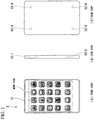
- Fig. 1 shows the exterior appearance of a cellular phone 5 according to the first embodiment of the present invention.
- (A) is a front view of the cellular phone 5;
- (B) is a side view of the cellular phone 5; and
- (C) is a rear view of the cellular phone 5.
- a touch panel 51 used for accepting a user's operation is arranged on the front face of the cellular phone 5.
- the touch panel 51 is configured of a display device such as an LCD and an input device such as a touch pad so as to display predetermined images and accept touch operations with a user's fingers and hands.
- As the touch panel 51 for example, it is possible to use an electrostatic-capacity touch panel implementing multiple-touch detection ability.
- a plurality of menu icons pre-assigned to an initial screen of the cellular phone 5 is displayed on the touch panel 51.
- the cellular phone 5 is equipped with a plurality of sensors 52. Specifically, sensors 52-1 and 52-2 are arranged on the side face of the cellular phone 5, while sensors 52-3 to 52-6 are arranged on the rear face of the cellular phone 5. These sensors 52 are used to detect that a user is holding and touching the cellular phone 5 with fingers or hands, wherein each sensor 52 is turned on when touched but turned off when not touched.
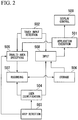
- Fig. 2 is a functional block diagram of the cellular phone 5 of the first embodiment.
- Fig. 1 does not include an illustration of a microcomputer (or a computer system) which is embedded inside the cellular phone 5.
- a computer system which reads and executes programs stored in computer-readable storage media, it is possible to implement an application execution part 501, a touch input detection part 502, a grip detection part 503, a user identification part 504, an invalid area specifying part 505, a storage unit 506, a recording part 507, an input part 508, and a display control part 509.
- computer-readable storage media denotes magnetic disks, magneto-optical disks, CD-ROM, DVD-ROM, and semiconductor memories.
- the application execution part 501 executes an application program stored in a storage medium of the cellular phone 5.
- the application program includes at least an invalid area setting application.
- the touch input detection part 502 determines whether or not a user touches the touch panel 51 so as to detect a touch area as an area of coordinates being touched by a user on the touch panel 51.
- the grip detection part 503 determines whether or not the cellular phone 5 is being held by user's fingers or a user's hand based on the ON/OFF information of the sensors 52.
- the user identification part 504 retrieves user identification information based on the ON/OFF information of the sensors 52.
- the invalid area specifying part 505 specifies an invalid area as a touch area detected by the touch input detection part 502 when the application execution part 501 executes the invalid area setting application.
- the storage unit 506 stores the user identification information retrieved by the user identification part 504 in connection with the invalid area specified by the invalid area specifying part 505.
- the recording part 507 records the user identification information retrieved by the user identification part 504 in connection with the invalid area which is specified by the invalid area specifying part 505.
- the input part 508 notifies the application execution part 501 of the touch area which is detected by the touch input detection part 502 but which is not encompassed by the invalid area stored in the storage unit 506.
- the display control part 509 accepts the screen information from the application execution part 501 so as to display the screen information on the touch panel 51.
- Fig. 3 is a flowchart showing the invalid area setting process of the cellular phone 5.
- the application execution part 501 executes the invalid area setting application when a user touches a menu icon, representing the invalid area setting application, displayed on the touch panel 51 with a finger.
- the application execution part 501 sends an instruction to display a message which requests a user to hold the cellular phone 5, e.g. "PLEASE HOLD WITH HAND", to the display control part 509.
- the display control part 509 displays a message received from the application execution part 501 on the touch panel 51 (step S1).
- Fig. 4 shows messages which are displayed on the touch panel 51 of the cellular phone 5 at an invalid area setting mode.
- the grip detection part 503 determines whether or not a user holds the cellular phone 5 with a finger or a hand (step S2). Specifically, a decision as to whether or not a user holds the cellular phone 5 depends on a decision as to whether or not any one of the sensors 52 is turned on.
- the grip detection part 503 determines that a user does not hold the cellular phone 5 (i.e. a decision result "NO" in step S2), the flow returns to step S2 so as to repeat step S2 until any one of the sensors 52 is turned on.
- the grip detection part 503 Upon detecting a user's grip of the cellular phone 5 (i.e. a decision result "YES" in step S2), the grip detection part 503 sends a grip detection signal to the user identification part 504 and the invalid area specifying part 505.
- the invalid area specifying part 505 retrieves the touch area on the touch panel 51 which is currently detected by the touch input detection part 502 (step S3), thus notifying the recording part 507 of the touch area as the invalid area.
- the user identification part 504 Upon detecting the grip detection signal from the grip detection part 503, the user identification part 504 obtains the user identification information as the ON/OFF information of each sensor 52 (step S4) so as to send the user identification information to the recording part 507.
- the recording part 507 determines whether or not the storage unit 506 stores the user identification information identical to or approximately equal to the user identification information identified by the user identification part 504 (step S5).
- the storage unit 506 stores the user identification information reflecting the ON/OFF information of the sensors 52. Therefore, the recording part 507 determines whether or not the storage unit 506 stores the user identification information matching with the ON/OFF information of each sensor 52.
- the recording part 507 determines that the user identification information, which reflects the ON/OFF information of the sensors 52 but in which the number of pieces of unmatched ON/OFF information is less than a threshold (e.g. one), is identical to or approximately equal to the user identification information identified by the user identification part 504.
- a threshold e.g. one
- the recording part 507 Upon determining that the storage unit 506 does not store the user identification information identical to or approximately equal to the user identification information identified by the user identification part 504 (i.e. a decision result "NO" in step S5), the recording part 507 stores the user identification information identified by the user identification part 504 in the storage part 506 in connection with the invalid area specified by the invalid area specifying part 505 (step S6).
- the recording part 507 Upon determining that the storage unit 506 stores the user identification information identical to or approximately equal to the user identification information specified by the user identification part 504 (i.e. a decision result "YES" in step S5), the recording part 507 rewrites the invalid area, which is stored in the storage unit 506 in connection with the user identification information, with the invalid area specified by the invalid area specifying part 505 (step S7).
- the application execution part 501 sends an instruction to display a message representing the end of the invalid area setting application, e.g. "REGISTRATION COMPLETED", on the touch panel 51 to the display control part 509. As shown in Fig. 4(B) , the display control part 509 displays a message received from the application execution part 501 on the touch panel 51. Thereafter, the application execution part 501 exits the invalid area setting application.
- a message representing the end of the invalid area setting application e.g. "REGISTRATION COMPLETED
- Fig. 5 is a flowchart showing the operation of the cellular phone 5 after the invalid area setting process.
- the touch input detection part 502 determines whether or not a user touches the touch panel 51 in an acceptable state to accept an operation of an application managed by the application execution part 501 (step S11). Upon determining that a user does not touch the touch panel 51 (i.e. a decision result "NO" in step S11), the flow returns to step S11 so as to repeat step S11 until the touch input detection part 502 detects a user's touch on the touch panel 51.
- the touch input detection part 502 Upon detecting a user's touch on the touch panel 51 (i.e. a decision result "YES” in step S11), the touch input detection part 502 sends the coordinates of the touch area on the touch panel 51 to the input part 508. Thereafter, the grip detection part 503 determines whether or not a user holds the cellular phone 5 (step S12). Upon determining a user's grip of the cellular phone 5 (i.e. a decision result "YES” in step S12), the user identification part 504 retrieves the user identification information as the ON/OFF information of each sensor 52 so as to send it to the input part 508 (step S13).
- the input part 508 determines whether or not the storage unit 506 stores the user identification information identical to or approximately equal to the user identification information identified by the user identification part 504 (step S14). Upon determining that the storage unit 506 stores the user identification information identical to or approximately equal to the user identification information identified by the user identification part 504 (i.e. a decision result "YES" in step S14), the input part 508 reads the invalid area, which is connected to the user identification information, from the storage part 506. Thereafter, the input part 508 determines whether or not the touch area detected by the touch input detection part 502 is encompassed by the invalid area read from the storage unit 506 (step S15).
- the input part 508 Upon determining that the touch area detected by the touch input detection part 502 is encompassed by the invalid area read from the storage unit 506 (i.e. a decision result "YES" in step S15), the input part 508 does not handle a user's input operation on the touch area, whereby the flow returns to step S11, and therefore the touch input detection part 502 determines again whether or not a user touches the touch panel 51.
- the grip detection part 503 determines that the cellular phone 5 is not held by a user (i.e. a decision result "NO” in step S12)
- the input part 508 determines that the storage unit 506 does not store the user identification information identical to or approximately equal to the user identification information identified by the user identification part 504 (i.e. a decision result "NO” in step S14)
- the input part 508 determines that the touch area detected by the touch input detection part 502 is not encompassed by the invalid area read from the storage unit 506 (i.e. a decision result "NO” in step S15)
- the input part 508 notifies the application execution part 501 of the touch area detected by the touch input detection part 502 (step S16).
- the cellular phone 5 of the first embodiment does not regard a user's finger touching the pre-recorded invalid area as an input operation. That is, it is possible to prevent an error operation (i.e. an input operation mistake) due to an event in which a user holding the cellular phone 5 with a hand inadvertently touches the touch panel 51 regardless of the amount of time a user touches the touch panel 51.
- an error operation i.e. an input operation mistake
- the first embodiment is designed to store the invalid area for each user in the storage unit 506 in connection with the user identification information. Since the cellular phone 5 is registered with the invalid area suited to the holding method for each user in advance, the input part 508 is able to determine whether an input operation is valid or invalid based on the invalid area for each user.
- the first embodiment employs the user identification information as the ON/OFF information of the sensors 52; but this is not a restriction. For example, it is possible to employ the user identification information as a user ID. However, it is possible to improve usability in the first embodiment employing the user identification information as the ON/OFF information of the sensors 52 because the cellular phone 5 is able to automatically retrieve the user identification information without needing an input process of a user ID.
- the second embodiment adapted to the cellular phone 5 differs from the first embodiment in that it implements a function of automatically aligning display areas of menu icons outside the invalid area and a function of displaying menu icons with reduced sizes.
- Fig. 6 is a functional block diagram of the cellular phone 5 according to the second embodiment of the present invention.
- the cellular phone 5 of the second embodiment includes an inscribed quadrilateral calculation part 510, a ratio calculation part 511, and a reduction part 512 in addition to the constituent elements 501 to 509 of the first embodiment shown in Fig. 1 .
- the inscribed quadrilateral calculation part 510 presumes a quadrilateral having the same aspect ratio as the touch panel 51, which is inscribed in the display area unmatched with the invalid area, so as to calculate the coordinates and the size of the quadrilateral.
- the ratio calculation part 511 calculates the ratio of the size of the quadrilateral, calculated by the inscribed quadrilateral calculation part 510, to the size of the touch panel 51.
- the reduction part 512 retrieves an image displayed on the touch panel 51 from the application execution part 501 so as to reduce the image with the ratio calculated by the ratio calculation part 511.
- the second embodiment executes the same invalid area setting process as the first embodiment; hence, detailed descriptions thereof will be omitted here.
- the second embodiment illustrates the operation of the cellular phone 5 after the invalid area setting process.
- Fig. 7 is a flowchart showing the operation of the cellular phone 5 of the second embodiment after the invalid area setting process.
- the grip detection part 503 determines whether or not the cellular phone 5 is being held by a user (step S21).
- the user identification part 504 retrieves the user identification information as the ON/OFF information of the sensors 52 so as to send it to the inscribed quadrilateral calculation part 510 (step S22).
- the inscribed quadrilateral calculation part 510 determines whether or not the storage unit 506 stores the user identification information identical to or approximately equal to the user identification information identified by the user identification part 504 (step S23). Upon determining that the storage unit 506 stores the user identification information identical to or approximately equal to the user identification information identified by the user identification part 504 (i.e. a decision result "YES" in step S23), the inscribed quadrilateral calculation part 510 reads the invalid area related to the user identification information from the storage unit 506.
- the inscribed quadrilateral calculation part 510 produces a quadrilateral having the same aspect ratio as the touch panel 51, which is inscribed to the display area precluding the invalid area on the touch panel 51 (step S24).
- the inscribed quadrilateral calculation part 510 calculates the size and the coordinates (e.g. coordinates at an upper-left corner) of the inscribed quadrilateral (step S25).
- the ratio calculation part 11 calculates the ratio of the inscribed quadrilateral to the display area on the touch panel 51 (step S26).
- the reduction part 512 retrieves an image displayed on the touch panel 51 from the application execution part 501 so as to reduce the image with the ratio calculated by the ratio calculation part 511 (step S27).
- the display control part 509 retrieves the image reduced by the reduction part 512 so as to display the reduced image inside the inscribed quadrilateral based on the coordinates calculated by the inscribed quadrilateral calculation part 510 (step S28).
- Fig. 8 shows the states of the cellular phone 5 used to display images (i.e. menu icons) which are being reduced in sizes on the touch panel 51.
- Fig. 8(A) shows an inscribed quadrilateral which is created in the center area, precluding invalid areas, interposed between the left and right sides on the touch panel 51.
- Fig. 8(B) shows an inscribed quadrilateral which is reduced with a reduction ratio N% and which is moved towards the lower-left corner on the touch panel 51.
- Fig. 8(C) shows reduced images displayed inside the inscribed quadrilateral shown in Fig. 8(B).
- Fig. 8(D) shows reduced images displayed inside the quadrilateral shown in Fig. 8(A) .
- the ratio calculation part 511 does not need to calculate a reduction ratio for images, wherein the reduction part 512 retrieves images from the application execution part 501 so as to directly send them to the display control part 509 (step S29).
- the cellular phone 5 of the second embodiment is able to reduce and display the display areas of images not overlapped with the invalid areas on the touch panel 51.
- a microcomputer (or a computer system) embedded in the cellular phone 5 reads a program from a computer-readable storage medium so as to execute the foregoing processes.
- This program can be drafted in the form combined with a main program pre-installed in a computer system, e.g. a differential file (or a differential program).
- this program can be downloaded to a computer system via a communication line, and therefore the computer system may execute the program.
- the present invention is able to automatically display images, which are hidden with user's fingers or a user's hand in a touch-panel cellular phone, at a desired position on a touch panel with a desired reduction ratio, and related to the technology which guarantees a display device to display images while freely changing their positions and sizes based on the detection results of sensors; hence, the present invention is not necessarily limited to handheld information terminals but applicable to any electronic devices equipped with displays and sensors.
Landscapes
- Engineering & Computer Science (AREA)
- Theoretical Computer Science (AREA)
- General Engineering & Computer Science (AREA)
- Human Computer Interaction (AREA)
- General Physics & Mathematics (AREA)
- Physics & Mathematics (AREA)
- Computer Hardware Design (AREA)
- Signal Processing (AREA)
- Computer Networks & Wireless Communication (AREA)
- Environmental & Geological Engineering (AREA)
- User Interface Of Digital Computer (AREA)
- Telephone Function (AREA)
- Position Input By Displaying (AREA)
Claims (9)
- Téléphone cellulaire qui détecte une position de toucher d'un utilisateur de façon à modifier une image affichée sur un écran tactile (51), caractérisé par :une partie de spécification de zone invalide (505) qui spécifie une zone invalide n'acceptant pas une opération d'entrée d'un utilisateur sur l'écran tactile ;une partie d'entrée (508) qui détecte une zone de toucher d'un utilisateur sur l'écran tactile et qui exécute une fonction préattribuée à la zone de toucher non englobée par la zone invalide,une partie de détection de préhension (503) qui détecte la présence ou l'absence d'une préhension d'un utilisateur, dans lequel la partie d'entrée (508) détermine si la zone de toucher d'un utilisateur est englobée ou non par la zone invalide sur l'écran tactile (51) lorsque la partie de détection de préhension (503) détecte la préhension d'un utilisateur,une partie d'identification d'utilisateur (504) qui identifie un utilisateur ayant la préhension d'un utilisateur détectée par la partie de détection de préhension, etune partie d'enregistrement (507) qui stocke les informations d'identification d'utilisateur en lien avec la zone invalide, qui est spécifiée par la partie de spécification de zone invalide (505), dans une unité de stockage (506),dans lequel la partie d'entrée (508) lit la zone invalide, liée aux informations d'identification d'utilisateur, depuis l'unité de stockage (506) de façon à déterminer si la zone de contact d'un utilisateur est englobée ou non par la zone invalide.
- Téléphone cellulaire selon la revendication 1, dans lequel la partie de détection de préhension (503) utilise une pluralité de capteurs (52) pour détecter la préhension d'un utilisateur, et dans lequel les informations d'identification d'utilisateur générées par la partie d'identification d'utilisateur (504) sont constituées d'une combinaison de résultats de détection fournis en sortie par la pluralité de capteurs (52).
- Téléphone cellulaire selon la revendication 1 ou 2, comprenant en outre une partie de calcul de quadrilatère inscrit (510) qui suppose un quadrilatère ayant un même rapport de côté que l'écran tactile, qui est inscrit dans la zone d'affichage de l'écran tactile à l'exclusion de la zone invalide, de façon à calculer une taille et des coordonnées du quadrilatère,
une partie de calcul de rapport (511) qui calcule un rapport entre le quadrilatère, calculé par la partie de calcul de quadrilatère inscrit, et une taille de l'écran tactile, une partie de réduction (512) qui réduit une image affichée sur l'écran tactile avec le rapport calculé par la partie de calcul de rapport, et
une partie de commande d'affichage (509) qui affiche l'image réduite par la partie de réduction à l'intérieur du quadrilatère inscrit sur l'écran tactile. - Téléphone cellulaire selon la revendication 3, dans lequel la partie de commande d'affichage (509) affiche l'image réduite par la partie de réduction à l'intérieur du quadrilatère inscrit sur l'écran tactile à une position facile à voir du champ de vision d'un utilisateur lorsqu'une partie de l'image est dissimulée par les doigts d'un utilisateur ou une main d'un utilisateur tenant le téléphone cellulaire.
- Téléphone cellulaire selon la revendication 4, dans lequel l'image réduite par la partie de réduction (512) est une pluralité d'icônes de menu.
- Procédé d'opération d'entrée adapté à un téléphone cellulaire qui détecte une position de toucher d'un utilisateur de façon à modifier une image affichée sur un écran tactile, caractérisé par :(a) la spécification d'une zone invalide n'acceptant pas une opération d'entrée d'un utilisateur sur l'écran tactile ;(b) la détection d'une zone de toucher d'un utilisateur sur l'écran tactile ; et(c) l'exécution d'une fonction préattribuée à la zone de toucher non englobée par la zone invalide,(d) la détection de la présence ou de l'absence d'une préhension d'un utilisateur,(e) le fait de déterminer si la zone de toucher d'un utilisateur est englobée ou non par la zone invalide sur l'écran tactile lorsque la préhension d'un utilisateur est détectée,(f) l'identification d'un utilisateur lorsque la préhension d'un utilisateur a été détectée,(g) le stockage des informations d'identification d'utilisateur en lien avec la zone invalide, qui est spécifiée à l'étape (a), et(h) la lecture de la zone invalide, liée aux informations d'identification d'utilisateur, stockées à l'étape (g), de façon à déterminer si la zone de contact d'un utilisateur est englobée ou non par la zone invalide.
- Produit de programme d'ordinateur comprenant des instructions implémentables par ordinateur pour amener un ordinateur à exécuter le procédé d'opération d'entrée de la revendication 6.
- Système d'ordinateur intégré dans le téléphone cellulaire selon la revendication 1, lisant un programme selon la revendication 7 à partir du support de stockage lisible par ordinateur.
- Système d'ordinateur ayant le programme selon la revendication 7 téléchargé via une ligne de communication, ledit système d'ordinateur exécutant ledit programme.
Applications Claiming Priority (2)
| Application Number | Priority Date | Filing Date | Title |
|---|---|---|---|
| JP2011102784A JP5813991B2 (ja) | 2011-05-02 | 2011-05-02 | 携帯端末、入力制御方法及びプログラム |
| PCT/JP2012/061381 WO2012150697A1 (fr) | 2011-05-02 | 2012-04-27 | Terminal portable de type à écran tactile et procédé d'opération d'entrée |
Publications (3)
| Publication Number | Publication Date |
|---|---|
| EP2706441A1 EP2706441A1 (fr) | 2014-03-12 |
| EP2706441A4 EP2706441A4 (fr) | 2014-09-24 |
| EP2706441B1 true EP2706441B1 (fr) | 2018-05-23 |
Family
ID=47107883
Family Applications (1)
| Application Number | Title | Priority Date | Filing Date |
|---|---|---|---|
| EP12779973.2A Active EP2706441B1 (fr) | 2011-05-02 | 2012-04-27 | Terminal portable de type à écran tactile et procédé d'opération d'entrée |
Country Status (4)
| Country | Link |
|---|---|
| US (9) | US9277045B2 (fr) |
| EP (1) | EP2706441B1 (fr) |
| JP (1) | JP5813991B2 (fr) |
| WO (1) | WO2012150697A1 (fr) |
Families Citing this family (24)
| Publication number | Priority date | Publication date | Assignee | Title |
|---|---|---|---|---|
| JP5813991B2 (ja) | 2011-05-02 | 2015-11-17 | 埼玉日本電気株式会社 | 携帯端末、入力制御方法及びプログラム |
| JP2014102557A (ja) * | 2012-11-16 | 2014-06-05 | Sharp Corp | 携帯端末 |
| KR20140138224A (ko) | 2013-01-06 | 2014-12-03 | 인텔 코오퍼레이션 | 터치 데이터의 분산된 전처리와 디스플레이 영역 제어를 위한 방법, 장치, 및 시스템 |
| GB2525780B (en) * | 2013-01-31 | 2020-07-29 | Hewlett Packard Development Co | Touch screen with unintended input prevention |
| JPWO2014129286A1 (ja) * | 2013-02-19 | 2017-02-02 | 日本電気株式会社 | 情報処理端末、画面制御方法、及び画面制御プログラム |
| JP5542224B1 (ja) | 2013-03-06 | 2014-07-09 | パナソニック株式会社 | 電子機器および座標検出方法 |
| JP6135203B2 (ja) * | 2013-03-11 | 2017-05-31 | 株式会社リコー | 表示システムとその制御方法及び表示装置と画面制御サーバ並びにプログラム |
| WO2014155696A1 (fr) * | 2013-03-29 | 2014-10-02 | 株式会社 東芝 | Appareil électronique, procédé de commande et programme |
| JP6230247B2 (ja) * | 2013-03-29 | 2017-11-15 | シャープ株式会社 | 情報入力装置およびプログラム |
| USD759008S1 (en) | 2013-04-18 | 2016-06-14 | Apple Inc. | Electronic device |
| KR102148809B1 (ko) * | 2013-04-22 | 2020-08-27 | 삼성전자주식회사 | 단축 아이콘 윈도우 표시 장치, 방법 및 컴퓨터 판독 가능한 기록 매체 |
| KR102153006B1 (ko) * | 2013-05-27 | 2020-09-07 | 삼성전자주식회사 | 입력 처리 방법 및 그 전자 장치 |
| JP5986957B2 (ja) | 2013-05-28 | 2016-09-06 | 京セラ株式会社 | 携帯端末、無効領域設定プログラムおよび無効領域設定方法 |
| US9785278B2 (en) * | 2013-08-22 | 2017-10-10 | Sharp Kabushiki Kaisha | Display device and touch-operation processing method |
| JP2015099526A (ja) * | 2013-11-20 | 2015-05-28 | 富士通株式会社 | 情報処理装置および情報処理プログラム |
| TWI696103B (zh) | 2013-11-29 | 2020-06-11 | 日商半導體能源研究所股份有限公司 | 資料處理裝置及資料處理裝置的驅動方法 |
| JP6289931B2 (ja) * | 2014-02-19 | 2018-03-07 | シャープ株式会社 | 持ち手判定機能付き携帯端末 |
| CN105608090A (zh) * | 2014-11-20 | 2016-05-25 | 华为技术有限公司 | 呈现联系人信息、确定联系人信息的方法和相关设备 |
| JP6319238B2 (ja) * | 2015-09-08 | 2018-05-09 | 日本電気株式会社 | 携帯端末、無効領域特定方法及びプログラム |
| KR102659062B1 (ko) * | 2016-11-29 | 2024-04-19 | 삼성전자주식회사 | 그립 센서의 감지 신호에 기초하여 ui를 표시하는 전자 장치 |
| US20190026120A1 (en) * | 2017-07-21 | 2019-01-24 | International Business Machines Corporation | Customizing mobile device operation based on touch points |
| WO2019143335A1 (fr) * | 2018-01-18 | 2019-07-25 | Hewlett-Packard Development Company, L.P. | Dispositifs à écran tactile pour transmission d'entrée de manière sélective |
| CN111309179A (zh) * | 2020-02-10 | 2020-06-19 | 北京小米移动软件有限公司 | 触控屏控制方法及装置、终端及存储介质 |
| KR102713491B1 (ko) * | 2023-08-29 | 2024-10-07 | 쿠팡 주식회사 | 서비스를 제공하는 전자 장치의 동작 방법 및 이를 지원하는 전자 장치 |
Family Cites Families (66)
| Publication number | Priority date | Publication date | Assignee | Title |
|---|---|---|---|---|
| CA1098342A (fr) | 1977-12-27 | 1981-03-31 | Min H. Tsai | Traduction non-disponible |
| JPH06214718A (ja) | 1993-01-14 | 1994-08-05 | Hitachi Ltd | 情報処理装置 |
| JPH08307954A (ja) * | 1995-05-12 | 1996-11-22 | Sony Corp | 座標入力装置および方法、並びに情報処理装置 |
| US7800592B2 (en) * | 2005-03-04 | 2010-09-21 | Apple Inc. | Hand held electronic device with multiple touch sensing devices |
| JP2000039964A (ja) | 1998-07-22 | 2000-02-08 | Sharp Corp | 手書き入力装置 |
| JP2000039984A (ja) | 1998-07-24 | 2000-02-08 | Hitachi Ltd | 情報端末装置 |
| US6469695B1 (en) * | 1999-01-28 | 2002-10-22 | Ncr Corporation | Method and apparatus for touch screen touch ahead capability |
| JP5449819B2 (ja) | 1999-08-20 | 2014-03-19 | シャープ株式会社 | 窒化物半導体厚膜基板 |
| JP3949912B2 (ja) * | 2000-08-08 | 2007-07-25 | 株式会社エヌ・ティ・ティ・ドコモ | 携帯型電子機器、電子機器、振動発生器、振動による報知方法および報知制御方法 |
| JP2003308130A (ja) | 2002-04-15 | 2003-10-31 | Matsushita Electric Ind Co Ltd | 情報装置 |
| EP1443437A1 (fr) * | 2002-12-18 | 2004-08-04 | Alcatel | Procédé, dispositif de telephonie mobile, station de base et logiciel pour guider un utilisateur pendant l'appel de services |
| JP2005234993A (ja) * | 2004-02-20 | 2005-09-02 | Toshiba Corp | 画像表示装置、及び画像表示方法 |
| JP2005276120A (ja) | 2004-03-26 | 2005-10-06 | Fujitsu Component Ltd | タッチパネル入力装置及びその入力制御システム |
| JP2006039686A (ja) | 2004-07-22 | 2006-02-09 | Pioneer Electronic Corp | タッチパネル装置、タッチ領域検出方法およびタッチ領域検出プログラム |
| KR100608576B1 (ko) | 2004-11-19 | 2006-08-03 | 삼성전자주식회사 | 휴대 단말기 제어 장치 및 방법 |
| US7847789B2 (en) * | 2004-11-23 | 2010-12-07 | Microsoft Corporation | Reducing accidental touch-sensitive device activation |
| JP4510713B2 (ja) * | 2005-07-21 | 2010-07-28 | 富士フイルム株式会社 | デジタルカメラ |
| US8018440B2 (en) * | 2005-12-30 | 2011-09-13 | Microsoft Corporation | Unintentional touch rejection |
| JP4747874B2 (ja) | 2006-02-14 | 2011-08-17 | パナソニック電工株式会社 | リモコン装置及び遠隔制御システム |
| JP2009158989A (ja) | 2006-04-06 | 2009-07-16 | Nikon Corp | カメラ |
| US7811952B2 (en) * | 2006-04-20 | 2010-10-12 | Southern Mills, Inc. | Ultraviolet-resistant fabrics and methods for making them |
| KR100843077B1 (ko) * | 2006-09-28 | 2008-07-02 | 삼성전자주식회사 | 터치스크린 상에서 가변적인 크기로 그룹화된 정보를디스플레이하는 장치 및 방법 |
| US8130203B2 (en) * | 2007-01-03 | 2012-03-06 | Apple Inc. | Multi-touch input discrimination |
| JP2008243128A (ja) * | 2007-03-29 | 2008-10-09 | Sanyo Electric Co Ltd | タッチパネル装置 |
| JP2009080683A (ja) * | 2007-09-26 | 2009-04-16 | Pioneer Electronic Corp | タッチパネル型表示装置、その制御方法、プログラム及び記憶媒体 |
| EP2206332B1 (fr) * | 2007-10-18 | 2017-12-06 | Telecom Italia S.p.A. | Procédé et système d'affichage d'informations relatives à l'utilisateur sur des combinés d'utilisateurs |
| US20090174679A1 (en) * | 2008-01-04 | 2009-07-09 | Wayne Carl Westerman | Selective Rejection of Touch Contacts in an Edge Region of a Touch Surface |
| WO2009147870A1 (fr) * | 2008-06-03 | 2009-12-10 | シャープ株式会社 | Dispositif de détection d'entrée, procédé de détection d'entrée, programme et support de stockage |
| JP5243115B2 (ja) * | 2008-06-27 | 2013-07-24 | 京セラ株式会社 | 携帯端末および携帯端末制御プログラム |
| JP4672756B2 (ja) | 2008-06-30 | 2011-04-20 | 株式会社東芝 | 電子機器 |
| JP5332392B2 (ja) * | 2008-08-12 | 2013-11-06 | ソニー株式会社 | 撮像装置 |
| JP2010066918A (ja) | 2008-09-09 | 2010-03-25 | Nec Personal Products Co Ltd | 情報処理装置および表示制御方法 |
| EP3654141A1 (fr) | 2008-10-06 | 2020-05-20 | Samsung Electronics Co., Ltd. | Procédé et appareil pour afficher une interface graphique utilisateur en fonction d'un motif de contact de l'utilisateur |
| WO2010047048A1 (fr) * | 2008-10-20 | 2010-04-29 | 三菱電機株式会社 | Dispositif à écran tactile |
| US20100153227A1 (en) * | 2008-12-12 | 2010-06-17 | Microsoft Corporation | Mobile phone billing for content payment |
| JP2010154090A (ja) | 2008-12-24 | 2010-07-08 | Toshiba Corp | 携帯端末 |
| KR101572071B1 (ko) * | 2009-01-06 | 2015-11-26 | 삼성전자주식회사 | 휴대단말 표시부의 온/오프 제어 방법 및 장치 |
| JP2010165174A (ja) | 2009-01-15 | 2010-07-29 | Fujifilm Corp | 表示装置 |
| JP2010213169A (ja) | 2009-03-12 | 2010-09-24 | Fujifilm Corp | 表示装置、表示処理方法及び撮像装置 |
| WO2010110550A1 (fr) * | 2009-03-23 | 2010-09-30 | Core Logic Inc. | Appareil et procédé de réalisation de clavier virtuel |
| WO2010147611A1 (fr) * | 2009-06-16 | 2010-12-23 | Intel Corporation | Clavier virtuel adaptatif pour dispositif portatif |
| JP2011008111A (ja) * | 2009-06-26 | 2011-01-13 | Canon Inc | 表示装置及びその制御方法 |
| WO2011003171A1 (fr) * | 2009-07-08 | 2011-01-13 | Smart Technologies Ulc | Manipulation d'objet graphique tridimensionnel sur un écran tactile multipoint |
| JP5669169B2 (ja) * | 2009-07-28 | 2015-02-12 | Necカシオモバイルコミュニケーションズ株式会社 | 端末装置及びプログラム |
| JP5451233B2 (ja) | 2009-07-30 | 2014-03-26 | Necカシオモバイルコミュニケーションズ株式会社 | 携帯端末装置及びプログラム |
| JP5127792B2 (ja) | 2009-08-18 | 2013-01-23 | キヤノン株式会社 | 情報処理装置、その制御方法、プログラム及び記録媒体 |
| CN102640094A (zh) * | 2009-11-25 | 2012-08-15 | 日本电气株式会社 | 便携信息终端、输入控制方法和程序 |
| US20120299856A1 (en) * | 2010-02-19 | 2012-11-29 | Nec Corporation | Mobile terminal and control method thereof |
| JP5370259B2 (ja) * | 2010-05-07 | 2013-12-18 | 富士通モバイルコミュニケーションズ株式会社 | 携帯型電子機器 |
| JP5133372B2 (ja) * | 2010-06-28 | 2013-01-30 | レノボ・シンガポール・プライベート・リミテッド | 情報入力装置、その入力無効化方法、およびコンピュータが実行可能なプログラム |
| US20120036468A1 (en) * | 2010-08-03 | 2012-02-09 | Nokia Corporation | User input remapping |
| US20120047454A1 (en) * | 2010-08-18 | 2012-02-23 | Erik Anthony Harte | Dynamic Soft Input |
| US9244545B2 (en) * | 2010-12-17 | 2016-01-26 | Microsoft Technology Licensing, Llc | Touch and stylus discrimination and rejection for contact sensitive computing devices |
| JP5661547B2 (ja) * | 2011-04-26 | 2015-01-28 | 京セラ株式会社 | 携帯端末装置およびプログラム |
| JP5813991B2 (ja) | 2011-05-02 | 2015-11-17 | 埼玉日本電気株式会社 | 携帯端末、入力制御方法及びプログラム |
| US20120311476A1 (en) * | 2011-06-02 | 2012-12-06 | Alan Stirling Campbell | System and method for providing an adaptive touch screen keyboard |
| CN102833700A (zh) * | 2011-06-14 | 2012-12-19 | 中兴通讯股份有限公司 | 一种计算终端话费的方法及系统 |
| JP5957834B2 (ja) * | 2011-09-26 | 2016-07-27 | 日本電気株式会社 | 携帯情報端末、タッチ操作制御方法、及びプログラム |
| KR20130102298A (ko) * | 2012-03-07 | 2013-09-17 | 주식회사 팬택 | 휴대용 단말기 및 휴대용 단말기의 디스플레이 제어 방법 |
| CN102830844A (zh) * | 2012-08-17 | 2012-12-19 | 北京小米科技有限责任公司 | 一种触摸屏防误操作方法、触摸屏及移动终端 |
| EP2770421A3 (fr) * | 2013-02-22 | 2017-11-08 | Samsung Electronics Co., Ltd. | Dispositif électronique ayant une interface utilisateur tactile et procédé de fonctionnement associé |
| JP5542224B1 (ja) * | 2013-03-06 | 2014-07-09 | パナソニック株式会社 | 電子機器および座標検出方法 |
| US9535603B2 (en) * | 2013-03-14 | 2017-01-03 | Carl F. Andersen | Columnar fitted virtual keyboard |
| JP2014211865A (ja) * | 2013-04-01 | 2014-11-13 | キヤノン株式会社 | 両面タッチスクリーンを搭載した携帯端末及びその制御方法、並びに記憶媒体 |
| JP7294586B2 (ja) | 2018-06-12 | 2023-06-20 | 日本化薬株式会社 | 重合性組成物及びその硬化物 |
| WO2023187611A1 (fr) * | 2022-03-28 | 2023-10-05 | Promethean Limited | Systèmes de modification d'interface utilisateur et procédés associés |
-
2011
- 2011-05-02 JP JP2011102784A patent/JP5813991B2/ja active Active
-
2012
- 2012-04-27 WO PCT/JP2012/061381 patent/WO2012150697A1/fr not_active Ceased
- 2012-04-27 US US14/114,129 patent/US9277045B2/en active Active
- 2012-04-27 EP EP12779973.2A patent/EP2706441B1/fr active Active
-
2016
- 2016-01-21 US US15/002,467 patent/US9843664B2/en active Active
-
2017
- 2017-11-21 US US15/819,026 patent/US10135967B2/en active Active
-
2018
- 2018-10-17 US US16/162,870 patent/US10447845B2/en active Active
-
2019
- 2019-09-03 US US16/559,124 patent/US10609209B2/en active Active
-
2020
- 2020-02-13 US US16/789,543 patent/US11070662B2/en active Active
-
2021
- 2021-06-22 US US17/354,840 patent/US11644969B2/en active Active
-
2023
- 2023-03-30 US US18/128,654 patent/US12008231B2/en active Active
-
2024
- 2024-04-23 US US18/643,072 patent/US20240281135A1/en active Pending
Non-Patent Citations (1)
| Title |
|---|
| None * |
Also Published As
| Publication number | Publication date |
|---|---|
| US9277045B2 (en) | 2016-03-01 |
| US20180097929A1 (en) | 2018-04-05 |
| US11070662B2 (en) | 2021-07-20 |
| US20210320996A1 (en) | 2021-10-14 |
| EP2706441A1 (fr) | 2014-03-12 |
| EP2706441A4 (fr) | 2014-09-24 |
| US20190052749A1 (en) | 2019-02-14 |
| US11644969B2 (en) | 2023-05-09 |
| US20200186640A1 (en) | 2020-06-11 |
| US20240281135A1 (en) | 2024-08-22 |
| US20190394326A1 (en) | 2019-12-26 |
| US20160134745A1 (en) | 2016-05-12 |
| JP5813991B2 (ja) | 2015-11-17 |
| US10609209B2 (en) | 2020-03-31 |
| US12008231B2 (en) | 2024-06-11 |
| US20230297226A1 (en) | 2023-09-21 |
| US20140051482A1 (en) | 2014-02-20 |
| US10135967B2 (en) | 2018-11-20 |
| US10447845B2 (en) | 2019-10-15 |
| JP2012234386A (ja) | 2012-11-29 |
| US9843664B2 (en) | 2017-12-12 |
| WO2012150697A1 (fr) | 2012-11-08 |
Similar Documents
| Publication | Publication Date | Title |
|---|---|---|
| US12008231B2 (en) | Invalid area specifying method for touch panel of mobile terminal | |
| JP5922480B2 (ja) | 表示機能を備える携帯機器、プログラムおよび表示機能を備える携帯機器の制御方法 | |
| JP5121963B2 (ja) | 電子機器及び制御方法 | |
| JP5105127B2 (ja) | 携帯端末、そのキー操作制御方法およびプログラム | |
| JP5611763B2 (ja) | 携帯端末装置及び処理方法 | |
| CN105103110B (zh) | 信息终端、显示控制方法和程序 | |
| JP6483452B2 (ja) | 電子機器、制御方法、及び制御プログラム | |
| CN103164156A (zh) | 便携式终端的触摸输入方法和设备 | |
| KR20140100791A (ko) | 사용자 단말 및 이의 인터페이싱 방법 | |
| US20170075453A1 (en) | Terminal and terminal control method | |
| JP2014102557A (ja) | 携帯端末 | |
| JP5769234B2 (ja) | 表示装置、表示方法およびプログラム | |
| JP6367720B2 (ja) | 情報処理装置およびプログラム | |
| JP6319238B2 (ja) | 携帯端末、無効領域特定方法及びプログラム | |
| JP2013080273A (ja) | 表示入力装置及び表示方法 | |
| JP6249071B2 (ja) | 携帯端末、無効領域特定方法及びプログラム | |
| JP2018142339A (ja) | 携帯端末、無効領域特定方法及びプログラム | |
| JP6114886B2 (ja) | 情報処理装置、情報処理装置の制御方法および制御プログラム | |
| JP2020047297A (ja) | 携帯端末、無効領域特定方法及びプログラム |
Legal Events
| Date | Code | Title | Description |
|---|---|---|---|
| PUAI | Public reference made under article 153(3) epc to a published international application that has entered the european phase |
Free format text: ORIGINAL CODE: 0009012 |
|
| 17P | Request for examination filed |
Effective date: 20131120 |
|
| AK | Designated contracting states |
Kind code of ref document: A1 Designated state(s): AL AT BE BG CH CY CZ DE DK EE ES FI FR GB GR HR HU IE IS IT LI LT LU LV MC MK MT NL NO PL PT RO RS SE SI SK SM TR |
|
| DAX | Request for extension of the european patent (deleted) | ||
| A4 | Supplementary search report drawn up and despatched |
Effective date: 20140827 |
|
| RIC1 | Information provided on ipc code assigned before grant |
Ipc: G06F 1/16 20060101ALN20140821BHEP Ipc: G06F 3/0488 20130101AFI20140821BHEP |
|
| RAP1 | Party data changed (applicant data changed or rights of an application transferred) |
Owner name: NEC CORPORATION |
|
| REG | Reference to a national code |
Ref country code: DE Ref legal event code: R079 Ref document number: 602012046652 Country of ref document: DE Free format text: PREVIOUS MAIN CLASS: G06F0003041000 Ipc: G06F0003048800 |
|
| RIC1 | Information provided on ipc code assigned before grant |
Ipc: G06F 3/0487 20130101ALI20170824BHEP Ipc: G06F 3/0488 20130101AFI20170824BHEP Ipc: H04M 1/725 20060101ALI20170824BHEP |
|
| GRAP | Despatch of communication of intention to grant a patent |
Free format text: ORIGINAL CODE: EPIDOSNIGR1 |
|
| STAA | Information on the status of an ep patent application or granted ep patent |
Free format text: STATUS: GRANT OF PATENT IS INTENDED |
|
| INTG | Intention to grant announced |
Effective date: 20171013 |
|
| GRAS | Grant fee paid |
Free format text: ORIGINAL CODE: EPIDOSNIGR3 |
|
| GRAJ | Information related to disapproval of communication of intention to grant by the applicant or resumption of examination proceedings by the epo deleted |
Free format text: ORIGINAL CODE: EPIDOSDIGR1 |
|
| GRAL | Information related to payment of fee for publishing/printing deleted |
Free format text: ORIGINAL CODE: EPIDOSDIGR3 |
|
| STAA | Information on the status of an ep patent application or granted ep patent |
Free format text: STATUS: REQUEST FOR EXAMINATION WAS MADE |
|
| INTC | Intention to grant announced (deleted) | ||
| GRAR | Information related to intention to grant a patent recorded |
Free format text: ORIGINAL CODE: EPIDOSNIGR71 |
|
| STAA | Information on the status of an ep patent application or granted ep patent |
Free format text: STATUS: GRANT OF PATENT IS INTENDED |
|
| GRAA | (expected) grant |
Free format text: ORIGINAL CODE: 0009210 |
|
| STAA | Information on the status of an ep patent application or granted ep patent |
Free format text: STATUS: THE PATENT HAS BEEN GRANTED |
|
| INTG | Intention to grant announced |
Effective date: 20180403 |
|
| AK | Designated contracting states |
Kind code of ref document: B1 Designated state(s): AL AT BE BG CH CY CZ DE DK EE ES FI FR GB GR HR HU IE IS IT LI LT LU LV MC MK MT NL NO PL PT RO RS SE SI SK SM TR |
|
| REG | Reference to a national code |
Ref country code: GB Ref legal event code: FG4D |
|
| REG | Reference to a national code |
Ref country code: CH Ref legal event code: EP |
|
| REG | Reference to a national code |
Ref country code: IE Ref legal event code: FG4D |
|
| REG | Reference to a national code |
Ref country code: AT Ref legal event code: REF Ref document number: 1002030 Country of ref document: AT Kind code of ref document: T Effective date: 20180615 |
|
| REG | Reference to a national code |
Ref country code: DE Ref legal event code: R096 Ref document number: 602012046652 Country of ref document: DE |
|
| REG | Reference to a national code |
Ref country code: NL Ref legal event code: MP Effective date: 20180523 |
|
| REG | Reference to a national code |
Ref country code: LT Ref legal event code: MG4D |
|
| PG25 | Lapsed in a contracting state [announced via postgrant information from national office to epo] |
Ref country code: LT Free format text: LAPSE BECAUSE OF FAILURE TO SUBMIT A TRANSLATION OF THE DESCRIPTION OR TO PAY THE FEE WITHIN THE PRESCRIBED TIME-LIMIT Effective date: 20180523 Ref country code: NO Free format text: LAPSE BECAUSE OF FAILURE TO SUBMIT A TRANSLATION OF THE DESCRIPTION OR TO PAY THE FEE WITHIN THE PRESCRIBED TIME-LIMIT Effective date: 20180823 Ref country code: SE Free format text: LAPSE BECAUSE OF FAILURE TO SUBMIT A TRANSLATION OF THE DESCRIPTION OR TO PAY THE FEE WITHIN THE PRESCRIBED TIME-LIMIT Effective date: 20180523 Ref country code: ES Free format text: LAPSE BECAUSE OF FAILURE TO SUBMIT A TRANSLATION OF THE DESCRIPTION OR TO PAY THE FEE WITHIN THE PRESCRIBED TIME-LIMIT Effective date: 20180523 Ref country code: BG Free format text: LAPSE BECAUSE OF FAILURE TO SUBMIT A TRANSLATION OF THE DESCRIPTION OR TO PAY THE FEE WITHIN THE PRESCRIBED TIME-LIMIT Effective date: 20180823 Ref country code: FI Free format text: LAPSE BECAUSE OF FAILURE TO SUBMIT A TRANSLATION OF THE DESCRIPTION OR TO PAY THE FEE WITHIN THE PRESCRIBED TIME-LIMIT Effective date: 20180523 |
|
| PG25 | Lapsed in a contracting state [announced via postgrant information from national office to epo] |
Ref country code: RS Free format text: LAPSE BECAUSE OF FAILURE TO SUBMIT A TRANSLATION OF THE DESCRIPTION OR TO PAY THE FEE WITHIN THE PRESCRIBED TIME-LIMIT Effective date: 20180523 Ref country code: NL Free format text: LAPSE BECAUSE OF FAILURE TO SUBMIT A TRANSLATION OF THE DESCRIPTION OR TO PAY THE FEE WITHIN THE PRESCRIBED TIME-LIMIT Effective date: 20180523 Ref country code: LV Free format text: LAPSE BECAUSE OF FAILURE TO SUBMIT A TRANSLATION OF THE DESCRIPTION OR TO PAY THE FEE WITHIN THE PRESCRIBED TIME-LIMIT Effective date: 20180523 Ref country code: HR Free format text: LAPSE BECAUSE OF FAILURE TO SUBMIT A TRANSLATION OF THE DESCRIPTION OR TO PAY THE FEE WITHIN THE PRESCRIBED TIME-LIMIT Effective date: 20180523 Ref country code: GR Free format text: LAPSE BECAUSE OF FAILURE TO SUBMIT A TRANSLATION OF THE DESCRIPTION OR TO PAY THE FEE WITHIN THE PRESCRIBED TIME-LIMIT Effective date: 20180824 |
|
| REG | Reference to a national code |
Ref country code: AT Ref legal event code: MK05 Ref document number: 1002030 Country of ref document: AT Kind code of ref document: T Effective date: 20180523 |
|
| PG25 | Lapsed in a contracting state [announced via postgrant information from national office to epo] |
Ref country code: DK Free format text: LAPSE BECAUSE OF FAILURE TO SUBMIT A TRANSLATION OF THE DESCRIPTION OR TO PAY THE FEE WITHIN THE PRESCRIBED TIME-LIMIT Effective date: 20180523 Ref country code: AT Free format text: LAPSE BECAUSE OF FAILURE TO SUBMIT A TRANSLATION OF THE DESCRIPTION OR TO PAY THE FEE WITHIN THE PRESCRIBED TIME-LIMIT Effective date: 20180523 Ref country code: EE Free format text: LAPSE BECAUSE OF FAILURE TO SUBMIT A TRANSLATION OF THE DESCRIPTION OR TO PAY THE FEE WITHIN THE PRESCRIBED TIME-LIMIT Effective date: 20180523 Ref country code: RO Free format text: LAPSE BECAUSE OF FAILURE TO SUBMIT A TRANSLATION OF THE DESCRIPTION OR TO PAY THE FEE WITHIN THE PRESCRIBED TIME-LIMIT Effective date: 20180523 Ref country code: SK Free format text: LAPSE BECAUSE OF FAILURE TO SUBMIT A TRANSLATION OF THE DESCRIPTION OR TO PAY THE FEE WITHIN THE PRESCRIBED TIME-LIMIT Effective date: 20180523 Ref country code: PL Free format text: LAPSE BECAUSE OF FAILURE TO SUBMIT A TRANSLATION OF THE DESCRIPTION OR TO PAY THE FEE WITHIN THE PRESCRIBED TIME-LIMIT Effective date: 20180523 Ref country code: CZ Free format text: LAPSE BECAUSE OF FAILURE TO SUBMIT A TRANSLATION OF THE DESCRIPTION OR TO PAY THE FEE WITHIN THE PRESCRIBED TIME-LIMIT Effective date: 20180523 |
|
| REG | Reference to a national code |
Ref country code: DE Ref legal event code: R097 Ref document number: 602012046652 Country of ref document: DE |
|
| PG25 | Lapsed in a contracting state [announced via postgrant information from national office to epo] |
Ref country code: IT Free format text: LAPSE BECAUSE OF FAILURE TO SUBMIT A TRANSLATION OF THE DESCRIPTION OR TO PAY THE FEE WITHIN THE PRESCRIBED TIME-LIMIT Effective date: 20180523 Ref country code: SM Free format text: LAPSE BECAUSE OF FAILURE TO SUBMIT A TRANSLATION OF THE DESCRIPTION OR TO PAY THE FEE WITHIN THE PRESCRIBED TIME-LIMIT Effective date: 20180523 |
|
| PLBE | No opposition filed within time limit |
Free format text: ORIGINAL CODE: 0009261 |
|
| STAA | Information on the status of an ep patent application or granted ep patent |
Free format text: STATUS: NO OPPOSITION FILED WITHIN TIME LIMIT |
|
| 26N | No opposition filed |
Effective date: 20190226 |
|
| PG25 | Lapsed in a contracting state [announced via postgrant information from national office to epo] |
Ref country code: SI Free format text: LAPSE BECAUSE OF FAILURE TO SUBMIT A TRANSLATION OF THE DESCRIPTION OR TO PAY THE FEE WITHIN THE PRESCRIBED TIME-LIMIT Effective date: 20180523 |
|
| PG25 | Lapsed in a contracting state [announced via postgrant information from national office to epo] |
Ref country code: AL Free format text: LAPSE BECAUSE OF FAILURE TO SUBMIT A TRANSLATION OF THE DESCRIPTION OR TO PAY THE FEE WITHIN THE PRESCRIBED TIME-LIMIT Effective date: 20180523 |
|
| REG | Reference to a national code |
Ref country code: CH Ref legal event code: PL |
|
| REG | Reference to a national code |
Ref country code: BE Ref legal event code: MM Effective date: 20190430 |
|
| PG25 | Lapsed in a contracting state [announced via postgrant information from national office to epo] |
Ref country code: LU Free format text: LAPSE BECAUSE OF NON-PAYMENT OF DUE FEES Effective date: 20190427 Ref country code: MC Free format text: LAPSE BECAUSE OF FAILURE TO SUBMIT A TRANSLATION OF THE DESCRIPTION OR TO PAY THE FEE WITHIN THE PRESCRIBED TIME-LIMIT Effective date: 20180523 |
|
| PG25 | Lapsed in a contracting state [announced via postgrant information from national office to epo] |
Ref country code: CH Free format text: LAPSE BECAUSE OF NON-PAYMENT OF DUE FEES Effective date: 20190430 Ref country code: LI Free format text: LAPSE BECAUSE OF NON-PAYMENT OF DUE FEES Effective date: 20190430 |
|
| PG25 | Lapsed in a contracting state [announced via postgrant information from national office to epo] |
Ref country code: BE Free format text: LAPSE BECAUSE OF NON-PAYMENT OF DUE FEES Effective date: 20190430 |
|
| PG25 | Lapsed in a contracting state [announced via postgrant information from national office to epo] |
Ref country code: TR Free format text: LAPSE BECAUSE OF FAILURE TO SUBMIT A TRANSLATION OF THE DESCRIPTION OR TO PAY THE FEE WITHIN THE PRESCRIBED TIME-LIMIT Effective date: 20180523 |
|
| PG25 | Lapsed in a contracting state [announced via postgrant information from national office to epo] |
Ref country code: IE Free format text: LAPSE BECAUSE OF NON-PAYMENT OF DUE FEES Effective date: 20190427 |
|
| PG25 | Lapsed in a contracting state [announced via postgrant information from national office to epo] |
Ref country code: PT Free format text: LAPSE BECAUSE OF FAILURE TO SUBMIT A TRANSLATION OF THE DESCRIPTION OR TO PAY THE FEE WITHIN THE PRESCRIBED TIME-LIMIT Effective date: 20180924 |
|
| PG25 | Lapsed in a contracting state [announced via postgrant information from national office to epo] |
Ref country code: CY Free format text: LAPSE BECAUSE OF FAILURE TO SUBMIT A TRANSLATION OF THE DESCRIPTION OR TO PAY THE FEE WITHIN THE PRESCRIBED TIME-LIMIT Effective date: 20180523 |
|
| PG25 | Lapsed in a contracting state [announced via postgrant information from national office to epo] |
Ref country code: IS Free format text: LAPSE BECAUSE OF FAILURE TO SUBMIT A TRANSLATION OF THE DESCRIPTION OR TO PAY THE FEE WITHIN THE PRESCRIBED TIME-LIMIT Effective date: 20180923 |
|
| PG25 | Lapsed in a contracting state [announced via postgrant information from national office to epo] |
Ref country code: MT Free format text: LAPSE BECAUSE OF FAILURE TO SUBMIT A TRANSLATION OF THE DESCRIPTION OR TO PAY THE FEE WITHIN THE PRESCRIBED TIME-LIMIT Effective date: 20180523 Ref country code: HU Free format text: LAPSE BECAUSE OF FAILURE TO SUBMIT A TRANSLATION OF THE DESCRIPTION OR TO PAY THE FEE WITHIN THE PRESCRIBED TIME-LIMIT; INVALID AB INITIO Effective date: 20120427 |
|
| PG25 | Lapsed in a contracting state [announced via postgrant information from national office to epo] |
Ref country code: MK Free format text: LAPSE BECAUSE OF FAILURE TO SUBMIT A TRANSLATION OF THE DESCRIPTION OR TO PAY THE FEE WITHIN THE PRESCRIBED TIME-LIMIT Effective date: 20180523 |
|
| PGFP | Annual fee paid to national office [announced via postgrant information from national office to epo] |
Ref country code: DE Payment date: 20250422 Year of fee payment: 14 |
|
| PGFP | Annual fee paid to national office [announced via postgrant information from national office to epo] |
Ref country code: GB Payment date: 20250423 Year of fee payment: 14 |
|
| PGFP | Annual fee paid to national office [announced via postgrant information from national office to epo] |
Ref country code: FR Payment date: 20250425 Year of fee payment: 14 |