EP2713260A1 - Dispositif électronique et procédé de fonctionnement - Google Patents
Dispositif électronique et procédé de fonctionnement Download PDFInfo
- Publication number
- EP2713260A1 EP2713260A1 EP13182298.3A EP13182298A EP2713260A1 EP 2713260 A1 EP2713260 A1 EP 2713260A1 EP 13182298 A EP13182298 A EP 13182298A EP 2713260 A1 EP2713260 A1 EP 2713260A1
- Authority
- EP
- European Patent Office
- Prior art keywords
- folder
- icon
- application
- electronic device
- displayed
- Prior art date
- Legal status (The legal status is an assumption and is not a legal conclusion. Google has not performed a legal analysis and makes no representation as to the accuracy of the status listed.)
- Withdrawn
Links
Images




Classifications
-
- G—PHYSICS
- G06—COMPUTING OR CALCULATING; COUNTING
- G06F—ELECTRIC DIGITAL DATA PROCESSING
- G06F3/00—Input arrangements for transferring data to be processed into a form capable of being handled by the computer; Output arrangements for transferring data from processing unit to output unit, e.g. interface arrangements
- G06F3/01—Input arrangements or combined input and output arrangements for interaction between user and computer
- G06F3/048—Interaction techniques based on graphical user interfaces [GUI]
- G06F3/0487—Interaction techniques based on graphical user interfaces [GUI] using specific features provided by the input device, e.g. functions controlled by the rotation of a mouse with dual sensing arrangements, or of the nature of the input device, e.g. tap gestures based on pressure sensed by a digitiser
- G06F3/0488—Interaction techniques based on graphical user interfaces [GUI] using specific features provided by the input device, e.g. functions controlled by the rotation of a mouse with dual sensing arrangements, or of the nature of the input device, e.g. tap gestures based on pressure sensed by a digitiser using a touch-screen or digitiser, e.g. input of commands through traced gestures
- G06F3/04883—Interaction techniques based on graphical user interfaces [GUI] using specific features provided by the input device, e.g. functions controlled by the rotation of a mouse with dual sensing arrangements, or of the nature of the input device, e.g. tap gestures based on pressure sensed by a digitiser using a touch-screen or digitiser, e.g. input of commands through traced gestures for inputting data by handwriting, e.g. gesture or text
-
- G—PHYSICS
- G06—COMPUTING OR CALCULATING; COUNTING
- G06F—ELECTRIC DIGITAL DATA PROCESSING
- G06F3/00—Input arrangements for transferring data to be processed into a form capable of being handled by the computer; Output arrangements for transferring data from processing unit to output unit, e.g. interface arrangements
- G06F3/01—Input arrangements or combined input and output arrangements for interaction between user and computer
- G06F3/048—Interaction techniques based on graphical user interfaces [GUI]
- G06F3/0481—Interaction techniques based on graphical user interfaces [GUI] based on specific properties of the displayed interaction object or a metaphor-based environment, e.g. interaction with desktop elements like windows or icons, or assisted by a cursor's changing behaviour or appearance
- G06F3/04817—Interaction techniques based on graphical user interfaces [GUI] based on specific properties of the displayed interaction object or a metaphor-based environment, e.g. interaction with desktop elements like windows or icons, or assisted by a cursor's changing behaviour or appearance using icons
-
- G—PHYSICS
- G06—COMPUTING OR CALCULATING; COUNTING
- G06F—ELECTRIC DIGITAL DATA PROCESSING
- G06F3/00—Input arrangements for transferring data to be processed into a form capable of being handled by the computer; Output arrangements for transferring data from processing unit to output unit, e.g. interface arrangements
- G06F3/01—Input arrangements or combined input and output arrangements for interaction between user and computer
- G06F3/048—Interaction techniques based on graphical user interfaces [GUI]
- G06F3/0484—Interaction techniques based on graphical user interfaces [GUI] for the control of specific functions or operations, e.g. selecting or manipulating an object, an image or a displayed text element, setting a parameter value or selecting a range
- G06F3/04842—Selection of displayed objects or displayed text elements
-
- G—PHYSICS
- G06—COMPUTING OR CALCULATING; COUNTING
- G06F—ELECTRIC DIGITAL DATA PROCESSING
- G06F3/00—Input arrangements for transferring data to be processed into a form capable of being handled by the computer; Output arrangements for transferring data from processing unit to output unit, e.g. interface arrangements
- G06F3/14—Digital output to display device ; Cooperation and interconnection of the display device with other functional units
-
- G—PHYSICS
- G06—COMPUTING OR CALCULATING; COUNTING
- G06F—ELECTRIC DIGITAL DATA PROCESSING
- G06F3/00—Input arrangements for transferring data to be processed into a form capable of being handled by the computer; Output arrangements for transferring data from processing unit to output unit, e.g. interface arrangements
- G06F3/14—Digital output to display device ; Cooperation and interconnection of the display device with other functional units
- G06F3/147—Digital output to display device ; Cooperation and interconnection of the display device with other functional units using display panels
-
- G—PHYSICS
- G06—COMPUTING OR CALCULATING; COUNTING
- G06F—ELECTRIC DIGITAL DATA PROCESSING
- G06F9/00—Arrangements for program control, e.g. control units
- G06F9/06—Arrangements for program control, e.g. control units using stored programs, i.e. using an internal store of processing equipment to receive or retain programs
- G06F9/44—Arrangements for executing specific programs
Definitions
- the present disclosure relates generally to an electronic device. More particularly, although not exclusively, the present disclosure relates to a method and an apparatus for running an application in an electronic device.
- a conventional electronic device manages the applications on a folder basis so as to ease the user's access to the application. For example, the electronic device creates a game folder and a life folder under user control, adds icons indicating a plurality of game applications to the game folder, and adds icons indicating scheduler, morning call, and traffic guide applications relating to the user's daily life to the life folder so that the user can access the corresponding application through the folder more easily.
- the user can perceive the folder including a particular application in advance, select the corresponding folder, reselect the particular application to launch in the selected folder, and thus run the particular application.
- a process should be repeated every time the user runs the particular application.
- Certain embodiments aim to achieve the technical effect of lowering a burden (e.g. a cognitive, operative, operational, operating, or manipulative burden) of a user when performing certain device interactions (i.e. interactions with the device).
- a burden e.g. a cognitive, operative, operational, operating, or manipulative burden
- Certain embodiments aim to achieve the technical effect of providing a more efficient man-machine (user-machine) interface.
- An aim of certain embodiments is to provide a method and an apparatus for displaying an icon of one of a plurality of applications contained in a folder, in or on a folder icon in an electronic device.
- An aim of certain embodiments is to provide a method and an apparatus for changing an application displayed in or on a folder icon in an electronic device.
- An aim of certain embodiments is to provide a method and an apparatus for displaying an icon of one of a plurality of applications contained in a folder, in or on a folder icon, and then immediately running the displayed application in the electronic device when a gesture to the folder is detected.
- Certain embodiments aim to provide a method and an apparatus for arranging applications of a folder based on their priority in an electronic device.
- a method for controlling an electronic device includes displaying one application icon of (i.e. corresponding to) one or more applications contained in a folder, in (or within, or within a boundary of, or inside, or on, or superimposed on, or overlaid on) an icon of the folder; detecting a gesture to the folder icon; and running or changing the application displayed in the folder icon according to the gesture to the folder icon.
- a method for controlling an electronic device comprising: displaying an application icon in or on (or within, or within a boundary of, or inside, or superimposed on, or overlaid on) an icon corresponding to (representing) a folder, wherein the displayed application icon corresponds to (represents) an application or one of a plurality of applications contained in, included in, stored in, allocated to, or associated with said folder; detecting a user input to the electronic device; and running (executing) the application corresponding to the displayed application icon, or changing the displayed application icon to a different application icon corresponding to a different one of said plurality of applications, according to the user input.
- the user input is a gesture to the folder icon, for example a touch input to a touch screen displaying the folder icon, the touch input comprising touching a portion of the screen corresponding to the location/position of the folder icon on the screen.
- the user input may comprise, or be perceived by the user as comprising, touching the displayed folder icon.
- the operation of the device in response to detecting a touch input to the displayed icon may depend on the type of touch input detected, for example whether the touch input is a single tap (e.g. on the folder icon), a double tap (e.g.
- the operation performed by the device in response may, in certain embodiments, depend on the direction of the sweep or drag.
- the device is adapted to detect, and recognize, a plurality of predetermined or pre-set inputs, each having a respective operation or action associated with it.
- a sweep, swipe, or drag across the folder icon in a first direction results in a change of the displayed application icon in/on the folder icon.
- a sweep up may be arranged to result in a change to display an application icon (in or on the folder icon) corresponding to an application of higher priority or ranking from the folder.
- a sweep down may be arranged to result in a change to display an application icon corresponding to an application of lower priority.
- Another aspect of the invention provides a method for operating an electronic device, the method comprising: displaying an application icon, of one or more applications included in a folder, in or on an icon of the folder; detecting a user input (e.g. a gesture to the icon of the folder); and running an application associated with the application icon or changing the application icon displayed in or on the icon of the folder according to the user input.
- a user input e.g. a gesture to the icon of the folder
- displaying the application icon in or on the icon of the folder comprises: prioritizing the one or more applications included in the folder based on at least one of an application execution time, an application usage frequency, an application name, or a user setting; and displaying an application icon of a highest priority, among the one or more applications, in the icon of the folder.
- the method further comprises determining, setting, or allocating a respective priority to each of a plurality of applications contained in, included in, stored in, allocated to, or associated with said folder, and the displaying of an application icon in or on the folder icon may comprise displaying the application icon corresponding to the application with the highest priority.
- Priority may be determined by a variety of factors, including, but not limited to: a length of time for which the application has been run/executed, for example over a predetermined preceding period; a frequency of usage of the application or a number of times the application has been executed over a certain period; a name of the application; metadata of the application; and a user setting.
- the user input comprises at least one of a tap, a double tap, a drag, or a tap over a certain time (e.g. a tap which maintains contact with a touch screen for a time greater than a predetermined threshold).
- detecting the user input comprises: determining whether the user input (e.g. gesture) is to change the application icon displayed in or on the icon of the folder; and in response to determining that the user input is to change the application icon displayed in or on the icon of the folder, changing and displaying the changed application icon in or on the icon of the folder (i.e. displaying a different application icon in or on the folder icon).
- the drag if the drag is in a vertical direction it may be interpreted as an input to change the displayed application icon in or on the folder icon.
- the method comprises, in response to determining that the detected drag direction and the page switch direction of the electronic device do not cross, determining that the input is a page switch input.
- the drag or sweep direction is determined to substantially correspond to a direction predetermined for a page switch input, then the drag input will result in a page switch rather than a change of the displayed application icon in or on the folder icon. For example, if the drag or sweep direction is substantially horizontal, it may be interpreted as an input to switch the displayed page from one page to another.
- the changing and displaying of the application icon displayed in or on the folder icon comprises: changing the application icon displayed in the folder icon with another application icon based on at least one of the detected drag direction and a priority of the one or more applications included in the folder.
- Another aspect of the invention provides a method for controlling an electronic device, the method comprising: displaying an application icon which was most recently executed (i.e. which corresponds to an application which was most recently executed), among one or more applications included in a folder, in or on an icon of the folder; detecting a double tap on the icon of the folder; and running an application associated with the application icon displayed in or on the icon of the folder in response to the double tap on the icon of the folder.
- Another aspect of the invention provides a method for controlling an electronic device, the method comprising: prioritizing one or more applications contained in a folder based on at least one of an application execution time, an application usage frequency, an application name, or user setting; and displaying an application icon of a highest priority, among the one or more applications, in or on an icon of the folder.
- the method further comprises: detecting a user input (e.g. a gesture to the icon of the folder); and running an application associated with the application icon or changing the application icon displayed in or on the icon of the folder according to the user input (e.g. the gesture on the folder icon).
- a user input e.g. a gesture to the icon of the folder
- running an application associated with the application icon or changing the application icon displayed in or on the icon of the folder according to the user input e.g. the gesture on the folder icon.
- Another aspect of the invention provides an electronic device comprising: one or more processors; a touch screen; and a memory configured to store program code of one or more programs, wherein one or more of the one or more processors are configured to execute the program code to: cause the touch screen to display an application icon of one or more applications included in a folder in or on an icon of the folder, detect a user input (e.g. a gesture to the icon of the folder), and run an application associated with the application icon or cause the touch screen to change the application icon displayed in or on the icon of the folder according to the user input (e.g. gesture to the icon of the folder).
- a user input e.g. a gesture to the icon of the folder
- one or more of the one or more processors are configured to execute the program code to: prioritize the one or more applications included in the folder based on at least one of an application execution time, an application usage frequency, an application name, or a user setting, and cause the touch screen to display an application icon of a highest priority, among the one or more applications, in or on the icon of the folder.
- Certain embodiments provide apparatus arranged to implement a method in accordance with any of the above-described aspects or embodiments.
- Another aspect provides an electronic device comprising: one or more processors; a touch screen; and a memory configured to store program code of one or more programs, wherein one or more of the one or more processors are configured to execute the program code to: cause the touch screen to display an application icon which was most recently executed, among one or more applications included in a folder, in or on an icon of the folder, detect a double tap on the icon of the folder, and run an application associated with the application icon displayed in or on the icon of the folder in response to the double tap on the icon of the folder.
- Another aspect provides an electronic device comprising: one or more processors; a touch screen; and a memory configured to store program code of one or more programs wherein one or more of the one or more processors are configured to execute the program code to: prioritize one or more applications contained in a folder based on at least one of an application execution time, an application usage frequency, an application name, or a user setting, and cause the touchscreen to display an application icon of a highest priority, among the one or more applications, in or on the icon of the folder.
- an electronic device includes one or more processors; a touch screen; a memory; and one or more programs stored in the memory and configured for execution by the one or more processors.
- the program includes instructions for displaying one application icon of one or more applications contained in a folder, in an icon of the folder, detecting a gesture to the folder icon, and running or changing the application displayed in the folder icon according to the gesture to the folder icon.
- Another aspect of the invention provides a computer program comprising instructions arranged, when executed, to implement a method and/or apparatus in accordance with any one of the above-described aspects.
- a further aspect provides machine-readable storage storing such a program.
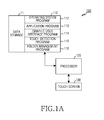
- FIG. 1A illustrates an electronic device according to an exemplary embodiment of the present disclosure
- FIG. 1B illustrates a processor in the electronic device according to an exemplary embodiment of the present disclosure
- FIG. 2A illustrates a method for running an application of a folder in the electronic device according to an exemplary embodiment of the present disclosure
- FIG. 2B illustrates means for running the application of the folder in the electronic device according to an exemplary embodiment of the present disclosure
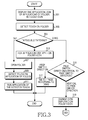
- FIG. 3 illustrates a method for running the application by detecting a touch on the folder in the electronic device according to an exemplary embodiment of the present disclosure
- FIG. 4 illustrates an application icon displayed on a folder icon in the electronic device according to an exemplary embodiment of the present disclosure
- FIG. 5 illustrates application execution in the folder by opening the folder in the electronic device according to an exemplary embodiment of the present disclosure
- FIG. 6 illustrates application execution in the folder without opening the folder in the electronic device according to an exemplary embodiment of the present disclosure
- FIG. 7 illustrates icon change of the application displayed on the folder icon in the electronic device according to an exemplary embodiment of the present disclosure
- FIG. 8 illustrates icon change of the application displayed on the folder icon in the electronic device according to other exemplary embodiment of the present disclosure.
- FIGURES 1A through 8 discussed below, and the various embodiments used to describe the principles of the present disclosure in this patent document are by way of illustration only and should not be construed in any way to limit the scope of the disclosure. Those skilled in the art will understand that the principles of the present disclosure may be implemented in any suitably arranged system or device.
- the following description with reference to the accompanying drawings is provided to assist in a comprehensive understanding of exemplary embodiments of the disclosure as defined by the claims and their equivalents.
- the present disclosure includes various specific details to assist in that understanding but these are to be regarded as merely exemplary. Accordingly, those of ordinary skill in the art will recognize that various changes and modifications of the embodiments described herein can be made without departing from the scope and spirit of the disclosure. In addition, descriptions of well-known functions and constructions may be omitted for clarity and conciseness.
- an electronic device embraces a mobile communication terminal, a smart phone, a tablet Personal Computer (PC), a digital camera, an MP3 player, a navigation system, a laptop, a netbook, a computer, a television, a refrigerator, and an air conditioner, which allow touch input.
- a mobile communication terminal a smart phone, a tablet Personal Computer (PC), a digital camera, an MP3 player, a navigation system, a laptop, a netbook, a computer, a television, a refrigerator, and an air conditioner, which allow touch input.
- FIG. 1A illustrates a block diagram of an electronic device according to an exemplary embodiment of the present disclosure.
- the electronic device 100 includes a memory 110, a processor 120, and a touch screen 130.
- a plurality of memories 110 and a plurality of processors 120 can be used.
- the memory 110 includes a data storage 111, an operating system program 112, an application program 113, a graphic user interface program 114, a touch detection program 115, and a folder management program 116.
- the program being a software component can be represented as a set of instructions, and thus the program can be referred to as an instruction set. Also, the program may be referred to as a module.
- the memory 110 can store one or more programs including instructions according to an exemplary embodiment of the present disclosure.
- the data storage 111 stores data generating in the function execution corresponding to the program stored in the memory 110.
- the data storage 111 can store information of an application displayed on a folder icon.
- the data storage 111 can store priorities of applications of the folder, on the folder basis. In so doing, the priority of the application can be determined according to when the application is run, how frequently the application is run, an application name, and user setting. For example, the application executed most recently can be given the highest priority, the application executed most frequently over a certain time duration can be given the highest priority, the application name can be prioritized in alphabetical order, and the application can be prioritized based on the user's direct setting.
- the operating system program 112 (the embedded operating system such as WINDOWS, LINUX, Darwin, RTXC, UNIX, OS X, or VxWorks) includes various software components for controlling general system operations. These include, e.g., memory management and control, storage hardware (device) control and management, and power control and management.
- the operating system program 112 processes normal communication between various hardware (devices) and software components (programs).
- the application program 113 includes applications for a browser, an e-mail, a message, a word processing, an address book, a widget, Digital Right Management (DRM), voice recognition, voice reproduction, a position determining function, a location based service, and a phone.
- DRM Digital Right Management
- the graphic user interface program 114 includes at least one software component for providing a user interface using graphics between the user and the electronic device 100. That is, the graphic user interface program 114 includes at least one software component for displaying user interface information on the touch screen 130.
- the graphic user interface program 114 includes an instruction for displaying one application icon of one or more applications of the folder, on the folder icon. For example, the graphic user interface program 114 can display the icon of the phone application of a system folder, in a system folder icon.
- the touch detection program 115 detects the touch to open the folder, the graphic user interface program 114 can open the folder of the detected touch and display the applications of the folder.
- the touch detection program 115 detects the touch input on a touch-sensitive surface in association with the touch screen 130. That is, the touch detection program 115 determines the contact (touch) on the touch-sensitive surface, movement of the contact, a movement direction and a movement time of the contact, and abortion (cessation) of the contact (i.e. release, end of the touch).
- the movement of the contact determined can include a speed (magnitude), a velocity (magnitude and direction) and/or an acceleration (including magnitude and/or direction) of the contact.
- the touch detection program 115 can sense the touch on the folder. In so doing, the detected touch includes at least one of tap, double tap, and drag in a certain direction.
- the touch detection program 115 can detect the touch on the displayed applications.
- the touch detection program 115 can detect the touch on a folder name over a certain time.
- the folder management program 116 includes an instruction for opening the folder and/or running the application in the folder according to the touch detected by the touch detection program 115. That is, when the tap on the folder is detected, the folder management program 116 can open the corresponding folder and display the applications in the folder. For example, when the tap on the system folder is detected, the folder management program 116 can display the phone, address book, and text message applications in the system folder. Next, when the phone application is tapped among the applications of the system folder, the folder management program 116 can run the phone application. Thus, a single tap on the folder icon may open the folder, resulting in the display of a plurality of application icons corresponding to (i.e. representing) a plurality of applications in, or otherwise associated with, the folder. A further tap or touch on one of the displayed application icons may then be used to open, execute, or run the corresponding application.
- the folder management program 116 can run the application displayed in the corresponding folder icon.
- the folder management program 116 can run the phone application.
- the application icon displayed in the folder icon can be of the highest priority among the applications of the folder.
- an application stored in the folder namely the application corresponding to the application icon displayed in or on the folder icon, may be opened, run, or executed without first opening the folder, thereby reducing the number of user inputs required, speeding up access to that application, and so providing an improved user-apparatus interface.
- the folder management program 116 in certain embodiments prioritizes the applications based on at least one of when the application is run, how frequently the application is run, the application name, and the user setting. In so doing, the priority can be updated on the periodic basis or in real time when the application is executed, when the application name is changed, or when the user setting is detected. In so doing, when the folder is touched to open the folder, the folder management program 116 can display the applications of the folder based on the determined priority.
- the folder management program 116 can determine whether to change the application icon displayed in the corresponding folder icon by considering a page switch direction and a drag direction. That is, when the page switch direction and the drag direction cross at right angles, the folder management program 116 changes the application icon displayed in the corresponding folder icon. When the page switch direction and the drag direction are identical, the folder management program 116 does not change the application icon displayed in the corresponding folder icon and switches the page according to the detected drag.
- the folder management program 116 can change and display the application icon displayed in the corresponding folder icon. For example, when the page is switched horizontally and the folder is dragged upwards, the folder management program 116 can determine other application of the higher priority than the application icon displayed in the corresponding folder icon, and then change the application icon displayed in the folder icon with the other application icon. For example, when the page is switched horizontally and the folder is dragged downwards, the folder management program 116 can determine other application of the lower priority than the application icon displayed in the corresponding folder icon, and then change the application icon displayed in the folder icon with the other application icon determined.
- the folder management program 116 can display a menu for changing the priority of the applications of the folder so as to change the priority of the applications of the folder under the user control.
- the processor 120 can include at least one processor and a peripheral interface, which are not shown.
- the processor 120 executes a particular program (instruction set) stored in the memory 110 and performs a plurality of functions corresponding to the program.
- the touch screen 130 is a touch-sensitive display and provides an interface for the touch input/output between the electronic device 100 and the user.
- the touch screen 130 is a medium for detecting the touch (or the contact) through a touch sensor (not shown), sending the detected touch input to the electronic device 100, and providing a visual output of the electronic device 100 to the user. That is, in response to the touch input, the touch screen 130 provides the visual output to the user based on text, graphics, and video.
- the touch screen 130 includes the touch-sensitive surface for detecting the user's touch input, and senses the user touch input using haptic contact, tactile contact, or their combination.
- the detected touch point of the touch screen 130 corresponds to a digit of a finger used to contact the touch-sensitive surface.
- the touch screen 130 detects the contact of an external device such as stylus pen. The detected contact is converted to an interaction corresponding to the user interface (e.g., a soft key) displayed on the touch screen 130.
- the touch screen 130 provides an interface for the touch input/output between the electronic device 100 and the user.
- the touch screen 130 is a medium for sending the user's touch input to the electronic device 100 and representing the visual output of the electronic device 100 to the user.
- the touch screen 130 can adopt various display technologies such as Liquid Crystal Display (LCD), Light Emitting Diode (LED), Light emitting Polymer Display (LPD), Organic LED (OLED), Active Matrix OLED (AMOLED) or Flexible LED (FLED).
- LCD Liquid Crystal Display
- LED Light Emitting Diode
- LPD Light emitting Polymer Display
- OLED Organic LED
- AMOLED Active Matrix OLED
- FLED Flexible LED
- the touch screen 130 is not limited to a touch screen using those display technologies.
- the touch screen 130 can detect the contact start, the contact movement, or the contact abortion or end on the touch-sensitive surface using, but not limited to, various touch detection (sensing) techniques such as capacitive, resistive, infrared or surface sound wave detections.
- the touch screen 130 can display one application icon of the applications of the folder, in the folder. Further, the touch screen 130 can detect the touch on the folder. In so doing, the touch includes at least one of the tap, the double tap, and the drag.
- FIG. 1B illustrates a block diagram of the processor in the electronic device according to an exemplary embodiment of the present disclosure.
- the processor 120 of the electronic device 100 includes a touch detection processor 122 and a folder management processor 124.
- the touch detection processor 122 detects the touch input on the touch-sensitive surface in association with the touch screen 130. That is, the touch detection processor 122 determines the contact (touch), the movement of the contact, the movement direction and the movement time of the contact, and the abortion of the contact on the touch-sensitive surface.
- the movement of the contact determined can include the speed (magnitude) of the contact, the velocity (magnitude and direction) and/or the acceleration (magnitude and/or direction).
- the touch detection processor 122 can sense the touch on the folder. In so doing, the detected touch includes at least one of the tap, the double tap, and the drag in a certain direction.
- the touch detection processor 122 can detect the touch on the displayed applications.
- the touch detection processor 122 can detect the touch on the folder name over a certain time.
- the folder management processor 124 includes an instruction for opening the folder and/or running the application in the folder according to the touch detected by the touch detection processor 122. That is, when the folder is tapped, the folder management processor 124 can open the corresponding folder and display the applications in the folder. For example, when the tap on the system folder is detected, the folder management processor 124 can display the phone, address book, and text message applications in the system folder. Next, when the phone application is tapped among the applications of the system folder, the folder management processor 124 can run the phone application.
- the folder management processor 124 can run the application displayed in the corresponding folder icon.
- the folder management processor 124 can run the phone application.
- the application icon displayed in the folder icon can be of the highest priority among the applications of the folder.
- the folder management processor 124 prioritizes the applications based on at least one of the application execution time, the application execution frequency, the application name, and the user setting in the folder. In so doing, the priority can be updated on the periodic basis or in real time when the application is executed, when the application name is changed, or when the user setting is detected. In so doing, when the folder is touched to open the folder, the folder management processor 124 can display the applications of the folder based on the determined priority.
- the folder management processor 124 can determine whether to change the application icon displayed in the corresponding folder icon by considering the page switch direction and the drag direction. That is, when the page switch direction and the drag direction cross at right angles, the folder management processor 124 changes the application icon displayed in the corresponding folder icon. When the page switch direction and the drag direction are identical, the folder management processor 124 does not change the application icon displayed in the corresponding folder icon and switches the page according to the detected drag.
- the folder management processor 124 can change and display the application icon displayed in the corresponding folder icon. For example, when the page is switched horizontally and the folder is dragged upwards, the folder management processor 124 can determine other application of the higher priority than the application icon displayed in the corresponding folder icon, and then change the application icon displayed in the folder icon with the other application icon determined. For example, when the page is switched horizontally and the folder is dragged downwards, the folder management processor 124 can determine other application of the lower priority than the application icon displayed in the corresponding folder icon, and then change the application icon displayed in the folder icon with the other application icon determined.
- the folder management processor 124 can display the menu for changing the priority of the applications of the folder so as to change the priority of the applications contained the folder under the user control.
- FIG. 2A illustrates a method for running the application of the folder in the electronic device 100 according to an exemplary embodiment of the present disclosure.
- the electronic device 100 displays one application icon of the one or more applications of the folder, in the folder icon in step 201. More specifically, the electronic device 100 can display the application icon of the highest priority among the one or more applications of the folder, in the folder icon. In so doing, the priority of the application can be determined according to at least one of the execution time, the execution frequency, and the name of the application, or the user setting.
- the electronic device 100 detects the gesture to the folder icon in step 203 and runs the application displayed on the folder icon in step 205.
- the gesture includes at least one of the tap, the multi-tap, the drag, and the tap over a certain time duration.
- the electronic device 100 can display the phone application icon in the system folder icon according to the priority of the application.
- the electronic device 100 can immediately run the phone application without having to open the system folder.
- FIG. 2B illustrates a means for running the application without opening the folder in the electronic device according to an exemplary embodiment of the present disclosure.
- the electronic device 100 includes a means 211 for displaying one application icon of the one or more applications of the folder, in the folder icon. Also, the electronic device 100 includes a means 213 for detecting the gesture on the folder icon and a means 215 for running the application displayed on the folder icon. The gesture includes at least one of the tap, the double tap, the drag, and the tap over a certain time duration. Accordingly, the electronic device 100 can include the means for detecting such a gesture.
- FIG. 3 illustrates a method for detecting the touch on the folder in the electronic device 100 according to an exemplary embodiment of the present disclosure.
- the electronic device 100 displays one application icon of the applications of the folder, in the folder icon in step 301.
- a general folder of FIG. 4 displays a plurality of applications icons 403 of applications of the folder, on the folder icon 401.
- a folder according to an exemplary embodiment of the present disclosure displays one application icon 407 of the applications of the folder, in the folder icon 405.
- the electronic device 100 detects the touch on the folder in step 303, and determines whether the detected touch is the tap, the double tap, or the drag in step 305.
- the electronic device 100 opens the folder and displays the applications of the folder in step 307, and detects the touch on the application of the folder in step 309.
- the electronic device 100 runs the application of the detected touch in step 311 and then finishes this process. For example, when a game folder 501 is tapped as shown in FIG. 5 , the electronic device 100 displays a plurality of applications in the game folder. Next, the electronic device 100 runs the application 503 of the detected touch among the displayed applications in step 505.
- the electronic device 100 runs the application displayed on the folder icon in step 313 and then finishes this process. For example, when one application icon is displayed on the game folder icon and the game folder icon is double-tapped in step 601 as shown in FIG. 6 , the electronic device 100 immediately runs the application displayed on the game folder icon in step 603 as shown in FIG. 6 . Next, the electronic device 100 finishes this process.
- the electronic device 100 determines whether the detected drag advances in the page switch direction or in the vertical direction of the page switch direction in step 315.
- the electronic device 100 switches the page according to the drag in step 317 and then finishes this process. For example, when the page is switched horizontally and the drag to the left is detected, the electronic device 100 can switch the corresponding page to a next page.
- the present disclosure is not limited to the horizontal page switch but is applicable to the horizontal page scroll.
- the electronic device 100 changes the displayed application icon on the folder icon in step 319 and returns to step 303.
- the electronic device 100 can change the displayed application icon on the folder icon.
- the electronic device 100 can change the displayed application icon on the folder icon with the application icon of the lower priority than the current application displayed on the folder icon.
- the electronic device 100 can change the displayed application icon on the folder icon with the application icon of the higher priority than the current application displayed on the folder icon.
- the electronic device 100 can change the displayed application icon on the folder icon.
- the electronic device 100 can change the displayed application icon 703 on the folder icon with the application icon 705 of the lower priority than the current application displayed on the folder icon.
- the electronic device 100 can change the displayed application icon 803 on the folder icon with the application icon 805 of the higher priority than the current application displayed on the folder icon
- the exemplary embodiments and various functional operations of the present disclosure described herein can be implemented in computer software, firmware, hardware, or in combinations of one or more of them including the structures disclosed in this specification and their structural equivalents.
- the exemplary embodiments of the present disclosure can be implemented as one or more computer program products, that is, one or more data processors, or one or more modules of computer program instructions encoded on a computer-readable medium to control the devices.
- the computer-readable medium may be a machine-readable storage medium, a machine-readable storage substrate, a memory device, a material affecting a machine-readable propagated stream, or a combination of one or more of these.
- the term 'data processor' encompasses every device, apparatus, and machine including, for example, a programmable processor, a computer, a multiple processors, or a computer, for processing data.
- the device can be added to the hardware and include a program code for creating an execution environment of a corresponding computer program, for example, a code for constituting processor firmware, a protocol stack, a database management system, an operating system, or a combination of one or more of these.
Landscapes
- Engineering & Computer Science (AREA)
- Theoretical Computer Science (AREA)
- General Engineering & Computer Science (AREA)
- Physics & Mathematics (AREA)
- General Physics & Mathematics (AREA)
- Human Computer Interaction (AREA)
- Software Systems (AREA)
- User Interface Of Digital Computer (AREA)
Applications Claiming Priority (1)
| Application Number | Priority Date | Filing Date | Title |
|---|---|---|---|
| KR1020120108799A KR20140042270A (ko) | 2012-09-28 | 2012-09-28 | 애플리케이션을 실행하기 위한 방법 및 그 전자 장치 |
Publications (1)
| Publication Number | Publication Date |
|---|---|
| EP2713260A1 true EP2713260A1 (fr) | 2014-04-02 |
Family
ID=49084815
Family Applications (1)
| Application Number | Title | Priority Date | Filing Date |
|---|---|---|---|
| EP13182298.3A Withdrawn EP2713260A1 (fr) | 2012-09-28 | 2013-08-29 | Dispositif électronique et procédé de fonctionnement |
Country Status (4)
| Country | Link |
|---|---|
| US (1) | US20140096083A1 (fr) |
| EP (1) | EP2713260A1 (fr) |
| KR (1) | KR20140042270A (fr) |
| CN (1) | CN103713802A (fr) |
Cited By (5)
| Publication number | Priority date | Publication date | Assignee | Title |
|---|---|---|---|---|
| WO2019100892A1 (fr) * | 2017-11-23 | 2019-05-31 | 麒麟合盛网络技术股份有限公司 | Procédé, dispositif et appareil d'affichage d'informations et support d'informations |
| EP3588256A4 (fr) * | 2017-03-06 | 2020-03-18 | Samsung Electronics Co., Ltd. | Procédé d'affichage d'icônes et dispositif électronique associé |
| WO2021225909A1 (fr) * | 2020-05-08 | 2021-11-11 | Sony Interactive Entertainment Inc. | Représentation unique d'un groupe d'applications sur une interface utilisateur |
| US11524228B2 (en) | 2020-05-08 | 2022-12-13 | Sony Interactive Entertainment Inc. | Sorting computer applications or computer files and indicating a sort attribute in a user interface |
| US11797154B2 (en) | 2020-05-08 | 2023-10-24 | Sony Interactive Entertainment Inc. | Inserting a graphical element cluster in a tiled library user interface |
Families Citing this family (30)
| Publication number | Priority date | Publication date | Assignee | Title |
|---|---|---|---|---|
| US11126321B2 (en) * | 2007-09-04 | 2021-09-21 | Apple Inc. | Application menu user interface |
| KR102115397B1 (ko) * | 2013-04-01 | 2020-05-26 | 삼성전자주식회사 | 휴대 장치 및 휴대 장치의 재생목록 표시 방법 |
| USD745041S1 (en) * | 2013-06-09 | 2015-12-08 | Apple Inc. | Display screen or portion thereof with icon |
| KR102024422B1 (ko) | 2013-12-20 | 2019-09-23 | 후아웨이 테크놀러지 컴퍼니 리미티드 | 파일 폴더 내의 파일을 오픈하기 위한 방법 및 단말기 |
| USD755848S1 (en) | 2014-06-01 | 2016-05-10 | Apple Inc. | Display screen or portion thereof with icon |
| US9584991B1 (en) * | 2014-06-19 | 2017-02-28 | Isaac S. Daniel | Method of communicating and accessing social networks using interactive coded messages |
| CN104090703A (zh) * | 2014-07-06 | 2014-10-08 | 朱义亮 | 一种完善移动终端设备图标整理的方法 |
| WO2016023208A1 (fr) * | 2014-08-14 | 2016-02-18 | 华为技术有限公司 | Procédé d'ouverture de fichier dans un dossier, dispositif et équipement |
| WO2016042553A1 (fr) | 2014-09-18 | 2016-03-24 | Drupe Mobile Ltd. | Interface utilisateur de terminal client permettant d'interagir avec des contacts |
| KR102336445B1 (ko) | 2014-12-01 | 2021-12-07 | 삼성전자주식회사 | 디바이스를 제어하는 방법, 시스템 및 그 디바이스 |
| USD761318S1 (en) * | 2014-12-30 | 2016-07-12 | Microsoft Corporation | Display screen with icon |
| CN106325696B (zh) * | 2015-06-30 | 2019-10-25 | 深圳超多维科技有限公司 | 快速启动文件夹中应用程序的方法、装置及其智能终端 |
| CN105204712B (zh) * | 2015-08-26 | 2018-12-11 | 小米科技有限责任公司 | 文件夹图标的显示方法及装置 |
| KR20170033706A (ko) * | 2015-09-17 | 2017-03-27 | 엘지전자 주식회사 | 이동 단말기 및 그것의 제어방법 |
| HK1215841A2 (zh) * | 2016-01-07 | 2016-09-15 | Incl Limited | 一种用於显示和交互使用储存在电脑系统的数字内容的方法和系统 |
| US10067738B2 (en) * | 2016-01-11 | 2018-09-04 | Motorola Mobility Llc | Device control based on its operational context |
| CN105630298B (zh) | 2016-02-29 | 2019-02-01 | 华为技术有限公司 | 一种文件夹的管理方法和设备 |
| CN105893804B (zh) * | 2016-03-31 | 2022-07-22 | 维沃移动通信有限公司 | 一种应用程序的管理方法和电子设备 |
| DK201770423A1 (en) | 2016-06-11 | 2018-01-15 | Apple Inc | Activity and workout updates |
| CN106445285A (zh) * | 2016-09-13 | 2017-02-22 | 宇龙计算机通信科技(深圳)有限公司 | 应用程序的管理方法、管理装置及终端 |
| CN106406675A (zh) * | 2016-09-29 | 2017-02-15 | 广东欧珀移动通信有限公司 | 运行应用程序的快捷方法及终端设备 |
| CN107463322A (zh) * | 2017-08-01 | 2017-12-12 | 珠海市魅族科技有限公司 | 显示控制方法及装置、终端装置及计算机可读存储介质 |
| US10891016B2 (en) * | 2018-06-05 | 2021-01-12 | Viacom International Inc. | Graphical representation showing information to a user |
| CN109145583A (zh) * | 2018-07-27 | 2019-01-04 | 奇酷互联网络科技(深圳)有限公司 | 应用解锁方法、系统、移动终端及存储介质 |
| US11704282B2 (en) * | 2018-12-14 | 2023-07-18 | Blackberry Limited | Notifications and graphical user interface for applications in folders |
| CN110618969B (zh) * | 2019-08-29 | 2022-08-02 | 维沃移动通信有限公司 | 一种图标显示方法及电子设备 |
| CN110851203A (zh) * | 2019-10-31 | 2020-02-28 | 维沃移动通信有限公司 | 一种启动应用程序的方法及电子设备 |
| CN115080520A (zh) * | 2021-03-01 | 2022-09-20 | Oppo广东移动通信有限公司 | 应用管理方法、电子设备及存储介质 |
| CN113238691B (zh) * | 2021-05-27 | 2024-03-01 | 维沃移动通信(杭州)有限公司 | 应用图标管理方法、装置及电子设备 |
| WO2023234546A1 (fr) * | 2022-05-29 | 2023-12-07 | 삼성전자 주식회사 | Dispositif électronique, procédé et support de stockage non transitoire lisible par ordinateur permettant de traiter un texte se trouvant dans une partie d'entrée de texte d'une interface utilisateur |
Citations (5)
| Publication number | Priority date | Publication date | Assignee | Title |
|---|---|---|---|---|
| US20070157125A1 (en) * | 2005-12-29 | 2007-07-05 | Peters Johan C | Desktop management scheme |
| US20080225153A1 (en) * | 2007-03-13 | 2008-09-18 | Apple Inc. | Interactive Image Thumbnails |
| US20100211872A1 (en) * | 2009-02-17 | 2010-08-19 | Sandisk Il Ltd. | User-application interface |
| US20120030623A1 (en) * | 2010-07-30 | 2012-02-02 | Hoellwarth Quin C | Device, Method, and Graphical User Interface for Activating an Item in a Folder |
| US20120062564A1 (en) * | 2010-09-15 | 2012-03-15 | Kyocera Corporation | Mobile electronic device, screen control method, and storage medium storing screen control program |
Family Cites Families (12)
| Publication number | Priority date | Publication date | Assignee | Title |
|---|---|---|---|---|
| US20060003656A1 (en) * | 2004-06-30 | 2006-01-05 | Kimberly-Clark Worldwide, Inc. | Efficient necked bonded laminates and methods of making same |
| CN101124572A (zh) * | 2004-09-24 | 2008-02-13 | 微软公司 | 文件系统外壳 |
| US9086785B2 (en) * | 2007-06-08 | 2015-07-21 | Apple Inc. | Visualization object receptacle |
| KR100900295B1 (ko) * | 2008-04-17 | 2009-05-29 | 엘지전자 주식회사 | 이동 디바이스와 이동 통신 시스템의 사용자 인터페이스방법 |
| JP5416983B2 (ja) * | 2009-02-04 | 2014-02-12 | 1stホールディングス株式会社 | フォルダ管理装置、フォルダ管理方法およびフォルダ管理用プログラム |
| EP2276162B1 (fr) * | 2009-07-17 | 2012-10-03 | ebm-papst Mulfingen GmbH & Co. KG | Procédé et système de commande destinés au fonctionnement d'un moteur électrique sans balais |
| CN102033710B (zh) * | 2010-04-07 | 2015-03-11 | 苹果公司 | 用于管理文件夹的方法和相关设备 |
| US8517657B2 (en) * | 2010-06-30 | 2013-08-27 | WD Media, LLC | Corner chamber with heater |
| US20120006256A1 (en) * | 2010-07-08 | 2012-01-12 | Samsung Electro-Mechanics Co., Ltd. | Apparatus for manufacturing ceramic green sheet |
| CN102184072B (zh) * | 2011-03-15 | 2014-07-16 | 宇龙计算机通信科技(深圳)有限公司 | 文件夹打开方法及文件夹打开装置 |
| US9495069B2 (en) * | 2012-08-31 | 2016-11-15 | Paypal, Inc. | Expanded icon functionality |
| US9342324B2 (en) * | 2013-05-23 | 2016-05-17 | Rakuten Kobo, Inc. | System and method for displaying a multimedia container |
-
2012
- 2012-09-28 KR KR1020120108799A patent/KR20140042270A/ko not_active Ceased
-
2013
- 2013-08-29 EP EP13182298.3A patent/EP2713260A1/fr not_active Withdrawn
- 2013-09-26 CN CN201310444772.XA patent/CN103713802A/zh active Pending
- 2013-09-27 US US14/040,497 patent/US20140096083A1/en not_active Abandoned
Patent Citations (5)
| Publication number | Priority date | Publication date | Assignee | Title |
|---|---|---|---|---|
| US20070157125A1 (en) * | 2005-12-29 | 2007-07-05 | Peters Johan C | Desktop management scheme |
| US20080225153A1 (en) * | 2007-03-13 | 2008-09-18 | Apple Inc. | Interactive Image Thumbnails |
| US20100211872A1 (en) * | 2009-02-17 | 2010-08-19 | Sandisk Il Ltd. | User-application interface |
| US20120030623A1 (en) * | 2010-07-30 | 2012-02-02 | Hoellwarth Quin C | Device, Method, and Graphical User Interface for Activating an Item in a Folder |
| US20120062564A1 (en) * | 2010-09-15 | 2012-03-15 | Kyocera Corporation | Mobile electronic device, screen control method, and storage medium storing screen control program |
Cited By (9)
| Publication number | Priority date | Publication date | Assignee | Title |
|---|---|---|---|---|
| EP3588256A4 (fr) * | 2017-03-06 | 2020-03-18 | Samsung Electronics Co., Ltd. | Procédé d'affichage d'icônes et dispositif électronique associé |
| US11221732B2 (en) | 2017-03-06 | 2022-01-11 | Samsung Electronics Co., Ltd. | Method for displaying icon and electronic device therefor |
| WO2019100892A1 (fr) * | 2017-11-23 | 2019-05-31 | 麒麟合盛网络技术股份有限公司 | Procédé, dispositif et appareil d'affichage d'informations et support d'informations |
| US11119627B2 (en) | 2017-11-23 | 2021-09-14 | Qilin Hesheng Network Technology Inc. | Information display method, device, apparatus and storage medium |
| WO2021225909A1 (fr) * | 2020-05-08 | 2021-11-11 | Sony Interactive Entertainment Inc. | Représentation unique d'un groupe d'applications sur une interface utilisateur |
| US11402973B2 (en) | 2020-05-08 | 2022-08-02 | Sony Interactive Entertainment Inc. | Single representation of a group of applications on a user interface |
| US11524228B2 (en) | 2020-05-08 | 2022-12-13 | Sony Interactive Entertainment Inc. | Sorting computer applications or computer files and indicating a sort attribute in a user interface |
| US11714530B2 (en) | 2020-05-08 | 2023-08-01 | Sony Interactive Entertainment Inc. | Single representation of a group of applications on a user interface |
| US11797154B2 (en) | 2020-05-08 | 2023-10-24 | Sony Interactive Entertainment Inc. | Inserting a graphical element cluster in a tiled library user interface |
Also Published As
| Publication number | Publication date |
|---|---|
| US20140096083A1 (en) | 2014-04-03 |
| KR20140042270A (ko) | 2014-04-07 |
| CN103713802A (zh) | 2014-04-09 |
Similar Documents
| Publication | Publication Date | Title |
|---|---|---|
| EP2713260A1 (fr) | Dispositif électronique et procédé de fonctionnement | |
| KR102028119B1 (ko) | 애플리케이션을 디스플레이하는 방법 및 그 전자 장치 | |
| DK180117B1 (en) | SYSTEMS AND METHODS FOR INTERACTING WITH MULTIPLE APPLICATIONS THAT ARE SIMULTANEOUSLY DISPLAYED ON AN ELECTRONIC DEVICE WITH A TOUCHSENSITIVE DISPLAY | |
| US9223471B2 (en) | Touch screen control | |
| US9292192B2 (en) | Method and apparatus for text selection | |
| AU2021202302B2 (en) | Systems and methods for interacting with multiple applications that are simultaneously displayed on an electronic device with a touch-sensitive display | |
| US9354805B2 (en) | Method and apparatus for text selection | |
| EP2660696B1 (fr) | Procédé et appareil de sélection de texte | |
| KR20220101750A (ko) | 애플리케이션 스위칭 사용자 인터페이스와 상호작용하기 위한 디바이스들 및 방법들 | |
| EP2660697B1 (fr) | Procédé et appareil de sélection de texte | |
| EP2660727B1 (fr) | Procédé et appareil de sélection de texte | |
| US20110265039A1 (en) | Category-based list navigation on touch sensitive screen | |
| CA2821814C (fr) | Procede et appareil de selection de texte | |
| KR20140112296A (ko) | 다중 터치에 대응하는 기능을 처리하기 위한 방법 및 그 전자 장치 | |
| CN104205033A (zh) | 基于触摸的输入控制方法 | |
| US20180018084A1 (en) | Display device, display method and computer-readable recording medium | |
| JP2012208636A (ja) | タッチスクリーンデバイスの制御装置、その制御方法及びプログラム | |
| US10642481B2 (en) | Gesture-based interaction method and interaction apparatus, and user equipment | |
| EP2741194A1 (fr) | Interface de saut de défilement pour dispositif d'écran tactile entrée/sortie | |
| CA2821772C (fr) | Procede et appareil de selection de texte | |
| CN106681597A (zh) | 一种人机界面的图标选中状态前后迁移的方法及系统 | |
| WO2013164014A1 (fr) | Procédé et appareil de sélection de texte |
Legal Events
| Date | Code | Title | Description |
|---|---|---|---|
| PUAI | Public reference made under article 153(3) epc to a published international application that has entered the european phase |
Free format text: ORIGINAL CODE: 0009012 |
|
| 17P | Request for examination filed |
Effective date: 20130829 |
|
| AK | Designated contracting states |
Kind code of ref document: A1 Designated state(s): AL AT BE BG CH CY CZ DE DK EE ES FI FR GB GR HR HU IE IS IT LI LT LU LV MC MK MT NL NO PL PT RO RS SE SI SK SM TR |
|
| AX | Request for extension of the european patent |
Extension state: BA ME |
|
| STAA | Information on the status of an ep patent application or granted ep patent |
Free format text: STATUS: EXAMINATION IS IN PROGRESS |
|
| 17Q | First examination report despatched |
Effective date: 20180504 |
|
| STAA | Information on the status of an ep patent application or granted ep patent |
Free format text: STATUS: THE APPLICATION HAS BEEN WITHDRAWN |
|
| 18W | Application withdrawn |
Effective date: 20180831 |