EP2717259A2 - Verfahren und Vorrichtung zur Durchführung eines voreingestellten Betriebsmodus mittels Spracherkennung - Google Patents
Verfahren und Vorrichtung zur Durchführung eines voreingestellten Betriebsmodus mittels Spracherkennung Download PDFInfo
- Publication number
- EP2717259A2 EP2717259A2 EP13187798.7A EP13187798A EP2717259A2 EP 2717259 A2 EP2717259 A2 EP 2717259A2 EP 13187798 A EP13187798 A EP 13187798A EP 2717259 A2 EP2717259 A2 EP 2717259A2
- Authority
- EP
- European Patent Office
- Prior art keywords
- text
- voice
- input
- preset operation
- displayed
- Prior art date
- Legal status (The legal status is an assumption and is not a legal conclusion. Google has not performed a legal analysis and makes no representation as to the accuracy of the status listed.)
- Granted
Links
Images



Classifications
-
- G—PHYSICS
- G10—MUSICAL INSTRUMENTS; ACOUSTICS
- G10L—SPEECH ANALYSIS TECHNIQUES OR SPEECH SYNTHESIS; SPEECH RECOGNITION; SPEECH OR VOICE PROCESSING TECHNIQUES; SPEECH OR AUDIO CODING OR DECODING
- G10L15/00—Speech recognition
- G10L15/22—Procedures used during a speech recognition process, e.g. man-machine dialogue
-
- G—PHYSICS
- G10—MUSICAL INSTRUMENTS; ACOUSTICS
- G10L—SPEECH ANALYSIS TECHNIQUES OR SPEECH SYNTHESIS; SPEECH RECOGNITION; SPEECH OR VOICE PROCESSING TECHNIQUES; SPEECH OR AUDIO CODING OR DECODING
- G10L15/00—Speech recognition
- G10L15/26—Speech to text systems
-
- G—PHYSICS
- G06—COMPUTING OR CALCULATING; COUNTING
- G06F—ELECTRIC DIGITAL DATA PROCESSING
- G06F3/00—Input arrangements for transferring data to be processed into a form capable of being handled by the computer; Output arrangements for transferring data from processing unit to output unit, e.g. interface arrangements
- G06F3/01—Input arrangements or combined input and output arrangements for interaction between user and computer
- G06F3/02—Input arrangements using manually operated switches, e.g. using keyboards or dials
- G06F3/023—Arrangements for converting discrete items of information into a coded form, e.g. arrangements for interpreting keyboard generated codes as alphanumeric codes, operand codes or instruction codes
- G06F3/0233—Character input methods
-
- G—PHYSICS
- G06—COMPUTING OR CALCULATING; COUNTING
- G06F—ELECTRIC DIGITAL DATA PROCESSING
- G06F3/00—Input arrangements for transferring data to be processed into a form capable of being handled by the computer; Output arrangements for transferring data from processing unit to output unit, e.g. interface arrangements
- G06F3/01—Input arrangements or combined input and output arrangements for interaction between user and computer
- G06F3/048—Interaction techniques based on graphical user interfaces [GUI]
- G06F3/0484—Interaction techniques based on graphical user interfaces [GUI] for the control of specific functions or operations, e.g. selecting or manipulating an object, an image or a displayed text element, setting a parameter value or selecting a range
- G06F3/0486—Drag-and-drop
-
- G—PHYSICS
- G06—COMPUTING OR CALCULATING; COUNTING
- G06F—ELECTRIC DIGITAL DATA PROCESSING
- G06F3/00—Input arrangements for transferring data to be processed into a form capable of being handled by the computer; Output arrangements for transferring data from processing unit to output unit, e.g. interface arrangements
- G06F3/14—Digital output to display device ; Cooperation and interconnection of the display device with other functional units
-
- G—PHYSICS
- G06—COMPUTING OR CALCULATING; COUNTING
- G06F—ELECTRIC DIGITAL DATA PROCESSING
- G06F3/00—Input arrangements for transferring data to be processed into a form capable of being handled by the computer; Output arrangements for transferring data from processing unit to output unit, e.g. interface arrangements
- G06F3/16—Sound input; Sound output
- G06F3/167—Audio in a user interface, e.g. using voice commands for navigating, audio feedback
-
- G—PHYSICS
- G06—COMPUTING OR CALCULATING; COUNTING
- G06F—ELECTRIC DIGITAL DATA PROCESSING
- G06F3/00—Input arrangements for transferring data to be processed into a form capable of being handled by the computer; Output arrangements for transferring data from processing unit to output unit, e.g. interface arrangements
- G06F3/01—Input arrangements or combined input and output arrangements for interaction between user and computer
- G06F3/048—Interaction techniques based on graphical user interfaces [GUI]
- G06F3/0484—Interaction techniques based on graphical user interfaces [GUI] for the control of specific functions or operations, e.g. selecting or manipulating an object, an image or a displayed text element, setting a parameter value or selecting a range
-
- G—PHYSICS
- G10—MUSICAL INSTRUMENTS; ACOUSTICS
- G10L—SPEECH ANALYSIS TECHNIQUES OR SPEECH SYNTHESIS; SPEECH RECOGNITION; SPEECH OR VOICE PROCESSING TECHNIQUES; SPEECH OR AUDIO CODING OR DECODING
- G10L15/00—Speech recognition
- G10L15/22—Procedures used during a speech recognition process, e.g. man-machine dialogue
- G10L2015/221—Announcement of recognition results
-
- G—PHYSICS
- G10—MUSICAL INSTRUMENTS; ACOUSTICS
- G10L—SPEECH ANALYSIS TECHNIQUES OR SPEECH SYNTHESIS; SPEECH RECOGNITION; SPEECH OR VOICE PROCESSING TECHNIQUES; SPEECH OR AUDIO CODING OR DECODING
- G10L15/00—Speech recognition
- G10L15/22—Procedures used during a speech recognition process, e.g. man-machine dialogue
- G10L2015/223—Execution procedure of a spoken command
Definitions
- Certain embodiments of the present invention relates generally to voice recognition technology for a terminal, and more particularly, although not exclusively, to a method and an apparatus for performing a particular (e.g. preset) operation mode using voice recognition which recognizes an input voice command to perform an operation mode of a terminal.
- a particular (e.g. preset) operation mode using voice recognition which recognizes an input voice command to perform an operation mode of a terminal.
- terminals are often implemented as multimedia devices having complex and varied functions, for example photographing pictures or videos, reproducing music or video files, playing games, receiving broadcasting, and executing applications.
- terminals for example smart phones and tablet PCs, are typically provided with touch screens to execute various functions of the terminals by using a touch-based input, for example inputting text through a touch input, scrolling, and dragging.
- Some of these various attempts to assist execution of the functions of the terminal are based on applying voice recognition technologies to the terminal. Accordingly, terminal using voice recognition technologies are actively being researched and under development.
- Korean Patent Publication No. 10-2009-0020265 discloses a function of modifying a message to which a voice signal is applied, for example inputting, moving, deleting, modifying, and searching for a message, through voice recognition. Further, Korean Patent Publication No. 10-2010-0064875 discloses a function of converting a user's voice to a text through voice recognition and then displaying the text, and a function of executing a text modifying operation by selecting a user's voice, a touch, or a key input from displayed command lists through a touch of a part to be modified.
- certain embodiments of the present invention provide a method and an apparatus for performing a particular (e.g. preset) operation mode by using voice recognition, which can reduce inconvenience due to an error of the voice recognition, which can be generated when an action (e.g. a main action) is to be executed by applying the voice recognition.
- a method of performing an operation by using voice recognition, the method comprising the steps of: performing an operation (e.g. a preset operation) according to a first input (e.g. a key input or a touch input); recognizing an input voice during performance of the operation; and assisting the performance of the operation according to the recognized voice.
- a first input e.g. a key input or a touch input
- an apparatus for performing an operation e.g. a preset operation
- the apparatus comprising: an input module including at least one input means (e.g. touch screen, button and/or a physical and/or virtual keypad) configured to receive a first input (e.g. a control input) of a user, and a microphone for receiving an input voice from the user; a display (e.g.
- a touch screen configured to receive a control input of the user and display an execution image, an operation state, and a menu state of an application program); and a controller configured to control the input module and the display, the controller including a voice recognition module for recognizing a voice input by the user through the microphone, the controller further configured to perform an operation (e.g. a preset operation) according to the first input, and assist the performance of the operation according to the recognized voice.
- an operation e.g. a preset operation
- the operation may be an operation of an operation mode (e.g. a present operation mode).
- the first input may be made in the operation mode.
- assisting the performance of the operation may comprise one or more of: modifying a result of the operation according to the recognized voice; modifying execution of the operation according to the recognized voice; performing a further operation (e.g. a further operation related to the operation) according to the recognized voice.
- assisting the performance of the operation may comprise comparing information derived from the recognized voice with an input and/or output of the operation.
- a result of the operation may be modified, execution of the operation may be modified and/or a further operation may be performed if the difference between the information derived from the recognized voice and the input and/or output of the operation is above a threshold (e.g. if the information derived from the recognized voice and the output of the operation are not identical or not sufficiently similar).
- the operation may be performed based on the recognized voice if the difference between the information derived from the recognized voice and the input and/or output of the operation is below a threshold (e.g. if the information derived from the recognized voice and the output of the operation are identical or sufficiently similar), and if the information derived from the recognized voice corresponds to the operation.
- a threshold e.g. if the information derived from the recognized voice and the output of the operation are identical or sufficiently similar
- Another aspect of the present invention provides a computer program comprising instructions arranged, when executed, to implement a method, system and/or apparatus, in accordance with any one of the above-described aspects.
- a further aspect of the present invention provides a machine-readable storage storing such a program.
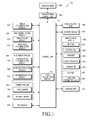
- FIG. 1 a block diagram of a mobile device according to an exemplary embodiment of the present invention.
- a device 100 includes a display unit 190 and a display controller 195. Further, the device 100 may include a controller 110, a mobile communication module 120, a sub communication module 130, a multimedia module 140, a camera module 150, a GPS module 155, an input/output module 160, a sensor module 170, a storage unit 175, and power supply unit 180.
- the sub communication module 130 includes at least one of a wireless LAN module 131 and a Near Field Communication (NFC) module 132
- the multimedia module 140 includes at least one of a broadcasting communication module 141, an audio reproduction module 142, and video reproduction module 143.
- the camera module 150 includes at least one of a first camera 151 and a second camera 152.
- the display unit 190 and the display controller 195 are a touch screen and a touch screen controller, respectively will be described as an example. However, the present invention is not limited to these specific examples.
- the controller 110 controls the mobile communication module 120, the sub communication module 130, the multimedia module 140, the camera module 150, the GPS module 155, the input/output module 160, the sensor module 170, the storage unit 175, the power supply unit 180, the touch screen 190, and the touch screen controller 195. Further, the controller 110 includes a voice recognition module 111 which recognizes a voice input from a microphone 162 of the input/output module 160. In addition, the controller 110 receives a control of the user from the input/output module 160 or the touch screen 190 to perform a preset operation, and assists performance of the preset operation by receiving a voice of the user from the voice recognition module 111 and applying the recognized voice. The control of the user from the input/output module 160 can be received by the controller 110 through keypad 166.
- the mobile communication module 120 connects the mobile communication device 100 with an external device by using one or a plurality of antennas (not shown) according to a control of the controller 110.
- the mobile communication module 120 transmits/receives a radio signal for voice call, a video call, a Short Message Service (SMS), or a Multimedia Message Service (MMS) with a mobile phone (not shown), a smart phone (not shown), a tablet PC, or another device (not shown) which has a phone number input to the device 100.
- SMS Short Message Service
- MMS Multimedia Message Service
- the wireless LAN module 131 of the sub communication module 130 can be Internet-connected according to a control of the controller 110 in a place where a wireless Access Point (AP) (not shown) is installed.
- the wireless LAN module 131 supports a wireless LAN standard (IEEE802.11x) of the Institute of Electrical and Electronics Engineers.
- the NFC module 132 can wirelessly perform near field communication between the portable terminal 100 and an image forming apparatus (not shown) according to a control of the controller 110.
- the device 100 includes at least one of the mobile communication module 120, the wireless LAN module 131, and the NFC module 132.
- the device 100 includes a combination of the mobile communication module 120, the wireless LAN module 131, and the NFC module 132 according to the capability.
- the multimedia module 140 includes the audio reproduction module 142 and the video reproduction module 143, and may or may not include the broadcasting communication module 141. Further, the audio reproduction module 142 or the video reproduction module 143 of the multimedia module 140 may be included in the controller 110.
- the input/output module 160 includes a plurality of buttons 161, a microphone 162, speaker 163, vibration device 164, connector 165, and a keypad 166.
- the buttons 161 may be formed on a housing of the mobile device 100.
- the microphone 162 receives a voice or a sound to generate an electrical signal according to a control of the controller 110.
- the speaker 163 can output sounds corresponding to various signals of the mobile communication module 120, the sub communication module 130, the multimedia module 140, or the camera module 150 to the outside of the device 100.
- the speaker 163 can output a sound corresponding to a function performed by the mobile device 100.
- One speaker 163 or a plurality of speakers 163 may be formed on a suitable position or positions of the housing of the device 100.
- the vibration motor 164 can convert an electrical signal to a mechanical vibration according to a control of the controller 110. For example, when the device 100 in a vibration mode receives voice phone communication from another device (not shown), the vibration motor 14 is operated.
- One vibration motor 164 or a plurality of motors 164 may be formed within the housing of the device 100.
- the vibration motor 164 can operate in response to a touch action of a user who touches the display unit 190 and successive touch actions on the display unit 190.
- the connector 165 may be used as an interface for connecting the device 100 and an external device (not shown), the mobile device 100 and a power source (not shown). Data stored in the storage unit 175 of the device 100 may be transmitted to the external device (not shown) or the data may be received from the external device (not shown) through a wired cable connected to the connector 165 according to a control of the controller 110. Power may be input from the power source (not shown) through the wired cable connected to the connector 165 or a battery (not shown) may be charged.
- the keypad 166 receives a key input from the user for the control of the device 100.
- the keypad 166 may be in the form of a physical keypad (not shown) formed in the device 100, or a virtual keypad (not shown) displayed on the display unit 190.
- a physical keypad (not shown) formed in the device 100 may be excluded according to capability or a structure of the device 100.
- An earphone (not shown) is inserted into the earphone connecting jack 167 so that the earphone connecting jack 167 can be connected with the device 100.
- the storage unit 175 can store a signal or data input/output according to operations of the mobile communication module 120, the sub communication module 130, the multimedia module 140, the camera module 150, the GPS module 155, the input/output module 160, the sensor module 170, and the display unit 190.
- the storage unit 175 can store a control program and applications for controlling the device 100 or the controller 110.
- the term “storage unit” includes the storage unit 175, a ROM and a RAM(not shown) within the controller 110, or a memory card (not shown) (for example, an SD card and a memory stick) installed in the device 100.
- the storage unit may include a nonvolatile memory, a volatile memory, a Hard Disk Drive (HDD), or a Solid State Drive (SSD).
- HDD Hard Disk Drive
- SSD Solid State Drive
- the touch screen 190 receives a control of the user and displays an execution image, an operation state, and a menu state of an application program.
- the touch screen 190 provides the user with a user interface corresponding to various services (for example, phone communication, data transmission, broadcasting, taking a picture, etc.).
- the touch screen 190 transmits an analog signal corresponding to at least one touch input to the user interface to the touch screen controller 195.
- the touch screen 190 receives at least one touch through a body part of the user (for example, fingers including a thumb) or a touchable input device. Further, the touch screen 190 receives successive actions of one touch among at least one touch.
- the touch screen 190 transmits the analog signal corresponding to successive actions of the input touch to the touch screen controller 195.
- the touch screen 190 may be implemented, for example, in a resistive type, a capacitive type, an infrared type, or an acoustic wave type.
- the touch screen controller 195 converts the analog signal received from the touch screen 190 to a digital signal (for example, X and Y coordinates) and then transmits the digital signal to the controller 110.
- the controller 110 controls the touch screen 190 by using the digital signal received from the touch screen controller 195.
- the controller 110 can enable a shortcut icon (not shown) displayed on the touch screen 190 to be selected or executed in response to the touch.
- the touch screen controller 195 may be included in the controller 110.
- the touch screen 190 may include at least two touch screen panels which detect a touch or an approach of a user's body part (e.g. finger) or a touchable input device (e.g. pen or stylus) in order to simultaneously receive inputs of the user's body part and the touchable input device.
- the at least two touch screen panels provide different output values to the touch screen controller 195, and the touch screen controller 195 differently recognizes the values input from the at least two touch screen panels to determine whether the input from the touch screen is an input by the user's body part or an input by the touchable input device.
- a method of performing a preset operation in a preset operation mode by using voice recognition may be divided into two processes as described below.
- the first process is a process of performing a first operation (e.g. main operation) in which a preset operation of an operation mode is performed according to a key input or a touch input in a preset operation mode.
- the second process is a process of assisting the main operation in which a voice input during an execution of the preset operation of the operation mode in the first process is recognized and then the operation of the first process is assisted according to the recognized voice.
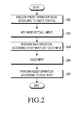
- FIG. 2 is a flowchart illustrating a process of performing a preset operation in a preset operation mode by using voice recognition according to an exemplary embodiment of the present invention.
- a preset operation mode is selected from a plurality of preset operation modes of the device 100 through a user's control input using one of the button 161, the keypad 166, and the microphone 162 of the input/output module 160, or the touch screen 190, and then the selected preset operation mode is executed in step 200.
- a key input or touch input by the user for executing the preset operation of the preset operation mode is performed.
- a preset operation according to the touch input in step 202 is performed.
- step 206 a voice is received from the user through the microphone 162 while the preset operation is executed. Thereafter, in step 208, an operation of recognizing the received voice by applying voice recognition of the voice recognition module 111, and assisting performance of the preset operation is performed using the recognized voice.
- the preset operation mode may include one or more various operation modes executed by a user's control input, for example, a text writing mode, a list menu execution mode, and a home screen execution mode. Further, the preset operation may include one or more various operations, for example a text input, a touch input, and scrolling and dragging applying the touch input.
- touch includes any suitable type of touch-based input, for example an operation in which the user contacts a particular area of the touch screen by using a body part or a touchable input device and then removing the body part or touchable input device which contacts the particular area, or a flick action in which the user contacts a particular area of the touch screen by using a body part or a touchable input device and then removes the body part or touchable input device in a movement direction on the terminal.
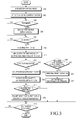
- FIG. 3 is a flowchart illustrating a process of modifying a text and assisting a preset operation by using voice recognition according to a first exemplary embodiment of the present invention. An operation of simultaneously inputting a text and a voice in the text writing mode and assisting a modification of the input text by using the input voice will be described.
- steps 300 to 306 are steps for performing the preset operation according to a key input or a touch input in the preset operation mode in the first process of FIG. 2 in which a main operation of executing the text writing mode and displaying the input text on a preset text display window is described.
- the text writing mode is executed through a user's control input in step 300, and a voice recognition function of the voice recognition module 111 is activated in step 302.
- the voice recognition function of the voice recognition module 111 may be automatically activated simultaneously with the execution of the text writing mode or may be activated by a user's selection.
- the input text is displayed on a preset text display window (i), as seen in FIG. 4A . If not, whether there is a voice input is checked in step 308.
- the remaining steps correspond to the second process of FIG. 2 of recognizing the voice input during the execution of the preset operation of the preset operation mode of the first process of FIG. 2 to assist performance of the operation of the first process according to the recognized voice.
- step 308 it is determined whether a voice is input through the microphone 162.
- the voice can be input independently of whether or not text is being input, for example in cases where the text is not input, the text is being input, or the text is input and then displayed in the text writing mode.
- the process will be described with reference to the case where the text is being input.
- Steps 311 to 318 describe the operation of assisting the modification of the text. That is, in step 311 the displayed text is compared with the recognized voice, as the user reads the displayed text aloud, which is input through the microphone 162. When the displayed text is not identical (or similar) to the recognized voice, it is determined in step 312 that the displayed text has an error. When the displayed text has an error, the recognized voice is converted to a text to assist in the modification of the displayed text, in step 314. When the displayed text is identical (or similar) to the recognized voice, it is determined that the displayed text has no error in step 312.
- the recognized voice is converted to the text in step 314, and the voice converted text is displayed as seen in FIG. 4A on a preset voice assist window (j), in step 315.
- the voice assist window (j) is set to be distinguished from the text display window (i), and is located and displayed adjacent to the text display window (i) at an upper, lower, left or right side.
- the user identifies contents of the text display window (i) and contents of the voice assist window (j) and determines in step 317 whether to change the contents of the text display window (i) into the contents of the voice assist window (j).
- the user converts the text displayed on the text display window (i) into the voice converted text displayed on the voice assist window (j) by applying a preset function to change the contents of the text display window (i) to the contents of the voice assist window (j) through a user's control in step 318.
- the preset function for changing the contents of the text display window (i) to the contents of the voice assist window (j) may be set as an item in the text writing mode, a popup window on the touch screen 190, or an input of a preset voice command using microphone 162. If the function is set as an item in the text writing mode or as a popup window, the user inputs the command using button 161 of keypad 166.
- step 319 The user then selects whether to end the text writing mode in step 319.
- the text writing mode does not end and the process returns to step 304.
- the user selects to end the text writing mode the text writing mode ends.
- step 312 if the input text is identical (or similar) to the recognized voice, that is, there is no error, steps 320 to 324 are performed, which describe performance of a preset operation command. That is, as a result of the determination where the input text has the error in step 312, when the displayed text has no error and a recognized voice is a preset operation command, steps 320 to 324 describe the performance of the preset operation command by applying the recognized voice.
- step 320 When the displayed text has no error in step 312, it is determined whether the recognized voice is the preset operation command in step 320.
- the recognized voice is the preset operation command
- the preset operation command is performed by applying the recognized voice in step 322.
- a result of the operation is output in step 324.
- performance of the operation command should not interrupt further inputting of the text and displaying the input text. That is, the text input can be performed simultaneously with the voice input and recognition of the input voice.
- the text when the text is input while the preset operation command of the input and recognized voice is performed, the text can be displayed.
- a meaningless voice of the recognized voice which has no similarity to the displayed text and the preset operation command is not applied when the voice recognition is applied.
- step 324 the user selects whether to end the text writing mode in step 319.
- the user also selects whether to end the text writing mode in step 319 if the recognized voice has no similarity to the displayed text and the preset operation command in step 320.
- the text writing mode does not end and the process returns to step 304.
- the text writing mode ends.
- FIGs. 4A to 4C illustrate an example of assisting the text writing for modification of the text by using voice recognition according to the first embodiment of the present invention.
- FIG. 4A illustrates an image in the terminal including the text display window (i) and the voice assist window (j).
- the text display window (i) displays the input text and a result of performing the text writing operation.
- the voice assist window (j) converts the input voice to the text and displays the converted text, and displays the status of the operation.
- the text is input through the physical or virtual keypad 166. Simultaneously with or after the text input, a voice having the same contents as the text is input through the microphone 162 by the user reading the text aloud.
- the input text is displayed on the text display window (i), and the input voice is converted to text and displayed on the voice assist window (j).
- the text displayed on the voice assist window (j) corresponds to an image generated by recognizing the input voice through the voice recognition, converting the voice to text, and then displaying the text on the voice assist window (j).
- the text input while the voice is input by the user may be preset to be highlighted or the input text may be preset to be distinguished from the voice of the user through an underline or highlight.
- the preset function may be a preset item that allows the user to select an application which changes the contents of the text display window (i) to the contents of the voice assist window (j), the preset function may be set to be displayed on the touch screen 190 as a popup window, or the preset function may be a preset voice command.
- FIG. 4C illustrates an image generated by changing the contents of the text display window (i) to the contents of the voice assist window (j).
- FIGs. 5A to 5C illustrate an example of assisting a preset operation using voice recognition according to a second exemplary embodiment of the present invention. An operation of assisting performance of the preset operation during a text input by using the voice recognition will be described in detail with reference to FIG. 5 .
- FIG. 5A illustrates an image on the terminal including the text display window (i) and the voice assist window (j), prior to the input of the voice.
- a text is input to the terminal through the physical or virtual keypad 166. Simultaneously with the text input, the user inputs a voice command of "Attach my current location" which is a preset operation command input through the microphone 162. As shown in FIG. 5B , an image generated by displaying an input text of "Damian's got a new pair of Nike's" on the text display window (i) and a text of "Attaching your current location" which expresses the performance of an operation command by recognizing an input voice on the voice assist window (j) is shown.
- FIG. 5C illustrates an example of a displayed result image generated by executing a map showing a user's position which is an output result displayed on the text display window (i) after the preset operation command is completely executed.
- FIGs. 6A to 6C illustrate an example of assisting a preset operation by using voice recognition according to a third exemplary embodiment of the present invention. An operation of assisting the preset operation by using the voice recognition while the text is input will be described in detail with reference to FIG. 6 .
- FIGs. 6A illustrates an example of a displayed result image generated by executing a map showing a user's position which is an output result as shown in FIG. 5C .
- the user inputs a voice command through the microphone 162 corresponding to a preset operation command of "Move a cursor behind 'store"' as shown in FIG. 6A .
- the command is for moving the cursor in the text to a position following the word "store” in the text shown in the text display window (i).
- FIG. 6B illustrates an image generated by moving the position of a cursor according to the operation command of the recognized voice of "Move a cursor behind 'store"'.
- FIG. 6C illustrates an image showing a result generated by inputting the text "right now” in a position where the cursor is located according to the recognized operation command of "Input 'right now”'.
- the preset operation command in the text writing mode may be set to operate functions preset to the terminal by the input voice, such as reproduction of music or a video, searching the Internet, and an execution of a particular application. Further, a result of the operation may be directly displayed on the text window or may appear as a popup window.
- FIG. 7 is a flowchart illustrating a process of assisting a preset operation and a text modification by using voice recognition according to the second embodiment of the present invention. An operation of simultaneously inputting a voice and a text in the text writing mode, performing a preset operation by using the input voice and assisting a modification of the input text by using the input voice will be described.
- steps 400 to 406 are steps for performing a preset operation according to a key input or a touch input in the preset operation mode of the first process of FIG. 2 , which describe an operation of executing the text writing mode and displaying the input text on a preset text display window.
- the text writing mode is executed through a user control input in step 400, and a voice recognition function of the voice recognition module 111 is activated in step 402.
- the voice recognition function of the voice recognition module 111 may be automatically activated simultaneously with the execution of the text writing mode or may be activated by a user's selection.
- the input text is displayed on a preset text display window (i) in step 406. If not, voice input is determined in step 408.
- the remaining steps are processes corresponding to the second process of FIG. 2 of recognizing the voice input during the execution of the preset operation of the preset operation mode as described in FIG. 2 to assist performance of the operation of the first process according to the recognized voice.
- a voice is input through the microphone 162 in step 408.
- the voice input at this time can be made independently of whether text is being input, for example where the text is not input, the text is being input, or the text is input and then displayed in the text writing mode.
- all these cases, where the text is not input, the text is being input, or the text is input and then displayed in the text writing mode, will be described with reference to the case where the text is being input.
- the activated voice recognition module 111 recognizes the input voice in step 410. If there is no voice input, the user determines whether to end the text writing mode at step 418.
- Steps 412 to 416 describe performance of the preset operation command.
- the preset operation command is performed by applying the recognized voice.
- the recognized voice is the preset operation command in step 412.
- the preset operation command is performed by applying the recognized voice in step 414.
- a result of the performance of the operation is output in step 416.
- the performance of the operation command should not interrupt the inputting of the text and the displaying of the input text. That is, the text input can be performed simultaneously with the voice input and recognition of the input voice. Further, when the text is input while the preset operation command of the input and recognized voice is performed, the text can be displayed.
- the user selects whether to end the text writing mode in step 418. When the user does not desire to end the text writing mode, the process returns to step 404. When the user selects to end the text writing mode, the text writing mode ends.
- Steps 420 to 429 describe the operation of assisting the modification of the text. That is, in step 412, if it is determined that the recognized voice is not the preset operation command, the possibility of an error in the input text is analyzed by comparing the displayed text with the recognized voice in step 420. When the displayed text is not identical to the recognized voice, it is determined that the displayed text has an error, and thus the recognized voice is converted to the text and a modification of the displayed text is assisted.
- step 422 it is determined whether the input text has an error in step 422. That is, when the displayed text is not identical to the recognized voice through the comparison between the displayed text and the recognized voice, it is determined that the displayed text has an error.
- the recognized voice is converted to text in step 424, and the voice converted text is displayed on the preset voice assist window (j) in step 426.
- the user identifies the contents of the text display window (i) and contents of the voice assist window (j) and determines whether to change the contents of the text display window (i) to the contents of the voice assist window (j) in step 428.
- the user converts the text displayed on the text display window (i) into the voice converted text displayed on the voice assist window (j) by applying a preset function to change the contents of the text display window (i) into the contents of the voice assist window (j) through a user's control input in step 429, which may be done by any of buttons 161, keypad 166, or a voice command input through microphone 162.
- the preset function for changing the contents of the text display window (i) into the contents of the voice assist window (j) may be set as an item in the text writing mode, a popup window on the touch screen 190, or an input of a preset voice command.
- a meaningless voice of the recognized voice which has no similarity to the displayed text and the preset operation command is not applied when the voice recognition is applied.
- step 429 the user selects whether to end the text writing mode in step 418.
- the process returns to step 404.
- the text writing mode ends.
- step 422 if there is no error in the text, the user selects whether to end the text writing mode in step 418. Also, in step 428, if the user decides not to change the contents of text display window (i) to the contents of voice assist window (j), the user selects whether to end the text writing mode in step 418.
- FIG. 8 is a flowchart illustrating a process of assisting a text modification by using voice recognition according to a third exemplary embodiment of the present invention. An operation of simultaneously inputting a text and a voice in the text writing mode and assisting an error modification of the input text by using the input voice will be described.
- FIG. 8 The operation of FIG. 8 is identical to the operation of assisting the modification of the input text by using the input voice in the text writing mode of FIG. 3 . Accordingly, the operation of assisting the modification of the text by using voice recognition will briefly described.
- the text writing mode is executed through a user control input in step 500, and a voice recognition function of the voice recognition module 111 is activated in step 502. Thereafter, it is determined whether the text is input through the physical or virtual keypad 166 according to a key input or a touch input in step 504. When the text is input, the input text is displayed on a preset text display window (i) in step 506. If not, voice input is determined in step 508.
- step 508 it is determined whether a voice is input through the microphone 162 in step 508.
- the activated voice recognition module 111 recognizes the input voice in step 510. If there is no voice input, the user determines whether to end the text writing mode in step 520.
- the possibility of the error of the input text is analyzed by comparing the displayed text with the recognized voice in step 511, and it is determined whether the input text has an error in step 512. That is, when the displayed text is not identical to the recognized voice through the comparison between the display text and the recognized voice, it is determined that the displayed text has an error. When the displayed text is identical to the recognized voice, it is determined that the displayed text has no error, and the user determines whether to end the text writing mode in step 520.
- the recognized voice is converted to text in step 514, and the voice converted text is displayed on a preset voice assist window (j) in step 515.
- the user identifies contents of the text display window (i) and contents of the voice assist window (j) and determines whether to change the contents of the text display window (i) to the contents of the voice assist window (j) in step 517.
- the user When the user desires to change the contents of the text display window (i) to the contents of the voice assist window (j), the user converts the text displayed on the text display window (i) into the voice converted text displayed on the voice assist window (j) by applying a preset function to change the contents of the text display window (i) to the contents of the voice assist window (j) through a user's control input in step 519, as described above.
- the user selects whether to end the text writing mode in step 520.
- the text writing mode does not end and the process returns to step 504.
- the user selects to end the text writing mode the text writing mode ends.
- FIG. 9 is a flowchart illustrating a process of assisting an input operation in a list menu by using voice recognition according to a fourth exemplary embodiment of the present invention. An operation of simultaneously inputting a preset operation command and a voice in a screen displaying the list and assisting an execution of the preset operation command by using the input voice will be described.
- steps 600 to 603 are steps for performing the preset operation of the operation mode according to a key input or a touch input in the preset operation mode in the first process of FIG. 2 .
- the list menu is executed through a user control input in step 600, and lists of the executed list menu are displayed in step 601.
- the voice recognition function of the voice recognition module 111 may be automatically activated or may be activated by a user's selection, using buttons 161, keypad 166 or microphone 162. Thereafter, it is determined whether there is a touch input on the touch screen 190 in step 602. If not, it is determined that whether voice is input in step 604. When there is the touch input on the touch screen 190, an operation of the touch input is executed in step 603.
- the touch input at this time is a scrolling touch input, which corresponds to an input of a flick operation in which the user contacts a particular area of displayed lists by using a body part or a touchable input device and then removes the body part or the touchable input device from the particular area in a movement direction.
- the displayed lists may be scrolled in an up, down, left, or right direction according to a scrolling direction.
- the remaining steps correspond to the second process of FIG. 2 of recognizing the voice input during the execution of the preset operation of the operation mode of the first process of FIG. 2 in which an operation of assisting a touch operation input in a list menu is described.
- step 604 it is determined whether a voice is input through the microphone 162. If not, the user determines whether to end the list menu mode in step 609.
- the input voice at this time can be made in all cases, such as where the touch is not input, the touch is being input, and a preset operation command is being performed during the touch input when the lists of the list menu are displayed.
- all these cases where the touch is not input, the touch is being input, or the preset operation command is being performed during the touch input when the lists of the list menu are displayed will be described with reference to the case where the touch operation is being performed.
- the activated voice recognition module 111 recognizes the input voice in step 605.
- the recognized voice is the preset operation command in step 606. If not, the user determines whether to end the list menu mode in step 609. A recognized voice which has no similarity with the preset operation command is not applied.
- the recognized voice is the preset operation command
- the preset operation command of the recognized voice is performed during performance of the touch operation in step 607, and a result of the execution of the operation command is output in step 608.
- the preset operation command may be a command set to automatically perform the scrolling operation from the display list to a desired position in the preset up, down, left, or right direction.
- the command set to automatically perform the scrolling operation from the list to the desired position may include a command set to automatically perform a scrolling operation to a position of one or more words, a character string, or a phrase, a position of a part of the all lists, and a position of a language for each country.
- step 609 it is determined whether to end the list menu through a user's selection in step 609.
- the list menu does not end and the process returns to step 602.
- a screen displaying the list menu ends.
- FIGs. 10 to 12 are examples of assisting an input operation in the list menu by using voice recognition according to fourth, fifth, and sixth exemplary embodiments of the present invention, respectively. Performance of the input operation in the list menu by using voice recognition will be described in detail with reference to FIGs. 10 to 12 .
- FIG. 10A , FIG. 11A , and FIG. 12A are images of screens where the list menu is executed and then lists are displayed.
- FIG. 10B , FIG. 11B , and FIG. 12B are images of screens displaying particular images when the displayed lists are scrolled.
- FIG. 10C illustrates an image of a screen where a scrolling operation is performed on the list to a part where items in the list beginning with the letter J begins when a voice of the preset command of "Until J" is input.
- FIG. 11C illustrates an image of a screen where a scrolling operation is performed to a part where a center of the entire list begins when a voice of the preset command of "Until half the list” is input.
- FIG. 12C is an image of a screen where a scrolling operation is performed to a part of the entire list where items in the list exist in the Korean language begins when a voice of the preset command of "Until Korean starts" is input.
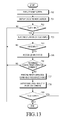
- FIG. 13 is a flowchart of assisting a home screen editing by using voice recognition according to a fifth exemplary embodiment of the present invention. An operation of simultaneously inputting a preset operation command and a voice in an executed home screen and assisting an execution of the preset operation command by using the input voice is described.
- steps 700 to 703 are steps for performing the preset operation of the operation mode according to a key input or a touch input in the preset operation mode in the first process of FIG. 2 .
- a home screen is executed through a user control input in step 700, and a page of the executed home screen is displayed in step 701.
- the home screen is preset to include preset home screen pages including preset items, wherein one or more home screen pages may be preset.
- the voice recognition function of the voice recognition module 111 may be automatically activated or may be activated by a user's selection using buttons 161, keypad 166 or microphone 162. Thereafter, it is determined whether there is a touch input on the touch screen 190 in step 702. When there is the touch input on the touch screen 190, an operation of the touch input is performed in step 703. If not, the process ends.
- the touch input at this time is a dragging touch input, which corresponds to an input of a flick operation in which the user contacts one or more particular items in a displayed page of the home screen by using a body part or a touchable input device and then removes the body part or the touchable input device from the contacted particular items in a movement direction.
- the items can be moved from one page of the home screen to another page of the home screen through the dragging in an up, down, left, or right direction according to a dragging direction.
- the remaining steps correspond to the second process of FIG. 2 of recognizing the voice input during the execution of the preset operation of the operation mode of the first process of FIG. 2 .
- the voice input through the microphone 162 can be made in all cases where a touch is not input, a touch is being input, and a preset operation command is being performed during the touch input when the home screen is displayed.
- a preset operation command is being performed during the touch input when the home screen is displayed.
- step 706 it is determined whether the recognized voice is the preset operation command in step 706. At this time, a recognized voice which has no similarity with the preset operation command is not applied. If the recognized voice is not the preset operation command, the process ends.
- a determination of whether the recognized voice is the preset operation command in step 706 will be described in detail.
- “dragging the item” means “placing the item”.
- "dragging the item” means “returning the item to an original place”.
- the recognized voice in a dragged state is the preset operation command.
- the preset operation command of the recognized voice is performed during performance of the touch operation in step 707, and a result of performance of the operation command is output in step 708.
- the preset operation command may be a preset operation command which moves a preset item of a page of the preset home screen to another page. Further, the preset operation command may be a preset command which generates a new page of the home screen.
- step 702 may be performed again when the user desires to continuously perform the operations, and the home screen editing ends when the user does not perform the touch input in step 709.
- FIGs. 14A to 14E illustrate an example of assisting the home screen editing by using voice recognition according to the seventh embodiment of the present invention.
- FIG. 14A illustrates an image of a screen where the home screen is executed and then displayed
- FIG. 14B illustrates an image of an editing mode screen of the home screen when a touch is input and a touch state is maintained. It is assumed that the home screen of FIG. 14A and FIG. 14B is page 1.
- FIG. 14C illustrates an image where the item on the home screen is dragged to another page of the home screen through the touch input by the user. It is assumed that the home screen of FIG. 14C is page 3 and there is no space to place a new item in the screen of page 3. As illustrated in FIG. 14C , when there is no space to place the new item in the page of the home screen to which the item is dragged, a message informing the user that there is no space is displayed on the screen or the user is informed of the fact that there is no space through a voice, through which the user can identify that there is no space.
- the user inputs the preset operation command through the voice in a dragging operation state, and the terminal performs the preset operation command by recognizing the input voice. For example, the user can move all items in page 3 to another page of the home screen through a voice command of "Move all other items to the next page".
- FIG. 14D illustrates an image in a touch and dragging state where the preset operation command is performed, and all items in page 3 are moved to another page of the home screen.
- FIG. 14E illustrates an image in a touch and dragging state where the touch ends, an icon is placed in a position where the touch ends, and an editing mode ends.
- the preset operation command in the home screen may be set to perform functions such as deletion and copy of the item or set to move only some items selected by the user when the user desires to move items.
- exemplary embodiments of the present invention can be implemented in software, hardware, or a combination thereof. Any such software may be stored as described above, for example, in a volatile or non-volatile storage device, for example a ROM, a RAM, a memory chip, a memory device, or a memory IC, or a recordable optical or magnetic medium, for example a CD, a DVD, a magnetic disk, or a magnetic tape, regardless of its ability to be erased or its ability to be re-recorded.
- a volatile or non-volatile storage device for example a ROM, a RAM, a memory chip, a memory device, or a memory IC
- a recordable optical or magnetic medium for example a CD, a DVD, a magnetic disk, or a magnetic tape
- a memory, storage device and storage media are examples of machine-readable devices or media suitable for storing a program including instructions that, when executed by a processor, implement embodiments of the present invention. Therefore, embodiments of the present invention provide a program including code for implementing a system, apparatus or method as claimed in any claim of the accompanying claims, and a machine-readable device or media for storing such a program. Further, such a program may be electronically conveyed through any medium, for example a communication signal transferred via a wired or wireless connection, and embodiments of the present invention appropriately encompass the same.
Landscapes
- Engineering & Computer Science (AREA)
- Theoretical Computer Science (AREA)
- Human Computer Interaction (AREA)
- Physics & Mathematics (AREA)
- General Engineering & Computer Science (AREA)
- Health & Medical Sciences (AREA)
- Audiology, Speech & Language Pathology (AREA)
- Multimedia (AREA)
- General Physics & Mathematics (AREA)
- Acoustics & Sound (AREA)
- Computational Linguistics (AREA)
- General Health & Medical Sciences (AREA)
- User Interface Of Digital Computer (AREA)
- Position Input By Displaying (AREA)
Applications Claiming Priority (1)
| Application Number | Priority Date | Filing Date | Title |
|---|---|---|---|
| KR1020120111402A KR102009423B1 (ko) | 2012-10-08 | 2012-10-08 | 음성 인식을 이용한 미리 설정된 동작 모드의 수행 방법 및 장치 |
Publications (3)
| Publication Number | Publication Date |
|---|---|
| EP2717259A2 true EP2717259A2 (de) | 2014-04-09 |
| EP2717259A3 EP2717259A3 (de) | 2014-04-30 |
| EP2717259B1 EP2717259B1 (de) | 2016-09-14 |
Family
ID=49303887
Family Applications (1)
| Application Number | Title | Priority Date | Filing Date |
|---|---|---|---|
| EP13187798.7A Not-in-force EP2717259B1 (de) | 2012-10-08 | 2013-10-08 | Verfahren und Vorrichtung zur Durchführung eines voreingestellten Betriebsmodus mittels Spracherkennung |
Country Status (8)
| Country | Link |
|---|---|
| US (2) | US20140100850A1 (de) |
| EP (1) | EP2717259B1 (de) |
| JP (1) | JP6347587B2 (de) |
| KR (1) | KR102009423B1 (de) |
| CN (1) | CN103716454A (de) |
| AU (1) | AU2013237690B2 (de) |
| BR (1) | BR102013025963A2 (de) |
| RU (1) | RU2013144921A (de) |
Cited By (68)
| Publication number | Priority date | Publication date | Assignee | Title |
|---|---|---|---|---|
| WO2016054885A1 (zh) * | 2014-10-09 | 2016-04-14 | 中兴通讯股份有限公司 | 操作对象的处理方法及装置 |
| WO2018168114A1 (en) * | 2017-03-16 | 2018-09-20 | Ricoh Company, Ltd. | Information processing system, information processing apparatus, information processing program and information processing method |
| US10747498B2 (en) | 2015-09-08 | 2020-08-18 | Apple Inc. | Zero latency digital assistant |
| US10978090B2 (en) | 2013-02-07 | 2021-04-13 | Apple Inc. | Voice trigger for a digital assistant |
| US10984798B2 (en) | 2018-06-01 | 2021-04-20 | Apple Inc. | Voice interaction at a primary device to access call functionality of a companion device |
| US11009970B2 (en) | 2018-06-01 | 2021-05-18 | Apple Inc. | Attention aware virtual assistant dismissal |
| US11037565B2 (en) | 2016-06-10 | 2021-06-15 | Apple Inc. | Intelligent digital assistant in a multi-tasking environment |
| US11070949B2 (en) | 2015-05-27 | 2021-07-20 | Apple Inc. | Systems and methods for proactively identifying and surfacing relevant content on an electronic device with a touch-sensitive display |
| US11087759B2 (en) | 2015-03-08 | 2021-08-10 | Apple Inc. | Virtual assistant activation |
| US11120372B2 (en) | 2011-06-03 | 2021-09-14 | Apple Inc. | Performing actions associated with task items that represent tasks to perform |
| US11133008B2 (en) | 2014-05-30 | 2021-09-28 | Apple Inc. | Reducing the need for manual start/end-pointing and trigger phrases |
| US11152002B2 (en) | 2016-06-11 | 2021-10-19 | Apple Inc. | Application integration with a digital assistant |
| US11169616B2 (en) | 2018-05-07 | 2021-11-09 | Apple Inc. | Raise to speak |
| US11237797B2 (en) | 2019-05-31 | 2022-02-01 | Apple Inc. | User activity shortcut suggestions |
| US11257504B2 (en) | 2014-05-30 | 2022-02-22 | Apple Inc. | Intelligent assistant for home automation |
| US11321116B2 (en) | 2012-05-15 | 2022-05-03 | Apple Inc. | Systems and methods for integrating third party services with a digital assistant |
| US11348582B2 (en) | 2008-10-02 | 2022-05-31 | Apple Inc. | Electronic devices with voice command and contextual data processing capabilities |
| US11380310B2 (en) | 2017-05-12 | 2022-07-05 | Apple Inc. | Low-latency intelligent automated assistant |
| US11388291B2 (en) | 2013-03-14 | 2022-07-12 | Apple Inc. | System and method for processing voicemail |
| US11405466B2 (en) | 2017-05-12 | 2022-08-02 | Apple Inc. | Synchronization and task delegation of a digital assistant |
| US11423886B2 (en) | 2010-01-18 | 2022-08-23 | Apple Inc. | Task flow identification based on user intent |
| US11431642B2 (en) | 2018-06-01 | 2022-08-30 | Apple Inc. | Variable latency device coordination |
| US11467802B2 (en) | 2017-05-11 | 2022-10-11 | Apple Inc. | Maintaining privacy of personal information |
| US11500672B2 (en) | 2015-09-08 | 2022-11-15 | Apple Inc. | Distributed personal assistant |
| US11516537B2 (en) | 2014-06-30 | 2022-11-29 | Apple Inc. | Intelligent automated assistant for TV user interactions |
| US11526368B2 (en) | 2015-11-06 | 2022-12-13 | Apple Inc. | Intelligent automated assistant in a messaging environment |
| US11532306B2 (en) | 2017-05-16 | 2022-12-20 | Apple Inc. | Detecting a trigger of a digital assistant |
| US11580990B2 (en) | 2017-05-12 | 2023-02-14 | Apple Inc. | User-specific acoustic models |
| US11599331B2 (en) | 2017-05-11 | 2023-03-07 | Apple Inc. | Maintaining privacy of personal information |
| US11657813B2 (en) | 2019-05-31 | 2023-05-23 | Apple Inc. | Voice identification in digital assistant systems |
| US11671920B2 (en) | 2007-04-03 | 2023-06-06 | Apple Inc. | Method and system for operating a multifunction portable electronic device using voice-activation |
| US11670289B2 (en) | 2014-05-30 | 2023-06-06 | Apple Inc. | Multi-command single utterance input method |
| US11675829B2 (en) | 2017-05-16 | 2023-06-13 | Apple Inc. | Intelligent automated assistant for media exploration |
| US11675491B2 (en) | 2019-05-06 | 2023-06-13 | Apple Inc. | User configurable task triggers |
| US11696060B2 (en) | 2020-07-21 | 2023-07-04 | Apple Inc. | User identification using headphones |
| US11705130B2 (en) | 2019-05-06 | 2023-07-18 | Apple Inc. | Spoken notifications |
| US11710482B2 (en) | 2018-03-26 | 2023-07-25 | Apple Inc. | Natural assistant interaction |
| US11727219B2 (en) | 2013-06-09 | 2023-08-15 | Apple Inc. | System and method for inferring user intent from speech inputs |
| US11755276B2 (en) | 2020-05-12 | 2023-09-12 | Apple Inc. | Reducing description length based on confidence |
| US11765209B2 (en) | 2020-05-11 | 2023-09-19 | Apple Inc. | Digital assistant hardware abstraction |
| US11783815B2 (en) | 2019-03-18 | 2023-10-10 | Apple Inc. | Multimodality in digital assistant systems |
| US11790914B2 (en) | 2019-06-01 | 2023-10-17 | Apple Inc. | Methods and user interfaces for voice-based control of electronic devices |
| US11798547B2 (en) | 2013-03-15 | 2023-10-24 | Apple Inc. | Voice activated device for use with a voice-based digital assistant |
| US11809783B2 (en) | 2016-06-11 | 2023-11-07 | Apple Inc. | Intelligent device arbitration and control |
| US11809483B2 (en) | 2015-09-08 | 2023-11-07 | Apple Inc. | Intelligent automated assistant for media search and playback |
| US11838734B2 (en) | 2020-07-20 | 2023-12-05 | Apple Inc. | Multi-device audio adjustment coordination |
| US11854539B2 (en) | 2018-05-07 | 2023-12-26 | Apple Inc. | Intelligent automated assistant for delivering content from user experiences |
| US11853647B2 (en) | 2015-12-23 | 2023-12-26 | Apple Inc. | Proactive assistance based on dialog communication between devices |
| US11853536B2 (en) | 2015-09-08 | 2023-12-26 | Apple Inc. | Intelligent automated assistant in a media environment |
| US11886805B2 (en) | 2015-11-09 | 2024-01-30 | Apple Inc. | Unconventional virtual assistant interactions |
| US11888791B2 (en) | 2019-05-21 | 2024-01-30 | Apple Inc. | Providing message response suggestions |
| US11893992B2 (en) | 2018-09-28 | 2024-02-06 | Apple Inc. | Multi-modal inputs for voice commands |
| US11914848B2 (en) | 2020-05-11 | 2024-02-27 | Apple Inc. | Providing relevant data items based on context |
| US11947873B2 (en) | 2015-06-29 | 2024-04-02 | Apple Inc. | Virtual assistant for media playback |
| US12001933B2 (en) | 2015-05-15 | 2024-06-04 | Apple Inc. | Virtual assistant in a communication session |
| US12010262B2 (en) | 2013-08-06 | 2024-06-11 | Apple Inc. | Auto-activating smart responses based on activities from remote devices |
| US12014118B2 (en) | 2017-05-15 | 2024-06-18 | Apple Inc. | Multi-modal interfaces having selection disambiguation and text modification capability |
| US12051413B2 (en) | 2015-09-30 | 2024-07-30 | Apple Inc. | Intelligent device identification |
| US12067985B2 (en) | 2018-06-01 | 2024-08-20 | Apple Inc. | Virtual assistant operations in multi-device environments |
| US12073147B2 (en) | 2013-06-09 | 2024-08-27 | Apple Inc. | Device, method, and graphical user interface for enabling conversation persistence across two or more instances of a digital assistant |
| US12087308B2 (en) | 2010-01-18 | 2024-09-10 | Apple Inc. | Intelligent automated assistant |
| US12197817B2 (en) | 2016-06-11 | 2025-01-14 | Apple Inc. | Intelligent device arbitration and control |
| US12223282B2 (en) | 2016-06-09 | 2025-02-11 | Apple Inc. | Intelligent automated assistant in a home environment |
| US12254887B2 (en) | 2017-05-16 | 2025-03-18 | Apple Inc. | Far-field extension of digital assistant services for providing a notification of an event to a user |
| US12260234B2 (en) | 2017-01-09 | 2025-03-25 | Apple Inc. | Application integration with a digital assistant |
| US12301635B2 (en) | 2020-05-11 | 2025-05-13 | Apple Inc. | Digital assistant hardware abstraction |
| US12556890B2 (en) | 2011-06-03 | 2026-02-17 | Apple Inc. | Active transport based notifications |
| US12613730B2 (en) | 2022-03-03 | 2026-04-28 | Apple Inc. | Systems and methods for integrating third party services with a digital assistant |
Families Citing this family (19)
| Publication number | Priority date | Publication date | Assignee | Title |
|---|---|---|---|---|
| CN103198831A (zh) * | 2013-04-10 | 2013-07-10 | 威盛电子股份有限公司 | 语音操控方法与移动终端装置 |
| CN104252285B (zh) * | 2014-06-03 | 2018-04-27 | 联想(北京)有限公司 | 一种信息处理方法及电子设备 |
| KR102302721B1 (ko) | 2014-11-24 | 2021-09-15 | 삼성전자주식회사 | 복수의 어플리케이션을 실행하는 전자 장치 및 그 제어 방법 |
| US10726197B2 (en) * | 2015-03-26 | 2020-07-28 | Lenovo (Singapore) Pte. Ltd. | Text correction using a second input |
| US10146355B2 (en) * | 2015-03-26 | 2018-12-04 | Lenovo (Singapore) Pte. Ltd. | Human interface device input fusion |
| KR101632534B1 (ko) * | 2015-04-06 | 2016-06-21 | 주식회사 카카오 | 오타 처리 방법 및 그 방법을 수행하는 사용자 단말 |
| EP3281122A4 (de) * | 2015-07-24 | 2018-04-25 | Samsung Electronics Co., Ltd. | Verfahren zur automatischen erzeugung eines dynamischen index für auf einer elektronischen vorrichtung angezeigten inhalt |
| WO2018101459A1 (ja) | 2016-12-02 | 2018-06-07 | ヤマハ株式会社 | コンテンツ再生機器、収音機器、及びコンテンツ再生システム |
| CN106940595B (zh) * | 2017-03-16 | 2019-10-11 | 北京云知声信息技术有限公司 | 一种信息编辑方法及装置 |
| CN108509175B (zh) * | 2018-03-30 | 2021-10-22 | 联想(北京)有限公司 | 一种语音交互方法及电子设备 |
| JP7047592B2 (ja) * | 2018-05-22 | 2022-04-05 | コニカミノルタ株式会社 | 操作画面の表示装置、画像処理装置及びプログラム |
| KR102136463B1 (ko) * | 2018-07-27 | 2020-07-21 | (주)휴맥스 | 스마트 디바이스 및 그 제어 방법 |
| CN109361814A (zh) * | 2018-09-25 | 2019-02-19 | 联想(北京)有限公司 | 一种控制方法及电子设备 |
| KR102931615B1 (ko) | 2019-02-14 | 2026-02-27 | 삼성전자주식회사 | 음성 인식 서비스를 제공하는 방법 및 그 전자 장치 |
| US11838459B2 (en) | 2019-06-07 | 2023-12-05 | Canon Kabushiki Kaisha | Information processing system, information processing apparatus, and information processing method |
| US20210090558A1 (en) * | 2019-09-24 | 2021-03-25 | Audio Analytic Ltd | Controlling a user interface |
| KR20230102506A (ko) | 2021-12-30 | 2023-07-07 | 삼성전자주식회사 | 전자 장치 및 이의 제어 방법 |
| KR102793798B1 (ko) * | 2022-08-23 | 2025-04-11 | 국방과학연구소 | 정보를 출력하는 전자 장치의 동작 방법 및 이를 지원하는 전자 장치 |
| CN116312514B (zh) * | 2023-02-22 | 2025-10-28 | 海信视像科技股份有限公司 | 显示设备和语音控制方法 |
Citations (2)
| Publication number | Priority date | Publication date | Assignee | Title |
|---|---|---|---|---|
| KR20090020265A (ko) | 2007-08-23 | 2009-02-26 | 삼성전자주식회사 | 휴대 단말기 및 그 메시지 작성 방법 |
| KR20100064875A (ko) | 2008-12-05 | 2010-06-15 | 엘지전자 주식회사 | 단말기 및 그 제어 방법 |
Family Cites Families (32)
| Publication number | Priority date | Publication date | Assignee | Title |
|---|---|---|---|---|
| CN1867068A (zh) * | 1998-07-14 | 2006-11-22 | 联合视频制品公司 | 交互式电视节目导视系统及其方法 |
| US6545669B1 (en) * | 1999-03-26 | 2003-04-08 | Husam Kinawi | Object-drag continuity between discontinuous touch-screens |
| EP1110204B1 (de) * | 1999-07-08 | 2005-06-01 | Koninklijke Philips Electronics N.V. | Anpassung eines spracherkenners an korrigierte texte |
| US7467089B2 (en) * | 2001-09-05 | 2008-12-16 | Roth Daniel L | Combined speech and handwriting recognition |
| US20030061053A1 (en) | 2001-09-27 | 2003-03-27 | Payne Michael J. | Method and apparatus for processing inputs into a computing device |
| US6791529B2 (en) * | 2001-12-13 | 2004-09-14 | Koninklijke Philips Electronics N.V. | UI with graphics-assisted voice control system |
| JP2003195939A (ja) * | 2001-12-26 | 2003-07-11 | Toshiba Corp | プラント監視制御システム |
| US6895257B2 (en) * | 2002-02-18 | 2005-05-17 | Matsushita Electric Industrial Co., Ltd. | Personalized agent for portable devices and cellular phone |
| US7380203B2 (en) * | 2002-05-14 | 2008-05-27 | Microsoft Corporation | Natural input recognition tool |
| JP2006515073A (ja) * | 2002-09-06 | 2006-05-18 | ヴォイス シグナル テクノロジーズ インコーポレーティッド | 音声認識を実行するための方法、システム、及びプログラミング |
| GB2433002A (en) * | 2003-09-25 | 2007-06-06 | Canon Europa Nv | Processing of Text Data involving an Ambiguous Keyboard and Method thereof. |
| US7574356B2 (en) * | 2004-07-19 | 2009-08-11 | At&T Intellectual Property Ii, L.P. | System and method for spelling recognition using speech and non-speech input |
| US8942985B2 (en) * | 2004-11-16 | 2015-01-27 | Microsoft Corporation | Centralized method and system for clarifying voice commands |
| NZ589382A (en) * | 2005-06-16 | 2012-03-30 | Keyless Systems Ltd | Data Entry System |
| US7941316B2 (en) * | 2005-10-28 | 2011-05-10 | Microsoft Corporation | Combined speech and alternate input modality to a mobile device |
| WO2008064137A2 (en) * | 2006-11-17 | 2008-05-29 | Rao Ashwin P | Predictive speech-to-text input |
| US8219406B2 (en) * | 2007-03-15 | 2012-07-10 | Microsoft Corporation | Speech-centric multimodal user interface design in mobile technology |
| US7877700B2 (en) | 2007-11-20 | 2011-01-25 | International Business Machines Corporation | Adding accessibility to drag-and-drop web content |
| US8077975B2 (en) * | 2008-02-26 | 2011-12-13 | Microsoft Corporation | Handwriting symbol recognition accuracy using speech input |
| US8958848B2 (en) * | 2008-04-08 | 2015-02-17 | Lg Electronics Inc. | Mobile terminal and menu control method thereof |
| US20090326938A1 (en) * | 2008-05-28 | 2009-12-31 | Nokia Corporation | Multiword text correction |
| KR100988397B1 (ko) | 2008-06-09 | 2010-10-19 | 엘지전자 주식회사 | 이동 단말기 및 그의 텍스트 수정방법 |
| KR101502003B1 (ko) * | 2008-07-08 | 2015-03-12 | 엘지전자 주식회사 | 이동 단말기 및 그 텍스트 입력 방법 |
| WO2010006087A1 (en) * | 2008-07-08 | 2010-01-14 | David Seaberg | Process for providing and editing instructions, data, data structures, and algorithms in a computer system |
| KR101613838B1 (ko) * | 2009-05-19 | 2016-05-02 | 삼성전자주식회사 | 휴대 단말기의 홈 스크린 지원 방법 및 이를 지원하는 휴대 단말기 |
| US8661369B2 (en) * | 2010-06-17 | 2014-02-25 | Lg Electronics Inc. | Mobile terminal and method of controlling the same |
| US8359020B2 (en) | 2010-08-06 | 2013-01-22 | Google Inc. | Automatically monitoring for voice input based on context |
| KR101718027B1 (ko) * | 2010-09-09 | 2017-03-20 | 엘지전자 주식회사 | 이동 단말기 및 그의 메모 관리방법 |
| US8836638B2 (en) * | 2010-09-25 | 2014-09-16 | Hewlett-Packard Development Company, L.P. | Silent speech based command to a computing device |
| WO2013022221A2 (en) * | 2011-08-05 | 2013-02-14 | Samsung Electronics Co., Ltd. | Method for controlling electronic apparatus based on voice recognition and motion recognition, and electronic apparatus applying the same |
| JP6024675B2 (ja) * | 2014-01-17 | 2016-11-16 | 株式会社デンソー | 音声認識端末装置、音声認識システム、音声認識方法 |
| US9606716B2 (en) | 2014-10-24 | 2017-03-28 | Google Inc. | Drag-and-drop on a mobile device |
-
2012
- 2012-10-08 KR KR1020120111402A patent/KR102009423B1/ko not_active Expired - Fee Related
-
2013
- 2013-07-30 US US13/954,432 patent/US20140100850A1/en not_active Abandoned
- 2013-10-03 AU AU2013237690A patent/AU2013237690B2/en not_active Ceased
- 2013-10-07 RU RU2013144921/08A patent/RU2013144921A/ru not_active Application Discontinuation
- 2013-10-08 JP JP2013210818A patent/JP6347587B2/ja not_active Expired - Fee Related
- 2013-10-08 CN CN201310463866.1A patent/CN103716454A/zh active Pending
- 2013-10-08 BR BR102013025963-2A patent/BR102013025963A2/pt not_active IP Right Cessation
- 2013-10-08 EP EP13187798.7A patent/EP2717259B1/de not_active Not-in-force
-
2019
- 2019-01-15 US US16/247,987 patent/US10825456B2/en not_active Expired - Fee Related
Patent Citations (2)
| Publication number | Priority date | Publication date | Assignee | Title |
|---|---|---|---|---|
| KR20090020265A (ko) | 2007-08-23 | 2009-02-26 | 삼성전자주식회사 | 휴대 단말기 및 그 메시지 작성 방법 |
| KR20100064875A (ko) | 2008-12-05 | 2010-06-15 | 엘지전자 주식회사 | 단말기 및 그 제어 방법 |
Cited By (122)
| Publication number | Priority date | Publication date | Assignee | Title |
|---|---|---|---|---|
| US12477470B2 (en) | 2007-04-03 | 2025-11-18 | Apple Inc. | Method and system for operating a multi-function portable electronic device using voice-activation |
| US11671920B2 (en) | 2007-04-03 | 2023-06-06 | Apple Inc. | Method and system for operating a multifunction portable electronic device using voice-activation |
| US11979836B2 (en) | 2007-04-03 | 2024-05-07 | Apple Inc. | Method and system for operating a multi-function portable electronic device using voice-activation |
| US11900936B2 (en) | 2008-10-02 | 2024-02-13 | Apple Inc. | Electronic devices with voice command and contextual data processing capabilities |
| US12361943B2 (en) | 2008-10-02 | 2025-07-15 | Apple Inc. | Electronic devices with voice command and contextual data processing capabilities |
| US11348582B2 (en) | 2008-10-02 | 2022-05-31 | Apple Inc. | Electronic devices with voice command and contextual data processing capabilities |
| US11423886B2 (en) | 2010-01-18 | 2022-08-23 | Apple Inc. | Task flow identification based on user intent |
| US12431128B2 (en) | 2010-01-18 | 2025-09-30 | Apple Inc. | Task flow identification based on user intent |
| US12087308B2 (en) | 2010-01-18 | 2024-09-10 | Apple Inc. | Intelligent automated assistant |
| US12165635B2 (en) | 2010-01-18 | 2024-12-10 | Apple Inc. | Intelligent automated assistant |
| US12556890B2 (en) | 2011-06-03 | 2026-02-17 | Apple Inc. | Active transport based notifications |
| US11120372B2 (en) | 2011-06-03 | 2021-09-14 | Apple Inc. | Performing actions associated with task items that represent tasks to perform |
| US11321116B2 (en) | 2012-05-15 | 2022-05-03 | Apple Inc. | Systems and methods for integrating third party services with a digital assistant |
| US11557310B2 (en) | 2013-02-07 | 2023-01-17 | Apple Inc. | Voice trigger for a digital assistant |
| US12277954B2 (en) | 2013-02-07 | 2025-04-15 | Apple Inc. | Voice trigger for a digital assistant |
| US11636869B2 (en) | 2013-02-07 | 2023-04-25 | Apple Inc. | Voice trigger for a digital assistant |
| US10978090B2 (en) | 2013-02-07 | 2021-04-13 | Apple Inc. | Voice trigger for a digital assistant |
| US12009007B2 (en) | 2013-02-07 | 2024-06-11 | Apple Inc. | Voice trigger for a digital assistant |
| US11862186B2 (en) | 2013-02-07 | 2024-01-02 | Apple Inc. | Voice trigger for a digital assistant |
| US11388291B2 (en) | 2013-03-14 | 2022-07-12 | Apple Inc. | System and method for processing voicemail |
| US11798547B2 (en) | 2013-03-15 | 2023-10-24 | Apple Inc. | Voice activated device for use with a voice-based digital assistant |
| US11727219B2 (en) | 2013-06-09 | 2023-08-15 | Apple Inc. | System and method for inferring user intent from speech inputs |
| US12073147B2 (en) | 2013-06-09 | 2024-08-27 | Apple Inc. | Device, method, and graphical user interface for enabling conversation persistence across two or more instances of a digital assistant |
| US12010262B2 (en) | 2013-08-06 | 2024-06-11 | Apple Inc. | Auto-activating smart responses based on activities from remote devices |
| US12118999B2 (en) | 2014-05-30 | 2024-10-15 | Apple Inc. | Reducing the need for manual start/end-pointing and trigger phrases |
| US11810562B2 (en) | 2014-05-30 | 2023-11-07 | Apple Inc. | Reducing the need for manual start/end-pointing and trigger phrases |
| US11257504B2 (en) | 2014-05-30 | 2022-02-22 | Apple Inc. | Intelligent assistant for home automation |
| US11699448B2 (en) | 2014-05-30 | 2023-07-11 | Apple Inc. | Intelligent assistant for home automation |
| US11670289B2 (en) | 2014-05-30 | 2023-06-06 | Apple Inc. | Multi-command single utterance input method |
| US11133008B2 (en) | 2014-05-30 | 2021-09-28 | Apple Inc. | Reducing the need for manual start/end-pointing and trigger phrases |
| US12067990B2 (en) | 2014-05-30 | 2024-08-20 | Apple Inc. | Intelligent assistant for home automation |
| US11516537B2 (en) | 2014-06-30 | 2022-11-29 | Apple Inc. | Intelligent automated assistant for TV user interactions |
| US12200297B2 (en) | 2014-06-30 | 2025-01-14 | Apple Inc. | Intelligent automated assistant for TV user interactions |
| US11838579B2 (en) | 2014-06-30 | 2023-12-05 | Apple Inc. | Intelligent automated assistant for TV user interactions |
| WO2016054885A1 (zh) * | 2014-10-09 | 2016-04-14 | 中兴通讯股份有限公司 | 操作对象的处理方法及装置 |
| US12236952B2 (en) | 2015-03-08 | 2025-02-25 | Apple Inc. | Virtual assistant activation |
| US11842734B2 (en) | 2015-03-08 | 2023-12-12 | Apple Inc. | Virtual assistant activation |
| US11087759B2 (en) | 2015-03-08 | 2021-08-10 | Apple Inc. | Virtual assistant activation |
| US12333404B2 (en) | 2015-05-15 | 2025-06-17 | Apple Inc. | Virtual assistant in a communication session |
| US12154016B2 (en) | 2015-05-15 | 2024-11-26 | Apple Inc. | Virtual assistant in a communication session |
| US12001933B2 (en) | 2015-05-15 | 2024-06-04 | Apple Inc. | Virtual assistant in a communication session |
| US11070949B2 (en) | 2015-05-27 | 2021-07-20 | Apple Inc. | Systems and methods for proactively identifying and surfacing relevant content on an electronic device with a touch-sensitive display |
| US11947873B2 (en) | 2015-06-29 | 2024-04-02 | Apple Inc. | Virtual assistant for media playback |
| US11954405B2 (en) | 2015-09-08 | 2024-04-09 | Apple Inc. | Zero latency digital assistant |
| US11500672B2 (en) | 2015-09-08 | 2022-11-15 | Apple Inc. | Distributed personal assistant |
| US11550542B2 (en) | 2015-09-08 | 2023-01-10 | Apple Inc. | Zero latency digital assistant |
| US12204932B2 (en) | 2015-09-08 | 2025-01-21 | Apple Inc. | Distributed personal assistant |
| US11853536B2 (en) | 2015-09-08 | 2023-12-26 | Apple Inc. | Intelligent automated assistant in a media environment |
| US12386491B2 (en) | 2015-09-08 | 2025-08-12 | Apple Inc. | Intelligent automated assistant in a media environment |
| US11126400B2 (en) | 2015-09-08 | 2021-09-21 | Apple Inc. | Zero latency digital assistant |
| US10747498B2 (en) | 2015-09-08 | 2020-08-18 | Apple Inc. | Zero latency digital assistant |
| US11809483B2 (en) | 2015-09-08 | 2023-11-07 | Apple Inc. | Intelligent automated assistant for media search and playback |
| US12608171B2 (en) | 2015-09-08 | 2026-04-21 | Apple Inc. | Zero latency digital assistant |
| US12051413B2 (en) | 2015-09-30 | 2024-07-30 | Apple Inc. | Intelligent device identification |
| US11809886B2 (en) | 2015-11-06 | 2023-11-07 | Apple Inc. | Intelligent automated assistant in a messaging environment |
| US11526368B2 (en) | 2015-11-06 | 2022-12-13 | Apple Inc. | Intelligent automated assistant in a messaging environment |
| US11886805B2 (en) | 2015-11-09 | 2024-01-30 | Apple Inc. | Unconventional virtual assistant interactions |
| US11853647B2 (en) | 2015-12-23 | 2023-12-26 | Apple Inc. | Proactive assistance based on dialog communication between devices |
| US12223282B2 (en) | 2016-06-09 | 2025-02-11 | Apple Inc. | Intelligent automated assistant in a home environment |
| US12175977B2 (en) | 2016-06-10 | 2024-12-24 | Apple Inc. | Intelligent digital assistant in a multi-tasking environment |
| US11657820B2 (en) | 2016-06-10 | 2023-05-23 | Apple Inc. | Intelligent digital assistant in a multi-tasking environment |
| US11037565B2 (en) | 2016-06-10 | 2021-06-15 | Apple Inc. | Intelligent digital assistant in a multi-tasking environment |
| US11809783B2 (en) | 2016-06-11 | 2023-11-07 | Apple Inc. | Intelligent device arbitration and control |
| US12197817B2 (en) | 2016-06-11 | 2025-01-14 | Apple Inc. | Intelligent device arbitration and control |
| US11749275B2 (en) | 2016-06-11 | 2023-09-05 | Apple Inc. | Application integration with a digital assistant |
| US12293763B2 (en) | 2016-06-11 | 2025-05-06 | Apple Inc. | Application integration with a digital assistant |
| US11152002B2 (en) | 2016-06-11 | 2021-10-19 | Apple Inc. | Application integration with a digital assistant |
| US12260234B2 (en) | 2017-01-09 | 2025-03-25 | Apple Inc. | Application integration with a digital assistant |
| WO2018168114A1 (en) * | 2017-03-16 | 2018-09-20 | Ricoh Company, Ltd. | Information processing system, information processing apparatus, information processing program and information processing method |
| US11163835B2 (en) | 2017-03-16 | 2021-11-02 | Ricoh Company, Ltd. | Information processing system, information processing apparatus, information processing program and information processing method |
| US11599331B2 (en) | 2017-05-11 | 2023-03-07 | Apple Inc. | Maintaining privacy of personal information |
| US11467802B2 (en) | 2017-05-11 | 2022-10-11 | Apple Inc. | Maintaining privacy of personal information |
| US11862151B2 (en) | 2017-05-12 | 2024-01-02 | Apple Inc. | Low-latency intelligent automated assistant |
| US11405466B2 (en) | 2017-05-12 | 2022-08-02 | Apple Inc. | Synchronization and task delegation of a digital assistant |
| US11380310B2 (en) | 2017-05-12 | 2022-07-05 | Apple Inc. | Low-latency intelligent automated assistant |
| US11580990B2 (en) | 2017-05-12 | 2023-02-14 | Apple Inc. | User-specific acoustic models |
| US11837237B2 (en) | 2017-05-12 | 2023-12-05 | Apple Inc. | User-specific acoustic models |
| US11538469B2 (en) | 2017-05-12 | 2022-12-27 | Apple Inc. | Low-latency intelligent automated assistant |
| US12014118B2 (en) | 2017-05-15 | 2024-06-18 | Apple Inc. | Multi-modal interfaces having selection disambiguation and text modification capability |
| US12254887B2 (en) | 2017-05-16 | 2025-03-18 | Apple Inc. | Far-field extension of digital assistant services for providing a notification of an event to a user |
| US11675829B2 (en) | 2017-05-16 | 2023-06-13 | Apple Inc. | Intelligent automated assistant for media exploration |
| US11532306B2 (en) | 2017-05-16 | 2022-12-20 | Apple Inc. | Detecting a trigger of a digital assistant |
| US12026197B2 (en) | 2017-05-16 | 2024-07-02 | Apple Inc. | Intelligent automated assistant for media exploration |
| US11710482B2 (en) | 2018-03-26 | 2023-07-25 | Apple Inc. | Natural assistant interaction |
| US12211502B2 (en) | 2018-03-26 | 2025-01-28 | Apple Inc. | Natural assistant interaction |
| US11169616B2 (en) | 2018-05-07 | 2021-11-09 | Apple Inc. | Raise to speak |
| US11487364B2 (en) | 2018-05-07 | 2022-11-01 | Apple Inc. | Raise to speak |
| US11900923B2 (en) | 2018-05-07 | 2024-02-13 | Apple Inc. | Intelligent automated assistant for delivering content from user experiences |
| US11907436B2 (en) | 2018-05-07 | 2024-02-20 | Apple Inc. | Raise to speak |
| US11854539B2 (en) | 2018-05-07 | 2023-12-26 | Apple Inc. | Intelligent automated assistant for delivering content from user experiences |
| US12080287B2 (en) | 2018-06-01 | 2024-09-03 | Apple Inc. | Voice interaction at a primary device to access call functionality of a companion device |
| US10984798B2 (en) | 2018-06-01 | 2021-04-20 | Apple Inc. | Voice interaction at a primary device to access call functionality of a companion device |
| US12061752B2 (en) | 2018-06-01 | 2024-08-13 | Apple Inc. | Attention aware virtual assistant dismissal |
| US11009970B2 (en) | 2018-06-01 | 2021-05-18 | Apple Inc. | Attention aware virtual assistant dismissal |
| US12067985B2 (en) | 2018-06-01 | 2024-08-20 | Apple Inc. | Virtual assistant operations in multi-device environments |
| US11431642B2 (en) | 2018-06-01 | 2022-08-30 | Apple Inc. | Variable latency device coordination |
| US11630525B2 (en) | 2018-06-01 | 2023-04-18 | Apple Inc. | Attention aware virtual assistant dismissal |
| US11360577B2 (en) | 2018-06-01 | 2022-06-14 | Apple Inc. | Attention aware virtual assistant dismissal |
| US12386434B2 (en) | 2018-06-01 | 2025-08-12 | Apple Inc. | Attention aware virtual assistant dismissal |
| US12367879B2 (en) | 2018-09-28 | 2025-07-22 | Apple Inc. | Multi-modal inputs for voice commands |
| US11893992B2 (en) | 2018-09-28 | 2024-02-06 | Apple Inc. | Multi-modal inputs for voice commands |
| US12136419B2 (en) | 2019-03-18 | 2024-11-05 | Apple Inc. | Multimodality in digital assistant systems |
| US11783815B2 (en) | 2019-03-18 | 2023-10-10 | Apple Inc. | Multimodality in digital assistant systems |
| US12216894B2 (en) | 2019-05-06 | 2025-02-04 | Apple Inc. | User configurable task triggers |
| US11675491B2 (en) | 2019-05-06 | 2023-06-13 | Apple Inc. | User configurable task triggers |
| US11705130B2 (en) | 2019-05-06 | 2023-07-18 | Apple Inc. | Spoken notifications |
| US12154571B2 (en) | 2019-05-06 | 2024-11-26 | Apple Inc. | Spoken notifications |
| US11888791B2 (en) | 2019-05-21 | 2024-01-30 | Apple Inc. | Providing message response suggestions |
| US11657813B2 (en) | 2019-05-31 | 2023-05-23 | Apple Inc. | Voice identification in digital assistant systems |
| US11237797B2 (en) | 2019-05-31 | 2022-02-01 | Apple Inc. | User activity shortcut suggestions |
| US11790914B2 (en) | 2019-06-01 | 2023-10-17 | Apple Inc. | Methods and user interfaces for voice-based control of electronic devices |
| US12197712B2 (en) | 2020-05-11 | 2025-01-14 | Apple Inc. | Providing relevant data items based on context |
| US11924254B2 (en) | 2020-05-11 | 2024-03-05 | Apple Inc. | Digital assistant hardware abstraction |
| US11914848B2 (en) | 2020-05-11 | 2024-02-27 | Apple Inc. | Providing relevant data items based on context |
| US12301635B2 (en) | 2020-05-11 | 2025-05-13 | Apple Inc. | Digital assistant hardware abstraction |
| US11765209B2 (en) | 2020-05-11 | 2023-09-19 | Apple Inc. | Digital assistant hardware abstraction |
| US11755276B2 (en) | 2020-05-12 | 2023-09-12 | Apple Inc. | Reducing description length based on confidence |
| US11838734B2 (en) | 2020-07-20 | 2023-12-05 | Apple Inc. | Multi-device audio adjustment coordination |
| US11696060B2 (en) | 2020-07-21 | 2023-07-04 | Apple Inc. | User identification using headphones |
| US12219314B2 (en) | 2020-07-21 | 2025-02-04 | Apple Inc. | User identification using headphones |
| US11750962B2 (en) | 2020-07-21 | 2023-09-05 | Apple Inc. | User identification using headphones |
| US12613730B2 (en) | 2022-03-03 | 2026-04-28 | Apple Inc. | Systems and methods for integrating third party services with a digital assistant |
Also Published As
| Publication number | Publication date |
|---|---|
| KR102009423B1 (ko) | 2019-08-09 |
| US20190147879A1 (en) | 2019-05-16 |
| AU2013237690A1 (en) | 2014-04-24 |
| EP2717259B1 (de) | 2016-09-14 |
| EP2717259A3 (de) | 2014-04-30 |
| JP6347587B2 (ja) | 2018-06-27 |
| RU2013144921A (ru) | 2015-04-20 |
| BR102013025963A2 (pt) | 2018-06-26 |
| AU2013237690B2 (en) | 2018-07-05 |
| KR20140045181A (ko) | 2014-04-16 |
| CN103716454A (zh) | 2014-04-09 |
| US10825456B2 (en) | 2020-11-03 |
| JP2014078007A (ja) | 2014-05-01 |
| US20140100850A1 (en) | 2014-04-10 |
Similar Documents
| Publication | Publication Date | Title |
|---|---|---|
| EP2717259B1 (de) | Verfahren und Vorrichtung zur Durchführung eines voreingestellten Betriebsmodus mittels Spracherkennung | |
| KR102141155B1 (ko) | 모바일 장치의 상태에 대응하는 변경된 숏컷 아이콘을 제공하는 모바일 장치 및 그 제어 방법 | |
| US9261995B2 (en) | Apparatus, method, and computer readable recording medium for selecting object by using multi-touch with related reference point | |
| US9411512B2 (en) | Method, apparatus, and medium for executing a function related to information displayed on an external device | |
| CN105518643B (zh) | 多显示方法、存储介质和电子装置 | |
| EP2701053B1 (de) | Verfahren zur Steuerung einer Funktionsausführung in einem mobilen Endgerät durch Erkennen der Schreibgestik und Vorrichtung zur Durchführung davon | |
| JP6655275B2 (ja) | モバイル装置及びその制御方法 | |
| EP2753065B1 (de) | Verfahren und Vorrichtung für Bildlayout mit Bilderkennung | |
| US20140317555A1 (en) | Apparatus, method, and computer-readable recording medium for displaying shortcut icon window | |
| EP2690542A1 (de) | Anzeigevorrichtung und Steuerungsverfahren dafür | |
| CN110069203B (zh) | 电子设备和操作电子设备的方法 | |
| KR20140143555A (ko) | 휴대 장치의 잠금 화면 상에서 빠른 어플리케이션 실행 방법 및 이를 위한 휴대 장치 | |
| CN103631519A (zh) | 用于提供用户界面的方法和设备 | |
| US20140365950A1 (en) | Portable terminal and user interface method in portable terminal | |
| KR102186815B1 (ko) | 컨텐츠 스크랩 방법, 장치 및 기록매체 | |
| EP2955616A1 (de) | Elektronische vorrichtung und bearbeitungsverfahren für symbole in einer elektronischen vorrichtung | |
| KR20160090709A (ko) | 이동단말기 및 그 제어방법 | |
| EP2775385B1 (de) | Mobile Vorrichtung mit Funktion für eine Voraktion auf einem Objekt und Steuerverfahren dafür | |
| US20150185988A1 (en) | Method, apparatus and recording medium for guiding text editing position | |
| KR102231888B1 (ko) | 컨텐츠의 스크롤 시 대표 정보를 표시하는 전자 장치 및 그 제어 방법 | |
| EP2843527A1 (de) | Mobiles Endgerät mit Unterstützung einer Notizfunktion und Verfahren zur Steuerung des mobilen Endgeräts | |
| KR20150026646A (ko) | 사용자로부터 입력되는 텍스트를 수정하는 방법 및 이를 위한 전자 장치 |
Legal Events
| Date | Code | Title | Description |
|---|---|---|---|
| PUAL | Search report despatched |
Free format text: ORIGINAL CODE: 0009013 |
|
| PUAI | Public reference made under article 153(3) epc to a published international application that has entered the european phase |
Free format text: ORIGINAL CODE: 0009012 |
|
| AK | Designated contracting states |
Kind code of ref document: A2 Designated state(s): AL AT BE BG CH CY CZ DE DK EE ES FI FR GB GR HR HU IE IS IT LI LT LU LV MC MK MT NL NO PL PT RO RS SE SI SK SM TR |
|
| AX | Request for extension of the european patent |
Extension state: BA ME |
|
| AK | Designated contracting states |
Kind code of ref document: A3 Designated state(s): AL AT BE BG CH CY CZ DE DK EE ES FI FR GB GR HR HU IE IS IT LI LT LU LV MC MK MT NL NO PL PT RO RS SE SI SK SM TR |
|
| AX | Request for extension of the european patent |
Extension state: BA ME |
|
| RIC1 | Information provided on ipc code assigned before grant |
Ipc: G10L 15/22 20060101ALI20140321BHEP Ipc: G06F 3/0486 20130101ALI20140321BHEP Ipc: G10L 15/26 20060101AFI20140321BHEP Ipc: H04M 1/247 20060101ALI20140321BHEP |
|
| 17P | Request for examination filed |
Effective date: 20141030 |
|
| 17Q | First examination report despatched |
Effective date: 20141223 |
|
| GRAP | Despatch of communication of intention to grant a patent |
Free format text: ORIGINAL CODE: EPIDOSNIGR1 |
|
| INTG | Intention to grant announced |
Effective date: 20160408 |
|
| GRAS | Grant fee paid |
Free format text: ORIGINAL CODE: EPIDOSNIGR3 |
|
| GRAA | (expected) grant |
Free format text: ORIGINAL CODE: 0009210 |
|
| AK | Designated contracting states |
Kind code of ref document: B1 Designated state(s): AL AT BE BG CH CY CZ DE DK EE ES FI FR GB GR HR HU IE IS IT LI LT LU LV MC MK MT NL NO PL PT RO RS SE SI SK SM TR |
|
| REG | Reference to a national code |
Ref country code: GB Ref legal event code: FG4D |
|
| REG | Reference to a national code |
Ref country code: CH Ref legal event code: EP |
|
| REG | Reference to a national code |
Ref country code: IE Ref legal event code: FG4D |
|
| REG | Reference to a national code |
Ref country code: AT Ref legal event code: REF Ref document number: 829769 Country of ref document: AT Kind code of ref document: T Effective date: 20161015 |
|
| REG | Reference to a national code |
Ref country code: DE Ref legal event code: R096 Ref document number: 602013011400 Country of ref document: DE |
|
| REG | Reference to a national code |
Ref country code: NL Ref legal event code: FP |
|
| REG | Reference to a national code |
Ref country code: LT Ref legal event code: MG4D |
|
| PG25 | Lapsed in a contracting state [announced via postgrant information from national office to epo] |
Ref country code: HR Free format text: LAPSE BECAUSE OF FAILURE TO SUBMIT A TRANSLATION OF THE DESCRIPTION OR TO PAY THE FEE WITHIN THE PRESCRIBED TIME-LIMIT Effective date: 20160914 Ref country code: NO Free format text: LAPSE BECAUSE OF FAILURE TO SUBMIT A TRANSLATION OF THE DESCRIPTION OR TO PAY THE FEE WITHIN THE PRESCRIBED TIME-LIMIT Effective date: 20161214 Ref country code: RS Free format text: LAPSE BECAUSE OF FAILURE TO SUBMIT A TRANSLATION OF THE DESCRIPTION OR TO PAY THE FEE WITHIN THE PRESCRIBED TIME-LIMIT Effective date: 20160914 Ref country code: LT Free format text: LAPSE BECAUSE OF FAILURE TO SUBMIT A TRANSLATION OF THE DESCRIPTION OR TO PAY THE FEE WITHIN THE PRESCRIBED TIME-LIMIT Effective date: 20160914 Ref country code: FI Free format text: LAPSE BECAUSE OF FAILURE TO SUBMIT A TRANSLATION OF THE DESCRIPTION OR TO PAY THE FEE WITHIN THE PRESCRIBED TIME-LIMIT Effective date: 20160914 |
|
| REG | Reference to a national code |
Ref country code: AT Ref legal event code: MK05 Ref document number: 829769 Country of ref document: AT Kind code of ref document: T Effective date: 20160914 |
|
| PG25 | Lapsed in a contracting state [announced via postgrant information from national office to epo] |
Ref country code: BE Free format text: LAPSE BECAUSE OF NON-PAYMENT OF DUE FEES Effective date: 20161031 Ref country code: LV Free format text: LAPSE BECAUSE OF FAILURE TO SUBMIT A TRANSLATION OF THE DESCRIPTION OR TO PAY THE FEE WITHIN THE PRESCRIBED TIME-LIMIT Effective date: 20160914 Ref country code: SE Free format text: LAPSE BECAUSE OF FAILURE TO SUBMIT A TRANSLATION OF THE DESCRIPTION OR TO PAY THE FEE WITHIN THE PRESCRIBED TIME-LIMIT Effective date: 20160914 Ref country code: GR Free format text: LAPSE BECAUSE OF FAILURE TO SUBMIT A TRANSLATION OF THE DESCRIPTION OR TO PAY THE FEE WITHIN THE PRESCRIBED TIME-LIMIT Effective date: 20161215 |
|
| PG25 | Lapsed in a contracting state [announced via postgrant information from national office to epo] |
Ref country code: EE Free format text: LAPSE BECAUSE OF FAILURE TO SUBMIT A TRANSLATION OF THE DESCRIPTION OR TO PAY THE FEE WITHIN THE PRESCRIBED TIME-LIMIT Effective date: 20160914 Ref country code: RO Free format text: LAPSE BECAUSE OF FAILURE TO SUBMIT A TRANSLATION OF THE DESCRIPTION OR TO PAY THE FEE WITHIN THE PRESCRIBED TIME-LIMIT Effective date: 20160914 |
|
| PG25 | Lapsed in a contracting state [announced via postgrant information from national office to epo] |
Ref country code: AT Free format text: LAPSE BECAUSE OF FAILURE TO SUBMIT A TRANSLATION OF THE DESCRIPTION OR TO PAY THE FEE WITHIN THE PRESCRIBED TIME-LIMIT Effective date: 20160914 Ref country code: CZ Free format text: LAPSE BECAUSE OF FAILURE TO SUBMIT A TRANSLATION OF THE DESCRIPTION OR TO PAY THE FEE WITHIN THE PRESCRIBED TIME-LIMIT Effective date: 20160914 Ref country code: ES Free format text: LAPSE BECAUSE OF FAILURE TO SUBMIT A TRANSLATION OF THE DESCRIPTION OR TO PAY THE FEE WITHIN THE PRESCRIBED TIME-LIMIT Effective date: 20160914 Ref country code: IS Free format text: LAPSE BECAUSE OF FAILURE TO SUBMIT A TRANSLATION OF THE DESCRIPTION OR TO PAY THE FEE WITHIN THE PRESCRIBED TIME-LIMIT Effective date: 20170114 Ref country code: SM Free format text: LAPSE BECAUSE OF FAILURE TO SUBMIT A TRANSLATION OF THE DESCRIPTION OR TO PAY THE FEE WITHIN THE PRESCRIBED TIME-LIMIT Effective date: 20160914 Ref country code: BE Free format text: LAPSE BECAUSE OF FAILURE TO SUBMIT A TRANSLATION OF THE DESCRIPTION OR TO PAY THE FEE WITHIN THE PRESCRIBED TIME-LIMIT Effective date: 20160914 Ref country code: SK Free format text: LAPSE BECAUSE OF FAILURE TO SUBMIT A TRANSLATION OF THE DESCRIPTION OR TO PAY THE FEE WITHIN THE PRESCRIBED TIME-LIMIT Effective date: 20160914 Ref country code: PL Free format text: LAPSE BECAUSE OF FAILURE TO SUBMIT A TRANSLATION OF THE DESCRIPTION OR TO PAY THE FEE WITHIN THE PRESCRIBED TIME-LIMIT Effective date: 20160914 Ref country code: PT Free format text: LAPSE BECAUSE OF FAILURE TO SUBMIT A TRANSLATION OF THE DESCRIPTION OR TO PAY THE FEE WITHIN THE PRESCRIBED TIME-LIMIT Effective date: 20170116 Ref country code: BG Free format text: LAPSE BECAUSE OF FAILURE TO SUBMIT A TRANSLATION OF THE DESCRIPTION OR TO PAY THE FEE WITHIN THE PRESCRIBED TIME-LIMIT Effective date: 20161214 |
|
| REG | Reference to a national code |
Ref country code: CH Ref legal event code: PL |
|
| REG | Reference to a national code |
Ref country code: DE Ref legal event code: R097 Ref document number: 602013011400 Country of ref document: DE |
|
| PG25 | Lapsed in a contracting state [announced via postgrant information from national office to epo] |
Ref country code: IT Free format text: LAPSE BECAUSE OF FAILURE TO SUBMIT A TRANSLATION OF THE DESCRIPTION OR TO PAY THE FEE WITHIN THE PRESCRIBED TIME-LIMIT Effective date: 20160914 |
|
| PLBE | No opposition filed within time limit |
Free format text: ORIGINAL CODE: 0009261 |
|
| STAA | Information on the status of an ep patent application or granted ep patent |
Free format text: STATUS: NO OPPOSITION FILED WITHIN TIME LIMIT |
|
| REG | Reference to a national code |
Ref country code: IE Ref legal event code: MM4A |
|
| REG | Reference to a national code |
Ref country code: FR Ref legal event code: ST Effective date: 20170630 |
|
| PG25 | Lapsed in a contracting state [announced via postgrant information from national office to epo] |
Ref country code: DK Free format text: LAPSE BECAUSE OF FAILURE TO SUBMIT A TRANSLATION OF THE DESCRIPTION OR TO PAY THE FEE WITHIN THE PRESCRIBED TIME-LIMIT Effective date: 20160914 Ref country code: CH Free format text: LAPSE BECAUSE OF NON-PAYMENT OF DUE FEES Effective date: 20161031 Ref country code: FR Free format text: LAPSE BECAUSE OF NON-PAYMENT OF DUE FEES Effective date: 20161114 Ref country code: LI Free format text: LAPSE BECAUSE OF NON-PAYMENT OF DUE FEES Effective date: 20161031 |
|
| 26N | No opposition filed |
Effective date: 20170615 |
|
| PG25 | Lapsed in a contracting state [announced via postgrant information from national office to epo] |
Ref country code: LU Free format text: LAPSE BECAUSE OF NON-PAYMENT OF DUE FEES Effective date: 20161008 |
|
| PG25 | Lapsed in a contracting state [announced via postgrant information from national office to epo] |
Ref country code: IE Free format text: LAPSE BECAUSE OF NON-PAYMENT OF DUE FEES Effective date: 20161008 Ref country code: SI Free format text: LAPSE BECAUSE OF FAILURE TO SUBMIT A TRANSLATION OF THE DESCRIPTION OR TO PAY THE FEE WITHIN THE PRESCRIBED TIME-LIMIT Effective date: 20160914 |
|
| PG25 | Lapsed in a contracting state [announced via postgrant information from national office to epo] |
Ref country code: HU Free format text: LAPSE BECAUSE OF FAILURE TO SUBMIT A TRANSLATION OF THE DESCRIPTION OR TO PAY THE FEE WITHIN THE PRESCRIBED TIME-LIMIT; INVALID AB INITIO Effective date: 20131008 Ref country code: CY Free format text: LAPSE BECAUSE OF FAILURE TO SUBMIT A TRANSLATION OF THE DESCRIPTION OR TO PAY THE FEE WITHIN THE PRESCRIBED TIME-LIMIT Effective date: 20160914 |
|
| PG25 | Lapsed in a contracting state [announced via postgrant information from national office to epo] |
Ref country code: MC Free format text: LAPSE BECAUSE OF FAILURE TO SUBMIT A TRANSLATION OF THE DESCRIPTION OR TO PAY THE FEE WITHIN THE PRESCRIBED TIME-LIMIT Effective date: 20160914 Ref country code: MT Free format text: LAPSE BECAUSE OF NON-PAYMENT OF DUE FEES Effective date: 20161031 Ref country code: MK Free format text: LAPSE BECAUSE OF FAILURE TO SUBMIT A TRANSLATION OF THE DESCRIPTION OR TO PAY THE FEE WITHIN THE PRESCRIBED TIME-LIMIT Effective date: 20160914 |
|
| PG25 | Lapsed in a contracting state [announced via postgrant information from national office to epo] |
Ref country code: AL Free format text: LAPSE BECAUSE OF FAILURE TO SUBMIT A TRANSLATION OF THE DESCRIPTION OR TO PAY THE FEE WITHIN THE PRESCRIBED TIME-LIMIT Effective date: 20160914 Ref country code: TR Free format text: LAPSE BECAUSE OF FAILURE TO SUBMIT A TRANSLATION OF THE DESCRIPTION OR TO PAY THE FEE WITHIN THE PRESCRIBED TIME-LIMIT Effective date: 20160914 |
|
| PGFP | Annual fee paid to national office [announced via postgrant information from national office to epo] |
Ref country code: NL Payment date: 20210917 Year of fee payment: 9 |
|
| PGFP | Annual fee paid to national office [announced via postgrant information from national office to epo] |
Ref country code: GB Payment date: 20220920 Year of fee payment: 10 |
|
| PGFP | Annual fee paid to national office [announced via postgrant information from national office to epo] |
Ref country code: DE Payment date: 20220621 Year of fee payment: 10 |
|
| REG | Reference to a national code |
Ref country code: NL Ref legal event code: MM Effective date: 20221101 |
|
| PG25 | Lapsed in a contracting state [announced via postgrant information from national office to epo] |
Ref country code: NL Free format text: LAPSE BECAUSE OF NON-PAYMENT OF DUE FEES Effective date: 20221101 |
|
| REG | Reference to a national code |
Ref country code: DE Ref legal event code: R119 Ref document number: 602013011400 Country of ref document: DE |
|
| GBPC | Gb: european patent ceased through non-payment of renewal fee |
Effective date: 20231008 |
|
| PG25 | Lapsed in a contracting state [announced via postgrant information from national office to epo] |
Ref country code: GB Free format text: LAPSE BECAUSE OF NON-PAYMENT OF DUE FEES Effective date: 20231008 |
|
| PG25 | Lapsed in a contracting state [announced via postgrant information from national office to epo] |
Ref country code: GB Free format text: LAPSE BECAUSE OF NON-PAYMENT OF DUE FEES Effective date: 20231008 Ref country code: DE Free format text: LAPSE BECAUSE OF NON-PAYMENT OF DUE FEES Effective date: 20240501 |