EP2722748A2 - Appareil et procédé d'affichage de données dans un terminal - Google Patents
Appareil et procédé d'affichage de données dans un terminal Download PDFInfo
- Publication number
- EP2722748A2 EP2722748A2 EP13188848.9A EP13188848A EP2722748A2 EP 2722748 A2 EP2722748 A2 EP 2722748A2 EP 13188848 A EP13188848 A EP 13188848A EP 2722748 A2 EP2722748 A2 EP 2722748A2
- Authority
- EP
- European Patent Office
- Prior art keywords
- predetermined
- screen display
- display region
- occurs
- gesture
- Prior art date
- Legal status (The legal status is an assumption and is not a legal conclusion. Google has not performed a legal analysis and makes no representation as to the accuracy of the status listed.)
- Withdrawn
Links
Images





Classifications
-
- G—PHYSICS
- G06—COMPUTING OR CALCULATING; COUNTING
- G06F—ELECTRIC DIGITAL DATA PROCESSING
- G06F3/00—Input arrangements for transferring data to be processed into a form capable of being handled by the computer; Output arrangements for transferring data from processing unit to output unit, e.g. interface arrangements
- G06F3/01—Input arrangements or combined input and output arrangements for interaction between user and computer
- G06F3/048—Interaction techniques based on graphical user interfaces [GUI]
- G06F3/0487—Interaction techniques based on graphical user interfaces [GUI] using specific features provided by the input device, e.g. functions controlled by the rotation of a mouse with dual sensing arrangements, or of the nature of the input device, e.g. tap gestures based on pressure sensed by a digitiser
- G06F3/0488—Interaction techniques based on graphical user interfaces [GUI] using specific features provided by the input device, e.g. functions controlled by the rotation of a mouse with dual sensing arrangements, or of the nature of the input device, e.g. tap gestures based on pressure sensed by a digitiser using a touch-screen or digitiser, e.g. input of commands through traced gestures
-
- G—PHYSICS
- G06—COMPUTING OR CALCULATING; COUNTING
- G06F—ELECTRIC DIGITAL DATA PROCESSING
- G06F1/00—Details not covered by groups G06F3/00 - G06F13/00 and G06F21/00
- G06F1/16—Constructional details or arrangements
- G06F1/1613—Constructional details or arrangements for portable computers
- G06F1/1626—Constructional details or arrangements for portable computers with a single-body enclosure integrating a flat display, e.g. Personal Digital Assistants [PDAs]
-
- G—PHYSICS
- G06—COMPUTING OR CALCULATING; COUNTING
- G06F—ELECTRIC DIGITAL DATA PROCESSING
- G06F1/00—Details not covered by groups G06F3/00 - G06F13/00 and G06F21/00
- G06F1/16—Constructional details or arrangements
- G06F1/1613—Constructional details or arrangements for portable computers
- G06F1/1633—Constructional details or arrangements of portable computers not specific to the type of enclosures covered by groups G06F1/1615 - G06F1/1626
- G06F1/1637—Details related to the display arrangement, including those related to the mounting of the display in the housing
- G06F1/1643—Details related to the display arrangement, including those related to the mounting of the display in the housing the display being associated to a digitizer, e.g. laptops that can be used as penpads
-
- G—PHYSICS
- G06—COMPUTING OR CALCULATING; COUNTING
- G06F—ELECTRIC DIGITAL DATA PROCESSING
- G06F3/00—Input arrangements for transferring data to be processed into a form capable of being handled by the computer; Output arrangements for transferring data from processing unit to output unit, e.g. interface arrangements
- G06F3/01—Input arrangements or combined input and output arrangements for interaction between user and computer
- G06F3/03—Arrangements for converting the position or the displacement of a member into a coded form
- G06F3/041—Digitisers, e.g. for touch screens or touch pads, characterised by the transducing means
-
- G—PHYSICS
- G06—COMPUTING OR CALCULATING; COUNTING
- G06F—ELECTRIC DIGITAL DATA PROCESSING
- G06F3/00—Input arrangements for transferring data to be processed into a form capable of being handled by the computer; Output arrangements for transferring data from processing unit to output unit, e.g. interface arrangements
- G06F3/01—Input arrangements or combined input and output arrangements for interaction between user and computer
- G06F3/048—Interaction techniques based on graphical user interfaces [GUI]
- G06F3/0481—Interaction techniques based on graphical user interfaces [GUI] based on specific properties of the displayed interaction object or a metaphor-based environment, e.g. interaction with desktop elements like windows or icons, or assisted by a cursor's changing behaviour or appearance
- G06F3/04817—Interaction techniques based on graphical user interfaces [GUI] based on specific properties of the displayed interaction object or a metaphor-based environment, e.g. interaction with desktop elements like windows or icons, or assisted by a cursor's changing behaviour or appearance using icons
-
- G—PHYSICS
- G06—COMPUTING OR CALCULATING; COUNTING
- G06F—ELECTRIC DIGITAL DATA PROCESSING
- G06F3/00—Input arrangements for transferring data to be processed into a form capable of being handled by the computer; Output arrangements for transferring data from processing unit to output unit, e.g. interface arrangements
- G06F3/01—Input arrangements or combined input and output arrangements for interaction between user and computer
- G06F3/048—Interaction techniques based on graphical user interfaces [GUI]
- G06F3/0481—Interaction techniques based on graphical user interfaces [GUI] based on specific properties of the displayed interaction object or a metaphor-based environment, e.g. interaction with desktop elements like windows or icons, or assisted by a cursor's changing behaviour or appearance
- G06F3/0482—Interaction with lists of selectable items, e.g. menus
-
- G—PHYSICS
- G06—COMPUTING OR CALCULATING; COUNTING
- G06F—ELECTRIC DIGITAL DATA PROCESSING
- G06F3/00—Input arrangements for transferring data to be processed into a form capable of being handled by the computer; Output arrangements for transferring data from processing unit to output unit, e.g. interface arrangements
- G06F3/01—Input arrangements or combined input and output arrangements for interaction between user and computer
- G06F3/048—Interaction techniques based on graphical user interfaces [GUI]
- G06F3/0484—Interaction techniques based on graphical user interfaces [GUI] for the control of specific functions or operations, e.g. selecting or manipulating an object, an image or a displayed text element, setting a parameter value or selecting a range
- G06F3/0486—Drag-and-drop
-
- G—PHYSICS
- G06—COMPUTING OR CALCULATING; COUNTING
- G06F—ELECTRIC DIGITAL DATA PROCESSING
- G06F3/00—Input arrangements for transferring data to be processed into a form capable of being handled by the computer; Output arrangements for transferring data from processing unit to output unit, e.g. interface arrangements
- G06F3/01—Input arrangements or combined input and output arrangements for interaction between user and computer
- G06F3/048—Interaction techniques based on graphical user interfaces [GUI]
- G06F3/0487—Interaction techniques based on graphical user interfaces [GUI] using specific features provided by the input device, e.g. functions controlled by the rotation of a mouse with dual sensing arrangements, or of the nature of the input device, e.g. tap gestures based on pressure sensed by a digitiser
- G06F3/0488—Interaction techniques based on graphical user interfaces [GUI] using specific features provided by the input device, e.g. functions controlled by the rotation of a mouse with dual sensing arrangements, or of the nature of the input device, e.g. tap gestures based on pressure sensed by a digitiser using a touch-screen or digitiser, e.g. input of commands through traced gestures
- G06F3/04883—Interaction techniques based on graphical user interfaces [GUI] using specific features provided by the input device, e.g. functions controlled by the rotation of a mouse with dual sensing arrangements, or of the nature of the input device, e.g. tap gestures based on pressure sensed by a digitiser using a touch-screen or digitiser, e.g. input of commands through traced gestures for inputting data by handwriting, e.g. gesture or text
-
- G—PHYSICS
- G06—COMPUTING OR CALCULATING; COUNTING
- G06F—ELECTRIC DIGITAL DATA PROCESSING
- G06F3/00—Input arrangements for transferring data to be processed into a form capable of being handled by the computer; Output arrangements for transferring data from processing unit to output unit, e.g. interface arrangements
- G06F3/14—Digital output to display device ; Cooperation and interconnection of the display device with other functional units
Definitions
- the present invention relates to a data display method and apparatus of a terminal. More particularly, the present invention relates to a data display method and apparatus of a terminal that displays predetermined data on a region of a size designated by a user.
- a terminal may store a moving picture, a picture, or any other similar and/or suitable image, data and information which is captured or downloaded through a camera contained in the terminal, and the moving picture or the picture stored in the terminal may be played back or displayed through the terminal.
- the terminal may provide only a screen of a fixed size, such as a full screen or a screen of a predetermined size, and thus, a user may view the moving picture or the picture through the full screen or the screen of the predetermined size provided by the terminal.
- an aspect of the present invention is to provide a data display method and apparatus of a terminal that may display predetermined data in a region having a size designated by a user.
- Another aspect of the present invention is to provide a data display method and apparatus of a terminal that may display data desired by a user in a region having a size desired by the user, at once through a predetermined gesture.
- a data display apparatus of a terminal includes a display unit upon which a predetermined gesture occurs, and a controller configured to detect a region designated by the predetermined gesture as a screen display region when the predetermined gesture occurs, to detect data selected by the predetermined gesture, and to control displaying of the data in the screen display region, wherein the controller simultaneously detects the region designated by the predetermined gesture and detects the data selected by the predetermined gesture.
- a data display apparatus of a terminal includes a display unit upon which a predetermined gesture occurs, and a controller configured to detect a screen display region designated by the predetermined gesture when the predetermined gesture occurs on a moving picture list, to detect a predetermined moving picture item selected by the predetermined gesture from the moving picture list, and to control play back, on the screen display region, of a moving picture corresponding to the predetermined moving picture item, wherein the controller simultaneously detects the screen display region designated by the predetermined gesture and detects the predetermined moving picture item selected by the predetermined gesture.
- a data displaying method includes simultaneously detecting, as a screen display region, a region designated by a predetermined gesture when the predetermined gesture occurs and detecting data selected by the predetermined gesture, and displaying the data in the screen display region.
- a data display method of a terminal includes simultaneously detecting a screen display region that is designated by a predetermined gesture when the predetermined gesture occurs in a moving picture list and detecting a predetermined moving picture item selected by the predetermined gesture from the moving picture list, and playing back, in the screen display region, a moving picture corresponding to the predetermined moving picture item.
- a data display method and apparatus of a terminal are provided and thus, predetermined data may be displayed in a region of a size designated by a user. Also, desired data is displayed in a region having a desired size through a single predetermined gesture and thus, the method and apparatus may provide user's convenience and may be applied to various interfaces.
- a terminal includes a portable terminal and a stationary terminal.
- the portable terminal may be a portable electronic device which is mobile, including a video phone, a portable phone, a smart phone, International Mobile Telecommunication 2000 (IMT-2000) terminal, a Wideband Code Division Multiple Access (WCDMA) terminal, a Universal Mobile Telecommunication Service (UMTS) terminal, a Personal Digital Assistant (PDA), a Portable Multimedia Player (PMP), a Digital Multimedia Broadcasting (DMB) terminal, an E-Book, a portable computer such as a Notebook, a Tablet, and the like, a digital camera, or any other similar and or suitable mobile electronic device.
- the stationary terminal may include a desktop, a personal computer, and any suitable and/or similar stationary electronic device.
- FIG. 1 is a diagram illustrating a configuration of a terminal according to an exemplary embodiment of the present invention.
- a Radio Frequency (RF) unit 123 performs a wireless communication function of the terminal.
- the RF unit 123 includes an RF transmitter (not shown) to up-convert and to amplify a frequency of a transmitted signal, an RF receiver (not shown) to low-noise amplify a received signal and to down-convert a frequency, and other similar and/or suitable elements for RF communications.
- a data processing unit 120 includes a transmitter (not shown) to encode and modulate the transmitted signal, a receiver (not shown) to demodulate and decode the received signal, and other similar and/or suitable elements for data processing.
- the data processing unit 120 may include a Modulator/Demodulator (MODEM), a Coder/Decoder (CODEC) and other similar and/or suitable elements for data processing.
- the codec is formed of a data codec (not shown) to process packet data and the like and an audio codec (not shown) to process an audio signal such as a voice signal and the like.
- An audio processing unit 125 plays back a received audio signal output from the audio codec of the data processing unit 120 or transmits a transmitted audio signal generated from a microphone MIC to the audio codec of the data processing unit 120.
- a key input unit 27 may include keys used for inputting number and character information, function keys used for setting various functions, and any other similar and/or suitable keys for inputting information to a terminal.
- a memory 130 may include a program memory and a data memory.
- the program memory stores programs for controlling general operations of a terminal and programs for performing controlling so as to detect a screen display region designated by a predetermined gesture according to an exemplary embodiment of the present invention, and simultaneously, to detect data to be displayed on the screen display region by the predetermined gesture.
- the data memory temporarily stores data generated while the programs are executed.
- the present invention is not limited thereto, and the memory 130 may be used to store any information that may be used and/or generated by the terminal.
- the memory 130 may store a start point where a predetermined gesture occurs and an end point where the predetermined gesture is released.
- the predetermined gesture corresponds to a touch and dragging
- the memory 130 stores a point where the touch occurs during at least the predetermined time as the start point of the predetermined gesture and a point where the dragging is released as the end point of the predetermined gesture.
- a controller 110 performs a function of controlling general operations of the terminal.
- the controller 110 detects a region designated by the predetermined gesture as a screen display region, and simultaneously, detects data selected by the predetermined gesture and controls the data to be displayed in the screen display region. Also, the controller 110 performs detection by changing a size of the screen display region based on the start point where the predetermined gesture starts and the end point where the predetermined gesture ends, and detects various quadrangular shapes associated with the screen display region. The controller 110 detects data located at the start point where the predetermined gesture starts as data to be displayed on the screen display region.
- the controller 110 detects, as the start point, a point where a touch occurs for at least a predetermined time and then detects, as the end point, a point where dragging is released after the dragging occurs in a predetermined direction while the touch is maintained.
- the controller 110 detects, as the screen display region, a quadrangular region having a diagonal line connecting the start point and the end point.
- the predetermined direction of the dragging includes a diagonal direction from an upper side of the terminal to a lower side of the terminal, and a diagonal direction from the lower side to the upper side.
- the controller 110 detects data located at the start point where the touch occurs for at least the predetermined time, as data to be displayed on the screen display region.
- the controller 110 displays a screen display region of a preset default size for displaying data selected by the first gesture. While the screen display region of the preset default size is displayed, the controller 110 adjusts the size of the screen display region of the preset default size according to a motion of the second gesture, and displays the data selected by the first gesture on the adjusted screen display region when the motion of the second gesture is released.
- the predetermined gesture includes a first gesture and a second gesture
- the first gesture corresponds to a touch
- the second gesture corresponds to a touch and dragging.
- the controller 110 displays types of sizes of a screen display region for displaying data selected by the predetermined gesture, and displays the data selected by the predetermined gesture on a screen display region of a size selected from among the types of sizes of the screen display region.
- the controller 110 detects a point where the touch is generated as a start point of the predetermined gesture and detects a point where the dragging is released as an end point of the predetermined gesture.
- the controller 110 detects a screen display region having a diagonal line connecting the start point and the end point, and performs controlling so as to play back, on the screen display region, a moving picture corresponding to the predetermined moving picture item where the touch occurs.
- the controller 110 performs detection by changing a size of the screen display region for playing back a moving picture according to the start point and the end point. Also, when a touch occurs on a predetermined moving picture item in the moving picture list, the controller 110 displays a screen display region of a preset default size for playing back a moving picture. While the screen display region of the preset default size is displayed, and when the touch is maintained and dragging occurs in a predetermined direction, then the controller 110 adjusts the size of the screen display region of the preset default size so as to correspond to the direction of the dragging, and when the dragging is released, the controller 110 plays back, on the adjusted screen display region, a moving picture corresponding to the predetermined moving picture item selected by the touch.
- the controller 110 When a touch occurs on a predetermined moving picture item in the moving picture list, the controller 110 displays types of sizes of a screen display region for playing back a moving picture, and plays back a moving picture corresponding to the predetermined moving picture item selected by the touch on a screen display region of a size selected from among the types of sizes of the screen display region.
- the controller 110 detects a point where the touch occurs as a start point of the predetermined gesture and detects a point where the dragging is released as an end point of the predetermined gesture.
- the controller 110 detects a screen display region having a diagonal line connecting the start point and the end point, and performs controlling so as to execute, on the screen display region, an application corresponding to the predetermined icon where the touch occurs.
- the controller 110 performs detection by changing a size of the screen display region for executing the application according to the start point and the end point.
- the controller 110 detects a point where the touch occurs as a start point of the predetermined gesture and a point where the dragging is released as an end point of the predetermined gesture.
- the controller 110 detects a screen display region having a diagonal line connecting the start point and the end point, and performs controlling so as to display, on the screen display region, contents corresponding to the predetermined item where the touch occurs.
- the controller 110 performs detection by changing a size of the screen display region for displaying contents corresponding to the predetermined item, according to the start point and the end point.
- the item list may include a picture list, a contact information list, a recent record list, a message list, and any other similar and/or suitable list of selectable information.
- a camera unit 140 captures image data, and includes a camera sensor to convert a captured optical signal into an electric signal and a signal processing unit to convert an analog image signal captured by the camera sensor into digital data.
- the camera sensor may be a Charge Coupled Device (CCD) or Complementary Metal Oxide Semiconductor (CMOS) sensor, may be embodied as a Digital Signal Processor and may be any other similar and/or suitable device for capturing image signal information.
- the camera sensor and the signal processing unit may be embodied as an integrated unit, and may be embodied as separate units.
- An image processing unit 150 performs Image Signal Processing (ISP) for displaying an image signal, which may be output from the camera unit 140, on the display unit 160, and the ISP may perform a gamma correction function, an interpolation function, a spatial change function, an image effect function, an image scale function, Automatic White Balance (AWB), Automatic Exposure (AE), Automatic Focus (AF), and any other similar and/or suitable functions. Accordingly, the image processing unit 150 processes an image signal output from the camera unit 140 according to a frame unit, and outputs the frame image data according to a feature and a size of the display unit 160.
- ISP Image Signal Processing
- the image processing unit 150 may include an image codec, and may perform a function of compressing the frame image data displayed on the display unit 160 according to a set scheme or a function of restoring the compressed frame image data into original frame image data.
- the image codec may be a Joint Photographic Experts Group (JPEG) codec, a Motion Pictures Expert Group (MPEG) 4 codec, a Wavelet codec, and any other similar and/or suitable codec.
- the image processing unit 150 may include an On Screen Display (OSD) function, and the image processing unit 150 may output on screen display data according to a screen size displayed based on controlling of the controller 110.
- OSD On Screen Display
- the display unit 160 displays an image signal output from the image processing unit 150 on a screen and displays user data output from the controller 110.
- the display unit 160 may be a Liquid Crystal Display (LCD), and in the present exemplary embodiment, the display unit 160 may include an LCD controller (not shown), a memory (not shown) for storing image data, an LCD display device (not shown), and other similar and/or suitable elements of the LCD.
- the display unit 160 may be Light Emitting Diode (LED) display, and Organic LED (OLED) display, or Thin Film Transistor (TFT) display, or any other similar and/or suitable type of display unit.
- the LCD or any other similar and/or suitable display device is a touch screen device, the LCD may operate as an input unit.
- keys such as the key input unit 127, may be displayed on the display unit 160.
- the touch screen unit may be formed of a Touch Screen Panel (TSP) including a plurality of sensor panels, and the plurality of sensor panels may include a capacitive sensor panel that may recognize a hand touch and an electromagnetic inductive sensor panel that may recognize a detailed touch such as a touch pen.
- TSP Touch Screen Panel
- the present invention is not limited thereto, and the TSP may include any similar and/or suitable type of sensors for detecting a touch gesture executed on the TSP.
- a predetermined gesture for selecting data, and simultaneously, for displaying a screen display region of a size designated by a user, may occur on the display unit 160.
- the display unit 160 displays the data selected by the predetermined gesture on the screen display region designated by the predetermined gesture.
- the predetermined gesture may include any suitable and/or similar gestures that may form a variable screen display region, such as a touch, a double-touch, a multi-touch, and the like.
- the predetermined data in order to display selected predetermined data on a screen display region having a size that varies according to a predetermined gesture generated by a user, the predetermined data may be resized and the resized data may be displayed on the screen display region.
- the resizing operation performed with respect to the predetermined data is a publically known technology and thus, detailed descriptions thereof will be omitted.
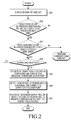
- FIG. 2 is a flowchart illustrating a process of playing back a moving picture in a terminal according to a first exemplary embodiment of the present invention.
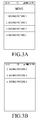
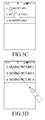
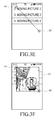
- FIGs. 3A through 3F are diagrams illustrating the process of the first exemplary embodiment of the present invention.
- a moving picture list including at least one moving picture item is displayed in step 201.
- the at least one moving picture item included in the moving picture list may include at least one moving picture title, at least one moving picture thumbnail or at least one item of any suitable and/or similar type of information related to moving pictures.
- step 202 the controller 110 determines if a touch occurs on a predetermined moving picture item in the moving picture list for at least a predetermined time. If it is determined that the touch occurs for at least the predetermined time, in step 202, then, at step 203, the controller 110 determines if dragging occurs in a predetermined direction while the touch is maintained.
- step 203 determines that the dragging occurs in the predetermined direction while the touch is maintained
- the controller 110 senses the dragging in step 203, and proceeds to step 204 in order to determine if the dragging is released.
- the controller 110 determines, in step 204, that the dragging is released
- the controller 110 senses the release in step 204, and determines a detected point where the touch occurs in step 202 to be a start point and determines a detected point where the dragging is released in step 204 to be an end point, and then proceeds with step 205 for storing the start point and the end point in the memory 130.
- the controller 110 proceeds to step 206 in order to detect, as a screen display region designated by a user, a quadrangular region having a diagonal line connecting the start point and the end point.
- a line connecting the start point and the end point is not a diagonal line, the controller 110 may not perform detection of the screen display region, and, instead, may perform another corresponding function.
- the diagonal line connecting the start point and the end point may be approximately diagonal or largely diagonal so as to be easily distinguished from a rectilinear line that is approximately orthogonal and/or parallel to a side of the terminal.
- the controller 110 may proceed with steps 205 and 206 that detect the screen display region designated by the user.
- the controller 110 may not proceed with steps 205 and 206 that detect the screen display region designated by the user, and may perform another corresponding function.
- step 206 When the screen display region designated by the touch and the dragging, which is a predetermined gesture generated by the user, is detected in step 206, the controller 110 then proceeds with step 207 in order to play back, on the screen display region, a moving picture corresponding to the predetermined moving picture item where the touch occurs in step 202.
- the controller 110 displays a screen display region of a preset default size for playing back a moving picture as an On-Screen Display (OSD) screen.
- the screen display region of the preset default size may be provided as a screen display region of a fixed size or a screen display region of a different size based on a selected file item in a terminal.
- the controller 110 adjusts the size of the screen display region so as to correspond to the direction of the dragging.
- the controller 110 plays back, on the screen display region of the adjusted size, a moving picture corresponding to the predetermined moving picture item where the touch occurs.
- the controller 110 plays back, on the screen display region of the default size, the moving picture corresponding to the predetermined moving picture item where the touch occurs.
- a screen display region of a default size is provided in order to play back a moving picture corresponding to a predetermined moving picture item that is touched by a touch motion or a touch gesture of a user, and subsequently, the screen display region of the default size is adjusted according to a screen display region of a size desired by the user as expressed by the user through a dragging motion of the user.
- the controller 110 When a touch occurs on a predetermined moving picture item in the moving picture list for at least the predetermined time, the controller 110 displays types of sizes of a screen display region, for example, screen size ratios of 3:4, 16:9, or any other similar and/or suitable screen size ratio, for playing back a moving picture.
- the controller 110 plays back, on a screen display region of the selected predetermined size, a moving picture corresponding to the predetermined moving picture item where the touch occurs.
- the types of sizes of the screen display region may include different types of sizes based on a selected moving picture item. Therefore, when a different moving picture item is selected, the controller 110 may extract size information that may be suitable and/or predetermined for play back of the selected moving picture item, and may display sizes of a screen display region including the extracted size information.
- FIG. 2 An operation of playing back a moving picture selected by the user on a screen display region of a size designated by the user, as illustrated in FIG. 2 , will be described with reference to FIGs. 3A through 3F .
- a "moving picture 2" item may be placed at an upper portion of a screen through a dragging motion, of the user, towards an upper direction, as illustrated in FIG. 3B .
- a touch occurs on the "moving picture 2" item for at least a predetermined time, as illustrated in FIG. 3C , and dragging is released after the dragging occurs in a diagonal direction towards a lower side, as illustrated in FIG. 3D , a point where the touch occurs is determined to be a start point A1 and a point where the dragging is released is determined to be an end point B1, as illustrated in FIG. 3E .
- a quadrangular region, having a diagonal line connecting the start point A1 and the end point B1, is detected as a screen display region C1, as illustrated in FIG. 3F , and a moving picture corresponding to the "moving picture 2" is resized and played back on the screen display region C1.
- the first exemplary embodiment describes that a moving picture selected by the user from among moving pictures stored in the terminal is played back on a screen display region of a size designated by the user.
- a moving picture may be played back on a screen display region of a desired size by touching an image indicating playback of a moving picture and performing a dragging motion in a diagonal direction, even in a page that allows selection of playback of a moving picture during searching on the Internet.
- FIG. 4 is a flowchart illustrating a process of executing an application in a terminal according to a second exemplary embodiment of the present invention.
- FIGs. 5A through 5E are diagrams illustrating the process of the second exemplary embodiment of the present invention.
- exemplary embodiments of the present invention will be described in detail with reference also to FIG. 1 .
- step 401 icons indicating applications are displayed, and then, in step 402, the controller 110 determines whether a touch occurs on a predetermined icon for at least a predetermined time.
- step 402 the controller 110 determines whether dragging occurs in a predetermined direction while the touch is maintained. If the dragging occurs in the predetermined dragging, then the controller 110 senses the dragging in step 403. When the dragging is released, the controller 110 senses the release in step 404, and determines a point where the touch occurs in step 402 as a start point and determines a point where the dragging is released in step 404 as an end point. Then, the controller 110 proceeds to step 405 and stores the start point and the end point in the memory 130.
- the controller 110 proceeds with step 406 in order to detect, as a screen display region designated by a user, a quadrangular region having a diagonal line connecting the start point and the end point.
- the controller 110 may not perform detection of the screen display region and performs another corresponding function.
- the controller 110 proceeds with steps 405 and 406 in order to detect the screen display region designated by the user.
- the controller 110 may not perform steps 405 and 406 that detect the screen display region designated by the user, and, rather, may perform another corresponding function.
- step 406 When the screen display region designated by the touch and the dragging, which is a predetermined gesture generated by the user, is detected in step 406, then the controller 110 proceeds with step 407 in order to execute, on the screen display region, an application, corresponding to the predetermined icon, at the location where the touch occurs in step 402.
- the controller 110 displays a screen display region as an OSD screen of a preset default size for executing an application corresponding to the predetermined icon on which the touch occurred.
- the screen display region that is an OSD screen of the preset default size is provided as a screen display region of a fixed size or a screen display region of a different size according to a type of the predetermined icon that is selected in a terminal.
- the size of the screen display region is adjusted so as to correspond to the direction of the dragging.
- the controller 110 executes, on the screen display region having the adjusted size, an application corresponding to the icon where, or upon which, the touch occurs.
- the controller 110 executes, on the screen display region of the default size, the application corresponding to the icon where, or upon which, the touch occurs.
- a screen display region of a default size is provided in order to execute an application corresponding to a predetermined icon touched according to a touch motion by the user, and subsequently, the screen display region of the default size is adjusted to be a screen display region of a size desired by the user through a dragging motion of the user.
- the controller 110 displays types of sizes of a screen display region for executing an application corresponding to an icon, for example, sizes corresponding to screen ratios such as 3:4, 16:9, and the like.
- a predetermined size is selected from among the displayed types of sizes of the screen display region
- the controller 110 executes, on a screen display region of the selected size, an application corresponding to the predetermined icon where the touch occurs.
- the types of sizes of the screen display region may include different types of sizes based on a type of a selected icon, that is, a type of a corresponding application of the selected icon. Therefore, every time that a different icon is selected, the controller 110 extracts size information that may execute an application corresponding to the selected icon, and displays types of sizes of a screen display region including the extracted size information.
- FIG. 4 An operation of executing an application selected by the user in a screen display region of a size designated by the user, as illustrated in FIG. 4 , will be described with reference to FIGs. 5A through 5E .
- a quadrangular region having a diagonal line connecting the start point A2 and the end point B2 is detected as a screen display region C2, as illustrated in FIG. 5E , and a music application corresponding to the icon 501 is executed on the screen display region C2.
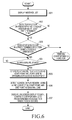
- FIG. 6 is a flowchart illustrating a process of displaying a message in a terminal according to a third exemplary embodiment of the present invention.
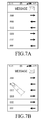
- FIGs. 7A through 7E are diagrams illustrating the process of the third exemplary embodiment of the present invention.
- exemplary embodiments of the present invention will be described in detail with reference also to FIG. 1 .
- a message list displaying at least one message item is displayed in step 601.
- the controller 110 determines whether a touch occurs on a predetermined message item in the message list for at least a predetermined time. If the controller 110 determines that the touch occurs on the predetermined message item for at least the predetermined time, then the controller 110 proceeds to step 603 in order to determine if dragging occurs in a predetermined direction while the touch is maintained.
- the controller 110 senses the dragging in step 603, and when the dragging is released, the controller 110 senses the release in step 604, and then determines a point where the touch occurs in step 602 to be a start point and a point where the dragging is released to be an end point in step 604.
- the controller 110 proceeds with step 605 for storing the start point and the end point in the memory 130.
- the controller 110 then proceeds with step 606 in order to detect, as a screen display region designated by the user, a quadrangular region having a diagonal line connecting the start point and the end point. However, when a line connecting the start point and the end point is different from a diagonal line, the controller 110 may not perform detection of the screen display region, and may perform another corresponding function.
- the controller 110 may proceed with steps 605 and 606 in order to detect the screen display region designated by the user.
- the controller 110 may not perform steps 605 and 606 that detect the screen display region designated by the user, and may perform another corresponding function.
- the controller 110 proceeds with step 607 in order to execute, on the screen display region, an application corresponding to the predetermined icon at a location where the touch occurs in step 602.
- the controller 110 displays a screen display region, as an OSD screen of a preset default size, for displaying contents corresponding to a message item.
- the screen display region of the preset default size is provided as a screen display region of a fixed size or a screen display region of a different size according to an amount of contents of a selected message item.
- the controller 110 displays, on the screen display region having the adjusted size, contents corresponding to the predetermined message item where the touch occurs.
- the controller 110 displays, on the screen display region of the preset default size, contents corresponding to the predetermined message item that is located where the touch occurs.
- a screen display region of a default size is provided in order to display contents corresponding to a predetermined message item touched by a touch motion of the user, and subsequently, the screen display region of the default size is adjusted to a screen display region of a size desired by the user through a dragging motion of the user.
- the controller 110 displays types of sizes of a screen display region for displaying contents corresponding to the message item, for example, the sizes may be screen ratio sizes such as 3:4, 16:9, and the like.
- the controller 110 displays, on a screen display region of the selected size, contents corresponding to the predetermined message item that is located where the touch occurs.
- the types of sizes of the screen display region may include different types of sizes based on an amount of contents corresponding to a selected message item. Therefore, every time a different message item is selected, the controller 110 extracts size information that may display contents corresponding to the selected message item, and displays types of sizes of a screen display region including the extracted size information.
- FIG. 6 An operation of displaying a predetermined message item selected by the user, as illustrated in FIG. 6 , on a screen display region of a size designated by the user will be described with reference to FIGs. 7A through 7E .
- a message list including a plurality of message items is displayed, as illustrated in FIG. 7A , and when a touch occurs on a "BBB" message item for at least a predetermined time, as illustrated in FIG. 7B , and dragging is released after the dragging occurs in a diagonal direction towards a lower side, as illustrated in FIG. 7C , a point where the touch occurs is determined to be a start point A3 and a point where the dragging is released is determined to be an end point B3, as illustrated in FIG. 7D .
- a quadrangular region having a diagonal line connecting the start point A3 and the end point B3 is detected as a screen display region C3, as illustrated in FIG. 7E , and contents corresponding to the "BBB" message item are displayed in the screen display region C3.
- FIGs. 7A through 7E describe displaying contents corresponding to a message item selected by the user on a screen display region of a size designated by the user while a message list is displayed, such operations of displaying contents may also be applied to displaying a contact information list, a picture list, a recent history list, and any other similar and/or suitable type of information list, in addition to the message list.
- the data display method and apparatus of a terminal may be embodied by a computer readable recoding medium and a computer readable code.
- the computer readable recoding medium may include all types of recording devices that store data that can be read by a computer system and may be a non-volatile computer readable recording medium. Examples of the computer readable recoding medium include a Read Only Memory (ROM), a Random Access Memory (RAM), an optical disc, a magnetic tape, a floppy disk, a hard disk, a non-volatile memory, and the like, and includes a computer-readable recoding medium embodied in a form of a carrier wave (for example, transmission through the Internet).
- the computer readable recording medium may also store, in a dispersed manner, a computer readable code in a computer system connected over a network based on a dispersive scheme, and execute the stored computer readable code.
Landscapes
- Engineering & Computer Science (AREA)
- Theoretical Computer Science (AREA)
- General Engineering & Computer Science (AREA)
- Human Computer Interaction (AREA)
- Physics & Mathematics (AREA)
- General Physics & Mathematics (AREA)
- Computer Hardware Design (AREA)
- User Interface Of Digital Computer (AREA)
- Digital Computer Display Output (AREA)
Applications Claiming Priority (1)
| Application Number | Priority Date | Filing Date | Title |
|---|---|---|---|
| KR1020120115288A KR20140049254A (ko) | 2012-10-17 | 2012-10-17 | 단말기의 데이터표시 장치 및 방법 |
Publications (2)
| Publication Number | Publication Date |
|---|---|
| EP2722748A2 true EP2722748A2 (fr) | 2014-04-23 |
| EP2722748A3 EP2722748A3 (fr) | 2017-09-27 |
Family
ID=49447962
Family Applications (1)
| Application Number | Title | Priority Date | Filing Date |
|---|---|---|---|
| EP13188848.9A Withdrawn EP2722748A3 (fr) | 2012-10-17 | 2013-10-16 | Appareil et procédé d'affichage de données dans un terminal |
Country Status (4)
| Country | Link |
|---|---|
| US (1) | US20140108933A1 (fr) |
| EP (1) | EP2722748A3 (fr) |
| KR (1) | KR20140049254A (fr) |
| CN (1) | CN103777884A (fr) |
Families Citing this family (16)
| Publication number | Priority date | Publication date | Assignee | Title |
|---|---|---|---|---|
| USD730393S1 (en) * | 2013-05-28 | 2015-05-26 | Deere & Company | Display screen or portion thereof with icon |
| GB2519124A (en) * | 2013-10-10 | 2015-04-15 | Ibm | Controlling application launch |
| WO2015089819A1 (fr) * | 2013-12-20 | 2015-06-25 | Orange | Procede pour la selection d'un contenu electronique a afficher sur un ecran d'un dispositif electronique |
| US10108339B2 (en) * | 2014-12-17 | 2018-10-23 | Intel Corporation | Reduction of intermingling of input and output operations in solid state drives |
| KR20160090183A (ko) * | 2015-01-21 | 2016-07-29 | 엘지전자 주식회사 | 이동 단말기 |
| JP6354696B2 (ja) * | 2015-07-30 | 2018-07-11 | 京セラドキュメントソリューションズ株式会社 | 表示装置、および画像処理装置 |
| CN105975840A (zh) * | 2016-06-13 | 2016-09-28 | 深圳市金立通信设备有限公司 | 一种分屏控制方法、及电子设备 |
| JP6723938B2 (ja) * | 2017-01-31 | 2020-07-15 | キヤノン株式会社 | 情報処理装置、表示制御方法、及びプログラム |
| WO2019014927A1 (fr) * | 2017-07-21 | 2019-01-24 | Orange | Procédé de gestion sur un terminal mobile d'une liste de contenus associés chacun à un sous-contenu |
| CN107633327A (zh) * | 2017-09-19 | 2018-01-26 | 飞友科技有限公司 | 一种基于航线运力大数据的终端显示系统 |
| CN107608606A (zh) * | 2017-10-18 | 2018-01-19 | 维沃移动通信有限公司 | 一种图片显示方法、移动终端及计算机可读存储介质 |
| US11404028B2 (en) | 2019-12-16 | 2022-08-02 | Microsoft Technology Licensing, Llc | Sub-display notification handling |
| US11093046B2 (en) | 2019-12-16 | 2021-08-17 | Microsoft Technology Licensing, Llc | Sub-display designation for remote content source device |
| US11042222B1 (en) * | 2019-12-16 | 2021-06-22 | Microsoft Technology Licensing, Llc | Sub-display designation and sharing |
| USD997984S1 (en) * | 2020-06-09 | 2023-09-05 | Samsung Electronics Co., Ltd. | Display screen or portion thereof with icon |
| USD1003937S1 (en) | 2020-06-09 | 2023-11-07 | Samsung Electronics Co., Ltd. | Display screen or portion thereof with icon |
Family Cites Families (8)
| Publication number | Priority date | Publication date | Assignee | Title |
|---|---|---|---|---|
| JP3475235B2 (ja) * | 1999-03-08 | 2003-12-08 | 東京農工大学長 | 表示装置の表示内容制御方法 |
| JP2001296945A (ja) * | 2000-04-14 | 2001-10-26 | Matsushita Electric Ind Co Ltd | アプリケーション起動制御装置 |
| US8196055B2 (en) * | 2006-01-30 | 2012-06-05 | Microsoft Corporation | Controlling application windows in an operating system |
| JP5310403B2 (ja) * | 2009-09-02 | 2013-10-09 | ソニー株式会社 | 情報処理装置、情報処理方法およびプログラム |
| US8766928B2 (en) * | 2009-09-25 | 2014-07-01 | Apple Inc. | Device, method, and graphical user interface for manipulating user interface objects |
| US8698762B2 (en) * | 2010-01-06 | 2014-04-15 | Apple Inc. | Device, method, and graphical user interface for navigating and displaying content in context |
| KR101699739B1 (ko) * | 2010-05-14 | 2017-01-25 | 엘지전자 주식회사 | 휴대 단말기 및 그 동작방법 |
| KR20120080922A (ko) * | 2011-01-10 | 2012-07-18 | 삼성전자주식회사 | 디스플레이 장치 및 그 디스플레이 방법 |
-
2012
- 2012-10-17 KR KR1020120115288A patent/KR20140049254A/ko not_active Withdrawn
-
2013
- 2013-10-16 US US14/055,252 patent/US20140108933A1/en not_active Abandoned
- 2013-10-16 EP EP13188848.9A patent/EP2722748A3/fr not_active Withdrawn
- 2013-10-17 CN CN201310487905.1A patent/CN103777884A/zh active Pending
Non-Patent Citations (1)
| Title |
|---|
| None |
Also Published As
| Publication number | Publication date |
|---|---|
| KR20140049254A (ko) | 2014-04-25 |
| EP2722748A3 (fr) | 2017-09-27 |
| CN103777884A (zh) | 2014-05-07 |
| US20140108933A1 (en) | 2014-04-17 |
Similar Documents
| Publication | Publication Date | Title |
|---|---|---|
| US20140108933A1 (en) | Method and apparatus for displaying data in terminal | |
| US10481779B2 (en) | Electronic device having touch screen and function controlling method of the same | |
| EP2784653B1 (fr) | Appareil et procédé de commande de fenêtres superposées dans un dispositif | |
| US8947375B2 (en) | Information processing device, information processing method, and information processing program | |
| US10712907B2 (en) | Terminal and method for setting menu environments in the terminal | |
| US8675113B2 (en) | User interface for a digital camera | |
| US9164608B2 (en) | Apparatus and method for adjusting touch sensitivity in mobile terminal | |
| US10082943B2 (en) | Scrolling method of mobile terminal and apparatus for performing the same | |
| US20130152024A1 (en) | Electronic device and page zooming method thereof | |
| US20130135182A1 (en) | Apparatus and method for displaying an application in a wireless terminal | |
| US20140237394A1 (en) | Apparatus and method for controlling messenger in terminal | |
| US9189269B2 (en) | Apparatus and method for performing multi-tasking in portable terminal | |
| KR101719989B1 (ko) | 전자 장치 및 메뉴를 구성하기 위한 인터페이스 방법 | |
| US20140028598A1 (en) | Apparatus and method for controlling data transmission in terminal | |
| US20160196284A1 (en) | Mobile terminal and method for searching for image | |
| CA2807866C (fr) | Interface utilisateur pour un appareil photo numerique | |
| KR101789617B1 (ko) | 전자 장치 및 메뉴 편집 인터페이스 방법 | |
| US10521501B2 (en) | Apparatus and method for editing table in terminal | |
| US20140125611A1 (en) | Apparatus and method for displaying zoomed data in terminal | |
| KR20120038826A (ko) | 전자 다이어리 서비스를 제공하는 전자 장치 및 전자 다이어리 서비스 제공 방법, 그리고 전자 다이어리 서비스를 위한 인터페이스 방법 | |
| KR20120040346A (ko) | 전자 장치 및 메뉴 자동 구성 방법 |
Legal Events
| Date | Code | Title | Description |
|---|---|---|---|
| PUAI | Public reference made under article 153(3) epc to a published international application that has entered the european phase |
Free format text: ORIGINAL CODE: 0009012 |
|
| AK | Designated contracting states |
Kind code of ref document: A2 Designated state(s): AL AT BE BG CH CY CZ DE DK EE ES FI FR GB GR HR HU IE IS IT LI LT LU LV MC MK MT NL NO PL PT RO RS SE SI SK SM TR |
|
| AX | Request for extension of the european patent |
Extension state: BA ME |
|
| PUAL | Search report despatched |
Free format text: ORIGINAL CODE: 0009013 |
|
| AK | Designated contracting states |
Kind code of ref document: A3 Designated state(s): AL AT BE BG CH CY CZ DE DK EE ES FI FR GB GR HR HU IE IS IT LI LT LU LV MC MK MT NL NO PL PT RO RS SE SI SK SM TR |
|
| AX | Request for extension of the european patent |
Extension state: BA ME |
|
| RIC1 | Information provided on ipc code assigned before grant |
Ipc: G06F 3/0488 20130101AFI20170821BHEP |
|
| STAA | Information on the status of an ep patent application or granted ep patent |
Free format text: STATUS: THE APPLICATION HAS BEEN WITHDRAWN |
|
| 18W | Application withdrawn |
Effective date: 20180327 |