EP2728454A2 - Tragbares Endgerät und Verfahren zu dessen Steuerung - Google Patents
Tragbares Endgerät und Verfahren zu dessen Steuerung Download PDFInfo
- Publication number
- EP2728454A2 EP2728454A2 EP13004917.4A EP13004917A EP2728454A2 EP 2728454 A2 EP2728454 A2 EP 2728454A2 EP 13004917 A EP13004917 A EP 13004917A EP 2728454 A2 EP2728454 A2 EP 2728454A2
- Authority
- EP
- European Patent Office
- Prior art keywords
- contour
- mobile terminal
- bar
- objects
- function
- Prior art date
- Legal status (The legal status is an assumption and is not a legal conclusion. Google has not performed a legal analysis and makes no representation as to the accuracy of the status listed.)
- Withdrawn
Links
Images









Classifications
-
- G—PHYSICS
- G06—COMPUTING OR CALCULATING; COUNTING
- G06F—ELECTRIC DIGITAL DATA PROCESSING
- G06F3/00—Input arrangements for transferring data to be processed into a form capable of being handled by the computer; Output arrangements for transferring data from processing unit to output unit, e.g. interface arrangements
- G06F3/01—Input arrangements or combined input and output arrangements for interaction between user and computer
- G06F3/048—Interaction techniques based on graphical user interfaces [GUI]
- G06F3/0484—Interaction techniques based on graphical user interfaces [GUI] for the control of specific functions or operations, e.g. selecting or manipulating an object, an image or a displayed text element, setting a parameter value or selecting a range
-
- G—PHYSICS
- G06—COMPUTING OR CALCULATING; COUNTING
- G06F—ELECTRIC DIGITAL DATA PROCESSING
- G06F3/00—Input arrangements for transferring data to be processed into a form capable of being handled by the computer; Output arrangements for transferring data from processing unit to output unit, e.g. interface arrangements
- G06F3/01—Input arrangements or combined input and output arrangements for interaction between user and computer
- G06F3/03—Arrangements for converting the position or the displacement of a member into a coded form
- G06F3/041—Digitisers, e.g. for touch screens or touch pads, characterised by the transducing means
- G06F3/0412—Digitisers structurally integrated in a display
-
- G—PHYSICS
- G06—COMPUTING OR CALCULATING; COUNTING
- G06F—ELECTRIC DIGITAL DATA PROCESSING
- G06F3/00—Input arrangements for transferring data to be processed into a form capable of being handled by the computer; Output arrangements for transferring data from processing unit to output unit, e.g. interface arrangements
- G06F3/01—Input arrangements or combined input and output arrangements for interaction between user and computer
- G06F3/03—Arrangements for converting the position or the displacement of a member into a coded form
- G06F3/041—Digitisers, e.g. for touch screens or touch pads, characterised by the transducing means
- G06F3/0416—Control or interface arrangements specially adapted for digitisers
-
- G—PHYSICS
- G06—COMPUTING OR CALCULATING; COUNTING
- G06F—ELECTRIC DIGITAL DATA PROCESSING
- G06F3/00—Input arrangements for transferring data to be processed into a form capable of being handled by the computer; Output arrangements for transferring data from processing unit to output unit, e.g. interface arrangements
- G06F3/01—Input arrangements or combined input and output arrangements for interaction between user and computer
- G06F3/048—Interaction techniques based on graphical user interfaces [GUI]
- G06F3/0484—Interaction techniques based on graphical user interfaces [GUI] for the control of specific functions or operations, e.g. selecting or manipulating an object, an image or a displayed text element, setting a parameter value or selecting a range
- G06F3/04842—Selection of displayed objects or displayed text elements
-
- G—PHYSICS
- G06—COMPUTING OR CALCULATING; COUNTING
- G06F—ELECTRIC DIGITAL DATA PROCESSING
- G06F3/00—Input arrangements for transferring data to be processed into a form capable of being handled by the computer; Output arrangements for transferring data from processing unit to output unit, e.g. interface arrangements
- G06F3/01—Input arrangements or combined input and output arrangements for interaction between user and computer
- G06F3/048—Interaction techniques based on graphical user interfaces [GUI]
- G06F3/0484—Interaction techniques based on graphical user interfaces [GUI] for the control of specific functions or operations, e.g. selecting or manipulating an object, an image or a displayed text element, setting a parameter value or selecting a range
- G06F3/04845—Interaction techniques based on graphical user interfaces [GUI] for the control of specific functions or operations, e.g. selecting or manipulating an object, an image or a displayed text element, setting a parameter value or selecting a range for image manipulation, e.g. dragging, rotation, expansion or change of colour
-
- G—PHYSICS
- G06—COMPUTING OR CALCULATING; COUNTING
- G06F—ELECTRIC DIGITAL DATA PROCESSING
- G06F3/00—Input arrangements for transferring data to be processed into a form capable of being handled by the computer; Output arrangements for transferring data from processing unit to output unit, e.g. interface arrangements
- G06F3/01—Input arrangements or combined input and output arrangements for interaction between user and computer
- G06F3/048—Interaction techniques based on graphical user interfaces [GUI]
- G06F3/0484—Interaction techniques based on graphical user interfaces [GUI] for the control of specific functions or operations, e.g. selecting or manipulating an object, an image or a displayed text element, setting a parameter value or selecting a range
- G06F3/0485—Scrolling or panning
-
- G—PHYSICS
- G06—COMPUTING OR CALCULATING; COUNTING
- G06F—ELECTRIC DIGITAL DATA PROCESSING
- G06F3/00—Input arrangements for transferring data to be processed into a form capable of being handled by the computer; Output arrangements for transferring data from processing unit to output unit, e.g. interface arrangements
- G06F3/01—Input arrangements or combined input and output arrangements for interaction between user and computer
- G06F3/048—Interaction techniques based on graphical user interfaces [GUI]
- G06F3/0487—Interaction techniques based on graphical user interfaces [GUI] using specific features provided by the input device, e.g. functions controlled by the rotation of a mouse with dual sensing arrangements, or of the nature of the input device, e.g. tap gestures based on pressure sensed by a digitiser
- G06F3/0488—Interaction techniques based on graphical user interfaces [GUI] using specific features provided by the input device, e.g. functions controlled by the rotation of a mouse with dual sensing arrangements, or of the nature of the input device, e.g. tap gestures based on pressure sensed by a digitiser using a touch-screen or digitiser, e.g. input of commands through traced gestures
-
- G—PHYSICS
- G06—COMPUTING OR CALCULATING; COUNTING
- G06F—ELECTRIC DIGITAL DATA PROCESSING
- G06F3/00—Input arrangements for transferring data to be processed into a form capable of being handled by the computer; Output arrangements for transferring data from processing unit to output unit, e.g. interface arrangements
- G06F3/01—Input arrangements or combined input and output arrangements for interaction between user and computer
- G06F3/048—Interaction techniques based on graphical user interfaces [GUI]
- G06F3/0487—Interaction techniques based on graphical user interfaces [GUI] using specific features provided by the input device, e.g. functions controlled by the rotation of a mouse with dual sensing arrangements, or of the nature of the input device, e.g. tap gestures based on pressure sensed by a digitiser
- G06F3/0488—Interaction techniques based on graphical user interfaces [GUI] using specific features provided by the input device, e.g. functions controlled by the rotation of a mouse with dual sensing arrangements, or of the nature of the input device, e.g. tap gestures based on pressure sensed by a digitiser using a touch-screen or digitiser, e.g. input of commands through traced gestures
- G06F3/04883—Interaction techniques based on graphical user interfaces [GUI] using specific features provided by the input device, e.g. functions controlled by the rotation of a mouse with dual sensing arrangements, or of the nature of the input device, e.g. tap gestures based on pressure sensed by a digitiser using a touch-screen or digitiser, e.g. input of commands through traced gestures for inputting data by handwriting, e.g. gesture or text
-
- G—PHYSICS
- G06—COMPUTING OR CALCULATING; COUNTING
- G06F—ELECTRIC DIGITAL DATA PROCESSING
- G06F3/00—Input arrangements for transferring data to be processed into a form capable of being handled by the computer; Output arrangements for transferring data from processing unit to output unit, e.g. interface arrangements
- G06F3/14—Digital output to display device ; Cooperation and interconnection of the display device with other functional units
-
- H—ELECTRICITY
- H04—ELECTRIC COMMUNICATION TECHNIQUE
- H04B—TRANSMISSION
- H04B1/00—Details of transmission systems, not covered by a single one of groups H04B3/00 - H04B13/00; Details of transmission systems not characterised by the medium used for transmission
- H04B1/38—Transceivers, i.e. devices in which transmitter and receiver form a structural unit and in which at least one part is used for functions of transmitting and receiving
- H04B1/40—Circuits
-
- G—PHYSICS
- G06—COMPUTING OR CALCULATING; COUNTING
- G06F—ELECTRIC DIGITAL DATA PROCESSING
- G06F2203/00—Indexing scheme relating to G06F3/00 - G06F3/048
- G06F2203/041—Indexing scheme relating to G06F3/041 - G06F3/045
- G06F2203/04102—Flexible digitiser, i.e. constructional details for allowing the whole digitising part of a device to be flexed or rolled like a sheet of paper
-
- G—PHYSICS
- G06—COMPUTING OR CALCULATING; COUNTING
- G06F—ELECTRIC DIGITAL DATA PROCESSING
- G06F2203/00—Indexing scheme relating to G06F3/00 - G06F3/048
- G06F2203/048—Indexing scheme relating to G06F3/048
- G06F2203/04802—3D-info-object: information is displayed on the internal or external surface of a three dimensional manipulable object, e.g. on the faces of a cube that can be rotated by the user
Definitions
- This relates to a mobile terminal and a method of controlling the same.
- electronic devices may provide and/or store various types of functions and pieces of information.
- a mobile terminal equipped with a touch screen may access various pieces of information through a touch manipulation.
- handwriting may also be input through a touch screen.
- An object of the present invention is to provide a mobile terminal capable of executing an undo function on at least part of a contour forming an object more conveniently and a method of controlling the same.
- a mobile terminal includes: a touch screen configured to receive touch inputs corresponding to a plurality of objects each having a specific contour; and a controller configured to control the touch screen to display the plurality of objects, and to display an editing interface for performing at least one editing function including at least an undo function or a redo function on a section of a contour of a selected object of the plurality of objects.
- the editing interface comprises: a start point corresponding to a start point of the contour forming the selected object; an end point corresponding to an end point of the contour; a bar extending between the start and end points, the bar corresponding to the contour; and a handle that moves along the bar according to a touch input provided thereto.
- movement of the handle along the bar designates a certain section of the bar corresponding to a certain section of the contour, wherein the at least one editing function is performed on the certain section of the contour.
- the undo function is executed when the handle is moved in a first direction along the bar
- the redo function is executed when the handle is moved in a second direction along the bar, the second direction being opposite the first direction.
- the undo function is executed in response to movement of the handle in the first direction to delete the certain section of the contour, a length of the certain section corresponding to a distance the handle has moved in the first direction.
- the redo function is executed when the handle is moved in the second direction after the undo function has been executed to restore the certain section of the contour deleted by the undo function.
- a location of the handle on the bar is adjusted to incorporate the new contour.
- the new contour comprises at least one of a handwriting input or a previously stored image.
- the plurality of thumbnail images being sequentially displayed on the touch screen in the order in which the plurality of objects are generated.
- the at least one editing function is performed on an object corresponding to a selected thumbnail image that has been dragged to the editing interface by a drag input.
- a specific section of the contour of a selected object corresponding to the specific section of the bar is displayed differently from remaining sections of the contour.
- an enlarged view window of the overlap area is displayed.
- a sub-bar for executing the undo function on only a contour of the selected object is displayed to activate and display only the selected object.
- the selected object is displayed as a line extending along the bar.
- a mobile terminal comprising: a camera; a memory; a touch screen; and a controller configured to control the camera, memory and touch screen to display a preview image captured by the camera on the touch screen, focus on at least one primary object included in the preview image, separate the at least one primary object from a background region, and separately store the at least one primary object and the background region in the memory.
- At least one secondary object included in the background region is deleted, and the at least one primary object and the background region from which the at least one secondary object has been deleted are stored as a composite image in the memory.
- a method of controlling a mobile terminal comprising: sequentially generating a plurality of objects each having a specific contour and displaying the plurality of objects on a touch screen; entering an editing mode for editing at least one of the plurality of objects in response to a predetermined input; and displaying an editing bar for controlling at least one editing function including at least an undo function for a section of a contour of a selected object of the plurality of objects displayed on the touch screen.
- a method of controlling a mobile terminal comprising: displaying a preview image captured by a camera on a touch screen; focusing on at least one object included in the preview image; and separating the at least one object from a background region excluding the at least one object and separately storing the at least one object and the background region in a memory.
- FIG. 1 is a block diagram of a mobile terminal in accordance with an embodiment as broadly described herein;
- FIG. 2 is a flowchart of a method of controlling the mobile terminal in accordance with an embodiment as broadly described herein;
- FIGS. 3 to 5 illustrate the method of controlling the mobile terminal shown in FIG. 2 , in accordance with embodiments as broadly described herein;
- FIG. 6 is a flowchart of a method of controlling the mobile terminal in accordance with another embodiment as broadly described herein;
- FIGS. 7 to 11 illustrate the method of controlling the mobile terminal shown in FIG. 6 , in accordance with embodiments as broadly described herein;
- FIG. 12 is a flowchart of a method of controlling the mobile terminal in accordance with another embodiment as broadly described herein;
- FIGS. 13 to 17 illustrate the method of controlling the mobile terminal shown in FIG. 12 , in accordance with embodiments as broadly described herein;
- FIG. 18 is a flowchart of a method of controlling the mobile terminal in accordance with another embodiment as broadly described herein;
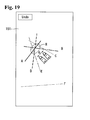
- FIGS. 19 to 26 illustrate the method of controlling the mobile terminal shown in FIG. 18 , in accordance with embodiments as broadly described herein;
- FIG. 27 is a flowchart of a method of controlling the mobile terminal in accordance with another embodiment as broadly described herein;
- FIGS. 28 to 29 illustrate the method of controlling the mobile terminal in accordance with the embodiment shown in FIG. 27 .
- the mobile terminal described in this specification may include a mobile phone, a smart phone, a notebook computer, a terminal for digital broadcast, a Personal Digital Assistant (PDA), a Portable Multimedia Player (PMP), a navigator, to a name few.
- PDA Personal Digital Assistant
- PMP Portable Multimedia Player
- the mobile terminal 100 may include a wireless communication device 110, an AN (Audio/Video) input device 120, a user input device 130, a sensing device 140, an output device 150, a memory 160, an interface 170, a controller 180, and a power supply 190, etc.
- FIG. 1 shows the mobile terminal 100 including various components, but implementing all of the illustrated components is not a requirement. Greater or fewer components may alternatively be implemented.
- the wireless communication device 110 may include one or more components allowing radio communication between the mobile terminal 100 and a wireless communication system or a network in which the mobile terminal 100 is located.
- the wireless communication device 110 may include at least one of a broadcast receiving module 111, a mobile communication module 112, a wireless Internet module 113, a short-range communication module 114, and a location information module 115.
- the broadcast receiving module 111 receives broadcast signals and/or broadcast associated information from an external broadcast management server via a broadcast channel.
- the broadcast channel may include a satellite channel and/or a terrestrial channel.
- the broadcast management server may be a server that generates and transmits a broadcast signal and/or broadcast associated information or a server that receives a previously generated broadcast signal and/or broadcast associated information and transmits the same to a terminal.
- the broadcast signal may include a TV broadcast signal, a radio broadcast signal, a data broadcast signal, and the like.
- the broadcast signal may further include a broadcast signal combined with a TV or radio broadcast signal.
- the broadcast associated information may refer to information associated with a broadcast channel, a broadcast program or a broadcast service provider.
- the broadcast associated information may also be provided via a mobile communication network and, in this instance, the broadcast associated information may be received by the mobile communication module 112.
- the broadcast signal may exist in various forms.
- the broadcast signal may exist in the form of an electronic program guide (EPG) of the digital multimedia broadcasting (DMB) system, and electronic service guide (ESG) of the digital video broadcast-handheld (DVB-H) system, and the like.
- EPG electronic program guide
- DMB digital multimedia broadcasting
- ESG electronic service guide
- DVD-H digital video broadcast-handheld
- the broadcast receiving module 111 may also be configured to receive signals broadcast by using various types of broadcast systems.
- the broadcast receiving module 111 may receive a digital broadcast using a digital broadcast system, such as the multimedia broadcasting-terrestrial (DMB-T) system, the digital multimedia broadcasting-satellite (DMB-S) system, the digital video broadcast-handheld (DVB-H) system, and the integrated services digital broadcast-terrestrial (ISDB-T) system.
- the broadcast receiving module 111 may also be configured to be suitable for all broadcast systems that provide a broadcast signal as well as the above-mentioned digital broadcast systems.
- the broadcast signals and/or broadcast-associated information received via the broadcast receiving module 111 may be stored in the memory 160.
- the mobile communication module 112 may transmit and/or receive radio signals to and/or from at least one of a base station, an external terminal and/or a server.
- radio signals may include a voice call signal, a video call signal or various types of data according to text and/or multimedia message transmission and/or reception.
- the wireless Internet module 113 may support wireless Internet access for the mobile terminal and may be internally or externally coupled to the terminal.
- the wireless Internet access technique implemented may include a WLAN (Wireless LAN) (Wi-Fi), Wibro (Wireless broadband), Wimax (World Interoperability for Microwave Access), HSDPA (High Speed Downlink Packet Access), or the like.
- the short-range communication module 114 may support short range communications.
- Some examples of short-range communication technology include BluetoothTM, Radio Frequency IDentification (RFID), Infrared Data Association (IrDA), Ultra-WideBand (UWB), ZigBeeTM, and the like.
- the location information module 115 may check and/or acquire a location or position of the mobile terminal 110.
- the location information module 115 may acquire location information by using a global navigation satellite system (GNSS).
- GNSS global navigation satellite system
- Such a GPS module 115 may calculate information related to the distance from one point (entity) to three or more satellites and information related to time at which the distance information was measured, and applies trigonometry to the calculated distance, thereby calculating three-dimensional location information according to latitude, longitude, and altitude with respect to the one point (entity).
- a method of acquiring location and time information by using three satellites and correcting an error of the calculated location and time information by using another one satellite may be also used.
- the GPS module 115 may also continuously calculate the current location in real time and also calculate speed information by using the continuously calculated current location.
- the A/V input device 120 may receive an audio or video signal, and may include a camera 121 and a microphone 122.
- the camera 121 processes image data of still pictures or video obtained by an image capture device in a video capturing mode or an image capturing mode, and the processed image frames may then be displayed on a display 151.
- the image frames processed by the camera 121 may be stored in the memory 160 or transmitted via the wireless communication device 110.
- Two or more cameras 121 may also be provided according to the configuration of the mobile terminal 100.
- the microphone 122 may receive sounds in a phone call mode, a recording mode, a voice recognition mode, and the like, and may process such sounds into audio data. The processed audio data may then be converted for output into a format transmittable to a mobile communication base station via the mobile communication module 112 for the phone call mode.
- the microphone 122 may also implement various types of noise canceling (or suppression) algorithms to cancel or suppress noise or interference generated when receiving and transmitting audio signals.
- the user input unit 130 may generate input data from commands entered by a user to control various operations of the mobile terminal.
- the user input unit 130 may include a keypad, a dome switch, a touch pad (e.g., electrostatic/static pressure), a jog wheel, a jog switch, and the like.
- the sensing device 140 may detect a current status of the mobile terminal 100 such as an opened or closed state of the mobile terminal 100, a location of the mobile terminal 100, the presence or absence of user contact with the mobile terminal 100, the orientation of the mobile terminal 100, an acceleration or deceleration movement and direction of the mobile terminal 100, etc., and may generate commands or signals for controlling the operation of the mobile terminal 100.
- a current status of the mobile terminal 100 such as an opened or closed state of the mobile terminal 100, a location of the mobile terminal 100, the presence or absence of user contact with the mobile terminal 100, the orientation of the mobile terminal 100, an acceleration or deceleration movement and direction of the mobile terminal 100, etc.
- the sensing device 140 may sense whether the slide phone is opened or closed.
- the sensing device 140 may detect whether or not the power supply 190 supplies power or whether or not the interface 170 is coupled with an external device.
- the sensing device 140 may also include a proximity sensor 141.
- the output device 150 may provide outputs in a visual, audible, and/or tactile manner.
- the output device 150 may include the display module 151, an audio output module 152, an alarm module 153, and a haptic module 154.
- the display module 151 may display information processed in the mobile terminal 100. For example, when the mobile terminal 100 is in a phone call mode, the display module 151 may display a User Interface (UI) or a Graphic User Interface (GUI) associated with a call or other communication. If the mobile terminal 100 is in a video call mode or a photographing mode, the mobile terminal 100 displays a photographed or/and received image or a UI or a GUI.
- UI User Interface
- GUI Graphic User Interface
- the display module 151 may also include at least one of a Liquid Crystal Display (LCD), a Thin Film Transistor-LCD (TFT-LCD), an Organic Light Emitting Diode (OLED) display, a flexible display, a three-dimensional (3D) display, or the like.
- LCD Liquid Crystal Display
- TFT-LCD Thin Film Transistor-LCD
- OLED Organic Light Emitting Diode
- flexible display a three-dimensional (3D) display, or the like.
- Some of these displays may also be configured to be transparent or light-transmissive to allow for viewing therethrough, referred to as transparent displays.
- An example of a transparent display is a TOLED (Transparent Organic Light Emitting Diode) display, or the like.
- a rear structure of the display module 151 may be also light-transmissive. Through such configuration, the user may view an object positioned at the rear side of the terminal body through the region occupied by the display module 151 of the terminal body.
- the mobile terminal 100 may include two or more display modules 151 depending on its particular desired embodiment.
- a plurality of display modules 151 may be separately or integrally disposed on one surface of the mobile terminal 100, or may be separately disposed on mutually different surfaces.
- the display module 151 and a sensor (referred to as a 'touch sensor', hereinafter) for detecting a touch operation are arranged in a layered manner to form a touch screen
- the display module 151 may function as both an input device and an output device.
- the touch sensor may have a form of a touch film, a touch sheet, or a touch pad.
- the touch sensor may be configured to convert pressure applied to a particular portion of the display module 151 or a change in the capacitance or the like generated at a particular portion of the display module 151 into an electrical input signal.
- the touch sensor may also be configured to detect pressure when a touch is applied, as well as the touched position and area.
- the touch controller When there is a touch input with respect to the touch sensor, corresponding signals are transmitted to a touch controller, and the touch controller processes the signals and transmits corresponding data to the controller 180. Accordingly, the controller 180 may recognize which portion of the display module 151 has been touched.
- the proximity sensor 141 may be disposed within or near the touch screen.
- the proximity sensor 141 may detect the presence or absence of an object relative to a certain detection surface or an object that exists nearby by using the force of electromagnetism or infrared rays without physical contact.
- the proximity sensor 141 may have a considerably longer life span compared with a contact type sensor, and may be utilized for various purposes.
- Examples of the proximity sensor 141 may include a transmission type photoelectric sensor, a direct reflection type photoelectric sensor, a mirror-reflection type photo sensor, an RF oscillation type proximity sensor, a capacitance type proximity sensor, a magnetic proximity sensor, and an infrared proximity sensor. If the touch screen is the capacitance type, proximity of the pointer may be detected by a change in electric field according to the proximity of the pointer. In this instance, the touch screen (touch sensor) may be considered a proximity sensor.
- recognition of the pointer positioned to be close to the touch screen will be called a 'proximity touch', while recognition of actual contact of the pointer on the touch screen will be called a 'contact touch'.
- the pointer when the pointer is in the state of the proximity touch, the pointer may be considered to be positioned to correspond vertically to the touch screen.
- a proximity touch and a proximity touch pattern e.g., a proximity touch distance, a proximity touch speed, a proximity touch time, a proximity touch position, a proximity touch movement state, or the like
- a proximity touch and a proximity touch pattern may be detected, and information corresponding to the detected proximity touch operation and the proximity touch pattern may be output to the touch screen.
- the audio output module 152 may convert and output audio data received from the wireless communication device 110 or stored in the memory 160 in a call signal reception mode, a call mode, a record mode, a voice recognition mode, a broadcast reception mode, and the like.
- the audio output module 152 may provide audible outputs related to a particular function performed by the mobile terminal 100 (e.g., a call signal reception sound, a message reception sound, etc.).
- the audio output module 152 may also include a speaker, a buzzer, or the like.
- the audio output module 152 may also output sound through an earphone jack.
- the alarm module 153 may output information indicating the occurrence of an event of the mobile terminal 100. Typical events may include call reception, message reception, key signal inputs, a touch input etc. In addition to audio or video outputs, the alarm module 153 may provide outputs in a different manner to indicate the occurrence of an event. For example, the alarm module 153 may provide an output in the form of vibrations. The video signal or the audio signal may be also output through the display module 151 or the audio output module 152.
- the haptic module 154 may generate various tactile effects the user may feel.
- One example of the tactile effects generated by the haptic module 154 is vibration.
- the strength and pattern of the haptic module 154 may also be controlled. For example, different vibrations may be combined to be output or sequentially output.
- the haptic module 154 may generate various other tactile effects such as stimulation effected by a pin arrangement vertically moving with respect to contact with skin, a spray force or suction force of air through a jet orifice or a suction opening, a contact on the skin, a contact of an electrode, electrostatic force, etc., an effect by reproducing the sense of cold and warmth using an element that can absorb or generate heat.
- the haptic module 154 may also allow the user to feel a tactile effect through a muscle sensation such as fingers or arm of the user, as well as transferring the tactile effect through direct contact. Two or more haptic modules 154 may be provided according to the configuration of the mobile terminal 100.
- the memory 160 may store software programs used for the processing and controlling operations performed by the controller 180, or temporarily store data (e.g., a phonebook, messages, still images, video, etc.) that are input and/or output.
- the memory 160 may store data regarding various patterns of vibrations and audio signals output when a touch is input to the touch screen.
- the memory 160 may also include at least one type of storage medium including a flash memory, a hard disk, a multimedia card micro type, a card-type memory (e.g., SD or DX memory, etc), a Random Access Memory (RAM), a Static Random Access Memory (SRAM), a Read-Only Memory (ROM), an Electrically Erasable Programmable Read-Only Memory (EEPROM), a Programmable Read-Only memory (PROM), a magnetic memory, a magnetic disk, and an optical disk.
- the mobile terminal 100 may be operated in relation to a web storage device that performs the storage function of the memory 160 over the Internet.
- the interface 170 may provide an interface with external devices connected with the mobile terminal 100 to exchange data with an external device, receive and transmit power to each element of the mobile terminal 100, or transmit internal data of the mobile terminal 100 to an external device.
- the interface 170 may include wired or wireless headset ports, external power supply ports, wired or wireless data ports, memory card ports, ports for connecting a device having an identification module, audio input/output (I/O) ports, video I/O ports, earphone ports, or the like.
- the identification module may also be a chip that stores various types of information for authenticating the authority of using the mobile terminal 100 and may include a user identity module (UIM), a subscriber identity module (SIM) a universal subscriber identity module (USIM), and the like.
- the device having the identification module (referred to as an 'identifying device', hereinafter) may take the form of a smart card. Accordingly, the identifying device can be connected with the mobile terminal 100 via a port.
- the interface 170 may also serve as a passage to allow power from the cradle to be supplied therethrough to the mobile terminal 100 or serve as a passage to allow various command signals input by the user from the cradle to be transferred to the mobile terminal 100 therethrough.
- Various command signals or power input from the cradle may operate as signals for recognizing that the mobile terminal is properly mounted on the cradle.
- the controller 180 may control the general operation of the mobile terminal 100. For example, the controller 180 performs controlling and processing associated with voice calls, data communications, video calls, and the like. In the example shown in FIG. 1 , the controller 180 also includes a multimedia module 181 for reproducing multimedia data. The multimedia module 181 may be configured within the controller 180 or may separate from the controller 180.
- the controller 180 may also perform pattern recognition processing to recognize a handwriting input or a picture drawing input performed on the touch screen as characters or images, respectively.
- the power supply 190 may receive external power or internal power and supply appropriate power required for operating respective elements and components under the control of the controller 180.
- the embodiments described herein may be implemented by using at least one of application specific integrated circuits (ASICs), digital signal processors (DSPs), digital signal processing devices (DSPDs), programmable logic devices (PLDs), field programmable gate arrays (FPGAs), processors, controllers, micro-controllers, microprocessors, electronic units designed to perform the functions described herein. In some cases, such embodiments may be implemented by the controller 180 itself.
- ASICs application specific integrated circuits
- DSPs digital signal processors
- DSPDs digital signal processing devices
- PLDs programmable logic devices
- FPGAs field programmable gate arrays
- processors controllers, micro-controllers, microprocessors, electronic units designed to perform the functions described herein.
- controller 180 such embodiments may be implemented by the controller 180 itself.
- the embodiments such as procedures or functions described herein may be implemented by separate software modules. Each software module may perform one or more functions or operations described herein.
- Software codes can be implemented by a software application written in any suitable programming language. The software codes may be stored in the memory 160 and executed by the controller 180.
- the display module 151 is a touch screen 151, for convenience of description.
- the touch screen 151 may perform both an information display function and an information input function. It is, however, to be noted that the touch screen 151 is not limited to the information display function and the information input function.
- a touch as broadly described herein may include both a contact touch and a proximity touch.
- FIG. 2 is a flowchart of a method of controlling the mobile terminal shown in FIG. 1
- FIGS. 3 to 5 are diagrams illustrating the method shown in FIG. 2 .
- the control method may be implemented under the control of the controller 180 of the mobile terminal 100 described above.
- the controller 180 of the mobile terminal 100 may sequentially generate a plurality of objects having a specific contour and display the plurality of objects on the touch screen 151 at step S100.
- the contour may be an outline forming an independent and specific object.
- the specific object may be, for example, a set of contours drawn in response to a user's handwriting input through the touch screen 151.
- the specific object may include an object inputted through a soft key of the mobile terminal 100 using a specific application.
- the plurality of objects may be sequentially generated. For example, after a first object is generated in response to a user's hand handwriting input, a second object may be generated. After the second object is generated, a third object may be generated.
- the first object, the second object, and the third object may have a region in which at least some of the first object, the second object, and the third object overlap with each other.
- the first object, the second object, or the third object may have a region in which two or more of the first object, the second object, and the third object overlap with each other.
- the controller 180 may display an identifier for identifying an order in which the plurality of objects were sequentially generated.
- the controller 180 may enable an edit mode in which at least one of the plurality of generated objects may be edited at step S110. In one embodiment, this may include an undo function for the contour that forms a particular object. Accordingly, when the contour forming a first object is inputted to the touch screen 151 through a user's hand handwriting input, the controller 180 may monitor information related to the path of the contour in real time and store the information in the memory 160.
- the edit mode may also include a redo function for a contour to which the undo function has previously been applied.
- These exemplary functions of the edit mode are provided to illustrate embodiments, but are not limited thereto.
- the edit mode may include various types of functions for assigning various effects to the image.
- a method of controlling the mobile terminal in accordance with an embodiment as broadly described herein may also be applied to the undo function and/or the redo function for the image effects.
- the controller 180 display a user interface, for controlling the undo function on at least some section of a contour that forms a specific object of the plurality of objects, on the touch screen 151 at step S120.
- the interface may have, for example, a bar shape or other shape as appropriate for the terminal 100, the touch screen 151, and the object(s) displayed.
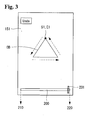
- the controller 180 may display an object OB drawn in response to a user's hand handwriting input on the touch screen 151.
- the start point S1 and the end point E1 of a contour forming the object OB may be the same, indicating the object OB is defined by a closed curve.
- the object OB may have a specific straight line or curve shape.
- the contour of the object OB may be drawn on the touch screen 151 along a specific path for forming the object OB.
- Information related to the path of the contour drawn in the touch screen 151 may be stored in the memory 160 of the mobile terminal 100 in real time.
- the controller 180 may display a bar 200 for controlling the undo function.
- the bar 200 may include a start point 210 and an end point 220.
- the start point 210 of the bar 200 corresponds to the start point S1 of the contour of the object OB
- the end point 220 of the bar 200 corresponds to the end point E1 of the contour of the object OB.
- the bar 200 may include a handle 201 for controlling the undo function and/or the redo function for the contour of the object OB while moving left and right along the bar 200.
- the controller 180 may display the handle 201 at the end point 220 of the bar 200.
- the controller 180 executes the undo function on the contour corresponding to a length which the handle 201 has moved along the bar 200. That is, when receiving a drag input moving the handle 201 to the left by d1, the controller 180 may apply the undo function to the contour of the object OB by a corresponding distance d1'.
- the controller 180 may execute the redo function on the contour on which the undo function has already been executed. That is, when receiving a drag input moving the handle 201 back toward the end point 220 of the bar 200 (i.e., in the right direction), the controller 180 may insert the section of the contour, or a portion thereof depending on the distance moved along the bar 200, deleted from the object OB earlier using the undo function by applying the redo function.
- the undo and redo functions may be executed on at least some section of a specific object, including a contour drawn in response to a user's hand handwriting input, through a drag input on the handle 201 of the bar 200 in an appropriate direction.
- FIG. 6 is a flowchart of a method of controlling the mobile terminal in accordance with another embodiment, and FIGS. 7 to 11 illustrate application(s) of the method shown in FIG. 6 .
- the controller 180 when entering the edit mode after sequentially generating a plurality of objects, the controller 180 may display thumbnail images, corresponding to the respective objects, on the touch screen 151 at step S200.
- the controller 180 may set the bar 200 for executing the undo function on the contour of the selected object at step S220.
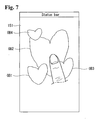
- the controller 180 may display a plurality of objects OB1, OB2, OB3, and OB4 on the touch screen 151. It is assumed that the first object OB1, the second object OB2, the third object OB3, and the fourth object OB4 are sequentially generated.
- the user may control the mobile terminal 100 using a predetermined input to enter the edit mode.
- the predetermined input may include an input for selecting an undo function key corresponding to the undo function, a long touch input for the second object OB2, or other input as appropriate.
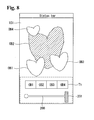
- the controller 180 may display the bar 200 and a thumbnail image group Th for the plurality of objects OB1, OB2, OB3, and OB4 on the touch screen 151.
- the controller 180 may set the bar 200 to control the undo function for the contour of an object corresponding to the selected thumbnail image.
- the controller 180 when receiving a drag input by which the second thumbnail image Th2 of the thumbnail image group Th is moved to the bar 200, the controller 180 sets the bar 200 as a bar for controlling the editing of the contour of the second object OB2. That is, the controller 180 may map information related to the contour of the second object OB2 to the bar 200 in response to the drag input. Accordingly, the bar 200 may control the undo function for the contours of all the objects displayed on the touch screen 151 in this manner.
- the controller 180 may delete a section of the contour of the second object OB2 by executing the undo function on the section of the contour of the second object OB2 having a length d1' corresponding to the length d1.
- the controller 180 does not edit the contour of the remaining objects OB1, OB3 and OB4. That is, the controller 180 performs a contour edit only an object (in this case, OB1) associated with the bar 200.
- FIG. 12 is a flowchart of a method of controlling the mobile terminal in accordance with another embodiment, and FIGS. 13 to 17 illustrate application of the method shown in FIG. 12 . Furthermore, the embodiment shown in FIG. 12 may be executed based on the first embodiment or the second embodiment or both.
- the controller 180 may designate a specific section on the bar 200 at step S300, and then display a section of the contour of a specific object corresponding to the specific section so that the displayed section is distinguished from other sections of the contour at step S310.
- the controller 180 may move the handle 201 to the end point of the specific section at step S320.
- the handle 201 when entering the edit mode, the handle 201 may be positioned at the end point 220 of the bar 200. That is, as previously described, the end point 220 of the bar 200 corresponds to the end point EP of a contour that forms an object. Accordingly, when the handle 201 is moved to the left, the undo function may be executed in reverse order. If a start position of the handle 201 is an intermediate, or middle, point of the bar 200, and not the end point of the bar 200, a section of the contour of the object on which the undo function is performed may be changed.
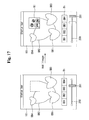
- the controller 180 when receiving a touch input in which a specific section on the bar 200 is designated by two points 231 and 232, the controller 180 moves the handle 201 from the end point of the bar 200 to an end point 232 of the designated specific section so that the undo function may be executed on a section I1-I2 of the contour of the second object OB2.
- the controller 180 may execute the undo function on the second object OB2 along a length d1' of the contour corresponding to the length d1.
- the controller 180 may add a new contour NC to the specific section on which the undo function has been performed in response to a user's handwriting input.
- the controller 180 may move the handle 201 from L1 to L2.
- a newly inserted contour is not limited to the object having the contour described above.
- an image NI stored in the memory 160 of the mobile terminal 100 may be inserted into the section on which the undo function has been performed.
- the controller 180 may incorporate the insertion of the image NI into the bar 200 by moving the handle 201 to the right.
- FIG. 18 is a flowchart of a method of controlling the mobile terminal in accordance with another embodiment, and FIGS. 19 to 26 illustrate application of the method shown in FIG. 18 .
- This embodiment may also be executed based on at least one of the first to third embodiments.
- the controller 180 may display a plurality of objects on the touch screen 151 so that at least some of the plurality of objects overlap with each other at step S400.
- the controller 180 may display an enlarged view window enlarging the peripheries of a touch point on the touch screen 151 at step S420.
- the controller 180 may display a sub-bar for executing the undo function only on the contour of the selected object on the touch screen 151 at step S440.
- the controller 180 displays a plurality of objects A, B, C, D, E and F on the touch screen 151, where at least some (e.g., A, B, C, D and E, but not F) of the plurality of objects A, B, C, D, E and F overlap each other.
- at least some (e.g., A, B, C, D and E, but not F) of the plurality of objects A, B, C, D, E and F overlap each other.
- an operation of deleting the contours of the remaining objects may be performed in a simpler way in accordance with a method of controlling the mobile terminal in accordance with an embodiment as broadly described herein.
- the controller 180 may display the enlarged view window 300, corresponding to the region G, near the region G as in a bar shown in FIG. 20 .
- a plurality of objects has a region in which some of the plurality of objects overlap each other and the overlapped region is displayed on the touch screen 151 having limited size, it may not be easy to execute the undo function by way of a user's touch input for some sections of a contour displayed in the overlapped region. For example, it may be difficult to select the contour of an object to be deleted by a user because the contour is covered by a user's finger. If the enlarged view window 300 is used, however, the undo function may be more easily executed on the contour of the object covered with a user's finger.
- the predetermined touch input may include a touch input by which the region G is rubbed.
- the enlarged view window 300 may enlarge and display each of a plurality of objects included in the region G. Furthermore, the enlarged view window 300 may include a pointer 301 for selecting a plurality of enlarged objects.
- the controller 180 may display a bar 400 for executing the undo function on at least some sections of the contour of an object indicated by the pointer 301 on the touch screen 151.
- the bar 400 may include a handle 401.
- the handle 401 may delete the contour of a specific object while moving left and right along the bar 400.
- the controller 180 may set the bar 400 as a bar for controlling the undo function on the contour of the object D by mapping information related to the contour of the object D to the bar 400.
- the controller 180 may also display an image D', corresponding to the object D, in the bar 400 to indicate the object D mapped to the bar 400.
- the controller 180 may execute the undo function on at least some sections of the contours of all objects near the region G using the method described with reference to FIG. 21 .
- the controller 180 may also execute the undo function on contours included in the region G, from among the remaining objects B, C, D and E, excluding the object A, in accordance with the aforementioned method. As a result, only the contour of the object A is present in the region G, and the contours of the remaining objects B, C, D and E appear deleted.
- the controller 180 may execute the undo function on a plurality of objects with one bar for controlling the undo function for at least some section of a specific object.
- N objects are edited at the same time is described below with reference to FIGS. 23 to 26 .
- the controller 180 may also display a bar 500 for controlling the undo function for the contours of the respective objects on the touch screen 151.
- the bar 500 may be partitioned into a plurality of regions and displayed by taking the order of the plurality of generated objects and the number of objects into consideration.
- the bar 500 may be partitioned into six regions and pieces of information about the contours of the respective objects A, B, C, D, E and F can be assigned to the six regions.
- the bar 500 may include a handle 510, and the controller 180 may execute the undo function on the contours of the objects A, B, C, D, E and F by controlling movement of the handle 510 as in the aforementioned embodiments.
- the controller 180 may delete the contours (i.e., a section from an end point of the contours F, E, D and C to the middle point of the contour C) of objects through which the handle 510 passes. Accordingly, an object displayed on the touch screen 151 may include some sections of the objects A, B and C.
- the controller 180 may display a second handle 520 in a specific location on the bar 500.
- the first handle 510 and the second handle 520 shown in FIG. 25 are placed at locations where the undo function may be executed on the respective objects C and D. It is to be noted that the location of each of the first and the second handles may be changed by a user's manipulation.
- the controller 180 may execute the undo function on the contour of the object C by a distance d3' and the undo function on the contour of the object D by a distance d4'.
- FIG. 27 is a flowchart illustrating a method of controlling the mobile terminal in accordance with another embodiment as broadly described herein, and FIGS. 28 to 29 illustrate application of the method shown in FIG. 27 .
- the controller 180 may display a preview image, captured by the camera 121, on the touch screen 151 at step S500.
- the controller 180 may perform focusing on at least one object included in the preview image at step S510.
- the controller 180 may focus the specific object.
- the controller 180 may also display a focusing guide in the object.
- the controller 180 may separate the focused object from a background region and store the focused object and the background region at step S530. If the focused object is a character, the background region may refer to remaining regions other than the character.
- a preview image PI may include, for example, a character object OB5 and another object OB6 included in the remaining background region.
- the controller 180 may focus on the character object OB5, and may recognize the entire focused character object OB5. Thereafter, when receiving an input for an image capturing function, the controller 180 may store the captured image BI. The controller 180 may separate the focused character object OB5 from the background region and store them. Furthermore, when receiving an input by which an unwanted object OB6 included in the background region of the image BI is selected, the controller 180 may delete the unwanted object OB6 from the background region. The controller 180 may then generate a new image I including the focused object OB5 and the background region from which the unwanted object OB6 has been removed.
- a user may simply delete an unnecessary object included in a background region by selecting only a desired object in a preview image and performing focusing on the selected object.
- the background region may include a plurality of objects, and the plurality of objects may at least partially overlap.
- the controller 180 may execute the undo function on the plurality of objects included in the background region more conveniently by displaying the bar for executing the undo function on at least some section of the contour of a specific object, included in the background region, on the touch screen 151 and controlling the handle of the bar.
- the controller 180 may execute the undo function on the specific object more simply.
- the methods of controlling the mobile terminal as embodied and broadly described herein may be recorded on a computer-readable recording medium in the form of a program for executing the control methods in a computer.
- the methods of controlling the mobile terminal in accordance with embodiments as broadly described herein may be executed through software.
- the elements may be code segments that execute necessary tasks.
- the program or code segments may be stored in a processor-readable medium or may be transmitted through a transfer medium or a computer data signal combined with carriers over a communication network.
- the computer-readable recording medium may include all kinds of recording devices on which data readable by a computer system is recorded.
- the computer-readable recording medium may include, for example, ROM, RAM, CD-ROM, DVD ⁇ ROM, DVD-RAM, magnetic tapes, floppy disks, hard disks, and optical data storages. Codes distributed over computer apparatuses coupled together over a network and readable by computers in a distributed manner may be stored in the computer-readable recording medium and executed.
- the undo function may be executed on at least part of an object having a specific contour more conveniently.
- the undo function may be executed on at least some section of the contour of a specific object more conveniently.
- the desired object when a specific image including a desired object and a background region is captured by a camera, the desired object may be separated from the background region, including any unwanted objects and the separated desired object and background region may be stored. Accordingly, a new image including only the desired object may be obtained by removing the unwanted object(s) from the background region and composing the desired object and the background region from which the unwanted object(s) have been removed.
- a mobile terminal and a method of controlling a mobile terminal are provided that are capable of executing an undo function on at least part of a contour forming an object more conveniently.
- a mobile terminal and associated control method including a user interface capable of editing at least part of a specific object of a plurality of objects at least some of which overlap with each other more conveniently and precisely.
- a mobile terminal as embodied and broadly described herein may include a touch screen and a controller configured to generate a plurality of objects comprising a specific contour, display the plurality of objects in the touch screen, and display a bar for controlling an undo function on at least some section of a contour forming a specific object, from among the plurality of objects.
- the plurality of objects may be sequentially generated and displayed in the touch screen.
- At least some of the plurality of objects may be overlapped with each other and displayed in the touch screen.
- the bar may include a handler controlled so that the handler executes the undo function when moving in a specific direction, the start point of the bar may correspond to the start point of the contour forming the specific object, and the end point of the bar may correspond to the end point of the contour.
- the controller may execute the undo function when receiving an input by which the handler is moved in a specific direction on the bar.
- the controller may execute the undo function by a section of the contour corresponding to a length in which the handler has moved in the specific object.
- the controller may execute a redo function on the section of the contour on which the undo function has been executed.
- the controller may display thumbnail images, corresponding to the respective objects, in the touch screen, and the thumbnail images may be arranged and displayed in order of the generated objects.
- the controller may set the bar as a bar for controlling the undo function for the contour of an object corresponding to the selected thumbnail image.
- the controller may display a specific section of the contour of the specific object corresponding to the specific section on the bar so that the specific section of the contour is distinguished from remaining sections of the contour of the specific object.
- the controller may display the handler at the end point of the specific section.
- the controller may control a location of the handler on the bar by incorporating the new contour into the location of the handler.
- the new contour may include at least one of a handwriting input touch contour and an image stored in the mobile terminal.
- the controller When receiving a predetermined touch input for a region in which the plurality of objects overlaps with each other, the controller displays an enlargement view window for enlarging and displaying peripheries of the touch inputted point near the touch inputted point.
- the controller may display a sub-bar for executing the undo function on only the contour of the selected object in the touch screen, and the sub-bar may activate and display only the selected object.
- a mobile terminal in accordance with another embodiment may include a camera, a memory, a touch screen, and a controller configured to display a preview image captured by the camera in the touch screen, perform focusing on at least one object included in the preview image, separate the focused object from a background region other than the focused object when capturing an image, and separately store the focused object and background region in the memory.
- a method of controlling a mobile terminal may include sequentially generating a plurality of objects having a specific contour and displaying the plurality of objects in a touch screen, entering edition mode for editing at least one of the plurality of objects in response to a predetermined input, and displaying a bar for controlling an undo function for at least some section of a contour forming a specific object of the plurality of objects in the touch screen.
- a method of controlling a mobile terminal may include displaying a preview image captured by a camera in a touch screen, performing focusing on at least one object included in the preview image, and separating the focused object from a background region other than the focused object and separately storing the focused object and the background region in a memory, when capturing an image.
- any reference in this specification to "one embodiment,” “an embodiment,” “example embodiment,” etc. means that a particular feature, structure, or characteristic described in connection with the embodiment is included in at least one embodiment of the invention.
- the appearances of such phrases in various places in the specification are not necessarily all referring to the same embodiment.
Landscapes
- Engineering & Computer Science (AREA)
- Theoretical Computer Science (AREA)
- General Engineering & Computer Science (AREA)
- Human Computer Interaction (AREA)
- Physics & Mathematics (AREA)
- General Physics & Mathematics (AREA)
- Computer Networks & Wireless Communication (AREA)
- Signal Processing (AREA)
- User Interface Of Digital Computer (AREA)
- Telephone Function (AREA)
- Controls And Circuits For Display Device (AREA)
- Studio Devices (AREA)
Applications Claiming Priority (1)
| Application Number | Priority Date | Filing Date | Title |
|---|---|---|---|
| KR1020120122058A KR102042461B1 (ko) | 2012-10-31 | 2012-10-31 | 이동 단말기 및 이동 단말기의 제어 방법 |
Publications (2)
| Publication Number | Publication Date |
|---|---|
| EP2728454A2 true EP2728454A2 (de) | 2014-05-07 |
| EP2728454A3 EP2728454A3 (de) | 2017-10-04 |
Family
ID=49447900
Family Applications (1)
| Application Number | Title | Priority Date | Filing Date |
|---|---|---|---|
| EP13004917.4A Withdrawn EP2728454A3 (de) | 2012-10-31 | 2013-10-14 | Tragbares Endgerät und Verfahren zu dessen Steuerung |
Country Status (4)
| Country | Link |
|---|---|
| US (1) | US9383904B2 (de) |
| EP (1) | EP2728454A3 (de) |
| KR (1) | KR102042461B1 (de) |
| CN (1) | CN103795851B (de) |
Cited By (1)
| Publication number | Priority date | Publication date | Assignee | Title |
|---|---|---|---|---|
| EP3128410A3 (de) * | 2015-07-13 | 2017-05-17 | LG Electronics Inc. | Mobiles endgerät und steuerungsverfahren dafür |
Families Citing this family (18)
| Publication number | Priority date | Publication date | Assignee | Title |
|---|---|---|---|---|
| USD746856S1 (en) * | 2013-02-07 | 2016-01-05 | Tencent Technology (Shenzhen) Company Limited | Display screen portion with an animated graphical user interface |
| JP2014203322A (ja) * | 2013-04-08 | 2014-10-27 | 船井電機株式会社 | 描画装置、描画方法、及び描画プログラム |
| JP2015064697A (ja) * | 2013-09-24 | 2015-04-09 | 富士通株式会社 | 情報処理装置、情報処理方法および情報処理プログラム |
| USD757817S1 (en) * | 2013-12-05 | 2016-05-31 | Tencent Technology (Shenzhen) Company Limited | Animated graphical user interface for a portion of a display screen |
| USD757816S1 (en) * | 2013-12-05 | 2016-05-31 | Tencent Technology (Shenzhen) Company Limited | Animated graphical user interface for a portion of a display screen |
| US20150286349A1 (en) * | 2014-04-02 | 2015-10-08 | Microsoft Corporation | Transient user interface elements |
| AU2016100651B4 (en) | 2015-06-18 | 2016-08-18 | Apple Inc. | Device, method, and graphical user interface for navigating media content |
| US9652125B2 (en) | 2015-06-18 | 2017-05-16 | Apple Inc. | Device, method, and graphical user interface for navigating media content |
| KR20170011190A (ko) * | 2015-07-21 | 2017-02-02 | 엘지전자 주식회사 | 이동 단말기 및 그것의 제어방법 |
| US9928029B2 (en) | 2015-09-08 | 2018-03-27 | Apple Inc. | Device, method, and graphical user interface for providing audiovisual feedback |
| US9990113B2 (en) | 2015-09-08 | 2018-06-05 | Apple Inc. | Devices, methods, and graphical user interfaces for moving a current focus using a touch-sensitive remote control |
| USD988333S1 (en) * | 2016-02-24 | 2023-06-06 | Nicholas Anil Salpekar | Wine display |
| JP6740020B2 (ja) * | 2016-06-14 | 2020-08-12 | 株式会社メガハウス | お絵描き装置 |
| JP2018148310A (ja) * | 2017-03-02 | 2018-09-20 | オリンパス株式会社 | 情報収集装置、情報端末装置、情報処理システム、情報処理方法及び情報処理プログラム |
| CN108519846B (zh) * | 2018-03-28 | 2020-05-19 | 维沃移动通信有限公司 | 一种图像编辑处理方法及终端 |
| US11922006B2 (en) | 2018-06-03 | 2024-03-05 | Apple Inc. | Media control for screensavers on an electronic device |
| US10796086B2 (en) * | 2018-08-25 | 2020-10-06 | Microsoft Technology Licensing, Llc | Selectively controlling modification states for user-defined subsets of objects within a digital document |
| CN109165626A (zh) * | 2018-09-11 | 2019-01-08 | 广州视源电子科技股份有限公司 | 电子白板的书写笔画处理方法、装置、设备和存储介质 |
Family Cites Families (19)
| Publication number | Priority date | Publication date | Assignee | Title |
|---|---|---|---|---|
| US5748780A (en) * | 1994-04-07 | 1998-05-05 | Stolfo; Salvatore J. | Method and apparatus for imaging, image processing and data compression |
| JPH08272993A (ja) * | 1995-03-31 | 1996-10-18 | Hitachi Electron Service Co Ltd | 図形オブジェクトの深さ制御方法および深さ表示方法 |
| US6115037A (en) * | 1996-11-15 | 2000-09-05 | Hitachi Denshi Kabushiki Kaisha | Motion image control method and apparatus |
| US6310623B1 (en) * | 1998-05-28 | 2001-10-30 | Scimed Life Systems, Inc. | Method for manual editing of a closed contour |
| US6459442B1 (en) * | 1999-09-10 | 2002-10-01 | Xerox Corporation | System for applying application behaviors to freeform data |
| US6784886B1 (en) * | 2000-08-28 | 2004-08-31 | Adobe Systems Incorporated | Method for apparatus for associating objects with a spline by value |
| US6937760B2 (en) * | 2000-12-28 | 2005-08-30 | University Of Washington | Interactive frame segmentation with dynamic programming |
| US7376265B2 (en) * | 2004-06-17 | 2008-05-20 | Seiko Epson Corporation | Segmentation-based hybrid compression scheme for scanned documents |
| US7869649B2 (en) * | 2006-05-08 | 2011-01-11 | Panasonic Corporation | Image processing device, image processing method, program, storage medium and integrated circuit |
| US8009903B2 (en) * | 2006-06-29 | 2011-08-30 | Panasonic Corporation | Image processor, image processing method, storage medium, and integrated circuit that can adjust a degree of depth feeling of a displayed high-quality image |
| US7873746B2 (en) * | 2007-07-27 | 2011-01-18 | Lagavulin Limited | User interface for a portable, image-processing transmitter |
| KR101429278B1 (ko) * | 2007-08-08 | 2014-08-11 | 삼성전자주식회사 | 문자 삭제 기능을 제공하기 위한 장치 및 방법 |
| US8363019B2 (en) * | 2008-05-26 | 2013-01-29 | Lg Electronics Inc. | Mobile terminal using proximity sensor and method of controlling the mobile terminal |
| JP2010160564A (ja) * | 2009-01-06 | 2010-07-22 | Toshiba Corp | 携帯端末 |
| US20100313158A1 (en) * | 2009-06-08 | 2010-12-09 | Lg Electronics Inc. | Method for editing data in mobile terminal and mobile terminal using the same |
| CN102054159B (zh) * | 2009-10-28 | 2014-05-28 | 腾讯科技(深圳)有限公司 | 一种人脸跟踪的方法和装置 |
| CN102375979A (zh) * | 2010-08-23 | 2012-03-14 | 北京汉林信通信息技术有限公司 | 人像智能采集设备及方法 |
| KR101266198B1 (ko) * | 2010-10-19 | 2013-05-21 | 주식회사 팬택 | 증강현실 객체정보의 가시성을 높이는 디스플레이 장치 및 디스플레이 방법 |
| KR20120062297A (ko) * | 2010-12-06 | 2012-06-14 | 삼성전자주식회사 | 디스플레이 장치 및 그 ui 제공 방법 |
-
2012
- 2012-10-31 KR KR1020120122058A patent/KR102042461B1/ko not_active Ceased
-
2013
- 2013-10-09 US US14/049,305 patent/US9383904B2/en not_active Expired - Fee Related
- 2013-10-14 EP EP13004917.4A patent/EP2728454A3/de not_active Withdrawn
- 2013-10-28 CN CN201310516530.7A patent/CN103795851B/zh not_active Expired - Fee Related
Non-Patent Citations (1)
| Title |
|---|
| None |
Cited By (1)
| Publication number | Priority date | Publication date | Assignee | Title |
|---|---|---|---|---|
| EP3128410A3 (de) * | 2015-07-13 | 2017-05-17 | LG Electronics Inc. | Mobiles endgerät und steuerungsverfahren dafür |
Also Published As
| Publication number | Publication date |
|---|---|
| EP2728454A3 (de) | 2017-10-04 |
| CN103795851A (zh) | 2014-05-14 |
| KR102042461B1 (ko) | 2019-11-08 |
| KR20140055361A (ko) | 2014-05-09 |
| US20140123042A1 (en) | 2014-05-01 |
| US9383904B2 (en) | 2016-07-05 |
| CN103795851B (zh) | 2018-10-19 |
Similar Documents
| Publication | Publication Date | Title |
|---|---|---|
| US9383904B2 (en) | Mobile terminal and method for controlling the same | |
| KR101935039B1 (ko) | 이동 단말기 및 이동 단말기의 제어 방법 | |
| US8774869B2 (en) | Mobile terminal and control method thereof | |
| EP2690879B1 (de) | Mobiles Endgerät und Verfahren zu dessen Steuerung | |
| KR102182160B1 (ko) | 휴대 단말기 및 그 제어 방법 | |
| US9716989B2 (en) | Mobile terminal and method for capturing a screen and extracting information to control the same | |
| US20120007890A1 (en) | Method for photo editing and mobile terminal using this method | |
| EP2693321A1 (de) | Mobiles Endgerät und Steuerungsverfahren dafür | |
| US9781355B2 (en) | Mobile terminal and control method thereof for displaying image cluster differently in an image gallery mode | |
| KR20140134864A (ko) | 이동 단말기 및 그 제어방법 | |
| US20160283181A1 (en) | Electronic device and method for controlling the same | |
| KR101919790B1 (ko) | 이미지 표시 장치 및 그 제어방법 | |
| EP2442241A1 (de) | Tragbares Endgerät und Anzeigeverfahren davon | |
| US9098194B2 (en) | Keypad of mobile terminal and display method thereof | |
| KR20150059344A (ko) | 이동 단말기 및 이의 제어 방법 | |
| CN114001748B (zh) | 导航路线显示方法、装置、设备及介质 | |
| CN111796733B (zh) | 图像显示方法、图像显示装置和电子设备 | |
| KR20120011138A (ko) | 이동 단말기 및 그를 이용한 증강 현실 정보의 편집 방법 | |
| KR101997444B1 (ko) | 이동 단말기 및 이동 단말기 제어방법 | |
| KR20140045640A (ko) | 이동단말기 및 그 제어 방법 | |
| KR20140133058A (ko) | 이동 단말기 및 그 제어방법 | |
| KR20150047387A (ko) | 단말기 및 그 제어 방법 | |
| KR101737287B1 (ko) | 조건을 통해 필터링된 결과를 실시간으로 표시하는 방법 | |
| CN114398129A (zh) | 共享对象分享方法、装置、电子设备及可读存储介质 | |
| KR102040613B1 (ko) | 휴대 단말기 및 그 제어 방법 |
Legal Events
| Date | Code | Title | Description |
|---|---|---|---|
| PUAI | Public reference made under article 153(3) epc to a published international application that has entered the european phase |
Free format text: ORIGINAL CODE: 0009012 |
|
| 17P | Request for examination filed |
Effective date: 20131014 |
|
| AK | Designated contracting states |
Kind code of ref document: A2 Designated state(s): AL AT BE BG CH CY CZ DE DK EE ES FI FR GB GR HR HU IE IS IT LI LT LU LV MC MK MT NL NO PL PT RO RS SE SI SK SM TR |
|
| AX | Request for extension of the european patent |
Extension state: BA ME |
|
| PUAL | Search report despatched |
Free format text: ORIGINAL CODE: 0009013 |
|
| AK | Designated contracting states |
Kind code of ref document: A3 Designated state(s): AL AT BE BG CH CY CZ DE DK EE ES FI FR GB GR HR HU IE IS IT LI LT LU LV MC MK MT NL NO PL PT RO RS SE SI SK SM TR |
|
| AX | Request for extension of the european patent |
Extension state: BA ME |
|
| RIC1 | Information provided on ipc code assigned before grant |
Ipc: G06F 3/0488 20130101AFI20170829BHEP |
|
| RBV | Designated contracting states (corrected) |
Designated state(s): AL AT BE BG CH CY CZ DE DK EE ES FI FR GB GR HR HU IE IS IT LI LT LU LV MC MK MT NL NO PL PT RO RS SE SI SK SM TR |
|
| STAA | Information on the status of an ep patent application or granted ep patent |
Free format text: STATUS: EXAMINATION IS IN PROGRESS |
|
| 17Q | First examination report despatched |
Effective date: 20190718 |
|
| STAA | Information on the status of an ep patent application or granted ep patent |
Free format text: STATUS: THE APPLICATION IS DEEMED TO BE WITHDRAWN |
|
| 18D | Application deemed to be withdrawn |
Effective date: 20200714 |