EP2728456B1 - Procédé et appareil de commande d'écran virtuel. - Google Patents
Procédé et appareil de commande d'écran virtuel. Download PDFInfo
- Publication number
- EP2728456B1 EP2728456B1 EP13172231.6A EP13172231A EP2728456B1 EP 2728456 B1 EP2728456 B1 EP 2728456B1 EP 13172231 A EP13172231 A EP 13172231A EP 2728456 B1 EP2728456 B1 EP 2728456B1
- Authority
- EP
- European Patent Office
- Prior art keywords
- touch
- screen
- input
- movement
- screen view
- Prior art date
- Legal status (The legal status is an assumption and is not a legal conclusion. Google has not performed a legal analysis and makes no representation as to the accuracy of the status listed.)
- Active
Links
Images



Classifications
-
- G—PHYSICS
- G06—COMPUTING OR CALCULATING; COUNTING
- G06F—ELECTRIC DIGITAL DATA PROCESSING
- G06F3/00—Input arrangements for transferring data to be processed into a form capable of being handled by the computer; Output arrangements for transferring data from processing unit to output unit, e.g. interface arrangements
- G06F3/01—Input arrangements or combined input and output arrangements for interaction between user and computer
- G06F3/048—Interaction techniques based on graphical user interfaces [GUI]
- G06F3/0487—Interaction techniques based on graphical user interfaces [GUI] using specific features provided by the input device, e.g. functions controlled by the rotation of a mouse with dual sensing arrangements, or of the nature of the input device, e.g. tap gestures based on pressure sensed by a digitiser
- G06F3/0488—Interaction techniques based on graphical user interfaces [GUI] using specific features provided by the input device, e.g. functions controlled by the rotation of a mouse with dual sensing arrangements, or of the nature of the input device, e.g. tap gestures based on pressure sensed by a digitiser using a touch-screen or digitiser, e.g. input of commands through traced gestures
-
- G—PHYSICS
- G06—COMPUTING OR CALCULATING; COUNTING
- G06F—ELECTRIC DIGITAL DATA PROCESSING
- G06F3/00—Input arrangements for transferring data to be processed into a form capable of being handled by the computer; Output arrangements for transferring data from processing unit to output unit, e.g. interface arrangements
- G06F3/01—Input arrangements or combined input and output arrangements for interaction between user and computer
- G06F3/048—Interaction techniques based on graphical user interfaces [GUI]
- G06F3/0487—Interaction techniques based on graphical user interfaces [GUI] using specific features provided by the input device, e.g. functions controlled by the rotation of a mouse with dual sensing arrangements, or of the nature of the input device, e.g. tap gestures based on pressure sensed by a digitiser
-
- G—PHYSICS
- G06—COMPUTING OR CALCULATING; COUNTING
- G06F—ELECTRIC DIGITAL DATA PROCESSING
- G06F3/00—Input arrangements for transferring data to be processed into a form capable of being handled by the computer; Output arrangements for transferring data from processing unit to output unit, e.g. interface arrangements
- G06F3/01—Input arrangements or combined input and output arrangements for interaction between user and computer
- G06F3/03—Arrangements for converting the position or the displacement of a member into a coded form
-
- G—PHYSICS
- G06—COMPUTING OR CALCULATING; COUNTING
- G06F—ELECTRIC DIGITAL DATA PROCESSING
- G06F3/00—Input arrangements for transferring data to be processed into a form capable of being handled by the computer; Output arrangements for transferring data from processing unit to output unit, e.g. interface arrangements
- G06F3/01—Input arrangements or combined input and output arrangements for interaction between user and computer
- G06F3/03—Arrangements for converting the position or the displacement of a member into a coded form
- G06F3/033—Pointing devices displaced or positioned by the user, e.g. mice, trackballs, pens or joysticks; Accessories therefor
- G06F3/0354—Pointing devices displaced or positioned by the user, e.g. mice, trackballs, pens or joysticks; Accessories therefor with detection of two-dimensional [2D] relative movements between the device, or an operating part thereof, and a plane or surface, e.g. 2D mice, trackballs, pens or pucks
- G06F3/03545—Pens or stylus
-
- G—PHYSICS
- G06—COMPUTING OR CALCULATING; COUNTING
- G06F—ELECTRIC DIGITAL DATA PROCESSING
- G06F3/00—Input arrangements for transferring data to be processed into a form capable of being handled by the computer; Output arrangements for transferring data from processing unit to output unit, e.g. interface arrangements
- G06F3/01—Input arrangements or combined input and output arrangements for interaction between user and computer
- G06F3/048—Interaction techniques based on graphical user interfaces [GUI]
- G06F3/0484—Interaction techniques based on graphical user interfaces [GUI] for the control of specific functions or operations, e.g. selecting or manipulating an object, an image or a displayed text element, setting a parameter value or selecting a range
- G06F3/0485—Scrolling or panning
-
- G—PHYSICS
- G06—COMPUTING OR CALCULATING; COUNTING
- G06F—ELECTRIC DIGITAL DATA PROCESSING
- G06F3/00—Input arrangements for transferring data to be processed into a form capable of being handled by the computer; Output arrangements for transferring data from processing unit to output unit, e.g. interface arrangements
- G06F3/14—Digital output to display device ; Cooperation and interconnection of the display device with other functional units
-
- G—PHYSICS
- G06—COMPUTING OR CALCULATING; COUNTING
- G06F—ELECTRIC DIGITAL DATA PROCESSING
- G06F2203/00—Indexing scheme relating to G06F3/00 - G06F3/048
- G06F2203/041—Indexing scheme relating to G06F3/041 - G06F3/045
- G06F2203/04104—Multi-touch detection in digitiser, i.e. details about the simultaneous detection of a plurality of touching locations, e.g. multiple fingers or pen and finger
Definitions
- the present invention relates to a method and an apparatus for controlling a virtual screen. More particularly, the present invention relates to a method and an apparatus for controlling a manipulation input related to a virtual screen and a movement of a screen view displaying a partial area of the virtual screen via the screen view.
- Virtual screen may refer to an area in which editing or viewing can be performed, wherein the virtual screen includes both an area displayed on a screen of a display unit and an area which is not displayed on the screen of the display unit.
- a portable computing apparatus may use a touch screen display unit.
- the touch screen display unit may provide a User Interface (UI) or User Experience (UX) through a touch screen included in the touch screen display unit.
- the touch screen display unit may display graphics and text on the touch screen, and may detect and respond to a touch on the touch screen.
- An apparatus, such as the portable computing apparatus, which uses the touch screen display unit may display one or more soft keys, a menu and other UI and/or UX objects on the touch screen.
- a user may cause the apparatus to receive an input related to UI and/or UX object by performing an operation for a touch screen input at a position matched to a UI and/or UX object.
- the touch screen input may be a stylus input or a touch input.
- swipe input may refer to the touch of a stylus or similar and/or suitable object to the screen
- touch input may refer to the touch of a part of the human body, such as a finger, to the touch screen.
- the touch may include a direct touch to the touch screen, a proximity to the touch screen, and any other similar and/or suitable touch to the touch screen according to a scheme for a touch screen input.
- functions and/or operations, such as editing, viewing, and the like, that are related to a virtual screen may be performed through a screen view displayed on the touch screen.
- the screen view displays a selected partial area of the virtual screen.
- the user may select a part of the virtual screen by using a touch screen input on the screen view, and may view or edit the selected part on the screen view.
- the portable computing apparatus which uses the touch screen display unit may be referred to as a "touch screen device.”
- the stylus input may be used as a precise input.
- a handwriting input may be executing via the stylus input in order to recognize a handwriting of the user, instead of a using a touch input of a finger for the handwriting.
- the stylus input and the touch input have been treated as being identical to each other.
- the screen view may be moved on the virtual screen according to the manipulation of a scroll bar. Therefore, there is a limit on a fast and natural movement of the screen view because of use of the scroll bar.
- EP 2 071 436 A1 discloses a system wherein, if it is detected in a touch screen that an input is performed by a pen, a function allocated in advance to an area on a screen of the application specified by a pen input is executed, and if it is detected that an input is performed by a finger, the execution of the function of the application allocated in advance on the screen of the application is prohibited and a predetermined function not allocated to the area on the screen of the application is executed.
- US 2012/062604 A1 discloses a flexible touch-based scrolling system using a touch screen, wherein the velocity of the touch gesture is analyzed, and the system selects between different types of movement based on the gesture velocity with the velocity ranges.
- an aspect of the present invention is to provide a method and an apparatus for controlling a virtual screen, which may implement a control of a manipulation input corresponding to the virtual screen through a screen view and the control of the movement of the screen view.
- Another aspect of the present invention is to provide a method and an apparatus for controlling a virtual screen, which may improve a response speed of both a manipulation input corresponding to the virtual screen through a screen view and the movement of the screen view.
- Another aspect of the present invention is to provide a method and an apparatus for controlling a virtual screen, which may first determine whether a touch screen input on a screen view is a stylus input or a touch input and may then process both a manipulation input related to the virtual screen on the screen view and the movement of the screen view in response to each of the stylus input and the touch input.
- a method for controlling a virtual screen includes detecting a touch screen input on a screen view, the screen view displaying a partial area of the virtual screen on a display unit of the electronic device, determining whether the touch screen input is a stylus input or a touch input, the stylus input being executed by a user controlling a stylus and the touch input being executed by the user using a body part of the user, processing the stylus input as a manipulation input corresponding to the virtual screen when the touch screen input is the stylus input, and moving the screen view on the virtual screen in response to a touch movement of the touch input when the touch screen input is the touch input.
- an apparatus for controlling a virtual screen includes a touch screen display unit configured to display a screen view that displays a partial area of the virtual screen and to detect a touch screen input on the screen view, and a controller configured to determine whether the touch screen input is a stylus input, which is executed by a user controlling a stylus, or a touch input, which is executed by the user using a body part of the user, to process the stylus input as a manipulation input corresponding to the virtual screen when the touch screen input is the stylus input, and to control to move the screen view on the virtual screen in response to a touch movement of the touch input when the touch screen input is the touch input.
- a touch screen display unit configured to display a screen view that displays a partial area of the virtual screen and to detect a touch screen input on the screen view
- a controller configured to determine whether the touch screen input is a stylus input, which is executed by a user controlling a stylus, or a touch input, which is executed by the user using a body part of the user, to process the styl
- exemplary embodiments of the present invention will be described.
- the exemplary embodiments may be described in a case where a mobile terminal is a touch screen device.
- the present invention is not limited thereto, and the exemplary embodiments may also be applied to other apparatuses having a similar technical features, operations and uses.
- the exemplary embodiments of the present invention may be applied to other apparatuses through some modifications by those having ordinary skill in the art, to which the present invention pertains, without departing from the scope of the present invention. Namely, the exemplary embodiments of the present invention may be applied to an apparatus even when the apparatus is a touch screen device but is not a mobile terminal.
- the exemplary embodiments of the present invention may be applied to a Personal Digital Assistant (PDA), a tablet computer, a laptop computer, or any other similar and/or suitable electronic device having a touch screen device.
- PDA Personal Digital Assistant
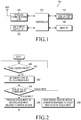
- FIG. 1 is a block diagram showing a configuration of a mobile terminal for controlling a virtual screen according to an exemplary embodiment of the present invention.
- a mobile terminal 100 may be a smart phone.
- the mobile terminal 100 may include a controller 102, a wireless communication unit 104, an audio input/output unit 106, a memory 108, and a touch screen display unit 110.
- a configuration, features, and/or elements which are not needed for a description of a control of a virtual screen according to an exemplary embodiment of the present invention will be omitted if possible.
- the wireless communication unit 104 may transmit and receive wireless signals for a mobile communication service of the mobile terminal 100.
- the audio input/output unit 106 may include an audio output device (not shown), such as a speaker, and an audio input device (not shown), such as a microphone, and may input and output various audio signals according to the operation of the controller 102.
- the memory 108 may store a program for the operation of the controller 102, and may store various data according to the execution of the controller 102.
- the memory 108 may further include an external memory (not shown), and may further include a storage unit (not shown), such as a Hard Disk Drive (HDD) or any other similar and/or suitable storage unit for storing information and/or data.
- the touch screen display unit 110 may provide an input interface and an output interface between the mobile terminal 100 and a user.
- the touch screen display unit 110 may include a touch screen (not shown).
- the touch screen display unit 110 may display a screen image on the touch screen according to the operation of the controller 102, and provides a touch screen input on the touch screen to the controller 102.
- the touch screen display unit 110 may display a screen view according to the execution of an application, which provides a virtual screen, by the controller 102, and the touch screen display unit 110 may detect a touch screen input that may be inputted on the screen view and may provide the detected touch screen input, and/or information corresponding to the detected touch screen input, to the controller 102.
- the mobile terminal 100 may further include an input device (not shown), for example, a keypad or buttons, other than the touch screen display unit 110.
- the mobile terminal 100 may further include a communication means (not shown), for example, a wired and wireless communication means, such as a Universal Serial Bus (USB), a Local Area Network (LAN), Bluetooth, and any other similar and/or suitable communication means other than the wireless communication unit 104.
- a communication means for example, a wired and wireless communication means, such as a Universal Serial Bus (USB), a Local Area Network (LAN), Bluetooth, and any other similar and/or suitable communication means other than the wireless communication unit 104.
- the controller 102 may control the wireless communication unit 104, the audio input/output unit 106, the memory 108 and the touch screen display unit 110, and may performs functions and overall operations of the mobile terminal 100.
- the controller 102 may control the touch screen display unit 110 so as to display a screen view according to the execution of an application, and may control a virtual screen according to a touch screen input that may be inputted through the screen view.
- the controller 102 may be included in, and/or implemented by a main controller (not shown) of the mobile terminal 100 in order to additionally execute the functions and/or operations of controlling a virtual screen according to an exemplary embodiment of the present invention.
- controller 102 may be implemented as a dedicated processor or controller for executing only the functions and/or operations of controlling a virtual screen, or the controller 102 may be implemented in dedicated hardware.
- the present invention is not limited thereto, and the controller 102 may be implemented by any suitable and/or similar hardware element.
- the controller 102 may determine a type of the touch screen input. Namely, the controller 102 may determine whether the touch screen input is a stylus input or a touch input. In order to distinguish between a stylus input and a touch input, the controller 102 may, for example, distinguish between them according to a difference in size between an area where a stylus touches a touch screen, such as the touch screen display unit 110, and an area where a human body touches the touch screen. As another example, the controller 102 may distinguish between a stylus input and a touch input by using a panel (not shown) for detecting the stylus input that is separate from another panel (not shown) for detecting the touch input. As described above, there are various known technologies, devices, elements and methods, each of which may determine whether a touch screen input is a stylus input or a touch input. Accordingly, any suitable elements, hardware and operations a further description of them will be omitted.
- the controller 102 may control a virtual screen, which may be different for each determined type of the touch screen input.
- the controller 102 may determine the touch screen input to be a manipulation input related to a virtual screen, and the controller 102 may process the touch screen input and control the virtual screen according to the manipulation input.
- the manipulation input related to the virtual screen may be used to perform operations such as selecting, editing, or any other similar and/or suitable operations that may be performed on the virtual screen.
- the controller 102 may determine the touch screen input to be an input related to the movement of the screen view, and may processes the touch screen input accordingly.
- FIG. 2 is a flowchart showing a control of a virtual screen according to an exemplary embodiment of the present invention
- FIGs. 3A to 3C illustrate an example of editing using a screen view according to an exemplary embodiment of the present invention.
- control of a virtual screen may be executed by the controller 102 while the controller 102 controls the touch screen display unit 110 so as to display a screen view according to the execution of an application which provides the virtual screen.
- the controller 102 may identify whether a touch screen input is detected. When the touch screen input is detected, the controller 102 may then determine a type of the detected touch screen input in step 202. According to the determined type of the touch screen input, the controller 102 may then proceed from step 204 to at least one of step 206 or step 208.
- the controller 102 may proceed to step 206, and when the touch screen input is a touch input, the controller 102 may proceed to step 208.
- the controller 102 in step 206, processes the stylus input as a manipulation input related to a virtual screen, and may then return to step 200.
- An example of processing the stylus input as the manipulation input related to the virtual screen will be described hereinafter with reference to FIGs. 3A to 3C .
- FIGs. 3A to 3C a virtual screen 300, and a screen view 302 are shown.
- An area 303 of the virtual screen 300 is not displayed on the screen view 302, whereas an area of the virtual screen which is displayed is the screen view 302.
- a user may edit, for example, an image on the virtual screen as shown in FIG. 3B or FIG. 3C.
- FIG. 3B shows an example where the user draws an oval 304 on the screen view 302 by using a stylus
- FIG. 3C shows an example where the user writes letters 306 on the screen view 302 by using the stylus.
- the controller 102 may edit an image on the virtual screen 300 according to stylus input.
- the controller 102 may first move the screen view 302 on the virtual screen 300 in response to a touch movement of the touch input in step 208, and may then return to step 200.
- the controller 102 may move the screen view 302 on the virtual screen 300 at a speed and in a direction respectively corresponding to a speed and a direction of the touch movement of the touch input.
- the controller 102 may move the screen view 302 at a speed equal to or proportional to the speed of the touch movement of the touch input.
- the controller 102 may move the screen view 302 in a direction corresponding to the direction of the touch movement of the touch input. Otherwise, depending on an application which provides a virtual screen, the controller 102 may move the screen view 302 in a direction opposite to the direction of the touch movement of the touch input.
- touch movement may be a gesture wherein a part of a human body, such as a finger, moves from one point to another point while the part of the human body is kept in contact with a touch screen.
- the touch movement may include gestures such as a dragging, a flick, a multi-touch drag, a scroll, or any other similar and/or suitable touch screen gestures.
- a dragging movement and/or gesture may be a gesture by which the user, after touching a finger of the user to a touch point on the touch screen, moves the finger from the touch point at a speed lower than a set speed while the user keeps touching the touch screen, and then releases the touch after moving the finger from the touch point.
- a flick gesture may be a gesture by which the user first moves a touch point at a speed equal to or higher than the set speed and then releases the touch.
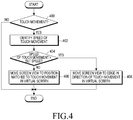
- FIG. 4 is a flowchart showing a control of a movement of a screen view according to an exemplary embodiment of the present invention
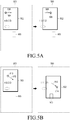
- FIGs. 5A to 5D illustrate examples of a movement of a screen view according to an exemplary embodiment of the present invention.
- step 400 the controller 102 may identify whether the touch input is a touch movement.
- the controller 102 performs step 402 in order to identify a speed of the touch movement.
- the controller 102 may complete the processing of the operations shown in FIG. 4 .
- the tap may be a gesture by which the user does not move a touch of his/her finger on a touch screen after touching it to the touch screen and then releases the touch within a predetermined time period without having moved the touch screen.
- the controller 102 may then determine whether the speed of the touch movement is greater than a set speed, such as a threshold speed and/or a predetermined speed.
- the set speed may be a speed which is set for a touch movement, for example, a speed which is set in order to distinguish between a dragging and a flick according to the speed of the touch movement. Accordingly, when the touch movement is, for example, the dragging, the speed of the touch movement may be less than the set speed. Furthermore, when the touch movement is, for example, the flick, the speed of the touch movement may be greater than the set speed.
- step 404 When a result of the determination in step 404 shows that the speed of the touch movement is less than the set speed, then the controller 102 may proceed to step 406.
- step 406 the controller 102 may move the screen view to a position corresponding to the touch movement in the virtual screen. An example of the movement of the screen view in step 406 will be described hereinafter with reference to FIGs. 5A and 5B .
- step 408 the controller 102 may move the screen view to the edge of the virtual screen in a direction corresponding to the direction of the touch movement on the virtual screen. An example of the movement of the screen view in step 408 will be described hereinafter with reference to FIGs. 5C and 5D .
- FIGs. 5A to 5D show an example of the movement of a screen view 502 in step 406, and FIGs. 5C and 5D show an example of the movement of the screen view 502 in step 408.
- a virtual screen 500 and the screen view 502 are shown.
- an area 503, as well as other text, graphics and images of the virtual screen 500 which are not displayed on the screen view 502 are shown in a dotted line, and an area of the virtual screen 500 and the other text, graphics and images which are displayed on the screen view 502, are shown in a solid line.
- a touch movement 506 having a speed less than a set speed occurs from a start point 504 of the touch movement 506 to an end point 508 of the touch movement 506, in a direction that is approximately horizontal to and to the right of the start point 504, as shown in FIG. 5A , then the screen view 502 may move in a direction and to a position corresponding the end point 508, according to the touch movement 506 on the virtual screen 500.
- the screen view 502 may move in a direction and to a position corresponding to the end point 514, according to the touch movement 512 on the virtual screen 500.
- a movement speed of the screen view 502 may be approximately equal to a movement speed of each of the touch movements 506 and 512.
- the present invention is not limited thereto, and a movement speed of the screen view 502 may be proportional to and/or correspond to a movement speed of each of the touch movements 506 and 512 in any suitable manner.
- a movement distance of the screen view 502 may be approximately equal to a movement distance of each of the touch movements 506 and 512, or may be proportional to and/or correspond to a movement distance of each of the touch movements 506 and 512 in any suitable manner.
- a movement direction of the screen view 502 may be opposite to the movement direction as shown in each of FIGs. 5A and 5B .
- the movement direction of the screen view 502 may be opposite to the movement direction of each of the touch movements 506 and 512.
- the touch movements 506 and 512 may correspond to a moving of the screen view 502 while the virtual screen 500 remains in a fixed position with respect to the screen view 502, or the touch movements 506 and 512 may correspond to a moving of the virtual screen 500 while the screen view 502 remains in a fixed position with respect to the virtual screen 500.
- the screen view 502 may move to an edge of the virtual screen 500 according to the touch movement 518 on the virtual screen 500.
- FIG. 5D when a touch movement 524, from a start point 522 of the touch movement 524 to an end point 526 of the touch movement 524, occurs in a direction that is approximately diagonal to the start point 522, as shown in FIG. 5D , then the screen view 502 may move to the edge of the virtual screen 500 according to the touch movement 524 on the virtual screen 500.
- a movement speed of the screen view 502 may be approximately equal to a movement speed of each of the touch movements 518 and 524.
- a movement speed of the screen view 502 may be proportional to and/or correspond to a movement speed of each of the touch movements 518 and 524 in any suitable manner.
- a movement distance of the screen view 502 may be irrelevant to a movement distance of each of the touch movements 518 and 524. Namely, as shown in FIGs. 5C and 5D , the screen view 502 may move to the edge of the virtual screen 500 regardless of the movement distance of each of the touch movements 518 and 524.
- the present invention is not limited thereto, and the movement distance of the screen view 502 may correspond to the respective movement distances of each of the touch movements 518 and 524 in any suitable manner.
- the touch movements 506, 512, 518, and 524, and corresponding movements of the screen view 502 are described as having specific directions. However, the present invention is not limited to those directions, and the touch movements 506, 512, 518, and 524, and corresponding movements of the screen view 502 may be in any suitable and/or similar direction. As described above, according to the exemplary embodiments of the present invention, a determination may be made as to whether a touch screen input on a screen view is a stylus input or a touch input.
- the stylus input may be used only as a manipulation input corresponding to a virtual screen having a part that is displayed by the screen view, and the touch input may be used for the movement of the screen view to change the part of the virtual screen that is displayed by the screen view.
- processing according to the stylus input may not overlap with processing according to the touch input. Accordingly, it is possible to implement control of a manipulation input that corresponds to the virtual screen and that is executed on the screen view and to implement control of a movement of the screen view according to the manipulation input. Therefore, a User Interface (UI) and/or User Experience (UX) scenario allowing for screen view manipulation may be implemented, and a response speed of both the manipulation input related to the virtual screen and the movement of the screen view may be improved.
- UI User Interface
- UX User Experience
- the user may perform manipulations and/or operations such as selecting, viewing, editing, and/or any other similar and/or suitable manipulations and/or operations that are related to the virtual screen by using the stylus, and may move the screen view by using the finger of the user, so that the user may use the virtual screen intuitively and naturally. Accordingly, an explanation of a method for using a virtual screen may not need to be provided to the user, or may be simply explained to the user.
- FIG. 6 is a flowchart showing a control of a movement of a screen view according to another exemplary embodiment of the present invention.
- steps 200 to 208 are respectively identical to steps 200 to 208 as shown in FIG. 2 , which are described above.
- step 600 is added before step 208
- step 602 is added after step 208. Therefore, hereinafter, a description of steps 200 to 208 will be omitted.
- the controller 102 may activate and display a navigation window on the screen view in step 600, and may then performs step 208.
- the navigation window may include a screen displaying navigation information of the screen view in the virtual screen.
- the controller 102 in step 602, may terminate the display of the navigation window by deactivating the navigation window, and may then return to step 200. Accordingly, while the touch input is detected by the controller 102, the navigation window may be continuously displayed.
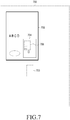
- FIG. 7 illustrates an example of a screen view according to another exemplary embodiment of the present invention.
- FIG. 7 the display of a navigation window 704, as described with respect to step 600 of FIG. 6 , is shown.
- a virtual screen 700 and a screen view 702 are shown.
- An area 703 of the virtual screen 700, which is not displayed on the screen view 702, is shown in a dotted line, and an area of the virtual screen 700 that is displayed as the screen view 702 is shown in a solid line.
- the navigation window 704 may be displayed on the screen view 702 and may display a reduced image of the virtual screen 700.
- the navigation window 704 may include a marker 706 indicating a position of the screen view 702 on the virtual screen 700. Accordingly, when the user moves the screen view 702, the user may more easily understand movement conditions by using the navigation window 704, and may more easily move the screen view 704 to a desired position on the virtual screen 700.
- the mobile device may be used to control the virtual screen in such a manner that the mobile device may first download, from a remotely-located apparatus, such as a server, for providing a program, and/or install the program, which may be an application or any other similar and/or suitable program, for controlling the virtual screen, and may then execute the program.
- a remotely-located apparatus such as a server
- the program which may be an application or any other similar and/or suitable program, for controlling the virtual screen, and may then execute the program.
- the program for controlling the virtual screen is installed on the mobile device, the program may be executed on the mobile device, and may provide control of the virtual screen.
- the apparatus for providing the program for controlling the virtual screen may transmit the program to the mobile device in response to a request for transmitting the program, which has been made by the mobile device, or may automatically transmit the program to the mobile device.
- the present invention is not limited thereto, and the program for controlling the virtual screen may be installed on the mobile device by a manufacturer or may be pre-installed on the mobile device in any suitable manner.
- the apparatus for providing the program may perform a determination as to whether the mobile device is to subscribe to a service, may perform a user authentication, may perform an identification of payment information, and may perform any other similar and/or suitable function corresponding to downloading, installing, and executing the program for controlling the virtual screen on the mobile device.
- the apparatus for providing the program may include a communication unit for performing wired or wireless communication with the mobile device, a storage medium for storing the program, and a control unit for controlling the communication unit so as to transmit the program to the mobile device, and any other similar and/or suitable programs, data and elements for providing the program to the mobile device.
- the storage medium may be located inside or outside the apparatus for providing the program.
- the exemplary embodiments of the present invention may be implemented in the form of hardware or a combination of hardware and software.
- Such software may be stored in a non-transitory computer readable storage medium, such as a volatile or non-volatile storage device such as a Read-Only Memory (ROM) and a Random Access Memory (RAM), a Compact Disc (CD), a Digital Versatile Disc (DVD), a magnetic disk, a magnetic tape which is optically or magnetically recordable and readable by a machine, or any other similar and/or suitable non-transitory computer readable storage medium.
- ROM Read-Only Memory
- RAM Random Access Memory
- CD Compact Disc
- DVD Digital Versatile Disc
- magnetic disk a magnetic tape which is optically or magnetically recordable and readable by a machine, or any other similar and/or suitable non-transitory computer readable storage medium.
- the present invention may include a program including a code for implementing an apparatus or a method claimed in any claim of this specification, and a non-transitory computer readable storage medium in which this program may be stored and which is readable by a machine, such as a computer.
- the program may be electronically conveyed via any medium such as a communication signal transmitted through a wired or wireless connection, and the present invention suitably includes equivalents of this program.
Landscapes
- Engineering & Computer Science (AREA)
- Theoretical Computer Science (AREA)
- General Engineering & Computer Science (AREA)
- Human Computer Interaction (AREA)
- Physics & Mathematics (AREA)
- General Physics & Mathematics (AREA)
- User Interface Of Digital Computer (AREA)
- Position Input By Displaying (AREA)
Claims (8)
- Procédé de commande d'un écran virtuel affiché sur un dispositif électronique, le procédé comprenant :la détection (200) d'une entrée d'écran tactile sur une vue d'écran, la vue d'écran affichant une zone partielle de l'écran virtuel sur une unité d'affichage du dispositif électronique ;la détermination (202) si l'entrée d'écran tactile est une entrée de stylet ou une entrée de toucher, l'entrée de stylet étant exécutée par un utilisateur en commandant un stylet et l'entrée de toucher étant exécutée par l'utilisateur en utilisant une partie du corps de l'utilisateur ;le traitement (206) de l'entrée de stylet en tant qu'une entrée de manipulation correspondant à l'écran virtuel lorsque l'entrée d'écran tactile est l'entrée de stylet ; etle déplacement (208) de la vue d'écran sur l'écran virtuel en réponse à un mouvement de toucher de l'entrée de toucher, lorsque l'entrée d'écran tactile est l'entrée de toucher ;dans lequel le déplacement de la vue d'écran comprend le déplacement (406) de la vue d'écran à une vitesse sensiblement égale à une vitesse du mouvement de toucher de l'entrée de toucher lorsque le mouvement de toucher de l'entrée de toucher est effectué à une vitesse inférieure à une vitesse prédéterminée et lorsque l'entrée de toucher est relâchée, etdans lequel le déplacement de la vue d'écran comprend en outre le déplacement (408) de la vue d'écran vers un bord de l'écran virtuel correspondant à un sens du mouvement de toucher de l'entrée de toucher sur l'écran virtuel lorsque le mouvement de toucher de l'entrée de toucher est effectué à une vitesse supérieure ou égale à une vitesse prédéterminée et lorsque l'entrée de toucher est relâchée ;le procédé comprenant en outre l'affichage (600) d'une fenêtre de navigation affichant des informations de navigation correspondant à la vue d'écran dans l'écran virtuel dans une zone partielle de la vue d'écran, lorsque l'entrée d'écran tactile est l'entrée de toucher.
- Procédé selon la revendication 1, dans lequel l'affichage de la fenêtre de navigation comprend :l'activation de la fenêtre de navigation lorsque l'entrée de toucher est détectée ; etla désactivation de la fenêtre de navigation lorsque l'entrée de toucher est au moins l'une de non détectée et terminée.
- Procédé selon la revendication 1, dans lequel le déplacement de la vue d'écran comprend le déplacement de la vue d'écran dans un sens correspondant à un sens du mouvement de toucher de l'entrée de toucher.
- Procédé selon la revendication 1, dans lequel le déplacement de la vue d'écran comprend le déplacement de la vue d'écran dans un sens opposé au sens du mouvement de toucher.
- Appareil de commande d'un écran virtuel, l'appareil comprenant :une unité d'affichage d'écran tactile (110) configurée pour effectuer l'affichage d'une vue d'écran qui affiche une zone partielle de l'écran virtuel et la détection d'une entrée d'écran tactile dans la vue d'écran ; etun organe de commande (102) configuré pour effectuerla détermination si l'entrée d'écran tactile est une entrée de stylet, qui est exécutée par un utilisateur en commandant un stylet, ou une entrée de toucher, qui est exécutée par l'utilisateur en utilisant une partie du corps de l'utilisateur,le traitement de l'entrée de stylet en tant qu'une entrée de manipulation correspondant à l'écran virtuel lorsque l'entrée d'écran tactile est l'entrée de stylet, etla commande du déplacement de la vue d'écran sur l'écran virtuel en réponse à un mouvement de toucher de l'entrée de toucher, lorsque l'entrée d'écran tactile est l'entrée de toucher ;dans lequel l'organe de commande est en outre configuré pour commander le déplacement de la vue d'écran à une vitesse sensiblement égale à une vitesse du mouvement de toucher de l'entrée de toucher lorsque le mouvement de toucher de l'entrée de toucher est effectué à une vitesse inférieure à une vitesse prédéterminée et lorsque l'entrée de toucher est relâchée, etdans lequel l'organe de commande est en outre configuré pour commander le déplacement de la vue d'écran vers un bord de l'écran virtuel correspondant à un sens du mouvement de toucher de l'entrée de toucher sur l'écran virtuel lorsque le mouvement de toucher de l'entrée de toucher est effectué à une vitesse supérieure ou égale à une vitesse prédéterminée et lorsque l'entrée de toucher est relâchée ;dans lequel l'organe de commande est en outre configuré pour commander l'affichage d'une fenêtre de navigation affichant des informations de navigation de la vue d'écran dans l'écran virtuel dans une zone partielle de la vue d'écran lorsque l'entrée d'écran tactile est l'entrée de toucher.
- Appareil selon la revendication 5, dans lequel l'organe de commande est en outre configuré pour commander l'activation de la fenêtre de navigation lorsque l'entrée de toucher est détectée ; et
dans lequel l'organe de commande est en outre configuré pour commander la désactivation de la fenêtre de navigation lorsque l'entrée de toucher est au moins l'une de non détectée et terminée. - Appareil selon la revendication 5, dans lequel l'organe de commande est en outre configuré pour commander le déplacement de la vue d'écran dans un sens correspondant à un sens du mouvement de toucher de l'entrée de toucher.
- Appareil selon la revendication 5, dans lequel l'organe de commande est en outre configuré pour commander le déplacement de la vue d'écran dans un sens opposé au sens du mouvement de toucher.
Applications Claiming Priority (1)
| Application Number | Priority Date | Filing Date | Title |
|---|---|---|---|
| KR1020120123285A KR20140055880A (ko) | 2012-11-01 | 2012-11-01 | 가상 화면 제어 방법 및 장치 |
Publications (3)
| Publication Number | Publication Date |
|---|---|
| EP2728456A2 EP2728456A2 (fr) | 2014-05-07 |
| EP2728456A3 EP2728456A3 (fr) | 2014-05-21 |
| EP2728456B1 true EP2728456B1 (fr) | 2017-03-29 |
Family
ID=48745635
Family Applications (1)
| Application Number | Title | Priority Date | Filing Date |
|---|---|---|---|
| EP13172231.6A Active EP2728456B1 (fr) | 2012-11-01 | 2013-06-17 | Procédé et appareil de commande d'écran virtuel. |
Country Status (4)
| Country | Link |
|---|---|
| US (1) | US10019148B2 (fr) |
| EP (1) | EP2728456B1 (fr) |
| KR (1) | KR20140055880A (fr) |
| CN (1) | CN103809903B (fr) |
Families Citing this family (7)
| Publication number | Priority date | Publication date | Assignee | Title |
|---|---|---|---|---|
| US20160252932A1 (en) * | 2015-03-01 | 2016-09-01 | Samsung Electronics Co., Ltd. | Electronic device including touch screen and method of controlling same |
| US10372317B1 (en) * | 2015-06-12 | 2019-08-06 | Google Llc | Method for highly accurate selection of items on an axis with a quadrilateral control surface |
| CN106855754A (zh) * | 2015-12-08 | 2017-06-16 | 叶建盟 | 一种通过屏幕实现信号输入输出的系统和方法 |
| KR102469754B1 (ko) * | 2018-02-13 | 2022-11-22 | 삼성전자주식회사 | 전자 장치 및 그 동작 방법 |
| KR102716974B1 (ko) * | 2018-12-19 | 2024-10-15 | 삼성전자 주식회사 | 증강 장치를 제어하는 방법 및 이를 수행하는 전자 장치 |
| CN111026488B (zh) * | 2019-12-06 | 2023-04-07 | Tcl移动通信科技(宁波)有限公司 | 通信数据保存方法、装置、终端设备和存储介质 |
| CN112506368A (zh) * | 2020-11-20 | 2021-03-16 | 广州朗国电子科技有限公司 | 基于白板笔的文字输入方法、装置及存储介质 |
Citations (1)
| Publication number | Priority date | Publication date | Assignee | Title |
|---|---|---|---|---|
| US20020067347A1 (en) * | 2000-10-11 | 2002-06-06 | International Business Machines Corporation | Data processor, I/O device, touch panel controlling method, recording medium, and program transmitter |
Family Cites Families (14)
| Publication number | Priority date | Publication date | Assignee | Title |
|---|---|---|---|---|
| WO2008047552A1 (fr) | 2006-09-28 | 2008-04-24 | Kyocera Corporation | Terminal portable et procédé de commande de celui-ci |
| TWI360775B (en) * | 2008-04-22 | 2012-03-21 | Htc Corp | Method and apparatus for operating user interface |
| US8473862B1 (en) * | 2009-05-21 | 2013-06-25 | Perceptive Pixel Inc. | Organizational tools on a multi-touch display device |
| KR20110037040A (ko) * | 2009-10-05 | 2011-04-13 | 삼성전자주식회사 | 휴대 단말기 및 그의 화면 표시 방법 |
| US8675019B1 (en) * | 2009-12-03 | 2014-03-18 | Innoventions, Inc. | View navigation guidance system for hand held devices with display |
| JP5381691B2 (ja) | 2009-12-25 | 2014-01-08 | アイシン・エィ・ダブリュ株式会社 | 地図表示装置、地図表示方法及びプログラム |
| KR101085776B1 (ko) * | 2010-01-15 | 2011-11-21 | 삼성전자주식회사 | 터치 패널 및 그 터치 패널을 이용한 입력 인식 장치 |
| US20110191671A1 (en) * | 2010-01-29 | 2011-08-04 | Extensis, Inc. | Website Font Previewing |
| US20110291964A1 (en) * | 2010-06-01 | 2011-12-01 | Kno, Inc. | Apparatus and Method for Gesture Control of a Dual Panel Electronic Device |
| US20110304556A1 (en) * | 2010-06-09 | 2011-12-15 | Microsoft Corporation | Activate, fill, and level gestures |
| US9164670B2 (en) | 2010-09-15 | 2015-10-20 | Microsoft Technology Licensing, Llc | Flexible touch-based scrolling |
| KR101802759B1 (ko) * | 2011-05-30 | 2017-11-29 | 엘지전자 주식회사 | 이동 단말기 및 이것의 디스플레이 제어 방법 |
| US9335921B2 (en) * | 2011-06-10 | 2016-05-10 | Amx Llc | Providing subpages in a touch panel user interface |
| US9892668B2 (en) * | 2012-09-28 | 2018-02-13 | Avaya Inc. | Screen resize for reducing power consumption |
-
2012
- 2012-11-01 KR KR1020120123285A patent/KR20140055880A/ko not_active Ceased
-
2013
- 2013-04-12 US US13/861,800 patent/US10019148B2/en active Active
- 2013-06-17 EP EP13172231.6A patent/EP2728456B1/fr active Active
- 2013-10-31 CN CN201310529722.1A patent/CN103809903B/zh active Active
Patent Citations (1)
| Publication number | Priority date | Publication date | Assignee | Title |
|---|---|---|---|---|
| US20020067347A1 (en) * | 2000-10-11 | 2002-06-06 | International Business Machines Corporation | Data processor, I/O device, touch panel controlling method, recording medium, and program transmitter |
Also Published As
| Publication number | Publication date |
|---|---|
| EP2728456A2 (fr) | 2014-05-07 |
| US20140118273A1 (en) | 2014-05-01 |
| EP2728456A3 (fr) | 2014-05-21 |
| CN103809903A (zh) | 2014-05-21 |
| KR20140055880A (ko) | 2014-05-09 |
| CN103809903B (zh) | 2018-12-28 |
| US10019148B2 (en) | 2018-07-10 |
Similar Documents
| Publication | Publication Date | Title |
|---|---|---|
| US11429244B2 (en) | Method and apparatus for displaying application | |
| KR102230708B1 (ko) | 사용자 인터렉션을 제공하는 사용자 단말 장치 및 그 방법 | |
| EP2715491B1 (fr) | Geste de bord | |
| US10831337B2 (en) | Device, method, and graphical user interface for a radial menu system | |
| AU2013223015B2 (en) | Method and apparatus for moving contents in terminal | |
| US10275151B2 (en) | Apparatus and method for cursor control and text selection and editing based on gesture-based touch inputs received in a virtual keyboard display area | |
| US9594504B2 (en) | User interface indirect interaction | |
| EP2728456B1 (fr) | Procédé et appareil de commande d'écran virtuel. | |
| EP2741207B1 (fr) | Procédé et système pour fournir des informations relatives à un contexte et support d'enregistrement lisible par ordinateur correspondant | |
| US20160070463A1 (en) | Flexible touch-based scrolling | |
| US20120169776A1 (en) | Method and apparatus for controlling a zoom function | |
| EP2717149A2 (fr) | Terminal mobile et son procédé de commande | |
| EP2701052A2 (fr) | Dispositif portable et son procédé de fourniture d'informations de guidage | |
| US10928948B2 (en) | User terminal apparatus and control method thereof | |
| US20110283212A1 (en) | User Interface | |
| EP2706449B1 (fr) | Procédé de changement de position d'objet et dispositif électronique associé | |
| US12517648B1 (en) | Methods and graphical user interfaces for pointing and editing on computing devices with touch-sensitive displays | |
| US10430071B2 (en) | Operation of a computing device functionality based on a determination of input means | |
| CN104205033A (zh) | 基于触摸的输入控制方法 | |
| JP2016528600A (ja) | グラフィカルユーザインターフェースの一部分の選択方法 | |
| EP2677413B1 (fr) | Procédé pour améliorer la reconnaissance tactile et dispositif électronique associé | |
| US10394442B2 (en) | Adjustment of user interface elements based on user accuracy and content consumption | |
| US20170228149A1 (en) | Information processing apparatus and information processing method | |
| EP3433713B1 (fr) | Sélection d'un premier comportement d'entrée numérique sur la base de la présence d'une seconde entrée simultanée | |
| WO2013103181A1 (fr) | Procédé de déplacement d'un curseur d'éditeur de texte à l'aide d'un détecteur de mouvement et support d'enregistrement lisible par ordinateur comportant un programme permettant de déplacer le curseur de l'éditeur de texte à l'aide du détecteur de mouvement |
Legal Events
| Date | Code | Title | Description |
|---|---|---|---|
| PUAL | Search report despatched |
Free format text: ORIGINAL CODE: 0009013 |
|
| PUAI | Public reference made under article 153(3) epc to a published international application that has entered the european phase |
Free format text: ORIGINAL CODE: 0009012 |
|
| 17P | Request for examination filed |
Effective date: 20130617 |
|
| AK | Designated contracting states |
Kind code of ref document: A2 Designated state(s): AL AT BE BG CH CY CZ DE DK EE ES FI FR GB GR HR HU IE IS IT LI LT LU LV MC MK MT NL NO PL PT RO RS SE SI SK SM TR |
|
| AX | Request for extension of the european patent |
Extension state: BA ME |
|
| RIC1 | Information provided on ipc code assigned before grant |
Ipc: G06F 3/0485 20130101ALI20140408BHEP Ipc: G06F 3/0488 20130101AFI20140408BHEP Ipc: G06F 3/0354 20130101ALI20140408BHEP |
|
| AK | Designated contracting states |
Kind code of ref document: A3 Designated state(s): AL AT BE BG CH CY CZ DE DK EE ES FI FR GB GR HR HU IE IS IT LI LT LU LV MC MK MT NL NO PL PT RO RS SE SI SK SM TR |
|
| AX | Request for extension of the european patent |
Extension state: BA ME |
|
| RIC1 | Information provided on ipc code assigned before grant |
Ipc: G06F 3/0354 20130101ALI20140411BHEP Ipc: G06F 3/0488 20130101AFI20140411BHEP Ipc: G06F 3/0485 20130101ALI20140411BHEP |
|
| 17P | Request for examination filed |
Effective date: 20141117 |
|
| RBV | Designated contracting states (corrected) |
Designated state(s): AL AT BE BG CH CY CZ DE DK EE ES FI FR GB GR HR HU IE IS IT LI LT LU LV MC MK MT NL NO PL PT RO RS SE SI SK SM TR |
|
| 17Q | First examination report despatched |
Effective date: 20150507 |
|
| REG | Reference to a national code |
Ref country code: DE Ref legal event code: R079 Ref document number: 602013019086 Country of ref document: DE Free format text: PREVIOUS MAIN CLASS: G06F0003048800 Ipc: G06F0003048500 |
|
| GRAP | Despatch of communication of intention to grant a patent |
Free format text: ORIGINAL CODE: EPIDOSNIGR1 |
|
| RIC1 | Information provided on ipc code assigned before grant |
Ipc: G06F 3/0485 20130101AFI20160921BHEP Ipc: G06F 3/0488 20130101ALI20160921BHEP |
|
| RIC1 | Information provided on ipc code assigned before grant |
Ipc: G06F 3/0488 20130101ALI20160926BHEP Ipc: G06F 3/0354 20130101ALI20160926BHEP Ipc: G06F 3/0485 20130101AFI20160926BHEP |
|
| INTG | Intention to grant announced |
Effective date: 20161018 |
|
| GRAS | Grant fee paid |
Free format text: ORIGINAL CODE: EPIDOSNIGR3 |
|
| GRAA | (expected) grant |
Free format text: ORIGINAL CODE: 0009210 |
|
| AK | Designated contracting states |
Kind code of ref document: B1 Designated state(s): AL AT BE BG CH CY CZ DE DK EE ES FI FR GB GR HR HU IE IS IT LI LT LU LV MC MK MT NL NO PL PT RO RS SE SI SK SM TR |
|
| REG | Reference to a national code |
Ref country code: GB Ref legal event code: FG4D |
|
| REG | Reference to a national code |
Ref country code: CH Ref legal event code: EP |
|
| REG | Reference to a national code |
Ref country code: AT Ref legal event code: REF Ref document number: 880331 Country of ref document: AT Kind code of ref document: T Effective date: 20170415 |
|
| REG | Reference to a national code |
Ref country code: IE Ref legal event code: FG4D |
|
| REG | Reference to a national code |
Ref country code: DE Ref legal event code: R096 Ref document number: 602013019086 Country of ref document: DE |
|
| REG | Reference to a national code |
Ref country code: NL Ref legal event code: FP |
|
| PG25 | Lapsed in a contracting state [announced via postgrant information from national office to epo] |
Ref country code: LT Free format text: LAPSE BECAUSE OF FAILURE TO SUBMIT A TRANSLATION OF THE DESCRIPTION OR TO PAY THE FEE WITHIN THE PRESCRIBED TIME-LIMIT Effective date: 20170329 Ref country code: HR Free format text: LAPSE BECAUSE OF FAILURE TO SUBMIT A TRANSLATION OF THE DESCRIPTION OR TO PAY THE FEE WITHIN THE PRESCRIBED TIME-LIMIT Effective date: 20170329 Ref country code: FI Free format text: LAPSE BECAUSE OF FAILURE TO SUBMIT A TRANSLATION OF THE DESCRIPTION OR TO PAY THE FEE WITHIN THE PRESCRIBED TIME-LIMIT Effective date: 20170329 Ref country code: NO Free format text: LAPSE BECAUSE OF FAILURE TO SUBMIT A TRANSLATION OF THE DESCRIPTION OR TO PAY THE FEE WITHIN THE PRESCRIBED TIME-LIMIT Effective date: 20170629 Ref country code: GR Free format text: LAPSE BECAUSE OF FAILURE TO SUBMIT A TRANSLATION OF THE DESCRIPTION OR TO PAY THE FEE WITHIN THE PRESCRIBED TIME-LIMIT Effective date: 20170630 |
|
| REG | Reference to a national code |
Ref country code: AT Ref legal event code: MK05 Ref document number: 880331 Country of ref document: AT Kind code of ref document: T Effective date: 20170329 |
|
| PG25 | Lapsed in a contracting state [announced via postgrant information from national office to epo] |
Ref country code: BG Free format text: LAPSE BECAUSE OF FAILURE TO SUBMIT A TRANSLATION OF THE DESCRIPTION OR TO PAY THE FEE WITHIN THE PRESCRIBED TIME-LIMIT Effective date: 20170629 Ref country code: SE Free format text: LAPSE BECAUSE OF FAILURE TO SUBMIT A TRANSLATION OF THE DESCRIPTION OR TO PAY THE FEE WITHIN THE PRESCRIBED TIME-LIMIT Effective date: 20170329 Ref country code: RS Free format text: LAPSE BECAUSE OF FAILURE TO SUBMIT A TRANSLATION OF THE DESCRIPTION OR TO PAY THE FEE WITHIN THE PRESCRIBED TIME-LIMIT Effective date: 20170329 Ref country code: LV Free format text: LAPSE BECAUSE OF FAILURE TO SUBMIT A TRANSLATION OF THE DESCRIPTION OR TO PAY THE FEE WITHIN THE PRESCRIBED TIME-LIMIT Effective date: 20170329 |
|
| PG25 | Lapsed in a contracting state [announced via postgrant information from national office to epo] |
Ref country code: EE Free format text: LAPSE BECAUSE OF FAILURE TO SUBMIT A TRANSLATION OF THE DESCRIPTION OR TO PAY THE FEE WITHIN THE PRESCRIBED TIME-LIMIT Effective date: 20170329 Ref country code: IT Free format text: LAPSE BECAUSE OF FAILURE TO SUBMIT A TRANSLATION OF THE DESCRIPTION OR TO PAY THE FEE WITHIN THE PRESCRIBED TIME-LIMIT Effective date: 20170329 Ref country code: AT Free format text: LAPSE BECAUSE OF FAILURE TO SUBMIT A TRANSLATION OF THE DESCRIPTION OR TO PAY THE FEE WITHIN THE PRESCRIBED TIME-LIMIT Effective date: 20170329 Ref country code: SK Free format text: LAPSE BECAUSE OF FAILURE TO SUBMIT A TRANSLATION OF THE DESCRIPTION OR TO PAY THE FEE WITHIN THE PRESCRIBED TIME-LIMIT Effective date: 20170329 Ref country code: CZ Free format text: LAPSE BECAUSE OF FAILURE TO SUBMIT A TRANSLATION OF THE DESCRIPTION OR TO PAY THE FEE WITHIN THE PRESCRIBED TIME-LIMIT Effective date: 20170329 Ref country code: ES Free format text: LAPSE BECAUSE OF FAILURE TO SUBMIT A TRANSLATION OF THE DESCRIPTION OR TO PAY THE FEE WITHIN THE PRESCRIBED TIME-LIMIT Effective date: 20170329 Ref country code: RO Free format text: LAPSE BECAUSE OF FAILURE TO SUBMIT A TRANSLATION OF THE DESCRIPTION OR TO PAY THE FEE WITHIN THE PRESCRIBED TIME-LIMIT Effective date: 20170329 |
|
| PG25 | Lapsed in a contracting state [announced via postgrant information from national office to epo] |
Ref country code: PL Free format text: LAPSE BECAUSE OF FAILURE TO SUBMIT A TRANSLATION OF THE DESCRIPTION OR TO PAY THE FEE WITHIN THE PRESCRIBED TIME-LIMIT Effective date: 20170329 Ref country code: PT Free format text: LAPSE BECAUSE OF FAILURE TO SUBMIT A TRANSLATION OF THE DESCRIPTION OR TO PAY THE FEE WITHIN THE PRESCRIBED TIME-LIMIT Effective date: 20170731 Ref country code: SM Free format text: LAPSE BECAUSE OF FAILURE TO SUBMIT A TRANSLATION OF THE DESCRIPTION OR TO PAY THE FEE WITHIN THE PRESCRIBED TIME-LIMIT Effective date: 20170329 Ref country code: IS Free format text: LAPSE BECAUSE OF FAILURE TO SUBMIT A TRANSLATION OF THE DESCRIPTION OR TO PAY THE FEE WITHIN THE PRESCRIBED TIME-LIMIT Effective date: 20170729 |
|
| REG | Reference to a national code |
Ref country code: DE Ref legal event code: R097 Ref document number: 602013019086 Country of ref document: DE |
|
| PG25 | Lapsed in a contracting state [announced via postgrant information from national office to epo] |
Ref country code: MC Free format text: LAPSE BECAUSE OF FAILURE TO SUBMIT A TRANSLATION OF THE DESCRIPTION OR TO PAY THE FEE WITHIN THE PRESCRIBED TIME-LIMIT Effective date: 20170329 Ref country code: DK Free format text: LAPSE BECAUSE OF FAILURE TO SUBMIT A TRANSLATION OF THE DESCRIPTION OR TO PAY THE FEE WITHIN THE PRESCRIBED TIME-LIMIT Effective date: 20170329 |
|
| REG | Reference to a national code |
Ref country code: CH Ref legal event code: PL |
|
| PLBE | No opposition filed within time limit |
Free format text: ORIGINAL CODE: 0009261 |
|
| STAA | Information on the status of an ep patent application or granted ep patent |
Free format text: STATUS: NO OPPOSITION FILED WITHIN TIME LIMIT |
|
| GBPC | Gb: european patent ceased through non-payment of renewal fee |
Effective date: 20170629 |
|
| 26N | No opposition filed |
Effective date: 20180103 |
|
| REG | Reference to a national code |
Ref country code: IE Ref legal event code: MM4A |
|
| REG | Reference to a national code |
Ref country code: FR Ref legal event code: ST Effective date: 20180228 |
|
| PG25 | Lapsed in a contracting state [announced via postgrant information from national office to epo] |
Ref country code: LI Free format text: LAPSE BECAUSE OF NON-PAYMENT OF DUE FEES Effective date: 20170630 Ref country code: CH Free format text: LAPSE BECAUSE OF NON-PAYMENT OF DUE FEES Effective date: 20170630 Ref country code: LU Free format text: LAPSE BECAUSE OF NON-PAYMENT OF DUE FEES Effective date: 20170617 Ref country code: IE Free format text: LAPSE BECAUSE OF NON-PAYMENT OF DUE FEES Effective date: 20170617 Ref country code: GB Free format text: LAPSE BECAUSE OF NON-PAYMENT OF DUE FEES Effective date: 20170629 |
|
| PG25 | Lapsed in a contracting state [announced via postgrant information from national office to epo] |
Ref country code: FR Free format text: LAPSE BECAUSE OF NON-PAYMENT OF DUE FEES Effective date: 20170630 Ref country code: SI Free format text: LAPSE BECAUSE OF FAILURE TO SUBMIT A TRANSLATION OF THE DESCRIPTION OR TO PAY THE FEE WITHIN THE PRESCRIBED TIME-LIMIT Effective date: 20170329 |
|
| REG | Reference to a national code |
Ref country code: BE Ref legal event code: MM Effective date: 20170630 |
|
| PG25 | Lapsed in a contracting state [announced via postgrant information from national office to epo] |
Ref country code: BE Free format text: LAPSE BECAUSE OF NON-PAYMENT OF DUE FEES Effective date: 20170630 |
|
| PG25 | Lapsed in a contracting state [announced via postgrant information from national office to epo] |
Ref country code: MT Free format text: LAPSE BECAUSE OF NON-PAYMENT OF DUE FEES Effective date: 20170617 |
|
| PG25 | Lapsed in a contracting state [announced via postgrant information from national office to epo] |
Ref country code: HU Free format text: LAPSE BECAUSE OF FAILURE TO SUBMIT A TRANSLATION OF THE DESCRIPTION OR TO PAY THE FEE WITHIN THE PRESCRIBED TIME-LIMIT; INVALID AB INITIO Effective date: 20130617 |
|
| PG25 | Lapsed in a contracting state [announced via postgrant information from national office to epo] |
Ref country code: CY Free format text: LAPSE BECAUSE OF NON-PAYMENT OF DUE FEES Effective date: 20170329 |
|
| PG25 | Lapsed in a contracting state [announced via postgrant information from national office to epo] |
Ref country code: MK Free format text: LAPSE BECAUSE OF FAILURE TO SUBMIT A TRANSLATION OF THE DESCRIPTION OR TO PAY THE FEE WITHIN THE PRESCRIBED TIME-LIMIT Effective date: 20170329 |
|
| PG25 | Lapsed in a contracting state [announced via postgrant information from national office to epo] |
Ref country code: TR Free format text: LAPSE BECAUSE OF FAILURE TO SUBMIT A TRANSLATION OF THE DESCRIPTION OR TO PAY THE FEE WITHIN THE PRESCRIBED TIME-LIMIT Effective date: 20170329 |
|
| PG25 | Lapsed in a contracting state [announced via postgrant information from national office to epo] |
Ref country code: AL Free format text: LAPSE BECAUSE OF FAILURE TO SUBMIT A TRANSLATION OF THE DESCRIPTION OR TO PAY THE FEE WITHIN THE PRESCRIBED TIME-LIMIT Effective date: 20170329 |
|
| PGFP | Annual fee paid to national office [announced via postgrant information from national office to epo] |
Ref country code: NL Payment date: 20210521 Year of fee payment: 9 |
|
| REG | Reference to a national code |
Ref country code: NL Ref legal event code: MM Effective date: 20220701 |
|
| PG25 | Lapsed in a contracting state [announced via postgrant information from national office to epo] |
Ref country code: NL Free format text: LAPSE BECAUSE OF NON-PAYMENT OF DUE FEES Effective date: 20220701 |
|
| PGFP | Annual fee paid to national office [announced via postgrant information from national office to epo] |
Ref country code: DE Payment date: 20250520 Year of fee payment: 13 |