EP2731002A1 - Sicherungsverfahren einer Taste auf einer Anzeigevorrichtung mit Touchpad, und entsprechendes System - Google Patents
Sicherungsverfahren einer Taste auf einer Anzeigevorrichtung mit Touchpad, und entsprechendes System Download PDFInfo
- Publication number
- EP2731002A1 EP2731002A1 EP13189036.0A EP13189036A EP2731002A1 EP 2731002 A1 EP2731002 A1 EP 2731002A1 EP 13189036 A EP13189036 A EP 13189036A EP 2731002 A1 EP2731002 A1 EP 2731002A1
- Authority
- EP
- European Patent Office
- Prior art keywords
- display
- command
- symbol
- activation method
- unlocking
- Prior art date
- Legal status (The legal status is an assumption and is not a legal conclusion. Google has not performed a legal analysis and makes no representation as to the accuracy of the status listed.)
- Ceased
Links
Images

Classifications
-
- G—PHYSICS
- G06—COMPUTING OR CALCULATING; COUNTING
- G06F—ELECTRIC DIGITAL DATA PROCESSING
- G06F3/00—Input arrangements for transferring data to be processed into a form capable of being handled by the computer; Output arrangements for transferring data from processing unit to output unit, e.g. interface arrangements
- G06F3/01—Input arrangements or combined input and output arrangements for interaction between user and computer
- G06F3/048—Interaction techniques based on graphical user interfaces [GUI]
- G06F3/0487—Interaction techniques based on graphical user interfaces [GUI] using specific features provided by the input device, e.g. functions controlled by the rotation of a mouse with dual sensing arrangements, or of the nature of the input device, e.g. tap gestures based on pressure sensed by a digitiser
- G06F3/0488—Interaction techniques based on graphical user interfaces [GUI] using specific features provided by the input device, e.g. functions controlled by the rotation of a mouse with dual sensing arrangements, or of the nature of the input device, e.g. tap gestures based on pressure sensed by a digitiser using a touch-screen or digitiser, e.g. input of commands through traced gestures
-
- G—PHYSICS
- G06—COMPUTING OR CALCULATING; COUNTING
- G06F—ELECTRIC DIGITAL DATA PROCESSING
- G06F3/00—Input arrangements for transferring data to be processed into a form capable of being handled by the computer; Output arrangements for transferring data from processing unit to output unit, e.g. interface arrangements
- G06F3/01—Input arrangements or combined input and output arrangements for interaction between user and computer
- G06F3/048—Interaction techniques based on graphical user interfaces [GUI]
- G06F3/0481—Interaction techniques based on graphical user interfaces [GUI] based on specific properties of the displayed interaction object or a metaphor-based environment, e.g. interaction with desktop elements like windows or icons, or assisted by a cursor's changing behaviour or appearance
- G06F3/04817—Interaction techniques based on graphical user interfaces [GUI] based on specific properties of the displayed interaction object or a metaphor-based environment, e.g. interaction with desktop elements like windows or icons, or assisted by a cursor's changing behaviour or appearance using icons
-
- G—PHYSICS
- G06—COMPUTING OR CALCULATING; COUNTING
- G06F—ELECTRIC DIGITAL DATA PROCESSING
- G06F3/00—Input arrangements for transferring data to be processed into a form capable of being handled by the computer; Output arrangements for transferring data from processing unit to output unit, e.g. interface arrangements
- G06F3/01—Input arrangements or combined input and output arrangements for interaction between user and computer
- G06F3/048—Interaction techniques based on graphical user interfaces [GUI]
- G06F3/0487—Interaction techniques based on graphical user interfaces [GUI] using specific features provided by the input device, e.g. functions controlled by the rotation of a mouse with dual sensing arrangements, or of the nature of the input device, e.g. tap gestures based on pressure sensed by a digitiser
- G06F3/0488—Interaction techniques based on graphical user interfaces [GUI] using specific features provided by the input device, e.g. functions controlled by the rotation of a mouse with dual sensing arrangements, or of the nature of the input device, e.g. tap gestures based on pressure sensed by a digitiser using a touch-screen or digitiser, e.g. input of commands through traced gestures
- G06F3/04886—Interaction techniques based on graphical user interfaces [GUI] using specific features provided by the input device, e.g. functions controlled by the rotation of a mouse with dual sensing arrangements, or of the nature of the input device, e.g. tap gestures based on pressure sensed by a digitiser using a touch-screen or digitiser, e.g. input of commands through traced gestures by partitioning the display area of the touch-screen or the surface of the digitising tablet into independently controllable areas, e.g. virtual keyboards or menus
-
- G—PHYSICS
- G06—COMPUTING OR CALCULATING; COUNTING
- G06F—ELECTRIC DIGITAL DATA PROCESSING
- G06F2203/00—Indexing scheme relating to G06F3/00 - G06F3/048
- G06F2203/048—Indexing scheme relating to G06F3/048
- G06F2203/04806—Zoom, i.e. interaction techniques or interactors for controlling the zooming operation
-
- G—PHYSICS
- G06—COMPUTING OR CALCULATING; COUNTING
- G06F—ELECTRIC DIGITAL DATA PROCESSING
- G06F2203/00—Indexing scheme relating to G06F3/00 - G06F3/048
- G06F2203/048—Indexing scheme relating to G06F3/048
- G06F2203/04808—Several contacts: gestures triggering a specific function, e.g. scrolling, zooming, right-click, when the user establishes several contacts with the surface simultaneously; e.g. using several fingers or a combination of fingers and pen
Definitions
- HMI man-machine interfaces
- the dashboards include different means of interaction with the main systems of the aircraft which are avionics, engines, the weapon system.
- a first solution described in the French patent FR 2 911409 entitled “Methods and system for secure control from a touch screen” presents a method of displaying a secure button including a graphical representation of a kept button.
- the control of the button is provided by a first unlocking step and a second control step, the graphical representation being modified at each step.
- the patent US 7,788,604 "Three state icons for operations" has an icon with three states, a locked state, an unlocked state, and a command state.
- a fourth solution consists in validating an action provided that it responds to a predefined shape movement.
- This latter solution is generally dedicated to mobile phone applications.
- a fifth solution that is a variant of the previous is to graphically indicate to the user the action to be performed to unlock a particular function.
- This category includes the patent US 7,657,849 titled “Unlocking a device byperforming gestures on an unlock image”, the patent application US 2010/0248689 called “Unlock screen” which describes a particular animation to move from one graphical page to the next.
- the patent US 7,593,000 describes a method for storing a particular gesture for authentication. In the neighboring automotive field, motion detection is also used to make commands.
- the first symbol represents a command button in a first state or a rectilinear cursor.
- the second symbol displayed in the second step represents a simple and colored geometric shape or a command button in a second state or the path of the gesture to be performed.
- the action to be performed in the third step is a simple and fixed support or a rectilinear movement or a semicircular movement.
- the fourth step of validating the command is effective only after a predetermined simultaneous touching time.
- an indicator of the elapsed time is displayed, the length of the indicator corresponding to the time of simultaneous touching predetermined.
- the fourth step of validating the command is effective only after three simultaneous touches.
- the invention also relates to an electronic system for aircraft comprising at least means for generating graphic symbols, a display device and a touch surface associated with said display device and arranged to detect a plurality of simultaneous touches, characterized in that a secure control of equipment Aeronautics is activated by the display and activation method described above.
- the implementation of the display and activation method ensuring secure control according to the invention requires means for generating graphic symbols, a display device and a touch surface associated with the display device and arranged to detect several simultaneous touches still called "Multi-touch”. These technical means are easily accessible to those skilled in the art.
- Figures 1 to 4 represent four possible implementations of the method according to the invention.
- Each figure comprises four drawings each representing the main steps of the method according to the invention.
- only one screen edge E has been shown comprising only the graphic symbols necessary for carrying out the different steps of the method.
- the control buttons to be activated are represented with a bold outline.
- a first variant represented in figure 1 represents the unlocking of a control button B in the form of cursor.
- the cursor B is displayed on the display screen E.
- a finger F1 of the user touches one end of the cursor.
- a colored or semitransparent circle S appears, indicating to the user to traverse linearly the cursor B with his finger F1.
- the finger F1 traverses the cursor.
- the symbol S changes color or transparency indicating that the unlocking of the cursor can be done.
- two fingers F1 and F2 of the user simultaneously press the cursor B and the symbol S causing the unlocking of the command.
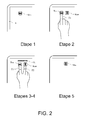
- a second variant represented in figure 2 represents the change of state of a command from a passing state to a blocking state.
- the on state is represented by a square button B ON having a horizontal black bar on the display screen E.
- a finger F1 of the user touches this button.
- a square B OFF button with a black vertical bar on the display E appears.
- the user presses two fingers F1 and F2 on the B ON and B OFF buttons.
- An indicator of the elapsed time TL is displayed, the length of the indicator corresponding to a predetermined simultaneous touching time which can be of a few hundreds of milliseconds.
- the predetermined time has elapsed causing the unlocking of the command.
- only the square B OFF button is displayed.
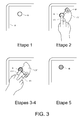
- a third variant represented in figure 3 represents the unlocking of a circular control button B.
- the button B is displayed on the display screen E.
- a finger F1 of the user touches the button B.
- a quarter of colored circle or semi-transparent CC appears. It comprises a pivot P focused on the button B and having an arrow at its end indicating the user to turn the pivot P.
- the user uses two fingers F1 and F2 to turn the pivot P, the first fixed finger centered on the button and the second movable finger moving the pivot.
- the pivot reaches the end of the race causing the unlocking of the command.
- the button B changes appearance indicating that the activation of the button B is effective.
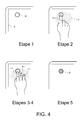
- a fourth variant represented in figure 4 also represents the unlocking of a circular control button B.
- the button B is displayed on the display screen E.
- a finger F1 of the user touches the button B.
- a beach colored A appears around the button B.
- the user presses with three fingers F1, F2 and F3 in the range A.
- the user maintains his three fingers supported for a predetermined duration that can be a few hundred milliseconds validating the unlocking of the button B.
- the button B changes appearance indicating that the activation of the button B is effective.
Landscapes
- Engineering & Computer Science (AREA)
- General Engineering & Computer Science (AREA)
- Theoretical Computer Science (AREA)
- Human Computer Interaction (AREA)
- Physics & Mathematics (AREA)
- General Physics & Mathematics (AREA)
- User Interface Of Digital Computer (AREA)
- Position Input By Displaying (AREA)
Applications Claiming Priority (1)
| Application Number | Priority Date | Filing Date | Title |
|---|---|---|---|
| FR1203013A FR2998071B1 (fr) | 2012-11-09 | 2012-11-09 | Procede de securisation d'une commande sur un dispositif de visualisation a surface tactile et systeme associe |
Publications (1)
| Publication Number | Publication Date |
|---|---|
| EP2731002A1 true EP2731002A1 (de) | 2014-05-14 |
Family
ID=48050795
Family Applications (1)
| Application Number | Title | Priority Date | Filing Date |
|---|---|---|---|
| EP13189036.0A Ceased EP2731002A1 (de) | 2012-11-09 | 2013-10-17 | Sicherungsverfahren einer Taste auf einer Anzeigevorrichtung mit Touchpad, und entsprechendes System |
Country Status (3)
| Country | Link |
|---|---|
| US (1) | US20140132555A1 (de) |
| EP (1) | EP2731002A1 (de) |
| FR (1) | FR2998071B1 (de) |
Cited By (1)
| Publication number | Priority date | Publication date | Assignee | Title |
|---|---|---|---|---|
| WO2017167698A1 (fr) * | 2016-04-01 | 2017-10-05 | Thales | Procede de commande securisee d'une fonction au moyen d'une dalle tactile |
Families Citing this family (6)
| Publication number | Priority date | Publication date | Assignee | Title |
|---|---|---|---|---|
| US10620775B2 (en) | 2013-05-17 | 2020-04-14 | Ultrahaptics IP Two Limited | Dynamic interactive objects |
| US9436288B2 (en) | 2013-05-17 | 2016-09-06 | Leap Motion, Inc. | Cursor mode switching |
| KR101647734B1 (ko) * | 2014-07-22 | 2016-08-23 | 엘지전자 주식회사 | 이동 단말기 및 그 제어방법 |
| JP6711081B2 (ja) * | 2016-03-31 | 2020-06-17 | ブラザー工業株式会社 | 画像処理プログラム及び情報処理装置 |
| CN105930047B (zh) * | 2016-04-01 | 2020-05-19 | 腾讯科技(深圳)有限公司 | 飞行器的控制方法和装置 |
| US11548656B2 (en) | 2019-09-20 | 2023-01-10 | Rockwell Collins, Inc. | Virtual guarded switch |
Citations (12)
| Publication number | Priority date | Publication date | Assignee | Title |
|---|---|---|---|---|
| US5252951A (en) | 1989-04-28 | 1993-10-12 | International Business Machines Corporation | Graphical user interface with gesture recognition in a multiapplication environment |
| US5801682A (en) | 1995-03-24 | 1998-09-01 | Sextant Avionique | Tactile designation device with high-resolution transparent capacitive surface |
| FR2853095A1 (fr) | 2003-02-18 | 2004-10-01 | Giat Ind Sa | Dispositif d'interface homme machine securise pour ecran tactile |
| US20070150842A1 (en) * | 2005-12-23 | 2007-06-28 | Imran Chaudhri | Unlocking a device by performing gestures on an unlock image |
| FR2911409A1 (fr) | 2007-01-16 | 2008-07-18 | Thales Sa | Procedes et systeme assurant une commande securisee a partir d'un ecran tactile |
| US20080278455A1 (en) * | 2007-05-11 | 2008-11-13 | Rpo Pty Limited | User-Defined Enablement Protocol |
| US7593000B1 (en) | 2008-05-17 | 2009-09-22 | David H. Chin | Touch-based authentication of a mobile device through user generated pattern creation |
| US20100162182A1 (en) | 2008-12-23 | 2010-06-24 | Samsung Electronics Co., Ltd. | Method and apparatus for unlocking electronic appliance |
| US7788604B2 (en) | 2001-01-08 | 2010-08-31 | Apple, Inc. | Three state icon for operations |
| US20100248689A1 (en) | 2009-03-30 | 2010-09-30 | Teng Stephanie E | Unlock Screen |
| US20110050589A1 (en) | 2009-08-28 | 2011-03-03 | Robert Bosch Gmbh | Gesture-based information and command entry for motor vehicle |
| WO2011083212A1 (fr) | 2009-12-22 | 2011-07-14 | Dav | Dispositif de commande pour véhicule automobile |
Family Cites Families (7)
| Publication number | Priority date | Publication date | Assignee | Title |
|---|---|---|---|---|
| JPH1069346A (ja) * | 1996-08-28 | 1998-03-10 | Alps Electric Co Ltd | 座標入力装置およびその制御方法 |
| KR101021857B1 (ko) * | 2008-12-30 | 2011-03-17 | 삼성전자주식회사 | 듀얼 터치 센서를 이용하여 제어 신호를 입력하는 장치 및 방법 |
| US20110130170A1 (en) * | 2009-07-21 | 2011-06-02 | Lg Electronics Inc. | Mobile terminal and method of controlling the operation of the mobile terminal |
| KR20110121888A (ko) * | 2010-05-03 | 2011-11-09 | 삼성전자주식회사 | 휴대용 단말기에서 팝업 메뉴를 확인하기 위한 장치 및 방법 |
| US8378985B2 (en) * | 2010-05-26 | 2013-02-19 | Sony Mobile Communications Ab | Touch interface for three-dimensional display control |
| US20120105335A1 (en) * | 2010-11-03 | 2012-05-03 | Honeywell International Inc. | Touch screen display assembly |
| KR101899812B1 (ko) * | 2012-05-14 | 2018-09-20 | 엘지전자 주식회사 | 포터블 디바이스 및 그 제어 방법 |
-
2012
- 2012-11-09 FR FR1203013A patent/FR2998071B1/fr active Active
-
2013
- 2013-10-17 EP EP13189036.0A patent/EP2731002A1/de not_active Ceased
- 2013-10-29 US US14/066,622 patent/US20140132555A1/en not_active Abandoned
Patent Citations (13)
| Publication number | Priority date | Publication date | Assignee | Title |
|---|---|---|---|---|
| US5252951A (en) | 1989-04-28 | 1993-10-12 | International Business Machines Corporation | Graphical user interface with gesture recognition in a multiapplication environment |
| US5801682A (en) | 1995-03-24 | 1998-09-01 | Sextant Avionique | Tactile designation device with high-resolution transparent capacitive surface |
| US7788604B2 (en) | 2001-01-08 | 2010-08-31 | Apple, Inc. | Three state icon for operations |
| FR2853095A1 (fr) | 2003-02-18 | 2004-10-01 | Giat Ind Sa | Dispositif d'interface homme machine securise pour ecran tactile |
| US20070150842A1 (en) * | 2005-12-23 | 2007-06-28 | Imran Chaudhri | Unlocking a device by performing gestures on an unlock image |
| US7657849B2 (en) | 2005-12-23 | 2010-02-02 | Apple Inc. | Unlocking a device by performing gestures on an unlock image |
| FR2911409A1 (fr) | 2007-01-16 | 2008-07-18 | Thales Sa | Procedes et systeme assurant une commande securisee a partir d'un ecran tactile |
| US20080278455A1 (en) * | 2007-05-11 | 2008-11-13 | Rpo Pty Limited | User-Defined Enablement Protocol |
| US7593000B1 (en) | 2008-05-17 | 2009-09-22 | David H. Chin | Touch-based authentication of a mobile device through user generated pattern creation |
| US20100162182A1 (en) | 2008-12-23 | 2010-06-24 | Samsung Electronics Co., Ltd. | Method and apparatus for unlocking electronic appliance |
| US20100248689A1 (en) | 2009-03-30 | 2010-09-30 | Teng Stephanie E | Unlock Screen |
| US20110050589A1 (en) | 2009-08-28 | 2011-03-03 | Robert Bosch Gmbh | Gesture-based information and command entry for motor vehicle |
| WO2011083212A1 (fr) | 2009-12-22 | 2011-07-14 | Dav | Dispositif de commande pour véhicule automobile |
Cited By (3)
| Publication number | Priority date | Publication date | Assignee | Title |
|---|---|---|---|---|
| WO2017167698A1 (fr) * | 2016-04-01 | 2017-10-05 | Thales | Procede de commande securisee d'une fonction au moyen d'une dalle tactile |
| FR3049733A1 (fr) * | 2016-04-01 | 2017-10-06 | Thales Sa | Procede de commande securisee d'une fonction au moyen d'une dalle tactile |
| US10649649B2 (en) | 2016-04-01 | 2020-05-12 | Thales | Secure method for control of a function by means of a touchpad |
Also Published As
| Publication number | Publication date |
|---|---|
| US20140132555A1 (en) | 2014-05-15 |
| FR2998071A1 (fr) | 2014-05-16 |
| FR2998071B1 (fr) | 2014-11-21 |
Similar Documents
| Publication | Publication Date | Title |
|---|---|---|
| EP2731002A1 (de) | Sicherungsverfahren einer Taste auf einer Anzeigevorrichtung mit Touchpad, und entsprechendes System | |
| US11003242B2 (en) | Eye tracking | |
| EP2631747B1 (de) | Verfahren und Vorrichtung zur Bereitstellung einer Benutzerschnittstelle auf einer Vorrichtung zur Angabe von Inhaltsbetreibern | |
| EP3221781B1 (de) | Grafische schnittstelle und verfahren zur verwaltung der besagten grafischen schnittstelle währen der berührungsauswahl eines angezeigten elements | |
| KR101412419B1 (ko) | 개선된 사용자 인터페이스 기능을 갖는 이동통신 단말과 사용자 인터페이스 제공 방법 | |
| CA2807031C (en) | Method and apparatus for adjusting a user interface to reduce obscuration | |
| EP3000013B1 (de) | Interaktive multitouch-fernbedienung | |
| KR20150090840A (ko) | 디스플레이 화면의 영역을 보호하는 디바이스 및 방법 | |
| EP3221780B1 (de) | Grafische schnittstelle und verfahren zur verwaltung der besagten grafischen schnittstelle währen der berührungsauswahl eines angezeigten elements | |
| US20160200195A1 (en) | Operating method for an operating and display device in a vehicle and operating and display device in a vehicle | |
| CN102177041A (zh) | 用于尤其是在车辆中显示信息的方法和装置 | |
| JP2013218391A (ja) | 操作入力装置、操作入力方法、及び、操作入力プログラム | |
| FR3005173A1 (fr) | Procede d'interaction dans un cockpit d'aeronef entre un pilote et son environnement | |
| CN112463000A (zh) | 交互方法、装置、系统、电子设备及交通工具 | |
| EP2827268A1 (de) | Informationsendgerät und ausführungssteuerungsverfahren | |
| JP2017197015A (ja) | 車載用情報処理システム | |
| EP3074842B1 (de) | Steuerstation für drohne | |
| WO2017188098A1 (ja) | 車載用情報処理システム | |
| KR20210016642A (ko) | 그래픽 사용자 인터페이스의 표시와 조작을 조정하기 위한 방법 | |
| CA2865628C (fr) | Procede et interface tactile de commande d'un equipement ou d'une fonction protege | |
| JP5539415B2 (ja) | 情報処理装置及びプログラム | |
| JP2014137774A (ja) | 表示操作装置 | |
| WO2015082817A1 (fr) | Procédé de commande de l'interaction avec un écran tactile et équipement mettant en oeuvre ce procédé | |
| WO2021197689A1 (fr) | Procede et dispositif pour gerer des appuis multiples sur une surface tactile | |
| KR20140025084A (ko) | 어플리케이션 실행 방법 및 이를 사용하는 사용자 단말기 |
Legal Events
| Date | Code | Title | Description |
|---|---|---|---|
| PUAI | Public reference made under article 153(3) epc to a published international application that has entered the european phase |
Free format text: ORIGINAL CODE: 0009012 |
|
| 17P | Request for examination filed |
Effective date: 20131017 |
|
| AK | Designated contracting states |
Kind code of ref document: A1 Designated state(s): AL AT BE BG CH CY CZ DE DK EE ES FI FR GB GR HR HU IE IS IT LI LT LU LV MC MK MT NL NO PL PT RO RS SE SI SK SM TR |
|
| AX | Request for extension of the european patent |
Extension state: BA ME |
|
| R17P | Request for examination filed (corrected) |
Effective date: 20141022 |
|
| RBV | Designated contracting states (corrected) |
Designated state(s): AL AT BE BG CH CY CZ DE DK EE ES FI FR GB GR HR HU IE IS IT LI LT LU LV MC MK MT NL NO PL PT RO RS SE SI SK SM TR |
|
| 17Q | First examination report despatched |
Effective date: 20170203 |
|
| 18R | Application refused |
Effective date: 20180215 |
|
| P01 | Opt-out of the competence of the unified patent court (upc) registered |
Effective date: 20230427 |