EP2763005A1 - Terminal d'informations portable, procédé de commande d'opération tactile et programme - Google Patents
Terminal d'informations portable, procédé de commande d'opération tactile et programme Download PDFInfo
- Publication number
- EP2763005A1 EP2763005A1 EP12835428.9A EP12835428A EP2763005A1 EP 2763005 A1 EP2763005 A1 EP 2763005A1 EP 12835428 A EP12835428 A EP 12835428A EP 2763005 A1 EP2763005 A1 EP 2763005A1
- Authority
- EP
- European Patent Office
- Prior art keywords
- touch operation
- touch
- touch panel
- edge area
- usage state
- Prior art date
- Legal status (The legal status is an assumption and is not a legal conclusion. Google has not performed a legal analysis and makes no representation as to the accuracy of the status listed.)
- Ceased
Links
Images




Classifications
-
- G—PHYSICS
- G06—COMPUTING OR CALCULATING; COUNTING
- G06F—ELECTRIC DIGITAL DATA PROCESSING
- G06F3/00—Input arrangements for transferring data to be processed into a form capable of being handled by the computer; Output arrangements for transferring data from processing unit to output unit, e.g. interface arrangements
- G06F3/01—Input arrangements or combined input and output arrangements for interaction between user and computer
- G06F3/03—Arrangements for converting the position or the displacement of a member into a coded form
- G06F3/041—Digitisers, e.g. for touch screens or touch pads, characterised by the transducing means
- G06F3/0416—Control or interface arrangements specially adapted for digitisers
- G06F3/0418—Control or interface arrangements specially adapted for digitisers for error correction or compensation, e.g. based on parallax, calibration or alignment
-
- G—PHYSICS
- G06—COMPUTING OR CALCULATING; COUNTING
- G06F—ELECTRIC DIGITAL DATA PROCESSING
- G06F3/00—Input arrangements for transferring data to be processed into a form capable of being handled by the computer; Output arrangements for transferring data from processing unit to output unit, e.g. interface arrangements
- G06F3/01—Input arrangements or combined input and output arrangements for interaction between user and computer
- G06F3/03—Arrangements for converting the position or the displacement of a member into a coded form
- G06F3/041—Digitisers, e.g. for touch screens or touch pads, characterised by the transducing means
-
- G—PHYSICS
- G06—COMPUTING OR CALCULATING; COUNTING
- G06F—ELECTRIC DIGITAL DATA PROCESSING
- G06F3/00—Input arrangements for transferring data to be processed into a form capable of being handled by the computer; Output arrangements for transferring data from processing unit to output unit, e.g. interface arrangements
- G06F3/01—Input arrangements or combined input and output arrangements for interaction between user and computer
- G06F3/048—Interaction techniques based on graphical user interfaces [GUI]
- G06F3/0487—Interaction techniques based on graphical user interfaces [GUI] using specific features provided by the input device, e.g. functions controlled by the rotation of a mouse with dual sensing arrangements, or of the nature of the input device, e.g. tap gestures based on pressure sensed by a digitiser
- G06F3/0488—Interaction techniques based on graphical user interfaces [GUI] using specific features provided by the input device, e.g. functions controlled by the rotation of a mouse with dual sensing arrangements, or of the nature of the input device, e.g. tap gestures based on pressure sensed by a digitiser using a touch-screen or digitiser, e.g. input of commands through traced gestures
Definitions
- the present invention relates to a portable information terminal that includes a touch panel, a touch operation control method, and a program.
- a portable information terminal that includes a touch panel such as a smartphone
- a touch panel such as a smartphone
- false detection occurs when the portable information terminal is held by a hand and the hand reaches the edge of a touch panel involuntarily.
- a portable information terminal 1 it tends that the finger easily touches a screen because reduction in size and thickness of a device has been proceeding, and false detection for a touch panel 2 and an unintended terminal operation of a user due to false detection are caused easily.
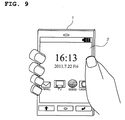
- FIG. 9 is a schematic diagram illustrating a state example when the user holds a portable information terminal with a hand. As illustrated in FIG. 9 , the user holds the portable information terminal 1 with one hand and performs a touch operation to the touch panel 2 with a finger of the other hand. However, when the user holds the portable information terminal 1 with the one hand, a finger reaches a part of the screen, so that false detection of the touch panel 2 is caused easily in the part of the screen that the finger reaches.
- Patent Document 1 a technology is discussed by which an operation invalidity area is physically formed in which a touch operation to the edge of a touch panel 1 is set invalid.
- Patent Document 2 a technology is discussed in which a part on a touch panel 2, which a finger of a hand that holds a portable information terminal 1 reaches is set as a touch invalidity area in which a touch operation is set invalid.
- Patent Document 1 above-described, the operation invalidity area in which the touch operation is set invalid is physically formed, and in Patent Document 2, in the part that the finger reaches of the hand, the touch operation is primarily set invalid, so that it is difficult to flexibly respond to the way of the touch operation (usage state) with respect the touch panel 2, and there is a problem that the effective use, the usability, and the like of the touch panel 2 are impaired.
- an object of the present invention is to provide a portable information terminal that can prevent false detection that is caused when the user touches the touch panel with the hand involuntarily without impairing the effective use, the usability, and the like of the touch panel, a touch operation control method, and a program.
- a portable information terminal is a portable information terminal that includes a touch panel on a display panel and includes a coordinate acquiring means configured to acquire coordinates on which a touch operation is performed from the touch panel when there is the touch operation to the touch panel, a judgment means configured to judge whether or not the touch operation to the touch panel is a touch operation to an edge area of the touch panel, based on the coordinates that are acquired by the coordinate acquiring means, a usage state judgment means configured to judge a usage state by the touch operation when the judgment means judges that the touch operation to the touch panel is the touch operation to the edge area of the touch panel, and a touch operation control means configured to limit the touch operation to the edge area of the touch panel, based on the usage state that is judged by the usage state judgment means.
- a touch operation control method is a touch operation control method to a touch panel that is provided on a display panel that is included in a portable information terminal and includes a coordinate acquiring step of acquiring coordinates on which a touch operation is performed from the touch panel when there is the touch operation to the touch panel, a judgment step of judging whether or not the touch operation to the touch panel is a touch operation to an edge area of the touch panel, based on the acquired coordinates, a usage state judgment step of judging a usage state by the touch operation when it is judged that the touch operation to the touch panel is the touch operation to the edge area of the touch panel, and a touch operation control step of limiting the touch operation to the edge area of the touch panel, based on the judged usage state.
- a program according to the present invention is a program that causes a computer of a portable information terminal that includes a touch panel on a display panel to execute a coordinate acquiring function to acquire coordinates on which a touch operation is performed from the touch panel when there is the touch operation to the touch panel, a judgment function to judge whether or not the touch operation to the touch panel is a touch operation to an edge area of the touch panel, based on the coordinates that are acquired by the coordinate acquiring function, a usage state judgment function to judge a usage state by the touch operation when the judgment function judges that the touch operation to the touch panel is the touch operation to the edge area of the touch panel, and a touch operation control function to limit the touch operation to the edge area of the touch panel, based on the usage state that is judged by the usage state judgment means.
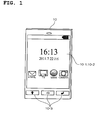
- FIG. 1 is a schematic diagram illustrating the external appearance of a portable information terminal according to a first embodiment.
- the portable information terminal 10 according to the first embodiment is a so-called smartphone that is operated by a touch operation on a screen, and includes the display panel 10-1, the touch panel 10-2 that is provided on the display panel 10-1, and a hard key 10-3.
- the display panel 10-1 displays various pieces of information as the smartphone.
- the hard key 10-3 is used for switching or the like of a screen and used to assist an operation using the touch panel 10-2.
- FIG. 2 is a schematic diagram illustrating parts of the display panel 10-1 and the touch panel 10-2 according to the first embodiment.
- the false detection guard area 10-4 in which a touch operation is not detected even when there is a touch operation is provided within a diagonally shaded area illustrated in FIG. 2 on the touch panel 10-2.
- the false detection guard area 10-4 is arranged so as to be overlapped with an operation screen that is displayed on the display panel 10-1. In a case in which the user holds the portable information terminal 10 by a hand, even when the finger touches the edge of the touch panel 10-2, a touch operation to the false detection guard area 10-4 is ignored, so that false detection can be prevented.
- an operating system for a smartphone which is represented by Android of Google Inc. (registered trademark) operates and various pieces of application software can be executed on the operating system.
- the application software is a general term for software in which various functions that the user desires to execute on a computer are directly implemented.
- the operating system notifies the application software of the coordinates that the finger touches, so that, in the application software, the corresponding function (input using a software keyboard, a function instruction of an icon, or the like) is executed on the basis of the touched coordinates.
- FIG. 3 is a flowchart illustrating an operation at the time of detection of a touch operation to the portable information terminal 10 according to the first embodiment.
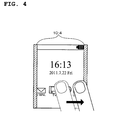
- FIG. 4 is a schematic diagram illustrating a continuous touch operation in the first embodiment.
- the portable information terminal 10 executes the flowchart illustrated in FIG. 3 when a touch operation to the touch panel 10-2 by the user is detected.
- the portable information terminal 10 acquires touched coordinates from the touch panel 10-2 when a touch operation to the touch panel 10-2 is detected (Step S10).
- the portable information terminal 10 judges whether or not the touched coordinates correspond to a touch operation to the false detection guard area 10-4 (Step S12). In addition, when the coordinates are within the false detection guard area 10-4 (YES in Step S12), the portable information terminal 10 judges whether or not the touch operation to the false detection guard area 10-4 is performed during a continuous touch operation (Step S14).
- the portable information terminal 10 judges whether or not the touch operation to the false detection guard area 10-4 is performed during a continuous touch operation.
- Step S14 when the touch operation is being performed during the continuous touch operation (YES in Step S14), the acquired coordinates are notified to the application software (Step S16).
- the application software processing that corresponds to the touch operation is performed. That is, when the touch operation to the false detection guard area 10-4 is performed during the continuous touch operation, the touch operation is judged valid and the corresponding processing is executed.
- Step S14 when the touch operation is performed not during the continuous touch operation (NO in Step S14), the acquired coordinates are discarded, and the processing ends without notification of the coordinates to the application software (Step S18). That is, when a touch operation is performed in the false detection guard area 10-4 first, it is judged that the hand touches the edge of the touch panel 10-2 involuntarily, and the touch operation is ignored.
- Step S16 processing that corresponds to the touch operation is executed. That is, when a touch operation is performed in the area outside the false detection guard area 10-4, it is judged that the touch operation to the touch panel 10-2 is performed intentionally and that the touch operation is valid, and the corresponding processing is executed.
- FIG. 5 is a schematic diagram illustrating a screen example in application software that desires an input using the touch panel 10-2 up to the edge of the display panel 10-1 in the first embodiment.
- a software keyboard is arranged in the lower half of the screen in order to perform character input, and touch switches are arranged up to the left and right edges of the screen.
- touch switches are arranged up to the left and right edges of the screen.
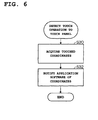
- the flowchart illustrated in FIG. 3 is replaced with a flowchart illustrated in FIG. 6 , and the touch detection in the false detection guard area 10-4 is not executed. That is, in this case, when a touch operation to the touch panel 10-2 by the user is detected, the touched coordinates are acquired (Step S30), the coordinates are notified to the application (Step S32), and the processing ends. In the application software, processing that corresponds to the touch operation is executed.
- a portion of the edge of the touch panel 10-2 is set as the false detection guard area 10-4, and even when the user holds the portable information terminal 10 with the hand and the finger touches the edge of the touch panel 10-2 false detection can be prevented because the touch operation to the false detection guard area 10-4 is ignored.
- the false detection guard area 10-4 is set invalid depending on the operation state of the touch panel 10-2, the usage state of the portable information terminal 10, and an application, so that it is possible to avoid that an operation of the portable information terminal 10 is hindered.
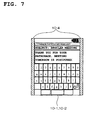
- FIG. 7 is a schematic diagram illustrating the false detection guard area 10-4 that is set by the application software by which the touch switches are arranged up to the edges of the screen, according to the second embodiment. Note that a configuration of the portable information terminal 10 according to the second embodiment is similar to that of the first embodiment. As illustrated in FIG. 5 , in the above-described first embodiment, when the application software by which the touch switches are arranged up to the edges of the screen is started up, the false detection guard area 10-4 is set invalid using the flowchart illustrated in FIG. 6 as a flow of the touch detection, so that false detection avoidance is set not to be performed.
- the flowchart illustrated in FIG. 3 is merely used as the flow of the touch detection, the false detection guard area 10-4 is set valid, and the false detection avoidance by the flowchart illustrated in FIG. 3 is performed all the time. Therefore, in the second embodiment, as illustrated in FIG. 7 , in the application software by which the touch switches are arranged up to the edges of the screen, the false detection guard area 10-4 is set on the touch panel 10-2, and a touch operation for the touch switches is allowed by performing display control so that the touch switches are arranged in an area other than the false detection guard area 10-4.
- the false detection guard area 10-4 is set on the touch panel 10-2, and display control is performed so that the touch switches are arranged in the area other than the false detection guard area 10-4, so that false detection can be prevented which is caused when the user holds the portable information terminal 10 with the hand and the finger touches the edge of the touch panel 10-2.
- the edge area when a touch operation to an edge area of the touch panel 10-2 is performed for a certain time period or more, the edge area is set as an invalidity area (touch operation is judged invalid), and when a touch operation to the edge area is performed within the certain time period, the edge area is set as a validity area (touch operation is judged valid).
- the third embodiment in a case in which the user holds the portable information terminal 10 with the hand, a touch operation is ignored even when there is the touch operation to the edge area that the finger reaches, otherwise, for the touch operation to the edge area, the coordinates are notified to the application software.
- FIG. 8 is a flowchart illustrating an operation when a touch operation to the portable information terminal 10 according to the third embodiment is detected.
- the portable information terminal 10 executes the flowchart illustrated in FIG. 8 .
- the portable information terminal 10 acquires the touched coordinates from the touch panel 10-2 (Step S40).
- the portable information terminal 10 judges whether or not the touched coordinates correspond to a touch operation to the edge area (Step S42). In addition, when the touched coordinates do not correspond to a touch operation to the edge area (NO in Step S42), that is, when the touched coordinates correspond to an area outside the edge area, the acquired coordinate are notified to the application software (Step S54), and the processing ends. In the application software, processing that corresponds to the coordinates of the touch operation is executed. That is, when the touched coordinates correspond to the touch operation to the area outside the edge area, it is judged that the touch operation to the touch panel 10-2 is intentionally performed, and of course, that the touch operation is valid, and the corresponding processing is executed.
- Step S44 when the touched coordinates correspond to a touch operation to the edge area (YES in Step S42), it is judged whether or not the edge area is an invalidity area (Step S44). Note that, it is assumed that the edge area is set as the validity area in the initial setting. In addition, when the edge area is not the invalidity area (NO in Step S44), it is judged whether or not the edge area is touched for a certain time period or more (Step S46).
- Step S46 when the edge area is touched for the certain time period or more (YES in Step S46), it is judged that the portable information terminal 10 is held with the hand, and the edge area is judged as the invalidity area (Step S48). After that, the acquired coordinates are discarded, the processing ends without notification to the application software (Step S50) . That is, when the edge area is touched for the certain time period or more, it is judged that the portable information terminal 10 is held, and the touch operation to the edge area is ignored.
- Step S46 when the edge area is touched within the certain time period (NO in Step S46), it is judged that there is an intentional touch operation, the edge area is judged as a validity area (Step S52), the acquired coordinates are notified to the application software (Step S54), and the processing ends.
- the application software processing that corresponds to the coordinates of the touch operation is executed.
- Step S42 when there is a touch operation to the edge area (YES in Step S42), and the edge area is the invalidity area (YES in Step S44), that is, when a touch operation to the edge area that is set as the invalidity area is performed in the state in which the portable information terminal 10 is held, it is judged whether or not the touch operation is performed during the continuous touch operation (Step S56).
- the continuous touch operation is as described above.
- Step S58 when the touch operation is performed during the continuous touch operation (YES in Step S56), the acquired coordinates are notified to the application software (Step S58), and the processing ends.
- the edge area is set as the invalidity area clearly, so that coordinates of the edge area, to which a touch operation is performed all the time may be ruled out.
- processing that corresponds to the coordinates of the touch operation is executed. That is, in a case in which a touch operation to the edge area is performed during the continuous touch operation even when the edge area is set as the invalidity area, the touch operation is judged valid, and the corresponding processing is executed.
- Step S42 when there is a touch operation to the edge area (YES in Step S42), and the edge area is the invalidity area (YES in Step S44), that is, when a touch operation is performed not during the continuous touch operation even in a case the touch operation to the edge area that is set as the invalidity area is performed in the state in which the portable information terminal 10 is held (NO in Step S56), the acquired coordinates are discarded, the coordinates are not notified to the application software (Step S50), and the processing ends. That is, when the edge area is set as the invalidity area, and a touch operation to the edge area is performed not during the continuous touch operation, the touch operation is ignored.
- the edge area of the touch panel 10-2 when the edge area of the touch panel 10-2 is touched for the certain time period or more, the edge area is judged as the invalidity area (touch operation is judged invalid), and when the edge area is touched within the certain time period, the edge area is judged as the validity area (touch operation is judged valid), so that false detection that is caused when the edge of the touch panel 10-2 is touched by the finger at the time of holding of the portable information terminal 10 with the hand can be prevented.
- the embodiment is not limited to such an example, and the touched coordinates that correspond to all of the touch operations to the touch panel 10-2 are notified to the application software, it is judged whether or not the touch operation is a touch operation to the false detection guard area 10-4, from the touch coordinates on the application software side on which the touch coordinates are received, and the touch operation may be ignored when it is judged that the touch operation is a touch operation to the false detection guard area 10-4.
- OS operating software
- a touch continuation time period to the false detection guard area 10-4 may be measured, and the touch operation to the false detection guard area 10-4 may be judged valid by judging that there is an intention of a touch operation clearly when the touch operation is performed within the certain time period (touch operation in a short time: that is, tapping).
- a touch time period to the false detection guard area 10-4 (touch operation invalidity area) is measured, it is judged that there is no intention of a touch operation and the portable information terminal 10 is held and touched with the hand when the touch operation is performed for the certain time period or more, so that the touch operation to the false detection guard area 10-4 operation is judged invalid.
- the false detection guard area 10-4 having a fixed size (area) is provided, however, the size (area) of the false detection guard area 10-4 in which a touch operation is judged invalid or valid may be dynamically changed depending on an area that the finger touches.
- the size (area: width) of the display area may be changed so as not to be overlapped with the false detection guard area 10-4 the size (area) of which is dynamically changed.
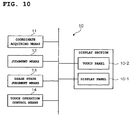
- FIG. 10 is a configuration diagram of Supplementary Note 1. As illustrated in such a diagram, the invention described in Supplementary Note 1 is the portable information terminal 10 that includes the touch panel 10-2 on the display panel 10-1 comprising:
- the portable information terminal according to Supplementary Note 1 or 2, further comprising:
- the portable information terminal according to Supplementary Note 1 or 2, wherein the touch operation control means sets the touch operation to the edge area of the touch panel valid when the operation screen that is displayed on the display panel is arranged up to the edge area of the touch panel.
- the portable information terminal according to any one of Supplementary Notes 1 to 4, wherein the usage state judgment means judges whether or not the touch operation is performed during a continuous touch operation as the usage state when the judgment means judges that the touch operation to the touch panel is the touch operation to the edge area of the touch panel, and the touch operation control means sets the touch operation valid when the usage state judgment means judges that the touch operation is performed during the continuous touch operation, and sets the touch operation invalid when the usage state judgment means judges that the touch operation is performed not during the continuous touch operation.
- the usage state judgment means judges whether or not the touch operation to the edge area is performed for a certain time period or more, as the usage state when the judgment means judges that the touch operation to the touch panel is the touch operation to the edge area of the touch panel, and the touch operation control means sets the edge area as an invalidity area in which the touch operation is judged invalid when the usage state judgment means judges that the touch operation to the edge area of the touch panel is performed for the certain time period or more, and sets the edge area as an validity area in which the touch operation is judged valid when the touch operation to the edge area of the touch panel is performed within the certain time period.
- a touch operation control method to a touch panel that is provided on a display panel that is included in a portable information terminal comprising:
- a program that causes a computer of a portable information terminal that includes a touch panel on a display panel to execute; a coordinate acquiring function to acquire coordinates on which a touch operation is performed from the touch panel when there is the touch operation to the touch panel; a judgment function to judge whether or not the touch operation to the touch panel is a touch operation to an edge area of the touch panel, based on the coordinates that are acquired by the coordinate acquiring function; a usage state judgment function to judge a usage state by the touch operation when the judgment function judges that the touch operation to the touch panel is the touch operation to the edge area of the touch panel; and a touch operation control function to limit the touch operation to the edge area of the touch panel, based on the usage state that is judged by the usage state judgment means.
Landscapes
- Engineering & Computer Science (AREA)
- General Engineering & Computer Science (AREA)
- Theoretical Computer Science (AREA)
- Human Computer Interaction (AREA)
- Physics & Mathematics (AREA)
- General Physics & Mathematics (AREA)
- User Interface Of Digital Computer (AREA)
- Position Input By Displaying (AREA)
Applications Claiming Priority (2)
| Application Number | Priority Date | Filing Date | Title |
|---|---|---|---|
| JP2011208481A JP5957834B2 (ja) | 2011-09-26 | 2011-09-26 | 携帯情報端末、タッチ操作制御方法、及びプログラム |
| PCT/JP2012/004468 WO2013046507A1 (fr) | 2011-09-26 | 2012-07-11 | Terminal d'informations portable, procédé de commande d'opération tactile et programme |
Publications (2)
| Publication Number | Publication Date |
|---|---|
| EP2763005A1 true EP2763005A1 (fr) | 2014-08-06 |
| EP2763005A4 EP2763005A4 (fr) | 2015-06-24 |
Family
ID=47994603
Family Applications (1)
| Application Number | Title | Priority Date | Filing Date |
|---|---|---|---|
| EP12835428.9A Ceased EP2763005A4 (fr) | 2011-09-26 | 2012-07-11 | Terminal d'informations portable, procédé de commande d'opération tactile et programme |
Country Status (4)
| Country | Link |
|---|---|
| US (1) | US20140232676A1 (fr) |
| EP (1) | EP2763005A4 (fr) |
| JP (1) | JP5957834B2 (fr) |
| WO (1) | WO2013046507A1 (fr) |
Cited By (4)
| Publication number | Priority date | Publication date | Assignee | Title |
|---|---|---|---|---|
| CN104657018A (zh) * | 2015-02-02 | 2015-05-27 | 深圳市中兴移动通信有限公司 | 移动终端及其显示装置 |
| EP3035175A4 (fr) * | 2013-08-16 | 2016-07-27 | Zte Corp | Procédé, dispositif et terminal d'optimisation de commande tactile de bord d'écran |
| WO2016138302A1 (fr) * | 2015-02-27 | 2016-09-01 | Quickstep Technologies Llc | Procédé pour interagir avec un dispositif électronique et/ou informatique comprenant une surface de contrôle capacitive et une surface périphérique, interface et dispositif mettant en oeuvre ce procédé |
| US11294561B2 (en) | 2013-11-29 | 2022-04-05 | Semiconductor Energy Laboratory Co., Ltd. | Data processing device having flexible position input portion and driving method thereof |
Families Citing this family (25)
| Publication number | Priority date | Publication date | Assignee | Title |
|---|---|---|---|---|
| JP5813991B2 (ja) * | 2011-05-02 | 2015-11-17 | 埼玉日本電気株式会社 | 携帯端末、入力制御方法及びプログラム |
| CN102830844A (zh) * | 2012-08-17 | 2012-12-19 | 北京小米科技有限责任公司 | 一种触摸屏防误操作方法、触摸屏及移动终端 |
| JP5986957B2 (ja) * | 2013-05-28 | 2016-09-06 | 京セラ株式会社 | 携帯端末、無効領域設定プログラムおよび無効領域設定方法 |
| CN107741793B (zh) * | 2013-08-07 | 2021-10-22 | 华为终端(深圳)有限公司 | 一种防止误触碰触摸屏的方法和装置 |
| WO2015029172A1 (fr) * | 2013-08-28 | 2015-03-05 | 株式会社東芝 | Appareil de traitement d'informations, méthode de traitement d'informations, et programme |
| WO2015064489A1 (fr) | 2013-11-01 | 2015-05-07 | 株式会社村田製作所 | Dispositif d'entrée tactile et dispositif d'affichage portatif |
| CN103558954A (zh) * | 2013-11-15 | 2014-02-05 | 京东方科技集团股份有限公司 | 一种触摸系统及显示装置 |
| JP2017033030A (ja) * | 2013-12-20 | 2017-02-09 | パナソニックIpマネジメント株式会社 | 情報処理装置 |
| CN104731498B (zh) * | 2015-01-30 | 2016-07-13 | 努比亚技术有限公司 | 移动终端防误触控方法及装置 |
| WO2016125215A1 (fr) * | 2015-02-06 | 2016-08-11 | ソニー株式会社 | Dispositif de traitement d'informations, dispositif d'entrée, procédé de commande de dispositif de traitement d'informations, procédé de commande de dispositif d'entrée, et programme |
| KR102332015B1 (ko) | 2015-02-26 | 2021-11-29 | 삼성전자주식회사 | 터치 처리 방법 및 이를 지원하는 전자 장치 |
| JP6432409B2 (ja) * | 2015-03-24 | 2018-12-05 | 富士通株式会社 | タッチパネルの制御装置およびタッチパネルの制御プログラム |
| JPWO2017085983A1 (ja) * | 2015-11-17 | 2018-09-13 | ソニー株式会社 | 制御装置、制御方法、およびプログラム |
| JP6513607B2 (ja) * | 2016-07-08 | 2019-05-15 | レノボ・シンガポール・プライベート・リミテッド | 情報処理装置 |
| CN106569709B (zh) * | 2016-10-31 | 2020-11-06 | 江苏久恒起重设备有限公司 | 控制移动终端的装置及方法 |
| CN106775084B (zh) * | 2016-12-16 | 2019-04-16 | Oppo广东移动通信有限公司 | 一种触摸屏的防误触方法、装置及移动终端 |
| CN106708520A (zh) * | 2016-12-16 | 2017-05-24 | 广东欧珀移动通信有限公司 | 一种移动终端的触摸屏控制方法、装置及移动终端 |
| CN106897017A (zh) * | 2017-02-17 | 2017-06-27 | 北京小米移动软件有限公司 | 控制终端屏幕的方法及装置 |
| WO2019047231A1 (fr) * | 2017-09-11 | 2019-03-14 | 广东欧珀移动通信有限公司 | Procédé et dispositif de réaction aux opérations tactiles |
| EP3671412B1 (fr) | 2017-09-11 | 2025-09-03 | Guangdong Oppo Mobile Telecommunications Corp., Ltd. | Procédé et dispositif de réponse d'opération tactile |
| US10698533B2 (en) | 2017-09-11 | 2020-06-30 | Guangdong Oppo Mobile Telecommunications Corp., Ltd. | Method for responding to touch operation and electronic device |
| EP3671420A4 (fr) | 2017-09-11 | 2020-08-05 | Guangdong Oppo Mobile Telecommunications Corp., Ltd. | Procédé et appareil de réaction aux opérations tactiles |
| JP7163755B2 (ja) * | 2018-12-14 | 2022-11-01 | 京セラドキュメントソリューションズ株式会社 | 表示入力装置 |
| JP2019197555A (ja) * | 2019-06-14 | 2019-11-14 | シャープ株式会社 | 持ち手判定機能付き携帯端末 |
| CN110347326B (zh) * | 2019-06-28 | 2021-03-16 | 北京集创北方科技股份有限公司 | 触摸屏误触摸的识别方法及装置、存储介质和处理器 |
Family Cites Families (18)
| Publication number | Priority date | Publication date | Assignee | Title |
|---|---|---|---|---|
| JP4178484B2 (ja) * | 1998-04-06 | 2008-11-12 | 富士フイルム株式会社 | モニタ付きカメラ |
| JP2000039964A (ja) * | 1998-07-22 | 2000-02-08 | Sharp Corp | 手書き入力装置 |
| US7656393B2 (en) * | 2005-03-04 | 2010-02-02 | Apple Inc. | Electronic device having display and surrounding touch sensitive bezel for user interface and control |
| JP2005234993A (ja) * | 2004-02-20 | 2005-09-02 | Toshiba Corp | 画像表示装置、及び画像表示方法 |
| JP2006244154A (ja) | 2005-03-03 | 2006-09-14 | Denso Corp | 表示入力装置およびディスプレイ装置 |
| JP5129478B2 (ja) * | 2006-03-24 | 2013-01-30 | 株式会社デンソーアイティーラボラトリ | 画面表示装置 |
| JP2009158989A (ja) * | 2006-04-06 | 2009-07-16 | Nikon Corp | カメラ |
| US20090174679A1 (en) * | 2008-01-04 | 2009-07-09 | Wayne Carl Westerman | Selective Rejection of Touch Contacts in an Edge Region of a Touch Surface |
| KR101499546B1 (ko) * | 2008-01-17 | 2015-03-09 | 삼성전자주식회사 | 터치 스크린 장치의 디스플레이 영역 제어 방법, 장치, 및기록매체 |
| TWI361613B (en) * | 2008-04-16 | 2012-04-01 | Htc Corp | Mobile electronic device, method for entering screen lock state and recording medium thereof |
| WO2009147870A1 (fr) * | 2008-06-03 | 2009-12-10 | シャープ株式会社 | Dispositif de détection d'entrée, procédé de détection d'entrée, programme et support de stockage |
| US20110069021A1 (en) * | 2009-06-12 | 2011-03-24 | Hill Jared C | Reducing false touchpad data by ignoring input when area gesture does not behave as predicted |
| JP5669169B2 (ja) | 2009-07-28 | 2015-02-12 | Necカシオモバイルコミュニケーションズ株式会社 | 端末装置及びプログラム |
| JP5451233B2 (ja) * | 2009-07-30 | 2014-03-26 | Necカシオモバイルコミュニケーションズ株式会社 | 携帯端末装置及びプログラム |
| US20110134048A1 (en) * | 2009-12-09 | 2011-06-09 | Walline Erin K | System for Interpretation of Gesture on a Non-All-Points-Addressable Multi-Touch Input Device Having Integrated Buttons |
| TWI445384B (zh) * | 2010-04-26 | 2014-07-11 | Htc Corp | 通訊控制方法、通訊裝置及電腦程式產品 |
| US9411459B2 (en) * | 2010-05-19 | 2016-08-09 | Lg Electronics Inc. | Mobile terminal and control method thereof |
| US9110580B2 (en) * | 2011-08-05 | 2015-08-18 | Nokia Technologies Oy | Apparatus comprising a display and a method and computer program |
-
2011
- 2011-09-26 JP JP2011208481A patent/JP5957834B2/ja not_active Expired - Fee Related
-
2012
- 2012-07-11 EP EP12835428.9A patent/EP2763005A4/fr not_active Ceased
- 2012-07-11 US US14/346,950 patent/US20140232676A1/en not_active Abandoned
- 2012-07-11 WO PCT/JP2012/004468 patent/WO2013046507A1/fr not_active Ceased
Cited By (8)
| Publication number | Priority date | Publication date | Assignee | Title |
|---|---|---|---|---|
| EP3035175A4 (fr) * | 2013-08-16 | 2016-07-27 | Zte Corp | Procédé, dispositif et terminal d'optimisation de commande tactile de bord d'écran |
| US11294561B2 (en) | 2013-11-29 | 2022-04-05 | Semiconductor Energy Laboratory Co., Ltd. | Data processing device having flexible position input portion and driving method thereof |
| US11714542B2 (en) | 2013-11-29 | 2023-08-01 | Semiconductor Energy Laboratory Co., Ltd. | Data processing device and driving method thereof for a flexible touchscreen device accepting input on the front, rear and sides |
| US12197717B2 (en) | 2013-11-29 | 2025-01-14 | Semiconductor Energy Laboratory Co., Ltd. | Data processing device and driving method for selectively stopping images to a region when it is held by a user right or left hand |
| CN104657018A (zh) * | 2015-02-02 | 2015-05-27 | 深圳市中兴移动通信有限公司 | 移动终端及其显示装置 |
| WO2016138302A1 (fr) * | 2015-02-27 | 2016-09-01 | Quickstep Technologies Llc | Procédé pour interagir avec un dispositif électronique et/ou informatique comprenant une surface de contrôle capacitive et une surface périphérique, interface et dispositif mettant en oeuvre ce procédé |
| FR3033203A1 (fr) * | 2015-02-27 | 2016-09-02 | Fogale Nanotech | Procede pour interagir avec un appareil electronique et/ou informatique mettant en œuvre une surface de commande capacitive et une surface peripherique, interface et appareil mettant en œuvre ce procede |
| US10768752B2 (en) | 2015-02-27 | 2020-09-08 | Quickstep Technologies Llc | Method for interacting with an electronic and/or computer device implementing a capacitive control surface and a peripheral surface, interface and device implementing this method |
Also Published As
| Publication number | Publication date |
|---|---|
| EP2763005A4 (fr) | 2015-06-24 |
| JP5957834B2 (ja) | 2016-07-27 |
| JP2013069190A (ja) | 2013-04-18 |
| WO2013046507A1 (fr) | 2013-04-04 |
| US20140232676A1 (en) | 2014-08-21 |
Similar Documents
| Publication | Publication Date | Title |
|---|---|---|
| EP2763005A1 (fr) | Terminal d'informations portable, procédé de commande d'opération tactile et programme | |
| JP5105127B2 (ja) | 携帯端末、そのキー操作制御方法およびプログラム | |
| EP3037927B1 (fr) | Appareil de traitement d'informations et procédé de traitement d'informations | |
| US9335925B2 (en) | Method of performing keypad input in a portable terminal and apparatus | |
| JP5618665B2 (ja) | 制御装置、制御方法、およびプログラム | |
| EP2498172A1 (fr) | Terminal mobile et procédé d'affichage | |
| CN103513817B (zh) | 一种触控设备及控制其配置操作模式的方法、装置 | |
| US20140051482A1 (en) | Touch-panel cellular phone and input operation method | |
| JP2009151718A (ja) | 情報処理装置および表示制御方法 | |
| WO2013189270A1 (fr) | Procédé de gestion d'icônes pour une interface utilisateur et dispositif de commande tactile | |
| CN1985234A (zh) | 用于配备有触屏的设备的有源键盘锁 | |
| CN103309604A (zh) | 一种终端及终端屏幕显示信息控制方法 | |
| CN107621899B (zh) | 信息处理装置、误操作抑制方法以及计算机可读存储介质 | |
| WO2014157357A1 (fr) | Terminal d'information, procédé de commande d'affichage et programme associé | |
| JPWO2012111230A1 (ja) | 情報処理端末およびその制御方法 | |
| EP2818984B1 (fr) | Dispositif de saisie de panneau tactile et son procédé de commande | |
| CN101470575B (zh) | 电子装置及其输入方法 | |
| US20150193139A1 (en) | Touchscreen device operation | |
| EP2146493B1 (fr) | Procédé et appareil pour le fonctionnement clé continu d'un terminal mobile | |
| JP2012113645A (ja) | 電子機器 | |
| KR20140140407A (ko) | 단말 및 상기 단말에서의 멀티 터치 동작을 제어하는 방법 | |
| JP2015179311A (ja) | 入力装置、入力制御方法、コンピュータプログラム | |
| US20100038151A1 (en) | Method for automatic switching between a cursor controller and a keyboard of depressible touch panels | |
| JP2008310521A (ja) | タッチパネル制御装置及び電気機器 | |
| US20150046855A1 (en) | Electronic apparatus, control method for electronic apparatus, and program |
Legal Events
| Date | Code | Title | Description |
|---|---|---|---|
| PUAI | Public reference made under article 153(3) epc to a published international application that has entered the european phase |
Free format text: ORIGINAL CODE: 0009012 |
|
| 17P | Request for examination filed |
Effective date: 20140327 |
|
| AK | Designated contracting states |
Kind code of ref document: A1 Designated state(s): AL AT BE BG CH CY CZ DE DK EE ES FI FR GB GR HR HU IE IS IT LI LT LU LV MC MK MT NL NO PL PT RO RS SE SI SK SM TR |
|
| DAX | Request for extension of the european patent (deleted) | ||
| RA4 | Supplementary search report drawn up and despatched (corrected) |
Effective date: 20150528 |
|
| RIC1 | Information provided on ipc code assigned before grant |
Ipc: G06F 3/0488 20130101ALI20150521BHEP Ipc: G06F 3/048 20130101ALI20150521BHEP Ipc: G06F 3/041 20060101AFI20150521BHEP |
|
| RAP1 | Party data changed (applicant data changed or rights of an application transferred) |
Owner name: NEC CORPORATION |
|
| 17Q | First examination report despatched |
Effective date: 20171219 |
|
| REG | Reference to a national code |
Ref country code: DE Ref legal event code: R003 |
|
| STAA | Information on the status of an ep patent application or granted ep patent |
Free format text: STATUS: THE APPLICATION HAS BEEN REFUSED |
|
| 18R | Application refused |
Effective date: 20190924 |