EP2772844A1 - Endgerät und verfahren für schnellen programmstart - Google Patents
Endgerät und verfahren für schnellen programmstart Download PDFInfo
- Publication number
- EP2772844A1 EP2772844A1 EP13776707.5A EP13776707A EP2772844A1 EP 2772844 A1 EP2772844 A1 EP 2772844A1 EP 13776707 A EP13776707 A EP 13776707A EP 2772844 A1 EP2772844 A1 EP 2772844A1
- Authority
- EP
- European Patent Office
- Prior art keywords
- touch
- program
- terminal device
- executable program
- user
- Prior art date
- Legal status (The legal status is an assumption and is not a legal conclusion. Google has not performed a legal analysis and makes no representation as to the accuracy of the status listed.)
- Withdrawn
Links
Images



Classifications
-
- G—PHYSICS
- G06—COMPUTING OR CALCULATING; COUNTING
- G06F—ELECTRIC DIGITAL DATA PROCESSING
- G06F3/00—Input arrangements for transferring data to be processed into a form capable of being handled by the computer; Output arrangements for transferring data from processing unit to output unit, e.g. interface arrangements
- G06F3/01—Input arrangements or combined input and output arrangements for interaction between user and computer
-
- G—PHYSICS
- G06—COMPUTING OR CALCULATING; COUNTING
- G06F—ELECTRIC DIGITAL DATA PROCESSING
- G06F1/00—Details not covered by groups G06F3/00 - G06F13/00 and G06F21/00
- G06F1/16—Constructional details or arrangements
- G06F1/1613—Constructional details or arrangements for portable computers
- G06F1/1633—Constructional details or arrangements of portable computers not specific to the type of enclosures covered by groups G06F1/1615 - G06F1/1626
- G06F1/1684—Constructional details or arrangements related to integrated I/O peripherals not covered by groups G06F1/1635 - G06F1/1675
- G06F1/169—Constructional details or arrangements related to integrated I/O peripherals not covered by groups G06F1/1635 - G06F1/1675 the I/O peripheral being an integrated pointing device, e.g. trackball in the palm rest area, mini-joystick integrated between keyboard keys, touch pads or touch stripes
- G06F1/1692—Constructional details or arrangements related to integrated I/O peripherals not covered by groups G06F1/1635 - G06F1/1675 the I/O peripheral being an integrated pointing device, e.g. trackball in the palm rest area, mini-joystick integrated between keyboard keys, touch pads or touch stripes the I/O peripheral being a secondary touch screen used as control interface, e.g. virtual buttons or sliders
-
- G—PHYSICS
- G06—COMPUTING OR CALCULATING; COUNTING
- G06F—ELECTRIC DIGITAL DATA PROCESSING
- G06F3/00—Input arrangements for transferring data to be processed into a form capable of being handled by the computer; Output arrangements for transferring data from processing unit to output unit, e.g. interface arrangements
- G06F3/01—Input arrangements or combined input and output arrangements for interaction between user and computer
- G06F3/048—Interaction techniques based on graphical user interfaces [GUI]
- G06F3/0487—Interaction techniques based on graphical user interfaces [GUI] using specific features provided by the input device, e.g. functions controlled by the rotation of a mouse with dual sensing arrangements, or of the nature of the input device, e.g. tap gestures based on pressure sensed by a digitiser
- G06F3/0488—Interaction techniques based on graphical user interfaces [GUI] using specific features provided by the input device, e.g. functions controlled by the rotation of a mouse with dual sensing arrangements, or of the nature of the input device, e.g. tap gestures based on pressure sensed by a digitiser using a touch-screen or digitiser, e.g. input of commands through traced gestures
- G06F3/04883—Interaction techniques based on graphical user interfaces [GUI] using specific features provided by the input device, e.g. functions controlled by the rotation of a mouse with dual sensing arrangements, or of the nature of the input device, e.g. tap gestures based on pressure sensed by a digitiser using a touch-screen or digitiser, e.g. input of commands through traced gestures for inputting data by handwriting, e.g. gesture or text
Definitions
- the present invention relates to information processing technologies in the communications field, and in particular, to a terminal device and a method for quickly starting a program.
- main input devices of the terminal devices include a keyboard, a touch device, a sensor, a mouse, and the like.
- Touch devices have become one of the most important input devices.
- people need to start a terminal device for example, a program on a mobile phone
- the inventor finds that the start of an application on a terminal device in the prior art involves cumbersome operation steps. Especially, the start of applications that need to be started instantly, such as a photographing function, may suffer the problem of miss of an opportune moment.
- Embodiments of the present invention provide a terminal device and a method for implementing quick start of a program thereof to start a preset program quickly.
- a first aspect of the embodiments of the present invention provides a terminal device, which includes a device body, where a front touch-sensitive display is located on a front surface of the device body, and an auxiliary touch device is located on a back surface or a side surface of the device body; and the device body supports a controller and a memory, where the controller is configured to: drive the auxiliary touch device, generate a corresponding touch signal according to a touch action of a user that is received by the auxiliary touch device, determine a user event according to the touch signal, run a corresponding executable program according to mapping between the user event and the executable program in the memory, and display the program on the front touch-sensitive display; and the memory is configured to store the mapping between the user event and the executable program.
- the controller includes:
- the processor specifically includes:
- the processor specifically includes:
- the controller includes:
- the processor specifically includes:
- the processor specifically includes:
- a second aspect of the embodiments of the present invention provides a method for quickly starting a program on a terminal device, including:
- the executable program includes but is not limited to a photographing program, a browser program, or a telephony program.
- a controller drives an auxiliary touch device and determines a user event according to a touch action on the auxiliary touch device, and runs a corresponding executable program according to mapping between the user event and the executable program in a memory, thereby implementing quick start of the executable program corresponding to the touch action. Therefore, the operation steps are simple and practical, and the operation efficiency of a user on the terminal device is improved.
- Terminal devices involved in the embodiments of the present invention include, but are not limited to, mobile phones, personal digital assistants (Personal Digital Assistant, abbreviated as PDA), wireless handheld devices, wireless notebooks, portable computers, MP3 players, MP4 players, and the like.
- PDA Personal Digital Assistant
- wireless handheld devices wireless notebooks
- portable computers portable computers
- MP3 players MP4 players
- FIG. 1 is a schematic side view of a terminal device according to an embodiment of the present invention.
- the terminal device in this embodiment may include a device body 10, where a front touch-sensitive display 20 is arranged on a front surface of the device body 10, and an auxiliary touch device 30 is located on a back surface or a side surface of the device body 10. Understandably, the auxiliary touch device 30 may be set in other unoccupied positions.
- the auxiliary touch device 30 may be a touch screen, a touchpad, or any other touch device.
- FIG. 2 is a schematic structural diagram of a device body of a terminal device according to an embodiment of the present invention. As shown in FIG. 2 , the device body 10 in the terminal device in this embodiment supports a controller 11 and a memory 12.
- the controller 11 is configured to: drive the auxiliary touch device 30, generate a corresponding touch signal according to a touch action of a user that is received by the auxiliary touch device 30, determine a user event according to the touch signal, run a corresponding executable program according to mapping between the user event and the executable program in the memory 12, and display the program on the front touch-sensitive display 20.
- the touch action on the auxiliary touch device 30 may be a click, a double click, a triple click, or other actions, for example, a slide and click on the auxiliary touch device 30, or operations on an original front touch screen together with operations on the auxiliary touch device 30.
- the executable program started corresponding to the touch action on the auxiliary touch device 30 is not limited to applications, including applications of a camera, a telephone, a browser, a calendar, or any third-party application such as a photographing program, a video recording program, a browser program, a dial-up program, and a telephony program, or may also include functions of specific terminal devices, and the like.
- the contents operated on the auxiliary touch device are not limited to the contents displayed on the front touch-sensitive display, but may be any contents output by the terminal device to the user or specific functions of the terminal device. Similarly, such functions can be implemented in different operation directions such as landscape operations and portrait operations.
- the user event may be a click event, a double-click event, a triple-click event, a slide event, or any event corresponding to a touch action or a touch action combination performed by any user for the auxiliary touch device at preset time.
- the memory 12 is configured to store the mapping between the user event and the executable program.
- the memory 12 stores mapping between a specific user event and a specific executable program. For example, a double-click event corresponds to quick start of a photographing program. Understandably, the user may set and modify the mapping in the memory 12 according to needs and preferences.
- a controller 11 drives an auxiliary touch device and determines a user event according to a touch action on the auxiliary touch device, and runs a corresponding executable program according to mapping between the user event and the executable program in a memory 12, thereby implementing quick start of the executable program corresponding to the touch action. Therefore, the operation steps are simple and practical, and the operation efficiency of a user on the terminal device is improved. Further, when a user operates the terminal device with a single hand, especially a large-screen mobile phone, operations performed by a thumb on a front touch screen of the terminal device are relatively inconvenient.
- the terminal device in the embodiment of the present invention takes full advantage of a back surface, a side surface and other unoccupied positions, and deploys an auxiliary touch device for controlling quick start of the program, so as to make operations more convenient and interesting and enhance user experience.
- FIG. 3 is a schematic structural diagram of a device body of a terminal device according to another embodiment of the present invention.
- the controller 11 in the device body 10 of the terminal device in this embodiment includes a driver 111 and a processor 112.
- the driver 111 is configured to: drive the auxiliary touch device 30, generate a corresponding touch signal according to each touch action of the user that is received by the auxiliary touch device 30, and send the signals to the processor 112 successively, where different touch actions correspond to different types of touch signals.
- the driver 111 generates touch signals corresponding to two touch actions according to two continuous touch actions of the user that is received by the auxiliary touch device 30, and sends the signals to the processor 112 successively.
- the auxiliary touch device may be customized or added based on an existing terminal device. If the auxiliary touch device is added based on the existing terminal device, an entire event system of the terminal device and all other aspects related to the system involve many modifications and specific technical implementations. The following describes modifications of the corresponding modules in detail:
- the auxiliary touch device may be different from or totally the same as an original front touch screen in type (single-touch, multi-touch, size, and the like).
- the original front touch screen and the auxiliary touch device may share a driver, or have their respective drivers.
- the auxiliary touch device may be completely mapped onto the front touch-sensitive display, or partly mapped, for example, only the upper half part of the screen is mapped, or the auxiliary touch device is not mapped onto the screen at all, which may be customized according to needs.
- a driver equipped with a back touch-sensitive display generates a corresponding device node at /dev/input/XXX in the Linux kernel, which stores information such as device information and event information, so that the information is available for being invoked by an upper layer.
- the back touch-sensitive display must have its own device name different from the name of the front touch screen, so that the upper layer can distinguish a touch event of the original front touch screen from a touch event of the auxiliary touch device.
- Modification of a system server for example, modification of an event module in an Android operating system: This part primarily reads an event of a device node, converts the event, and notifies an application distribution layer on the upper layer to pick up the event. This part is generally presented in a service state, and is initialized when the system is started. In the modification of this part, an event of the auxiliary touch device may be modified according to needs, for example, intercepted, converted, or modified into another corresponding event.
- the application distribution layer generally obtains an event from the server in a specific manner such as a pipeline and a shared memory mechanism of the Android system, and then distributes the event to each application. Because the application distribution layer is a part of an application layer, the modification of the application distribution layer can implement global event response, that is, an event that will be responded to by any display interface, and can determine a touch action on the auxiliary touch device, intercept an event, and the like. Because all events pass through this layer, the corresponding modification is very convenient.
- This layer is specific to an application.
- a specific application may respond to an event of the auxiliary touch device and perform the corresponding display or change, which may be customized according to needs.
- the application can respond to various slide events or click events on the upper layer.
- the processor 112 is configured to: receive the touch signal sent by the driver 111, determine a user event according to the type and number of received touch signals, and run a corresponding executable program according to mapping between the user event and the executable program in the memory 12, and display the program on the front touch-sensitive display.
- the processor 112 determines the user event as double-click event, runs a photographing program according to mapping between the double-click event and the photographing program in the memory 12, and implements quick start of the program.
- the processor 112 includes a first processing unit 1121 and a second processing unit 1122.
- the first processing unit 1121 is configured to: when the terminal device is locked, determine, after receiving three touch signals corresponding to touch actions continuously from the driver within a preset time period, when the terminal device is locked.
- the second processing unit 1122 is configured to: run an executable program corresponding to the triple-click event according to mapping between the user event and the executable program in the memory 12, and display the program on the front touch-sensitive display 20.
- the second processing unit 1122 runs an executable program corresponding to the triple-click event according to mapping between the user event and the executable program in the memory 12, thereby implementing quick start of the executable program corresponding to the triple-click event. Therefore, the operation steps are simple and practical, and the operation efficiency of a user on the terminal device is improved.
- FIG. 4 is a schematic structural diagram of a device body of a terminal device according to still another embodiment of the present invention.
- the terminal device in this embodiment is different from the terminal device in the embodiment corresponding to FIG. 3 in that, the processor 112 in the device body 10 of the terminal device in this embodiment includes a third processing unit 1123 and a fourth processing unit 1124.
- the third processing unit 1123 is configured to: when the terminal device is unlocked, determine, after receiving two touch signals corresponding to touch actions continuously from the driver within a preset time period, a current user event as a double-click event.
- the fourth processing unit 1124 is configured to: run an executable program corresponding to the double-click event according to mapping between the user event and the executable program in the memory, and display the program on the front touch-sensitive display 20.
- the third processing unit 1123 determines a current user event as a double-click event
- the fourth processing unit 1124 runs an executable program corresponding to the double-click event according to mapping between the user event and the executable program in the memory, thereby implementing quick start of the executable program corresponding to the double-click event. Therefore, the operation steps are simple and practical, and the operation efficiency of a user on the terminal device is improved.
- FIG. 5 is a schematic structural diagram of a device body of a terminal device according to yet another embodiment of the present invention.
- the device body 40 in the terminal device in this embodiment supports a controller 41 and a memory 42.
- the controller 41 includes a driver 411 and a processor 412.
- the driver 411 in this embodiment is different from the drivers 111 in the embodiments corresponding to FIG. 3 and FIG. 4 in that, the driver 411 is configured to: drive the auxiliary touch device, generate a corresponding touch signal according to each touch action of the user that is received by the auxiliary touch device, determine a user event according to the type and number of the touch signals, generate a combined touch signal corresponding to the user event, and send the combined touch signal to the processor 412, where different touch actions correspond to different types of touch signals.
- the driver 411 determines the user event according to the type and number of touch signals, generates the combined touch signal corresponding to the user event, and sends the combined touch signal to the processor 412.
- the processor 412 is configured to: receive the combined touch signal sent by the driver, run a corresponding executable program according to mapping between the combined touch signal and the executable program in the memory 42, and display the program on the front touch-sensitive display 20.
- the processor 412 includes a fifth processing unit 4121 and a sixth processing unit 4122.
- the fifth processing unit 4121 is configured to receive a combined touch signal indicative of a triple-click event from the driver when the terminal device is locked.
- the sixth processing unit 4122 is configured to: run an executable program corresponding to the triple-click event according to mapping between the combined touch signal and the executable program in the memory 42, and display the program on the front touch-sensitive display.
- the fifth processing unit 4121 receives a combined touch signal indicative of a triple-click event from the driver, and the sixth processing unit 4122 runs an executable program corresponding to the triple-click event according to mapping between the combined touch signal and the executable program in the memory 42, thereby implementing quick start of the executable program corresponding to the triple-click event. Therefore, the operation steps are simple and practical, and the operation efficiency of a user on the terminal device is improved.
- FIG. 6 is a schematic structural diagram of a device body of a terminal device according to yet another embodiment of the present invention.
- the terminal device in this embodiment is different from the terminal device in the embodiment corresponding to FIG. 5 in that, the processor 412 in the device body 40 of the terminal device in this embodiment includes a seventh processing unit 4123 and an eighth processing unit 4124.
- the seventh processing unit 4123 is configured to receive a combined touch signal indicative of a double-click event from the driver when the terminal device is unlocked.
- the eighth processing unit 4124 is configured to: run an executable program corresponding to the double-click event according to mapping between the combined touch signal and the executable program in the memory, and display the program on the front touch-sensitive display 20.
- the seventh processing unit 4123 receives a combined touch signal indicative of a double-click event from the driver, and the eighth processing unit 4124 runs an executable program corresponding to the double-click event according to mapping between the combined touch signal and the executable program in the memory 42, thereby implementing quick start of the executable program corresponding to the double-click event. Therefore, the operation steps are simple and practical, and the operation efficiency of a user on the terminal device is improved.
- auxiliary touch devices 30 are set in the terminal device.
- FIG. 7 is a flowchart of a method for quickly starting a program on a terminal device according to an embodiment of the present invention. As shown in FIG. 7 , the method includes:
- Step 701 Detect a touch action of a user that is received by an auxiliary touch device of a terminal device, and generate a corresponding touch signal according to the touch action of the user that is received by the auxiliary touch device, and determine a user event according to the touch signal, where the auxiliary touch device is located on a back surface or a side surface of the device body of the terminal device.
- Step 702 Run a corresponding executable program according to a stored mapping between the user event and the executable program, and display the program on a front touch-sensitive display of the terminal device, where the front touch-sensitive display is located on a front surface of the device body of the terminal device.
- mapping between the user event and the executable program may be stored in a memory of the terminal device, or stored on an external extension card of the terminal device, which is not particularly limited herein.
- All terminal devices provided in the embodiments of the present invention are applicable to implementation of the method for quickly starting a program on a terminal device.
- a controller detects a touch action of a user that is received by an auxiliary touch device, determines a user event, and runs a corresponding executable program according to mapping between the user event and the executable program in a memory, thereby implementing quick start of the executable program corresponding to the user event. Therefore, the operation steps are simple and practical, and the operation efficiency of a user on the terminal device is improved.
- the executable program includes but is not limited to a photographing program, a video recording program, a browser program, or a telephony program.
- a photographing program a video recording program
- a browser program a program that uses a telephony program.
- the auxiliary touch device on the terminal device in the embodiment of the present invention, the user can start a photographing program instantly to capture a scene that needs instant photographing.
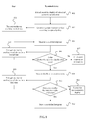
- FIG. 8 is a schematic flowchart of a method for quickly starting a program when a terminal device is locked according to an embodiment of the present invention. As shown in FIG. 8 , the method for quickly starting a program when a terminal device is locked according to the embodiment of the present invention includes:
- Step 801 A touch-sensitive display of a terminal device is locked.
- Step 802 Generate a system locked interface according to a preset policy.
- Any form of a graphic area of a lock screen interface may be generated according to a preset policy regardless of the form, shape, and position on the touch screen. Relevant unlock prompt information may further appear in the graphic area in any form such as text, image, video, animation or a combination thereof.
- Step 803 A user touches an auxiliary touch device.
- the user touching a touch screen refers to a process that begins when a touch object contacts the touch screen, and that ends when all touch objects leave the touch screen.
- the touch object may be any object suitable for operating a touch screen, such as a finger or stylus tip.
- Step 804 Make no click event response.
- Information about the touch event including a position, an event, touch pressure, and the like is obtained; the event is retained for subsequent double-click determining; and a click action is determined as a click event if duration from a previous click action to this click action exceeds a time interval between two click actions of a double-click event.
- the click event may be responded to or not.
- Step 805 The user touches the auxiliary touch device for a second time.
- Step 806 Determine whether the touch is a double-click event.
- the specific determining method is to compare the event with a first touch event, including comparison of time and position information, and the like.
- Step 807 If the touch is not a double-click event, make no response; or determine the touch as a click event and make a click response.
- Step 808 If the touch is a double-click event, also retain the event and make no double-click event response.
- Step 809 The user touches the auxiliary touch device for a third time.
- Step 810 Determine whether the touch is a triple-click event.
- the specific determining method is to compare the event with the two previous events, including comparison of time and position information, and the like.
- Step 811 If the touch is not a triple-click event, determine the touch as a double-click event, and perform an operation of unlocking the touch-sensitive display.
- Step 812 If the touch is a triple-click event, start a user-defined program, which may be applications of a camera, a telephone, a browser, a calendar, or any third-party application, or may also include functions of a specific terminal device, and the like.
- start a user-defined program which may be applications of a camera, a telephone, a browser, a calendar, or any third-party application, or may also include functions of a specific terminal device, and the like.
- a terminal device determines a touch action on an auxiliary touch screen and makes a response. Therefore, when a touch-sensitive display of the terminal device is locked, an unlock operation can be performed by double clicking an auxiliary touch device; and a user-defined program can be started by triple clicking the auxiliary touch device.
- the operation steps are simple and practical, and the operation efficiency of a user on the terminal device can be improved.
- FIG. 9 is a schematic flowchart of a method for quickly starting a program when a terminal device is unlocked according to an embodiment of the present invention. As shown in FIG. 9 , the method for quickly starting a program when a terminal device is unlocked according to the embodiment of the present invention includes:
- Step 901 A touch-sensitive display of a terminal device is unlocked.
- Step 902 A system displays an interface after unlocking, which may include a homepage interface, an interface of any application, and the like.
- Step 903 A user touches an auxiliary touch device.
- the user touching a touch screen refers to a process that begins when a touch object contacts the touch screen, and that ends when all touch objects leave the touch screen.
- the touch object may be any object suitable for operating a touch screen, such as a finger or stylus tip.
- Step 904 Store an event, and determine whether a second touch occurs; and specifically, store touch event information such as a position, an event, and touch pressure, make no click response, and determine whether a second touch event occurs within a time interval between two click actions of a double-click event.
- touch event information such as a position, an event, and touch pressure
- Step 905 If no second touch event occurs, make a click response or make no response according to information about a first touch event, including time, a click position, and the like.
- Step 906 If a second touch event occurs, make no click response described in the previous step. The user touches the auxiliary touch device for a second time.
- Step 907 Determine whether the touch is a double-click event.
- the specific determining method is to compare the event with a previous event, including comparison of time and position information, and the like.
- Step 908 If the touch is not a double-click event, determine the touch as a click event, and make a click response or make no response.
- Step 909 If the touch is a double-click event, start a user-defined program, which may be applications of a camera, a telephone, a browser, a calendar, or any third-party application, or may also include functions of a specific terminal device, and the like.
- start a user-defined program which may be applications of a camera, a telephone, a browser, a calendar, or any third-party application, or may also include functions of a specific terminal device, and the like.
- a terminal device determines a touch action on an auxiliary touch screen and makes a response. Therefore, when a touch-sensitive display of the terminal device is unlocked, a user-defined program can be started by double clicking an auxiliary touch device; and a user-defined program can be started by triple clicking the auxiliary touch device.
- the operation steps are simple and practical, and the operation efficiency of a user on the terminal device is improved.
- the terminal device and the method for implementing quick start of a program thereof that are provided in the embodiments of the present invention can improve operability of the terminal device, make operations more convenient and interesting, and enhance user experience.
- the aforementioned program may be stored in a computer readable storage medium.
- the foregoing storage medium includes any medium capable of storing program codes, such as a ROM, a RAM, a magnetic disk, or an optical disk.
Landscapes
- Engineering & Computer Science (AREA)
- Theoretical Computer Science (AREA)
- General Engineering & Computer Science (AREA)
- Human Computer Interaction (AREA)
- Physics & Mathematics (AREA)
- General Physics & Mathematics (AREA)
- Computer Hardware Design (AREA)
- User Interface Of Digital Computer (AREA)
- Telephone Function (AREA)
- Stored Programmes (AREA)
Applications Claiming Priority (2)
| Application Number | Priority Date | Filing Date | Title |
|---|---|---|---|
| CN2012103103104A CN102880414A (zh) | 2012-08-28 | 2012-08-28 | 终端设备及快速启动程序的方法 |
| PCT/CN2013/074078 WO2014032431A1 (zh) | 2012-08-28 | 2013-04-11 | 终端设备及快速启动程序的方法 |
Publications (2)
| Publication Number | Publication Date |
|---|---|
| EP2772844A1 true EP2772844A1 (de) | 2014-09-03 |
| EP2772844A4 EP2772844A4 (de) | 2014-12-17 |
Family
ID=47481763
Family Applications (1)
| Application Number | Title | Priority Date | Filing Date |
|---|---|---|---|
| EP13776707.5A Withdrawn EP2772844A4 (de) | 2012-08-28 | 2013-04-11 | Endgerät und verfahren für schnellen programmstart |
Country Status (4)
| Country | Link |
|---|---|
| US (1) | US20140078091A1 (de) |
| EP (1) | EP2772844A4 (de) |
| CN (1) | CN102880414A (de) |
| WO (1) | WO2014032431A1 (de) |
Families Citing this family (40)
| Publication number | Priority date | Publication date | Assignee | Title |
|---|---|---|---|---|
| CN102880414A (zh) * | 2012-08-28 | 2013-01-16 | 华为技术有限公司 | 终端设备及快速启动程序的方法 |
| CN103167179B (zh) * | 2013-03-12 | 2015-03-18 | 广东欧珀移动通信有限公司 | 一种快速启动拍照功能的方法及移动设备 |
| CN103269398A (zh) * | 2013-05-07 | 2013-08-28 | 深圳市卡卓无线信息技术有限公司 | 手势识别方法及智能移动终端 |
| CN103379225A (zh) * | 2013-05-30 | 2013-10-30 | 上海斐讯数据通信技术有限公司 | 移动终端 |
| CN104298551A (zh) * | 2013-07-15 | 2015-01-21 | 鸿富锦精密工业(武汉)有限公司 | 应用程序调用系统及方法 |
| CN103576578B (zh) * | 2013-11-05 | 2017-04-12 | 小米科技有限责任公司 | 一种采用耳机线对终端进行控制的方法、装置和设备 |
| US9600369B2 (en) | 2013-12-10 | 2017-03-21 | Huawei Technologies Co., Ltd. | Operating system recovery method and apparatus, and terminal device |
| CN104898966B (zh) * | 2014-03-07 | 2019-03-29 | 联想(北京)有限公司 | 一种信息处理方法、触控电子设备和触控装置 |
| CN103942047A (zh) * | 2014-03-28 | 2014-07-23 | 小米科技有限责任公司 | 用户指令执行方法及装置 |
| US9807219B2 (en) | 2014-03-28 | 2017-10-31 | Xiaomi Inc. | Method and terminal for executing user instructions |
| CN104380254B (zh) * | 2014-06-11 | 2017-09-22 | 华为技术有限公司 | 快速启动应用服务的方法和终端 |
| CN105302406A (zh) * | 2014-07-31 | 2016-02-03 | 中兴通讯股份有限公司 | 进入应用的方法、装置及解锁方法、装置 |
| CN104360709A (zh) * | 2014-10-13 | 2015-02-18 | 联想(北京)有限公司 | 一种电子设备及信息处理方法 |
| CN104391707B (zh) * | 2014-12-05 | 2018-01-30 | 上海斐讯数据通信技术有限公司 | 一种应用程序的启动方法及启动装置 |
| CN104407676A (zh) * | 2014-12-22 | 2015-03-11 | 合肥鑫晟光电科技有限公司 | 一种平板电脑 |
| CN105786370B (zh) * | 2014-12-23 | 2019-08-06 | 阿里巴巴集团控股有限公司 | 用户界面解锁的方法及装置 |
| CN104571926B (zh) * | 2015-01-27 | 2018-03-30 | 努比亚技术有限公司 | 触控方法及装置 |
| CN104731613A (zh) * | 2015-01-30 | 2015-06-24 | 深圳市中兴移动通信有限公司 | 应用快速启动方法和系统 |
| CN105988685A (zh) * | 2015-04-15 | 2016-10-05 | 乐视移动智能信息技术(北京)有限公司 | 移动终端的屏幕控制方法和装置 |
| CN104793886A (zh) * | 2015-04-28 | 2015-07-22 | 东莞颠覆产品设计有限公司 | 移动终端及用于移动终端的侧面识别方法 |
| CN104811523A (zh) * | 2015-05-13 | 2015-07-29 | 努比亚技术有限公司 | 按键控制方法、移动终端 |
| CN105843496A (zh) * | 2015-06-18 | 2016-08-10 | 维沃移动通信有限公司 | 移动终端和控制移动终端的方法 |
| CN105159559A (zh) * | 2015-08-28 | 2015-12-16 | 小米科技有限责任公司 | 移动终端控制的方法及移动终端 |
| CN105242867A (zh) * | 2015-09-09 | 2016-01-13 | 深圳市财富之舟科技有限公司 | 一种手机及其控制方法 |
| CN105824522A (zh) * | 2015-09-24 | 2016-08-03 | 维沃移动通信有限公司 | 一种拍照方法及移动终端 |
| CN105867761A (zh) * | 2015-12-23 | 2016-08-17 | 乐视移动智能信息技术(北京)有限公司 | 通过移动终端的桌面设置时间的方法和系统 |
| CN106249995B (zh) * | 2016-07-25 | 2020-01-24 | 珠海市魅族科技有限公司 | 通知方法和装置 |
| CN106095469B (zh) * | 2016-07-27 | 2020-06-16 | 维沃移动通信有限公司 | 一种移动终端解锁的方法和移动终端 |
| CN106227570A (zh) * | 2016-08-05 | 2016-12-14 | 北京小米移动软件有限公司 | 打开应用的方法及装置 |
| CN106326698A (zh) * | 2016-08-11 | 2017-01-11 | 上海青橙实业有限公司 | 终端的工作状态设置方法和终端 |
| CN106557255B (zh) * | 2016-10-28 | 2021-02-26 | 金华市智甄通信设备有限公司 | 一种多点触摸解锁方法及电子装置 |
| CN106775206B (zh) * | 2016-11-24 | 2020-05-22 | 广东小天才科技有限公司 | 一种用户终端的屏幕唤醒方法及装置、用户终端 |
| CN106919331A (zh) * | 2017-01-20 | 2017-07-04 | 珠海市魅族科技有限公司 | 一种快捷控制方法及系统 |
| CN107613138A (zh) * | 2017-10-18 | 2018-01-19 | 张磊 | 一种实现手机相机快速启动的方法及系统 |
| CN109388318B (zh) * | 2018-09-30 | 2022-05-31 | 联想(北京)有限公司 | 一种控制方法及电子设备 |
| CN109542281A (zh) * | 2018-12-07 | 2019-03-29 | 上海摩软通讯技术有限公司 | 移动终端 |
| CN110287734B (zh) * | 2019-07-01 | 2021-04-06 | Oppo广东移动通信有限公司 | 安全通信节点的设置方法、装置、终端及存储介质 |
| CN110795189A (zh) * | 2019-10-25 | 2020-02-14 | 维沃移动通信(杭州)有限公司 | 一种应用启动方法及电子设备 |
| CN113766116A (zh) * | 2020-06-05 | 2021-12-07 | 福建天泉教育科技有限公司 | 移动设备快捷拍摄的方法、存储介质 |
| CN115150550A (zh) * | 2022-06-20 | 2022-10-04 | 湖北星纪时代科技有限公司 | 用于终端的拍照处理方法、装置、电子设备和存储介质 |
Family Cites Families (10)
| Publication number | Priority date | Publication date | Assignee | Title |
|---|---|---|---|---|
| IL119498A (en) * | 1996-10-27 | 2003-02-12 | Advanced Recognition Tech | Application launching system |
| US7800592B2 (en) * | 2005-03-04 | 2010-09-21 | Apple Inc. | Hand held electronic device with multiple touch sensing devices |
| US9727082B2 (en) * | 2005-04-26 | 2017-08-08 | Apple Inc. | Back-side interface for hand-held devices |
| CN102117166A (zh) * | 2009-12-31 | 2011-07-06 | 联想(北京)有限公司 | 电子设备及其实现预设操作指令的方法及一种手机 |
| US20110187647A1 (en) * | 2010-02-04 | 2011-08-04 | Charles Howard Woloszynski | Method and apparatus for virtual keyboard interactions from secondary surfaces |
| CN101916166B (zh) * | 2010-08-19 | 2013-12-04 | 中兴通讯股份有限公司 | 应用程序的启动方法和移动终端 |
| EP2708994A4 (de) * | 2011-06-10 | 2014-11-19 | Huawei Device Co Ltd | Auslöseverfahren und drahtlose tragbare vorrichtung |
| CN105404465A (zh) * | 2012-02-29 | 2016-03-16 | 中兴通讯股份有限公司 | 一种触摸操作的处理方法及移动终端 |
| CN102646047B (zh) * | 2012-04-20 | 2016-03-30 | 华为终端有限公司 | 一种启动应用程序的方法及具有触摸显示屏的终端设备 |
| CN102880414A (zh) * | 2012-08-28 | 2013-01-16 | 华为技术有限公司 | 终端设备及快速启动程序的方法 |
-
2012
- 2012-08-28 CN CN2012103103104A patent/CN102880414A/zh active Pending
-
2013
- 2013-04-11 WO PCT/CN2013/074078 patent/WO2014032431A1/zh not_active Ceased
- 2013-04-11 EP EP13776707.5A patent/EP2772844A4/de not_active Withdrawn
- 2013-11-25 US US14/088,652 patent/US20140078091A1/en not_active Abandoned
Also Published As
| Publication number | Publication date |
|---|---|
| WO2014032431A1 (zh) | 2014-03-06 |
| US20140078091A1 (en) | 2014-03-20 |
| CN102880414A (zh) | 2013-01-16 |
| EP2772844A4 (de) | 2014-12-17 |
Similar Documents
| Publication | Publication Date | Title |
|---|---|---|
| EP2772844A1 (de) | Endgerät und verfahren für schnellen programmstart | |
| US20220391158A1 (en) | Systems and Methods for Interacting with Multiple Display Devices | |
| US20230409165A1 (en) | User interfaces for widgets | |
| US20220374085A1 (en) | Navigating user interfaces using hand gestures | |
| KR102642883B1 (ko) | 터치 감응형 디스플레이를 갖는 전자 디바이스 상에 동시에 디스플레이되는 다수의 애플리케이션들과 상호작용하기 위한 시스템들 및 방법들 | |
| US10936153B2 (en) | Method and apparatus for providing a user interface on a device enabling selection of operations to be performed in relation to content | |
| EP3422166B1 (de) | Verfahren und vorrichtung zur anzeige einer anwendungsoberfläche sowie elektronische vorrichtung | |
| US9081498B2 (en) | Method and apparatus for adjusting a user interface to reduce obscuration | |
| CN113407106B (zh) | 用于改善设备的单手操作的用户界面 | |
| CA2865442C (en) | Method and apparatus for providing a user interface on a device that indicates content operators | |
| US20190124203A1 (en) | User interface for phone call routing among devices | |
| US20220326816A1 (en) | Systems, Methods, and User Interfaces for Interacting with Multiple Application Views | |
| US20120032891A1 (en) | Device, Method, and Graphical User Interface with Enhanced Touch Targeting | |
| US20110163966A1 (en) | Apparatus and Method Having Multiple Application Display Modes Including Mode with Display Resolution of Another Apparatus | |
| US20130227490A1 (en) | Method and Apparatus for Providing an Option to Enable Multiple Selections | |
| US20130227413A1 (en) | Method and Apparatus for Providing a Contextual User Interface on a Device | |
| US20130227454A1 (en) | Method and Apparatus for Providing an Option to Undo a Delete Operation | |
| EP3136214A1 (de) | Berührungsbedienungsverfahren und -vorrichtung für endgerät | |
| US10768808B2 (en) | Method for displaying graphical user interface based on gesture and electronic device | |
| CN108064371A (zh) | 一种柔性显示屏的控制方法及装置 | |
| CN109634487B (zh) | 信息显示方法、装置及存储介质 | |
| CN112269501A (zh) | 图标移动方法、装置及电子设备 | |
| CN114222355B (zh) | 终端省电显示方法、装置和电子设备 | |
| US20260119006A1 (en) | Systems, Methods, and User Interfaces for Interacting with Multiple Application Views | |
| CN110554827B (zh) | 用于在具有触敏显示器且不具有力传感器的电子设备处激活并使用触控板的系统和方法 |
Legal Events
| Date | Code | Title | Description |
|---|---|---|---|
| PUAI | Public reference made under article 153(3) epc to a published international application that has entered the european phase |
Free format text: ORIGINAL CODE: 0009012 |
|
| 17P | Request for examination filed |
Effective date: 20131022 |
|
| AK | Designated contracting states |
Kind code of ref document: A1 Designated state(s): AL AT BE BG CH CY CZ DE DK EE ES FI FR GB GR HR HU IE IS IT LI LT LU LV MC MK MT NL NO PL PT RO RS SE SI SK SM TR |
|
| A4 | Supplementary search report drawn up and despatched |
Effective date: 20141117 |
|
| RIC1 | Information provided on ipc code assigned before grant |
Ipc: G06F 3/0488 20130101AFI20141111BHEP Ipc: G06F 1/16 20060101ALI20141111BHEP |
|
| DAX | Request for extension of the european patent (deleted) | ||
| STAA | Information on the status of an ep patent application or granted ep patent |
Free format text: STATUS: THE APPLICATION IS DEEMED TO BE WITHDRAWN |
|
| 18D | Application deemed to be withdrawn |
Effective date: 20150616 |