EP2779802A2 - Systèmes et procédés pour fournir une barre d'aperçu d'un jeu de lumière - Google Patents
Systèmes et procédés pour fournir une barre d'aperçu d'un jeu de lumière Download PDFInfo
- Publication number
- EP2779802A2 EP2779802A2 EP14159930.8A EP14159930A EP2779802A2 EP 2779802 A2 EP2779802 A2 EP 2779802A2 EP 14159930 A EP14159930 A EP 14159930A EP 2779802 A2 EP2779802 A2 EP 2779802A2
- Authority
- EP
- European Patent Office
- Prior art keywords
- light show
- color
- colors
- controller
- light
- Prior art date
- Legal status (The legal status is an assumption and is not a legal conclusion. Google has not performed a legal analysis and makes no representation as to the accuracy of the status listed.)
- Withdrawn
Links
Images

Classifications
-
- H—ELECTRICITY
- H05—ELECTRIC TECHNIQUES NOT OTHERWISE PROVIDED FOR
- H05B—ELECTRIC HEATING; ELECTRIC LIGHT SOURCES NOT OTHERWISE PROVIDED FOR; CIRCUIT ARRANGEMENTS FOR ELECTRIC LIGHT SOURCES, IN GENERAL
- H05B47/00—Circuit arrangements for operating light sources in general, i.e. where the type of light source is not relevant
- H05B47/10—Controlling the light source
- H05B47/155—Coordinated control of two or more light sources
-
- G—PHYSICS
- G06—COMPUTING OR CALCULATING; COUNTING
- G06F—ELECTRIC DIGITAL DATA PROCESSING
- G06F3/00—Input arrangements for transferring data to be processed into a form capable of being handled by the computer; Output arrangements for transferring data from processing unit to output unit, e.g. interface arrangements
- G06F3/01—Input arrangements or combined input and output arrangements for interaction between user and computer
- G06F3/048—Interaction techniques based on graphical user interfaces [GUI]
- G06F3/0481—Interaction techniques based on graphical user interfaces [GUI] based on specific properties of the displayed interaction object or a metaphor-based environment, e.g. interaction with desktop elements like windows or icons, or assisted by a cursor's changing behaviour or appearance
- G06F3/0482—Interaction with lists of selectable items, e.g. menus
-
- G—PHYSICS
- G06—COMPUTING OR CALCULATING; COUNTING
- G06F—ELECTRIC DIGITAL DATA PROCESSING
- G06F3/00—Input arrangements for transferring data to be processed into a form capable of being handled by the computer; Output arrangements for transferring data from processing unit to output unit, e.g. interface arrangements
- G06F3/01—Input arrangements or combined input and output arrangements for interaction between user and computer
- G06F3/048—Interaction techniques based on graphical user interfaces [GUI]
- G06F3/0484—Interaction techniques based on graphical user interfaces [GUI] for the control of specific functions or operations, e.g. selecting or manipulating an object, an image or a displayed text element, setting a parameter value or selecting a range
- G06F3/04847—Interaction techniques to control parameter settings, e.g. interaction with sliders or dials
Definitions
- the present invention is directed to rendering a preview bar depicting a preview of a light show.
- Conventional lighting systems provide users with the ability to define one or more aspects of a light show to be displayed by one or more lighting devices.
- the user can verify that the light show is accurate or otherwise acceptable only after the lighting devices play back the light show.
- the user may define the colors, a sequence of colors, a time where each color should be displayed and an overall duration of the light show.
- the lighting devices receive the user requests and display the light show as defined by the user.
- the lighting devices may receive an instruction at various time intervals to display a certain color at a certain intensity level and/or having some other visual effect.
- the user may then view the light show and make any desired adjustments to the light show.
- the user may provide the inputs related to the light show again, view the light show again and make any desired adjustments.
- the user may repeat this approach until the light show is acceptable for the user. In the case of a complicated light show, it would be simpler and less time consuming if the user can verify and edit the light show without waiting for the lighting devices to play back the defined light show.
- aspects of the invention provide systems and methods for previewing a light show to be displayed by at least one lighting fixture.
- a system comprising at least one lighting fixture and a controller for managing the at least one lighting fixture. Additionally, the controller is configured to receive at least one input associated with a light show and generate the light show to be displayed by the at least one lighting fixture based on at least one input. The controller is also configured to display, on a display device associated with the controller, a preview bar that depicts a preview of the light show to be displayed by the at least one lighting fixture.
- a method comprises receiving, via one or more input devices, at least one input related to a light show and defining, via a controller, a light show to be displayed by at least one lighting fixture. Additionally, the method comprises rendering, on a display device associated with the controller, a preview of the light show in a preview bar.
- a device configured to render a preview of a light show on a display device, the preview being depicted in a preview bar included in a user interface rendered on the display device.
- the device is additionally configured to transmit the light show to at least one lighting fixture, the light show comprising at least a sequence of colors and a plurality of timing information related to the sequence of colors.
- Certain aspects of the present invention disclose rendering a preview bar in a display associated with a controller for previewing a light show displayed by at least one lighting fixture.
- the preview of the light show is represented in a preview bar which may be accessible independently of a light show being displayed by at least one lighting fixture. For example, the lighting fixtures may be playing a light show while other light shows may be previewed via the preview bar.
- a user may provide one or more inputs to the controller via one or more input devices, such as a touch screen associated with a display. These inputs may be related to the light show, such as a duration of the light show, specific colors to be displayed during the light show, a sequence of the colors to be displayed during the light show, a length of time each color should be displayed, a transition time for transitioning between the specified colors during the light show, an intensity of the light, whether to continuously play the light show, a number of times to play the light show, and/or any other input.
- the user may provide one or more inputs to select a number of lighting fixtures to use for displaying the light show.
- the user may provide one or more inputs related to a number, location, type, and/or otherwise select a set of lighting fixtures for displaying the light show.
- the user may provide one or more inputs to cause all selected fixtures to be controlled together and simultaneously display the same color and intensity; in other embodiments, the user may provide inputs to cause individual fixtures or subsets of fixtures to display different colors and intensities at different times as part of the light show sequence.
- the controller generates the light show based on the inputs and renders the preview bar on the display.
- the preview bar includes at least one step where each step corresponds to a color and an amount of time.
- the color of each step may be one of the colors received via user input or an intermediary color that appears between two of the received colors.
- the intermediary color may be displayed by the lighting fixtures while transitioning from a first received color to a second received color.
- the intermediary color may be a color that appears at a location on the color spectrum between two of the received colors based on a specified transition time for transitioning between the two received colors.
- the intermediary color for a respective step may appear at a location at half the distance on the color spectrum between the two received colors when half of the transition time for transitioning between the two received colors has elapsed.
- the time associated with the step represents an amount of time that the color of the respective step is displayed by the lighting fixture.
- the size of the step in the preview bar is based on the amount of time that is associated with the step. For example, if a particular color is to be displayed by the lighting fixtures for a time that corresponds to 10% of the duration of the light shown, then the step associated with the respective color stop occupies 10% of the space in the preview bar.
- the controller renders a user interface for a user to create or edit the light show. For instance, the user may adjust the duration of the light show, a sequence of colors appearing in the light show, the colors of the light show, transition times between colors of the light show, and/or make other adjustments to the light show. Additionally, the user may manually adjust the intermediary colors and/or the colors received via the input. In response to the adjustments, the controller may dynamically modify the preview bar to reflect the effect of the adjustments requested by the user in the preview bar.
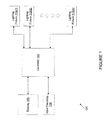
- FIG. 1 shows a light show management system 100 comprising a controller 103, a display 106, one or more input devices 109, and a plurality of lighting fixtures 113(l)-113(n).
- the controller 103 manages one or more light shows displayed by lighting fixtures 113.
- a user may provide inputs related to a light show via one or more input devices 109 or by manipulating a user interface rendered on the display 106.
- the display 106 may be a touch screen device that is configured to receive user input.
- the controller 103 receives the input related to the light show and generates a light show to be displayed by the lighting fixtures 113.
- the light show may include one or more instructions to the lighting fixtures 113 for displaying light having a specified color, at a specified intensity, for a specified duration, and/or other types of instructions, as discussed herein.
- the controller 103 is embodied as an application or other software module residing in a memory of a device that executes the application.
- the application may reside in a computer-readable medium and execute on a suitable processor.
- a processor may comprise a microprocessor, an ASIC, a state machine, or other processor, and can be any of a number of computer processors.
- the processor may be in communication with the computer-readable medium which stores instructions and other components such that when executed by the processor, cause the processor to perform the steps and methods described herein.
- the computer-readable medium may include an electronic, optical, magnetic, or other storage device capable of providing the processor with computer-readable instructions.
- instructions stored on the computer-readable medium may include processor-specific instructions generated by a compiler and/or an interpreter from code written in any suitable computer-programming language, including for example, C, C++, C#, Visual Basic, Java, Python, Pert, JavaScript, and ActionScript.
- the lighting fixtures 113 may be light emitting devices such as light emitting diodes (LEDs), fluorescent lamps, organic LEDs, and/or other types of light emitting devices.
- the lighting fixtures 113 may be configured to display a spectrum of colors. For example, the current being supplied to the LEDs or a subset of the LEDs may be adjusted or modulated to emit one of the colors of the spectrum.
- the controller 103 transmits an instruction to the LEDs comprising one or more current adjustments for instructing the LEDs to display a respective color in the spectrum.
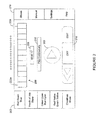
- FIG. 2 is a user interface rendered on a display 106 associated with the controller.
- the user interface includes a saved shows panel 203, a preview bar 206, a duration field 209, a continuity field 210, a play button 213, playback control panel 216, and an options panel 219.
- the saved shows panel 203 depicts previously saved light shows.
- the previously saved light shows may be identified by a descriptive name, such as the colors displayed by the lighting fixtures 113, a theme of the light show, and/or any other name.
- Each of the previously saved light shows depicted in the saved shows panel 203 may be individually selected by a user. For instance, the user may provide an input via one of the input devices 109 or by manipulating the user interface via the display 103 to select one of the previously saved light shows.
- the controller 106 may render the selected light show in the preview bar 209.
- the preview bar 206 depicts the light show over a period of time.
- the preview bar 206 depicts a plurality of steps 223 that each correspond to a respective color and a respective amount of time.
- each step may be uniquely shaded to indicate that a different color is displayed by the lighting fixtures 113 during that portion of the light show.
- the duration field 209 displays a length of the light show.
- the preview bar 206 depicts a light show that is 12 seconds in duration.
- Each step 223 may be individually configured to be associated with a specified color, duration and intensity.
- each step 223 may be represented in the preview bar 206 based on the color and duration associated with the respective step 223. For instance, if a step 223 is associated with a blue color and has a duration that corresponds to 10% of the duration of the light show, then the respective step 223 will occupy 10% of the preview bar and be represented in the blue color.
- the preview bar 206 depicts a light show with twelve steps 223a, 223b, 223c, 233d, 233e, 233f, 233g, 233h, 233i, 233j, 233k and 2331.
- Each one of the steps 223 in the preview bar 206 is associated with the same duration and a color.
- the color of each of the steps 223 may be unique relative to the other steps 233.
- a subset of the steps 223 may share the same color.
- the preview bar 206 includes twelve steps 223 of equal size where each step 223 may be represented by a respective color.
- the colors associated with each step 223 may correspond to a color provided by a user input or may be an intermediary color.
- the playback control panel 216 may include one or more options for the user to manage playback of the light show.
- the playback control panel 216 may include an option to traverse the light show, turn off the preview bar 206, edit the light show depicted by the preview bar 206, create a new light show, and/or other options related to the light show.
- the options panel 219 may include one or more options for accessing various functionalities offered by the light show management system 100 such as a shows button for accessing the previously saved light shows, a manual button for manually creating and/or editing a light show, a settings button for accessing various settings related to the components of the light show management system 110, a help button for accessing a guide, and/or other buttons.
- a user may manipulate the playback control panel 216 and the options panel 219 via one or more input devices 109 and/or the display 106.
- FIG. 3 illustrates one example of a user interface rendered on the display 106 if a user selects to edit a light show.
- the user interface includes the preview bar 206, a transition panel 303, a continuity indicator 304, a shift up button 306, a shift down button 309, a color button 313, an end effect button 316, an insert button 319, a delete button 323, a timings button 326, a name button 329, and an edit panel 333.
- the preview bar 206 depicts a preview of a light show entitled "Red Green Blue," a descriptive name where the lights displayed by the lighting fixtures 113 transitions from red to green to blue over the course of the light show.
- the user interface of FIG. 3 allows the user to edit the light show, such as, for example, by adjusting the colors, the duration of each color, the length of time for transitioning between colors, adding and/or deleting steps 223 to the light show, and/or otherwise edit the light show.
- the transition panel 303 provides for the user to adjust a transition time that elapses while the lighting fixtures 113 transition to another color.
- the lighting fixtures 113 may transition to another color specified by the user.
- a transition time of zero indicates that the lighting fixtures 113 change the color between a first and second color quickly and without displaying any intermediate colors determined by the controller.
- a longer transition time indicates that the lighting fixtures 113 change the color from the first to the second color in a more gradual and/or linear manner. For example, intermediary colors appearing in the color spectrum between the first and the second color may be displayed by the lighting fixtures 113 during the transition.
- the transition panel 303 denotes the three specified colors of the light show (i.e., red, green and blue).
- the user may select any one of the specified colors and adjust the transition time for transitioning between the specified colors.
- the user may indicate that the transition time for changing the color of the displayed light from the first color (i.e., red) to the second color (i.e., green) to be three seconds, as shown in FIG. 3 .
- the controller 103 defines the light show such that the lighting fixtures 113 gradually change the color of the light being displayed from red to green over a span of three seconds.
- the preview bar 206 may be dynamically refreshed to depict the colors displayed by the lighting fixtures 113 during the three second transition from the first color to the second color.
- colors appearing on the color spectrum between the first color and the second color may be displayed by the lighting fixtures 113 during the transition and therefore are depicted in the preview bar 206.
- the preview of the light show may be dynamically updated based on the inputs provided via the user interface to preview a light show without actual play back of the light show.
- the controller 103 identifies the intermediary colors based on colors appearing on the color spectrum between the first color and second color based on a linear approximation.
- the transition between the first and second color may be linear over the course of the specified transition time.
- the controller 103 may determine which colors are to be displayed by the lighting fixtures 113 by linearly approximating the colors that correspond to a linear change in wavelength for transitioning to the second color, as can be appreciated by one of skill in the art.
- each one of the lighting fixtures 113 may be one or more LEDs.
- the current being supplied to the red LED may be decreased while the current being supplied to the green LED is increased to achieve the wavelength that corresponds to green.
- This adjustment in current may be a linear adjustment occurring over a period that corresponds to the transition time.
- Colors on the spectrum having a wavelength between the red and green colors may thus be displayed by the lighting fixtures 113 as the current through the LEDs is adjusted.
- These colors on the spectrum that have a wavelength between the red and green colors are intermediary colors, a portion of which are displayed by the lighting fixtures 113 during the transition from red to green.
- the intermediary colors to be displayed by the lighting fixtures 113 may be represented in the preview bar by the steps 223.
- the duration of the first color (i.e., red) may have been previously defined to be one second and each step 223 of the light show may be one second in duration.
- one step 223a in the light show may be associated with the first color.
- the controller 113 defines the light show such that the lighting fixtures start transitioning to the second color after displaying the first color for one second.
- the light show then transitions to the second color (i.e. green) over the next three seconds such that the lighting fixtures 113 display the second color after the fourth second of the light show.
- step 223a may correspond to the first color which is displayed for the length of one step and steps 223b, 223c and 223d correspond to colors for transitioning to the second color.
- the controller 103 determines intermediary colors that correspond to the steps 223b, 223c and 223d for the lighting fixtures 113 to display while transitioning from the first color to the second color. In one embodiment, the controller 113 determines the intermediary color for each of the steps 223b, 223c, and 223d based on known colors of the adjacent steps. For instance, the color of step 223a and 223e are known (red and green, respectively). The controller 103 may determine the color of step 223c to be a color on the color spectrum occurring half the distance between the first and second colors based at least in part on the location of step 223c occurring half the distance between step 223a and 223e on the preview bar 206.
- the controller 103 may determine the color of step 223b to be a color on the color spectrum occurring half the distance between the first color of step 223a and the intermediary color of 223c, and so on. As another example, the controller 103 may determine the color of step 223b to be a color on the color spectrum occurring at a third of the distance between the color of step 223a and the color step 223e.
- transition from one color to the next could also be defined by the user to be a non-linear transition (e.g. logarithmic), and a wide variety of methods are available to adjust the intensity of the different colored LEDs or change the color or intensity output of the lighting fixtures (e.g. variable DC current, PWM, PAM, PLC, etc) in response to the light show programming.
- a non-linear transition e.g. logarithmic
- methods e.g. variable DC current, PWM, PAM, PLC, etc
- the transition time from the second color (i.e. green) to the third color (i.e. blue) may be one second.
- the continuity indicator 304 indicates that the light show represented in the preview bar 206 be played continuously.
- the transition time from the third color back to the first color (i.e. red) may also be two seconds.
- the transition time between each of the colors of the light show may be individually configurable via one or more input devices 109 or a touch interface on the display 106.
- the controller 103 may determine the intermediary colors displayed by the lighting fixtures 113 during the transition from the second color to the third color and during the transition from the third color to the first color using a similar approach, as discussed herein.
- the controller 103 associates the second color (i.e. green) to step 223e as previously mentioned.
- the transition time for transitioning between the second color to the third color is one second.
- the controller 103 defines the light show such that the lighting fixtures 113 display the second color for three seconds (steps 223e, 223f and 223g) and display an intermediary color for one second (step 223h) while transitioning to the third color. Accordingly, the lighting fixtures 113 display the third color (at step 223i) four seconds after starting the display of the second color while transitioning to the third color in one second (step 223h).
- the third color (i.e., blue) is displayed by the lighting fixtures 113 eight seconds into the light show because the duration of the first two colors were defined to be four seconds each.
- the controller 103 defines the light show such that step 223i corresponds to the third color which occurs at the eight second point in the light show.
- the transition time for the third color is two seconds.
- the controller 103 defines the light show such at the third color is displayed by the lighting fixtures for two seconds (steps 223i and 223j) before transitioning back to the first color.
- the controller determines intermediary colors to be displayed during the transition from the third color to the first color. For instance, steps 223k and 2231 may each correspond to an intermediary color as determined by the controller 103.
- the shift up button 306 and the shift down button 309 may be invoked by the user to adjust the position of one of the steps 223 in the preview of the light show. For example, the user may modify the order of the steps 223 to adjust an order of the colors being displayed by the lighting fixtures 113. Additionally, the insert button 319 and the delete button 323 may be invoked by the user to add and remove, respectively, steps 223 in the preview of the light show. For instance, the user may wish to remove one of the steps 223 of the preview bar 206. The timings button 326 may be invoked to adjust the duration of the light show and/or the duration that the lighting fixtures 113 display one of the specified colors.
- Adjusting the duration of the light show may result in a change in the number of steps 223 or a change in the length of each step 223 of the light show.
- invoking the name button 329 may change the name of the light show and invoking the end effect button 316 may end an effect implemented by the lighting fixtures 113.
- the lighting fixtures 113 may be configured to implement lighting effects such as fade out, fade in, strobe effect, intensity adjustments, and/or other effects.
- the color button 313 may be invoked to adjust one or more colors of the light show.
- the user may individually select one of the steps 223 and adjust the color associated with the selected step.
- adjusting a color of one of the steps 223 may alter the transition from a first color to a second color.
- the original color of one of the steps 223 may have been determined based on the transition time between the first and second colors, as discussed above.
- the user may adjust a light show color such that the controller 103 dynamically alters the preview bar 103 to depict a preview of the light show with adjusted intermediary colors based on the adjusted light show color.
- the adjusted light show color may not alter the intermediary colors such that the intermediary colors displayed by the lighting fixtures 113 during the transition from a first color to a second color over the span of the transition time may not be altered.
- the user interface includes the edit panel 333 for a user to access help menus, copy light shows, save a current light show, cancel any edits, and/or perform other functions.
- the user interface may also include additional options for a user to adjust the speed of the light show and intensity of the lighting fixtures 113 while performing the light show.
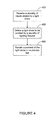
- FIG. 4 is a flowchart that provides one example of the operation of a portion of the controller 103 according to certain embodiments. It is understood that the flowchart of FIG. 4 provides merely an example of the many different types of functional arrangements that may be employed to implement the operation of the portion of the controller 103. As an alternative, the flowchart of FIG. 4 may be viewed as depicting an example of steps of a method implemented by the controller 103 according to one or more embodiments.
- the controller receives a at least one input related to a light show.
- a user may provide the inputs via one or more input devices 109 and/or a touch screen associated with a display 106.
- the inputs related to the light show may include one or more colors to be displayed during the light show, transition times for transitioning between the colors to be displayed during the light show, a duration for the light show, an intensity of the colors displayed during the light show, whether to play the light show continuously, and/or other inputs related to the light show.
- the user may provide the inputs related to the light show by accessing one or more user interfaces rendered on the display device. For example, the user may manipulate one or more user interfaces to provide the inputs, as discussed above with respect to FIGS. 2 and 3 .
- the controller 103 defines the light show that is to be displayed by at least one lighting fixture 113 communicatively coupled to the controller 103.
- the light show may be defined at least in part by the light show colors provided by the user and the transition times to transition between the light show colors.
- the controller 103 determines intermediary colors to be displayed by the lighting fixtures 113 during the transition between the light show colors provided the user.
- the controller 103 determines the intermediary colors based at least in part on the transition time to transition between two of the light show colors.
- the controller 103 defines the light show to have a duration as indicated by the inputs provided by the user.
- the controller 103 may define the light show to include effects such as fade in, fade out, intensity, and/or other effects received by a user.
- the controller 103 renders a preview of the light show in a preview bar on the display 106 associated with the controller 103.
- the preview bar graphically represents the light show to be implemented by the light fixtures 113.
- the preview bar may depict a sequence of colors to be displayed by the lighting fixtures 113 including the light show colors provided by the user and the intermediary colors determined by the controller 103.
- the colors are depicted in the preview bar proportionally with respect to the duration of the light show. For instance, length of a color in the preview bar may correspond to a proportion of the duration of the respective color relative to the duration of the complete light show.
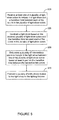
- FIG. 5 is a flowchart that provides one example of the operation of a portion of the controller 103 according to certain embodiments. It is understood that the flowchart of FIG. 5 provides merely an example of the many different types of functional arrangements that may be employed to implement the operation of the portion of the controller 103. As an alternative, the flowchart of FIG. 5 may be viewed as depicting an example of steps of a method implemented by the controller 103 according to one or more embodiments.
- the controller 103 receives at least one light show color to include in a light show and a transition time between each of the light show colors.
- a user may provide the light show colors and the transition times via one or more input devices 109 and/or a touch screen associated with a display 106.
- the user may manipulate a user interface rendered on the display 106 to provide the input.
- the controller 103 may also receive other inputs related to the light show. For instance, the controller 103 may receive input related to a duration of the light show, a duration for displaying each light show color, an intensity value, and/or any other inputs related to the light show.
- the controller 103 generates a light show based on the received at least one light show color and the transition time between each of the light show colors.
- the controller 103 generates the light show to be a sequence of colors including the received light show colors and at least one of intermediate color to be displayed by the lighting fixtures 113 during the transition between one light show color to another light show color. Additionally, each color in the sequence of colors may be associated with a duration during which the respective color will be displayed by the lighting fixtures 113 during play back of the light show.
- the controller 103 determines at least one intermediate color to include in the light show between two of the light show colors based at least in part on the transition time between the respective two of the light show colors. The determined intermediate colors will be displayed by the lighting fixtures 113 during the transition from each light show color to a next light show color. In one embodiment, if the transition time to transition between a first light show color to a second light show color is not specified, then the controller 103 determines that there are no intermediary colors to be displayed by the lighting fixtures 113 during the transition between the first and second light show colors. If the transition time to transition between the first light show color and the second light show color is more than zero, then the controller 103 identifies at least one intermediary color to be displayed by the lighting fixtures 113 during the transition between the first light show color and the second light show color.
- the controller 103 determines the intermediary colors based on the magnitude of the transition time and a difference between the first light show color and the second light show color. For instance, the controller 103 implements a linear transition from the first light show color to the second light show color over the span of the transition time.
- the controller 103 identifies the intermediary colors to be displayed by the lighting fixtures 113 during the transition from the first light show color to the second light show color to be those colors appearing in the spectrum between the first light show color and the second light show color. For example, the controller 103 may instruct that a color appearing at half the distance on the spectrum between the first light show color and the second light show color be displayed by the lighting fixtures 113 when half of the transition time has elapsed. Similarly, the controller 103 may indicate that a color appearing at a quarter of the distance on the spectrum between the first light show color and the second light show color be displayed by the lighting fixtures 113 when a quarter of the transition time has elapsed, and so on.
- the controller 103 transmits one or more instructions related to the light show to the lighting fixtures 113.
- the controller 103 may transmit instructions for displaying colors for certain times and for certain durations based on the light show.
- the controller 103 may individually transmit at least one instruction to the lighting fixtures 113 based related to a color to be displayed and/or an effect to be applied. The controller 103 may then transmit a next instruction related to the color and/or effect based on a duration and transition time, as described herein.
Landscapes
- Circuit Arrangement For Electric Light Sources In General (AREA)
- Control Of Indicators Other Than Cathode Ray Tubes (AREA)
Applications Claiming Priority (1)
| Application Number | Priority Date | Filing Date | Title |
|---|---|---|---|
| US13/838,924 US20140265865A1 (en) | 2013-03-15 | 2013-03-15 | Systems and methods for providing a preview bar of a light show |
Publications (2)
| Publication Number | Publication Date |
|---|---|
| EP2779802A2 true EP2779802A2 (fr) | 2014-09-17 |
| EP2779802A3 EP2779802A3 (fr) | 2015-01-14 |
Family
ID=50396863
Family Applications (1)
| Application Number | Title | Priority Date | Filing Date |
|---|---|---|---|
| EP14159930.8A Withdrawn EP2779802A3 (fr) | 2013-03-15 | 2014-03-14 | Systèmes et procédés pour fournir une barre d'aperçu d'un jeu de lumière |
Country Status (3)
| Country | Link |
|---|---|
| US (2) | US20140265865A1 (fr) |
| EP (1) | EP2779802A3 (fr) |
| CA (1) | CA2845607C (fr) |
Cited By (2)
| Publication number | Priority date | Publication date | Assignee | Title |
|---|---|---|---|---|
| WO2016166034A1 (fr) * | 2015-04-15 | 2016-10-20 | Philips Lighting Holding B.V. | Procédés et appareil pour des effets de transition de couleur personnalisés |
| GB2560282B (en) * | 2015-11-17 | 2022-06-01 | Telelumen Llc | Illumination content production and use |
Families Citing this family (2)
| Publication number | Priority date | Publication date | Assignee | Title |
|---|---|---|---|---|
| JP6467257B2 (ja) * | 2015-03-17 | 2019-02-06 | キヤノン株式会社 | 情報処理装置、情報処理方法及びプログラム |
| US10057964B2 (en) * | 2015-07-02 | 2018-08-21 | Hayward Industries, Inc. | Lighting system for an environment and a control module for use therein |
Citations (3)
| Publication number | Priority date | Publication date | Assignee | Title |
|---|---|---|---|---|
| US7228190B2 (en) * | 2000-06-21 | 2007-06-05 | Color Kinetics Incorporated | Method and apparatus for controlling a lighting system in response to an audio input |
| US20110115413A1 (en) * | 2009-11-14 | 2011-05-19 | Wms Gaming, Inc. | Configuring and controlling casino multimedia content shows |
| US20120213495A1 (en) * | 2011-02-18 | 2012-08-23 | Stefan Hafeneger | Video Context Popups |
Family Cites Families (5)
| Publication number | Priority date | Publication date | Assignee | Title |
|---|---|---|---|---|
| US7139617B1 (en) * | 1999-07-14 | 2006-11-21 | Color Kinetics Incorporated | Systems and methods for authoring lighting sequences |
| JP2008527446A (ja) * | 2005-01-06 | 2008-07-24 | エス.シー. ジョンソン アンド サン、インコーポレイテッド | ライトショーを保存・定義する方法および装置 |
| TW200842540A (en) * | 2007-04-26 | 2008-11-01 | L & C Lighting Technology Corp | Method of changing light colors of a lamp and control system thereof |
| US8344665B2 (en) * | 2008-03-27 | 2013-01-01 | Orion Energy Systems, Inc. | System and method for controlling lighting |
| WO2009069070A1 (fr) * | 2007-11-28 | 2009-06-04 | Koninklijke Philips Electronics N.V. | Procédé et dispositif de programmation de scénarios d'éclairage dynamique |
-
2013
- 2013-03-15 US US13/838,924 patent/US20140265865A1/en not_active Abandoned
-
2014
- 2014-03-12 CA CA2845607A patent/CA2845607C/fr active Active
- 2014-03-14 EP EP14159930.8A patent/EP2779802A3/fr not_active Withdrawn
-
2017
- 2017-04-28 US US15/581,380 patent/US20170231059A1/en not_active Abandoned
Patent Citations (3)
| Publication number | Priority date | Publication date | Assignee | Title |
|---|---|---|---|---|
| US7228190B2 (en) * | 2000-06-21 | 2007-06-05 | Color Kinetics Incorporated | Method and apparatus for controlling a lighting system in response to an audio input |
| US20110115413A1 (en) * | 2009-11-14 | 2011-05-19 | Wms Gaming, Inc. | Configuring and controlling casino multimedia content shows |
| US20120213495A1 (en) * | 2011-02-18 | 2012-08-23 | Stefan Hafeneger | Video Context Popups |
Cited By (2)
| Publication number | Priority date | Publication date | Assignee | Title |
|---|---|---|---|---|
| WO2016166034A1 (fr) * | 2015-04-15 | 2016-10-20 | Philips Lighting Holding B.V. | Procédés et appareil pour des effets de transition de couleur personnalisés |
| GB2560282B (en) * | 2015-11-17 | 2022-06-01 | Telelumen Llc | Illumination content production and use |
Also Published As
| Publication number | Publication date |
|---|---|
| CA2845607C (fr) | 2016-08-09 |
| EP2779802A3 (fr) | 2015-01-14 |
| US20140265865A1 (en) | 2014-09-18 |
| US20170231059A1 (en) | 2017-08-10 |
| CA2845607A1 (fr) | 2014-09-15 |
Similar Documents
| Publication | Publication Date | Title |
|---|---|---|
| JP5998865B2 (ja) | 照明制御装置 | |
| US9018840B2 (en) | Systems and methods for providing a lighting effect | |
| US7353071B2 (en) | Method and apparatus for authoring and playing back lighting sequences | |
| US20170231059A1 (en) | Systems and methods for providing a preview bar of a light show | |
| US9192024B2 (en) | Dimming console | |
| US20080140231A1 (en) | Methods and apparatus for authoring and playing back lighting sequences | |
| US7228190B2 (en) | Method and apparatus for controlling a lighting system in response to an audio input | |
| DE60023730T2 (de) | Systeme und methoden um lichtsequenzen zu erstellen | |
| JP5280356B2 (ja) | 光を発生するデバイス | |
| CN101785362B (zh) | 动态改变颜色的设备和方法 | |
| EP3099143B1 (fr) | Procédé et dispositif de création d'effets d'éclairage | |
| JP4993321B2 (ja) | 可変色光を発生するデバイス | |
| US20180092187A1 (en) | Lighting setting apparatus and lighting system | |
| CN104202877A (zh) | 一种基于lcd触摸屏照明控制器的互交式界面设计方法 | |
| WO2023144269A1 (fr) | Détermination de valeurs de paramètre d'effet de lumière global et local | |
| CN101395964B (zh) | 光系统的互动机制 | |
| KR20120017085A (ko) | 모듈식 조명 시스템을 위한 픽처 선택 방법 | |
| EP2164585A1 (fr) | Aaappareil et procédé pour modifier une scène lumineuse | |
| KR101801682B1 (ko) | 조명 시스템 및 그 조명 시스템의 조명 장면들의 에너지 소비를 결정하기 위한 방법 | |
| US9632745B2 (en) | Visual focus assistance for operating an audio control surface | |
| JP6695520B2 (ja) | 設計支援装置、設計支援方法、及びプログラム | |
| US20150029714A1 (en) | Method and system for lighting control | |
| Hunt | Opera, Art and Industrial Production: Lighting at the Royal Opera House, London | |
| JP6592723B2 (ja) | 設計支援装置、設計支援方法、及び設計支援プログラム | |
| Van Hurkman | Adobe SpeedGrade: Getting Started |
Legal Events
| Date | Code | Title | Description |
|---|---|---|---|
| 17P | Request for examination filed |
Effective date: 20140314 |
|
| AK | Designated contracting states |
Kind code of ref document: A2 Designated state(s): AL AT BE BG CH CY CZ DE DK EE ES FI FR GB GR HR HU IE IS IT LI LT LU LV MC MK MT NL NO PL PT RO RS SE SI SK SM TR |
|
| AX | Request for extension of the european patent |
Extension state: BA ME |
|
| PUAI | Public reference made under article 153(3) epc to a published international application that has entered the european phase |
Free format text: ORIGINAL CODE: 0009012 |
|
| PUAL | Search report despatched |
Free format text: ORIGINAL CODE: 0009013 |
|
| AK | Designated contracting states |
Kind code of ref document: A3 Designated state(s): AL AT BE BG CH CY CZ DE DK EE ES FI FR GB GR HR HU IE IS IT LI LT LU LV MC MK MT NL NO PL PT RO RS SE SI SK SM TR |
|
| AX | Request for extension of the european patent |
Extension state: BA ME |
|
| RIC1 | Information provided on ipc code assigned before grant |
Ipc: H05B 37/02 20060101AFI20141205BHEP |
|
| 17Q | First examination report despatched |
Effective date: 20160913 |
|
| RAP1 | Party data changed (applicant data changed or rights of an application transferred) |
Owner name: ABL IP HOLDING LLC |
|
| STAA | Information on the status of an ep patent application or granted ep patent |
Free format text: STATUS: EXAMINATION IS IN PROGRESS |
|
| RAP1 | Party data changed (applicant data changed or rights of an application transferred) |
Owner name: ABL IP HOLDING LLC |
|
| STAA | Information on the status of an ep patent application or granted ep patent |
Free format text: STATUS: THE APPLICATION HAS BEEN WITHDRAWN |
|
| 18W | Application withdrawn |
Effective date: 20180816 |