EP2801893A1 - Procédé et dispositif de déverrouillage pour écran tactile - Google Patents
Procédé et dispositif de déverrouillage pour écran tactile Download PDFInfo
- Publication number
- EP2801893A1 EP2801893A1 EP12869546.7A EP12869546A EP2801893A1 EP 2801893 A1 EP2801893 A1 EP 2801893A1 EP 12869546 A EP12869546 A EP 12869546A EP 2801893 A1 EP2801893 A1 EP 2801893A1
- Authority
- EP
- European Patent Office
- Prior art keywords
- screen
- unlocking
- gesture
- axis
- zones
- Prior art date
- Legal status (The legal status is an assumption and is not a legal conclusion. Google has not performed a legal analysis and makes no representation as to the accuracy of the status listed.)
- Withdrawn
Links
Images



Classifications
-
- G—PHYSICS
- G06—COMPUTING OR CALCULATING; COUNTING
- G06F—ELECTRIC DIGITAL DATA PROCESSING
- G06F3/00—Input arrangements for transferring data to be processed into a form capable of being handled by the computer; Output arrangements for transferring data from processing unit to output unit, e.g. interface arrangements
- G06F3/01—Input arrangements or combined input and output arrangements for interaction between user and computer
- G06F3/048—Interaction techniques based on graphical user interfaces [GUI]
- G06F3/0484—Interaction techniques based on graphical user interfaces [GUI] for the control of specific functions or operations, e.g. selecting or manipulating an object, an image or a displayed text element, setting a parameter value or selecting a range
- G06F3/04847—Interaction techniques to control parameter settings, e.g. interaction with sliders or dials
-
- G—PHYSICS
- G06—COMPUTING OR CALCULATING; COUNTING
- G06F—ELECTRIC DIGITAL DATA PROCESSING
- G06F3/00—Input arrangements for transferring data to be processed into a form capable of being handled by the computer; Output arrangements for transferring data from processing unit to output unit, e.g. interface arrangements
- G06F3/01—Input arrangements or combined input and output arrangements for interaction between user and computer
- G06F3/048—Interaction techniques based on graphical user interfaces [GUI]
- G06F3/0481—Interaction techniques based on graphical user interfaces [GUI] based on specific properties of the displayed interaction object or a metaphor-based environment, e.g. interaction with desktop elements like windows or icons, or assisted by a cursor's changing behaviour or appearance
-
- G—PHYSICS
- G06—COMPUTING OR CALCULATING; COUNTING
- G06F—ELECTRIC DIGITAL DATA PROCESSING
- G06F3/00—Input arrangements for transferring data to be processed into a form capable of being handled by the computer; Output arrangements for transferring data from processing unit to output unit, e.g. interface arrangements
- G06F3/01—Input arrangements or combined input and output arrangements for interaction between user and computer
- G06F3/048—Interaction techniques based on graphical user interfaces [GUI]
- G06F3/0484—Interaction techniques based on graphical user interfaces [GUI] for the control of specific functions or operations, e.g. selecting or manipulating an object, an image or a displayed text element, setting a parameter value or selecting a range
-
- G—PHYSICS
- G06—COMPUTING OR CALCULATING; COUNTING
- G06F—ELECTRIC DIGITAL DATA PROCESSING
- G06F3/00—Input arrangements for transferring data to be processed into a form capable of being handled by the computer; Output arrangements for transferring data from processing unit to output unit, e.g. interface arrangements
- G06F3/01—Input arrangements or combined input and output arrangements for interaction between user and computer
- G06F3/048—Interaction techniques based on graphical user interfaces [GUI]
- G06F3/0484—Interaction techniques based on graphical user interfaces [GUI] for the control of specific functions or operations, e.g. selecting or manipulating an object, an image or a displayed text element, setting a parameter value or selecting a range
- G06F3/04842—Selection of displayed objects or displayed text elements
-
- G—PHYSICS
- G06—COMPUTING OR CALCULATING; COUNTING
- G06F—ELECTRIC DIGITAL DATA PROCESSING
- G06F3/00—Input arrangements for transferring data to be processed into a form capable of being handled by the computer; Output arrangements for transferring data from processing unit to output unit, e.g. interface arrangements
- G06F3/01—Input arrangements or combined input and output arrangements for interaction between user and computer
- G06F3/048—Interaction techniques based on graphical user interfaces [GUI]
- G06F3/0487—Interaction techniques based on graphical user interfaces [GUI] using specific features provided by the input device, e.g. functions controlled by the rotation of a mouse with dual sensing arrangements, or of the nature of the input device, e.g. tap gestures based on pressure sensed by a digitiser
- G06F3/0488—Interaction techniques based on graphical user interfaces [GUI] using specific features provided by the input device, e.g. functions controlled by the rotation of a mouse with dual sensing arrangements, or of the nature of the input device, e.g. tap gestures based on pressure sensed by a digitiser using a touch-screen or digitiser, e.g. input of commands through traced gestures
-
- G—PHYSICS
- G06—COMPUTING OR CALCULATING; COUNTING
- G06F—ELECTRIC DIGITAL DATA PROCESSING
- G06F3/00—Input arrangements for transferring data to be processed into a form capable of being handled by the computer; Output arrangements for transferring data from processing unit to output unit, e.g. interface arrangements
- G06F3/01—Input arrangements or combined input and output arrangements for interaction between user and computer
- G06F3/048—Interaction techniques based on graphical user interfaces [GUI]
- G06F3/0487—Interaction techniques based on graphical user interfaces [GUI] using specific features provided by the input device, e.g. functions controlled by the rotation of a mouse with dual sensing arrangements, or of the nature of the input device, e.g. tap gestures based on pressure sensed by a digitiser
- G06F3/0488—Interaction techniques based on graphical user interfaces [GUI] using specific features provided by the input device, e.g. functions controlled by the rotation of a mouse with dual sensing arrangements, or of the nature of the input device, e.g. tap gestures based on pressure sensed by a digitiser using a touch-screen or digitiser, e.g. input of commands through traced gestures
- G06F3/04883—Interaction techniques based on graphical user interfaces [GUI] using specific features provided by the input device, e.g. functions controlled by the rotation of a mouse with dual sensing arrangements, or of the nature of the input device, e.g. tap gestures based on pressure sensed by a digitiser using a touch-screen or digitiser, e.g. input of commands through traced gestures for inputting data by handwriting, e.g. gesture or text
-
- G—PHYSICS
- G06—COMPUTING OR CALCULATING; COUNTING
- G06F—ELECTRIC DIGITAL DATA PROCESSING
- G06F2203/00—Indexing scheme relating to G06F3/00 - G06F3/048
- G06F2203/048—Indexing scheme relating to G06F3/048
- G06F2203/04802—3D-info-object: information is displayed on the internal or external surface of a three dimensional manipulable object, e.g. on the faces of a cube that can be rotated by the user
-
- G—PHYSICS
- G06—COMPUTING OR CALCULATING; COUNTING
- G06F—ELECTRIC DIGITAL DATA PROCESSING
- G06F2203/00—Indexing scheme relating to G06F3/00 - G06F3/048
- G06F2203/048—Indexing scheme relating to G06F3/048
- G06F2203/04803—Split screen, i.e. subdividing the display area or the window area into separate subareas
Definitions
- the disclosure relates to touch screen technology, and more particularly to a method and device for unlocking a touch screen.
- the other is to unlock a screen by a sliding movement on the screen, which requires presetting a sliding zone and a sliding path for a user and providing a path direction prompt, where the user is provided with a small unlocking zone and less freedom, and is required to think and learn in using such an unlocking solution.
- the primary goal of unlocking a mobile phone is to use the mobile phone, so there is a need for a faster, simpler, less restrictive, and more user-intuitive unlocking solution.
- embodiments of the disclosure provide a touch screen user with a faster, simpler, less restrictive, and more user-intuitive unlocking solution, so as to improve usability and user experience of an electronic equipment.
- a revolving door can bring, upon a gentle push, people from one space to another space; meanwhile, the side inside the door turns to be outside.
- a screen of a mobile phone as a device similar to a revolving door.
- the front side of the screen is a lock screen
- the back side of the screen is an unlocked screen (which may be a standby interface, an interface before exit, or an interface of an application preset by the lock screen).
- the screen which is in a lock screen state and is brightened up, may be unlocked by flipping an interface at the back of the screen to the front along an axis in the middle of the screen using a certain gesture, including but not limited to: two single clicks, a double click, a long press, a sliding movement perpendicular to the axis (with an angle deviation allowed), and the like.
- a certain gesture including but not limited to: two single clicks, a double click, a long press, a sliding movement perpendicular to the axis (with an angle deviation allowed), and the like.
- a method for unlocking a touch screen includes steps of:
- the unlocking gesture may be one of the following operations:
- the method may further include steps of: when the screen is in a lock screen state and is brightened up, upon detecting that the screen is clicked on once, turning the lock screen by a small angle, prompting a user of a way to unlock the screen, and restoring the lock screen gradually when no operation is performed by the user within a preset period of time.
- the step of turning a screen along an axis on the screen may be: turning the screen to the right when the screen-clicking gesture is performed on a zone to the right of the axis, or turning the screen to the left when the screen-clicking gesture is performed on a zone to the left of the axis.
- the method may further include steps of:
- a device for unlocking a touch screen includes: an unlocking gesture setting module, a screen transition setting module, and an unlocking module, wherein the unlocking gesture setting module is configured for presetting an unlocking gesture; the screen transition setting module is configured for presetting a screen transition in unlocking, wherein the screen transition includes: turning a screen along an axis on the screen, such that a lock screen is turned gradually from the front of the screen to the back of the screen, and an unlocked screen is turned gradually from the back of the screen to the front of the screen; and the unlocking module is configured for detecting a screen-clicking gesture, and upon detection of a screen-clicking gesture of the unlocking gesture, unlocking the screen according to the preset screen transition in unlocking.
- the unlocking gesture may be one of the following operations:
- the screen transition setting module may be further configured for presetting a screen transition of: when the screen is in a lock screen state and is brightened up, upon detecting that the screen is clicked on once, turning the lock screen by a small angle, prompting a user of a way to unlock the screen, and restoring the lock screen gradually when no operation is performed by the user within a preset period of time.
- the screen transition setting module may be configured for presetting to turn the screen to the right when the screen-clicking gesture is performed on a zone to the right of the axis, or to turn the screen to the left when the screen-clicking gesture is performed on a zone to the left of the axis.
- the device may further include a screen dividing module for: dividing the screen into N zones, wherein the N is a natural number greater than or equal to 2; presetting the N zones to each correspond to one of N different applications; and when the unlocking gesture is performed in one of the N zones, setting the unlocked screen as an interface of an application corresponding to the one of the N zones.
- a screen dividing module for: dividing the screen into N zones, wherein the N is a natural number greater than or equal to 2; presetting the N zones to each correspond to one of N different applications; and when the unlocking gesture is performed in one of the N zones, setting the unlocked screen as an interface of an application corresponding to the one of the N zones.
- the method and device for unlocking a touch screen according to the disclosure conform to people's daily life habits, and are more intuitive; with the disclosure, no operation path is defined, and there may be various operation gestures, leading to less limitation, providing more freedom as well as adaptation to a left-handed user, such that efficiency in unlocking a touch screen may be improved, thus leading to enhanced user experience.
- the disclosure provides a method and device for unlocking a touch screen, offering a touch screen user a faster, simpler, less restrictive, and more user-intuitive unlocking solution.
- the present embodiment provides a method for unlocking a touch screen. As shown in Fig.1 , the method includes steps as follows.
- step S101 an unlocking gesture is preset.
- the preset unlocking gesture includes but is not limited to the following operations:
- a screen transition in unlocking is preset as follows: a screen is turned along an axis on the screen starting from a lock screen, to produce a visual effect of turning the lock screen gradually from the front of the screen to the back of the screen, and turning an unlocked screen gradually from the back of the screen to the front of the screen.
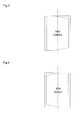
- the lock screen is as shown in Fig.2 .
- an axis in the middle of the screen i.e. the dash-dotted line shown in Fig.2 , divides the screen into two zones.
- the screen may be turned to different directions depending on where a hand touches the screen, The screen is turned to the right when the screen-clicking gesture is performed on a zone to the right of the axis, or to the left when the screen-clicking gesture is performed on a zone to the left of the axis.
- the lock screen may be turned to the right by a small angle.
- the lock screen may be turned to the left by a small angle. This Small-angle turn serves to prompt a user of a way to unlock the screen.
- the lock screen may be restored gradually when no move is made by the user within a preset period of time.
- step S103 upon detection of a screen-clicking gesture of the unlocking gesture, the screen is unlocked according to the preset screen transition in unlocking.
- the present embodiment is a specific embodiment of the method described in Embodiment 1.
- the screen is divided into N zones, wherein the N is a natural number greater than or equal to 2; the N zones is preset to each correspond to one of N different applications; and when the unlocking gesture is performed in one of the N zones, the unlocked screen is set as an interface of an application corresponding to the one of the N zones.
- Embodiment 2 differs from Embodiment 1 in that, the screen is divided into two zones.
- the unlocked screen may be different depending on which one of the two zones unlocking is performed in.
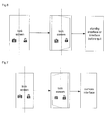
- the left zone of the screen is set to correspond to a camera application, and the right zone of the screen is set to correspond to a general unlocking zone.
- the unlocked screen when unlocking is performed in the right zone of the screen, the unlocked screen may be a standby interface or interface before quit;
- Fig.7 when unlocking is performed in the left zone of the screen, the unlocked screen may be a camera interface.
- a screen transition in unlocking is preset to produce a visual effect similar to that of pushing open a revolving door, such that a lock screen is pushed to the back of the screen, and an unlocked screen is flipped from the back of the screen over to the front of the screen, such that a touch screen user is provided with a faster, simpler, less restrictive, and more user-intuitive unlocking solution, improving usability and user experience of an electronic equipment.
- the present embodiment provides a device for unlocking a touch screen.
- the device includes an unlocking gesture setting module 810, a screen transition setting module 820, and an unlocking module 840; and may further include a screen dividing module 830.
- the unlocking gesture setting module 810 is configured for presetting an unlocking gesture.
- the unlocking gesture preset by the unlocking gesture setting module may include, but is not limited to operations of:
- the screen transition setting module 820 is configured for: presetting a screen transition in unlocking as turning a screen along an axis on the screen, such that a lock screen is turned gradually from the front of the screen to the back of the screen, and an unlocked screen is turned gradually from the back of the screen to the front of the screen; and when the screen is in a lock screen state and is brightened up, upon a click on the screen, turning the lock screen by a small angle to prompt a user of a way to unlock the screen, and restoring the lock screen gradually when no operation is performed by the user within a preset period of time.
- the screen may be turned to different directions depending on where a hand touches the screen, The screen is turned to the right when the screen-clicking gesture is performed on a zone to the right of the axis, or to the left when the screen-clicking gesture is performed on a zone to the left of the axis.
- the screen dividing module 830 may be configured for: dividing the screen into N zones, where the N is a natural number greater than or equal to 2; presetting the N zones to each correspond to one of N different applications; and when the unlocking gesture is performed in one of the N zones, setting the unlocked screen as an interface of an application corresponding to the one of the N zones.
- the unlocking module 840 is configured for detecting a screen-clicking gesture, and upon detection of a screen-clicking gesture of the unlocking gesture, unlocking the screen according to the preset screen transition in unlocking.
- a screen transition in unlocking is preset to produce a visual effect similar to that of pushing open a revolving door, such that a touch screen user is provided with a faster, simpler, less restrictive, and more user-intuitive unlocking solution, improving usability and user experience of an electronic equipment.
Landscapes
- Engineering & Computer Science (AREA)
- General Engineering & Computer Science (AREA)
- Theoretical Computer Science (AREA)
- Human Computer Interaction (AREA)
- Physics & Mathematics (AREA)
- General Physics & Mathematics (AREA)
- User Interface Of Digital Computer (AREA)
- Telephone Function (AREA)
Applications Claiming Priority (2)
| Application Number | Priority Date | Filing Date | Title |
|---|---|---|---|
| CN2012100417985A CN103294374A (zh) | 2012-02-23 | 2012-02-23 | 一种触摸屏解锁方法及装置 |
| PCT/CN2012/075150 WO2013123726A1 (fr) | 2012-02-23 | 2012-05-07 | Procédé et dispositif de déverrouillage pour écran tactile |
Publications (2)
| Publication Number | Publication Date |
|---|---|
| EP2801893A1 true EP2801893A1 (fr) | 2014-11-12 |
| EP2801893A4 EP2801893A4 (fr) | 2015-02-18 |
Family
ID=49004961
Family Applications (1)
| Application Number | Title | Priority Date | Filing Date |
|---|---|---|---|
| EP12869546.7A Withdrawn EP2801893A4 (fr) | 2012-02-23 | 2012-05-07 | Procédé et dispositif de déverrouillage pour écran tactile |
Country Status (4)
| Country | Link |
|---|---|
| US (1) | US9535588B2 (fr) |
| EP (1) | EP2801893A4 (fr) |
| CN (1) | CN103294374A (fr) |
| WO (1) | WO2013123726A1 (fr) |
Cited By (2)
| Publication number | Priority date | Publication date | Assignee | Title |
|---|---|---|---|---|
| CN105893025A (zh) * | 2016-03-09 | 2016-08-24 | 无限向量(北京)科技有限公司 | 一种更换锁屏图片的方法 |
| EP3318998A1 (fr) * | 2016-11-02 | 2018-05-09 | Sony Mobile Communications Inc. | Procédé et dispositif de traitement d'informations |
Families Citing this family (23)
| Publication number | Priority date | Publication date | Assignee | Title |
|---|---|---|---|---|
| EP2741199B1 (fr) * | 2012-12-06 | 2020-08-05 | Samsung Electronics Co., Ltd | Verrouillage individuel d'application pour un appareil à écran tactile |
| US9632689B2 (en) * | 2013-04-02 | 2017-04-25 | Facebook, Inc. | Interactive elements in a user interface |
| CN103593623B (zh) * | 2013-11-15 | 2018-05-22 | 努比亚技术有限公司 | 分屏显示方法和装置 |
| USD738909S1 (en) * | 2014-01-09 | 2015-09-15 | Microsoft Corporation | Display screen with animated graphical user interface |
| CN104866084B (zh) | 2014-02-25 | 2021-04-30 | 中兴通讯股份有限公司 | 手势识别方法、装置和系统 |
| CN104866083B (zh) | 2014-02-25 | 2020-03-17 | 中兴通讯股份有限公司 | 手势识别方法、装置和系统 |
| DK3143134T3 (da) | 2014-05-15 | 2021-01-04 | Nat Univ Singapore | Modificerede, naturlige dræberceller og anvendelser deraf |
| EP3167445B1 (fr) | 2014-07-10 | 2021-05-26 | Intelligent Platforms, LLC | Appareil et procédé d'étiquetage électronique d'équipement électronique |
| KR20160045428A (ko) * | 2014-10-17 | 2016-04-27 | 삼성전자주식회사 | 잠금 해제 방법 및 장치 |
| CN106033507A (zh) * | 2015-03-09 | 2016-10-19 | 阿里巴巴集团控股有限公司 | 用于触摸屏设备的屏幕解锁方法及装置 |
| CN105045477A (zh) * | 2015-06-24 | 2015-11-11 | 深圳市金立通信设备有限公司 | 一种终端解锁方法及终端 |
| CN105389499B (zh) * | 2015-10-23 | 2017-10-17 | 广东欧珀移动通信有限公司 | 一种屏幕解锁的控制方法及用户终端 |
| CN105929949A (zh) * | 2016-04-15 | 2016-09-07 | 北京小鸟看看科技有限公司 | 一种虚拟现实系统开机效果呈现方法和装置 |
| US10845987B2 (en) * | 2016-05-03 | 2020-11-24 | Intelligent Platforms, Llc | System and method of using touch interaction based on location of touch on a touch screen |
| US11079915B2 (en) | 2016-05-03 | 2021-08-03 | Intelligent Platforms, Llc | System and method of using multiple touch inputs for controller interaction in industrial control systems |
| BR112019019917A2 (pt) | 2017-03-27 | 2020-04-22 | Nat Univ Singapore | receptores quiméricos nkg2d truncados e seus usos em imunoterapia de células exterminadoras naturais |
| CA3056591A1 (fr) | 2017-03-27 | 2018-10-04 | National University Of Singapore | Lignees cellulaires stimulatrices pour l'expansion et l'activation ex vivo de cellules tueuses naturelles |
| EP3749685A4 (fr) | 2018-02-09 | 2021-12-22 | National University of Singapore | Récepteurs chimériques activateurs et leurs utilisations dans une immunothérapie par cellules tueuses naturelles |
| JP7334985B2 (ja) | 2018-04-02 | 2023-08-29 | ナショナル ユニヴァーシティー オブ シンガポール | 免疫細胞で発現される膜結合抗サイトカイン非シグナル伝達バインダーによるヒトサイトカインの中和 |
| EP3844186A4 (fr) | 2018-08-29 | 2022-08-17 | National University of Singapore | Procédé permettant de stimuler de manière spécifique la survie et l'expansion de cellules immunitaires génétiquement modifiées |
| CA3120563A1 (fr) | 2018-11-26 | 2020-06-04 | Nkarta, Inc. | Procedes d'expansion simultanee de multiples types de cellules immunitaires, compositions associees et utilisations de celles-ci dans l'immunotherapie contre le cancer |
| EP3773918A4 (fr) | 2019-03-05 | 2022-01-05 | Nkarta, Inc. | Récepteurs d'antigènes chimériques anti-cd19 et leurs utilisations en immunothérapie |
| CN116339514A (zh) * | 2023-03-16 | 2023-06-27 | 腾讯音乐娱乐科技(深圳)有限公司 | 一种信息显示方法、装置、设备及存储介质 |
Family Cites Families (12)
| Publication number | Priority date | Publication date | Assignee | Title |
|---|---|---|---|---|
| US7657849B2 (en) * | 2005-12-23 | 2010-02-02 | Apple Inc. | Unlocking a device by performing gestures on an unlock image |
| US8564544B2 (en) * | 2006-09-06 | 2013-10-22 | Apple Inc. | Touch screen device, method, and graphical user interface for customizing display of content category icons |
| US20110300831A1 (en) * | 2008-05-17 | 2011-12-08 | Chin David H | Authentication of a mobile device by a patterned security gesture applied to dotted input area |
| KR20100010860A (ko) * | 2008-07-23 | 2010-02-02 | 엘지전자 주식회사 | 이동 단말기 및 그의 이벤트 제어방법 |
| US8355698B2 (en) | 2009-03-30 | 2013-01-15 | Microsoft Corporation | Unlock screen |
| KR101650102B1 (ko) * | 2009-09-22 | 2016-08-23 | 삼성전자주식회사 | 터치 스크린을 구비한 이동 단말의 사용자 인터페이스 제공 방법 및 그 단말 |
| KR101692550B1 (ko) * | 2009-10-27 | 2017-01-03 | 엘지전자 주식회사 | 이동 통신 단말기에서의 메뉴 표시 방법 및 이를 적용한 이동 통신 단말기 |
| CN101957715B (zh) * | 2010-05-31 | 2013-04-24 | 宇龙计算机通信科技(深圳)有限公司 | 一种触控终端界面的解锁方法、系统及触控终端 |
| CN102314295A (zh) * | 2010-07-08 | 2012-01-11 | 富泰华工业(深圳)有限公司 | 屏幕解锁装置及方法 |
| JP5510185B2 (ja) * | 2010-08-20 | 2014-06-04 | ソニー株式会社 | 情報処理装置、プログラム及び表示制御方法 |
| US20130055169A1 (en) * | 2011-08-25 | 2013-02-28 | Samsung Electronics Co. Ltd. | Apparatus and method for unlocking a touch screen device |
| CN102368796B (zh) * | 2011-10-13 | 2013-10-23 | 广东欧珀移动通信有限公司 | 一种手机解锁界面切换控制方法 |
-
2012
- 2012-02-23 CN CN2012100417985A patent/CN103294374A/zh active Pending
- 2012-05-07 WO PCT/CN2012/075150 patent/WO2013123726A1/fr not_active Ceased
- 2012-05-07 US US14/379,393 patent/US9535588B2/en active Active
- 2012-05-07 EP EP12869546.7A patent/EP2801893A4/fr not_active Withdrawn
Cited By (3)
| Publication number | Priority date | Publication date | Assignee | Title |
|---|---|---|---|---|
| CN105893025A (zh) * | 2016-03-09 | 2016-08-24 | 无限向量(北京)科技有限公司 | 一种更换锁屏图片的方法 |
| EP3318998A1 (fr) * | 2016-11-02 | 2018-05-09 | Sony Mobile Communications Inc. | Procédé et dispositif de traitement d'informations |
| US10389867B2 (en) | 2016-11-02 | 2019-08-20 | Sony Corporation | Information processing device and information processing method for controlling a transition between a lock screen and an unlocked return screen |
Also Published As
| Publication number | Publication date |
|---|---|
| WO2013123726A1 (fr) | 2013-08-29 |
| CN103294374A (zh) | 2013-09-11 |
| US20150046885A1 (en) | 2015-02-12 |
| US9535588B2 (en) | 2017-01-03 |
| EP2801893A4 (fr) | 2015-02-18 |
Similar Documents
| Publication | Publication Date | Title |
|---|---|---|
| US9535588B2 (en) | Method and device for unlocking touch screen | |
| US9158399B2 (en) | Unlock method and mobile device using the same | |
| US9823834B2 (en) | Quick access gesture setting and accessing method for a touch control device | |
| US11372957B2 (en) | Method and device for starting application based on fingerprint recognition | |
| CN102566818A (zh) | 具有触摸屏的电子设备及其屏幕解锁方法 | |
| US9571621B2 (en) | Dynamic unlocking method and electronic apparatus using the same | |
| AU2015401339B2 (en) | Operation method applied to terminal device, and terminal device | |
| EP4276605A3 (fr) | Procédé d'orchestration de programme et dispositif électronique | |
| CN102681785A (zh) | 解锁方式及移动设备 | |
| CN106951159B (zh) | 一种终端解锁快速进入应用程序的方法及终端 | |
| US9182902B2 (en) | Controlling method for fixing a scale ratio of browsing image of touch device | |
| CN103809852A (zh) | 在同一屏幕上同时显示多个应用程序的方法及装置 | |
| CN105630345A (zh) | 一种控制显示方向的方法和设备 | |
| CN104182161A (zh) | 一种开启屏幕功能区域的方法和装置 | |
| CN102779010A (zh) | 一种触摸屏多点触摸解锁的方法和移动终端 | |
| CN103793171B (zh) | 一种移动终端触摸屏解锁方法及装置 | |
| WO2017067414A1 (fr) | Procédé et dispositif de déverrouillage d'un terminal, et terminal intelligent | |
| CN103309598A (zh) | 触摸屏的解锁方法及通信终端 | |
| CN103345596B (zh) | 一种软件管理系统 | |
| CN101976168B (zh) | 一种手写输入处理方法、装置及手写输入处理设备 | |
| CN104750369A (zh) | 一种智能终端中快捷开关的控制方法及装置 | |
| CN103065075A (zh) | 一种触摸屏移动终端的解锁方法 | |
| CN102799338B (zh) | 电子设备屏幕控制方法及系统 | |
| CN104615957A (zh) | 一种电源模式切换方法和装置 | |
| CN105278720A (zh) | 无挡触控的手持式电子装置及其解锁方法 |
Legal Events
| Date | Code | Title | Description |
|---|---|---|---|
| PUAI | Public reference made under article 153(3) epc to a published international application that has entered the european phase |
Free format text: ORIGINAL CODE: 0009012 |
|
| 17P | Request for examination filed |
Effective date: 20140807 |
|
| AK | Designated contracting states |
Kind code of ref document: A1 Designated state(s): AL AT BE BG CH CY CZ DE DK EE ES FI FR GB GR HR HU IE IS IT LI LT LU LV MC MK MT NL NO PL PT RO RS SE SI SK SM TR |
|
| A4 | Supplementary search report drawn up and despatched |
Effective date: 20150120 |
|
| RIC1 | Information provided on ipc code assigned before grant |
Ipc: G06F 3/0488 20130101ALI20150114BHEP Ipc: G06F 3/048 20130101AFI20150114BHEP |
|
| DAX | Request for extension of the european patent (deleted) | ||
| 17Q | First examination report despatched |
Effective date: 20151211 |
|
| STAA | Information on the status of an ep patent application or granted ep patent |
Free format text: STATUS: THE APPLICATION IS DEEMED TO BE WITHDRAWN |
|
| 18D | Application deemed to be withdrawn |
Effective date: 20160422 |