EP2806345A1 - Appareil de traitement d'informations, programme de commande d'entrée et procédé de commande d'entrée - Google Patents
Appareil de traitement d'informations, programme de commande d'entrée et procédé de commande d'entrée Download PDFInfo
- Publication number
- EP2806345A1 EP2806345A1 EP14165169.5A EP14165169A EP2806345A1 EP 2806345 A1 EP2806345 A1 EP 2806345A1 EP 14165169 A EP14165169 A EP 14165169A EP 2806345 A1 EP2806345 A1 EP 2806345A1
- Authority
- EP
- European Patent Office
- Prior art keywords
- display
- space
- unit
- processing apparatus
- information processing
- Prior art date
- Legal status (The legal status is an assumption and is not a legal conclusion. Google has not performed a legal analysis and makes no representation as to the accuracy of the status listed.)
- Ceased
Links
Images





Classifications
-
- G—PHYSICS
- G06—COMPUTING OR CALCULATING; COUNTING
- G06F—ELECTRIC DIGITAL DATA PROCESSING
- G06F3/00—Input arrangements for transferring data to be processed into a form capable of being handled by the computer; Output arrangements for transferring data from processing unit to output unit, e.g. interface arrangements
- G06F3/01—Input arrangements or combined input and output arrangements for interaction between user and computer
- G06F3/048—Interaction techniques based on graphical user interfaces [GUI]
- G06F3/0484—Interaction techniques based on graphical user interfaces [GUI] for the control of specific functions or operations, e.g. selecting or manipulating an object, an image or a displayed text element, setting a parameter value or selecting a range
- G06F3/04842—Selection of displayed objects or displayed text elements
-
- G—PHYSICS
- G06—COMPUTING OR CALCULATING; COUNTING
- G06F—ELECTRIC DIGITAL DATA PROCESSING
- G06F3/00—Input arrangements for transferring data to be processed into a form capable of being handled by the computer; Output arrangements for transferring data from processing unit to output unit, e.g. interface arrangements
- G06F3/01—Input arrangements or combined input and output arrangements for interaction between user and computer
- G06F3/048—Interaction techniques based on graphical user interfaces [GUI]
- G06F3/0481—Interaction techniques based on graphical user interfaces [GUI] based on specific properties of the displayed interaction object or a metaphor-based environment, e.g. interaction with desktop elements like windows or icons, or assisted by a cursor's changing behaviour or appearance
- G06F3/04817—Interaction techniques based on graphical user interfaces [GUI] based on specific properties of the displayed interaction object or a metaphor-based environment, e.g. interaction with desktop elements like windows or icons, or assisted by a cursor's changing behaviour or appearance using icons
-
- G—PHYSICS
- G06—COMPUTING OR CALCULATING; COUNTING
- G06F—ELECTRIC DIGITAL DATA PROCESSING
- G06F3/00—Input arrangements for transferring data to be processed into a form capable of being handled by the computer; Output arrangements for transferring data from processing unit to output unit, e.g. interface arrangements
- G06F3/01—Input arrangements or combined input and output arrangements for interaction between user and computer
- G06F3/048—Interaction techniques based on graphical user interfaces [GUI]
- G06F3/0487—Interaction techniques based on graphical user interfaces [GUI] using specific features provided by the input device, e.g. functions controlled by the rotation of a mouse with dual sensing arrangements, or of the nature of the input device, e.g. tap gestures based on pressure sensed by a digitiser
- G06F3/0488—Interaction techniques based on graphical user interfaces [GUI] using specific features provided by the input device, e.g. functions controlled by the rotation of a mouse with dual sensing arrangements, or of the nature of the input device, e.g. tap gestures based on pressure sensed by a digitiser using a touch-screen or digitiser, e.g. input of commands through traced gestures
-
- G—PHYSICS
- G06—COMPUTING OR CALCULATING; COUNTING
- G06F—ELECTRIC DIGITAL DATA PROCESSING
- G06F2203/00—Indexing scheme relating to G06F3/00 - G06F3/048
- G06F2203/048—Indexing scheme relating to G06F3/048
- G06F2203/04805—Virtual magnifying lens, i.e. window or frame movable on top of displayed information to enlarge it for better reading or selection
-
- G—PHYSICS
- G06—COMPUTING OR CALCULATING; COUNTING
- G06F—ELECTRIC DIGITAL DATA PROCESSING
- G06F2203/00—Indexing scheme relating to G06F3/00 - G06F3/048
- G06F2203/048—Indexing scheme relating to G06F3/048
- G06F2203/04806—Zoom, i.e. interaction techniques or interactors for controlling the zooming operation
Definitions
- the embodiments discussed herein are related to an information processing apparatus, an input control program, and an input control method.
- an information processing apparatus with a touch panel has been widely used.
- Examples of such an information processing apparatus include a smartphone and a tablet terminal.
- a range of an object displayed on a screen is selected through a touch operation.
- a text is displayed on the screen as the object.
- a start position and an end position for range selection are selected through the touch operation.
- Patent Document 1 Japanese Laid-open Patent Publication No. 2002-251241
- a size of the displayed object is optimized so that a user can view the object easily.
- the information processing apparatus displays the text with a character size suitable for viewing by a user.
- the apparatus may recognize a position different from that intended by the user, and thus, the user has sometimes difficulty in selecting the range.
- an information processing apparatus includes: a display unit that displays an object; a detection unit that detects a touch operation on the display unit; and a change unit that widens a display space of the object while keeping a display size of the object when range selection of the object displayed on the display unit is performed through a touch operation.
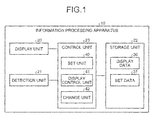
- FIG. 1 is a block diagram illustrating the functional configuration of the information processing apparatus.
- the information processing apparatus 10 enables, through a touch operation, various manipulations including designation of the range selection of an object displayed on a screen.
- the information processing apparatus 10 for example, in addition to mobile terminals such as smartphones and personal digital assistants (PDA), a personal computer and a tablet terminal with a touch panel may also be adopted.
- the present embodiment is described based on a presumption that the information processing apparatus 10 is a smartphone.
- the information processing apparatus 10 includes a display unit 20, a detection unit 21, a storage unit 22, and a control unit 23.
- the information processing apparatus 10 may include various functional units of a known mobile terminal and terminal device, in addition to the functional units illustrated in FIG. 1 .
- the information processing apparatus 10 may include a network interface that communicates thorough a network, an antenna, a carrier communication unit that communicates through a carrier network, and a global positioning system (GPS) receiver.
- GPS global positioning system
- the display unit 20 is a device that displays various types of information. Examples of the display unit 20 include a liquid crystal display (LCD) and a cathode ray tube (CRT).
- the display unit 20 displays various objects on the screen. For example, the display unit 20 displays a text on the screen as the object. The displayed text may be manipulated in various ways through the touch operation.
- the detection unit 21 is a device that detects a touch operation on the display unit 20.
- Examples of the detection unit 21 include an input device such as a transmission type touch sensor provided on the display unit 20.
- the detection unit 21 detects the touch operation on the display unit 20 and outputs, to the control unit 23, information indicative of detected manipulation contents.
- the information processing apparatus may be configured by a device such as the touch panel obtained by integrally providing the display unit 20 and the detection unit 21.
- the information processing apparatus 10 may include other input devices, such as a mouse, a keyboard, and various buttons.
- the storage unit 22 is a storage device that stores various types of data. Examples of the storage unit 22 include a hard disk, a solid state drive (SSD), and an optical disc. Incidentally, the storage unit 22 may be a semiconductor memory, such as a random access memory (RAM), a flash memory, and a non-volatile static random access memory (NVSRAM), all of which allow rewriting data.
- RAM random access memory
- NVSRAM non-volatile static random access memory
- the storage unit 22 stores an operating system (OS) and various programs to be executed at the control unit 23.
- OS operating system
- the storage unit 22 stores various programs used for input control for the range selection.
- the storage unit 22 stores various types of data used for executing the programs at the control unit 23.
- the storage unit 22 stores display data 30 and set data 31.
- the display data 30 stores information on the object to be displayed on the screen.
- the present embodiment describes a case of storing text data as the object.
- the set data 31 stores various types of set information.
- the set data 31 stores information on whether a display space of the object is widened during the range selection of the object displayed on the screen.
- the control unit 23 is a device that controls the information processing apparatus 10.
- an electronic circuit such as a central processing unit (CPU) and a micro processing unit (MPU), and an integrated circuit such as an application specific integrated circuit (ASIC) and a field programmable gate array (FPGA) may be adopted.
- the control unit 23 includes an internal memory for storing the program specifying a procedure of various processes and control data.
- the control unit 23 executes various processes using the memory.
- the control unit 23 functions as various process units.
- the control unit 23 includes a set unit 40, a display control unit 41, and a change unit 42 as process units.
- the set unit 40 is a process unit that makes various types of setting. For example, the set unit 40 sets whether the display space of the object is widened when the range selection of the object displayed on the display unit 20 is performed through the touch operation. Upon receiving a predetermined manipulation designating to make setting, the set unit 40 causes the display unit 20 to display a setting screen and allows a user to set, through the setting screen, whether the display space of the object is widened during the range selection. Then, the set unit 40 stores, in the set data 31, a selection result on the setting screen.
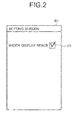
- FIG. 2 is a diagram illustrating one example of the setting screen.
- a setting screen 60 includes a selection area 61 through which a user may select whether the display space of the object is widened during the range selection. If a user intends to widen the display space of the object during the range selection, the user selects the setting of widening the display space through the selection area 61.
- the example of FIG. 2 illustrates the selected setting of widening the display space of the object during the range selection.
- the display control unit 41 is the process unit that controls the display unit 20 to display various types of information.
- the display control unit 41 controls the display unit 20 to display the object.
- the display control unit 41 controls the display unit 20 to display a display screen. On the display screen, the text stored as the object in the display data 30 is displayed.
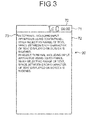
- FIG. 3 is a diagram illustrating one example of the display screen.
- a display screen 70 includes a plurality of display areas.
- the display screen 70 includes a status bar 71 and a desktop 72 as the display areas.
- the status bar 71 displays radio wave strength of the carrier network, a charging condition of a battery of the information processing apparatus 10, and clock time.
- the desktop 72 can display various types of information.
- a text 73 is displayed on the desktop 72 as the object.
- the information processing apparatus 10 may select a range of the text for copying, cutting, and deleting. If a user intends to select a range of the text for copying, cutting, and deleting, the user performs a predetermined manipulation on the information processing apparatus 10, such as a long press of the desktop 72 of the display screen 70, for designating a start of the range selection.
- the change unit 42 is a process unit that changes, during the range selection, the display space of the object displayed on the display unit 20. Upon receiving the predetermined manipulation designating a start of the range selection, the change unit 42 refers to the set data 31 and determines whether a user has selected the setting of widening the display space of the object during the range selection. If the user has selected the setting of widening the display space, the change unit 42 widens the display space of the object while keeping a display size of the object displayed on the display unit 20.
- the change unit 42 widens the space between each character of the text while keeping a character size of the text displayed on the display unit 20.
- the change unit 42 changes the setting of the space between each character, such as a property of the space between each character of the text, so that the space between each character of the text displayed on the display unit 20 is changed to a predetermined space.
- the predetermined space may be one obtained by a test and the like and stored in the set data 31. In the test, for example, the display unit 20 is made to display the object such as the text to allow a user to select the range, thereby obtaining the space improving the operability during the range selection while suppressing degradation of visibility of the object.
- the predetermined space may be, for example, an arrangement space between each key of a software keyboard of the information processing apparatus 10.
- the predetermined space may be an arrangement space between each key of the software keyboard having the QWERTY keyboard layout.
- the change unit 42 may add space between each character of the text to widen the space between each character of the text displayed on the display unit 20. Further, if a value of the display space of the object displayed on the display unit 20 is equal to or less than a predetermined value, the change unit 42 may widen the display space.
- This predetermined value may be, for example, the value of the above-described predetermined space, and also may be a specific value equal to or less than the value of the predetermined space. Such specific value may lead to a difficulty in selecting the range.
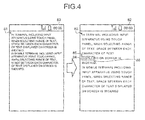
- FIG. 4 is a diagram illustrating one example of a change in the display screen.
- a text 83 on a display screen 82 on the right the space between each character of a text 81 displayed on a display screen 80 on the left is widened with a character size maintained.
- a start cursor 85 indicative of a start position of a selected range 84 and an end cursor 86 indicative of an end position of the selected range 84 are illustrated.
- the change unit 42 When the range selection ends, the change unit 42 returns the display space of the object displayed on the display unit 20 to the original space. More specifically, upon receiving the manipulation designating an end of the range selection, the change unit 42 returns the display space of the object displayed on the display unit 20 to the original space. For example, if the change unit 42 has changed the setting for the space between each character to change the space between each character of the text, the setting for the space between each character is returned to the original setting of when the range selection has been started. Further, if the space is added to change the space between each character of the text, the change unit 42 deletes the added space.
- the space between each character of the text is widened when the range selection of the text is performed through the touch operation by a user. This reduces the possibility that the information processing apparatus 10 may recognize positions, which are different from those intended by a user, as the start position and the end position. Therefore, the operability during the range selection may be improved.
- FIG. 5 is a flowchart illustrating one example of a procedure of the set processes according to the first embodiment. These set processes are executed when the predetermined manipulation designating to make the setting is performed.
- the set unit 40 causes the display unit 20 to display the setting screen 60 (S10).
- the set unit 40 determines if the setting of whether the display space of the object is to be widened has been changed through the setting screen 60 (S11). For example, the set unit 40 determines whether the setting of the selection area 61 in the setting screen 60 has been changed. If the setting has been changed (S11 Yes), the set unit 40 stores, in the set data 31, a result of the setting whether to widen the display space of the object (S12), and then, the process proceeds to S13.
- the set unit 40 determines whether the end of the setting has been designated (S13). If the end of the setting has been designated (S13 Yes), the process is ended. On the other hand, if the end of the setting has not been designated (S13 No), the process returns to the above S11.
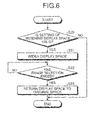
- FIG. 6 is a flowchart illustrating one example of a procedure of input control processes according to the first embodiment. The input control processes are executed when the predetermined manipulation designating a start of the range selection is performed.
- the change unit 42 refers to the set data 31 and determines whether the setting of widening the display space of the object during the range selection is valid (S20). If the setting of widening the display space is invalid (S20 No), the process is ended.
- the change unit 42 widens the space between each character of the text and causes the start cursor and the end cursor to be displayed while keeping the character size of the text displayed on the display unit 20 (S21). For example, the change unit 42 changes the space between each character of the text to that set in the set data 31.
- a user changes positions of the start cursor and the end cursor to make the range selection.
- the change unit 42 determines whether the range selection has been ended (S22). For example, upon receiving the manipulation designating the end of the range selection, the change unit 42 determines that the range selection has been ended. If the range selection has not been ended (S22 No), the process returns to S22 to wait for the end of the range selection. On the other hand, if the range selection has been ended (S22 Yes), the change unit 42 returns the space between each character of the text displayed on the display unit 20 to the original space (S23) to end the process.
- the information processing apparatus 10 widens the space between each character of the text while keeping the display size of the text, when the range selection of the text displayed on the display unit 20 is performed through the touch operation. Accordingly, the operability of the information processing apparatus 10 during the range selection may be improved.
- a change unit 42 Upon receiving a predetermined manipulation designating a start of range selection, a change unit 42 refers to set data 31 and determines whether a user has set to widen a display space of the object during the range selection. If the user has selected setting of widening the display space, the change unit 42 waits for designation of a start position for the range selection. When the start position for the range selection is designated, the change unit 42 widens the display space of the object while keeping a display size of the object, from a position a predetermined length before the designated start position. For example, while keeping a character size of a text displayed on the display unit 20, the change unit 42 widens the space between each character of the text from a position five characters before the designated start position. Incidentally, the position the predetermined length before the start position may be stored in the set data 31 in order to be externally changeable.
- FIG. 7 is a diagram illustrating one example of a change in a display screen.
- a position 92 as a start position for the range selection is designated through a touch operation in a text 91 displayed on a display screen 90 on the left.
- the space between each character of a text 94 is widened from a position 95 five characters before a character position corresponding to the position 92.
- the information processing apparatus 10 widens the space between each character of the text from the position a predetermined length before the start position for the range selection. Accordingly, in the information processing apparatus 10, the space between each character of the text part before the position, which is the predetermined length before the start position, remains the same and the space between each character viewed by a user may be maintained. Therefore, the degradation of the visibility of the text for the user may be suppressed. Further, the information processing apparatus 10 widens the space between each character of the text, from the position the predetermined length before the start position for the range selection. Therefore, the operability during the range selection may be improved.
- FIG. 8 is a flowchart illustrating one example of a procedure of input control processes according to the second embodiment. Note that identical symbols used in FIG. 6 are given to the processes which are identical to the input control processes according to the first embodiment illustrated in FIG. 6 to omit the duplicate description. Thus, different processes are mainly described.
- the change unit 42 determines whether a user has designated the start position for the range selection (S30). For example, after receiving the predetermined manipulation designating the start of the range selection, the change unit 42 regards the first touched position on the display screen as the start position for the range selection, and thus, waits for detection of the touch operation on the display screen.
- the process repeats S30 to wait for the designation of the start position.
- the start position for the range selection has been designated (S30 Yes)
- the change unit 42 widens the space between each character of the text from the position the predetermined length before the designated start position (S31).
- the information processing apparatus 10 widens the space between each character of the text, from the position the predetermined length before the start position for the range selection. Accordingly, the information processing apparatus 10 may improve the operability during the range selection while suppressing the degradation of the visibility of the text by a user.
- a change unit 42 After widening a display space of an object for range selection, if selection of a start position or an end position is repeated, a change unit 42 widens the display space of the object according to the number of repetitions. For example, after widening a space between each character of the object, every given number of times the selection of the start position or the end position is continuously repeated, the change unit 42 widens the display space of the object by a predetermined value incrementally. As one example, every three times the start cursor or the end cursor is continuously touched, the change unit 42 widens the space between each character of the text by the predetermined value incrementally.
- the change unit 42 stores, in set data 31, a set value of the changed space between each character of the text. Then, hereinafter, during the range selection of the text, the change unit 42 changes a value of the space between each character of the text to the set value stored in the set data 31.
- the information processing apparatus 10 may adjust the space between each character of the text to a space allowing a user an easy manipulation.
- the information processing apparatus 10 stores, in the set data 31, the set value of the changed space between each character of the text, and in selecting the range hereinafter, the apparatus changes the value of the space between each character of the text to the set value stored in the set data 31. Accordingly, in selecting the range hereinafter, the information processing apparatus 10 may display the space between each character of the text allowing a user an easy manipulation.
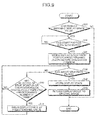
- FIG. 9 is a flowchart illustrating one example of a procedure of input control processes according to the third embodiment. Incidentally, since identical symbols used in FIG. 8 are given to the processes identical to the input control processes according to the second embodiment illustrated in FIG. 8 to omit the duplicate description, different processes are mainly described.
- the change unit 42 determines whether the selection of the start position or the end position has been continuously repeated a predetermined number of times (S40). If the selection has not been continuously repeated the predetermined number of times (S40 No), the process returns to the above S22.
- the change unit 42 widens the space between each character of the text by a predetermined value (S41), and the process returns to the above S22.
- the change unit 42 stores, in the set data 31, the set value of the space between each character of the text (S42).
- the information processing apparatus 10 may adjust the space between each character of the text to a space allowing a user an easy manipulation.
- the information processing apparatus 10 stores, in the set data 31, the set value of the changed space between each character of the text, and in selecting the range hereinafter, the apparatus changes the value of the space between each character of the text to the set value stored in the set data 31. Accordingly, in selecting the range hereinafter, the information processing apparatus 10 may display the space between each character of the text allowing a user an easy manipulation.
- the change unit 42 may widen the space between each word of the text. That is, the change unit 42 may morphologically and syntactically analyze the text displayed on the display unit 20 to determine a separation part between each word of the text and may widen the space between each word.
- FIG. 10 is a diagram illustrating one example of a change in a display screen.
- the space between each word of a text 101 displayed on a display screen 100 on the left is widened.
- a user In selecting the range of the text 103, a user usually selects, as a range, a combination of separated words making sentence sense. Accordingly, the information processing apparatus 10 widens the space between each word to improve the operability during the range selection.
- the disclosed apparatuses are not limited thereto.
- the space between each line of the text may be widened.
- FIG. 11 is a diagram illustrating one example of a change in a display screen.
- the change unit 42 widens the space between each character and the space between each line while keeping the character size as illustrated in a text 113 on a display screen 112 on the right. Accordingly, even if the space between each line of the displayed text is narrow, the information processing apparatus 10 is less likely to recognize a position of an unintended line as a position of an intended line.
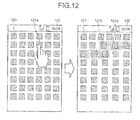
- the changes unit 42 may widen the display space of the icon or the thumbnail while keeping the display size of the icon or the thumbnail during the range selection of the icon or the thumbnail.
- FIG. 12 is a diagram illustrating one example of a change in a display screen.
- the example of FIG. 12 illustrates a plurality of images 121 of the icon or the thumbnail on a display screen 120 on the left.
- the change unit 42 widens the display space between the images 121 from after an image 121b which is one image before the image 121a. Accordingly, even when selecting the range of the plurality of images of the displayed icon or thumbnail, the information processing apparatus 10 may improve the operability during the range selection.
- each element of each apparatus illustrated in the diagrams is functional and conceptual, and each element is not necessarily physically configured as illustrated in the diagram.
- specific dispersion/integration of each apparatus is not limited to the aspect illustrated in the diagram, and all apparatuses or a part thereof may be functionally or physically dispersed/integrated in any unit according to a load and a use condition of each apparatus.
- the process units such as the set unit 40, the display control unit 41, and the change unit 42 in the information processing apparatus 10 may be appropriately integrated.
- the processes of each process unit may be appropriately dispersed to the processes of the plurality of process units.
- all or any one part of each process function of each process unit is realized using a CPU and a program to be analyzed and executed by the CPU, or may be realized as hardware with a wired logic.
- pre-prepared programs may be executed in a computer system including a personal computer and a workstation to realize the various processes described in the above embodiments. Then, description is made below for one example of a computer system for executing a program having the same function as each unit in the above embodiments.
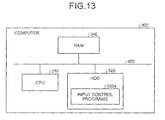
- FIG. 13 is a diagram illustrating a computer for executing an input control program.
- a computer 300 includes a central processing unit (CPU) 310, a hard disk drive (HDD) 320, and a random access memory (RAM) 340.
- the units 300 to 340 are connected with each other through a bus 400.
- the HDD 320 pre-stores an input control program 320a exerting functions similar to those of the set unit 40, the display control unit 41, and the change unit 42 included in the information processing apparatus 10 above.
- the input control program 320a may be appropriately separated.
- the HDD 320 stores various types of information.
- the HDD 320 stores the OS and various types of data used for input control for the range selection.
- the CPU 310 reads the input control program 320a from the HDD 320 for executing the program, whereby the program acts similarly to each process unit in the embodiments. That is, the input control program 320a acts similarly to the set unit 40, the display control unit 41, and the change unit 42.
- the HDD 320 does not necessarily store the above-described input control program 320a from the start.
- the program is stored in a "portable physical medium" such as a flexible disk (FD), a CD-ROM, a DVD disc, a magnetic optical disk, and an IC card to be inserted into the computer 300. Then, the program may be read from the medium and executed by the computer 300.
- a "portable physical medium” such as a flexible disk (FD), a CD-ROM, a DVD disc, a magnetic optical disk, and an IC card to be inserted into the computer 300. Then, the program may be read from the medium and executed by the computer 300.
- the program is stored in "another computer (or server)" connected to the computer 300 through a public line, the Internet, a LAN, and a WAN. Then, the program may be read from the computer or the server and executed by the computer 300.
- the operability during the range selection may be improved.
Landscapes
- Engineering & Computer Science (AREA)
- General Engineering & Computer Science (AREA)
- Theoretical Computer Science (AREA)
- Human Computer Interaction (AREA)
- Physics & Mathematics (AREA)
- General Physics & Mathematics (AREA)
- User Interface Of Digital Computer (AREA)
- Position Input By Displaying (AREA)
Applications Claiming Priority (1)
| Application Number | Priority Date | Filing Date | Title |
|---|---|---|---|
| JP2013109396A JP6136568B2 (ja) | 2013-05-23 | 2013-05-23 | 情報処理装置および入力制御プログラム |
Publications (1)
| Publication Number | Publication Date |
|---|---|
| EP2806345A1 true EP2806345A1 (fr) | 2014-11-26 |
Family
ID=50549001
Family Applications (1)
| Application Number | Title | Priority Date | Filing Date |
|---|---|---|---|
| EP14165169.5A Ceased EP2806345A1 (fr) | 2013-05-23 | 2014-04-17 | Appareil de traitement d'informations, programme de commande d'entrée et procédé de commande d'entrée |
Country Status (3)
| Country | Link |
|---|---|
| US (1) | US9792016B2 (fr) |
| EP (1) | EP2806345A1 (fr) |
| JP (1) | JP6136568B2 (fr) |
Cited By (1)
| Publication number | Priority date | Publication date | Assignee | Title |
|---|---|---|---|---|
| CN111078080A (zh) * | 2019-06-09 | 2020-04-28 | 广东小天才科技有限公司 | 一种点读控制方法及电子设备 |
Families Citing this family (2)
| Publication number | Priority date | Publication date | Assignee | Title |
|---|---|---|---|---|
| US20170083177A1 (en) * | 2014-03-20 | 2017-03-23 | Nec Corporation | Information processing apparatus, information processing method, and information processing program |
| BR112017017612A2 (pt) * | 2015-03-10 | 2018-05-08 | Asymmetrica Labs Inc | ?sistemas e métodos para formatação assimétrica de espaços de palavras de acordo com a incerteza entre palavras? |
Citations (4)
| Publication number | Priority date | Publication date | Assignee | Title |
|---|---|---|---|---|
| JP2002251241A (ja) | 2000-12-22 | 2002-09-06 | Fujitsu Ltd | 情報表示方法、これを利用した情報処理装置、媒体、およびプログラム |
| EP2273408A1 (fr) * | 2009-06-10 | 2011-01-12 | LG Electronics Inc. | Terminal mobile et son procédé de contrôle |
| EP2477105A2 (fr) * | 2011-01-13 | 2012-07-18 | Samsung Electronics Co., Ltd | Procédé pour la sélection de cible au point tactile sur un écran tactile d'un terminal mobile |
| US20130002719A1 (en) * | 2011-06-29 | 2013-01-03 | Nokia Corporation | Apparatus and associated methods related to touch sensitive displays |
Family Cites Families (17)
| Publication number | Priority date | Publication date | Assignee | Title |
|---|---|---|---|---|
| US2273408A (en) * | 1941-05-19 | 1942-02-17 | Walter T Woodward | Speed regulating system |
| US4783760A (en) * | 1985-06-03 | 1988-11-08 | Honeywell Bull Inc. | Word processing text justification method |
| US20020080152A1 (en) | 2000-12-22 | 2002-06-27 | Takuma Sudo | Event-for-change oriented information display method and information processing system using the same method |
| JP3613177B2 (ja) * | 2000-12-26 | 2005-01-26 | インターナショナル・ビジネス・マシーンズ・コーポレーション | 入力対象選択装置及び方法 |
| US7039862B2 (en) * | 2002-05-10 | 2006-05-02 | Adobe Systems Incorporated | Text spacing adjustment |
| US20040253568A1 (en) * | 2003-06-16 | 2004-12-16 | Shaver-Troup Bonnie S. | Method of improving reading of a text |
| KR100813062B1 (ko) * | 2006-05-03 | 2008-03-14 | 엘지전자 주식회사 | 휴대용 단말기 및 이를 이용한 텍스트 표시 방법 |
| JP4801503B2 (ja) * | 2006-05-23 | 2011-10-26 | シャープ株式会社 | 項目選択装置、コンピュータプログラムとその記録媒体、及び情報処理装置 |
| US8009146B2 (en) * | 2007-06-28 | 2011-08-30 | Nokia Corporation | Method, apparatus and computer program product for facilitating data entry via a touchscreen |
| US8471823B2 (en) * | 2007-08-16 | 2013-06-25 | Sony Corporation | Systems and methods for providing a user interface |
| US8201109B2 (en) * | 2008-03-04 | 2012-06-12 | Apple Inc. | Methods and graphical user interfaces for editing on a portable multifunction device |
| US20100235734A1 (en) * | 2009-03-16 | 2010-09-16 | Bas Ording | Methods and Graphical User Interfaces for Editing on a Multifunction Device with a Touch Screen Display |
| US8405677B2 (en) * | 2009-09-09 | 2013-03-26 | Mitac International Corp. | Method of improving the accuracy of selecting a soft button displayed on a touch-sensitive screen and related portable electronic device |
| JP5246802B2 (ja) | 2009-12-09 | 2013-07-24 | Necアクセステクニカ株式会社 | 携帯端末装置及びそれに用いる画面表示方法並びにそのプログラム |
| JP5573487B2 (ja) * | 2010-08-20 | 2014-08-20 | ソニー株式会社 | 情報処理装置、プログラム及び操作制御方法 |
| US9092130B2 (en) * | 2011-05-31 | 2015-07-28 | Apple Inc. | Devices, methods, and graphical user interfaces for document manipulation |
| US20140208263A1 (en) * | 2013-01-24 | 2014-07-24 | Victor Maklouf | System and method for dynamically displaying characters over a screen of a computerized mobile device |
-
2013
- 2013-05-23 JP JP2013109396A patent/JP6136568B2/ja active Active
-
2014
- 2014-04-11 US US14/250,791 patent/US9792016B2/en active Active
- 2014-04-17 EP EP14165169.5A patent/EP2806345A1/fr not_active Ceased
Patent Citations (4)
| Publication number | Priority date | Publication date | Assignee | Title |
|---|---|---|---|---|
| JP2002251241A (ja) | 2000-12-22 | 2002-09-06 | Fujitsu Ltd | 情報表示方法、これを利用した情報処理装置、媒体、およびプログラム |
| EP2273408A1 (fr) * | 2009-06-10 | 2011-01-12 | LG Electronics Inc. | Terminal mobile et son procédé de contrôle |
| EP2477105A2 (fr) * | 2011-01-13 | 2012-07-18 | Samsung Electronics Co., Ltd | Procédé pour la sélection de cible au point tactile sur un écran tactile d'un terminal mobile |
| US20130002719A1 (en) * | 2011-06-29 | 2013-01-03 | Nokia Corporation | Apparatus and associated methods related to touch sensitive displays |
Cited By (1)
| Publication number | Priority date | Publication date | Assignee | Title |
|---|---|---|---|---|
| CN111078080A (zh) * | 2019-06-09 | 2020-04-28 | 广东小天才科技有限公司 | 一种点读控制方法及电子设备 |
Also Published As
| Publication number | Publication date |
|---|---|
| US9792016B2 (en) | 2017-10-17 |
| JP6136568B2 (ja) | 2017-05-31 |
| JP2014229151A (ja) | 2014-12-08 |
| US20140351754A1 (en) | 2014-11-27 |
Similar Documents
| Publication | Publication Date | Title |
|---|---|---|
| US8875017B2 (en) | Information processing apparatus, information processing method and program | |
| US8832578B1 (en) | Visual clipboard on soft keyboard | |
| US9569004B2 (en) | Swipe toolbar to switch tabs | |
| US9910584B2 (en) | Method for manipulating folders and apparatus thereof | |
| CN105739773B (zh) | 一种截屏方法及终端 | |
| KR20160032938A (ko) | 애플리케이션 디스플레이 디바이스 및 방법 | |
| US10757241B2 (en) | Method and system for dynamically changing a header space in a graphical user interface | |
| CN103076980A (zh) | 搜索项显示方法和装置 | |
| EP3296859A1 (fr) | Procédé de commande de sortie d'image, programme de commande de sortie d'image, et dispositif d'affichage | |
| US9792016B2 (en) | Information processing apparatus and input control method | |
| WO2016163150A1 (fr) | Dispositif d'affichage de contenu, programme d'affichage de contenu et procédé d'affichage de contenu | |
| JP2014164718A (ja) | 情報端末 | |
| US20210303769A1 (en) | Display control method, server apparatus, and system | |
| EP2908234A1 (fr) | Dispositif d'interface utilisateur, procédé d'interface utilisateur et programme | |
| JP2017033439A (ja) | 表示制御装置及びプログラム | |
| US20170010805A1 (en) | Character Input Method and Electronic Device | |
| EP3382579A1 (fr) | Processeur d'informations et procédé de traitement d'informations | |
| CN112835491A (zh) | 信息处理方法、装置、电子设备及可读存储介质 | |
| US9727349B2 (en) | Display control apparatus, display control method, and storage medium | |
| KR102223554B1 (ko) | 단말기, 이의 제어 방법 및 상기 방법을 구현하기 위한 프로그램을 기록한 기록 매체 | |
| US7735006B2 (en) | Method and system for defining page size when displaying a data list | |
| US8621351B2 (en) | Methods and electronic devices for selecting and displaying thumbnails | |
| US20160266780A1 (en) | Electronic devices, methods for operating user interface and computer program products | |
| JP6520674B2 (ja) | 表示システム、表示端末、表示方法、および表示プログラム | |
| US10372314B2 (en) | Display device and display control method |
Legal Events
| Date | Code | Title | Description |
|---|---|---|---|
| PUAI | Public reference made under article 153(3) epc to a published international application that has entered the european phase |
Free format text: ORIGINAL CODE: 0009012 |
|
| 17P | Request for examination filed |
Effective date: 20140417 |
|
| AK | Designated contracting states |
Kind code of ref document: A1 Designated state(s): AL AT BE BG CH CY CZ DE DK EE ES FI FR GB GR HR HU IE IS IT LI LT LU LV MC MK MT NL NO PL PT RO RS SE SI SK SM TR |
|
| AX | Request for extension of the european patent |
Extension state: BA ME |
|
| R17P | Request for examination filed (corrected) |
Effective date: 20150128 |
|
| RBV | Designated contracting states (corrected) |
Designated state(s): AL AT BE BG CH CY CZ DE DK EE ES FI FR GB GR HR HU IE IS IT LI LT LU LV MC MK MT NL NO PL PT RO RS SE SI SK SM TR |
|
| 17Q | First examination report despatched |
Effective date: 20160317 |
|
| STAA | Information on the status of an ep patent application or granted ep patent |
Free format text: STATUS: THE APPLICATION HAS BEEN REFUSED |
|
| 18R | Application refused |
Effective date: 20171004 |