EP2808776A2 - Procédé et appareil pour afficher des images dans des dispositifs à fonctionnement par écran tactile - Google Patents
Procédé et appareil pour afficher des images dans des dispositifs à fonctionnement par écran tactile Download PDFInfo
- Publication number
- EP2808776A2 EP2808776A2 EP14169898.5A EP14169898A EP2808776A2 EP 2808776 A2 EP2808776 A2 EP 2808776A2 EP 14169898 A EP14169898 A EP 14169898A EP 2808776 A2 EP2808776 A2 EP 2808776A2
- Authority
- EP
- European Patent Office
- Prior art keywords
- item
- input
- displayed
- electronic device
- touchscreen
- Prior art date
- Legal status (The legal status is an assumption and is not a legal conclusion. Google has not performed a legal analysis and makes no representation as to the accuracy of the status listed.)
- Ceased
Links
Images



Classifications
-
- G—PHYSICS
- G06—COMPUTING OR CALCULATING; COUNTING
- G06T—IMAGE DATA PROCESSING OR GENERATION, IN GENERAL
- G06T3/00—Geometric image transformations in the plane of the image
- G06T3/40—Scaling of whole images or parts thereof, e.g. expanding or contracting
-
- G—PHYSICS
- G06—COMPUTING OR CALCULATING; COUNTING
- G06F—ELECTRIC DIGITAL DATA PROCESSING
- G06F3/00—Input arrangements for transferring data to be processed into a form capable of being handled by the computer; Output arrangements for transferring data from processing unit to output unit, e.g. interface arrangements
- G06F3/01—Input arrangements or combined input and output arrangements for interaction between user and computer
- G06F3/02—Input arrangements using manually operated switches, e.g. using keyboards or dials
- G06F3/023—Arrangements for converting discrete items of information into a coded form, e.g. arrangements for interpreting keyboard generated codes as alphanumeric codes, operand codes or instruction codes
- G06F3/0233—Character input methods
-
- G—PHYSICS
- G06—COMPUTING OR CALCULATING; COUNTING
- G06F—ELECTRIC DIGITAL DATA PROCESSING
- G06F3/00—Input arrangements for transferring data to be processed into a form capable of being handled by the computer; Output arrangements for transferring data from processing unit to output unit, e.g. interface arrangements
- G06F3/01—Input arrangements or combined input and output arrangements for interaction between user and computer
- G06F3/03—Arrangements for converting the position or the displacement of a member into a coded form
- G06F3/041—Digitisers, e.g. for touch screens or touch pads, characterised by the transducing means
- G06F3/0412—Digitisers structurally integrated in a display
-
- G—PHYSICS
- G06—COMPUTING OR CALCULATING; COUNTING
- G06F—ELECTRIC DIGITAL DATA PROCESSING
- G06F3/00—Input arrangements for transferring data to be processed into a form capable of being handled by the computer; Output arrangements for transferring data from processing unit to output unit, e.g. interface arrangements
- G06F3/01—Input arrangements or combined input and output arrangements for interaction between user and computer
- G06F3/03—Arrangements for converting the position or the displacement of a member into a coded form
- G06F3/041—Digitisers, e.g. for touch screens or touch pads, characterised by the transducing means
- G06F3/0416—Control or interface arrangements specially adapted for digitisers
- G06F3/04164—Connections between sensors and controllers, e.g. routing lines between electrodes and connection pads
-
- G—PHYSICS
- G06—COMPUTING OR CALCULATING; COUNTING
- G06F—ELECTRIC DIGITAL DATA PROCESSING
- G06F3/00—Input arrangements for transferring data to be processed into a form capable of being handled by the computer; Output arrangements for transferring data from processing unit to output unit, e.g. interface arrangements
- G06F3/01—Input arrangements or combined input and output arrangements for interaction between user and computer
- G06F3/048—Interaction techniques based on graphical user interfaces [GUI]
- G06F3/0481—Interaction techniques based on graphical user interfaces [GUI] based on specific properties of the displayed interaction object or a metaphor-based environment, e.g. interaction with desktop elements like windows or icons, or assisted by a cursor's changing behaviour or appearance
- G06F3/04817—Interaction techniques based on graphical user interfaces [GUI] based on specific properties of the displayed interaction object or a metaphor-based environment, e.g. interaction with desktop elements like windows or icons, or assisted by a cursor's changing behaviour or appearance using icons
-
- G—PHYSICS
- G06—COMPUTING OR CALCULATING; COUNTING
- G06F—ELECTRIC DIGITAL DATA PROCESSING
- G06F3/00—Input arrangements for transferring data to be processed into a form capable of being handled by the computer; Output arrangements for transferring data from processing unit to output unit, e.g. interface arrangements
- G06F3/01—Input arrangements or combined input and output arrangements for interaction between user and computer
- G06F3/048—Interaction techniques based on graphical user interfaces [GUI]
- G06F3/0484—Interaction techniques based on graphical user interfaces [GUI] for the control of specific functions or operations, e.g. selecting or manipulating an object, an image or a displayed text element, setting a parameter value or selecting a range
-
- G—PHYSICS
- G06—COMPUTING OR CALCULATING; COUNTING
- G06F—ELECTRIC DIGITAL DATA PROCESSING
- G06F3/00—Input arrangements for transferring data to be processed into a form capable of being handled by the computer; Output arrangements for transferring data from processing unit to output unit, e.g. interface arrangements
- G06F3/01—Input arrangements or combined input and output arrangements for interaction between user and computer
- G06F3/048—Interaction techniques based on graphical user interfaces [GUI]
- G06F3/0484—Interaction techniques based on graphical user interfaces [GUI] for the control of specific functions or operations, e.g. selecting or manipulating an object, an image or a displayed text element, setting a parameter value or selecting a range
- G06F3/04845—Interaction techniques based on graphical user interfaces [GUI] for the control of specific functions or operations, e.g. selecting or manipulating an object, an image or a displayed text element, setting a parameter value or selecting a range for image manipulation, e.g. dragging, rotation, expansion or change of colour
-
- G—PHYSICS
- G06—COMPUTING OR CALCULATING; COUNTING
- G06F—ELECTRIC DIGITAL DATA PROCESSING
- G06F3/00—Input arrangements for transferring data to be processed into a form capable of being handled by the computer; Output arrangements for transferring data from processing unit to output unit, e.g. interface arrangements
- G06F3/01—Input arrangements or combined input and output arrangements for interaction between user and computer
- G06F3/048—Interaction techniques based on graphical user interfaces [GUI]
- G06F3/0487—Interaction techniques based on graphical user interfaces [GUI] using specific features provided by the input device, e.g. functions controlled by the rotation of a mouse with dual sensing arrangements, or of the nature of the input device, e.g. tap gestures based on pressure sensed by a digitiser
- G06F3/0488—Interaction techniques based on graphical user interfaces [GUI] using specific features provided by the input device, e.g. functions controlled by the rotation of a mouse with dual sensing arrangements, or of the nature of the input device, e.g. tap gestures based on pressure sensed by a digitiser using a touch-screen or digitiser, e.g. input of commands through traced gestures
- G06F3/04883—Interaction techniques based on graphical user interfaces [GUI] using specific features provided by the input device, e.g. functions controlled by the rotation of a mouse with dual sensing arrangements, or of the nature of the input device, e.g. tap gestures based on pressure sensed by a digitiser using a touch-screen or digitiser, e.g. input of commands through traced gestures for inputting data by handwriting, e.g. gesture or text
-
- G—PHYSICS
- G06—COMPUTING OR CALCULATING; COUNTING
- G06F—ELECTRIC DIGITAL DATA PROCESSING
- G06F3/00—Input arrangements for transferring data to be processed into a form capable of being handled by the computer; Output arrangements for transferring data from processing unit to output unit, e.g. interface arrangements
- G06F3/01—Input arrangements or combined input and output arrangements for interaction between user and computer
- G06F3/048—Interaction techniques based on graphical user interfaces [GUI]
- G06F3/0487—Interaction techniques based on graphical user interfaces [GUI] using specific features provided by the input device, e.g. functions controlled by the rotation of a mouse with dual sensing arrangements, or of the nature of the input device, e.g. tap gestures based on pressure sensed by a digitiser
- G06F3/0488—Interaction techniques based on graphical user interfaces [GUI] using specific features provided by the input device, e.g. functions controlled by the rotation of a mouse with dual sensing arrangements, or of the nature of the input device, e.g. tap gestures based on pressure sensed by a digitiser using a touch-screen or digitiser, e.g. input of commands through traced gestures
- G06F3/04886—Interaction techniques based on graphical user interfaces [GUI] using specific features provided by the input device, e.g. functions controlled by the rotation of a mouse with dual sensing arrangements, or of the nature of the input device, e.g. tap gestures based on pressure sensed by a digitiser using a touch-screen or digitiser, e.g. input of commands through traced gestures by partitioning the display area of the touch-screen or the surface of the digitising tablet into independently controllable areas, e.g. virtual keyboards or menus
-
- G—PHYSICS
- G06—COMPUTING OR CALCULATING; COUNTING
- G06F—ELECTRIC DIGITAL DATA PROCESSING
- G06F2203/00—Indexing scheme relating to G06F3/00 - G06F3/048
- G06F2203/048—Indexing scheme relating to G06F3/048
- G06F2203/04805—Virtual magnifying lens, i.e. window or frame movable on top of displayed information to enlarge it for better reading or selection
-
- G—PHYSICS
- G06—COMPUTING OR CALCULATING; COUNTING
- G06F—ELECTRIC DIGITAL DATA PROCESSING
- G06F2203/00—Indexing scheme relating to G06F3/00 - G06F3/048
- G06F2203/048—Indexing scheme relating to G06F3/048
- G06F2203/04806—Zoom, i.e. interaction techniques or interactors for controlling the zooming operation
-
- G—PHYSICS
- G06—COMPUTING OR CALCULATING; COUNTING
- G06F—ELECTRIC DIGITAL DATA PROCESSING
- G06F2203/00—Indexing scheme relating to G06F3/00 - G06F3/048
- G06F2203/048—Indexing scheme relating to G06F3/048
- G06F2203/04808—Several contacts: gestures triggering a specific function, e.g. scrolling, zooming, right-click, when the user establishes several contacts with the surface simultaneously; e.g. using several fingers or a combination of fingers and pen
Definitions
- the present invention relates generally to electronic devices, and more particularly, to a method and an apparatus for displaying images.
- portable terminals are being developed into multimedia devices that provide various optional services such as multimedia playback services, games and schedule management services.
- various optional services such as multimedia playback services, games and schedule management services.
- the increasing number of various optional services provided in portable terminals requires an appropriate user interface for conveniently managing and using the services.
- a method for displaying an image comprising: displaying, on a touchscreen of an electronic device, a plurality of items; selecting a first item from the plurality in response to an input received at the electronic device; detecting whether a condition for displaying an auxiliary area is satisfied; and responsive to the condition being satisfied, displaying the auxiliary area on the touchscreen.
- an electronic device comprising a touchscreen and a controller configured to: display, on the touchscreen, a plurality of items; select a first item from the plurality in response to an input received via the touchscreen; detect whether a condition for displaying an auxiliary area is satisfied; and responsive to the condition being satisfied, display the auxiliary area on the touchscreen.
- an electronic device comprising a touchscreen and a controller configured to: display, on the touchscreen, a plurality of items; select a first item from the plurality in response to a touch object making contact with the touchscreen at a location where the first item is displayed; when the object maintains the contact with the touchscreen, performs a drag gesture, and stops at a location in the touchscreen where a second item from the plurality is displayed, detect whether the drag gesture satisfies a constraint; select the second item, when the drag gesture satisisfies the constraint; and perform an action other than selecting the second item, when the drag gesture fails to satisfy the constraint.
- touch object refers to any object that used to provide touch input to a touch screen of an electronic device, such as, but not limited to, a finger, a stylus, or a pen.
- a touch screen of an electronic device such as, but not limited to, a finger, a stylus, or a pen.
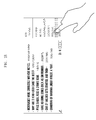
- FIGS. 1a and 1b are diagrams of an example of a user interface of an electronic device, according to aspects of the disclosure.
- FIG. 1a shows the device in a state in which sizes of items (news headlines in the form of text) in a web page are not smaller than a size of a touch object (a user's finger), so that the user is able to easily recognize the selected item.
- an item selected by the user is indicated by a focus ring which surrounds the selected item, or by a highlighted background.
- FIG. 1b shows the device a state in which sizes of items (news headlines in the form of text) to be selected by the user are similar to the size of the touch object (the user's finger), which may hinder the user from recognizing the selected item.
- the size of the item displayed in the web page is similar to or smaller than the size of an area that the touch obj ect contacts within the touch screen for a touch input
- the selected area is obscured by the touch object.
- the user may not be able to recognize the item that is being selected when the use's finger moves in close proximity to the item. This in turn may lead to the user making an input error and accidentally selecting an item which the user did not intend to select.
- an auxiliary area may be defined that provides a method of displaying item-related information corresponding to an item that is being selected.
- the item related information may include at least one of text, a still image, a movie, a website address and a sub-menu which correspond to the selected item.
- an item selected by a user may be displayed in the auxiliary area.
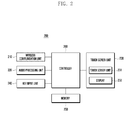
- FIG. 2 is a block diagram of an example of a device 200 according to aspects of the disclosure.
- the device 200 may be any suitable type of device, such as a smart phone, a desktop computer, a laptop compuer, a tablet, an electric applieance, a camera, etc.
- the device 200 may include a wireless communication unit 210, an audio processing unit 220, a touch screen unit 230, a key input unit 240, a memory 250 and a controller 260.
- the wireless communication unit 210 carries out transmission and reception of data for wireless communication of the device 200.
- the wireless communication unit 210 may include a radio frequency (RF) transmitter for modulating and amplifying a frequency of a signal to be transmitted, and an RF receiver for low-noise-amplifying a received signal and demodulating a frequency thereof.
- RF radio frequency
- the wireless communication unit 210 may receive data through a wireless channel to thereby output the data to the controller 260, and may transmit data output from the controller 260 through the wireless channel.
- the device 200 does not need to have the wireless communication unit 210, and that is why the wireless communication unit 210 is illustrated by dotted lines in the drawing. For example, if the device 200 is an MP3 player or an electronic dictionary, it does not need to adopt the wireless communication unit 210.
- the audio processing unit 220 may be configured with a CODEC which may include a data CODEC for processing packet data and an audio CODEC for processing an audio signal like a voice.
- the audio processing unit 220 converts a digital audio signal into an analog audio signal by the audio CODEC to thereby reproduce the analog audio signal by a speaker (SPK), and also converts an analog audio signal input from a microphone (MIC) into a digital audio signal by the audio CODEC.
- SPK speaker
- MIC microphone
- the touch screen unit 230 includes a touch sensor unit 231 and a display 232.
- the touch sensor unit 231 detects a touch input from a user.
- the touch sensor unit 231 may be implemented by a touch sensor of a capacitive overlay, a resistive overlay and an infrared beam, or by a pressure sensor. It is to be understood, the touch sensorunit 231 may be implemented using any suitable sensor devices, which are able to detect a contact or a pressure of an object, may be used.
- the touch sensor unit 231 detects a touch input from a user and generates a detection signal to be transmitted to the controller 260.
- the detection signal includes coordinate data of a user's touch input.
- the touch sensor unit 231 When a user inputs a touch location movement gesture, the touch sensor unit 231 generates a detection signal including coordinate data for the location movement path of the touch to be thereby transmitted to the controller 260.
- the display 232 may be implemented by Liquid Crystal Displays (LCDs), Organic Light Emitting Diodes (OLEDs), and Active Matrix Light Emitting Diodes (AMOLEDs).
- the display 232 provides a user with various visual information such as a menu, input data and setup information of a function of the device 200.
- the display 232 may output a booting image, a background image, a menu image, a phone call image, application images, or the like.
- the key input unit 240 receives an input of a user's key manipulation for controlling the device 200, and generates an input signal to be thereby transmitted to the controller 260.
- the key input unit 240 may be configured with a key pad including number keys and direction keys, and with predetermined function keys at one side of the device 200. According to aspects of the disclosure, if the touch screen unit 230 provides all of key input functions, the key input unit 240 may be omitted in the device 200.
- the memory 250 stores programs and data necessary for operating the device 200, and includes a program area and a data area.
- the program area may store programs for controlling the general operation of the device 200, an Operating System (OS) for booting the device 200, application programs for reproducing multimedia contents, and other application programs necessary for optional functions of device 200 such as, for example, a camera, sound reproduction, and image or movie reproduction.
- the data area may store data, such as images, movies, a phone book and audio data, which result from the use of the device 200
- the controller may include processing circuitry, such as a processor (e.g., an ARM-based processor, an x86-based processor, etc.), an Application Specific Integrated Circuit (ASIC), a Field-Programmable Gate Array (FPGA), and/or any other suitble type of processing circuitry.
- the controller 260 controls general operations of elements of the device. Particularly, although a certain item is selected to be covered with the touch object, the controller 260 may control the process of displaying a selected item separately.
- the controller 260 may determine whether an auxiliary area of the selected item needs to be displayed, and, if necessary, the controller 260 may control to display item related information corresponding to the selected item in the auxiliary area.
- the item related information may include at least one of, for example, text, a still image, a movie, a website address and a sub-menu, which correspond to the selected item. Additionally or alternatively, the controller 260 may control to display an item selected by a user in the auxiliary area.
- the controller 260 may determine whether to display the auxiliary area, based on at least one of a reference area defined with a width and a height, resolution information of the touch screen, and zoom scale information of an image displayed on the touch screen, which will be described further below.
- the controller 260 may control to display the selected item and another item (or item related information thereof) adjacent to the selected item within a predetermined distance in at least one of the auxiliary areas.
- the controller 260 may determine whether a change input for changing the selected item is detected after detection of the touch input. Also, when the change input is detected, the controller 260 may determine whether the change input leaves a predetermined area. If the change input leaves the predetermined area, the controller 260 may processes the change input as an input for an image conversion. On the contrary, if the change input does not leave the predetermined area, the controller 260 may control to display item related information corresponding to an item reselected by the change input in the auxiliary area.
- the controller 260 may determine whether a change input for changing the selected item is detected after detection of the touch input. Also, when the change input is detected, the controller 260 may determine whether the change input passes by a predetermined number of items. If the change input passes by the predetermined number of items, the controller 260 may process the change input as an input for an image conversion. On the contrary, if the change input does not pass by the predetermined number of items, the controller 260 may control to display item related information corresponding to an item reselected by the change input in the auxiliary area.
- the controller 260 may control to decide a location of the auxiliary area based on at least one of a size of the selected item, a location of the selected item, and a location where the touch input is generated, and to thereby display the auxiliary area.
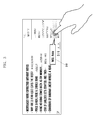
- FIG. 3 is a diagram illustrating a technique for displaying an auxiliary area according to aspects of the disclosure.
- the device 200 determines whether the selected item is covered with a touch object. If the selected item is determined to be covered with the touch object, the device 200 displays an auxiliary area 310 and allows item related information corresponding to the selected item to be displayed in the auxiliary area 310.
- the auxiliary area 310 may include the selected item and an image of a focus ring surrounding the item.
- the device 200 may determine whether the auxiliary area 310 needs to be displayed based on at least one of dots per inch (dpi) of a predetermined area,zoom scale information of a the browser that displays the item, size of the touch object, and or any other suitable information.
- dpi dots per inch
- FIG. 4 is a diagram illustrating an example of a technique for determining whether to display the auxiliary area 310, according to aspects of the disclosure.
- a reference area 410 having a width W and a height H and used in determining whether the auxiliary area 310 needs to be displayed. More specifically, in some aspects, the reference area 410 may be equal in size to an area on the touchscreen that the touch object contacts when the touch object is pressed against the touchscreen.
- the reference area 410 may be defined to a size that is likely to be covered with the touch object.
- the reference area 410 may be defined based on an area that the touch object contacts within the touch screen during the touch input on the touch screen.
- the reference area 410 may be set by a user using a separate setup procedure, or may be set in a default value without a user's setup. In some aspects, the size of the reference area 410 may be set based on a type of touch object used to select a particular item ( e.g., a finger, a stylus, etc. ) . In some aspects, the size of the reference area 410 may be set based on the age of a user who is using the device 200. In some aspects, the age of the user may be identified by the device 200 by using facial recognition.
- the device 200 may store a definition (e.g., an object and/or any other suitable representation) of the reference area 410 in memory and determine whether the auxiliary area 310 needs to be displayed based on this definition. More specifically, in determining the necessity of the display of the auxiliary area, for example, the device 200 may set a limit value based on the reference area 410, and may compare a size of an item selected by a user's touch input with the limit value to determine whether the auxiliary area 310 needs to be displayed. In this case, if the size of the selected item is larger than the limit value, the device 200 may determine that the auxiliary area 310 does not need to be displayed. Conversely, if the size of the selected item is smaller than the limit value, the device 200 may determine that the auxiliary area 310 needs to be displayed.
- a definition e.g., an object and/or any other suitable representation
- the device 200 may determine that the auxiliary area 310 does not need to be displayed.
- the device 200 may determine that the auxiliary area 310 needs to be displayed.
- FIG. 5 is a diagram depicting an example of an auxiliary area according to aspects of the disclosure.
- a display location of an auxiliary area 530 may be determined based on at least one of a size of a selected item, a location of the selected item, a size of a reference area 520, and a touch point 510.
- the auxiliary area 530 may be displayed on the left side of the selected item.
- the auxiliary area may be displayed at any other location on the screen of the device 200.
- the auxiliary area 530 may be displayed on the left side of the selected item for a right-handed user, or on the right side of the selected item for a left-handed user, respectively.
- the auxiliary area 530 may be displayed on either side of the selected item according to a user's setup.
- the copy of the selected item displayed in the axiliary area may have the same size as the original item that is being selected.
- the copy of the selected item displayed in the auxiliary area may be larger in size than the original item that is being selected.
- the size to which the copy of the selected item is enlarged may depend on at least one ofzoom scale information and font size information of a current browser
- FIG. 6 is a diagram illustrating an example of a technique for displaying an auxiliary area according to aspects of the disclosure.
- FIG. 6 illustrates an example of a technique for displaying an item (or item related information) that is likely to be covered with a touch object when the item is selected, according to aspects of the disclosure.
- screen (a) of FIG. 6 shows that when the item "Linkd" is selected, that item is covered by the touch object used to make the selection (e.g., a user's finger). so that the selected item is displayed in an auxiliary area 610.
- an item “Linki" is also partially covered with the touch object as shown in screen (a) of FIG. 6.
- the device 200 may determine that item “Linki” is likely to be covered by the touch object, even though the item “Linki” is not being selected. The determination may be based on at least one of a size of the item “Linki”, a location of the item “Linki”, a size of the reference area associated with the item “Linkd”, a touch point, dpi of the item “Linki”, and current zoom scale information of a browser or other software that is displaying the items "Linki” and "Linkd.”_
- the device 200 may display the item "Linkd” selected by the user in the first auxiliary area 620, and may display the item “Linki” that is not selected by the user but is covered with the touch object in the second auxiliary area 630, respectively, as shown in screen (b) of FIG. 6. Doing so may enable the user to recognize what item is adjacent to the selected item.
- the selected item and the adjacent item may be displayed together in a single auxiliary area.
- a visual indication may be output differentiating the item selected by the user (e.g., "Linkd") from the item that is adjacent to the selected item (e.g., "Linki"). For example, the item selected by the user may be highlighted.
- FIG. 7 is a diagram illustrating an example of a technique for displaying an auxiliary area according to aspects of the disclosure.
- FIG. 7(a) shows a state of the device 200 in which an item "Linkd" selected by a user is covered with a touch object, so that the selected item is displayed in an auxiliary area 710.
- the device 200 determines whether the touch input is removed. When the touch input is removed, the device 200 may perform a function related to the selected item.
- the item “Linki” is selected. However, this selection is made in error. Upon realizing the error, the user may attempt to correct it by maintining a touch of the screen while sliding the user's finger onto the item that the user actually intended to select (e. g., "Linkd"). However, the sliding of the user's finger from item “Linki” onto item “Linkd” may be mistaken by the device 200 for a panning gesture for the turning of pages, or an instruction for performing another operation that is different from the selection of items. Accordingly, the device 200 may erroneously change (or scroll) the page displayed on the screen instead of selecting the item "Linki.”
- the device 200 may avoid making such an error by utilizing a change reference area 720.
- the device 200 may store a definition (e.g ., an object and/or any other suitable representation) of the change reference area 720 in memory and determine whether input provided subseqently to the selection of an item is intended to correct an error in the selection of the item or perform another function that is different from correcting the error.
- the size of the change reference area 720 may be based on a size of the selected item (e.g ., item "Linki").
- the change reference area 720 may be shaped as a rectangle, a square, a circle, an oval, and/or any other suitable geometric figure.
- the device 200 may treat this input as being provided for the purpose of correcting an error in the selection of the first item. However, if the input is received outside of the selection area, or the input leaves the selection area, that input may be treated as input for performing a pre-designated function (e.g., flipping a page).
- a pre-designated function e.g., flipping a page
- the device 200 may display item related information corresponding to an item that is reselected according to the drag input in the auxiliary area 710. That is, when the selected item is changed into "Linki" by a user's drag input, and simultaneously when the drag input does not leave the change reference area 720, the device 200 may change the item related information displayed in the auxiliary area 710 to thereby be displayed according to the drag input.
- a change input e.g., a drag input, referred to as a drag input hereinafter
- the device 200 may display item related information corresponding to an item that is reselected according to the drag input in the auxiliary area 710. That is, when the selected item is changed into "Linki" by a user's drag input, and simultaneously when the drag input does not leave the change reference area 720, the device 200 may change the item related information displayed in the auxiliary area 710 to thereby be displayed according to the drag input.
- the device 200 processes the drag input as a panning gesture or a scroll input. Accordingly, the currently displayed image may be converted or moved according to a direction of the drag input.
- FIG. 8 is a diagram illustrating an example of a technique for displaying an auxiliary area, according to aspects of the disclosure.
- a plurality of items are in a lattice or any other suitable arrangement.
- the item "Linki" is selected.
- this selection is made in error.
- the user may attempt to correct it by maintining a touch of the screen while sliding the user's finger onto the item that the user actually intended to select (e.g., "Linkd").
- the sliding of the user's finger from item “Linki” onto item “Linkd” may be mistaken by the device 200 for a panning gesture for the turning of pages or a command for performing an operation that is different from the selection of items. Accordingly, the device 200 may erroneously change (or scroll) the page displayed on the screen instead of selecting the item "Linki.”
- the device 200 may avoid making such an error by counting the number of items that are traversed by user input that is continiously received after the item "Linkd" is selected.
- FIG. 8(b) illustrates an example in which a drag input does not pass by the predetermined number of items. That is, when the drag input, that is continuously detected after selection of the item, does not pass by the predetermined number of items, the device 200 may change item related information displayed in the auxiliary area 810 to be thereby displayed in the auxiliary area 810 according to the drag input.
- the device 200 may change the item related information displayed in the auxiliary area 810 to be thereby displayed according to the drag input.
- FIG. 8(c) illustrates ane example in which a drag input passes by the predetermined number of items. That is, when the drag input, that is continuously detected after selection of an item, passes by the predetermined number of items, the device 200 processes the drag input as a panning gesture or a scroll input. Accordingly, the current displayed image may be converted or moved according to a direction of the drag input.
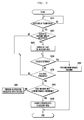
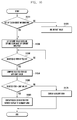
- FIG. 9 is a flowchart of an example of a process for displaying an auxiliary area, according to aspects of the dislcosure.
- an image including at least one item is displayed in a touch screen or a display of the device 200.
- the image may include a browser image, a background image, a home image, and/or any other suitable type of image.
- step S910 the device 200 determines whether a touch input is detected.
- the touch input may be performed by a touch object including a user's finger and a touch pen.
- step S920 the device 200 determines whether an auxiliary area needs to be displayed.
- the device 200 may define a reference area defined with a width and a height, and may determine whether the auxiliary area needs to be displayed based on the reference area, dpi and zoom scale information of a current image, as set forth before.
- the process proceeds to step S950. Otherwise, the process proceeds to step S940.
- step S940 at least one auxiliary area is displayed.
- the device 200 may display item related information corresponding to an item selected by the touch input in the auxiliary area.
- the item related information may include at least one of text, a still image, a movie, a website address, a sub-menu corresponding to the selected item, and/or any other suitable type of information.
- step S950 the device 200 may determine whether the touch input is removed. When the touch input is removed, the process proceeds to step S960. Otherwise, the process procees to step S970.
- step S960 the device 200 performs a function corresponding to the item selected by the touch input.
- the selected item may be performed, or a sub-menu which belongs to the selected item may be displayed.
- step S970 the device 200 determines whether a a drag is performed after the item is selected. For example, while the user is performing a drag input, the device 200 might detect a difference between a location where a first touch input is generated and a location where a current touch input is generated. If a drag is being perfored, the process proceeds to step S980. Otherwise, the process returns to step S950.
- step S980 the device 200 determines whether the drag meets a constraint.
- the drag may meet the constraint if the drag is performed within a predetermined area surrounding the location where the touch input is first performed.
- the drag may fail to meet the constraint if the drag exits the predetermined area.
- the drag may meet the constraint if the drag spans over no more than a predetemrined number of items that are displayed by the device 200.
- the drag may fail to meet the constraint if the drag spans more than the predetmined number of items.
- the drag may meet the constraing if the drag extends no further than a predetermined distance from the selected item. If the constraint is satisfied, the process proceeds to step S990. Otherwise, the process proceeds to step S985.
- step S985 the device 200 performs a function corresponding to the drag (e.g., scrolling, changing of page/screen, etc.).
- step S990 the device 200 may select another item based on the drag gesture and display information related to the other item in the auxiliary area. In doing so, the device 200 may display item related information of an item corresponding to a location where the current touch input is generated in the auxiliary area.
- FIG. 10 is a flowchart of an example of a process, according to aspects of the disclosure.
- the device 200 determines whether information is available that associated with a particular touch object that is associated with the device 200.
- the information for the touch object may include identification of a type of touch object that is to be used (e.g., fingers or pens), a size of the touch object, an area that the touch object contacts within the touch screen through a touch input, or the like.
- step S1020 When the information is set up, the process proceeds to step S1020. Otherwise, the process proceeds to step S1020.
- step S1020 the device identifies default touch object information.
- step S1030 the device 200 sets up a limit value based on dpi and a zoom scale of a current image (e.g., a web page).
- step S1040 the device 200 determines whether an item is selected by a touch input. When an item is selected, the device 200 proceeds to step S1050. Otherwise, step S1040 is repeated.
- step S1050 the device 200 compares a size of the selected item with the preset limit value.
- step S1060 the device 200 determines whether the size of the selected item is greater than the limit value. If the size of the selected item is greater than the limit value, it is likely that the item is too big to be fully covered with the touch object. Accordingly, in this case, the process proceeds to step S1080 and the device 200 displays a focus on the selected item.
- step S1070 the device 200 displays an auxiliary area and display item related information corresponding to the selected item in the auxiliary area.
- a user when an item is selected, a user is able to recognize item related information corresponding to the selected item in the separate auxiliary area, which may enhance a user's convenience. Also, according to aspects of the disclosure, when a user selects an incorrect item, the selection may be easily changed to a desired item, so that a mis-operation due to an incorrect touch may be prevented.
- the term "item” may refer to a visual object, a plurality of visual objects, or a portion of a visual object that is displayed on the screen of a device.
- the visual object(s) may include text, images, and/or any other type of information that is capable of being visually presented on the display screen of a device.
- the Figures are provided as an example only. At least some of the operations disclosed by the Figures can be performed in a different order, performed concurrently, or altogether omitted.
- make contact may refer to the making of a physical contact between a touch object and a touch screen, making electrical contact between the physical object and the touch screen, and or making any other suitable type of contact.
- the above-described aspects of the present disclosure can be implemented in hardware, firmware or via the execution of software or computer code that can be stored in a recording medium such as a CD ROM, a Digital Versatile Disc (DVD), a magnetic tape, a RAM, a floppy disk, a hard disk, or a magneto-optical disk or computer code downloaded over a network originally stored on a remote recording medium or a non-transitory machine readable medium and to be stored on a local recording medium, so that the methods described herein can be rendered via such software that is stored on the recording medium using a general purpose computer, or a special processor or in programmable or dedicated hardware, such as an ASIC or FPGA.
- a recording medium such as a CD ROM, a Digital Versatile Disc (DVD), a magnetic tape, a RAM, a floppy disk, a hard disk, or a magneto-optical disk or computer code downloaded over a network originally stored on a remote recording medium or a non-transitory
- the computer, the processor, microprocessor controller or the programmable hardware include memory components, e.g., RAM, ROM, Flash, etc. that may store or receive software or computer code that when accessed and executed by the computer, processor or hardware implement the processing methods described herein.
- memory components e.g., RAM, ROM, Flash, etc.
- the execution of the code transforms the general purpose computer into a special purpose computer for executing the processing shown herein.
- Any of the functions and steps provided in the Figures may be implemented in hardware, software or a combination of both and may be performed in whole or in part within the programmed instructions of a computer. No claim element herein is to be construed under the provisions of 35 U.S.C. 112, sixth paragraph, unless the element is expressly recited using the phrase "means for".
Landscapes
- Engineering & Computer Science (AREA)
- Theoretical Computer Science (AREA)
- General Engineering & Computer Science (AREA)
- Physics & Mathematics (AREA)
- General Physics & Mathematics (AREA)
- Human Computer Interaction (AREA)
- Computer Networks & Wireless Communication (AREA)
- User Interface Of Digital Computer (AREA)
- Controls And Circuits For Display Device (AREA)
Applications Claiming Priority (1)
| Application Number | Priority Date | Filing Date | Title |
|---|---|---|---|
| KR1020130061534A KR102120651B1 (ko) | 2013-05-30 | 2013-05-30 | 터치스크린을 구비하는 디바이스에서 화면 표시 방법 및 장치 |
Publications (2)
| Publication Number | Publication Date |
|---|---|
| EP2808776A2 true EP2808776A2 (fr) | 2014-12-03 |
| EP2808776A3 EP2808776A3 (fr) | 2015-04-01 |
Family
ID=50819591
Family Applications (1)
| Application Number | Title | Priority Date | Filing Date |
|---|---|---|---|
| EP14169898.5A Ceased EP2808776A3 (fr) | 2013-05-30 | 2014-05-26 | Procédé et appareil pour afficher des images dans des dispositifs à fonctionnement par écran tactile |
Country Status (3)
| Country | Link |
|---|---|
| US (1) | US9886741B2 (fr) |
| EP (1) | EP2808776A3 (fr) |
| KR (1) | KR102120651B1 (fr) |
Families Citing this family (4)
| Publication number | Priority date | Publication date | Assignee | Title |
|---|---|---|---|---|
| US10453085B2 (en) * | 2013-09-27 | 2019-10-22 | Gree, Inc. | Reward giving method, computer-readable recording medium, server device, and game system |
| JP6062351B2 (ja) * | 2013-11-28 | 2017-01-18 | 京セラ株式会社 | 電子機器 |
| JP5917753B1 (ja) * | 2015-07-27 | 2016-05-18 | ヤフー株式会社 | 情報処理装置、情報処理方法、情報処理プログラムおよび配信装置 |
| DE102016124277A1 (de) * | 2016-04-19 | 2017-10-19 | Patty's Gmbh | Verfahren zum Ermitteln und Anzeigen von Produkten auf einer elektronischen Anzeigeeinrichtung |
Citations (1)
| Publication number | Priority date | Publication date | Assignee | Title |
|---|---|---|---|---|
| WO2013019404A1 (fr) * | 2011-08-02 | 2013-02-07 | Microsoft Corporation | Geste de glissement croisé de sélection et réorganisation |
Family Cites Families (21)
| Publication number | Priority date | Publication date | Assignee | Title |
|---|---|---|---|---|
| US5416895A (en) * | 1992-04-08 | 1995-05-16 | Borland International, Inc. | System and methods for improved spreadsheet interface with user-familiar objects |
| AU5087800A (en) * | 1999-06-02 | 2000-12-28 | Ncr International, Inc. | Self-service terminal |
| EP1652310A4 (fr) * | 2003-07-17 | 2007-11-14 | Xrgomics Pte Ltd | Procede d'entree d'un texte par choix de lettres et de mots pour des claviers et systemes de clavier reduits |
| US7802202B2 (en) | 2005-03-17 | 2010-09-21 | Microsoft Corporation | Computer interaction based upon a currently active input device |
| US7680333B2 (en) * | 2005-04-21 | 2010-03-16 | Microsoft Corporation | System and method for binary persistence format for a recognition result lattice |
| US7886233B2 (en) * | 2005-05-23 | 2011-02-08 | Nokia Corporation | Electronic text input involving word completion functionality for predicting word candidates for partial word inputs |
| US7908082B2 (en) * | 2007-05-04 | 2011-03-15 | The Boeing Company | Methods and systems for displaying airport moving map information |
| US8375336B2 (en) * | 2008-05-23 | 2013-02-12 | Microsoft Corporation | Panning content utilizing a drag operation |
| US8245156B2 (en) * | 2008-06-28 | 2012-08-14 | Apple Inc. | Radial menu selection |
| KR101010283B1 (ko) | 2008-10-24 | 2011-01-24 | 삼성전자주식회사 | 휴대단말기의 웹 페이지 제공 방법 및 장치 |
| JP4683126B2 (ja) | 2008-12-26 | 2011-05-11 | ブラザー工業株式会社 | 入力装置 |
| KR20110121926A (ko) | 2010-05-03 | 2011-11-09 | 삼성전자주식회사 | 터치 스크린에서 선택된 정보에 대응하는 부가정보를 포함하는 투명 팝업을 표시하는 방법 및 장치 |
| US20120192108A1 (en) * | 2011-01-26 | 2012-07-26 | Google Inc. | Gesture-based menu controls |
| US9116616B2 (en) * | 2011-02-10 | 2015-08-25 | Blackberry Limited | Portable electronic device and method of controlling same |
| FR2973899B1 (fr) * | 2011-04-07 | 2013-04-26 | Archos | Procede de selection d'un element d'une interface utilisateur et dispositif mettant en oeuvre un tel procede. |
| US20130014053A1 (en) * | 2011-07-07 | 2013-01-10 | Microsoft Corporation | Menu Gestures |
| KR101891475B1 (ko) * | 2012-01-06 | 2018-09-28 | 삼성전자 주식회사 | 디스플레이장치 및 그 제어방법, 입력장치, 디스플레이 시스템 |
| US20130227463A1 (en) * | 2012-02-24 | 2013-08-29 | Research In Motion Limited | Electronic device including touch-sensitive display and method of controlling same |
| US20130227490A1 (en) * | 2012-02-24 | 2013-08-29 | Simon Martin THORSANDER | Method and Apparatus for Providing an Option to Enable Multiple Selections |
| US9477382B2 (en) * | 2012-12-14 | 2016-10-25 | Barnes & Noble College Booksellers, Inc. | Multi-page content selection technique |
| WO2014139129A1 (fr) * | 2013-03-14 | 2014-09-18 | Hewlett-Packard Development Company, L.P. | Panneau de commande pour dispositif électronique |
-
2013
- 2013-05-30 KR KR1020130061534A patent/KR102120651B1/ko not_active Expired - Fee Related
-
2014
- 2014-05-21 US US14/283,500 patent/US9886741B2/en not_active Expired - Fee Related
- 2014-05-26 EP EP14169898.5A patent/EP2808776A3/fr not_active Ceased
Patent Citations (1)
| Publication number | Priority date | Publication date | Assignee | Title |
|---|---|---|---|---|
| WO2013019404A1 (fr) * | 2011-08-02 | 2013-02-07 | Microsoft Corporation | Geste de glissement croisé de sélection et réorganisation |
Also Published As
| Publication number | Publication date |
|---|---|
| EP2808776A3 (fr) | 2015-04-01 |
| US9886741B2 (en) | 2018-02-06 |
| KR102120651B1 (ko) | 2020-06-09 |
| US20140359507A1 (en) | 2014-12-04 |
| KR20140140759A (ko) | 2014-12-10 |
Similar Documents
| Publication | Publication Date | Title |
|---|---|---|
| US10825456B2 (en) | Method and apparatus for performing preset operation mode using voice recognition | |
| EP2565770B1 (fr) | Appareil portable et procédé de saisie d'un appareil portable | |
| US10482573B2 (en) | Method and mobile device for displaying image | |
| US20210034190A1 (en) | Mobile terminal having a touch screen and method for providing a user interface therein | |
| US11188192B2 (en) | Information processing device, information processing method, and computer program for side menus | |
| JP6154374B2 (ja) | グラフィックオブジェクトを利用したコンテンツ制御方法及び装置 | |
| US10705702B2 (en) | Information processing device, information processing method, and computer program | |
| EP2613247B1 (fr) | Procédé et appareil d'affichage d'un clavier pour un terminal à écran tactile | |
| US20120096393A1 (en) | Method and apparatus for controlling touch screen in mobile terminal responsive to multi-touch inputs | |
| CN109002759A (zh) | 文本识别方法、装置、移动终端以及存储介质 | |
| US20140055398A1 (en) | Touch sensitive device and method of touch-based manipulation for contents | |
| CN108664190A (zh) | 页面显示方法、装置、移动终端以及存储介质 | |
| CN107734183A (zh) | 一种单手操作移动终端的方法、存储介质及移动终端 | |
| US10019148B2 (en) | Method and apparatus for controlling virtual screen | |
| US9886741B2 (en) | Method and apparatus for displaying images in touchscreen-based devices | |
| EP2677413B1 (fr) | Procédé pour améliorer la reconnaissance tactile et dispositif électronique associé | |
| JP2015141526A (ja) | 情報処理装置、情報処理方法、及びプログラム | |
| US20160132478A1 (en) | Method of displaying memo and device therefor | |
| JP6484859B2 (ja) | 情報処理装置、情報処理方法、及びプログラム | |
| KR20120105105A (ko) | 제스쳐를 이용한 터치스크린 구비 사용자 단말 제어방법, 장치, 이를 위한 기록매체 및 이를 포함하는 사용자 단말 |
Legal Events
| Date | Code | Title | Description |
|---|---|---|---|
| PUAI | Public reference made under article 153(3) epc to a published international application that has entered the european phase |
Free format text: ORIGINAL CODE: 0009012 |
|
| 17P | Request for examination filed |
Effective date: 20140526 |
|
| AK | Designated contracting states |
Kind code of ref document: A2 Designated state(s): AL AT BE BG CH CY CZ DE DK EE ES FI FR GB GR HR HU IE IS IT LI LT LU LV MC MK MT NL NO PL PT RO RS SE SI SK SM TR |
|
| AX | Request for extension of the european patent |
Extension state: BA ME |
|
| PUAL | Search report despatched |
Free format text: ORIGINAL CODE: 0009013 |
|
| AK | Designated contracting states |
Kind code of ref document: A3 Designated state(s): AL AT BE BG CH CY CZ DE DK EE ES FI FR GB GR HR HU IE IS IT LI LT LU LV MC MK MT NL NO PL PT RO RS SE SI SK SM TR |
|
| AX | Request for extension of the european patent |
Extension state: BA ME |
|
| RIC1 | Information provided on ipc code assigned before grant |
Ipc: G06F 3/0488 20130101AFI20150225BHEP |
|
| R17P | Request for examination filed (corrected) |
Effective date: 20151001 |
|
| RBV | Designated contracting states (corrected) |
Designated state(s): AL AT BE BG CH CY CZ DE DK EE ES FI FR GB GR HR HU IE IS IT LI LT LU LV MC MK MT NL NO PL PT RO RS SE SI SK SM TR |
|
| 17Q | First examination report despatched |
Effective date: 20170123 |
|
| STAA | Information on the status of an ep patent application or granted ep patent |
Free format text: STATUS: THE APPLICATION HAS BEEN REFUSED |
|
| 18R | Application refused |
Effective date: 20191125 |