EP2821905A1 - Auf dreidimensionaler anzeige basiertes mauszeigerbetriebsverfahren und mobiles endgerät - Google Patents
Auf dreidimensionaler anzeige basiertes mauszeigerbetriebsverfahren und mobiles endgerät Download PDFInfo
- Publication number
- EP2821905A1 EP2821905A1 EP13770212.2A EP13770212A EP2821905A1 EP 2821905 A1 EP2821905 A1 EP 2821905A1 EP 13770212 A EP13770212 A EP 13770212A EP 2821905 A1 EP2821905 A1 EP 2821905A1
- Authority
- EP
- European Patent Office
- Prior art keywords
- dimensional
- cursor
- finger
- image
- mobile terminal
- Prior art date
- Legal status (The legal status is an assumption and is not a legal conclusion. Google has not performed a legal analysis and makes no representation as to the accuracy of the status listed.)
- Withdrawn
Links
Images


Classifications
-
- G—PHYSICS
- G06—COMPUTING OR CALCULATING; COUNTING
- G06F—ELECTRIC DIGITAL DATA PROCESSING
- G06F3/00—Input arrangements for transferring data to be processed into a form capable of being handled by the computer; Output arrangements for transferring data from processing unit to output unit, e.g. interface arrangements
- G06F3/01—Input arrangements or combined input and output arrangements for interaction between user and computer
- G06F3/048—Interaction techniques based on graphical user interfaces [GUI]
- G06F3/0481—Interaction techniques based on graphical user interfaces [GUI] based on specific properties of the displayed interaction object or a metaphor-based environment, e.g. interaction with desktop elements like windows or icons, or assisted by a cursor's changing behaviour or appearance
- G06F3/04815—Interaction with a metaphor-based environment or interaction object displayed as three-dimensional [3D], e.g. changing the user viewpoint with respect to the environment or object
-
- G—PHYSICS
- G06—COMPUTING OR CALCULATING; COUNTING
- G06F—ELECTRIC DIGITAL DATA PROCESSING
- G06F3/00—Input arrangements for transferring data to be processed into a form capable of being handled by the computer; Output arrangements for transferring data from processing unit to output unit, e.g. interface arrangements
- G06F3/01—Input arrangements or combined input and output arrangements for interaction between user and computer
- G06F3/017—Gesture based interaction, e.g. based on a set of recognized hand gestures
-
- G—PHYSICS
- G06—COMPUTING OR CALCULATING; COUNTING
- G06F—ELECTRIC DIGITAL DATA PROCESSING
- G06F3/00—Input arrangements for transferring data to be processed into a form capable of being handled by the computer; Output arrangements for transferring data from processing unit to output unit, e.g. interface arrangements
- G06F3/01—Input arrangements or combined input and output arrangements for interaction between user and computer
- G06F3/048—Interaction techniques based on graphical user interfaces [GUI]
- G06F3/0481—Interaction techniques based on graphical user interfaces [GUI] based on specific properties of the displayed interaction object or a metaphor-based environment, e.g. interaction with desktop elements like windows or icons, or assisted by a cursor's changing behaviour or appearance
- G06F3/04812—Interaction techniques based on cursor appearance or behaviour, e.g. being affected by the presence of displayed objects
-
- G—PHYSICS
- G06—COMPUTING OR CALCULATING; COUNTING
- G06F—ELECTRIC DIGITAL DATA PROCESSING
- G06F3/00—Input arrangements for transferring data to be processed into a form capable of being handled by the computer; Output arrangements for transferring data from processing unit to output unit, e.g. interface arrangements
- G06F3/01—Input arrangements or combined input and output arrangements for interaction between user and computer
- G06F3/048—Interaction techniques based on graphical user interfaces [GUI]
- G06F3/0481—Interaction techniques based on graphical user interfaces [GUI] based on specific properties of the displayed interaction object or a metaphor-based environment, e.g. interaction with desktop elements like windows or icons, or assisted by a cursor's changing behaviour or appearance
- G06F3/04817—Interaction techniques based on graphical user interfaces [GUI] based on specific properties of the displayed interaction object or a metaphor-based environment, e.g. interaction with desktop elements like windows or icons, or assisted by a cursor's changing behaviour or appearance using icons
-
- G—PHYSICS
- G06—COMPUTING OR CALCULATING; COUNTING
- G06F—ELECTRIC DIGITAL DATA PROCESSING
- G06F3/00—Input arrangements for transferring data to be processed into a form capable of being handled by the computer; Output arrangements for transferring data from processing unit to output unit, e.g. interface arrangements
- G06F3/01—Input arrangements or combined input and output arrangements for interaction between user and computer
- G06F3/048—Interaction techniques based on graphical user interfaces [GUI]
- G06F3/0484—Interaction techniques based on graphical user interfaces [GUI] for the control of specific functions or operations, e.g. selecting or manipulating an object, an image or a displayed text element, setting a parameter value or selecting a range
- G06F3/04842—Selection of displayed objects or displayed text elements
-
- G—PHYSICS
- G06—COMPUTING OR CALCULATING; COUNTING
- G06F—ELECTRIC DIGITAL DATA PROCESSING
- G06F3/00—Input arrangements for transferring data to be processed into a form capable of being handled by the computer; Output arrangements for transferring data from processing unit to output unit, e.g. interface arrangements
- G06F3/01—Input arrangements or combined input and output arrangements for interaction between user and computer
- G06F3/048—Interaction techniques based on graphical user interfaces [GUI]
- G06F3/0484—Interaction techniques based on graphical user interfaces [GUI] for the control of specific functions or operations, e.g. selecting or manipulating an object, an image or a displayed text element, setting a parameter value or selecting a range
- G06F3/0485—Scrolling or panning
Definitions
- the present invention relates to the field of electronic technologies, and in particular, to a three-dimensional display-based cursor operation method and a mobile terminal.
- a touchscreen is a type of peripheral component for implementing point touch control of a two-dimensional display mobile terminal.
- a touch interface included by the touchscreen is on a same plane as a display interface of a two-dimensional liquid crystal display (LCD, Liquid Crystal Display), and therefore a purpose of controlling may be achieved by touching a displayed icon.
- LCD liquid crystal display
- a three-dimensional LCD is a new type of LCD display technology, which depends on a raster technology, so that light rays of some dot matrices can only be emitted from specified directions, so as to ensure that a left eye and a right eye of a person can separately see different images, thereby implementing a three-dimensional display effect.
- a touchscreen technology is still used to implement touch control, because a plane on which a touchscreen is located is different from a plane on which a three-dimensional display object is located, display and touch are separated, and as a result, a three-dimensional touch control effect cannot be implemented.
- Embodiments of the present invention provide a three-dimensional display-based cursor operation method and a mobile terminal, which are used to implement a visually three-dimensional cursor operation on a three-dimensional display mobile terminal.
- An embodiment of the present invention provides a three-dimensional display-based cursor operation method, including: acquiring a finger image; generating, according to image information of the finger image, a three-dimensional cursor in a three-dimensional display interface corresponding to the image information; acquiring a movement position of the finger image; and determining a movement distance and a movement direction of the three-dimensional cursor according to the movement position.
- the method includes:
- the determining whether a current operation is a tap operation according to a hover time of the three-dimensional cursor includes:
- the method further includes:
- the method includes:
- the method further includes:
- the generating, according to image information of the finger image, a three-dimensional cursor in a three-dimensional display interface corresponding to the image information includes:
- the acquiring a finger image includes:
- An embodiment of the present invention provides a mobile terminal, including: a photographing unit, configured to acquire a finger image; a cursor generating unit, configured to generate, according to image information of the finger image, a three-dimensional cursor in a three-dimensional display interface corresponding to the image information; and a movement positioning unit, configured to determine a movement distance and a movement direction of the three-dimensional cursor according to a movement position of the finger image.
- the mobile terminal further includes:
- the mobile terminal further includes:
- the mobile terminal further includes:
- the tap determining unit includes:
- the cursor generating unit is further configured to acquire a current position of the finger image by using the original position as a reference position, determine three-dimensional coordinates of the three-dimensional cursor in the three-dimensional display interface according to the reference position and image information of the current position, and generate the three-dimensional cursor on the three-dimensional coordinates.
- a mobile terminal in embodiments of the present invention may acquire a finger image by using a photographing unit, and generate, according to image information of the finger image, a three-dimensional cursor in a three-dimensional display interface corresponding to the image information.
- a user may operate the three-dimensional cursor to move in the three-dimensional display interface by moving a finger in three-dimensional space (within a photographing range of the photographing unit of the mobile terminal), so as to implement a visually three-dimensional cursor operation.
- the embodiments of the present invention provide a three-dimensional display-based cursor operation method and a mobile terminal, which are used to implement a visually three-dimensional cursor operation on a three-dimensional display mobile terminal.
- the following uses a mobile terminal as an example to describe an embodiment of a three-dimensional display-based cursor operation method. It may be understood that the example does not constitute a limitation on the present invention.
- the embodiment of the three-dimensional display-based cursor operation method in this embodiment of the present invention includes:
- the mobile terminal acquires a finger image, where the finger image is an image having a finger feature.
- a photographing unit of the mobile terminal collects a photographed image.
- the mobile terminal identifies whether the collected photographed image is the finger image (that is, the photographed image matches the finger feature preset on the mobile terminal), and if yes, the finger image is successfully acquired.
- a maximum range for acquiring the finger image may be a range in which the photographing unit of the mobile terminal can photograph images.
- the photographing unit for acquiring the finger image may be disposed in the front of a display screen (that is, a user's finger needs to perform an operation above the display screen), and the photographing unit for acquiring the finger image may also be disposed in the back of the display screen (that is, the user's finger needs to perform an operation below the display screen).
- the mobile terminal After successfully acquiring the finger image, the mobile terminal generates, according to the image information of the finger image, the three-dimensional cursor in the three-dimensional display interface corresponding to the image information.
- the mobile terminal may use a position of a camera as an original position, and the original position is a reference position for determining an orientation of the three-dimensional cursor. For example, if the position of the camera is used as the original position, a corresponding position of the original position in a three-dimensional display screen is a middle position of the screen.
- the mobile terminal calculates a distance and a direction of the finger image relative to the original position, and converts, according to a preset proportional coefficient, the distance and direction into a position of the three-dimensional cursor in the three-dimensional display screen.
- a current position of the finger image is acquired by using the original position as the reference position, three-dimensional coordinates of the three-dimensional cursor in the three-dimensional display interface are determined according to the reference position and image information of the current position, and the three-dimensional cursor is generated on the three-dimensional coordinates.
- the user may perform some initial settings, such as calibration of the original position.
- the photographing unit of the mobile terminal acquires a finger image in any position (within a photographing range of the photographing unit), and then determines coordinates (X, Y, Z) of the finger image in an image, where coordinate information of X and Y may be obtained, by means of calculation, by determining a position of a central position of a fingertip of a finger in an entire image, and Z coordinate information may be determined according to a size of the finger image.
- data information of Z may be obtained by means of calculation only according to an area of the finger image.
- a position corresponding to the coordinates of the finger image is determined to be the original position.
- a calibrated original position is an original position that the user considers comfortable for an operation, and subsequently, the mobile terminal uses the calibrated original position as the reference position for determining the orientation of the three-dimensional cursor.
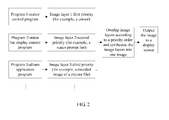
- the mobile terminal overlaps, by using a hierarchical overlapping display technology, the generated three-dimensional cursor on a three-dimensional image displayed in the display interface.
- a focused image of the three-dimensional cursor is located under an LCD surface layer and over a display layer of an operation icon. The user may perform an operation on the three-dimensional cursor by moving the finger in three-dimensional space.
- a limitation on a display priority is imposed on image layers. For example, for a picture with a third priority and a status prompt box with a second priority, if images are displayed in a certain position, a processing effect after overlapping is that a display of the status prompt box with a high priority overlays a display of the picture. Similarly, a cursor display image with a first priority also overlaps display images at other image layers, ensuring that the cursor can be seen in any case.
- That the photographing unit is disposed in the back of the display screen is used as an example.
- the user only needs to move the finger downwards during an operation, that is, move away from the mobile terminal, the photographing unit determines that a formed image is zoomed out, and therefore the three-dimensional cursor visually moves towards a direction away from the mobile terminal; and on the contrary, the finger gets close to the mobile terminal, the photographing unit determines that a formed image is zoomed in, and therefore the three-dimensional cursor visually moves towards a direction close to the user.
- a raster technology may be used for imaging the three-dimensional cursor, so that light rays of some dot matrices can only be emitted from specified directions, so as to ensure that a left eye and a right eye of a person can separately see different images, thereby implementing a three-dimensional display effect.
- the user may perform an operation on the three-dimensional cursor by moving the finger in the three-dimensional space.
- the mobile terminal acquires a movement position of the finger image in real time, and transmits information about the movement position to a movement positioning unit of the mobile terminal, so as to determine a movement track of the three-dimensional cursor in the three-dimensional display interface.
- the mobile terminal After acquiring the movement position of the finger image, the mobile terminal determines the movement distance and the movement direction of the three-dimensional cursor according to the movement position.
- the photographing unit collects a position of a held-out finger of the hand, and controls the three-dimensional cursor to move up and down or left and right along with the finger.
- the photographing unit of the mobile terminal photographs the finger image at a speed of N frames per second, and synchronously transmits the obtained photographed image to the movement positioning unit to calculate a track of the three-dimensional cursor.
- a mobile terminal of the present invention may acquire a finger image by using a photographing unit, and after successfully acquiring the finger image, generate, according to image information of the finger image, a three-dimensional cursor in a three-dimensional display interface corresponding to the image information.
- a user may operate the three-dimensional cursor to move in the three-dimensional display interface by moving a finger in three-dimensional space (within a shooting range of the photographing unit of the mobile terminal), so as to implement a visually three-dimensional cursor operation and improve user experience.
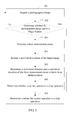
- FIG. 3 another embodiment of a three-dimensional display-based cursor operation method in an embodiment of the present invention includes:
- a mobile terminal acquires a photographed image. Specifically, after a user sends a three-dimensional operation instruction (which may be a tap operation) to the mobile terminal, a photographing unit of the mobile terminal may start acquiring a photographed image.
- a three-dimensional operation instruction which may be a tap operation
- the mobile terminal may receive a calibration instruction before acquiring a photographed image, and then trigger the photographing unit to calibrate a position of the acquired finger image.
- the mobile terminal acquires a calibration position of the finger image; and stores three-dimensional coordinates of the calibration position as an original position, where a purpose of the calibration is to determine a correspondence between a hand position and a virtual cursor display position. For example, some people have big hands, some people have small hands, some people like performing an operation with a hand closer to the mobile terminal, and some people like performing an operation in a farther position.
- the mobile terminal may provide a calibration mode, and in this mode, a hand is firstly placed in a position in which a user considers most comfortable for an operation, and the photographing unit collects the position (an original position), and records the position as a position in which the three-dimensional cursor is displayed in a central origin. Subsequently, when the hand moves relative to the position collected by the photographing unit, the mobile terminal may control the three-dimensional cursor to move relative to a position of the central origin.
- the photographing unit for acquiring the finger image may be disposed in the front of a display screen (that is, a user's finger needs to perform an operation above the display screen), and the photographing unit for acquiring the finger image may also be disposed in the back of the display screen (that is, the user's finger needs to perform an operation below the display screen).
- the mobile terminal After acquiring the photographed image, the mobile terminal determines whether the photographed image meets a finger feature, and if yes, determines that the finger image is successfully acquired, and executes step 203; and if no, continues to acquire a photographed image.
- the finger feature includes a finger thickness ratio and knuckle information. Further, the finger feature may further include other information. For example, if the photographing unit for acquiring the finger image may be disposed in the front of the display screen, the finger feature may also be a fingerprint; and if the photographing unit for acquiring the finger image may be disposed in the back of the display screen, the finger feature may also be a fingernail. Furthermore, the finger feature may also include a chrominance range of a finger skin color.
- the mobile terminal After successfully acquiring the finger image, the mobile terminal generates, according to image information of the finger image, a three-dimensional cursor in a three-dimensional display interface corresponding to the image information.
- the user may tap the three-dimensional operation instruction of the mobile terminal, and instruct the mobile terminal to acquire a photographed image by using the photographing unit.
- the three-dimensional cursor may be generated in the three-dimensional display interface.
- the mobile terminal may further acquire N finger images to perform multi-point touch control. Specifically, after determining that the N finger images are acquired, the mobile terminal simultaneously reports position information of the N finger images, generates N three-dimensional cursors accordingly, and implements a multi-point touch control function according to relative movements of the N three-dimensional cursors. For example, when a thumb and an index finger are held out simultaneously, it indicates that the user wants to perform a two-point touch operation. In this case, after the photographing unit determines that two fingers of the hand are held out, two three-dimensional cursors are simultaneously displayed at a same display layer according to corresponding positions of the two fingers.
- the user may perform an operation on the three-dimensional cursor by moving the finger in three-dimensional space.
- the mobile terminal acquires a movement position of the finger image in real time, and transmits information about the movement position to a movement positioning unit of the mobile terminal, so as to determine a movement track of the three-dimensional cursor in the three-dimensional display interface.
- the mobile terminal After acquiring the movement position of the finger image, the mobile terminal determines the movement distance and the movement direction of the three-dimensional cursor according to the movement position.
- the photographing unit collects a position of a held-out finger of the hand, and controls the three-dimensional cursor to move up and down or left and right along with the finger.
- the photographing unit of the mobile terminal photographs the finger image at a speed of N frames per second, and synchronously transmits the obtained photographed image to the movement positioning unit to calculate a track of the three-dimensional cursor.
- a movement ratio of the finger image to the three-dimensional cursor for example, 5:1, is preset in the mobile terminal. That is, the finger image horizontally moves five centimeters, and the three-dimensional cursor horizontally moves one centimeter.
- the mobile terminal also needs to calculate the movement distance and the movement direction of the three-dimensional cursor in the three-dimensional display interface according to a three-dimensional visual effect.
- a principle for calculating a movement position of the three-dimensional cursor is as follows: Firstly, it is assumed that corresponding cursor coordinates are in the very center of a display area when the finger is in a position with coordinates (X, Y, Z), and that dimensions, namely, a length, a height and a depth (three-dimensional display) of the display area are (A, B, C) respectively, coordinates of a corresponding cursor origin are (A/2, B/2, C/2).
- new coordinates are (x, y, z) when the finger moves; therefore, a difference (x-X, y-Y, z-Z) between a current finger position and a finger origin position may be obtained by means of calculation; then a preset proportional coefficient m is multiplied (where the proportional coefficient is used to convert a multiple between a finger displacement distance and a cursor displacement distance, for example, the finger moves one centimeter, and the corresponding cursor moves three pixels); and in this way, a current cursor position ⁇ A/2+m(x-X), B/2+m(y-Y), C/2+m(z-Z) ⁇ may be obtained.
- the three-dimensional cursor moves to a position of an operation icon in the three-dimensional display interface, it is determined whether the three-dimensional cursor coincides with three-dimensional coordinates of the operation icon, and if yes, it is determined whether the current operation is a tap operation according to a hover time of the three-dimensional cursor. After it is determined that the current operation is a tap operation, a function link corresponding to the operation icon may be triggered.
- the operation icon is an icon linked with a reported event, and the operation icon may be a graphic icon, a digital icon, or a string of link address.
- a time for determining the tap operation may be preset on the mobile terminal, and when the hover time of the three-dimensional cursor reaches the time for determining the tap operation, it is determined that the current operation is the tap operation. Further, the time for determining the tap operation may be further divided into a short tap time and a touch and hold time, and the short tap time and the touch and hold time separately correspond to different tap operations.
- the hover time of the three-dimensional cursor is more than the short tap time and less than the touch and hold time (that is, the three-dimensional cursor leaves a current position after hovering for the short tap time)
- it is determined that the current cursor operation is a short tap operation
- the hover time of the three-dimensional cursor is more than the touch and hold time
- it is determined that the current cursor operation is a touch and hold tap operation.
- the mobile terminal may determine whether displacement of the finger image is greater than a preset distance, and determine whether a time used for moving the finger image from a previous position to the current position is less than a preset time limit. If the displacement of the finger image is greater than the preset distance, and if the time used for moving the finger image from the previous position to the current position is less than the preset time limit, it is determined that the current operation is a slide operation, and the mobile terminal may switch a current display interface or implement another sliding function according to a sliding direction.
- slide operations of a two-dimensional scenario such as up, down, left, and right
- three-dimensional slide operations may be implemented, that is, operations of sliding close and away may further be implemented.
- a photographing unit determines that a rate and an extent of the down movement reach preset thresholds, and therefore determines that a sliding away event occurs, and feeds back a result to an application layer to execute a corresponding operation, for example, by using this action, to zoom out a currently displayed menu icon or move the icon down to a display layer in a lower position, so as to display more icons.
- the application layer may execute a corresponding operation after receiving the corresponding event, for example, zoom in the currently displayed menu icon or place the icon at a display layer in an upper position, so as to display the icon more clearly.
- the following describes an embodiment of a mobile terminal for executing the foregoing three-dimensional display-based cursor operation method in the present invention.
- a mobile terminal for executing the foregoing three-dimensional display-based cursor operation method in the present invention.
- the embodiment of the mobile terminal in an embodiment of the present invention includes:
- the mobile terminal in this embodiment of the present invention may further include:
- the tap determining unit in this embodiment of the present invention further includes:
- the cursor generating unit 402 is further configured to acquire a current position of the finger image by using the original position as a reference position, determine three-dimensional coordinates of the three-dimensional cursor in the three-dimensional display interface according to the reference position and image information of the current position, and generate the three-dimensional cursor on the three-dimensional coordinates.
- the mobile terminal overlaps, by using a hierarchical overlapping display technology, the generated three-dimensional cursor on a three-dimensional image displayed in the display interface.
- a focused image of the three-dimensional cursor is located under an LCD surface layer and over a display layer of an operation icon.
- a user may operate the three-dimensional cursor by moving a finger in three-dimensional space.
- a limitation on a display priority is imposed on image layers.
- a processing effect after overlapping is that a display of the status prompt box with a high priority overlays a display of the picture.
- a cursor display image with a first priority also overlays display images at other image layers, ensuring that the cursor can be seen in any case.
- the photographing unit for acquiring the finger image may be disposed in the front of a display screen (that is, a user's finger needs to perform an operation above the display screen), and the photographing unit for acquiring the finger image may also be disposed in the back of the display screen (that is, the user's finger needs to perform an operation below the display screen).
- the cursor generating unit 402 After the mobile terminal successfully acquires the finger image, the cursor generating unit 402 generates, according to image information of the finger image, a three-dimensional cursor in the three-dimensional display interface corresponding to the image information.
- the mobile terminal may use a position of a camera as an original position, and the original position is a reference position for determining an orientation of the three-dimensional cursor. For example, if the position of the camera is used as the original position, a corresponding position of the original position in a three-dimensional display screen is a middle position of the screen.
- the mobile terminal calculates a distance and a direction of the finger image relative to the original position, and converts, according to a preset proportional coefficient, the distance and direction into a position of the three-dimensional cursor in the three-dimensional display screen.
- a current position of the finger image is acquired by using the original position as a reference position, three-dimensional coordinates of the three-dimensional cursor in the three-dimensional display interface are determined according to the reference position and image information of the current position, and the three-dimensional cursor is generated on the three-dimensional coordinates.
- the user may perform some initial settings, such as calibration of the original position.
- the calibration unit 406 of the mobile terminal receives a calibration instruction, and triggers the photographing unit 401 to acquire a calibration position of the finger image, and then determines coordinates (X, Y, and Z) of the finger image in an image, where X and Y coordinates information may be obtained, by means of calculation by determining a position of a central position of a fingertip of a finger in an entire image, and Z coordinate information may be determined according to a size of the finger image.
- data information of Z may be obtained by means of calculation only according to an area of the finger image.
- a position corresponding to the coordinates of the finger image is determined to be the original position.
- a calibrated original position is an original position that the user considers comfortable for an operation, and subsequently, the mobile terminal uses the calibrated original position as the reference position for determining the orientation of the three-dimensional cursor.
- the photographing unit 401 may further acquire N finger images to perform multi-point touch control. Specifically, after determining that N finger images are acquired, the photographing unit 401 simultaneously reports position information of the N finger images, generates N three-dimensional cursors correspondingly, and implements a multi-point touch control function according to relative movements of the N three-dimensional cursors. For example, when a thumb and an index finger are held out simultaneously, it indicates that the user wants to perform a two-point touch operation. In this case, after the photographing unit determines that two fingers of the hand are held out, two three-dimensional cursors are simultaneously displayed at a same display layer according to corresponding positions of the two fingers.
- the user may operate the three-dimensional cursor by moving the finger in three-dimensional space.
- the photographing unit 401 acquires a movement position of the finger image, and transmits information about the movement position to the movement positioning unit 403 of the mobile terminal, so as to determine a movement track of the three-dimensional cursor in the three-dimensional display interface; and the movement positioning unit 403 determines a movement distance and a movement direction of the three-dimensional cursor according to the movement position.
- the photographing unit collects a position of a held-out finger of the hand, and controls the three-dimensional cursor to move up and down or left and right along with the finger.
- the photographing unit of the mobile terminal shoots the finger image at a speed of N frames per second, and synchronously transmits the obtained photographed image to the movement positioning unit to calculate a track of the three-dimensional cursor.
- a movement ratio of the finger image to the three-dimensional cursor for example, 5:1, is preset in the mobile terminal. That is, the finger image horizontally moves five centimeters, and the three-dimensional cursor horizontally moves one centimeter.
- the mobile terminal also needs to calculate the movement distance and the movement direction of the three-dimensional cursor in the three-dimensional display interface according to a three-dimensional visual effect.
- a principle for calculating a movement position of the three-dimensional cursor is as follows: Firstly, it is assumed that corresponding cursor coordinates are in the very center of a display area when the finger is in a position with coordinates (X, Y, and Z), and that dimensions, namely, a length, a height and a depth (three-dimensional display) of the display area are (A, B, C) respectively, coordinates of a corresponding cursor origin are (A/2, B/2, C/2).
- new coordinates are (x, y, z) when the finger moves; therefore, a difference (x-X, y-Y, z-Z) between a current finger position and a finger origin position may be obtained by means of calculation; then a preset proportional coefficient m is multiplied (where the proportional coefficient is used to convert a multiple between a finger displacement distance and a cursor displacement distance, for example, the finger moves one centimeter, and the corresponding cursor moves three pixels); and in this way, a current cursor position ⁇ A/2+m(x-X), B/2+m(y-Y), C/2+m(z-Z) ⁇ may be obtained.
- the tap determining unit 404 determines whether the three-dimensional cursor coincides with three-dimensional coordinates of the operation icon, and if yes, the tap determining unit 404 determines whether the current operation is a tap operation according to a hover time of the three-dimensional cursor. After it is determined that the current operation is a tap operation, a function link corresponding to the operation icon may be triggered.
- the operation icon is an icon linked with a reported event, and the operation icon may be a graphic icon, a digital icon, or a string of link address.
- a time for determining the tap operation may be preset in the mobile terminal, and when the hover time of the three-dimensional cursor reaches the time for determining the tap operation, it is determined that the current operation is the tap operation. Further, the time for determining the tap operation may be further divided into a short tap time and a touch and hold time, and the short tap time and the touch and hold time separately correspond to different tap operations.
- the hover time of the three-dimensional cursor is more than the short tap time and less than the touch and hold time (that is, the three-dimensional cursor leaves a current position after hovering for the short tap time)
- it is determined that the current cursor operation is a short tap operation
- the hover time of the three-dimensional cursor is more than the touch and hold time
- it is determined that the current cursor operation is a touch and hold tap operation.
- the slide determining unit 405 may determine whether displacement of the finger image is greater than a preset distance, and determine whether a time used for moving the finger image from a previous position to the current position is less than a preset time limit. If displacement of the finger image is greater than the preset distance and if the time used for moving the finger image from the previous position to the current position is less than the preset time limit, it is determined that the current operation is a slide operation, and the mobile terminal may, according to a sliding direction, switch a current display interface or implement another sliding function.
- slide operations of a two-dimensional scenario such as up, down, left, and right
- three-dimensional slide operations may be implemented, that is, operations of sliding close and away may further be implemented.
- a photographing unit determines that a rate and an extent of the down movement reach preset thresholds, and therefore determines that a sliding away event occurs, and feeds back a result to an application layer to execute a corresponding operation, for example, by using this action, to zoom out a currently displayed menu icon or move the icon down to a display layer in a lower position, so as to display more icons.
- the application layer may execute a corresponding operation after receiving the corresponding event, for example, zoom in the currently displayed menu icon or place the icon at a display layer in an upper position, so as to display the icon more clearly.
- the disclosed apparatus and method may be implemented in other manners.
- the described apparatus embodiment is merely exemplary.
- the unit division is merely logical function division and may be other division in actual implementation.
- a plurality of units or components may be combined or integrated into another system, or some features may be ignored or not performed.
- the displayed or discussed mutual couplings or direct couplings or communication connections may be implemented through some interfaces.
- the indirect couplings or communication connections between the apparatuses or units may be implemented in electronic, mechanical, or other forms.
- the units described as separate parts may or may not be physically separate, and parts displayed as units may or may not be physical units, may be located in one position, or may be distributed on a plurality of network units. A part or all of the units may be selected according to actual needs to achieve the objectives of the solutions of the embodiments.
- functional units in the embodiments of the present invention may be integrated into one processing unit, or each of the units may exist alone physically, or two or more units are integrated into one unit.
- the integrated unit may be implemented in a form of hardware, or may be implemented in a form of a software functional unit.
- the integrated unit When the integrated unit is implemented in the form of a software functional unit and sold or used as an independent product, the integrated unit may be stored in a computer-readable storage medium. Based on such an understanding, the technical solutions of the present invention essentially, or the part contributing to the prior art, or all or a part of the technical solutions may be implemented in the form of a software product.
- the software product is stored in a storage medium and includes several instructions for instructing a computer device (which may be a personal computer, a server, or a network device) to perform all or a part of the steps of the methods described in the embodiments of the present invention.
- the foregoing storage medium includes: any medium that can store program code, such as a USB flash drive, a removable hard disk, a read-only memory (Read-Only Memory, ROM), a random access memory (Random Access Memory, RAM), a magnetic disk, or an optical disc.
- program code such as a USB flash drive, a removable hard disk, a read-only memory (Read-Only Memory, ROM), a random access memory (Random Access Memory, RAM), a magnetic disk, or an optical disc.
Landscapes
- Engineering & Computer Science (AREA)
- General Engineering & Computer Science (AREA)
- Theoretical Computer Science (AREA)
- Human Computer Interaction (AREA)
- Physics & Mathematics (AREA)
- General Physics & Mathematics (AREA)
- User Interface Of Digital Computer (AREA)
- Position Input By Displaying (AREA)
Applications Claiming Priority (2)
| Application Number | Priority Date | Filing Date | Title |
|---|---|---|---|
| CN201210087689.7A CN102662577B (zh) | 2012-03-29 | 2012-03-29 | 一种基于三维显示的光标操作方法及移动终端 |
| PCT/CN2013/072902 WO2013143409A1 (zh) | 2012-03-29 | 2013-03-20 | 一种基于三维显示的光标操作方法及移动终端 |
Publications (2)
| Publication Number | Publication Date |
|---|---|
| EP2821905A1 true EP2821905A1 (de) | 2015-01-07 |
| EP2821905A4 EP2821905A4 (de) | 2015-01-21 |
Family
ID=46772080
Family Applications (1)
| Application Number | Title | Priority Date | Filing Date |
|---|---|---|---|
| EP13770212.2A Withdrawn EP2821905A4 (de) | 2012-03-29 | 2013-03-20 | Auf dreidimensionaler anzeige basiertes mauszeigerbetriebsverfahren und mobiles endgerät |
Country Status (4)
| Country | Link |
|---|---|
| US (1) | US20150020032A1 (de) |
| EP (1) | EP2821905A4 (de) |
| CN (1) | CN102662577B (de) |
| WO (1) | WO2013143409A1 (de) |
Families Citing this family (43)
| Publication number | Priority date | Publication date | Assignee | Title |
|---|---|---|---|---|
| CN102662577B (zh) * | 2012-03-29 | 2016-08-10 | 华为终端有限公司 | 一种基于三维显示的光标操作方法及移动终端 |
| JP6273263B2 (ja) | 2012-05-09 | 2018-01-31 | アップル インコーポレイテッド | ユーザ接触に応答して追加情報を表示するための、デバイス、方法、及びグラフィカルユーザインタフェース |
| JP6002836B2 (ja) | 2012-05-09 | 2016-10-05 | アップル インコーポレイテッド | ジェスチャに応答して表示状態間を遷移するためのデバイス、方法、及びグラフィカルユーザインタフェース |
| WO2013169849A2 (en) | 2012-05-09 | 2013-11-14 | Industries Llc Yknots | Device, method, and graphical user interface for displaying user interface objects corresponding to an application |
| CN109298789B (zh) | 2012-05-09 | 2021-12-31 | 苹果公司 | 用于针对激活状态提供反馈的设备、方法和图形用户界面 |
| WO2013169865A2 (en) | 2012-05-09 | 2013-11-14 | Yknots Industries Llc | Device, method, and graphical user interface for moving a user interface object based on an intensity of a press input |
| WO2013169882A2 (en) | 2012-05-09 | 2013-11-14 | Yknots Industries Llc | Device, method, and graphical user interface for moving and dropping a user interface object |
| EP2847660B1 (de) | 2012-05-09 | 2018-11-14 | Apple Inc. | Vorrichtung, verfahren und grafische benutzeroberfläche zur auswahl von benutzerschnittstellenobjekten |
| WO2013169843A1 (en) | 2012-05-09 | 2013-11-14 | Yknots Industries Llc | Device, method, and graphical user interface for manipulating framed graphical objects |
| WO2013169842A2 (en) | 2012-05-09 | 2013-11-14 | Yknots Industries Llc | Device, method, and graphical user interface for selecting object within a group of objects |
| CN107977084B (zh) | 2012-05-09 | 2021-11-05 | 苹果公司 | 用于针对在用户界面中执行的操作提供触觉反馈的方法和装置 |
| WO2014105279A1 (en) | 2012-12-29 | 2014-07-03 | Yknots Industries Llc | Device, method, and graphical user interface for switching between user interfaces |
| EP2939096B1 (de) | 2012-12-29 | 2019-08-28 | Apple Inc. | Vorrichtung, verfahren und grafische benutzeroberfläche zur entscheidung über das scrollen oder auswählen von bildschirminhalten |
| KR101742808B1 (ko) | 2012-12-29 | 2017-06-01 | 애플 인크. | 사용자 인터페이스 계층을 내비게이션하기 위한 디바이스, 방법 및 그래픽 사용자 인터페이스 |
| CN105144057B (zh) * | 2012-12-29 | 2019-05-17 | 苹果公司 | 用于根据具有模拟三维特征的控制图标的外观变化来移动光标的设备、方法和图形用户界面 |
| CN103927089A (zh) * | 2013-01-11 | 2014-07-16 | 株式会社理光 | 控制交互用户界面对象的方法和装置 |
| TWI471757B (zh) * | 2013-01-31 | 2015-02-01 | Pixart Imaging Inc | 懸浮及點擊手勢偵測裝置 |
| US10043172B2 (en) * | 2013-05-29 | 2018-08-07 | Ebay Inc. | Tap and hold |
| CN103793060B (zh) * | 2014-02-14 | 2017-07-28 | 杨智 | 一种用户交互系统和方法 |
| CN104598035B (zh) * | 2015-02-27 | 2017-12-05 | 北京极维科技有限公司 | 基于3d立体图像显示的光标显示方法、智能设备及系统 |
| US10095396B2 (en) | 2015-03-08 | 2018-10-09 | Apple Inc. | Devices, methods, and graphical user interfaces for interacting with a control object while dragging another object |
| US9632664B2 (en) | 2015-03-08 | 2017-04-25 | Apple Inc. | Devices, methods, and graphical user interfaces for manipulating user interface objects with visual and/or haptic feedback |
| US9639184B2 (en) | 2015-03-19 | 2017-05-02 | Apple Inc. | Touch input cursor manipulation |
| US20170045981A1 (en) | 2015-08-10 | 2017-02-16 | Apple Inc. | Devices and Methods for Processing Touch Inputs Based on Their Intensities |
| US9830048B2 (en) | 2015-06-07 | 2017-11-28 | Apple Inc. | Devices and methods for processing touch inputs with instructions in a web page |
| US9891811B2 (en) | 2015-06-07 | 2018-02-13 | Apple Inc. | Devices and methods for navigating between user interfaces |
| US10200598B2 (en) | 2015-06-07 | 2019-02-05 | Apple Inc. | Devices and methods for capturing and interacting with enhanced digital images |
| US9860451B2 (en) | 2015-06-07 | 2018-01-02 | Apple Inc. | Devices and methods for capturing and interacting with enhanced digital images |
| CN106325650B (zh) * | 2015-06-19 | 2019-12-10 | 深圳超多维科技有限公司 | 基于人机交互的3d动态显示方法及移动终端 |
| CN106325649B (zh) * | 2015-06-19 | 2020-02-07 | 深圳超多维科技有限公司 | 3d动态显示的方法及移动终端 |
| US10235035B2 (en) | 2015-08-10 | 2019-03-19 | Apple Inc. | Devices, methods, and graphical user interfaces for content navigation and manipulation |
| US9880735B2 (en) | 2015-08-10 | 2018-01-30 | Apple Inc. | Devices, methods, and graphical user interfaces for manipulating user interface objects with visual and/or haptic feedback |
| CN106814842A (zh) * | 2015-11-30 | 2017-06-09 | 丰唐物联技术(深圳)有限公司 | 基于虚拟现实的光标移动方法及系统 |
| CN105511607B (zh) * | 2015-11-30 | 2018-10-02 | 四川长虹电器股份有限公司 | 立体式的人机交互设备、方法及系统 |
| CN106814843A (zh) * | 2015-11-30 | 2017-06-09 | 丰唐物联技术(深圳)有限公司 | 基于虚拟现实的光标操控方法及系统 |
| CN105824534B (zh) * | 2016-03-21 | 2019-06-25 | 联想(北京)有限公司 | 一种信息处理方法及电子设备 |
| CN106406660A (zh) * | 2016-09-02 | 2017-02-15 | 广东聚联电子商务股份有限公司 | 一种基于用户悬停时间的网站标题栏操作方法 |
| CN107315489A (zh) * | 2017-06-30 | 2017-11-03 | 联想(北京)有限公司 | 一种信息处理方法及追踪设备 |
| WO2019023852A1 (en) * | 2017-07-31 | 2019-02-07 | Tencent Technology (Shenzhen) Company Limited | INTERACTION WITH THREE-DIMENSIONAL INTERNET CONTENT DISPLAYED ON A USER INTERFACE |
| CN107803024B (zh) * | 2017-09-28 | 2021-06-25 | 网易(杭州)网络有限公司 | 一种射击控制方法及装置 |
| CN113220183A (zh) * | 2021-05-24 | 2021-08-06 | 中国银行股份有限公司 | 系统操作方法、装置、计算机设备及可读存储介质 |
| CN115185411B (zh) * | 2022-07-08 | 2024-03-15 | 北京字跳网络技术有限公司 | 光标移动方法、装置和电子设备 |
| CN117784950B (zh) * | 2024-02-28 | 2024-05-24 | 大连三通科技发展有限公司 | 三维光标实现虚拟触控的方法、存储介质和芯片 |
Family Cites Families (21)
| Publication number | Priority date | Publication date | Assignee | Title |
|---|---|---|---|---|
| US6753847B2 (en) * | 2002-01-25 | 2004-06-22 | Silicon Graphics, Inc. | Three dimensional volumetric display input and output configurations |
| US7256773B2 (en) * | 2003-06-09 | 2007-08-14 | Microsoft Corporation | Detection of a dwell gesture by examining parameters associated with pen motion |
| US20080231926A1 (en) * | 2007-03-19 | 2008-09-25 | Klug Michael A | Systems and Methods for Updating Dynamic Three-Dimensional Displays with User Input |
| JP5453246B2 (ja) * | 2007-05-04 | 2014-03-26 | クアルコム,インコーポレイテッド | コンパクト・デバイスのためのカメラ・ベースのユーザ入力 |
| CN101110007A (zh) * | 2007-07-31 | 2008-01-23 | 中国科学院软件研究所 | 一种动态三维光标显示方法 |
| CN101587386B (zh) * | 2008-05-21 | 2011-02-02 | 华为终端有限公司 | 光标处理方法、装置及系统 |
| JP5427385B2 (ja) * | 2008-09-29 | 2014-02-26 | 日立コンシューマエレクトロニクス株式会社 | 操作制御装置及び操作表示方法 |
| CN101655747B (zh) * | 2009-08-14 | 2011-05-11 | 四川大学 | 一种三维立体鼠标 |
| US8291322B2 (en) * | 2009-09-30 | 2012-10-16 | United Video Properties, Inc. | Systems and methods for navigating a three-dimensional media guidance application |
| JP2011081480A (ja) * | 2009-10-05 | 2011-04-21 | Seiko Epson Corp | 画像入力システム |
| KR101695809B1 (ko) * | 2009-10-09 | 2017-01-13 | 엘지전자 주식회사 | 이동 단말기 및 그 제어방법 |
| CN101673161B (zh) * | 2009-10-15 | 2011-12-07 | 复旦大学 | 一种可视可操作无实体的触摸屏系统 |
| JP4900741B2 (ja) * | 2010-01-29 | 2012-03-21 | 島根県 | 画像認識装置および操作判定方法並びにプログラム |
| KR101743948B1 (ko) * | 2010-04-07 | 2017-06-21 | 삼성전자주식회사 | 인터렉티브 디스플레이에서 근접 센싱을 위한 방법 및 근접 센싱 이미지를 처리하는 방법 |
| EP2558924B1 (de) * | 2010-04-13 | 2021-06-09 | Nokia Technologies Oy | Vorrichtung, verfahren und computerprogramm für benutzereingabe mithilfe einer kamera |
| KR101708696B1 (ko) * | 2010-09-15 | 2017-02-21 | 엘지전자 주식회사 | 휴대 단말기 및 그 동작 제어방법 |
| US20120069055A1 (en) * | 2010-09-22 | 2012-03-22 | Nikon Corporation | Image display apparatus |
| EP2455841A3 (de) * | 2010-11-22 | 2015-07-15 | Samsung Electronics Co., Ltd. | Vorrichtung und Verfahren zum Auswählen eines Elements mithilfe der Bewegung eines Objekts |
| CN102200834B (zh) * | 2011-05-26 | 2012-10-31 | 华南理工大学 | 面向电视控制的指尖鼠标交互方法 |
| US8971572B1 (en) * | 2011-08-12 | 2015-03-03 | The Research Foundation For The State University Of New York | Hand pointing estimation for human computer interaction |
| CN102662577B (zh) * | 2012-03-29 | 2016-08-10 | 华为终端有限公司 | 一种基于三维显示的光标操作方法及移动终端 |
-
2012
- 2012-03-29 CN CN201210087689.7A patent/CN102662577B/zh not_active Expired - Fee Related
-
2013
- 2013-03-20 WO PCT/CN2013/072902 patent/WO2013143409A1/zh not_active Ceased
- 2013-03-20 EP EP13770212.2A patent/EP2821905A4/de not_active Withdrawn
-
2014
- 2014-09-29 US US14/499,442 patent/US20150020032A1/en not_active Abandoned
Also Published As
| Publication number | Publication date |
|---|---|
| EP2821905A4 (de) | 2015-01-21 |
| US20150020032A1 (en) | 2015-01-15 |
| CN102662577B (zh) | 2016-08-10 |
| WO2013143409A1 (zh) | 2013-10-03 |
| CN102662577A (zh) | 2012-09-12 |
Similar Documents
| Publication | Publication Date | Title |
|---|---|---|
| US20150020032A1 (en) | Three-Dimensional Display-Based Cursor Operation Method and Mobile Terminal | |
| CN117032450B (zh) | 用于操纵环境中的对象的方法 | |
| US12405759B2 (en) | Gaze-based user interactions | |
| US12475635B2 (en) | Methods for displaying and repositioning objects in an environment | |
| EP4575742B1 (de) | Verfahren zur manipulation von objekten in einer umgebung | |
| US20240152256A1 (en) | Devices, Methods, and Graphical User Interfaces for Tabbed Browsing in Three-Dimensional Environments | |
| JP7459798B2 (ja) | 情報処理装置、情報処理方法、及びプログラム | |
| CN118435151A (zh) | 用于在三维环境中移动对象的方法 | |
| JP5167523B2 (ja) | 操作入力装置および操作判定方法並びにプログラム | |
| AU2022352756B2 (en) | Devices, methods, and graphical user interfaces for interacting with media and three-dimensional environments | |
| CN118871875A (zh) | 用于在环境中显示、选择以及移动对象和容器的方法 | |
| WO2023101881A1 (en) | Devices, methods, and graphical user interfaces for capturing and displaying media | |
| JP5515067B2 (ja) | 操作入力装置および操作判定方法並びにプログラム | |
| EP4081883A1 (de) | Vorrichtungen, verfahren und graphische benutzerschnittstellen zur anzeige von anwendungen in dreidimensionalen umgebungen | |
| US20260099236A1 (en) | Devices, methods, and graphical user interfaces for interacting with media and three-dimensional environments | |
| JPWO2014128787A1 (ja) | 追従表示システム、追従表示プログラム、および追従表示方法、ならびにそれらを用いたウェアラブル機器、ウェアラブル機器用の追従表示プログラム、およびウェアラブル機器の操作方法 | |
| CN111061372B (zh) | 设备控制方法及相关设备 | |
| EP4652516A1 (de) | Vorrichtungen, verfahren und grafische benutzeroberflächen zur verwendung eines cursors zur interaktion mit dreidimensionalen umgebungen | |
| AU2026203409A1 (en) | Devices, methods, and graphical user interfaces for interacting with media and three-dimensional environments | |
| CN117043720A (zh) | 用于与环境中的对象进行交互的方法 | |
| CN118519556A (zh) | 用于与媒体和三维环境交互的设备、方法和图形用户界面 |
Legal Events
| Date | Code | Title | Description |
|---|---|---|---|
| PUAI | Public reference made under article 153(3) epc to a published international application that has entered the european phase |
Free format text: ORIGINAL CODE: 0009012 |
|
| 17P | Request for examination filed |
Effective date: 20141002 |
|
| AK | Designated contracting states |
Kind code of ref document: A1 Designated state(s): AL AT BE BG CH CY CZ DE DK EE ES FI FR GB GR HR HU IE IS IT LI LT LU LV MC MK MT NL NO PL PT RO RS SE SI SK SM TR |
|
| AX | Request for extension of the european patent |
Extension state: BA ME |
|
| A4 | Supplementary search report drawn up and despatched |
Effective date: 20141218 |
|
| RIC1 | Information provided on ipc code assigned before grant |
Ipc: G06F 3/0481 20130101ALI20141212BHEP Ipc: G06F 3/048 20130101AFI20141212BHEP Ipc: G06F 3/03 20060101ALI20141212BHEP Ipc: G06F 3/01 20060101ALI20141212BHEP |
|
| DAX | Request for extension of the european patent (deleted) | ||
| 17Q | First examination report despatched |
Effective date: 20160511 |
|
| STAA | Information on the status of an ep patent application or granted ep patent |
Free format text: STATUS: THE APPLICATION HAS BEEN WITHDRAWN |
|
| RAP1 | Party data changed (applicant data changed or rights of an application transferred) |
Owner name: HUAWEI DEVICE (DONGGUAN) CO., LTD. |
|
| 18W | Application withdrawn |
Effective date: 20171110 |