EP2824633A1 - Procédé de traitement d'image et dispositif terminal - Google Patents
Procédé de traitement d'image et dispositif terminal Download PDFInfo
- Publication number
- EP2824633A1 EP2824633A1 EP12867153.4A EP12867153A EP2824633A1 EP 2824633 A1 EP2824633 A1 EP 2824633A1 EP 12867153 A EP12867153 A EP 12867153A EP 2824633 A1 EP2824633 A1 EP 2824633A1
- Authority
- EP
- European Patent Office
- Prior art keywords
- image
- description information
- face
- user
- module
- Prior art date
- Legal status (The legal status is an assumption and is not a legal conclusion. Google has not performed a legal analysis and makes no representation as to the accuracy of the status listed.)
- Ceased
Links
Images


Classifications
-
- G—PHYSICS
- G06—COMPUTING OR CALCULATING; COUNTING
- G06F—ELECTRIC DIGITAL DATA PROCESSING
- G06F3/00—Input arrangements for transferring data to be processed into a form capable of being handled by the computer; Output arrangements for transferring data from processing unit to output unit, e.g. interface arrangements
- G06F3/01—Input arrangements or combined input and output arrangements for interaction between user and computer
- G06F3/048—Interaction techniques based on graphical user interfaces [GUI]
- G06F3/0484—Interaction techniques based on graphical user interfaces [GUI] for the control of specific functions or operations, e.g. selecting or manipulating an object, an image or a displayed text element, setting a parameter value or selecting a range
- G06F3/04847—Interaction techniques to control parameter settings, e.g. interaction with sliders or dials
-
- G—PHYSICS
- G06—COMPUTING OR CALCULATING; COUNTING
- G06T—IMAGE DATA PROCESSING OR GENERATION, IN GENERAL
- G06T11/00—Two-dimensional [2D] image generation
-
- G—PHYSICS
- G06—COMPUTING OR CALCULATING; COUNTING
- G06F—ELECTRIC DIGITAL DATA PROCESSING
- G06F3/00—Input arrangements for transferring data to be processed into a form capable of being handled by the computer; Output arrangements for transferring data from processing unit to output unit, e.g. interface arrangements
- G06F3/01—Input arrangements or combined input and output arrangements for interaction between user and computer
- G06F3/048—Interaction techniques based on graphical user interfaces [GUI]
- G06F3/0484—Interaction techniques based on graphical user interfaces [GUI] for the control of specific functions or operations, e.g. selecting or manipulating an object, an image or a displayed text element, setting a parameter value or selecting a range
- G06F3/04842—Selection of displayed objects or displayed text elements
-
- G—PHYSICS
- G06—COMPUTING OR CALCULATING; COUNTING
- G06V—IMAGE OR VIDEO RECOGNITION OR UNDERSTANDING
- G06V40/00—Recognition of biometric, human-related or animal-related patterns in image or video data
- G06V40/10—Human or animal bodies, e.g. vehicle occupants or pedestrians; Body parts, e.g. hands
- G06V40/16—Human faces, e.g. facial parts, sketches or expressions
- G06V40/161—Detection; Localisation; Normalisation
Definitions
- the present invention relates to image processing technologies, and in particular, to an image processing method and a terminal device.
- the terminal device can store an increasing number of images, such as a photo, a video, and an e-card.
- images such as a photo, a video, and an e-card.
- the terminal device may further add some annotation information, such as a place for taking the photo or shooting the video, a name of a character in the photo or video, or greeting words on the e-card, to an image.
- the present invention provides an image processing method and a terminal device, to resolve a problem in the prior art that some pixels of an image are shielded because a terminal device adds annotation information to the image.
- an image processing method includes:
- a terminal device includes:
- an image in a terminal is displayed in a display area on a screen of the terminal; and after an instruction for viewing description information of the image is received, the description information of the image is presented outside the display area of the image. Therefore, it avoids a problem in the prior art that some pixels of an image are shielded because a terminal device adds annotation information to the image, thereby effectively increasing a visual effect of the image.
- a terminal device in the embodiments of the present invention includes, but is not limited to, a mobile phone, a personal digital assistant (personal digital assistant, PDA for short), a wireless handheld device, a wireless netbook, a portable computer, an MP3 player, or an MP4 player.
- a mobile phone includes, but is not limited to, a mobile phone, a personal digital assistant (personal digital assistant, PDA for short), a wireless handheld device, a wireless netbook, a portable computer, an MP3 player, or an MP4 player.
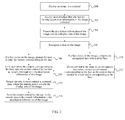
- FIG. 1 is a schematic flowchart of an image processing method according to an embodiment of the present invention. As shown in FIG. 1 , the image processing method in this embodiment may include:
- the image in the terminal may include, but is not limited to, a photo or a video, and this embodiment of the present invention sets no limit thereto.
- the description information of the image includes time, a place, or remark information of the image, which may be specifically determined according to an actual need. This embodiment of the present invention sets no limit thereto.
- the time of the image may be system time of the terminal when the image is taken, or may be time entered by a user manually.
- the place of the image may be geographical location information of the terminal when the image is taken. Specifically, the geographical location information may be obtained by using a network map, a satellite positioning system, or the like, or may be a place manually entered by the user.
- the remark information may be content manually entered by the user, which may be specifically an explanation of content of the image, such as an introduction to a character on the image, an introduction to scenery, a mood of the user when the image is taken, or some greeting words. That is, all information that the user can think of may be saved in the description information of the image as the remark information.
- an image in a terminal is displayed in a display area on a screen of the terminal; and after an instruction for viewing description information of the image is received, the description information of the image is presented outside the display area of the image. Therefore, it avoids a problem in the prior art that some pixels of an image are shielded because a terminal device adds annotation information to the image, thereby effectively increasing a visual effect of the image.
- FIG. 2 is a schematic flowchart of an image processing method according to an embodiment of the present invention. As shown in FIG. 2 , the image processing method in this embodiment may include:
- the image in the terminal may include, but is not limited to, a photo or a video, and this embodiment of the present invention sets no limit thereto.
- the description information of the image includes time, a place, or remark information of the image, which may be specifically determined according to an actual need. This embodiment of the present invention sets no limit thereto.
- the time of the image may be system time of the terminal when the image is taken, or may be time entered by a user manually.
- the place of the image may be geographical location information of the terminal when the image is taken. Specifically, the geographical location information may be obtained by using a network map, a satellite positioning system, or the like, or may be a place manually entered by the user.
- the remark information may be content manually entered by the user, which may be specifically an explanation of content of the image, such as an introduction to a character on the image, an introduction to scenery, a mood of the user when the image is taken, or some greeting words. That is, all information that the user can think of may be saved in the description information of the image as the remark information.
- buttons may be implemented by software or hardware.
- a virtual button may be added, a hardware button may be newly added, a function of viewing the description information of the image may be added to an existing button, or a certain touch gesture may be newly defined to represent viewing of the description information of the image.
- Manner 1 is shown in FIG. 2A .
- a specific zoom-out scale of the image may be determined according to an actual need. For example, if the terminal device is a mobile phone with a smaller screen, only one-word width may be vacated in an upper or lower part of the screen, and the description information of the image is displayed in one line. If content of the description information is large in size, the description information of the image may be displayed in a scrolling manner. If the terminal device is a PDA with a larger screen, the zoom-out scale of the image may be properly increased to vacate a larger display area.
- the specific zoom-out scale of the image may be adjusted adaptively according to a size of the screen, and the embodiment of the present invention sets no specific limit thereto.
- the image and the description information of the image may be displayed at the same time, and the user may see the description information of the image in a case in which an original image is not shielded, thereby effectively increasing user experience when the user uses the terminal.
- Manner 2 is shown in FIG. 2B .
- the correspondence may be recorded in a manner of adding an identifier to the two images.
- the other image linked to the image is displayed when the identifier on the image is clicked.
- the correspondence may also be saved; when the second image linked to the image is to be displayed, the correspondence is firstly called, then the second image corresponding to the image is found, and then the second image is displayed.
- the foregoing terminal device may specifically generate the second image in a specified pixel size according to a preset specified pixel size, and may further specifically generate, according to a pixel size of the image, the second image in the same pixel size as the image.
- an effect of flipping the displayed image in the terminal device is similar to an effect of an action of flipping a plane, so as to make the user visually take the second image for the back of the image.
- the user may view the description information of the image in a manner of flipping the image in a case in which the original image is not shielded.
- the effect of flipping the displayed image in the terminal device is similar to the effect of the action of flipping the plane, so as to make the user visually take the second image for the back of the image, thereby effectively increasing the user experience when the user uses the terminal device.
- the description information of the image is played in an audio manner.
- the description information of the image is played in the audio manner.
- the user may listen to the description information of the image in a case in which the image is not shielded, thereby effectively increasing the user experience when the user uses the terminal device.
- the method may further include the following steps:
- a prompting manner may be that: an empty input box is provided, and indicative text may be written in the input box, for example, please enter a name here; it may also be a prompt for the user to enter information by entering a recording.
- a corresponding saving operation needs to be performed according to different entered content; for example, if the entered content is text, it is saved in a text manner; if the entered content is an audio, it is saved in a recording and saving manner.
- a correspondence between the face and the entered content on the image needs to be saved, or the entered content is simply saved according to a sequence of faces on the image.
- the method may further include:
- the saved face in the terminal may be a profile picture saved in a contact list, and may also be information about a friend's profile picture saved in another application.
- step 207 If a record that is the same as the recognized face exists, extract saved content corresponding to the face as the content that is entered by the user and is corresponding to the face, and then perform step 209; if no record that is the same as the recognized face exists, perform step 208 (not shown in the figure).
- steps 206 to 209 may be skipped; the user is unaware of existence of the steps of face recognition.
- steps 205 to 209 are steps set for face recognition; the recognition is performed only once and does not need to be repeated. No more recognition is required in a subsequent process of viewing the description information of the image.
- Annotation information may be added to the face on the image by adding steps 205 to 209. Therefore, the user can see the annotation information corresponding to the face when viewing the image, thereby obtaining a prompt.
- the method further includes:
- a prompting manner may be that: an empty input box is provided, and indicative text may be written in the input box, for example, please enter content here; it may also be a prompt for the user to enter information by entering a recording.
- the user has entered the remark information, the content entered by the user is displayed in the remark area.
- a corresponding saving operation needs to be performed according to different entered content; for example, if the entered content is text, it is saved in a text manner; if the entered content is an audio, it is saved in a recording and saving manner.
- the user may enter desirable content in the image so that the user may see the description information of the image when viewing the image. For example, the user has a tour in a place and has taken photos of beautiful scenery. The user wants to give regards to a friend by using a photo of the beautiful scenery.
- the user may add greeting words to the remark area of the photo and send the photo to the friend. The friend can receive the regards from afar while appreciating the beautiful scenery.
- steps 205 to 209 and steps 210 to 211 are all optional steps; steps 205 to 209 and steps 210 to 211 are not performed in an order of sequence, and may also be performed at the same time. They may specifically be set according to an actual need, and this embodiment of the present invention sets no limit thereto.
- a status of displaying the description information of the image may be exited by re-clicking the button, or a status of displaying a next image is entered after a touch operation of turning a page is received.
- FIG. 3 is a schematic structural diagram of a terminal device according to another embodiment of the present invention.
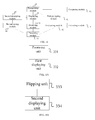
- the terminal device of this embodiment may include a displaying module 31, a receiving module 32, and a presenting module 33.
- the displaying module 31 is configured to display an image in a terminal;
- the receiving module 32 is configured to receive an instruction for viewing description information of the image, where the description information of the image includes time, a place, or remark information of the image;
- the presenting module 33 is configured to present the description information of the image outside a display area of the image.
- the description information of the image includes the time, the place, or the remark information of the image, which may be specifically determined according to an actual need. This embodiment of the present invention sets no limit thereto.
- the time of the image may be system time of the terminal when the image is taken, or may be time entered by a user manually.
- the place of the image may be geographical location information of the terminal when the image is taken. Specifically, the geographical location information may be obtained by using a network map, a satellite positioning system, or the like, or may be a place manually entered by the user.
- the remark information may be content manually entered by the user, which may be specifically an explanation of content of the image, such as an introduction to a character on the image, an introduction to scenery, a mood of the user when the image is taken, or some greeting words. That is, all information that the user can think of may be saved in the description information of the image as the remark information.
- the image may include, but not limited to, a picture or a video, and this embodiment of the present invention sets no limit thereto.
- a function of the terminal device in the embodiments corresponding to the foregoing FIG. 1 and FIG. 2 may be implemented by the terminal device according to this embodiment.
- an image in a terminal is displayed in a display area on a screen of the terminal; and after an instruction for viewing description information of the image is received, the description information of the image is presented outside the display area of the image. Therefore, it avoids a problem in the prior art that some pixels of an image are shielded because a terminal device adds annotation information to the image, thereby effectively increasing a visual effect of the image.
- FIG. 4 is a schematic structural diagram of a terminal device according to another embodiment of the present invention.
- the terminal device in this embodiment may include a displaying module 31, a receiving module 32, and a presenting module 33.
- the displaying module 31 is configured to display an image in a terminal;
- the receiving module 32 is configured to receive an instruction for viewing description information of the image, where the description information of the image includes time, a place, or remark information of the image;
- the presenting module 33 is configured to present the description information of the image outside a display area of the image.
- the description information of the image includes the time, the place, or the remark information of the image, which may be specifically determined according to an actual need. This embodiment of the present invention sets no limit thereto.
- the time of the image may be system time of the terminal when the image is taken, or may be time entered by a user manually.
- the place of the image may be geographical location information of the terminal when the image is taken. Specifically, the geographical location information may be obtained by using a network map, a satellite positioning system, or the like, or may be a place manually entered by the user.
- the remark information may be content manually entered by the user, which may be specifically an explanation of content of the image, such as an introduction to a character on the image, an introduction to scenery, a mood of the user when the image is taken, or some greeting words. That is, all information that the user can think of may be saved in the description information of the image as the remark information.
- the image may include, but not limited to, a picture or a video, and this embodiment of the present invention sets no limit thereto.
- the receiving module is specifically configured to receive an instruction that a button for viewing the description information of the image is clicked.
- the presenting module 33 may include: a zoom-out unit 331, configured to zoom out the image to vacate a part of the display area; and a first displaying unit 332, configured to display the description information of the image in the vacated display area.
- the presenting module 33 may include: a flipping unit 333, configured to perform a flipping operation on the image; and a second displaying unit 334, configured to display a second image linked to the image and display the description information of the image in the second image.
- the correspondence may be recorded in a manner of adding an identifier to the two images.
- the other image linked to the image is displayed when the identifier on the image is clicked.
- the correspondence may also be saved; when the second image linked to the image is to be displayed, the correspondence is firstly called, then the second image corresponding to the image is found, and then the second image is displayed.
- the foregoing terminal device may specifically generate, according to a preset specified pixel size, the second image that is in a specified pixel size and is corresponding to the image; and may further specifically generate, according to the pixel size of the image, the second image in the same pixel size as the image.
- the presenting module 33 is specifically configured to play the description information of the image in an audio manner.
- the terminal device may further include the following modules:
- the terminal may complete manual input and saving of the content corresponding to the face by including the recognizing module 40, the first prompting module 41, and the first saving module 42.
- the terminal device may further include the following modules:
- the terminal completes automatic input and saving of the content corresponding to the face by including the recognizing module 40, the comparing module 43, the extracting module 44, and the first saving module 42. If a comparison result of the comparing module 43 is that no record that is the same as the recognized face exists, the terminal may further include the first prompting module 41; therefore, when no record that is the same as the recognized face exists, the user may be prompted in time to enter the content corresponding to the face, and then to complete manual input and saving of the content corresponding to the face.
- the terminal device may further include the following modules:
- an image in a terminal is displayed in a display area on a screen of the terminal; and after an instruction for viewing description information of the image is received, the description information of the image is presented outside the display area of the image. Therefore, it avoids a problem in the prior art that some pixels of an image are shielded because a terminal device adds annotation information to the image, thereby effectively increasing a visual effect of the image.
- the disclosed method and terminal device may be implemented in other manners.
- the foregoing described apparatus embodiment is merely exemplary; for example, the division of the module and the unit is merely logical function division and may be divided in another manner in actual implementation; for example, a plurality of units or components may be combined or integrated into another system, or some features may be ignored or not performed.
- the displayed or discussed mutual couplings or direct couplings or communication connections may be implemented through some interfaces.
- the indirect couplings or communication connections between the apparatuses or units may be implemented in electronic, mechanical, or other forms.
- the units described as separate parts may or may not be physically separate, and parts displayed as units may or may not be physical units, may be located in one position, or may be distributed on a plurality of network units. Apart or all of the units may be selected according to actual needs to achieve the objectives of the solutions of the embodiments.
- functional units in the embodiments of the present invention may be integrated into one processing unit, or each of the units may exist alone physically, or two or more units are integrated into one unit.
- the integrated unit may be implemented in a form of hardware, or may be implemented in a form of a software functional unit.
- the integrated unit may be stored in a computer-readable storage medium.
- the software functional unit is stored in a storage medium and includes several instructions for instructing a computer device (which may be a personal computer, a server, or a network device) to perform a part of the steps of the methods described in the embodiments of the present invention.
- the foregoing storage medium includes: any medium that can store program code, such as a USB flash drive, a removable hard disk, a read-only memory (Read-Only Memory, ROM), a random access memory (Random Access Memory, RAM), a magnetic disk, or an optical disc.
Landscapes
- Engineering & Computer Science (AREA)
- Theoretical Computer Science (AREA)
- Physics & Mathematics (AREA)
- General Physics & Mathematics (AREA)
- General Engineering & Computer Science (AREA)
- Human Computer Interaction (AREA)
- Health & Medical Sciences (AREA)
- General Health & Medical Sciences (AREA)
- Oral & Maxillofacial Surgery (AREA)
- Multimedia (AREA)
- User Interface Of Digital Computer (AREA)
- Management, Administration, Business Operations System, And Electronic Commerce (AREA)
Applications Claiming Priority (2)
| Application Number | Priority Date | Filing Date | Title |
|---|---|---|---|
| CN2012100218549A CN102609895A (zh) | 2012-01-31 | 2012-01-31 | 一种图像处理方法及终端设备 |
| PCT/CN2012/080999 WO2013113219A1 (fr) | 2012-01-31 | 2012-09-05 | Procédé de traitement d'image et dispositif terminal |
Publications (2)
| Publication Number | Publication Date |
|---|---|
| EP2824633A1 true EP2824633A1 (fr) | 2015-01-14 |
| EP2824633A4 EP2824633A4 (fr) | 2015-09-02 |
Family
ID=46527243
Family Applications (1)
| Application Number | Title | Priority Date | Filing Date |
|---|---|---|---|
| EP12867153.4A Ceased EP2824633A4 (fr) | 2012-01-31 | 2012-09-05 | Procédé de traitement d'image et dispositif terminal |
Country Status (4)
| Country | Link |
|---|---|
| US (1) | US20140344751A1 (fr) |
| EP (1) | EP2824633A4 (fr) |
| CN (1) | CN102609895A (fr) |
| WO (1) | WO2013113219A1 (fr) |
Families Citing this family (11)
| Publication number | Priority date | Publication date | Assignee | Title |
|---|---|---|---|---|
| CN102609895A (zh) * | 2012-01-31 | 2012-07-25 | 华为终端有限公司 | 一种图像处理方法及终端设备 |
| CN104731829B (zh) * | 2013-12-24 | 2019-06-21 | 腾讯科技(深圳)有限公司 | 一种网络图片的互动方法和装置 |
| CN104035674B (zh) * | 2014-05-23 | 2017-05-24 | 小米科技有限责任公司 | 图片显示方法和装置 |
| CN104267869A (zh) * | 2014-09-05 | 2015-01-07 | 联想(北京)有限公司 | 一种信息处理方法及电子设备 |
| CN104657102B (zh) * | 2015-03-16 | 2018-08-10 | 联想(北京)有限公司 | 一种显示控制方法及电子设备 |
| CN106294519A (zh) * | 2015-06-12 | 2017-01-04 | 联想(北京)有限公司 | 一种图像显示方法及电子设备 |
| CN105867794A (zh) * | 2015-11-13 | 2016-08-17 | 乐视移动智能信息技术(北京)有限公司 | 一种锁屏壁纸相关信息获取方法及装置 |
| CN106200922B (zh) * | 2016-06-28 | 2019-08-23 | Oppo广东移动通信有限公司 | 控制方法、控制装置及电子装置 |
| CN108132746B (zh) * | 2016-12-01 | 2021-02-05 | 腾讯科技(北京)有限公司 | 一种图片显示方法、装置和设备 |
| CN107610042B (zh) * | 2017-08-23 | 2019-06-07 | 维沃移动通信有限公司 | 一种图像美化方法及移动终端 |
| CN108984143B (zh) * | 2018-07-13 | 2021-01-08 | 维沃移动通信有限公司 | 一种显示控制方法及终端设备 |
Family Cites Families (10)
| Publication number | Priority date | Publication date | Assignee | Title |
|---|---|---|---|---|
| US6243502B1 (en) * | 1998-08-13 | 2001-06-05 | International Business Machines Corporation | Image quality maintenance |
| US7546531B2 (en) * | 2003-11-21 | 2009-06-09 | Microsoft Corporation | Accessing alternate content |
| JP2008117333A (ja) * | 2006-11-08 | 2008-05-22 | Sony Corp | 情報処理装置、情報処理方法、個人識別装置、個人識別装置における辞書データ生成・更新方法および辞書データ生成・更新プログラム |
| CN101378433A (zh) * | 2007-08-31 | 2009-03-04 | 鹏智科技(深圳)有限公司 | 图片显示装置及方法 |
| CN101527772A (zh) * | 2008-03-07 | 2009-09-09 | 鸿富锦精密工业(深圳)有限公司 | 数码相机以及信息记录方法 |
| CN101340674A (zh) * | 2008-08-28 | 2009-01-07 | 深圳华为通信技术有限公司 | 一种移动终端中图像附加描述信息的方法和装置 |
| CN101753855A (zh) * | 2008-12-09 | 2010-06-23 | 华晶科技股份有限公司 | 可将数字相片结合备注文件的数字相机与方法 |
| KR101969930B1 (ko) * | 2011-01-07 | 2019-04-18 | 삼성전자주식회사 | 컨텐트 수집 방법 및 그 장치 |
| US9046980B1 (en) * | 2011-05-11 | 2015-06-02 | Photobucket Corporation | System and method for flipping a displayed image to present real-time additional data pertaining to that image |
| CN102609895A (zh) * | 2012-01-31 | 2012-07-25 | 华为终端有限公司 | 一种图像处理方法及终端设备 |
-
2012
- 2012-01-31 CN CN2012100218549A patent/CN102609895A/zh active Pending
- 2012-09-05 EP EP12867153.4A patent/EP2824633A4/fr not_active Ceased
- 2012-09-05 WO PCT/CN2012/080999 patent/WO2013113219A1/fr not_active Ceased
-
2014
- 2014-07-31 US US14/447,717 patent/US20140344751A1/en not_active Abandoned
Also Published As
| Publication number | Publication date |
|---|---|
| US20140344751A1 (en) | 2014-11-20 |
| WO2013113219A1 (fr) | 2013-08-08 |
| CN102609895A (zh) | 2012-07-25 |
| EP2824633A4 (fr) | 2015-09-02 |
Similar Documents
| Publication | Publication Date | Title |
|---|---|---|
| EP2824633A1 (fr) | Procédé de traitement d'image et dispositif terminal | |
| US10346023B2 (en) | Selectively emphasizing digital content | |
| CN105005429B (zh) | 一种终端展示图片的方法及终端 | |
| EP3226537A1 (fr) | Terminal mobile et son procédé de commande | |
| EP3528140A1 (fr) | Procédé de traitement d'images, dispositif, dispositif électronique et interface utilisateur graphique | |
| US11003707B2 (en) | Image processing in a virtual reality (VR) system | |
| US20150347824A1 (en) | Name bubble handling | |
| WO2014201832A1 (fr) | Procédé de changement de page, appareil et terminal de changement de page ainsi que support lisible par ordinateur | |
| US10140005B2 (en) | Causing elements to be displayed | |
| US9959487B2 (en) | Method and device for adding font | |
| US10922479B2 (en) | Method and electronic device for creating an electronic signature | |
| CN105243084A (zh) | 拍摄图像文件的保存方法和系统及其检索方法和系统 | |
| CN104754223A (zh) | 一种生成缩略图的方法及拍摄终端 | |
| CN104756096A (zh) | 混合媒体通信 | |
| CN108958592B (zh) | 视频处理方法及相关产品 | |
| US20190082002A1 (en) | Media file sharing method, media file sharing device, and terminal | |
| US20170004804A1 (en) | Photograph displaying method and user terminal | |
| US20170161871A1 (en) | Method and electronic device for previewing picture on intelligent terminal | |
| CN118409683A (zh) | 对象展示方法、装置、电子设备、存储介质和程序产品 | |
| CN103098003B (zh) | 用于显示数据对象的方法、软件和设备 | |
| US20160127651A1 (en) | Electronic device and method for capturing image using assistant icon | |
| CN112235632A (zh) | 视频处理方法、装置及服务器 | |
| CN103546709A (zh) | 一种视频拍摄的片头生成方法、系统及智能电子设备 | |
| CN108255917B (zh) | 图像管理方法、设备及电子设备 | |
| CN116257165A (zh) | 视频处理方法、装置、终端及存储介质 |
Legal Events
| Date | Code | Title | Description |
|---|---|---|---|
| PUAI | Public reference made under article 153(3) epc to a published international application that has entered the european phase |
Free format text: ORIGINAL CODE: 0009012 |
|
| 17P | Request for examination filed |
Effective date: 20140710 |
|
| AK | Designated contracting states |
Kind code of ref document: A1 Designated state(s): AL AT BE BG CH CY CZ DE DK EE ES FI FR GB GR HR HU IE IS IT LI LT LU LV MC MK MT NL NO PL PT RO RS SE SI SK SM TR |
|
| AX | Request for extension of the european patent |
Extension state: BA ME |
|
| DAX | Request for extension of the european patent (deleted) | ||
| RIC1 | Information provided on ipc code assigned before grant |
Ipc: G06T 11/00 20060101AFI20150327BHEP |
|
| RA4 | Supplementary search report drawn up and despatched (corrected) |
Effective date: 20150805 |
|
| RIC1 | Information provided on ipc code assigned before grant |
Ipc: G06T 11/00 20060101AFI20150730BHEP |
|
| 17Q | First examination report despatched |
Effective date: 20160902 |
|
| REG | Reference to a national code |
Ref country code: DE Ref legal event code: R003 |
|
| RAP1 | Party data changed (applicant data changed or rights of an application transferred) |
Owner name: HUAWEI DEVICE (DONGGUAN) CO., LTD. |
|
| STAA | Information on the status of an ep patent application or granted ep patent |
Free format text: STATUS: THE APPLICATION HAS BEEN REFUSED |
|
| 18R | Application refused |
Effective date: 20170427 |