EP2843535A2 - Appareil et procédé de réglage de geste dans un dispositif électronique - Google Patents
Appareil et procédé de réglage de geste dans un dispositif électronique Download PDFInfo
- Publication number
- EP2843535A2 EP2843535A2 EP20140181909 EP14181909A EP2843535A2 EP 2843535 A2 EP2843535 A2 EP 2843535A2 EP 20140181909 EP20140181909 EP 20140181909 EP 14181909 A EP14181909 A EP 14181909A EP 2843535 A2 EP2843535 A2 EP 2843535A2
- Authority
- EP
- European Patent Office
- Prior art keywords
- gesture
- control module
- input
- tap
- touch
- Prior art date
- Legal status (The legal status is an assumption and is not a legal conclusion. Google has not performed a legal analysis and makes no representation as to the accuracy of the status listed.)
- Granted
Links
Images










Classifications
-
- G—PHYSICS
- G06—COMPUTING OR CALCULATING; COUNTING
- G06F—ELECTRIC DIGITAL DATA PROCESSING
- G06F3/00—Input arrangements for transferring data to be processed into a form capable of being handled by the computer; Output arrangements for transferring data from processing unit to output unit, e.g. interface arrangements
- G06F3/01—Input arrangements or combined input and output arrangements for interaction between user and computer
- G06F3/048—Interaction techniques based on graphical user interfaces [GUI]
- G06F3/0487—Interaction techniques based on graphical user interfaces [GUI] using specific features provided by the input device, e.g. functions controlled by the rotation of a mouse with dual sensing arrangements, or of the nature of the input device, e.g. tap gestures based on pressure sensed by a digitiser
- G06F3/0488—Interaction techniques based on graphical user interfaces [GUI] using specific features provided by the input device, e.g. functions controlled by the rotation of a mouse with dual sensing arrangements, or of the nature of the input device, e.g. tap gestures based on pressure sensed by a digitiser using a touch-screen or digitiser, e.g. input of commands through traced gestures
- G06F3/04883—Interaction techniques based on graphical user interfaces [GUI] using specific features provided by the input device, e.g. functions controlled by the rotation of a mouse with dual sensing arrangements, or of the nature of the input device, e.g. tap gestures based on pressure sensed by a digitiser using a touch-screen or digitiser, e.g. input of commands through traced gestures for inputting data by handwriting, e.g. gesture or text
-
- G—PHYSICS
- G06—COMPUTING OR CALCULATING; COUNTING
- G06F—ELECTRIC DIGITAL DATA PROCESSING
- G06F9/00—Arrangements for program control, e.g. control units
- G06F9/06—Arrangements for program control, e.g. control units using stored programs, i.e. using an internal store of processing equipment to receive or retain programs
- G06F9/44—Arrangements for executing specific programs
-
- G—PHYSICS
- G06—COMPUTING OR CALCULATING; COUNTING
- G06F—ELECTRIC DIGITAL DATA PROCESSING
- G06F3/00—Input arrangements for transferring data to be processed into a form capable of being handled by the computer; Output arrangements for transferring data from processing unit to output unit, e.g. interface arrangements
- G06F3/01—Input arrangements or combined input and output arrangements for interaction between user and computer
- G06F3/017—Gesture based interaction, e.g. based on a set of recognized hand gestures
-
- G—PHYSICS
- G06—COMPUTING OR CALCULATING; COUNTING
- G06F—ELECTRIC DIGITAL DATA PROCESSING
- G06F3/00—Input arrangements for transferring data to be processed into a form capable of being handled by the computer; Output arrangements for transferring data from processing unit to output unit, e.g. interface arrangements
- G06F3/01—Input arrangements or combined input and output arrangements for interaction between user and computer
- G06F3/03—Arrangements for converting the position or the displacement of a member into a coded form
- G06F3/041—Digitisers, e.g. for touch screens or touch pads, characterised by the transducing means
-
- G—PHYSICS
- G06—COMPUTING OR CALCULATING; COUNTING
- G06F—ELECTRIC DIGITAL DATA PROCESSING
- G06F3/00—Input arrangements for transferring data to be processed into a form capable of being handled by the computer; Output arrangements for transferring data from processing unit to output unit, e.g. interface arrangements
- G06F3/01—Input arrangements or combined input and output arrangements for interaction between user and computer
- G06F3/03—Arrangements for converting the position or the displacement of a member into a coded form
- G06F3/041—Digitisers, e.g. for touch screens or touch pads, characterised by the transducing means
- G06F3/0412—Digitisers structurally integrated in a display
-
- G—PHYSICS
- G06—COMPUTING OR CALCULATING; COUNTING
- G06F—ELECTRIC DIGITAL DATA PROCESSING
- G06F3/00—Input arrangements for transferring data to be processed into a form capable of being handled by the computer; Output arrangements for transferring data from processing unit to output unit, e.g. interface arrangements
- G06F3/01—Input arrangements or combined input and output arrangements for interaction between user and computer
- G06F3/048—Interaction techniques based on graphical user interfaces [GUI]
- G06F3/0481—Interaction techniques based on graphical user interfaces [GUI] based on specific properties of the displayed interaction object or a metaphor-based environment, e.g. interaction with desktop elements like windows or icons, or assisted by a cursor's changing behaviour or appearance
- G06F3/0482—Interaction with lists of selectable items, e.g. menus
-
- G—PHYSICS
- G06—COMPUTING OR CALCULATING; COUNTING
- G06F—ELECTRIC DIGITAL DATA PROCESSING
- G06F3/00—Input arrangements for transferring data to be processed into a form capable of being handled by the computer; Output arrangements for transferring data from processing unit to output unit, e.g. interface arrangements
- G06F3/01—Input arrangements or combined input and output arrangements for interaction between user and computer
- G06F3/048—Interaction techniques based on graphical user interfaces [GUI]
- G06F3/0484—Interaction techniques based on graphical user interfaces [GUI] for the control of specific functions or operations, e.g. selecting or manipulating an object, an image or a displayed text element, setting a parameter value or selecting a range
-
- G—PHYSICS
- G06—COMPUTING OR CALCULATING; COUNTING
- G06F—ELECTRIC DIGITAL DATA PROCESSING
- G06F3/00—Input arrangements for transferring data to be processed into a form capable of being handled by the computer; Output arrangements for transferring data from processing unit to output unit, e.g. interface arrangements
- G06F3/01—Input arrangements or combined input and output arrangements for interaction between user and computer
- G06F3/048—Interaction techniques based on graphical user interfaces [GUI]
- G06F3/0484—Interaction techniques based on graphical user interfaces [GUI] for the control of specific functions or operations, e.g. selecting or manipulating an object, an image or a displayed text element, setting a parameter value or selecting a range
- G06F3/04842—Selection of displayed objects or displayed text elements
-
- G—PHYSICS
- G06—COMPUTING OR CALCULATING; COUNTING
- G06F—ELECTRIC DIGITAL DATA PROCESSING
- G06F3/00—Input arrangements for transferring data to be processed into a form capable of being handled by the computer; Output arrangements for transferring data from processing unit to output unit, e.g. interface arrangements
- G06F3/01—Input arrangements or combined input and output arrangements for interaction between user and computer
- G06F3/048—Interaction techniques based on graphical user interfaces [GUI]
- G06F3/0484—Interaction techniques based on graphical user interfaces [GUI] for the control of specific functions or operations, e.g. selecting or manipulating an object, an image or a displayed text element, setting a parameter value or selecting a range
- G06F3/04845—Interaction techniques based on graphical user interfaces [GUI] for the control of specific functions or operations, e.g. selecting or manipulating an object, an image or a displayed text element, setting a parameter value or selecting a range for image manipulation, e.g. dragging, rotation, expansion or change of colour
-
- G—PHYSICS
- G06—COMPUTING OR CALCULATING; COUNTING
- G06F—ELECTRIC DIGITAL DATA PROCESSING
- G06F3/00—Input arrangements for transferring data to be processed into a form capable of being handled by the computer; Output arrangements for transferring data from processing unit to output unit, e.g. interface arrangements
- G06F3/01—Input arrangements or combined input and output arrangements for interaction between user and computer
- G06F3/048—Interaction techniques based on graphical user interfaces [GUI]
- G06F3/0484—Interaction techniques based on graphical user interfaces [GUI] for the control of specific functions or operations, e.g. selecting or manipulating an object, an image or a displayed text element, setting a parameter value or selecting a range
- G06F3/04847—Interaction techniques to control parameter settings, e.g. interaction with sliders or dials
-
- G—PHYSICS
- G06—COMPUTING OR CALCULATING; COUNTING
- G06F—ELECTRIC DIGITAL DATA PROCESSING
- G06F3/00—Input arrangements for transferring data to be processed into a form capable of being handled by the computer; Output arrangements for transferring data from processing unit to output unit, e.g. interface arrangements
- G06F3/01—Input arrangements or combined input and output arrangements for interaction between user and computer
- G06F3/048—Interaction techniques based on graphical user interfaces [GUI]
- G06F3/0487—Interaction techniques based on graphical user interfaces [GUI] using specific features provided by the input device, e.g. functions controlled by the rotation of a mouse with dual sensing arrangements, or of the nature of the input device, e.g. tap gestures based on pressure sensed by a digitiser
- G06F3/0488—Interaction techniques based on graphical user interfaces [GUI] using specific features provided by the input device, e.g. functions controlled by the rotation of a mouse with dual sensing arrangements, or of the nature of the input device, e.g. tap gestures based on pressure sensed by a digitiser using a touch-screen or digitiser, e.g. input of commands through traced gestures
-
- G—PHYSICS
- G06—COMPUTING OR CALCULATING; COUNTING
- G06F—ELECTRIC DIGITAL DATA PROCESSING
- G06F3/00—Input arrangements for transferring data to be processed into a form capable of being handled by the computer; Output arrangements for transferring data from processing unit to output unit, e.g. interface arrangements
- G06F3/14—Digital output to display device ; Cooperation and interconnection of the display device with other functional units
Definitions
- the present disclosure relates to an electronic apparatus, and more particularly, to an apparatus and a method of setting a gesture in an electronic device.
- An electronic device such as a smart phone and a tablet Personal Computer (PC) has provided a user with various useful functions through various applications.
- the electronic device is changed to an apparatus enabling the user to use various types of information in addition to a voice communication function by providing various functions.
- the electronic device recognizes a gesture input from a user and executes a specific function.
- a recognition reference of the gesture of the electronic device is fixed, a unique touch sign of a user is not reflected. Further, since whether a gesture is input is determined based on a gesture recognition reference determined based on an ordinary person, such that when a user is a disabled person having a difficulty in inputting a touch, a success rate of recognizing a touch input of the user is low.
- an apparatus for setting a gesture in an electronic device includes a memory module and a control module.
- the memory module stores information about a gesture.
- the control module displays a gesture setting region for receiving an input of a specific gesture when the specific gesture is selected among a plurality of gestures, generates gesture information about the specific gesture and stores the generated gesture information in the memory module when the specific gesture is input through the gesture setting region, and sets a recognition reference of the specific gesture based on the gesture information.
- a method for setting a gesture in an electronic device. The method includes that when a specific gesture is selected among a plurality of gestures, displaying a gesture setting region for receiving an input of the specific gesture. The method also includes generating and storing gesture information about the specific gesture when the specific gesture is input through the gesture setting region. The method also includes setting a recognition reference of the specific gesture based on the gesture information.
- FIGURES 1 through 12G discussed below, and the various embodiments used to describe the principles of the present disclosure in this patent document are by way of illustration only and should not be construed in any way to limit the scope of the disclosure. Those skilled in the art will understand that the principles of the present disclosure may be implemented in any suitably arranged system or method.
- An electronic device is a easily portable and mobile electronic device, and may include, for example, a video phone, a mobile phone, a smart phone, an IMT-2000 (International Mobile Telecommunication 2000) terminal, a WCDMA terminal, a UMTS (Universal Mobile Telecommunication Service) terminal, a PDA (Personal Digital Assistant), a PMP (Portable Multimedia Player), a DMB (Digital Multimedia Broadcasting) terminal, an E-Book, a portable computer (for example, a notebook computer or a tablet computer), or a digital camera.
- a video phone for example, a mobile phone, a smart phone, an IMT-2000 (International Mobile Telecommunication 2000) terminal, a WCDMA terminal, a UMTS (Universal Mobile Telecommunication Service) terminal, a PDA (Personal Digital Assistant), a PMP (Portable Multimedia Player), a DMB (Digital Multimedia Broadcasting) terminal, an E-Book, a portable computer (for example, a notebook computer or a tablet computer), or a digital
- FIG. 1 illustrates a block diagram showing an electronic device according to various example embodiments of the present disclosure.
- the electronic device may include a control module 101, a display module 103, an input module 105, and a memory module 107.
- the input module 105 includes keys for inputting number and character information and function keys for setting various functions, and the display module 103 displays an image signal on a screen and displays data requested to be output by the control module 101.
- the display module 103 is implemented by a touch display screen, such as an electrostatic type or a resistive type, the input module 105 may include predetermined keys, and the display module 103 may partially replace a key input function of the input module 105.
- the memory module 107 includes a program memory and a data memory.
- the program memory may store a booting system and an operating system (hereinafter, referred to as the "OS") for controlling a general operation of the electronic device
- the data memory may store various data generated during an operation of the electronic device.
- OS operating system
- control module 101 performs a function of controlling a general operation of the electronic device.
- the control module 101 may generate gesture information based on a gesture input by a user, and set a gesture based on the generated gesture information.
- control module 101 may display a gesture setting menu, and confirm whether the gesture setting menu is selected by the user.
- gesture setting menu refers to a menu for setting a gesture.
- the control module 101 may display a gesture type menu.
- the gesture type menu refers to a menu including the types of gesture recognizable by the electronic device.
- the gesture type menu may include at least one of a tap and hold, a double tap, a flick, a zoom gesture, and a rotation gesture.
- control module 101 may identify whether a specific gesture menu item is selected in the displayed gesture type menu by the user. For example, the control module 101 may confirm whether a menu item corresponding to the tap and hold among the tap and hold, the double tap, the flick, the zoom gesture, and the rotation gesture is selected.
- the control module 101 may display a gesture setting region corresponding to the selected specific gesture menu item. For example, when the selected specific gesture menu item is the double tap, the control module 101 may display a gesture setting region including an input region for receiving an input of the double tap from the user.
- control module 101 may confirm whether a gesture corresponding to the selected specific gesture menu item is input into the input region of the gesture setting region. For example, when the selected specific gesture menu item is the double tap, the control module 101 may confirm whether the double tap is input into the input region of the gesture setting region.
- the control module 101 may generate gesture information corresponding to the input specific gesture, and store the generated gesture information in the memory module 107.
- the gesture information is information related to the gesture input by the user.
- the gesture information may include a time from when the input region is input to when the touch is released.
- the gesture information may include a time from when the input region is first touched to when the touch is released, a time from when the input region is second touched to when the touch is released, and a time from when a touch of the input region is first released to when the input region is second touched.
- the gesture information may include a time from when the input region is touched to when the touch is released, a moving distance from the touch of the input region to the release of the touch, and a direction of the flick.
- the gesture information may include a zoom ratio and a moving distance between a plurality of touched regions.
- the gesture information may include a rotation ratio and a rotation angle of the touched region.
- control module 101 may set a recognition reference of a corresponding gesture based on the gesture information corresponding to the corresponding gesture.
- the control module 101 may set the recognition reference of the corresponding gesture so as to be customized to an input sign of the user by changing a setting value of a corresponding gesture included in a frame work of the electronic device based on the gesture information of the corresponding gesture.
- the control module 101 may change the hold time of the tap and hold to 4 seconds based on the gesture information about the tap and hold. Further, when a gesture, in which the touch is maintained for 4 seconds, is input by the user, the control module 101 may determine that the input gesture meets the recognition reference of the tap and hold, and determine that the tap and hold is input.
- control module 101 may display the gesture setting menu item, and confirm whether the gesture setting menu item is selected by the user. When the gesture setting menu item is selected, the control module 101 may display the gesture type menu.
- control module 101 may confirm whether the tap and hold menu item is selected in the displayed gesture type menu by the user.
- the control module 101 may display a gesture setting region corresponding to the tap and hold menu item.
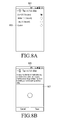
- the control module 101 may display a gesture setting region 807 including an input region for receiving an input of the tap and hold from the user like a screen 805 of FIG. 8B .
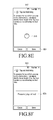
- control module 101 may confirm whether the tap and hold is input into the input region of the gesture setting region by the user. For example, the control module 101 may confirm whether the tap and hold is input into an input region 811 like a screen 809 of FIG. 8C .
- the control module 101 may confirm whether it is possible to generate tap and hold information, which is the gesture information corresponding to the tap and hold, based on a parameter (for example, a touch time or a touch release time) for the input tap and hold.
- the tap and hold information is the gesture information corresponding to the tap and hold, and may include a time from when the input region is touched to when the touch is released.
- the control module 101 may output a notice message demanding re-inputting the tap and hold, and repeatedly perform an operation of receiving an input of the tap and hold from the user. For example, the control module 101 may generate and display a pop-up window requesting re-inputting the tap and hold like a screen 823 of FIG. 8F . For another example, the control module 101 may output a voice message requesting re-inputting the tap and hold.
- the control module 101 may generate the tap and hold information that is the gesture information, and store the generated tap and hold information in the memory module 107. Further, the control module 101 may set the recognition reference of the tap and hold for the electronic device based on the tap and hold information. In this embodiment, the control module 101 may set the recognition reference of the tap and hold so as to be customized to the input sign of the user by changing a setting value of the tap and hold included in a frame work of the electronic device based on the tap and hold information.
- the control module 101 may change the hold time of the tap and hold to 4 seconds based on the tap and hold information. Then, when the gesture, in which the touch is maintained for 4 seconds, is input, the control module 101 may determine that the input gesture meets the recognition reference of the tap and hold, and determine that the tap and hold is input.
- control module 101 may display the gesture setting menu item, and confirm whether the gesture setting menu item is selected by the user. When the gesture setting menu item is selected, the control module 101 may display the gesture type menu.
- control module 101 may confirm whether a double tap menu item is selected in the displayed gesture type menu by the user.
- the control module 101 may display a gesture setting region corresponding to the double tap menu item.
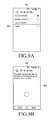
- the control module 101 may display a gesture setting region 907 including an input region for receiving an input of the double tap from the user like a screen 905 of FIG. 9B .
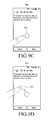
- control module 101 may confirm whether the double tap is input into the input region of the gesture setting region by the user. For example, the control module 101 may confirm whether the gesture is input into an input region 911 like a screen 909 of FIG. 9C .
- the control module 101 may confirm whether it is possible to generate double tap information, which is gesture information corresponding to the double tap, based on a parameter (for example, a touch time or a touch release time) for the input double tap.
- the double tap information is the gesture information corresponding to the double tap, and may include a time from when the input region is first touched to when the touch is released, a time from when the input region is second touched to when the touch is released, and a time from a touch of the input region is first released to the input region is second touched.
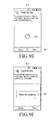
- the control module 101 may output a notice message requesting re-inputting the double tap, and repeatedly perform an operation of receiving an input of the double tap from the user. For example, the control module 101 may generate and display a pop-up window requesting re-inputting the double tap like a screen 923 of FIG. 9F . For another example, the control module 101 may output a voice message requesting re-inputting the double tap.
- the control module 101 may generate the double tap information, store the generated double tap information in the memory module 107, and then set the recognition reference of the double tap for the electronic device based on the double tap information.
- the control module 101 may set the recognition reference of the double tap so as to be customized to the input sign of the user by changing a setting value of the double tap included in the frame work of the electronic device based on the double tap information.
- the control module 101 may change a double tap touch interval to 3 seconds based on the double tap information. Then, when a gesture, in which an input time difference between a plurality of taps is 3 seconds, is input, the control module 101 may determine that the input gesture meets the recognition condition of the double tap, and determine that the double tap is input.
- control module 101 may display the gesture setting menu and confirm whether the gesture setting menu item is selected by the user. When the gesture setting menu item is selected, the control module 101 may display the gesture type menu.
- control module 101 may confirm whether a flick menu item is selected in the display gesture type menu by the user.
- the control module 101 may display the gesture type menu.
- a flick direction type menu is a menu showing directions of the flick, and may include, for example, a right directional flick, a left directional flick, a down directional flick, and an up directional flick.
- the control module 101 may display the flick direction type menu like a screen 1001 of FIG. 10A .
- control module 101 may confirm whether a specific flick direction is selected in the displayed flick direction type menu by the user.
- the control module 101 may display a gesture setting region corresponding to the selected flick direction.
- the control module 101 may display a gesture setting region 1011 including an input region for receiving an input of the right directional flick from the user like a screen 1009 of FIG. 10C .
- control module 101 may confirm whether the flick is input into the input region of the gesture setting region by the user. For example, the control module 101 may confirm whether the gesture is input into an input region 1015 like a screen 1013 of FIG. 10D .
- the control module 101 may confirm whether it is possible to generate flick information, which is the gesture information corresponding to the flick, based on a parameter for the input flick (for example, a touch performance direction, a moving distance of the touch, or a touch time).
- the flick information is the gesture information corresponding to the flick, and may include a time from when the input region is touched to when the touch is released, a moving distance from the touch of the input region to the release of the touch, and the direction of the flick.
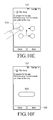
- the control module 101 may output a notice message demanding re-inputting the flick, and repeatedly perform an operation of receiving an input of the flick from the user. For example, the control module 101 may generate and display a pop-up window 1029 requesting re-inputting the flick like a screen 1027 of FIG. 10G . For another example, the control module 101 may output a voice message requesting re-inputting the flick.
- the control module 101 may generate the flick information, store the generated flick information in the memory module 107, and then set a recognition reference of the flick for the electronic device based on the flick information.
- the control module 101 may set the recognition reference of the flick so as to be customized to the input sign of the user by changing a setting value of the flick included in the frame work of the electronic device based on the flick information.
- the control module 101 may change the moving distance of the flick to 1 cm based on the flick information. Then, when a gesture, in which a direction of a touch is the right direction and a moving distance of the touch is 1 cm, is input, the control module 101 may determine that the gesture meets the recognition reference of the flick, and determine that the right direction flick is input.
- the control module 101 may display the gesture setting menu and confirm whether the gesture setting menu item is selected by the user.
- the control module 101 may display the gesture type menu.
- the zoom type menu is a menu showing the types of zoom, and may include, for example, a zoom-in gesture and a zoom-out gesture.
- the control module 101 may display the zoom type menu like a screen 1101 of FIG. 11A .
- control module 101 may confirm whether a zoom gesture menu item is selected in the displayed gesture type menu by the user. When the zoom gesture menu item is selected, the control module 101 may display the zoom type menu.
- control module 101 may confirm whether a specific zoom gesture is selected in the displayed zoom type menu by the user.
- the control module 101 may display a zoom ratio menu showing a plurality of zoom ratios for the selected specific zoom gesture.
- the control module 101 may display a zoom ratio menu like a screen 1105 of FIG. 11B .
- control module 101 may confirm whether a specific zoom ratio is selected in the zoom ratio menu by the user.
- the control module 101 may display a gesture setting region corresponding to the selected zoom gesture.
- the control module 101 may display a gesture setting region 1115 including an input region for receiving an input of the zoom-in gesture from the user like a screen 1113 of FIG. 11D .
- control module 101 may confirm whether the zoom gesture is input into the input region of the gesture setting region by the user. For example, the control module 101 may confirm whether the zoom-in gesture is input into an input region 1119 like a screen 1117 of FIG. 11E .
- the control module 101 confirms whether it is possible to generate zoom gesture information, which is the gesture information corresponding to the zoom gesture, based on a parameter for the input zoom gesture (for example, a moving distance between the plurality or touched regions).
- the zoom gesture information is the gesture information corresponding to the zoom, and may include the zoom ratio and the moving distance between the plurality of touched regions.
- the control module 101 may output a notice message demanding re-inputting the zoom gesture, and repeatedly perform an operation of receiving an input of the zoom gesture from the user. For example, the control module 101 may generate and display a pop-up window 1129 requesting re-inputting the flick like a screen 1127 of FIG. 11G . For another example, the control module 101 may output a voice message requesting re-inputting the zoom-in gesture.
- the control module 101 may generate the zoom gesture information, store the generated zoom gesture information in the memory module 107, and then set a recognition reference of the zoom gesture for the electronic device based on the zoom gesture information.
- the control module 101 may set the recognition reference of the zoom gesture so as to be customized to the input sign of the user by changing a setting value of the zoom gesture included in the frame work of the electronic device based on the zoom gesture information.
- the control module 101 may change the moving distance between the plurality of touched regions for the zoom-in to 1 cm based on the zoom gesture information. Then, when a gesture, in which a moving distance between a plurality of touched regions is 1 cm, is input on a specific image, the control module 101 may determine that the input gesture meets the recognition reference of the zoom-in gesture, and enlarge the specific image by 10 times (10 (selected zoom ratio) ⁇ 1 (moving distance)).
- control module 101 may display the gesture setting menu and confirm whether the gesture setting menu item is selected by the user. When the gesture setting menu item is selected, the control module 101 may display the gesture type menu.
- control module 101 may confirm whether a rotation gesture menu item is selected in the displayed gesture type menu by the user.
- the control module 101 may display a rotation direction menu.
- the rotation direction menu is a menu showing the direction types of rotation, and may include, for example, a clockwise direction and a counterclockwise direction.
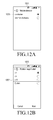
- the control module 101 may display the rotation direction menu like a screen 1201 of FIG. 12A .
- control module 101 may confirm whether a specific rotation direction is selected in the displayed rotation direction menu by the user.
- the control module 101 may display a rotation ratio menu showing a plurality of rotation ratios for the selected specific rotation direction.
- the control module 101 may display a rotation ratio menu like a screen 1205 of FIG. 12C .
- control module 101 may confirm whether a specific rotation ratio is selected in the rotation ratio menu by the user.
- the control module 101 may display a gesture setting region corresponding to the selected rotation direction. For example, when the direction of the selected rotation is the clockwise direction, the control module 101 may display a gesture setting region 1215 including an input region for receiving an input of the clockwise rotation gesture from the user like a screen 1213 of FIG. 12D .
- control module 101 may confirm whether the rotation gesture is input into the input region of the gesture setting region by the user. For example, the control module 101 may confirm whether the clockwise rotation gesture is input into an input region 1219 like a screen 1217 of FIG. 12E .
- the control module 101 confirms whether it is possible to generate rotation gesture information, which is the gesture information corresponding to the rotation gesture, based on a parameter for the input rotation gesture (for example, a rotation angle of a touched region).
- the rotation gesture information is the gesture information corresponding to the rotation, and may include a rotation ratio and a rotation angle of the touched region.
- the control module 101 may output a notice message demanding re-inputting the rotation gesture, and repeatedly perform an operation of receiving an input of the rotation gesture from the user. For example, the control module 101 may generate and display a pop-up window 1229 requesting re-inputting the clockwise rotation gesture like a screen 1227 of FIG. 12G . For another example, the control module 101 may output a voice message requesting re-inputting the rotation gesture.
- the control module 101 may generate the rotation gesture information, store the generated rotation gesture information in the memory module 107, and then set a recognition reference of the rotation gesture for the electronic device based on the rotation gesture information.
- the control module 101 may set the recognition reference of the rotation gesture so as to be customized to the input sign of the user by changing a setting value of the rotation gesture included in the frame work of the electronic device based on the rotation gesture information.
- the control module 101 may change the rotation angle of the touched region for the rotation to 10° based on the rotation gesture information. Then, when a gesture, in which a rotation angle of a touched region is 10°, is input on a specific image, the control module 101 may determine that the input gesture meets the recognition reference of the rotation gesture and rotate the specific image by 100° (10° ⁇ 10 times)
- FIG. 2 illustrates a process of setting a gesture according to various example embodiments.
- the control module 101 may display a gesture setting menu and confirm whether a gesture setting menu item is selected by a user.
- the gesture setting menu refers to a menu for setting a gesture.
- control module 101 may proceed to operation 203, but otherwise, the control module 101 may repeatedly perform operation 201.
- the control module 101 may display a gesture type menu, and then proceed to operation 205.
- the gesture type menu refers to a menu including the types of gesture recognizable by the electronic device.
- the gesture type menu may include at least one of a tap and hold, a double tap, a flick, a zoom gesture, and a rotation gesture.
- control module 101 may confirm whether a specific gesture menu item is selected in the displayed gesture type menu in operation 205. For example, the control module 101 may confirm whether a menu item corresponding to the tap and hold is selected among the tap and hold, the double tap, the flick, the zoom gesture, and the rotation gesture.
- control module 101 may proceed to operation 207, but otherwise, the control module 101 may repeatedly perform operation 205.
- control module 101 may display a gesture setting region corresponding to the selected specific gesture menu item, and then proceed to operation 209.
- the control module 101 may display a gesture setting region including an input region for receiving an input of the double tap from the user.
- control module 101 may confirm whether a gesture corresponding to the selected specific gesture menu item is input into the input region of the gesture setting region by the user. For example, when the selected specific gesture menu item is the double tap, the control module 101 may confirm whether the double tap is input into the input region of the gestures setting region.
- control module 101 may proceed to operation 211, but otherwise, the control module 101 may repeatedly perform operation 209.
- control module 101 may generate gesture information corresponding to the input specific gesture, store the generated gesture information in the memory module 107, and then proceed to operation 213.
- the gesture information is information related to the gesture input by the user.
- the gesture information may include a time from when the input region is touched to when the touch is released.
- the gesture information may include a time from when the input region is first touched to when the touch is released, a time from when the input region is second touched to when the touch is released, and a time from when a touch of the input region is first released to when the input region is second touched.
- the gesture information may include a time from when the input region is touched to when the touch is released, a moving distance from the touch of the input region to the release of the touch, and a direction of the flick.
- the gesture information may include a zoom ratio and a moving distance between a plurality of touched regions.
- the gesture information may include a rotation ratio and a rotation angle of the touched region.
- control module 101 may set a recognition reference of the corresponding gesture based on the gesture information corresponding to the corresponding gesture.
- the control module 101 may set the recognition reference of the corresponding gesture so as to be customized to an input sign of the user by changing a setting value of the corresponding gesture included in a frame work of the electronic device based on the gesture information about the corresponding gesture.
- the control module 101 may change the hold time of the tap and hold to 4 seconds based on the gesture information about the tap and hold. Further, when a gesture, in which the touch is maintained for 4 seconds, is input by the user, the control module 101 may determine that the tap and hold is input.
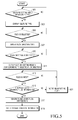
- FIG. 3 illustrates a process of setting a gesture according to various example embodiments.
- the control module 101 may display a gesture setting menu and confirm whether a gesture setting menu item is selected by a user.
- the gesture setting menu refers to a menu for setting a gesture.
- control module 101 may proceed to operation 303, but otherwise, the control module 101 may repeatedly perform operation 301.
- the control module 101 may display a gesture type menu, and then proceed to operation 305.
- the gesture type menu refers to a menu including the types of gesture recognizable by the electronic device.
- the gesture type menu may include at least one of a tap and hold, a double tap, a flick, a zoom gesture, and a rotation gesture.
- control module 101 may confirm whether the tap and hold menu item is selected in the displayed gesture type menu in operation 305. When the tap and hold menu item is selected, the control module 101 may proceed to operation 307, but otherwise, the control module 101 may repeatedly perform operation 305.
- control module 101 may display a gesture setting region corresponding to the tap and hold menu item, and then proceed to operation 309.
- the control module 101 may display a gesture setting region 807 including an input region for receiving an input of the tap and hold from the user like the screen 805 of FIG. 8B .
- control module 101 may confirm whether the tap and hold is input into the input region of the gesture setting region by the user. For example, the control module 101 may confirm whether the tap and hold is input into the input region 811 like a screen 809 of FIG. 8C .
- control module 101 may proceed to operation 311, but otherwise, the control module 101 may repeatedly perform operation 309.
- the control module 101 may confirm whether it is possible to generate tap and hold information, which is the gesture information corresponding to the tap and hold, based on a parameter (for example, a touch time or a touch release time) for the input tap and hold.
- the tap and hold information is the gesture information corresponding to the tap and hold, and may include a time from when the input region is touched to when the touch is released.
- control module 101 may proceed to operation 313, but otherwise, the control module 101 may repeatedly perform operation 317.
- control module 101 may output a notice message demanding re-inputting the tap and hold, and then repeatedly perform operation 309.
- the control module 101 may generate and display a pop-up window requesting re-inputting the tap and hold like the screen 823 of FIG. 8F .
- the control module 101 may output a voice message requesting re-inputting the tap and hold.
- control module 101 may generate the tap and hold information, which is the gesture information, store the generated tap and hold information in the memory module 107, and then proceed to operation 315.
- control module 101 may set a recognition reference of the tap and hold for the electronic device based on the tap and hold information.
- the control module 101 may set the recognition reference of the tap and hold so as to be customized to the input sign of the user by changing a setting value of the tap and hold included in the frame work of the electronic device based on the tap and hold information.
- the control module 101 may change the hold time of the tap and hold to 4 seconds based on the tap and hold information. Then, when a gesture, in which the touch is maintained for 4 seconds, is input by the user, the control module 101 may determine that the tap and hold is input.
- FIG. 4 illustrates a process of setting a gesture according to various example embodiments.
- the control module 101 may display a gesture setting menu and confirm whether a gesture setting menu item is selected by a user.
- the gesture setting menu refers to a menu for setting a gesture.
- control module 101 may proceed to operation 403, but otherwise, the control module 101 may repeatedly perform operation 401.
- the control module 101 may display a gesture type menu, and then proceed to operation 405.
- the gesture type menu refers to a menu including the types of gesture recognizable by the electronic device.
- the gesture type menu may include at least one of a tap and hold, a double tap, a flick, a zoom gesture, and a rotation gesture.
- control module 101 may confirm whether a double tap menu item is selected in the displayed gesture type menu in operation 405. When the double tap menu item is selected, the control module 101 may proceed to operation 407, but otherwise, the control module 101 may repeatedly perform operation 405.
- control module 101 may display a gesture setting region corresponding to the double tap menu item, and then proceed to operation 409.
- the control module 101 may display a gesture setting region 907 including an input region for receiving an input of the double tap from the user like the screen 905 of FIG. 9B .
- control module 101 may confirm whether the double tap is input into the input region of the gesture setting region by the user. For example, the control module 101 may confirm whether the gesture is input into the input region 911 like the screen 909 of FIG. 9C .
- control module 101 may proceed to operation 411, but otherwise, the control module 101 may repeatedly perform operation 409.
- the control module 101 may confirm whether it is possible to generate double tap information, which is the gesture information corresponding to the double tap, based on a parameter (for example, a touch time or a touch release time) for the input double tap.
- the double tap information is the gesture information corresponding to the double tap, and may include a time from when the input region is first touched to when the touch is released, a time from when the input region is second touched to when the touch is released, and a time from when a touch of the input region is first released to when the input region is second touched.
- control module 101 may proceed to operation 413, but otherwise, the control module 101 may proceed to operation 417.
- control module 101 may output a notice message demanding re-inputting the double tap, and then repeatedly perform operation 409.
- the control module 101 may generate and display a pop-up window requesting re-inputting the double tap like the screen 923 of FIG. 9F .
- the control module 101 may output a voice message requesting re-inputting the double tap.
- control module 101 may generate the double tap information, store the generated double tap information in the memory module 107, and then proceed to operation 415.
- control module 101 may set a recognition reference of the double tap for the electronic device based on the double tap information.
- control module 101 may set the recognition reference of the double tap so as to be customized to the input sign of the user by changing a setting value of the double tap included in the framework of the electronic device based on the double tap information.
- the control module 101 may change a double tap touch interval to 3 seconds based on the double tap information. Then, when a gesture, in which an input time difference between a plurality of taps is 3 seconds, is input, the control module 101 may determine that the double tap is input.
- FIG. 5 illustrates a process of setting a gesture according to various example embodiments.
- the control module 101 may display a gesture setting menu and confirm whether a gesture setting menu item is selected by a user.
- the gesture setting menu refers to a menu for setting a gesture.
- control module 101 may proceed to operation 503, but otherwise, the control module 101 may repeatedly perform operation 501.
- the control module 101 may display a gesture type menu, and then proceed to operation 505.
- the gesture type menu refers to a menu including the types of gesture recognizable by the electronic device.
- the gesture type menu may include at least one of a tap and hold, a double tap, a flick, a zoom gesture, and a rotation gesture.
- control module 101 may confirm whether a flick menu item is selected in the displayed gesture type menu in operation 505. When the flick menu item is selected, the control module 101 may proceed to operation 507, but otherwise, the control module 101 may repeatedly perform operation 505.
- a flick direction type menu is a menu showing directions of the flick, and may include, for example, a right directional flick, a left directional flick, a down directional flick, and an up directional flick.
- the control module 101 may display the flick direction type menu like the screen 1001 of FIG. 10A .
- control module 101 may confirm whether a specific flick direction is selected in the displayed flick direction type menu by the user. When the specific flick direction is selected, the control module 101 may proceed to operation 511, but otherwise, the control module 101 may repeatedly perform operation 509.
- control module 101 may display a gesture setting region corresponding to the selected flick direction, and then proceed to operation 513.
- the control module 101 may display a gesture setting region 1011 including an input region for receiving an input of the right directional flick from the user like the screen 1009 of FIG. 10C .
- control module 101 may confirm whether the flick is input into the input region of the gesture setting region by the user. For example, the control module 101 may confirm whether the gesture is input into the input region 1015 like the screen 1013 of FIG. 10D .
- control module 101 may proceed to operation 515, but otherwise, the control module 101 may repeatedly perform operation 513.
- the control module 101 may confirm whether it is possible to generate flick information, which is the gesture information corresponding to the flick, based on a parameter for the input flick (for example, a touch performance direction, a moving distance of the touch, or a touch time).
- the flick information is the gesture information corresponding to the flick, and may include a time from when the input region is touched to when the touch is released, a moving distance from the touch of the input region to the release of the touch, and the direction of the flick.
- control module 101 may proceed to operation 517, but otherwise, the control module 101 may proceed to operation 521.
- control module 101 may output a notice message demanding re-inputting the flick tap, and then repeatedly perform operation 513.
- the control module 101 may generate and display a pop-up window 1029 requesting re-inputting the flick like the screen 1027 of FIG. 10G .
- the control module 101 may output a voice message requesting re-inputting the flick.
- control module 101 may generate the flick information, store the generated flick information in the memory module 107, and then proceed to operation 519.
- control module 101 may set a recognition reference of the flick for the electronic device based on the flick information.
- control module 101 may set the recognition reference of the flick so as to be customized to the input sign of the user by changing a setting value of the flick included in the frame work of the electronic device based on the flick information.
- the control module 101 may change the moving distance of the flick to 1 cm based on the flick information. Then, when a gesture, in which a touch direction is the right direction and a touch moving distance is 1 cm, the control module 101 may determine that the right directional flick is input.
- the control module 101 when the flick direction is selected by the user, the control module 101 generates the flick information about the selected flick direction in operations 507 to 519, but the control module 101 may generate the flick information without user's selection of the flick direction.
- the control module 101 may automatically display a gesture setting region corresponding to a predetermined first direction (for example, the right direction), and generate the flick information about the first direction according to a first-directional flick input by the user through a first gesture setting region.
- control module 101 may automatically display a second gesture setting region corresponding to a predetermined second direction (for example, the left direction), and generate the flick information about the second direction according to a second-directional flick input by the user through the gesture setting region. Through the repetition of the operation, the control module 101 may generate the flick information about at least one direction between a third direction and a fourth direction.
- a predetermined second direction for example, the left direction
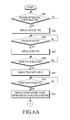
- FIGS. 6A and 6B illustrate a process of setting a gesture according to various example embodiments.
- the control module 101 may display a gesture setting menu and confirm whether a gesture setting menu item is selected by a user.
- the gesture setting menu refers to a menu for setting a gesture.
- control module 101 may proceed to operation 603, but otherwise, the control module 101 may repeatedly perform operation 601.
- the control module 101 may display a gesture type menu, and then proceed to operation 605.
- the gesture type menu refers to a menu including the types of gesture recognizable by the electronic device.
- the gesture type menu may include at least one of a tap and hold, a double tap, a flick, a zoom gesture, and a rotation gesture.
- control module 101 may confirm whether a zoom gesture menu item is selected in the displayed gesture type menu in operation 605. When the zoom gesture menu item is selected, the control module 101 may proceed to operation 607, but otherwise, the control module 101 may repeatedly perform operation 605.
- the control module 101 may display a zoom type menu, and then proceed to operation 609.
- the zoom type menu is a menu showing the types of zoom, and may include, for example, a zoom-in gesture and a zoom-out gesture.
- the control module 101 may display the zoom type menu like the screen 1101 of FIG. 11A .
- control module 101 may confirm whether a specific zoom gesture is selected in the displayed zoom type menu by the user. When the specific zoom gesture is selected, the control module 101 may proceed to operation 611, but otherwise, the control module 101 may proceed to operation 609.
- control module 101 may display a zoom ratio menu showing a plurality of zoom ratios for the selected specific zoom gesture and then proceed to operation 613.
- the control module 101 may display a zoom ratio menu like the screen 1105 of FIG. 11B .
- control module 101 may confirm whether a specific zoom ratio is selected in the zoom ratio menu by the user. When the specific zoom ratio is selected, the control module 101 may proceed to operation 615, but otherwise, the control module 101 may proceed to operation 613.
- the control module 101 may display a gesture setting region corresponding to the selected zoom gesture and then proceed to operation 617.
- the control module 101 may display a gesture setting region 1115 including an input region for receiving an input of the zoom-in gesture from the user like the screen 1113 of FIG. 11D .
- control module 101 may confirm whether the zoom gesture is input into the input region of the gesture setting region by the user. For example, the control module 101 may confirm whether the zoom-in gesture is input into the input region 1119 like the screen 1117 of FIG. 11E .
- control module 101 may proceed to operation 619, but otherwise, the control module 101 may repeatedly perform operation 617.
- the control module 101 confirms whether it is possible to generate zoom gesture information, which is the gesture information corresponding to the zoom gesture, based on a parameter for the input zoom gesture (for example, a moving distance between the plurality or touched regions).
- the zoom gesture information is the gesture information corresponding to the zoom, and may include the zoom ratio and the moving distance between the plurality of touched regions.
- control module 101 may proceed to operation 621, but otherwise, the control module 101 may proceed to operation 625.
- control module 101 may output a notice message demanding re-inputting the zoom gesture, and then repeatedly perform operation 617.
- the control module 101 may generate and display a pop-up window 1129 requesting re-inputting the zoom-in gesture like the screen 1127 of FIG. 11G .
- the control module 101 may output a voice message requesting re-inputting the zoom-in gesture.
- control module 101 may generate the zoom gesture information, store the generated zoom gesture information in the memory module 107, and then proceed to operation 623.
- control module 101 may set a recognition reference of the zoom gesture for the electronic device based on the zoom gesture information.
- control module 101 may set the recognition reference of the zoom gesture so as to be customized to the input sign of the user by changing a setting value of the zoom gesture included in the frame work of the electronic device based on the zoom gesture information.
- the control module 101 may change the moving distance between the plurality of touched regions for the zoom-in to 1 cm based on the zoom gesture information. Then, when a gesture, in which a moving distance between the plurality of touched regions is 1 cm, is input into a specific image, the control module 101 may determine that the zoom-in gesture of enlarging the specific image by 10 times is input.
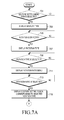
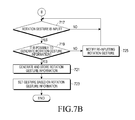
- FIGS. 7A and 7B illustrate a process of setting a gesture according to various example embodiments.
- the control module 101 may display a gesture setting menu and confirm whether a gesture setting menu item is selected by a user.
- the gesture setting menu refers to a menu for setting a gesture.
- control module 101 may proceed to operation 703, but otherwise, the control module 101 may repeatedly perform operation 701.
- the control module 101 may display a gesture type menu, and then proceed to operation 705.
- the gesture type menu refers to a menu including the types of gesture recognizable by the electronic device.
- the gesture type menu may include at least one of a tap and hold, a double tap, a flick, a zoom gesture, and a rotation gesture.
- control module 101 may confirm whether a rotation gesture menu item is selected in the displayed gesture type menu in operation 705. When the rotation menu item is selected, the control module 101 may proceed to operation 707, but otherwise, the control module 101 may repeatedly perform operation 705.
- the control module 101 may display a rotation direction menu, and then proceed to operation 709.
- the rotation direction menu is a menu showing the direction types of rotation, and may include, for example, a clockwise direction and a counterclockwise direction.
- the control module 101 may display the rotation direction menu like the screen 1201 of FIG. 12A .
- control module 101 may confirm whether a specific rotation direction is selected in the displayed rotation direction menu by the user. When the specific rotation direction is selected, the control module 101 may proceed to operation 711, but otherwise, the control module 101 may repeatedly perform operation 709.
- control module 101 may display a rotation ratio menu showing a plurality of rotation ratios for the selected specific rotation direction and then proceed to operation 713.
- the control module 101 may display a rotation ratio menu like the screen 1205 of FIG. 12B .
- control module 101 may confirm whether a specific rotation ratio is selected in the rotation ratio menu by the user. When the specific rotation ratio is selected, the control module 101 may proceed to operation 715, but otherwise, the control module 101 may proceed to operation 713.
- control module 101 may display a gesture setting region corresponding to the selected rotation direction, and then proceed to operation 717.
- the control module 101 may display a gesture setting region 1215 including an input region for receiving an input of the clockwise rotation gesture from the user like the screen 1213 of FIG. 12D .
- control module 101 may confirm whether the rotation gesture is input into the input region of the gesture setting region by the user. For example, the control module 101 may confirm whether the clockwise rotation gesture is input into the input region 1219 like the screen 1217 of FIG. 12E .
- control module 101 may proceed to operation 719, but otherwise, the control module 101 may repeatedly perform operation 717.
- the control module 101 may confirm whether it is possible to generate rotation gesture information, which is the gesture information corresponding to the rotation gesture, based on a parameter for the input rotation gesture (for example, a rotation angle of a touched region).
- the rotation gesture information is the gesture information corresponding to the rotation, and may include a rotation ratio and a rotation angle of the touched region.
- control module 101 may proceed to operation 721, but otherwise, the control module 101 may proceed to operation 725.
- control module 101 may output a notice message demanding re-inputting the rotation gesture, and then repeatedly perform operation 717.
- the control module 101 may generate and display a pop-up window 1229 requesting re-inputting the clockwise rotation gesture like a screen 1227 of FIG. 12G .
- the control module 101 may output a voice message requesting re-inputting the rotation gesture.
- control module 101 may generate the rotation gesture information, store the generated rotation gesture information in the memory module 107, and then proceed to operation 723.
- control module 101 may set a recognition reference of the zoom gesture for the electronic device based on the rotation gesture information.
- control module 101 may set the recognition reference of the rotation gesture so as to be customized to the input sign of the user by changing a setting value of the rotation gesture included in the frame work of the electronic device based on the rotation gesture information.
- the control module 101 may change the rotation angle of the touched region for the rotation to 10° based on the rotation gesture information. Then, when a gesture, in which a rotation angle of a touched region is 10°, is input on a specific image, the control module 101 may determine that the rotation gesture for rotating the specific image by 100° (10° ⁇ 10 times) is input.
- FIGs. 8A to 8F illustrate screens in which a gesture is set according to various embodiments.
- the control module 101 may display a delay setting menu including a plurality of delay times for setting a tap and hold delay time like a screen 801.
- the delay setting menu may include a short section delay menu item (0.5 second), a medium section delay menu item (1 second), a long section delay menu item (1.5 seconds), and a user setting menu item 803.
- the user setting refers to a menu item for setting a delay time of the tap and hold based on the tap and hold input by the user.
- the control module 101 may display the gesture setting region 807 including the input region for receiving the input of the tap and hold from the user like the screen 805. In this embodiment, the control module 101 may display the input region at a center portion of the gesture setting region 807.
- control module 101 may confirm whether the tap and hold is input into the input region 811 of the gesture setting region like the screen 809. In this embodiment, when the touch of the gesture is not started within the displayed input region, the control module 101 may detect a touch position of the gesture and display the input region 815 at the detected touch position like a screen 813.
- control module 101 confirms whether it is possible to generate the tap and hold information based on the parameter of the input tap and hold.
- the control module 101 may change a color of the input region 819 for showing that it is possible to generate the tap and hold information, and activate a storage menu item 821 of the tap and hold information like a screen 817.
- control module 101 may display a pop-up window 825 demanding re-inputting the tap and hold on the gesture setting region like the screen 823.
- FIGS. 9A to 9F illustrate screens in which a gesture is set according to various embodiments.
- the control module 101 may display a delay setting menu including a plurality of delay times for setting a double tap delay time like a screen 901.
- the delay setting menu may include a short section delay menu item (0.5 second), a medium section delay menu item (1 second), a long section delay menu item (1.5 seconds), and a user setting menu item 903.
- the user setting refers to a menu for setting a delay time of the double tap based on the double tap input by the user.
- the control module 101 may display the gesture setting region 907 including the input region for receiving the input of the tap and hold from the user like the screen 905. In this embodiment, the control module 101 may display the input region at a center portion of the gesture setting region 907.
- control module 101 may confirm whether the double tap is input into the input region 911 of the gesture setting region like the screen 909. In this embodiment, when the touch of the gesture is not started within the displayed input region, the control module 101 may detect a touch position of the gesture and display the input region 913 at the detected touch position like a screen 915.
- control module 101 confirms whether it is possible to generate the double tap information based on the parameter of the input double tap.
- the control module 101 may change a color of the input region 919 for showing that it is possible to generate the tap and hold information, and activate a storage menu item 921 of the double tap information.
- control module 101 may display a pop-up window 925 demanding re-inputting the double tap on the gesture setting region like the screen 923.
- FIGs. 10A to 10I illustrate screens in which a gesture is set according to various embodiments.
- the control module 101 may display the flick direction type menu for selecting a flick direction like the screen 1001.
- the flick direction type menu may include a right direction menu item, a left direction menu item, an up direction menu item, a down direction menu item, and an all direction menu item.
- the all direction menu item is a menu item for setting a delay time for a representative direction among the flicks in the right direction, the left direction, the up direction, and the down direction, and reflecting the delay time for the representative direction to delay times of all of the directions.
- the control module 101 may display the flick direction type menu for selecting a flick direction like the screen 1037.
- the flick direction type menu may include the right direction menu item, the left direction menu item, the up direction menu item, and the down direction menu item, and check boxes (for example, a check box 1039 for selecting the right direction menu item) for selecting a specific direction in the flick direction type menu.
- the control module 101 may display the delay setting menu for setting a delay time for the flick in the specific direction like a screen 1005.
- the control module 101 may display the delay setting menu for setting a delay time for the flick in the right direction like the screen 1005.
- the delay setting menu may include a short section delay menu item (0.5 second), a medium section delay menu item (1 second), a long section delay menu item (1.5 seconds), and a user setting menu item 903.
- the user setting refers to a menu for setting a delay time of the flick based on the flick input by the user.
- the control module 101 may display the delay setting menu for setting the delay for the flick in the representative direction (For example, the right direction) among all of the directions like the screen 1005. Further, when the user setting menu item 1007 is selected in the delay setting menu, the control module 101 may display the gesture setting region 1011 including the input region for receiving the input of the flick from the user like the screen 1009. In this embodiment, the control module 101 may display the input region at a center portion of the gesture setting region 1011.
- control module 101 may confirm whether the flick is input into the input region 1015 of the gesture setting region like the screen 1013. In this embodiment, when the touch of the gesture is not started within the displayed input region, the control module 101 may detect a touch position of the gesture and display the input region 1017 at the detected touch position like a screen 1019.
- control module 101 confirms whether it is possible to generate the flick information based on the parameter of the input flick. When it may be unable to generate the flick information, the control module 101 may display a pop-up window 1029 demanding re-inputting the flick on the gesture setting region like the screen 1027.
- control module 101 may change a color of the input region 1023 for showing that it is possible to generate the flick information, and activate a storage menu item 1025 of the flick information like a screen 1021.
- the control module 101 may display a pop-up window 1035 inquiring whether to apply the information about the flick in the corresponding direction as information of the flick in other directions. Further, when "yes” is selected by the user, the control module 101 may apply the information about the flick in the corresponding direction as the information of the flick in other directions. However, when "no" is selected by the user, the control module 101 may not apply the information about the flick in the corresponding direction as the information of the flick in other directions.
- the control module 101 may apply the information about the flick in the corresponding direction as the information of the flick in other directions.
- FIGs. 11A to 11G illustrate screens in which a gesture is set according to various embodiments.
- the control module 101 may display the zoom type menu for selecting the type of the zoom gesture like the screen 1101.
- the zoom type menu may include a zoom in menu item and a zoom-out menu item.
- the control module 101 may display the zoom ratio setting menu for setting a ratio of the specific zoom menu item like a screen 1105.
- the zoom ratio setting menu may include a low ratio menu item (one time), a medium ratio menu item (5 times), a high ratio menu item (10 times), and a user setting menu item.
- the user setting menu item refers to a menu item for setting a zoom ratio with a number input by the user.
- the control module 101 may display a moving distance setting menu for setting a moving distance between the plurality of touched regions of the specific zoom gesture like a screen 1109.
- the moving distance setting menu may include a short section moving menu item (0.5 cm), a medium section moving menu item (1 cm), a long section moving menu item (1.5 cm), and a user setting menu item.
- the user setting menu item refers to a menu item for setting a moving distance between the touched regions of the specific zoom gesture based on the specific zoom gesture input by the user.
- the control module 101 may display the gesture setting region 1115 including the input region for receiving the input of the specific zoom gesture from the user like the screen 1113.
- the control module 101 may display the input region at a center portion of the gesture setting region 1115.
- the control module 101 confirms whether it is possible to generate the zoom gesture information based on the parameter of the input zoom gesture.
- the control module 101 may change a color of the input region 1123 for showing that it is possible to generate the zoom gesture information, and activate a storage menu item 1125 of the zoom gesture information like the screen 1121.
- control module 101 may display a pop-up window 1129 demanding re-inputting the specific zoom gesture on the gesture setting region like the screen 1127.
- FIGs. 12A to 12G illustrate screens in which a gesture is set according to various embodiments.
- the control module 101 may display the rotation type menu for selecting a rotation direction of the rotation gesture like the screen 1201.
- the rotation type menu may include a clockwise direction rotation menu item and a counterclockwise direction rotation menu item.
- the control module 101 may display the rotation ratio setting menu for setting a ratio of the specific rotation menu item like the screen 1205.
- the control module 101 may display the rotation ratio setting menu for setting a rotation ratio for the clockwise rotation gesture like the screen 1205.
- the rotation ratio setting menu may include a low ratio menu item (one time), a medium ratio menu item (5 times), a high ratio menu item (10 times), and a user setting menu item.
- the user setting menu item refers to a menu item for setting a rotation ratio with a number input by the user.
- the control module 101 may display a rotation angle setting menu for setting a rotation angle of the touched region for the specific rotation gesture like a screen 1209.
- the rotation ratio setting menu may include a small angle menu item (5°), a medium angle menu item (10°), a large angle menu item (15°), and a user setting menu item.
- the user setting menu item refers to a menu item for setting a rotation angle of the touched region for the specific rotation gesture based on the specific rotation gesture input by the user.
- the control module 101 may display the gesture setting region 1215 including the input region for receiving the input of the specific rotation gesture from the user like the screen 1213.
- the control module 101 may display the input region at a center portion of the gesture setting region 1215.
- the control module 101 confirms whether it is possible to generate the rotation gesture information based on the parameter of the input rotation gesture.
- the control module 101 may change a color of the input region 1223 for showing that it is possible to generate the rotation gesture information, and activate a storage menu item 1225 of the rotation gesture information like the screen 1221.
- control module 101 may display a pop-up window 1229 demanding re-inputting the specific rotation gesture on the gesture setting region like the screen 1227.
- a gesture is set by reflecting a unique touch sign of a user, thereby providing the user with touch convenience.
- the apparatus and the method of setting the gesture in the electronic device may be implemented by computer readable codes in a computer readable recording medium.
- the computer-readable recording medium includes all the types of recording devices in which data readable by a computer system are stored. As for such a recording medium, for example, a ROM, a RAM, an optical disc, a magnetic tape, a floppy disc, a hard disc, or a non-volatile memory may be used, and a medium implemented in a type of carrier wave (for example, transmission through the Internet) may also be included in such a recording medium.
- the computer-readable recording medium may be stored with codes which are distributed in computer systems connected by a network such that the codes can be read and executed by a computer in a distributed method.
- a gesture is set by reflecting a unique touch sign of a user, thereby providing the user with touch convenience.
- a gesture input by using another function may also be set.
- a gesture input by using a hovering function a proximity touch function
- a gesture input by using a touch function may be set.
Landscapes
- Engineering & Computer Science (AREA)
- Theoretical Computer Science (AREA)
- General Engineering & Computer Science (AREA)
- Physics & Mathematics (AREA)
- General Physics & Mathematics (AREA)
- Human Computer Interaction (AREA)
- Software Systems (AREA)
- User Interface Of Digital Computer (AREA)
Applications Claiming Priority (1)
| Application Number | Priority Date | Filing Date | Title |
|---|---|---|---|
| KR20130105770A KR20150026649A (ko) | 2013-09-03 | 2013-09-03 | 전자 장치에서 제스처를 설정하는 장치 및 방법 |
Publications (3)
| Publication Number | Publication Date |
|---|---|
| EP2843535A2 true EP2843535A2 (fr) | 2015-03-04 |
| EP2843535A3 EP2843535A3 (fr) | 2015-03-18 |
| EP2843535B1 EP2843535B1 (fr) | 2018-02-28 |
Family
ID=51485445
Family Applications (1)
| Application Number | Title | Priority Date | Filing Date |
|---|---|---|---|
| EP14181909.4A Not-in-force EP2843535B1 (fr) | 2013-09-03 | 2014-08-22 | Appareil et procédé de réglage de geste dans un dispositif électronique |
Country Status (3)
| Country | Link |
|---|---|
| US (1) | US20150062046A1 (fr) |
| EP (1) | EP2843535B1 (fr) |
| KR (1) | KR20150026649A (fr) |
Cited By (2)
| Publication number | Priority date | Publication date | Assignee | Title |
|---|---|---|---|---|
| CN108717325A (zh) * | 2018-04-18 | 2018-10-30 | Oppo广东移动通信有限公司 | 操作手势设置方法、装置及移动终端 |
| EP3783473A4 (fr) * | 2018-04-18 | 2021-06-09 | Guangdong Oppo Mobile Telecommunications Corp., Ltd. | Procédé et appareil d'affichage de page, terminal mobile et support de stockage |
Families Citing this family (52)
| Publication number | Priority date | Publication date | Assignee | Title |
|---|---|---|---|---|
| US9792017B1 (en) | 2011-07-12 | 2017-10-17 | Domo, Inc. | Automatic creation of drill paths |
| US9202297B1 (en) * | 2011-07-12 | 2015-12-01 | Domo, Inc. | Dynamic expansion of data visualizations |
| US9417754B2 (en) | 2011-08-05 | 2016-08-16 | P4tents1, LLC | User interface system, method, and computer program product |
| WO2013169875A2 (fr) | 2012-05-09 | 2013-11-14 | Yknots Industries Llc | Dispositif, méthode et interface utilisateur graphique d'affichage de contenu associé à une affordance correspondante |
| WO2013169849A2 (fr) | 2012-05-09 | 2013-11-14 | Industries Llc Yknots | Dispositif, procédé et interface utilisateur graphique permettant d'afficher des objets d'interface utilisateur correspondant à une application |
| WO2013169846A1 (fr) | 2012-05-09 | 2013-11-14 | Yknots Industries Llc | Dispositif, procédé et interface graphique utilisateur pour afficher des informations supplémentaires en réponse à un contact d'utilisateur |
| WO2013169843A1 (fr) | 2012-05-09 | 2013-11-14 | Yknots Industries Llc | Dispositif, procédé et interface graphique utilisateur pour manipuler des objets graphiques encadrés |
| WO2013169845A1 (fr) | 2012-05-09 | 2013-11-14 | Yknots Industries Llc | Dispositif, procédé et interface graphique utilisateur pour faire défiler des régions imbriquées |
| WO2013169842A2 (fr) | 2012-05-09 | 2013-11-14 | Yknots Industries Llc | Dispositif, procédé, et interface utilisateur graphique permettant de sélectionner un objet parmi un groupe d'objets |
| CN104487930A (zh) | 2012-05-09 | 2015-04-01 | 苹果公司 | 用于移动和放置用户界面对象的设备、方法和图形用户界面 |
| WO2013169865A2 (fr) | 2012-05-09 | 2013-11-14 | Yknots Industries Llc | Dispositif, procédé et interface d'utilisateur graphique pour déplacer un objet d'interface d'utilisateur en fonction d'une intensité d'une entrée d'appui |
| EP2847659B1 (fr) | 2012-05-09 | 2019-09-04 | Apple Inc. | Dispositif, procédé et interface graphique utilisateur permettant une transition entre des états d'affichage en réponse à un geste |
| JP6031186B2 (ja) | 2012-05-09 | 2016-11-24 | アップル インコーポレイテッド | ユーザインタフェースオブジェクトを選択するためのデバイス、方法及びグラフィカルユーザインタフェース |
| EP2847662B1 (fr) | 2012-05-09 | 2020-02-19 | Apple Inc. | Dispositif, procédé et interface d'utilisateur graphique pour obtenir une rétroaction destinée à modifier des états d'activation d'un objet d'interface d'utilisateur |
| WO2013169851A2 (fr) | 2012-05-09 | 2013-11-14 | Yknots Industries Llc | Dispositif, procédé et interface d'utilisateur graphique pour faciliter l'interaction de l'utilisateur avec des commandes dans une interface d'utilisateur |
| CN104508618B (zh) | 2012-05-09 | 2018-01-05 | 苹果公司 | 用于针对在用户界面中执行的操作提供触觉反馈的设备、方法和图形用户界面 |
| CN107831991B (zh) | 2012-12-29 | 2020-11-27 | 苹果公司 | 用于确定是滚动还是选择内容的设备、方法和图形用户界面 |
| WO2014105274A1 (fr) | 2012-12-29 | 2014-07-03 | Yknots Industries Llc | Dispositif, procédé et interface utilisateur graphique pour naviguer dans des hiérarchies d'interface utilisateur |
| HK1215094A1 (zh) | 2012-12-29 | 2016-08-12 | Apple Inc. | 用於根據具有模擬三維特徵的控制圖標的外觀變化來移動光標的設備、方法和圖形用戶界面 |
| AU2013368441B2 (en) | 2012-12-29 | 2016-04-14 | Apple Inc. | Device, method, and graphical user interface for forgoing generation of tactile output for a multi-contact gesture |
| WO2014105279A1 (fr) | 2012-12-29 | 2014-07-03 | Yknots Industries Llc | Dispositif, procédé et interface utilisateur graphique pour une commutation entre des interfaces utilisateur |
| AU2013368443B2 (en) | 2012-12-29 | 2016-03-24 | Apple Inc. | Device, method, and graphical user interface for transitioning between touch input to display output relationships |
| KR102189787B1 (ko) * | 2013-11-13 | 2020-12-11 | 삼성전자 주식회사 | 터치스크린을 가지는 전자 장치 및 이의 입력 처리 방법 |
| WO2015164820A1 (fr) * | 2014-04-24 | 2015-10-29 | Idis Technology Ip Ltd | Application de messagerie privée et procédés associés |
| US9990107B2 (en) | 2015-03-08 | 2018-06-05 | Apple Inc. | Devices, methods, and graphical user interfaces for displaying and using menus |
| US10095396B2 (en) | 2015-03-08 | 2018-10-09 | Apple Inc. | Devices, methods, and graphical user interfaces for interacting with a control object while dragging another object |
| US9632664B2 (en) | 2015-03-08 | 2017-04-25 | Apple Inc. | Devices, methods, and graphical user interfaces for manipulating user interface objects with visual and/or haptic feedback |
| US10048757B2 (en) | 2015-03-08 | 2018-08-14 | Apple Inc. | Devices and methods for controlling media presentation |
| US9645732B2 (en) | 2015-03-08 | 2017-05-09 | Apple Inc. | Devices, methods, and graphical user interfaces for displaying and using menus |
| US9639184B2 (en) | 2015-03-19 | 2017-05-02 | Apple Inc. | Touch input cursor manipulation |
| US10152208B2 (en) | 2015-04-01 | 2018-12-11 | Apple Inc. | Devices and methods for processing touch inputs based on their intensities |
| US20170045981A1 (en) | 2015-08-10 | 2017-02-16 | Apple Inc. | Devices and Methods for Processing Touch Inputs Based on Their Intensities |
| US10200598B2 (en) | 2015-06-07 | 2019-02-05 | Apple Inc. | Devices and methods for capturing and interacting with enhanced digital images |
| US9830048B2 (en) | 2015-06-07 | 2017-11-28 | Apple Inc. | Devices and methods for processing touch inputs with instructions in a web page |
| US9860451B2 (en) | 2015-06-07 | 2018-01-02 | Apple Inc. | Devices and methods for capturing and interacting with enhanced digital images |
| US10346030B2 (en) | 2015-06-07 | 2019-07-09 | Apple Inc. | Devices and methods for navigating between user interfaces |
| US9891811B2 (en) | 2015-06-07 | 2018-02-13 | Apple Inc. | Devices and methods for navigating between user interfaces |
| US10416800B2 (en) | 2015-08-10 | 2019-09-17 | Apple Inc. | Devices, methods, and graphical user interfaces for adjusting user interface objects |
| US9880735B2 (en) | 2015-08-10 | 2018-01-30 | Apple Inc. | Devices, methods, and graphical user interfaces for manipulating user interface objects with visual and/or haptic feedback |
| US10248308B2 (en) | 2015-08-10 | 2019-04-02 | Apple Inc. | Devices, methods, and graphical user interfaces for manipulating user interfaces with physical gestures |
| US10235035B2 (en) | 2015-08-10 | 2019-03-19 | Apple Inc. | Devices, methods, and graphical user interfaces for content navigation and manipulation |
| US11099647B2 (en) | 2018-08-05 | 2021-08-24 | Pison Technology, Inc. | User interface control of responsive devices |
| US10802598B2 (en) * | 2018-08-05 | 2020-10-13 | Pison Technology, Inc. | User interface control of responsive devices |
| US11199908B2 (en) | 2020-01-28 | 2021-12-14 | Pison Technology, Inc. | Wrist-worn device-based inputs for an operating system |
| US11157086B2 (en) | 2020-01-28 | 2021-10-26 | Pison Technology, Inc. | Determining a geographical location based on human gestures |
| TWI755809B (zh) * | 2020-08-05 | 2022-02-21 | 華碩電腦股份有限公司 | 電子裝置之控制方法 |
| US12130719B2 (en) | 2020-10-30 | 2024-10-29 | Google Llc | Systems and methods of debugging delivery of content items |
| WO2023220023A1 (fr) * | 2022-05-09 | 2023-11-16 | SB22, Inc. | Systèmes et procédés de génération de superpositions de contenu pour des systèmes de réalité virtuelle |
| US12340627B2 (en) | 2022-09-26 | 2025-06-24 | Pison Technology, Inc. | System and methods for gesture inference using computer vision |
| US12366923B2 (en) | 2022-09-26 | 2025-07-22 | Pison Technology, Inc. | Systems and methods for gesture inference using ML model selection |
| US12366920B2 (en) | 2022-09-26 | 2025-07-22 | Pison Technology, Inc. | Systems and methods for gesture inference using transformations |
| US12502110B2 (en) | 2023-10-24 | 2025-12-23 | Pison Technology, Inc. | Systems and methods for determining physiological state based on surface biopotentials |
Family Cites Families (16)
| Publication number | Priority date | Publication date | Assignee | Title |
|---|---|---|---|---|
| US5559943A (en) * | 1994-06-27 | 1996-09-24 | Microsoft Corporation | Method and apparatus customizing a dual actuation setting of a computer input device switch |
| US8059100B2 (en) * | 2005-11-17 | 2011-11-15 | Lg Electronics Inc. | Method for allocating/arranging keys on touch-screen, and mobile terminal for use of the same |
| US7657849B2 (en) * | 2005-12-23 | 2010-02-02 | Apple Inc. | Unlocking a device by performing gestures on an unlock image |
| US8413075B2 (en) * | 2008-01-04 | 2013-04-02 | Apple Inc. | Gesture movies |
| US20100001961A1 (en) * | 2008-07-03 | 2010-01-07 | Dell Products L.P. | Information Handling System Settings Adjustment |
| JP5343692B2 (ja) * | 2009-05-12 | 2013-11-13 | ソニー株式会社 | 情報処理装置、情報処理方法及び情報処理プログラム |
| US20120327009A1 (en) * | 2009-06-07 | 2012-12-27 | Apple Inc. | Devices, methods, and graphical user interfaces for accessibility using a touch-sensitive surface |
| US9400548B2 (en) * | 2009-10-19 | 2016-07-26 | Microsoft Technology Licensing, Llc | Gesture personalization and profile roaming |
| US8436821B1 (en) * | 2009-11-20 | 2013-05-07 | Adobe Systems Incorporated | System and method for developing and classifying touch gestures |
| CN102207783A (zh) * | 2010-03-31 | 2011-10-05 | 鸿富锦精密工业(深圳)有限公司 | 可自定义触摸动作的电子装置及方法 |
| US8751215B2 (en) * | 2010-06-04 | 2014-06-10 | Microsoft Corporation | Machine based sign language interpreter |
| KR20120119440A (ko) * | 2011-04-21 | 2012-10-31 | 삼성전자주식회사 | 전자기기에서 사용자의 제스처를 인식하는 방법 |
| US20130021269A1 (en) * | 2011-07-20 | 2013-01-24 | Google Inc. | Dynamic Control of an Active Input Region of a User Interface |
| US20130044912A1 (en) * | 2011-08-19 | 2013-02-21 | Qualcomm Incorporated | Use of association of an object detected in an image to obtain information to display to a user |
| US20130080932A1 (en) * | 2011-09-27 | 2013-03-28 | Sanjiv Sirpal | Secondary single screen mode activation through user interface toggle |
| US20130265276A1 (en) * | 2012-04-09 | 2013-10-10 | Amazon Technologies, Inc. | Multiple touch sensing modes |
-
2013
- 2013-09-03 KR KR20130105770A patent/KR20150026649A/ko not_active Ceased
-
2014
- 2014-08-22 EP EP14181909.4A patent/EP2843535B1/fr not_active Not-in-force
- 2014-09-03 US US14/476,595 patent/US20150062046A1/en not_active Abandoned
Non-Patent Citations (1)
| Title |
|---|
| None |
Cited By (5)
| Publication number | Priority date | Publication date | Assignee | Title |
|---|---|---|---|---|
| CN108717325A (zh) * | 2018-04-18 | 2018-10-30 | Oppo广东移动通信有限公司 | 操作手势设置方法、装置及移动终端 |
| WO2019201102A1 (fr) * | 2018-04-18 | 2019-10-24 | Oppo广东移动通信有限公司 | Procédé et appareil de réglage de geste d'opération, terminal mobile et support d'informations |
| CN108717325B (zh) * | 2018-04-18 | 2020-08-25 | Oppo广东移动通信有限公司 | 操作手势设置方法、装置及移动终端 |
| EP3783473A4 (fr) * | 2018-04-18 | 2021-06-09 | Guangdong Oppo Mobile Telecommunications Corp., Ltd. | Procédé et appareil d'affichage de page, terminal mobile et support de stockage |
| US11237703B2 (en) | 2018-04-18 | 2022-02-01 | Guangdong Oppo Mobile Telecommunications Corp., Ltd. | Method for user-operation mode selection and terminals |
Also Published As
| Publication number | Publication date |
|---|---|
| EP2843535B1 (fr) | 2018-02-28 |
| US20150062046A1 (en) | 2015-03-05 |
| EP2843535A3 (fr) | 2015-03-18 |
| KR20150026649A (ko) | 2015-03-11 |
Similar Documents
| Publication | Publication Date | Title |
|---|---|---|
| EP2843535A2 (fr) | Appareil et procédé de réglage de geste dans un dispositif électronique | |
| US11886252B2 (en) | Foldable device and method of controlling the same | |
| US9645720B2 (en) | Data sharing | |
| US20180292966A1 (en) | Apparatus and method for providing an interface in a device with touch screen | |
| CN102622173B (zh) | 用于控制触摸屏终端中的屏幕显示的设备和方法 | |
| CN105518643B (zh) | 多显示方法、存储介质和电子装置 | |
| EP2306289B1 (fr) | Terminal mobile et procédé de commande de celui-ci | |
| JP5443389B2 (ja) | 3dグラフィカルユーザインタフェースをナビゲートするためのシステム及び方法 | |
| KR101873738B1 (ko) | 이동 단말기 및 그를 통한 정보 전송방법 | |
| EP2399186B1 (fr) | Procédé et appareil permettant d'afficher des éléments d'information supplémentaires | |
| US9116618B2 (en) | Terminal having touch screen and method for displaying key on terminal | |
| CN104932809A (zh) | 用于控制显示面板的装置和方法 | |
| WO2014046962A1 (fr) | Mise à l'échelle et défilement multipoint | |
| CN103631509A (zh) | 根据弯曲状态改变对象的电子设备和方法 | |
| CN102591566A (zh) | 用于在便携式终端中搜索电子书的装置和方法 | |
| CN116107531A (zh) | 界面显示方法和装置 | |
| US10019423B2 (en) | Method and apparatus for creating electronic document in mobile terminal | |
| US20160077795A1 (en) | Display apparatus and method of controlling thereof | |
| CN115729412A (zh) | 界面显示方法及其装置 | |
| CN105577518A (zh) | 一种在即时通信中显示网址对应信息的方法及电子设备 | |
| US20210191605A1 (en) | Method for displaying web browser and terminal device using the same | |
| CN108509138A (zh) | 一种任务栏按钮显示的方法及其终端 | |
| EP2778950A2 (fr) | Appareil et procédé de conversion de casse | |
| KR20150044427A (ko) | 벤디드 디스플레이를 갖는 휴대단말의 기능 운용 방법 및 장치 | |
| WO2023174328A1 (fr) | Procédé et appareil de commande d'écran, dispositif électronique et support de stockage |
Legal Events
| Date | Code | Title | Description |
|---|---|---|---|
| PUAL | Search report despatched |
Free format text: ORIGINAL CODE: 0009013 |
|
| 17P | Request for examination filed |
Effective date: 20140822 |
|
| AK | Designated contracting states |
Kind code of ref document: A2 Designated state(s): AL AT BE BG CH CY CZ DE DK EE ES FI FR GB GR HR HU IE IS IT LI LT LU LV MC MK MT NL NO PL PT RO RS SE SI SK SM TR |
|
| AX | Request for extension of the european patent |
Extension state: BA ME |
|
| PUAI | Public reference made under article 153(3) epc to a published international application that has entered the european phase |
Free format text: ORIGINAL CODE: 0009012 |
|
| AK | Designated contracting states |
Kind code of ref document: A3 Designated state(s): AL AT BE BG CH CY CZ DE DK EE ES FI FR GB GR HR HU IE IS IT LI LT LU LV MC MK MT NL NO PL PT RO RS SE SI SK SM TR |
|
| AX | Request for extension of the european patent |
Extension state: BA ME |
|
| RIC1 | Information provided on ipc code assigned before grant |
Ipc: G06F 3/0488 20130101AFI20150211BHEP Ipc: A61F 4/00 20060101ALI20150211BHEP |
|
| R17P | Request for examination filed (corrected) |
Effective date: 20150918 |
|
| RBV | Designated contracting states (corrected) |
Designated state(s): AL AT BE BG CH CY CZ DE DK EE ES FI FR GB GR HR HU IE IS IT LI LT LU LV MC MK MT NL NO PL PT RO RS SE SI SK SM TR |
|
| 17Q | First examination report despatched |
Effective date: 20160429 |
|
| GRAP | Despatch of communication of intention to grant a patent |
Free format text: ORIGINAL CODE: EPIDOSNIGR1 |
|
| INTG | Intention to grant announced |
Effective date: 20171023 |
|
| GRAS | Grant fee paid |
Free format text: ORIGINAL CODE: EPIDOSNIGR3 |
|
| GRAA | (expected) grant |
Free format text: ORIGINAL CODE: 0009210 |
|
| AK | Designated contracting states |
Kind code of ref document: B1 Designated state(s): AL AT BE BG CH CY CZ DE DK EE ES FI FR GB GR HR HU IE IS IT LI LT LU LV MC MK MT NL NO PL PT RO RS SE SI SK SM TR |
|
| REG | Reference to a national code |
Ref country code: GB Ref legal event code: FG4D Ref country code: CH Ref legal event code: EP |
|
| REG | Reference to a national code |
Ref country code: AT Ref legal event code: REF Ref document number: 974848 Country of ref document: AT Kind code of ref document: T Effective date: 20180315 |
|
| REG | Reference to a national code |
Ref country code: IE Ref legal event code: FG4D |
|
| REG | Reference to a national code |
Ref country code: DE Ref legal event code: R096 Ref document number: 602014021538 Country of ref document: DE |
|
| REG | Reference to a national code |
Ref country code: NL Ref legal event code: FP |
|
| REG | Reference to a national code |
Ref country code: LT Ref legal event code: MG4D |
|
| REG | Reference to a national code |
Ref country code: AT Ref legal event code: MK05 Ref document number: 974848 Country of ref document: AT Kind code of ref document: T Effective date: 20180228 |
|
| PG25 | Lapsed in a contracting state [announced via postgrant information from national office to epo] |
Ref country code: CY Free format text: LAPSE BECAUSE OF FAILURE TO SUBMIT A TRANSLATION OF THE DESCRIPTION OR TO PAY THE FEE WITHIN THE PRESCRIBED TIME-LIMIT Effective date: 20180228 Ref country code: FI Free format text: LAPSE BECAUSE OF FAILURE TO SUBMIT A TRANSLATION OF THE DESCRIPTION OR TO PAY THE FEE WITHIN THE PRESCRIBED TIME-LIMIT Effective date: 20180228 Ref country code: NO Free format text: LAPSE BECAUSE OF FAILURE TO SUBMIT A TRANSLATION OF THE DESCRIPTION OR TO PAY THE FEE WITHIN THE PRESCRIBED TIME-LIMIT Effective date: 20180528 Ref country code: LT Free format text: LAPSE BECAUSE OF FAILURE TO SUBMIT A TRANSLATION OF THE DESCRIPTION OR TO PAY THE FEE WITHIN THE PRESCRIBED TIME-LIMIT Effective date: 20180228 Ref country code: HR Free format text: LAPSE BECAUSE OF FAILURE TO SUBMIT A TRANSLATION OF THE DESCRIPTION OR TO PAY THE FEE WITHIN THE PRESCRIBED TIME-LIMIT Effective date: 20180228 Ref country code: ES Free format text: LAPSE BECAUSE OF FAILURE TO SUBMIT A TRANSLATION OF THE DESCRIPTION OR TO PAY THE FEE WITHIN THE PRESCRIBED TIME-LIMIT Effective date: 20180228 |
|
| PG25 | Lapsed in a contracting state [announced via postgrant information from national office to epo] |
Ref country code: LV Free format text: LAPSE BECAUSE OF FAILURE TO SUBMIT A TRANSLATION OF THE DESCRIPTION OR TO PAY THE FEE WITHIN THE PRESCRIBED TIME-LIMIT Effective date: 20180228 Ref country code: SE Free format text: LAPSE BECAUSE OF FAILURE TO SUBMIT A TRANSLATION OF THE DESCRIPTION OR TO PAY THE FEE WITHIN THE PRESCRIBED TIME-LIMIT Effective date: 20180228 Ref country code: RS Free format text: LAPSE BECAUSE OF FAILURE TO SUBMIT A TRANSLATION OF THE DESCRIPTION OR TO PAY THE FEE WITHIN THE PRESCRIBED TIME-LIMIT Effective date: 20180228 Ref country code: AT Free format text: LAPSE BECAUSE OF FAILURE TO SUBMIT A TRANSLATION OF THE DESCRIPTION OR TO PAY THE FEE WITHIN THE PRESCRIBED TIME-LIMIT Effective date: 20180228 Ref country code: BG Free format text: LAPSE BECAUSE OF FAILURE TO SUBMIT A TRANSLATION OF THE DESCRIPTION OR TO PAY THE FEE WITHIN THE PRESCRIBED TIME-LIMIT Effective date: 20180528 Ref country code: GR Free format text: LAPSE BECAUSE OF FAILURE TO SUBMIT A TRANSLATION OF THE DESCRIPTION OR TO PAY THE FEE WITHIN THE PRESCRIBED TIME-LIMIT Effective date: 20180529 |
|
| PG25 | Lapsed in a contracting state [announced via postgrant information from national office to epo] |
Ref country code: IT Free format text: LAPSE BECAUSE OF FAILURE TO SUBMIT A TRANSLATION OF THE DESCRIPTION OR TO PAY THE FEE WITHIN THE PRESCRIBED TIME-LIMIT Effective date: 20180228 Ref country code: RO Free format text: LAPSE BECAUSE OF FAILURE TO SUBMIT A TRANSLATION OF THE DESCRIPTION OR TO PAY THE FEE WITHIN THE PRESCRIBED TIME-LIMIT Effective date: 20180228 Ref country code: PL Free format text: LAPSE BECAUSE OF FAILURE TO SUBMIT A TRANSLATION OF THE DESCRIPTION OR TO PAY THE FEE WITHIN THE PRESCRIBED TIME-LIMIT Effective date: 20180228 Ref country code: EE Free format text: LAPSE BECAUSE OF FAILURE TO SUBMIT A TRANSLATION OF THE DESCRIPTION OR TO PAY THE FEE WITHIN THE PRESCRIBED TIME-LIMIT Effective date: 20180228 Ref country code: AL Free format text: LAPSE BECAUSE OF FAILURE TO SUBMIT A TRANSLATION OF THE DESCRIPTION OR TO PAY THE FEE WITHIN THE PRESCRIBED TIME-LIMIT Effective date: 20180228 |
|
| REG | Reference to a national code |
Ref country code: DE Ref legal event code: R097 Ref document number: 602014021538 Country of ref document: DE |
|
| PG25 | Lapsed in a contracting state [announced via postgrant information from national office to epo] |
Ref country code: SM Free format text: LAPSE BECAUSE OF FAILURE TO SUBMIT A TRANSLATION OF THE DESCRIPTION OR TO PAY THE FEE WITHIN THE PRESCRIBED TIME-LIMIT Effective date: 20180228 Ref country code: DK Free format text: LAPSE BECAUSE OF FAILURE TO SUBMIT A TRANSLATION OF THE DESCRIPTION OR TO PAY THE FEE WITHIN THE PRESCRIBED TIME-LIMIT Effective date: 20180228 Ref country code: SK Free format text: LAPSE BECAUSE OF FAILURE TO SUBMIT A TRANSLATION OF THE DESCRIPTION OR TO PAY THE FEE WITHIN THE PRESCRIBED TIME-LIMIT Effective date: 20180228 Ref country code: CZ Free format text: LAPSE BECAUSE OF FAILURE TO SUBMIT A TRANSLATION OF THE DESCRIPTION OR TO PAY THE FEE WITHIN THE PRESCRIBED TIME-LIMIT Effective date: 20180228 |
|
| PLBE | No opposition filed within time limit |
Free format text: ORIGINAL CODE: 0009261 |
|
| STAA | Information on the status of an ep patent application or granted ep patent |
Free format text: STATUS: NO OPPOSITION FILED WITHIN TIME LIMIT |
|
| 26N | No opposition filed |
Effective date: 20181129 |
|
| PG25 | Lapsed in a contracting state [announced via postgrant information from national office to epo] |
Ref country code: SI Free format text: LAPSE BECAUSE OF FAILURE TO SUBMIT A TRANSLATION OF THE DESCRIPTION OR TO PAY THE FEE WITHIN THE PRESCRIBED TIME-LIMIT Effective date: 20180228 |
|
| PG25 | Lapsed in a contracting state [announced via postgrant information from national office to epo] |
Ref country code: MC Free format text: LAPSE BECAUSE OF FAILURE TO SUBMIT A TRANSLATION OF THE DESCRIPTION OR TO PAY THE FEE WITHIN THE PRESCRIBED TIME-LIMIT Effective date: 20180228 |
|
| REG | Reference to a national code |
Ref country code: CH Ref legal event code: PL |
|
| PG25 | Lapsed in a contracting state [announced via postgrant information from national office to epo] |
Ref country code: CH Free format text: LAPSE BECAUSE OF NON-PAYMENT OF DUE FEES Effective date: 20180831 Ref country code: LU Free format text: LAPSE BECAUSE OF NON-PAYMENT OF DUE FEES Effective date: 20180822 Ref country code: LI Free format text: LAPSE BECAUSE OF NON-PAYMENT OF DUE FEES Effective date: 20180831 |
|
| REG | Reference to a national code |
Ref country code: BE Ref legal event code: MM Effective date: 20180831 |
|
| PG25 | Lapsed in a contracting state [announced via postgrant information from national office to epo] |
Ref country code: BE Free format text: LAPSE BECAUSE OF NON-PAYMENT OF DUE FEES Effective date: 20180831 Ref country code: FR Free format text: LAPSE BECAUSE OF NON-PAYMENT OF DUE FEES Effective date: 20180831 |
|
| PG25 | Lapsed in a contracting state [announced via postgrant information from national office to epo] |
Ref country code: MT Free format text: LAPSE BECAUSE OF NON-PAYMENT OF DUE FEES Effective date: 20180822 |
|
| PG25 | Lapsed in a contracting state [announced via postgrant information from national office to epo] |
Ref country code: TR Free format text: LAPSE BECAUSE OF FAILURE TO SUBMIT A TRANSLATION OF THE DESCRIPTION OR TO PAY THE FEE WITHIN THE PRESCRIBED TIME-LIMIT Effective date: 20180228 |
|
| PG25 | Lapsed in a contracting state [announced via postgrant information from national office to epo] |
Ref country code: HU Free format text: LAPSE BECAUSE OF FAILURE TO SUBMIT A TRANSLATION OF THE DESCRIPTION OR TO PAY THE FEE WITHIN THE PRESCRIBED TIME-LIMIT; INVALID AB INITIO Effective date: 20140822 Ref country code: PT Free format text: LAPSE BECAUSE OF FAILURE TO SUBMIT A TRANSLATION OF THE DESCRIPTION OR TO PAY THE FEE WITHIN THE PRESCRIBED TIME-LIMIT Effective date: 20180228 |
|
| PG25 | Lapsed in a contracting state [announced via postgrant information from national office to epo] |
Ref country code: IE Free format text: LAPSE BECAUSE OF NON-PAYMENT OF DUE FEES Effective date: 20180822 Ref country code: MK Free format text: LAPSE BECAUSE OF NON-PAYMENT OF DUE FEES Effective date: 20180228 |
|
| PG25 | Lapsed in a contracting state [announced via postgrant information from national office to epo] |
Ref country code: IS Free format text: LAPSE BECAUSE OF FAILURE TO SUBMIT A TRANSLATION OF THE DESCRIPTION OR TO PAY THE FEE WITHIN THE PRESCRIBED TIME-LIMIT Effective date: 20180628 |
|
| PGFP | Annual fee paid to national office [announced via postgrant information from national office to epo] |
Ref country code: NL Payment date: 20200722 Year of fee payment: 7 |
|
| PGFP | Annual fee paid to national office [announced via postgrant information from national office to epo] |
Ref country code: GB Payment date: 20200722 Year of fee payment: 7 Ref country code: DE Payment date: 20200721 Year of fee payment: 7 |
|
| REG | Reference to a national code |
Ref country code: DE Ref legal event code: R119 Ref document number: 602014021538 Country of ref document: DE |
|
| REG | Reference to a national code |
Ref country code: NL Ref legal event code: MM Effective date: 20210901 |
|
| GBPC | Gb: european patent ceased through non-payment of renewal fee |
Effective date: 20210822 |
|
| PG25 | Lapsed in a contracting state [announced via postgrant information from national office to epo] |
Ref country code: NL Free format text: LAPSE BECAUSE OF NON-PAYMENT OF DUE FEES Effective date: 20210901 |
|
| PG25 | Lapsed in a contracting state [announced via postgrant information from national office to epo] |
Ref country code: GB Free format text: LAPSE BECAUSE OF NON-PAYMENT OF DUE FEES Effective date: 20210822 Ref country code: DE Free format text: LAPSE BECAUSE OF NON-PAYMENT OF DUE FEES Effective date: 20220301 |