EP2846231A2 - Vorrichtung, Verfahren und Aufzeichnungsmedium zur Steuerung einer Benutzerschnittstelle mittels Eingangsbild - Google Patents
Vorrichtung, Verfahren und Aufzeichnungsmedium zur Steuerung einer Benutzerschnittstelle mittels Eingangsbild Download PDFInfo
- Publication number
- EP2846231A2 EP2846231A2 EP14184260.9A EP14184260A EP2846231A2 EP 2846231 A2 EP2846231 A2 EP 2846231A2 EP 14184260 A EP14184260 A EP 14184260A EP 2846231 A2 EP2846231 A2 EP 2846231A2
- Authority
- EP
- European Patent Office
- Prior art keywords
- gesture form
- gesture
- detected
- image
- input image
- Prior art date
- Legal status (The legal status is an assumption and is not a legal conclusion. Google has not performed a legal analysis and makes no representation as to the accuracy of the status listed.)
- Granted
Links
Images






Classifications
-
- G—PHYSICS
- G06—COMPUTING OR CALCULATING; COUNTING
- G06F—ELECTRIC DIGITAL DATA PROCESSING
- G06F3/00—Input arrangements for transferring data to be processed into a form capable of being handled by the computer; Output arrangements for transferring data from processing unit to output unit, e.g. interface arrangements
- G06F3/01—Input arrangements or combined input and output arrangements for interaction between user and computer
- G06F3/017—Gesture based interaction, e.g. based on a set of recognized hand gestures
-
- G—PHYSICS
- G06—COMPUTING OR CALCULATING; COUNTING
- G06F—ELECTRIC DIGITAL DATA PROCESSING
- G06F3/00—Input arrangements for transferring data to be processed into a form capable of being handled by the computer; Output arrangements for transferring data from processing unit to output unit, e.g. interface arrangements
- G06F3/01—Input arrangements or combined input and output arrangements for interaction between user and computer
- G06F3/048—Interaction techniques based on graphical user interfaces [GUI]
-
- G—PHYSICS
- G06—COMPUTING OR CALCULATING; COUNTING
- G06F—ELECTRIC DIGITAL DATA PROCESSING
- G06F3/00—Input arrangements for transferring data to be processed into a form capable of being handled by the computer; Output arrangements for transferring data from processing unit to output unit, e.g. interface arrangements
- G06F3/002—Specific input/output arrangements not covered by G06F3/01 - G06F3/16
- G06F3/005—Input arrangements through a video camera
-
- G—PHYSICS
- G06—COMPUTING OR CALCULATING; COUNTING
- G06F—ELECTRIC DIGITAL DATA PROCESSING
- G06F3/00—Input arrangements for transferring data to be processed into a form capable of being handled by the computer; Output arrangements for transferring data from processing unit to output unit, e.g. interface arrangements
- G06F3/01—Input arrangements or combined input and output arrangements for interaction between user and computer
- G06F3/011—Arrangements for interaction with the human body, e.g. for user immersion in virtual reality
-
- G—PHYSICS
- G06—COMPUTING OR CALCULATING; COUNTING
- G06F—ELECTRIC DIGITAL DATA PROCESSING
- G06F3/00—Input arrangements for transferring data to be processed into a form capable of being handled by the computer; Output arrangements for transferring data from processing unit to output unit, e.g. interface arrangements
- G06F3/01—Input arrangements or combined input and output arrangements for interaction between user and computer
- G06F3/03—Arrangements for converting the position or the displacement of a member into a coded form
- G06F3/0304—Detection arrangements using opto-electronic means
-
- G—PHYSICS
- G06—COMPUTING OR CALCULATING; COUNTING
- G06F—ELECTRIC DIGITAL DATA PROCESSING
- G06F3/00—Input arrangements for transferring data to be processed into a form capable of being handled by the computer; Output arrangements for transferring data from processing unit to output unit, e.g. interface arrangements
- G06F3/01—Input arrangements or combined input and output arrangements for interaction between user and computer
- G06F3/03—Arrangements for converting the position or the displacement of a member into a coded form
- G06F3/033—Pointing devices displaced or positioned by the user, e.g. mice, trackballs, pens or joysticks; Accessories therefor
- G06F3/0346—Pointing devices displaced or positioned by the user, e.g. mice, trackballs, pens or joysticks; Accessories therefor with detection of the device orientation or free movement in a three-dimensional [3D] space, e.g. 3D mice, 6-DOF [six degrees of freedom] pointers using gyroscopes, accelerometers or tilt-sensors
-
- G—PHYSICS
- G06—COMPUTING OR CALCULATING; COUNTING
- G06V—IMAGE OR VIDEO RECOGNITION OR UNDERSTANDING
- G06V40/00—Recognition of biometric, human-related or animal-related patterns in image or video data
- G06V40/10—Human or animal bodies, e.g. vehicle occupants or pedestrians; Body parts, e.g. hands
- G06V40/16—Human faces, e.g. facial parts, sketches or expressions
- G06V40/174—Facial expression recognition
-
- G—PHYSICS
- G06—COMPUTING OR CALCULATING; COUNTING
- G06V—IMAGE OR VIDEO RECOGNITION OR UNDERSTANDING
- G06V40/00—Recognition of biometric, human-related or animal-related patterns in image or video data
- G06V40/20—Movements or behaviour, e.g. gesture recognition
-
- H—ELECTRICITY
- H04—ELECTRIC COMMUNICATION TECHNIQUE
- H04N—PICTORIAL COMMUNICATION, e.g. TELEVISION
- H04N23/00—Cameras or camera modules comprising electronic image sensors; Control thereof
- H04N23/60—Control of cameras or camera modules
-
- H—ELECTRICITY
- H04—ELECTRIC COMMUNICATION TECHNIQUE
- H04N—PICTORIAL COMMUNICATION, e.g. TELEVISION
- H04N23/00—Cameras or camera modules comprising electronic image sensors; Control thereof
- H04N23/60—Control of cameras or camera modules
- H04N23/61—Control of cameras or camera modules based on recognised objects
-
- H—ELECTRICITY
- H04—ELECTRIC COMMUNICATION TECHNIQUE
- H04N—PICTORIAL COMMUNICATION, e.g. TELEVISION
- H04N23/00—Cameras or camera modules comprising electronic image sensors; Control thereof
- H04N23/60—Control of cameras or camera modules
- H04N23/61—Control of cameras or camera modules based on recognised objects
- H04N23/611—Control of cameras or camera modules based on recognised objects where the recognised objects include parts of the human body
-
- H—ELECTRICITY
- H04—ELECTRIC COMMUNICATION TECHNIQUE
- H04N—PICTORIAL COMMUNICATION, e.g. TELEVISION
- H04N23/00—Cameras or camera modules comprising electronic image sensors; Control thereof
- H04N23/60—Control of cameras or camera modules
- H04N23/62—Control of parameters via user interfaces
-
- H—ELECTRICITY
- H04—ELECTRIC COMMUNICATION TECHNIQUE
- H04N—PICTORIAL COMMUNICATION, e.g. TELEVISION
- H04N23/00—Cameras or camera modules comprising electronic image sensors; Control thereof
- H04N23/60—Control of cameras or camera modules
- H04N23/63—Control of cameras or camera modules by using electronic viewfinders
-
- H—ELECTRICITY
- H04—ELECTRIC COMMUNICATION TECHNIQUE
- H04N—PICTORIAL COMMUNICATION, e.g. TELEVISION
- H04N23/00—Cameras or camera modules comprising electronic image sensors; Control thereof
- H04N23/60—Control of cameras or camera modules
- H04N23/67—Focus control based on electronic image sensor signals
- H04N23/675—Focus control based on electronic image sensor signals comprising setting of focusing regions
-
- G—PHYSICS
- G06—COMPUTING OR CALCULATING; COUNTING
- G06F—ELECTRIC DIGITAL DATA PROCESSING
- G06F2203/00—Indexing scheme relating to G06F3/00 - G06F3/048
- G06F2203/038—Indexing scheme relating to G06F3/038
- G06F2203/0381—Multimodal input, i.e. interface arrangements enabling the user to issue commands by simultaneous use of input devices of different nature, e.g. voice plus gesture on digitizer
Definitions
- the present disclosure relates to an apparatus, a method and a recording medium for controlling a user interface of an electronic device using an input image.
- an electronic device such as a computer, a laptop computer, a tablet PC, a smart phone, a portable phone, and the like has a camera function, it is possible to conveniently take a picture of an image anywhere. Further, with the development of electronic technologies, the electronic device has various functions and provides various user interfaces for a user's convenience.
- the user interfaces have advantages in that a user is allowed to easily operate the electronic device so as to rapidly and intuitively transmit information.
- technologies related to the user interfaces have been actively developed so that the user can conveniently use an electronic device.
- an aspect of the present disclosure is to provide an apparatus, a method and a recording medium for controlling a user interface by using an input image in for order a user to execute various operations of an electronic device more easily. That is, when a user makes a certain gesture during use of the electronic device, the electronic device is allowed to recognize the certain gesture and execute an operation corresponding to the gesture.
- a method of controlling a user interface using an input image includes storing operation executing information of each of one or more gesture forms according to each of a plurality of functions, detecting a gesture form from the input image, and identifying the operation executing information mapped on the detected gesture form according to a function which currently operates.
- an apparatus for controlling a user interface using an input image includes an image receiving unit configured to receive an input of an image, a storage unit, and a controller configured to enable the storage unit to store operation executing information of each of one or more gesture forms according to each of a plurality of functions, detect the gesture form from an image input through the image receiving unit, and identify and execute the operation executing information mapped on the detected gesture form according to a function which is currently operated.
- a storage medium for controlling a user interface using an input image.
- the storage medium includes an image receiving unit configured to receive an input of an image, a storage unit, and programs which operate a controller for enabling the storage unit to store operation executing information of each of one or more gesture forms according to each of a plurality of functions, detecting a gesture form from an image input through the image receiving unit, and identifying and executing the operation executing information mapped on the detected gesture form according to a function which is currently operated.
- a method of modifying an input image includes receiving a gesture form via an image receiving unit, matching the gesture form to at least one of a plurality of stored gesture forms; and applying an object associated with the matched gesture form to the input image and displaying the input image with the applied object.
- the user is allowed to easily operate the user interface, so as to execute various operations of the electronic device. That is, when the user makes a certain gesture while using the electronic device, the electronic device recognizes the certain gesture through an image input unit so that an operation corresponding to the certain gesture is executed.
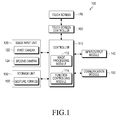
- FIG. 1 is a block diagram illustrating an electronic device for controlling a user interface using an input image according to an embodiment of the present disclosure.
- the electronic device 100 includes an image input unit 120, a storage unit 130, an input/output module 140, a communication module 150, a display controller 160, a display unit 170 and a controller 110.
- the storage unit 130 includes a gesture form database 132
- the controller 110 includes an image processing module 112 and a function controlling module 114.
- a touch screen controller and a touch screen will be described as examples of the display controller 160 and the display unit 170.
- the image input unit 120 receives an input of various images including videos and stationary images.
- the image input unit 120 includes at least one of a first camera 122 and a second camera 124. Further, an image obtained through the at least one camera will be described as an example of an image input through the image input unit 120.
- the image input unit 120 includes at least one of the first camera 122 and the second camera 124, and performs functions of a general digital camera, which include taking stationary images or videos, under a control of the controller 110. Further, the image input unit 120 operates the first camera 122 or the second camera 124 so as to carry out a function of taking images through an image sensor (not shown) included in the corresponding camera.
- the input/output module 140 includes at least one of plural buttons (not shown), a microphone (not shown), a speaker (not shown), a vibration motor (not shown), a connector (not shown), and a keypad (not shown).
- the buttons 161 may be disposed on a front surface, a side surface or a rear surface of a housing of the electronic device 100, and may include an electric power/lock button (not shown), a volume control button (not shown), a menu button, a home button, and a back button.
- the microphone (not shown) receives an input of voice or sound to generate electric signals under a control of the controller 110.
- the speaker is capable of outputting sound which corresponds to various signals, i.e. radio signals or photographing sound, of the communication module 150 or the image input unit 120, outside of the electronic device 100 under a control of the controller 110.
- the speaker is capable of outputting sounds, i.e. a button operation sound or a ringtone corresponding to a voice call, corresponding to functions which the electronic device 100 performs.
- One or more speakers are arranged at a suitable position or positions on the housing of the electronic device 100.
- the vibration motor (not shown) is capable of converting electric signals into mechanical vibrations under a control of the controller 110.
- the electronic device 100 which stays in a vibration mode operates the vibration motor (not shown) when receiving a voice call from another device (not shown).
- One or more vibration motors may be arranged in the housing of the electronic device 100.
- the vibration motor (not shown) is capable of operating in response to a touch operation of a user who touches the touch screen 170, and a continuous movement of a touch on the touch screen 170.
- the connector (not shown) may be used as an interface to connect the electronic device 100 to an external device (not shown) or electric power source (not shown).
- the electronic device 100 transmits data which is stored in the storage unit 130 of the electronic device 100, to the external device (not shown) through a wired cable connected to the connector (not shown), or receives data from the external device (not shown), under a control of the controller 110. Further, the electronic device 100 is supplied with electric power from the electric power source (not shown) through a wired cable connected to the connector (not shown), or is capable of charging a battery (not shown) by using the electric power source.
- the keypad (not shown) receives a key input of a user in order to control the electronic device 100.
- the keypad (not shown) includes a physical keypad (not shown) arranged on the electronic device 100 or a virtual keypad (not shown) displayed on the touch screen 170.
- the physical keypad (not shown) arranged on the electronic device 100 may be excluded according to the performance or structure of the electronic device 100.
- the communication module 150 may include a mobile communication module (not shown), a wireless LAN module (not shown), and a short-range communication module (not shown).
- the mobile communication module allows the electronic device 100 to be in contact with the external terminal through a mobile communication system by using one or more antennas (not shown) under a control of the controller 110.
- the mobile communication module (not shown) transmits and receives radio signals for a voice call, a video call, a Short Message Service (SMS), or a Multimedia Message Service (MMS) to/from a portable phone (not shown), a smart phone (not shown), a tablet PC, or other devices (not shown) which have telephone numbers input into the electronic device 100.
- SMS Short Message Service
- MMS Multimedia Message Service
- the wireless LAN module may be connected to the Internet at a location in which the wireless Access Point (AP, not shown) is installed, under a control of the controller 110.
- the wireless LAN module (not shown) supports the wireless LAN provision, i.e. IEEE802.11x, of the Institute of Electrical and Electronics Engineers (IEEE).
- the short-range communication module (not shown) may include a Bluetooth communication module and the like, and allows the electronic device 100 to wirelessly carry out the short-range communication with another electronic device, under a control of the controller 210.
- the electronic device 100 may include at least one of the mobile communication module (not shown), the wireless LAN module (not shown) and the short-range communication module (not shown) as the communication module 150 according to the performance thereof.
- the communication module 150 may include a combination of the mobile communication module (not shown), the wireless LAN module (not shown) and the short-range communication module (not shown) according to the performance of the electronic device 100.
- the touch screen 170 receives an operation of a user, and displays an executed application program, an operation state, and a menu state.
- the touch screen 170 provides a user with a User Interface (UI) corresponding to various services, i.e. a voice call, a data transmission, broadcasting, and photographing.
- UI User Interface
- the touch screen 170 can transmit analog signals, which correspond to at least one touch input into the UI, to the touch screen controller 160.
- the touch screen 170 can receive at least one touch through a touchable input means, i.e. a finger or an electronic pen such as a stylus pen. Further, the touch screen 170 may receive a continuous movement of at least one touch among the touches.
- the touch screen 170 can transmit analog signals, which correspond to the continuous movement of the input touch, to the touch screen controller 160.
- the touch screen 170 may be implemented, for example by a resistive type, a capacitive type, an Electro Magnetic Resonance (EMR) type, an infrared type, or an acoustic wave type of touch screen.
- EMR Electro Magnetic Resonance
- a touch of the present disclosure is not limited to a direct contact of a finger or electronic pen with the touch screen 170, and may include a non-contact touch.
- a detectable distance from the touch screen 170 is changeable according to a performance or a structure of the electronic device 100, and especially the touch screen 170 is configured to distinctively output a touch event by a contact of the finger or the electronic pen and the non-contact touch input.
- the touch screen 170 recognizes values, i.e. electric current values, of the touch event and the hovering event in order to distinguish the hovering event from the touch event.
- the touch screen 170 distinctively outputs a recognized value, i.e. an electric current value, depending on a distance between the touch screen 170 and a space in which the hovering event is generated.
- the touch screen controller 160 converts analog signals received from the touch screen 170 into digital signals, i.e. X and Y coordinates, and transmits the digital signals to the controller 110.
- the controller 110 is capable of controlling the touch screen 170 by using the digital signals received from the touch screen controller 160.
- the controller 110 allows a user to select or execute a shortcut icon (not shown) displayed on the touch screen 170 in response to the touch event or the hovering event.
- the touch screen controller 160 may be included in the controller 110.
- the touch screen controller 160 detects a value, i.e. an electric current value, output through the touch screen 170 and identifies a distance between the touch screen 170 and the space in which the hovering event is generated. Then, the touch screen controller 160 converts a value of the identified distance into a digital signal, i.e. a Z coordinate, and provides the controller 110 with the digital signal.
- a value i.e. an electric current value
- the touch screen 170 may include at least two touch screen panels capable of recognizing the touch and proximity of the finger and the electronic pen respectively, so as to simultaneously receive inputs of the finger touch and the input of the electronic pen.
- the at least two touch screen panels provide different output values to the touch screen controller 160, and the touch screen controller 160 may differently recognize values input from the at least two touch screen panels so as to distinguish whether the input of the respective touch screens 170 is generated by a finger touch or an input of the electronic pen.
- the storage unit 130 stores signals or data which are input/output in correspondence to operations of the image input unit 120, the input/output module 140, the communication module 150, and the touch screen 170, under a control of the controller 110.
- the storage unit 130 may store a control program and an application for controlling the electronic device 100 or the controller 110.
- the term “storage unit” refers to the storage unit 130, the ROM (not shown) and the RAM (not shown) in the controller 110, or a memory card (not shown), i.e. a SD card, and a memory stick, inserted in the electronic device 100.
- the storage unit may include a non-volatile memory, a volatile memory, a Hard Disk Drive (HDD), and a Solid State Drive (SSD).
- HDD Hard Disk Drive
- SSD Solid State Drive
- the storage unit 130 may include the gesture form database 132 according to the feature of the present disclosure.
- the gesture form database 132 has at least one predetermined gesture form or at least one gesture form input by the user stored therein. Furthermore, the storage unit 130 stores an accumulated recognition log data constituting the gesture form database, and an operation executing information mapped on each gesture form. The operation executing information mapped on each gesture form may be distinguished and stored according to each function of the electronic device 100 described later.
- the controller 110 may include a CPU (not shown), a ROM (not shown) in which a control program for a control of the electronic device 100 is stored, and a RAM (not shown) which stores signals or data input from outside of the electronic device 100, or is used as a storage region for operations performed by the electronic device 100.
- the CPU (not shown) may include a single core CPU and a multiple core CPU such as a dual core CPU, a triple core CPU and a quad core CPU.
- the CPU (not shown), the ROM (not shown) and the RAM (not shown) are connected to one another through an internal bus.
- the controller 110 controls the image input unit 120, the storage unit 130, the input/output module 140, the communication module 150, the touch screen controller 160, and the touch screen 170.
- the controller 110 may include an image processing module 112 and a function controlling module 114 according to the feature of the present disclosure.
- the image processing module 112 extracts a contour of an image received from the image input unit 120 in order to recognize a gesture form, and detects the gesture form.
- the function controlling module 114 identifies operation executing information mapped on the detected gesture form and executes an operation according to a function which is currently operated based on the detected gesture form. Further, the function controlling module 114 enables a suitable operation to be executed in correspondence to a condition element, i.e. function, of the electronic device which is currently operated, by using an index value obtained from the gesture form DB 132. For example, with respect to identical gesture forms which are detected during the executions of two different applications respectively, respective operations (corresponding to gesture forms) can be executed according to context data of an application.
- the controller 110 controls operations according to a combination of the image processing module 112 and the image processing module 112 based on the performance of the electronic device 100. Accordingly, the controller 110 detects a gesture form from an image which is obtained through the image input unit 120, and identifies operation executing information mapped on the detected gesture form according to the currently operated function so as to enable an operation to be executed. At this time, the controller 110 stores operation executing information corresponding to each of one or more gesture forms into the gesture form DB 132, i.e. the storage unit 130, according to each of functions.
- FIG. 2 is a view illustrating an operation of controlling the user interface using an image which is obtained through a camera according to an embodiment of the present disclosure.
- the electronic device 100 to which the operation of the present disclosure is applied at least one camera 122 or 124 equipped to the electronic device 100 acquires images in real-time, and analyzes the acquired image. Further, in the electronic device 100 which is set to apply the operation of the present disclosure, the operation executing information corresponding to each of one or more gesture forms is stored according to each function. Furthermore, according to the setting of the user, the operation execution information corresponding to each of one or more gesture forms may be stored according to each form.
- the functions may be various according to the performance of the electronic device 100 and include applications, locking screens, background screens and the like.
- the gesture form may be various according to a form of a part or whole of a human body and include a gesture with a hand and a gesture with a foot.
- the operation executing information may be various operations of the electronic device 100 such as a display of a visible effect, conversion of a screen, a pause, a termination of a screen and the like.
- the electronic device 100 obtains an image including the certain gesture and detects the certain gesture form from the obtained image. Then, it is possible to identify the operation executing information mapped on the detected gesture form so as to execute the operation.
- FIG. 3 is a flowchart illustrating an operation of controlling the user interface using an image which is obtained by a camera according to a first embodiment of the present disclosure.
- an image is obtained through the camera.
- a gesture image is detected from the obtained image.
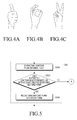
- the gesture form may be detected from the gestures with a hand as shown in FIGS. 4A to 4C , and in addition various gesture forms may be obtained depending on the various gestures.
- FIGS. 4A, 4B, and 4C are views illustrating various gestures used for controlling a user interface using an image which is obtained by a camera according to an embodiment of the present disclosure.
- FIG. 5 is a flowchart illustrating a process of detecting a gesture from obtained images during an operation of controlling a user interface using the obtained image through the camera according to the first embodiment shown in FIG. 3 of the present disclosure.
- a contour is extracted from the obtained image.
- operation 2320 it is determined whether the extracted contour has a form matched with at least one predetermined gesture form.
- operation 2340 is carried out.
- the operation of the present disclosure is finished via connector (A).
- the matched form is recognized as the gesture form.
- operation 250 the operation executing information mapped on the detected gesture is identified according to the function carried out currently.
- an operation executed by the first application may be different from an operation executed by the second application according to the operation executing information differently stored to correspond to identical gesture forms of each application.
- an operation is executed according to the identified operation executing information.
- FIG. 6 is a flowchart illustrating an operation of controlling a user interface using an image which is obtained by a camera according to a second embodiment of the present disclosure.
- an image is photographed through the camera.
- Metadata i.e. name and the like, is allocated to each of the predetermined gesture forms.
- FIGS. 7A, 7B, 7C, and 7D are views illustrating various gestures and metadata corresponding to each gesture for controlling a user interface using the image obtained through the camera according to a second embodiment shown in FIG. 6 of the present disclosure.
- the names may be allocated to the gesture forms respectively.
- a name 'Oh!' 701 may be allocated to the gesture form shown in FIG. 7A
- a name 'Hi-Five' 702 may be allocated to the gesture form shown in FIG. 7B
- a name 'peace' 703 may be allocated to the gesture form shown in FIG. 7C
- a name 'clip' 704 may be allocated to the gesture form shown in FIG. 7D .
- These may be set in manufacturing of the electronic device 100, and may be set such that a user who uses the electronic device 100 inputs favorite hand gestures and designates separate names to the hand gestures.
- operation 350 is carried out. If it is determined that an image taken in operation 330 has a predetermined gesture form ('YES'), operation 350 is carried out. If it is determined that the image taken in operation 330 has no predetermined gesture form ('NO'), the operation of the present disclosure is completed. In operation 350, a gesture image is detected from the taken image. It is determined whether there are metadata corresponding to the gesture form detected in operation 370. If it is determined that there are metadata corresponding to the gesture form detected ('YES'), in operation 370, operation 390 is performed. To the contrary, if it is determined that there is no metadata corresponding to the gesture form detected ('NO') in operation 370, the operation of the present disclosure is finished.
- the metadata information such as a name designated by a tag can be utilized as a useful reference when a user separately classifies or searches for desired items from a whole image or video list. Further, in the case of uploading the image or video file to a personal cloud storage or a social network, it is possible to provide continuous experiences regardless of sorts of the electronic devices by maintaining tag property information.
- FIG. 8 is a flowchart illustrating an operation of controlling a user interface using an image which is obtained by a camera according to a third embodiment of the present disclosure.
- an image is obtained through the camera.
- operation 430 it is determined whether the obtained image has a predetermined gesture form.
- Various visible effects are designated to the predetermined gesture forms respectively, according to settings such as a color change, a display of a specific image, and the like. Further, the visible effects can be set by an operation of the user. Furthermore, a type, a color, a shape and the like of the visible effects can be changed according to the operation of the user, i.e. a voice instruction and the like. If it is determined that an image taken in operation 430 has a predetermined gesture form ('YES'), operation 450 is carried out.
- 'YES' predetermined gesture form
- operation 450 a gesture form is detected from the obtained image.
- operation 470 it is determined whether there is a visible effect corresponding to the detected gesture form.
- operation 470 if it is determined that there are the visible effect corresponding to the detected gesture form ('YES'), operation 490 is performed. To the contrary, if it is determined that there is no visible effect corresponding to the detected gesture form ('NO'), in operation 470, the operation of the present disclosure is finished.
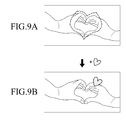
- FIGS. 9A and 9B are views illustrating an operation of controlling a user interface using an image which is obtained by a camera according to the third embodiment of the present disclosure.
- the gesture form as shown in FIG. 9A is set to display a visible effect of a heart shape
- the visible effect of the heart shape corresponding to the obtained image shown in FIG. 9B can be displayed at a predetermined position.
- the displayed visible effect can be changed in a position according to the operation of the user, i.e. an operation of touching and dragging the visible effect, inputting a voice instruction, and the like.
- the display of the visible effect may be stopped.
- the visible effect corresponding to the gesture form detected from the corresponding image can be displayed in real time.
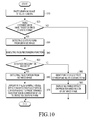
- FIG. 10 is a flowchart illustrating an operation of controlling a user interface using an image which is obtained by a camera according to the second embodiment of the present disclosure.
- an image is obtained through the camera.
- operation 520 it is determined whether the obtained image has a predetermined gesture form.
- visible effects may be designated to the predetermined gesture forms respectively, and a position at which the visible effect is displayed may be a certain portion on a face corresponding to each visible effect in connection with a face recognizing function. Further, the visible effect and the position at which the visible effect is displayed can be set or changed according to the operation of the user.
- operation 530 if it is determined that the obtained image has a predetermined gesture form ('YES'), operation 530 is carried out.
- operation 520 if it is determined that the obtained image has no predetermined gesture form ('NO'), the operation of the present disclosure is finished.
- operation 530 a gesture form is detected from the obtained image.
- the face recognizing function is carried out.
- operation 550 it is identified whether the face recognition is a success.
- operation 550 if it is determined that the face recognition is a success ('YES'), operation 560 is performed.
- operation 580 if it is determined that the face recognition is not a success ('NO'), operation 580 is carried out.
- operation 580 a visible effect corresponding to the gesture form is identified.
- operation 590 the visible effect is displayed in a predetermined region on the obtained image.
- operation 560 a face portion is detected from the obtained image.
- operation 570 after 560, the predetermined visible effect is displayed on the detected face portion corresponding to the predetermined face portion in correspondence to the detected gesture form.
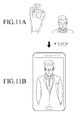
- FIGS. 11A and 11B are views illustrating an operation of controlling a user interface using an image which is obtained by a camera according to a fourth embodiment of the present disclosure.
- a visible effect such as sunglasses is displayed on the eyes, according to the operation of the fourth embodiment of the present disclosure.
- the visible effect of the sunglasses may be continuously displayed on the eye portion when the display of the visible effect is not finished in a predetermined time or by the user. Further, in the state that the visible effect of the sunglasses is displayed on the eyes of the user, if a photographing of an image is carried out, an image in which the visible effect of the sunglasses is displayed on the eyes of a person can be stored on the photographed image.
- the visible effect corresponding to the gesture form detected from the corresponding image can be displayed. Further, a face portion is detected by using the face recognizing function, so that the visible effect can be displayed on the detected face portion.
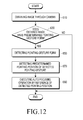
- FIG. 12 is a flowchart illustrating a process of controlling a user interface using an image which is obtained through a camera according to a fifth embodiment of the present disclosure.
- an image is obtained through the camera and displayed on a preview screen.
- operation 630 it is determined whether the obtained image has a predetermined pointing gesture form.
- execution information for operating an auto-focusing of the camera is stored in the predetermined pointing gesture form. More particularly, the information for executing the auto-focusing operation is stored by a reference of the predetermined pointing position of the pointing gesture form.
- the pointing gesture form may be detected from various hand gestures as shown in FIGS. 13A to 13D , and in addition various pointing gesture forms may be obtained depending on the various pointing gestures.
- FIGS. 13A, 13B, 13C, and 13D are views illustrating various pointing gestures used for controlling a user interface using an image which is obtained by a camera according to the fifth embodiment of the present disclosure.
- operation 650 if it is determined that the obtained image has a predetermined pointing gesture form ('YES'), operation 650 is carried out. To the contrary, in operation 630, if it is determined that the obtained image has no predetermined pointing gesture form ('NO'), the operation of the present disclosure is finished.
- operation 650 a pointing gesture image is detected.
- operation 670 a predetermined pointing position of the detected pointing gesture form is detected.
- operation 690 an auto-focusing operation is carried out by a reference of the detected pointing position.
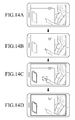
- FIGS. 14A, 14B, 14C, and 14D are views illustrating an operation of controlling a user interface using an image which is obtained by a camera according to the fifth embodiment of the present disclosure.
- a pointing gesture form as shown in FIG. 14B is detected depending on an operation according to the fifth embodiment of the present disclosure, and then an auto-focusing operation is carried out around a position which the pointing gesture form indicates as shown in FIG. 14C , i.e. a predetermined position of a pointing gesture. Then, when an image photographing mode is executed, an image is photographed and it is possible to store the image as shown in FIG. 14D .
- the predetermined pointing gesture form is detected from the obtained image through the camera in a camera function mode, the predetermined pointing position of the predetermined pointing gesture form is detected and an auto-focusing operation is executed by a reference of the detected pointing position.
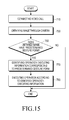
- FIG. 15 is a flowchart illustrating a process of controlling a user interface using an image which is obtained through a camera according to a fifth embodiment of the present disclosure.
- a video call is connected in order to execute a video communication.
- an image is obtained through the camera.
- Corresponding pieces of the operation executing information are stored in the predetermined gesture forms, respectively. Further, the operation executing information may be set or changed according to the operation of the user.
- the operation executing information is in various forms such as a substitution of an image with a photograph, a conversion of front and rear cameras, a recording, a transmission of a visible effect, and the like. If it is determined that an image taken in operation 750 has a predetermined gesture form ('YES'), operation 770 is carried out.
- the operation of the present disclosure is finished.
- the operation executing information corresponding to the predetermined gesture form is identified.
- an operation is executed according to the identified operation executing information.
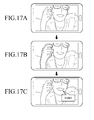
- FIGS. 17A, 17B, and 17C are views illustrating an operation of controlling the user interface using an image which is obtained by a camera according to the sixth embodiment of the present disclosure.
- FIGS. 17A to 17C in the case that an image in which a person makes a gesture is obtained by using the camera as shown in FIG. 17A , the gesture form of FIG. 17B is detected depending on an operation according to the sixth embodiment of the present disclosure, and then an operation of displaying a visible effect which is operation executing information corresponding to the gesture form is executed as shown in FIG. 17C .
- the displayed visible effect is enabled to be displayed on an electronic device of a companion in communication with the user's electronic device 100, as well as the user's electronic device 100.
- FIG. 16 is a view illustrating an operation of controlling a user interface using an image which is obtained by a camera according to the sixth embodiment of the present disclosure, in which the control operation is applied to an electronic device.
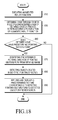
- FIG. 18 is a flowchart illustrating an operation of controlling a user interface using an image which is obtained through a camera according to a seventh embodiment of the present disclosure.
- an Augmented Reality (AR) function is executed.
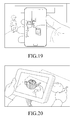
- an image obtained through the camera is displayed on a preview screen differently from an actual image, as shown in FIG. 19 .
- FIG. 19 is a first view illustrating an operation of controlling the user interface using an image which is obtained by a camera according to the seventh embodiment of the present disclosure.
- an image is obtained through the camera, and a modified image of the obtained image is displayed on the preview screen according to the execution of the AR.
- operation 850 it is determined whether the obtained image has a predetermined pointing gesture form.
- Various pieces of texture information may be designated to the predetermined pointing gesture forms, respectively. Further, the texture information may be set or changed according to the operation of the user.
- operation 850 if it is determined that the obtained image has the predetermined pointing gesture form ('YES'), operation 870 is carried out. To the contrary, in operation 850, if it is determined that the obtained image has no predetermined pointing gesture form ('NO'), the operation of the present disclosure is finished.
- a predetermined pointing direction of the pointing gesture form is identified from the obtained image.
- an object located in the identified pointing direction is detected.
- the detection of the object can be executed by using various recognition functions.
- a predetermined texture corresponding to the detected pointing gesture form is applied to the detected object.
- FIG. 20 is a second view illustrating an operation of controlling the user interface using an image which is obtained by a camera according to the seventh embodiment of the present disclosure.
- the pointing gesture form is detected depending on an operation according to the seventh embodiment of the present disclosure, and the texture corresponding to the pointing gesture form can be applied to an object located in the predetermined pointing direction of the detected pointing gesture form.
- the object located in the predetermined pointing direction of the detected pointing gesture is detected, and the predetermined texture corresponding to the detected pointing gesture form is applied to the detected object.
- the electronic device 100 may store identical operation executing information of each gesture form for all functions, and is set to allow the user to store the identical operation executing information of each gesture form with respect to all functions.
- the visible effect is displayed on an image obtained through the camera according to the third embodiment, when it is executed to take a photograph of an image according to the operation of the user, the obtained image is taken and an image on which the visible effect is displayed can be stored.
- the predetermined visible effect corresponding to the detected gesture form may be displayed on the predetermined portion of a recognized object by applying various recognizing functions as well as the face recognition function and recognizing various objects.
- the texture may be applied to the whole screen.
- the pointing gesture form and the predetermined texture corresponding to the pointing gesture form it is possible to provide various gesture forms to the AR function according to a user's setting or a setting in a manufacturing of the electronic device 100, and also it is possible to apply various operations corresponding to the gesture form to the AR function.
- a non-volatile storage device such as a ROM, a memory such as an RAM, a memory chip, a memory device, or an integrated circuit, or a storage medium such as a CD, a DVD, a magnetic disc, or a magnetic tape that is optically or electromagnetically recordable and readable by a machine, for example, a computer.
- a memory which may be incorporated in a portable terminal, may be an example of a machine-readable storage medium which is suitable for storing a program or programs including commands to implement the various embodiments of the present disclosure. Therefore, various embodiments of the present disclosure provide a program including codes for implementing a system or method claimed in any claim of the accompanying claims and a machine-readable device for storing such a program. Moreover, such a program as described above can be electronically transferred through an arbitrary medium such as a communication signal transferred through cable or wireless connection, and the present disclosure properly includes the things equivalent to that.
Landscapes
- Engineering & Computer Science (AREA)
- Theoretical Computer Science (AREA)
- General Engineering & Computer Science (AREA)
- Human Computer Interaction (AREA)
- Multimedia (AREA)
- Physics & Mathematics (AREA)
- General Physics & Mathematics (AREA)
- Signal Processing (AREA)
- Health & Medical Sciences (AREA)
- General Health & Medical Sciences (AREA)
- Computer Vision & Pattern Recognition (AREA)
- Psychiatry (AREA)
- Social Psychology (AREA)
- Oral & Maxillofacial Surgery (AREA)
- User Interface Of Digital Computer (AREA)
Applications Claiming Priority (1)
| Application Number | Priority Date | Filing Date | Title |
|---|---|---|---|
| KR1020130108697A KR102165818B1 (ko) | 2013-09-10 | 2013-09-10 | 입력 영상을 이용한 사용자 인터페이스 제어 방법, 장치 및 기록매체 |
Publications (3)
| Publication Number | Publication Date |
|---|---|
| EP2846231A2 true EP2846231A2 (de) | 2015-03-11 |
| EP2846231A3 EP2846231A3 (de) | 2015-07-15 |
| EP2846231B1 EP2846231B1 (de) | 2021-02-17 |
Family
ID=51542166
Family Applications (1)
| Application Number | Title | Priority Date | Filing Date |
|---|---|---|---|
| EP14184260.9A Active EP2846231B1 (de) | 2013-09-10 | 2014-09-10 | Vorrichtung, Verfahren und Aufzeichnungsmedium zur Steuerung einer Benutzerschnittstelle mittels Eingangsbild |
Country Status (3)
| Country | Link |
|---|---|
| US (4) | US9898090B2 (de) |
| EP (1) | EP2846231B1 (de) |
| KR (1) | KR102165818B1 (de) |
Cited By (2)
| Publication number | Priority date | Publication date | Assignee | Title |
|---|---|---|---|---|
| CN108784175A (zh) * | 2017-04-27 | 2018-11-13 | 芜湖美的厨卫电器制造有限公司 | 浴室镜及其手势控制装置、方法 |
| CN109981989A (zh) * | 2019-04-04 | 2019-07-05 | 北京字节跳动网络技术有限公司 | 渲染图像的方法、装置、电子设备和计算机可读存储介质 |
Families Citing this family (47)
| Publication number | Priority date | Publication date | Assignee | Title |
|---|---|---|---|---|
| US8502856B2 (en) | 2010-04-07 | 2013-08-06 | Apple Inc. | In conference display adjustments |
| US10370118B1 (en) | 2015-10-31 | 2019-08-06 | Simon Saito Nielsen | Lighting apparatus for remote controlled device |
| US10353473B2 (en) * | 2015-11-19 | 2019-07-16 | International Business Machines Corporation | Client device motion control via a video feed |
| CN106131124A (zh) * | 2016-06-22 | 2016-11-16 | 上海承蓝科技股份有限公司 | 一种云平台数据存储方法 |
| US11404056B1 (en) | 2016-06-30 | 2022-08-02 | Snap Inc. | Remoteless control of drone behavior |
| CN109416733B (zh) * | 2016-07-07 | 2023-04-18 | 哈曼国际工业有限公司 | 便携式个性化 |
| KR101941005B1 (ko) * | 2017-04-05 | 2019-01-22 | 광주과학기술원 | 인카운터 타입 햅틱 시스템에서 임의의 툴에 대한 툴 캘리브레이션 방법 |
| EP4366317A3 (de) | 2017-05-16 | 2024-08-07 | Apple Inc. | Emoji aufnahme und senden |
| JP6635093B2 (ja) * | 2017-07-14 | 2020-01-22 | カシオ計算機株式会社 | 画像記録装置、画像記録方法及びプログラム |
| US11348265B1 (en) | 2017-09-15 | 2022-05-31 | Snap Inc. | Computing a point cloud from stitched images |
| US11753142B1 (en) | 2017-09-29 | 2023-09-12 | Snap Inc. | Noise modulation for unmanned aerial vehicles |
| US11531357B1 (en) | 2017-10-05 | 2022-12-20 | Snap Inc. | Spatial vector-based drone control |
| JP7061883B2 (ja) * | 2018-01-22 | 2022-05-02 | マクセル株式会社 | 画像表示装置および画像表示方法 |
| US11822346B1 (en) | 2018-03-06 | 2023-11-21 | Snap Inc. | Systems and methods for estimating user intent to launch autonomous aerial vehicle |
| DK180130B1 (da) | 2018-05-07 | 2020-06-02 | Apple Inc. | Multi-participant live communication user interface |
| US12071228B1 (en) * | 2019-03-28 | 2024-08-27 | Snap Inc. | Drone with propeller guard configured as an airfoil |
| US11079913B1 (en) | 2020-05-11 | 2021-08-03 | Apple Inc. | User interface for status indicators |
| US12301979B2 (en) | 2021-01-31 | 2025-05-13 | Apple Inc. | User interfaces for wide angle video conference |
| US12170579B2 (en) | 2021-03-05 | 2024-12-17 | Apple Inc. | User interfaces for multi-participant live communication |
| CN115223236A (zh) * | 2021-04-19 | 2022-10-21 | 华为技术有限公司 | 设备控制方法和电子设备 |
| CN120881039A (zh) | 2021-05-15 | 2025-10-31 | 苹果公司 | 实时通信用户界面 |
| US11822761B2 (en) | 2021-05-15 | 2023-11-21 | Apple Inc. | Shared-content session user interfaces |
| US11907605B2 (en) | 2021-05-15 | 2024-02-20 | Apple Inc. | Shared-content session user interfaces |
| US12449961B2 (en) | 2021-05-18 | 2025-10-21 | Apple Inc. | Adaptive video conference user interfaces |
| US12267622B2 (en) | 2021-09-24 | 2025-04-01 | Apple Inc. | Wide angle video conference |
| US12368946B2 (en) | 2021-09-24 | 2025-07-22 | Apple Inc. | Wide angle video conference |
| US12563299B2 (en) | 2022-04-04 | 2026-02-24 | Apple Inc. | User interfaces for camera sharing |
| US12412281B2 (en) | 2022-04-25 | 2025-09-09 | Industrial Technology Research Institute | Method and system for remote sharing three dimensional space annotation trajectory |
| US12367606B2 (en) | 2022-04-27 | 2025-07-22 | Snap Inc. | Automatically cropping of landscape videos |
| US12517521B2 (en) | 2022-04-27 | 2026-01-06 | Snap Inc. | Landing an autonomous drone with gestures |
| US12344409B2 (en) | 2022-04-27 | 2025-07-01 | Snap Inc. | Fully autonomous drone flights |
| US12181945B2 (en) | 2022-04-27 | 2024-12-31 | Snap Inc. | Boot time for autonomous drones |
| US12190739B2 (en) | 2022-04-27 | 2025-01-07 | Snap Inc. | Navigation correction for excessive wind |
| US12360531B2 (en) | 2022-04-27 | 2025-07-15 | Snap Inc. | Stabilization and navigation of an autonomous drone |
| US12287647B2 (en) | 2022-04-27 | 2025-04-29 | Snap Inc. | Autonomous drone navigation based on vision |
| US12372975B2 (en) | 2022-04-27 | 2025-07-29 | Snap Inc. | Unlocking an autonomous drone for takeoff |
| US12300275B2 (en) | 2022-04-27 | 2025-05-13 | Snap Inc. | Editing video captured by electronic devices |
| US12267482B2 (en) | 2022-08-31 | 2025-04-01 | Snap Inc. | Controlling and editing presentation of volumetric content |
| US12417593B2 (en) | 2022-08-31 | 2025-09-16 | Snap Inc. | Generating immersive augmented reality experiences from existing images and videos |
| US12322052B2 (en) | 2022-08-31 | 2025-06-03 | Snap Inc. | Mixing and matching volumetric contents for new augmented reality experiences |
| US12519924B2 (en) | 2022-08-31 | 2026-01-06 | Snap Inc. | Multi-perspective augmented reality experience |
| US11972521B2 (en) | 2022-08-31 | 2024-04-30 | Snap Inc. | Multisensorial presentation of volumetric content |
| US12282604B2 (en) | 2022-08-31 | 2025-04-22 | Snap Inc. | Touch-based augmented reality experience |
| US12449891B2 (en) | 2022-08-31 | 2025-10-21 | Snap Inc. | Timelapse re-experiencing system |
| US12578837B2 (en) | 2022-09-23 | 2026-03-17 | Apple Inc. | User interfaces for managing sharing of content in three-dimensional environments |
| US20240291944A1 (en) * | 2023-02-24 | 2024-08-29 | Apple Inc. | Video application graphical effects |
| US12298768B2 (en) | 2023-04-18 | 2025-05-13 | Snap Inc. | Image capturing while circumnavigating objects using mobile devices |
Family Cites Families (104)
| Publication number | Priority date | Publication date | Assignee | Title |
|---|---|---|---|---|
| US7489303B1 (en) * | 2001-02-22 | 2009-02-10 | Pryor Timothy R | Reconfigurable instrument panels |
| US7095401B2 (en) * | 2000-11-02 | 2006-08-22 | Siemens Corporate Research, Inc. | System and method for gesture interface |
| US6834249B2 (en) * | 2001-03-29 | 2004-12-21 | Arraycomm, Inc. | Method and apparatus for controlling a computing system |
| US7850526B2 (en) * | 2002-07-27 | 2010-12-14 | Sony Computer Entertainment America Inc. | System for tracking user manipulations within an environment |
| US20060256081A1 (en) * | 2002-07-27 | 2006-11-16 | Sony Computer Entertainment America Inc. | Scheme for detecting and tracking user manipulation of a game controller body |
| US9153074B2 (en) * | 2011-07-18 | 2015-10-06 | Dylan T X Zhou | Wearable augmented reality eyeglass communication device including mobile phone and mobile computing via virtual touch screen gesture control and neuron command |
| KR100457928B1 (ko) | 2002-11-12 | 2004-11-18 | 한국과학기술원 | 소그룹 기반 분류에 의한 수신호 인식 방법 및 이를기록한 기록매체 |
| US7164410B2 (en) | 2003-07-28 | 2007-01-16 | Sig G. Kupka | Manipulating an on-screen object using zones surrounding the object |
| US7365736B2 (en) * | 2004-03-23 | 2008-04-29 | Fujitsu Limited | Customizable gesture mappings for motion controlled handheld devices |
| US7301529B2 (en) * | 2004-03-23 | 2007-11-27 | Fujitsu Limited | Context dependent gesture response |
| US20060028429A1 (en) * | 2004-08-09 | 2006-02-09 | International Business Machines Corporation | Controlling devices' behaviors via changes in their relative locations and positions |
| US8982110B2 (en) * | 2005-03-01 | 2015-03-17 | Eyesmatch Ltd | Method for image transformation, augmented reality, and teleperence |
| US8976160B2 (en) * | 2005-03-01 | 2015-03-10 | Eyesmatch Ltd | User interface and authentication for a virtual mirror |
| US9269157B2 (en) * | 2005-03-01 | 2016-02-23 | Eyesmatch Ltd | Methods for extracting objects from digital images and for performing color change on the object |
| US20060239591A1 (en) * | 2005-04-18 | 2006-10-26 | Samsung Electronics Co., Ltd. | Method and system for albuming multimedia using albuming hints |
| US7855638B2 (en) * | 2005-07-14 | 2010-12-21 | Huston Charles D | GPS based spectator and participant sport system and method |
| US20080147730A1 (en) * | 2006-12-18 | 2008-06-19 | Motorola, Inc. | Method and system for providing location-specific image information |
| KR101373333B1 (ko) * | 2007-07-11 | 2014-03-10 | 엘지전자 주식회사 | 터치인식을 통한 영상촬영 기능을 구비한 휴대 단말기 및그 촬영방법 |
| WO2009016607A2 (en) * | 2007-08-01 | 2009-02-05 | Nokia Corporation | Apparatus, methods, and computer program products providing context-dependent gesture recognition |
| AU2008290211A1 (en) * | 2007-08-19 | 2009-02-26 | Ringbow Ltd. | Finger-worn devices and related methods of use |
| US9164995B2 (en) * | 2008-01-03 | 2015-10-20 | International Business Machines Corporation | Establishing usage policies for recorded events in digital life recording |
| US8225343B2 (en) * | 2008-01-11 | 2012-07-17 | Sony Computer Entertainment America Llc | Gesture cataloging and recognition |
| KR101440620B1 (ko) * | 2008-02-01 | 2014-09-17 | 삼성전자주식회사 | 동영상의 객체 경계 추정 방법 및 장치 |
| US9740293B2 (en) * | 2009-04-02 | 2017-08-22 | Oblong Industries, Inc. | Operating environment with gestural control and multiple client devices, displays, and users |
| US20100100439A1 (en) * | 2008-06-12 | 2010-04-22 | Dawn Jutla | Multi-platform system apparatus for interoperable, multimedia-accessible and convertible structured and unstructured wikis, wiki user networks, and other user-generated content repositories |
| US7990421B2 (en) * | 2008-07-18 | 2011-08-02 | Sony Ericsson Mobile Communications Ab | Arrangement and method relating to an image recording device |
| US8520979B2 (en) * | 2008-08-19 | 2013-08-27 | Digimarc Corporation | Methods and systems for content processing |
| US8385971B2 (en) * | 2008-08-19 | 2013-02-26 | Digimarc Corporation | Methods and systems for content processing |
| US8929877B2 (en) * | 2008-09-12 | 2015-01-06 | Digimarc Corporation | Methods and systems for content processing |
| US8693336B2 (en) * | 2008-11-10 | 2014-04-08 | Qualcomm Incorporated | Communications decision methods and apparatus |
| TW201020896A (en) * | 2008-11-19 | 2010-06-01 | Nat Applied Res Laboratories | Method of gesture control |
| US9569001B2 (en) * | 2009-02-03 | 2017-02-14 | Massachusetts Institute Of Technology | Wearable gestural interface |
| US20100257252A1 (en) * | 2009-04-01 | 2010-10-07 | Microsoft Corporation | Augmented Reality Cloud Computing |
| KR20100118317A (ko) | 2009-04-28 | 2010-11-05 | 삼성전자주식회사 | 휴대단말의 제스처 인식 방법 및 시스템 |
| US8565479B2 (en) * | 2009-08-13 | 2013-10-22 | Primesense Ltd. | Extraction of skeletons from 3D maps |
| KR101660271B1 (ko) * | 2009-08-21 | 2016-10-11 | 삼성전자주식회사 | 메타데이터 태깅 시스템, 이미지 검색 방법, 디바이스 및 이에 적용되는 제스처 태깅방법 |
| US8611592B2 (en) * | 2009-08-26 | 2013-12-17 | Apple Inc. | Landmark identification using metadata |
| US20110072047A1 (en) * | 2009-09-21 | 2011-03-24 | Microsoft Corporation | Interest Learning from an Image Collection for Advertising |
| US9218530B2 (en) * | 2010-11-04 | 2015-12-22 | Digimarc Corporation | Smartphone-based methods and systems |
| US9183580B2 (en) * | 2010-11-04 | 2015-11-10 | Digimarc Corporation | Methods and systems for resource management on portable devices |
| US8600166B2 (en) | 2009-11-06 | 2013-12-03 | Sony Corporation | Real time hand tracking, pose classification and interface control |
| US9244533B2 (en) * | 2009-12-17 | 2016-01-26 | Microsoft Technology Licensing, Llc | Camera navigation for presentations |
| US8447136B2 (en) * | 2010-01-12 | 2013-05-21 | Microsoft Corporation | Viewing media in the context of street-level images |
| JP5728159B2 (ja) * | 2010-02-02 | 2015-06-03 | ソニー株式会社 | 画像処理装置、画像処理方法及びプログラム |
| US9488488B2 (en) * | 2010-02-12 | 2016-11-08 | Apple Inc. | Augmented reality maps |
| CN102822774B (zh) * | 2010-02-25 | 2015-08-05 | 惠普发展公司,有限责任合伙企业 | 代表性图像 |
| EP2362636B1 (de) * | 2010-02-26 | 2013-04-24 | Research In Motion Limited | Objekterkennung und Auswahl mit Gestenerkennung |
| US9128281B2 (en) * | 2010-09-14 | 2015-09-08 | Microsoft Technology Licensing, Llc | Eyepiece with uniformly illuminated reflective display |
| US20110211737A1 (en) * | 2010-03-01 | 2011-09-01 | Microsoft Corporation | Event Matching in Social Networks |
| US8787663B2 (en) * | 2010-03-01 | 2014-07-22 | Primesense Ltd. | Tracking body parts by combined color image and depth processing |
| WO2011111215A1 (ja) * | 2010-03-11 | 2011-09-15 | 富士通株式会社 | ソフトウェア制御装置、ソフトウェア制御方法、およびソフトウェア制御プログラム |
| US8660355B2 (en) * | 2010-03-19 | 2014-02-25 | Digimarc Corporation | Methods and systems for determining image processing operations relevant to particular imagery |
| US9582166B2 (en) * | 2010-05-16 | 2017-02-28 | Nokia Technologies Oy | Method and apparatus for rendering user interface for location-based service having main view portion and preview portion |
| US20110313779A1 (en) * | 2010-06-17 | 2011-12-22 | Microsoft Corporation | Augmentation and correction of location based data through user feedback |
| US8488040B2 (en) * | 2010-06-18 | 2013-07-16 | Microsoft Corporation | Mobile and server-side computational photography |
| US20110314427A1 (en) * | 2010-06-18 | 2011-12-22 | Samsung Electronics Co., Ltd. | Personalization using custom gestures |
| US9586147B2 (en) * | 2010-06-23 | 2017-03-07 | Microsoft Technology Licensing, Llc | Coordinating device interaction to enhance user experience |
| US9122053B2 (en) * | 2010-10-15 | 2015-09-01 | Microsoft Technology Licensing, Llc | Realistic occlusion for a head mounted augmented reality display |
| KR101680684B1 (ko) * | 2010-10-19 | 2016-11-29 | 삼성전자주식회사 | 영상 처리 방법 및 이를 적용한 영상 촬영 장치 |
| US9240021B2 (en) * | 2010-11-04 | 2016-01-19 | Digimarc Corporation | Smartphone-based methods and systems |
| US9484046B2 (en) * | 2010-11-04 | 2016-11-01 | Digimarc Corporation | Smartphone-based methods and systems |
| KR101752496B1 (ko) | 2010-11-05 | 2017-07-03 | 육상조 | 플레이어의 전체 움직임을 주시하면서 분할된 특정부위의 움직임을 확인하는 비디오 게임시스템. |
| KR101229795B1 (ko) * | 2010-12-20 | 2013-02-05 | 주식회사 케이티 | 경로 안내 단말의 사용자 인터페이스 제공 방법 및 이를 실행하는 장치 |
| CN103459099B (zh) * | 2011-01-28 | 2015-08-26 | 英塔茨科技公司 | 与一个可移动的远程机器人相互交流 |
| KR101896947B1 (ko) * | 2011-02-23 | 2018-10-31 | 엘지이노텍 주식회사 | 제스쳐를 이용한 입력 장치 및 방법 |
| US8848970B2 (en) * | 2011-04-26 | 2014-09-30 | Digimarc Corporation | Salient point-based arrangements |
| US8676937B2 (en) * | 2011-05-12 | 2014-03-18 | Jeffrey Alan Rapaport | Social-topical adaptive networking (STAN) system allowing for group based contextual transaction offers and acceptances and hot topic watchdogging |
| KR101252169B1 (ko) | 2011-05-27 | 2013-04-05 | 엘지전자 주식회사 | 휴대 단말기 및 그 동작 제어방법 |
| US9367770B2 (en) * | 2011-08-30 | 2016-06-14 | Digimarc Corporation | Methods and arrangements for identifying objects |
| US9129277B2 (en) * | 2011-08-30 | 2015-09-08 | Digimarc Corporation | Methods and arrangements for identifying objects |
| WO2013093906A1 (en) * | 2011-09-19 | 2013-06-27 | Eyesight Mobile Technologies Ltd. | Touch free interface for augmented reality systems |
| US9916538B2 (en) * | 2012-09-15 | 2018-03-13 | Z Advanced Computing, Inc. | Method and system for feature detection |
| US9286711B2 (en) * | 2011-09-30 | 2016-03-15 | Microsoft Technology Licensing, Llc | Representing a location at a previous time period using an augmented reality display |
| JP2013103010A (ja) | 2011-11-15 | 2013-05-30 | Sony Corp | 画像処理装置、画像処理方法及びプログラム |
| US9165187B2 (en) * | 2012-01-12 | 2015-10-20 | Kofax, Inc. | Systems and methods for mobile image capture and processing |
| US20130222369A1 (en) * | 2012-02-23 | 2013-08-29 | Charles D. Huston | System and Method for Creating an Environment and for Sharing a Location Based Experience in an Environment |
| US9363220B2 (en) * | 2012-03-06 | 2016-06-07 | Apple Inc. | Context-sensitive help for image viewing and editing application |
| JP2013196482A (ja) * | 2012-03-21 | 2013-09-30 | Casio Comput Co Ltd | 入力ユーザーインターフェイス装置、投影装置、プログラム及びコマンド決定方法 |
| JP5929387B2 (ja) * | 2012-03-22 | 2016-06-08 | 株式会社リコー | 情報処理装置、履歴データ生成プログラム及び投影システム |
| US10667790B2 (en) * | 2012-03-26 | 2020-06-02 | Teratech Corporation | Tablet ultrasound system |
| US8620021B2 (en) * | 2012-03-29 | 2013-12-31 | Digimarc Corporation | Image-related methods and arrangements |
| US9183676B2 (en) * | 2012-04-27 | 2015-11-10 | Microsoft Technology Licensing, Llc | Displaying a collision between real and virtual objects |
| EP2853989A1 (de) | 2012-05-21 | 2015-04-01 | Huawei Technologies Co., Ltd. | Kontaktloses, gestenbasiertes Steuerungsverfahren und Vorrichtung |
| US20140071061A1 (en) * | 2012-09-12 | 2014-03-13 | Chih-Ping Lin | Method for controlling execution of camera related functions by referring to gesture pattern and related computer-readable medium |
| KR101984683B1 (ko) * | 2012-10-10 | 2019-05-31 | 삼성전자주식회사 | 멀티 디스플레이 장치 및 그 제어 방법 |
| CN103777746B (zh) * | 2012-10-23 | 2018-03-13 | 腾讯科技(深圳)有限公司 | 一种人机交互方法、终端及系统 |
| US10223859B2 (en) * | 2012-10-30 | 2019-03-05 | Bally Gaming, Inc. | Augmented reality gaming eyewear |
| KR102126292B1 (ko) * | 2012-11-19 | 2020-06-24 | 삼성전자주식회사 | 이동 단말에서 화면 표시 방법 및 이를 위한 이동 단말 |
| KR20150103723A (ko) * | 2013-01-03 | 2015-09-11 | 메타 컴퍼니 | 가상 또는 증강매개된 비전을 위한 엑스트라미시브 공간 이미징 디지털 아이 글래스 |
| US20140240354A1 (en) * | 2013-02-28 | 2014-08-28 | Samsung Electronics Co., Ltd. | Augmented reality apparatus and method |
| US9110541B1 (en) * | 2013-03-14 | 2015-08-18 | Amazon Technologies, Inc. | Interface selection approaches for multi-dimensional input |
| US10620709B2 (en) * | 2013-04-05 | 2020-04-14 | Ultrahaptics IP Two Limited | Customized gesture interpretation |
| WO2014169238A1 (en) * | 2013-04-11 | 2014-10-16 | Digimarc Corporation | Methods for object recognition and related arrangements |
| WO2014170714A1 (en) * | 2013-04-18 | 2014-10-23 | Wakefield Franz Antonio | A tangible portable interactive electronic computing device |
| US10019057B2 (en) * | 2013-06-07 | 2018-07-10 | Sony Interactive Entertainment Inc. | Switching mode of operation in a head mounted display |
| KR102114377B1 (ko) * | 2013-07-05 | 2020-05-25 | 삼성전자주식회사 | 전자 장치에 의해 촬영된 이미지들을 프리뷰하는 방법 및 이를 위한 전자 장치 |
| US9160993B1 (en) * | 2013-07-18 | 2015-10-13 | Amazon Technologies, Inc. | Using projection for visual recognition |
| US9916010B2 (en) * | 2014-05-16 | 2018-03-13 | Visa International Service Association | Gesture recognition cloud command platform, system, method, and apparatus |
| TWI520007B (zh) * | 2014-05-30 | 2016-02-01 | 由田新技股份有限公司 | 眼控密碼輸入設備、方法、電腦可讀取紀錄媒體及電腦程式產品 |
| CA2949152A1 (en) * | 2014-06-27 | 2015-12-30 | Microsoft Technology Licensing, Llc | Data protection based on user and gesture recognition |
| US10169535B2 (en) * | 2015-01-16 | 2019-01-01 | The University Of Maryland, Baltimore County | Annotation of endoscopic video using gesture and voice commands |
| US20170115742A1 (en) * | 2015-08-01 | 2017-04-27 | Zhou Tian Xing | Wearable augmented reality eyeglass communication device including mobile phone and mobile computing via virtual touch screen gesture control and neuron command |
| US9857881B2 (en) * | 2015-12-31 | 2018-01-02 | Microsoft Technology Licensing, Llc | Electrical device for hand gestures detection |
| US10460492B2 (en) * | 2017-09-13 | 2019-10-29 | Canon Kabushiki Kaisha | Method, system and apparatus for navigating a virtual camera using a navigation device |
-
2013
- 2013-09-10 KR KR1020130108697A patent/KR102165818B1/ko active Active
-
2014
- 2014-09-05 US US14/478,399 patent/US9898090B2/en active Active
- 2014-09-10 EP EP14184260.9A patent/EP2846231B1/de active Active
-
2018
- 2018-02-14 US US15/896,751 patent/US10579152B2/en active Active
-
2020
- 2020-03-02 US US16/806,421 patent/US11061480B2/en active Active
-
2021
- 2021-06-09 US US17/342,980 patent/US11513608B2/en active Active
Non-Patent Citations (1)
| Title |
|---|
| None |
Cited By (2)
| Publication number | Priority date | Publication date | Assignee | Title |
|---|---|---|---|---|
| CN108784175A (zh) * | 2017-04-27 | 2018-11-13 | 芜湖美的厨卫电器制造有限公司 | 浴室镜及其手势控制装置、方法 |
| CN109981989A (zh) * | 2019-04-04 | 2019-07-05 | 北京字节跳动网络技术有限公司 | 渲染图像的方法、装置、电子设备和计算机可读存储介质 |
Also Published As
| Publication number | Publication date |
|---|---|
| US20210294429A1 (en) | 2021-09-23 |
| US20180173321A1 (en) | 2018-06-21 |
| US9898090B2 (en) | 2018-02-20 |
| US20150070272A1 (en) | 2015-03-12 |
| US20200201446A1 (en) | 2020-06-25 |
| EP2846231A3 (de) | 2015-07-15 |
| KR20150029463A (ko) | 2015-03-18 |
| US11513608B2 (en) | 2022-11-29 |
| US10579152B2 (en) | 2020-03-03 |
| KR102165818B1 (ko) | 2020-10-14 |
| US11061480B2 (en) | 2021-07-13 |
| EP2846231B1 (de) | 2021-02-17 |
Similar Documents
| Publication | Publication Date | Title |
|---|---|---|
| US11513608B2 (en) | Apparatus, method and recording medium for controlling user interface using input image | |
| KR102080183B1 (ko) | 전자 장치 및 전자 장치에서 잠금 해제 방법 | |
| KR102031142B1 (ko) | 영상 디스플레이를 제어하는 전자 장치 및 방법 | |
| KR102041984B1 (ko) | 추가 구성 요소를 이용한 얼굴 인식 기능을 가지는 모바일 장치 및 그 제어 방법 | |
| KR102051418B1 (ko) | 영상에 포함된 객체를 선택하기 위한 사용자 인터페이스 제어 장치 및 그 방법 그리고 영상 입력 장치 | |
| KR102028952B1 (ko) | 휴대 단말에 의해 촬영된 이미지들을 합성하는 방법, 기계로 읽을 수 있는 저장 매체 및 휴대 단말 | |
| US20140317499A1 (en) | Apparatus and method for controlling locking and unlocking of portable terminal | |
| EP2753065A2 (de) | Verfahren und Vorrichtung für Bildlayout mit Bilderkennung | |
| US9525828B2 (en) | Group recording method, machine-readable storage medium, and electronic device | |
| KR102090948B1 (ko) | 대화 기록 장치 및 그 방법 | |
| US9633225B2 (en) | Portable terminal and method for controlling provision of data | |
| KR102076629B1 (ko) | 휴대 장치에 의해 촬영된 이미지들을 편집하는 방법 및 이를 위한 휴대 장치 | |
| KR102369621B1 (ko) | 입력 영상을 이용한 사용자 인터페이스 제어 방법, 장치 및 기록매체 | |
| KR102289497B1 (ko) | 입력 영상을 이용한 사용자 인터페이스 제어 방법, 장치 및 기록매체 | |
| CN111813486B (zh) | 页面显示方法、装置、电子设备及存储介质 | |
| KR102160954B1 (ko) | 영상에 포함된 객체를 선택하기 위한 사용자 인터페이스 제어 장치 및 그 방법 그리고 영상 입력 장치 | |
| KR20150024009A (ko) | 사용자 입력 피드백 제공 방법 및 장치 | |
| KR101625738B1 (ko) | 이동 단말기 | |
| KR102112226B1 (ko) | 디스플레이 장치 및 그 제어 방법 |
Legal Events
| Date | Code | Title | Description |
|---|---|---|---|
| 17P | Request for examination filed |
Effective date: 20140910 |
|
| AK | Designated contracting states |
Kind code of ref document: A2 Designated state(s): AL AT BE BG CH CY CZ DE DK EE ES FI FR GB GR HR HU IE IS IT LI LT LU LV MC MK MT NL NO PL PT RO RS SE SI SK SM TR |
|
| AX | Request for extension of the european patent |
Extension state: BA ME |
|
| PUAI | Public reference made under article 153(3) epc to a published international application that has entered the european phase |
Free format text: ORIGINAL CODE: 0009012 |
|
| PUAL | Search report despatched |
Free format text: ORIGINAL CODE: 0009013 |
|
| AK | Designated contracting states |
Kind code of ref document: A3 Designated state(s): AL AT BE BG CH CY CZ DE DK EE ES FI FR GB GR HR HU IE IS IT LI LT LU LV MC MK MT NL NO PL PT RO RS SE SI SK SM TR |
|
| AX | Request for extension of the european patent |
Extension state: BA ME |
|
| RIC1 | Information provided on ipc code assigned before grant |
Ipc: G06F 3/01 20060101AFI20150605BHEP Ipc: G06F 3/03 20060101ALI20150605BHEP |
|
| R17P | Request for examination filed (corrected) |
Effective date: 20160115 |
|
| RBV | Designated contracting states (corrected) |
Designated state(s): AL AT BE BG CH CY CZ DE DK EE ES FI FR GB GR HR HU IE IS IT LI LT LU LV MC MK MT NL NO PL PT RO RS SE SI SK SM TR |
|
| STAA | Information on the status of an ep patent application or granted ep patent |
Free format text: STATUS: EXAMINATION IS IN PROGRESS |
|
| 17Q | First examination report despatched |
Effective date: 20180226 |
|
| GRAP | Despatch of communication of intention to grant a patent |
Free format text: ORIGINAL CODE: EPIDOSNIGR1 |
|
| STAA | Information on the status of an ep patent application or granted ep patent |
Free format text: STATUS: GRANT OF PATENT IS INTENDED |
|
| INTG | Intention to grant announced |
Effective date: 20200930 |
|
| GRAS | Grant fee paid |
Free format text: ORIGINAL CODE: EPIDOSNIGR3 |
|
| GRAA | (expected) grant |
Free format text: ORIGINAL CODE: 0009210 |
|
| STAA | Information on the status of an ep patent application or granted ep patent |
Free format text: STATUS: THE PATENT HAS BEEN GRANTED |
|
| AK | Designated contracting states |
Kind code of ref document: B1 Designated state(s): AL AT BE BG CH CY CZ DE DK EE ES FI FR GB GR HR HU IE IS IT LI LT LU LV MC MK MT NL NO PL PT RO RS SE SI SK SM TR |
|
| REG | Reference to a national code |
Ref country code: GB Ref legal event code: FG4D |
|
| REG | Reference to a national code |
Ref country code: CH Ref legal event code: EP |
|
| REG | Reference to a national code |
Ref country code: DE Ref legal event code: R096 Ref document number: 602014074778 Country of ref document: DE |
|
| REG | Reference to a national code |
Ref country code: AT Ref legal event code: REF Ref document number: 1362312 Country of ref document: AT Kind code of ref document: T Effective date: 20210315 |
|
| REG | Reference to a national code |
Ref country code: IE Ref legal event code: FG4D |
|
| REG | Reference to a national code |
Ref country code: LT Ref legal event code: MG9D |
|
| REG | Reference to a national code |
Ref country code: NL Ref legal event code: MP Effective date: 20210217 |
|
| PG25 | Lapsed in a contracting state [announced via postgrant information from national office to epo] |
Ref country code: PT Free format text: LAPSE BECAUSE OF FAILURE TO SUBMIT A TRANSLATION OF THE DESCRIPTION OR TO PAY THE FEE WITHIN THE PRESCRIBED TIME-LIMIT Effective date: 20210617 Ref country code: LT Free format text: LAPSE BECAUSE OF FAILURE TO SUBMIT A TRANSLATION OF THE DESCRIPTION OR TO PAY THE FEE WITHIN THE PRESCRIBED TIME-LIMIT Effective date: 20210217 Ref country code: HR Free format text: LAPSE BECAUSE OF FAILURE TO SUBMIT A TRANSLATION OF THE DESCRIPTION OR TO PAY THE FEE WITHIN THE PRESCRIBED TIME-LIMIT Effective date: 20210217 Ref country code: GR Free format text: LAPSE BECAUSE OF FAILURE TO SUBMIT A TRANSLATION OF THE DESCRIPTION OR TO PAY THE FEE WITHIN THE PRESCRIBED TIME-LIMIT Effective date: 20210518 Ref country code: FI Free format text: LAPSE BECAUSE OF FAILURE TO SUBMIT A TRANSLATION OF THE DESCRIPTION OR TO PAY THE FEE WITHIN THE PRESCRIBED TIME-LIMIT Effective date: 20210217 Ref country code: BG Free format text: LAPSE BECAUSE OF FAILURE TO SUBMIT A TRANSLATION OF THE DESCRIPTION OR TO PAY THE FEE WITHIN THE PRESCRIBED TIME-LIMIT Effective date: 20210517 Ref country code: NO Free format text: LAPSE BECAUSE OF FAILURE TO SUBMIT A TRANSLATION OF THE DESCRIPTION OR TO PAY THE FEE WITHIN THE PRESCRIBED TIME-LIMIT Effective date: 20210517 |
|
| REG | Reference to a national code |
Ref country code: AT Ref legal event code: MK05 Ref document number: 1362312 Country of ref document: AT Kind code of ref document: T Effective date: 20210217 |
|
| PG25 | Lapsed in a contracting state [announced via postgrant information from national office to epo] |
Ref country code: NL Free format text: LAPSE BECAUSE OF FAILURE TO SUBMIT A TRANSLATION OF THE DESCRIPTION OR TO PAY THE FEE WITHIN THE PRESCRIBED TIME-LIMIT Effective date: 20210217 Ref country code: LV Free format text: LAPSE BECAUSE OF FAILURE TO SUBMIT A TRANSLATION OF THE DESCRIPTION OR TO PAY THE FEE WITHIN THE PRESCRIBED TIME-LIMIT Effective date: 20210217 Ref country code: RS Free format text: LAPSE BECAUSE OF FAILURE TO SUBMIT A TRANSLATION OF THE DESCRIPTION OR TO PAY THE FEE WITHIN THE PRESCRIBED TIME-LIMIT Effective date: 20210217 Ref country code: PL Free format text: LAPSE BECAUSE OF FAILURE TO SUBMIT A TRANSLATION OF THE DESCRIPTION OR TO PAY THE FEE WITHIN THE PRESCRIBED TIME-LIMIT Effective date: 20210217 Ref country code: SE Free format text: LAPSE BECAUSE OF FAILURE TO SUBMIT A TRANSLATION OF THE DESCRIPTION OR TO PAY THE FEE WITHIN THE PRESCRIBED TIME-LIMIT Effective date: 20210217 |
|
| PG25 | Lapsed in a contracting state [announced via postgrant information from national office to epo] |
Ref country code: IS Free format text: LAPSE BECAUSE OF FAILURE TO SUBMIT A TRANSLATION OF THE DESCRIPTION OR TO PAY THE FEE WITHIN THE PRESCRIBED TIME-LIMIT Effective date: 20210617 |
|
| PG25 | Lapsed in a contracting state [announced via postgrant information from national office to epo] |
Ref country code: SM Free format text: LAPSE BECAUSE OF FAILURE TO SUBMIT A TRANSLATION OF THE DESCRIPTION OR TO PAY THE FEE WITHIN THE PRESCRIBED TIME-LIMIT Effective date: 20210217 Ref country code: CZ Free format text: LAPSE BECAUSE OF FAILURE TO SUBMIT A TRANSLATION OF THE DESCRIPTION OR TO PAY THE FEE WITHIN THE PRESCRIBED TIME-LIMIT Effective date: 20210217 Ref country code: EE Free format text: LAPSE BECAUSE OF FAILURE TO SUBMIT A TRANSLATION OF THE DESCRIPTION OR TO PAY THE FEE WITHIN THE PRESCRIBED TIME-LIMIT Effective date: 20210217 Ref country code: AT Free format text: LAPSE BECAUSE OF FAILURE TO SUBMIT A TRANSLATION OF THE DESCRIPTION OR TO PAY THE FEE WITHIN THE PRESCRIBED TIME-LIMIT Effective date: 20210217 |
|
| REG | Reference to a national code |
Ref country code: DE Ref legal event code: R097 Ref document number: 602014074778 Country of ref document: DE |
|
| PG25 | Lapsed in a contracting state [announced via postgrant information from national office to epo] |
Ref country code: ES Free format text: LAPSE BECAUSE OF FAILURE TO SUBMIT A TRANSLATION OF THE DESCRIPTION OR TO PAY THE FEE WITHIN THE PRESCRIBED TIME-LIMIT Effective date: 20210217 Ref country code: DK Free format text: LAPSE BECAUSE OF FAILURE TO SUBMIT A TRANSLATION OF THE DESCRIPTION OR TO PAY THE FEE WITHIN THE PRESCRIBED TIME-LIMIT Effective date: 20210217 Ref country code: RO Free format text: LAPSE BECAUSE OF FAILURE TO SUBMIT A TRANSLATION OF THE DESCRIPTION OR TO PAY THE FEE WITHIN THE PRESCRIBED TIME-LIMIT Effective date: 20210217 Ref country code: SK Free format text: LAPSE BECAUSE OF FAILURE TO SUBMIT A TRANSLATION OF THE DESCRIPTION OR TO PAY THE FEE WITHIN THE PRESCRIBED TIME-LIMIT Effective date: 20210217 |
|
| PLBE | No opposition filed within time limit |
Free format text: ORIGINAL CODE: 0009261 |
|
| STAA | Information on the status of an ep patent application or granted ep patent |
Free format text: STATUS: NO OPPOSITION FILED WITHIN TIME LIMIT |
|
| 26N | No opposition filed |
Effective date: 20211118 |
|
| PG25 | Lapsed in a contracting state [announced via postgrant information from national office to epo] |
Ref country code: AL Free format text: LAPSE BECAUSE OF FAILURE TO SUBMIT A TRANSLATION OF THE DESCRIPTION OR TO PAY THE FEE WITHIN THE PRESCRIBED TIME-LIMIT Effective date: 20210217 |
|
| PG25 | Lapsed in a contracting state [announced via postgrant information from national office to epo] |
Ref country code: SI Free format text: LAPSE BECAUSE OF FAILURE TO SUBMIT A TRANSLATION OF THE DESCRIPTION OR TO PAY THE FEE WITHIN THE PRESCRIBED TIME-LIMIT Effective date: 20210217 |
|
| PG25 | Lapsed in a contracting state [announced via postgrant information from national office to epo] |
Ref country code: IT Free format text: LAPSE BECAUSE OF FAILURE TO SUBMIT A TRANSLATION OF THE DESCRIPTION OR TO PAY THE FEE WITHIN THE PRESCRIBED TIME-LIMIT Effective date: 20210217 |
|
| REG | Reference to a national code |
Ref country code: CH Ref legal event code: PL |
|
| REG | Reference to a national code |
Ref country code: BE Ref legal event code: MM Effective date: 20210930 |
|
| PG25 | Lapsed in a contracting state [announced via postgrant information from national office to epo] |
Ref country code: IS Free format text: LAPSE BECAUSE OF FAILURE TO SUBMIT A TRANSLATION OF THE DESCRIPTION OR TO PAY THE FEE WITHIN THE PRESCRIBED TIME-LIMIT Effective date: 20210617 Ref country code: MC Free format text: LAPSE BECAUSE OF FAILURE TO SUBMIT A TRANSLATION OF THE DESCRIPTION OR TO PAY THE FEE WITHIN THE PRESCRIBED TIME-LIMIT Effective date: 20210217 |
|
| PG25 | Lapsed in a contracting state [announced via postgrant information from national office to epo] |
Ref country code: LU Free format text: LAPSE BECAUSE OF NON-PAYMENT OF DUE FEES Effective date: 20210910 Ref country code: IE Free format text: LAPSE BECAUSE OF NON-PAYMENT OF DUE FEES Effective date: 20210910 Ref country code: FR Free format text: LAPSE BECAUSE OF NON-PAYMENT OF DUE FEES Effective date: 20210930 Ref country code: BE Free format text: LAPSE BECAUSE OF NON-PAYMENT OF DUE FEES Effective date: 20210930 |
|
| PG25 | Lapsed in a contracting state [announced via postgrant information from national office to epo] |
Ref country code: LI Free format text: LAPSE BECAUSE OF NON-PAYMENT OF DUE FEES Effective date: 20210930 Ref country code: CH Free format text: LAPSE BECAUSE OF NON-PAYMENT OF DUE FEES Effective date: 20210930 |
|
| PG25 | Lapsed in a contracting state [announced via postgrant information from national office to epo] |
Ref country code: HU Free format text: LAPSE BECAUSE OF FAILURE TO SUBMIT A TRANSLATION OF THE DESCRIPTION OR TO PAY THE FEE WITHIN THE PRESCRIBED TIME-LIMIT; INVALID AB INITIO Effective date: 20140910 |
|
| PG25 | Lapsed in a contracting state [announced via postgrant information from national office to epo] |
Ref country code: CY Free format text: LAPSE BECAUSE OF FAILURE TO SUBMIT A TRANSLATION OF THE DESCRIPTION OR TO PAY THE FEE WITHIN THE PRESCRIBED TIME-LIMIT Effective date: 20210217 |
|
| PG25 | Lapsed in a contracting state [announced via postgrant information from national office to epo] |
Ref country code: MK Free format text: LAPSE BECAUSE OF FAILURE TO SUBMIT A TRANSLATION OF THE DESCRIPTION OR TO PAY THE FEE WITHIN THE PRESCRIBED TIME-LIMIT Effective date: 20210217 |
|
| PG25 | Lapsed in a contracting state [announced via postgrant information from national office to epo] |
Ref country code: TR Free format text: LAPSE BECAUSE OF FAILURE TO SUBMIT A TRANSLATION OF THE DESCRIPTION OR TO PAY THE FEE WITHIN THE PRESCRIBED TIME-LIMIT Effective date: 20210217 |
|
| PG25 | Lapsed in a contracting state [announced via postgrant information from national office to epo] |
Ref country code: MT Free format text: LAPSE BECAUSE OF FAILURE TO SUBMIT A TRANSLATION OF THE DESCRIPTION OR TO PAY THE FEE WITHIN THE PRESCRIBED TIME-LIMIT Effective date: 20210217 |
|
| PGFP | Annual fee paid to national office [announced via postgrant information from national office to epo] |
Ref country code: DE Payment date: 20250820 Year of fee payment: 12 |
|
| PGFP | Annual fee paid to national office [announced via postgrant information from national office to epo] |
Ref country code: GB Payment date: 20250820 Year of fee payment: 12 |