EP2846244A1 - Dispositif de traitement d'informations écran tactile, procédé de commande de dispositif et programme - Google Patents
Dispositif de traitement d'informations écran tactile, procédé de commande de dispositif et programme Download PDFInfo
- Publication number
- EP2846244A1 EP2846244A1 EP14003039.6A EP14003039A EP2846244A1 EP 2846244 A1 EP2846244 A1 EP 2846244A1 EP 14003039 A EP14003039 A EP 14003039A EP 2846244 A1 EP2846244 A1 EP 2846244A1
- Authority
- EP
- European Patent Office
- Prior art keywords
- command
- menu
- contact
- button
- operation button
- Prior art date
- Legal status (The legal status is an assumption and is not a legal conclusion. Google has not performed a legal analysis and makes no representation as to the accuracy of the status listed.)
- Withdrawn
Links
Images





Classifications
-
- G—PHYSICS
- G06—COMPUTING OR CALCULATING; COUNTING
- G06F—ELECTRIC DIGITAL DATA PROCESSING
- G06F3/00—Input arrangements for transferring data to be processed into a form capable of being handled by the computer; Output arrangements for transferring data from processing unit to output unit, e.g. interface arrangements
- G06F3/01—Input arrangements or combined input and output arrangements for interaction between user and computer
- G06F3/03—Arrangements for converting the position or the displacement of a member into a coded form
- G06F3/033—Pointing devices displaced or positioned by the user, e.g. mice, trackballs, pens or joysticks; Accessories therefor
- G06F3/038—Control and interface arrangements therefor, e.g. drivers or device-embedded control circuitry
-
- G—PHYSICS
- G06—COMPUTING OR CALCULATING; COUNTING
- G06F—ELECTRIC DIGITAL DATA PROCESSING
- G06F3/00—Input arrangements for transferring data to be processed into a form capable of being handled by the computer; Output arrangements for transferring data from processing unit to output unit, e.g. interface arrangements
- G06F3/01—Input arrangements or combined input and output arrangements for interaction between user and computer
- G06F3/048—Interaction techniques based on graphical user interfaces [GUI]
- G06F3/0487—Interaction techniques based on graphical user interfaces [GUI] using specific features provided by the input device, e.g. functions controlled by the rotation of a mouse with dual sensing arrangements, or of the nature of the input device, e.g. tap gestures based on pressure sensed by a digitiser
- G06F3/0488—Interaction techniques based on graphical user interfaces [GUI] using specific features provided by the input device, e.g. functions controlled by the rotation of a mouse with dual sensing arrangements, or of the nature of the input device, e.g. tap gestures based on pressure sensed by a digitiser using a touch-screen or digitiser, e.g. input of commands through traced gestures
- G06F3/04886—Interaction techniques based on graphical user interfaces [GUI] using specific features provided by the input device, e.g. functions controlled by the rotation of a mouse with dual sensing arrangements, or of the nature of the input device, e.g. tap gestures based on pressure sensed by a digitiser using a touch-screen or digitiser, e.g. input of commands through traced gestures by partitioning the display area of the touch-screen or the surface of the digitising tablet into independently controllable areas, e.g. virtual keyboards or menus
-
- G—PHYSICS
- G06—COMPUTING OR CALCULATING; COUNTING
- G06F—ELECTRIC DIGITAL DATA PROCESSING
- G06F3/00—Input arrangements for transferring data to be processed into a form capable of being handled by the computer; Output arrangements for transferring data from processing unit to output unit, e.g. interface arrangements
- G06F3/01—Input arrangements or combined input and output arrangements for interaction between user and computer
- G06F3/048—Interaction techniques based on graphical user interfaces [GUI]
- G06F3/0487—Interaction techniques based on graphical user interfaces [GUI] using specific features provided by the input device, e.g. functions controlled by the rotation of a mouse with dual sensing arrangements, or of the nature of the input device, e.g. tap gestures based on pressure sensed by a digitiser
- G06F3/0489—Interaction techniques based on graphical user interfaces [GUI] using specific features provided by the input device, e.g. functions controlled by the rotation of a mouse with dual sensing arrangements, or of the nature of the input device, e.g. tap gestures based on pressure sensed by a digitiser using dedicated keyboard keys or combinations thereof
- G06F3/04892—Arrangements for controlling cursor position based on codes indicative of cursor displacements from one discrete location to another, e.g. using cursor control keys associated to different directions or using the tab key
-
- G—PHYSICS
- G06—COMPUTING OR CALCULATING; COUNTING
- G06F—ELECTRIC DIGITAL DATA PROCESSING
- G06F2203/00—Indexing scheme relating to G06F3/00 - G06F3/048
- G06F2203/038—Indexing scheme relating to G06F3/038
- G06F2203/0381—Multimodal input, i.e. interface arrangements enabling the user to issue commands by simultaneous use of input devices of different nature, e.g. voice plus gesture on digitizer
Definitions
- the present invention relates to an information processor, a control method, and a program.
- information processors representatively including a smart phone, a cellular phone, an electronic information terminal, a Personal Digital Assistant (PDA), a notebook Personal Computer (PC), and a tablet PC are rapidly coming into wide use.
- Some information processors include a display equipped with a touch panel function to improve operability. In the display including the touch panel function, the display area is also used as the touch area in general. Further, personal computers in a construction capable of changing the operation mode between the notebook mode and the tablet mode are also coming into broad use.
- an information processor on which a display including the touch panel function is mounted, gesture of a finger or a stylus pen is detected via a touch panel display.
- the information processor operates according to the gesture thus detected.
- the basic operation of the information processor is implemented by an Operating System (OS) such as Windows (registered trademark) installed in the information processor.
- OS Operating System
- the liquid-crystal display as a display thereof includes the touch panel function.
- information can be inputted without using a hardware keyboard and the like.
- information pieces such as letters and characters are mainly inputted via the touch panel. That is, the PC has a high degree of freedom with respect to the size and the shape of the PC itself. This leads to an advantage of superior browsing performance in presenting information on the display.
- the information processors such as personal computers have primarily processed data of characters inputted from hardware keyboards.
- the mouse has been primarily employed.
- tablet PCs capable of conducting the pen input operation are increasingly used.
- the tablet PCs are devised in consideration of the image of a pen and a sheet of paper for use in the daily life. That is, the tablet PCs include no hardware keyboard.
- the character input is possible through operation similar to the operation to write characters on a sheet of paper.
- the tablet PCs are familiar tools for the users of the generation who are familiar with the tablet PCs and who have not a long experience of the character input operation from the hardware keyboard.
- the tablet PCs provide a particular input operation called "pinch out" in which pointers are dragged in mutually opposing directions to be apart from each other to widen an area surrounded by pointers, to thereby display a magnified image.
- Such multi-touch operations include flick, swipe, and pinch-in.
- the flick is an operation in which an operation to click a pointer and an operation to move a pointer are simultaneously carried out.
- the swipe indicates an operation to be used, for example, in the screen scrolling operation such that after the pointer is removed from the tablet, the screen scrolling continues.
- the pinch-in is an operation reverse to the pinch-out. When the pointers are dragged in the direction to approach each other, the area surrounded by pointers is reduced, to thereby display a contracted image.
- the operation to input letters from a keyboard displayed as an image on the touch panel display is employed together with the operation to input handwritten letters depending on cases.
- the software keyboard is a keyboard image presented on the display in which key images corresponding to the Japanese cursive syllabary or hiragana or the angular Japanese phonic syllabary or katakana and alphabetic letters are arranged in predetermined orders, specifically, in the order of the Japanese syllabary and the alphabetic order.
- the shortcut is a function in which a command can be executed, without opening a menu, by use of a combination of a special key other than the ordinary keys and an ordinary key.
- the shortcut function is set to operations to be frequently used, for example, copy and paste operations.
- Japanese Patent Pub. No. 3385965 describes an information terminal.
- operation of the information terminal in a state wherein a range of a character string "123456789” is selected and is displayed in a reversing display mode, when the pen is kept in contact with the position of character "9" on the transparent touch panel, the hold operation is assumed and a shortcut menu to conduct a plurality of operations (cut, copy, and the like) which can be conducted for the character string is displayed in the neighborhood of the character string "123456789".
- the shortcut menu is displayed, when the pen is removed from the transparent touch panel, the shortcut menu is kept displayed.
- the character string "123456789" is cut out to be stored in a buffer memory.
- an information processor including:
- a control method for use with an information processor including:
- a program for use with a computer of an information processor including:
- an information processor a control method, and a program wherein it is possible to implement the shortcut operation conventionally accomplished on the hardware keyboard, to thereby improve operability based on intuitive operation of the tablet terminal.
- the information processor in accordance with the present invention, it is possible to implement the shortcut operation conventionally accomplished on the hardware keyboard, to thereby improve operability based on intuitive operation of the tablet terminal.
- the information processor includes:
- FIG. 1 shows the configuration of the information processor in a schematic block diagram.
- the information processor of the present invention is an information processor, for example, an electronic information terminal, a Personal Digital Assistant (PDA), a notebook PC, a tablet PC, or the like.
- PDA Personal Digital Assistant
- the configuration shown in FIG. 1 includes an information processor (to be referred to also as a personal computer (PC) hereinbelow) 100.
- the PC includes a Read Only Memory (ROM) 101, a Random Access Memory (RAM) 102, a Hard Disk Drive (HDD) 103, a power supply 104, a network connecting section 105, a Central Processing Unit (CPU) 106, and a touch panel display 111.
- ROM Read Only Memory
- RAM Random Access Memory
- HDD Hard Disk Drive
- CPU Central Processing Unit
- the ROM 101 is employed to store therein programs to control overall operation of the personal computer 100.
- the RAM 102 is a storage area in which programs stored in the ROM 101 are to be loaded.
- the HDD 103 is used to store therein application software of the personal computer 100 and to record therein contents such as Television (TV) programs received by a TV tuner, not shown.
- the power supply 104 supplies Alternating Current (AC) power or Direct Current (DC) to the personal computer 100.
- the network connecting section 105 is connected to networks such as internet, not shown, to serve as an interface for the networks.
- the CPU 106 controls the overall operation of the personal computer 100 and loads in a memory a control program stored in the ROM 101 and develops in the RAM 102 various data items obtained through operations of the personal computer 100.
- the touch panel display 111 includes a Liquid Crystal Display (LCD) 107, a touch panel section 108, a special key section 109, and an operation menu display section 110.
- the LCD 107 configures a device to display results of information processing executed by the personal computer 100.
- the touch panel 108 provides a contact input function. Specifically, when the touch panel 108 senses pressure, static electricity, or the like applied thereto through input operations by a finger, a stylus pen, or the like, it supplies data of the pressure to the CPU 106.
- input operations can be conducted by use of the touch panel section 108 in place of the operation input devices such as the hardware keyboard and the touch pad.
- data items and commands can be inputted through an operation in which characters are directly written by bringing a finger or a stylus pen, not shown, into contact with the touch panel 108.
- the special key section 109 is a tool to conduct a special key operation and is kept displayed in any situation on the right or left side of the touch display panel 111, which will be described later.
- flick commands operation menu
- the PC includes a function as below.
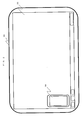
- FIG. 2 schematically shows a situation in which the special key section is displayed on the left side of the touch panel display 111 of the information processor.
- FIG. 3 schematically shows a situation in which the special key section is displayed on the right side of the touch panel display 111 of the information processor.
- the special key section 109 is kept displayed in any situation on the lower-left area (in FIG. 2 ) or at substantially a central position on the right side (in FIG. 3 ) in substantially the rectangular touch panel display 111.
- the special key section 109 is displayed to be available without causing any uncomfortable feeling regardless of the display position thereof and is designed to be independent of the utilization state and the dominant hand of the user.
- the special key section 109 may be placed on the right or left side not to hinder the icons and windows.
- the special key section 109 may be placed at a position on the touch panel display 111 suitable for operations of the user, for example, near the upper side or the lower side of the touch panel display 111. That is, the special key section 109 is flexibly placed at an appropriate position on the touch panel display 111.
- the right-handed user operates icons and windows as main or primary operations on the touch panel display 111 by fingers of the right hand and operates the special key section 109 placed on the left side of the touch panel display 111 as subordinate or cooperative operations by fingers of the left hand.
- the left-handed user operates icons and windows as main operations on the touch panel display 111 by fingers of the left hand and operates the special key section 109 placed on the right side of the touch panel display 111 as subordinate operations by fingers of the right hand.
- the special key section 109 is kept presented on the touch panel display 111 in any situation. Hence, icons and the like concealed by the special key section 109 on the touch panel display 111 are not easily recognized in some cases. To prevent the disadvantageous situation, the special key section 109 may be presented as a semitransparent image on the touch panel display 111.
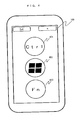
- FIG. 4 schematically shows the special key section 109 of the information processor.
- the special key section 109 includes, for example, a Control (Ctrl) button 401, a Windows (registered trademark) button 402, and a Function (Fn) button 403.
- Each button is associated with a plurality of flick commands (operation menu), which will be described later.
- the flick commands associated with these buttons correspond to the shortcut function which is a combination of keys capable of executing a command without opening an associated menu in a personal computer including a hardware keyboard. That is, the Ctrl button 401, the Windows (registered trademark) button 402, and the Fn button 403 of the special key section 109 and the flick commands (operation menu), which will be described later, conform to combinations beforehand determined in the personal computer including a hardware key board.
- shortcut key to call a function of Windows or software on a Windows PC in place of selecting the function from a menu. For example, when the user depresses the c key of the alphabet keys while pressing the Ctrl key as the special key, the selected character is copied. When the user depresses the v key of the alphabet keys while pressing the Ctrl key as the special key, the copied character is pasted onto the copy destination.
- Ordinary keys constituting commands which are executed by a combination of a special key and an ordinary key other than the special keys are displayed, when the user conducts an operation to hold the tapped state of a key in the special key section 109, in the periphery of the button of the special key section 109 by subdividing the periphery into a predetermined number of areas.
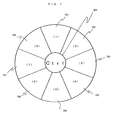
- FIGS. 5 to 9 are schematic diagrams to explain display examples of an operation menu displayed in response to an operation to hold the tapped state in the special key section of the information processor.
- FIG. 5 eight flick commands (1) to (8) are beforehand associated with special key "Ctrl” 401. Although not shown, flick commands are beforehand respectively associated with special key "Windows” 402 and special key "Fn” 403. As described above, the correspondences between the special keys 401 to 403 and the flick commands conform to the combinations beforehand determined in the personal computer including the hardware keyboard. Although eight flick commands are associated with one special key in the configuration of FIGS. 5 to 7 , a desired number of flick commands may be arranged for each special key in the range of the number of codes beforehand determined between one special key and an associated normal key in the personal computer including the hardware keyboard.
- the operation menu corresponding to the special key is displayed in the periphery of the special key by subdividing the periphery into a predetermined number of subareas.
- the processing associated with the selected operation menu item (coordinates) is executed.
- the flick commands are displayed when the user conducts an operation to hold one of the special keys 401 to 403 of the special key section 109 in the tapped state.
- the system displays in the periphery of the special key a command menu from which the user can select a command to be executed corresponding to a code generated in response to an operation in which the special key and an associated normal key are simultaneously operated, in conformity with the combinations determined in advance.
- FIG. 7 shows the flick commands corresponding to special key "Ctrl” 401 arranged in the clockwise direction opposing to the counterclockwise direction in which the flick commands (1) to (8) in the periphery of the special key “Ctrl” 401 are arranged in FIG. 5 .
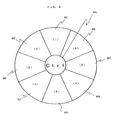
- FIG. 8 shows an arrangement symmetrical about a line drawn lengthwise to pass the center of special key "Ctrl” 401 in FIG. 8 from that shown in FIGS. 5 to 7 in which the flick commands corresponding to special key "Ctrl” 401 are radially arranged.
- the flick commands (1) to (5) corresponding to special key "Ctrl” 401 are arranged to be substantially symmetrical about a line drawn lengthwise to pass the center of special key "Ctrl” 401 in FIG. 8 .
- the flick commands may be assigned to each special key in an asymmetric way such that the assignment of the commands is set in a symmetric way later by the user.
- particular flick commands flick commands (1) and (4) in FIG. 9
- flick commands (1) and (4) in FIG. 9 may be larger in the area than the other flick commands. This makes it possible that a user with thick fingers to select the target flick commands without touching the other flick areas.
- one and the same flick command may be associated with a plurality of flick command areas. This improves operability in the selection of flick commands.
- the special key section 109 is placed in the right or left side of the touch panel display 111, to facilitate the flick operation by a finger of the right or left hand, it is also possible that by operating a changeover button, not shown, the allocation of the flick commands to the special keys may be reversed at a time. Specifically, the flick commands on the left side and those on the right side are replaced with each other. Further, to visually indicate a special key touched by the finger and flick commands, the background of the selected special key and that of the flick commands under the flick operation may be colored or the colors of the backgrounds may be changed.
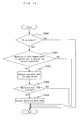
- FIG. 10 is a flowchart to explain the operation of the information processor.
- step 1001 judges whether or not the PC 100 has been activated. If the PC 100 has not been activated (no in S1001), the processing is terminated. If the PC 100 has been activated (yes in S1001), control goes to S102.
- S1002 judges whether or not the operation to hold the tapped state of a special key of the special key section 109 has been conducted. If the operation has not been conducted (no in S1002), the processing is terminated. If the operation has been conducted (yes in S1002), control goes to S1003.
- an operation menu corresponding to the special key for which the operation to hold the tapped state has been conducted is displayed in the peripheral area of the special key by dividing the peripheral area into a predetermined number of subareas.
- the operation menu displayed in the subdivided areas is a command menu from which the user can select a command to be executed corresponding to a code generated in response to an operation in which the special key and an associated normal key are simultaneously operated when either one of the special keys 401 to 403 of the special key section 109 is tapped.
- S1004 judges whether or not an operation menu item has been selected. The judgment is conducted based on an event in which an operation to hold the tapped state of a special key is conducted and a flick operation to an operation menu area is successively carried out and then the finger is removed from the screen. If no operation menu item has been selected (no in S1004), the processing is terminated. If an operation menu item has been selected (yes in S1004), control goes to S1005. In S1005, the operation menu item thus selected is executed. As a result, in a tablet PC, it is possible to establish an operation environment almost equal to that in which a shortcut function is conducted in a personal computer including a hardware keyboard.
- the operations of the functional blocks constituting the information processor 100 of the embodiment shown in FIG. 10 may be carried out by programs on a computer. That is, the CPU 106 of the information processor 100 loads therein the programs stored in the storage media such as the ROM 101 and the RAM 102 and then sequentially executes processing steps of the programs.
- an information processor in which it is possible to implement the shortcut operation conventionally accomplished on the hardware keyboard, to thereby improve operability based on intuitive operation of the tablet terminal.
- the information processor includes:
Landscapes
- Engineering & Computer Science (AREA)
- General Engineering & Computer Science (AREA)
- Theoretical Computer Science (AREA)
- Human Computer Interaction (AREA)
- Physics & Mathematics (AREA)
- General Physics & Mathematics (AREA)
- Input From Keyboards Or The Like (AREA)
- User Interface Of Digital Computer (AREA)
- Position Input By Displaying (AREA)
Applications Claiming Priority (1)
| Application Number | Priority Date | Filing Date | Title |
|---|---|---|---|
| JP2013183457A JP2015050755A (ja) | 2013-09-04 | 2013-09-04 | 情報処理装置、制御方法、及びプログラム |
Publications (1)
| Publication Number | Publication Date |
|---|---|
| EP2846244A1 true EP2846244A1 (fr) | 2015-03-11 |
Family
ID=51518506
Family Applications (1)
| Application Number | Title | Priority Date | Filing Date |
|---|---|---|---|
| EP14003039.6A Withdrawn EP2846244A1 (fr) | 2013-09-04 | 2014-09-03 | Dispositif de traitement d'informations écran tactile, procédé de commande de dispositif et programme |
Country Status (4)
| Country | Link |
|---|---|
| US (1) | US20150062015A1 (fr) |
| EP (1) | EP2846244A1 (fr) |
| JP (1) | JP2015050755A (fr) |
| CN (1) | CN104423626A (fr) |
Families Citing this family (6)
| Publication number | Priority date | Publication date | Assignee | Title |
|---|---|---|---|---|
| EP3012728B1 (fr) * | 2014-10-24 | 2022-12-07 | Electrolux Appliances Aktiebolag | Interface utilisateur graphique |
| JP1566076S (fr) * | 2015-04-21 | 2016-12-26 | ||
| JP1566075S (fr) * | 2015-04-21 | 2016-12-26 | ||
| USD783654S1 (en) * | 2015-04-21 | 2017-04-11 | Jingtao HU | Display screen with graphic user interface |
| PL3347934T3 (pl) | 2015-09-08 | 2021-05-17 | Umicore | Prekursor i sposób otrzymywania katod z litowanego metalu przejściowego na bazie niklu do baterii wielokrotnego ładowania |
| JP6651275B1 (ja) * | 2019-08-01 | 2020-02-19 | 株式会社ディスコ | 加工装置 |
Citations (1)
| Publication number | Priority date | Publication date | Assignee | Title |
|---|---|---|---|---|
| JP3385965B2 (ja) | 1998-04-20 | 2003-03-10 | セイコーエプソン株式会社 | 入力装置及び入力方法 |
Family Cites Families (9)
| Publication number | Priority date | Publication date | Assignee | Title |
|---|---|---|---|---|
| JP3546337B2 (ja) * | 1993-12-21 | 2004-07-28 | ゼロックス コーポレイション | 計算システム用ユーザ・インタフェース装置及びグラフィック・キーボード使用方法 |
| GB0201074D0 (en) * | 2002-01-18 | 2002-03-06 | 3G Lab Ltd | Graphic user interface for data processing device |
| JP2005352569A (ja) * | 2004-06-08 | 2005-12-22 | Sony Corp | 情報処理装置、情報処理装置における処理方法及び情報処理装置における処理プログラム |
| CN101387915B (zh) * | 2007-09-10 | 2011-03-23 | 深圳富泰宏精密工业有限公司 | 触摸式键盘控制系统及方法 |
| CN101685348A (zh) * | 2008-09-24 | 2010-03-31 | 王雅弟 | 一种使用字母键选择候选字词的输入方法 |
| US9746995B2 (en) * | 2011-07-14 | 2017-08-29 | Microsoft Technology Licensing, Llc | Launcher for context based menus |
| CN103246683B (zh) * | 2012-02-13 | 2018-04-27 | 联想(北京)有限公司 | 一种组合按键的提示方法及电子设备 |
| US20130219340A1 (en) * | 2012-02-21 | 2013-08-22 | Sap Ag | Navigation on a Portable Electronic Device |
| US11422695B2 (en) * | 2013-03-27 | 2022-08-23 | Texas Instruments Incorporated | Radial based user interface on touch sensitive screen |
-
2013
- 2013-09-04 JP JP2013183457A patent/JP2015050755A/ja active Pending
-
2014
- 2014-09-03 EP EP14003039.6A patent/EP2846244A1/fr not_active Withdrawn
- 2014-09-04 US US14/477,456 patent/US20150062015A1/en not_active Abandoned
- 2014-09-04 CN CN201410455034.XA patent/CN104423626A/zh active Pending
Patent Citations (1)
| Publication number | Priority date | Publication date | Assignee | Title |
|---|---|---|---|---|
| JP3385965B2 (ja) | 1998-04-20 | 2003-03-10 | セイコーエプソン株式会社 | 入力装置及び入力方法 |
Non-Patent Citations (1)
| Title |
|---|
| ANONYMOUS: "Start menu - Wikipedia, the free encyclopedia", 25 April 2013 (2013-04-25), XP055162715, Retrieved from the Internet <URL:https://web.archive.org/web/20130425191350/http://en.wikipedia.org/wiki/Start_menu> [retrieved on 20150116] * |
Also Published As
| Publication number | Publication date |
|---|---|
| US20150062015A1 (en) | 2015-03-05 |
| JP2015050755A (ja) | 2015-03-16 |
| CN104423626A (zh) | 2015-03-18 |
Similar Documents
| Publication | Publication Date | Title |
|---|---|---|
| EP1979804B1 (fr) | Méthodes et systèmes permettant d'utiliser des gestes dans des dispositifs de détection | |
| US9292111B2 (en) | Gesturing with a multipoint sensing device | |
| US9239673B2 (en) | Gesturing with a multipoint sensing device | |
| EP2915036A1 (fr) | Clavier à touches redondantes avec les gestes supprimées | |
| CN114764304B (zh) | 一种屏幕显示方法 | |
| US12530083B2 (en) | Feedback method and related device | |
| CN116601586A (zh) | 一种虚拟键盘的处理方法以及相关设备 | |
| EP2846244A1 (fr) | Dispositif de traitement d'informations écran tactile, procédé de commande de dispositif et programme | |
| EP2851776A1 (fr) | Dispositif de traitement d'informations écran tactile, procédé de commande de dispositif et programme | |
| CN114690888B (zh) | 一种应用界面的处理方法以及相关设备 | |
| WO2014043275A1 (fr) | Mise en œuvre de gestes avec un dispositif de détection multipoint | |
| AU2016238971B2 (en) | Gesturing with a multipoint sensing device | |
| AU2014201419B2 (en) | Gesturing with a multipoint sensing device | |
| HK1124676A (en) | Gesturing with a multipoint sensing device | |
| HK1124676B (en) | Gesturing with a multipoint sensing device | |
| HK1174984A (en) | Gesturing with a multipoint sensing device | |
| HK1174985A (en) | Gesturing with a multipoint sensing device |
Legal Events
| Date | Code | Title | Description |
|---|---|---|---|
| 17P | Request for examination filed |
Effective date: 20140903 |
|
| AK | Designated contracting states |
Kind code of ref document: A1 Designated state(s): AL AT BE BG CH CY CZ DE DK EE ES FI FR GB GR HR HU IE IS IT LI LT LU LV MC MK MT NL NO PL PT RO RS SE SI SK SM TR |
|
| AX | Request for extension of the european patent |
Extension state: BA ME |
|
| PUAI | Public reference made under article 153(3) epc to a published international application that has entered the european phase |
Free format text: ORIGINAL CODE: 0009012 |
|
| STAA | Information on the status of an ep patent application or granted ep patent |
Free format text: STATUS: THE APPLICATION IS DEEMED TO BE WITHDRAWN |
|
| 18D | Application deemed to be withdrawn |
Effective date: 20150912 |