EP2854005A1 - Procédé de présentation d'une image de prévisualisation, dispositif et terminal associés - Google Patents
Procédé de présentation d'une image de prévisualisation, dispositif et terminal associés Download PDFInfo
- Publication number
- EP2854005A1 EP2854005A1 EP14743773.5A EP14743773A EP2854005A1 EP 2854005 A1 EP2854005 A1 EP 2854005A1 EP 14743773 A EP14743773 A EP 14743773A EP 2854005 A1 EP2854005 A1 EP 2854005A1
- Authority
- EP
- European Patent Office
- Prior art keywords
- preview image
- image
- present
- camera
- terminal
- Prior art date
- Legal status (The legal status is an assumption and is not a legal conclusion. Google has not performed a legal analysis and makes no representation as to the accuracy of the status listed.)
- Granted
Links
Images



Classifications
-
- G—PHYSICS
- G06—COMPUTING OR CALCULATING; COUNTING
- G06T—IMAGE DATA PROCESSING OR GENERATION, IN GENERAL
- G06T3/00—Geometric image transformations in the plane of the image
- G06T3/40—Scaling of whole images or parts thereof, e.g. expanding or contracting
-
- H—ELECTRICITY
- H04—ELECTRIC COMMUNICATION TECHNIQUE
- H04N—PICTORIAL COMMUNICATION, e.g. TELEVISION
- H04N23/00—Cameras or camera modules comprising electronic image sensors; Control thereof
- H04N23/60—Control of cameras or camera modules
- H04N23/62—Control of parameters via user interfaces
-
- H—ELECTRICITY
- H04—ELECTRIC COMMUNICATION TECHNIQUE
- H04N—PICTORIAL COMMUNICATION, e.g. TELEVISION
- H04N23/00—Cameras or camera modules comprising electronic image sensors; Control thereof
- H04N23/60—Control of cameras or camera modules
- H04N23/63—Control of cameras or camera modules by using electronic viewfinders
- H04N23/631—Graphical user interfaces [GUI] specially adapted for controlling image capture or setting capture parameters
-
- H—ELECTRICITY
- H04—ELECTRIC COMMUNICATION TECHNIQUE
- H04N—PICTORIAL COMMUNICATION, e.g. TELEVISION
- H04N23/00—Cameras or camera modules comprising electronic image sensors; Control thereof
- H04N23/60—Control of cameras or camera modules
- H04N23/63—Control of cameras or camera modules by using electronic viewfinders
- H04N23/631—Graphical user interfaces [GUI] specially adapted for controlling image capture or setting capture parameters
- H04N23/632—Graphical user interfaces [GUI] specially adapted for controlling image capture or setting capture parameters for displaying or modifying preview images prior to image capturing, e.g. variety of image resolutions or capturing parameters
-
- H—ELECTRICITY
- H04—ELECTRIC COMMUNICATION TECHNIQUE
- H04N—PICTORIAL COMMUNICATION, e.g. TELEVISION
- H04N23/00—Cameras or camera modules comprising electronic image sensors; Control thereof
- H04N23/60—Control of cameras or camera modules
- H04N23/63—Control of cameras or camera modules by using electronic viewfinders
- H04N23/633—Control of cameras or camera modules by using electronic viewfinders for displaying additional information relating to control or operation of the camera
- H04N23/635—Region indicators; Field of view indicators
-
- H—ELECTRICITY
- H04—ELECTRIC COMMUNICATION TECHNIQUE
- H04N—PICTORIAL COMMUNICATION, e.g. TELEVISION
- H04N23/00—Cameras or camera modules comprising electronic image sensors; Control thereof
- H04N23/90—Arrangement of cameras or camera modules, e.g. multiple cameras in TV studios or sports stadiums
-
- G—PHYSICS
- G06—COMPUTING OR CALCULATING; COUNTING
- G06F—ELECTRIC DIGITAL DATA PROCESSING
- G06F3/00—Input arrangements for transferring data to be processed into a form capable of being handled by the computer; Output arrangements for transferring data from processing unit to output unit, e.g. interface arrangements
- G06F3/01—Input arrangements or combined input and output arrangements for interaction between user and computer
- G06F3/048—Interaction techniques based on graphical user interfaces [GUI]
- G06F3/0484—Interaction techniques based on graphical user interfaces [GUI] for the control of specific functions or operations, e.g. selecting or manipulating an object, an image or a displayed text element, setting a parameter value or selecting a range
- G06F3/04845—Interaction techniques based on graphical user interfaces [GUI] for the control of specific functions or operations, e.g. selecting or manipulating an object, an image or a displayed text element, setting a parameter value or selecting a range for image manipulation, e.g. dragging, rotation, expansion or change of colour
-
- G—PHYSICS
- G06—COMPUTING OR CALCULATING; COUNTING
- G06F—ELECTRIC DIGITAL DATA PROCESSING
- G06F3/00—Input arrangements for transferring data to be processed into a form capable of being handled by the computer; Output arrangements for transferring data from processing unit to output unit, e.g. interface arrangements
- G06F3/01—Input arrangements or combined input and output arrangements for interaction between user and computer
- G06F3/048—Interaction techniques based on graphical user interfaces [GUI]
- G06F3/0487—Interaction techniques based on graphical user interfaces [GUI] using specific features provided by the input device, e.g. functions controlled by the rotation of a mouse with dual sensing arrangements, or of the nature of the input device, e.g. tap gestures based on pressure sensed by a digitiser
- G06F3/0488—Interaction techniques based on graphical user interfaces [GUI] using specific features provided by the input device, e.g. functions controlled by the rotation of a mouse with dual sensing arrangements, or of the nature of the input device, e.g. tap gestures based on pressure sensed by a digitiser using a touch-screen or digitiser, e.g. input of commands through traced gestures
- G06F3/04883—Interaction techniques based on graphical user interfaces [GUI] using specific features provided by the input device, e.g. functions controlled by the rotation of a mouse with dual sensing arrangements, or of the nature of the input device, e.g. tap gestures based on pressure sensed by a digitiser using a touch-screen or digitiser, e.g. input of commands through traced gestures for inputting data by handwriting, e.g. gesture or text
-
- H—ELECTRICITY
- H04—ELECTRIC COMMUNICATION TECHNIQUE
- H04N—PICTORIAL COMMUNICATION, e.g. TELEVISION
- H04N1/00—Scanning, transmission or reproduction of documents or the like, e.g. facsimile transmission; Details thereof
- H04N1/0035—User-machine interface; Control console
- H04N1/00405—Output means
- H04N1/00408—Display of information to the user, e.g. menus
- H04N1/0044—Display of information to the user, e.g. menus for image preview or review, e.g. to help the user position a sheet
Definitions
- the present invention relates to the field of intelligent terminal technologies, and in particular, to a preview image presentation method and apparatus, and a terminal.
- one front-facing camera and one rear-facing camera may be disposed on an intelligent terminal.
- the front-facing camera faces a user holding the intelligent terminal, and may implement image presentation when the user is making a video call or taking a selfie. That the user takes a selfie is used as an example.
- the intelligent terminal may display a preview image in real time on a screen according to an output of the front-facing camera.
- the user may adjust, according to the preview image, image composition, on the screen, of an image that is captured by the front-facing camera, and when obtaining satisfactory image composition by means of adjustment, the user taps a camera button to complete the selfie.
- an intelligent terminal In a process of researching the prior art, the inventor finds that an intelligent terminal generally displays a preview image in a full screen manner; when observing the preview image, a user generally watches the center of the image; and in this case, eyes of the user in the preview image are difficult to focus because a sight line of the user diverges from a front-facing camera. In addition, if watching the front-facing camera, the user can observe the preview image only by using a peripheral vision, and it is difficult to capture an expression change. It may be learned from this that when an intelligent terminal performs preview displaying on an image captured by a front-facing camera, a photography effect is poor because the displaying can be performed only in a full screen manner, thereby causing poor user photography experience.
- Embodiments of the present invention provide a preview image presentation method and apparatus, and a terminal, so as to resolve a problem in the prior art of a poor photography effect and poor user photography experience that are caused by displaying a preview image in a full screen manner.
- a preview image presentation method where the method includes:
- the presenting, on a screen of the terminal, a first preview image and a second preview image that are generated according to the image includes:
- the presenting the second preview image on a preset location in the display area includes:
- the preset location includes:
- the method further includes:
- a preview image presentation apparatus where the apparatus includes:
- the presentation unit includes:
- the second presentation subunit is specifically configured to present the second preview image by superimposing the second preview image on a preset location of the first preview image, or present the second preview image on a preset location that is independent of the first preview image.
- the apparatus further includes:
- a terminal includes a processor, and a camera and a screen that are connected to the processor, where:
- the processor is specifically configured to present, in a display area of the screen, the first preview image generated according to the image, generate the second preview image according to the first preview image by using a downscale algorithm, and present the second preview image on a preset location in the display area.
- the processor is specifically configured to present the second preview image by superimposing the second preview image on a preset location of the first preview image, or present the second preview image on a preset location that is independent of the first preview image.
- the processor is further configured to receive an operating instruction of a user on the second preview image, and present the second preview image on a target location indicated by the operating instruction.
- a terminal acquires an image captured by a camera, and presents, on a screen of the terminal, a first preview image and a second preview image that are generated according to the image, where a size of the second preview image is less than a size of the first preview image.
- a second preview image that is smaller than the first preview image may be presented additionally, so that a user can adjust photographic composition according to the second preview image, thereby enhancing a photography effect and improving user photography experience.
- the following embodiments of the present invention provide a preview image presentation method and apparatus, and a terminal.
- FIG. 1 is a flowchart of an embodiment of a preview image presentation method according to the present invention.
- Step 101 A terminal acquires an image captured by a camera.
- the terminal in this embodiment may be an intelligent terminal into which a camera and a touchscreen are integrated, for example, a smart phone, a personal digital assistant (Personal Digital Assistant, PDA), a personal access device PAD, and a photographic camera.
- the camera may refer to a front-facing camera with a selfie function, and correspondingly, a preview image presented in this embodiment of the present invention may refer to an image captured by the front-facing camera.
- Step 102 Present, on a screen of the terminal, a first preview image and a second preview image that are generated according to the image, where a size of the second preview image is less than a size of the first preview image.
- the first preview image generated according to the image captured by the camera may be presented in a display area of the screen; the second preview image may be generated according to the first preview image by using a downscale (Downscale) algorithm; and the second preview image may be presented on a preset location in the display area.
- the size of the second preview image is less than the size of the first preview image.
- the second preview image may be presented by superimposing the second preview image on a preset location of the first preview image; or the second preview image may be presented on a preset location that is independent of the first preview image.
- a second preview image that is smaller than the first preview image may be presented additionally, so that a user can adjust photographic composition according to the second preview image, thereby enhancing a photography effect and improving user photography experience.
- FIG. 2 is a flowchart of another embodiment of a preview image presentation method according to the present invention.
- Step 201 A terminal acquires an image captured by a camera.
- the terminal in this embodiment may be an intelligent terminal into which a camera and a touchscreen are integrated, for example, a smart phone, a PDA, a palmtop computer PAD, and a photographic camera.
- the camera may refer to a front-facing camera with a selfie function, and correspondingly, a preview image presented in this embodiment of the present invention may refer to an image captured by the front-facing camera.
- Step 202 Present, in a display area of a screen, a first preview image generated according to the image.
- a presentation manner of the first preview image is the same as that in the prior art.
- the first preview image may be presented in the display area of the screen in a full screen manner, which is not described herein again.
- Step 203 Generate a second preview image according to the first preview image by using a downscale algorithm.
- a size of the second preview image is less than a size of the first preview image.
- the second preview image may be generated by using various existing downscaling (Downscale) algorithms, for example, with the first preview image used as an input, a second preview image that is one fourth the size of the first preview image is generated.
- Downscale downscaling
- a specific size of the second preview image is not limited in this embodiment.
- Step 204 Present the generated second preview image on a preset location in the display area.
- the second preview image may be presented by superimposing the second preview image on a preset location of the first preview image; or, the display area may be divided into two parts, where the larger part is used to present the first preview image and the smaller part is used to present the second preview image, that is, the second preview image may be presented on a preset location that is independent of the first preview image.
- the preset location may include: a location near the camera, for example, a location that is located in a same vertical direction as the camera and is spaced from the camera by a distance less than a threshold; or a location having a certain angle with respect to the camera, for example, a location that is in a direction having a preset included angle with respect to a vertical direction of the camera and is spaced from the camera by a distance less than a threshold.
- a second preview image that is smaller than the first preview image may be presented additionally, so that a user can adjust photographic composition according to the second preview image, thereby enhancing a photography effect and improving user photography experience.
- the second preview image is presented near a camera, the user may enable a sight line to exactly face the camera when watching the second preview image, thereby improving the photography effect.
- FIG. 3 is a flowchart of another embodiment of a preview image presentation method according to the present invention.
- Step 301 A terminal acquires an image captured by a camera.
- the terminal in this embodiment may be an intelligent terminal into which a camera and a touchscreen are integrated, for example, a smart phone, a PDA, a palmtop computer PAD, and a photographic camera.
- the camera may refer to a front-facing camera with a selfie function, and correspondingly, a preview image presented in this embodiment of the present invention may refer to an image captured by the front-facing camera.
- Step 302 Present, on a screen of the terminal, a first preview image and a second preview image that are generated according to the image, where a size of the second preview image is less than a size of the first preview image.
- the first preview image generated according to the image captured by the camera may be presented in a display area of the screen; the second preview image may be generated according to the first preview image by using a downscaling (Downscale) algorithm; and the second preview image may be presented on a preset location in the display area.
- the size of the second preview image is less than the size of the first preview image.
- the second preview image may be presented by superimposing the second preview image on a preset location of the first preview image; or the second preview image may be presented on a preset location that is independent of the first preview image.
- Step 303 Receive an operating instruction of a user on the second preview image.
- a difference from the embodiment of FIG. 2 lies in that in this embodiment, after the second preview image is presented on the screen according to step 302, the user may move, according to a photography requirement, the second preview image on the screen by using the operating instruction.
- the terminal may provide preset location options for the user to select, and a select action of the user for a location generates a corresponding operating instruction; or, for a touchscreen, the user may drag the second preview image on the screen, and a corresponding operating instruction is generated by using a drag gesture.
- Step 304 Present the second preview image on a target location indicated by the operating instruction.
- the operating instruction when the operating instruction is an operating instruction generated according to the select action of the user for a location, after the user ends the selection, the second preview image is presented on a selected target location according to the operating instruction; when the operating instruction is a drag gesture, after the user ends the dragging, the second preview image is presented, according to the operating instruction generated by the drag gesture, on a target location at which a finger leaves the screen.
- a second preview image that is smaller than the first preview image may be presented additionally, so that a user can adjust photographic composition according to the second preview image, thereby enhancing a photography effect and improving user photography experience.
- the user can move the second preview image, so that flexible image composition may be performed according to a photography requirement of the user, which further improves the user photography experience.
- the second preview image is presented near a camera, the user may enable a sight line to exactly face the camera when watching the second preview image, thereby improving the photography effect.
- the second preview image may be dragged to a direction having a preset included angle with respect to a vertical direction of the camera, so as to perform the image composition based on the second preview image.
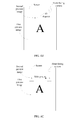
- FIG. 4A is a schematic diagram of presenting a preview image by applying a method embodiment of the present invention.
- a front-facing camera is disposed on the upper right of a screen, a first preview image is presented on a display area in a full screen manner, a second preview image is superimposed on the first preview image, and the second preview image is presented below the front-facing camera. Because the second preview image is located near the front-facing camera, when a user is watching the second preview image, a presented image is an image in which the user is watching the camera.
- FIG. 4B is another schematic diagram of presenting a preview image by applying a method embodiment of the present invention.
- a front-facing camera is disposed on the upper left of a screen, a first preview image is presented on a display area in a full screen manner, a second preview image is superimposed on the first preview image, and the second preview image has a 45-degree included angle with respect to a vertical direction of the front-facing camera.
- a photography effect of a side view of the user may be presented.
- FIG. 4B is not intended to limit an included angle between the second preview image and the vertical direction of the front-facing camera to 45 degrees. Any angle is acceptable as long as it can ensure that a photography effect of a side view of a user can be previewed when the user is watching the second preview image.
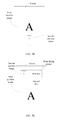
- FIG. 4C is another schematic diagram of presenting a preview image by applying a method embodiment of the present invention.
- the user may drag the second preview image by using a gesture, and drag the second preview image from the location having a 45-degree included angle with respect to the vertical direction of the front-facing camera to a location below the front-facing camera. Therefore, a photographing angle of the front-facing camera may be adjusted from a side view of the user to a front view of the user, and a presented image is an image in which the user is watching the camera.
- FIG. 4D is another schematic diagram of presenting a preview image according to a method embodiment of the present invention.
- a difference from FIG. 4A lies in that a front-facing camera is disposed on a central location below a screen, a first preview image is presented on a display area in a full screen manner, a second preview image is superimposed on the first preview image, and the second preview image is presented above the front-facing camera.
- FIG. 4E is another schematic diagram of presenting a preview image by applying a method embodiment of the present invention.
- a difference from FIG. 4B lies in that a display area of a screen is divided into two parts, where the larger first area in the lower part of the screen is used to present a first preview image in a full screen manner, a second area above the first area is used to present a second preview image, and the second preview image may be presented on any location in the second area.
- the second preview image may also be presented by superimposing the second preview image on the first preview image, which is not limited in the embodiment.
- the present invention further provides embodiments of a preview image presentation apparatus and a terminal.
- FIG. 5 is a block diagram of an embodiment of a preview image presentation apparatus according to the present invention.
- the apparatus includes: an acquiring unit 510 and a presentation unit 520.
- the acquiring unit 510 is configured to acquire an image captured by a camera.
- the presentation unit 520 is configured to present, on a screen of a terminal, a first preview image and a second preview image that are generated according to the image acquired by the acquiring unit 510, where a size of the second preview image is less than a size of the first preview image.
- the presentation unit 520 may include (not shown in FIG. 5 ):
- the second presentation subunit may be specifically configured to present the second preview image by superimposing the second preview image on a preset location of the first preview image, or present the second preview image on a preset location that is independent of the first preview image.
- FIG. 6 is a block diagram of another embodiment of a preview image presentation apparatus according to the present invention.
- the apparatus includes: an acquiring unit 610, a presentation unit 620, and a receiving unit 630.
- the acquiring unit 610 is configured to acquire an image captured by a camera.
- the presentation unit 620 is configured to present, on a screen of a terminal, a first preview image and a second preview image that are generated according to the image acquired by the acquiring unit 610, where a size of the second preview image is less than a size of the first preview image.
- the receiving unit 630 is configured to receive an operating instruction of a user on the second preview image.
- the presentation unit 620 is further configured to present the second preview image on a target location indicated by the operating instruction received by the receiving unit 630.
- the presentation unit 620 may include (not shown in FIG. 6 ):
- the second presentation subunit may be specifically configured to present the second preview image by superimposing the second preview image on a preset location of the first preview image, or present the second preview image on a preset location that is independent of the first preview image.
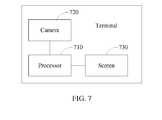
- FIG. 7 is a block diagram of an embodiment of a terminal according to the present invention.
- the terminal includes: a processor 710, and a camera 720 and a screen 730 that are connected to the processor 710.
- the camera 720 is configured to capture an image, and transfer the image to the processor 710.
- the processor 710 is configured to present, on the screen 730, a first preview image and a second preview image that are generated according to the image, where a size of the second preview image is less than a size of the first preview image.
- the processor 710 may be specifically configured to present, in a display area of the screen 730, the first preview image generated according to the image, generate the second preview image according to the first preview image by using a downscale algorithm, and present the second preview image on a preset location in the display area.
- the processor 710 may be specifically configured to present the second preview image by superimposing the second preview image on a preset location of the first preview image, or present the second preview image on a preset location that is independent of the first preview image.
- the processor 710 may be further configured to receive an operating instruction of a user on the second preview image, and present the second preview image on a target location indicated by the operating instruction.
- a terminal acquires an image captured by a camera, and presents, on a screen of the terminal, a first preview image and a second preview image that are generated according to the image, where a size of the second preview image is less than a size of the first preview image.
- a second preview image that is smaller than the first preview image may be presented additionally, so that a user can adjust photographic composition according to the second preview image, thereby enhancing a photography effect and improving user photography experience.
- the computer software product may be stored in a storage medium, such as a ROM/RAM, a magnetic disk, or an optical disc, and includes several instructions for instructing a computer device (which may be a personal computer, a server, or a network device) to perform the methods described in the embodiments or some parts of the embodiments of the present invention.
Landscapes
- Engineering & Computer Science (AREA)
- Multimedia (AREA)
- Signal Processing (AREA)
- Human Computer Interaction (AREA)
- Physics & Mathematics (AREA)
- General Physics & Mathematics (AREA)
- Theoretical Computer Science (AREA)
- User Interface Of Digital Computer (AREA)
- Studio Devices (AREA)
- Editing Of Facsimile Originals (AREA)
- Controls And Circuits For Display Device (AREA)
- Telephone Function (AREA)
Priority Applications (1)
| Application Number | Priority Date | Filing Date | Title |
|---|---|---|---|
| EP18169002.5A EP3486760B1 (fr) | 2013-01-22 | 2014-01-22 | Procédé de présentation d'image de prévisualisation, dispositif et terminal |
Applications Claiming Priority (2)
| Application Number | Priority Date | Filing Date | Title |
|---|---|---|---|
| CN201310023362.8A CN103049175B (zh) | 2013-01-22 | 2013-01-22 | 预览画面呈现方法、装置及终端 |
| PCT/CN2014/071131 WO2014114238A1 (fr) | 2013-01-22 | 2014-01-22 | Procédé de présentation d'une image de prévisualisation, dispositif et terminal associés |
Related Child Applications (2)
| Application Number | Title | Priority Date | Filing Date |
|---|---|---|---|
| EP18169002.5A Division EP3486760B1 (fr) | 2013-01-22 | 2014-01-22 | Procédé de présentation d'image de prévisualisation, dispositif et terminal |
| EP18169002.5A Division-Into EP3486760B1 (fr) | 2013-01-22 | 2014-01-22 | Procédé de présentation d'image de prévisualisation, dispositif et terminal |
Publications (3)
| Publication Number | Publication Date |
|---|---|
| EP2854005A1 true EP2854005A1 (fr) | 2015-04-01 |
| EP2854005A4 EP2854005A4 (fr) | 2015-08-26 |
| EP2854005B1 EP2854005B1 (fr) | 2018-06-27 |
Family
ID=48061829
Family Applications (2)
| Application Number | Title | Priority Date | Filing Date |
|---|---|---|---|
| EP18169002.5A Active EP3486760B1 (fr) | 2013-01-22 | 2014-01-22 | Procédé de présentation d'image de prévisualisation, dispositif et terminal |
| EP14743773.5A Active EP2854005B1 (fr) | 2013-01-22 | 2014-01-22 | Procédé de présentation d'une image de prévisualisation, dispositif et terminal associés |
Family Applications Before (1)
| Application Number | Title | Priority Date | Filing Date |
|---|---|---|---|
| EP18169002.5A Active EP3486760B1 (fr) | 2013-01-22 | 2014-01-22 | Procédé de présentation d'image de prévisualisation, dispositif et terminal |
Country Status (5)
| Country | Link |
|---|---|
| US (3) | US9509916B2 (fr) |
| EP (2) | EP3486760B1 (fr) |
| JP (3) | JP2015531079A (fr) |
| CN (2) | CN106027910B (fr) |
| WO (1) | WO2014114238A1 (fr) |
Families Citing this family (37)
| Publication number | Priority date | Publication date | Assignee | Title |
|---|---|---|---|---|
| CN106027910B (zh) * | 2013-01-22 | 2019-08-16 | 华为终端有限公司 | 预览画面呈现方法、装置及终端 |
| CN103369138A (zh) * | 2013-06-28 | 2013-10-23 | 深圳市有方科技有限公司 | 数字设备的照片拍摄方法以及数字设备 |
| KR20150039355A (ko) * | 2013-10-02 | 2015-04-10 | 엘지전자 주식회사 | 이동 단말기 및 그 제어방법 |
| US9578233B2 (en) * | 2013-12-26 | 2017-02-21 | Canon Kabushiki Kaisha | Imaging apparatus and method for controlling the same |
| JP2015142317A (ja) * | 2014-01-30 | 2015-08-03 | シャープ株式会社 | 電子機器 |
| CN103777865A (zh) * | 2014-02-21 | 2014-05-07 | 联想(北京)有限公司 | 信息显示方法、装置、处理器及电子设备 |
| CN104076882A (zh) * | 2014-07-21 | 2014-10-01 | 联想(北京)有限公司 | 电子设备和应用于其的信息处理方法 |
| CN104618652A (zh) * | 2015-02-02 | 2015-05-13 | 上海卓悠网络科技有限公司 | 一种优化智能终端自拍效果的方法及装置 |
| CN104967773A (zh) * | 2015-06-03 | 2015-10-07 | 上海华豚科技有限公司 | 具有前置摄像头拍摄功能的电子设备 |
| CN104881265A (zh) * | 2015-06-03 | 2015-09-02 | 上海华豚科技有限公司 | 可实现图像记录的双屏幕设备 |
| KR101782582B1 (ko) * | 2015-12-04 | 2017-09-28 | 카페24 주식회사 | 아이 트랙킹을 기반으로 하는 영상 전송 방법, 장치 및 시스템 |
| CN105430269B (zh) * | 2015-12-10 | 2018-09-21 | 广东欧珀移动通信有限公司 | 一种应用于移动终端的拍照方法及装置 |
| CN105472166A (zh) * | 2016-01-04 | 2016-04-06 | 广东欧珀移动通信有限公司 | 照片拍摄方法及装置 |
| EP3486863A4 (fr) * | 2016-07-30 | 2019-07-10 | Huawei Technologies Co., Ltd. | Procédé de reconnaissance d'image et terminal |
| CN106375595A (zh) * | 2016-10-17 | 2017-02-01 | 努比亚技术有限公司 | 一种辅助对焦装置及方法 |
| EP3496386A4 (fr) | 2016-11-24 | 2019-07-03 | Huawei Technologies Co., Ltd. | Procédé et dispositif de guidage pour composition de photographie |
| JP6695788B2 (ja) | 2016-12-07 | 2020-05-20 | 任天堂株式会社 | 情報処理プログラム、情報処理装置および情報処理方法 |
| CN106937045B (zh) * | 2017-02-23 | 2020-08-14 | 华为机器有限公司 | 一种预览图像的显示方法、终端设备及计算机存储介质 |
| CN107257439B (zh) * | 2017-07-26 | 2019-05-17 | 维沃移动通信有限公司 | 一种拍摄方法及移动终端 |
| CN107277375B (zh) * | 2017-07-31 | 2020-03-27 | 维沃移动通信有限公司 | 一种自拍方法和移动终端 |
| US11265460B2 (en) * | 2017-09-20 | 2022-03-01 | Sharp Kabushiki Kaisha | Electronic device, control device, and control method |
| CN107577409B (zh) * | 2017-10-20 | 2019-07-26 | 维沃移动通信有限公司 | 一种预览图像的处理方法和移动终端 |
| CN108174110B (zh) * | 2018-03-15 | 2021-05-18 | 维沃移动通信有限公司 | 一种拍照方法及柔性屏终端 |
| CN108495029B (zh) * | 2018-03-15 | 2020-03-31 | 维沃移动通信有限公司 | 一种拍照方法及移动终端 |
| CN108650454A (zh) * | 2018-04-23 | 2018-10-12 | 联想(北京)有限公司 | 一种信息处理方法、电子设备和计算机可读存储介质 |
| CN108881723A (zh) * | 2018-07-11 | 2018-11-23 | 维沃移动通信有限公司 | 一种图像预览方法及终端 |
| CN109492123B (zh) * | 2018-09-30 | 2023-09-15 | 北京工业职业技术学院 | 一种信息呈现方法 |
| CN109246345B (zh) * | 2018-10-23 | 2021-06-08 | Oppo广东移动通信有限公司 | 美瞳拍摄方法、装置、存储介质及移动终端 |
| CN111385465B (zh) * | 2018-12-29 | 2022-02-08 | 北京小米移动软件有限公司 | 副屏显示控制方法及装置、电子设备、机器可读存储介质 |
| CN110503911B (zh) * | 2019-08-09 | 2025-02-28 | 武汉华星光电半导体显示技术有限公司 | 显示面板及电子设备 |
| CN110784674B (zh) | 2019-10-30 | 2022-03-15 | 北京字节跳动网络技术有限公司 | 视频处理的方法、装置、终端及存储介质 |
| WO2021083146A1 (fr) | 2019-10-30 | 2021-05-06 | 北京字节跳动网络技术有限公司 | Procédé et appareil de traitement de vidéo, ainsi que terminal et support de stockage |
| CN112486449A (zh) * | 2020-12-18 | 2021-03-12 | 维沃移动通信(杭州)有限公司 | 显示控制方法、装置、电子设备及介质 |
| CN115442509B (zh) * | 2021-06-01 | 2023-10-13 | 荣耀终端有限公司 | 拍摄方法、用户界面及电子设备 |
| CN117407596A (zh) | 2022-07-07 | 2024-01-16 | 抖音视界(北京)有限公司 | 用于内容呈现的方法、装置、设备和存储介质 |
| CN117425057A (zh) * | 2022-07-07 | 2024-01-19 | 抖音视界(北京)有限公司 | 用于影像拍摄的方法、装置、设备和存储介质 |
| CN115334246B (zh) | 2022-09-06 | 2025-07-01 | 抖音视界有限公司 | 用于影像拍摄的方法、装置、设备和存储介质 |
Family Cites Families (44)
| Publication number | Priority date | Publication date | Assignee | Title |
|---|---|---|---|---|
| DE19506297A1 (de) * | 1995-02-23 | 1996-08-29 | Schloemann Siemag Ag | Verfahren und Anlage zum Regenerieren von Sulfatelektrolyt bei der Stahlband-Verzinkung |
| JPH11225319A (ja) * | 1998-02-09 | 1999-08-17 | Olympus Optical Co Ltd | 画像入出力装置 |
| EP0944248B1 (fr) * | 1998-03-16 | 2003-05-21 | Sanyo Electric Co., Ltd. | Caméra numérique avec fonctions de traitement d'image |
| JP2003111040A (ja) * | 2001-09-28 | 2003-04-11 | Matsushita Electric Ind Co Ltd | 動画像通信方法及び動画像通信装置 |
| JP2004260433A (ja) * | 2003-02-25 | 2004-09-16 | Hitachi Ltd | ビデオカメラ付き携帯電話機 |
| US7551199B2 (en) * | 2003-05-05 | 2009-06-23 | Microsoft Corporation | Computer camera system and method for reducing parallax |
| JP2006101466A (ja) * | 2004-09-03 | 2006-04-13 | Nikon Corp | デジタルスチルカメラ |
| JP2006246079A (ja) * | 2005-03-03 | 2006-09-14 | Victor Co Of Japan Ltd | 通信装置 |
| JP2007121378A (ja) * | 2005-10-25 | 2007-05-17 | Sharp Corp | 映像表示装置 |
| EP1950954B1 (fr) * | 2005-11-11 | 2011-04-06 | Sony Corporation | Dispositif, procede et programme de traitement d'images, support d'enregistrement contenant le programme et dispositif d'imagerie |
| KR100836616B1 (ko) * | 2006-11-14 | 2008-06-10 | (주)케이티에프테크놀로지스 | 영상 합성 기능을 가지는 휴대용 단말기 및 휴대용단말기의 영상 합성 방법 |
| JP4759775B2 (ja) * | 2007-06-14 | 2011-08-31 | 富士フイルム株式会社 | 画像記録方法及び装置 |
| KR101439845B1 (ko) * | 2007-11-16 | 2014-09-12 | 삼성전자주식회사 | 디지털 이미지 처리장치 |
| JP5147424B2 (ja) * | 2008-01-23 | 2013-02-20 | キヤノン株式会社 | 画像表示装置及びその制御方法、並びにプログラム |
| JP2009284309A (ja) * | 2008-05-23 | 2009-12-03 | Casio Comput Co Ltd | 撮像装置、表示制御プログラム及び表示制御方法 |
| US8314859B2 (en) * | 2008-05-29 | 2012-11-20 | Lg Electronics Inc. | Mobile terminal and image capturing method thereof |
| KR101507797B1 (ko) * | 2008-05-29 | 2015-04-03 | 엘지전자 주식회사 | 단말기 및 그 제어 방법 |
| ES2313860B1 (es) * | 2008-08-08 | 2010-03-16 | Nilo Garcia Manchado | Camara digital y procedimiento asociado. |
| KR101436841B1 (ko) * | 2008-08-19 | 2014-09-03 | 삼성전자주식회사 | 디지털 이미지 처리장치 |
| WO2010053473A1 (fr) * | 2008-11-04 | 2010-05-14 | Hewlett-Packard Development Company, L.P. | Réglage d'une position de fenêtre vidéo par rapport à une position de caméra vidéo |
| US20100118175A1 (en) * | 2008-11-10 | 2010-05-13 | Victor Charles Bruce | Imaging Apparatus For Image Integration |
| EP2207342B1 (fr) * | 2009-01-07 | 2017-12-06 | LG Electronics Inc. | Terminal mobile et son procédé de contrôle d'image d'appareil photographique |
| JP2010213216A (ja) * | 2009-03-12 | 2010-09-24 | Nikon Corp | 画像編集処理装置、電子カメラ、画像編集処理システム、及び画像編集処理方法 |
| JP5276536B2 (ja) * | 2009-07-16 | 2013-08-28 | 富士フイルム株式会社 | 3次元画像表示装置及び3次元画像表示方法 |
| KR20110047613A (ko) * | 2009-10-30 | 2011-05-09 | 삼성전자주식회사 | 촬영가이드 모드를 제공하는 방법 및 장치 |
| KR101613619B1 (ko) * | 2009-11-30 | 2016-04-29 | 삼성전자주식회사 | 디지털 촬영 장치, 그 제어 방법, 및 컴퓨터 판독가능 매체 |
| JP2011118586A (ja) * | 2009-12-02 | 2011-06-16 | Fujifilm Corp | 印刷プレビューシステム、サーバ、印刷プレビュー方法及びプログラム |
| US9584735B2 (en) * | 2010-11-12 | 2017-02-28 | Arcsoft, Inc. | Front and back facing cameras |
| KR101727899B1 (ko) * | 2010-11-26 | 2017-04-18 | 엘지전자 주식회사 | 휴대 단말기 및 그 동작 제어방법 |
| US8432432B2 (en) * | 2010-12-03 | 2013-04-30 | Microsoft Corporation | Eye gaze reduction |
| US20120147246A1 (en) * | 2010-12-13 | 2012-06-14 | Research In Motion Limited | Methods And Apparatus For Use In Enabling An Efficient Review Of Photographic Images Which May Contain Irregularities |
| KR101701852B1 (ko) * | 2010-12-29 | 2017-02-13 | 엘지전자 주식회사 | 이동단말기 및 그 제어방법 |
| US20120198386A1 (en) * | 2011-01-31 | 2012-08-02 | Nokia Corporation | Causing display of thumbnail images |
| CN103477304A (zh) * | 2011-02-10 | 2013-12-25 | 三星电子株式会社 | 包含触摸屏显示器的便携式设备以及控制它的方法 |
| US20120257004A1 (en) * | 2011-04-05 | 2012-10-11 | Polycom, Inc. | Direct Eye-Contact Enhancing Videoconferencing Unit |
| US8988558B2 (en) * | 2011-04-26 | 2015-03-24 | Omnivision Technologies, Inc. | Image overlay in a mobile device |
| JP5806512B2 (ja) | 2011-05-31 | 2015-11-10 | オリンパス株式会社 | 撮像装置、撮像方法および撮像プログラム |
| KR101834987B1 (ko) * | 2011-08-08 | 2018-03-06 | 삼성전자주식회사 | 휴대용 단말기에서 화면 캡쳐를 위한 장치 및 방법 |
| US20130120602A1 (en) * | 2011-11-14 | 2013-05-16 | Microsoft Corporation | Taking Photos With Multiple Cameras |
| US20130155308A1 (en) | 2011-12-20 | 2013-06-20 | Qualcomm Incorporated | Method and apparatus to enhance details in an image |
| KR101864452B1 (ko) * | 2012-01-12 | 2018-06-04 | 삼성전자주식회사 | 이미지 촬영 및 화상 통화 장치와 방법 |
| KR101545883B1 (ko) * | 2012-10-30 | 2015-08-20 | 삼성전자주식회사 | 단말의 카메라 제어 방법 및 그 단말 |
| US9253433B2 (en) * | 2012-11-27 | 2016-02-02 | International Business Machines Corporation | Method and apparatus for tagging media with identity of creator or scene |
| CN106027910B (zh) | 2013-01-22 | 2019-08-16 | 华为终端有限公司 | 预览画面呈现方法、装置及终端 |
-
2013
- 2013-01-22 CN CN201610527949.6A patent/CN106027910B/zh active Active
- 2013-01-22 CN CN201310023362.8A patent/CN103049175B/zh active Active
-
2014
- 2014-01-22 WO PCT/CN2014/071131 patent/WO2014114238A1/fr not_active Ceased
- 2014-01-22 EP EP18169002.5A patent/EP3486760B1/fr active Active
- 2014-01-22 EP EP14743773.5A patent/EP2854005B1/fr active Active
- 2014-01-22 JP JP2015523413A patent/JP2015531079A/ja active Pending
- 2014-12-30 US US14/585,625 patent/US9509916B2/en active Active
-
2016
- 2016-11-28 US US15/362,116 patent/US9948863B2/en active Active
-
2017
- 2017-10-05 JP JP2017194898A patent/JP6522708B2/ja active Active
-
2018
- 2018-03-07 US US15/914,133 patent/US20180198986A1/en not_active Abandoned
-
2019
- 2019-04-24 JP JP2019082826A patent/JP6838099B2/ja active Active
Also Published As
| Publication number | Publication date |
|---|---|
| US9948863B2 (en) | 2018-04-17 |
| US20180198986A1 (en) | 2018-07-12 |
| US9509916B2 (en) | 2016-11-29 |
| WO2014114238A1 (fr) | 2014-07-31 |
| CN103049175B (zh) | 2016-08-10 |
| US20170078582A1 (en) | 2017-03-16 |
| JP6838099B2 (ja) | 2021-03-03 |
| JP2015531079A (ja) | 2015-10-29 |
| CN106027910A (zh) | 2016-10-12 |
| CN106027910B (zh) | 2019-08-16 |
| JP2018023158A (ja) | 2018-02-08 |
| EP3486760A1 (fr) | 2019-05-22 |
| US20150109507A1 (en) | 2015-04-23 |
| CN103049175A (zh) | 2013-04-17 |
| JP6522708B2 (ja) | 2019-05-29 |
| EP3486760B1 (fr) | 2023-11-29 |
| EP2854005B1 (fr) | 2018-06-27 |
| JP2019135879A (ja) | 2019-08-15 |
| EP2854005A4 (fr) | 2015-08-26 |
Similar Documents
| Publication | Publication Date | Title |
|---|---|---|
| US9509916B2 (en) | Image presentation method and apparatus, and terminal | |
| KR102814703B1 (ko) | 디바이스를 이용한 화면 처리 방법 및 장치 | |
| US9672649B2 (en) | System and method for enabling mirror video chat using a wearable display device | |
| JP7678713B2 (ja) | 撮像装置および方法 | |
| US10284817B2 (en) | Device for and method of corneal imaging | |
| EP3068124A1 (fr) | Procédé, dispositif et terminal de traitement d'image | |
| US10956733B2 (en) | Image processing apparatus and image processing method | |
| US10643334B2 (en) | Image presentation control methods and image presentation control apparatuses | |
| US20130141550A1 (en) | Method, apparatus and computer program for selecting a stereoscopic imaging viewpoint pair | |
| CN109496293A (zh) | 扩展内容显示方法、装置、系统及存储介质 | |
| CN112672058B (zh) | 拍摄方法及装置 | |
| WO2016155227A1 (fr) | Procédé et appareil permettant d'afficher des informations de viseur | |
| CN107592520B (zh) | Ar设备的成像装置及成像方法 | |
| CN104427226B (zh) | 图像采集方法和电子设备 | |
| CN104423038B (zh) | 电子设备及其焦点信息获取方法 | |
| CN103220458B (zh) | 一种立体摄像装置和立体摄像方法 | |
| US9762891B2 (en) | Terminal device, image shooting system and image shooting method | |
| TWI497188B (zh) | 立體影像產生方法及立體影像攝像裝置 | |
| CN115373517A (zh) | 一种基于注视点的智能眼镜宽视角调节方法 | |
| JP2016129341A (ja) | 制御装置、およびプログラム |
Legal Events
| Date | Code | Title | Description |
|---|---|---|---|
| PUAI | Public reference made under article 153(3) epc to a published international application that has entered the european phase |
Free format text: ORIGINAL CODE: 0009012 |
|
| 17P | Request for examination filed |
Effective date: 20141222 |
|
| AK | Designated contracting states |
Kind code of ref document: A1 Designated state(s): AL AT BE BG CH CY CZ DE DK EE ES FI FR GB GR HR HU IE IS IT LI LT LU LV MC MK MT NL NO PL PT RO RS SE SI SK SM TR |
|
| AX | Request for extension of the european patent |
Extension state: BA ME |
|
| RIC1 | Information provided on ipc code assigned before grant |
Ipc: G06F 3/048 20130101AFI20150716BHEP Ipc: H04N 5/232 20060101ALI20150716BHEP |
|
| RA4 | Supplementary search report drawn up and despatched (corrected) |
Effective date: 20150723 |
|
| DAX | Request for extension of the european patent (deleted) | ||
| STAA | Information on the status of an ep patent application or granted ep patent |
Free format text: STATUS: EXAMINATION IS IN PROGRESS |
|
| 17Q | First examination report despatched |
Effective date: 20170327 |
|
| RAP1 | Party data changed (applicant data changed or rights of an application transferred) |
Owner name: HUAWEI DEVICE (DONGGUAN) CO., LTD. |
|
| GRAP | Despatch of communication of intention to grant a patent |
Free format text: ORIGINAL CODE: EPIDOSNIGR1 |
|
| STAA | Information on the status of an ep patent application or granted ep patent |
Free format text: STATUS: GRANT OF PATENT IS INTENDED |
|
| INTG | Intention to grant announced |
Effective date: 20180122 |
|
| GRAS | Grant fee paid |
Free format text: ORIGINAL CODE: EPIDOSNIGR3 |
|
| GRAA | (expected) grant |
Free format text: ORIGINAL CODE: 0009210 |
|
| STAA | Information on the status of an ep patent application or granted ep patent |
Free format text: STATUS: THE PATENT HAS BEEN GRANTED |
|
| AK | Designated contracting states |
Kind code of ref document: B1 Designated state(s): AL AT BE BG CH CY CZ DE DK EE ES FI FR GB GR HR HU IE IS IT LI LT LU LV MC MK MT NL NO PL PT RO RS SE SI SK SM TR |
|
| REG | Reference to a national code |
Ref country code: GB Ref legal event code: FG4D |
|
| REG | Reference to a national code |
Ref country code: AT Ref legal event code: REF Ref document number: 1012888 Country of ref document: AT Kind code of ref document: T Effective date: 20180715 |
|
| REG | Reference to a national code |
Ref country code: IE Ref legal event code: FG4D |
|
| REG | Reference to a national code |
Ref country code: DE Ref legal event code: R096 Ref document number: 602014027547 Country of ref document: DE |
|
| REG | Reference to a national code |
Ref country code: NL Ref legal event code: FP |
|
| PG25 | Lapsed in a contracting state [announced via postgrant information from national office to epo] |
Ref country code: FI Free format text: LAPSE BECAUSE OF FAILURE TO SUBMIT A TRANSLATION OF THE DESCRIPTION OR TO PAY THE FEE WITHIN THE PRESCRIBED TIME-LIMIT Effective date: 20180627 Ref country code: BG Free format text: LAPSE BECAUSE OF FAILURE TO SUBMIT A TRANSLATION OF THE DESCRIPTION OR TO PAY THE FEE WITHIN THE PRESCRIBED TIME-LIMIT Effective date: 20180927 Ref country code: NO Free format text: LAPSE BECAUSE OF FAILURE TO SUBMIT A TRANSLATION OF THE DESCRIPTION OR TO PAY THE FEE WITHIN THE PRESCRIBED TIME-LIMIT Effective date: 20180927 Ref country code: LT Free format text: LAPSE BECAUSE OF FAILURE TO SUBMIT A TRANSLATION OF THE DESCRIPTION OR TO PAY THE FEE WITHIN THE PRESCRIBED TIME-LIMIT Effective date: 20180627 Ref country code: SE Free format text: LAPSE BECAUSE OF FAILURE TO SUBMIT A TRANSLATION OF THE DESCRIPTION OR TO PAY THE FEE WITHIN THE PRESCRIBED TIME-LIMIT Effective date: 20180627 |
|
| REG | Reference to a national code |
Ref country code: LT Ref legal event code: MG4D |
|
| PG25 | Lapsed in a contracting state [announced via postgrant information from national office to epo] |
Ref country code: LV Free format text: LAPSE BECAUSE OF FAILURE TO SUBMIT A TRANSLATION OF THE DESCRIPTION OR TO PAY THE FEE WITHIN THE PRESCRIBED TIME-LIMIT Effective date: 20180627 Ref country code: HR Free format text: LAPSE BECAUSE OF FAILURE TO SUBMIT A TRANSLATION OF THE DESCRIPTION OR TO PAY THE FEE WITHIN THE PRESCRIBED TIME-LIMIT Effective date: 20180627 Ref country code: RS Free format text: LAPSE BECAUSE OF FAILURE TO SUBMIT A TRANSLATION OF THE DESCRIPTION OR TO PAY THE FEE WITHIN THE PRESCRIBED TIME-LIMIT Effective date: 20180627 Ref country code: GR Free format text: LAPSE BECAUSE OF FAILURE TO SUBMIT A TRANSLATION OF THE DESCRIPTION OR TO PAY THE FEE WITHIN THE PRESCRIBED TIME-LIMIT Effective date: 20180928 |
|
| REG | Reference to a national code |
Ref country code: AT Ref legal event code: MK05 Ref document number: 1012888 Country of ref document: AT Kind code of ref document: T Effective date: 20180627 |
|
| PG25 | Lapsed in a contracting state [announced via postgrant information from national office to epo] |
Ref country code: PL Free format text: LAPSE BECAUSE OF FAILURE TO SUBMIT A TRANSLATION OF THE DESCRIPTION OR TO PAY THE FEE WITHIN THE PRESCRIBED TIME-LIMIT Effective date: 20180627 Ref country code: IS Free format text: LAPSE BECAUSE OF FAILURE TO SUBMIT A TRANSLATION OF THE DESCRIPTION OR TO PAY THE FEE WITHIN THE PRESCRIBED TIME-LIMIT Effective date: 20181027 Ref country code: EE Free format text: LAPSE BECAUSE OF FAILURE TO SUBMIT A TRANSLATION OF THE DESCRIPTION OR TO PAY THE FEE WITHIN THE PRESCRIBED TIME-LIMIT Effective date: 20180627 Ref country code: SK Free format text: LAPSE BECAUSE OF FAILURE TO SUBMIT A TRANSLATION OF THE DESCRIPTION OR TO PAY THE FEE WITHIN THE PRESCRIBED TIME-LIMIT Effective date: 20180627 Ref country code: CZ Free format text: LAPSE BECAUSE OF FAILURE TO SUBMIT A TRANSLATION OF THE DESCRIPTION OR TO PAY THE FEE WITHIN THE PRESCRIBED TIME-LIMIT Effective date: 20180627 Ref country code: RO Free format text: LAPSE BECAUSE OF FAILURE TO SUBMIT A TRANSLATION OF THE DESCRIPTION OR TO PAY THE FEE WITHIN THE PRESCRIBED TIME-LIMIT Effective date: 20180627 Ref country code: AT Free format text: LAPSE BECAUSE OF FAILURE TO SUBMIT A TRANSLATION OF THE DESCRIPTION OR TO PAY THE FEE WITHIN THE PRESCRIBED TIME-LIMIT Effective date: 20180627 |
|
| PG25 | Lapsed in a contracting state [announced via postgrant information from national office to epo] |
Ref country code: ES Free format text: LAPSE BECAUSE OF FAILURE TO SUBMIT A TRANSLATION OF THE DESCRIPTION OR TO PAY THE FEE WITHIN THE PRESCRIBED TIME-LIMIT Effective date: 20180627 Ref country code: SM Free format text: LAPSE BECAUSE OF FAILURE TO SUBMIT A TRANSLATION OF THE DESCRIPTION OR TO PAY THE FEE WITHIN THE PRESCRIBED TIME-LIMIT Effective date: 20180627 Ref country code: IT Free format text: LAPSE BECAUSE OF FAILURE TO SUBMIT A TRANSLATION OF THE DESCRIPTION OR TO PAY THE FEE WITHIN THE PRESCRIBED TIME-LIMIT Effective date: 20180627 |
|
| REG | Reference to a national code |
Ref country code: DE Ref legal event code: R097 Ref document number: 602014027547 Country of ref document: DE |
|
| PLBE | No opposition filed within time limit |
Free format text: ORIGINAL CODE: 0009261 |
|
| STAA | Information on the status of an ep patent application or granted ep patent |
Free format text: STATUS: NO OPPOSITION FILED WITHIN TIME LIMIT |
|
| PG25 | Lapsed in a contracting state [announced via postgrant information from national office to epo] |
Ref country code: DK Free format text: LAPSE BECAUSE OF FAILURE TO SUBMIT A TRANSLATION OF THE DESCRIPTION OR TO PAY THE FEE WITHIN THE PRESCRIBED TIME-LIMIT Effective date: 20180627 |
|
| 26N | No opposition filed |
Effective date: 20190328 |
|
| REG | Reference to a national code |
Ref country code: NL Ref legal event code: HC Owner name: HUAWEI DEVICE CO., LTD.; CN Free format text: DETAILS ASSIGNMENT: CHANGE OF OWNER(S), CHANGE OF OWNER(S) NAME; FORMER OWNER NAME: HUAWEI DEVICE (DONGGUAN) CO., LTD. Effective date: 20190514 |
|
| REG | Reference to a national code |
Ref country code: DE Ref legal event code: R081 Ref document number: 602014027547 Country of ref document: DE Owner name: HUAWEI DEVICE CO., LTD., DONGGUAN, CN Free format text: FORMER OWNER: HUAWEI DEVICE (DONGGUAN) CO., LTD., DONGGUAN, GUANGDONG, CN |
|
| PG25 | Lapsed in a contracting state [announced via postgrant information from national office to epo] |
Ref country code: SI Free format text: LAPSE BECAUSE OF FAILURE TO SUBMIT A TRANSLATION OF THE DESCRIPTION OR TO PAY THE FEE WITHIN THE PRESCRIBED TIME-LIMIT Effective date: 20180627 Ref country code: MC Free format text: LAPSE BECAUSE OF FAILURE TO SUBMIT A TRANSLATION OF THE DESCRIPTION OR TO PAY THE FEE WITHIN THE PRESCRIBED TIME-LIMIT Effective date: 20180627 |
|
| REG | Reference to a national code |
Ref country code: CH Ref legal event code: PL |
|
| PG25 | Lapsed in a contracting state [announced via postgrant information from national office to epo] |
Ref country code: LU Free format text: LAPSE BECAUSE OF NON-PAYMENT OF DUE FEES Effective date: 20190122 |
|
| REG | Reference to a national code |
Ref country code: BE Ref legal event code: MM Effective date: 20190131 |
|
| REG | Reference to a national code |
Ref country code: IE Ref legal event code: MM4A |
|
| PG25 | Lapsed in a contracting state [announced via postgrant information from national office to epo] |
Ref country code: BE Free format text: LAPSE BECAUSE OF NON-PAYMENT OF DUE FEES Effective date: 20190131 Ref country code: AL Free format text: LAPSE BECAUSE OF FAILURE TO SUBMIT A TRANSLATION OF THE DESCRIPTION OR TO PAY THE FEE WITHIN THE PRESCRIBED TIME-LIMIT Effective date: 20180627 |
|
| PG25 | Lapsed in a contracting state [announced via postgrant information from national office to epo] |
Ref country code: CH Free format text: LAPSE BECAUSE OF NON-PAYMENT OF DUE FEES Effective date: 20190131 Ref country code: LI Free format text: LAPSE BECAUSE OF NON-PAYMENT OF DUE FEES Effective date: 20190131 |
|
| PG25 | Lapsed in a contracting state [announced via postgrant information from national office to epo] |
Ref country code: IE Free format text: LAPSE BECAUSE OF NON-PAYMENT OF DUE FEES Effective date: 20190122 |
|
| PG25 | Lapsed in a contracting state [announced via postgrant information from national office to epo] |
Ref country code: TR Free format text: LAPSE BECAUSE OF FAILURE TO SUBMIT A TRANSLATION OF THE DESCRIPTION OR TO PAY THE FEE WITHIN THE PRESCRIBED TIME-LIMIT Effective date: 20180627 |
|
| PG25 | Lapsed in a contracting state [announced via postgrant information from national office to epo] |
Ref country code: PT Free format text: LAPSE BECAUSE OF FAILURE TO SUBMIT A TRANSLATION OF THE DESCRIPTION OR TO PAY THE FEE WITHIN THE PRESCRIBED TIME-LIMIT Effective date: 20181029 Ref country code: MT Free format text: LAPSE BECAUSE OF NON-PAYMENT OF DUE FEES Effective date: 20190122 |
|
| PG25 | Lapsed in a contracting state [announced via postgrant information from national office to epo] |
Ref country code: CY Free format text: LAPSE BECAUSE OF FAILURE TO SUBMIT A TRANSLATION OF THE DESCRIPTION OR TO PAY THE FEE WITHIN THE PRESCRIBED TIME-LIMIT Effective date: 20180627 |
|
| PG25 | Lapsed in a contracting state [announced via postgrant information from national office to epo] |
Ref country code: HU Free format text: LAPSE BECAUSE OF FAILURE TO SUBMIT A TRANSLATION OF THE DESCRIPTION OR TO PAY THE FEE WITHIN THE PRESCRIBED TIME-LIMIT; INVALID AB INITIO Effective date: 20140122 |
|
| PG25 | Lapsed in a contracting state [announced via postgrant information from national office to epo] |
Ref country code: MK Free format text: LAPSE BECAUSE OF FAILURE TO SUBMIT A TRANSLATION OF THE DESCRIPTION OR TO PAY THE FEE WITHIN THE PRESCRIBED TIME-LIMIT Effective date: 20180627 |
|
| P01 | Opt-out of the competence of the unified patent court (upc) registered |
Effective date: 20230510 |
|
| PGFP | Annual fee paid to national office [announced via postgrant information from national office to epo] |
Ref country code: GB Payment date: 20251204 Year of fee payment: 13 |
|
| PGFP | Annual fee paid to national office [announced via postgrant information from national office to epo] |
Ref country code: FR Payment date: 20251208 Year of fee payment: 13 Ref country code: NL Payment date: 20251215 Year of fee payment: 13 |
|
| PGFP | Annual fee paid to national office [announced via postgrant information from national office to epo] |
Ref country code: DE Payment date: 20251203 Year of fee payment: 13 |