EP2874405A2 - Verfahren, Server, Client und Software zur Bereitstellung einer definierten Ansicht eines Bildes auf einer Clientvorrichtung - Google Patents
Verfahren, Server, Client und Software zur Bereitstellung einer definierten Ansicht eines Bildes auf einer Clientvorrichtung Download PDFInfo
- Publication number
- EP2874405A2 EP2874405A2 EP20140189778 EP14189778A EP2874405A2 EP 2874405 A2 EP2874405 A2 EP 2874405A2 EP 20140189778 EP20140189778 EP 20140189778 EP 14189778 A EP14189778 A EP 14189778A EP 2874405 A2 EP2874405 A2 EP 2874405A2
- Authority
- EP
- European Patent Office
- Prior art keywords
- client device
- image
- segments
- segment
- server
- Prior art date
- Legal status (The legal status is an assumption and is not a legal conclusion. Google has not performed a legal analysis and makes no representation as to the accuracy of the status listed.)
- Granted
Links
Images










Classifications
-
- H—ELECTRICITY
- H04—ELECTRIC COMMUNICATION TECHNIQUE
- H04N—PICTORIAL COMMUNICATION, e.g. TELEVISION
- H04N21/00—Selective content distribution, e.g. interactive television or video on demand [VOD]
- H04N21/20—Servers specifically adapted for the distribution of content, e.g. VOD servers; Operations thereof
- H04N21/23—Processing of content or additional data; Elementary server operations; Server middleware
- H04N21/234—Processing of video elementary streams, e.g. splicing of video streams or manipulating encoded video stream scene graphs
- H04N21/2343—Processing of video elementary streams, e.g. splicing of video streams or manipulating encoded video stream scene graphs involving reformatting operations of video signals for distribution or compliance with end-user requests or end-user device requirements
- H04N21/234327—Processing of video elementary streams, e.g. splicing of video streams or manipulating encoded video stream scene graphs involving reformatting operations of video signals for distribution or compliance with end-user requests or end-user device requirements by decomposing into layers, e.g. base layer and one or more enhancement layers
-
- H—ELECTRICITY
- H04—ELECTRIC COMMUNICATION TECHNIQUE
- H04L—TRANSMISSION OF DIGITAL INFORMATION, e.g. TELEGRAPHIC COMMUNICATION
- H04L65/00—Network arrangements, protocols or services for supporting real-time applications in data packet communication
- H04L65/60—Network streaming of media packets
- H04L65/75—Media network packet handling
- H04L65/764—Media network packet handling at the destination
-
- H—ELECTRICITY
- H04—ELECTRIC COMMUNICATION TECHNIQUE
- H04L—TRANSMISSION OF DIGITAL INFORMATION, e.g. TELEGRAPHIC COMMUNICATION
- H04L67/00—Network arrangements or protocols for supporting network services or applications
- H04L67/01—Protocols
- H04L67/10—Protocols in which an application is distributed across nodes in the network
-
- H—ELECTRICITY
- H04—ELECTRIC COMMUNICATION TECHNIQUE
- H04N—PICTORIAL COMMUNICATION, e.g. TELEVISION
- H04N21/00—Selective content distribution, e.g. interactive television or video on demand [VOD]
- H04N21/20—Servers specifically adapted for the distribution of content, e.g. VOD servers; Operations thereof
- H04N21/23—Processing of content or additional data; Elementary server operations; Server middleware
- H04N21/239—Interfacing the upstream path of the transmission network, e.g. prioritizing client content requests
- H04N21/2393—Interfacing the upstream path of the transmission network, e.g. prioritizing client content requests involving handling client requests
-
- H—ELECTRICITY
- H04—ELECTRIC COMMUNICATION TECHNIQUE
- H04N—PICTORIAL COMMUNICATION, e.g. TELEVISION
- H04N21/00—Selective content distribution, e.g. interactive television or video on demand [VOD]
- H04N21/20—Servers specifically adapted for the distribution of content, e.g. VOD servers; Operations thereof
- H04N21/25—Management operations performed by the server for facilitating the content distribution or administrating data related to end-users or client devices, e.g. end-user or client device authentication, learning user preferences for recommending movies
- H04N21/258—Client or end-user data management, e.g. managing client capabilities, user preferences or demographics, processing of multiple end-users preferences to derive collaborative data
- H04N21/25866—Management of end-user data
- H04N21/25891—Management of end-user data being end-user preferences
-
- H—ELECTRICITY
- H04—ELECTRIC COMMUNICATION TECHNIQUE
- H04N—PICTORIAL COMMUNICATION, e.g. TELEVISION
- H04N21/00—Selective content distribution, e.g. interactive television or video on demand [VOD]
- H04N21/20—Servers specifically adapted for the distribution of content, e.g. VOD servers; Operations thereof
- H04N21/25—Management operations performed by the server for facilitating the content distribution or administrating data related to end-users or client devices, e.g. end-user or client device authentication, learning user preferences for recommending movies
- H04N21/266—Channel or content management, e.g. generation and management of keys and entitlement messages in a conditional access system, merging a VOD unicast channel into a multicast channel
- H04N21/2662—Controlling the complexity of the video stream, e.g. by scaling the resolution or bitrate of the video stream based on the client capabilities
-
- H—ELECTRICITY
- H04—ELECTRIC COMMUNICATION TECHNIQUE
- H04N—PICTORIAL COMMUNICATION, e.g. TELEVISION
- H04N21/00—Selective content distribution, e.g. interactive television or video on demand [VOD]
- H04N21/20—Servers specifically adapted for the distribution of content, e.g. VOD servers; Operations thereof
- H04N21/27—Server based end-user applications
- H04N21/274—Storing end-user multimedia data in response to end-user request, e.g. network recorder
-
- H—ELECTRICITY
- H04—ELECTRIC COMMUNICATION TECHNIQUE
- H04N—PICTORIAL COMMUNICATION, e.g. TELEVISION
- H04N21/00—Selective content distribution, e.g. interactive television or video on demand [VOD]
- H04N21/40—Client devices specifically adapted for the reception of or interaction with content, e.g. set-top-box [STB]; Operations thereof
- H04N21/43—Processing of content or additional data, e.g. demultiplexing additional data from a digital video stream; Elementary client operations, e.g. monitoring of home network or synchronising decoder's clock; Client middleware
- H04N21/433—Content storage operation, e.g. storage operation in response to a pause request, caching operations
-
- H—ELECTRICITY
- H04—ELECTRIC COMMUNICATION TECHNIQUE
- H04N—PICTORIAL COMMUNICATION, e.g. TELEVISION
- H04N21/00—Selective content distribution, e.g. interactive television or video on demand [VOD]
- H04N21/40—Client devices specifically adapted for the reception of or interaction with content, e.g. set-top-box [STB]; Operations thereof
- H04N21/43—Processing of content or additional data, e.g. demultiplexing additional data from a digital video stream; Elementary client operations, e.g. monitoring of home network or synchronising decoder's clock; Client middleware
- H04N21/437—Interfacing the upstream path of the transmission network, e.g. for transmitting client requests to a VOD server
-
- H—ELECTRICITY
- H04—ELECTRIC COMMUNICATION TECHNIQUE
- H04N—PICTORIAL COMMUNICATION, e.g. TELEVISION
- H04N21/00—Selective content distribution, e.g. interactive television or video on demand [VOD]
- H04N21/40—Client devices specifically adapted for the reception of or interaction with content, e.g. set-top-box [STB]; Operations thereof
- H04N21/43—Processing of content or additional data, e.g. demultiplexing additional data from a digital video stream; Elementary client operations, e.g. monitoring of home network or synchronising decoder's clock; Client middleware
- H04N21/44—Processing of video elementary streams, e.g. splicing a video clip retrieved from local storage with an incoming video stream or rendering scenes according to encoded video stream scene graphs
- H04N21/4402—Processing of video elementary streams, e.g. splicing a video clip retrieved from local storage with an incoming video stream or rendering scenes according to encoded video stream scene graphs involving reformatting operations of video signals for household redistribution, storage or real-time display
- H04N21/440245—Processing of video elementary streams, e.g. splicing a video clip retrieved from local storage with an incoming video stream or rendering scenes according to encoded video stream scene graphs involving reformatting operations of video signals for household redistribution, storage or real-time display the reformatting operation being performed only on part of the stream, e.g. a region of the image or a time segment
-
- H—ELECTRICITY
- H04—ELECTRIC COMMUNICATION TECHNIQUE
- H04N—PICTORIAL COMMUNICATION, e.g. TELEVISION
- H04N21/00—Selective content distribution, e.g. interactive television or video on demand [VOD]
- H04N21/40—Client devices specifically adapted for the reception of or interaction with content, e.g. set-top-box [STB]; Operations thereof
- H04N21/47—End-user applications
- H04N21/472—End-user interface for requesting content, additional data or services; End-user interface for interacting with content, e.g. for content reservation or setting reminders, for requesting event notification, for manipulating displayed content
- H04N21/47205—End-user interface for requesting content, additional data or services; End-user interface for interacting with content, e.g. for content reservation or setting reminders, for requesting event notification, for manipulating displayed content for manipulating displayed content, e.g. interacting with MPEG-4 objects, editing locally
-
- H—ELECTRICITY
- H04—ELECTRIC COMMUNICATION TECHNIQUE
- H04N—PICTORIAL COMMUNICATION, e.g. TELEVISION
- H04N21/00—Selective content distribution, e.g. interactive television or video on demand [VOD]
- H04N21/40—Client devices specifically adapted for the reception of or interaction with content, e.g. set-top-box [STB]; Operations thereof
- H04N21/47—End-user applications
- H04N21/472—End-user interface for requesting content, additional data or services; End-user interface for interacting with content, e.g. for content reservation or setting reminders, for requesting event notification, for manipulating displayed content
- H04N21/4728—End-user interface for requesting content, additional data or services; End-user interface for interacting with content, e.g. for content reservation or setting reminders, for requesting event notification, for manipulating displayed content for selecting a Region Of Interest [ROI], e.g. for requesting a higher resolution version of a selected region
-
- H—ELECTRICITY
- H04—ELECTRIC COMMUNICATION TECHNIQUE
- H04N—PICTORIAL COMMUNICATION, e.g. TELEVISION
- H04N21/00—Selective content distribution, e.g. interactive television or video on demand [VOD]
- H04N21/60—Network structure or processes for video distribution between server and client or between remote clients; Control signalling between clients, server and network components; Transmission of management data between server and client, e.g. sending from server to client commands for recording incoming content stream; Communication details between server and client
- H04N21/63—Control signaling related to video distribution between client, server and network components; Network processes for video distribution between server and clients or between remote clients, e.g. transmitting basic layer and enhancement layers over different transmission paths, setting up a peer-to-peer communication via Internet between remote STB's; Communication protocols; Addressing
- H04N21/643—Communication protocols
- H04N21/64322—IP
-
- H—ELECTRICITY
- H04—ELECTRIC COMMUNICATION TECHNIQUE
- H04N—PICTORIAL COMMUNICATION, e.g. TELEVISION
- H04N21/00—Selective content distribution, e.g. interactive television or video on demand [VOD]
- H04N21/60—Network structure or processes for video distribution between server and client or between remote clients; Control signalling between clients, server and network components; Transmission of management data between server and client, e.g. sending from server to client commands for recording incoming content stream; Communication details between server and client
- H04N21/65—Transmission of management data between client and server
- H04N21/658—Transmission by the client directed to the server
- H04N21/6587—Control parameters, e.g. trick play commands, viewpoint selection
Definitions
- the present invention relates to a method, server, client and software
- This cut-out image can then be broadcast to many user devices over a network.
- This network may be a broadcast network or a local or wide area network.
- the user of each device would be able to only view the broadcast stream. In other words, the user has no control over the position of the cut out and so cannot control their virtual camera view.
- a client device comprising:
- the amount of overlap between the segments may be greater than the cut out of the image.
- the plurality of segments may be the same size.
- the plurality of segments may be high definition images.
- the resolution of the plurality of the segments may be less than the resolution of the image.
- the cut-out may be defined using the same parameters as those used to define the segments and the processing unit is further operable to select the segment by comparing the value of the parameters of the cut-out with the value of the parameters of the segment and selecting the segment having the closest value to that of the cut-out.
- the device may further comprise a storage unit configured to store the parameters of the cut out of the image, and to return the stored parameters to the server via the communication unit.
- the device may comprise charging advertising revenue on the basis of the returned parameters
- the segment may be defined by a Unique Resource Identifier identifying the location of the segment and a time identifier uniquely identifying the Group of Pictures of the segment required for download.
- the communication unit may be further configured to receive, at the client device, parameters of a second set of segments containing a different number of segments of the image, and to select the segment of the image from either the first or second set of segments in accordance with the defined view on the client device.
- a server comprising: a communication unit configured to send, to a client device, a plurality of parameters, the parameters defining segments of an image stored on the server, wherein the segments partially overlap; and a processing unit configured in use to receive, via the communication unit, a request for a selected segment of the image in accordance with a defined view on the client device and, in use, uploading the segment of the image to the client.
- the amount of overlap between the segments may be greater than the defined view on the client device.
- the plurality of segments may be the same size.
- the plurality of segments may be high definition images.
- the resolution of the plurality of the segments may be less than the resolution of the image.
- the defined view may use the same parameters as those used to define the segments and the processing unit is further configured to: select the segment by comparing the value of the parameters of the defined view with the value of the parameters of the segment and selecting the segment having the closest value to that of the defined view.
- the communication unit may be configured to receive the parameters of the desired view from the client device.
- the server may comprise charging advertising revenue on the basis of the returned parameters
- the segment may be defined by a Unique Resource Identifier identifying the location of the segment and a time identifier uniquely identifying the Group of Pictures of the segment required for upload.
- the communication unit may be configured to send, to the client device, parameters of a second set of segments containing a different number of segments of the image, and to send the segment of the image from either the first or second set of segments in accordance with the defined view on the client device.
- a method of displaying, on a client device, a cut out of an image stored on a server comprising the steps of: receiving, at the client device, a plurality of parameters, the parameters defining segments of the image stored on the server, wherein the segments partially overlap; selecting the segment of the image in accordance with a defined view on the client device and downloading the segment of the image from the server; and displaying on the client device the cut out of the image taken from the received segment.
- the amount of overlap between the segments may be greater than the cut out of the image.
- the plurality of segments may be the same size
- the plurality of segments may be high definition images.
- the resolution of the plurality of the segments may be less than the resolution of the image.
- the cut-out may be defined using the same parameters as those used to define the segments and the step of selecting the segment comprises the step of comparing the value of the parameters of the cut-out with the value of the parameters of the segment and selecting the segment having the closest value to that of the cut-out.
- the method may further comprise storing the parameters of the cut out of the image, and returning the stored parameters to the server.
- the method may further comprise charging advertising revenue on the basis of the returned parameters
- the segment may be defined by a Unique Resource Identifier identifying the location of the segment and a time identifier uniquely identifying the Group of Pictures of the segment required for download.
- the method may further comprise receiving, at the client device, parameters of a second set of segments containing a different number of segments of the image, and selecting the segment of the image from either the first or second set of segments in accordance with the defined view on the client device.
- a method of providing, to a client device, a segment of an image stored on at least one server comprising the steps of: sending, to the client device, a plurality of parameters, the parameters defining segments of the image stored on the server, wherein the segments partially overlap; and receiving a request for a selected segment of the image in accordance with a defined view on the client device and uploading the segment of the image to the client.
- the amount of overlap between the segments may be greater than the defined view on the client device.
- the plurality of segments may be the same size.
- the plurality of segments may be high definition images.
- the resolution of the plurality of the segments may be less than the resolution of the image.
- the defined view may use the same parameters as those used to define the segments and the step of selecting the segment comprises the step of comparing the value of the parameters of the defined view with the value of the parameters of the segment and selecting the segment having the closest value to that of the defined view.
- the method may further comprise receiving the parameters of the desired view from the client device.
- the method may further comprise charging advertising revenue on the basis of the returned parameters
- the segment may be defined by a Unique Resource Identifier identifying the location of the segment and a time identifier uniquely identifying the Group of Pictures of the segment required for upload.
- the method may further comprise sending, to the client device, parameters of a second set of segments containing a different number of segments of the image, and sending the segment of the image from either the first or second set of segments in accordance with the defined view on the client device.
- a system 100 is shown.
- a server 300 is connected to the Internet 110.
- a router 120 is also connected to the Internet 110.
- the router 120 enables devices to connect to the Internet 110.
- the router 120 is a home router located within a user's home.
- the router 120 may be any device that allows any apparatus to connect to the Internet 110.
- the router 120 is connected to a device 200 and thus the device 200 connects to the Internet 110.
- the device in this case, is a client device that connects to the server 300 via the Internet 110.
- the client device 200 is a portable client device such as a tablet.
- the tablet may be a Sony ® Xperia Z which runs the Android operating system.
- any tablet device, smartphone, laptop or indeed any client device is envisaged.
- a communication unit 210 is connected to an antenna 205.
- the communication unit 210 is, in embodiments, communicates with the router 120 using WiFi, such as the IEEE802.11g/n standard.
- the antenna 205 may be a MIMO type antenna to reduce interference.
- any type of wired or wireless protocol is envisaged. Indeed, anything that enables the client device 200 to communicate with the server 300, either directly or via a network, such as the Internet is envisaged.
- the communication unit 210 is connected to a controller 220.
- the controller 220 operates using a computer program which contains computer readable instructions.
- the computer program which controls the controller 230 is stored on a memory 225 which is also connected to the controller 220.
- the memory 225 may be any kind of storage medium such as a solid state memory, or indeed, an optical or magnetic readable memory or the like is envisaged.
- Also connected to the controller 220 is a touch screen 230.
- the touch screen 230 is a user interface to allow a user to control the tablet 200. In embodiments, the tablet 200 has a "pinch to zoom" function. This will be explained later. Of course, any kind of user interface may be used.
- the controller 220 is also connected to a graphical processor unit (GPU) 215.
- the GPU 215 is a processing unit that is specifically configured to process images.
- the GPU 215 is entirely optional in embodiments.
- a display 235 Further, connected to the GPU 215 is a display 235.
- the size of the display may vary. For example, in the Xperia ® Z tablet, the display is 10.1 inches and has a resolution of 1920x1200 pixels.
- the server 300 according to embodiments of the disclosure is shown.
- storage 305 is provided.
- Stored within the storage 305 are video tiles. These will be explained later. Additionally, other video streams may be stored in the storage 305. Moreover, advertisements or still images, or indeed any content may be stored in the storage 305.
- the storage 305 may be solid state memory, or magnetic or optical readable storage or a combination thereof.
- a server controller 320 is provided.
- the server controller 320 is a processor that controls the operation of the server 300. Further, the server controller 320 performs image processing to generate the image tiles (or segments) stored within the storage 305.
- the server controller 320 is controlled using a computer program.
- the computer program contains computer readable instructions which when loaded onto the server controller 320 makes the server controller 320 perform certain steps as will be explained later.
- Also connected to the server controller 320 is a user database 310.
- the user database 310 stores details about the users connected to the server 300. This will be explained later.
- a video database 315 is connected to the server controller 320.
- the video database 315 stores the address of the video tile and associates the address with the appropriate video tile (or any other content) stored within the storage 305 as will be explained later.
- the communication circuit 325 connects the server 300 to the Internet 110 and communicates with the client device 200.
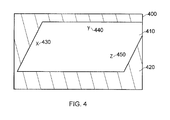
- Figure 4 shows an image 400.
- the image 400 contains a soccer pitch 410 and a surrounding area 420.
- three identified points 430, 440 and 450 are within the image.
- the first identified point 430 (shown as an "X” in the Figure) is a user selectable icon.
- the second and third identified points 440, 450 (shown as a "Y” and “Z” in the Figure) is user specific content. These identified points are selected in advance by the content provider and their locations are stored within the tile map shown in Figure 9 .
- the tile map is a set of co-ordinates defining segments in the image.
- the image 400 is, in embodiments, an ultra-high definition image. That is, the image 400 is comprised of two images stitched together. Specifically, in embodiments, the image is comprised of two 4K images stitched together. This means that image 400 has a resolution of 8192x2160 pixels. Clearly, any kind of image or any size of image may be used.
- the video tiles are explained with reference to the video tile map.
- the video tile map of Figure 9 is stored within the memory 225 of the client device 200. This tile map is specific to any particular stream and is downloaded in advance of the content.
- the tile map is a set of pitch, zoom and yaw values that define segments (or tiles) of the image 400. These pitch, yaw and zoom values are the values that would be applied to a virtual camera when cutting out the tile from the image 400.
- the method for calculating the pitch, zoom and yaw are known and are disclosed in GB1306050.4 filed on 4 April 2013 and also in GB1316102.1 filed 10 September 2013 . The contents of these documents are hereby incorporated by reference.
- the pitch, yaw and zoom values are examples of parameters which define the tiles (or segments) of the image 400.
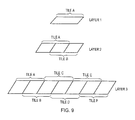
- the video tiles are arranged in layers. These tiles, irrespective of layer, and in embodiments, are all the same size and resolution and may be any size or resolution. However, this is not necessary for the entire breadth of the disclosure.
- the tiles could be high definition tiles. That is, each tile may have a resolution of 1920x1080 pixels.
- Figure 9 shows tiles only overlapping in the horizontal direction, this is only for ease of explanation. It is also intended that tiles overlap both the horizontal and vertical directions and give the advantages explained below in all directions in the image.
- the size of the tile could depend on the display resolution of the of the client device as will become apparent.
- the resolution of the tile conforms to an acceptable standard size to ensure high efficiency codecs for efficiency in storage and transmission.
- the size of the tiles is a size for which regular codecs exist.
- the high definition example is an acceptable standard size tile.
- layers correspond to different zoom levels within the image 400. That is, in layer 1, one tile covers the image 400 and so the content of the tile is the entire image 400 albeit at a reduced resolution. In other words, the content of the image 400 is provided at a resolution of the tile rather than the ultra-high definition resolution.
- the image 400 is split into a plurality of overlapping tiles.
- the resolution of the tiles between the layers is the same, and because the image 400 is split into more tiles in layer 2 than in layer 1, the content of each of the two tiles within layer 2 contains a different segment of the image 400 (except for an overlapping section which will be explained later).
- the content of tile A in layer 2 contains the left side of the image and the content of tile B in layer 2 contains the right side of the image 400. Therefore, the content of each tile segment in layer 2 appears magnified when compared to the content of the tile in layer 1.
- the image 400 is split into six overlapping tiles all having the same resolution as the tiles in layer 1 and 2.
- the content of each of the tiles in layer 3 is therefore a more magnified version of the content in each of layer 1 or 2.
- each tile within each layer is analogous to a virtual camera capturing part or the image 400.
- the amount of pitch, yaw and zoom which must be applied to the virtual camera in order to capture this field of view is determined using a known technique such as that described in GB1306050.4 filed on 4 April 2013 and also in GB1316102.1 filed 10 September 2013 , the entire contents of which is hereby incorporated by reference.
- the zoom value, pitch value and yaw values are stored in the client device 200 in association with the tile.
- the tiles of the image are pre-processed and stored on the server.
- the client device 200 requests different tiles to be provided by the server 300
- the user of the client device can zoom into the image 400.
- the client device 200 starts by displaying the content of the tile of layer 1 and if the user wishes to zoom into the image, the client device 200 requests the appropriate tile from layer 2 and then layer 3 in order to allow the user to zoom into the image and to thus control the zoom of a virtual camera around image 400.
- the client device 200 also generates a virtual camera view of the tile provided to it by the server 300.
- the technique for determining the client side virtual camera parameters is determined using a known technique such as that disclosed in GB1306050.4 filed on 4 April 2013 and also in GB1316102.1 filed 10 September 2013 .
- the pinch control on the client device 200 controls the zoom axis of the client side virtual camera and the swipe action controls both the pitch and yaw axes of the client side virtual camera.
- the image 400 is provided as one tile segment 500.
- the name of the tile indicates a unique letter identifying each tile within a layer as well as the number of the layer. So, in Figure 5A , the image 400 is contained within one tile 500. This tile is "tile A1" (or is tile A in layer 1).
- a dotted box 510 is provided within the tile 500. This dotted box 510 indicates the view that is being displayed on the client device 200. As will be explained later, the server 300 provides the content of the tile to the client device 200 and the client device 200 will extract the appropriate section of the tile for display to the user. However, the dotted box 510 has been included to aid explanation.
- FIG. 5B the screen of the client device 200 is shown. As can be seen, the content of the dotted box 510 in Figure 5A is displayed to the user of the client device 200.
- the user of the client device 200 wishes to zoom in to the first identified point (point X) 430 of the image 400.
- the user will perform a "pinch to zoom" action on the touch screen 230 around the first identified point 430.
- the user will swipe the screen to pan around the image 400 to align the first identified point 430 with the centre of the view.
- the pinch zoom is applied which increases the zoom parameter of the client side virtual camera and thus zooms in on the centre of the view.
- the dotted box 605 shows the section of the image 400 that is being displayed on the client device 200.
- the client device 200 determines that a tile from layer 2 is required.
- the user of the client device 200 wants a more detailed view of the first identified point (point X) 430 than was possible using tile A from layer 1. Therefore, the client device 200 requests a tile from layer 2 as the zoom action takes place.
- the client device 200 knowing from the tile map stored in the memory 225 the zoom, pitch and yaw values of each of the tiles. The client device 200 then compares the client side zoom, pitch and yaw of the image shown on its display to the zoom, pitch and yaw of the stored tiles. The client device 200 then retrieves a tile with the zoom, pitch and yaw closer to the client side value of zoom, pitch and yaw of the tile currently being displayed. It is important to note that the client device 200 will switch to a different tile when the view displayed on the client device 200 will not fit inside the tile view.
- the server 300 ensures that there is sufficient overlap between the tiles to allow the view of the client device 200 to fit within the overlap region. Additionally, the client device 200 will only ever have a zoom level higher than the zoom level associated with a particular tile. Therefore, when searching for a new tile, the client device 200 may only search tiles having a zoom level lower than the current zoom level associated with the client device 200. This reduces processing requirements of the client device 200.
- the client device 200 employs a predictive scheme such as a linear scheme or a Kalman filter in order to predict which tile needs downloading next.
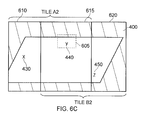
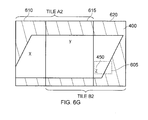
- image 400 is split into two tiles, tile A2 and B2.
- tile A2 has two parts.
- a first part 610 of tile A2 covers the left side of the image 400 and a second part 615 of tile A2 covers a more central position.
- the second part of tile A2 overlaps with a second part of tile B2.
- the first part of tile B2 covers the right side of the image 400. Therefore, the client device 200 retrieves tile A2 from the storage 305 within the server 300.
- the dotted box 605A is shown on the client device 200.
- the first identified point (point X) 430 appears much larger on the display of the client device 200.
- the two tiles are provided with zoom, pitch and yaw values. These values indicate the zoom, pitch and yaw values of a virtual camera capturing the image of the tile from the image 400.
- the zoom, pitch and yaw values of the tiles are those values of a virtual camera capturing the image of the tile from image 400.
- the relationship between two perspective views is defined by an homography.
- the tile view is defined by zoom, pitch and yaw with respect to the image 400 and the client device view is defined by zoom, pitch and yaw.
- the homography transform in this case is calculated from the differences in the zoom, pitch and yaw between the client device 200 view and the zoom, pitch and yaw of the specific tile.
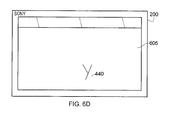
- the user of the client device 200 swipes the touch screen, the user of the client device 200 can move around the image 400 at this zoom level. Therefore, if we assume the user of the client device 200 moves the view to the right, the view displayed to the user will change. In particular, we can assume that the user of the client device 200 has "swiped" the touch screen such that the view displayed to the user is new dotted box 605 in Figure 6C . In other words, the user of the client device 200 is now viewing the second identified point (point Y) 440. This view is shown in Figure 6D .
- the client device 200 calculates the client side zoom, pitch and yaw of the new dotted box 605. It should be noted here that the user has moved their view into the second area 615 of tile A2. In other words, the dotted box 605 which indicates the image displayed on the client device 200 is taken from the overlapping region 615 between tile A2 and tile B2.
- the client device 200 requests that tile B2 be provided to the client device 200 from the server 300. It is important to note here that in order for the client device 200 to have time to download the next tile, the size of the dotted box 605 must be smaller than the overlap region 615. If the dotted box were larger than the area of overlap then the client device 200 would not be able to display a complete image for intermediate views between tiles.
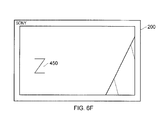
- the content of tile B2 is downloaded from the server 300 and the client device 200 can display the third identified point 450 as shown by the dotted line box 605 and shown in Figure 6F . This is because the content of the dotted line box 605 in Figure 6F is provided by tile B2 rather than tile A1.
- the dotted line box 605 is from the first (non-overlapping) part of tile B2.
- the displayed view is shown in Figure 6H .
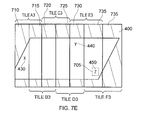
- FIG. 7A a view of the image 400 split into six tiles of layer 3 is shown. Specifically, the image 400 is split into tile A3, B3...F3. Each of these tiles has two sections. The first section of each tile, similar to that described above with reference to Figure 6A-6H , covers an area of the image 400. The second section overlaps with the preceding tile so that as the user controls the view on the client device 200 and the dotted box 705 effectively moves across the image 400, the next tile in the view can be downloaded from the server 300 to the client device 200. The client device 200 then displays the appropriate cut out from the tile.
- the dotted box 705 indicates that the user of the client device 200 is viewing the first indicated point 430.
- the position of the dotted box 705 in this Figure indicates that the user of the client device 200 performed a pinch to zoom operation on the position of the dotted box 605 in Figure 6A .
- the co-ordinates of the dotted box 705 is shown in Figure 7A .
- the zoom, pitch and yaw of the dotted box 705 are known to the client device 200 as the user performed a pinch to zoom operation.
- the dotted box 705 is smaller in the image 400, this indicates that the user of the client device 200 has zoomed in more closely on the first indicative point 430.
- the client device 200 retrieves tile A3 from the server 300. That is, the client device 200 retrieves tile A from layer 3. This zoomed in view displayed to the user is shown in Figure 7B .
- the dotted box 705 indicates that the user is located over the second indicated point 440.
- the client device 200 will have requested tile D3 from the server 300 as the user moved across the image 400.
- the second indicated point 440 is located in the first part of tile E3 and the second part of tile D3.
- the second indicated point 440 is located in the overlap between tile D3 and tile E3. Therefore, the client device 200 now retrieves tile E3 from the server 300.
- the view on the client device 200 is shown in Figure 7D Again, the user continues to scroll to the right at the same zoom level.
- the dotted box 705 indicates that the user is located over the third indicated point 450.
- the client device 200 will have requested tile E3 from the server 300 as the user moved across the image 400.
- the third indicated point 450 is located in the first part of tile F3 and the second part of tile E3. In other words, the third indicated point 450 is located in the overlap between tile E3 and tile F3. Therefore, the client device 200 now retrieves tile F3 from the server 300.
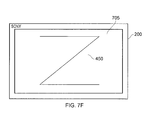
- the view on the client device 200 is shown in Figure 7F .
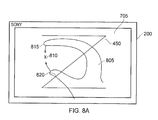
- Figure 8A shows the view on the client device 200 of Figure 7F with a user of the client device 200 wishing to zoom out.
- the user's hand 805 is located over the touch screen 230.
- the user's hand 805 touches the screen at points 815 and 820.
- Point 810 is equidistant between point 815 and point 820.
- Figure 8B shows the image displayed on the client device 200.
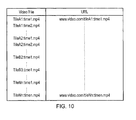
- Figure 10 shows a table that is stored within the server 300. Specifically, the table shows the association between the location of the video tile stored within the storage 305 and the name of the video file.
- the table shows a Unique Resource Locator (URL) identifying the unique address of the storage 305 in which the video tile is stored.
- URL may also be a Unique Resource Identifier (URI).
- the table is stored within the video database 315 of the server 300.
- this embodiment mentions only a single server for brevity, it is possible that the content will be stored on multiple servers. These servers may form part of a so-called "Cloud Service". Although the content may be distributed in any fashion amongst the servers, it is possible that each server will provide a subset of the tile streams. By providing the tile streams from multiple servers, the number of client devices 200 connected to the service is scalable.
- the client device 200 downloads the tile from the appropriate URL.
- the tile is stored as an MPEG4-AVC elementary stream with an accompanying index file that specifies the location in the stream of each key-frame..
- the tile may be stored as any appropriate image file.
- the content of the video is stored for the duration of the program. This allows the user to not only control the virtual camera position but that the user can also rewind, pause and fast forward through the content. By uniquely identifying each frame (or Group of Pictures) within the content, each user is allowed to have frame accurate control of the pause, fast forward and rewind through the content.
- the frame (or Group of Pictures) number is provided after the ":" in the URL.
- Figure 11 shows a table stored within the client device 200. Specifically, the table of Figure 11 is stored within the memory 225 of the client device 200. The table of Figure 11 is downloaded from the video database 315 of the server 300 before the program is to be viewed on the client device 200. The table shows the tile name and the URL where the tile is stored. Further, as will be noted, the URL includes the query ⁇ insert-time>. As will be explained later, the client device 200 retrieves this value from a counter. The server 300 therefore knows which Group of Pictures to retrieve from the server 300. Specifically, a
- Group of Pictures is retrieved because it is only possible to switch tile streams on a Group of Picture/ Key frame boundary.
- the Group of Picture length is 15 frames (or 0.5 seconds), in embodiments. Therefore, as the switch between title streams can only happen on a Group of Picture/Key Frame boundary, there is a switching latency of at least 0.5seconds.
- the zoom, pitch and yaw values associated with each tile are required so that the client device 200 can determine which tile to request from server 300.
- the co-ordinates of the first to third indicated points are also provided.
- the co-ordinates may be either real world 3D positions or 2D co-ordinates in the image 400. Indeed any invariant co-ordinates that may be easily transformed into the view of the client device 200 may be used.
- a URL to the icon is provided so that when the first indicated point is being displayed to the user, the client device 200 can retrieve the icon from the server 300. Additionally, the URL may re-direct the user to a different stream of content (for example a broadcast stream of content following a particular player within the content of the image 400) for display on the client device 200.
- This view of the player may be provided as an virtual camera view from the image 400 using player tracking information. Alternatively, this view may be from a dedicated camera.
- a user may be provided with a stadium view. The user can then navigate and/or zoom around the stadium identifying the different events taking place in the stadium. The user may then select a particular indicated point within the client view. This selection will then re-route the user to a particular broadcast video stream using the URL associated with the identified point. Indeed, if there is no available current live broadcast, then either the user of the client device 200 is informed of this, or the user of the client device 200 is re-routed to alternative content based on either the user or the particular selected event.
- the selection of the particular identified point may be either touching the identified point on the touch screen or may be selected by zooming in to the identified point beyond a certain level of zoom.
- the second and third indicated point may include advertisement content specifically targeted to the user of the client device 200.
- the user of the client device 200 may then select such advertisement which may redirect the user to a different URL such as the website of the advertiser. This may lead to the generation of user specific metadata which could be useful for an advertiser for obtaining data related to the impact of a particular advert or for determining the amount of revenue and advertiser has to pay the broadcaster or service provider.
- Figure 12 shows a flow chart 1200 explaining the initial operation of the system.
- the process starts in step S1205.
- the user of the client device 200 registers with the system.
- the user provides a unique reference that uniquely identifies one user from another user. This may be an Email address, a unique username or the like.
- the user may be registered using their Sony Network username or their Android username, for example.
- details of the user may be collected such as payment details, loyalty card details or the like. Indeed, the user may be asked questions to determine their personal preferences and shopping habits. These may be taken at the time of registration or from any loyalty schemes that the user may subscribe to or any social media accounts which are linked to the user during registration.
- This information is stored within the user database 310 located in the server 300.
- the application is downloaded to the client device 200 in step 1220. In other words, the software required to configure the client device 200 is downloaded and stored within the memory 225 of the client device 200.
- the initial registration process is then completed in step 1225.
- Figure 13 shows a flow chart 1300 explaining the operation of the system when a user of the client device wishes to view a program.
- the flow chart starts in step 1305.
- the user of the client device 200 logs in to their account set up in the initial registration process of Figure 12 .
- the user is then permitted to select an event to watch in step 1315.
- the selection may be a recommendation according to the user's previous events or may be restricted to a certain age profile or the like.
- the server 300 selects the appropriate tile map from the video database 315.
- the tile map is downloaded to the client device 200 in step 1320.
- the tile map is the table shown in Figure 11 . This is stored in the memory 225 of the client device 200.
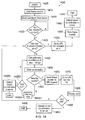
- Figure 14 shows a flow chart 1400 explaining the operation of the client device 200.
- the flow chart starts at step 1405.
- the client device 200 starts a frame counter in step 1410.
- the GOP counter is incremented every time the client device displays a new GOP. This allows the client device 200 to request the correct tile with frame accuracy from the server 300.
- the client device 200 downloads the first tile from the server 300 in step 1415.
- the first tile in this example is tile A1 although the disclosure is not so limited and any tile may be selected as the initial tile either automatically or through user preference.
- the client device 200 determines whether the user has touched the touch screen 230. This is step 1420. Of course, if the client device 200 is being operated using a mouse or other input device, the client device 200 will determine if the user has performed any input operation. If the user does not perform an input, the client device 200 waits until such an input is received. In reality, although the Figure shows a loop back to step 1420, the client device will increment the GOP counter and will retrieve the next GOP of that tile from the server 300. This means that a server request is made every 0.5seconds or so.
- the client device 200 determines whether the user has touched (that is, selected) an indicated point in step 1425. If the user has selected an indicated point, the yes path is followed and the client device 200 goes to the URL for that indicated point stored in memory 225. This occurs in step 1430. The value of frame counter is stored in step 1435 so that should the user wish to return to the application, the client device 200 will retrieve the last frame from the server 300. It is optional whether the value of the tile is also stored, or whether the client device 200 starts from the initial tile should a user return to the application.
- the client device 200 stores the co-ordinates of the view shown to the user of the client device 200.
- the client device 200 for each frame, stores the co-ordinates of the dotted boxes shown in Figures 4-6 .
- This zoom, pitch, yaw data may be uploaded to the server 300 and, if uploaded, this is stored in the user database 310.
- the co-ordinate data is analysed to determine for each user, their preferred view as well as any occasions where the indicated points were displayed to the user. This enables any advertising revenue to be collected from advertisers. The process will then end in step 1445.
- the co-ordinate data may be used to generate user driven metadata such as generating a pseudo-broadcast feed defined as the average of the views being watched.
- step 1425 if the user has not selected an indicated point, the "no" step is followed. In other words, the user has changed the view displayed on the client device 200. So, the co-ordinates of the moved dotted box are calculated according to amount of movement provided by the user during the swipe or the pinch to zoom. This is step 1450. The user in this step effectively changes the zoom of the virtual camera (with the pinch to zoom) and the pitch and yaw of the virtual camera (with the swipe).
- step 1455 The co-ordinates of the moved dotted box are then stored in step 1455.
- the client device 200 determines whether a new tile is needed in step 1460.
- the client device 200 in step 1465 then adds the value of the frame counter into the URL of the tile from the memory 225.
- the client device 200 then requests the tile from the server 300 in step 1475.
- the client device 200 then extracts the view from the received tile. In other words, the client device 200 extracts the content of the dotted box from the received tile and displays this on the display of the client device. This is step 1480.
- the client device 200 determines whether the user wishes to quit the application by closing the application or pressing an appropriate icon on the touch screen. If the user does not wish to quit the application, the client device 200 returns to step 1425.
- the coordinates of dotted box during the user's viewing experience are uploaded to the server 300 similarly to that described with reference to steps 1440.
- the frame counter may be stored to allow a user to return to the same frame and/or the tile may also be stored.
- step 1460 if a new tile is not required, the no path is followed.
- the client device 200 then extracts the view from the current tile. In other words, the client device 200 extracts the content of the dotted box from the current tile and displays this on the display of the client device. This is step 14951.
- the client device 200 determines whether the user wishes to quit the application by closing the application or pressing an appropriate icon the touch screen. If the user does not wish to quit the application, the client device 200 returns to step 1450.
- the coordinates of dotted box during the user's viewing experience are uploaded to the server 300 similarly to that described with reference to step 1440.
- the frame counter may be stored to allow a user to return to the same frame and/or the tile may also be stored.
- the disclosure is no way limited to this.
- rectangular shaped tiles are described other shapes are envisaged.
- GB1306050.4 filed on 4 April 2013 and also in GB1316102.1 filed 10 September 2013 a method for applying perspective correction to a view of a panoramic scene is described.
- the entire content of this disclosure is hereby incorporated by reference.
- at least the section in this previous application describing the perspective correction is incorporated.
- the perspective correction may be applied to the entire image 400.
- the rectangular tiles may then be applied to the perspective corrected image 400.
- the shape of the tile may be selected to apply the perspective correction thereto.
- the client device 200 may perform the perspective correction knowing the co-ordinates of the view (i.e. the dotted box) using the techniques described in GB1306050.4 filed on 4 April 2013 and also in GB1316102.1 filed 10 September 2013 .
- the server 300 may be configured to map the image 400 onto a non-rectilinear surface.
- the client 200 may then only supply the co-ordinates of the view required.
- the server 300 can then extract the view at the required co-ordinates (which is a rectangular cut-out) and provide this via the Internet. This allows the client device 200 to have very low processing power such as a set-top box and as the server 300 is only performing a rectangular cut-out of the mapped image (which is very low on processing power), the number of client devices 200 requesting these views is scalable.
Landscapes
- Engineering & Computer Science (AREA)
- Multimedia (AREA)
- Signal Processing (AREA)
- Databases & Information Systems (AREA)
- Human Computer Interaction (AREA)
- Computer Networks & Wireless Communication (AREA)
- Computer Graphics (AREA)
- Information Transfer Between Computers (AREA)
- Two-Way Televisions, Distribution Of Moving Picture Or The Like (AREA)
Applications Claiming Priority (1)
| Application Number | Priority Date | Filing Date | Title |
|---|---|---|---|
| GB1320217.1A GB2520310A (en) | 2013-11-15 | 2013-11-15 | A method, server, client and software |
Publications (3)
| Publication Number | Publication Date |
|---|---|
| EP2874405A2 true EP2874405A2 (de) | 2015-05-20 |
| EP2874405A3 EP2874405A3 (de) | 2015-06-10 |
| EP2874405B1 EP2874405B1 (de) | 2020-08-12 |
Family
ID=49883689
Family Applications (1)
| Application Number | Title | Priority Date | Filing Date |
|---|---|---|---|
| EP14189778.5A Active EP2874405B1 (de) | 2013-11-15 | 2014-10-21 | Client, Server und Software zur Bereitstellung einer definierten Ansicht eines Bildes auf einer Clientvorrichtung |
Country Status (4)
| Country | Link |
|---|---|
| US (2) | US20150143421A1 (de) |
| EP (1) | EP2874405B1 (de) |
| CN (1) | CN104661098B (de) |
| GB (1) | GB2520310A (de) |
Families Citing this family (7)
| Publication number | Priority date | Publication date | Assignee | Title |
|---|---|---|---|---|
| US10015527B1 (en) * | 2013-12-16 | 2018-07-03 | Amazon Technologies, Inc. | Panoramic video distribution and viewing |
| US9332285B1 (en) * | 2014-05-28 | 2016-05-03 | Lucasfilm Entertainment Company Ltd. | Switching modes of a media content item |
| JP6696737B2 (ja) * | 2015-06-26 | 2020-05-20 | シャープ株式会社 | コンテンツ表示装置及びプログラム |
| RU2653229C2 (ru) * | 2016-03-14 | 2018-05-07 | Валерий Валерьевич Слепичко | Компактное автономное сетевое устройство хранения и просмотра данных |
| US10873781B2 (en) | 2017-06-13 | 2020-12-22 | Comcast Cable Communications, Llc | Video fragment file processing |
| KR20220155117A (ko) * | 2021-05-14 | 2022-11-22 | 삼성전자주식회사 | 영상을 표시하는 방법 및 장치 |
| TWI874273B (zh) * | 2024-08-20 | 2025-02-21 | 輝創電子股份有限公司 | 船舶之環景影像的校正方法、校正系統與校正程序的輔助方法 |
Family Cites Families (32)
| Publication number | Priority date | Publication date | Assignee | Title |
|---|---|---|---|---|
| US6331869B1 (en) * | 1998-08-07 | 2001-12-18 | Be Here Corporation | Method and apparatus for electronically distributing motion panoramic images |
| US6043837A (en) * | 1997-05-08 | 2000-03-28 | Be Here Corporation | Method and apparatus for electronically distributing images from a panoptic camera system |
| US6192393B1 (en) * | 1998-04-07 | 2001-02-20 | Mgi Software Corporation | Method and system for panorama viewing |
| US6532311B1 (en) * | 1999-02-26 | 2003-03-11 | Lockheed Martin Corporation | Image browser |
| EP1297634A1 (de) * | 2000-06-09 | 2003-04-02 | iMove Inc. | Streaming-verfahren für panoramische videosignale |
| US6859557B1 (en) * | 2000-07-07 | 2005-02-22 | Microsoft Corp. | System and method for selective decoding and decompression |
| US20040172650A1 (en) * | 2003-02-28 | 2004-09-02 | Hawkins William J. | Targeted content delivery system in an interactive television network |
| US7149370B2 (en) * | 2003-03-07 | 2006-12-12 | Nokia Corporation | Method and device for image surfing |
| US7660352B2 (en) * | 2003-04-04 | 2010-02-09 | Sony Corporation | Apparatus and method of parallel processing an MPEG-4 data stream |
| US9449109B1 (en) * | 2004-04-29 | 2016-09-20 | Eversitas, LLC | Visualizing, sharing and monetizing multimedia content |
| KR100690819B1 (ko) * | 2005-07-21 | 2007-03-09 | 엘지전자 주식회사 | 콘텐츠 서비스의 북마크 기능을 갖는 휴대 단말기 및 그동작 방법 |
| KR101255226B1 (ko) * | 2005-09-26 | 2013-04-16 | 한국과학기술원 | 스케일러블 비디오 코딩에서 다중 roi 설정, 복원을위한 장치 및 방법 |
| US9182228B2 (en) * | 2006-02-13 | 2015-11-10 | Sony Corporation | Multi-lens array system and method |
| US8270469B2 (en) * | 2006-12-15 | 2012-09-18 | Precoad Inc. | Encoding video at multiple resolution levels |
| CN102957914B (zh) * | 2008-05-23 | 2016-01-06 | 松下知识产权经营株式会社 | 图像解码装置、图像解码方法、图像编码装置、以及图像编码方法 |
| US20090300692A1 (en) * | 2008-06-02 | 2009-12-03 | Mavlankar Aditya A | Systems and methods for video streaming and display |
| US20100054578A1 (en) * | 2008-08-26 | 2010-03-04 | Frank Edughom Ekpar | Method and apparatus for interactive visualization and distribution of very large image data sets |
| US20100060547A1 (en) * | 2008-09-11 | 2010-03-11 | Sony Ericsson Mobile Communications Ab | Display Device and Method for Displaying Images in a Variable Size Display Area |
| JP5067361B2 (ja) * | 2008-12-25 | 2012-11-07 | ソニー株式会社 | エンコーダ及びデコーダ、符号方法及び復号方法、並びに記録媒体 |
| US8463741B2 (en) * | 2009-09-04 | 2013-06-11 | Omnyx, LLC | Digital pathology system |
| KR101611531B1 (ko) * | 2009-11-13 | 2016-04-12 | 삼성전자주식회사 | 촬영장치 및 촬영영상 제공방법 |
| US8205227B1 (en) * | 2010-02-06 | 2012-06-19 | Frontier Communications Corporation | Management and delivery of audiovisual content items that correspond to scheduled programs |
| WO2012046435A1 (ja) * | 2010-10-04 | 2012-04-12 | パナソニック株式会社 | 画像処理装置、画像符号化方法および画像処理方法 |
| US8468262B2 (en) * | 2010-11-01 | 2013-06-18 | Research In Motion Limited | Method and apparatus for updating http content descriptions |
| US8515990B2 (en) * | 2010-11-19 | 2013-08-20 | Lg Electronics Inc. | Mobile terminal and method of managing video using metadata therein |
| CN103583050B (zh) * | 2011-06-08 | 2018-09-14 | 皇家Kpn公司 | 空间分段的内容的递送 |
| US9384297B2 (en) * | 2011-07-28 | 2016-07-05 | Hewlett Packard Enterprise Development Lp | Systems and methods of accelerating delivery of remote content |
| US9621905B2 (en) * | 2012-06-29 | 2017-04-11 | Qualcomm Incorporated | Tiles and wavefront parallel processing |
| WO2014074200A2 (en) * | 2012-08-21 | 2014-05-15 | Skybox Imaging, Inc. | Multi-resolution pyramid for georeferenced video |
| GB2512621A (en) * | 2013-04-04 | 2014-10-08 | Sony Corp | A method and apparatus |
| IN2013CH03069A (de) * | 2013-07-09 | 2015-08-28 | Samsung India Software Operations Pvt Ltd | |
| EP3028472B1 (de) * | 2013-07-29 | 2020-02-26 | Koninklijke KPN N.V. | Bereitstellung von mosaikbasierten videoströmen an einen empfänger |
-
2013
- 2013-11-15 GB GB1320217.1A patent/GB2520310A/en not_active Withdrawn
-
2014
- 2014-10-21 EP EP14189778.5A patent/EP2874405B1/de active Active
- 2014-10-22 US US14/520,438 patent/US20150143421A1/en not_active Abandoned
- 2014-11-05 CN CN201410636159.2A patent/CN104661098B/zh not_active Expired - Fee Related
- 2014-11-07 US US14/535,712 patent/US10091277B2/en active Active
Also Published As
| Publication number | Publication date |
|---|---|
| US20150142875A1 (en) | 2015-05-21 |
| CN104661098A (zh) | 2015-05-27 |
| EP2874405B1 (de) | 2020-08-12 |
| GB201320217D0 (en) | 2014-01-01 |
| CN104661098B (zh) | 2018-12-04 |
| EP2874405A3 (de) | 2015-06-10 |
| US10091277B2 (en) | 2018-10-02 |
| US20150143421A1 (en) | 2015-05-21 |
| GB2520310A (en) | 2015-05-20 |
Similar Documents
| Publication | Publication Date | Title |
|---|---|---|
| EP2874405B1 (de) | Client, Server und Software zur Bereitstellung einer definierten Ansicht eines Bildes auf einer Clientvorrichtung | |
| US8918737B2 (en) | Zoom display navigation | |
| JP6335448B2 (ja) | 移動端末の情報表示方法、ディスプレイ装置の情報提供方法、移動端末の制御信号生成方法 | |
| JP6277329B2 (ja) | 立体広告枠決定システム、ユーザ端末および立体広告枠決定コンピュータ | |
| EP2843919B1 (de) | Verfahren und Vorrichtung zum Bereitstellen eines Dienstes unter Verwendung von Bildschirmspiegelung | |
| US8463777B2 (en) | Contents display device and contents display method | |
| US10449732B2 (en) | Customized three dimensional (3D) printing of media-related objects | |
| US20140223481A1 (en) | Systems and methods for updating a search request | |
| US20190138194A1 (en) | Apparatus and methods for a user interface | |
| US20160132278A1 (en) | Method, server, client and software | |
| WO2017096817A1 (zh) | 一种多机位视频同步播放的实现方法及装置 | |
| CN107123084A (zh) | 优化图像裁剪 | |
| JP5923021B2 (ja) | 映像視聴履歴解析装置、映像視聴履歴解析方法及び映像視聴履歴解析プログラム | |
| KR20140118604A (ko) | 개인화된 증강 객체를 전송하는 서버 및 방법 | |
| KR20140085931A (ko) | 손 움직임 감지를 통한 방송 서비스 제공 방법 및 장치 | |
| US10061482B1 (en) | Methods, systems, and media for presenting annotations across multiple videos | |
| HK1203010A1 (en) | Processing of video files, server and client thereof | |
| CN104035953A (zh) | 用于跨不同装置的无缝内容导航的方法和系统 | |
| CN112486364A (zh) | 用于包括交互式网格显示的媒体应用的系统和方法 | |
| KR102060902B1 (ko) | 모바일 단말을 이용한 소셜 네트워크 기반의 영상 데이터 제공시스템 및 그 방법 | |
| JP6590433B2 (ja) | 動画再生管理方法、システムおよびプログラム | |
| KR101805302B1 (ko) | 멀티미디어 컨텐츠 재생 장치 및 방법 | |
| KR101596592B1 (ko) | 디스플레이 장치 및 그 제어방법과, 그 제어방법을 실행하기 위한 프로그램을 기록한 기록 매체와, 하드웨어와 결합되어 그 제어방법을 실행시키기 위하여 매체에 저장된 애플리케이션 | |
| KR102204566B1 (ko) | 디스플레이 장치 및 그의 동작 방법 | |
| KR20150065320A (ko) | 컨텐츠 개인화 편성을 제공하는 시스템 및 방법, 그리고 장치 |
Legal Events
| Date | Code | Title | Description |
|---|---|---|---|
| PUAL | Search report despatched |
Free format text: ORIGINAL CODE: 0009013 |
|
| PUAI | Public reference made under article 153(3) epc to a published international application that has entered the european phase |
Free format text: ORIGINAL CODE: 0009012 |
|
| 17P | Request for examination filed |
Effective date: 20141115 |
|
| AK | Designated contracting states |
Kind code of ref document: A2 Designated state(s): AL AT BE BG CH CY CZ DE DK EE ES FI FR GB GR HR HU IE IS IT LI LT LU LV MC MK MT NL NO PL PT RO RS SE SI SK SM TR |
|
| AX | Request for extension of the european patent |
Extension state: BA ME |
|
| RIC1 | Information provided on ipc code assigned before grant |
Ipc: H04N 21/643 20110101ALI20150430BHEP Ipc: H04N 21/6587 20110101AFI20150430BHEP Ipc: H04N 21/2343 20110101ALI20150430BHEP Ipc: H04N 21/4728 20110101ALI20150430BHEP |
|
| AK | Designated contracting states |
Kind code of ref document: A3 Designated state(s): AL AT BE BG CH CY CZ DE DK EE ES FI FR GB GR HR HU IE IS IT LI LT LU LV MC MK MT NL NO PL PT RO RS SE SI SK SM TR |
|
| AX | Request for extension of the european patent |
Extension state: BA ME |
|
| STAA | Information on the status of an ep patent application or granted ep patent |
Free format text: STATUS: EXAMINATION IS IN PROGRESS |
|
| 17Q | First examination report despatched |
Effective date: 20171026 |
|
| GRAP | Despatch of communication of intention to grant a patent |
Free format text: ORIGINAL CODE: EPIDOSNIGR1 |
|
| STAA | Information on the status of an ep patent application or granted ep patent |
Free format text: STATUS: GRANT OF PATENT IS INTENDED |
|
| INTG | Intention to grant announced |
Effective date: 20200312 |
|
| GRAS | Grant fee paid |
Free format text: ORIGINAL CODE: EPIDOSNIGR3 |
|
| GRAA | (expected) grant |
Free format text: ORIGINAL CODE: 0009210 |
|
| STAA | Information on the status of an ep patent application or granted ep patent |
Free format text: STATUS: THE PATENT HAS BEEN GRANTED |
|
| AK | Designated contracting states |
Kind code of ref document: B1 Designated state(s): AL AT BE BG CH CY CZ DE DK EE ES FI FR GB GR HR HU IE IS IT LI LT LU LV MC MK MT NL NO PL PT RO RS SE SI SK SM TR |
|
| REG | Reference to a national code |
Ref country code: CH Ref legal event code: EP |
|
| REG | Reference to a national code |
Ref country code: IE Ref legal event code: FG4D |
|
| REG | Reference to a national code |
Ref country code: DE Ref legal event code: R096 Ref document number: 602014068824 Country of ref document: DE |
|
| REG | Reference to a national code |
Ref country code: AT Ref legal event code: REF Ref document number: 1302750 Country of ref document: AT Kind code of ref document: T Effective date: 20200915 |
|
| REG | Reference to a national code |
Ref country code: LT Ref legal event code: MG4D |
|
| REG | Reference to a national code |
Ref country code: NL Ref legal event code: MP Effective date: 20200812 |
|
| PG25 | Lapsed in a contracting state [announced via postgrant information from national office to epo] |
Ref country code: SE Free format text: LAPSE BECAUSE OF FAILURE TO SUBMIT A TRANSLATION OF THE DESCRIPTION OR TO PAY THE FEE WITHIN THE PRESCRIBED TIME-LIMIT Effective date: 20200812 Ref country code: FI Free format text: LAPSE BECAUSE OF FAILURE TO SUBMIT A TRANSLATION OF THE DESCRIPTION OR TO PAY THE FEE WITHIN THE PRESCRIBED TIME-LIMIT Effective date: 20200812 Ref country code: NO Free format text: LAPSE BECAUSE OF FAILURE TO SUBMIT A TRANSLATION OF THE DESCRIPTION OR TO PAY THE FEE WITHIN THE PRESCRIBED TIME-LIMIT Effective date: 20201112 Ref country code: GR Free format text: LAPSE BECAUSE OF FAILURE TO SUBMIT A TRANSLATION OF THE DESCRIPTION OR TO PAY THE FEE WITHIN THE PRESCRIBED TIME-LIMIT Effective date: 20201113 Ref country code: BG Free format text: LAPSE BECAUSE OF FAILURE TO SUBMIT A TRANSLATION OF THE DESCRIPTION OR TO PAY THE FEE WITHIN THE PRESCRIBED TIME-LIMIT Effective date: 20201112 Ref country code: HR Free format text: LAPSE BECAUSE OF FAILURE TO SUBMIT A TRANSLATION OF THE DESCRIPTION OR TO PAY THE FEE WITHIN THE PRESCRIBED TIME-LIMIT Effective date: 20200812 Ref country code: LT Free format text: LAPSE BECAUSE OF FAILURE TO SUBMIT A TRANSLATION OF THE DESCRIPTION OR TO PAY THE FEE WITHIN THE PRESCRIBED TIME-LIMIT Effective date: 20200812 Ref country code: ES Free format text: LAPSE BECAUSE OF FAILURE TO SUBMIT A TRANSLATION OF THE DESCRIPTION OR TO PAY THE FEE WITHIN THE PRESCRIBED TIME-LIMIT Effective date: 20200812 |
|
| REG | Reference to a national code |
Ref country code: AT Ref legal event code: MK05 Ref document number: 1302750 Country of ref document: AT Kind code of ref document: T Effective date: 20200812 |
|
| PG25 | Lapsed in a contracting state [announced via postgrant information from national office to epo] |
Ref country code: RS Free format text: LAPSE BECAUSE OF FAILURE TO SUBMIT A TRANSLATION OF THE DESCRIPTION OR TO PAY THE FEE WITHIN THE PRESCRIBED TIME-LIMIT Effective date: 20200812 Ref country code: NL Free format text: LAPSE BECAUSE OF FAILURE TO SUBMIT A TRANSLATION OF THE DESCRIPTION OR TO PAY THE FEE WITHIN THE PRESCRIBED TIME-LIMIT Effective date: 20200812 Ref country code: LV Free format text: LAPSE BECAUSE OF FAILURE TO SUBMIT A TRANSLATION OF THE DESCRIPTION OR TO PAY THE FEE WITHIN THE PRESCRIBED TIME-LIMIT Effective date: 20200812 Ref country code: PL Free format text: LAPSE BECAUSE OF FAILURE TO SUBMIT A TRANSLATION OF THE DESCRIPTION OR TO PAY THE FEE WITHIN THE PRESCRIBED TIME-LIMIT Effective date: 20200812 Ref country code: IS Free format text: LAPSE BECAUSE OF FAILURE TO SUBMIT A TRANSLATION OF THE DESCRIPTION OR TO PAY THE FEE WITHIN THE PRESCRIBED TIME-LIMIT Effective date: 20201212 |
|
| PG25 | Lapsed in a contracting state [announced via postgrant information from national office to epo] |
Ref country code: EE Free format text: LAPSE BECAUSE OF FAILURE TO SUBMIT A TRANSLATION OF THE DESCRIPTION OR TO PAY THE FEE WITHIN THE PRESCRIBED TIME-LIMIT Effective date: 20200812 Ref country code: CZ Free format text: LAPSE BECAUSE OF FAILURE TO SUBMIT A TRANSLATION OF THE DESCRIPTION OR TO PAY THE FEE WITHIN THE PRESCRIBED TIME-LIMIT Effective date: 20200812 Ref country code: DK Free format text: LAPSE BECAUSE OF FAILURE TO SUBMIT A TRANSLATION OF THE DESCRIPTION OR TO PAY THE FEE WITHIN THE PRESCRIBED TIME-LIMIT Effective date: 20200812 Ref country code: RO Free format text: LAPSE BECAUSE OF FAILURE TO SUBMIT A TRANSLATION OF THE DESCRIPTION OR TO PAY THE FEE WITHIN THE PRESCRIBED TIME-LIMIT Effective date: 20200812 Ref country code: SM Free format text: LAPSE BECAUSE OF FAILURE TO SUBMIT A TRANSLATION OF THE DESCRIPTION OR TO PAY THE FEE WITHIN THE PRESCRIBED TIME-LIMIT Effective date: 20200812 |
|
| REG | Reference to a national code |
Ref country code: DE Ref legal event code: R097 Ref document number: 602014068824 Country of ref document: DE |
|
| PG25 | Lapsed in a contracting state [announced via postgrant information from national office to epo] |
Ref country code: AL Free format text: LAPSE BECAUSE OF FAILURE TO SUBMIT A TRANSLATION OF THE DESCRIPTION OR TO PAY THE FEE WITHIN THE PRESCRIBED TIME-LIMIT Effective date: 20200812 Ref country code: AT Free format text: LAPSE BECAUSE OF FAILURE TO SUBMIT A TRANSLATION OF THE DESCRIPTION OR TO PAY THE FEE WITHIN THE PRESCRIBED TIME-LIMIT Effective date: 20200812 |
|
| REG | Reference to a national code |
Ref country code: CH Ref legal event code: PL |
|
| PLBE | No opposition filed within time limit |
Free format text: ORIGINAL CODE: 0009261 |
|
| STAA | Information on the status of an ep patent application or granted ep patent |
Free format text: STATUS: NO OPPOSITION FILED WITHIN TIME LIMIT |
|
| PG25 | Lapsed in a contracting state [announced via postgrant information from national office to epo] |
Ref country code: MC Free format text: LAPSE BECAUSE OF FAILURE TO SUBMIT A TRANSLATION OF THE DESCRIPTION OR TO PAY THE FEE WITHIN THE PRESCRIBED TIME-LIMIT Effective date: 20200812 Ref country code: SK Free format text: LAPSE BECAUSE OF FAILURE TO SUBMIT A TRANSLATION OF THE DESCRIPTION OR TO PAY THE FEE WITHIN THE PRESCRIBED TIME-LIMIT Effective date: 20200812 Ref country code: LU Free format text: LAPSE BECAUSE OF NON-PAYMENT OF DUE FEES Effective date: 20201021 |
|
| REG | Reference to a national code |
Ref country code: BE Ref legal event code: MM Effective date: 20201031 |
|
| 26N | No opposition filed |
Effective date: 20210514 |
|
| PG25 | Lapsed in a contracting state [announced via postgrant information from national office to epo] |
Ref country code: FR Free format text: LAPSE BECAUSE OF NON-PAYMENT OF DUE FEES Effective date: 20201031 Ref country code: IT Free format text: LAPSE BECAUSE OF FAILURE TO SUBMIT A TRANSLATION OF THE DESCRIPTION OR TO PAY THE FEE WITHIN THE PRESCRIBED TIME-LIMIT Effective date: 20200812 |
|
| PG25 | Lapsed in a contracting state [announced via postgrant information from national office to epo] |
Ref country code: SI Free format text: LAPSE BECAUSE OF FAILURE TO SUBMIT A TRANSLATION OF THE DESCRIPTION OR TO PAY THE FEE WITHIN THE PRESCRIBED TIME-LIMIT Effective date: 20200812 Ref country code: LI Free format text: LAPSE BECAUSE OF NON-PAYMENT OF DUE FEES Effective date: 20201031 Ref country code: BE Free format text: LAPSE BECAUSE OF NON-PAYMENT OF DUE FEES Effective date: 20201031 Ref country code: CH Free format text: LAPSE BECAUSE OF NON-PAYMENT OF DUE FEES Effective date: 20201031 |
|
| PG25 | Lapsed in a contracting state [announced via postgrant information from national office to epo] |
Ref country code: IE Free format text: LAPSE BECAUSE OF NON-PAYMENT OF DUE FEES Effective date: 20201021 |
|
| PG25 | Lapsed in a contracting state [announced via postgrant information from national office to epo] |
Ref country code: TR Free format text: LAPSE BECAUSE OF FAILURE TO SUBMIT A TRANSLATION OF THE DESCRIPTION OR TO PAY THE FEE WITHIN THE PRESCRIBED TIME-LIMIT Effective date: 20200812 Ref country code: MT Free format text: LAPSE BECAUSE OF FAILURE TO SUBMIT A TRANSLATION OF THE DESCRIPTION OR TO PAY THE FEE WITHIN THE PRESCRIBED TIME-LIMIT Effective date: 20200812 Ref country code: CY Free format text: LAPSE BECAUSE OF FAILURE TO SUBMIT A TRANSLATION OF THE DESCRIPTION OR TO PAY THE FEE WITHIN THE PRESCRIBED TIME-LIMIT Effective date: 20200812 |
|
| PG25 | Lapsed in a contracting state [announced via postgrant information from national office to epo] |
Ref country code: MK Free format text: LAPSE BECAUSE OF FAILURE TO SUBMIT A TRANSLATION OF THE DESCRIPTION OR TO PAY THE FEE WITHIN THE PRESCRIBED TIME-LIMIT Effective date: 20200812 |
|
| PG25 | Lapsed in a contracting state [announced via postgrant information from national office to epo] |
Ref country code: PT Free format text: LAPSE BECAUSE OF FAILURE TO SUBMIT A TRANSLATION OF THE DESCRIPTION OR TO PAY THE FEE WITHIN THE PRESCRIBED TIME-LIMIT Effective date: 20200812 |
|
| P01 | Opt-out of the competence of the unified patent court (upc) registered |
Effective date: 20230527 |
|
| PGFP | Annual fee paid to national office [announced via postgrant information from national office to epo] |
Ref country code: GB Payment date: 20250923 Year of fee payment: 12 |
|
| PGFP | Annual fee paid to national office [announced via postgrant information from national office to epo] |
Ref country code: DE Payment date: 20250923 Year of fee payment: 12 |