EP2879367B1 - Appareil, procédé de traitement d'image et programme - Google Patents
Appareil, procédé de traitement d'image et programme Download PDFInfo
- Publication number
- EP2879367B1 EP2879367B1 EP14195480.0A EP14195480A EP2879367B1 EP 2879367 B1 EP2879367 B1 EP 2879367B1 EP 14195480 A EP14195480 A EP 14195480A EP 2879367 B1 EP2879367 B1 EP 2879367B1
- Authority
- EP
- European Patent Office
- Prior art keywords
- authentication information
- user
- file server
- folder
- authentication
- Prior art date
- Legal status (The legal status is an assumption and is not a legal conclusion. Google has not performed a legal analysis and makes no representation as to the accuracy of the status listed.)
- Active
Links
Images







Classifications
-
- H—ELECTRICITY
- H04—ELECTRIC COMMUNICATION TECHNIQUE
- H04N—PICTORIAL COMMUNICATION, e.g. TELEVISION
- H04N1/00—Scanning, transmission or reproduction of documents or the like, e.g. facsimile transmission; Details thereof
- H04N1/00002—Diagnosis, testing or measuring; Detecting, analysing or monitoring not otherwise provided for
- H04N1/00007—Diagnosis, testing or measuring; Detecting, analysing or monitoring not otherwise provided for relating to particular apparatus or devices
- H04N1/0001—Transmission systems or arrangements
-
- H—ELECTRICITY
- H04—ELECTRIC COMMUNICATION TECHNIQUE
- H04N—PICTORIAL COMMUNICATION, e.g. TELEVISION
- H04N1/00—Scanning, transmission or reproduction of documents or the like, e.g. facsimile transmission; Details thereof
- H04N1/00002—Diagnosis, testing or measuring; Detecting, analysing or monitoring not otherwise provided for
- H04N1/00026—Methods therefor
- H04N1/00037—Detecting, i.e. determining the occurrence of a predetermined state
-
- H—ELECTRICITY
- H04—ELECTRIC COMMUNICATION TECHNIQUE
- H04N—PICTORIAL COMMUNICATION, e.g. TELEVISION
- H04N1/00—Scanning, transmission or reproduction of documents or the like, e.g. facsimile transmission; Details thereof
- H04N1/00002—Diagnosis, testing or measuring; Detecting, analysing or monitoring not otherwise provided for
- H04N1/00071—Diagnosis, testing or measuring; Detecting, analysing or monitoring not otherwise provided for characterised by the action taken
- H04N1/00074—Indicating or reporting
-
- H—ELECTRICITY
- H04—ELECTRIC COMMUNICATION TECHNIQUE
- H04N—PICTORIAL COMMUNICATION, e.g. TELEVISION
- H04N1/00—Scanning, transmission or reproduction of documents or the like, e.g. facsimile transmission; Details thereof
- H04N1/00127—Connection or combination of a still picture apparatus with another apparatus, e.g. for storage, processing or transmission of still picture signals or of information associated with a still picture
- H04N1/00204—Connection or combination of a still picture apparatus with another apparatus, e.g. for storage, processing or transmission of still picture signals or of information associated with a still picture with a digital computer or a digital computer system, e.g. an internet server
- H04N1/00209—Transmitting or receiving image data, e.g. facsimile data, via a computer, e.g. using e-mail, a computer network, the internet, I-fax
- H04N1/00214—Transmitting or receiving image data, e.g. facsimile data, via a computer, e.g. using e-mail, a computer network, the internet, I-fax details of transmission
- H04N1/00217—Transmitting or receiving image data, e.g. facsimile data, via a computer, e.g. using e-mail, a computer network, the internet, I-fax details of transmission only involving computer data transmission protocols, e.g. SMTP, WAP or HTTP
-
- H—ELECTRICITY
- H04—ELECTRIC COMMUNICATION TECHNIQUE
- H04N—PICTORIAL COMMUNICATION, e.g. TELEVISION
- H04N1/00—Scanning, transmission or reproduction of documents or the like, e.g. facsimile transmission; Details thereof
- H04N1/00127—Connection or combination of a still picture apparatus with another apparatus, e.g. for storage, processing or transmission of still picture signals or of information associated with a still picture
- H04N1/00204—Connection or combination of a still picture apparatus with another apparatus, e.g. for storage, processing or transmission of still picture signals or of information associated with a still picture with a digital computer or a digital computer system, e.g. an internet server
- H04N1/00244—Connection or combination of a still picture apparatus with another apparatus, e.g. for storage, processing or transmission of still picture signals or of information associated with a still picture with a digital computer or a digital computer system, e.g. an internet server with a server, e.g. an internet server
-
- H—ELECTRICITY
- H04—ELECTRIC COMMUNICATION TECHNIQUE
- H04N—PICTORIAL COMMUNICATION, e.g. TELEVISION
- H04N1/00—Scanning, transmission or reproduction of documents or the like, e.g. facsimile transmission; Details thereof
- H04N1/32—Circuits or arrangements for control or supervision between transmitter and receiver or between image input and image output device, e.g. between a still-image camera and its memory or between a still-image camera and a printer device
- H04N1/32037—Automation of particular transmitter jobs, e.g. multi-address calling, auto-dialing
- H04N1/32096—Checking the destination, e.g. correspondence of manual input with stored destination
-
- H—ELECTRICITY
- H04—ELECTRIC COMMUNICATION TECHNIQUE
- H04N—PICTORIAL COMMUNICATION, e.g. TELEVISION
- H04N1/00—Scanning, transmission or reproduction of documents or the like, e.g. facsimile transmission; Details thereof
- H04N1/32—Circuits or arrangements for control or supervision between transmitter and receiver or between image input and image output device, e.g. between a still-image camera and its memory or between a still-image camera and a printer device
- H04N1/32101—Display, printing, storage or transmission of additional information, e.g. ID code, date and time or title
- H04N1/32106—Display, printing, storage or transmission of additional information, e.g. ID code, date and time or title separate from the image data, e.g. in a different computer file
-
- H—ELECTRICITY
- H04—ELECTRIC COMMUNICATION TECHNIQUE
- H04N—PICTORIAL COMMUNICATION, e.g. TELEVISION
- H04N1/00—Scanning, transmission or reproduction of documents or the like, e.g. facsimile transmission; Details thereof
- H04N1/00127—Connection or combination of a still picture apparatus with another apparatus, e.g. for storage, processing or transmission of still picture signals or of information associated with a still picture
- H04N1/00204—Connection or combination of a still picture apparatus with another apparatus, e.g. for storage, processing or transmission of still picture signals or of information associated with a still picture with a digital computer or a digital computer system, e.g. an internet server
- H04N1/00209—Transmitting or receiving image data, e.g. facsimile data, via a computer, e.g. using e-mail, a computer network, the internet, I-fax
- H04N1/00222—Transmitting or receiving image data, e.g. facsimile data, via a computer, e.g. using e-mail, a computer network, the internet, I-fax details of image data generation or reproduction, e.g. scan-to-email or network printing
- H04N1/00225—Transmitting or receiving image data, e.g. facsimile data, via a computer, e.g. using e-mail, a computer network, the internet, I-fax details of image data generation or reproduction, e.g. scan-to-email or network printing details of image data generation, e.g. scan-to-email or network scanners
-
- H—ELECTRICITY
- H04—ELECTRIC COMMUNICATION TECHNIQUE
- H04N—PICTORIAL COMMUNICATION, e.g. TELEVISION
- H04N2201/00—Indexing scheme relating to scanning, transmission or reproduction of documents or the like, and to details thereof
- H04N2201/0008—Connection or combination of a still picture apparatus with another apparatus
- H04N2201/0034—Details of the connection, e.g. connector, interface
- H04N2201/0036—Detecting or checking connection
-
- H—ELECTRICITY
- H04—ELECTRIC COMMUNICATION TECHNIQUE
- H04N—PICTORIAL COMMUNICATION, e.g. TELEVISION
- H04N2201/00—Indexing scheme relating to scanning, transmission or reproduction of documents or the like, and to details thereof
- H04N2201/0077—Types of the still picture apparatus
- H04N2201/0094—Multifunctional device, i.e. a device capable of all of reading, reproducing, copying, facsimile transception, file transception
-
- H—ELECTRICITY
- H04—ELECTRIC COMMUNICATION TECHNIQUE
- H04N—PICTORIAL COMMUNICATION, e.g. TELEVISION
- H04N2201/00—Indexing scheme relating to scanning, transmission or reproduction of documents or the like, and to details thereof
- H04N2201/32—Circuits or arrangements for control or supervision between transmitter and receiver or between image input and image output device, e.g. between a still-image camera and its memory or between a still-image camera and a printer device
- H04N2201/3201—Display, printing, storage or transmission of additional information, e.g. ID code, date and time or title
- H04N2201/3204—Display, printing, storage or transmission of additional information, e.g. ID code, date and time or title of data relating to a user, sender, addressee, machine or electronic recording medium
- H04N2201/3207—Display, printing, storage or transmission of additional information, e.g. ID code, date and time or title of data relating to a user, sender, addressee, machine or electronic recording medium of an address
- H04N2201/3208—Display, printing, storage or transmission of additional information, e.g. ID code, date and time or title of data relating to a user, sender, addressee, machine or electronic recording medium of an address of an e-mail or network address
Definitions
- An exemplary embodiment of the present invention relates to an image processing apparatus capable of transmitting image data to a file server.
- an image processing apparatus such as a multi function peripheral (MFP) is known, which transmits image data to a file server and stores the image data in a folder on the file server.
- MFP multi function peripheral
- SMB server message block
- FTP file transfer protocol
- WebDAV distributed authoring and versioning protocol for the WWW
- the destination information includes a host name and a folder path allocated to a file server, and authentication information (user name and password) for accessing a folder.
- destination information When destination information is to be registered in the address book, destination information is given and received from the user, and the received destination information is registered in the address book.
- the content of the destination information which is input by the user is incorrect, the content is registered in the address book while the user does not notice that the content is incorrect. Examples of mistakes in the content include a host name not existing on the network or incorrect authentication information.
- US2012/0147418 A1 discloses an MFP having a display adapted to display to a user a screen allowing registration of a new address of a file server that can be accessed from the MFP.
- the screen contains input fields to input a host name, a folder path and authentication information, a field to select a communication protocol such as SMB, WebDav and FTP and a key allowing the user to instruct registration of the input information in an address book.
- Embodiments of the present invention are directed to a system for preventing destination information having incorrect content from being registered in the address book.
- the present invention in its first aspect provides an image processing apparatus as specified in claims 1 and 2, an image processing method as specified in claim 3 and a program as specified in claim 4.
- Fig. 1 is an overall view of an image processing system.
- An MFP 101, an authentication server 102, and a file server 103 are connected to communicate with each other on a local area network (LAN) 100.
- the MFP 101 can transmit image data to a destination folder in the file server 103.
- the MFP 101 is described as an example of an image processing apparatus, but other types of apparatuses may be used as long as the apparatuses can transmit image data to the file server.
- Fig. 1 illustrates a single file server 103, but more than one file server may exist on the LAN 100.
- the MFP 101 can transmit image data to the destination folder in each file server. Protocols such as SMB, FTP, and WebDAV can be used for transmission to the file server 103.
- the MFP 101 can also transmit image data via a mail server, not illustrated, using an e-mail.
- the image processing system includes the MFP 101, the authentication server 102, and the file server 103. Only the MFP 101 and the authentication server 102 or only the MFP 101 may be referred to as an image processing system.
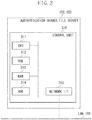
- FIG. 2 is a block diagram illustrating a configuration of the MFP 101.
- a control unit 210 including a central processing unit (CPU) 211 controls operation of the entire MFP 101.
- the CPU 211 reads a control program stored in a read only memory (ROM) 212 to perform various kinds of control such as reading control and transmission control.
- a random access memory (RAM) 213 is used as a temporary storage area such as a main memory and a work area for the CPU 211.
- the single CPU 211 uses the single memory (the RAM 213 or a hard disk (HDD) 214) to execute each processing illustrated in a flowchart described below, but the configuration may be formed otherwise.
- two or more CPUs and two or more RAMs or HDDs may cooperate with each other to execute each processing illustrated in the flowchart described below.
- the HDD 214 stores image data and various kinds of programs.
- An operation unit interface (I/F) 215 connects an operation unit 219 and the control unit 210.
- the operation unit 219 includes a liquid crystal display unit having a touch panel function and a keyboard, and functions as a reception unit configured to receive a user's operation and various kinds of information.
- a printer I/F 216 connects a printer 220 and the control unit 210.
- the image data to be printed by the printer 220 are transferred via the printer I/F 216 from the control unit 210, and are printed on a recording medium by the printer 220.
- a scanner I/F 217 connects a scanner 221 and the control unit 210.
- the scanner 221 reads an image on an original document to generate image data, and inputs the image data via the scanner I/F 217 into the control unit 210.
- the MFP 101 can convert the image data generated by the scanner 221 into any given file format, and transmit the image data to the file server or transmit the data by mail.
- a network I/F 218 connects the control unit 210 (MFP 101) with the LAN 100.
- the network I/F 218 transmits image data and information to an external apparatus on the LAN 100 (such as the authentication server 102 and the file server 103), or receives various kinds of information from an external apparatus on the LAN 100.
- Fig. 3 is a block diagram illustrating a configuration of the authentication server 102.
- a control unit 310 including a CPU 311 controls the entire operation of the authentication server 102.
- the CPU 311 executes various kinds of control processing by reading the control program stored in the ROM 312.
- a RAM 313 is used as a temporary storage area such as a main memory and a work area for the CPU 311.
- a HDD 314 stores image data and various kinds of program.
- a network I/F 315 connects the control unit 310 (authentication server 102) to the LAN 100.
- the network I/F 315 transmits and receives various kinds of information to and from another apparatus on the LAN 100.
- the configuration of the file server 103 is the same as that of the authentication server 102.
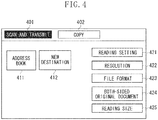
- Fig. 4 is a figure illustrating an example of operation screen displayed on the operation unit 219.
- the user operates an operation key 401 or 402 on the screen of Fig. 4 , so that the function can be selected.
- Fig. 4 illustrates the state in which the operation key 401 is selected.
- Fig. 4 illustrates "scan and transmit" and "copy” as the functions as an example.
- the MFP 101 may have other kinds of functions.
- the user who has selected the operation key 401 controls an operation key 411 or 412, so that the destination of image data to be transmitted can be set.
- the user controls the operation key 411 and the content of the address book held in the HDD 214 is displayed, and the user refers to the content registered in the address book, and the user can designate the destination of image data.
- the operation key 412 a screen for receiving new destination information from the user is displayed. The user can input destination information via the displayed screen to designate the destination of the image data.
- An operation key 421 is used to perform image reading setting such as color/black-and-white.
- An operation key 422 is used to set the reading resolution.
- An operation key 423 is used to set a file format of image data to be transmitted.
- An operation key 424 is used to set single side/both-sides reading.
- An operation key 425 is used to set the reading size.
- Fig. 5 is a figure illustrating an example of operation screen displayed on the operation unit 219.
- the operation screen on Fig. 5 is displayed when the user controls an operation key 411 of Fig. 5 .
- the destination information registered in an address book is displayed in list form in a destination information display area 500.
- a left-side column the destination name given to each destination information is displayed.
- the type of each destination (information indicating a transmission protocol) is displayed.
- address information included in each destination information is displayed.
- the type of destination is a mail
- the address information is a mail address
- the type of destination is a file server (SMB, FTP, WebDAV)
- the address information is a host name.
- the type of destination is a file server, not only a host name but also a folder path may also be displayed.
- Fig. 6 is a figure illustrating an example of an operation screen displayed on the operation unit 219.
- the operation screen as illustrated in Fig. 6 is displayed when the user presses down an operation key 503 and thereafter selects a file server (SMB, FTP, WebDAV) as the type of destination.
- SMB file server
- FTP FTP
- WebDAV WebDAV
- a transmission protocol can be selected.
- SMB, FTP, WebDAV are displayed in list form in a dropdown format, and the user selects any one of them.
- the user inputs the host name of the file server.
- the user inputs the folder path in the file server.
- the user inputs authentication information (user name and password) for accessing the folder.
- an input field 606 the user can select whether to input the authentication information in every transmission. If "ON" is selected, a destination confirmation screen ( Fig. 10 ) described below is displayed when the user instructs transmission of image data (when the user presses down the start key). Then, image data is transmitted using authentication information which is newly input by the user on the destination confirmation screen instead of using the authentication information which is input to the input fields 604 and 605 (the authentication information which is registered in the address book). If "OFF" is selected, the destination confirmation screen is not displayed when transmission of image data is instructed (when the start key is pressed down), and image data is transmitted using authentication information which is input to the input fields 604 and 605 (the authentication information registered in the address book).
- connection can be established with the file server is determined in accordance with a flowchart as illustrated in Fig. 7 , and a result of the determination is notified to the user as illustrated in Fig. 8 . Therefore, the user can confirm whether connection can be established with the file server using information which is input to the input fields 601 to 605.
- the destination information which is input to the input fields 601 to 606 is registered in the address book.
- Fig. 7 is a flowchart showing address book new registration operation to be performed in the MFP 101.
- Each operation (step) illustrated in the flowchart of Fig. 7 is realized by the CPU 211 of the MFP 101 executing the control program stored in the HDD 214.
- the flowchart of Fig. 7 is started when the operation screen illustrated in Fig. 6 is displayed.
- step S701 the CPU 211 receives the destination information input into the input fields 601 to 606.
- step S702 a determination is made as to whether a connection confirmation has been instructed (whether the user presses down the operation key 607).
- the processing proceeds to step S703.
- step S707 the processing proceeds to step S707.
- step S703 the CPU tries to connect to the file server (access a folder) using information which is input in the input fields 601 to 605. Then, in step S704, a determination is made as to whether connection with the file server tried in step S703 has been successfully completed. In this case, whether the connection to the file server has been successfully completed is treated as a result of the determination. More specifically, when it is determined that the connection to the file server has been successfully completed (Yes in step S704), the processing proceeds to step S705, and when it is determined that the connection to the file server has failed (No in step S704), the processing proceeds to step S706.
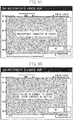
- Fig. 8A is a connection determination result notifying screen displayed in step S705.
- a message indicating that the connection with the file server has been successfully completed is described as illustrated in the drawing.
- Fig. 8B is a connection determination result notifying screen displayed in step S706.
- a message indicating that the connection with the file server has failed and the user is advised to check the content of setting (information which is input to the input fields 601 to 605) appears as illustrated in the drawing.
- the reason why the connection cannot be made may be further described in the screen illustrated in Fig. 8B . Examples of reasons include a failure to connect to network, a failure to find the host name, a failure to find the folder, and incorrect user name or password.
- step S707 a determination is made as to whether registration has been instructed (whether the user presses down the operation key 608).
- the processing proceeds to step S708, and when it is determined that the registration has not been instructed (No in step S707), the processing returns back to step S701.
- step S708 information which is input to the input fields 601 to 606 is registered in the address book (an information database stored in the HDD 214).
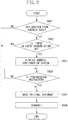
- Fig. 9 is a flowchart showing transmission operation performed in the MFP 101.
- Each operation (step) illustrated in the flowchart of Fig. 9 is realized by the CPU 211 of the MFP 101 executing the control program stored in the HDD 214.
- the flowchart of Fig. 9 is started when transmission of image data is instructed (when the start key is pressed down).
- Fig. 9 corresponds to a case where a file server is designated as a destination type. When a mail is designated as the destination type, transmission operation is executed according to a flowchart, not illustrated.
- step S901 the CPU 211 determines whether the destination is designated by referring to the address book.
- the processing proceeds to step S902.
- the processing proceeds to step S905.
- step S902 the CPU 211 determines whether the content which is input in the input field 606 is ON.
- the processing proceeds to step S903.
- the processing proceeds to step S905.
- step S903 the destination confirmation screen illustrated in Fig. 10 is displayed (i.e., editing disabled).
- the destination confirmation screen includes input fields 1001 to 1004.
- the input fields 1001 and 1002 are displayed in a grayed-out state, and the host name and the folder path which are input to the input fields 602 and 603 of Fig. 6 and registered in the address book are preset in the input fields 1001 and 1002.
- the input fields 1003 and 1004 are displayed as blank fields, and the user inputs the authentication information (user name and password) for accessing a folder.
- the user is prompted to input authentication information in every transmission, for example, in a case where the authentication information which is set to the folder of the file server is frequently changed.
- Another example is a case where the level of security is raised to prevent anyone from easily accessing the folder.
- step S904 the CPU 211 determines whether transmission is designated (whether the user presses down an operation key 1005).
- the processing proceeds to step S905.
- the processing waits until the transmission is designated.
- the operation key 1005 may be disabled until the user enters input to the input fields 1003 and 1004.
- step S905 the CPU 211 controls the scanner 221, and generates image data by reading an image on an original document.
- step S906 the destination folder is accessed by using the destination information which is input on the destination confirmation screen, and the image data generated in step S905 are transmitted.
- the folder is accessed by using the host name, the folder path, the user name, and the password which are newly input by the user.
- the folder is accessed by using the destination information which is input to the input fields 601 to 605 and registered in the address book.
- the user can confirm before the registration in the address book, whether the connection with the file server can be established (more specifically, whether the content which has been input is incorrect) by making a determination using the destination information input on the screen of Fig. 6 . Therefore, the user can notice incorrect content which has been input before the registration in the address book.
- the input fields 1003 and 1004 are displayed as blank fields, and the CPU 211 again receives input of authentication information from the user. Therefore, even if the connection can be established with the file server using the content input to the input fields 601 to 605, this does not necessarily mean that the transmission in step S906 can be successfully completed. In consideration of this point, the operation key 607 may be invalidated when the input field 606 is ON.
- the input field 606 is ON, it is possible to confirm that the host name and the folder path are not incorrect (the host name which is input to the input field 602 exists on the LAN 100, and the folder path of the input field 603 exists in the file server). Therefore, in the present example, regardless of whether the input field 606 is ON or OFF, the confirmation as to whether the connection can be established can be performed using the operation key 607.
- the input fields 1003 and 1004 may not be blank fields. Instead, the content which is input to input fields 604 and 605 (the content registered in the address book) may be preset in an editable manner. In this case, the authentication information which is input to the input fields 604 and 605 is likely to be used for transmission of image data. Therefore, it enhances the effect of confirming whether the connection can be established.
- the input fields 1003 and 1004 of the destination confirmation screen are displayed as blank fields, or the content which is input to the input fields 604 and 605 are preset in an editable manner in the input fields 1003 and 1004.
- the first embodiment it is presumed that information different from what has been input to the input fields 604 and 605 is preset in an editable manner in the input fields 1003 and 1004.
- the first embodiment is configured such that whether connection can be established is determined using preset authentication information. Similar constituent elements as those of the first example are denoted by the same reference numerals.
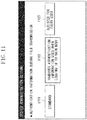
- Fig. 11 is a figure illustrating an example of an operation screen displayed on the operation unit 219.
- the operation screen illustrated in Fig. 11 can be operated only by an administrator of the MFP 101, and it is not displayed when an ordinary user operates the MFP 101.
- the administrator makes setting concerning handover of authentication information (selection of a mode) via the screen of Fig. 11 .
- the authentication information is not handed over.
- the authentication information is handed over.
- the authentication information input by the user to log in to the MFP 101 is presented to the user as authentication information for transmission to the file server (for accessing a folder), and the user is allowed to use the information.
- the administrator controls an operation key 1103 the authentication information stored in advance in association for each user (described below with reference to Fig. 12 ) is presented to the user as authentication information for transmission to the file server (for accessing a folder).
- Fig. 12 is a figure illustrating an example of an operation screen displayed on the operation unit 219.
- the screen of Fig. 12 is displayed when an ordinary user operates the MFP 101.
- the user inputs authentication information for accessing the folder (user name and password) into fields 1201 and 1202.
- the authentication information input to the input fields 1201 and 1202 is stored in the HDD 214 in association with the user who is currently logging in to the MFP 101.
- the authentication is used when "registration for each user" in Fig. 11 is selected. Once the authentication information is stored, the authentication information can be used when the user logs in from the next time and thereafter.
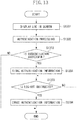
- Fig. 13 is a flowchart showing a log-in operation of the MFP 101 (a line of operations when the user starts to use the MFP 101). Each operation (step) shown in the flowchart of Fig. 13 is realized by the CPU 211 of the MFP 101 executing the control program stored in the HDD 214.
- step S1301 the CPU 211 receives the authentication information (user name and password) from the user via a log-in screen displayed on the operation unit 219.
- step S1302 the authentication information received in step S1301 is transmitted to the authentication server 102 to request the authentication server 102 to perform the user authentication (sends an inquiry about whether the user is allowed to use the MFP 101).
- step S1303 according to the content notified from the authentication server 102, it is determined whether the authentication is OK or NG.
- the authentication is determined to be OK (Yes in step S1303), the user is allowed to use the MFP 101, and the processing proceeds to step S1304.
- the authentication is determined to be NG (No in step S1303), the processing is terminated as it is (or, the processing returns back to step S1301 to display the log-in screen again).
- step S1304 the authentication information received in step S1301 is stored in the RAM 213 or the HDD 214. After the above processing, the user starts to operate the MFP 101.
- step S1305 the CPU 211 determines whether the user has given an instruction to log out from the MFP 101.
- the processing proceeds to step S1306.
- step S1306 the authentication information stored in the RAM 213 or HDD 214 in step S1304 is erased.
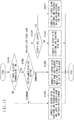
- Fig. 14 is a flowchart showing processing in step S703 of Fig. 7 in details.
- Each operation (step) illustrated in the flowchart of Fig. 14 is realized by the CPU 211 of the MFP 101 executing the control program stored in the HDD 214.
- the CPU 211 tries to connect to the file server (access a folder) using information which is input in the input fields 601 to 605.
- the CPU 211 tries to connect to the file server (access a folder) using authentication information of a type which is different dependent on the mode that is set on the screen of Fig. 11 .
- step S1401 the CPU 211 determines whether the content input to the input field 606 is ON.
- the processing proceeds to step S1402.
- the processing proceeds to step S1403.
- step S1402 the CPU 211 determines which mode is selected on the screen of Fig. 11 .
- the processing proceeds to step S1403.
- the processing proceeds to step S1404.
- the processing proceeds to step S145.
- step S1403 the CPU 211 tries to connect to the file server (access a folder) using authentication information input to the input fields 601 to 605.
- step S1404 the CPU 211 tries to connect to the file server (access a folder) using the information input to the input fields 601 to 603 and the user name and the password which are input in step S1301 of Fig. 13 at the time of log-in to the MFP 101.
- step S1405 the CPU 211 determines whether authentication information associated with each user is stored (the authentication information is registered via the screen of Fig. 12 ). When the CPU 211 determines that authentication information is stored (Yes in step S1405), the processing proceeds to step S1407. When the CPU 211 determines that the authentication information is not stored (No in step S1405), the processing proceeds to step S1406.
- step S1406 the CPU 211 tries to connect to the file server (access a folder) using the information input to the input fields 601 to 603 and assuming that the user name and the password are NULL.
- step S1407 the CPU 211 tries to connect to the file server (access a folder) using the information input to the input fields 601 to 603 and using the user name and the password which are input to the input fields 1201 and 1202 of Fig. 12 and which are stored in association with each user.
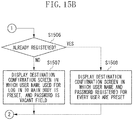
- Fig. 15A and 15B are a flowchart replacing Fig. 9 , and is a flowchart showing transmission operation in the MFP 101.
- Each operation (step) shown in the flowchart of Fig. 15 is realized by the CPU 211 of the MFP 101 executing the control program stored in the HDD 214.
- the flowchart of Fig. 15 is started when transmission of image data is instructed (when the start key is pressed down).
- step S1501 the CPU 211 determines whether the destination is designated by referring to the address book.
- the processing proceeds to step S1502.
- the processing proceeds to step S1510.
- step S1502 the CPU 211 determines whether the content input in the input field 606 is ON.
- the processing proceeds to step S1503.
- the processing proceeds to step S1510.
- step S1503 the CPU 211 determines which mode is selected on the screen of Fig. 11 .
- the processing proceeds to step S1504.
- step S1505. the processing proceeds to step S1505.
- step S1504 the same destination confirmation screen as that of step S903 is displayed. More specifically, the input fields 1001 and 1002 are displayed in a grayed-out state (i.e., editing disabled), and the host name and the folder path which are input to the input fields 602 and 603 of Fig. 6 and registered in the address book are preset in the input fields 1001 and 1002.
- the input fields 1003 and 1004 are displayed as blank fields, and the user inputs the authentication information (user name and password) for accessing a folder.
- the input fields 1001 and 1002 are displayed in a grayed-out state (i.e., editing disabled), and the host name and the folder path which are input to the input fields 602 and 603 of Fig. 6 and registered in the address book are preset in the input fields 1001 and 1002.
- the authentication information used at the time of log-in to the MFP 101 is preset in an editable state in the input fields 1003 and 1004.
- step S1506 the CPU 211 determines whether authentication information associated with each user is stored (authentication information is registered via the screen of Fig. 12 ). When the CPU 211 determines that authentication information is stored (Yes in step S1506), the processing proceeds to step S1508, and when the CPU 211 determines that authentication information is not stored (No in step S1506), the processing proceeds to step S1507.
- the input fields 1001 and 1002 are displayed in a grayed-out state (i.e., editing disabled), and the host name and the folder path which are input to the input fields 602 and 603 of Fig. 6 and registered in the address book, are preset in the input fields 1001 and 1002.
- the user name of the authentication information used for log-in to the MFP 101 (the authentication information stored in step S1304) is preset in an editable state in the input field 1003.
- the input field 1004 is displayed as a blank field.
- the input fields 1001 and 1002 are displayed in a grayed-out state (i.e., editing disabled), and the host name and the folder path which are input to the input fields 602 and 603 of Fig. 6 and registered in the address book, are preset in the input fields 1001 and 1002.
- step S1509 a determination is made as to whether transmission has been instructed (whether the user has pressed down the operation key 1005).
- the processing proceeds to step S1510.
- the processing waits until the transmission is instructed.
- the operation key 1005 may be disabled until the user enters input to the input fields 1003 and 1004.
- step S1510 the CPU 211 controls the scanner 221, and generates image data by reading an image on an original document.
- step S1511 the destination folder is accessed by using the destination information which is input on the destination confirmation screen, and the image data generated in step S1510 are transmitted.
- the folder is accessed by using the host name, the folder path, the user name, and the password which are newly input by the user.
- the content input in the input field 606 is determined not to be ON (which means OFF)
- the folder is accessed by using the destination information input to the input fields 601 to 605 and registered in the address book.
- a determination as to whether the connection with the file server can be established is made using authentication information of a type which is different dependent on the mode concerning the handover of the authentication information (a type of authentication information that is preset in an editable state on the destination confirmation screen). Therefore, a determination as to whether the connection can be established is made using the authentication information that is more likely to be actually used for transmission of image data, and this can further reduce a possibility of transmission error occurrence.
- the CPU 211 uses the destination information input to the input fields 601 to 605 and registered in the address book.
- the CPU 211 may determine whether connection can be established by using the authentication information of a type dependent on the mode selection in Fig. 11 .
- image data may be transmitted using the authentication information of the type dependent on the mode selection in Fig. 11 without further displaying the destination confirmation screen.
- the MFP 101 has been described, which receives the destination information indicating the folder in the file server and is capable of registering the received destination information in the address book.
- the MFP 101 is configured such that, after the MFP 101 receives the destination information from the user but before the destination information is registered in the address book, the MFP 101 determines whether the connection with the file server can be established using the destination information, and notifies the user of the determination. Therefore, this configuration can prevent destination information having incorrect content from being registered in the address book.
- the image data which the MFP 101 transmits is not limited to the data generated by the scanner 221.
- it may be image data which the MFP 101 receives from an external apparatus.
- the address book is not limited to what is stored in the MFP 101, and it may be an address book stored in an LDAP (Lightweight Directory Access Protocol) server provided in the LAN 101.
- LDAP Lightweight Directory Access Protocol
- An object of an exemplary embodiment of the present invention may also achieved by executing the following processing. More specifically, a storage medium storing a program code of software achieving the functions of the above embodiments is supplied to a system or an apparatus, and a computer (a CPU, an MPU, or the like) of the system or the apparatus may read and execute the program code stored in the storage medium.
- a storage medium storing a program code of software achieving the functions of the above embodiments is supplied to a system or an apparatus, and a computer (a CPU, an MPU, or the like) of the system or the apparatus may read and execute the program code stored in the storage medium.
- the program code itself read from the storage medium achieves the functions of the above embodiments. Therefore, the program code and the storage medium storing the program code constitute an exemplary embodiment of the present invention.
- destination information having incorrect content is prevented from being registered in the address book.
- Embodiments of the present invention can also be realized by a computer of a system or apparatus that reads out and executes computer executable instructions recorded on a storage medium (e.g., non-transitory computer-readable storage medium) to perform the functions of one or more of the above-described embodiment(s) of the present invention, and by a method performed by the computer of the system or apparatus by, for example, reading out and executing the computer executable instructions from the storage medium to perform the functions of one or more of the above-described embodiment(s).
- the computer may comprise one or more of a central processing unit (CPU), micro processing unit (MPU), or other circuitry, and may include a network of separate computers or separate computer processors.
- the computer executable instructions may be provided to the computer, for example, from a network or the storage medium.
- the storage medium may include, for example, one or more of a hard disk, a random-access memory (RAM), a read only memory (ROM), a storage of distributed computing systems, an optical disk (such as a compact disc (CD), digital versatile disc (DVD), or Blu-ray Disc (BD)TM), a flash memory device, a memory card, and the like.
Landscapes
- Engineering & Computer Science (AREA)
- Multimedia (AREA)
- Signal Processing (AREA)
- General Engineering & Computer Science (AREA)
- Health & Medical Sciences (AREA)
- Biomedical Technology (AREA)
- General Health & Medical Sciences (AREA)
- Automation & Control Theory (AREA)
- Computing Systems (AREA)
- Computer Networks & Wireless Communication (AREA)
- Facsimiles In General (AREA)
- Accessory Devices And Overall Control Thereof (AREA)
Claims (4)
- Appareil de traitement d'image, comprenant :un moyen d'affichage (219) conçu pour afficher :un champ d'entrée (601) destiné à recevoir une sélection, en tant que protocole de communication permettant de communiquer avec un serveur de fichiers, d'un protocole (601) parmi les protocoles SMB, FTP et WebDAV,des champs d'entrée (602, 603, 604, 605) conçus pour recevoir des informations de destination (602, 603) indiquant un dossier dans le serveur de fichiers et des informations d'authentification (604, 605) permettant d'accéder au dossier,une première touche (607) destinée à recevoir une première opération d'utilisateur en tant qu'instruction permettant une confirmation de connexion concernant le dossier pour le serveur de fichiers, etune seconde touche (608) destinée à recevoir une seconde opération d'utilisateur concernant une instruction d'enregistrement des informations de destination (602, 603) et des informations d'authentification (604, 605),un moyen d'autorisation conçu pour autoriser un utilisateur à utiliser l'appareil de traitement d'image, sur la base de secondes informations d'authentification qui sont entrées à des fins de connexion à l'appareil de traitement d'image par l'utilisateur ;un moyen de définition conçu pour définir, par un administrateur, un premier mode (1102) dans lequel les secondes informations d'authentification servent à une authentification au niveau du serveur de fichiers, un deuxième mode (1101) dans lequel les informations d'authentification (604, 605) reçues par les champs d'entrée affichés servent à une authentification au niveau du serveur de fichiers, ou un troisième mode (1103) dans lequel des informations d'authentification qui ont été mémorisées à l'avance en association avec chaque utilisateur servent à une authentification au niveau du serveur de fichiers ;un moyen d'enregistrement (211) conçu, en réponse à la seconde opération d'utilisateur concernant la seconde touche (608), pour enregistrer, dans un carnet d'adresses, les informations de destination (602, 603) et les informations d'authentification (604, 605) reçues par les champs d'entrée affichés ;un moyen de détermination (211) conçu pour déterminer, conformément au protocole de communication sélectionné (601), si une connexion au dossier dans le serveur de fichiers peut être établie au moyen des informations de destination (602, 603) reçues par les champs d'entrée affichés, la détermination étant effectuée avant l'enregistrement des informations de destination (602, 603) et des informations d'authentification (604, 605) ;un moyen de notification (211) conçu pour notifier un résultat de détermination effectué par le moyen de détermination à un utilisateur ; etun moyen de transmission (211) conçu pour transmettre des données d'image au dossier dans le serveur de fichiers,dans lequel :
dans un cas dans lequel le deuxième mode (1101) est défini par le moyen de définition :en réponse à la première opération d'utilisateur concernant la première touche (607), le moyen de détermination (211) effectue la détermination au moyen des informations d'authentification (604, 605) reçues par les champs d'entrée affichés,dans un cas dans lequel le premier mode est défini par le moyen de définition :en réponse à la première opération d'utilisateur concernant la première touche (607), le moyen de détermination (211) effectue la détermination au moyen des secondes informations d'authentification, etdans un cas dans lequel le troisième mode (1103) est défini par le moyen de définition :
en réponse à la première opération d'utilisateur concernant la première touche (607), le moyen de détermination (211) effectue la détermination au moyen des informations d'authentification qui ont été mémorisées à l'avance en association avec chaque utilisateur. - Appareil de traitement d'image selon la revendication 1, comprenant en outre un moyen de lecture conçu pour générer des données d'image par une lecture d'une image d'un document d'origine,
dans lequel le moyen de transmission transmet les données d'image générées par le moyen de lecture. - Procédé de traitement d'image comprenant les étapes consistant à :afficher :un champ d'entrée (601) destiné à recevoir une sélection, en tant que protocole de communication permettant de communiquer avec un serveur de fichiers, un protocole (601) parmi les protocoles SMB, FTP et WebDAV,des champs d'entrée (602, 603, 604, 605) conçus pour recevoir des informations de destination (602, 603) indiquant un dossier dans le serveur de fichiers et des informations d'authentification (604, 605) permettant d'accéder au dossier,une première touche (607) destinée à recevoir une première opération d'utilisateur en tant qu'instruction permettant une confirmation de connexion concernant le dossier pour le serveur de fichiers, etune seconde touche (608) destinée à recevoir une seconde opération d'utilisateur concernant une instruction d'enregistrement des informations de destination (602, 603) et des informations d'authentification (604, 605), etautoriser un utilisateur à utiliser l'appareil de traitement d'image, sur la base de secondes informations d'authentification qui sont entrées à des fins de connexion à l'appareil de traitement d'image par l'utilisateur ;définir, par un administrateur, un premier mode (1102) dans lequel les secondes informations d'authentification servent à une authentification au niveau du serveur de fichiers, un deuxième mode (1101) dans lequel les informations d'authentification (604, 605) reçues par les champs d'entrée affichés servent à une authentification au niveau du serveur de fichiers, ou un troisième mode (1103) dans lequel des informations d'authentification qui ont été mémorisées à l'avance pour chaque utilisateur servent à une authentification au niveau du serveur de fichiers ;enregistrer, en réponse à la seconde opération d'utilisateur concernant la seconde touche (608), dans un carnet d'adresses, les informations de destination (602, 603) et les informations d'authentification (604, 605) reçues par les champs d'entrée affichés ;déterminer, conformément au protocole de communication sélectionné (601), si une connexion au dossier dans le serveur de fichiers peut être établie au moyen des informations de destination (602, 603) reçues par les champs d'entrée affichés, la détermination étant effectuée avant l'enregistrement des informations de destination (602, 603) ;notifier un résultat de détermination de la détermination à un utilisateur ; ettransmettre des données d'image au dossier dans le serveur de fichiers,dans lequel :
dans un cas dans lequel le deuxième mode (1101) est défini :en réponse à la première opération d'utilisateur concernant la première touche (607), la détermination effectue la détermination au moyen des informations d'authentification (604, 605) reçues par les champs d'entrée affichés,dans un cas dans lequel le premier mode (1102) est défini :en réponse à la première opération d'utilisateur concernant la première touche (607), la détermination effectue la détermination au moyen des secondes informations d'authentification, etdans un cas dans lequel le troisième mode (1103) est défini :
en réponse à la première opération d'utilisateur concernant la première touche (607), la détermination effectue la détermination au moyen des informations d'authentification qui ont été mémorisées à l'avance pour chaque utilisateur. - Programme comprenant des instructions qui, lorsque le programme est exécuté par un ordinateur, amènent l'ordinateur à mettre en œuvre le procédé de traitement d'image selon la revendication 3.
Applications Claiming Priority (1)
| Application Number | Priority Date | Filing Date | Title |
|---|---|---|---|
| JP2013248031A JP6415040B2 (ja) | 2013-11-29 | 2013-11-29 | 画像処理装置、画像処理方法、及びプログラム |
Publications (2)
| Publication Number | Publication Date |
|---|---|
| EP2879367A1 EP2879367A1 (fr) | 2015-06-03 |
| EP2879367B1 true EP2879367B1 (fr) | 2020-07-15 |
Family
ID=52002768
Family Applications (1)
| Application Number | Title | Priority Date | Filing Date |
|---|---|---|---|
| EP14195480.0A Active EP2879367B1 (fr) | 2013-11-29 | 2014-11-28 | Appareil, procédé de traitement d'image et programme |
Country Status (5)
| Country | Link |
|---|---|
| US (2) | US9924047B2 (fr) |
| EP (1) | EP2879367B1 (fr) |
| JP (1) | JP6415040B2 (fr) |
| KR (1) | KR101774291B1 (fr) |
| CN (1) | CN104683631B (fr) |
Families Citing this family (12)
| Publication number | Priority date | Publication date | Assignee | Title |
|---|---|---|---|---|
| KR102504497B1 (ko) | 2014-09-07 | 2023-02-27 | 오씨오 리미티드 | 이방성 생체복합재료 물질, 이를 포함하는 의학적 이식물 및 이의 치료방법 |
| EP3236866B1 (fr) | 2014-12-26 | 2019-11-13 | Ossio Ltd | Implants médicaux biocomposites renforcés de fibres continues |
| JP6168102B2 (ja) * | 2015-06-04 | 2017-07-26 | コニカミノルタ株式会社 | 画像形成装置、画像データ送信方法、およびコンピュータプログラム |
| JP6696169B2 (ja) * | 2015-12-21 | 2020-05-20 | ブラザー工業株式会社 | 機能実行装置、機能実行方法及び記憶媒体 |
| WO2017155956A1 (fr) | 2016-03-07 | 2017-09-14 | Ossio Ltd | Matériau biocomposite traité en surface, implants médicaux comprenant celui-ci et méthodes de traitement associées |
| JP6816529B2 (ja) * | 2016-04-20 | 2021-01-20 | 株式会社リコー | 情報処理装置、情報処理システム、情報処理方法、及びプログラム |
| JP2019518568A (ja) | 2016-06-27 | 2019-07-04 | オッシオ リミテッド | 高い鉱物含有量を有する繊維強化バイオ複合材料の医療用インプラント |
| JP2019041303A (ja) * | 2017-08-28 | 2019-03-14 | シャープ株式会社 | 情報送信装置、情報送信システム、複合機、情報送信方法及び情報送信プログラム |
| JP7187145B2 (ja) * | 2017-11-02 | 2022-12-12 | キヤノン株式会社 | 画像送信装置、画像送信装置の制御方法、及びプログラム |
| JP7139868B2 (ja) | 2018-10-18 | 2022-09-21 | ブラザー工業株式会社 | スキャナ及びスキャナのためのコンピュータプログラム |
| JP7592466B2 (ja) * | 2020-11-18 | 2024-12-02 | キヤノン株式会社 | サーバシステムおよびプログラム |
| IL294542B1 (en) | 2021-07-19 | 2026-02-01 | Ossio Ltd | Device with an implant insertion tube with adjustable insertion depth |
Citations (1)
| Publication number | Priority date | Publication date | Assignee | Title |
|---|---|---|---|---|
| JP2006140763A (ja) * | 2004-11-12 | 2006-06-01 | Murata Mach Ltd | 画像読取装置 |
Family Cites Families (17)
| Publication number | Priority date | Publication date | Assignee | Title |
|---|---|---|---|---|
| JPH10117198A (ja) | 1996-10-09 | 1998-05-06 | Ricoh Co Ltd | 通信装置 |
| JP2002217944A (ja) | 2001-01-19 | 2002-08-02 | Ricoh Co Ltd | 通信装置 |
| US7366170B2 (en) * | 2003-09-25 | 2008-04-29 | Kabushiki Kaisha Toshiba | Communication connection method, authentication method, server computer, client computer and program |
| JP4966753B2 (ja) * | 2007-06-08 | 2012-07-04 | 株式会社日立製作所 | 情報処理システム、および情報処理方法 |
| JP2010140075A (ja) * | 2008-12-09 | 2010-06-24 | Finaldevice Corp | ファイル課金システム |
| JP5377116B2 (ja) | 2009-06-30 | 2013-12-25 | キヤノン株式会社 | 情報処理装置及び情報処理装置の制御方法並びにプログラム |
| JP5355487B2 (ja) * | 2010-04-26 | 2013-11-27 | キヤノン株式会社 | 画像送信装置、画像送信装置の認証方法 |
| JP5595106B2 (ja) | 2010-04-27 | 2014-09-24 | キヤノン株式会社 | 画像送信装置、画像送信装置の制御方法 |
| JP5711512B2 (ja) | 2010-12-10 | 2015-04-30 | キヤノン株式会社 | 情報処理装置及び当該情報処理装置を制御するための制御方法 |
| JP2013110695A (ja) | 2011-11-24 | 2013-06-06 | Canon Inc | 情報処理装置、情報処理方法及びプログラム |
| JP5867783B2 (ja) * | 2011-12-22 | 2016-02-24 | ブラザー工業株式会社 | 画像処理装置及びプログラム |
| JP6027750B2 (ja) * | 2012-02-08 | 2016-11-16 | キヤノン株式会社 | 情報処理装置、情報処理装置の制御方法、およびプログラム |
| JP6066572B2 (ja) * | 2012-02-28 | 2017-01-25 | キヤノン株式会社 | 画像処理装置、画像処理装置の制御方法、及び制御プログラム |
| JP6049275B2 (ja) | 2012-03-07 | 2016-12-21 | キヤノン株式会社 | 画像処理システム、画像処理装置、画像処理装置の制御方法、及びプログラム |
| JP6029300B2 (ja) | 2012-03-22 | 2016-11-24 | キヤノン株式会社 | 画像処理装置、画像処理装置の制御方法、及びプログラム |
| JP5817766B2 (ja) * | 2013-03-21 | 2015-11-18 | 富士ゼロックス株式会社 | 情報処理装置、通信システム及びプログラム |
| JP5986546B2 (ja) * | 2013-08-29 | 2016-09-06 | ヤフー株式会社 | 情報処理装置、および情報処理方法 |
-
2013
- 2013-11-29 JP JP2013248031A patent/JP6415040B2/ja active Active
-
2014
- 2014-11-24 US US14/551,872 patent/US9924047B2/en not_active Expired - Fee Related
- 2014-11-25 CN CN201410685741.8A patent/CN104683631B/zh active Active
- 2014-11-27 KR KR1020140167120A patent/KR101774291B1/ko not_active Expired - Fee Related
- 2014-11-28 EP EP14195480.0A patent/EP2879367B1/fr active Active
-
2018
- 2018-02-08 US US15/892,260 patent/US10306077B2/en not_active Expired - Fee Related
Patent Citations (1)
| Publication number | Priority date | Publication date | Assignee | Title |
|---|---|---|---|---|
| JP2006140763A (ja) * | 2004-11-12 | 2006-06-01 | Murata Mach Ltd | 画像読取装置 |
Also Published As
| Publication number | Publication date |
|---|---|
| EP2879367A1 (fr) | 2015-06-03 |
| US20180198926A1 (en) | 2018-07-12 |
| CN104683631A (zh) | 2015-06-03 |
| CN104683631B (zh) | 2018-03-13 |
| US10306077B2 (en) | 2019-05-28 |
| JP6415040B2 (ja) | 2018-10-31 |
| US20150156338A1 (en) | 2015-06-04 |
| JP2015106815A (ja) | 2015-06-08 |
| KR101774291B1 (ko) | 2017-09-12 |
| US9924047B2 (en) | 2018-03-20 |
| KR20150062983A (ko) | 2015-06-08 |
Similar Documents
| Publication | Publication Date | Title |
|---|---|---|
| EP2879367B1 (fr) | Appareil, procédé de traitement d'image et programme | |
| EP2667549B1 (fr) | Procédé de contrôle pour un appareil de traitement d'images | |
| JP2007174062A (ja) | データ通信装置、データ通信システム、データ通信方法、及びそのプログラム | |
| US9854116B2 (en) | Image processing apparatus configured to transmit image data and method for controlling an image processing apparatus | |
| US20130242329A1 (en) | Image processing system and image processing apparatus for transmitting image data | |
| US9509879B2 (en) | Image processing apparatus, method for controlling image processing apparatus, and storage medium | |
| US10917530B2 (en) | Image processing apparatus and method | |
| JP7127555B2 (ja) | 画像形成装置、情報処理方法及びプログラム | |
| CN101827185A (zh) | 信息处理系统及其控制方法 | |
| US10084934B2 (en) | Information processing apparatus that generates file names for naming files, method of controlling the same, and storage medium | |
| JP6576529B2 (ja) | データ処理装置、データ処理装置の制御方法、及びプログラム | |
| EP4290359B1 (fr) | Système d'impression et procédé de commande d'impression | |
| JP6391742B2 (ja) | データ処理装置、データ処理装置の制御方法、及びプログラム | |
| US9973655B2 (en) | Image processing apparatus, method for controlling image processing apparatus, and storage medium | |
| US20140317310A1 (en) | Image processing system, image processing method, and storage medium | |
| US9201616B2 (en) | Image communication apparatus, method and storage medium with archiving function | |
| CN117896429A (zh) | 信息处理装置、设备登记方法以及存储介质 |
Legal Events
| Date | Code | Title | Description |
|---|---|---|---|
| PUAI | Public reference made under article 153(3) epc to a published international application that has entered the european phase |
Free format text: ORIGINAL CODE: 0009012 |
|
| 17P | Request for examination filed |
Effective date: 20141128 |
|
| AK | Designated contracting states |
Kind code of ref document: A1 Designated state(s): AL AT BE BG CH CY CZ DE DK EE ES FI FR GB GR HR HU IE IS IT LI LT LU LV MC MK MT NL NO PL PT RO RS SE SI SK SM TR |
|
| AX | Request for extension of the european patent |
Extension state: BA ME |
|
| R17P | Request for examination filed (corrected) |
Effective date: 20151203 |
|
| RBV | Designated contracting states (corrected) |
Designated state(s): AL AT BE BG CH CY CZ DE DK EE ES FI FR GB GR HR HU IE IS IT LI LT LU LV MC MK MT NL NO PL PT RO RS SE SI SK SM TR |
|
| STAA | Information on the status of an ep patent application or granted ep patent |
Free format text: STATUS: EXAMINATION IS IN PROGRESS |
|
| 17Q | First examination report despatched |
Effective date: 20171113 |
|
| GRAP | Despatch of communication of intention to grant a patent |
Free format text: ORIGINAL CODE: EPIDOSNIGR1 |
|
| STAA | Information on the status of an ep patent application or granted ep patent |
Free format text: STATUS: GRANT OF PATENT IS INTENDED |
|
| INTG | Intention to grant announced |
Effective date: 20200220 |
|
| GRAS | Grant fee paid |
Free format text: ORIGINAL CODE: EPIDOSNIGR3 |
|
| GRAA | (expected) grant |
Free format text: ORIGINAL CODE: 0009210 |
|
| STAA | Information on the status of an ep patent application or granted ep patent |
Free format text: STATUS: THE PATENT HAS BEEN GRANTED |
|
| AK | Designated contracting states |
Kind code of ref document: B1 Designated state(s): AL AT BE BG CH CY CZ DE DK EE ES FI FR GB GR HR HU IE IS IT LI LT LU LV MC MK MT NL NO PL PT RO RS SE SI SK SM TR |
|
| REG | Reference to a national code |
Ref country code: CH Ref legal event code: EP Ref country code: GB Ref legal event code: FG4D |
|
| REG | Reference to a national code |
Ref country code: IE Ref legal event code: FG4D |
|
| REG | Reference to a national code |
Ref country code: DE Ref legal event code: R096 Ref document number: 602014067682 Country of ref document: DE |
|
| REG | Reference to a national code |
Ref country code: AT Ref legal event code: REF Ref document number: 1292272 Country of ref document: AT Kind code of ref document: T Effective date: 20200815 |
|
| REG | Reference to a national code |
Ref country code: LT Ref legal event code: MG4D |
|
| REG | Reference to a national code |
Ref country code: AT Ref legal event code: MK05 Ref document number: 1292272 Country of ref document: AT Kind code of ref document: T Effective date: 20200715 |
|
| REG | Reference to a national code |
Ref country code: NL Ref legal event code: MP Effective date: 20200715 |
|
| PG25 | Lapsed in a contracting state [announced via postgrant information from national office to epo] |
Ref country code: GR Free format text: LAPSE BECAUSE OF FAILURE TO SUBMIT A TRANSLATION OF THE DESCRIPTION OR TO PAY THE FEE WITHIN THE PRESCRIBED TIME-LIMIT Effective date: 20201016 Ref country code: FI Free format text: LAPSE BECAUSE OF FAILURE TO SUBMIT A TRANSLATION OF THE DESCRIPTION OR TO PAY THE FEE WITHIN THE PRESCRIBED TIME-LIMIT Effective date: 20200715 Ref country code: SE Free format text: LAPSE BECAUSE OF FAILURE TO SUBMIT A TRANSLATION OF THE DESCRIPTION OR TO PAY THE FEE WITHIN THE PRESCRIBED TIME-LIMIT Effective date: 20200715 Ref country code: LT Free format text: LAPSE BECAUSE OF FAILURE TO SUBMIT A TRANSLATION OF THE DESCRIPTION OR TO PAY THE FEE WITHIN THE PRESCRIBED TIME-LIMIT Effective date: 20200715 Ref country code: HR Free format text: LAPSE BECAUSE OF FAILURE TO SUBMIT A TRANSLATION OF THE DESCRIPTION OR TO PAY THE FEE WITHIN THE PRESCRIBED TIME-LIMIT Effective date: 20200715 Ref country code: AT Free format text: LAPSE BECAUSE OF FAILURE TO SUBMIT A TRANSLATION OF THE DESCRIPTION OR TO PAY THE FEE WITHIN THE PRESCRIBED TIME-LIMIT Effective date: 20200715 Ref country code: NO Free format text: LAPSE BECAUSE OF FAILURE TO SUBMIT A TRANSLATION OF THE DESCRIPTION OR TO PAY THE FEE WITHIN THE PRESCRIBED TIME-LIMIT Effective date: 20201015 Ref country code: ES Free format text: LAPSE BECAUSE OF FAILURE TO SUBMIT A TRANSLATION OF THE DESCRIPTION OR TO PAY THE FEE WITHIN THE PRESCRIBED TIME-LIMIT Effective date: 20200715 Ref country code: PT Free format text: LAPSE BECAUSE OF FAILURE TO SUBMIT A TRANSLATION OF THE DESCRIPTION OR TO PAY THE FEE WITHIN THE PRESCRIBED TIME-LIMIT Effective date: 20201116 Ref country code: BG Free format text: LAPSE BECAUSE OF FAILURE TO SUBMIT A TRANSLATION OF THE DESCRIPTION OR TO PAY THE FEE WITHIN THE PRESCRIBED TIME-LIMIT Effective date: 20201015 |
|
| PG25 | Lapsed in a contracting state [announced via postgrant information from national office to epo] |
Ref country code: RS Free format text: LAPSE BECAUSE OF FAILURE TO SUBMIT A TRANSLATION OF THE DESCRIPTION OR TO PAY THE FEE WITHIN THE PRESCRIBED TIME-LIMIT Effective date: 20200715 Ref country code: LV Free format text: LAPSE BECAUSE OF FAILURE TO SUBMIT A TRANSLATION OF THE DESCRIPTION OR TO PAY THE FEE WITHIN THE PRESCRIBED TIME-LIMIT Effective date: 20200715 Ref country code: PL Free format text: LAPSE BECAUSE OF FAILURE TO SUBMIT A TRANSLATION OF THE DESCRIPTION OR TO PAY THE FEE WITHIN THE PRESCRIBED TIME-LIMIT Effective date: 20200715 Ref country code: IS Free format text: LAPSE BECAUSE OF FAILURE TO SUBMIT A TRANSLATION OF THE DESCRIPTION OR TO PAY THE FEE WITHIN THE PRESCRIBED TIME-LIMIT Effective date: 20201115 |
|
| PG25 | Lapsed in a contracting state [announced via postgrant information from national office to epo] |
Ref country code: NL Free format text: LAPSE BECAUSE OF FAILURE TO SUBMIT A TRANSLATION OF THE DESCRIPTION OR TO PAY THE FEE WITHIN THE PRESCRIBED TIME-LIMIT Effective date: 20200715 |
|
| REG | Reference to a national code |
Ref country code: DE Ref legal event code: R097 Ref document number: 602014067682 Country of ref document: DE |
|
| PG25 | Lapsed in a contracting state [announced via postgrant information from national office to epo] |
Ref country code: IT Free format text: LAPSE BECAUSE OF FAILURE TO SUBMIT A TRANSLATION OF THE DESCRIPTION OR TO PAY THE FEE WITHIN THE PRESCRIBED TIME-LIMIT Effective date: 20200715 Ref country code: DK Free format text: LAPSE BECAUSE OF FAILURE TO SUBMIT A TRANSLATION OF THE DESCRIPTION OR TO PAY THE FEE WITHIN THE PRESCRIBED TIME-LIMIT Effective date: 20200715 Ref country code: EE Free format text: LAPSE BECAUSE OF FAILURE TO SUBMIT A TRANSLATION OF THE DESCRIPTION OR TO PAY THE FEE WITHIN THE PRESCRIBED TIME-LIMIT Effective date: 20200715 Ref country code: CZ Free format text: LAPSE BECAUSE OF FAILURE TO SUBMIT A TRANSLATION OF THE DESCRIPTION OR TO PAY THE FEE WITHIN THE PRESCRIBED TIME-LIMIT Effective date: 20200715 Ref country code: RO Free format text: LAPSE BECAUSE OF FAILURE TO SUBMIT A TRANSLATION OF THE DESCRIPTION OR TO PAY THE FEE WITHIN THE PRESCRIBED TIME-LIMIT Effective date: 20200715 Ref country code: SM Free format text: LAPSE BECAUSE OF FAILURE TO SUBMIT A TRANSLATION OF THE DESCRIPTION OR TO PAY THE FEE WITHIN THE PRESCRIBED TIME-LIMIT Effective date: 20200715 |
|
| PLBE | No opposition filed within time limit |
Free format text: ORIGINAL CODE: 0009261 |
|
| STAA | Information on the status of an ep patent application or granted ep patent |
Free format text: STATUS: NO OPPOSITION FILED WITHIN TIME LIMIT |
|
| PG25 | Lapsed in a contracting state [announced via postgrant information from national office to epo] |
Ref country code: AL Free format text: LAPSE BECAUSE OF FAILURE TO SUBMIT A TRANSLATION OF THE DESCRIPTION OR TO PAY THE FEE WITHIN THE PRESCRIBED TIME-LIMIT Effective date: 20200715 |
|
| 26N | No opposition filed |
Effective date: 20210416 |
|
| PG25 | Lapsed in a contracting state [announced via postgrant information from national office to epo] |
Ref country code: SK Free format text: LAPSE BECAUSE OF FAILURE TO SUBMIT A TRANSLATION OF THE DESCRIPTION OR TO PAY THE FEE WITHIN THE PRESCRIBED TIME-LIMIT Effective date: 20200715 Ref country code: MC Free format text: LAPSE BECAUSE OF FAILURE TO SUBMIT A TRANSLATION OF THE DESCRIPTION OR TO PAY THE FEE WITHIN THE PRESCRIBED TIME-LIMIT Effective date: 20200715 |
|
| REG | Reference to a national code |
Ref country code: CH Ref legal event code: PL |
|
| PG25 | Lapsed in a contracting state [announced via postgrant information from national office to epo] |
Ref country code: LU Free format text: LAPSE BECAUSE OF NON-PAYMENT OF DUE FEES Effective date: 20201128 |
|
| REG | Reference to a national code |
Ref country code: BE Ref legal event code: MM Effective date: 20201130 |
|
| PG25 | Lapsed in a contracting state [announced via postgrant information from national office to epo] |
Ref country code: CH Free format text: LAPSE BECAUSE OF NON-PAYMENT OF DUE FEES Effective date: 20201130 Ref country code: LI Free format text: LAPSE BECAUSE OF NON-PAYMENT OF DUE FEES Effective date: 20201130 Ref country code: SI Free format text: LAPSE BECAUSE OF FAILURE TO SUBMIT A TRANSLATION OF THE DESCRIPTION OR TO PAY THE FEE WITHIN THE PRESCRIBED TIME-LIMIT Effective date: 20200715 |
|
| PG25 | Lapsed in a contracting state [announced via postgrant information from national office to epo] |
Ref country code: FR Free format text: LAPSE BECAUSE OF NON-PAYMENT OF DUE FEES Effective date: 20201130 Ref country code: IE Free format text: LAPSE BECAUSE OF NON-PAYMENT OF DUE FEES Effective date: 20201128 |
|
| PGFP | Annual fee paid to national office [announced via postgrant information from national office to epo] |
Ref country code: DE Payment date: 20211020 Year of fee payment: 8 Ref country code: GB Payment date: 20211020 Year of fee payment: 8 |
|
| PG25 | Lapsed in a contracting state [announced via postgrant information from national office to epo] |
Ref country code: TR Free format text: LAPSE BECAUSE OF FAILURE TO SUBMIT A TRANSLATION OF THE DESCRIPTION OR TO PAY THE FEE WITHIN THE PRESCRIBED TIME-LIMIT Effective date: 20200715 Ref country code: MT Free format text: LAPSE BECAUSE OF FAILURE TO SUBMIT A TRANSLATION OF THE DESCRIPTION OR TO PAY THE FEE WITHIN THE PRESCRIBED TIME-LIMIT Effective date: 20200715 Ref country code: CY Free format text: LAPSE BECAUSE OF FAILURE TO SUBMIT A TRANSLATION OF THE DESCRIPTION OR TO PAY THE FEE WITHIN THE PRESCRIBED TIME-LIMIT Effective date: 20200715 |
|
| PG25 | Lapsed in a contracting state [announced via postgrant information from national office to epo] |
Ref country code: MK Free format text: LAPSE BECAUSE OF FAILURE TO SUBMIT A TRANSLATION OF THE DESCRIPTION OR TO PAY THE FEE WITHIN THE PRESCRIBED TIME-LIMIT Effective date: 20200715 |
|
| PG25 | Lapsed in a contracting state [announced via postgrant information from national office to epo] |
Ref country code: BE Free format text: LAPSE BECAUSE OF NON-PAYMENT OF DUE FEES Effective date: 20201130 |
|
| REG | Reference to a national code |
Ref country code: DE Ref legal event code: R119 Ref document number: 602014067682 Country of ref document: DE |
|
| GBPC | Gb: european patent ceased through non-payment of renewal fee |
Effective date: 20221128 |
|
| PG25 | Lapsed in a contracting state [announced via postgrant information from national office to epo] |
Ref country code: GB Free format text: LAPSE BECAUSE OF NON-PAYMENT OF DUE FEES Effective date: 20221128 Ref country code: DE Free format text: LAPSE BECAUSE OF NON-PAYMENT OF DUE FEES Effective date: 20230601 |