EP2908505A1 - Tragbare elektronische vorrichtung sowie steuerungsverfahren und -programm dafür - Google Patents
Tragbare elektronische vorrichtung sowie steuerungsverfahren und -programm dafür Download PDFInfo
- Publication number
- EP2908505A1 EP2908505A1 EP13845709.8A EP13845709A EP2908505A1 EP 2908505 A1 EP2908505 A1 EP 2908505A1 EP 13845709 A EP13845709 A EP 13845709A EP 2908505 A1 EP2908505 A1 EP 2908505A1
- Authority
- EP
- European Patent Office
- Prior art keywords
- user
- electronic apparatus
- mobile electronic
- distance
- magnification ratio
- Prior art date
- Legal status (The legal status is an assumption and is not a legal conclusion. Google has not performed a legal analysis and makes no representation as to the accuracy of the status listed.)
- Withdrawn
Links
Images




Classifications
-
- G—PHYSICS
- G06—COMPUTING OR CALCULATING; COUNTING
- G06F—ELECTRIC DIGITAL DATA PROCESSING
- G06F3/00—Input arrangements for transferring data to be processed into a form capable of being handled by the computer; Output arrangements for transferring data from processing unit to output unit, e.g. interface arrangements
- G06F3/01—Input arrangements or combined input and output arrangements for interaction between user and computer
- G06F3/011—Arrangements for interaction with the human body, e.g. for user immersion in virtual reality
- G06F3/012—Head tracking input arrangements
-
- G—PHYSICS
- G06—COMPUTING OR CALCULATING; COUNTING
- G06F—ELECTRIC DIGITAL DATA PROCESSING
- G06F1/00—Details not covered by groups G06F3/00 - G06F13/00 and G06F21/00
- G06F1/16—Constructional details or arrangements
- G06F1/1613—Constructional details or arrangements for portable computers
- G06F1/1633—Constructional details or arrangements of portable computers not specific to the type of enclosures covered by groups G06F1/1615 - G06F1/1626
- G06F1/1684—Constructional details or arrangements related to integrated I/O peripherals not covered by groups G06F1/1635 - G06F1/1675
- G06F1/1686—Constructional details or arrangements related to integrated I/O peripherals not covered by groups G06F1/1635 - G06F1/1675 the I/O peripheral being an integrated camera
-
- G—PHYSICS
- G06—COMPUTING OR CALCULATING; COUNTING
- G06F—ELECTRIC DIGITAL DATA PROCESSING
- G06F3/00—Input arrangements for transferring data to be processed into a form capable of being handled by the computer; Output arrangements for transferring data from processing unit to output unit, e.g. interface arrangements
- G06F3/01—Input arrangements or combined input and output arrangements for interaction between user and computer
- G06F3/03—Arrangements for converting the position or the displacement of a member into a coded form
- G06F3/0304—Detection arrangements using opto-electronic means
-
- G—PHYSICS
- G06—COMPUTING OR CALCULATING; COUNTING
- G06F—ELECTRIC DIGITAL DATA PROCESSING
- G06F3/00—Input arrangements for transferring data to be processed into a form capable of being handled by the computer; Output arrangements for transferring data from processing unit to output unit, e.g. interface arrangements
- G06F3/01—Input arrangements or combined input and output arrangements for interaction between user and computer
- G06F3/03—Arrangements for converting the position or the displacement of a member into a coded form
- G06F3/033—Pointing devices displaced or positioned by the user, e.g. mice, trackballs, pens or joysticks; Accessories therefor
- G06F3/0354—Pointing devices displaced or positioned by the user, e.g. mice, trackballs, pens or joysticks; Accessories therefor with detection of two-dimensional [2D] relative movements between the device, or an operating part thereof, and a plane or surface, e.g. 2D mice, trackballs, pens or pucks
- G06F3/03547—Touch pads, in which fingers can move on a surface
-
- G—PHYSICS
- G06—COMPUTING OR CALCULATING; COUNTING
- G06F—ELECTRIC DIGITAL DATA PROCESSING
- G06F3/00—Input arrangements for transferring data to be processed into a form capable of being handled by the computer; Output arrangements for transferring data from processing unit to output unit, e.g. interface arrangements
- G06F3/01—Input arrangements or combined input and output arrangements for interaction between user and computer
- G06F3/048—Interaction techniques based on graphical user interfaces [GUI]
- G06F3/0484—Interaction techniques based on graphical user interfaces [GUI] for the control of specific functions or operations, e.g. selecting or manipulating an object, an image or a displayed text element, setting a parameter value or selecting a range
- G06F3/04845—Interaction techniques based on graphical user interfaces [GUI] for the control of specific functions or operations, e.g. selecting or manipulating an object, an image or a displayed text element, setting a parameter value or selecting a range for image manipulation, e.g. dragging, rotation, expansion or change of colour
-
- G—PHYSICS
- G06—COMPUTING OR CALCULATING; COUNTING
- G06F—ELECTRIC DIGITAL DATA PROCESSING
- G06F3/00—Input arrangements for transferring data to be processed into a form capable of being handled by the computer; Output arrangements for transferring data from processing unit to output unit, e.g. interface arrangements
- G06F3/01—Input arrangements or combined input and output arrangements for interaction between user and computer
- G06F3/048—Interaction techniques based on graphical user interfaces [GUI]
- G06F3/0487—Interaction techniques based on graphical user interfaces [GUI] using specific features provided by the input device, e.g. functions controlled by the rotation of a mouse with dual sensing arrangements, or of the nature of the input device, e.g. tap gestures based on pressure sensed by a digitiser
- G06F3/0488—Interaction techniques based on graphical user interfaces [GUI] using specific features provided by the input device, e.g. functions controlled by the rotation of a mouse with dual sensing arrangements, or of the nature of the input device, e.g. tap gestures based on pressure sensed by a digitiser using a touch-screen or digitiser, e.g. input of commands through traced gestures
- G06F3/04883—Interaction techniques based on graphical user interfaces [GUI] using specific features provided by the input device, e.g. functions controlled by the rotation of a mouse with dual sensing arrangements, or of the nature of the input device, e.g. tap gestures based on pressure sensed by a digitiser using a touch-screen or digitiser, e.g. input of commands through traced gestures for inputting data by handwriting, e.g. gesture or text
-
- G—PHYSICS
- G06—COMPUTING OR CALCULATING; COUNTING
- G06T—IMAGE DATA PROCESSING OR GENERATION, IN GENERAL
- G06T3/00—Geometric image transformations in the plane of the image
- G06T3/40—Scaling of whole images or parts thereof, e.g. expanding or contracting
-
- H—ELECTRICITY
- H04—ELECTRIC COMMUNICATION TECHNIQUE
- H04M—TELEPHONIC COMMUNICATION
- H04M1/00—Substation equipment, e.g. for use by subscribers
- H04M1/72—Mobile telephones; Cordless telephones, i.e. devices for establishing wireless links to base stations without route selection
- H04M1/724—User interfaces specially adapted for cordless or mobile telephones
- H04M1/72475—User interfaces specially adapted for cordless or mobile telephones specially adapted for disabled users
- H04M1/72481—User interfaces specially adapted for cordless or mobile telephones specially adapted for disabled users for visually impaired users
-
- G—PHYSICS
- G06—COMPUTING OR CALCULATING; COUNTING
- G06F—ELECTRIC DIGITAL DATA PROCESSING
- G06F2203/00—Indexing scheme relating to G06F3/00 - G06F3/048
- G06F2203/038—Indexing scheme relating to G06F3/038
- G06F2203/0381—Multimodal input, i.e. interface arrangements enabling the user to issue commands by simultaneous use of input devices of different nature, e.g. voice plus gesture on digitizer
-
- G—PHYSICS
- G06—COMPUTING OR CALCULATING; COUNTING
- G06F—ELECTRIC DIGITAL DATA PROCESSING
- G06F2203/00—Indexing scheme relating to G06F3/00 - G06F3/048
- G06F2203/048—Indexing scheme relating to G06F3/048
- G06F2203/04806—Zoom, i.e. interaction techniques or interactors for controlling the zooming operation
-
- H—ELECTRICITY
- H04—ELECTRIC COMMUNICATION TECHNIQUE
- H04M—TELEPHONIC COMMUNICATION
- H04M2250/00—Details of telephonic subscriber devices
- H04M2250/12—Details of telephonic subscriber devices including a sensor for measuring a physical value, e.g. temperature or motion
Definitions
- This invention relates to a mobile electronic apparatus, a method for controlling the apparatus, and a program.
- a mobile electronic apparatus including a display unit, a method for controlling the apparatus and a program.
- GUI Graphic User Interface
- an optimum size of the information represented on the display unit of the mobile electronic apparatus differs from user to user. For this reason, many of the mobile electronic apparatus are configured to provide for operations that allow the display magnification ratio to be changed as desired by the user.
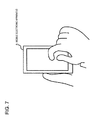
- Fig.7 and Fig.8 depict schematic views for illustrating the operations of changing the display magnification ratio by the user.
- operations for changing the display magnification ratio by the user it may be contemplated that the user puts his/her two fingers on the touch panel of a mobile electronic apparatus 2 and enlarges the interval between his/her two fingers to enlarge a display (see Fig.7 and Fig.8 ). Or, the user may contract the interval between his/her two fingers to contract the display (see Fig.8 ).
- Patent Literature 1 discloses a technique of changing the display magnification ratio depending on a distance between the user and the mobile electronic apparatus.
- Patent Literature 1
- the display magnification ratio is changed depending solely on the distance between the user and the mobile electronic apparatus, as stated in Patent Literature 1, there is a possibility that the magnification ratio is set to a value not conforming to the user's intention. If, for example, a picture of a photo is to be confirmed, and the user intends to grasp the photo's global appearance, but the mobile electronic apparatus automatically changes the magnification ratio, the result may be contrary to the user's intention.
- a mobile electronic apparatus including a display unit and an operation unit that detects an operation via a touch panel
- the mobile electronic apparatus comprises a distance measurement unit that measures a distance between a user and the mobile electronic apparatus as a user distance and a controller that changes a display magnification ratio of a picture represented on the display unit in response to changes in the user distance caused during a detection of a pressing point on the touch panel by the operation unit is going on.
- a method for controlling a mobile electronic apparatus including a display unit and an operation unit that detects an operation via a touch panel
- the method comprises a distance measurement step of measuring a distance between a user and the mobile electronic apparatus, as a user distance, and a display magnification ratio changing step of changing a display magnification ratio of a picture represented on the display unit in response to changes in the user distance caused during a detection of a pressing point on the touch panel by the operation unit is going on.
- the present invention is bound up with a particular machine which is a mobile electronic apparatus including a display unit and an operation unit that detects an operation via a touch panel.
- a program that is to be run on a computer controlling a mobile electronic apparatus including a display unit, an operation unit that detects an operation via a touch panel and a distance measurement unit that measures a distance between a user and the mobile electronic apparatus, as a user distance, in which the program executes processing of changing a display magnification ratio of a picture represented on the display unit in response to changes in the user distance caused during a detection of a pressing point on the touch panel by the operation unit is going on.
- the present program can be recorded on a computer-readable recording medium, which recording medium may be a non-transient one such as a semiconductor memory, a hard disc, a magnetic recording medium or an optical recording medium.
- the present invention may be implemented as a computer program product.
- the mobile electronic apparatus 100 includes a display unit 101, an operation unit 102 that detects an operation via a touch panel, a distance measurement unit 103 that measures a distance between a user and the mobile electronic apparatus, as a user distance, and a controller 104. It is noted that the controller changes a display magnification ratio of a picture represented on the display unit 101 in response to changes in the user distance caused during a detection of a pressing point on the touch panel by the operation unit 102 is going on.
- the mobile electronic apparatus 100 decides the display magnification ratio of the picture represented on the display unit 101 based on the user distance as measured by the distance measurement unit 103. At this time, the display magnification ratio is not changed except if the user continues his/her operation via the operation unit 102 by keeping on pressing the touch panel. That is, the mobile electronic apparatus 100 changes the display magnification ratio of the picture represented on the display unit 101 in accordance with the user's intention.
- a mobile electronic apparatus in which the display magnification ratio can be changed with the single hand of the user as the user's intention is observed.
- the controller transfers, when the user presses the touch panel for longer than a preset time, to a display magnification ratio change mode that enables changing the display magnification ratio.
- the controller cancels the display magnification ratio change mode when the touch panel is released from pressing by the user.
- the controller transfers to the display magnification ratio change mode when a force not less than a preset force has been applied to the pressing point on the touch panel.
- the distance measurement unit includes a camera module capable of shooting a picture.
- the distance measurement unit extracts, from a picture shot by the camera module, an area of the picture equivalent to a face of the user as a face picture, and measures the user distance based on changes in the size of the face picture.
- the distance measurement unit includes an infrared sensor and measures the user distance based on an output of the infrared sensor.
- the distance measurement unit includes an acceleration sensor, and the controller changes the display magnification ratio based on a direction or a distance of movement as obtained from an output of the acceleration sensor.
- the method for controlling the mobile electronic apparatus further comprises a step of transferring to the display magnification ratio change mode that enables changing the display magnification ratio when the user presses the touch panel for longer than a preset time.
- the method for controlling the mobile electronic apparatus further comprises a step of canceling the display magnification ratio change mode when the touch panel has been released from pressing on the touch panel by the user.
- the program executes processing of transferring to the display magnification ratio change mode enabling changing of the display magnification ratio when the touch panel has been pressed by the user for longer than a preset time.
- the program executes processing of canceling the display magnification ratio change mode when the touch panel has been released from pressing on the touch panel by the user.
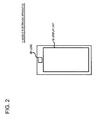
- Fig.2 depicts an example front view showing a mobile electronic apparatus 1 according to the subject exemplary embodiment.
- the mobile electronic apparatus 1 includes a display unit 10 and a lens 20.
- the display unit 10 includes a display panel, such as a liquid crystal panel, and provides a user with an as-shot picture, a menu presentation or the like.
- a display panel such as a liquid crystal panel
- the mobile electronic apparatus 1 has a camera function to permit shooting via a lens 20.
- the lens 20 is mounted so as to permit a user's face picture to be shot.
- Fig.3 shows an example inner configuration of the mobile electronic apparatus 1.
- the mobile electronic apparatus 1 includes the display unit 10, an operation unit 30, a distance measurement unit 40, a controller 50 and a memory 60.
- the display unit 10 includes the display unit 10, an operation unit 30, a distance measurement unit 40, a controller 50 and a memory 60.
- Fig.3 only those modules pertinent to the mobile electronic apparatus 1 of the subject exemplary embodiment.
- the display unit 10 is configured as described above and further explanation is dispensed with.
- the operation unit 30 accepts operations made by a user on the mobile electronic apparatus 1. More specifically, the operation unit 30 includes a touch panel and a driver actuating the touch panel. The operation unit 30 informs the controller 50 about a location of the touch panel touched by the user.
- the touch panel may be of any of a variety of known system sorts including a capacitance measurement system. For example, a proximity detection touch panel, detecting the proximity of an object, such as a user's finger, may be used.
- the distance measurement unit 40 includes a camera module configured by the lens 20 and shooting elements, not shown, etc.
- the distance measurement unit 40 shoots a picture inclusive of a user's face and measures the distance between the user and the mobile electronic apparatus 1 (the user distance mentioned above) from the as-shot picture. More specifically, the distance measurement unit 40 extracts, from the as-shot picture, an area of the picture corresponding to a user's face, and calculates the size of the picture of the user's face extracted.
- the mobile electronic apparatus 1 includes a menu in which, directly after the user has purchased the mobile electronic apparatus 1, the user shoots his/her own face twice at respective different distances.
- the user shoots his/her face twice, that is, first at a certain distance between the user and the mobile electronic apparatus 1 as a first distance, then at another distance between the user and the mobile electronic apparatus 1 as a second distance.
- the first and second distances are of values prescribed at the outset for the mobile electronic apparatus 1, it is possible to establish the correlation between changes in the distance and changes in the face picture.
- the distance measurement unit 40 fits the size of the extracted face picture to the correlation in order to find the user distance.
- the distance measurement unit 40 outputs the so measured user distance to the controller 50.
- the controller 50 globally controls the mobile electronic apparatus 1, while also controlling respective components shown in Fig.3 .
- the memory 60 stores the information necessary for the operation of the controller 50 and the as-shot pictures etc.
- the controller 50 may be implemented by a computer program that causes a computer on board the mobile electronic apparatus 1 to perform the processing of the controller 50, as later described in detail, using the computer's hardware.
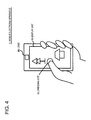
- Fig.4 shows an example of the manner of using the mobile electronic apparatus 1 by the user.
- a median point 11 of an area to be zoomed in for a time longer than a preset time interval If the user wishes to zoom in the picture displayed, he/she presses a median point 11 of an area to be zoomed in for a time longer than a preset time interval.
- the pressed median point 11 is assumed to be a center point of the area of the picture desired to be zoomed in by the user.
- the mobile electronic apparatus 1 transfers from an ordinary operation mode to a display magnification ratio change mode.
- the ordinary operation mode is meant the operation mode possessed by the mobile electronic apparatus 1, such as an application actuating mode or a menu display mode.
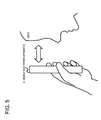
- the mobile electronic apparatus 1 may display for the user a message such as 'the operation mode has been set to the display magnification ratio change mode'. The user then performs an operation to move the mobile electronic apparatus 1 in a direction towards or away from his/her face (see Fig.5 ).
- the mobile electronic apparatus 1 changes the display magnification ratio depending on the user distance as measured by the distance measurement unit 40. More specifically, if the user distance becomes shorter, the mobile electronic apparatus zooms in the picture represented on the display unit 10. Note that, if the picture represented on the display unit 10 is zoomed in, display is magnified in an area centered about the pressed median point 11.
- the picture represented on the display unit 10 is zoomed out.
- the zoom out ratio is decided depending on the distance between the user and the mobile electronic apparatus 1 without regard to the pressing location on the touch panel.
- Fig.6 depicts a flowchart showing an example operation of the mobile electronic apparatus 1.
- the controller 50 checks to see whether or not the touch panel has been pressed by the user for longer than a preset time (step S01). If the user has pressed the touch panel for longer than the preset time (Yes branching in a step S01), the controller 50 sets the operating mode at the display magnification ratio change mode (step S02). If the touch panel has not been pressed down by the user for longer than the preset time (No branching in the step S01), the check operation in the step S01 is continued.
- the controller 50 gets a user distance from the distance measurement unit 40.
- the user distance is measured at a preset constant time interval by the distance measurement unit 40.
- a step S04 the controller 50 checks to see whether or not the user distance has become shorter. If the user distance has become shorter (Yes branching in the step S04), the controller 50 zooms in the picture represented on the display unit 10 (step S05).
- the controller 50 verifies whether or not the user distance has become longer (step S06). If the user distance has become longer (Yes branching in the step S06), the controller 50 zooms out the picture represented on the display unit 10 (step S07).
- a step S08 the controller 50 checks to see whether or not the touch panel has been released from the pressing by the user. In case the touch panel has been released from the pressing (Yes branching in the step S08), the controller 50 cancels the display magnification ratio change mode to transfer to the ordinary mode. In case the touch panel has not been released from the pressing (No branching in the step S08), the processing as from the step S03 is continued.
- the display magnification ratio of the picture represented on the display unit 10 is decided, as described above, on the basis of the distance between the user and the mobile electronic apparatus 1 (user distance).
- the operation mode does not transfer to the display magnification change mode except if the user presses the touch panel for longer than a preset time. It is thus possible to avoid a situation in which the display magnification ratio of the picture represented on the display unit 10 is changed automatically to the disregard of the user's intention.
- the user of the mobile electronic apparatus 1 is able to change the display magnification ratio of the picture represented on the display unit 10 without the necessity of performing complicated or onerous manipulations.
- the user attempts to zoom in the picture represented on the display unit 10 using his/her two fingers, there is possibility that the center point of an area desired to be zoomed in cannot be correctly recognized by the touch panel, with the result that a site offset from the target site is zoomed in. Or, there is a possibility that, depending on the performance of the touch panel, the positions of the two fingers cannot be sufficiently recognized so that only the position of one of the fingers is recognized. In such case, the user's operation may be recognized as if his/her single finger is pointing to a target site. This may a cause problem that the position of the picture portion desired to be zoomed in becomes offset and thus shifts to a position indicated by the user's sole finger recognized.
- the display magnification ratio may be changed as the user's intention is observed.
- the operation mode transfers to the display magnification ratio change mode in case the user presses the touch panel for longer than a preset time interval, by what is called press and hold of the touch panel.
- the touch panel of the operation unit 30 is capable of detecting the pressure applied to the pressing point, it is possible for the mobile electronic apparatus to transfer to the display magnification ratio change mode when a force not less than a preset force is applied to the pressing point on the touch panel.
- the distance measurement unit 40 can make direct measurement of the user distance, using a distance sensor, such as infrared sensor, in place of measuring the user distance based on a picture acquired by a camera module.
- a distance sensor such as infrared sensor
- the display magnification ratio can be changed in response to the direction or distance of movement of the mobile electronic apparatus 1.
- a user may put his/her finger on a site on the display screen desired to be zoomed in and the operation may then be switched between zoom in and zoom out on the assumption that, for example, leftward finger movement brings about zoom in and rightward finger movement zoom out.
- Patent Literature is to be incorporated herein by reference.
- the exemplary embodiments or Examples may be modified or adjusted within the concept of the total disclosures of the present invention, inclusive of claims, based on the fundamental technical concept of the invention.
- a wide variety of combinations or selections of elements herein disclosed may be made within the context of the claims of the present invention. That is, the present invention may include a wide variety of changes or corrections that may occur to those skilled in the art in accordance with the total disclosures inclusive of the claims and the drawings as well as the technical concept of the invention.
Landscapes
- Engineering & Computer Science (AREA)
- Theoretical Computer Science (AREA)
- General Engineering & Computer Science (AREA)
- Human Computer Interaction (AREA)
- Physics & Mathematics (AREA)
- General Physics & Mathematics (AREA)
- Computer Hardware Design (AREA)
- Computer Networks & Wireless Communication (AREA)
- Signal Processing (AREA)
- User Interface Of Digital Computer (AREA)
- Telephone Function (AREA)
Applications Claiming Priority (2)
| Application Number | Priority Date | Filing Date | Title |
|---|---|---|---|
| JP2012224960A JP2014078823A (ja) | 2012-10-10 | 2012-10-10 | 携帯電子機器、その制御方法及びプログラム |
| PCT/JP2013/077473 WO2014057975A1 (ja) | 2012-10-10 | 2013-10-09 | 携帯電子機器、その制御方法及びプログラム |
Publications (2)
| Publication Number | Publication Date |
|---|---|
| EP2908505A1 true EP2908505A1 (de) | 2015-08-19 |
| EP2908505A4 EP2908505A4 (de) | 2016-05-25 |
Family
ID=50477442
Family Applications (1)
| Application Number | Title | Priority Date | Filing Date |
|---|---|---|---|
| EP13845709.8A Withdrawn EP2908505A4 (de) | 2012-10-10 | 2013-10-09 | Tragbare elektronische vorrichtung sowie steuerungsverfahren und -programm dafür |
Country Status (5)
| Country | Link |
|---|---|
| US (1) | US20150277548A1 (de) |
| EP (1) | EP2908505A4 (de) |
| JP (1) | JP2014078823A (de) |
| CN (1) | CN104704798A (de) |
| WO (1) | WO2014057975A1 (de) |
Families Citing this family (12)
| Publication number | Priority date | Publication date | Assignee | Title |
|---|---|---|---|---|
| US10304238B2 (en) * | 2013-07-23 | 2019-05-28 | National Ict Australia Limited | Geo-located activity visualisation, editing and sharing |
| US20160103574A1 (en) * | 2014-10-11 | 2016-04-14 | Microsoft Technology Licensing, Llc | Selecting frame from video on user interface |
| CN105892719A (zh) * | 2015-11-26 | 2016-08-24 | 乐视致新电子科技(天津)有限公司 | 一种调整显示设备显示内容的方法和显示设备 |
| JP6700770B2 (ja) * | 2015-12-16 | 2020-05-27 | キヤノン株式会社 | 表示装置、その制御方法、および制御プログラム |
| CN105688409A (zh) * | 2016-01-27 | 2016-06-22 | 网易(杭州)网络有限公司 | 游戏控制方法及装置 |
| US10963044B2 (en) | 2016-09-30 | 2021-03-30 | Intel Corporation | Apparatus, system and method for dynamic modification of a graphical user interface |
| US11270474B2 (en) * | 2018-12-05 | 2022-03-08 | Sony Corporation | Screen-tone look generator |
| US11740071B2 (en) | 2018-12-21 | 2023-08-29 | Apple Inc. | Optical interferometry proximity sensor with temperature variation compensation |
| US11243068B1 (en) | 2019-02-28 | 2022-02-08 | Apple Inc. | Configuration and operation of array of self-mixing interferometry sensors |
| US11473898B2 (en) | 2019-05-24 | 2022-10-18 | Apple Inc. | Wearable voice-induced vibration or silent gesture sensor |
| US11629948B2 (en) * | 2021-02-04 | 2023-04-18 | Apple Inc. | Optical interferometry proximity sensor with optical path extender |
| US12209890B2 (en) | 2022-03-31 | 2025-01-28 | Apple Inc. | Optical sensor module including an interferometric sensor and extended depth of focus optics |
Family Cites Families (14)
| Publication number | Priority date | Publication date | Assignee | Title |
|---|---|---|---|---|
| JPH07271505A (ja) * | 1994-03-29 | 1995-10-20 | Toshiba Corp | 画像表示制御装置 |
| JP2011164625A (ja) * | 2003-06-09 | 2011-08-25 | Casio Computer Co Ltd | 電子機器、表示制御方法及びプログラム |
| JP4144555B2 (ja) * | 2003-06-09 | 2008-09-03 | カシオ計算機株式会社 | 電子機器、表示制御方法及びプログラム |
| JP4036168B2 (ja) * | 2003-09-09 | 2008-01-23 | 株式会社日立製作所 | 携帯電話 |
| JP4371798B2 (ja) * | 2003-12-18 | 2009-11-25 | パナソニック株式会社 | 携帯端末装置 |
| JP2006079312A (ja) * | 2004-09-09 | 2006-03-23 | Matsushita Electric Ind Co Ltd | 携帯型ビューワ |
| US20080049020A1 (en) * | 2006-08-22 | 2008-02-28 | Carl Phillip Gusler | Display Optimization For Viewer Position |
| US8209635B2 (en) * | 2007-12-20 | 2012-06-26 | Sony Mobile Communications Ab | System and method for dynamically changing a display |
| JP4720879B2 (ja) * | 2008-08-29 | 2011-07-13 | ソニー株式会社 | 情報処理装置及び情報処理方法 |
| JP2010258603A (ja) * | 2009-04-22 | 2010-11-11 | Ntt Docomo Inc | 通信端末及び表示サイズの調整方法 |
| JP5223784B2 (ja) * | 2009-06-05 | 2013-06-26 | 船井電機株式会社 | 携帯端末装置 |
| US20110316888A1 (en) * | 2010-06-28 | 2011-12-29 | Invensense, Inc. | Mobile device user interface combining input from motion sensors and other controls |
| EP2423796B1 (de) * | 2010-08-24 | 2019-10-02 | LG Electronics Inc. | Tragbares Endgerät und Anzeigeverfahren davon |
| KR101915615B1 (ko) * | 2010-10-14 | 2019-01-07 | 삼성전자주식회사 | 모션 기반 사용자 인터페이스 제어 장치 및 방법 |
-
2012
- 2012-10-10 JP JP2012224960A patent/JP2014078823A/ja active Pending
-
2013
- 2013-10-09 WO PCT/JP2013/077473 patent/WO2014057975A1/ja not_active Ceased
- 2013-10-09 US US14/433,808 patent/US20150277548A1/en not_active Abandoned
- 2013-10-09 EP EP13845709.8A patent/EP2908505A4/de not_active Withdrawn
- 2013-10-09 CN CN201380052713.6A patent/CN104704798A/zh active Pending
Also Published As
| Publication number | Publication date |
|---|---|
| US20150277548A1 (en) | 2015-10-01 |
| EP2908505A4 (de) | 2016-05-25 |
| CN104704798A (zh) | 2015-06-10 |
| WO2014057975A1 (ja) | 2014-04-17 |
| JP2014078823A (ja) | 2014-05-01 |
Similar Documents
| Publication | Publication Date | Title |
|---|---|---|
| EP2908505A1 (de) | Tragbare elektronische vorrichtung sowie steuerungsverfahren und -programm dafür | |
| CN106775313B (zh) | 分屏操作控制方法及移动终端 | |
| EP2887648B1 (de) | Verfahren und elektronische Vorrichtung zur Durchführung einer Vorschau | |
| CN102902131B (zh) | 触摸型便携式终端 | |
| US20120280898A1 (en) | Method, apparatus and computer program product for controlling information detail in a multi-device environment | |
| EP3276477B1 (de) | Verfahren und vorrichtung zur desktopseitenanzeige | |
| CN105103110B (zh) | 信息终端、显示控制方法和程序 | |
| WO2010097741A1 (en) | Image object detection browser | |
| WO2012153228A1 (en) | Camera control | |
| US20130179845A1 (en) | Method and apparatus for displaying keypad in terminal having touch screen | |
| WO2015192763A1 (zh) | 一种触摸屏控制方法及装置 | |
| EP2990905B1 (de) | Verfahren und vorrichtung zum anzeigen eines bildes | |
| JP5220157B2 (ja) | 情報処理装置及びその制御方法、プログラム、並びに記憶媒体 | |
| CN105094647A (zh) | 一种界面控制方法及移动终端 | |
| WO2017059734A1 (zh) | 一种图片缩放方法及电子设备 | |
| CN104838347A (zh) | 信息处理装置、信息处理方法、以及程序 | |
| EP4020150B1 (de) | Verfahren zur cursorsteuerung, elektronische vorrichtung und speichermedium | |
| EP3640789A1 (de) | Verfahren und vorrichtung zum umschalten eines anzeigemodus, mobiles endgerät und speichermedium | |
| CN113286085B (zh) | 显示控制方法、装置和电子设备 | |
| EP2963639A1 (de) | Tragbare elektronische vorrichtung, steuerungsverfahren dafür und programm | |
| EP3731078B1 (de) | Verfahren und vorrichtung zum reagieren auf einen gestenbetrieb und speichermedium | |
| US10168872B2 (en) | Method and apparatus for displaying and scrolling content | |
| CN113434076B (zh) | 一种单手控制方法、装置及移动终端 | |
| KR20150108591A (ko) | 웨어러블 디바이스의 제어 방법 및 그 장치 | |
| JP6039325B2 (ja) | 撮像装置、電子機器、およびタッチパネルの制御方法 |
Legal Events
| Date | Code | Title | Description |
|---|---|---|---|
| PUAI | Public reference made under article 153(3) epc to a published international application that has entered the european phase |
Free format text: ORIGINAL CODE: 0009012 |
|
| 17P | Request for examination filed |
Effective date: 20150403 |
|
| AK | Designated contracting states |
Kind code of ref document: A1 Designated state(s): AL AT BE BG CH CY CZ DE DK EE ES FI FR GB GR HR HU IE IS IT LI LT LU LV MC MK MT NL NO PL PT RO RS SE SI SK SM TR |
|
| AX | Request for extension of the european patent |
Extension state: BA ME |
|
| DAX | Request for extension of the european patent (deleted) | ||
| RA4 | Supplementary search report drawn up and despatched (corrected) |
Effective date: 20160426 |
|
| RIC1 | Information provided on ipc code assigned before grant |
Ipc: G06F 3/01 20060101ALI20160420BHEP Ipc: G06F 3/0484 20130101ALI20160420BHEP Ipc: G06F 3/048 20060101ALI20160420BHEP Ipc: G06T 3/40 20060101ALI20160420BHEP Ipc: H04M 1/725 20060101ALI20160420BHEP Ipc: G06F 3/041 20060101ALI20160420BHEP Ipc: G06F 3/03 20060101ALI20160420BHEP Ipc: H04M 1/00 20060101AFI20160420BHEP Ipc: G06F 3/0488 20130101ALI20160420BHEP |
|
| STAA | Information on the status of an ep patent application or granted ep patent |
Free format text: STATUS: THE APPLICATION HAS BEEN WITHDRAWN |
|
| 18W | Application withdrawn |
Effective date: 20180301 |