EP2927043B1 - Procédé et système de commande dans un véhicule - Google Patents
Procédé et système de commande dans un véhicule Download PDFInfo
- Publication number
- EP2927043B1 EP2927043B1 EP15159381.1A EP15159381A EP2927043B1 EP 2927043 B1 EP2927043 B1 EP 2927043B1 EP 15159381 A EP15159381 A EP 15159381A EP 2927043 B1 EP2927043 B1 EP 2927043B1
- Authority
- EP
- European Patent Office
- Prior art keywords
- graphical data
- region
- displayed
- display surface
- area
- Prior art date
- Legal status (The legal status is an assumption and is not a legal conclusion. Google has not performed a legal analysis and makes no representation as to the accuracy of the status listed.)
- Active
Links
Images
Classifications
-
- G—PHYSICS
- G06—COMPUTING OR CALCULATING; COUNTING
- G06F—ELECTRIC DIGITAL DATA PROCESSING
- G06F3/00—Input arrangements for transferring data to be processed into a form capable of being handled by the computer; Output arrangements for transferring data from processing unit to output unit, e.g. interface arrangements
- G06F3/01—Input arrangements or combined input and output arrangements for interaction between user and computer
- G06F3/048—Interaction techniques based on graphical user interfaces [GUI]
- G06F3/0487—Interaction techniques based on graphical user interfaces [GUI] using specific features provided by the input device, e.g. functions controlled by the rotation of a mouse with dual sensing arrangements, or of the nature of the input device, e.g. tap gestures based on pressure sensed by a digitiser
- G06F3/0488—Interaction techniques based on graphical user interfaces [GUI] using specific features provided by the input device, e.g. functions controlled by the rotation of a mouse with dual sensing arrangements, or of the nature of the input device, e.g. tap gestures based on pressure sensed by a digitiser using a touch-screen or digitiser, e.g. input of commands through traced gestures
- G06F3/04886—Interaction techniques based on graphical user interfaces [GUI] using specific features provided by the input device, e.g. functions controlled by the rotation of a mouse with dual sensing arrangements, or of the nature of the input device, e.g. tap gestures based on pressure sensed by a digitiser using a touch-screen or digitiser, e.g. input of commands through traced gestures by partitioning the display area of the touch-screen or the surface of the digitising tablet into independently controllable areas, e.g. virtual keyboards or menus
-
- B—PERFORMING OPERATIONS; TRANSPORTING
- B60—VEHICLES IN GENERAL
- B60K—ARRANGEMENT OR MOUNTING OF PROPULSION UNITS OR OF TRANSMISSIONS IN VEHICLES; ARRANGEMENT OR MOUNTING OF PLURAL DIVERSE PRIME-MOVERS IN VEHICLES; AUXILIARY DRIVES FOR VEHICLES; INSTRUMENTATION OR DASHBOARDS FOR VEHICLES; ARRANGEMENTS IN CONNECTION WITH COOLING, AIR INTAKE, GAS EXHAUST OR FUEL SUPPLY OF PROPULSION UNITS IN VEHICLES
- B60K35/00—Instruments specially adapted for vehicles; Arrangement of instruments in or on vehicles
- B60K35/10—Input arrangements, i.e. from user to vehicle, associated with vehicle functions or specially adapted therefor
-
- B—PERFORMING OPERATIONS; TRANSPORTING
- B60—VEHICLES IN GENERAL
- B60K—ARRANGEMENT OR MOUNTING OF PROPULSION UNITS OR OF TRANSMISSIONS IN VEHICLES; ARRANGEMENT OR MOUNTING OF PLURAL DIVERSE PRIME-MOVERS IN VEHICLES; AUXILIARY DRIVES FOR VEHICLES; INSTRUMENTATION OR DASHBOARDS FOR VEHICLES; ARRANGEMENTS IN CONNECTION WITH COOLING, AIR INTAKE, GAS EXHAUST OR FUEL SUPPLY OF PROPULSION UNITS IN VEHICLES
- B60K35/00—Instruments specially adapted for vehicles; Arrangement of instruments in or on vehicles
- B60K35/20—Output arrangements, i.e. from vehicle to user, associated with vehicle functions or specially adapted therefor
- B60K35/28—Output arrangements, i.e. from vehicle to user, associated with vehicle functions or specially adapted therefor characterised by the type of the output information, e.g. video entertainment or vehicle dynamics information; characterised by the purpose of the output information, e.g. for attracting the attention of the driver
-
- B—PERFORMING OPERATIONS; TRANSPORTING
- B60—VEHICLES IN GENERAL
- B60K—ARRANGEMENT OR MOUNTING OF PROPULSION UNITS OR OF TRANSMISSIONS IN VEHICLES; ARRANGEMENT OR MOUNTING OF PLURAL DIVERSE PRIME-MOVERS IN VEHICLES; AUXILIARY DRIVES FOR VEHICLES; INSTRUMENTATION OR DASHBOARDS FOR VEHICLES; ARRANGEMENTS IN CONNECTION WITH COOLING, AIR INTAKE, GAS EXHAUST OR FUEL SUPPLY OF PROPULSION UNITS IN VEHICLES
- B60K2360/00—Indexing scheme associated with groups B60K35/00 or B60K37/00 relating to details of instruments or dashboards
- B60K2360/143—Touch sensitive instrument input devices
- B60K2360/1438—Touch screens
- B60K2360/1442—Emulation of input devices
-
- B—PERFORMING OPERATIONS; TRANSPORTING
- B60—VEHICLES IN GENERAL
- B60K—ARRANGEMENT OR MOUNTING OF PROPULSION UNITS OR OF TRANSMISSIONS IN VEHICLES; ARRANGEMENT OR MOUNTING OF PLURAL DIVERSE PRIME-MOVERS IN VEHICLES; AUXILIARY DRIVES FOR VEHICLES; INSTRUMENTATION OR DASHBOARDS FOR VEHICLES; ARRANGEMENTS IN CONNECTION WITH COOLING, AIR INTAKE, GAS EXHAUST OR FUEL SUPPLY OF PROPULSION UNITS IN VEHICLES
- B60K2360/00—Indexing scheme associated with groups B60K35/00 or B60K37/00 relating to details of instruments or dashboards
- B60K2360/16—Type of output information
- B60K2360/166—Navigation
Definitions
- the invention relates to an operating method and an operating system in a vehicle.
- the operation of the various devices of the vehicle and the recording of the information displayed, which are provided by these devices should as little as possible attract the attention of the driver of the vehicle. It is therefore desirable to display the information in the vehicle in such a way that it can be picked up quickly and intuitively by the driver, so that the detection of the displayed information does not lead to a distraction of the driver while driving. Furthermore, the operation should be so intuitive, simple and quick to carry out that the driver can operate the devices of the vehicle, the information of which is displayed by the display device, even while driving.
- the type of operation and the information display associated with the operation in a vehicle thus contributes to safety when driving this vehicle.
- a method and a device for operating in a device located in a vehicle is known.
- the control panels and the display of a device in the vehicle are projected onto a projection surface in front of a passenger of the vehicle and the user inputs are recorded.
- the device accordingly comprises a projection device and at least one projection surface which is equipped with optical or pressure-sensitive sensors for recording user inputs which are transmitted to a device in the vehicle.
- a motor vehicle and a display for displaying changeable information and a control panel arranged spatially separate from the display with at least two control elements for operating at least one function of the motor vehicle are known.
- the motor vehicle comprises a display controller for displaying an image of the control panel, which is oriented as a function of the orientation of an operator's hand to the control panel, in a display area shown by means of the display.
- a touchscreen which has a sensitive control surface for setting certain functions.
- at least one mechanical control element is arranged above the sensitive control surface, which has a trigger which acts on the sensitive control surface to set the function when the control element is moved.
- first graphic data are displayed in a first area of a display area in the interior of the vehicle.
- second graphic data are displayed, the first graphic data being assigned to the second graphic data.
- a position of an actuating element is detected in a detection space which is assigned to the second area of the display area.
- the position of the actuating element is assigned to a first part of the second graphic data, the first part of the second graphic data being preselected.
- first graphic data are generated in the first area of the display area for a preview in a display mode.
- a preselection of the part of the second graphic data means that the part of the second graphic data is provisionally selected. This means in particular that the user has not yet made a final selection for operation.
- the graphic data which are assigned to the second graphic data are thereby displayed to the user. The user can decide simply, quickly and intuitively whether he actually wants to select the part of the second graphic data.
- this saves the user from having to navigate back again, since he is shown what other information is hidden behind this before he actually selects graphic data.
- the preselection relates to a preselection of a data record within a set of data records which are visualized by the second graphic data in the second area of the display area.
- Information is assigned to each of the data records.
- the information assigned to the preselected data record is visualized in the first area of the display area as a preview. This allows the user to navigate through a lot of data without actually having to make an actual selection of data.
- the method according to the invention makes it possible for the user to orientate himself in a simple manner in the amount of data.
- the first part of the second graphic data is displayed at a specific position in the second area of the display area.
- An operating action is recorded with which a second part of the second graphic data is brought to the specific position, the second part of the second graphic data being preselected after the operating action.
- the operator action can be, for example, a swipe gesture with which a scroll is generated. Parts of the second graphic data can then be moved to the specific position and thus preselected, while the first part of the second graphic data is no longer preselected.
- the particular position is preferably fixed. The user can then preselect graphic data without having to look at the second area of the display area during the operating action.
- the second graphic data preferably comprise list entries of a list, the first part of the second graphic data comprising a first list entry and / or the second part of the graphic data comprising a second list entry.
- First the first list entry is preselected and information associated with the preselected list entry is visualized as a preview.
- the operator action for example the swipe gesture, creates a scroll through the list entries. This removes the first list entry from the specific position and displays a second list entry on the specific position, which is then preselected.
- the list entries can in particular be contacts in a telephone book.
- the position of the actuating element is assigned to a contact
- information about the contact is displayed in the first area of the display area, for example a photo, a telephone number, an email address and / or a postal address of the contact.
- the list can also be stored in a media system and list audio or video files.
- the second graphic data can include buttons for inputs. Inputs can then be recorded via the position of the actuating element.
- the first graphic data are then generated corresponding to the inputs.
- the inputs can be recorded in particular by touching the buttons on the display area in the second area.
- the positions of the actuating element can then be detected where the user touches the display area.
- the position of the actuating element in front of the second area of the display surface can also be detected without touching it.
- a button is understood to mean a control element of a graphical user interface.
- a button differs from elements and areas for pure information display, so-called display elements or display areas, in that they can be selected.
- a function assigned to it is carried out. The function can only change the information display.
- the buttons can also be used to control devices whose operation is supported by the information display. The buttons can thus replace conventional mechanical switches.
- the buttons can be created for and displayed by a freely programmable display area.
- a button can be marked. In this case, the assigned function is not yet carried out. However, the marked button is highlighted compared to other buttons. The function assigned to it is only executed when the button is selected.
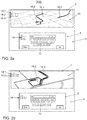
- a geographic map with a scale is displayed in the first area of the display area.
- Buttons for entering a navigation system are displayed in the second area of the display area.
- Individual entry steps are entered using the buttons, with each individual entry step changing the number of hits within a set of data records.
- objects of the navigation system are determined which result from the previous individual entry steps of the entry process.
- the scale of the geographic map is changed in such a way that all identified objects are displayed on the geographic map. This allows the user to have an overview of the location of the identified objects on the geographic map during an input process.
- the objects are, for example, cities, streets, certain addresses or points of interest.
- a first window with buttons for inputs is completely displayed in the second area of the display area.
- At least one second window is displayed with graphics objects in it that are assigned to the inputs.
- the position of the actuating element is assigned to one of the windows.
- the cropped window is brought to full display and the first window is brought to a cropped display.
- a bleed display is understood to mean that only a section of the second window is shown.
- the buttons displayed in the first window can still be operated.
- the second display area it is possible for the second display area to display a plurality of cut windows. In this case, the buttons in a window that has been cut can be operated.
- the first part of the second graphic data is selected after the preview by the first graphic data, the first graphic data changing from the display mode to an operating mode.
- the first graphic data can therefore only be used when the first part of the second graphic data, that is to say a list entry or a graphic object of the second graphic data, has actually been selected. Before selection, the user is only granted a preview of the content of the information associated with the second graphic data without having access to it.
- the first graphic data can thereby be divided into one Change operating mode by at least partially converting display objects into buttons.
- the actuating element leaves the detection space that is assigned to the second area of the display area.
- the button in the second area of the display area that was last preselected is then selected before the actuating element has left the detection area.
- the user then no longer has to perform a separate operating action in order to actually select the desired part of the second graphic data.
- the second area is divided into at least two partial areas. Buttons with menu items are displayed in a first section. Furthermore, a position of the actuating element is assigned to one of the buttons in the first partial area. The button is preselected. The second graphic data are generated in a second partial area of the second area depending on the preselected button. This enables clear and simple navigation through an operating menu.
- the same graphic data can then be generated in the first area of the display area as in the second partial area of the second area of the display area.
- the graphic data in the first area can also contain additional information.
- the first sub-area of the second area is shown separated from the second sub-area of the second area. This makes it clear to the user that the display in the first section does not change. This contributes in particular to a clear design of the display area.
- the first partial area can, for example, be shown offset by a dividing line or another arrangement of the buttons, for example side by side instead of one below the other.
- the invention further relates to an operating system in a vehicle.
- the operating system comprises a display area in the interior of the vehicle, which is divided into at least two areas. First graphic data can be displayed in a first area of the display area and second graphic data can be displayed in a second area of the display area, the first graphic data being associated with the second graphic data.
- the operating system comprises a detection unit, by means of which a position of an actuating element in a detection space, which is assigned to the second area of the display area, can be detected.
- the operating system comprises a control unit, by means of which the position of the actuating element can be assigned to a first part of the second graphic data.
- the first part of the second graphic data can be preselected.
- the first area of the display area can be controlled by means of the control unit such that first graphic data for a preview can be generated in the first area of the display area depending on the preselected first part of the second graphic data.
- the first area of the display area in the interior of the vehicle is arranged in the field of view of a user, which sits on the driver's or front passenger's seat.
- the second area of the display area is arranged within the user's reach.
- the operating system then enables operation which is mainly carried out via the second area of the display area.
- the actuating element is then in particular the hand or a fingertip of the user.
- At least the second area of the display surface comprises a touch-sensitive surface. This then enables inputs on the second area of the display area.
- the display area is thereby at least partially designed as a touchscreen.
- the display area can also be formed by two separate displays.
- the invention relates to a vehicle which comprises an operating system according to the invention.
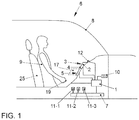
- the operating system comprises a central control unit 1. This is coupled to a display device 2 which has a display surface 4.
- the control unit 1 generates first graphic data which can be displayed in a first area 3 on the display surface 4.
- the display area 4 can be provided by a display, in particular a liquid crystal display or a plasma display, of any type. Furthermore, the display area 4 can be provided by a display with organic light-emitting diodes.
- the display surface 4 can be either flat or curved.
- the first area 3 of the display area 4 lies in particular in the viewing area of a user 9 on the driver's seat 25 of the vehicle 6.
- the display area 4 has a second area 5.
- the control unit 1 generates second graphic data for the information display for the second area 5 of the display area 4.
- the second area 5 comprises a touch-sensitive surface on the display surface 4, so that a so-called touch screen is provided, in particular a capacitive or a resistive touch screen.
- buttons are shown which are used for operation.
- the second area 5 of the display area 4 with the touch-sensitive surface is arranged within the reach of the user 9.
- the range includes the area that the user 9 sitting on the driver's seat 25, which has an average size, easily, i. H. with little or no change in position, in a position that he normally occupies while driving.
- the user 9 In order to touch the touch-sensitive surface of the second area 5 of the display area 4, the user 9 therefore does not have to bend, or only slightly, at all.
- a detection unit 12 is provided on the display surface 4, by means of which the position of an actuating element 19, for example the hand or fingertip of the user, is detected in a detection space 17 which is assigned to the second area 3 of the display surface 4.
- the detection device 12 is also connected to the control unit 1.
- the control unit 1 can generate the graphic data for the displays in the first area 3 of the display area 4 and the second area 5 of the display area 4 as a function of the detected position of the actuating element 19 in front of the second area 5 of the display area 4.
- the detection space 17 can be formed in front of the second area 5 of the display area 4. However, the detection space 17 can also be provided by a touch-sensitive surface which is arranged on the display surface 4 in the second region 5.
- the control unit 1 is also coupled to a data bus 7 of the vehicle 6.
- the devices 11-1, 11-2, 11-3 of the vehicle 6, which are to be operated by means of the display device 2, are also coupled to this data bus 7.
- a navigation system 11-1, a multimedia system 11-2 and a telecommunication device 11-3 can be provided.
- vehicle devices 11-1, 11-2, 11-3 can be coupled directly to the control unit 1.
- Data may be transmitted from the vehicle devices 11-1, 11-2 and 11-3 to the control unit 1 via the data bus 7.
- the data is processed there.
- graphic data are generated which are graphically reproduced in the first area 3 and the second area 5 of the display area 4 of the display device 2.
- Information is displayed on the display surface 4, which is directly connected to the operation via the touch-sensitive surface of the second area 5 of the display surface 4 or via further operating elements. In the first area 3 of the display area 4, information is displayed, among other things, that visualize the actuations.
- control unit 1 is connected to a memory 10, from which data can be read out.
- a variety of data which are required for processing the data received by the control unit 1 can be stored in the memory 10.
- the operating method according to the invention is described below with reference to FIGS Figures 2 to 5 explained.
- the operating procedure can be carried out by the operating system described above.
- buttons 13 are shown, via which inputs can be made.
- the buttons 13 represent individual letters on a keyboard. Street names or city names can therefore be entered using the keyboard.
- buttons 13 If the user makes inputs via the buttons 13, the position of an actuating element 19, for example the fingertip of the user 9, is assigned to the input of a button 13 with each input. As a result, the actuated button 13 is then determined and the letter chain is thus expanded by the letters assigned to the actuated button 13.
- the scale of the geographic map 15 is set in the first area 3 of the display area 4 such that all three objects 16-1 to 16-3, which correspond to the list entries 14-1 to 14-3, are displayed on the geographic map 15 become. Objects 16-1 to 16-3 are then highlighted. The objects 16-1 to 16-3, which correspond to the list entries 14-1 to 14-3 on the geographical map 15, can be shown highlighted in that they are either marked in color or displayed in a different thickness than other objects become.
- the scale of the geographical map 15 is in turn changed such that only those relating to the list entries are changed 14-1 and 14-2 corresponding objects 16-1 and 16-2 are displayed on the geographic map 15. Objects 16-1 and 16-2 are highlighted in comparison to other objects that are still displayed due to the set scale.
- This method gives the user 9 a preview of where the street names entered by him can be classified within the urban area. This gives the user 9 an overview at an early stage before he has actually made a selection. Any errors can therefore be corrected at an early stage.
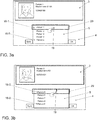
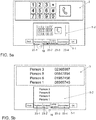
- FIG. 3a and 3b A further example of displays in the first 3 and the second area 5 of the display area 4 is shown, in which the telecommunication system 11-3 of the vehicle 6 is operated.
- the first area 3 of the display area 4 details about a contact are displayed
- the second area 5 of the display area 4 a list with is shown List entries 18-1 to 18-5 are displayed, which are designed as buttons.
- the list entries 18-1 to 18-5 are assigned to contacts of the telecommunication system 11-3. If the user 9 brings his fingertip 19 over a specific list entry 18-1, this contact is preselected. This means that information is displayed in the first area 3 of the display area 4 which is assigned to the list entry 18-1. However, this information cannot be accessed because the contact has not yet been selected.
- list entry 18-1 is shown marked by a marker 20.
- the contact that is associated with list entry 18-1 is the first entry in the list. It is therefore displayed at the top in the second area 5 of the display area 4.
- an operating action is recorded with which the user creates a scroll.
- the operating action is thus recognized as a swiping gesture with which the user can gradually push the following contacts in the list, represented by the buttons 18-2 to 18-9, to the uppermost position, which is marked by the marking 20.
- Each contact that is moved to the top position is then preselected.
- the position on which the first preselected list entry 18-1 is preselected is thus. All other list entries 18-2 to 18-9 brought to this by the swiping gesture are then preselected.
- the list entry 18-5 "Person 5" is in the marked position.
- the list entry 18-5 is therefore preselected.
- a preview of the list entry 18-5 "person 5" is displayed in the first area 3 of the display area 4. If the user 9 leaves the detection area 17 with his fingertip 19, the list entry 18-5 that was last preselected is selected before the fingertip 19 has left the detection area 17.
- the information in the first area 3 of the display area is then converted into operable buttons. When the number displayed is tapped in the first area 3 of the display area, the contact is then called.
- the position of this list entry 18-3 is shown marked. If further list entries 18-1, 18-2 or 18-4 to 18-9 are then moved to the marked position of list entry 18-3, these are preselected.
- the position at which a list entry 18-1 to 18-9 is preselected is therefore not limited to an edge position of the second area 5 of the display area 4.
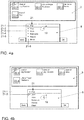
- a list 21 of musical genres is displayed in the second area 5 of the display area 4.
- the position of the fingertip 19 of the user 9 is again detected in the detection space 17 and assigned to one of the list entries 21-1.
- graphic objects 22-1 to 22-4 are then displayed, which represent music albums that are assigned to the music direction. If the position of the fingertip changes to another list entry 21-2, the music albums assigned to the list entry 21-2 are displayed.
- a music album in the first area 3 of the display area 4 can only be selected when the user has made an operating action, for example by touching one of the list entries 21-1 to 21-6. Then the graphic objects 22-1 to 22-4 are converted from buttons to display objects. This can prevent unintentional entries in the first area 3 of the display area 4 from changing the display in the first area 3.
- the list entry 21-1 or 21-2, to which the position of the fingertip 19 is assigned, can again be marked.
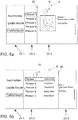
- FIGS Figures 5a and 5b Another embodiment of the method according to the invention is described with reference to FIGS Figures 5a and 5b explained.
- the telecommunications system 11-3 is operated in turn.
- the second area 5 of the display area 4 is divided into a first 5-1 and a second partial area 5-2.
- the first section 5-1 is in particular optically separated from the second section 5-2, for example by a dividing line.
- buttons 23-1 to 23-4 are displayed in the first partial area 5-1.
- Each of the buttons 23-1 to 23-4 is assigned to a menu item of the telecommunications function.
- the menu items are for example: Phonebook 23-1, keypad 23-2, last calls 23-3 and messages 23-4.
- the position of the fingertip 19 of the user 9 is again recorded and assigned to one of the buttons 23-2.
- the button 23-2 is assigned to the menu item Keypad. A keypad is therefore displayed in the second partial area 5-2.
- the same keypad is shown enlarged as a preview.
- the position of his fingertip 19 is assigned to the button 23-3 "last calls".
- the second subarea 5-2 is then automatically activated in such a way that the contacts which last called or which the user 9 last called are displayed. The same contacts are displayed in the first area 3 of the display area 4. However, additional information, such as the number of the contact, is displayed.
- the button 23-3 is selected which was last preselected before the fingertip 19 has left the detection area 17. A separate entry for the selection of the menu item is therefore not necessary.
- the first partial area 5-1 of the second area 5 of the display area 4 is in particular only intended for preselecting or selecting a menu item via one of the buttons 23-1 to 23-4. No other entries can be made in the first section 5-1.
- a display is shown in the second area 5 of the display area 4.
- Three windows 24-1 to 24-3 are displayed.
- the display windows 24-1 and 24-2 are shown in a bleed display.
- the display window 24-3 is shown in a complete display.
- the display windows 24-1 to 24-3 in particular represent an operating path.
- the telecommunications function is selected.
- the lowest hierarchy level for the telecommunications system 11-3 is shown in the display window 24-1.
- the menu item "Phonebook" is selected. This menu item is highlighted.
- the display window 24-2 shows all the contacts entered in the phone book in a list form, the list entries being buttons via which the contacts can be selected. In the present example, the contact "Person 1" is selected.
- the position of the fingertip 19 of the user 9 is detected in the detection area 17 in front of the display window 24-3. This is therefore assigned to the display window 24-3.
- the display window 24-3 is therefore displayed completely. This shows details of the selected contact "Person 1".
- the position of the fingertip changes. If the position in front of the display surface 4 exceeds the line 26, the fingertip 19 is assigned to the display window 24-2. This is then brought to full display while the display window 24-3 is brought to a bleed display. In the complete display of the display window 24-2, the telephone numbers of the contacts are shown in addition to the names of the contacts. The user 9 can now select another contact using the buttons in the display window 24-2.
- the position of the fingertip 19 can also be detected by tapping the desired display window.
- the display with the preview in the first area 3 of the display area 4 changes substantially simultaneously with the inputs on the touch-sensitive surface of the second area 5 of the display area 4.
- the first area 3 of the display area 4 thus offers a live preview of the entries made.
- the operating system and the operating method can be used not only in connection with the user 9 in the driver's seat 25 of the vehicle 6, but also by other vehicle occupants of the vehicle 6 who are seated in other seats of the vehicle 6.
Landscapes
- Engineering & Computer Science (AREA)
- General Engineering & Computer Science (AREA)
- Theoretical Computer Science (AREA)
- Chemical & Material Sciences (AREA)
- Combustion & Propulsion (AREA)
- Transportation (AREA)
- Mechanical Engineering (AREA)
- Human Computer Interaction (AREA)
- Physics & Mathematics (AREA)
- General Physics & Mathematics (AREA)
- User Interface Of Digital Computer (AREA)
- Instrument Panels (AREA)
Claims (14)
- Procédé de commande dans un véhicule (6), dans lequel
des premières données graphiques sont affichées dans une première zone (3) d'une surface d'affichage (4) dans l'habitacle du véhicule (6),
des secondes données graphiques sont affichées dans une seconde zone (5) de la surface d'affichage (4), les premières données graphiques étant associées aux secondes données graphiques,
une position d'un élément d'un actionnement (19) est détectée dans un espace de détection (17) associé à la seconde zone (5) de la surface d'affichage (4), et
la position de l'élément d'actionnement (19) est associée à une première partie des secondes données graphiques, la première partie des secondes données graphiques étant présélectionnée,
caractérisé en ce que
la présélection concerne une sélection d'un jeu de données au sein d'un ensemble de jeux de données qui sont visualisés par les secondes données graphiques dans la seconde zone (5) de la surface d'affichage (4),
des informations sont associées au jeu de données présélectionné et des premières données graphiques sont générées à des fin d'aperçu dans un mode d'affichage dans la première zone (3) de la surface d'affichage (4) en fonction du jeu de données présélectionné, les informations associées au jeu de données présélectionné étant visualisées sous la forme d'un aperçu dans la première zone (3) de la surface d'affichage (4). - Procédé de commande selon la revendication 1, caractérisé en ce que
la première partie des secondes données graphiques (18-1) est affichée à une position déterminée dans la seconde zone (5) de la surface d'affichage (4), et
une action de commande est détectée, avec laquelle une seconde partie (18-5) des secondes données graphiques est amenée à la position déterminée, la seconde partie (18-5) des secondes données graphiques étant présélectionnée après l'action de commande. - Procédé de commande selon la revendication 2, caractérisé en ce que
la position déterminée est représentée de manière marquée. - Procédé de commande selon l'une des revendications 1 à 3,
caractérisé en ce que
les secondes données graphiques comprennent des entrées de liste (14-1, 14-1, 14-3, 18-1 - 18-9) d'une liste (14), la première partie des secondes données graphiques comprenant une première entrée de liste (14-1, 14-1, 14-3, 18-1) et/ou la seconde partie des données graphiques comprenant une seconde entrée de liste (18-5). - Procédé de commande selon l'une des revendications 1 à 4,
caractérisé en ce que
les secondes données graphiques comprennent des boutons (13) pour des entrées,
des entrées pour les boutons (13) sont détectées par l'intermédiaire de la position de l'élément d'actionnement (19) et
les premières données graphiques sont générées en correspondance avec les entrées. - Procédé de commande selon la revendication 5, caractérisé en ce que
une carte géographique (15) dotée d'une échelle est affichée dans la première zone (3) de la surface d'affichage (4) et des boutons (13) permettant de fournir une entrée d'un système de navigation (11-1) sont affichés dans la seconde zone (5) de la surface d'affichage (4),
des étapes d'entrée individuelles peuvent être fournies en entrée au moyen des boutons (13), l'ensemble d'occurrences au sein d'un ensemble de jeux de données se modifiant à chaque étape d'entrée individuelle, après chaque étape d'entrée individuelle, des objets (16-1, 16-2, 16-3) du système de navigation (11-1) sont déterminés, ceux-ci résultant des étapes d'entrée individuelles précédentes du processus d'entrée, et l'échelle est modifiée de manière à ce que tous les objets (16-1, 16-2, 16-3) déterminés après chaque étape d'entrée individuelle soient affichés sur la carte géographique (15) . - Procédé de commande selon l'une des revendications précédentes,
caractérisé en ce que
une première fenêtre (24-2) comportant des boutons pour les entrées est affichée intégralement dans la seconde zone (5) de la surface d'affichage (4) pendant un processus d'entrée,
au moins une seconde fenêtre (24-3) dans laquelle sont contenus des objets graphiques associés aux entrées est affichée sous forme tronquée,
la position de l'élément d'actionnement (19) est associée à l'une des fenêtres (24-1, 24-2, 24-3), et,
lorsque la position est associée à la seconde fenêtre (24-3), la fenêtre affichée de manière tronquée (24-3) est mise en affichage intégral et la première fenêtre (24-2) est mise en affichage tronqué. - Procédé de commande selon l'une des revendications précédentes,
caractérisé en ce que,
après l'aperçu au moyen des premières données graphiques, la première partie des secondes données graphiques est sélectionnée, les premières données graphiques passant du mode d'affichage à un mode de commande. - Procédé de commande selon l'une des revendications 5 à 8,
caractérisé en ce que
le moment où l'élément d'actionnement (19) quitte l'espace de détection (17) qui est associé à la seconde zone (5) de la surface d'affichage (4) est détecté, et le bouton (23-3) situé dans la seconde zone (5) de la surface d'affichage (4) qui a été présélectionnée en dernier lieu avant que l'élément d'actionnement (19) ne quitte la zone de détection (17) est sélectionné. - Procédé de commande selon l'une des revendications précédentes,
caractérisé en ce que
la seconde zone (5) est divisée en au moins deux zones partielles (5-1, 5-2), des boutons (23-1 - 23-4) comportant des éléments de menu étant affichés dans une première zone partielle (5-1),
une position de l'élément d'actionnement (19) est associée à l'un des boutons (23-1 - 23-4) dans la première zone partielle (5-1), le bouton étant présélectionné, et les secondes données graphiques sont générées dans une seconde zone partielle (5-2) en fonction du bouton (23-2, 23-3) présélectionné. - Procédé de fonctionnement selon la revendication 10, caractérisé en ce que
la première zone partielle (5-1) de la seconde zone (5) est affichée séparément de la seconde zone partielle (5-2) de la seconde zone (5). - Système de commande dans un véhicule (6), comportant une zone d'affichage (4) qui est divisée en au moins deux zones (3, 5) dans l'habitacle du véhicule (6), des premières données graphiques pouvant être affichées dans une première zone (3) de la surface d'affichage (4) et des secondes données graphiques pouvant être affichées dans une seconde zone (5) de la surface d'affichage (4), les premières données graphiques étant associées aux secondes données graphiques,
une unité de détection (12) au moyen de laquelle une position d'un élément d'actionnement (19) dans un espace de détection (17) qui est associé à la seconde zone (5) de la surface d'affichage (4) peut être détectée, et une unité de commande (1) au moyen de laquelle la position de l'élément d'actionnement (19) peut être associée à une première partie des secondes données graphiques, la première partie des secondes données graphiques pouvant être présélectionnée,
caractérisé en ce que
la présélection concerne une sélection d'un jeu de données au sein d'un ensemble de jeux de données qui peuvent être visualisés par les secondes données graphiques dans la seconde zone (5) de la surface d'affichage (4),
des informations sont associées au jeu de données présélectionné et la première zone (3) de la surface d'affichage (4) peut être commandée au moyen de l'unité de commande (1) de manière à ce que des premières données graphiques puissent être générées à des fins d'aperçu dans la première zone (3) de la surface d'affichage (4) en fonction du jeu de données présélectionné, les informations associées au jeu de données présélectionné pouvant être visualisées sous la forme d'un aperçu dans la première zone (3) de la surface d'affichage (4). - Système de commande selon la revendication 12, caractérisé en ce que
la première zone (3) de la surface d'affichage (4) est disposée dans l'habitacle du véhicule (6) dans le champ de vision d'un utilisateur (9) qui est assis sur le siège du conducteur (25) ou du passager du véhicule (6), et la seconde zone (5) de la surface d'affichage (4) est disposée à portée de main de l'utilisateur (9). - Véhicule (6) comportant un système de commande selon l'une des revendications 12 ou 13.
Applications Claiming Priority (1)
| Application Number | Priority Date | Filing Date | Title |
|---|---|---|---|
| DE102014206036.2A DE102014206036A1 (de) | 2014-03-31 | 2014-03-31 | Bedienverfahren und Bediensystem in einem Fahrzeug |
Publications (3)
| Publication Number | Publication Date |
|---|---|
| EP2927043A2 EP2927043A2 (fr) | 2015-10-07 |
| EP2927043A3 EP2927043A3 (fr) | 2016-06-08 |
| EP2927043B1 true EP2927043B1 (fr) | 2020-07-01 |
Family
ID=52780811
Family Applications (1)
| Application Number | Title | Priority Date | Filing Date |
|---|---|---|---|
| EP15159381.1A Active EP2927043B1 (fr) | 2014-03-31 | 2015-03-17 | Procédé et système de commande dans un véhicule |
Country Status (2)
| Country | Link |
|---|---|
| EP (1) | EP2927043B1 (fr) |
| DE (1) | DE102014206036A1 (fr) |
Family Cites Families (9)
| Publication number | Priority date | Publication date | Assignee | Title |
|---|---|---|---|---|
| EP1311803B8 (fr) * | 2000-08-24 | 2008-05-07 | VDO Automotive AG | Procédé de recherche d'informations de destination et pour la navigation dans une représentation cartographique, et dispositif de navigation correspondant |
| DE102005014774A1 (de) * | 2005-03-31 | 2006-10-05 | Siemens Ag | Verfahren zur Eingabevorschau und Benutzerschnittstelle mit Eingabevorschau |
| DE102006037154A1 (de) * | 2006-03-27 | 2007-10-18 | Volkswagen Ag | Navigationsgerät und Verfahren zum Betreiben eines Navigationsgeräts |
| DE102006043208A1 (de) | 2006-09-11 | 2008-03-27 | Siemens Ag | Touchpad oder -screen und Stellelement für Touchpad oder -screen |
| DE102006059032B4 (de) * | 2006-12-14 | 2009-08-27 | Volkswagen Ag | Bedienvorrichtung eines Kraftfahrzeugs und Verfahren zum Erfassen von Nutzereingaben |
| DE102007029602B4 (de) | 2007-06-27 | 2021-10-28 | Volkswagen Ag | Verfahren und Vorrichtung zum Bedienen einer in einem Fahrzeug befindlichen Einheit |
| DE102008023405B4 (de) | 2008-05-13 | 2020-10-01 | Volkswagen Ag | Kraftfahrzeug mit einem Display sowie Verfahren zum Betrieb eines Kraftfahrzeuges mit einem Display |
| DE102009019561A1 (de) * | 2009-04-30 | 2010-11-04 | Volkswagen Ag | Verfahren zum Anzeigen von Informationen in einem Kraftfahrzeug und Anzeigeeinrichtung |
| DE102010012240A1 (de) * | 2010-03-22 | 2011-09-22 | Volkswagen Ag | Bedienungs- und Anzeigevorrichtung eines Kraftfahrzeugs |
-
2014
- 2014-03-31 DE DE102014206036.2A patent/DE102014206036A1/de not_active Withdrawn
-
2015
- 2015-03-17 EP EP15159381.1A patent/EP2927043B1/fr active Active
Non-Patent Citations (1)
| Title |
|---|
| None * |
Also Published As
| Publication number | Publication date |
|---|---|
| EP2927043A2 (fr) | 2015-10-07 |
| EP2927043A3 (fr) | 2016-06-08 |
| DE102014206036A1 (de) | 2015-10-01 |
Similar Documents
| Publication | Publication Date | Title |
|---|---|---|
| DE102010026291A1 (de) | Kraftfahrzeug | |
| EP2766211B1 (fr) | Procédé de mise à disposition d'un dispositif de commande d'utilisateur, en particulier dans un véhicule, et dispositif de commande d'utilisateur pour un véhicule | |
| DE102009036371A1 (de) | Verfahren und Vorrichtung zum Bereitstellen einer Benutzerschnittstelle | |
| DE102010022721A1 (de) | Verfahren und Vorrichtung zum Anzeigen von Informationen | |
| WO2014075962A1 (fr) | Système de reproduction d'information et procédé de reproduction d'information | |
| EP2930051B1 (fr) | Dispositif et procédé de préparation d'une interface utilisateur graphique dans un véhicule | |
| EP2955614A1 (fr) | Interface d'utilisateur et procédé d'adaptation d'une échelle sémantique d'un cadre | |
| EP2927791A1 (fr) | Procédé et dispositif de préparation d'une interface utilisateur graphique dans un véhicule | |
| EP2425321B1 (fr) | Procédé et dispositif pour afficher de l'information rangée dans des listes | |
| DE102007007982A1 (de) | Informationseinrichtung und Verfahren zum Bereitstellen von Informationen in einem Kraftfahrzeug mit verbesserter Bedienbarkeit | |
| EP2941685B1 (fr) | Procédé de commande et système de commande pour véhicule | |
| DE102016114669A1 (de) | Verfahren und Bedienvorrichtung zum Bedienen einer Einrichtung | |
| EP3040849A1 (fr) | Moyen de transport, interface utilisateur et procédé destiné à faire chevaucher un contenu d'affichage sur deux dispositifs d'affichage | |
| DE102010018637B4 (de) | Bedienvorrichtung in einem Straßenfahrzeug | |
| DE102007012828A1 (de) | Informationssystem und Verfahren zum Bereitstellen von Informationen in einem Kraftfahrzeug mit verbesserter Bedienbarkeit | |
| EP2925552B1 (fr) | Procédé de commande et système de commande dans un véhicule automobile | |
| DE102009059869A1 (de) | Verfahren zum Bereitstellen einer Benutzerschnittstelle und Bedienvorrichtung | |
| DE102009057082A1 (de) | Verfahren und Vorrichtung zum Anzeigen von Widget-Objekten auf einer Anzeigefläche | |
| EP2972101B1 (fr) | Dispositif périphérique d'entrée pour véhicule avec champ d'effaçage et/ou champ de sélection | |
| DE102017001614A1 (de) | Bediensystem, Verfahren zum Bedienen eines Bediensystems und ein Fahrzeug mit einem Bediensystem | |
| EP2703205B1 (fr) | Procédé d'affichage et de commande de groupes fonctionnels et/ou de fonctions ainsi que dispositif d'affichage et de commande | |
| EP2818353B1 (fr) | Dispositif de commande dans un véhicule et procédé de commande de dispositifs de fonctionnement d'un véhicule | |
| EP3143483B1 (fr) | Procédé de commande et système de commande dans un véhicule | |
| EP3404525B1 (fr) | Procédé et dispositif d'utilisation d'un système de divertissement éducatif et véhicule automobile et programme d'ordinateur | |
| EP2927043A2 (fr) | Procédé et système de commande dans un véhicule |
Legal Events
| Date | Code | Title | Description |
|---|---|---|---|
| PUAI | Public reference made under article 153(3) epc to a published international application that has entered the european phase |
Free format text: ORIGINAL CODE: 0009012 |
|
| AK | Designated contracting states |
Kind code of ref document: A2 Designated state(s): AL AT BE BG CH CY CZ DE DK EE ES FI FR GB GR HR HU IE IS IT LI LT LU LV MC MK MT NL NO PL PT RO RS SE SI SK SM TR |
|
| AX | Request for extension of the european patent |
Extension state: BA ME |
|
| RIN1 | Information on inventor provided before grant (corrected) |
Inventor name: JUN, MI-RAN Inventor name: PETERSEN, SOENKE Inventor name: BUDZYNSKI, TOBIAS |
|
| PUAL | Search report despatched |
Free format text: ORIGINAL CODE: 0009013 |
|
| AK | Designated contracting states |
Kind code of ref document: A3 Designated state(s): AL AT BE BG CH CY CZ DE DK EE ES FI FR GB GR HR HU IE IS IT LI LT LU LV MC MK MT NL NO PL PT RO RS SE SI SK SM TR |
|
| AX | Request for extension of the european patent |
Extension state: BA ME |
|
| RIC1 | Information provided on ipc code assigned before grant |
Ipc: G06F 3/14 20060101ALI20160429BHEP Ipc: B60K 37/06 20060101AFI20160429BHEP |
|
| STAA | Information on the status of an ep patent application or granted ep patent |
Free format text: STATUS: REQUEST FOR EXAMINATION WAS MADE |
|
| 17P | Request for examination filed |
Effective date: 20161208 |
|
| RBV | Designated contracting states (corrected) |
Designated state(s): AL AT BE BG CH CY CZ DE DK EE ES FI FR GB GR HR HU IE IS IT LI LT LU LV MC MK MT NL NO PL PT RO RS SE SI SK SM TR |
|
| GRAP | Despatch of communication of intention to grant a patent |
Free format text: ORIGINAL CODE: EPIDOSNIGR1 |
|
| STAA | Information on the status of an ep patent application or granted ep patent |
Free format text: STATUS: GRANT OF PATENT IS INTENDED |
|
| INTG | Intention to grant announced |
Effective date: 20200414 |
|
| GRAS | Grant fee paid |
Free format text: ORIGINAL CODE: EPIDOSNIGR3 |
|
| GRAA | (expected) grant |
Free format text: ORIGINAL CODE: 0009210 |
|
| STAA | Information on the status of an ep patent application or granted ep patent |
Free format text: STATUS: THE PATENT HAS BEEN GRANTED |
|
| AK | Designated contracting states |
Kind code of ref document: B1 Designated state(s): AL AT BE BG CH CY CZ DE DK EE ES FI FR GB GR HR HU IE IS IT LI LT LU LV MC MK MT NL NO PL PT RO RS SE SI SK SM TR |
|
| REG | Reference to a national code |
Ref country code: CH Ref legal event code: EP Ref country code: AT Ref legal event code: REF Ref document number: 1285852 Country of ref document: AT Kind code of ref document: T Effective date: 20200715 |
|
| REG | Reference to a national code |
Ref country code: IE Ref legal event code: FG4D Free format text: LANGUAGE OF EP DOCUMENT: GERMAN |
|
| REG | Reference to a national code |
Ref country code: DE Ref legal event code: R096 Ref document number: 502015012890 Country of ref document: DE |
|
| REG | Reference to a national code |
Ref country code: LT Ref legal event code: MG4D |
|
| PG25 | Lapsed in a contracting state [announced via postgrant information from national office to epo] |
Ref country code: BG Free format text: LAPSE BECAUSE OF FAILURE TO SUBMIT A TRANSLATION OF THE DESCRIPTION OR TO PAY THE FEE WITHIN THE PRESCRIBED TIME-LIMIT Effective date: 20201001 |
|
| REG | Reference to a national code |
Ref country code: NL Ref legal event code: MP Effective date: 20200701 |
|
| PG25 | Lapsed in a contracting state [announced via postgrant information from national office to epo] |
Ref country code: LT Free format text: LAPSE BECAUSE OF FAILURE TO SUBMIT A TRANSLATION OF THE DESCRIPTION OR TO PAY THE FEE WITHIN THE PRESCRIBED TIME-LIMIT Effective date: 20200701 Ref country code: SE Free format text: LAPSE BECAUSE OF FAILURE TO SUBMIT A TRANSLATION OF THE DESCRIPTION OR TO PAY THE FEE WITHIN THE PRESCRIBED TIME-LIMIT Effective date: 20200701 Ref country code: PT Free format text: LAPSE BECAUSE OF FAILURE TO SUBMIT A TRANSLATION OF THE DESCRIPTION OR TO PAY THE FEE WITHIN THE PRESCRIBED TIME-LIMIT Effective date: 20201102 Ref country code: ES Free format text: LAPSE BECAUSE OF FAILURE TO SUBMIT A TRANSLATION OF THE DESCRIPTION OR TO PAY THE FEE WITHIN THE PRESCRIBED TIME-LIMIT Effective date: 20200701 Ref country code: HR Free format text: LAPSE BECAUSE OF FAILURE TO SUBMIT A TRANSLATION OF THE DESCRIPTION OR TO PAY THE FEE WITHIN THE PRESCRIBED TIME-LIMIT Effective date: 20200701 Ref country code: CZ Free format text: LAPSE BECAUSE OF FAILURE TO SUBMIT A TRANSLATION OF THE DESCRIPTION OR TO PAY THE FEE WITHIN THE PRESCRIBED TIME-LIMIT Effective date: 20200701 Ref country code: GR Free format text: LAPSE BECAUSE OF FAILURE TO SUBMIT A TRANSLATION OF THE DESCRIPTION OR TO PAY THE FEE WITHIN THE PRESCRIBED TIME-LIMIT Effective date: 20201002 Ref country code: NO Free format text: LAPSE BECAUSE OF FAILURE TO SUBMIT A TRANSLATION OF THE DESCRIPTION OR TO PAY THE FEE WITHIN THE PRESCRIBED TIME-LIMIT Effective date: 20201001 Ref country code: FI Free format text: LAPSE BECAUSE OF FAILURE TO SUBMIT A TRANSLATION OF THE DESCRIPTION OR TO PAY THE FEE WITHIN THE PRESCRIBED TIME-LIMIT Effective date: 20200701 |
|
| PG25 | Lapsed in a contracting state [announced via postgrant information from national office to epo] |
Ref country code: RS Free format text: LAPSE BECAUSE OF FAILURE TO SUBMIT A TRANSLATION OF THE DESCRIPTION OR TO PAY THE FEE WITHIN THE PRESCRIBED TIME-LIMIT Effective date: 20200701 Ref country code: PL Free format text: LAPSE BECAUSE OF FAILURE TO SUBMIT A TRANSLATION OF THE DESCRIPTION OR TO PAY THE FEE WITHIN THE PRESCRIBED TIME-LIMIT Effective date: 20200701 Ref country code: LV Free format text: LAPSE BECAUSE OF FAILURE TO SUBMIT A TRANSLATION OF THE DESCRIPTION OR TO PAY THE FEE WITHIN THE PRESCRIBED TIME-LIMIT Effective date: 20200701 Ref country code: IS Free format text: LAPSE BECAUSE OF FAILURE TO SUBMIT A TRANSLATION OF THE DESCRIPTION OR TO PAY THE FEE WITHIN THE PRESCRIBED TIME-LIMIT Effective date: 20201101 |
|
| PG25 | Lapsed in a contracting state [announced via postgrant information from national office to epo] |
Ref country code: NL Free format text: LAPSE BECAUSE OF FAILURE TO SUBMIT A TRANSLATION OF THE DESCRIPTION OR TO PAY THE FEE WITHIN THE PRESCRIBED TIME-LIMIT Effective date: 20200701 |
|
| REG | Reference to a national code |
Ref country code: DE Ref legal event code: R097 Ref document number: 502015012890 Country of ref document: DE |
|
| PG25 | Lapsed in a contracting state [announced via postgrant information from national office to epo] |
Ref country code: DK Free format text: LAPSE BECAUSE OF FAILURE TO SUBMIT A TRANSLATION OF THE DESCRIPTION OR TO PAY THE FEE WITHIN THE PRESCRIBED TIME-LIMIT Effective date: 20200701 Ref country code: IT Free format text: LAPSE BECAUSE OF FAILURE TO SUBMIT A TRANSLATION OF THE DESCRIPTION OR TO PAY THE FEE WITHIN THE PRESCRIBED TIME-LIMIT Effective date: 20200701 Ref country code: EE Free format text: LAPSE BECAUSE OF FAILURE TO SUBMIT A TRANSLATION OF THE DESCRIPTION OR TO PAY THE FEE WITHIN THE PRESCRIBED TIME-LIMIT Effective date: 20200701 Ref country code: RO Free format text: LAPSE BECAUSE OF FAILURE TO SUBMIT A TRANSLATION OF THE DESCRIPTION OR TO PAY THE FEE WITHIN THE PRESCRIBED TIME-LIMIT Effective date: 20200701 Ref country code: SM Free format text: LAPSE BECAUSE OF FAILURE TO SUBMIT A TRANSLATION OF THE DESCRIPTION OR TO PAY THE FEE WITHIN THE PRESCRIBED TIME-LIMIT Effective date: 20200701 |
|
| PLBE | No opposition filed within time limit |
Free format text: ORIGINAL CODE: 0009261 |
|
| STAA | Information on the status of an ep patent application or granted ep patent |
Free format text: STATUS: NO OPPOSITION FILED WITHIN TIME LIMIT |
|
| PG25 | Lapsed in a contracting state [announced via postgrant information from national office to epo] |
Ref country code: AL Free format text: LAPSE BECAUSE OF FAILURE TO SUBMIT A TRANSLATION OF THE DESCRIPTION OR TO PAY THE FEE WITHIN THE PRESCRIBED TIME-LIMIT Effective date: 20200701 |
|
| 26N | No opposition filed |
Effective date: 20210406 |
|
| PG25 | Lapsed in a contracting state [announced via postgrant information from national office to epo] |
Ref country code: SK Free format text: LAPSE BECAUSE OF FAILURE TO SUBMIT A TRANSLATION OF THE DESCRIPTION OR TO PAY THE FEE WITHIN THE PRESCRIBED TIME-LIMIT Effective date: 20200701 |
|
| PG25 | Lapsed in a contracting state [announced via postgrant information from national office to epo] |
Ref country code: SI Free format text: LAPSE BECAUSE OF FAILURE TO SUBMIT A TRANSLATION OF THE DESCRIPTION OR TO PAY THE FEE WITHIN THE PRESCRIBED TIME-LIMIT Effective date: 20200701 |
|
| PG25 | Lapsed in a contracting state [announced via postgrant information from national office to epo] |
Ref country code: MC Free format text: LAPSE BECAUSE OF FAILURE TO SUBMIT A TRANSLATION OF THE DESCRIPTION OR TO PAY THE FEE WITHIN THE PRESCRIBED TIME-LIMIT Effective date: 20200701 |
|
| REG | Reference to a national code |
Ref country code: CH Ref legal event code: PL |
|
| REG | Reference to a national code |
Ref country code: BE Ref legal event code: MM Effective date: 20210331 |
|
| PG25 | Lapsed in a contracting state [announced via postgrant information from national office to epo] |
Ref country code: CH Free format text: LAPSE BECAUSE OF NON-PAYMENT OF DUE FEES Effective date: 20210331 Ref country code: LI Free format text: LAPSE BECAUSE OF NON-PAYMENT OF DUE FEES Effective date: 20210331 Ref country code: LU Free format text: LAPSE BECAUSE OF NON-PAYMENT OF DUE FEES Effective date: 20210317 Ref country code: IE Free format text: LAPSE BECAUSE OF NON-PAYMENT OF DUE FEES Effective date: 20210317 |
|
| REG | Reference to a national code |
Ref country code: AT Ref legal event code: MM01 Ref document number: 1285852 Country of ref document: AT Kind code of ref document: T Effective date: 20210317 |
|
| PG25 | Lapsed in a contracting state [announced via postgrant information from national office to epo] |
Ref country code: BE Free format text: LAPSE BECAUSE OF NON-PAYMENT OF DUE FEES Effective date: 20210331 |
|
| PG25 | Lapsed in a contracting state [announced via postgrant information from national office to epo] |
Ref country code: AT Free format text: LAPSE BECAUSE OF NON-PAYMENT OF DUE FEES Effective date: 20210317 |
|
| PG25 | Lapsed in a contracting state [announced via postgrant information from national office to epo] |
Ref country code: HU Free format text: LAPSE BECAUSE OF FAILURE TO SUBMIT A TRANSLATION OF THE DESCRIPTION OR TO PAY THE FEE WITHIN THE PRESCRIBED TIME-LIMIT; INVALID AB INITIO Effective date: 20150317 |
|
| P01 | Opt-out of the competence of the unified patent court (upc) registered |
Effective date: 20230523 |
|
| PG25 | Lapsed in a contracting state [announced via postgrant information from national office to epo] |
Ref country code: CY Free format text: LAPSE BECAUSE OF FAILURE TO SUBMIT A TRANSLATION OF THE DESCRIPTION OR TO PAY THE FEE WITHIN THE PRESCRIBED TIME-LIMIT Effective date: 20200701 |
|
| REG | Reference to a national code |
Ref country code: DE Ref legal event code: R079 Ref document number: 502015012890 Country of ref document: DE Free format text: PREVIOUS MAIN CLASS: B60K0037060000 Ipc: B60K0035100000 |
|
| PG25 | Lapsed in a contracting state [announced via postgrant information from national office to epo] |
Ref country code: MK Free format text: LAPSE BECAUSE OF FAILURE TO SUBMIT A TRANSLATION OF THE DESCRIPTION OR TO PAY THE FEE WITHIN THE PRESCRIBED TIME-LIMIT Effective date: 20200701 |
|
| PG25 | Lapsed in a contracting state [announced via postgrant information from national office to epo] |
Ref country code: MT Free format text: LAPSE BECAUSE OF FAILURE TO SUBMIT A TRANSLATION OF THE DESCRIPTION OR TO PAY THE FEE WITHIN THE PRESCRIBED TIME-LIMIT Effective date: 20200701 |
|
| PGFP | Annual fee paid to national office [announced via postgrant information from national office to epo] |
Ref country code: DE Payment date: 20250331 Year of fee payment: 11 |
|
| PGFP | Annual fee paid to national office [announced via postgrant information from national office to epo] |
Ref country code: FR Payment date: 20250324 Year of fee payment: 11 |
|
| PGFP | Annual fee paid to national office [announced via postgrant information from national office to epo] |
Ref country code: GB Payment date: 20250326 Year of fee payment: 11 |
|
| PG25 | Lapsed in a contracting state [announced via postgrant information from national office to epo] |
Ref country code: TR Free format text: LAPSE BECAUSE OF FAILURE TO SUBMIT A TRANSLATION OF THE DESCRIPTION OR TO PAY THE FEE WITHIN THE PRESCRIBED TIME-LIMIT Effective date: 20200701 |