EP2950198A1 - Druckempfindliche benutzerschnittstelle für mobile vorrichtungen - Google Patents
Druckempfindliche benutzerschnittstelle für mobile vorrichtungen Download PDFInfo
- Publication number
- EP2950198A1 EP2950198A1 EP15173609.7A EP15173609A EP2950198A1 EP 2950198 A1 EP2950198 A1 EP 2950198A1 EP 15173609 A EP15173609 A EP 15173609A EP 2950198 A1 EP2950198 A1 EP 2950198A1
- Authority
- EP
- European Patent Office
- Prior art keywords
- keystroke
- pressure
- detected
- overlap region
- touch
- Prior art date
- Legal status (The legal status is an assumption and is not a legal conclusion. Google has not performed a legal analysis and makes no representation as to the accuracy of the status listed.)
- Withdrawn
Links
Images








Classifications
-
- G—PHYSICS
- G06—COMPUTING OR CALCULATING; COUNTING
- G06F—ELECTRIC DIGITAL DATA PROCESSING
- G06F3/00—Input arrangements for transferring data to be processed into a form capable of being handled by the computer; Output arrangements for transferring data from processing unit to output unit, e.g. interface arrangements
- G06F3/01—Input arrangements or combined input and output arrangements for interaction between user and computer
- G06F3/048—Interaction techniques based on graphical user interfaces [GUI]
- G06F3/0487—Interaction techniques based on graphical user interfaces [GUI] using specific features provided by the input device, e.g. functions controlled by the rotation of a mouse with dual sensing arrangements, or of the nature of the input device, e.g. tap gestures based on pressure sensed by a digitiser
- G06F3/0488—Interaction techniques based on graphical user interfaces [GUI] using specific features provided by the input device, e.g. functions controlled by the rotation of a mouse with dual sensing arrangements, or of the nature of the input device, e.g. tap gestures based on pressure sensed by a digitiser using a touch-screen or digitiser, e.g. input of commands through traced gestures
- G06F3/04886—Interaction techniques based on graphical user interfaces [GUI] using specific features provided by the input device, e.g. functions controlled by the rotation of a mouse with dual sensing arrangements, or of the nature of the input device, e.g. tap gestures based on pressure sensed by a digitiser using a touch-screen or digitiser, e.g. input of commands through traced gestures by partitioning the display area of the touch-screen or the surface of the digitising tablet into independently controllable areas, e.g. virtual keyboards or menus
-
- G—PHYSICS
- G06—COMPUTING OR CALCULATING; COUNTING
- G06F—ELECTRIC DIGITAL DATA PROCESSING
- G06F3/00—Input arrangements for transferring data to be processed into a form capable of being handled by the computer; Output arrangements for transferring data from processing unit to output unit, e.g. interface arrangements
- G06F3/01—Input arrangements or combined input and output arrangements for interaction between user and computer
- G06F3/02—Input arrangements using manually operated switches, e.g. using keyboards or dials
- G06F3/0202—Constructional details or processes of manufacture of the input device
- G06F3/0216—Arrangements for ergonomically adjusting the disposition of keys of a keyboard
-
- G—PHYSICS
- G06—COMPUTING OR CALCULATING; COUNTING
- G06F—ELECTRIC DIGITAL DATA PROCESSING
- G06F3/00—Input arrangements for transferring data to be processed into a form capable of being handled by the computer; Output arrangements for transferring data from processing unit to output unit, e.g. interface arrangements
- G06F3/01—Input arrangements or combined input and output arrangements for interaction between user and computer
- G06F3/03—Arrangements for converting the position or the displacement of a member into a coded form
- G06F3/041—Digitisers, e.g. for touch screens or touch pads, characterised by the transducing means
- G06F3/0416—Control or interface arrangements specially adapted for digitisers
-
- G—PHYSICS
- G06—COMPUTING OR CALCULATING; COUNTING
- G06F—ELECTRIC DIGITAL DATA PROCESSING
- G06F3/00—Input arrangements for transferring data to be processed into a form capable of being handled by the computer; Output arrangements for transferring data from processing unit to output unit, e.g. interface arrangements
- G06F3/01—Input arrangements or combined input and output arrangements for interaction between user and computer
- G06F3/048—Interaction techniques based on graphical user interfaces [GUI]
- G06F3/0487—Interaction techniques based on graphical user interfaces [GUI] using specific features provided by the input device, e.g. functions controlled by the rotation of a mouse with dual sensing arrangements, or of the nature of the input device, e.g. tap gestures based on pressure sensed by a digitiser
- G06F3/0488—Interaction techniques based on graphical user interfaces [GUI] using specific features provided by the input device, e.g. functions controlled by the rotation of a mouse with dual sensing arrangements, or of the nature of the input device, e.g. tap gestures based on pressure sensed by a digitiser using a touch-screen or digitiser, e.g. input of commands through traced gestures
-
- G—PHYSICS
- G06—COMPUTING OR CALCULATING; COUNTING
- G06F—ELECTRIC DIGITAL DATA PROCESSING
- G06F2203/00—Indexing scheme relating to G06F3/00 - G06F3/048
- G06F2203/041—Indexing scheme relating to G06F3/041 - G06F3/045
- G06F2203/04104—Multi-touch detection in digitiser, i.e. details about the simultaneous detection of a plurality of touching locations, e.g. multiple fingers or pen and finger
-
- G—PHYSICS
- G06—COMPUTING OR CALCULATING; COUNTING
- G06F—ELECTRIC DIGITAL DATA PROCESSING
- G06F2203/00—Indexing scheme relating to G06F3/00 - G06F3/048
- G06F2203/048—Indexing scheme relating to G06F3/048
- G06F2203/04803—Split screen, i.e. subdividing the display area or the window area into separate subareas
Definitions
- the present invention relates generally to computer user input devices, and more particularly to pressure sensitive mobile device user interfaces.
- mobile electronic devices such as cellular telephones, that now function as telephones, video and audio capture devices, video and audio players, web access terminals, and computers.
- FIG. 1 illustrates a hardware/software architecture of a typical mobile device showing one way that key press events may be communicated to application software.
- the pressing of a key on a traditional fixed keypad 5 closes a circuit or changes a capacitance or resistance that results in an electrical signal that can be processed by a hardware driver 4.
- the hardware driver 4 may be circuitry, software or a mixture of hardware and software depending upon the particular mobile device.
- the hardware driver 4 converts the electrical signal received from the keypad 5 into a format that can be interpreted by a software application running on the mobile device.
- This signal may be in the form of an interrupt or stored value in a memory table which is accessible by application software.
- Such an interrupt or stored value in memory may be received by a runtime environment software layer 3.
- the purpose of the runtime environment software layer 3 is to provide a common interface between application software and the mobile device.
- key press event signals are passed on to the application layer 2 in the form of a key press event message.
- the application software must be able to understand the meaning of the key press event, and therefore must be written to accommodate the underlying hardware driver 4 and keypad hardware 5.
- Key press events may also be communicated to a user-interface layer 1 such as to display the value associated with a particular key.
- Virtual keypads i.e., software generated keypads on a touch sensitive display surface
- virtual keypads continue to use a traditional approach. That is, virtual keypads typically mimic the function and layout design of traditional keypads.
- Various embodiment systems and methods make use of pressure sensitive displays to provide alternative virtual keypads that may improve user data entry throughput and reduce data entry errors.
- virtual keypad the images of keys traditionally displayed as individual keys are combined to form a combined key. Keystrokes to the combined key may represent a user's intention to enter any of the combined individual keys. Since the combined virtual key can be displayed much larger in size than would be the case if individual keys were presented, the user is less likely to erroneously strike an unintended key.
- a pressure sensor that can distinguish between varying levels of pressure is used to distinguish which of the individual keys the user intended. By striking the combined key with varying levels of pressure, users may communicate their intended key to the mobile device. Thus, the user's intended key may be determined by correlating both the location of the user's keystroke as well as the pressure in which the user executes the keystroke.
- individual key images in a virtual keypad layout may be arranged such that some keys overlap others.
- Various embodiments utilize a combination of location, shape and/or pressure measurements to distinguish a user's intended keypad entry.
- the mobile device may measure the position of the user's fingertips in a baseline resting position and disambiguates a keystroke to an overlapped key image by determining which hand made the keystroke.
- the mobile device may record a user's keystroke signature in terms of touch shape and pressure on overlapped key images, and use this data to disambiguate a keystroke to an overlapped key image.
- a mobile device may be configured to measure an amount of pressure in a keystroke within a display of a contacts application to display different contact functions (e.g., voice call, email, SMS, etc.) associated with a user's various contact records.
- a mobile device may be configured to measure an amount of pressure exerted upon a touch sensitive display surface and adjust hardware control settings accordingly. For example, a mobile device may be configured to increase the volume output of the speaker in response to measuring the pressure applied to the touch screen pressed against the user's ear during a voice.
- a mobile device may be configured to measure an amount of pressure exerted upon the touch sensitive display surface during a zoom in/out two-finger pinch touch/movement and adjust the degree of magnification (zoom) accordingly.
- mobile handsets and “mobile devices” are used interchangeably and refer to any one of various cellular telephones, personal data assistants (PDA's), palm-top computers, laptop computers, wireless electronic mail receivers (e.g., the Blackberry ® and Treo ® devices), and multimedia Internet enabled cellular telephones (e.g., the Blackberry Storm ® ), and similar personal electronic devices.
- PDA personal data assistant
- a mobile device may include a programmable processor and memory as described more fully below with reference to FIG. 24 .
- keyboard and “keyboard” are used interchangeably to refer generally to any one of various configurations of user input devices used to convey input data to a computing device, such as a QWERTY (or other) keyboard, a number pad, a game controller, and a musical keyboard. Since the various aspects involve “virtual” user input devices whose “keys” may be displayed, the terms “keypad” and “keyboard” are not intended to require physical keys that can be depressed, but rather refer to any user input device which can sense a touch (or press) by a user finger and interpret that touch as a input to the computing device.
- touch sensitive surface encompasses any surface configured to detect or sense a touch (or press) by a user finger and interpret that touch as an input to the computing device.
- a touch sensitive surface can determine the location and/or shape of the touch of a user's finger tip. Sensing the touch location and/or shape of a fingertip on a surface can be accomplished using any of a variety of known technologies.
- touch sensitive surfaces may include pressure sensing surfaces, capacitance-sensing surfaces, and induction-sensing services which directly detect a user's touch.
- Another example touch sensor may use sound or vibration measurements to detect and determine the location of a user touch, such as an ultrasound sensor that can detect a touch based upon the effect of ultrasound traveling through the cover glass, or sound or vibration sensors that can determine the location of a touch based upon triangulation of received vibration or sound from the touch on the cover glass.
- an ultrasound sensor that can detect a touch based upon the effect of ultrasound traveling through the cover glass
- sound or vibration sensors that can determine the location of a touch based upon triangulation of received vibration or sound from the touch on the cover glass.
- a touch sensitive surface may be employed on any of a variety of surfaces, and thus is not intended to be limited to a particular type of device or form.
- a “touch sensitive screen” or “touchscreen” is a touch sensitive surface in combination with a display.
- the display may be a physical display, such as a liquid crystal display (as in the Blackberry Storm ® ).
- virtual keypad and “virtual keyboard” refer to a keypad image that is displayed on a touch sensitive surface, such as a touch screen.
- a virtual keypad is not necessarily limited to numbers or letters, and as used herein encompasses any user interface involving a user activation of a key or button. Examples of non-number and non-letter virtual keypads include game controllers, device controllers (e.g., a TV remote), application interfaces, and joy sticks including a touch sensitive surface.
- a virtual keypad may be implemented as the user interface for an MP3 or video player application.
- keypad layout data refers collectively to information regarding the location, size, shape, and orientation of keys in a virtual keypad, particularly information that can be used to generate an image of the virtual keypad.
- FIG. 1 An illustrative hardware/software interface of a computing device keypad is illustrated in FIG. 1 .
- the pressing of a key on the keypad 5 results in an electrical signal that can be processed by a hardware driver 4.
- the hardware driver 4 may be circuitry, software or a mixture of hardware and software depending upon the particular computing device (e.g., a mobile device).
- the hardware driver 4 converts the electrical signal received from the keypad 5 into a format that can be interpreted by a software application 2 running on the computing device.
- This signal may be in the form of an interrupt or stored value in a memory table which is accessible by the application 2.
- Such an interrupt or stored value in memory may be received by a keypad interface 3 that may be part of the runtime environment or operating system.
- the purpose of the keypad interface 3 is to provide a common interface between application software 2 and the computing device keypad 5.
- key press event signals may be passed on to the application layer 2 in the form of standard key press event signals or messages (e.g., ASCI character values) which the application 2 can interpret.
- One of the drawbacks of providing mobile devices with a full QWERTY style keyboard is the amount device real estate that is consumed by the keyboard. In order to facilitate a full QWERT keyboard, the display size must be reduced in order to maintain the pocket sized dimensions of the mobile device.
- FIG. 2 is an illustration of an example conventional virtual keypad displayed on a conventional touch screen display 102 of a mobile device 101.
- the touch screen display 102 may include a display area 104 which displays to the user the keystrokes recorded as well as a virtual keypad area 105 which mimics the traditional QWERTY keypad layout. Each letter is afforded its own individual key in the conventional virtual keypad layout.
- mobile devices may be provided with a touch screen display 102 that constitutes a majority of the total real estate available on a mobile device. In instances where the virtual keypad is not needed, the increased display size allows the user to view larger images and more complete screen shots which is highly desirable when performing tasks such as viewing Internet web pages.
- Conventional touch screen displays 102 may have the ability to discern when and where on the touch screen display surface a user has touched.
- conventional touch screen display do not measure or discriminate the amount of pressure exerted by each touch of the display surface.
- conventional touch screen displays may determine when and where a user touches the display surface but cannot determine how hard the user touched the surface.
- One drawback of conventional touch screens has been that any pressure exerted on the touch screen surface may register as a touch and result in an unintended keystroke entry. Consequently, users can not rest their fingers on a conventional virtual keyboard. Rather, users are forced to hover their fingers above the keys which may lead to user fatigue and decreased data entry throughput.
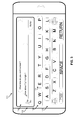
- FIG. 3 is an illustration of such an embodiment virtual keypad layout that makes use of pressure sensing touch screen display technologies.
- a mobile device 111 includes a pressure sensing touch screen display 112 that enables the mobile device to determine the location and magnitude of force exerted by a user touch on the touch screen surface.
- the display is divided into two areas: the first area being a display area 114 which shows the keystrokes that have been detected; and the second area being the virtual keypad area 115.
- the virtual keypad 115 in the illustrated embodiment presents a QWERTY style keypad layout in which single keys are used for two letters.
- the QW key 120 is used for both letters Q and W.
- the virtual keypad display can provide larger keys that are spaced further apart which should help reduce keystroke errors. The larger keys and the wider spacing between keys should decrease the probability of an inaccurate keystroke of an adjacent key. While the only two possible key entries are assigned to a single combined key in the embodiment virtual keypad illustrated in FIG. 3 , more than two possible key entries may be combined into a single key.
- an embodiment virtual keypad may include of a single numeral key which combines digits 0-9.
- the mobile device may be configured to measure the pressure applied to the key using the capabilities of a pressure sensing touch screen display. By correlating the two letters or numbers to different amounts of measured pressure, the mobile device can determine which of the two keys to record based upon the measured force applied in the keystroke. When using a mobile device with such capability, a user may apply different amounts of force to indicate the intended keystroke. For example, if the user intends to enter a Q, the user may lightly strike the QW key, whereas if the user intends to enter a W, the user may strike the QW key with greater force.
- the mobile device may correlate each letter or number associated with a combined key with a range of measured pressure values. In order to determine which of 10 digits is intended from the press of a single numeric key, the mobile device may measure the applied force and compare the measured value against a table of pressure ranges correlated to each of the ten number values.
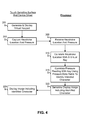
- FIG. 4 is a process flow diagram illustrating an embodiment method for detecting and interpreting user keystrokes on the embodiment virtual keypad layout illustrated in FIG. 3 .
- a touch sensitive surface and device driver in communication with the mobile device processor may generate and display a virtual keypad layout such as illustrated in FIG. 3 , step 201.
- the pressure sensing touch screen may capture the location of the keystroke as well as measure the amount of pressure exerted by the keystroke, step 205. Both the keystroke location and pressure measurement may be communicated to and received by the mobile device processor, step 305.
- the mobile device processor may correlate the keystroke location with a virtual key by comparing the detected touch location coordinates with the virtual keypad key coordinates, step 310. This may be accomplished in a data table look up process in which the touch coordinates are used to look up the characters associated with the touch location. For example, if the user touches the pressure sensitive touch screen where the QW key 120 is being displayed, the processor may correlate the location of the touch with the letters Q and W. Once the correlated letters are determined, the mobile device processor may disambiguate the keystroke (i.e., discern which key of the correlated keys the user intended to enter) by using the measured pressure exerted by the user to determine the intended letter, step 315. This process may be accomplished in a data table look up operation, where the measured pressure is compared to pressure ranges in a pressure data table to determine a corresponding letter. An illustrative pressure data table is shown in FIG. 5 .
- the first column of a pressure data table 501 may identify the possible characters associated with a particular virtual key.
- the mobile device processor may determine the pressed key based upon the location coordinates of the user keystroke (see step 310). Once the processor has determined the touched key, the measured pressure can be compared to the ranges in the pressure data table 501 to determine the corresponding key. Using the example from above where the user has struck the QW key 120, if the magnitude of force exerted on the touch screen surface is measured to be less than 10 Newtons of force the processor may determine from the pressure data table 501 that the user intended to input the letter Q.
- the processor may determine that the user intended to input the letter W. It is noted that in the illustrative virtual keypad layout shown in FIG. 3 some of the keys are associated with single letters or functions. For example, the "L,” "M,” space, shift, delete, and return keys each represent a single character or function. Thus, the processor will not have to access the pressure data table 501 to determine the corresponding key since such keystrokes will be unambiguous. Nevertheless, the pressure data table 501 may correlate the same letter with both pressure ranges as illustrated.
- the mobile device processor may record that character as an input and generate a display image of the identified character or perform the discerned function, step 320. If appropriate, an image of the identified character may be displayed on the touch screen, step 220. As users become more adept at controlling the amount of pressure applied in individual keystrokes the embodiment virtual keypad layout and detection method may allow users to enter data with increased speed.
- an alternative virtual keypad layout may be implemented that may enable increased typing speed by using pressure measurement or touch shape information to disambiguate keystrokes on overlapping keys.
- a virtual keypad layout similar to many ergonomic "natural style keyboard” layouts may be implemented.
- Bio-mechanic analysis has lead to the development of an ergonomic keyboard which is intended to minimize muscle strain and stress often occurring during repetitive stress exercises such as typing on a keyboard.
- FIG. 6 illustrates left hand keyboard portion 156 of the virtual keypad layout displayed on a mobile device 151.
- the mobile device 151 includes a display screen 152 which includes a display area 154 as well as virtual keypad area 155.
- the left hand portion 156 is nearly perpendicular to the display area 154.
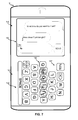
- FIG. 7 illustrates the full virtual keypad layout 155 displayed on a mobile device 151 including both the left hand portion 156 and the right hand portion 157.
- the size of the individual character keys in both the left and right hand portions 156, 157 may be displayed large enough to decrease the probability of erroneous keystrokes (i.e., unintended keystrokes to adjacent keys).
- the top row of keys in the right hand portion 157 may overlap the top row of keys of left hand portion 156 in an overlap region 158.
- the processor can determine the intended character using conventional processing, such as described above with reference to step 310 in FIG. 4 .
- further processing is required to disambiguate the keystroke.
- Pressure measurement information received from a pressure sensing touch screen display may be used to accomplish such disambiguation.
- a baseline location reading of all finger touches on the touch screen may be obtained to determine the location of the user's fingertips resting on the display surface.
- the pressure sensing touch screen display can distinguish between fingers resting on the surface and keystrokes in which pressures is applied to the surface.
- the resting location information can be used to determine which finger has been moved to accomplish the keystroke in the overlap region 158.
- the mobile device processor may determine which of the overlap keys the user intended to touch. For example, the W and the P keys overlap in the illustrated example virtual keyboard layout.
- the processor can determine which hand made the keystroke, and from this information, determine which of the two overlapping keys was intended to be struck by the user.
- the processor may accordingly correlate the received keystroke in the overlap region with the appropriate character.
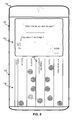
- FIG. 8 illustrates example baseline positions of a user's fingertips resting on the embodiment virtual keypad layout shown in FIG. 7 .
- the processor When a processor receives an indication that a keystroke has occurred in the overlap region, the processor must disambiguate the keystroke to determine which of the overlapping keys the user intended to strike. By checking the current position of each fingertip resting on the display surface, the processor may determine which fingertip is no longer in its baseline position. Using this information, the processor may determine which of the overlapping keys was intended by the user. In the example shown in FIG. 8 , the positions of the user's fingertips resting on the display surface are identified by the dark gray circles.
- the left hand fingertips will naturally rest on the "A,” “S,” “D,” and “F” keys or at least somewhere in the “A, S, D, F, G” row.
- the left hand thumb may typically rest on the “V” key or at least somewhere in the “Z, X, C, V, B” row.
- the right hand fingertips will naturally rest on the "J,” “K,” and “L” keys or at least somewhere in the "H, J, K, L” row.
- the right handed thumb may rest on the "N” key position or at least in the "N, M, Delete, Return” row. It should be noted that the fingertip positions shown in FIG. 8 are intended to be illustrative only. Actual user baseline fingertip positions may vary.
- the overlap region 158 contains the "Q,” "W,” “E,” “R,” “T,” “Y,” “U,” “I,” “O,” and “P” keys.
- a user may use the little finger on the left hand.
- To strike the "W” key a user may use the ring finger on the left hand.
- To strike the "E” key a user may use the middle finger on the left hand.
- To strike the "R” key a user may use either the middle or index finger on the left hand.
- To strike the "T” key a user may use the index finger on the left hand.
- To strike the "Y” key a user may use the index finger on the right hand.
- a user may use the middle or index finger on the right hand.
- To strike the "I” key a user may use the middle finger on the right hand.
- To strike the "O” key a user may use the ring finger on the right hand.
- To strike the "P” key a user may use the little finger on the right hand.
- FIG. 7 in the overlap region the "W” key may overlap the "P” key.
- the processor can determine that the user intended to strike the "T” key and not the “U” key. Similarly, the processor may be able to determine whether the user intended to strike the "E” or “O” key, "R” or “I” key, or "T” or “U” key by determining which finger from which hand (left or right) has moved from the baseline position to execute the keystroke in the overlap region.
- FIG. 9 is a process flow diagram illustrating an embodiment method for disambiguating keystrokes in the overlap region 158 of the virtual keypad layout embodiment illustrated in FIG. 7 .
- a touch sensitive surface and device driver in communication with the mobile device processor may generate and display a virtual keypad layout such as the embodiment shown in FIG. 7 , step 201.
- the pressure sensing touch screen may detect a keystroke above a certain pressure threshold, step 202. Because the user may be resting fingertips on the display surface, keystroke pressure must be above a certain threshold to distinguish keystrokes from the resting fingertip positions.
- the location of the keystroke may be captured, step 206.
- the location of the keystroke may be communicated to the processor, step 306, such as in the form of display coordinates.
- the display image may be communicated to the touch screen for display to the user, step 220.
- the processor may determine the current location of all touches on the display surface that are below the pressure threshold, step 308. This may involve requesting the pressure sensing touch screen to report the location of all touches on the display surface. Alternatively, the pressure sensing touch screen may continuously report the location of all touches including those below the pressure threshold, in which case the processor may simply access such touch location data from a buffer memory. The processor may compare the received locations of all current touches with a stored baseline position to determine which touch has deviated from the baseline position, step 309. The baseline position data may be obtained by frequently obtaining the locations of all touches below the pressure threshold and storing the positions in memory.
- the processor may determine an average position of a user's fingers based upon a number of observations of the locations of all touches below the pressure threshold and use that average as the baseline position. By determining which fingertip or side (i.e., right hand side vis-à-vis left hand side) has deviated from its baseline position, the processor may disambiguate the keystroke in the overlap region in the manner described above, step 311. Once the processor has determined which key the user intended to strike, it may record an entry of the corresponding character and generate the display image of the character, step 320. The display image may be communicated to the touch sensitive surface and device driver for display to the user, step 220.
- the appropriate character to assign to a keystroke located in the overlap region 158 may be determined by analyzing the shape and/or orientation of the keystroke touch.
- a keystroke in the overlap region 158 from a finger on the left hand may have a shape and/or orientation as sensed by the touch screen that differs from the shape and/or orientation of a keystroke from a finger on the right hand.
- the touches may appear approximately circular.
- the shape of the touch on the display screen surface may appear oblong in shape. In some instances, the oblong shape may resemble a teardrop.
- FIG. 10 illustrates the unique touch shape that may occur when a user executes a keystroke in the overlap region.
- FIG. 10 depicts nine stationary finger positions resting in their baseline position plus the touch shape of the index finger from the user's left hand executing a keystroke in the overlap region 158. Due to the extension of the index finger and natural positioning of the remainder of the user's hand, the touch shape created on the touch screen surface may appear as a teardrop or some other recognizable shape. In the example shown in FIG. 10 , the tail of the teardrop shape points to the side of the display whose hand executed the keystroke (i.e., the left hand in the illustrated example). By analyzing the touch shape and orientation of a keystroke in the overlap region, the processor may disambiguate a keystroke on overlapping keys in the overlap region 158.
- the analysis of the touch shape may involve determining the side of the keypad layout to which the tail section of the teardrop touch shape points. If the tail section points to the left, then the keystroke may be determined to have been made with a finger on the left hand, and therefore the left hand overlapping key was pressed (i.e., one of W, E, R or T). Similarly, if the tail section points to the right, then the keystroke may be determined to have been made with a finger on the right hand, and therefore the right hand overlapping key was pressed (i.e., one of Y, U, I or O). As with the embodiment method described above with reference to FIG. 9 , by determining which hand made the keystroke to a particular key location in the overlap region, the processor can determine the key that the user intended to strike.
- FIG. 11 is a process flow diagram illustrating an alternative embodiment method for disambiguating keystrokes in an overlap region. Similar to the process flow illustrated in FIG. 9 , the pressure sensing touch screen displays the virtual keypad layout whenever a keypad is requested by the user or an application, step 201. The pressure sensing touch screen detects when a keystroke is made with a measures pressure above a threshold pressure, step 202. The pressure sensing touch screen may capture the location coordinates of the keystroke which includes the keystroke shape (i.e., outline coordinates), step 212. This information is communicated to the mobile device processor, step 312. Based on this information, the processor may determine whether the keystroke was made in the overlap region 158, determination 307. As described above with reference to FIG.
- the processor may identify the corresponding character without further processing, and accept the character input and generate the display image of the identified character, step 320.
- the display image may be communicated to the pressure sensing touch screen for display to the user, step 220.
- the processor may determine the orientation of the overlap region keystroke, step 313. This may be accomplished by analyzing the touch shape to identify a long axis of other asymmetric characteristics. For example, in an embodiment where a teardrop touch shape is recognized, the processor may determine the orientation of the tail portion vis-a-vis the rest of the keystroke shape. This orientation of the tail portion may be used to determine the hand making the keystroke in the overlap region. In other embodiments the processor may determine the orientation of the long axis of a detected oblong touch shape created by an overlap region keystroke. Depending upon the overlapping keys, the angle of the long axis of the touch shape may be oriented in one direction for a left hand keystroke and in a different direction for a right hand keystroke.
- the processor may disambiguate the keystroke in the overlap region in a manner similar to that discussed above with reference to FIG. 9 . Specifically, by determining the hand that made the keystroke and the two overlapping keys at the keystroke location, the processor can determine which of the two keys was pressed (e.g., "T' or "U,” “R” or “I,” etc.). Once the processor has determined the key that was pressed, the processor may accept the corresponding character as an input and generate the display image of the identified character, step 320. The display image may be communicated to the pressure sensing touch screen for display to the user, step 220.
- the mobile device may utilize a learning module which can learn to distinguish different keystrikes based upon measured keystroke characteristics, such as shape and applied pressure.
- the processor can collect data regarding a specific user's keystroke signatures.
- keystroke signature data may be gathered during training sessions during which the user types keys whose value is known to the learning module, such as a displayed text or in response to aural commands emitted by the mobile device speaker.
- keystroke signature data may include measurements of the unique locations where a user strikes a particular key, the unique shape of each keystrike and/or the unique amount of pressure the user exerts when striking each key.
- the processor may correlate subsequent strike locations, shapes and/or pressure readings to disambiguate keystrokes in the overlap region.
- learning algorithms associated with the various embodiments may be implemented within a mobile device processor in a learning module, which may be a module of processor-executable instructions operating in the processor.
- the various aspects may be applied to define other types of keypads, such as numeric keypads and alphanumeric keypads with different key layouts.
- the various aspects may also be applied to the variant forms of QWERTY keyboard layouts, including those defined for Canadian Multilingual Standard, Canadian French, Czech, Danish, Dutch, Faroese, Irish, Italian, Norwegian, Polish, Portuguese (Portugal), Portuguese (Brazil), Romanian (in Romania and Moldova), Slovak, Spanish (Spain), Spanish (Latin America), Swedish/Finnish, United Kingdom, United Kingdom extended, and US-International.
- keyboard layouts including, for example, QWERTZ (including those defined for Czech, Hungary, Germany, and Austria, Slovak, Laun, Wegn, Serbian (Latin), and Slovene, Serbian (Cyrillic), Swiss German, Swiss French, Swiss Italian, Liechtenstein, and Switzerland), AZERTY (including those defined for French and Belgian), QZERTY, the Dvorak keyboard, the Colemak keyboard, Vietnamese, and chorded keyboards.
- keyboards optimized for non-Latin alphabets and non-alphabetic writing including, for example, Arabic, Armenian, Greek, Hebrew, Russian, Ukrainian, Bulgarian, Devanagari, Thai, Khmer, Vietnamese Script, Vietnamese (China), Dzongkha (Bhutan), Chinese, Japanese, Hangul (for Korean), Dubeolshik, Sebeolsik 390, Sebeolsik Final, and Sebeolsik Noshift.
- various embodiments could be applied to musical keyboards, such a piano keyboard.
- the mobile device may display a virtual keyboard layout, such as the layout illustrated in FIG. 7 .
- the learning module may record the specific manner in which the user executes keystrokes in the overlap region. By comparing the characteristics of subsequent keystrokes to the keystroke signature data recorded during a learning session, the processor can disambiguate a keystroke in the overlap region 158.
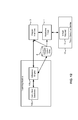
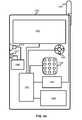
- FIG. 12 is a system component diagram of a mobile device enabling the various embodiments.
- the mobile device may include a pressure sensing touch screen 14 on which is displayed a virtual keyboard 12.
- the pressure sensing touch screen 14 may be coupled to a hardware driver 4 which receives signals associated with keystrokes to the surface and translates those signals into keystroke event, coordinate and measured pressure signals that can be interpreted by the computing device operating system, such as a keypad interface 3.
- the keypad interface 3 is illustrated as a process module, but it may be a part of the functionality of the computing device operating system or a firmware or hardware component of the computing device.
- the keypad interface 3 functionality relays keystroke event signals to applications 2 operating within the context of the operating system in a format that can be interpreted by the application.
- the hardware driver 4 for the pressure sensing touch screen 14 in combination with the keypad interface 3 may generate the virtual keyboard 12 display. Further, the hardware driver 4 and/or the keypad interface 3 may interpret keystrokes on the pressure sensing touch screen 14 as strikes to particular keys based on the location coordinates of the keystrokes. The hardware driver 4 and/or the keypad interface 3 may further determine the shape of each keystroke on a particular key depending upon the precision and resolution of the touch screen display. In addition, the hardware driver 4 and/or the keypad interface 3 may measure the magnitude of pressure exerted on the touch screen surface associated by each keystroke.
- the driver 4 and/or the keypad interface 3 may implement the various embodiments to disambiguate keystrokes in regions of overlapping keys or on multi-character keys.
- the keypad interface 3 then may communicate a key press event to the application 2 that identifies the pressed key as if from a physical keyboard.
- the keypad interface 3 may cooperate with a learning module 10 configured to gather keystroke signature data from a user's keystrokes.
- the learning module 10 may receive information regarding locations, shape and pressure of keystrokes (i.e., keystroke signature data) on the pressure sensing touch screen 14 from the keypad interface 3 or the hardware driver 4 and correlate this keystroke signature data with specific characters or functions.
- keystroke signature data i.e., keystroke signature data
- a strike to each key may have correlated keystroke signature data.
- the correlated keystroke signature data may then be stored in memory for subsequent use in disambiguating keystrokes.
- the correlated keystroke signature data may be retrieved from memory and compared to the measured keystroke characteristics to determine a most likely match.
- the processor can determine which of the two keys the user intended to strike.
- the learning module 10 may be processor-executable processes which may be implemented as an application 2, as a part of the mobile device operating system, or as part of a hardware driver 4.
- the learning module 10 may also receive information from other applications, such as a training application, spell checking applications (such as may be implemented within a word processing application), and auto-correction applications that can inform the learning module 10 of intended or predicted keystrokes.
- the learning module 10 may correlate gathered keystroke signature data to a desired or proper key, character or function.
- the keypad layout data 8 output of the learning module 10 may be in the form of a correlation matrix stored in memory that a keypad driver 4, keypad interface 3 or other element of the computing device operating system can use to translate keystroke signature data on a virtual keypad into an appropriate character (e.g., an ASCII character value).
- an appropriate character e.g., an ASCII character value
- the learning module 10 may include an inference engine 100 and an instruction database 106.
- the inference engine 100 may be in the form of processes and rules that are executed on the computing device processor.
- the learning module 10 may also include an instruction database 106 that may be stored in a memory which includes training commands and learning text samples that may be presented to a user during initial learning routines.
- FIG. 13 is a process flow diagram illustrating an example teaching process 300 for learning a user's keystroke signature data and correlating the keystroke signature data with intended keys.
- the learning module may access the instruction database for the next instruction, step 325.
- the accessed instructions may be displayed to the user on the pressure sensing touch screen, step 225.
- the instruction may request that the user type in a phrase which requires the user to make at least one keystroke to each key in the overlap region 158.
- the user may be requested to type in the phrase "The quick brown fox jumped over the lazy dog.” This phrase may be chosen as it contains all of the 26 letters of the Roman alphabet at least once.
- the pressure sensing touch screen may capture the user keystroke signature data, step 230.
- the keystroke signature data may be communicated to the learning module, step 330.
- the learning module may correlate the keystroke signature data to each letter in the instruction phrase, step 335.
- the learning module may then update a stored user keystroke signature data table with the received keystroke signature data for the expected key, step 340.
- the processor determines if additional keystrokes are needed to complete the phrase, determination 345.
- FIG. 14 is a process flow diagram illustrating steps that may be taken to disambiguate keystrokes in an overlap region using the learned keystroke signature data.
- a virtual keyboard is displayed (step 201) and keystrokes having a measured pressure above a threshold are detected (step 202).
- the pressure sensing touch screen may capture the keystroke signature data, step 215.
- Such signature data may include, for example, data regarding the location of the keystroke, the shape of the keystroke, the measured pressure exerted in the keystroke, etc.
- the keystroke signature data may be communicated to the mobile device processor, step 315.
- the display image may be communicated to the touch sensitive surface and device driver for display to the user, step 220.
- the processor may compare the received keystroke signature data to the user's keystroke signature data stored in the keystroke signature data table, step 316. By determining a closest match of the received keystroke signature data to the stored keystroke signature data and determining the character or key corresponding to the matched stored signature data the processor may disambiguate a keystroke in an overlap region 158, step 317. When the keystroke is disambiguated and a corresponding character identified, the identified character may be accepted as an input and the processor may generate a display image of the character, step 320. The display image may be communicated to the pressure sensing touch screen for display to the user, step 220.
- FIG. 15 Another alternative embodiment for disambiguating keystrokes in an overlap region is illustrated in FIG. 15 .
- the processor may attempt to disambiguate a keystroke by comparing individual keystroke signature data values to the keystroke signature data table. The keystroke disambiguation process may then terminate as soon as the intended key is determined.
- the processor may attempt to disambiguate the keystroke based upon the touch shape by comparing the received touch shape to touch shapes stored in the keystroke signature data table, step 355. If the processor matches the detected keystroke touch shape to a touch shape stored in the keystroke signature data table for one of the two (or more keys) in the overlap region, the processor may disambiguate the keystroke in the overlap region 158 as that of the character or key corresponding to the matched shape. In some instances, the shape of the keystroke may not match the touch shape for either of the particular overlapping keys stored in the keystroke signature data table. This may be due to abnormal keystroke movement by the user or possibly movement of the mobile device 151 while the user was making the keystroke.
- the processor may attempt to match the detected keystroke pressure measurement to pressure measurements in the stored keystroke signature data, step 357. By comparing measured pressure data and shape data to the stored keystroke signature data, the processor can perform a multi-variant comparison to select one of the two overlapping keys as the most likely intended key strike.
- the processor may accept the identified character as an input and generate the display image of the identified character, step 320. The display image may be communicated to the touch sensitive surface and device driver for display to the user, step 220.
- FIG. 16 is a process flow diagram illustrating such an alternative embodiment method. The process flow illustrated in FIG. 16 is similar to the process flow described above with reference to FIG. 15 so the foregoing descriptions of like number steps apply as well.
- the processor may determine if it was able to disambiguate the keystroke, determination 360.
- the processor accepts the identified character as an input, generates the display image including the identified character, step 320, and communicates display to the pressure sensing touch screen to display the image, step 220.
- the processor may implement any of a number of well known predictive text routines to select between two (or more) overlapping keys the character of which best matches the rest of the previously entered text, step 365.
- the predicted character is then assigned as the input character associated with the detected keystroke, step 270.
- the processor may then generate the display image including the identified character, step 320, and communicate this information to the pressure sensing touch screen to display the image, step 220.
- FIG. 17 illustrates another embodiment virtual keypad layout displayed on a mobile device 151.
- the virtual keypad layout shown in FIG. 17 is similar to the embodiment virtual keypad layout illustrated in FIG. 7 , except that the angle between the left hand portion 156 and right hand portion 157 has been increased.
- Such a layout more closely resembles the commercially available ergonomic "natural style keyboard" layouts and may be more comfortable for some users.
- the user may experience a more comfortable data entry position as the increased angle may more closely resemble the user's natural hand pronation angle.
- the angle between left hand portion 156 and right hand portion 157 may be modified by the user to achieve a more comfortable hand position and/or to minimize the number of keys overlapping one another on the touch screen surface display.
- an address book or contact database may contain contact information regarding a user's family, friends, business acquaintances, etc.
- each contact may include multiple contact phone numbers (e.g., mobile device, home, business, fax, etc.), as well as email addresses, SMS addresses, etc.
- a user may have to execute a series of keystrokes and/or pull down menu selections in order to select a contact function (such as placing a telephone, typing an email, sending a fax, typing an SMS, sending a MMS, etc.) to use to communicate with a contact name.
- an embodiment user interface may be provided which allows users to select both a contact and a desired contact function/address/number in a single keystroke.
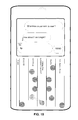
- FIG. 18 illustrates an exemplary top menu display for an address book application.
- applied pressure is measured and the data used to select a different element or function.
- Each contact within the address book database may be assigned a number of pressure "speed dials.”
- the number of pressure speed dials may vary according to the sensitivity of the pressure sensor (i.e., the precision with which the pressure sensor is able to distinguish between varying levels of applied pressure) as well as the user's ability to control the amount of pressure exerted on the touch screen display surface.
- a mobile device address book application may allow users to assign up to four pressure speed dials per contact name.
- the user By pressing on the contact name lightly, the user may initiate a telephone call to the contact name's mobile device.
- the contact name By pressing on the contact name slightly harder, the user may initiate an email message to the contact name's primary email address.
- the user By pressing on the contact name harder still, the user may initiate an SMS text message to the contact name's mobile device.
- the contact name very hard the user may initiate a telephone call to the contact name's work telephone.
- the mobile device may implement an embodiment method, such as illustrated in FIG. 19 , which allows a user to select both the contact name and contact function in a single keystroke. Similar to generating and displaying a virtual keypad layout, the touch sensitive surface and device driver may generate and display a contact application top menu, step 203. When a user touches a contact name, the touch sensitive surface and device driver may capture keystroke signature data associated with the touch, step 215. As described earlier, the detected keystroke signature data may include information regarding the keystroke location, shape, and/or pressure. The detected keystroke signature data may be communicated to the mobile device processor, step 315.
- the mobile device processor may correlate the detected keystroke location with a particular contact record, step 375.
- the mobile device processor may then compare the detected keystroke pressure data to pressure data stored in the pressure speed dial data table to determine a corresponding contact function, step 380.
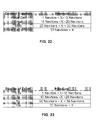
- An example of a pressure speed dial data table is illustrated in FIG. 22 .
- the processor may initiate the contact function for the selected contact, step 385.
- the processor may also generate a display image indicating that the contact function has been initiated, step 390.
- the display image may be communicated to the pressure sensing touch screen for display, step 290.
- FIG. 22 is an exemplary pressure speed dial data table.
- various contact functions may be initiated in response to measuring the pressure exerted on a contact name. For example, if a user exerts between 1 Newton and 10 Newtons of force upon the touch screen, the keystroke pressure may be correlated to a voice call function. Therefore, when such a pressure is measured, the processor may initiate a voice call to the primary telephone number listed in the detailed contact information for the contact name that was touched. Similarly, if a user exerts between 10 Newtons and 20 Newtons of force upon the touch screen, the keystroke pressure may be correlated to an email function. Therefore, when such a pressure is measured, the processor may initiate an email to the primary email address listed in the detailed contact information for the contact name that was touched.
- the keystroke pressure may be correlated to a SMS function. Therefore, when such a pressure is measured, the processor may initiate a SMS message to the mobile device telephone number listed in the detailed contact information for the contact name that was touched. Also, if a user exerts more than 30 Newtons of force upon the touch screen, the keystroke pressure may be correlated to a telephone call to a secondary telephone number. Therefore, when such a pressure is measured, the processor may initiate a telephone call to a secondary telephone number listed in the detailed contact information for the contact name that was touched. In this manner, a user may make a single keystroke, namely a touch to a desired contact name, with varying degrees of pressure to initiate a variety of contact functions for the selected contact.
- the pressure speed dial data table shown in FIG. 22 is meant to be illustrative only. Variations of the pressure speed dial data table may be implemented. For example, some pressure speed dial data tables may include more or fewer contact function options. Some pressure sensors may not be able to precisely distinguish varying levels of pressure. As a result fewer contact function options may be provided. Alternatively, users may have a hard time exerting pressure on the touch screen with a high degree of repeatability. Accordingly, some users may wish to have fewer pressure-activated contact function options so that the user may simply press hard or soft to distinguish between contact function options. In other alternative embodiments, a separate pressure speed dial data table may be maintained for each contact. Each pressure speed dial data table may be customized to initiate a different contact function for different levels of pressure.
- pressure sensors in the pressure sensing touch screen may be exploited to provide the user with an intuitive volume control user interface. While some mobile devices provide users with a speaker function, there may be instances where the user wishes to keep the audio output of the speaker private. For example, when conducting a telephone call in public, the user may wish to forego the speakerphone functionality so that others cannot eavesdrop. In such instances, the user typically holds the speaker of the mobile device to the user's ear. When the user cannot hear the audio output clearly, the natural instinct of the user is to press the mobile device harder against the user's ear. In an embodiment, the mobile device may detect this pressure exerted against the pressure sensing touch screen by the user's ear and/or face and, in response, increase the volume output of the speaker.
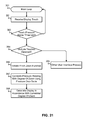
- FIG. 20 is a process flow diagram illustrating such an embodiment method.
- a mobile device processor may execute a main loop 301 which controls and monitors the activity of several applications and activities.
- the processor may receive an interrupt from the pressure sensing touch screen that pressure is being exerted on the pressure sensing touch screen including the keystroke signature data (e.g., touch location, shape, pressure, etc.), step 315.
- the processor (or pressure sensing touch screen) may determine if the touch pressure is above a threshold in order to confirm that the touch is an intentional press on the pressure sensing touch screen and not merely an incidental touch, determination 391.
- the touch may be deemed incidental and the processor returns to the main loop 301.
- pressure sensors in the pressure sensing touch screen may be exploited to provide the user with an intuitive zoom-in/zoom-out image control user interface.
- a pinch gesture that allows users to zoom-out by placing two fingers on a touch screen display surface (typically a thumb-index finger combination) spaced some distance apart and moving the fingers in a pinching motion together.
- the touch screen display effectively zooms-out by recalibrating the scale of the display. For example, suppose a map were displayed on the touch screen surface and the scale of the map indicated that an inch represented a mile. By placing two fingers an inch apart and pinching them together such that the two fingers were now only half an inch apart, the scale of the displayed map would be effectively doubled so that one inch now represented two miles.
- a user could zoom-in by placing two fingers together on the touch screen display surface and subsequently moving the fingers apart.
- the scale of the map would be decreased such that the same distance on the map would now represent less distance in real space.
- the problem with the conventional pinch gesture is that the amount of zoom is limited by 1) the size of the touch screen display and 2) the amount of distance users can spread their fingers. In many cases, users simply perform the pinch gesture repetitively until the desired amount of zoom is achieved.
- the amount of zoom achieved in a two-finger pinch gesture may be controlled by the amount of pressure the user exerts on the touch pressure sensing touch screen.
- the amount of pressure the user exerts on the touch pressure sensing touch screen By performing the same pinch gesture with varying degrees of pressure a user can both initiate a zoom in or zoom out function with varying amounts of zoom power (magnification power).
- the pinch zooming function initiated in step 230 may determine whether to zoom-in or zoom-out depending on the movement of the fingers in the pinch gesture.
- the processor may further compared the measured pressure applied in the pinch gesture to a pressure zoom data table to determine a magnification factor to apply in the zoom in/out function, step 397.
- a pressure zoom data table is shown in and described in more detail below with reference to FIG. 23 .
- FIG. 23 is an exemplary pressure zoom data table. As shown in FIG. 23 , various levels of zoom may be applied to a zoom in or zoom out function when varying levels of pressure are exerted on a pressure sensing touch screen by the user's two fingers. For example, if a user exerts between 1 Newton and 10 Newtons of force upon the touch screen, the touch pressure will be correlated to 1.5x of zoom (magnification). If a user exerts between 10 Newton and 20 Newtons of force upon the touch screen, the touch pressure will be correlated to 2x of zoom (magnification). If a user exerts between 20 Newton and 30 Newtons of force upon the touch screen, the touch pressure will be correlated to 5x of zoom (magnification). If a user exerts between 1 Newton and 10 Newtons of force upon the touch screen, the touch pressure will be correlated to 10x of zoom (magnification).
- the pressure zoom data table shown in FIG. 23 is meant to be illustrative only. Variations of the pressure zoom dial data table may be implemented. For example, some pressure zoom data tables may include more or fewer levels of magnification. Some pressure sensors may not be able to precisely distinguish varying levels of pressure. As a result fewer magnification level options may be presented. Alternatively, users may have a hard time exerting the varying degrees of pressure on the touch screen in a repeatable manner. Accordingly, some users may wish to have fewer magnification level options so that the user may simply press hard or soft to distinguish magnification level options.
- an exemplary mobile device 1300 may include a processor 1301 coupled to internal memory 1302 and a pressure sensing touch screen 1303. Additionally, the mobile device 1300 may have an antenna 1304 for sending and receiving electromagnetic radiation that is connected to a wireless data link and/or cellular telephone transceiver 1305 coupled to the processor 1301. In some implementations, the transceiver 1305 and portions of the processor 1301 and memory 1302 used for cellular telephone communications are collectively referred to as the air interface since it provides a data interface via a wireless data link.
- Mobile devices 1300 may also include a physical key pad 1306 or miniature keyboard and menu selection buttons or rocker switches 1307 for receiving user inputs.
- the processor 1301 may further be connected to a vocoder 1399 which is in turn connected to a microphone 1319 and speaker 1318.
- the mobile processor 1301 may be any programmable microprocessor, microcomputer or multiple processor chip or chips that can be configured by software instructions (applications) to perform a variety of functions, including the functions of the various aspects described herein.
- multiple processors 1301 may be provided, such as one processor dedicated to wireless communication functions and one processor dedicated to running other applications.
- software applications may be stored in the internal memory 1302 before they are accessed and loaded into the processor 1301.
- additional memory chips e.g., a Secure Data (SD) card
- SD Secure Data
- the internal memory 1302 may be a volatile or nonvolatile memory, such as flash memory, or a mixture of both.
- a general reference to memory refers to all memory accessible by the processor 1301, including internal memory 1302, removable memory plugged into the mobile device, and memory within the processor 1301 itself.
- DSP digital signal processor
- ASIC application specific integrated circuit
- FPGA field programmable gate array
- a general-purpose processor may be a microprocessor, but, in the alternative, the processor may be any conventional processor, controller, microcontroller, or state machine.
- a processor may also be implemented as a combination of computing devices, e.g., a combination of a DSP and a microprocessor, a plurality of microprocessors, one or more microprocessors in conjunction with a DSP core, or any other such configuration. Alternatively, some steps or methods may be performed by circuitry that is specific to a given function.
- the functions described may be implemented in hardware, software, firmware, or any combination thereof. If implemented in software, the functions may be stored on or transmitted over as one or more instructions or code on a computer-readable medium.
- the steps of a method or algorithm disclosed herein may be embodied in a processor-executable software module executed which may reside on a computer-readable medium.
- Computer-readable media includes both computer storage media and communication media including any medium that facilitates transfer of a computer program from one place to another.
- a storage media may be any available media that may be accessed by a computer.
- such computer-readable media may comprise RAM, ROM, EEPROM, CD-ROM or other optical disk storage, magnetic disk storage or other magnetic storage devices, or any other medium that may be used to carry or store desired program code in the form of instructions or data structures and that may be accessed by a computer.
- any connection is properly termed a computer-readable medium.
- the software is transmitted from a website, server, or other remote source using a coaxial cable, fiber optic cable, twisted pair, digital subscriber line (DSL), or wireless technologies such as infrared, radio, and microwave
- DSL digital subscriber line
- wireless technologies such as infrared, radio, and microwave
- Disk and disc includes compact disc (CD), laser disc, optical disc, digital versatile disc (DVD), floppy disk, and blu-ray disc where disks usually reproduce data magnetically, while discs reproduce data optically with lasers. Combinations of the above should also be included within the scope of computer-readable media. Additionally, the operations of a method or algorithm may reside as one or any combination or set of codes and/or instructions on a machine readable medium and/or computer-readable medium, which may be incorporated into a computer program product.
Landscapes
- Engineering & Computer Science (AREA)
- General Engineering & Computer Science (AREA)
- Theoretical Computer Science (AREA)
- Human Computer Interaction (AREA)
- Physics & Mathematics (AREA)
- General Physics & Mathematics (AREA)
- Input From Keyboards Or The Like (AREA)
- User Interface Of Digital Computer (AREA)
- Position Input By Displaying (AREA)
Applications Claiming Priority (2)
| Application Number | Priority Date | Filing Date | Title |
|---|---|---|---|
| US12/551,543 US8390583B2 (en) | 2009-08-31 | 2009-08-31 | Pressure sensitive user interface for mobile devices |
| EP10742978A EP2473900A1 (de) | 2009-08-31 | 2010-08-06 | Druckmpfindliche benutzerschnittstelle für mobilgeräte |
Related Parent Applications (1)
| Application Number | Title | Priority Date | Filing Date |
|---|---|---|---|
| EP10742978A Division EP2473900A1 (de) | 2009-08-31 | 2010-08-06 | Druckmpfindliche benutzerschnittstelle für mobilgeräte |
Publications (1)
| Publication Number | Publication Date |
|---|---|
| EP2950198A1 true EP2950198A1 (de) | 2015-12-02 |
Family
ID=42942052
Family Applications (2)
| Application Number | Title | Priority Date | Filing Date |
|---|---|---|---|
| EP10742978A Withdrawn EP2473900A1 (de) | 2009-08-31 | 2010-08-06 | Druckmpfindliche benutzerschnittstelle für mobilgeräte |
| EP15173609.7A Withdrawn EP2950198A1 (de) | 2009-08-31 | 2010-08-06 | Druckempfindliche benutzerschnittstelle für mobile vorrichtungen |
Family Applications Before (1)
| Application Number | Title | Priority Date | Filing Date |
|---|---|---|---|
| EP10742978A Withdrawn EP2473900A1 (de) | 2009-08-31 | 2010-08-06 | Druckmpfindliche benutzerschnittstelle für mobilgeräte |
Country Status (6)
| Country | Link |
|---|---|
| US (1) | US8390583B2 (de) |
| EP (2) | EP2473900A1 (de) |
| JP (1) | JP5486089B2 (de) |
| KR (1) | KR101368041B1 (de) |
| CN (2) | CN102483666B (de) |
| WO (1) | WO2011025643A1 (de) |
Cited By (22)
| Publication number | Priority date | Publication date | Assignee | Title |
|---|---|---|---|---|
| US9716825B1 (en) | 2016-06-12 | 2017-07-25 | Apple Inc. | User interface for camera effects |
| DK201670753A1 (en) * | 2016-06-12 | 2018-01-15 | Apple Inc | User Interface for Camera Effects |
| US9979890B2 (en) | 2015-04-23 | 2018-05-22 | Apple Inc. | Digital viewfinder user interface for multiple cameras |
| US10200587B2 (en) | 2014-09-02 | 2019-02-05 | Apple Inc. | Remote camera user interface |
| US10270983B1 (en) | 2018-05-07 | 2019-04-23 | Apple Inc. | Creative camera |
| US10528243B2 (en) | 2017-06-04 | 2020-01-07 | Apple Inc. | User interface camera effects |
| US10645294B1 (en) | 2019-05-06 | 2020-05-05 | Apple Inc. | User interfaces for capturing and managing visual media |
| US11054973B1 (en) | 2020-06-01 | 2021-07-06 | Apple Inc. | User interfaces for managing media |
| US11112964B2 (en) | 2018-02-09 | 2021-09-07 | Apple Inc. | Media capture lock affordance for graphical user interface |
| US11128792B2 (en) | 2018-09-28 | 2021-09-21 | Apple Inc. | Capturing and displaying images with multiple focal planes |
| US11212449B1 (en) | 2020-09-25 | 2021-12-28 | Apple Inc. | User interfaces for media capture and management |
| US11321857B2 (en) | 2018-09-28 | 2022-05-03 | Apple Inc. | Displaying and editing images with depth information |
| US11350026B1 (en) | 2021-04-30 | 2022-05-31 | Apple Inc. | User interfaces for altering visual media |
| US11468625B2 (en) | 2018-09-11 | 2022-10-11 | Apple Inc. | User interfaces for simulated depth effects |
| US11706521B2 (en) | 2019-05-06 | 2023-07-18 | Apple Inc. | User interfaces for capturing and managing visual media |
| US11722764B2 (en) | 2018-05-07 | 2023-08-08 | Apple Inc. | Creative camera |
| US11770601B2 (en) | 2019-05-06 | 2023-09-26 | Apple Inc. | User interfaces for capturing and managing visual media |
| US11778339B2 (en) | 2021-04-30 | 2023-10-03 | Apple Inc. | User interfaces for altering visual media |
| US12112024B2 (en) | 2021-06-01 | 2024-10-08 | Apple Inc. | User interfaces for managing media styles |
| US12401889B2 (en) | 2023-05-05 | 2025-08-26 | Apple Inc. | User interfaces for controlling media capture settings |
| US12506953B2 (en) | 2021-12-03 | 2025-12-23 | Apple Inc. | Device, methods, and graphical user interfaces for capturing and displaying media |
| US12602154B2 (en) | 2024-01-18 | 2026-04-14 | Apple Inc. | User interfaces integrating hardware buttons |
Families Citing this family (169)
| Publication number | Priority date | Publication date | Assignee | Title |
|---|---|---|---|---|
| US9454270B2 (en) | 2008-09-19 | 2016-09-27 | Apple Inc. | Systems and methods for detecting a press on a touch-sensitive surface |
| US9489086B1 (en) | 2013-04-29 | 2016-11-08 | Apple Inc. | Finger hover detection for improved typing |
| US10203873B2 (en) | 2007-09-19 | 2019-02-12 | Apple Inc. | Systems and methods for adaptively presenting a keyboard on a touch-sensitive display |
| US10126942B2 (en) | 2007-09-19 | 2018-11-13 | Apple Inc. | Systems and methods for detecting a press on a touch-sensitive surface |
| US9110590B2 (en) | 2007-09-19 | 2015-08-18 | Typesoft Technologies, Inc. | Dynamically located onscreen keyboard |
| US9018030B2 (en) | 2008-03-20 | 2015-04-28 | Symbol Technologies, Inc. | Transparent force sensor and method of fabrication |
| JP4600548B2 (ja) * | 2008-08-27 | 2010-12-15 | ソニー株式会社 | 再生装置、再生方法、およびプログラム |
| US9069390B2 (en) | 2008-09-19 | 2015-06-30 | Typesoft Technologies, Inc. | Systems and methods for monitoring surface sanitation |
| US8988191B2 (en) * | 2009-08-27 | 2015-03-24 | Symbol Technologies, Inc. | Systems and methods for pressure-based authentication of an input on a touch screen |
| KR101657963B1 (ko) * | 2009-12-08 | 2016-10-04 | 삼성전자 주식회사 | 단말기의 터치 면적 변화율에 따른 운용 방법 및 장치 |
| JP5750875B2 (ja) * | 2010-12-01 | 2015-07-22 | ソニー株式会社 | 情報処理装置、情報処理方法及びプログラム |
| TW201128478A (en) * | 2010-02-12 | 2011-08-16 | Novatek Microelectronics Corp | Touch sensing method and system using the same |
| US20110205157A1 (en) * | 2010-02-24 | 2011-08-25 | Walline Erin K | System and Method for Information Handling System Touchpad Enablement |
| US8432362B2 (en) * | 2010-03-07 | 2013-04-30 | Ice Computer, Inc. | Keyboards and methods thereof |
| JP2011221640A (ja) * | 2010-04-06 | 2011-11-04 | Sony Corp | 情報処理装置、情報処理方法およびプログラム |
| PT4122383T (pt) * | 2010-05-08 | 2025-05-02 | Univ California | Aparelho de deteção de scanner sem para a deteção precoce de úlceras |
| US8918146B2 (en) * | 2010-05-10 | 2014-12-23 | Microsoft Corporation | Automatic gain control based on detected pressure |
| US8384566B2 (en) * | 2010-05-19 | 2013-02-26 | Mckesson Financial Holdings | Pressure-sensitive keyboard and associated method of operation |
| US9946459B2 (en) * | 2010-05-28 | 2018-04-17 | Lenovo (Singapore) Pte. Ltd. | Systems and methods for determining intentional touch screen contact |
| KR101119373B1 (ko) * | 2010-07-09 | 2012-03-06 | 삼성전기주식회사 | 하이브리드 터치패널의 작동방법 |
| TWI594128B (zh) | 2010-07-10 | 2017-08-01 | 鄭尚澈 | 可更換智慧核心元件之智慧平台 |
| US8963874B2 (en) | 2010-07-31 | 2015-02-24 | Symbol Technologies, Inc. | Touch screen rendering system and method of operation thereof |
| US20120036468A1 (en) * | 2010-08-03 | 2012-02-09 | Nokia Corporation | User input remapping |
| US20120050335A1 (en) * | 2010-08-25 | 2012-03-01 | Universal Cement Corporation | Zooming system for a display |
| JP5732783B2 (ja) * | 2010-09-02 | 2015-06-10 | ソニー株式会社 | 情報処理装置、情報処理装置の入力制御方法及びプログラム |
| US9104308B2 (en) * | 2010-12-17 | 2015-08-11 | The Hong Kong University Of Science And Technology | Multi-touch finger registration and its applications |
| JP5543615B2 (ja) * | 2010-12-22 | 2014-07-09 | 京セラ株式会社 | 電子機器 |
| US8797284B2 (en) * | 2011-01-05 | 2014-08-05 | Motorola Mobility Llc | User interface and method for locating an interactive element associated with a touch sensitive interface |
| US20130234826A1 (en) * | 2011-01-13 | 2013-09-12 | Nikon Corporation | Electronic device and electronic device control program |
| JP5588023B2 (ja) * | 2011-01-27 | 2014-09-10 | 京セラ株式会社 | 電子機器 |
| US10001806B2 (en) | 2011-04-20 | 2018-06-19 | Shang-Che Cheng | Computing device with two or more display panels |
| JP5722696B2 (ja) * | 2011-05-10 | 2015-05-27 | 京セラ株式会社 | 電子機器、制御方法及び制御プログラム |
| US8952987B2 (en) * | 2011-05-19 | 2015-02-10 | Qualcomm Incorporated | User interface elements augmented with force detection |
| US20140123051A1 (en) * | 2011-05-30 | 2014-05-01 | Li Ni | Graphic object selection by way of directional swipe gestures |
| US8587542B2 (en) | 2011-06-01 | 2013-11-19 | Motorola Mobility Llc | Using pressure differences with a touch-sensitive display screen |
| US9417754B2 (en) | 2011-08-05 | 2016-08-16 | P4tents1, LLC | User interface system, method, and computer program product |
| US8976128B2 (en) | 2011-09-12 | 2015-03-10 | Google Technology Holdings LLC | Using pressure differences with a touch-sensitive display screen |
| US9262076B2 (en) * | 2011-09-12 | 2016-02-16 | Microsoft Technology Licensing, Llc | Soft keyboard interface |
| US9069460B2 (en) | 2011-09-12 | 2015-06-30 | Google Technology Holdings LLC | Using pressure differences with a touch-sensitive display screen |
| US20130063366A1 (en) * | 2011-09-13 | 2013-03-14 | Google Inc. | User inputs of a touch-sensitive device |
| US8856674B2 (en) | 2011-09-28 | 2014-10-07 | Blackberry Limited | Electronic device and method for character deletion |
| US9323379B2 (en) * | 2011-12-09 | 2016-04-26 | Microchip Technology Germany Gmbh | Electronic device with a user interface that has more than two degrees of freedom, the user interface comprising a touch-sensitive surface and contact-free detection means |
| CN104137038B (zh) * | 2012-01-09 | 2017-08-25 | 谷歌公司 | 具有手指鉴别的智能触摸屏键盘 |
| EP2634672A1 (de) * | 2012-02-28 | 2013-09-04 | Alcatel Lucent | System und Verfahren zur Eingabe von Symbolen |
| US9426905B2 (en) | 2012-03-02 | 2016-08-23 | Microsoft Technology Licensing, Llc | Connection device for computing devices |
| US9360893B2 (en) | 2012-03-02 | 2016-06-07 | Microsoft Technology Licensing, Llc | Input device writing surface |
| USRE48963E1 (en) | 2012-03-02 | 2022-03-08 | Microsoft Technology Licensing, Llc | Connection device for computing devices |
| US8935774B2 (en) | 2012-03-02 | 2015-01-13 | Microsoft Corporation | Accessory device authentication |
| US9134807B2 (en) | 2012-03-02 | 2015-09-15 | Microsoft Technology Licensing, Llc | Pressure sensitive key normalization |
| US9075566B2 (en) | 2012-03-02 | 2015-07-07 | Microsoft Technoogy Licensing, LLC | Flexible hinge spine |
| US8873227B2 (en) | 2012-03-02 | 2014-10-28 | Microsoft Corporation | Flexible hinge support layer |
| US9064654B2 (en) | 2012-03-02 | 2015-06-23 | Microsoft Technology Licensing, Llc | Method of manufacturing an input device |
| US9870066B2 (en) | 2012-03-02 | 2018-01-16 | Microsoft Technology Licensing, Llc | Method of manufacturing an input device |
| JP2013198068A (ja) * | 2012-03-22 | 2013-09-30 | Ntt Docomo Inc | 情報端末及び入力方法 |
| JP2013206180A (ja) * | 2012-03-28 | 2013-10-07 | Kyocera Corp | 電子機器および表示方法 |
| US9104260B2 (en) * | 2012-04-10 | 2015-08-11 | Typesoft Technologies, Inc. | Systems and methods for detecting a press on a touch-sensitive surface |
| WO2013169843A1 (en) | 2012-05-09 | 2013-11-14 | Yknots Industries Llc | Device, method, and graphical user interface for manipulating framed graphical objects |
| WO2013169846A1 (en) | 2012-05-09 | 2013-11-14 | Yknots Industries Llc | Device, method, and graphical user interface for displaying additional information in response to a user contact |
| CN104487930A (zh) | 2012-05-09 | 2015-04-01 | 苹果公司 | 用于移动和放置用户界面对象的设备、方法和图形用户界面 |
| WO2013169849A2 (en) | 2012-05-09 | 2013-11-14 | Industries Llc Yknots | Device, method, and graphical user interface for displaying user interface objects corresponding to an application |
| JP6031186B2 (ja) | 2012-05-09 | 2016-11-24 | アップル インコーポレイテッド | ユーザインタフェースオブジェクトを選択するためのデバイス、方法及びグラフィカルユーザインタフェース |
| EP2847659B1 (de) | 2012-05-09 | 2019-09-04 | Apple Inc. | Vorrichtung, verfahren und grafische benutzerschnittstelle zum übergang zwischen anzeigezuständen als reaktion auf eine geste |
| WO2013169865A2 (en) | 2012-05-09 | 2013-11-14 | Yknots Industries Llc | Device, method, and graphical user interface for moving a user interface object based on an intensity of a press input |
| EP2847662B1 (de) | 2012-05-09 | 2020-02-19 | Apple Inc. | Vorrichtung, verfahren und grafische benutzeroberfläche zur bereitstellung von feedback für sich ändernde aktivierungszustände eines benutzeroberflächenobjekts |
| WO2013169851A2 (en) | 2012-05-09 | 2013-11-14 | Yknots Industries Llc | Device, method, and graphical user interface for facilitating user interaction with controls in a user interface |
| WO2013169875A2 (en) | 2012-05-09 | 2013-11-14 | Yknots Industries Llc | Device, method, and graphical user interface for displaying content associated with a corresponding affordance |
| CN104508618B (zh) | 2012-05-09 | 2018-01-05 | 苹果公司 | 用于针对在用户界面中执行的操作提供触觉反馈的设备、方法和图形用户界面 |
| WO2013169845A1 (en) | 2012-05-09 | 2013-11-14 | Yknots Industries Llc | Device, method, and graphical user interface for scrolling nested regions |
| WO2013169842A2 (en) | 2012-05-09 | 2013-11-14 | Yknots Industries Llc | Device, method, and graphical user interface for selecting object within a group of objects |
| US20130300590A1 (en) | 2012-05-14 | 2013-11-14 | Paul Henry Dietz | Audio Feedback |
| US8816989B2 (en) | 2012-05-22 | 2014-08-26 | Lenovo (Singapore) Pte. Ltd. | User interface navigation utilizing pressure-sensitive touch |
| US10031556B2 (en) | 2012-06-08 | 2018-07-24 | Microsoft Technology Licensing, Llc | User experience adaptation |
| US9019615B2 (en) | 2012-06-12 | 2015-04-28 | Microsoft Technology Licensing, Llc | Wide field-of-view virtual image projector |
| US9836213B2 (en) | 2012-07-27 | 2017-12-05 | Symbol Technologies, Llc | Enhanced user interface for pressure sensitive touch screen |
| US8964379B2 (en) | 2012-08-20 | 2015-02-24 | Microsoft Corporation | Switchable magnetic lock |
| CN102833418B (zh) * | 2012-08-31 | 2016-08-24 | 广东欧珀移动通信有限公司 | 一种rcp通信过程选择联系人方法及移动智能终端 |
| US8952892B2 (en) | 2012-11-01 | 2015-02-10 | Microsoft Corporation | Input location correction tables for input panels |
| CN104956681A (zh) * | 2012-11-09 | 2015-09-30 | 汤姆逊许可公司 | 手持显示器缩放特征 |
| US9880736B2 (en) * | 2012-12-03 | 2018-01-30 | Facebook, Inc. | Systems and methods for determining a symbol input by a user from two sets of symbols on a multi-layer keyboard |
| US20140188561A1 (en) * | 2012-12-28 | 2014-07-03 | Arbitron Inc. | Audience Measurement System, Method and Apparatus with Grip Sensing |
| CN107831991B (zh) | 2012-12-29 | 2020-11-27 | 苹果公司 | 用于确定是滚动还是选择内容的设备、方法和图形用户界面 |
| AU2013368441B2 (en) | 2012-12-29 | 2016-04-14 | Apple Inc. | Device, method, and graphical user interface for forgoing generation of tactile output for a multi-contact gesture |
| WO2014105279A1 (en) | 2012-12-29 | 2014-07-03 | Yknots Industries Llc | Device, method, and graphical user interface for switching between user interfaces |
| HK1215094A1 (zh) | 2012-12-29 | 2016-08-12 | Apple Inc. | 用於根據具有模擬三維特徵的控制圖標的外觀變化來移動光標的設備、方法和圖形用戶界面 |
| WO2014105274A1 (en) | 2012-12-29 | 2014-07-03 | Yknots Industries Llc | Device, method, and graphical user interface for navigating user interface hierarchies |
| AU2013368443B2 (en) | 2012-12-29 | 2016-03-24 | Apple Inc. | Device, method, and graphical user interface for transitioning between touch input to display output relationships |
| US9098244B2 (en) * | 2013-01-15 | 2015-08-04 | Google Inc. | Ignoring tactile input based on subsequent input received from keyboard |
| CN104049933B (zh) * | 2013-03-11 | 2019-07-26 | 联想(北京)有限公司 | 一种信息处理的方法及电子设备 |
| US9304549B2 (en) | 2013-03-28 | 2016-04-05 | Microsoft Technology Licensing, Llc | Hinge mechanism for rotatable component attachment |
| US9454251B1 (en) * | 2013-06-26 | 2016-09-27 | Google Inc. | Methods, systems, and media for controlling a remote device using a touch screen of a mobile device in a display inhibited state |
| CN104281376A (zh) * | 2013-07-04 | 2015-01-14 | 福建省辉锐材料科技有限公司 | 一种移动终端的控制方法及系统 |
| GB2516029A (en) | 2013-07-08 | 2015-01-14 | Ibm | Touchscreen keyboard |
| US9483176B2 (en) * | 2013-07-08 | 2016-11-01 | Samsung Display Co., Ltd. | Method and apparatus to reduce display lag of soft keyboard presses |
| US10366264B2 (en) | 2013-08-09 | 2019-07-30 | Korea Advanced Institute Of Science And Technology | System and method for transferring content among devices |
| CN104423612A (zh) * | 2013-09-05 | 2015-03-18 | 联想(北京)有限公司 | 按键识别方法、装置和电子设备 |
| US10289302B1 (en) | 2013-09-09 | 2019-05-14 | Apple Inc. | Virtual keyboard animation |
| CN104423615B (zh) * | 2013-09-11 | 2018-02-27 | 联想(北京)有限公司 | 一种辅助输入方法、装置及应用其的电子设备 |
| KR101509495B1 (ko) * | 2013-10-18 | 2015-04-09 | 한국전자통신연구원 | 키패드의 이동을 통한 보안 키패드 입력 장치 및 방법 |
| US20150185850A1 (en) * | 2013-12-27 | 2015-07-02 | Farzin Guilak | Input detection |
| US9483118B2 (en) * | 2013-12-27 | 2016-11-01 | Rovi Guides, Inc. | Methods and systems for selecting media guidance functions based on tactile attributes of a user input |
| US9158426B1 (en) * | 2014-03-19 | 2015-10-13 | Google Inc. | Touch keyboard calibration |
| WO2015175419A1 (en) | 2014-05-12 | 2015-11-19 | Ice Computer, Inc. | Mobile computing resource |
| CN104123093A (zh) * | 2014-06-24 | 2014-10-29 | 小米科技有限责任公司 | 信息处理方法及装置 |
| TW201610412A (zh) * | 2014-09-02 | 2016-03-16 | 旭硝子股份有限公司 | 評價基材的操作感的方法及基材 |
| US9424048B2 (en) | 2014-09-15 | 2016-08-23 | Microsoft Technology Licensing, Llc | Inductive peripheral retention device |
| WO2016048279A1 (en) * | 2014-09-23 | 2016-03-31 | Hewlett-Packard Development Company, Lp | Determining location using time difference of arrival |
| WO2016048313A1 (en) | 2014-09-24 | 2016-03-31 | Hewlett-Packard Development Company, L.P. | Transforming received touch input |
| WO2016053239A1 (en) * | 2014-09-29 | 2016-04-07 | Hewlett-Packard Development Company, L.P. | Virtual keyboard |
| CN105640553A (zh) * | 2014-11-28 | 2016-06-08 | 富泰华工业(深圳)有限公司 | 测量体脂的移动装置、系统及方法 |
| US9990107B2 (en) | 2015-03-08 | 2018-06-05 | Apple Inc. | Devices, methods, and graphical user interfaces for displaying and using menus |
| US10048757B2 (en) | 2015-03-08 | 2018-08-14 | Apple Inc. | Devices and methods for controlling media presentation |
| US10095396B2 (en) | 2015-03-08 | 2018-10-09 | Apple Inc. | Devices, methods, and graphical user interfaces for interacting with a control object while dragging another object |
| US9645732B2 (en) | 2015-03-08 | 2017-05-09 | Apple Inc. | Devices, methods, and graphical user interfaces for displaying and using menus |
| US9632664B2 (en) | 2015-03-08 | 2017-04-25 | Apple Inc. | Devices, methods, and graphical user interfaces for manipulating user interface objects with visual and/or haptic feedback |
| US9639184B2 (en) | 2015-03-19 | 2017-05-02 | Apple Inc. | Touch input cursor manipulation |
| US9785305B2 (en) | 2015-03-19 | 2017-10-10 | Apple Inc. | Touch input cursor manipulation |
| US10152208B2 (en) | 2015-04-01 | 2018-12-11 | Apple Inc. | Devices and methods for processing touch inputs based on their intensities |
| US20170045981A1 (en) | 2015-08-10 | 2017-02-16 | Apple Inc. | Devices and Methods for Processing Touch Inputs Based on Their Intensities |
| AU2016250527B2 (en) | 2015-04-24 | 2021-01-14 | Bruin Biometrics, Llc | Apparatus and methods for determining damaged tissue using sub-epidermal moisture measurements |
| CN105100428A (zh) * | 2015-06-05 | 2015-11-25 | 努比亚技术有限公司 | 一种联系人显示方法和系统 |
| US9891811B2 (en) | 2015-06-07 | 2018-02-13 | Apple Inc. | Devices and methods for navigating between user interfaces |
| US10200598B2 (en) | 2015-06-07 | 2019-02-05 | Apple Inc. | Devices and methods for capturing and interacting with enhanced digital images |
| US9830048B2 (en) | 2015-06-07 | 2017-11-28 | Apple Inc. | Devices and methods for processing touch inputs with instructions in a web page |
| US9860451B2 (en) | 2015-06-07 | 2018-01-02 | Apple Inc. | Devices and methods for capturing and interacting with enhanced digital images |
| US9674426B2 (en) | 2015-06-07 | 2017-06-06 | Apple Inc. | Devices and methods for capturing and interacting with enhanced digital images |
| US10346030B2 (en) | 2015-06-07 | 2019-07-09 | Apple Inc. | Devices and methods for navigating between user interfaces |
| CN105100431B (zh) * | 2015-06-09 | 2019-02-05 | 联想(北京)有限公司 | 一种控制方法及电子设备 |
| CN105120079A (zh) * | 2015-07-22 | 2015-12-02 | 努比亚技术有限公司 | 一种实现联系人信息显示的方法及终端 |
| US9880735B2 (en) | 2015-08-10 | 2018-01-30 | Apple Inc. | Devices, methods, and graphical user interfaces for manipulating user interface objects with visual and/or haptic feedback |
| US10248308B2 (en) * | 2015-08-10 | 2019-04-02 | Apple Inc. | Devices, methods, and graphical user interfaces for manipulating user interfaces with physical gestures |
| US10235035B2 (en) | 2015-08-10 | 2019-03-19 | Apple Inc. | Devices, methods, and graphical user interfaces for content navigation and manipulation |
| US10416800B2 (en) | 2015-08-10 | 2019-09-17 | Apple Inc. | Devices, methods, and graphical user interfaces for adjusting user interface objects |
| CN105162974B (zh) * | 2015-08-19 | 2016-09-07 | 努比亚技术有限公司 | 一种动态显示联系人属性的装置和方法 |
| CN105224216B (zh) * | 2015-08-27 | 2018-07-06 | 广东欧珀移动通信有限公司 | 一种用户终端控制方法及用户终端 |
| CN106610730A (zh) * | 2015-10-23 | 2017-05-03 | 深圳富泰宏精密工业有限公司 | 电子设备及字元校正方法 |
| US9392460B1 (en) | 2016-01-02 | 2016-07-12 | International Business Machines Corporation | Continuous user authentication tool for mobile device communications |
| KR20170085419A (ko) * | 2016-01-14 | 2017-07-24 | 삼성전자주식회사 | 터치 입력에 기반한 동작 방법 및 그 전자 장치 |
| US10627948B2 (en) * | 2016-05-25 | 2020-04-21 | Microsoft Technology Licensing, Llc | Sequential two-handed touch typing on a mobile device |
| WO2018035729A1 (zh) * | 2016-08-24 | 2018-03-01 | 北京小米移动软件有限公司 | 资源转移方法及装置 |
| CN106775084B (zh) * | 2016-12-16 | 2019-04-16 | Oppo广东移动通信有限公司 | 一种触摸屏的防误触方法、装置及移动终端 |
| KR102304070B1 (ko) | 2017-02-03 | 2021-09-23 | 브루인 바이오메트릭스, 엘엘씨 | 부종의 측정 |
| EP4241670B1 (de) | 2017-02-03 | 2025-12-10 | BBI Medical Innovations, LLC | Messung der lebensfähigkeit von gewebe |
| US20180220954A1 (en) | 2017-02-03 | 2018-08-09 | Bruin Biometrics, Llc | Measurement of susceptibility to diabetic foot ulcers |
| CN110300950B (zh) | 2017-02-06 | 2023-06-16 | 平蛙实验室股份公司 | 触摸感测系统中的光学耦合 |
| US10282590B2 (en) | 2017-03-31 | 2019-05-07 | International Business Machines Corporation | Analyzing writing using pressure sensing touchscreens |
| US12126589B2 (en) | 2017-05-16 | 2024-10-22 | Apple Inc. | Initiating a business messaging session |
| US10057197B1 (en) | 2017-05-16 | 2018-08-21 | Apple Inc. | Messaging system for organizations |
| CN110637275B (zh) * | 2017-05-19 | 2023-11-14 | M·W·墨菲 | 交错字符选择界面 |
| US10530770B2 (en) * | 2017-06-28 | 2020-01-07 | International Business Machines Corporation | Pressure-based authentication |
| CN111052058B (zh) | 2017-09-01 | 2023-10-20 | 平蛙实验室股份公司 | 改进的光学部件 |
| WO2019070249A1 (en) * | 2017-10-04 | 2019-04-11 | Hewlett-Packard Development Company, L.P. | USER INTERFACES WITH STRAIN SENSORS |
| CN116473517A (zh) | 2017-11-16 | 2023-07-25 | 布鲁恩生物有限责任公司 | 使用表皮下水分值对压力性溃疡进行战略治疗 |
| PL3749181T3 (pl) | 2018-02-09 | 2024-06-10 | Bruin Biometrics, Llc | Wykrywanie uszkodzenia tkanek |
| US11567610B2 (en) | 2018-03-05 | 2023-01-31 | Flatfrog Laboratories Ab | Detection line broadening |
| WO2019187619A1 (ja) * | 2018-03-29 | 2019-10-03 | 株式会社コナミデジタルエンタテインメント | 情報処理装置およびそのプログラムを記録した記録媒体 |
| CN108803986A (zh) * | 2018-05-07 | 2018-11-13 | 瑞声科技(新加坡)有限公司 | 一种移动终端虚拟按键的调整方法及装置 |
| GB2591899B (en) | 2018-10-11 | 2022-03-09 | Bruin Biometrics Llc | Device with disposable element |
| CN112889016A (zh) | 2018-10-20 | 2021-06-01 | 平蛙实验室股份公司 | 用于触摸敏感装置的框架及其工具 |
| US11922007B2 (en) * | 2018-11-29 | 2024-03-05 | Michael William Murphy | Apparatus, method and system for inputting characters to an electronic device |
| GB2586789A (en) * | 2019-08-30 | 2021-03-10 | Sony Interactive Entertainment Inc | Controlling data processing |
| CN110727522A (zh) * | 2019-09-29 | 2020-01-24 | 联想(北京)有限公司 | 一种控制方法及电子设备 |
| EP4066089B1 (de) | 2019-11-25 | 2024-09-25 | FlatFrog Laboratories AB | Ein berührungsempfindliches gerät |
| WO2021158164A1 (en) | 2020-02-08 | 2021-08-12 | Flatfrog Laboratories Ab | Touch apparatus with low latency interactions |
| CN115039063B (zh) | 2020-02-10 | 2026-02-13 | 平蛙实验室股份公司 | 改进的触摸感测设备 |
| US12524515B2 (en) * | 2020-12-21 | 2026-01-13 | Telefonaktiebolaget Lm Ericsson (Publ) | Authenticating a user |
| WO2022169850A1 (en) | 2021-02-03 | 2022-08-11 | Bruin Biometrics, Llc | Methods of treating deep and early-stage pressure induced tissue damage |
| US12169595B2 (en) * | 2021-05-26 | 2024-12-17 | Huawei Technologies Co., Ltd. | Methods, devices, and computer-readable storage media for performing a function based on user input |
| US11883002B2 (en) * | 2021-09-09 | 2024-01-30 | Karl Storz Se & Co. Kg | Endoscope connector and endoscope adapter |
| US11870739B2 (en) * | 2022-05-17 | 2024-01-09 | Bank Of America Corporation | Auto-adjust app operation in response to data entry anomalies |
Citations (3)
| Publication number | Priority date | Publication date | Assignee | Title |
|---|---|---|---|---|
| US20060244727A1 (en) * | 2003-07-09 | 2006-11-02 | Salman Majeed D | Shared input key method and apparatus |
| US20070152976A1 (en) * | 2005-12-30 | 2007-07-05 | Microsoft Corporation | Unintentional touch rejection |
| US20080297475A1 (en) * | 2005-08-02 | 2008-12-04 | Woolf Tod M | Input Device Having Multifunctional Keys |
Family Cites Families (15)
| Publication number | Priority date | Publication date | Assignee | Title |
|---|---|---|---|---|
| JP3727399B2 (ja) * | 1996-02-19 | 2005-12-14 | ミサワホーム株式会社 | 画面表示式キー入力装置 |
| JP2002351600A (ja) * | 2001-05-28 | 2002-12-06 | Allied Brains Inc | 入力操作支援プログラム |
| WO2003017244A1 (en) * | 2001-08-17 | 2003-02-27 | Multidigit, Inc. | System and method for selecting actions based on the identification of user's fingers |
| KR20040083788A (ko) * | 2003-03-25 | 2004-10-06 | 삼성전자주식회사 | 제스쳐 커맨드를 이용하여 프로그램을 구동시킬 수 있는휴대용 단말기 및 이를 이용한 프로그램 구동 방법 |
| CN100478851C (zh) * | 2004-02-10 | 2009-04-15 | 刘二中 | 一种具有键盘输入功能的装置和输入方法 |
| JP2006127488A (ja) * | 2004-09-29 | 2006-05-18 | Toshiba Corp | 入力装置、コンピュータ装置、情報処理方法及び情報処理プログラム |
| JP2007128497A (ja) * | 2005-10-05 | 2007-05-24 | Sony Corp | 表示装置および表示方法 |
| JP5092255B2 (ja) * | 2006-03-09 | 2012-12-05 | カシオ計算機株式会社 | 表示装置 |
| CN101501619B (zh) * | 2006-06-13 | 2012-09-26 | N-特莱格有限公司 | 用于数字化器的指尖触摸识别 |
| US8059102B2 (en) * | 2006-06-13 | 2011-11-15 | N-Trig Ltd. | Fingertip touch recognition for a digitizer |
| KR100954594B1 (ko) * | 2007-02-23 | 2010-04-26 | (주)티피다시아이 | 디지털 기기에 사용되는 포인팅장치를 이용한 가상키보드입력시스템 |
| JP4897596B2 (ja) * | 2007-07-12 | 2012-03-14 | ソニー株式会社 | 入力装置、記憶媒体、情報入力方法及び電子機器 |
| KR101395780B1 (ko) * | 2007-07-27 | 2014-05-16 | 삼성전자주식회사 | 촉각 감지를 위한 압력 센서 어레이 장치 및 방법 |
| JP4657265B2 (ja) * | 2007-07-30 | 2011-03-23 | 京セラ株式会社 | 文字入力装置及び表示制御方法 |
| JP4600548B2 (ja) * | 2008-08-27 | 2010-12-15 | ソニー株式会社 | 再生装置、再生方法、およびプログラム |
-
2009
- 2009-08-31 US US12/551,543 patent/US8390583B2/en active Active
-
2010
- 2010-08-06 EP EP10742978A patent/EP2473900A1/de not_active Withdrawn
- 2010-08-06 CN CN201080038941.4A patent/CN102483666B/zh active Active
- 2010-08-06 CN CN201510311847.6A patent/CN104965614B/zh active Active
- 2010-08-06 WO PCT/US2010/044641 patent/WO2011025643A1/en not_active Ceased
- 2010-08-06 EP EP15173609.7A patent/EP2950198A1/de not_active Withdrawn
- 2010-08-06 JP JP2012526807A patent/JP5486089B2/ja not_active Expired - Fee Related
- 2010-08-06 KR KR1020127008384A patent/KR101368041B1/ko not_active Expired - Fee Related
Patent Citations (3)
| Publication number | Priority date | Publication date | Assignee | Title |
|---|---|---|---|---|
| US20060244727A1 (en) * | 2003-07-09 | 2006-11-02 | Salman Majeed D | Shared input key method and apparatus |
| US20080297475A1 (en) * | 2005-08-02 | 2008-12-04 | Woolf Tod M | Input Device Having Multifunctional Keys |
| US20070152976A1 (en) * | 2005-12-30 | 2007-07-05 | Microsoft Corporation | Unintentional touch rejection |
Cited By (69)
| Publication number | Priority date | Publication date | Assignee | Title |
|---|---|---|---|---|
| US10200587B2 (en) | 2014-09-02 | 2019-02-05 | Apple Inc. | Remote camera user interface |
| US11711614B2 (en) | 2015-04-23 | 2023-07-25 | Apple Inc. | Digital viewfinder user interface for multiple cameras |
| US11490017B2 (en) | 2015-04-23 | 2022-11-01 | Apple Inc. | Digital viewfinder user interface for multiple cameras |
| US11102414B2 (en) | 2015-04-23 | 2021-08-24 | Apple Inc. | Digital viewfinder user interface for multiple cameras |
| US9979890B2 (en) | 2015-04-23 | 2018-05-22 | Apple Inc. | Digital viewfinder user interface for multiple cameras |
| US12149831B2 (en) | 2015-04-23 | 2024-11-19 | Apple Inc. | Digital viewfinder user interface for multiple cameras |
| US10122931B2 (en) | 2015-04-23 | 2018-11-06 | Apple Inc. | Digital viewfinder user interface for multiple cameras |
| US10616490B2 (en) | 2015-04-23 | 2020-04-07 | Apple Inc. | Digital viewfinder user interface for multiple cameras |
| US10136048B2 (en) | 2016-06-12 | 2018-11-20 | Apple Inc. | User interface for camera effects |
| US10009536B2 (en) | 2016-06-12 | 2018-06-26 | Apple Inc. | Applying a simulated optical effect based on data received from multiple camera sensors |
| CN110058772A (zh) * | 2016-06-12 | 2019-07-26 | 苹果公司 | 用于相机效果的用户界面 |
| DK201670753A1 (en) * | 2016-06-12 | 2018-01-15 | Apple Inc | User Interface for Camera Effects |
| US9912860B2 (en) | 2016-06-12 | 2018-03-06 | Apple Inc. | User interface for camera effects |
| US9716825B1 (en) | 2016-06-12 | 2017-07-25 | Apple Inc. | User interface for camera effects |
| US10602053B2 (en) | 2016-06-12 | 2020-03-24 | Apple Inc. | User interface for camera effects |
| US11165949B2 (en) | 2016-06-12 | 2021-11-02 | Apple Inc. | User interface for capturing photos with different camera magnifications |
| US11245837B2 (en) | 2016-06-12 | 2022-02-08 | Apple Inc. | User interface for camera effects |
| US9854156B1 (en) | 2016-06-12 | 2017-12-26 | Apple Inc. | User interface for camera effects |
| US11962889B2 (en) | 2016-06-12 | 2024-04-16 | Apple Inc. | User interface for camera effects |
| US12132981B2 (en) | 2016-06-12 | 2024-10-29 | Apple Inc. | User interface for camera effects |
| US11641517B2 (en) | 2016-06-12 | 2023-05-02 | Apple Inc. | User interface for camera effects |
| US10528243B2 (en) | 2017-06-04 | 2020-01-07 | Apple Inc. | User interface camera effects |
| US11204692B2 (en) | 2017-06-04 | 2021-12-21 | Apple Inc. | User interface camera effects |
| US12314553B2 (en) | 2017-06-04 | 2025-05-27 | Apple Inc. | User interface camera effects |
| US11687224B2 (en) | 2017-06-04 | 2023-06-27 | Apple Inc. | User interface camera effects |
| US11977731B2 (en) | 2018-02-09 | 2024-05-07 | Apple Inc. | Media capture lock affordance for graphical user interface |
| US12530116B2 (en) | 2018-02-09 | 2026-01-20 | Apple Inc. | Media capture lock affordance for graphical user interface |
| US11112964B2 (en) | 2018-02-09 | 2021-09-07 | Apple Inc. | Media capture lock affordance for graphical user interface |
| US11722764B2 (en) | 2018-05-07 | 2023-08-08 | Apple Inc. | Creative camera |
| US12170834B2 (en) | 2018-05-07 | 2024-12-17 | Apple Inc. | Creative camera |
| US11178335B2 (en) | 2018-05-07 | 2021-11-16 | Apple Inc. | Creative camera |
| US10523879B2 (en) | 2018-05-07 | 2019-12-31 | Apple Inc. | Creative camera |
| US10375313B1 (en) | 2018-05-07 | 2019-08-06 | Apple Inc. | Creative camera |
| US10270983B1 (en) | 2018-05-07 | 2019-04-23 | Apple Inc. | Creative camera |
| US12154218B2 (en) | 2018-09-11 | 2024-11-26 | Apple Inc. | User interfaces simulated depth effects |
| US11468625B2 (en) | 2018-09-11 | 2022-10-11 | Apple Inc. | User interfaces for simulated depth effects |
| US12394077B2 (en) | 2018-09-28 | 2025-08-19 | Apple Inc. | Displaying and editing images with depth information |
| US11321857B2 (en) | 2018-09-28 | 2022-05-03 | Apple Inc. | Displaying and editing images with depth information |
| US11895391B2 (en) | 2018-09-28 | 2024-02-06 | Apple Inc. | Capturing and displaying images with multiple focal planes |
| US11128792B2 (en) | 2018-09-28 | 2021-09-21 | Apple Inc. | Capturing and displaying images with multiple focal planes |
| US11669985B2 (en) | 2018-09-28 | 2023-06-06 | Apple Inc. | Displaying and editing images with depth information |
| US10652470B1 (en) | 2019-05-06 | 2020-05-12 | Apple Inc. | User interfaces for capturing and managing visual media |
| US10735643B1 (en) | 2019-05-06 | 2020-08-04 | Apple Inc. | User interfaces for capturing and managing visual media |
| US10645294B1 (en) | 2019-05-06 | 2020-05-05 | Apple Inc. | User interfaces for capturing and managing visual media |
| US10674072B1 (en) | 2019-05-06 | 2020-06-02 | Apple Inc. | User interfaces for capturing and managing visual media |
| US11706521B2 (en) | 2019-05-06 | 2023-07-18 | Apple Inc. | User interfaces for capturing and managing visual media |
| US10681282B1 (en) | 2019-05-06 | 2020-06-09 | Apple Inc. | User interfaces for capturing and managing visual media |
| US12192617B2 (en) | 2019-05-06 | 2025-01-07 | Apple Inc. | User interfaces for capturing and managing visual media |
| US11770601B2 (en) | 2019-05-06 | 2023-09-26 | Apple Inc. | User interfaces for capturing and managing visual media |
| US10735642B1 (en) | 2019-05-06 | 2020-08-04 | Apple Inc. | User interfaces for capturing and managing visual media |
| US10791273B1 (en) | 2019-05-06 | 2020-09-29 | Apple Inc. | User interfaces for capturing and managing visual media |
| US11223771B2 (en) | 2019-05-06 | 2022-01-11 | Apple Inc. | User interfaces for capturing and managing visual media |
| US11617022B2 (en) | 2020-06-01 | 2023-03-28 | Apple Inc. | User interfaces for managing media |
| US12081862B2 (en) | 2020-06-01 | 2024-09-03 | Apple Inc. | User interfaces for managing media |
| US11054973B1 (en) | 2020-06-01 | 2021-07-06 | Apple Inc. | User interfaces for managing media |
| US11330184B2 (en) | 2020-06-01 | 2022-05-10 | Apple Inc. | User interfaces for managing media |
| US12155925B2 (en) | 2020-09-25 | 2024-11-26 | Apple Inc. | User interfaces for media capture and management |
| US11212449B1 (en) | 2020-09-25 | 2021-12-28 | Apple Inc. | User interfaces for media capture and management |
| US11350026B1 (en) | 2021-04-30 | 2022-05-31 | Apple Inc. | User interfaces for altering visual media |
| US11778339B2 (en) | 2021-04-30 | 2023-10-03 | Apple Inc. | User interfaces for altering visual media |
| US11418699B1 (en) | 2021-04-30 | 2022-08-16 | Apple Inc. | User interfaces for altering visual media |
| US12101567B2 (en) | 2021-04-30 | 2024-09-24 | Apple Inc. | User interfaces for altering visual media |
| US11416134B1 (en) | 2021-04-30 | 2022-08-16 | Apple Inc. | User interfaces for altering visual media |
| US11539876B2 (en) | 2021-04-30 | 2022-12-27 | Apple Inc. | User interfaces for altering visual media |
| US12112024B2 (en) | 2021-06-01 | 2024-10-08 | Apple Inc. | User interfaces for managing media styles |
| US12506953B2 (en) | 2021-12-03 | 2025-12-23 | Apple Inc. | Device, methods, and graphical user interfaces for capturing and displaying media |
| US12401889B2 (en) | 2023-05-05 | 2025-08-26 | Apple Inc. | User interfaces for controlling media capture settings |
| US12495204B2 (en) | 2023-05-05 | 2025-12-09 | Apple Inc. | User interfaces for controlling media capture settings |
| US12602154B2 (en) | 2024-01-18 | 2026-04-14 | Apple Inc. | User interfaces integrating hardware buttons |
Also Published As
| Publication number | Publication date |
|---|---|
| CN104965614B (zh) | 2018-04-27 |
| JP5486089B2 (ja) | 2014-05-07 |
| US20110050576A1 (en) | 2011-03-03 |
| CN104965614A (zh) | 2015-10-07 |
| KR101368041B1 (ko) | 2014-02-26 |
| CN102483666A (zh) | 2012-05-30 |
| JP2013503387A (ja) | 2013-01-31 |
| KR20120060223A (ko) | 2012-06-11 |
| CN102483666B (zh) | 2015-07-08 |
| WO2011025643A1 (en) | 2011-03-03 |
| US8390583B2 (en) | 2013-03-05 |
| EP2473900A1 (de) | 2012-07-11 |
Similar Documents
| Publication | Publication Date | Title |
|---|---|---|
| US8390583B2 (en) | Pressure sensitive user interface for mobile devices | |
| US8300023B2 (en) | Virtual keypad generator with learning capabilities | |
| US8281251B2 (en) | Apparatus and method for inputting characters/numerals for communication terminal | |
| JP4797104B2 (ja) | 電子装置および記号入力のための方法 | |
| US7508324B2 (en) | Finger activated reduced keyboard and a method for performing text input | |
| US20060119582A1 (en) | Unambiguous text input method for touch screens and reduced keyboard systems | |
| US20060176283A1 (en) | Finger activated reduced keyboard and a method for performing text input | |
| US20100225592A1 (en) | Apparatus and method for inputting characters/numerals for communication terminal | |
| CN101390039A (zh) | 用于便携式电子设备的键盘 | |
| US8253690B2 (en) | Electronic device, character input module and method for selecting characters thereof | |
| KR20120006503A (ko) | 개선된 텍스트 입력 | |
| CN106445369B (zh) | 一种输入的方法和装置 | |
| CN102339196A (zh) | 触摸屏输入装置和方法 | |
| JP5623054B2 (ja) | 入力装置 | |
| KR20110082532A (ko) | 다단계 가상 키보드를 가진 통신 디바이스 | |
| CA2783761A1 (en) | Electronic device and method of character entry | |
| EP2570892A1 (de) | Elektronische Vorrichtung und Verfahren zur Zeicheneingabe | |
| CN101587418A (zh) | 使用者界面的操作方法、电脑可读取媒体以及可携式装置 | |
| Laitinen | Two one-handed tilting-based writing techniques on a smartphone |
Legal Events
| Date | Code | Title | Description |
|---|---|---|---|
| 17P | Request for examination filed |
Effective date: 20150624 |
|
| AC | Divisional application: reference to earlier application |
Ref document number: 2473900 Country of ref document: EP Kind code of ref document: P |
|
| AK | Designated contracting states |
Kind code of ref document: A1 Designated state(s): AL AT BE BG CH CY CZ DE DK EE ES FI FR GB GR HR HU IE IS IT LI LT LU LV MC MK MT NL NO PL PT RO SE SI SK SM TR |
|
| PUAI | Public reference made under article 153(3) epc to a published international application that has entered the european phase |
Free format text: ORIGINAL CODE: 0009012 |
|
| 17Q | First examination report despatched |
Effective date: 20190904 |
|
| GRAP | Despatch of communication of intention to grant a patent |
Free format text: ORIGINAL CODE: EPIDOSNIGR1 |
|
| INTG | Intention to grant announced |
Effective date: 20200214 |
|
| STAA | Information on the status of an ep patent application or granted ep patent |
Free format text: STATUS: THE APPLICATION IS DEEMED TO BE WITHDRAWN |
|
| 18D | Application deemed to be withdrawn |
Effective date: 20200625 |