EP2953022A1 - Benutzerschnittstellenbildschirm-erzeugungsunterstützungssystem - Google Patents
Benutzerschnittstellenbildschirm-erzeugungsunterstützungssystem Download PDFInfo
- Publication number
- EP2953022A1 EP2953022A1 EP15170327.9A EP15170327A EP2953022A1 EP 2953022 A1 EP2953022 A1 EP 2953022A1 EP 15170327 A EP15170327 A EP 15170327A EP 2953022 A1 EP2953022 A1 EP 2953022A1
- Authority
- EP
- European Patent Office
- Prior art keywords
- guest
- information
- user interface
- interface screen
- template
- Prior art date
- Legal status (The legal status is an assumption and is not a legal conclusion. Google has not performed a legal analysis and makes no representation as to the accuracy of the status listed.)
- Withdrawn
Links
Images




Classifications
-
- G—PHYSICS
- G06—COMPUTING OR CALCULATING; COUNTING
- G06F—ELECTRIC DIGITAL DATA PROCESSING
- G06F40/00—Handling natural language data
- G06F40/40—Processing or translation of natural language
-
- G—PHYSICS
- G06—COMPUTING OR CALCULATING; COUNTING
- G06F—ELECTRIC DIGITAL DATA PROCESSING
- G06F3/00—Input arrangements for transferring data to be processed into a form capable of being handled by the computer; Output arrangements for transferring data from processing unit to output unit, e.g. interface arrangements
- G06F3/01—Input arrangements or combined input and output arrangements for interaction between user and computer
- G06F3/048—Interaction techniques based on graphical user interfaces [GUI]
- G06F3/0484—Interaction techniques based on graphical user interfaces [GUI] for the control of specific functions or operations, e.g. selecting or manipulating an object, an image or a displayed text element, setting a parameter value or selecting a range
-
- G—PHYSICS
- G06—COMPUTING OR CALCULATING; COUNTING
- G06F—ELECTRIC DIGITAL DATA PROCESSING
- G06F40/00—Handling natural language data
- G06F40/10—Text processing
- G06F40/166—Editing, e.g. inserting or deleting
- G06F40/186—Templates
-
- G—PHYSICS
- G06—COMPUTING OR CALCULATING; COUNTING
- G06F—ELECTRIC DIGITAL DATA PROCESSING
- G06F8/00—Arrangements for software engineering
- G06F8/30—Creation or generation of source code
- G06F8/38—Creation or generation of source code for implementing user interfaces
-
- G—PHYSICS
- G06—COMPUTING OR CALCULATING; COUNTING
- G06F—ELECTRIC DIGITAL DATA PROCESSING
- G06F9/00—Arrangements for program control, e.g. control units
- G06F9/06—Arrangements for program control, e.g. control units using stored programs, i.e. using an internal store of processing equipment to receive or retain programs
- G06F9/44—Arrangements for executing specific programs
- G06F9/451—Execution arrangements for user interfaces
- G06F9/454—Multi-language systems; Localisation; Internationalisation
-
- G—PHYSICS
- G06—COMPUTING OR CALCULATING; COUNTING
- G06Q—INFORMATION AND COMMUNICATION TECHNOLOGY [ICT] SPECIALLY ADAPTED FOR ADMINISTRATIVE, COMMERCIAL, FINANCIAL, MANAGERIAL OR SUPERVISORY PURPOSES; SYSTEMS OR METHODS SPECIALLY ADAPTED FOR ADMINISTRATIVE, COMMERCIAL, FINANCIAL, MANAGERIAL OR SUPERVISORY PURPOSES, NOT OTHERWISE PROVIDED FOR
- G06Q10/00—Administration; Management
- G06Q10/40—Business processes related to social networking or social networking services
-
- G—PHYSICS
- G06—COMPUTING OR CALCULATING; COUNTING
- G06Q—INFORMATION AND COMMUNICATION TECHNOLOGY [ICT] SPECIALLY ADAPTED FOR ADMINISTRATIVE, COMMERCIAL, FINANCIAL, MANAGERIAL OR SUPERVISORY PURPOSES; SYSTEMS OR METHODS SPECIALLY ADAPTED FOR ADMINISTRATIVE, COMMERCIAL, FINANCIAL, MANAGERIAL OR SUPERVISORY PURPOSES, NOT OTHERWISE PROVIDED FOR
- G06Q30/00—Commerce
-
- G—PHYSICS
- G06—COMPUTING OR CALCULATING; COUNTING
- G06Q—INFORMATION AND COMMUNICATION TECHNOLOGY [ICT] SPECIALLY ADAPTED FOR ADMINISTRATIVE, COMMERCIAL, FINANCIAL, MANAGERIAL OR SUPERVISORY PURPOSES; SYSTEMS OR METHODS SPECIALLY ADAPTED FOR ADMINISTRATIVE, COMMERCIAL, FINANCIAL, MANAGERIAL OR SUPERVISORY PURPOSES, NOT OTHERWISE PROVIDED FOR
- G06Q30/00—Commerce
- G06Q30/02—Marketing; Price estimation or determination; Fundraising
-
- G—PHYSICS
- G06—COMPUTING OR CALCULATING; COUNTING
- G06Q—INFORMATION AND COMMUNICATION TECHNOLOGY [ICT] SPECIALLY ADAPTED FOR ADMINISTRATIVE, COMMERCIAL, FINANCIAL, MANAGERIAL OR SUPERVISORY PURPOSES; SYSTEMS OR METHODS SPECIALLY ADAPTED FOR ADMINISTRATIVE, COMMERCIAL, FINANCIAL, MANAGERIAL OR SUPERVISORY PURPOSES, NOT OTHERWISE PROVIDED FOR
- G06Q30/00—Commerce
- G06Q30/02—Marketing; Price estimation or determination; Fundraising
- G06Q30/0201—Market modelling; Market analysis; Collecting market data
-
- H—ELECTRICITY
- H04—ELECTRIC COMMUNICATION TECHNIQUE
- H04L—TRANSMISSION OF DIGITAL INFORMATION, e.g. TELEGRAPHIC COMMUNICATION
- H04L65/00—Network arrangements, protocols or services for supporting real-time applications in data packet communication
- H04L65/40—Support for services or applications
- H04L65/403—Arrangements for multi-party communication, e.g. for conferences
Definitions
- Embodiments described herein relate generally to a technique for supporting creation of a user interface screen operated by an unspecified large number of guests.
- JP-A-2013-186573 , JP-A-2013-115545 , and JP-A-2012-18457 are examples of the related art.
- An embodiment has an object of providing, in creating a user interface screen operated by an unspecified large number of guests, a technique for supporting creation of a user interface screen that can easily attract attention of the guests.
- a user interface screen creation supporting system that presents, to a screen creator, a design template for supporting creation of a user interface screen operated by an unspecified large numberofguests.
- the user interface screen creation supporting system includes a guest-information acquiring unit, a template selecting unit, and a template presenting unit.
- the guest-information acquiring unit acquires guest information concerning the guests who operate the user interface screen.
- the template selecting unit selects, on the basis of the acquired guest information, out of a plurality of template groups stored in a predetermined storage region in advance, design templates that should be presented as selection candidates.
- the template presenting unit presents the design templates selected by the template selecting unit to the screen creator.
- the apparatus further comprises a guest-information setting unit configured to set, on the basis of an operation input by a user, information concerning a guest in a target class who operates the user interface screen, wherein the guest-information acquiring unit acquires the information set by the guest-information setting unit.
- a guest-information setting unit configured to set, on the basis of an operation input by a user, information concerning a guest in a target class who operates the user interface screen, wherein the guest-information acquiring unit acquires the information set by the guest-information setting unit.
- the user interface screen is displayed on a signage apparatus set in a place where the unspecified large number of guests visit
- the signage apparatus includes a peripheral-guest-information acquiring unit configured to acquire peripheral guest information concerning a user present around the user interface screen screen-displayed on the signage apparatus, and the guest-information acquiring unit acquires, as the guest information, the information acquired by the peripheral-guest-information acquiring unit.
- the user interface screen is displayed on a signage apparatus set in a place where the unspecified large number of guests visit
- the signage apparatus includes a peripheral-guest-information acquiring unit configured to acquire peripheral guest information concerning a user present around the user interface screen screen-displayed on the signage apparatus
- the user interface screen creation supporting system further includes a corresponding-template setting unit configured to set, on the basis of an operation input by the screen creator, any template that should be displayed to a guest indicated by the peripheral guest information acquired by the peripheral-guest-information acquiring unit.
- the user interface screen is displayed on a signage apparatus set in a place where the unspecified large number of guests visit
- the signage apparatus includes: a language-setting-information acquiring unit that acquires information concerning language setting of a guest owned terminal communicably connected to the signage apparatus; and a display control section configured to display the user interface screen with the language setting indicated by the information concerning the language setting acquired by the language-setting-information acquiring unit.
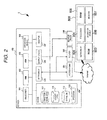
- FIG. 1 is a diagram showing a configuration example of a system in an embodiment.
- An information providing system 1 includes, for example, a server 100, a signage apparatus 200, an access point 301, a router 302, and a client terminal 800.
- the server 100 and the signage apparatus 200 are connected by a video input and output cable such as an HDMI (High Definition Multimedia Interface) cable or a DVI (Digital Visual Interface) cable.
- the server 100 is connected to the access point 301 and the router 302 by, for example, a LAN (Local Area Network) cable. Note that the server 100 and the signage apparatus 200 may be connected using a LAN cable.
- the server 100 is a computer that performs display control of the signage apparatus 200 and provides, via the access point 301, information to portable terminal apparatuses 401 to 403 carried by store visitors, event participants, and pedestrians.
- the server 100 acquires image data transmitted from the portable terminal apparatuses 401 to 403 via the access point 301 and causes the signage apparatus 200 to display the image data.
- the server 100 uploads the image data to a site of an SNS (Social Networking Service) via the router 302. Note that communication between the server 100 and the portable terminal apparatuses 401 to 403 may be performed using a broad area line network not via the access point 301.
- the server 100 can receive an operation input to an operation device 108 by an administrator and create and edit a user interface screen that the server 100 causes the signage apparatus 200 to display.
- the signage apparatus 200 can be set in, for example, a commercial facility.
- the signage apparatus 200 is an electronic sign board disposed in a position viewable by not only store visitors and event participants but also pedestrians and the like.
- the signage apparatus 200 displays an image according to a video signal output from the server 100. A specific display example is explained below.
- the signage apparatus 200 may emit sound according to a sound signal output from the server 100.
- the access point 301 is a communication infrastructure apparatus for the server 100 and the portable terminal apparatuses 401 to 403 to perform radio communication.
- the access point 301 performs communication conforming to the standard of IEEE802.11 and performs encrypted communication.
- the router 302 is a device that relays communication between the information providing system 1 and an external device.
- the server 100 is capable of uploading an image to the SNS site via the router 302.
- the portable terminal apparatuses 401 to 403 are, for example, communication terminal apparatuses such as smart phones carried by store visitors, event participants, and passengers (hereinafter referred to as users).
- the portable terminal apparatuses 401 to 403 are not always limited to the communication terminal apparatuses and may be notebook computers or tablet computers.
- the portable terminal apparatuses 401 to 403 are capable of performing at least radio communication.
- a Web browser and a camera application for image pickup are introduced into the portable terminal apparatuses 401 to 403.
- the portable terminal apparatuses 401 to 403 display operation screens on touch panel displays using the Web browser, acquire operation information from the users via the touch panel displays, and transmit the operation information to the server 100.
- the portable terminal apparatuses 401 to 403 transmit picked-up images to the server 100 via the access point 301.
- the client terminal 800 is a communication terminal such as a personal computer capable of communicating with the server 100 via, for example, the Internet, a LAN, or a WAN.
- a user can perform an operation input using an operation device 808 of the client terminal 800 and create and edit a user interface screen provided from the server 100 to the signage apparatus 200.
- the configuration of the server 100 is explained with reference to FIG. 2 .
- the server 100 includes a processor 101, a RAM (Random Access Memory) 102, a ROM (Read Only Memory) 103, a HDD (Hard Disk Drive) 104, a network I/F (Interface) 105, an output device 106, a monitor 107, and an operation device 108.
- the processor 101 is an arithmetic unit such as a CPU (Central Processing Unit).
- the processor 101 expands, in the RAM 102, a computer program stored in the ROM 103 and a computer program 115 stored in the HDD 104 and executes an arithmetic operation to provide various functions while cooperating with the respective kinds of hardware.
- the RAM 102 is a main storage device.
- the ROM 103 is a device having stored therein a system program and the like in a nonvolatile manner.
- the HDD 104 is an auxiliary storage device that stores computer programs, data, and the like in a nonvolatile manner.
- the network I/F 105 is a LAN board and performs communication between the access point 301 and the router 302.
- the output device 106 is a device including an HDMI terminal, a DVI terminal, and a controller that controls video output.
- the output device 106 is connected to the signage apparatus 200 via a cable.
- the monitor 107 and the operation device 108 (e.g., a keyboard) is an operation display unit used by, for example, the administrator of the server 100 when performing maintenance.
- exhibition image data 111 layout data 112, a detail DB 113, and the computer program 115 are stored in advance.
- the computer program 115 provides a Web server function and includes a program group executed according to an instruct ion fromclients (in this example, the portable terminal apparatuses 401 to 403).
- the exhibition image data 111 is a data group of compiled representative images of commodities and held events displayed on the signage apparatus 200.
- the layout data 112 is a data group that defines arrangement positions, directions, sizes, and the like in displaying characters, images, and the like on the signage apparatus 200.
- the layout data 112 includes, for example, a markup language, a style sheet, and a script to be executed in the server 100 and the signage apparatus 200.
- the detail DB 113 is a database having stored therein detailed data associated with the respective representative images of the exhibition image data 111.
- various kinds of information such as file names of the representative images, product names and prices of clothes indicated by the representative images, presence or absence of stocks for respective colors, coordinate examples (combination examples of clothes recommended by the store), and a remarks column are stored as one record.
- text information such as information indicating whether a commodity is a discount target commodity is stored.
- the various kinds of information in the record are detailed information transmitted to the portable terminal apparatuses 401 to 403 of the user.
- the configuration of the client terminal 800 is explained with reference to FIG. 2 .
- the client terminal 800 includes, for example, a processor 801, a RAM (Random Access Memory) 802, a ROM (Read Only Memory) 803, a network I/F (Interface) 805, a monitor 807, and the operation device 808.
- the processor 801 is an arithmetic unit such as a CPU (Central Processing Unit).
- the processor 801 expands, in the RAM 802, a computer program stored in the ROM 803 and a computer program stored in a storage device such as a not-shown HDD and executes an arithmetic operation to provide various functions while cooperating with the respective kinds of hardware.
- the RAM 802 is a main storage device.
- the ROM 803 is a device having stored therein a system program and the like in a nonvolatile manner.
- the not-shown HDD is a storage device usually included in a communication terminal and is an auxiliary storage device that stores computer programs, data, and the like in a nonvolatile manner.
- the network I/F 805 performs communication with, for example, the router 302 via a communication line such as the Internet.
- the monitor 807 and the operation device 808 e.g., a keyboard
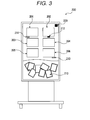
- FIG. 3 A display example of the user interface screen in the signage apparatus 200 is shown in FIG. 3 .
- the signage apparatus 200 displays representative images 201 to 206 in an upper part of a display.
- the representative images 201 to 206 are snap photograph images of people who wear commodity clothes and are arrayed in the longitudinal and lateral directions and displayed as a list.
- the representative images 201 to 206 are data in the exhibition image data 111 stored in the HDD 104.
- the server 100 acquires representative images designated in advance out of the exhibition image data 111 and displays the representative images 201 to 206 on the signage apparatus 200 according to the layout data 112.
- the signage apparatus 200 arranges and displays photograph images 210 transmitted by users in a lower part of the display at random. In this way, the representative images 201 to 206 and the photograph images 210 are simultaneously displayed.
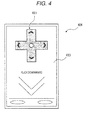
- Cursors 211 to 213 shown in FIG. 3 are pointers that move according to operation of the users. The operation of the cursors 211 to 213 is explained. It is assumed that a user operates the cursors 211 to 213 using the portable terminal apparatus 401. The user visually recognizes display content of the signage apparatus 200, picks up an image of a QR code 220 using the portable terminal apparatus 401 to acquire a URL of the server 100, and accesses the server 100 using the Web browser. The server 100 is triggered by the access from the portable terminal apparatus 401 and transmits the data (including the script) in the layout data 112 to the portable terminal apparatus 401. The portable terminal apparatus 401 executes the transmitted script in the Web browser to display an operation screen shown in FIG. 4 . The user operates a displayed cross key 411 using a touch panel display 413. Information concerning the operation is sequentially transmitted to the server 100. The server 100 moves the cursor 211 according to the operation information.
- the server 100 allows simultaneous operation from a plurality of terminals. That is, the operation explained above can be simultaneously performed using the portable terminal apparatuses 402 and 403.
- the cursors 211 to 213 it is unknown which cursors the users are operating. Therefore,in thisembodiment,the cursors shown in FIG. 3 and the cross key 411 shown in FIG. 4 are colored in the same color.
- the cursor 211 is operated using the portable terminal apparatus 401.
- the cursors 212 and 213 are respectively operated using the other portable terminal apparatuses 402 and 403.
- the display color of the cross key 411 and the color of the cursors are the same.
- the portable terminal apparatuses only have to display colors same as the colors of the cursors to a degree that the user can understand.
- the server 100 receives information concerning this operation and acquires, from the detail DB 113, detailed data associated with the selected representative image.
- the server 100 transmits the acquired detailed data and the representative image to the portable terminal apparatus 401.
- the server 100 acquires predetermined data from the layout data 112 and transmits the predetermined data.
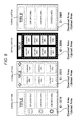
- the portable terminal apparatus 401 displays, according to the transmitted layout data, the representative image (it is assumed that the representative image 203 shown in FIG. 3 is selected) and detailed data 414 as shown in FIG. 5 .
- the representative image 203 is an image of a person wearing a jacket, a skirt, a muffler, and the like
- the detailed data 414 are values registered in the detail DB 113 such as product names, presence or absence of stocks, prices, and the like of the jacket, the skirt, the muffler, and the like.
- a coordinate example in the same record is also displayed.
- the remarks column is displayed as bargain information.
- the user After trying on the clothes with reference to the representative image 302, the coordinate example, and the like, the user presses a button 415 shown in FIG. 5 . Consequently, a camera application for image pickup is started. An image of a try-on state and the like can be picked up. Data of the picked-up image is transmitted to the server 100 and displayed as the photograph image 210 in the lower part of the display of the signage apparatus 200.
- the server 100 uploads, to the SNS, the picked-up image data transmitted from the portable terminal apparatus 401.
- an account for the information providing system 1 is registered in the SNS in advance.
- the server 100 uploads the picked-up image data using the registered account.
- the server 100 transmits a linked URL of the upload to the portable terminal apparatus 401. Consequently, the user can inform acquaintances and unspecified people of various kinds of information (tried-on clothes, a store name, etc.) using a function of an SNS application.
- the operations of the server 100 are realized by the processor 101 expanding, in the RAM 102, the computer program 115 stored in the HDD 104 in advance and executing an arithmetic operation.
- FIG. 6 is a flowchart for explaining an example of operation up to acquisition of detailed information by the user.
- the processor 101 receives an access from the portable terminal apparatus via the network I/F 105 (ACT 001). In this example, it is assumed that the server 100 is accessed from the portable terminal apparatus 401.
- the processor 101 also acquires information for identifying the user.
- the user identification information is stored in the portable terminal apparatus 401 using a technique such as Cookie. Note that, in the case of a new access, new user identification information is stored in the portable terminal apparatus 401.
- the processor 101 specifies and identifies the user on the basis of the transmitted user identification information (ACT 002).
- the user identification is reflected on, for example, the color of the cursor. If a cursor color same as a cursor color used last time is not in use, the processor 101 allocates the color to be used.
- the user identification may be performed using the Cookie as explained above or HTTP-based user authentication may be performed. A peculiar ID or the like of the terminal can be acquired and collated with registered information and access information in the past.
- the processor 101 controls the signage apparatus 200 to display the cursor for the user (ACT 003).
- the processor 101 moves the cursor according to operation information of the portable terminal apparatus 401 received by the network I/F 105 (ACT 004).
- the processor 101 repeatedly executes Act 004 until the processor 101 receives information concerning acquisition operation (flick operation in the downward direction) (a loop of No in ACT 005). If the processor 101 receives the acquisition operation (Yes in ACT 005), the processor 101 acquires, from the detail DB 113, detailed information corresponding to a selected representative image, acquires the selected representative image from the exhibit image data 111 (ACT 006), and transmits the data to the portable terminal apparatus 401 (ACT 007). Note that the processor 101 specifies a record in the detail DB 113 on the basis of a file name of the representative image and acquires the detailed information.
- FIG. 7 is a flowchart for explaining an operation example in receiving photograph image data picked up by the user.
- the processor 101 receives an access from the portable terminal apparatus 401 (Act 101) and identifies the user on the basis of user identification information transmitted simultaneously with the access (ACT 102).
- the processor 101 temporarily stores the picked-up image in the RAM 102 (ACT 103).
- the processor 101 applies decoration work to the picked-up image to, for example, set a frame or the like of a photograph (ACT 104).
- the processor 101 changes a large size of the picked-up image to a specified size and rotates the image (ACT 105).
- the image is rotated to a degree for not vertically reversing the image.
- the processor 101 causes the signage apparatus 200 to display an image after the processing in ACTS 104 and 105 (see a photograph image 210 in FIG. 3 ).
- Thephotograph image is arranged at random as shown in FIG. 3 . If a photograph image is already displayed, the photograph image is allowed to be arranged over the already-displayed photograph image.
- the processor 101 operates the network I/F 105 and uploads the picked-up image to the SNS site (Act 107).
- the picked-up image received in ACT 103 may be uploaded as it is or an image obtained by subjecting the picked-up image to various kinds of work may be uploaded.
- the user can select a desired representative image from the signage apparatus, which a plurality of people can view, and easily provide detailed information corresponding to the representative image. Since the user displays the picked-up image on the signage apparatus, it is possible to provide an information providing system of a user participation type rather than one-way information presentation.
- a method of creating and editing the user interface screen screen-displayed on the signage apparatus 200 as explained above in the information providing system 1 according to this embodiment (a user interface screen creation supporting method) is explained.
- a creator of the user interface screen operated by an unspecified large number of guests is capable of executing, by operating the operation device 108 of the server 100 or the operation device 808 of the client terminal 800, creation and editing of the user interface screen screen-displayed on the signage apparatus 200.
- FIG. 8 is a flowchart for explaining the creation supporting method for the user interface screen in this embodiment.
- a user who operates the operation device 808 of the client terminal 800 e.g., an administrator of a screen of a store
- processing is performed in the same process when the user directly operates the operation device 108 of the server 100 and edits the user interface screen provided to the signage apparatus 200 by the server 100. Therefore, a system substantively including processing functions of ACT 902 to ACT 904 explained below is equivalent to the user interface screen creation supporting system.
- the functions of ACT 902 to ACT 904 do not need to be provided in a single apparatus.
- the functions of ACT 902 to ACT 904 only have to be resultantly realized in the entire system.
- the processor 801 performs, on the basis of an operation input by a user to the operation device 808, authentication of log-in operation by the user (ACT 901).
- the processor 801 acquires guest information concerning a guest who operates the user interface screen (ACT 902).
- guest information examples include:
- the processor 801 receives, through a network, data such as an image picked up by the signage apparatus 200 and sound recorded by the signage apparatus 200 and analyzes the data to thereby estimate attributes of guests present around the signage apparatus 200.
- the signage apparatus 200 includes a camera and a microphone (a peripheral-guest-information acquiring unit) for acquiring "peripheral guest information" concerning users present around the user interface screen screen-displayed on the signage apparatus 200.
- Information acquired by the camera and the like is acquired as guest information by the processor 801 (the guest-information acquiring unit).
- images of a face, a body type, a hairstyle, clothes, and the like of a guest present around the user interface screen of the signage apparatus 200 and viewing the user interface screen are picked up by the camera.
- Face recognition and the like are performed by a publicly-known image recognition technique. Consequently, it is possible to estimate, as the peripheral guest information, sex, rough age, and the like of the guest present around the screen.
- Voice of a guest speaking around the user interface screen of the signage apparatus 200 is recorded by the microphone and analyzed by a publicly-known sound recognition technique or the like. Consequently, it is possible to estimate, as the peripheral guest information, sex, rough age, and the like of the guest present around the screen.
- the processor 801 can acquire a history of operation in the past of the signage apparatus 200 by a guest in association with attribute information of the guest who performed the operation.
- the processor 801 can acquire, as guest information, attribute information of customers registered in advance in the server 100 or the like as customer information at the time of admission to a membership service such as a point card.
- a membership service such as a point card.
- a user who performs creation and editing of a screen can use, as the guest information, registration information in the specific membership service.
- the screen creator can use, for screen creation support in performing creation and editing of the user interface screen, guest information registered in association with a service of the store A.
- the processor 801 can acquire, as the guest information, attribute information such as sexes, age brackets, heights, body types, and clothes of guests in an advertisement target class registered in advance in, for example, the HDD of the server 100 by the administrator of the user interface screen.
- the guest information acquired by the processor 801 the guest information of (3) and (4) above associated with an ID of a screen creator can be acquired on the basis of login information of the screen creator obtained by the authentication processing performed in ACT 901.
- information such as an operation history of the guest in a specific period of time in the signage apparatus 200 may be acquired as the guest information and used later.
- FIG. 9 is a diagram of an example of a design template group stored in advance in the HDD 104 of the server 100.
- design templates prepared in advance are attached with IDs.
- various design template groups are prepared assuming guests having various attributes such that great advertisement effects can be obtained according to attributes of guests set as an advertisement target.
- the design templates include:
- the processor 801 (a corresponding-template setting unit) can also set, on the basis of an operation input to the operation device 808 by the screen creator, any template that should be displayed to the guest indicated by the peripheral guest information acquired by the camera, the microphone, or the like functioning as the peripheral-guest-information acquiring unit.
- a design template of a user interface screen desired to be displayed is selected according to attributes of a guest in advance.
- the user interface screen by the design template associated with the attributes of the guest in advance is displayed. Consequently, for example, it is possible to provide information using a method suitable for an age bracket and sex of the guest.
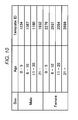
- the processor 801 extracts, on the basis of a data table shown in FIG. 10 registered in advance in the HDD 104 of the server 100, a recommended design template out of the design templates illustrated in FIG. 9 . For example, if acquired guest information indicates "female" and "six to ten years old", the processor 801 selects the design template of ID: 2931 on the basis of the table shown in FIG. 10 (ACT 903).
- the processor 801 (a template presenting unit) screen-displays the selected design template on the monitor 807 and presents the design template to the screen creator as a template for screen creation (ACT 904).
- ACT 904 a template for screen creation
- one template is resultantly displayed.
- a determination table may be used from which a plurality of design templates are resultantly presented.
- the design template selected as explained above has, at a page top, a text box "TITLE" serving as a caption. A plurality of contents areas are arrayed under the text box.
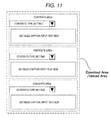
- FIG. 11 is a diagram showing an example of setting items of each of the contents areas in the design template of ID: 2931.
- the contents area can be set to selectively display any one of a "download area” that is an area where a downloadable image is displayed when the area is displayed as a user interface screen, an "upload area” that is an area where, when the area is displayed as a user interface screen, data upload to the area is possible, and a "fixed information area” where download and upload of data cannot be performed and predetermined information (e.g., index information such as "first floor” and "second floor”) is fixedly displayed.
- a download area that is an area where a downloadable image is displayed when the area is displayed as a user interface screen
- an "upload area” that is an area where, when the area is displayed as a user interface screen, data upload to the area is possible
- a "fixed information area” where download and upload of data cannot be performed and predetermined information (e.g., index information such as "first floor” and "second floor”) is fixedly displayed.
- predetermined information e.g., index information such as "first floor” and "second floor
- the processor 101 of the server 100 causes the HDD 104 of the server 100 to store, in association with a login ID of the screen creator and identification information of an organization such as a store associated with the login ID, information concerning the design template selected and subjected to the various settings as the layout data.
- a creator of a user interface screen and a store operator are enabled to optionally set information concerning guests in a target class using the processor 801 (the guest-information setting unit). Consequently, it is possible to present, to the screen creator, as candidate templates, design templates that enable more effective information provision to the target guest.
- Information concerning language setting of a guest owned terminal communicably connected to the signage apparatus 200 is acquired by the processor included in the signage apparatus 200 or the processor 101 (a language-setting-information acquiring unit) included in the server 100. Consequently, the processor (a display control unit) can cause, with language setting indicated by information concerning the language setting acquired by the processor (the language-setting-information acquiring unit), the signage apparatus 200 to display a user interface screen in the signage apparatus 200.
- a relationship between attributes of the guest set as the advertisement target and a design template associated with the attributes is specified beforehand mainly on the screen creator side.
- a design template frequently operated by a guest having certain attributes may be actively recommended to a screen creator who performs advertisements targeting the guests having the attributes.
- the functions for carrying out the invention are recorded in advance in the apparatus.
- the same functions may be downloaded from a network to the apparatus or a recording medium having the same functions stored therein may be installed in the apparatus.
- a form of the recording medium may be any form as long as the recording medium is a recording medium that can store a computer program and readable by the apparatus such as a CD-ROM.
- the functions obtained by the installation or the download in advance may be realized in cooperation with an OS (operating system) in the apparatus.
Landscapes
- Engineering & Computer Science (AREA)
- Theoretical Computer Science (AREA)
- Business, Economics & Management (AREA)
- Physics & Mathematics (AREA)
- General Physics & Mathematics (AREA)
- Strategic Management (AREA)
- Finance (AREA)
- Development Economics (AREA)
- Accounting & Taxation (AREA)
- General Engineering & Computer Science (AREA)
- Software Systems (AREA)
- Marketing (AREA)
- General Business, Economics & Management (AREA)
- Economics (AREA)
- Entrepreneurship & Innovation (AREA)
- Human Computer Interaction (AREA)
- Game Theory and Decision Science (AREA)
- Tourism & Hospitality (AREA)
- Data Mining & Analysis (AREA)
- Quality & Reliability (AREA)
- Health & Medical Sciences (AREA)
- Artificial Intelligence (AREA)
- Audiology, Speech & Language Pathology (AREA)
- Operations Research (AREA)
- Computational Linguistics (AREA)
- Human Resources & Organizations (AREA)
- General Health & Medical Sciences (AREA)
- Multimedia (AREA)
- Computer Networks & Wireless Communication (AREA)
- Signal Processing (AREA)
- User Interface Of Digital Computer (AREA)
- Management, Administration, Business Operations System, And Electronic Commerce (AREA)
- Information Transfer Between Computers (AREA)
Applications Claiming Priority (1)
| Application Number | Priority Date | Filing Date | Title |
|---|---|---|---|
| JP2014115112A JP2015230512A (ja) | 2014-06-03 | 2014-06-03 | ユーザインタフェース画面作成支援システム |
Publications (1)
| Publication Number | Publication Date |
|---|---|
| EP2953022A1 true EP2953022A1 (de) | 2015-12-09 |
Family
ID=53284095
Family Applications (1)
| Application Number | Title | Priority Date | Filing Date |
|---|---|---|---|
| EP15170327.9A Withdrawn EP2953022A1 (de) | 2014-06-03 | 2015-06-02 | Benutzerschnittstellenbildschirm-erzeugungsunterstützungssystem |
Country Status (3)
| Country | Link |
|---|---|
| US (1) | US10025777B2 (de) |
| EP (1) | EP2953022A1 (de) |
| JP (1) | JP2015230512A (de) |
Cited By (1)
| Publication number | Priority date | Publication date | Assignee | Title |
|---|---|---|---|---|
| CN108347628A (zh) * | 2018-01-10 | 2018-07-31 | 维沃移动通信有限公司 | 提示开通会员的方法、移动终端及服务器 |
Families Citing this family (7)
| Publication number | Priority date | Publication date | Assignee | Title |
|---|---|---|---|---|
| US10521502B2 (en) | 2016-08-10 | 2019-12-31 | International Business Machines Corporation | Generating a user interface template by combining relevant components of the different user interface templates based on the action request by the user and the user context |
| US10788972B2 (en) | 2017-10-02 | 2020-09-29 | Fisher-Rosemount Systems, Inc. | Systems and methods for automatically populating a display area with historized process parameters |
| GB2568586B (en) * | 2017-10-02 | 2022-11-23 | Fisher Rosemount Systems Inc | Systems and methods for configuring and presenting a display navigation hierachy in a process plant |
| KR102225356B1 (ko) * | 2019-01-04 | 2021-03-09 | 울산과학기술원 | Gui 디자인에 대한 피드백을 제공하는 방법 및 장치 |
| US10952519B1 (en) | 2020-07-16 | 2021-03-23 | Elyse Enterprises LLC | Virtual hub for three-step process for mimicking plastic surgery results |
| US10909879B1 (en) * | 2020-07-16 | 2021-02-02 | Elyse Enterprises LLC | Multilingual interface for three-step process for mimicking plastic surgery results |
| CN114021053A (zh) * | 2021-10-08 | 2022-02-08 | 钉钉(中国)信息技术有限公司 | 一种页面搭建方法、服务器、终端及存储介质 |
Citations (6)
| Publication number | Priority date | Publication date | Assignee | Title |
|---|---|---|---|---|
| JP2012018457A (ja) | 2010-07-06 | 2012-01-26 | Nippon Telegr & Teleph Corp <Ntt> | サイネージディスプレイ表示情報提供装置、サイネージディスプレイ表示情報提供方法、およびサイネージディスプレイ表示情報提供用プログラム |
| US20120078720A1 (en) * | 2010-09-28 | 2012-03-29 | Startforce, Inc. | Virtual desktop service with targeted advertisement |
| US20120137235A1 (en) * | 2010-11-29 | 2012-05-31 | Sabarish T S | Dynamic user interface generation |
| JP2013115545A (ja) | 2011-11-28 | 2013-06-10 | Streetmedia Inc | エリア別コンテンツ配信システム、携帯端末装置、エリア別コンテンツ提供サーバ装置、中継サーバ装置、方法及びプログラム |
| JP2013186573A (ja) | 2012-03-06 | 2013-09-19 | Sharp Corp | 情報処理装置 |
| US20140067519A1 (en) * | 2012-09-05 | 2014-03-06 | Toshiba Tec Kabushiki Kaisha | Information distribution server and information distribution method |
Family Cites Families (19)
| Publication number | Priority date | Publication date | Assignee | Title |
|---|---|---|---|---|
| AU4521201A (en) * | 1999-12-10 | 2001-06-25 | Jerry W. Lennon | Customer image capture and use thereof in a retailing system |
| WO2005015362A2 (en) * | 2003-08-06 | 2005-02-17 | Innovida, Inc. | System and method for delivering and optimizing media programming in public spaces |
| JP2006099722A (ja) * | 2004-08-31 | 2006-04-13 | Hitachi Systems & Services Ltd | 広告情報配信システム |
| US8417568B2 (en) * | 2006-02-15 | 2013-04-09 | Microsoft Corporation | Generation of contextual image-containing advertisements |
| US20090144157A1 (en) * | 2007-11-30 | 2009-06-04 | Saracino Charles T | Dynamic digital signage, customer content control portal & management system |
| JP2010079770A (ja) * | 2008-09-29 | 2010-04-08 | Hitachi Ltd | デジタルサイネージシステム |
| JP4447652B1 (ja) * | 2009-07-07 | 2010-04-07 | タケショウ株式会社 | 自動販売機システム |
| US20120179968A1 (en) * | 2011-01-06 | 2012-07-12 | Steven Gregory Madnick | Digital signage system and method |
| US20120246010A1 (en) * | 2011-03-23 | 2012-09-27 | Pitney Bowes Inc. | Method and system for creating targeted advertising utilizing behavioral economics marketing experts |
| US20120324342A1 (en) * | 2011-06-14 | 2012-12-20 | Mediplay, Inc. | Methods, Systems, and Computer Program Products for Generating a Media Presentation for Digital Signage |
| JP2013125047A (ja) * | 2011-12-13 | 2013-06-24 | Zenrin Datacom Co Ltd | 情報提供システム、使用言語種別提供端末装置、情報提供装置、情報提供方法、使用言語種別提供プログラムおよび情報提供プログラム |
| US20130179201A1 (en) * | 2012-01-06 | 2013-07-11 | Visa International Service Association | Systems and methods to optimize media presentations to a seated audience |
| JP2014014014A (ja) * | 2012-07-04 | 2014-01-23 | Toshiba Tec Corp | 情報配信装置、サイネージシステムおよびプログラム |
| JP2014048891A (ja) * | 2012-08-31 | 2014-03-17 | Toshiba Corp | サーバ装置、サーバ装置用プログラム |
| US20140114771A1 (en) * | 2012-10-19 | 2014-04-24 | Electronics And Telecommunications Research Institute | Apparatus and method for providing digital signage service reflecting user's preference |
| KR20140076274A (ko) * | 2012-12-12 | 2014-06-20 | 한국전자통신연구원 | 모바일 단말과 연동하는 디지털 사이니지 제공 장치 및 방법 |
| JP5449633B1 (ja) * | 2013-03-22 | 2014-03-19 | パナソニック株式会社 | 広告翻訳装置、広告表示装置、および広告翻訳方法 |
| US20150121245A1 (en) * | 2013-10-25 | 2015-04-30 | Feltmeng Inc. | Method, system and non-transitory computer-readable storage medium for displaying personalized information on digital out of home |
| US10817525B2 (en) * | 2013-12-13 | 2020-10-27 | impulseGUIDE.com | Method for displaying customized compilation media items on an electronic display device |
-
2014
- 2014-06-03 JP JP2014115112A patent/JP2015230512A/ja active Pending
-
2015
- 2015-04-23 US US14/694,050 patent/US10025777B2/en active Active
- 2015-06-02 EP EP15170327.9A patent/EP2953022A1/de not_active Withdrawn
Patent Citations (6)
| Publication number | Priority date | Publication date | Assignee | Title |
|---|---|---|---|---|
| JP2012018457A (ja) | 2010-07-06 | 2012-01-26 | Nippon Telegr & Teleph Corp <Ntt> | サイネージディスプレイ表示情報提供装置、サイネージディスプレイ表示情報提供方法、およびサイネージディスプレイ表示情報提供用プログラム |
| US20120078720A1 (en) * | 2010-09-28 | 2012-03-29 | Startforce, Inc. | Virtual desktop service with targeted advertisement |
| US20120137235A1 (en) * | 2010-11-29 | 2012-05-31 | Sabarish T S | Dynamic user interface generation |
| JP2013115545A (ja) | 2011-11-28 | 2013-06-10 | Streetmedia Inc | エリア別コンテンツ配信システム、携帯端末装置、エリア別コンテンツ提供サーバ装置、中継サーバ装置、方法及びプログラム |
| JP2013186573A (ja) | 2012-03-06 | 2013-09-19 | Sharp Corp | 情報処理装置 |
| US20140067519A1 (en) * | 2012-09-05 | 2014-03-06 | Toshiba Tec Kabushiki Kaisha | Information distribution server and information distribution method |
Cited By (2)
| Publication number | Priority date | Publication date | Assignee | Title |
|---|---|---|---|---|
| CN108347628A (zh) * | 2018-01-10 | 2018-07-31 | 维沃移动通信有限公司 | 提示开通会员的方法、移动终端及服务器 |
| CN108347628B (zh) * | 2018-01-10 | 2020-05-29 | 维沃移动通信有限公司 | 提示开通会员的方法、移动终端及服务器 |
Also Published As
| Publication number | Publication date |
|---|---|
| US20150347394A1 (en) | 2015-12-03 |
| US10025777B2 (en) | 2018-07-17 |
| JP2015230512A (ja) | 2015-12-21 |
Similar Documents
| Publication | Publication Date | Title |
|---|---|---|
| US10025777B2 (en) | User interface screen creation supporting system | |
| US10540707B2 (en) | Commercial information providing system and commercial information providing method | |
| US10252172B2 (en) | Game system with shared replays | |
| US8732766B2 (en) | Video object tag creation and processing | |
| US10398975B2 (en) | Information sharing system, information-processing device, storage medium, and information sharing method | |
| US20120158515A1 (en) | Dynamic advertisement serving based on an avatar | |
| US20090112473A1 (en) | Method for providing location and promotional information associated with a building complex | |
| US9553840B2 (en) | Information sharing system, server device, display system, storage medium, and information sharing method | |
| DE112016002384T5 (de) | Hilfsschicht mit automatisierter Extraktion | |
| US10318989B2 (en) | Information providing method and system using signage device | |
| CN111367608B (zh) | 酒店信息展示及管理方法、装置、电子设备、存储介质 | |
| CN111400588A (zh) | 酒店搜索及信息管理方法、装置、电子设备、存储介质 | |
| US20230328013A1 (en) | Comment art management system, comment art management method, comment art management program, and computer-readable recording medium | |
| Kim et al. | Exploring Visual Attention, Consumption Vision, and Attitude Toward Café Menus Using Eye‐Tracking Analysis | |
| US10268640B1 (en) | System for communication of object-directed feelings | |
| JP7281012B1 (ja) | プログラム、情報処理方法及び情報処理システム | |
| JP7370464B2 (ja) | 情報処理装置、情報処理方法、情報処理プログラム | |
| US20250335954A1 (en) | Notification device, notification system, notification method, and recording medium | |
| US20250285170A1 (en) | Information processing device and information processing method | |
| JP7382111B1 (ja) | 情報処理装置及び情報処理方法 | |
| US20250285163A1 (en) | Information processing device and information processing method | |
| JP7485718B2 (ja) | 情報提供装置、情報提供方法、および情報提供プログラム | |
| JPWO2020095546A1 (ja) | 情報処理装置、情報処理システム、および情報処理方法、並びにプログラム | |
| TWI375790B (en) | Method for providing location and promotional information associated with a building complex | |
| JP6989994B1 (ja) | 情報処理装置、情報処理方法および情報処理プログラム |
Legal Events
| Date | Code | Title | Description |
|---|---|---|---|
| PUAI | Public reference made under article 153(3) epc to a published international application that has entered the european phase |
Free format text: ORIGINAL CODE: 0009012 |
|
| AK | Designated contracting states |
Kind code of ref document: A1 Designated state(s): AL AT BE BG CH CY CZ DE DK EE ES FI FR GB GR HR HU IE IS IT LI LT LU LV MC MK MT NL NO PL PT RO RS SE SI SK SM TR |
|
| AX | Request for extension of the european patent |
Extension state: BA ME |
|
| RIN1 | Information on inventor provided before grant (corrected) |
Inventor name: HIRAMA, MIKA Inventor name: FUJIWARA, AKIHIKO Inventor name: TANAKA, HIROYO Inventor name: UCHIDA, SHIGEO |
|
| STAA | Information on the status of an ep patent application or granted ep patent |
Free format text: STATUS: THE APPLICATION IS DEEMED TO BE WITHDRAWN |
|
| 18D | Application deemed to be withdrawn |
Effective date: 20160610 |