EP2966558A1 - Procédé de commande tactile multi-canal, dispositif et support de stockage informatique destinés à une machine d'intégration - Google Patents
Procédé de commande tactile multi-canal, dispositif et support de stockage informatique destinés à une machine d'intégration Download PDFInfo
- Publication number
- EP2966558A1 EP2966558A1 EP14783408.9A EP14783408A EP2966558A1 EP 2966558 A1 EP2966558 A1 EP 2966558A1 EP 14783408 A EP14783408 A EP 14783408A EP 2966558 A1 EP2966558 A1 EP 2966558A1
- Authority
- EP
- European Patent Office
- Prior art keywords
- annotation
- image
- channel
- unit
- Prior art date
- Legal status (The legal status is an assumption and is not a legal conclusion. Google has not performed a legal analysis and makes no representation as to the accuracy of the status listed.)
- Granted
Links
Images

Classifications
-
- G—PHYSICS
- G06—COMPUTING OR CALCULATING; COUNTING
- G06F—ELECTRIC DIGITAL DATA PROCESSING
- G06F3/00—Input arrangements for transferring data to be processed into a form capable of being handled by the computer; Output arrangements for transferring data from processing unit to output unit, e.g. interface arrangements
- G06F3/01—Input arrangements or combined input and output arrangements for interaction between user and computer
- G06F3/048—Interaction techniques based on graphical user interfaces [GUI]
- G06F3/0487—Interaction techniques based on graphical user interfaces [GUI] using specific features provided by the input device, e.g. functions controlled by the rotation of a mouse with dual sensing arrangements, or of the nature of the input device, e.g. tap gestures based on pressure sensed by a digitiser
- G06F3/0488—Interaction techniques based on graphical user interfaces [GUI] using specific features provided by the input device, e.g. functions controlled by the rotation of a mouse with dual sensing arrangements, or of the nature of the input device, e.g. tap gestures based on pressure sensed by a digitiser using a touch-screen or digitiser, e.g. input of commands through traced gestures
-
- G—PHYSICS
- G06—COMPUTING OR CALCULATING; COUNTING
- G06F—ELECTRIC DIGITAL DATA PROCESSING
- G06F3/00—Input arrangements for transferring data to be processed into a form capable of being handled by the computer; Output arrangements for transferring data from processing unit to output unit, e.g. interface arrangements
- G06F3/01—Input arrangements or combined input and output arrangements for interaction between user and computer
- G06F3/048—Interaction techniques based on graphical user interfaces [GUI]
- G06F3/0481—Interaction techniques based on graphical user interfaces [GUI] based on specific properties of the displayed interaction object or a metaphor-based environment, e.g. interaction with desktop elements like windows or icons, or assisted by a cursor's changing behaviour or appearance
-
- G—PHYSICS
- G06—COMPUTING OR CALCULATING; COUNTING
- G06F—ELECTRIC DIGITAL DATA PROCESSING
- G06F3/00—Input arrangements for transferring data to be processed into a form capable of being handled by the computer; Output arrangements for transferring data from processing unit to output unit, e.g. interface arrangements
- G06F3/01—Input arrangements or combined input and output arrangements for interaction between user and computer
- G06F3/048—Interaction techniques based on graphical user interfaces [GUI]
- G06F3/0484—Interaction techniques based on graphical user interfaces [GUI] for the control of specific functions or operations, e.g. selecting or manipulating an object, an image or a displayed text element, setting a parameter value or selecting a range
-
- G—PHYSICS
- G06—COMPUTING OR CALCULATING; COUNTING
- G06F—ELECTRIC DIGITAL DATA PROCESSING
- G06F3/00—Input arrangements for transferring data to be processed into a form capable of being handled by the computer; Output arrangements for transferring data from processing unit to output unit, e.g. interface arrangements
- G06F3/01—Input arrangements or combined input and output arrangements for interaction between user and computer
- G06F3/048—Interaction techniques based on graphical user interfaces [GUI]
- G06F3/0487—Interaction techniques based on graphical user interfaces [GUI] using specific features provided by the input device, e.g. functions controlled by the rotation of a mouse with dual sensing arrangements, or of the nature of the input device, e.g. tap gestures based on pressure sensed by a digitiser
- G06F3/0488—Interaction techniques based on graphical user interfaces [GUI] using specific features provided by the input device, e.g. functions controlled by the rotation of a mouse with dual sensing arrangements, or of the nature of the input device, e.g. tap gestures based on pressure sensed by a digitiser using a touch-screen or digitiser, e.g. input of commands through traced gestures
- G06F3/04883—Interaction techniques based on graphical user interfaces [GUI] using specific features provided by the input device, e.g. functions controlled by the rotation of a mouse with dual sensing arrangements, or of the nature of the input device, e.g. tap gestures based on pressure sensed by a digitiser using a touch-screen or digitiser, e.g. input of commands through traced gestures for inputting data by handwriting, e.g. gesture or text
-
- G—PHYSICS
- G06—COMPUTING OR CALCULATING; COUNTING
- G06F—ELECTRIC DIGITAL DATA PROCESSING
- G06F3/00—Input arrangements for transferring data to be processed into a form capable of being handled by the computer; Output arrangements for transferring data from processing unit to output unit, e.g. interface arrangements
- G06F3/12—Digital output to print unit, e.g. line printer, chain printer
-
- G—PHYSICS
- G06—COMPUTING OR CALCULATING; COUNTING
- G06F—ELECTRIC DIGITAL DATA PROCESSING
- G06F3/00—Input arrangements for transferring data to be processed into a form capable of being handled by the computer; Output arrangements for transferring data from processing unit to output unit, e.g. interface arrangements
- G06F3/12—Digital output to print unit, e.g. line printer, chain printer
- G06F3/1201—Dedicated interfaces to print systems
- G06F3/1202—Dedicated interfaces to print systems specifically adapted to achieve a particular effect
- G06F3/1203—Improving or facilitating administration, e.g. print management
- G06F3/1206—Improving or facilitating administration, e.g. print management resulting in increased flexibility in input data format or job format or job type
-
- G—PHYSICS
- G06—COMPUTING OR CALCULATING; COUNTING
- G06F—ELECTRIC DIGITAL DATA PROCESSING
- G06F3/00—Input arrangements for transferring data to be processed into a form capable of being handled by the computer; Output arrangements for transferring data from processing unit to output unit, e.g. interface arrangements
- G06F3/12—Digital output to print unit, e.g. line printer, chain printer
- G06F3/1201—Dedicated interfaces to print systems
- G06F3/1223—Dedicated interfaces to print systems specifically adapted to use a particular technique
- G06F3/1237—Print job management
- G06F3/1253—Configuration of print job parameters, e.g. using UI at the client
-
- G—PHYSICS
- G06—COMPUTING OR CALCULATING; COUNTING
- G06F—ELECTRIC DIGITAL DATA PROCESSING
- G06F3/00—Input arrangements for transferring data to be processed into a form capable of being handled by the computer; Output arrangements for transferring data from processing unit to output unit, e.g. interface arrangements
- G06F3/12—Digital output to print unit, e.g. line printer, chain printer
- G06F3/1201—Dedicated interfaces to print systems
- G06F3/1278—Dedicated interfaces to print systems specifically adapted to adopt a particular infrastructure
- G06F3/1285—Remote printer device, e.g. being remote from client or server
-
- G—PHYSICS
- G06—COMPUTING OR CALCULATING; COUNTING
- G06T—IMAGE DATA PROCESSING OR GENERATION, IN GENERAL
- G06T11/00—Two-dimensional [2D] image generation
- G06T11/10—Texturing; Colouring; Generation of textures or colours
-
- G—PHYSICS
- G06—COMPUTING OR CALCULATING; COUNTING
- G06T—IMAGE DATA PROCESSING OR GENERATION, IN GENERAL
- G06T11/00—Two-dimensional [2D] image generation
- G06T11/60—Creating or editing images; Combining images with text
-
- G—PHYSICS
- G06—COMPUTING OR CALCULATING; COUNTING
- G06F—ELECTRIC DIGITAL DATA PROCESSING
- G06F2203/00—Indexing scheme relating to G06F3/00 - G06F3/048
- G06F2203/041—Indexing scheme relating to G06F3/041 - G06F3/045
- G06F2203/04104—Multi-touch detection in digitiser, i.e. details about the simultaneous detection of a plurality of touching locations, e.g. multiple fingers or pen and finger
-
- G—PHYSICS
- G06—COMPUTING OR CALCULATING; COUNTING
- G06F—ELECTRIC DIGITAL DATA PROCESSING
- G06F2203/00—Indexing scheme relating to G06F3/00 - G06F3/048
- G06F2203/048—Indexing scheme relating to G06F3/048
- G06F2203/04803—Split screen, i.e. subdividing the display area or the window area into separate subareas
-
- G—PHYSICS
- G06—COMPUTING OR CALCULATING; COUNTING
- G06T—IMAGE DATA PROCESSING OR GENERATION, IN GENERAL
- G06T2207/00—Indexing scheme for image analysis or image enhancement
- G06T2207/10—Image acquisition modality
- G06T2207/10024—Color image
Definitions
- the present invention relates generally to the field of multichannel display control of an all-in-one machine, and more particularly, to a method for multichannel touch control of an all-in-one machine, a device for multichannel touch control of an all-in-one machine, and a computer storage medium storing the method.
- An all-in-one machine is an integrative equipment which combines the functions of TV, touch and PC.
- most of all-in-one machines have the function of channel switching between VGA, HDMI, AV and YPBPR channels.
- channel A a channel
- channel B a target channel
- the channel B may be displayed after system processing, and the user may perform some operations in the channel B, and then switch back to the channel A in the same way. The frequent switches in this way may be a tedious and time consuming process to the user.
- an object of the present invention is to provide a method for multichannel touch control of an all-in-one machine, which does not require switching the channel one after another and is convenient for the user's operation when performing operations on the display content of the multiple channels in the all-in-one machine.
- a method for multichannel touch control of an all-in-one machine including:
- the display content of the multiple channels can be displayed by providing a channel display window on the user interface of the all-in-one machine, and with the multichannel touch control component set up on the user interface, the touch control operation on the multiple channels at the same time can be activated, for example, the display content of the multiple channels can be annotated, captured or printed at the same time, without having to respectively switch to the respective channel before performing the corresponding operation in the channel.
- the respective link button set up between the channel display window and the respective channel it is convenient to switch between the multiple channels by the respective link button set up between the channel display window and the respective channel.
- the step 2 includes: providing a transparent annotation window above the channel display window, receiving touch point information from a user, converting the touch point information into annotations, and storing the annotations corresponding to each of the channels respectively.
- the transparent annotation window overlays the channel display window, but the transparent annotation window is transparent, so the feel of the image cannot be affected.
- the transparent annotation window can receive touch point information of the user, and covert the touch point information into a visual figure, character or line, which can be shown on the image as an annotation.
- the annotations respectively corresponding to each of the channels can be stored so as to display each of the annotations on the image at the same time.
- the present invention is convenient to capture the display images respectively corresponding to each of the channel, to enhance the user experience.
- the image of the channel display window with an annotation can be captured that the image with the annotation can be stored.
- the step 2 includes: setting up an image-capturing activation button on the user interface, and receiving the touch point information of the user after activating the image-capturing activation button; and creating an image-capturing box based on the touch point information, and storing the images captured by the image-capturing box respectively corresponding to each of the channel.
- the image of the channel display window with an annotation can be captured that the image with the annotation can be stored.
- the step 2 includes: setting up a print activation button on the user interface, and receiving the touch point information of the user after activating the print activation button; and acquiring print areas based on the touch point information, putting the print areas respectively corresponding to each of the channels into the same print task, and outputting the print task to complete the print.
- the pages of all of the channels can be printed by driving an external printer only once, which does not take up too much of the channel resources of the printer.
- the image of the whole screen with the annotation in each channel can be printed, the image shown on the whole channel display window can be also printed, and a certain area captured from the channel display window can be further printed.
- the above same print task includes at least one page to be printed.
- another object of the present invention is to provide a device for multichannel touch control of an all-in-one machine, which does not require switching the channel one after another and is convenient for the user's operation when performing operations on the display content of the multiple channels in the all-in-one machine.
- a device for multichannel touch control of an all-in-one machine including:
- the display content of the multiple channels can be displayed by providing a channel display window on the user interface of the all-in-one machine with the window editing unit.
- the touch control unit can set up the multichannel touch control component on the user interface, and the touch control operation on the multiple channels at the same time can be activated with the multichannel touch control component, for example, the display content of the multiple channels can be annotated, captured or printed at the same time, without having to respectively switch to the respective channel before performing the corresponding operation in the channel.
- a further object of the present invention is to provide a computer-readable storage medium storing computer-executable instructions which, when executed, perform the method for multichannel touch control of the all-in-one machine.
- a method for multichannel touch control of an all-in-one machine includes:
- the display content of the multiple channels can be displayed by providing a channel display window on the user interface of the all-in-one machine, and with the multichannel touch control component set up on the user interface, the touch control operation on the multiple channels at the same time can be activated, for example, the display content of the multiple channels can be annotated, captured or printed at the same time, without having to respectively switch to the respective channel before performing the corresponding operation in the channel.
- the respective link button set up between the channel display window and the respective channel it is convenient to switch between the multiple channels by the respective link button set up between the channel display window and the respective channel.
- the channel display window may be set up in an Android system, and the channel display window may display the display content of the multiple channels at the same time, for example, the channel display window may display the content of all of the multiple channels in a plurality of sub windows which correspond to the multiple channels respectively.
- the channel display window may also be switched to display content of a certain channel alone, for example, when it is switched to a certain channel, the content corresponding to the channel may be displayed in the whole channel display window while the content of other channels may be hidden.
- both of the size and location of the channel display window may be adjusted.
- a drop-down box may be created in the menu bar, which includes a link button of each channel.
- the all-in-one machine can be switched from the current channel to another channel corresponding to the link button, and the image of the channel may be display in the channel display window.
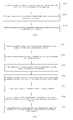
- FIG. 1 is a flow diagram illustrating a method for multichannel touch control of an all-in-one machine according to Example One of the present invention.
- the method for multichannel touch control of an all-in-one machine can implement annotations for the multiple channels, including:
- the transparent annotation window overlays the channel display window, but the transparent annotation window is transparent, so the feel of the image cannot be affected.
- the transparent annotation window can receive touch point information of the user, and covert the touch point information into a visual figure, character or line, which can be shown on the image as an annotation.
- the annotations respectively corresponding to each of the channels can be stored so as to display each of the annotations on the image at the same time.
- FIG. 2 is a flow diagram shown an embodiment of a method for multichannel touch control of an all-in-one machine to implement annotations in multiple channels according to one embodiment of the present invention.
- the method includes:
- the technical solution includes an Android user interface, a channel display window and a transparent annotation window configured to display an annotation.
- the channel display window is arranged on the Android user interface, and the size and location of the channel display window is adjustable.
- the transparent annotation window may overlay the channel display window.
- the image information of other channels can be displayed on the area of the channel display window in the current user interface in real time, and it is possible to make an annotation at any location of the whole display screen.
- the present invention uses a three-tier structure, including an Android user interface layer, a channel display window layer and a transparent annotation layer.
- the Android user interface layer as the lowest layer, is configured to display the current interface and control the location of the channel display window.
- the channel display window layer as the middle layer, is configured to display information of other channels, and it would have to depend on the Android user interface layer which is used as a carrier.
- the transparent annotation layer as the uppermost layer, is configured to receive user input and display annotations.
- the Android user interface layer may be implemented by the Activity of the Android
- the channel display window layer may be implemented by the SurfaceView of the Android
- the transparent annotation layer may also be implemented by the SurfaceView of the Android.
- the transparent annotation layer When the transparent annotation window of the transparent annotation layer is in a writing mode to receive touch events of the user, the transparent annotation layer is responsible for processing the point data and forming a certain graphic element which may be display on the SurfaceView of this layer. Because this layer is transparent, the annotation looks like an annotation directly made on the channel display window layer.
- the writing mode can be determined by the type or pattern of the annotation.
- the types of the annotation include graphic annotation, line annotation and/or text annotation
- the wiring mode includes:
- the starting point where the touch starts, the end point where the touch is end, and the sampling points between the starting point and the end point may be connected into a line.
- the sampling rate is high, an irregular line may be formed according to the touch of the user.
- the type of the annotation is a graphic annotation, the starting point and the starting point may be connected to form a closed region.
- the annotation may be displayed on the image with a predefined color, such as red.
- the graphic annotation or line annotation that has been formed may be edited by some operation, such as deletion or adding text.
- the deletion means cancelling the annotation.
- the adding text means adding a text annotation onto the graphic annotation or line annotation.
- the annotation includes a graphics library and a line library storing preset patterns.
- the wiring mode includes:
- annotation formed may be a straight line, a wave line, a circle, a rectangle or other basic patterns.
- a rectangular region object with the same size of the channel display winder layer is defined in the transparent annotation layer, which is called as a transparent annotation window.
- the user performs a selecting operation on the transparent annotation window, whether the operation is within the rectangular region of the channel display window is determined, and if so, the operation will be executed in the rectangular region.
- the result of the execution may be informed to the Android user interface layer, and the Android user interface layer may adjust the size or location of the channel display window.
- the operations on the channel display window may include moving and zooming in and out.
- a drop-down box with a list of available channels may be provided that if the user selects a channel, the channel display window layer may switch to the channel for display.
- the present invention may create a graphic file package, a line file package and/or text file package respectively, configured to store various types or patterns of the annotation, which is convenience for calling.
- the annotation may be stored in a corresponding file package according to its type, together with its coordinate location with respect to the channel corresponding to the annotation. In this way, it is known an annotation will be displayed on which location of which channel.
- All of the annotations corresponding to the current channel may be called from all file packages after switching to the current channel, and the annotations may be displayed according to their coordinate locations respectively. Thus, even switching the channel, the annotation will not be lost.
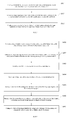
- FIG. 3 is a flow diagram illustrating a method for multichannel touch control of an all-in-one machine according to Example Two of the present invention.
- the method for multichannel touch control of an all-in-one machine can implement image-capturing for the multiple channels, including:
- a transparent annotation window may overlay the channel display window, which is transparent, so the feel of the image cannot be affected.
- the transparent annotation window can receive touch point information of the user, and covert the touch point information into a visual figure, character or line, which can be shown on the image as an annotation.
- the annotations respectively corresponding to each of the channels can be stored so as to display each of the annotations on the image at the same time.
- the present invention is convenient to capture the display images respectively corresponding to each of the channel, to enhance the user experience.
- the image of the channel display window with an annotation can be captured that the image with the annotation can be stored.
- FIG. 4 is a flow diagram shown an embodiment of a method for multichannel touch control of an all-in-one machine to implement image-capturing in multiple channels according to the present invention.
- the method includes:
- the technical solution of this example can combine the method according to the Example One, including an Android user interface, a channel display window and a transparent annotation window configured to display an annotation.
- the channel display window is arranged on the Android user interface, and the size and location of the channel display window is adjustable.
- the transparent annotation window may overlay the channel display window.
- the image with an annotation or without annotation may be captured.
- the size, shape and location of the image-capturing box should be determined.
- the image-capturing box may include a round box and a rectangular box.
- Forming an image-capturing box according to the touch point information includes:
- a rectangular region object with the same size of the channel display winder layer is defined in the transparent annotation layer, which is called as a transparent annotation window.
- the user performs a selecting operation on the transparent annotation window, whether the operation is within the rectangular region of the channel display window is determined, and if so, the operation will be executed in the rectangular region.
- the result of the execution may be informed to the Android user interface layer, and the Android user interface layer may adjust the size or location of the channel display window.
- the operations on the channel display window may include moving and zooming in and out.
- a drop-down box with a list of available channels may be provided that if the user selects a channel, the channel display window layer may switch to the channel for display.
- each of the captured images may be named according to a name of the corresponding channel and numbers, and may be stored in a selected file package.
- the system may start a service for image-capturing.
- the function of the service is to capture the content of whole screen, and store the content as a picture in a certain folder on a storage medium.
- the captured image is an image including content of other channels and with annotations, because the content of other channels and the annotations which have been made by the user on the channels are displayed in the screen.
- deletion prompt button may be inserted.
- the deletion prompt button When the deletion prompt button is activated, the captured image that has been stored can be deleted.
- the captured image may be selected according to the name of the image from the file package after switching between channels. And the captured image may be called and dragged onto the user interface for display. Thus, the acquired images corresponding to the multiple channels can be observed and compared after switching between channels.
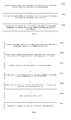
- FIG. 5 is a flow diagram illustrating a method for multichannel touch control of an all-in-one machine according to Example Three of the present invention.
- the method for multichannel touch control of an all-in-one machine can implement print for the multiple channels, including:
- a transparent annotation window may overlay the channel display window, which is transparent, so the feel of the image cannot be affected.
- the transparent annotation window can receive touch point information of the user, and covert the touch point information into a visual figure, character or line, which can be shown on the image as an annotation.
- the annotations respectively corresponding to each of the channels can be stored so as to display each of the annotations on the image at the same time.
- the present invention is convenient to put the pages to be printed in respective channels into the same print task to output without switching the system, which saves testing time.
- the pages of all of the channels can be printed by driving an external printer only once, which does not take up too much of the channel resources of the printer.
- the image of the whole screen with the annotation in each channel can be printed, the image shown on the whole channel display window can be also printed, and a certain area captured from the channel display window can be further printed.
- the above same print task includes at least one page to be printed.
- FIG. 6 is a flow diagram shown an embodiment of a method for multichannel touch control of an all-in-one machine to implement print of content in multiple channels according to the present invention.
- the method includes:
- step S605 may further include:
- the technical solution of this example can combine the method according to the Example One, including an Android user interface, a channel display window and a transparent annotation window configured to display an annotation.
- the channel display window is arranged on the Android user interface, and the size and location of the channel display window is adjustable.
- the transparent annotation window may overlay the channel display window.
- the print area should be determined before printing the image with an annotation or without annotation.
- the acquiring print areas based on the touch point information may include:
- the target print image boxes to be printed can be selected from the temporary folder to be arranged on the same page to be printed.
- a print image box is arranged on a page to be printed, there may be some blank space left on the printed page, because the print image box is a mall area captured by the user.
- the plurality of print image boxes stored in the temporary folder can be arranged on the same page to be printed in this embodiment, so it can make use of the space of the printed page to save printing paper.
- the user can select a target print image box from the temporary folder and arrange the print areas of a number of channels which are related to each other on the same page to be printed, which is convenient for the user to read and compare to enhance the user experience.
- the user can adjust the size of each target print image box in the page to be printed by zooming, to save space.
- the user can also adjust the location of each target print image box in the page to be printed by dragging, to edit the space of the page to be printed.
- the user may remove the print image box by a deletion operation.
- the print image boxes corresponding to the print areas stored in the temporary folder can be deleted.
- the system may delete the print image boxes just stored in the temporary folder to save storage space.
- the user can store the relevant files which have been printed in a fixed folder for later calling.
- the embodiments of the method for multichannel touch control of an all-in-one machine according to the present invention can be implemented in a coordinated way or an alternative way, that is, with the method for multichannel touch control of an all-in-one machine according to the present invention, one of annotation, image-capturing and print for multiple channels or their combination can be implemented.
- An all-in-one machine may have the function of annotation, image-capturing or print for multiple channels respectively, or have all of the functions of annotation, image-capturing and print for multiple channels.
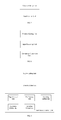
- FIG. 7 is a schematic diagram illustrating a device for multichannel touch control of an all-in-one machine according to certain embodiments of the present invention.
- the device for multichannel touch control of an all-in-one machine includes:
- the display content of the multiple channels can be displayed by providing a channel display window on the user interface of the all-in-one machine with the window editing unit.
- the touch control unit can set up the multichannel touch control component on the user interface, and the touch control operation on the multiple channels at the same time can be activated with the multichannel touch control component, for example, the display content of the multiple channels can be annotated, captured or printed at the same time, without having to respectively switch to the respective channel before performing the corresponding operation in the channel.
- FIG.8 is a schematic diagram illustrating a device for multichannel touch control of an all-in-one machine according to Example One of the present invention.
- the device for multichannel touch control of an all-in-one machine includes:
- the touch control unit of the device for multichannel touch control of the all-in-one machine includes the input receiving unit and the annotation generation unit.
- the operation mode of the units of the device for multichannel touch control of the all-in-one machine in this example is the same as the method for multichannel touch control of the all-in-one machine in the Example One.
- FIG. 9 is a schematic diagram shown an embodiment of a device for multichannel touch control of an all-in-one machine to implement annotations in multiple channels according to the present invention.
- the annotation generation unit includes:
- the annotation generation unit further includes:
- FIG. 9 it further includes a switching calling unit coupled to the location storage unit, configured to call all of the annotations corresponding to the current channel from all file packages after switching to the current channel, and display the annotations according to their coordinate locations respectively.
- a switching calling unit coupled to the location storage unit, configured to call all of the annotations corresponding to the current channel from all file packages after switching to the current channel, and display the annotations according to their coordinate locations respectively.
- annotation generation unit includes:
- the operation mode of the units of the device for multichannel touch control of the all-in-one machine in this example is the same as the method for multichannel touch control of the all-in-one machine in the Example One.
- FIG. 10 is a schematic diagram illustrating a device for multichannel touch control of an all-in-one machine according to Example Two of the present invention.
- the device includes:
- the touch control unit of the device for multichannel touch control of the all-in-one machine includes the image-capturing activation unit and the image-capturing editing unit.
- the operation mode of the units of the device for multichannel touch control of the all-in-one machine in this example is the same as the method for multichannel touch control of the all-in-one machine in the Example Two.
- FIG. 11 is a schematic diagram illustrating a device for multichannel touch control of an all-in-one machine according to an embodiment of Example Two of the present invention.
- the image-capturing box includes a round box and a rectangular box.
- the image-capturing editing unit includes:
- the image determination unit includes:
- the image-capturing editing unit further includes an image naming unit coupled to the image determination unit, configured to name each of the captured images according to a name of the corresponding channel and numbers and store in a selected file package.
- the device further includes an image-capturing calling unit coupled to the image naming unit, configured to select a captured image from the file package according to the name of the image after switching between channels, call the captured image, and drag the captured image onto the user interface for display.
- an image-capturing calling unit coupled to the image naming unit, configured to select a captured image from the file package according to the name of the image after switching between channels, call the captured image, and drag the captured image onto the user interface for display.
- the operation mode of the units of the device for multichannel touch control of the all-in-one machine in this example is the same as the method for multichannel touch control of the all-in-one machine in the Example Two.
- FIG. 12 is a schematic diagram illustrating a device for multichannel touch control of an all-in-one machine according to Example Three of the present invention.
- the device includes:
- the operation mode of the units of the device for multichannel touch control of the all-in-one machine in this example is the same as the method for multichannel touch control of the all-in-one machine in the Example Three.
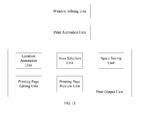
- FIG. 13 is a schematic diagram illustrating a device for multichannel touch control of an all-in-one machine according to an embodiment of Example Three of the present invention.
- the print output unit includes :
- FIG. 13 it further includes a printing page preview unit coupled to the area selection unit, configured to select target print image boxes to be printed from the temporary folder, and arrange the target print image boxes on the same page to be printed.
- a printing page preview unit coupled to the area selection unit, configured to select target print image boxes to be printed from the temporary folder, and arrange the target print image boxes on the same page to be printed.
- FIG. 13 it further includes a printing page editing unit coupled to the printing page preview unit, configured to adjust the size and/or location of each target print image box in the page to be printed, or delete the selected target print image box in the page to be printed.
- a printing page editing unit coupled to the printing page preview unit, configured to adjust the size and/or location of each target print image box in the page to be printed, or delete the selected target print image box in the page to be printed.
- the present invention further includes a space saving unit, configured to delete the print image box corresponding to the print area stored in the temporary folder.
- the operation mode of the units of the device for multichannel touch control of the all-in-one machine in this example is the same as the method for multichannel touch control of the all-in-one machine in the Example Three.
- the computer program can be stored in a computer-readable storage medium, and when the computer program is executed, it can include the processes of the above embodiments of each method.
- the non-transitory computer-readable storage medium can be a disc, a compact disc, a Read-Only Memory or a Random Access Memory.
- a computer-readable storage medium is further provided. When the computer program stored in the computer-readable storage medium is executed, it can implement any of the above methods for multichannel touch control of an all-in-one machine.
- the methods in the embodiments according to the present invention as mentioned above can be in a form of software and installed in a corresponding device, and the process of performing remote control on the external computer can be implemented by related process unit controlled by the software when the software is running.
- the above process unit may be arranged or installed in a corresponding terminal device, or itself may be a corresponding terminal device accordingly, such as mobile phone, tablet computer, PDA (Personal Digital Assistant), POS (Point of Sales), onboard computer or any other terminal devices.
- the present invention also provide a terminal device or server which is installed with the computer storage medium and can perform any of the methods for multichannel touch control of the all-in-one machine in accordance with the present invention.
- the terminal device may be a mobile phone, tablet PC, PDA (Personal Digital Assistant), POS (Point of Sales), onboard computer or any terminal device may need to perform touch control on multiple channels.
Landscapes
- Engineering & Computer Science (AREA)
- Theoretical Computer Science (AREA)
- General Engineering & Computer Science (AREA)
- Physics & Mathematics (AREA)
- General Physics & Mathematics (AREA)
- Human Computer Interaction (AREA)
- User Interface Of Digital Computer (AREA)
Priority Applications (1)
| Application Number | Priority Date | Filing Date | Title |
|---|---|---|---|
| EP18209439.1A EP3486761B1 (fr) | 2013-04-07 | 2014-04-04 | Procédé de commande tactile multicanal, dispositif et supports d'enregistrement informatiques pour machine d'intégration |
Applications Claiming Priority (4)
| Application Number | Priority Date | Filing Date | Title |
|---|---|---|---|
| CN201310118703.XA CN103197904B (zh) | 2013-04-07 | 2013-04-07 | 一体机多通道显示的打印方法及装置 |
| CN201310118741.5A CN103207731B (zh) | 2013-04-07 | 2013-04-07 | 一体机多通道显示的批注方法及装置 |
| CN201310118679.XA CN103197854B (zh) | 2013-04-07 | 2013-04-07 | 一体机多通道显示的截图方法及装置 |
| PCT/CN2014/074854 WO2014166369A1 (fr) | 2013-04-07 | 2014-04-04 | Procédé de commande tactile multi-canal, dispositif et support de stockage informatique destinés à une machine d'intégration |
Related Child Applications (2)
| Application Number | Title | Priority Date | Filing Date |
|---|---|---|---|
| EP18209439.1A Division-Into EP3486761B1 (fr) | 2013-04-07 | 2014-04-04 | Procédé de commande tactile multicanal, dispositif et supports d'enregistrement informatiques pour machine d'intégration |
| EP18209439.1A Division EP3486761B1 (fr) | 2013-04-07 | 2014-04-04 | Procédé de commande tactile multicanal, dispositif et supports d'enregistrement informatiques pour machine d'intégration |
Publications (3)
| Publication Number | Publication Date |
|---|---|
| EP2966558A1 true EP2966558A1 (fr) | 2016-01-13 |
| EP2966558A4 EP2966558A4 (fr) | 2017-02-15 |
| EP2966558B1 EP2966558B1 (fr) | 2019-01-09 |
Family
ID=51688938
Family Applications (2)
| Application Number | Title | Priority Date | Filing Date |
|---|---|---|---|
| EP14783408.9A Active EP2966558B1 (fr) | 2013-04-07 | 2014-04-04 | Procédé de commande tactile multi-canal, dispositif et support de stockage informatique destinés à une machine d'intégration |
| EP18209439.1A Active EP3486761B1 (fr) | 2013-04-07 | 2014-04-04 | Procédé de commande tactile multicanal, dispositif et supports d'enregistrement informatiques pour machine d'intégration |
Family Applications After (1)
| Application Number | Title | Priority Date | Filing Date |
|---|---|---|---|
| EP18209439.1A Active EP3486761B1 (fr) | 2013-04-07 | 2014-04-04 | Procédé de commande tactile multicanal, dispositif et supports d'enregistrement informatiques pour machine d'intégration |
Country Status (4)
| Country | Link |
|---|---|
| US (2) | US10025490B2 (fr) |
| EP (2) | EP2966558B1 (fr) |
| ES (1) | ES2809423T3 (fr) |
| WO (1) | WO2014166369A1 (fr) |
Cited By (1)
| Publication number | Priority date | Publication date | Assignee | Title |
|---|---|---|---|---|
| CN111427501A (zh) * | 2020-03-23 | 2020-07-17 | 广州视源电子科技股份有限公司 | 触控实现方法及交互智能设备 |
Families Citing this family (3)
| Publication number | Priority date | Publication date | Assignee | Title |
|---|---|---|---|---|
| US10025490B2 (en) * | 2013-04-07 | 2018-07-17 | Guangzhou Shirui Electronics Co., Ltd. | Method, device and computer storage medium for multichannel touch control of all-in-one machine |
| WO2018200073A1 (fr) | 2017-04-27 | 2018-11-01 | Hewlett-Packard Development Company, L.P. | Impression dans une zone d'impression d'un support d'impression définie par l'utilisateur |
| CN115269460B (zh) * | 2022-05-25 | 2026-03-06 | 深圳市鸿合创新信息技术有限责任公司 | 多个外接设备的切换方法及相关设备 |
Family Cites Families (27)
| Publication number | Priority date | Publication date | Assignee | Title |
|---|---|---|---|---|
| CN2697983Y (zh) | 2003-04-17 | 2005-05-04 | 陈绍华 | 一种智能信息电视 |
| CN1538735A (zh) | 2003-04-17 | 2004-10-20 | 陈绍华 | 一种智能信息电视及收听收看方法 |
| US6844891B1 (en) | 2003-07-08 | 2005-01-18 | Eastman Kodak Company | Aligning in five degrees of freedom a multichannel laser printhead for transferring OLED material |
| JP4003746B2 (ja) | 2004-01-07 | 2007-11-07 | ソニー株式会社 | 表示装置 |
| US20050273700A1 (en) * | 2004-06-02 | 2005-12-08 | Amx Corporation | Computer system with user interface having annotation capability |
| KR20070021001A (ko) | 2005-08-17 | 2007-02-22 | 삼성전자주식회사 | 이미지 편집기능을 구비한 화상형성장치 및 그 방법 |
| JP4393444B2 (ja) | 2005-11-02 | 2010-01-06 | キヤノン株式会社 | 情報処理方法およびその装置 |
| CN101206640B (zh) | 2006-12-22 | 2011-01-26 | 深圳市学之友教学仪器有限公司 | 用于对便携式电子设备中的电子资料进行批注的方法 |
| CN101477440A (zh) | 2009-01-15 | 2009-07-08 | 腾讯科技(深圳)有限公司 | 屏幕截图方法和屏幕截图系统 |
| US20100318921A1 (en) * | 2009-06-16 | 2010-12-16 | Marc Trachtenberg | Digital easel collaboration system and method |
| NO332170B1 (no) * | 2009-10-14 | 2012-07-16 | Cisco Systems Int Sarl | Anordning og fremgangsmate for kamerakontroll |
| JP5081939B2 (ja) | 2010-03-23 | 2012-11-28 | シャープ株式会社 | 操作機器、その操作機器を備えた電子機器および画像処理装置、ならびにその操作機器における情報表示方法 |
| CN102263706A (zh) | 2010-05-26 | 2011-11-30 | 腾讯科技(深圳)有限公司 | 一种截取图像的方法及装置 |
| CN101968716A (zh) | 2010-10-20 | 2011-02-09 | 鸿富锦精密工业(深圳)有限公司 | 电子阅读装置及其添加批注的方法 |
| US9377950B2 (en) | 2010-11-02 | 2016-06-28 | Perceptive Pixel, Inc. | Touch-based annotation system with temporary modes |
| CN102546905A (zh) | 2010-12-20 | 2012-07-04 | 康佳集团股份有限公司 | 在移动终端中屏幕截图的方法、系统及移动终端 |
| US9019400B2 (en) | 2011-05-31 | 2015-04-28 | Olympus Imaging Corp. | Imaging apparatus, imaging method and computer-readable storage medium |
| CN102419743A (zh) * | 2011-07-06 | 2012-04-18 | 北京汇冠新技术股份有限公司 | 一种批注方法及系统 |
| US20130077822A1 (en) * | 2011-09-28 | 2013-03-28 | John Randall Fredlund | Method for creating an index using an all-in-one printer and adjustable grouping parameters |
| CN102497521B (zh) | 2011-11-18 | 2015-07-22 | 冠捷显示科技(厦门)有限公司 | 一种预览方式选择视音频信号输入通道的设备和方法 |
| CN102663791A (zh) | 2012-03-20 | 2012-09-12 | 上海量明科技发展有限公司 | 一种针对截图区域进行剪辑的方法及客户端 |
| CN102707879A (zh) | 2012-04-17 | 2012-10-03 | 上海量明科技发展有限公司 | 选择截图区域图像轮廓的方法、客户端及系统 |
| US9678617B2 (en) * | 2013-01-14 | 2017-06-13 | Patrick Soon-Shiong | Shared real-time content editing activated by an image |
| US10025490B2 (en) * | 2013-04-07 | 2018-07-17 | Guangzhou Shirui Electronics Co., Ltd. | Method, device and computer storage medium for multichannel touch control of all-in-one machine |
| CN103197854B (zh) * | 2013-04-07 | 2016-08-03 | 广州视睿电子科技有限公司 | 一体机多通道显示的截图方法及装置 |
| CN103207731B (zh) * | 2013-04-07 | 2016-05-18 | 广州视睿电子科技有限公司 | 一体机多通道显示的批注方法及装置 |
| CN103197904B (zh) * | 2013-04-07 | 2017-04-12 | 广州视睿电子科技有限公司 | 一体机多通道显示的打印方法及装置 |
-
2014
- 2014-04-04 US US14/781,516 patent/US10025490B2/en active Active
- 2014-04-04 EP EP14783408.9A patent/EP2966558B1/fr active Active
- 2014-04-04 WO PCT/CN2014/074854 patent/WO2014166369A1/fr not_active Ceased
- 2014-04-04 EP EP18209439.1A patent/EP3486761B1/fr active Active
- 2014-04-04 ES ES18209439T patent/ES2809423T3/es active Active
-
2018
- 2018-07-16 US US16/036,859 patent/US20190179507A1/en not_active Abandoned
Cited By (2)
| Publication number | Priority date | Publication date | Assignee | Title |
|---|---|---|---|---|
| CN111427501A (zh) * | 2020-03-23 | 2020-07-17 | 广州视源电子科技股份有限公司 | 触控实现方法及交互智能设备 |
| CN111427501B (zh) * | 2020-03-23 | 2021-07-23 | 广州视源电子科技股份有限公司 | 触控实现方法及交互智能设备 |
Also Published As
| Publication number | Publication date |
|---|---|
| EP2966558B1 (fr) | 2019-01-09 |
| WO2014166369A1 (fr) | 2014-10-16 |
| ES2809423T3 (es) | 2021-03-04 |
| US10025490B2 (en) | 2018-07-17 |
| US20160054885A1 (en) | 2016-02-25 |
| EP2966558A4 (fr) | 2017-02-15 |
| EP3486761B1 (fr) | 2020-05-13 |
| EP3486761A1 (fr) | 2019-05-22 |
| US20190179507A1 (en) | 2019-06-13 |
Similar Documents
| Publication | Publication Date | Title |
|---|---|---|
| JP6779250B2 (ja) | メディア編集アプリケーション用の扇形編出ユーザインタフェースコントロール | |
| EP2487578B1 (fr) | Procédé and système pour contrôle de l' écran de terminal mobile | |
| EP2690545A2 (fr) | Procédé et système de support de services en nuage et terminal pour supporter celui-ci | |
| CN114564263A (zh) | 页面布局调整方法、装置 | |
| CN111008520A (zh) | 一种批注方法、装置、终端设备及存储介质 | |
| US10728197B2 (en) | Unscripted digital media message generation | |
| CN103197854B (zh) | 一体机多通道显示的截图方法及装置 | |
| US20130152018A1 (en) | Electronic device with touch screen and page processing method thereof | |
| US20190179507A1 (en) | Method, Device and Computer Storage Medium for Multichannel Touch Control of All-in-One Machine | |
| CN104123383A (zh) | 一种在媒体应用中使用的方法及装置 | |
| CN104699383B (zh) | 绑定关系更新方法和装置 | |
| US9330099B2 (en) | Multimedia apparatus and method for providing content | |
| CN103207731B (zh) | 一体机多通道显示的批注方法及装置 | |
| JP5376685B2 (ja) | コンテンツデータ表示装置、コンテンツデータ表示方法及びプログラム | |
| JP6070116B2 (ja) | 画像処理装置、画像処理システム、画像処理方法及びプログラム | |
| JP2008250700A (ja) | 情報処理装置、ウインドウ再生方法及びプログラム | |
| JP2018049450A (ja) | 表示制御方法及び表示装置 | |
| CN114089884A (zh) | 桌面编辑方法和电子设备 | |
| US9817560B2 (en) | Method for managing documents on a mobile device | |
| JP7006042B2 (ja) | 画像処理プログラム、情報処理装置および画像処理方法 | |
| WO2024041468A1 (fr) | Procédé et appareil de traitement de fichiers, dispositif électronique et support de stockage | |
| CN113946258A (zh) | 图片编辑处理方法、装置、存储介质、处理器及终端设备 | |
| JP2014071539A (ja) | 画像データ編集装置、および画像データ編集方法 | |
| JP6996196B2 (ja) | 情報処理装置及び情報処理プログラム | |
| CN103197904A (zh) | 一体机多通道显示的打印方法及装置 |
Legal Events
| Date | Code | Title | Description |
|---|---|---|---|
| PUAI | Public reference made under article 153(3) epc to a published international application that has entered the european phase |
Free format text: ORIGINAL CODE: 0009012 |
|
| 17P | Request for examination filed |
Effective date: 20151006 |
|
| AK | Designated contracting states |
Kind code of ref document: A1 Designated state(s): AL AT BE BG CH CY CZ DE DK EE ES FI FR GB GR HR HU IE IS IT LI LT LU LV MC MK MT NL NO PL PT RO RS SE SI SK SM TR |
|
| AX | Request for extension of the european patent |
Extension state: BA ME |
|
| DAX | Request for extension of the european patent (deleted) | ||
| RIC1 | Information provided on ipc code assigned before grant |
Ipc: G06F 3/041 20060101ALI20160922BHEP Ipc: G06T 11/00 20060101ALI20160922BHEP Ipc: G06F 3/0481 20130101ALI20160922BHEP Ipc: H04N 7/18 20060101ALI20160922BHEP Ipc: G06F 3/0488 20130101ALI20160922BHEP Ipc: G06F 3/12 20060101ALI20160922BHEP Ipc: G06F 3/048 20060101AFI20160922BHEP Ipc: G06T 11/60 20060101ALI20160922BHEP |
|
| A4 | Supplementary search report drawn up and despatched |
Effective date: 20170113 |
|
| RIC1 | Information provided on ipc code assigned before grant |
Ipc: G06T 11/60 20060101ALI20170109BHEP Ipc: G06T 11/00 20060101ALI20170109BHEP Ipc: G06F 3/12 20060101ALI20170109BHEP Ipc: G06F 3/0488 20130101ALI20170109BHEP Ipc: G06F 3/0481 20130101ALI20170109BHEP Ipc: H04N 7/18 20060101ALI20170109BHEP Ipc: G06F 3/041 20060101ALI20170109BHEP Ipc: G06F 3/048 20130101AFI20170109BHEP |
|
| STAA | Information on the status of an ep patent application or granted ep patent |
Free format text: STATUS: EXAMINATION IS IN PROGRESS |
|
| 17Q | First examination report despatched |
Effective date: 20180102 |
|
| GRAP | Despatch of communication of intention to grant a patent |
Free format text: ORIGINAL CODE: EPIDOSNIGR1 |
|
| STAA | Information on the status of an ep patent application or granted ep patent |
Free format text: STATUS: GRANT OF PATENT IS INTENDED |
|
| INTG | Intention to grant announced |
Effective date: 20180813 |
|
| GRAS | Grant fee paid |
Free format text: ORIGINAL CODE: EPIDOSNIGR3 |
|
| GRAA | (expected) grant |
Free format text: ORIGINAL CODE: 0009210 |
|
| STAA | Information on the status of an ep patent application or granted ep patent |
Free format text: STATUS: THE PATENT HAS BEEN GRANTED |
|
| AK | Designated contracting states |
Kind code of ref document: B1 Designated state(s): AL AT BE BG CH CY CZ DE DK EE ES FI FR GB GR HR HU IE IS IT LI LT LU LV MC MK MT NL NO PL PT RO RS SE SI SK SM TR |
|
| REG | Reference to a national code |
Ref country code: GB Ref legal event code: FG4D |
|
| REG | Reference to a national code |
Ref country code: CH Ref legal event code: EP Ref country code: AT Ref legal event code: REF Ref document number: 1088103 Country of ref document: AT Kind code of ref document: T Effective date: 20190115 |
|
| REG | Reference to a national code |
Ref country code: DE Ref legal event code: R096 Ref document number: 602014039620 Country of ref document: DE |
|
| REG | Reference to a national code |
Ref country code: IE Ref legal event code: FG4D |
|
| REG | Reference to a national code |
Ref country code: NL Ref legal event code: FP |
|
| REG | Reference to a national code |
Ref country code: LT Ref legal event code: MG4D |
|
| REG | Reference to a national code |
Ref country code: AT Ref legal event code: MK05 Ref document number: 1088103 Country of ref document: AT Kind code of ref document: T Effective date: 20190109 |
|
| PG25 | Lapsed in a contracting state [announced via postgrant information from national office to epo] |
Ref country code: PT Free format text: LAPSE BECAUSE OF FAILURE TO SUBMIT A TRANSLATION OF THE DESCRIPTION OR TO PAY THE FEE WITHIN THE PRESCRIBED TIME-LIMIT Effective date: 20190509 Ref country code: ES Free format text: LAPSE BECAUSE OF FAILURE TO SUBMIT A TRANSLATION OF THE DESCRIPTION OR TO PAY THE FEE WITHIN THE PRESCRIBED TIME-LIMIT Effective date: 20190109 Ref country code: SE Free format text: LAPSE BECAUSE OF FAILURE TO SUBMIT A TRANSLATION OF THE DESCRIPTION OR TO PAY THE FEE WITHIN THE PRESCRIBED TIME-LIMIT Effective date: 20190109 Ref country code: LT Free format text: LAPSE BECAUSE OF FAILURE TO SUBMIT A TRANSLATION OF THE DESCRIPTION OR TO PAY THE FEE WITHIN THE PRESCRIBED TIME-LIMIT Effective date: 20190109 Ref country code: PL Free format text: LAPSE BECAUSE OF FAILURE TO SUBMIT A TRANSLATION OF THE DESCRIPTION OR TO PAY THE FEE WITHIN THE PRESCRIBED TIME-LIMIT Effective date: 20190109 Ref country code: NO Free format text: LAPSE BECAUSE OF FAILURE TO SUBMIT A TRANSLATION OF THE DESCRIPTION OR TO PAY THE FEE WITHIN THE PRESCRIBED TIME-LIMIT Effective date: 20190409 Ref country code: FI Free format text: LAPSE BECAUSE OF FAILURE TO SUBMIT A TRANSLATION OF THE DESCRIPTION OR TO PAY THE FEE WITHIN THE PRESCRIBED TIME-LIMIT Effective date: 20190109 |
|
| PG25 | Lapsed in a contracting state [announced via postgrant information from national office to epo] |
Ref country code: BG Free format text: LAPSE BECAUSE OF FAILURE TO SUBMIT A TRANSLATION OF THE DESCRIPTION OR TO PAY THE FEE WITHIN THE PRESCRIBED TIME-LIMIT Effective date: 20190409 Ref country code: IS Free format text: LAPSE BECAUSE OF FAILURE TO SUBMIT A TRANSLATION OF THE DESCRIPTION OR TO PAY THE FEE WITHIN THE PRESCRIBED TIME-LIMIT Effective date: 20190509 Ref country code: RS Free format text: LAPSE BECAUSE OF FAILURE TO SUBMIT A TRANSLATION OF THE DESCRIPTION OR TO PAY THE FEE WITHIN THE PRESCRIBED TIME-LIMIT Effective date: 20190109 Ref country code: GR Free format text: LAPSE BECAUSE OF FAILURE TO SUBMIT A TRANSLATION OF THE DESCRIPTION OR TO PAY THE FEE WITHIN THE PRESCRIBED TIME-LIMIT Effective date: 20190410 Ref country code: LV Free format text: LAPSE BECAUSE OF FAILURE TO SUBMIT A TRANSLATION OF THE DESCRIPTION OR TO PAY THE FEE WITHIN THE PRESCRIBED TIME-LIMIT Effective date: 20190109 Ref country code: HR Free format text: LAPSE BECAUSE OF FAILURE TO SUBMIT A TRANSLATION OF THE DESCRIPTION OR TO PAY THE FEE WITHIN THE PRESCRIBED TIME-LIMIT Effective date: 20190109 |
|
| REG | Reference to a national code |
Ref country code: DE Ref legal event code: R097 Ref document number: 602014039620 Country of ref document: DE |
|
| PG25 | Lapsed in a contracting state [announced via postgrant information from national office to epo] |
Ref country code: IT Free format text: LAPSE BECAUSE OF FAILURE TO SUBMIT A TRANSLATION OF THE DESCRIPTION OR TO PAY THE FEE WITHIN THE PRESCRIBED TIME-LIMIT Effective date: 20190109 Ref country code: RO Free format text: LAPSE BECAUSE OF FAILURE TO SUBMIT A TRANSLATION OF THE DESCRIPTION OR TO PAY THE FEE WITHIN THE PRESCRIBED TIME-LIMIT Effective date: 20190109 Ref country code: SK Free format text: LAPSE BECAUSE OF FAILURE TO SUBMIT A TRANSLATION OF THE DESCRIPTION OR TO PAY THE FEE WITHIN THE PRESCRIBED TIME-LIMIT Effective date: 20190109 Ref country code: AL Free format text: LAPSE BECAUSE OF FAILURE TO SUBMIT A TRANSLATION OF THE DESCRIPTION OR TO PAY THE FEE WITHIN THE PRESCRIBED TIME-LIMIT Effective date: 20190109 Ref country code: AT Free format text: LAPSE BECAUSE OF FAILURE TO SUBMIT A TRANSLATION OF THE DESCRIPTION OR TO PAY THE FEE WITHIN THE PRESCRIBED TIME-LIMIT Effective date: 20190109 Ref country code: DK Free format text: LAPSE BECAUSE OF FAILURE TO SUBMIT A TRANSLATION OF THE DESCRIPTION OR TO PAY THE FEE WITHIN THE PRESCRIBED TIME-LIMIT Effective date: 20190109 Ref country code: EE Free format text: LAPSE BECAUSE OF FAILURE TO SUBMIT A TRANSLATION OF THE DESCRIPTION OR TO PAY THE FEE WITHIN THE PRESCRIBED TIME-LIMIT Effective date: 20190109 Ref country code: CZ Free format text: LAPSE BECAUSE OF FAILURE TO SUBMIT A TRANSLATION OF THE DESCRIPTION OR TO PAY THE FEE WITHIN THE PRESCRIBED TIME-LIMIT Effective date: 20190109 |
|
| PLBE | No opposition filed within time limit |
Free format text: ORIGINAL CODE: 0009261 |
|
| STAA | Information on the status of an ep patent application or granted ep patent |
Free format text: STATUS: NO OPPOSITION FILED WITHIN TIME LIMIT |
|
| PG25 | Lapsed in a contracting state [announced via postgrant information from national office to epo] |
Ref country code: SM Free format text: LAPSE BECAUSE OF FAILURE TO SUBMIT A TRANSLATION OF THE DESCRIPTION OR TO PAY THE FEE WITHIN THE PRESCRIBED TIME-LIMIT Effective date: 20190109 |
|
| REG | Reference to a national code |
Ref country code: CH Ref legal event code: PL |
|
| 26N | No opposition filed |
Effective date: 20191010 |
|
| REG | Reference to a national code |
Ref country code: BE Ref legal event code: MM Effective date: 20190430 |
|
| PG25 | Lapsed in a contracting state [announced via postgrant information from national office to epo] |
Ref country code: MC Free format text: LAPSE BECAUSE OF FAILURE TO SUBMIT A TRANSLATION OF THE DESCRIPTION OR TO PAY THE FEE WITHIN THE PRESCRIBED TIME-LIMIT Effective date: 20190109 Ref country code: LU Free format text: LAPSE BECAUSE OF NON-PAYMENT OF DUE FEES Effective date: 20190404 |
|
| PG25 | Lapsed in a contracting state [announced via postgrant information from national office to epo] |
Ref country code: CH Free format text: LAPSE BECAUSE OF NON-PAYMENT OF DUE FEES Effective date: 20190430 Ref country code: LI Free format text: LAPSE BECAUSE OF NON-PAYMENT OF DUE FEES Effective date: 20190430 |
|
| PG25 | Lapsed in a contracting state [announced via postgrant information from national office to epo] |
Ref country code: SI Free format text: LAPSE BECAUSE OF FAILURE TO SUBMIT A TRANSLATION OF THE DESCRIPTION OR TO PAY THE FEE WITHIN THE PRESCRIBED TIME-LIMIT Effective date: 20190109 Ref country code: BE Free format text: LAPSE BECAUSE OF NON-PAYMENT OF DUE FEES Effective date: 20190430 |
|
| PG25 | Lapsed in a contracting state [announced via postgrant information from national office to epo] |
Ref country code: TR Free format text: LAPSE BECAUSE OF FAILURE TO SUBMIT A TRANSLATION OF THE DESCRIPTION OR TO PAY THE FEE WITHIN THE PRESCRIBED TIME-LIMIT Effective date: 20190109 |
|
| PG25 | Lapsed in a contracting state [announced via postgrant information from national office to epo] |
Ref country code: IE Free format text: LAPSE BECAUSE OF NON-PAYMENT OF DUE FEES Effective date: 20190404 |
|
| PG25 | Lapsed in a contracting state [announced via postgrant information from national office to epo] |
Ref country code: CY Free format text: LAPSE BECAUSE OF FAILURE TO SUBMIT A TRANSLATION OF THE DESCRIPTION OR TO PAY THE FEE WITHIN THE PRESCRIBED TIME-LIMIT Effective date: 20190109 |
|
| PG25 | Lapsed in a contracting state [announced via postgrant information from national office to epo] |
Ref country code: MT Free format text: LAPSE BECAUSE OF FAILURE TO SUBMIT A TRANSLATION OF THE DESCRIPTION OR TO PAY THE FEE WITHIN THE PRESCRIBED TIME-LIMIT Effective date: 20190109 Ref country code: HU Free format text: LAPSE BECAUSE OF FAILURE TO SUBMIT A TRANSLATION OF THE DESCRIPTION OR TO PAY THE FEE WITHIN THE PRESCRIBED TIME-LIMIT; INVALID AB INITIO Effective date: 20140404 |
|
| PG25 | Lapsed in a contracting state [announced via postgrant information from national office to epo] |
Ref country code: MK Free format text: LAPSE BECAUSE OF FAILURE TO SUBMIT A TRANSLATION OF THE DESCRIPTION OR TO PAY THE FEE WITHIN THE PRESCRIBED TIME-LIMIT Effective date: 20190109 |
|
| P01 | Opt-out of the competence of the unified patent court (upc) registered |
Effective date: 20230714 |
|
| PGFP | Annual fee paid to national office [announced via postgrant information from national office to epo] |
Ref country code: NL Payment date: 20250418 Year of fee payment: 12 |
|
| PGFP | Annual fee paid to national office [announced via postgrant information from national office to epo] |
Ref country code: DE Payment date: 20250422 Year of fee payment: 12 |
|
| PGFP | Annual fee paid to national office [announced via postgrant information from national office to epo] |
Ref country code: FR Payment date: 20250425 Year of fee payment: 12 |
|
| PGFP | Annual fee paid to national office [announced via postgrant information from national office to epo] |
Ref country code: GB Payment date: 20260306 Year of fee payment: 13 |