EP2985986A1 - Interface utilisateur pour la gestion d'un dispositif sans fil - Google Patents
Interface utilisateur pour la gestion d'un dispositif sans fil Download PDFInfo
- Publication number
- EP2985986A1 EP2985986A1 EP15178954.2A EP15178954A EP2985986A1 EP 2985986 A1 EP2985986 A1 EP 2985986A1 EP 15178954 A EP15178954 A EP 15178954A EP 2985986 A1 EP2985986 A1 EP 2985986A1
- Authority
- EP
- European Patent Office
- Prior art keywords
- circle
- processor
- computing device
- audio output
- graphical display
- Prior art date
- Legal status (The legal status is an assumption and is not a legal conclusion. Google has not performed a legal analysis and makes no representation as to the accuracy of the status listed.)
- Withdrawn
Links
Images





Classifications
-
- G—PHYSICS
- G06—COMPUTING OR CALCULATING; COUNTING
- G06F—ELECTRIC DIGITAL DATA PROCESSING
- G06F3/00—Input arrangements for transferring data to be processed into a form capable of being handled by the computer; Output arrangements for transferring data from processing unit to output unit, e.g. interface arrangements
- G06F3/01—Input arrangements or combined input and output arrangements for interaction between user and computer
- G06F3/048—Interaction techniques based on graphical user interfaces [GUI]
- G06F3/0484—Interaction techniques based on graphical user interfaces [GUI] for the control of specific functions or operations, e.g. selecting or manipulating an object, an image or a displayed text element, setting a parameter value or selecting a range
- G06F3/04847—Interaction techniques to control parameter settings, e.g. interaction with sliders or dials
-
- G—PHYSICS
- G06—COMPUTING OR CALCULATING; COUNTING
- G06F—ELECTRIC DIGITAL DATA PROCESSING
- G06F3/00—Input arrangements for transferring data to be processed into a form capable of being handled by the computer; Output arrangements for transferring data from processing unit to output unit, e.g. interface arrangements
- G06F3/01—Input arrangements or combined input and output arrangements for interaction between user and computer
- G06F3/048—Interaction techniques based on graphical user interfaces [GUI]
- G06F3/0484—Interaction techniques based on graphical user interfaces [GUI] for the control of specific functions or operations, e.g. selecting or manipulating an object, an image or a displayed text element, setting a parameter value or selecting a range
- G06F3/0486—Drag-and-drop
-
- G—PHYSICS
- G06—COMPUTING OR CALCULATING; COUNTING
- G06F—ELECTRIC DIGITAL DATA PROCESSING
- G06F3/00—Input arrangements for transferring data to be processed into a form capable of being handled by the computer; Output arrangements for transferring data from processing unit to output unit, e.g. interface arrangements
- G06F3/01—Input arrangements or combined input and output arrangements for interaction between user and computer
- G06F3/048—Interaction techniques based on graphical user interfaces [GUI]
- G06F3/0481—Interaction techniques based on graphical user interfaces [GUI] based on specific properties of the displayed interaction object or a metaphor-based environment, e.g. interaction with desktop elements like windows or icons, or assisted by a cursor's changing behaviour or appearance
- G06F3/0482—Interaction with lists of selectable items, e.g. menus
-
- G—PHYSICS
- G06—COMPUTING OR CALCULATING; COUNTING
- G06F—ELECTRIC DIGITAL DATA PROCESSING
- G06F3/00—Input arrangements for transferring data to be processed into a form capable of being handled by the computer; Output arrangements for transferring data from processing unit to output unit, e.g. interface arrangements
- G06F3/01—Input arrangements or combined input and output arrangements for interaction between user and computer
- G06F3/048—Interaction techniques based on graphical user interfaces [GUI]
- G06F3/0484—Interaction techniques based on graphical user interfaces [GUI] for the control of specific functions or operations, e.g. selecting or manipulating an object, an image or a displayed text element, setting a parameter value or selecting a range
- G06F3/04842—Selection of displayed objects or displayed text elements
-
- G—PHYSICS
- G06—COMPUTING OR CALCULATING; COUNTING
- G06F—ELECTRIC DIGITAL DATA PROCESSING
- G06F3/00—Input arrangements for transferring data to be processed into a form capable of being handled by the computer; Output arrangements for transferring data from processing unit to output unit, e.g. interface arrangements
- G06F3/01—Input arrangements or combined input and output arrangements for interaction between user and computer
- G06F3/048—Interaction techniques based on graphical user interfaces [GUI]
- G06F3/0487—Interaction techniques based on graphical user interfaces [GUI] using specific features provided by the input device, e.g. functions controlled by the rotation of a mouse with dual sensing arrangements, or of the nature of the input device, e.g. tap gestures based on pressure sensed by a digitiser
- G06F3/0488—Interaction techniques based on graphical user interfaces [GUI] using specific features provided by the input device, e.g. functions controlled by the rotation of a mouse with dual sensing arrangements, or of the nature of the input device, e.g. tap gestures based on pressure sensed by a digitiser using a touch-screen or digitiser, e.g. input of commands through traced gestures
-
- H—ELECTRICITY
- H04—ELECTRIC COMMUNICATION TECHNIQUE
- H04M—TELEPHONIC COMMUNICATION
- H04M1/00—Substation equipment, e.g. for use by subscribers
- H04M1/72—Mobile telephones; Cordless telephones, i.e. devices for establishing wireless links to base stations without route selection
- H04M1/724—User interfaces specially adapted for cordless or mobile telephones
- H04M1/72403—User interfaces specially adapted for cordless or mobile telephones with means for local support of applications that increase the functionality
- H04M1/72409—User interfaces specially adapted for cordless or mobile telephones with means for local support of applications that increase the functionality by interfacing with external accessories
- H04M1/72412—User interfaces specially adapted for cordless or mobile telephones with means for local support of applications that increase the functionality by interfacing with external accessories using two-way short-range wireless interfaces
-
- H—ELECTRICITY
- H04—ELECTRIC COMMUNICATION TECHNIQUE
- H04M—TELEPHONIC COMMUNICATION
- H04M1/00—Substation equipment, e.g. for use by subscribers
- H04M1/72—Mobile telephones; Cordless telephones, i.e. devices for establishing wireless links to base stations without route selection
- H04M1/724—User interfaces specially adapted for cordless or mobile telephones
- H04M1/72403—User interfaces specially adapted for cordless or mobile telephones with means for local support of applications that increase the functionality
- H04M1/72427—User interfaces specially adapted for cordless or mobile telephones with means for local support of applications that increase the functionality for supporting games or graphical animations
-
- H—ELECTRICITY
- H04—ELECTRIC COMMUNICATION TECHNIQUE
- H04M—TELEPHONIC COMMUNICATION
- H04M2250/00—Details of telephonic subscriber devices
- H04M2250/22—Details of telephonic subscriber devices including a touch pad, a touch sensor or a touch detector
Definitions
- This disclosure relates to a user interface for management of wireless devices.
- U.S. Patent Publication 2013/0260672 describes a system by which a wireless device, such as a set of headphones, may relay messages from one connected endpoint device, such as a mobile phone, to another connected endpoint device, such as a tablet computer, such that the two endpoint devices behave as if they have a direct communication link between each other.
- a wireless device such as a set of headphones
- Such an infrastructure also allows one of those endpoint devices to control not only its own connection to the wireless device, but that wireless device's connection to and interaction with the other endpoint device.
- This application describes a graphical user interface for operating on such an end point device that intuitively shows the user what is connected, and allows the user to control the wireless device and its interconnections in a comfortable, natural manner.
- the invention relates to a computing device comprising: a wireless interface for connection to associated devices; a graphical display screen integrated into the computing device; a user input device for indicating to the computing device selection and movement by a user of graphical objects displayed on the graphical display screen; and a processor programmed to cause the graphical display screen to display: a first arc representing the computing device itself; a first circle surrounding a visual representation of an audio output device associated with the computing device; and a connector between the first arc and the first circle, the connector comprising two curved lines each beginning at the first arc and ending at the first circle, the lines curved towards each other between the first arc and the first circle.
- a user interface for a communication device having a wireless interface for connection to associated devices includes a graphical display screen integrated into the communication device, a user input device indicating selection and movement of graphical objects displayed on the graphical display screen, and a processor programmed to cause the graphical display screen to display a first arc representing the communication device itself, a first circle surrounding a visual representation of an audio output device associated with the communication device, and a connector between the first arc and the first circle.
- the connector includes two curved lines each beginning at the first arc and ending at the first circle, the lines curved towards each other between the first arc and the first circle.
- Implementations of each one of the two above-mentioned aspects may include one or more of the following, in any combination.
- a distance between the two curved lines indicates a state of a wireless connection between the communication device and the audio output device.
- the processor may have an input indicating the signal strength of the wireless connection, and the processor may be programmed to cause the graphical display to display the two curved lines a predetermined distance apart when the signal strength may be above a threshold, and to display the lines closer together when the signal strength may be below the threshold.
- the processor may be programmed to cause the graphical display to display the two curved lines a predetermined distance apart when not receiving user input, animate motion of the two curved lines towards each other when the user input indicates dragging of the first circle away from the first arc, and cease displaying the connector when the user input indicates dragging of the first circle away from the first arc by a predetermined amount, and the processor may be further programmed to deactivate the wireless connection between the communications device and the audio output device after the graphical display ceased displaying the connector in response to the user dragging of the first circle away from the first arc by the predetermined amount.
- the processor may be programmed to deactivate the wireless connection only upon receiving an indication that the the user released the first circle after the graphical display ceased displaying the connector.
- the processor may be programmed to deactivate the wireless connection upon receiving an indication that the user continued to hold the first circle away from the first arc by the predetermined amount for a predetermined amount of time after the graphical display ceased displaying the connector.
- the processor may be programmed to further cause the graphical display to replace the connector with a pair of generally triangular points extending respectively from the first arc and the first circle, and pointing towards each other, at the positions on the first arc and the first circle where the connector was previously displayed.
- the processor may be configured to receive information from the audio output device about other devices associated with the audio output device, and in response to a user input indicating a desire to connect another device to the audio output device, the processor may be programmed to cause the graphical display to display an animation indicating that the audio output device may be in a pairing mode, and upon receiving an identification from the audio device of a second device that has paired with the audio device, the processor may be programmed to cause the graphical display to display a second circle surrounding a visual representation of the second device, and a second connector connecting the second circle to the first circle.
- the processor may be configured to receive information from the audio output device about other devices associated with the audio output device, and while the audio output device is not actively connected to any of the other devices, the processor may be programmed to cause the graphical display to display additional circles surrounding visual representations of each of the other devices, and in response to an indication that the user dragged a selected one of the additional circles onto the first circle, the processor may be programmed to instruct the audio output device to establish a wireless connection to the device indicated by the selected circle.
- the processor may additionally be programmed to, after receiving confirmation that the audio output device established the wireless connection to the device indicated by the selected circle, cause the graphical display to continue displaying a second circle surrounding the visual representation of the connected device, cease displaying the other additional circles, and display a second connector between the first circle and the second circle.
- the processor may be configured to receive information from the audio output device about other devices associated with the audio output device, and when the audio output device is actively connected to a second device, the processor may be programmed to cause the graphical display to display a second circle surrounding the visual representation of the connected device and a second connector between the first circle and the second circle.
- the processor may be programmed to cause the graphical display to enlarge the second circle, and display in the second circle at least one of information about the audio signals or a control interface for controlling the second device.
- the processor may be further programmed to cause the graphical display to display additional circles or partial circles surrounding visual representations of other audio output devices with which the communication device may be associated.
- the processor may be further programmed to cause the graphical display to animate slight motion of the first circle around the display screen when no user input may be actively being received, the connector stretching and contracting as the circle moves by changing the curvature of the two curved lines.
- the user input device may include a touch sensor associated with the graphical display screen.
- Advantages include providing a user with an intuitive understanding of and control over their interconnected devices.
- Figure 1 shows a representative collection of devices and the wireless connections between them.
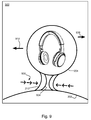
- Figures 2 though 9 show various screens of the user interface which show to the user the collection of devices and interconnections depicted in figure 1 in various states of operation.
- a first endpoint device 102 is a tablet computer.
- a second endpoint device 10 is a mobile phone.
- a third endpoint device 106 is another mobile phone.
- a first wireless device 108 is a set of headphones.
- a second wireless device 110 is a portable speaker.
- the tablet and first mobile phone are paired with the headphones, and the second mobile phone is paired with the speaker.
- the wireless links between devices are commonly made using Bluetooth® wireless technology, but may also be made using WiFi® wireless technology or any other suitable wireless connection.
- the screen of a tablet computer is used, and a set of headphones are shown as examples only; the interface described is not limited to such devices.
- a screen 200 that would be shown on the tablet computer 102, a partial circle or arc 202 at the bottom of the screen represents the tablet itself.
- a first full circle 204 represents the headphones 108
- a second full circle 206 represents the mobile phone 104.
- Tapered connectors 208 and 210 between the circles represent the wireless connections between the headphones and the two endpoint devices. This allows the user to easily observe that the device he's holding, represented by the partial circle that if complete would surround the user himself, is connected to the headphones, which are also connected to the first mobile phone.
- the connections are shown as a pair of curved lines extending from one arc or circle to the other circle, with the lines curved slightly towards each other.
- the space between the curved lines is filled with a solid color.
- a symbol, icon, or text may be displayed within the connector to indicate the nature of the connection, such as a Bluetooth icon to represent a Bluetooth connect, or a WiFi icon to indicate that the devices are connected over WiFi.
- the color of the fill may indicate the type of connection. Text may also be used within the arc and circles to identify the devices, in place of or in addition to visual representations of the devices.
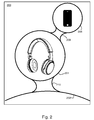
- FIG. 300 Another aspect of the user interface is shown by screen 300 in figure 3 .
- the mobile phone represented by circle 206 is providing audio to the headphones.
- the circle 204 is decreased in size, and the circle 306 is increased in size.
- the circle 206 shows transport controls 302 (e.g., pause, last track, next track), and could also show information about the audio, such as a track name, album name, or cover art, to name a few examples. Pressing the controls in the user interface of the device showing the screen 300 results in that device informing the headphones of the action, so that the headphones can relay the command to the remote device which will respond to it.
- transport controls 302 e.g., pause, last track, next track
- Pressing the controls in the user interface of the device showing the screen 300 results in that device informing the headphones of the action, so that the headphones can relay the command to the remote device which will respond to it.
- a similar screen 400a, 400b shows how the graphical interface responds to user input to show the user what is going to happen in response to the input.
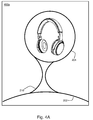
- a user is dragging the circle 204 representing the headphones away from the arc 202 representing the tablet displaying the interface. This gesture tells the headphones to disconnect from the tablet.
- the connector 210 narrows, as shown in figure 4A , until it breaks, as shown by points 402 and 404 in figure 4B , indicating intuitively that the user is breaking the connection to the headphones.
- the tablet transmits to the headphones a command to disconnect itself from the tablet.
- the tablet may simply turn off the connection itself, but that may leave the headphones in an uncertain state.
- the same interface may be used for disconnecting the remote device represented by circle 206 in figure 2 from the headphones, by dragging the circle 206 away from the circle 204 until the connector 208 breaks (not shown).
- screens 500 in figure 5 , 600 in figure 6 , and 700 in figure 7 show the interface for connecting additional devices (such as another one of the mobile phones) to the headphones.
- a circle 502 with a plus sign is shown near the circle 204 for the headphones. Tapping that circle 502 puts the headphones into a pairing mode.
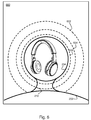
- the interface shows screen 600.
- circles 602, 604, 606 radiating from the headphones' circle 204 indicate that the headphones are now broadcasting their availability for pairing to other devices that might be in the area.
- a glowing field rather than radiating circles, may be used. This screen might be used whenever the headphones are in pairing mode, whether initiated through the interface of screen 500 or by the headphones' own user interface.
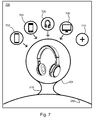
- screen 700 in figure 7 is used.
- additional circles 702, 704, 706, 708 representing previously paired devices, which aren't currently connected, are arrayed around the circle 204 representing the headphones.
- Another circle 710 contains a plus sign, for indicating that the user wishes to pair yet another device.
- a user may connect the headphones to one of the already-paired devices by simply dragging that device's circle onto the circle representing the headphones. Doing so will return the user to screen 200 in figure 2 , showing the other connected device as a second circle connected to the headphones' circle.
- Some intermediate animation may be used to show that the connection is being established.
- one of the available devices in screen 700 is not a source device, but is another set of headphones, in circle 706.
- two output devices may be connected to each other, to engage in a variety of peer-to-peer activities, such as direct voice communication or music sharing, or in the case of both devices being out-loud speakers, to provide stereo playback through the two speakers, to name some examples.
- the same interface used to connect other source devices to the headphones can be used to connect such peer devices.
- an additional prompt may be used to ask the user what functions are desired, and the user may be able to control the second output device via a relay through the first output device.
- screen 7 allows a user to connect an additional source device to a single output device
- the user may also want to connect a different output device to the device displaying the user interface, whether as an additional output device or in place of the one in use.
- the interface can display other nearby, or previously paired, output devices in additional circles 802, 804, on either side of the circle 204 for the presently controlled device. In some example, tapping one of these other devices may bring up information about it, and dragging it onto the arc 202 representing the device on which the interface is running causes that output device to be connected.
- a screen 900 shows how the curved connector 210 between connected devices can also indicate the strength of the signal over which the devices are connected.
- the neck of the connector narrows, to narrower connection 904, intuitively indicating a weaker connection between the device displaying the screen 900, represented by the arc 202, and the device represented by the circle 204 (i.e., the headphones from figure 1 ).
- This weakening can be animated, with the connector 210 visibly narrowing or thickening as the connection strength varies, indicated by arrows 906 in this figure, or with animated shadows continuously moving in the direction of the arrows to show a weakened signal.
- FIG. 9 An additional element shown in figure 9 , by arrows 908 and 910, is that the circle 204 representing the headphones may drift back and forth on the screen, giving the user an intuitive indication that the connection is live but variable, e.g., that it represents a wireless connection between separate devices. As the circle 204 moves around, the connector 210 stretches and moves accordingly to maintain the link between the arc 202 and the circle 204.
- the user interface is displayed on the screen of a computing device, such as a tablet computer.
- a computing device such as a tablet computer.
- Examples include the iPad® tablet from Apple, Inc., the SurfaceTM computer from Microsoft Corporation, or one of the many tablets running the AndroidTM operating system from Google, Inc.
- the user interface described herein can also be used on other devices, such as smart phones, car audio systems, and laptop or desktop computers. It is generally assumed that the screens used for displaying the user interface are touch-sensitive and the user inputs described above correspond to users touching the screen with their hand or a stylus and information describing such touches being communicated to a processor. In other examples, however, a non-touch screen could be used with a mouse or other pointing device, with similar interactions and effects.
- the device running the user interface may be referred to as a computing device, or a communication device, without any limitation intended as to the functions of a device using either such description or other descriptions.
- the device will have a processor used for generating the display, responding to user input, managing the wireless interfaces, and otherwise operating the device.
- Such functions may be distributed between multiple processors, most commonly a graphics processor and a computing processor.
- Instructions for such processors may be embedded in the processor, in on-board memory within the device, or loaded as needed from a remote source. In some examples, some of the processing may be done in a remote device, with instructions communicated to the device showing the user interface, for example, in the case of a computer with a wireless display. Any such combination of component devices is within the scope of any claims that are not specifically limited to specific implementations.
- Embodiments of the systems and methods described above comprise computer components and computer-implemented steps that will be apparent to those skilled in the art.
- the computer-implemented steps may be stored as computer-executable instructions on a computer-readable medium such as, for example, hard disks, Flash ROMS, nonvolatile ROM, and RAM.
- the computer-executable instructions may be executed on a variety of processors such as, for example, microprocessors, digital signal processors, gate arrays, etc.
Landscapes
- Engineering & Computer Science (AREA)
- General Engineering & Computer Science (AREA)
- Theoretical Computer Science (AREA)
- Human Computer Interaction (AREA)
- Physics & Mathematics (AREA)
- General Physics & Mathematics (AREA)
- Computer Networks & Wireless Communication (AREA)
- Signal Processing (AREA)
- User Interface Of Digital Computer (AREA)
Applications Claiming Priority (1)
| Application Number | Priority Date | Filing Date | Title |
|---|---|---|---|
| US14/457,771 US9639255B2 (en) | 2014-08-12 | 2014-08-12 | User interface for wireless device management |
Publications (1)
| Publication Number | Publication Date |
|---|---|
| EP2985986A1 true EP2985986A1 (fr) | 2016-02-17 |
Family
ID=53776389
Family Applications (1)
| Application Number | Title | Priority Date | Filing Date |
|---|---|---|---|
| EP15178954.2A Withdrawn EP2985986A1 (fr) | 2014-08-12 | 2015-07-29 | Interface utilisateur pour la gestion d'un dispositif sans fil |
Country Status (3)
| Country | Link |
|---|---|
| US (1) | US9639255B2 (fr) |
| EP (1) | EP2985986A1 (fr) |
| WO (1) | WO2016025555A1 (fr) |
Families Citing this family (9)
| Publication number | Priority date | Publication date | Assignee | Title |
|---|---|---|---|---|
| EP2774341B1 (fr) * | 2011-11-03 | 2020-08-19 | Glowbl | Interface de communication et procédé de communication, programme d'ordinateur correspondant et support d'enregistrement correspondant |
| USD761844S1 (en) * | 2014-08-12 | 2016-07-19 | Bose Corporation | Display screen or portion thereof with animated graphical user interface |
| WO2016052876A1 (fr) * | 2014-09-30 | 2016-04-07 | Samsung Electronics Co., Ltd. | Appareil d'affichage et son procede de commande |
| USD789985S1 (en) * | 2015-08-12 | 2017-06-20 | Samsung Electronics Co., Ltd. | Display screen or portion thereof with transitional graphical user interface |
| EP3287867A1 (fr) * | 2016-08-26 | 2018-02-28 | Nokia Technologies Oy | Traitement audio |
| JP2019152984A (ja) * | 2018-03-01 | 2019-09-12 | 富士ゼロックス株式会社 | 情報処理装置及びプログラム |
| USD921029S1 (en) * | 2019-09-09 | 2021-06-01 | Apple Inc. | Electronic device with graphical user interface |
| US11675565B2 (en) * | 2021-09-07 | 2023-06-13 | ACCO Brands Corporation | Audio switching device |
| CN118363506A (zh) * | 2023-01-19 | 2024-07-19 | 华为技术有限公司 | 设备交互的方法和电子设备 |
Citations (3)
| Publication number | Priority date | Publication date | Assignee | Title |
|---|---|---|---|---|
| EP2073514A2 (fr) * | 2007-12-18 | 2009-06-24 | Lg Electronics Inc. | Terminal mobile et procédé pour afficher des dispositifs sans fil |
| US20100138794A1 (en) * | 2008-11-30 | 2010-06-03 | Lenovo (Singapore) Pte. Ltd. | Wireless interface for access connections |
| US20130260672A1 (en) | 2012-03-30 | 2013-10-03 | Bose Corporation | Method and Apparatus for Relaying Data Communications in a Bluetooth Network |
-
2014
- 2014-08-12 US US14/457,771 patent/US9639255B2/en not_active Expired - Fee Related
-
2015
- 2015-07-29 EP EP15178954.2A patent/EP2985986A1/fr not_active Withdrawn
- 2015-08-12 WO PCT/US2015/044775 patent/WO2016025555A1/fr not_active Ceased
Patent Citations (3)
| Publication number | Priority date | Publication date | Assignee | Title |
|---|---|---|---|---|
| EP2073514A2 (fr) * | 2007-12-18 | 2009-06-24 | Lg Electronics Inc. | Terminal mobile et procédé pour afficher des dispositifs sans fil |
| US20100138794A1 (en) * | 2008-11-30 | 2010-06-03 | Lenovo (Singapore) Pte. Ltd. | Wireless interface for access connections |
| US20130260672A1 (en) | 2012-03-30 | 2013-10-03 | Bose Corporation | Method and Apparatus for Relaying Data Communications in a Bluetooth Network |
Also Published As
| Publication number | Publication date |
|---|---|
| US20160048310A1 (en) | 2016-02-18 |
| WO2016025555A1 (fr) | 2016-02-18 |
| US9639255B2 (en) | 2017-05-02 |
Similar Documents
| Publication | Publication Date | Title |
|---|---|---|
| US9639255B2 (en) | User interface for wireless device management | |
| US10045105B2 (en) | Wireless communication between endpoint devices | |
| EP2993566B9 (fr) | Procédé et appareil de présentation d'interfaces d'applications et dispositif électronique | |
| US10353661B2 (en) | Method for sharing screen between devices and device using the same | |
| EP4164203B1 (fr) | Procédé de connexion de terminal mobile et d'affichage externe et appareil mettant en uvre celui-ci | |
| EP2994810B1 (fr) | Procédé et appareil d'affichage d'interface utilisateur par l'intermédiaire d'un dispositif secondaire qui peut être connecté à un dispositif électronique portable | |
| EP3591509A1 (fr) | Procédé et afficheur d'écran divisé et dispositif électronique associé | |
| TWI688866B (zh) | 一種資料共用系統及方法 | |
| EP2682854A1 (fr) | Procédé et dispositif terminal de traitement de fichier basé sur une interface utilisateur | |
| CN105930071A (zh) | 用于管理项目的方法和装置 | |
| US10623549B2 (en) | Method of outputting screens from server and client devices in performing mirrorlink | |
| KR20160092310A (ko) | 전자 장치들 간 양방향 데이터 통신 방법 및 장치 | |
| US20190196707A1 (en) | User interface for cross-device requests | |
| EP4044008A1 (fr) | Procédé et appareil d'affichage d'objet cible, dispositif électronique et support lisible par ordinateur | |
| KR102265648B1 (ko) | 전자 장치 및 메시지 전송 방법 | |
| CN103024143B (zh) | 一种移动设备传输文件的方法 | |
| JP6821769B2 (ja) | アプリケーションインターフェースを表示する方法、装置および電子デバイス | |
| US9990117B2 (en) | Zooming and panning within a user interface | |
| EP3078401B1 (fr) | Communication sans fil entre des dispositifs d'extrémité | |
| EP3207445B1 (fr) | Procédé et appareil permettant de fournir une interface utilisateur | |
| KR102157621B1 (ko) | 휴대장치 및 그 컨텐츠 공유 방법 | |
| EP3803558A1 (fr) | Procédé, appareil et support lisible par ordinateur pour un partage de bureau sur une connexion websocket dans un espace de travail de collaboration en réseau | |
| US20240036701A1 (en) | A computer a software module arrangement, a circuitry arrangement, a user equipment and a method for an improved and extended user interface | |
| KR102418564B1 (ko) | 아이템을 관리하는 방법 및 이를 위한 디바이스 | |
| KR20240061054A (ko) | 보조 디스플레이 제어 방법 및 장치 |
Legal Events
| Date | Code | Title | Description |
|---|---|---|---|
| PUAI | Public reference made under article 153(3) epc to a published international application that has entered the european phase |
Free format text: ORIGINAL CODE: 0009012 |
|
| AK | Designated contracting states |
Kind code of ref document: A1 Designated state(s): AL AT BE BG CH CY CZ DE DK EE ES FI FR GB GR HR HU IE IS IT LI LT LU LV MC MK MT NL NO PL PT RO RS SE SI SK SM TR |
|
| AX | Request for extension of the european patent |
Extension state: BA ME |
|
| 17P | Request for examination filed |
Effective date: 20160405 |
|
| RBV | Designated contracting states (corrected) |
Designated state(s): AL AT BE BG CH CY CZ DE DK EE ES FI FR GB GR HR HU IE IS IT LI LT LU LV MC MK MT NL NO PL PT RO RS SE SI SK SM TR |
|
| STAA | Information on the status of an ep patent application or granted ep patent |
Free format text: STATUS: REQUEST FOR EXAMINATION WAS MADE |
|
| STAA | Information on the status of an ep patent application or granted ep patent |
Free format text: STATUS: THE APPLICATION IS DEEMED TO BE WITHDRAWN |
|
| 18D | Application deemed to be withdrawn |
Effective date: 20190201 |