EP3015997A1 - Procédé et dispositif pour faciliter la sélection de blocks d'information - Google Patents
Procédé et dispositif pour faciliter la sélection de blocks d'information Download PDFInfo
- Publication number
- EP3015997A1 EP3015997A1 EP15192276.2A EP15192276A EP3015997A1 EP 3015997 A1 EP3015997 A1 EP 3015997A1 EP 15192276 A EP15192276 A EP 15192276A EP 3015997 A1 EP3015997 A1 EP 3015997A1
- Authority
- EP
- European Patent Office
- Prior art keywords
- content block
- content
- selection operation
- webpage
- text
- Prior art date
- Legal status (The legal status is an assumption and is not a legal conclusion. Google has not performed a legal analysis and makes no representation as to the accuracy of the status listed.)
- Ceased
Links
Images




Classifications
-
- G—PHYSICS
- G06—COMPUTING OR CALCULATING; COUNTING
- G06F—ELECTRIC DIGITAL DATA PROCESSING
- G06F3/00—Input arrangements for transferring data to be processed into a form capable of being handled by the computer; Output arrangements for transferring data from processing unit to output unit, e.g. interface arrangements
- G06F3/01—Input arrangements or combined input and output arrangements for interaction between user and computer
- G06F3/048—Interaction techniques based on graphical user interfaces [GUI]
- G06F3/0487—Interaction techniques based on graphical user interfaces [GUI] using specific features provided by the input device, e.g. functions controlled by the rotation of a mouse with dual sensing arrangements, or of the nature of the input device, e.g. tap gestures based on pressure sensed by a digitiser
- G06F3/0488—Interaction techniques based on graphical user interfaces [GUI] using specific features provided by the input device, e.g. functions controlled by the rotation of a mouse with dual sensing arrangements, or of the nature of the input device, e.g. tap gestures based on pressure sensed by a digitiser using a touch-screen or digitiser, e.g. input of commands through traced gestures
-
- G—PHYSICS
- G06—COMPUTING OR CALCULATING; COUNTING
- G06F—ELECTRIC DIGITAL DATA PROCESSING
- G06F40/00—Handling natural language data
- G06F40/10—Text processing
- G06F40/12—Use of codes for handling textual entities
- G06F40/14—Tree-structured documents
- G06F40/143—Markup, e.g. Standard Generalized Markup Language [SGML] or Document Type Definition [DTD]
-
- G—PHYSICS
- G06—COMPUTING OR CALCULATING; COUNTING
- G06F—ELECTRIC DIGITAL DATA PROCESSING
- G06F40/00—Handling natural language data
- G06F40/10—Text processing
- G06F40/166—Editing, e.g. inserting or deleting
-
- G—PHYSICS
- G06—COMPUTING OR CALCULATING; COUNTING
- G06F—ELECTRIC DIGITAL DATA PROCESSING
- G06F3/00—Input arrangements for transferring data to be processed into a form capable of being handled by the computer; Output arrangements for transferring data from processing unit to output unit, e.g. interface arrangements
- G06F3/01—Input arrangements or combined input and output arrangements for interaction between user and computer
- G06F3/048—Interaction techniques based on graphical user interfaces [GUI]
- G06F3/0484—Interaction techniques based on graphical user interfaces [GUI] for the control of specific functions or operations, e.g. selecting or manipulating an object, an image or a displayed text element, setting a parameter value or selecting a range
- G06F3/04842—Selection of displayed objects or displayed text elements
-
- G—PHYSICS
- G06—COMPUTING OR CALCULATING; COUNTING
- G06F—ELECTRIC DIGITAL DATA PROCESSING
- G06F40/00—Handling natural language data
- G06F40/10—Text processing
- G06F40/12—Use of codes for handling textual entities
- G06F40/14—Tree-structured documents
Definitions
- the present disclosure generally relates to the field of touch screen operation, and more particularly, to a method for selecting information and a device for selecting information.
- a user may select a part of text information for copying or searching.
- the user may long-press the webpage.
- the touch screen terminal displays a text selection component including a front select box and a rear select box. The user selects text information between the front select box and the rear select box by dragging the front select box and/or the rear select box.
- the present disclosure provides a method for selecting information and a device for selecting information.
- the technical solution is provided as follows.
- the invention relates to a method for selecting information, comprising:
- dividing the page content comprises:
- dividing a text according to a paragraph structure and a sentence structure of the text so as to obtain at least one content block organized into a tree structure if the page content is the text comprises:
- dividing a webpage according to a structure of the webpage so as to obtain at least one content block organized into a tree structure if the page content is the webpage comprises:
- determining a content block selected by the selection operation comprises:
- the invention relates to a device for selecting information, comprising:
- the device further comprises:
- the first dividing module comprises:
- the second dividing module comprises:
- the content block determining module comprises:
- the invention relates to a device for selecting information, comprising:
- the processor is configured to:
- the steps of the method for selecting information are determined by computer program instructions.
- the invention is also directed to a computer program for executing the steps of a method for selecting information as described above when this program is executed by a computer.
- This program can use any programming language and take the form of source code, object code or a code intermediate between source code and object code, such as a partially compiled form, or any other desirable form.
- the invention is also directed to a computer-readable information medium containing instructions of a computer program as described above.
- the information medium can be any entity or device capable of storing the program.
- the support can include storage means such as a ROM, for example a CD ROM or a microelectronic circuit ROM, or magnetic storage means, for example a diskette (floppy disk) or a hard disk.
- the information medium can be an integrated circuit in which the program is incorporated, the circuit being adapted to execute the method in question or to be used in its execution.
- a selection operation on a page content is received, a content block selected by the selection operation is determined, in which the content block is obtained by dividing the page content according to a structure of the page content, information in the content block is determined as selected information, such that it is possible to solve the problem that a lot of operations are wasted to select desired text information since it is difficult for a user to accurately drag a front select box and/or a rear select box, i.e. the accuracy when selecting text information is low due to a small screen of a touch screen terminal; and it is possible to achieve the effect of accurately identifying the content block selected by the user and enhancing the accuracy when selecting text information.
- the method for selecting information according to exemplary embodiments of the present disclosure may be implemented by a touch screen terminal.
- the touch screen terminal may be a smart phone, a tablet PC (personal computer), an e-book reader, a MP3 (Moving Picture Experts Group Audio Layer III) player, a MP4 (Moving Picture Experts Group Audio Layer IV) player, a portable laptop computer, a camera, a video camera, etc.
- Fig. 1 is a flow chart of a method for selecting information according to an exemplary embodiment. In this embodiment, the use of the method for selecting information in a touch screen terminal is illustrated.
- the method for selecting information may comprise the following steps.
- step 102 a selection operation on a page content is received.
- step 104 a content block selected by the selection operation is determined, in which the content block is obtained by dividing the page content according to a structure of the page content.
- step 106 information in the content block is determined as selected information.
- a selection operation on a page content is received, a content block selected by the selection operation is determined, in which the content block is obtained by dividing the page content according to a structure of the page content, information in the content block is determined as selected information, such that it is possible to solve the problem that a lot of operations are wasted to select desired text information since it is difficult for a user to accurately drag a front select box and/or a rear select box, i.e. the accuracy when selecting text information is low due to a small screen of a touch screen terminal; and it is possible to achieve the effect of accurately identifying the content block selected by the user and enhancing the accuracy when selecting text information.
- the user performs the selection operation on a page in which the page content is a text
- the touch screen terminal divides the text according to a paragraph structure and a sentence structure of the text so as to obtain at least one content block organized into a tree structure, thus determining the content block selected by the selection operation of the user.
- Fig. 2A is a flow chart of a method for selecting information according to another exemplary embodiment.
- the method for selecting information may comprise the following steps.
- a text is divided according to a paragraph structure and a sentence structure of the text so as to obtain at least one content block organized into a tree structure if the page content is the text.
- the touch screen terminal may identify the page content currently displayed to determine the type of the page content, and the type of the page content comprises a text, a webpage, etc. For example, if it is identified that there are continuous words in the page, it may be determined that the page content is a text.
- the touch screen terminal may divide the text according to the paragraph structure and the sentence structure of the text. This step may comprise the following substeps A to C.
- substep A the text is used as a root content block.
- the touch screen terminal uses the text as a root content block organized into a tree structure.
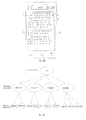
- a touch screen terminal 21 identifies that a current page content is a text 22, and uses the text 22 as a corresponding root content block organized into a tree structure.
- substep B the text is divided according to the paragraph structure to obtain at least one second-level content block, in which each of the at least one second-level content block corresponds to one paragraph.
- the touch screen terminal may divide the text into different paragraphs according to line breaks in the text, and uses each paragraph as one second-level content block.
- the touch screen terminal 21 uses each paragraph 23 in the text 22 as a corresponding second-level content block organized into a tree structure.
- each of the at least one second-level content block is divided according to the sentence structure to obtain at least one third-level content block, in which each of the at least one third-level content block corresponds to one sentence.
- the touch screen terminal divides each second-level content block according to the sentence structure in accordance with a punctuation, i.e. the touch screen terminal may divide each paragraph into different sentences according to punctuations, and uses each sentence as a third-level content block organized into a tree structure.
- the punctuation may be a comma, a semicolon, a period, or the like.
- the touch screen terminal 21 divides each paragraph 23 into different sentences 24 according to punctuations, and uses each sentence 24 as a third-level content block.
- the touch screen terminal may further divide each third-level content block according to the word so as to obtain at least one fourth-level content block, in which each fourth-level content block corresponds to one word.
- step 202 a selection operation on the page content is received.
- the touch screen terminal receives the selection operation on the page content from the user.
- the selection operation may be a gesture of drawing a circle, a gesture of drawing a horizontal line, a gesture of drawing a vertical line, or the like.
- the selection operation may be an action predetermined by the touch screen terminal, and may also be set by the user.
- the touch screen terminal determines a corresponding operation region according to the selection operation.
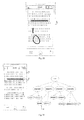
- the touch screen terminal 21 determines a region passed by the horizontal line as the operation region.
- the touch screen terminal 21 determines a region enclosed by the circle as the operation region.
- the touch screen terminal 21 determines a region passed by the vertical line as the operation region.
- step 201 may be performed after step 202, and in this embodiment, the order of step 201 and step 202 is not limited.
- step 203 a content block selected by the selection operation is determined.
- the touch screen terminal determines the content block according to the operation region of the selection operation. This step may comprise the following three possible implementations.
- all of one content block is determined as the content block selected by the selection operation if an operation region of the selection operation covers all or a part of the one content block.
- the touch screen terminal 21 determines all of the third-level content block 25 as the content block selected by the horizontal line.
- two content blocks connected by a punctuation are determined as the content block selected by the selection operation if an operation region of the selection operation covers the punctuation between the two content blocks.
- the touch screen terminal 21 determines the two third-level content blocks 25 as the content block selected by the horizontal line.
- an upper-level content block is determined as the content block selected by the selection operation if an operation region of the selection operation covers a first lower-level content block and a last lower-level content block of the upper-level content block.
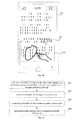
- Fig. 2G if the user selects text information by drawing a circle on the touch screen terminal 21, and an operation region corresponding to the circle covers a first sentence and a last sentence of a paragraph 23, i.e. covers a first third-level content block 25 to a last third-level content block 25 of the same second-level content block 26, then the touch screen terminal 21 determines the second-level content block 26 corresponding to the paragraph 23 as the content block selected by the selection operation.
- step 204 information in the content block is determined as selected information.
- the touch screen terminal acquires text information corresponding to the content block, determines the text information as the selected information, and marks the selected information.
- the selected information may be selected via a dashed-line box or a solid-line box, or the background color of the selected information may be changed.
- the touch screen terminal determines the second-level content block 26 as the selected content block, acquires the paragraph 23 corresponding to the second-level content block 26, uses the paragraph 23 as the selected information, and selects the paragraph 23 using a dashed-line box.
- the touch screen terminal After determining the selected information, the touch screen terminal displays an operation menu, and the user performs a corresponding operation on the selected information by selecting an operation option in the operation menu. It should be noted that the user may also call the operation menu by clicking a virtual button or a physical button on the touch screen terminal.
- the touch screen terminal 21 determines the paragraph 23 as the selected information according to the selected content block, and displays an operation menu 27, and the user may copy the selected information by selecting a "copy" option in the operation menu 27, or may search for the selected information by selecting a "search” option in the operation menu 27.
- a selection operation on a page content is received, a content block selected by the selection operation is determined, in which the content block is obtained by dividing the page content according to a structure of the page content, information in the content block is determined as selected information, such that it is possible to solve the problem that a lot of operations are wasted to select desired text information since it is difficult for a user to accurately drag a front select box and/or a rear select box, i.e. the accuracy when selecting text information is low due to a small screen of a touch screen terminal; and it is possible to achieve the effect of accurately identifying the content block selected by the user and enhancing the accuracy when selecting text information.
- the touch screen terminal may divide the text according to the paragraph structure and the sentence structure to obtain at least one content block organized into a tree structure, so as to determine the content block selected by the selection operation, thus enhancing the selection accuracy of the user and simplifying the selection operation of the user.
- the user performs the selection operation on a page in which the page content is a webpage
- the touch screen terminal divides the webpage according to a structure of the webpage so as to obtain at least one content block organized into a tree structure, thus determining the content block selected by the selection operation of the user.
- Fig. 3A is a flow chart of a method for selecting information according to another exemplary embodiment.
- the method for selecting information may comprise the following steps.
- a webpage is divided according to a structure of the webpage so as to obtain at least one content block organized into a tree structure if the page content is a webpage.
- the touch screen terminal may identify the displayed page content to determine the type of the page content, and the type of the page content comprises a text, a webpage, etc. For example, if the touch screen terminal identifies that words in the page content are discontinuous and the page contains a picture or a cartoon, it may be determined that the type of the page content is a webpage. Alternatively, if the touch screen terminal identifies a web address displayed at a top bar of the page content, it may be determined that the type of the page content is a webpage.
- the touch screen terminal may divide the webpage according to the structure of the webpage. This step may comprise the following substeps D to E.
- substep D the touch screen terminal analyzes a tree structure of the webpage according to a source code of the webpage.
- the touch screen terminal may analyze the tree structure according to the source code of the webpage.
- each message corresponds to one DIV (division) in the source code of the webpage
- each DIV corresponds to one branch of the tree structure of the webpage.
- the touch screen terminal may obtain the tree structure of the webpage by analyzing the DIV in the source code of the webpage.
- substep E the touch screen terminal divides the webpage according to the tree structure so as to obtain at least one content block organized into a tree structure.
- the touch screen terminal may make each DIV correspond to one content block according to the tree structure, so as to obtain at least one content block organized into a tree structure.
- a touch screen terminal 31 analyzes the source code of the webpage to obtain DIV 32, DIV 33 and DIV 34, and each DIV corresponds to one content block, so as to obtain a tree structure 35.
- step 302 a selection operation on the page content is received.
- This step is similar to step 202, i.e. the selection operation of the user such as a gesture of drawing a circle, a gesture of drawing a horizontal line, or a gesture of drawing a vertical line is received, and an operation region corresponding to the selection operation is determined.
- the selection operation of the user such as a gesture of drawing a circle, a gesture of drawing a horizontal line, or a gesture of drawing a vertical line is received, and an operation region corresponding to the selection operation is determined.
- step 301 may be performed after step 302, and in this embodiment, the order of step 301 and step 302 is not limited.
- step 303 a content block selected by the selection operation is determined.
- the touch screen terminal determines all of the one content block as the content block selected by the selection operation.
- the touch screen terminal 31 determines all of the content block 36 as the content block selected by the vertical line.
- the touch screen terminal determines all of the multiple content blocks as the content block selected by the selection operation.
- the touch screen terminal 31 determines all of the content block 36 and the content block 37 as the content block selected by the vertical line.
- step 304 information in the content block is determined as selected information.
- This step is similar to step 204, which will not be elaborated herein.
- a selection operation on a page content is received, a content block selected by the selection operation is determined, in which the content block is obtained by dividing the page content according to a structure of the page content, information in the content block is determined as selected information, such that it is possible to solve the problem that a lot of operations are wasted to select desired text information since it is difficult for a user to accurately drag a front select box and/or a rear select box, i.e. the accuracy when selecting text information is low due to a small screen of a touch screen terminal; and it is possible to achieve the effect of accurately identifying the content block selected by the user and enhancing the accuracy when selecting text information.
- the touch screen terminal may divide the webpage according to the structure of the webpage to obtain at least one content block organized into a tree structure, so as to determine the content block selected by the selection operation, thus enhancing the selection accuracy of the user and simplifying the selection operation of the user.
- Fig. 4 is a block diagram of a device for selecting information according to an exemplary embodiment.
- the device for selecting information may become a part or all of a touch screen terminal via software, hardware, or a combination of both software and hardware.
- the device for selecting information may comprise an operation receiving module 402, a content block determining module 404, and an information determining module 406.
- the operation receiving module 402 is configured to receive a selection operation on a page content.
- the content block determining module 404 is configured to determine a content block selected by the selection operation, in which the content block is obtained by dividing the page content according to a structure of the page content.
- the information determining module 406 is configured to determine information in the content block as selected information.
- a selection operation on a page content is received, a content block selected by the selection operation is determined, in which the content block is obtained by dividing the page content according to a structure of the page content, information in the content block is determined as selected information, such that it is possible to solve the problem that a lot of operations are wasted to select desired text information since it is difficult for a user to accurately drag a front select box and/or a rear select box, i.e. the accuracy when selecting text information is low due to a small screen of a touch screen terminal; and it is possible to achieve the effect of accurately identifying the content block selected by the user and enhancing the accuracy when selecting text information.
- Fig. 5 is a block diagram of a device for selecting information according to another exemplary embodiment.
- the device for selecting information may become a part or all of a touch screen terminal via software, hardware, or a combination thereof.
- the device for selecting information may comprise an operation receiving module 502, a content block determining module 504, and an information determining module 506.
- the operation receiving module 502 is configured to receive a selection operation on a page content.
- the content block determining module 504 is configured to determine a content block selected by the selection operation, in which the content block is obtained by dividing the page content according to a structure of the page content.
- the information determining module 506 is configured to determine information in the content block as selected information.
- the device further comprises a first dividing module 507 or a second dividing module 508.
- the first dividing module 507 is configured to divide a text according to a paragraph structure and a sentence structure of the text so as to obtain at least one content block organized into a tree structure if the page content is the text.
- the second dividing module 508 is configured to divide a webpage according to a structure of the webpage so as to obtain at least one content block organized into a tree structure if the page content is the webpage.
- the first dividing module 507 comprises: a root content block determining submodule 507A configured to use the text as a root content block; a second content block determining submodule 507B configured to divide the text according to the paragraph structure to obtain at least one second-level content block, in which each of the at least one second-level content block corresponds to one paragraph; a third content block determining submodule 507C configured to divide each of the at least one second-level content block according to the sentence structure to obtain at least one third-level content block, in which each of the at least one third-level content block corresponds to one sentence.
- the second dividing module 508 comprises: a webpage analyzing submodule 508A configured to analyze a tree structure of the webpage according to a source code of the webpage; a second dividing submodule 508B configured to divide the webpage according to the tree structure so as to obtain at least one content block organized into a tree structure.
- the content block determining module 504 comprises: a first content block determining submodule 504A configured to determine all of one content block as the content block selected by the selection operation if an operation region of the selection operation covers all or a part of the one content block; or a second content block determining submodule 504B configured to determine two content blocks connected by a punctuation as the content block selected by the selection operation if an operation region of the selection operation covers the punctuation between the two content blocks; or a third content block determining submodule 504C configured to determine an upper-level content block as the content block selected by the selection operation if an operation region of the selection operation covers a first lower-level content block and a last lower-level content block of the upper-level content block.
- a selection operation on a page content is received, a content block selected by the selection operation is determined, in which the content block is obtained by dividing the page content according to a structure of the page content, information in the content block is determined as selected information, such that it is possible to solve the problem that a lot of operations are wasted to select desired text information since it is difficult for a user to accurately drag a front select box and/or a rear select box, i.e. the accuracy when selecting text information is low due to a small screen of a touch screen terminal; and it is possible to achieve the effect of accurately identifying the content block selected by the user and enhancing the accuracy when selecting text information.
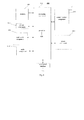
- Fig. 6 is a block diagram of a device 600 for selecting information according to an exemplary embodiment.
- the device 600 may be a touch screen terminal, or the like.
- the device 600 may comprise one or more of the following components: a processing component 602, a memory 604, a power component 606, a multimedia component 608, an audio component 610, an input/output (I/O) interface 612, a sensor component 614, and a communication component 616.
- the processing component 602 typically controls overall operations of the device 600, such as the operations associated with display, telephone calls, data communications, camera operations, and recording operations.
- the processing component 602 may comprise one or more processors 620 to execute instructions to perform all or part of the steps in the above described methods.
- the processing component 602 may comprise one or more modules which facilitate the interaction between the processing component 602 and other components.
- the processing component 602 may comprise a multimedia module to facilitate the interaction between the multimedia component 608 and the processing component 602.
- the memory 604 is configured to store various types of data to support the operation of the device 600. Examples of such data comprise instructions for any applications or methods operated on the device 600, contact data, phonebook data, messages, pictures, video, etc.
- the memory 604 may be implemented using any type of volatile or non-volatile memory devices, or a combination thereof, such as a static random access memory (SRAM), an electrically erasable programmable read-only memory (EEPROM), an erasable programmable read-only memory (EPROM), a programmable read-only memory (PROM), a read-only memory (ROM), a magnetic memory, a flash memory, a magnetic or optical disk.
- SRAM static random access memory
- EEPROM electrically erasable programmable read-only memory
- EPROM erasable programmable read-only memory
- PROM programmable read-only memory
- ROM read-only memory
- magnetic memory a magnetic memory
- flash memory a flash memory
- magnetic or optical disk a magnetic or optical
- the power component 606 provides power to various components of the device 600.
- the power component 606 may comprise a power management system, one or more power sources, and any other components associated with the generation, management, and distribution of power in the device 600.
- the multimedia component 608 comprises a screen providing an output interface between the device 600 and the user.
- the screen may comprise a liquid crystal display (LCD) and a touch panel (TP). If the screen comprises the touch panel, the screen may be implemented as a touch screen to receive input signals from the user.
- the touch panel comprises one or more touch sensors to sense touches, swipes, and gestures on the touch panel. The touch sensors may not only sense a boundary of a touch or swipe action, but also sense a period of time and a pressure associated with the touch or swipe action.
- the multimedia component 608 comprises a front camera and/or a rear camera. The front camera and the rear camera may receive an external multimedia datum while the device 600 is in an operation mode, such as a photographing mode or a video mode. Each of the front camera and the rear camera may be a fixed optical lens system or have focus and optical zoom capability.
- the audio component 610 is configured to output and/or input audio signals.
- the audio component 610 comprises a microphone (MIC) configured to receive an external audio signal when the device 600 is in an operation mode, such as a call mode, a recording mode, and a voice recognition mode.
- the received audio signal may be further stored in the memory 604 or transmitted via the communication component 616.
- the audio component 610 further comprises a speaker to output audio signals.
- the I/O interface 612 provides an interface between the processing component 602 and peripheral interface modules, such as a keyboard, a click wheel, buttons, and the like.
- the buttons may comprise, but are not limited to, a home button, a volume button, a starting button, and a locking button.
- the sensor component 614 comprises one or more sensors to provide status assessments of various aspects of the device 600. For instance, the sensor component 614 may detect an open/closed status of the device 600, relative positioning of components, e.g., the display and the keypad, of the device 600, a change in position of the device 600 or a component of the device 600, a presence or absence of user contact with the device 600, an orientation or an acceleration/deceleration of the device 600, and a change in temperature of the device 600.
- the sensor component 614 may comprise a proximity sensor configured to detect the presence of nearby objects without any physical contact.
- the sensor component 614 may also comprise a light sensor, such as a CMOS or CCD image sensor, for use in imaging applications.
- the sensor component 614 may also comprise an accelerometer sensor, a gyroscope sensor, a magnetic sensor, a pressure sensor, or a temperature sensor.
- the communication component 616 is configured to facilitate communication, wired or wirelessly, between the device 600 and other devices.
- the device 600 can access a wireless network based on a communication standard, such as WiFi, 2G, or 3G, or a combination thereof.
- the communication component 616 receives a broadcast signal or broadcast associated information from an external broadcast management system via a broadcast channel.
- the communication component 616 further comprises a near field communication (NFC) module to facilitate short-range communications.
- the NFC module may be implemented based on a radio frequency identification (RFID) technology, an infrared data association (IrDA) technology, an ultra-wideband (UWB) technology, a Bluetooth (BT) technology, and other technologies.
- RFID radio frequency identification
- IrDA infrared data association
- UWB ultra-wideband
- BT Bluetooth
- the device 600 may be implemented with one or more application specific integrated circuits (ASICs), digital signal processors (DSPs), digital signal processing devices (DSPDs), programmable logic devices (PLDs), field programmable gate arrays (FPGAs), controllers, micro-controllers, microprocessors, or other electronic components, for performing the above described methods.
- ASICs application specific integrated circuits
- DSPs digital signal processors
- DSPDs digital signal processing devices
- PLDs programmable logic devices
- FPGAs field programmable gate arrays
- controllers micro-controllers, microprocessors, or other electronic components, for performing the above described methods.
- non-transitory computer-readable storage medium comprising instructions, such as comprised in the memory 604, executable by the processor 620 in the device 600, for performing the above-described methods.
- the non-transitory computer-readable storage medium may be a ROM, a RAM, a CD-ROM, a magnetic tape, a floppy disc, an optical data storage device, and the like.
- a non-transitory computer-readable storage medium is provided.
- the device 600 may perform a method for selecting information applied to an electronic device having a touch screen function.
Landscapes
- Engineering & Computer Science (AREA)
- Theoretical Computer Science (AREA)
- General Engineering & Computer Science (AREA)
- Physics & Mathematics (AREA)
- General Physics & Mathematics (AREA)
- Human Computer Interaction (AREA)
- Health & Medical Sciences (AREA)
- Artificial Intelligence (AREA)
- Audiology, Speech & Language Pathology (AREA)
- Computational Linguistics (AREA)
- General Health & Medical Sciences (AREA)
- User Interface Of Digital Computer (AREA)
- Document Processing Apparatus (AREA)
- Information Transfer Between Computers (AREA)
- Information Retrieval, Db Structures And Fs Structures Therefor (AREA)
Applications Claiming Priority (1)
| Application Number | Priority Date | Filing Date | Title |
|---|---|---|---|
| CN201410601591.8A CN104461348B (zh) | 2014-10-31 | 2014-10-31 | 信息选取方法及装置 |
Publications (1)
| Publication Number | Publication Date |
|---|---|
| EP3015997A1 true EP3015997A1 (fr) | 2016-05-04 |
Family
ID=52907480
Family Applications (1)
| Application Number | Title | Priority Date | Filing Date |
|---|---|---|---|
| EP15192276.2A Ceased EP3015997A1 (fr) | 2014-10-31 | 2015-10-30 | Procédé et dispositif pour faciliter la sélection de blocks d'information |
Country Status (8)
| Country | Link |
|---|---|
| EP (1) | EP3015997A1 (fr) |
| JP (1) | JP6239783B2 (fr) |
| KR (1) | KR101709427B1 (fr) |
| CN (1) | CN104461348B (fr) |
| BR (1) | BR112015017344A2 (fr) |
| MX (1) | MX357642B (fr) |
| RU (1) | RU2643437C2 (fr) |
| WO (1) | WO2016065814A1 (fr) |
Families Citing this family (9)
| Publication number | Priority date | Publication date | Assignee | Title |
|---|---|---|---|---|
| CN105160854B (zh) * | 2015-09-16 | 2019-01-11 | 小米科技有限责任公司 | 设备控制方法、装置和终端设备 |
| CN105791592A (zh) * | 2016-04-29 | 2016-07-20 | 努比亚技术有限公司 | 一种信息提示的方法及移动终端 |
| CN106599105A (zh) * | 2016-11-29 | 2017-04-26 | 珠海市魅族科技有限公司 | 显示控制方法及电子设备 |
| CN108427527B (zh) * | 2017-02-14 | 2022-01-04 | 阿里巴巴集团控股有限公司 | 信息选择方法、装置和移动终端 |
| CN110032324B (zh) * | 2018-01-11 | 2024-03-05 | 荣耀终端有限公司 | 一种文本选中方法及终端 |
| CN109298819B (zh) * | 2018-09-21 | 2021-03-16 | Oppo广东移动通信有限公司 | 选择对象的方法、装置、终端及存储介质 |
| CN110502173A (zh) * | 2019-08-19 | 2019-11-26 | Oppo(重庆)智能科技有限公司 | 一种界面内容处理方法、装置及计算机可读存储介质 |
| CN113128182A (zh) | 2021-04-14 | 2021-07-16 | 北京字跳网络技术有限公司 | 电子文档的处理方法、装置、终端和存储介质 |
| CN120045110A (zh) * | 2024-09-23 | 2025-05-27 | 华为技术有限公司 | 人机交互方法、装置和电子设备 |
Citations (2)
| Publication number | Priority date | Publication date | Assignee | Title |
|---|---|---|---|---|
| US20060132455A1 (en) * | 2004-12-21 | 2006-06-22 | Microsoft Corporation | Pressure based selection |
| US20140173484A1 (en) * | 2012-12-14 | 2014-06-19 | Barnesandnoble.Com Llc | Block-based content selecting technique for touch screen ui |
Family Cites Families (18)
| Publication number | Priority date | Publication date | Assignee | Title |
|---|---|---|---|---|
| JPH09101991A (ja) * | 1995-07-31 | 1997-04-15 | Toshiba Corp | 情報フィルタリング装置 |
| US7325186B2 (en) * | 2003-02-28 | 2008-01-29 | Microsoft Corporation | Method and system for showing unannotated text nodes in a data formatted document |
| US20050138067A1 (en) * | 2003-12-19 | 2005-06-23 | Fuji Xerox Co., Ltd. | Indexing for contexual revisitation and digest generation |
| US8643605B2 (en) * | 2005-11-21 | 2014-02-04 | Core Wireless Licensing S.A.R.L | Gesture based document editor |
| US8873858B2 (en) * | 2006-06-29 | 2014-10-28 | Rpx Corporation | Apparatus, method, device and computer program product providing enhanced text copy capability with touch input display |
| US8656295B2 (en) * | 2007-01-05 | 2014-02-18 | Apple Inc. | Selecting and manipulating web content |
| JP2008305163A (ja) * | 2007-06-07 | 2008-12-18 | Sharp Corp | 文章表示装置、文章表示方法、プログラムおよび記録媒体 |
| US8650507B2 (en) * | 2008-03-04 | 2014-02-11 | Apple Inc. | Selecting of text using gestures |
| US8443278B2 (en) * | 2009-01-02 | 2013-05-14 | Apple Inc. | Identification of tables in an unstructured document |
| US20100235734A1 (en) * | 2009-03-16 | 2010-09-16 | Bas Ording | Methods and Graphical User Interfaces for Editing on a Multifunction Device with a Touch Screen Display |
| CN101930448B (zh) * | 2009-06-23 | 2012-08-29 | 北京搜狗科技发展有限公司 | 一种网页信息的订阅方法和装置 |
| CN102314448B (zh) * | 2010-07-06 | 2013-12-04 | 株式会社理光 | 一种在文档中获得一个或多个关键元素的设备和方法 |
| JP2012027724A (ja) * | 2010-07-23 | 2012-02-09 | Sony Corp | 情報処理装置、情報処理方法及び情報処理プログラム |
| JP5802924B2 (ja) * | 2011-07-29 | 2015-11-04 | アーカイブ技術研究所株式会社 | 文書検索システムおよび文書検索プログラム |
| JP6079069B2 (ja) * | 2012-09-05 | 2017-02-15 | コニカミノルタ株式会社 | 文書表示装置、文書表示端末および文書表示プログラム |
| JP5598584B2 (ja) * | 2012-12-25 | 2014-10-01 | キヤノンマーケティングジャパン株式会社 | 情報処理装置、情報処理方法及びプログラム |
| JP2014215911A (ja) * | 2013-04-26 | 2014-11-17 | 株式会社東芝 | 注目領域推定装置、方法およびプログラム |
| CN103472998B (zh) * | 2013-09-27 | 2017-03-15 | 小米科技有限责任公司 | 一种选取文字的方法、装置和终端设备 |
-
2014
- 2014-10-31 CN CN201410601591.8A patent/CN104461348B/zh active Active
-
2015
- 2015-03-19 JP JP2016555896A patent/JP6239783B2/ja active Active
- 2015-03-19 WO PCT/CN2015/074628 patent/WO2016065814A1/fr not_active Ceased
- 2015-03-19 MX MX2015008601A patent/MX357642B/es active IP Right Grant
- 2015-03-19 RU RU2015130478A patent/RU2643437C2/ru active
- 2015-03-19 BR BR112015017344A patent/BR112015017344A2/pt not_active Application Discontinuation
- 2015-03-19 KR KR1020157018219A patent/KR101709427B1/ko active Active
- 2015-10-30 EP EP15192276.2A patent/EP3015997A1/fr not_active Ceased
Patent Citations (2)
| Publication number | Priority date | Publication date | Assignee | Title |
|---|---|---|---|---|
| US20060132455A1 (en) * | 2004-12-21 | 2006-06-22 | Microsoft Corporation | Pressure based selection |
| US20140173484A1 (en) * | 2012-12-14 | 2014-06-19 | Barnesandnoble.Com Llc | Block-based content selecting technique for touch screen ui |
Non-Patent Citations (2)
| Title |
|---|
| CAROL BRATT: "Extend Selection Mode: MS Word", 6 September 2006 (2006-09-06), XP055255856, Retrieved from the Internet <URL:https://www.infopackets.com/news/1548/extend-selection-mode-ms-word> [retrieved on 20160307] * |
| INTRODUCTION: "Microsoft Word 2010 Product Guide Word 2010", 31 December 2010 (2010-12-31), XP055255937, Retrieved from the Internet <URL:https://www.microsoft.com/en-us/download/details.aspx?id=5829> [retrieved on 20160307] * |
Also Published As
| Publication number | Publication date |
|---|---|
| KR20160064040A (ko) | 2016-06-07 |
| JP6239783B2 (ja) | 2017-11-29 |
| RU2015130478A (ru) | 2017-02-02 |
| CN104461348B (zh) | 2018-09-04 |
| MX2015008601A (es) | 2017-03-20 |
| RU2643437C2 (ru) | 2018-02-01 |
| MX357642B (es) | 2018-07-17 |
| JP2017505962A (ja) | 2017-02-23 |
| BR112015017344A2 (pt) | 2017-07-11 |
| KR101709427B1 (ko) | 2017-02-22 |
| CN104461348A (zh) | 2015-03-25 |
| WO2016065814A1 (fr) | 2016-05-06 |
Similar Documents
| Publication | Publication Date | Title |
|---|---|---|
| EP3015997A1 (fr) | Procédé et dispositif pour faciliter la sélection de blocks d'information | |
| US10296201B2 (en) | Method and apparatus for text selection | |
| US10761688B2 (en) | Method and apparatus for editing object | |
| JP6051338B2 (ja) | ページロールバック制御方法、ページロールバック制御装置、端末、プログラム及び記録媒体 | |
| CN107544810B (zh) | 控制应用程序的方法和装置 | |
| CN107153541A (zh) | 浏览交互处理方法及装置 | |
| EP3128411B1 (fr) | Procédé d'affichage d'interface, terminal, programme d'ordinateur et support d'enregistrement | |
| CN108829686B (zh) | 翻译信息显示方法、装置、设备及存储介质 | |
| EP3364285A1 (fr) | Procédé, appareil, programme informatique et support de stockage pour mettre à jour des informations | |
| TW201923547A (zh) | 處理方法、裝置、設備和機器可讀媒體 | |
| WO2013097129A1 (fr) | Procédé et dispositif de recherche de contact, et terminal mobile associé | |
| EP2921969A1 (fr) | Procédé et appareil de réglage de page Internet et dispositif électronique | |
| TW201923630A (zh) | 處理方法、裝置、設備和機器可讀媒體 | |
| WO2015176483A1 (fr) | Procédé et dispositif de création d'étiquette, et terminal | |
| CN112068764B (zh) | 一种语言切换方法、装置和用于语言切换的装置 | |
| CN104951445B (zh) | 一种网页处理方法及装置 | |
| CN107368562B (zh) | 页面的显示方法、装置及终端 | |
| CN108108356A (zh) | 一种文字翻译方法、装置及设备 | |
| US10423706B2 (en) | Method and device for selecting information | |
| CN106020694A (zh) | 电子设备、选区动态调整方法及装置 | |
| CN106354749B (zh) | 信息显示方法及装置 | |
| US9679076B2 (en) | Method and device for controlling page rollback | |
| US20170060822A1 (en) | Method and device for storing string | |
| CN109388328B (zh) | 一种输入方法、装置和介质 | |
| CN112905023A (zh) | 一种输入纠错方法、装置和用于输入纠错的装置 |
Legal Events
| Date | Code | Title | Description |
|---|---|---|---|
| PUAI | Public reference made under article 153(3) epc to a published international application that has entered the european phase |
Free format text: ORIGINAL CODE: 0009012 |
|
| AK | Designated contracting states |
Kind code of ref document: A1 Designated state(s): AL AT BE BG CH CY CZ DE DK EE ES FI FR GB GR HR HU IE IS IT LI LT LU LV MC MK MT NL NO PL PT RO RS SE SI SK SM TR |
|
| AX | Request for extension of the european patent |
Extension state: BA ME |
|
| 17P | Request for examination filed |
Effective date: 20161012 |
|
| RBV | Designated contracting states (corrected) |
Designated state(s): AL AT BE BG CH CY CZ DE DK EE ES FI FR GB GR HR HU IE IS IT LI LT LU LV MC MK MT NL NO PL PT RO RS SE SI SK SM TR |
|
| STAA | Information on the status of an ep patent application or granted ep patent |
Free format text: STATUS: EXAMINATION IS IN PROGRESS |
|
| 17Q | First examination report despatched |
Effective date: 20170614 |
|
| STAA | Information on the status of an ep patent application or granted ep patent |
Free format text: STATUS: THE APPLICATION HAS BEEN REFUSED |
|
| 18R | Application refused |
Effective date: 20200521 |