EP3040842A1 - Anwenderschnittstelle und Verfahren zur hybriden Nutzung einer Anzeigeeinheit eines Fortbewegungsmittels - Google Patents
Anwenderschnittstelle und Verfahren zur hybriden Nutzung einer Anzeigeeinheit eines Fortbewegungsmittels Download PDFInfo
- Publication number
- EP3040842A1 EP3040842A1 EP15150033.7A EP15150033A EP3040842A1 EP 3040842 A1 EP3040842 A1 EP 3040842A1 EP 15150033 A EP15150033 A EP 15150033A EP 3040842 A1 EP3040842 A1 EP 3040842A1
- Authority
- EP
- European Patent Office
- Prior art keywords
- display
- user interface
- display unit
- elements
- unit
- Prior art date
- Legal status (The legal status is an assumption and is not a legal conclusion. Google has not performed a legal analysis and makes no representation as to the accuracy of the status listed.)
- Granted
Links
Images


Classifications
-
- G—PHYSICS
- G06—COMPUTING OR CALCULATING; COUNTING
- G06F—ELECTRIC DIGITAL DATA PROCESSING
- G06F3/00—Input arrangements for transferring data to be processed into a form capable of being handled by the computer; Output arrangements for transferring data from processing unit to output unit, e.g. interface arrangements
- G06F3/14—Digital output to display device ; Cooperation and interconnection of the display device with other functional units
- G06F3/1423—Digital output to display device ; Cooperation and interconnection of the display device with other functional units controlling a plurality of local displays, e.g. CRT and flat panel display
-
- G—PHYSICS
- G06—COMPUTING OR CALCULATING; COUNTING
- G06F—ELECTRIC DIGITAL DATA PROCESSING
- G06F3/00—Input arrangements for transferring data to be processed into a form capable of being handled by the computer; Output arrangements for transferring data from processing unit to output unit, e.g. interface arrangements
- G06F3/01—Input arrangements or combined input and output arrangements for interaction between user and computer
- G06F3/017—Gesture based interaction, e.g. based on a set of recognized hand gestures
-
- G—PHYSICS
- G06—COMPUTING OR CALCULATING; COUNTING
- G06F—ELECTRIC DIGITAL DATA PROCESSING
- G06F3/00—Input arrangements for transferring data to be processed into a form capable of being handled by the computer; Output arrangements for transferring data from processing unit to output unit, e.g. interface arrangements
- G06F3/01—Input arrangements or combined input and output arrangements for interaction between user and computer
- G06F3/048—Interaction techniques based on graphical user interfaces [GUI]
- G06F3/0484—Interaction techniques based on graphical user interfaces [GUI] for the control of specific functions or operations, e.g. selecting or manipulating an object, an image or a displayed text element, setting a parameter value or selecting a range
- G06F3/04847—Interaction techniques to control parameter settings, e.g. interaction with sliders or dials
-
- B—PERFORMING OPERATIONS; TRANSPORTING
- B60—VEHICLES IN GENERAL
- B60K—ARRANGEMENT OR MOUNTING OF PROPULSION UNITS OR OF TRANSMISSIONS IN VEHICLES; ARRANGEMENT OR MOUNTING OF PLURAL DIVERSE PRIME-MOVERS IN VEHICLES; AUXILIARY DRIVES FOR VEHICLES; INSTRUMENTATION OR DASHBOARDS FOR VEHICLES; ARRANGEMENTS IN CONNECTION WITH COOLING, AIR INTAKE, GAS EXHAUST OR FUEL SUPPLY OF PROPULSION UNITS IN VEHICLES
- B60K35/00—Instruments specially adapted for vehicles; Arrangement of instruments in or on vehicles
- B60K35/10—Input arrangements, i.e. from user to vehicle, associated with vehicle functions or specially adapted therefor
-
- B—PERFORMING OPERATIONS; TRANSPORTING
- B60—VEHICLES IN GENERAL
- B60K—ARRANGEMENT OR MOUNTING OF PROPULSION UNITS OR OF TRANSMISSIONS IN VEHICLES; ARRANGEMENT OR MOUNTING OF PLURAL DIVERSE PRIME-MOVERS IN VEHICLES; AUXILIARY DRIVES FOR VEHICLES; INSTRUMENTATION OR DASHBOARDS FOR VEHICLES; ARRANGEMENTS IN CONNECTION WITH COOLING, AIR INTAKE, GAS EXHAUST OR FUEL SUPPLY OF PROPULSION UNITS IN VEHICLES
- B60K35/00—Instruments specially adapted for vehicles; Arrangement of instruments in or on vehicles
- B60K35/20—Output arrangements, i.e. from vehicle to user, associated with vehicle functions or specially adapted therefor
- B60K35/21—Output arrangements, i.e. from vehicle to user, associated with vehicle functions or specially adapted therefor using visual output, e.g. blinking lights or matrix displays
- B60K35/22—Display screens
-
- B—PERFORMING OPERATIONS; TRANSPORTING
- B60—VEHICLES IN GENERAL
- B60K—ARRANGEMENT OR MOUNTING OF PROPULSION UNITS OR OF TRANSMISSIONS IN VEHICLES; ARRANGEMENT OR MOUNTING OF PLURAL DIVERSE PRIME-MOVERS IN VEHICLES; AUXILIARY DRIVES FOR VEHICLES; INSTRUMENTATION OR DASHBOARDS FOR VEHICLES; ARRANGEMENTS IN CONNECTION WITH COOLING, AIR INTAKE, GAS EXHAUST OR FUEL SUPPLY OF PROPULSION UNITS IN VEHICLES
- B60K35/00—Instruments specially adapted for vehicles; Arrangement of instruments in or on vehicles
- B60K35/20—Output arrangements, i.e. from vehicle to user, associated with vehicle functions or specially adapted therefor
- B60K35/29—Instruments characterised by the way in which information is handled, e.g. showing information on plural displays or prioritising information according to driving conditions
-
- G—PHYSICS
- G06—COMPUTING OR CALCULATING; COUNTING
- G06F—ELECTRIC DIGITAL DATA PROCESSING
- G06F3/00—Input arrangements for transferring data to be processed into a form capable of being handled by the computer; Output arrangements for transferring data from processing unit to output unit, e.g. interface arrangements
- G06F3/01—Input arrangements or combined input and output arrangements for interaction between user and computer
- G06F3/03—Arrangements for converting the position or the displacement of a member into a coded form
- G06F3/0304—Detection arrangements using opto-electronic means
-
- G—PHYSICS
- G06—COMPUTING OR CALCULATING; COUNTING
- G06F—ELECTRIC DIGITAL DATA PROCESSING
- G06F3/00—Input arrangements for transferring data to be processed into a form capable of being handled by the computer; Output arrangements for transferring data from processing unit to output unit, e.g. interface arrangements
- G06F3/01—Input arrangements or combined input and output arrangements for interaction between user and computer
- G06F3/048—Interaction techniques based on graphical user interfaces [GUI]
- G06F3/0487—Interaction techniques based on graphical user interfaces [GUI] using specific features provided by the input device, e.g. functions controlled by the rotation of a mouse with dual sensing arrangements, or of the nature of the input device, e.g. tap gestures based on pressure sensed by a digitiser
- G06F3/0488—Interaction techniques based on graphical user interfaces [GUI] using specific features provided by the input device, e.g. functions controlled by the rotation of a mouse with dual sensing arrangements, or of the nature of the input device, e.g. tap gestures based on pressure sensed by a digitiser using a touch-screen or digitiser, e.g. input of commands through traced gestures
- G06F3/04886—Interaction techniques based on graphical user interfaces [GUI] using specific features provided by the input device, e.g. functions controlled by the rotation of a mouse with dual sensing arrangements, or of the nature of the input device, e.g. tap gestures based on pressure sensed by a digitiser using a touch-screen or digitiser, e.g. input of commands through traced gestures by partitioning the display area of the touch-screen or the surface of the digitising tablet into independently controllable areas, e.g. virtual keyboards or menus
-
- B—PERFORMING OPERATIONS; TRANSPORTING
- B60—VEHICLES IN GENERAL
- B60K—ARRANGEMENT OR MOUNTING OF PROPULSION UNITS OR OF TRANSMISSIONS IN VEHICLES; ARRANGEMENT OR MOUNTING OF PLURAL DIVERSE PRIME-MOVERS IN VEHICLES; AUXILIARY DRIVES FOR VEHICLES; INSTRUMENTATION OR DASHBOARDS FOR VEHICLES; ARRANGEMENTS IN CONNECTION WITH COOLING, AIR INTAKE, GAS EXHAUST OR FUEL SUPPLY OF PROPULSION UNITS IN VEHICLES
- B60K2360/00—Indexing scheme associated with groups B60K35/00 or B60K37/00 relating to details of instruments or dashboards
- B60K2360/11—Instrument graphical user interfaces or menu aspects
-
- B—PERFORMING OPERATIONS; TRANSPORTING
- B60—VEHICLES IN GENERAL
- B60K—ARRANGEMENT OR MOUNTING OF PROPULSION UNITS OR OF TRANSMISSIONS IN VEHICLES; ARRANGEMENT OR MOUNTING OF PLURAL DIVERSE PRIME-MOVERS IN VEHICLES; AUXILIARY DRIVES FOR VEHICLES; INSTRUMENTATION OR DASHBOARDS FOR VEHICLES; ARRANGEMENTS IN CONNECTION WITH COOLING, AIR INTAKE, GAS EXHAUST OR FUEL SUPPLY OF PROPULSION UNITS IN VEHICLES
- B60K2360/00—Indexing scheme associated with groups B60K35/00 or B60K37/00 relating to details of instruments or dashboards
- B60K2360/11—Instrument graphical user interfaces or menu aspects
- B60K2360/111—Instrument graphical user interfaces or menu aspects for controlling multiple devices
-
- B—PERFORMING OPERATIONS; TRANSPORTING
- B60—VEHICLES IN GENERAL
- B60K—ARRANGEMENT OR MOUNTING OF PROPULSION UNITS OR OF TRANSMISSIONS IN VEHICLES; ARRANGEMENT OR MOUNTING OF PLURAL DIVERSE PRIME-MOVERS IN VEHICLES; AUXILIARY DRIVES FOR VEHICLES; INSTRUMENTATION OR DASHBOARDS FOR VEHICLES; ARRANGEMENTS IN CONNECTION WITH COOLING, AIR INTAKE, GAS EXHAUST OR FUEL SUPPLY OF PROPULSION UNITS IN VEHICLES
- B60K2360/00—Indexing scheme associated with groups B60K35/00 or B60K37/00 relating to details of instruments or dashboards
- B60K2360/122—Instrument input devices with reconfigurable control functions, e.g. reconfigurable menus
-
- B—PERFORMING OPERATIONS; TRANSPORTING
- B60—VEHICLES IN GENERAL
- B60K—ARRANGEMENT OR MOUNTING OF PROPULSION UNITS OR OF TRANSMISSIONS IN VEHICLES; ARRANGEMENT OR MOUNTING OF PLURAL DIVERSE PRIME-MOVERS IN VEHICLES; AUXILIARY DRIVES FOR VEHICLES; INSTRUMENTATION OR DASHBOARDS FOR VEHICLES; ARRANGEMENTS IN CONNECTION WITH COOLING, AIR INTAKE, GAS EXHAUST OR FUEL SUPPLY OF PROPULSION UNITS IN VEHICLES
- B60K2360/00—Indexing scheme associated with groups B60K35/00 or B60K37/00 relating to details of instruments or dashboards
- B60K2360/141—Activation of instrument input devices by approaching fingers or pens
-
- B—PERFORMING OPERATIONS; TRANSPORTING
- B60—VEHICLES IN GENERAL
- B60K—ARRANGEMENT OR MOUNTING OF PROPULSION UNITS OR OF TRANSMISSIONS IN VEHICLES; ARRANGEMENT OR MOUNTING OF PLURAL DIVERSE PRIME-MOVERS IN VEHICLES; AUXILIARY DRIVES FOR VEHICLES; INSTRUMENTATION OR DASHBOARDS FOR VEHICLES; ARRANGEMENTS IN CONNECTION WITH COOLING, AIR INTAKE, GAS EXHAUST OR FUEL SUPPLY OF PROPULSION UNITS IN VEHICLES
- B60K2360/00—Indexing scheme associated with groups B60K35/00 or B60K37/00 relating to details of instruments or dashboards
- B60K2360/143—Touch sensitive instrument input devices
- B60K2360/1438—Touch screens
-
- B—PERFORMING OPERATIONS; TRANSPORTING
- B60—VEHICLES IN GENERAL
- B60K—ARRANGEMENT OR MOUNTING OF PROPULSION UNITS OR OF TRANSMISSIONS IN VEHICLES; ARRANGEMENT OR MOUNTING OF PLURAL DIVERSE PRIME-MOVERS IN VEHICLES; AUXILIARY DRIVES FOR VEHICLES; INSTRUMENTATION OR DASHBOARDS FOR VEHICLES; ARRANGEMENTS IN CONNECTION WITH COOLING, AIR INTAKE, GAS EXHAUST OR FUEL SUPPLY OF PROPULSION UNITS IN VEHICLES
- B60K2360/00—Indexing scheme associated with groups B60K35/00 or B60K37/00 relating to details of instruments or dashboards
- B60K2360/143—Touch sensitive instrument input devices
- B60K2360/1438—Touch screens
- B60K2360/1442—Emulation of input devices
-
- B—PERFORMING OPERATIONS; TRANSPORTING
- B60—VEHICLES IN GENERAL
- B60K—ARRANGEMENT OR MOUNTING OF PROPULSION UNITS OR OF TRANSMISSIONS IN VEHICLES; ARRANGEMENT OR MOUNTING OF PLURAL DIVERSE PRIME-MOVERS IN VEHICLES; AUXILIARY DRIVES FOR VEHICLES; INSTRUMENTATION OR DASHBOARDS FOR VEHICLES; ARRANGEMENTS IN CONNECTION WITH COOLING, AIR INTAKE, GAS EXHAUST OR FUEL SUPPLY OF PROPULSION UNITS IN VEHICLES
- B60K35/00—Instruments specially adapted for vehicles; Arrangement of instruments in or on vehicles
- B60K35/20—Output arrangements, i.e. from vehicle to user, associated with vehicle functions or specially adapted therefor
- B60K35/26—Output arrangements, i.e. from vehicle to user, associated with vehicle functions or specially adapted therefor using acoustic output
- B60K35/265—Voice
-
- G—PHYSICS
- G06—COMPUTING OR CALCULATING; COUNTING
- G06F—ELECTRIC DIGITAL DATA PROCESSING
- G06F1/00—Details not covered by groups G06F3/00 - G06F13/00 and G06F21/00
- G06F1/26—Power supply means, e.g. regulation thereof
- G06F1/32—Means for saving power
- G06F1/3203—Power management, i.e. event-based initiation of a power-saving mode
- G06F1/3234—Power saving characterised by the action undertaken
- G06F1/325—Power saving in peripheral device
- G06F1/3265—Power saving in display device
Definitions
- the present invention relates to a vehicle, a user interface and a method for multiple ("hybrid") use of a display unit of a means of transportation.
- the present invention relates to a use of a display unit for displaying fittings and controls in response to an operating condition.
- prior art approach gestures for modifying a display unit of a means of transportation are known. For example, depending on an approach gesture, additional operating elements are displayed which are assigned to a respective tile (window or information unit) on the display unit. The controls allow the user to modify the contents of the tile or the appearance of the tile.
- prior art devices are known in software which are displayed on a display screen of a vehicle to indicate to a user information about the operating condition of the vehicle or other data and measurements.
- the object identified above is achieved by a user interface and a method for the hybrid ("multiple") use of a user unit of a means of locomotion.
- the user unit may be, for example, a screen on which true content can be displayed.
- the means of locomotion can be configured, for example, as a car, as a transporter, as a truck, as an aircraft and / or watercraft.
- a plurality of display elements representing a first amount of information are displayed on the display unit.
- the display elements are expressly not set up to receive user input and can therefore be understood as "faucets".
- the display elements may represent a time, a current acceleration of the means of locomotion, a direction, a speed, a load distribution on wheels of the means of transportation or the like.
- an approach of a user to the display unit is detected. This can be done, for example, via an infrared LED strip, as is generally known in the prior art for detecting approaching gestures.
- an "approximation" is understood in particular to be a gesture of the user which takes place completely without contact with a touch-sensitive surface of the display unit.
- one control or a plurality of controls representing functional circumferences are displayed in place of the display elements.
- the display element or the plurality of previously displayed display elements is no longer displayed after a complete display of the controls.
- the amount of information represented by the display elements is thus replaced by the range of functions represented by the operating elements.
- the operating elements serve to receive user interactions, which have an effect on a range of functions represented by the operating elements.
- the controls may be provided, for example, to change climate and / or seat settings.
- the user can use the display unit when approaching in order to be able to influence the functional scope of the operating elements.
- the display unit for different information or functional scopes are used. This can be particularly advantageous if a user interface of the means of locomotion is in an operating state in which an additional display unit is currently out of operation.
- a user interface for multiple use of a display unit of a means of transportation comprises a display unit which is set up to display display elements representing a first amount of information.
- a detection unit is provided, which is set up to detect an approach of a user to the display unit and / or the detection unit.
- An evaluation unit of the user interface is set up to display the scope of information on the display unit in response to an approach of the user detected by the detection unit, representing control elements of a functional scope instead of the display elements.
- the user interface according to the invention is set up to carry out a method according to the first-mentioned aspect of the invention.
- the method as well as the user interface may use a primary display unit or a primary display unit, which is set up to be put into a power-saving mode.
- the energy-saving mode can also be understood as a darkening mode, which the user can activate, for example, optionally. This can be beneficial for reducing light emissions in the passenger compartment during night driving.
- users who are using modern User interfaces are unfamiliar, feel less fears over the user interface through a reduced display area.
- the display unit can be assigned to a primary screen which is located in an energy-saving mode or can be converted into a power-saving mode, which is, for example, larger than the display unit of the abovementioned inventive aspects.
- the display elements can be automatically transferred when switching to a higher energy mode of operation.
- the display element or the plurality of display elements is displayed on the primary screen instead of on the display unit.
- the display element or the display elements can be removed from the primary screen and displayed again on the display unit, ultimately completely replacing the operating elements.
- the scope of information of the display elements may for example be assigned to other functions of the means of locomotion than the functional scope of the controls.
- not only an operable variant of the display elements is displayed after detected approach, but essentially displayed by the display elements thematically independent controls.
- user inputs by means of the operating elements do not affect the amount of information represented by the display elements.
- the display elements may be, for example, a compass function and / or a temperature display (outside temperature and / or interior temperature, driver side and / or passenger side, seat heating, air temperature, steering wheel heating etc.) and / or a load distribution on driven wheels of the means of locomotion.
- the controls may relate to adjustments of heating / air conditioning functions, such as the interior temperature (driver side and / or Passenger side), the seat heating, the air temperature, the steering wheel heating, etc.), but in particular of the aforementioned functions different functions apply to the controls.
- heating / air conditioning functions such as the interior temperature (driver side and / or Passenger side), the seat heating, the air temperature, the steering wheel heating, etc.
- the operating elements may in particular include on / off buttons and / or incrementing and / or decrementing buttons and / or sliders, etc., which relate to the operating elements predefined functional scopes.
- a computer program product which comprises instructions which, when executed on an evaluation unit of a user interface according to the invention, cause the user interface to carry out the steps of a method according to the first-mentioned aspect of the invention.
- the computer program product can be designed as a CD, DVD, blue-ray disc, flash memory, hard disk, RAM / ROM, Cashe etc.
- a signal sequence is proposed representing instructions which, when executed on a programmable evaluation unit of a user interface according to the second-mentioned aspect of the invention, cause the user interface to place the method steps of a method according to the first-mentioned aspect of the invention ,
- the information technology provision of the information is provided for the case under protection, that the storage means required for this purpose are outside the scope of the appended claims.
- a means of transportation eg, a car, a van, a truck, a motorcycle, an air and / or water vehicle
- a means of transportation eg, a car, a van, a truck, a motorcycle, an air and / or water vehicle
- the features, feature combinations and the resulting advantages of the third, fourth and fifth aspects of the invention arise accordingly those which have been carried out in connection with the first aspect of the invention.
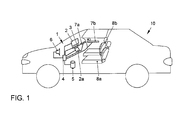
- FIG. 1 shows a car 10 as a means of transport, in which an embodiment of an inventively designed user interface 1 is provided.
- a first screen 2 is arranged as a primary screen and a second screen 2a is arranged as a display unit below the primary screen 2.
- a finger strip 3 with integrated proximity sensor is provided between the screens 2, 2a as a detection unit for receiving approach and swipe gestures.
- An electronic control unit 4 is provided as an evaluation and information technology connected to the screens 2, 2a and the finger bar 3 and the proximity sensor.
- a data memory 5 and a loudspeaker 6 are connected in terms of information technology to the electronic control unit 4. References for approach and / or swipe gestures can be stored in the data memory 5.
- Ambientelichtance 7a and 7b are embedded in the dashboard or in the doors of the car 10, which can be controlled via the electronic control unit 4 for the distribution of light.
- a driver's seat 8a and a passenger's seat 8b are provided for receiving a driver and a passenger, respectively.
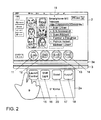
- FIG. 2 shows a possible screen content 19 of a primary screen 2 (English “screenshot"), in which in a central lower area four display elements 11, 12, 13, 14 representing a current acceleration of the means of locomotion or a current output of the means of locomotion or a boost pressure of an internal combustion engine of the means of locomotion or a coolant temperature of the means of transport are displayed.
- a primary screen 2 English “screenshot"
- an infrared LED bar 3a is provided as a detection unit for detecting approach gestures of a user.
- a finger strip 3 is provided as part of the detection unit for receiving wiping gestures of the user.
- a touch-sensitive screen 2a is arranged as an example of a claimed display unit. It has a lower one Width and a lower height than the primary screen 2 on.
- a (not shown) touch-sensitive surface allows a touching input by means of a hand 9 of a user with respect to four operating elements 15, 16, 17, 18, which for activating a start support or an interior light adjustment or a "boost" function or a modification of a soundscape of an exhaust system of the means of locomotion are provided. Below the controls 15, 16, 17, 18 heating / Klimaumfnature 20 are displayed.
- FIG. 3 shows a user gesture for activating a sleep mode 'in FIG. 2 illustrated user interface.
- a swipe gesture associated with activation of the sleep mode of the user's hand 9 in the direction of an arrow P results in the display elements 11, 12, 13, 14 previously displayed on the primary screen 2 no longer being displayed on the primary screen 2, but virtually pointing in the direction Lower the screen 2a.
- the display elements 11, 12, 13, 14 are "inserted” from above into the screen content of the screen 2 a, wherein they superimpose and finally replace the operating elements 15, 16, 17, 18.
- the climate control area 20 arranged below the operating elements 15, 16, 17, 18 remains visible and operable even after the insertion of the display elements 11, 12, 13, 14.
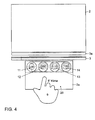
- FIG. 4 shows the result of the successfully activated idle state, in which the display elements 11, 12, 13, 14 completely overlay the controls and visually replace.
- a renewed approach of the user with the hand 9 to the infrared LED strip 3a generates the in FIG. 5 shown representation in which the no longer completely darkened primary screen 2 is activated again.
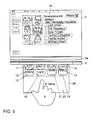
- FIG. 5 shows the result of a successfully recognized approach of a hand 9 to the infrared LED strip 3a, in response to which the primary screen 2 is filled with a blurred representation of different functional heights 19.
- the primary screen 2 becomes the in FIG. 6 produced representation generated.
- FIG. 6 is the screen 19 again shown sharply and superimposed in a lower area with the display elements 11, 12, 13, 14.
- the screen 2a now again completely shows the controls 15, 16, 17, 18 and the climate control area 20.
- a touching input with the hand 9 of the user with respect to one of the controls 15, 16, 17, 18 now provides again for a corresponding function call.
- FIG. 7 is a flowchart illustratively showing steps of a method of hybrid use of a display unit of a vehicle.
- step 100 display elements representing a first amount of information are displayed on a display unit of a vehicle.
- step 200 an approach of a user to the display unit is detected. This can be done for example by using an infrared LED bar.
- step 300 control elements of a functional scope which does not coincide in content with the information scope of the display elements are displayed instead of the display elements.
- the user can operate the functional peripheries of the controls (for example by means of a touching input on a touch-sensitive surface of the display unit).
Landscapes
- Engineering & Computer Science (AREA)
- Theoretical Computer Science (AREA)
- General Engineering & Computer Science (AREA)
- Physics & Mathematics (AREA)
- General Physics & Mathematics (AREA)
- Human Computer Interaction (AREA)
- Chemical & Material Sciences (AREA)
- Combustion & Propulsion (AREA)
- Transportation (AREA)
- Mechanical Engineering (AREA)
- User Interface Of Digital Computer (AREA)
- Instrument Panels (AREA)
- Devices For Indicating Variable Information By Combining Individual Elements (AREA)
- Control Of Indicators Other Than Cathode Ray Tubes (AREA)
Abstract
Description
- Die vorliegende Erfindung betrifft ein Fahrzeug, eine Anwenderschnittstelle sowie ein Verfahren zur mehrfachen ("hybriden") Nutzung einer Anzeigeeinheit eines Fortbewegungsmittels. Insbesondere betrifft die vorliegende Erfindung eine Verwendung einer Anzeigeeinheit zur Anzeige von Armaturen und Bedienelementen in Abhängigkeit eines Betriebszustandes.
- Im Stand der Technik sind Annäherungsgesten zur Modifikation einer Anzeigeeinheit eines Fortbewegungsmittels bekannt. Beispielsweise werden in Abhängigkeit einer Annäherungsgeste zusätzliche Bedienelemente angezeigt, welche einer jeweiligen Kachel (Fenster oder Informationseinheit) auf der Anzeigeeinheit zugeordnet sind. Über die Bedienelemente kann der Anwender Inhalte der Kachel oder eine Erscheinungsform der Kachel modifizieren. Außerdem sind im Stand der Technik in Software ausgeführte Armaturen bekannt, welche auf einem Bildschirm eines Fortbewegungsmittels angezeigt werden, um einem Anwender Informationen über den Betriebszustand des Fahrzeuges oder andere Daten und Messwerte anzuzeigen.
- Ausgehend vom vorstehend identifizierten Stand der Technik ist es eine Aufgabe der vorliegenden Erfindung, eine Anwendereinheit eines Fortbewegungsmittels flexibel und in Abhängigkeit eines Anwenderbedürfnisses zu nutzen.
- Die vorstehend identifizierte Aufgabe wird erfindungsgemäß durch eine Anwenderschnittstelle und ein Verfahren zur hybriden ("mehrfachen") Nutzung einer Anwendereinheit eines Fortbewegungsmittels gelöst. Die Anwendereinheit kann beispielsweise ein Bildschirm sein, auf welchem wahrfreie Inhalte dargestellt werden können. Das Fortbewegungsmittel kann beispielsweise als PKW, als Transporter, als LKW, als Luft- und/oder Wasserfahrzeug ausgestaltet sein. In einem ersten Schritt wird eine Vielzahl von Anzeigeelementen repräsentierend einen ersten Informationsumfang auf der Anzeigeeinheit angezeigt. Die Anzeigeelemente seien ausdrücklich nicht zur Entgegennahme von Anwendereingaben eingerichtet und können daher als "Armaturen" verstanden werden. Beispielsweise können die Anzeigeelemente eine Zeit, eine aktuelle Beschleunigung des Fortbewegungsmittels, eine Himmelsrichtung, eine Geschwindigkeit, eine Lastverteilung auf Räder des Fortbewegungsmittels o. ä. darstellen. In einem zweiten Schritt wird eine Annäherung eines Anwenders an die Anzeigeeinheit erfasst. Dies kann beispielsweise über eine Infrarot-LED-Leiste erfolgen, wie sie im Stand der Technik grundsätzlich zur Erfassung von Annäherungsgesten bekannt ist. Unter einer "Annäherung" wird im Rahmen der vorliegenden Erfindung insbesondere eine solche Geste des Anwenders verstanden, welche vollständig ohne Kontakt zu einer berührungsempfindlichen Oberfläche der Anzeigeeinheit erfolgt. Im Ansprechen auf die erfasste Annäherungsgeste wird ein Bedienelement oder eine Vielzahl von Bedienelementen repräsentierend Funktionsumfänge anstelle der Anzeigeelemente angezeigt. Mit anderen Worten wird das Anzeigeelement beziehungsweise die Vielzahl zuvor angezeigter Anzeigeelemente nach einem vollständigen Anzeigen der Bedienelemente nicht mehr angezeigt. Der durch die Anzeigeelemente repräsentierte Informationsumfang wird somit durch den durch die Bedienelemente repräsentierten Funktionsumfang ersetzt. Die Bedienelemente dienen im Gegensatz zu den Anzeigeelementen zur Entgegennahme von Anwenderinteraktionen, welche sich auf einen durch die Bedienelemente repräsentierten Funktionsumfang auswirken. Die Bedienelemente können beispielsweise zur Veränderung von Klima- und/oder Sitzeinstellungen vorgesehen sein. Somit kann der Anwender bei einer Annäherung die Anzeigeeinheit nutzen, um Einfluss auf den Funktionsumfang der Bedienelemente nehmen zu können. Auf diese Weise kann die Anzeigeeinheit für unterschiedliche Informations- beziehungsweise Funktionsumfänge verwendet werden. Dies kann insbesondere dann von Vorteil sein, falls eine Anwenderschnittstelle des Fortbewegungsmittels in einem Betriebszustand ist, in welchem eine zusätzliche Anzeigeeinheit derzeit außer Betrieb ist.
- Gemäß einem zweiten Aspekt der vorliegenden Erfindung wird eine Anwenderschnittstelle zur mehrfachen Nutzung einer Anzeigeeinheit eines Fortbewegungsmittels vorgeschlagen. Die Anwenderschnittstelle umfasst eine Anzeigeeinheit, welche eingerichtet ist, Anzeigeelemente repräsentierend einen ersten Informationsumfang anzuzeigen. Zudem ist eine Erfassungseinheit vorgesehen, welche eingerichtet ist, eine Annäherung eines Anwenders an die Anzeigeeinheit und/oder die Erfassungseinheit zu erfassen. Eine Auswerteeinheit der Anwenderschnittstelle ist eingerichtet, im Ansprechen auf eine mittels der Erfassungseinheit erfasste Annäherung des Anwenders Bedienelemente eines Funktionsumfangs anstelle der Anzeigeelemente repräsentierend den Informationsumfang auf der Anzeigeeinheit anzuzeigen. Mit anderen Worten ist die erfindungsgemäße Anwenderschnittstelle eingerichtet, ein Verfahren gemäß dem erstgenannten Erfindungsaspekt auszuführen. Die Merkmale, Merkmalskombinationen und die sich aus diesen ergebenden Vorteile entsprechen den in Verbindung mit dem erstgenannten Erfindungsaspekt ausgeführten derart ersichtlich, dass zur Vermeidung von Wiederholungen auf die obigen Ausführungen verwiesen wird.
- Die Unteransprüche zeigen bevorzugte Weiterbildungen der Erfindung.
- Das Verfahren sowie die Anwenderschnittstelle kann beziehungsweise können einen Primärbildschirm beziehungsweise eine primäre Anzeigeeinheit verwenden beziehungsweise umfassen, welche eingerichtet ist, in einen Energiesparmodus versetzt zu werden. Der Energiesparmodus kann auch als Verdunklungsmodus verstanden werden, welchen der Anwender beispielsweise wahlfrei aktivieren kann. Dies kann zur Verringerung von Lichtemissionen im Fahrgastraum bei Nachtfahrten von Vorteil sein. Außerdem können Anwender, welche mit modernen Anwenderschnittstellen nicht vertraut sind, durch eine verringerte Anzeigefläche weniger Berührungsängste bezüglich der Anwenderschnittstelle empfinden.
- Bevorzugt kann die Anzeigeeinheit einem in einem Energiesparmodus befindlichen bzw. in einen Energiesparmodus überführbaren Primärbildschirm zugeordnet sein, welcher beispielsweise größer als die Anzeigeeinheit der oben genannten Erfindungsaspekte ist. Auf dem Primärbildschirm können die Anzeigeelemente bei einem Wechsel in einen Betriebsmodus mit höherer Energieaufnahme automatisch transferiert werden. Mit anderen Worten wird bei einer erfassten Annäherung des Anwenders das Anzeigeelement beziehungsweise die Vielzahl Anzeigeelemente auf dem Primärbildschirm anstatt auf der Anzeigeeinheit angezeigt. Alternativ oder zusätzlich kann nach Verstreichen einer vordefinierten Zeitdauer nach einem Entfernen des Anwenders von der Anzeigeeinheit beziehungsweise von der Erfassungseinheit das Anzeigeelement beziehungsweise die Anzeigeelemente vom Primärbildschirm entfernt und erneut auf der Anzeigeeinheit dargestellt werden und hierbei die Bedienelemente letztendlich vollständig ersetzen.
- Der Informationsumfang der Anzeigeelemente kann beispielsweise anderen Funktionen des Fortbewegungsmittels zugeordnet sein als der Funktionsumfang der Bedienelemente. Mit anderen Worten wird nicht lediglich eine bedienbare Variante der Anzeigeelemente nach erfasster Annäherung angezeigt, sondern im Wesentlichen von den Anzeigeelementen thematisch unabhängige Bedienelemente angezeigt. Insbesondere wirken sich Anwendereingaben mittels der Bedienelemente nicht auf den von den Anzeigeelementen repräsentieren Informationsumfang aus.
- Die Anzeigeelemente können beispielsweise einer Kompassfunktion und/oder einer Temperaturanzeige (Außentemperatur und/oder Innenraumtemperatur, Fahrerseite und/oder Beifahrerseite, Sitzheizung, Lufttemperatur, Lenkradheizung etc.) und/oder einer Lastverteilung auf angetriebene Räder des Fortbewegungsmittels sein.
- Die Bedienelemente können sich auf Anpassungen von Heiz-/Klimafunktionen beziehen, beispielsweise der Innenraumtemperatur (Fahrerseite und/oder Beifahrerseite), der Sitzheizung, der Lufttemperatur, der Lenkradheizung etc.), insbesondere jedoch von den vorgenannten Funktionen verschiedene Funktionen gelten für die Bedienelemente.
- Die Bedienelemente können insbesondere Ein-/ Aus-Schaltflächen und/oder Inkrementier- und/oder Dekrementier-Schaltflächen und/oder Schieberegler etc. umfassen, welche sich für die Bedienelemente vordefinierte Funktionsumfänge beziehen.
- Gemäß einem dritten Aspekt der vorliegenden Erfindung wird ein Computerprogrammprodukt vorgeschlagen, welches Instruktionen umfasst, welche, wenn sie auf einer Auswerteeinheit einer erfindungsgemäßen Anwenderschnittstelle ausgeführt werden, die Anwenderschnittstelle veranlassen, die Schritte eines Verfahrens gemäß dem erstgenannten Erfindungsaspekt auszuführen. Das Computerprogrammprodukt kann als CD, DVD, Blue-Ray-Disc, Flash-Speicher, Festplatte, RAM/ROM, Cashe etc. ausgestaltet sein.
- Gemäß einem vierten Aspekt der vorliegenden Erfindung wird eine Signalfolge repräsentierend Instruktionen vorgeschlagen, welche, wenn sie auf einer programmierbaren Auswerteeinheit einer Anwenderschnittstelle gemäß dem zweitgenannten Erfindungsaspekt ausgeführt werden, die Anwenderschnittstelle veranlassen beziehungsweise diese in die Lager versetzen, die Verfahrensschritte eines Verfahrens gemäß dem erstgenannten Erfindungsaspekt auszuführen. Auf diese Weise wird auch die informationstechnische Bereitstellung der Informationen für den Fall unter Schutz gestellt, dass sich die hierzu erforderlicher Speichermittel außerhalb des Geltungsbereiches der beigefügten Ansprüche befinden.
- Gemäß einem fünften Aspekt der vorliegenden Erfindung wird ein Fortbewegungsmittel (z. B. ein PKW, ein Transporter, ein LKW, ein Motorrad, ein Luft- und/oder Wasserfahrzeug) vorgeschlagen, welches eine Anwenderschnittstelle gemäß dem zweitgenannten Erfindungsaspekt umfasst. Die Merkmale, Merkmalskombinationen und die sich aus diesen ergebenden Vorteile des dritt-, viert- und fünftgenannten Erfindungsaspektes ergeben sich entsprechend denjenigen, welche in Verbindung mit dem erstgenannten Erfindungsaspekt ausgeführt wurden.
- Nachfolgend werden Ausführungsbeispiele der Erfindung unter Bezugnahme auf die begleitenden Zeichnungen im Detail beschrieben. In den Zeichnungen ist:
- Figur 1
- eine Prinzipskizze veranschaulichend Komponenten eines Ausführungsbeispiels eines erfindungsgemäßen Fortbewegungsmittels mit einem Ausführungsbeispiel einer erfindungsgemäßen Anwenderschnittstelle;
- Figur 2
- eine Veranschaulichung einer Anwenderinteraktion zur Aktivierung eines Ruhemodus' einer Anwenderschnittstelle;
- Figur 3
- eine Veranschaulichung einer weiteren Anwenderinteraktion zur Aktivierung des Ruhemodus';
- Figur 4
- eine Annäherung eines Anwenders an eine in einem Ruhemodus befindliche erfindungsgemäß ausgestaltete Anwenderschnittstelle;
- Figur 5
- eine Annäherung eines Anwenders an eine in einem Ruhemodus befindliche erfindungsgemäß ausgestaltete Anwenderschnittstelle;
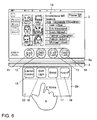
- Figur 6
- das Ergebnis der in den
Figuren 4 und5 veranschaulichten Annäherung; und - Figur 7
- ein Flussdiagramm veranschaulichend Schritte eines Ausführungsbeispiels eines erfindungsgemäßen Verfahrens.
-
Figur 1 zeigt einen PKW 10 als Fortbewegungsmittel, in welchem ein Ausführungsbeispiel einer erfindungsgemäß ausgestalteten Anwenderschnittstelle 1 vorgesehen ist. Ein erster Bildschirm 2 ist als Primärbildschirm und ein zweiter Bildschirm 2a ist als Anzeigeeinheit unterhalb des Primärbildschirms 2 angeordnet. Zwischen den Bildschirmen 2, 2a ist eine Fingerleiste 3 mit integrierter Annäherungssensorik als Erfassungseinheit zur Entgegennahme von Annäherungs- und Wischgesten vorgesehen. Ein elektronisches Steuergerät 4 ist als Auswerteeinheit vorgesehen und informationstechnisch mit den Bildschirmen 2, 2a und der Fingerleiste 3 sowie der Annäherungssensorik verbunden. Überdies sind ein Datenspeicher 5 und ein Lautsprecher 6 informationstechnisch mit dem elektronischen Steuergerät 4 verbunden. Im Datenspeicher 5 können Referenzen für Annäherungs- und/oder Wischgesten gespeichert sein. Über den Lautsprecher 6 können Quittier- und/oder Signaltöne und Sprachsignale ausgegeben werden. Zudem sind Ambientelichtleisten 7a und 7b in das Armaturenbrett beziehungsweise in die Türen des PKWs 10 eingelassen, welche über das elektronische Steuergerät 4 zur Ausschüttung von Licht angesteuert werden können. Ein Fahrersitz 8a und ein Beifahrersitz 8b sind zur Aufnahme eines Fahrers beziehungsweise eines Beifahrers als Anwender vorgesehen. -
Figur 2 zeigt einen möglichen Bildschirminhalt 19 eines Primärbildschirmes 2 (englisch "Screenshot"), auf welchem in einem mittleren unteren Bereich vier Anzeigeelemente 11, 12, 13, 14 repräsentierend eine aktuelle Beschleunigung des Fortbewegungsmittels beziehungsweise eine aktuelle Leistungsabgabe des Fortbewegungsmittels beziehungsweise einen Ladedruck einer Brennkraftmaschine des Fortbewegungsmittels beziehungsweise eine Kühlmitteltemperatur des Fortbewegungsmittels angezeigt werden. Unterhalb des Primärbildschirms 2 ist eine Infrarot-LED-Leiste 3a als Erfassungseinheit zur Erfassung von Annäherungsgesten eines Anwenders vorgesehen. Unterhalb der Infrarot-LED-Leiste 3a ist eine Fingerleiste 3 als Teil der Erfassungseinheit zur Entgegennahme von Wischgesten des Anwenders vorgesehen. - Unterhalb der Fingerleiste 3 ein berührungsempfindlicher Bildschirm 2a als Beispiel für eine anspruchsgemäße Anzeigeeinheit angeordnet. Sie weist eine geringere Breite und eine geringere Höhe als der Primärbildschirm 2 auf. Eine (nicht dargestellte) berührungsempfindliche Oberfläche ermöglicht eine berührende Eingabe mittels einer Hand 9 eines Anwenders bezüglich vierer Bedienelemente 15, 16, 17, 18, welche zur Aktivierung einer Startunterstützung beziehungsweise einer Innenraumlichtanpassung beziehungsweise einer "Boost"-Funktion beziehungsweise einer Modifikation einer Geräuschkulisse einer Abgasanlage des Fortbewegungsmittels vorgesehen sind. Unterhalb der Bedienelemente 15, 16, 17, 18 werden Heiz-/Klimaumfänge 20 angezeigt.
-
Figur 3 zeigt eine Anwendergeste zur Aktivierung eines Ruhemodus' der inFigur 2 veranschaulichten Anwenderschnittstelle. Eine der Aktivierung des Ruhemodus zugeordnete Wischgeste der Hand 9 des Anwenders in Richtung eines Pfeils P führt dazu, dass die vormals auf dem Primärbildschirm 2 angezeigten Anzeigeelemente 11, 12, 13, 14 nicht mehr auf dem Primärbildschirm 2 angezeigt werden, sondern sich virtuell in Richtung des Bildschirmes 2a absenken. Mit anderen Worten werden die Anzeigeelemente 11, 12, 13, 14 von oben in den Bildschirminhalt des Bildschirms 2a "eingeschoben", wobei sie die Bedienelemente 15, 16, 17, 18 überlagern und schließlich ersetzen. Der unterhalb der Bedienelemente 15, 16, 17, 18 angeordnete Klimabedienbereich 20 bleibt auch nach dem Einschieben der Anzeigeelemente 11, 12, 13, 14 sichtbar und bedienbar. -
Figur 4 zeigt das Resultat des erfolgreich aktivierten Ruhezustandes, bei welchem die Anzeigeelemente 11, 12, 13, 14 vollständig die Bedienelemente überlagem und optisch ersetzen. Eine erneute Annäherung des Anwenders mit der Hand 9 an die Infrarot-LED-Leiste 3a erzeugt die inFigur 5 gezeigte Darstellung, in welcher der nicht mehr vollständig abgedunkelte Primärbildschirm 2 wieder aktiviert wird. -
Figur 5 zeigt das Resultat einer erfolgreich erkannten Annäherung einer Hand 9 an die Infrarot-LED-Leiste 3a, im Ansprechen worauf der Primärbildschirm 2 mit einer unscharfen Darstellung unterschiedlicher Funktionsumfänge 19 gefüllt wird. Die vormals vollständig auf dem Bildschirm 2a dargestellten Anzeigeelemente 11, 12, 13, 14 verschieben sich in Richtung des Primärbildschirmes 2, wobei sie die Bedienelemente 15, 16, 17, 18 auf dem Bildschirm 2a wieder freigeben. Im Zuge der Reaktivierung des Primärbildschirms 2 wird die inFigur 6 gezeigte Darstellung erzeugt. - In
Figur 6 ist der Bildschirminhalt 19 wieder scharf dargestellt und in einem unteren Bereich mit den Anzeigeelementen 11, 12, 13, 14 überlagert. Der Bildschirm 2a zeigt nun wieder vollständig die Bedienelemente 15, 16, 17, 18 und den Klimabedienbereich 20. Eine berührende Eingabe mit der Hand 9 des Anwenders bezüglich eines der dargestellten Bedienelemente 15, 16, 17, 18 sorgt nun wieder für einen entsprechenden Funktionsaufruf. -
Figur 7 zeigt ein Flussdiagramm veranschaulichend Schritte eines Verfahrens zur hybriden Nutzung einer Anzeigeeinheit eines Fortbewegungsmittels. In Schritt 100 werden Anzeigeelemente repräsentierend einen ersten Informationsumfang auf einer Anzeigeeinheit eines Fortbewegungsmittels angezeigt. In Schritt 200 wird eine Annäherung eines Anwenders an die Anzeigeeinheit erfasst. Dies kann beispielsweise unter Verwendung einer Infrarot-LED-Leiste erfolgen. In Schritt 300 werden Bedienelemente eines Funktionsumfanges, welcher inhaltlich nicht mit dem Informationsumfang der Anzeigeelemente zusammenfällt, anstelle der Anzeigeelemente angezeigt. Nun kann der Anwender, anstatt die Informationsumfänge der Anzeigeelemente optisch zu erfassen, die Funktionsumfänge der Bedienelemente (beispielsweise mittels einer berührenden Eingabe auf einer berührungsempfindlichen Oberfläche der Anzeigeeinheit) bedienen. - Auch wenn die erfindungsgemäßen Aspekte und vorteilhaften Ausführungsformen anhand der in Verbindung mit den beigefügten Zeichnungsfiguren erläuterten Ausführungsbeispiele im Detail beschrieben worden sind, sind für den Fachmann Modifikationen und Kombinationen von Merkmalen der dargestellten Ausführungsbeispiele möglich, ohne den Bereich der vorliegenden Erfindung zu verlassen, deren Schutzbereich durch die beigefügten Ansprüche definiert wird.
-
- 1
- Anwenderschnittstelle
- 2
- Primärbildschirm
- 2a
- Bildschirm/Anzeigeeinheit
- 3
- Fingerleiste
- 3a
- Annäherungssensorik
- 4
- elektronisches Steuergerät
- 5
- Datenspeicher
- 6
- Lautsprecher
- 7a, 7b
- Ambientelichtleisten
- 8a
- Fahrersitz
- 8b
- Beifahrersitz
- 9
- Hand des Anwenders
- 10
- PKW
- 11 - 14
- Anzeigeelemente
- 15 - 18
- Bedienelemente
- 19
- Bildschirminhalt des Primärbildschirms
- 20
- Bedienbereich Heiz-/Klimaumfänge
- 100 bis 300
- Verfahrensschritte
- P
- Pfeil
Claims (13)
- Verfahren zur hybriden Nutzung einer Anzeigeeinheit (2a) eines Fortbewegungsmittels (10) umfassend die Schritte- Anzeigen (100) von Anzeigeelementen (11, 12, 13, 14) repräsentierend einen Informationsumfang auf einer ersten Anzeigeeinheit (2a),- Erfassen (200) einer Annäherung eines Anwenders und im Ansprechen darauf- Anzeigen (300) von Bedienelementen (15, 16, 17, 18) repräsentierend einen Funktionsumfang anstelle der Anzeigeelemente (11,12, 13,14).
- Verfahren nach Anspruch 1 weiter umfassend- Anzeigen der Anzeigeelemente (11, 12, 13, 14) auf einer zweiten Anzeigeeinheit (2), und- Entfernen der Anzeigeelemente (11, 12, 13, 14) von der zweiten Anzeigeeinheit (2).
- Verfahren nach Anspruch 1 oder 2 weiter umfassend- Versetzen der zweiten Anzeigeeinheit (2) in einen Zustand verringerter Energieaufnahme.
- Anwenderschnittstelle zur hybriden Nutzung einer Anzeigeeinheit (2a) eines Fortbewegungsmittels (10) umfassend- eine erste Anzeigeeinheit (2a), welche eingerichtet ist, Anzeigeelemente (11, 12, 13, 14) repräsentierend einen ersten Informationsumfang anzuzeigen,- eine Erfassungseinheit (3), welche eingerichtet ist, eine Annäherung eines Anwenders an die erste Anzeigeeinheit (2a) zu erfassen, und- eine Auswerteeinheit (4), welche eingerichtet ist, im Ansprechen auf eine mittels der Erfassungseinheit (3) erfasste Annäherung des Anwenders- Bedienelemente (15, 16, 17, 18) eines Funktionsumfangs anstelle der Anzeigeelemente (11, 12, 13, 14) repräsentierend den ersten Informationsumfang auf der ersten Anzeigeeinheit (2a) anzuzeigen.
- Anwenderschnittstelle nach Anspruch 4 weiter umfassend eine zweite Anzeigeeinheit (2), welche eingerichtet ist, in einen Energiesparmodus versetzt zu werden, wobei die Auswerteeinheit (4) eingerichtet ist, zunächst auf der zweiten Anzeigeeinheit (2) angezeigte Anzeigeelemente (11, 12, 13, 14) auf der ersten Anzeigeeinheit (2a) anzuzeigen und.
- Anwenderschnittstelle nach Anspruch 4 oder 5, wobei der Informationsumfang der Anzeigeelemente (11,12,13,14) anderen Funktionen und/oder Zustandsgrößen des Fortbewegungsmittels (10) zugeordnet ist als der Funktionsumfang der Bedienelemente (15, 16, 17, 18).
- Anwenderschnittstelle nach einem der Ansprüche 4 bis 6, wobei die Anzeigeelemente (11, 12, 13, 14) nach Art einzelner, insbesondere analoger, Armaturen dargestellt werden.
- Anwenderschnittstelle nach einem der Ansprüche 4 bis 7, wobei die Anzeigeelemente (11, 12, 13, 14)- einer Kompassfunktion, und/oder- einer Temperaturanzeige, und/oder- einer Beschleunigungsanzeige, und/oder- einem Ladedruck, und/oder- einer Kühlwassertemperaturanzeigezugeordnet sind.
- Anwenderschnittstelle nach einem der Ansprüche 4 bis 8, wobei die Bedienelemente (15, 16, 17, 18)- einer Klimabedienfunktion, und/oder- einer Sitzeinstellung, und/oder- einer Einstellung einer Abgasanlage, und/oder- einem Antriebstrangprogramm, und/oder- einem Getriebeprogramm, und/oder- einer Beleuchtungsfunktionzugeordnet sind.
- Anwenderschnittstelle nach einem der Ansprüche 4 bis 9, wobei die Bedienelemente (15, 16, 17, 18)- Ein-/Aus-Schaltflächen, und/oder- Inkrementier- und Dekrementier-Schaltflächen, und/oder- einen Schiebereglerumfassen.
- Computerprogrammprodukt umfassend Instruktionen, welche, wenn Sie auf einer programmierbaren Auswerteeinheit (4) einer Anwenderschnittstelle (1) nach einem der Ansprüche 4 bis 10 ausgeführt werden, die Auswerteeinheit (4) veranlassen, die Schritte eines Verfahrens nach einem der Ansprüche 1 bis 3 durchzuführen.
- Signalfolge repräsentierend Instruktionen, welche, wenn Sie auf einer programmierbaren Auswerteeinheit (4) einer Anwenderschnittstelle (1) nach einem der Ansprüche 4 bis 10 ausgeführt werden, die Auswerteeinheit (4) veranlassen, die Schritte eines Verfahrens nach einem der Ansprüche 1 bis 3 durchzuführen.
- Fortbewegungsmittel umfassend eine Anwenderschnittstelle nach einem der Ansprüche 4 bis 10.
Priority Applications (5)
| Application Number | Priority Date | Filing Date | Title |
|---|---|---|---|
| EP15150033.7A EP3040842B1 (de) | 2015-01-02 | 2015-01-02 | Anwenderschnittstelle und Verfahren zur hybriden Nutzung einer Anzeigeeinheit eines Fortbewegungsmittels |
| PCT/EP2015/080523 WO2016107760A2 (de) | 2015-01-02 | 2015-12-18 | Anwenderschnittstelle und verfahren zur hybriden nutzung einer anzeigeeinheit eines fortbewegungsmittels |
| US15/538,839 US10838604B2 (en) | 2015-01-02 | 2015-12-18 | User interface and method for the hybrid use of a display unit of a transportation means |
| KR1020177018892A KR101978585B1 (ko) | 2015-01-02 | 2015-12-18 | 사용자 인터페이스 및 이동 수단의 디스플레이 유닛을 혼성 사용하기 위한 방법 |
| CN201580071905.0A CN107111369B (zh) | 2015-01-02 | 2015-12-18 | 用于混合利用交通运输工具的显示装置的用户界面和方法 |
Applications Claiming Priority (1)
| Application Number | Priority Date | Filing Date | Title |
|---|---|---|---|
| EP15150033.7A EP3040842B1 (de) | 2015-01-02 | 2015-01-02 | Anwenderschnittstelle und Verfahren zur hybriden Nutzung einer Anzeigeeinheit eines Fortbewegungsmittels |
Publications (2)
| Publication Number | Publication Date |
|---|---|
| EP3040842A1 true EP3040842A1 (de) | 2016-07-06 |
| EP3040842B1 EP3040842B1 (de) | 2019-08-07 |
Family
ID=52292748
Family Applications (1)
| Application Number | Title | Priority Date | Filing Date |
|---|---|---|---|
| EP15150033.7A Active EP3040842B1 (de) | 2015-01-02 | 2015-01-02 | Anwenderschnittstelle und Verfahren zur hybriden Nutzung einer Anzeigeeinheit eines Fortbewegungsmittels |
Country Status (5)
| Country | Link |
|---|---|
| US (1) | US10838604B2 (de) |
| EP (1) | EP3040842B1 (de) |
| KR (1) | KR101978585B1 (de) |
| CN (1) | CN107111369B (de) |
| WO (1) | WO2016107760A2 (de) |
Cited By (2)
| Publication number | Priority date | Publication date | Assignee | Title |
|---|---|---|---|---|
| EP4043262A1 (de) | 2021-02-12 | 2022-08-17 | Volkswagen Ag | Anzeige- und bedienvorrichtung zur steuerung von fahrzeugfunktionen |
| EP4043263A1 (de) | 2021-02-12 | 2022-08-17 | Volkswagen Ag | Verfahren zur steuerung von fahrzeugfunktionen |
Citations (7)
| Publication number | Priority date | Publication date | Assignee | Title |
|---|---|---|---|---|
| DE102005011094A1 (de) * | 2004-03-29 | 2005-11-03 | Volkswagen Ag | Fahrerinformationssystem |
| DE102007039445A1 (de) * | 2007-08-21 | 2009-02-26 | Volkswagen Ag | Verfahren zum Anzeigen von Informationen in einem Kraftfahrzeug für einen Bedienzustand und einen Anzeigezustand und Anzeigeeinrichtung |
| DE102009023447A1 (de) * | 2009-05-30 | 2010-01-14 | Daimler Ag | Zusatzfläche im Zentraldisplay als Anzeigebereich für Statusinformationen aus Headunit-Inhalten |
| DE102009051202A1 (de) * | 2009-10-29 | 2011-05-12 | Volkswagen Ag | Verfahren zum Betreiben einer Bedienvorrichtung und Bedienvorrichtung |
| US20110187675A1 (en) * | 2009-02-06 | 2011-08-04 | Panasonic Corporation | Image display device |
| DE102010055132A1 (de) * | 2010-12-18 | 2012-06-21 | Volkswagen Aktiengesellschaft | Verfahren und Vorrichtung zum Bereitstellen einer Nutzerschnittstelle in einem Fahrzeug |
| EP2808775A2 (de) * | 2013-05-27 | 2014-12-03 | Volkswagen Aktiengesellschaft | Controller für ein Informationswiedergabesystem für ein Fahrzeug |
Family Cites Families (25)
| Publication number | Priority date | Publication date | Assignee | Title |
|---|---|---|---|---|
| JP2000056910A (ja) * | 1998-08-11 | 2000-02-25 | Nippon Denki Ido Tsushin Kk | 携帯型コンピュータの節電方式 |
| JP2007076383A (ja) * | 2005-09-09 | 2007-03-29 | Mazda Motor Corp | 車両用情報表示装置 |
| JP4333697B2 (ja) * | 2006-06-06 | 2009-09-16 | トヨタ自動車株式会社 | 車両用表示装置 |
| DE102007023290A1 (de) * | 2007-05-16 | 2008-11-20 | Volkswagen Ag | Multifunktionsanzeige- und Bedienvorrichtung und Verfahren zum Betreiben einer Multifunktionsanzeige- und Bedienvorrichtung mit verbesserter Auswahlbedienung |
| KR101141087B1 (ko) * | 2007-09-14 | 2012-07-12 | 인텔렉츄얼 벤처스 홀딩 67 엘엘씨 | 제스처-기반 사용자 상호작용의 프로세싱 |
| JP4900824B2 (ja) | 2007-09-18 | 2012-03-21 | トヨタ自動車株式会社 | 入力表示装置 |
| DE102009019561A1 (de) * | 2009-04-30 | 2010-11-04 | Volkswagen Ag | Verfahren zum Anzeigen von Informationen in einem Kraftfahrzeug und Anzeigeeinrichtung |
| US8078359B2 (en) * | 2009-10-05 | 2011-12-13 | Tesla Motors, Inc. | User configurable vehicle user interface |
| DE102010042376A1 (de) | 2010-05-28 | 2011-12-01 | Johnson Controls Gmbh | Anzeigevorrichtung für ein Fahrzeug |
| US20130044080A1 (en) * | 2010-06-16 | 2013-02-21 | Holy Stone Enterprise Co., Ltd. | Dual-view display device operating method |
| DE102010046124A1 (de) * | 2010-09-21 | 2012-03-22 | Gm Global Technology Operations Llc (N.D.Ges.D. Staates Delaware) | Informationsanzeigeanordnung |
| JP5652432B2 (ja) * | 2011-06-29 | 2015-01-14 | トヨタ自動車株式会社 | 車両用操作装置 |
| JP5905691B2 (ja) * | 2011-09-26 | 2016-04-20 | トヨタ自動車株式会社 | 車両用操作入力装置 |
| JP2013096736A (ja) * | 2011-10-28 | 2013-05-20 | Denso Corp | 車両用表示装置 |
| JP5754410B2 (ja) * | 2012-04-13 | 2015-07-29 | トヨタ自動車株式会社 | 表示装置 |
| US10019066B2 (en) * | 2012-09-28 | 2018-07-10 | Tesla, Inc. | Method of launching an application and selecting the application target window |
| DE102012022312A1 (de) * | 2012-11-14 | 2014-05-15 | Volkswagen Aktiengesellschaft | Informationswiedergabesystem und Verfahren zur Informationswiedergabe |
| US9632584B2 (en) * | 2013-01-08 | 2017-04-25 | 2236008 Ontario Inc. | On-demand user control |
| US9200915B2 (en) * | 2013-06-08 | 2015-12-01 | Apple Inc. | Mapping application with several user interfaces |
| JP5858059B2 (ja) * | 2013-04-02 | 2016-02-10 | 株式会社デンソー | 入力装置 |
| JP6232804B2 (ja) * | 2013-07-25 | 2017-11-22 | 株式会社デンソー | 車両用ユーザインタフェースシステム |
| JP6179253B2 (ja) * | 2013-08-02 | 2017-08-16 | 株式会社デンソー | 入力装置 |
| US9340155B2 (en) * | 2013-09-17 | 2016-05-17 | Toyota Motor Sales, U.S.A., Inc. | Interactive vehicle window display system with user identification |
| KR102354883B1 (ko) * | 2013-11-18 | 2022-01-25 | 삼성전자주식회사 | 디스플레이 장치 및 그 제어 방법 |
| KR20150092561A (ko) * | 2014-02-05 | 2015-08-13 | 현대자동차주식회사 | 차량용 제어 장치 및 차량 |
-
2015
- 2015-01-02 EP EP15150033.7A patent/EP3040842B1/de active Active
- 2015-12-18 WO PCT/EP2015/080523 patent/WO2016107760A2/de not_active Ceased
- 2015-12-18 CN CN201580071905.0A patent/CN107111369B/zh active Active
- 2015-12-18 KR KR1020177018892A patent/KR101978585B1/ko active Active
- 2015-12-18 US US15/538,839 patent/US10838604B2/en active Active
Patent Citations (7)
| Publication number | Priority date | Publication date | Assignee | Title |
|---|---|---|---|---|
| DE102005011094A1 (de) * | 2004-03-29 | 2005-11-03 | Volkswagen Ag | Fahrerinformationssystem |
| DE102007039445A1 (de) * | 2007-08-21 | 2009-02-26 | Volkswagen Ag | Verfahren zum Anzeigen von Informationen in einem Kraftfahrzeug für einen Bedienzustand und einen Anzeigezustand und Anzeigeeinrichtung |
| US20110187675A1 (en) * | 2009-02-06 | 2011-08-04 | Panasonic Corporation | Image display device |
| DE102009023447A1 (de) * | 2009-05-30 | 2010-01-14 | Daimler Ag | Zusatzfläche im Zentraldisplay als Anzeigebereich für Statusinformationen aus Headunit-Inhalten |
| DE102009051202A1 (de) * | 2009-10-29 | 2011-05-12 | Volkswagen Ag | Verfahren zum Betreiben einer Bedienvorrichtung und Bedienvorrichtung |
| DE102010055132A1 (de) * | 2010-12-18 | 2012-06-21 | Volkswagen Aktiengesellschaft | Verfahren und Vorrichtung zum Bereitstellen einer Nutzerschnittstelle in einem Fahrzeug |
| EP2808775A2 (de) * | 2013-05-27 | 2014-12-03 | Volkswagen Aktiengesellschaft | Controller für ein Informationswiedergabesystem für ein Fahrzeug |
Cited By (4)
| Publication number | Priority date | Publication date | Assignee | Title |
|---|---|---|---|---|
| EP4043262A1 (de) | 2021-02-12 | 2022-08-17 | Volkswagen Ag | Anzeige- und bedienvorrichtung zur steuerung von fahrzeugfunktionen |
| EP4043263A1 (de) | 2021-02-12 | 2022-08-17 | Volkswagen Ag | Verfahren zur steuerung von fahrzeugfunktionen |
| DE102021201375A1 (de) | 2021-02-12 | 2022-08-18 | Volkswagen Aktiengesellschaft | Anzeige- und Bedienvorrichtung zur Steuerung von Fahrzeugfunktionen |
| DE102021201376A1 (de) | 2021-02-12 | 2022-08-18 | Volkswagen Aktiengesellschaft | Verfahren zur Steuerung von Fahrzeugfunktionen |
Also Published As
| Publication number | Publication date |
|---|---|
| KR20170093227A (ko) | 2017-08-14 |
| KR101978585B1 (ko) | 2019-05-14 |
| US10838604B2 (en) | 2020-11-17 |
| WO2016107760A3 (de) | 2016-08-25 |
| CN107111369B (zh) | 2020-08-11 |
| EP3040842B1 (de) | 2019-08-07 |
| US20180024733A1 (en) | 2018-01-25 |
| WO2016107760A2 (de) | 2016-07-07 |
| CN107111369A (zh) | 2017-08-29 |
Similar Documents
| Publication | Publication Date | Title |
|---|---|---|
| EP2930049B1 (de) | Anwenderschnittstelle und Verfahren zur Anpassung einer Ansicht auf einer Anzeigeeinheit | |
| DE102014016222A1 (de) | Verfahren und System zum Betreiben einer berührungssensitiven Anzeigeeinrichtung eines Kraftwagens | |
| WO2007090593A1 (de) | Vorrichtung und verfahren zur interaktiven informationsausgabe und/oder hilfestellung für den benutzer eines kraftfahrzeugs | |
| DE102009021280A1 (de) | Kraftfahrzeug mit einem Touchpad im Lenkrad und Verfahren zur Ansteuerung des Touchpads | |
| DE102014013960A1 (de) | Verfahren zum Betreiben wenigstens einer Fahrerassistenzeinrichtung eines Kraftwagens und System mit einer Fahrerassistenzeinrichtung | |
| EP2960099B1 (de) | Anwenderschnittstelle und verfahren zum anpassen einer einstellung eines fortbewegungsmittels mittels einer anzeigeeinheit einer anwenderschnittstelle | |
| EP3108331B1 (de) | Anwenderschnittstelle und verfahren zum berührungslosen bedienen eines in hardware ausgestalteten bedienelementes in einem 3d-gestenmodus | |
| EP3047355B1 (de) | Verfahren und system zum betreiben wenigstens einer anzeigeeinrichtung eines kraftwagens sowie kraftwagen mit einem system zum betreiben wenigstens einer anzeigeeinrichtung | |
| EP3416848B1 (de) | Anordnung, fortbewegungsmittel und verfahren zur unterstützung eines anwenders bei einer bedienung einer berührungsempfindlichen anzeigeeinrichtung | |
| DE102013011311A1 (de) | Verfahren zum Betreiben eines Informationssystems eines Kraftwagens und Informationssystem für einen Kraftwagen | |
| DE102014011118B4 (de) | Verfahren zum Bedienen einer Lichtfunktion von Kraftfahrzeugscheinwerfern und Kraftfahrzeug mit einer Anzeigeeinrichtung und einem Bedienelement für eine Bedienung der Lichtfunktion der Kraftfahrzeugscheinwerfer | |
| DE102013013696A1 (de) | Infotainmentsystem für ein Kraftwagen, Kraftwagen mit einem Infotainmentsystem und Verfahren zum Betreiben eines Infotainmentsystems | |
| DE102010011306A1 (de) | Verfahren und Vorrichtung zur Einstellung von mindestens einem Parameter mindestens einer Lichtquelle | |
| EP3040842B1 (de) | Anwenderschnittstelle und Verfahren zur hybriden Nutzung einer Anzeigeeinheit eines Fortbewegungsmittels | |
| DE102013000744A1 (de) | Verfahren und System zum Steuern wenigstens einer Funktionseinheit sowie Kraftwagen und mobiles Endgerät mit einem solchen System | |
| DE102014014341B4 (de) | Verfahren zum Betreiben eines Infotainmentsystems eines Kraftfahrzeugs und Infotainmentsystem für ein Kraftfahrzeug | |
| WO2014114426A1 (de) | Anzeigesystem und verfahren zum blickrichtungsabhängigen betreiben eines anzeigesystems | |
| EP3212454B1 (de) | Situative anzeigen | |
| DE102015205529A1 (de) | Positionsungebundenes Element zur Bedienung von Funktionen eines Fortbewegungsmittels | |
| EP3040836B1 (de) | Fortbewegungsmittel, Anwenderschnittstelle und Verfahren zur Reduzierung einer Lichtemission einer Anzeigeeinrichtung eines Fortbewegungsmittels | |
| DE102014001183B4 (de) | Verfahren und System zum Auslösen wenigstens einer Funktion eines Kraftwagens | |
| DE102014222792A1 (de) | Verfahren und Vorrichtung zur fahrzustandsabhängigen Anpassung eines Bedienelementes in einem Fortbewegungsmittel | |
| DE102023100139A1 (de) | Verfahren und Vorrichtung zum betriebsphasenabhängigen Bereitstellen von Bedienelementen | |
| DE102013015716B4 (de) | Bedienungseinrichtung für eine Anlage im Innenraum eines Kraftwagens | |
| DE102012005866A1 (de) | Verfahren zur Wiedergabe von möglichen oder bereits erfolgten, von einer Eingabeeinheit zu erfassenden oder bereits erfolgten Bedieneingaben in einem Kraftfahrzeug |
Legal Events
| Date | Code | Title | Description |
|---|---|---|---|
| PUAI | Public reference made under article 153(3) epc to a published international application that has entered the european phase |
Free format text: ORIGINAL CODE: 0009012 |
|
| 17P | Request for examination filed |
Effective date: 20150102 |
|
| AK | Designated contracting states |
Kind code of ref document: A1 Designated state(s): AL AT BE BG CH CY CZ DE DK EE ES FI FR GB GR HR HU IE IS IT LI LT LU LV MC MK MT NL NO PL PT RO RS SE SI SK SM TR |
|
| AX | Request for extension of the european patent |
Extension state: BA ME |
|
| RBV | Designated contracting states (corrected) |
Designated state(s): AL AT BE BG CH CY CZ DE DK EE ES FI FR GB GR HR HU IE IS IT LI LT LU LV MC MK MT NL NO PL PT RO RS SE SI SK SM TR |
|
| STAA | Information on the status of an ep patent application or granted ep patent |
Free format text: STATUS: EXAMINATION IS IN PROGRESS |
|
| 17Q | First examination report despatched |
Effective date: 20171206 |
|
| REG | Reference to a national code |
Ref country code: DE Ref legal event code: R079 Ref document number: 502015009851 Country of ref document: DE Free format text: PREVIOUS MAIN CLASS: G06F0003048800 Ipc: B60K0037060000 |
|
| RIC1 | Information provided on ipc code assigned before grant |
Ipc: G06F 3/0484 20130101ALI20190313BHEP Ipc: B60K 37/06 20060101AFI20190313BHEP Ipc: G06F 3/0488 20130101ALI20190313BHEP Ipc: G06F 3/03 20060101ALI20190313BHEP Ipc: G06F 3/01 20060101ALI20190313BHEP Ipc: B60K 35/00 20060101ALI20190313BHEP |
|
| GRAP | Despatch of communication of intention to grant a patent |
Free format text: ORIGINAL CODE: EPIDOSNIGR1 |
|
| STAA | Information on the status of an ep patent application or granted ep patent |
Free format text: STATUS: GRANT OF PATENT IS INTENDED |
|
| INTG | Intention to grant announced |
Effective date: 20190429 |
|
| GRAS | Grant fee paid |
Free format text: ORIGINAL CODE: EPIDOSNIGR3 |
|
| GRAA | (expected) grant |
Free format text: ORIGINAL CODE: 0009210 |
|
| STAA | Information on the status of an ep patent application or granted ep patent |
Free format text: STATUS: THE PATENT HAS BEEN GRANTED |
|
| AK | Designated contracting states |
Kind code of ref document: B1 Designated state(s): AL AT BE BG CH CY CZ DE DK EE ES FI FR GB GR HR HU IE IS IT LI LT LU LV MC MK MT NL NO PL PT RO RS SE SI SK SM TR |
|
| REG | Reference to a national code |
Ref country code: GB Ref legal event code: FG4D Free format text: NOT ENGLISH |
|
| REG | Reference to a national code |
Ref country code: CH Ref legal event code: EP Ref country code: AT Ref legal event code: REF Ref document number: 1163303 Country of ref document: AT Kind code of ref document: T Effective date: 20190815 |
|
| REG | Reference to a national code |
Ref country code: DE Ref legal event code: R096 Ref document number: 502015009851 Country of ref document: DE |
|
| REG | Reference to a national code |
Ref country code: IE Ref legal event code: FG4D Free format text: LANGUAGE OF EP DOCUMENT: GERMAN |
|
| REG | Reference to a national code |
Ref country code: NL Ref legal event code: MP Effective date: 20190807 |
|
| REG | Reference to a national code |
Ref country code: LT Ref legal event code: MG4D |
|
| PG25 | Lapsed in a contracting state [announced via postgrant information from national office to epo] |
Ref country code: PT Free format text: LAPSE BECAUSE OF FAILURE TO SUBMIT A TRANSLATION OF THE DESCRIPTION OR TO PAY THE FEE WITHIN THE PRESCRIBED TIME-LIMIT Effective date: 20191209 Ref country code: NO Free format text: LAPSE BECAUSE OF FAILURE TO SUBMIT A TRANSLATION OF THE DESCRIPTION OR TO PAY THE FEE WITHIN THE PRESCRIBED TIME-LIMIT Effective date: 20191107 Ref country code: FI Free format text: LAPSE BECAUSE OF FAILURE TO SUBMIT A TRANSLATION OF THE DESCRIPTION OR TO PAY THE FEE WITHIN THE PRESCRIBED TIME-LIMIT Effective date: 20190807 Ref country code: SE Free format text: LAPSE BECAUSE OF FAILURE TO SUBMIT A TRANSLATION OF THE DESCRIPTION OR TO PAY THE FEE WITHIN THE PRESCRIBED TIME-LIMIT Effective date: 20190807 Ref country code: LT Free format text: LAPSE BECAUSE OF FAILURE TO SUBMIT A TRANSLATION OF THE DESCRIPTION OR TO PAY THE FEE WITHIN THE PRESCRIBED TIME-LIMIT Effective date: 20190807 Ref country code: HR Free format text: LAPSE BECAUSE OF FAILURE TO SUBMIT A TRANSLATION OF THE DESCRIPTION OR TO PAY THE FEE WITHIN THE PRESCRIBED TIME-LIMIT Effective date: 20190807 Ref country code: NL Free format text: LAPSE BECAUSE OF FAILURE TO SUBMIT A TRANSLATION OF THE DESCRIPTION OR TO PAY THE FEE WITHIN THE PRESCRIBED TIME-LIMIT Effective date: 20190807 Ref country code: BG Free format text: LAPSE BECAUSE OF FAILURE TO SUBMIT A TRANSLATION OF THE DESCRIPTION OR TO PAY THE FEE WITHIN THE PRESCRIBED TIME-LIMIT Effective date: 20191107 |
|
| PG25 | Lapsed in a contracting state [announced via postgrant information from national office to epo] |
Ref country code: AL Free format text: LAPSE BECAUSE OF FAILURE TO SUBMIT A TRANSLATION OF THE DESCRIPTION OR TO PAY THE FEE WITHIN THE PRESCRIBED TIME-LIMIT Effective date: 20190807 Ref country code: ES Free format text: LAPSE BECAUSE OF FAILURE TO SUBMIT A TRANSLATION OF THE DESCRIPTION OR TO PAY THE FEE WITHIN THE PRESCRIBED TIME-LIMIT Effective date: 20190807 Ref country code: LV Free format text: LAPSE BECAUSE OF FAILURE TO SUBMIT A TRANSLATION OF THE DESCRIPTION OR TO PAY THE FEE WITHIN THE PRESCRIBED TIME-LIMIT Effective date: 20190807 Ref country code: IS Free format text: LAPSE BECAUSE OF FAILURE TO SUBMIT A TRANSLATION OF THE DESCRIPTION OR TO PAY THE FEE WITHIN THE PRESCRIBED TIME-LIMIT Effective date: 20191207 Ref country code: RS Free format text: LAPSE BECAUSE OF FAILURE TO SUBMIT A TRANSLATION OF THE DESCRIPTION OR TO PAY THE FEE WITHIN THE PRESCRIBED TIME-LIMIT Effective date: 20190807 Ref country code: GR Free format text: LAPSE BECAUSE OF FAILURE TO SUBMIT A TRANSLATION OF THE DESCRIPTION OR TO PAY THE FEE WITHIN THE PRESCRIBED TIME-LIMIT Effective date: 20191108 |
|
| PG25 | Lapsed in a contracting state [announced via postgrant information from national office to epo] |
Ref country code: TR Free format text: LAPSE BECAUSE OF FAILURE TO SUBMIT A TRANSLATION OF THE DESCRIPTION OR TO PAY THE FEE WITHIN THE PRESCRIBED TIME-LIMIT Effective date: 20190807 |
|
| PG25 | Lapsed in a contracting state [announced via postgrant information from national office to epo] |
Ref country code: IT Free format text: LAPSE BECAUSE OF FAILURE TO SUBMIT A TRANSLATION OF THE DESCRIPTION OR TO PAY THE FEE WITHIN THE PRESCRIBED TIME-LIMIT Effective date: 20190807 Ref country code: RO Free format text: LAPSE BECAUSE OF FAILURE TO SUBMIT A TRANSLATION OF THE DESCRIPTION OR TO PAY THE FEE WITHIN THE PRESCRIBED TIME-LIMIT Effective date: 20190807 Ref country code: PL Free format text: LAPSE BECAUSE OF FAILURE TO SUBMIT A TRANSLATION OF THE DESCRIPTION OR TO PAY THE FEE WITHIN THE PRESCRIBED TIME-LIMIT Effective date: 20190807 Ref country code: EE Free format text: LAPSE BECAUSE OF FAILURE TO SUBMIT A TRANSLATION OF THE DESCRIPTION OR TO PAY THE FEE WITHIN THE PRESCRIBED TIME-LIMIT Effective date: 20190807 Ref country code: DK Free format text: LAPSE BECAUSE OF FAILURE TO SUBMIT A TRANSLATION OF THE DESCRIPTION OR TO PAY THE FEE WITHIN THE PRESCRIBED TIME-LIMIT Effective date: 20190807 |
|
| PG25 | Lapsed in a contracting state [announced via postgrant information from national office to epo] |
Ref country code: CZ Free format text: LAPSE BECAUSE OF FAILURE TO SUBMIT A TRANSLATION OF THE DESCRIPTION OR TO PAY THE FEE WITHIN THE PRESCRIBED TIME-LIMIT Effective date: 20190807 Ref country code: SM Free format text: LAPSE BECAUSE OF FAILURE TO SUBMIT A TRANSLATION OF THE DESCRIPTION OR TO PAY THE FEE WITHIN THE PRESCRIBED TIME-LIMIT Effective date: 20190807 Ref country code: IS Free format text: LAPSE BECAUSE OF FAILURE TO SUBMIT A TRANSLATION OF THE DESCRIPTION OR TO PAY THE FEE WITHIN THE PRESCRIBED TIME-LIMIT Effective date: 20200224 Ref country code: SK Free format text: LAPSE BECAUSE OF FAILURE TO SUBMIT A TRANSLATION OF THE DESCRIPTION OR TO PAY THE FEE WITHIN THE PRESCRIBED TIME-LIMIT Effective date: 20190807 |
|
| REG | Reference to a national code |
Ref country code: DE Ref legal event code: R097 Ref document number: 502015009851 Country of ref document: DE |
|
| PLBE | No opposition filed within time limit |
Free format text: ORIGINAL CODE: 0009261 |
|
| STAA | Information on the status of an ep patent application or granted ep patent |
Free format text: STATUS: NO OPPOSITION FILED WITHIN TIME LIMIT |
|
| PG2D | Information on lapse in contracting state deleted |
Ref country code: IS |
|
| 26N | No opposition filed |
Effective date: 20200603 |
|
| PG25 | Lapsed in a contracting state [announced via postgrant information from national office to epo] |
Ref country code: MC Free format text: LAPSE BECAUSE OF FAILURE TO SUBMIT A TRANSLATION OF THE DESCRIPTION OR TO PAY THE FEE WITHIN THE PRESCRIBED TIME-LIMIT Effective date: 20190807 Ref country code: SI Free format text: LAPSE BECAUSE OF FAILURE TO SUBMIT A TRANSLATION OF THE DESCRIPTION OR TO PAY THE FEE WITHIN THE PRESCRIBED TIME-LIMIT Effective date: 20190807 |
|
| REG | Reference to a national code |
Ref country code: CH Ref legal event code: PL |
|
| REG | Reference to a national code |
Ref country code: BE Ref legal event code: MM Effective date: 20200131 |
|
| PG25 | Lapsed in a contracting state [announced via postgrant information from national office to epo] |
Ref country code: LU Free format text: LAPSE BECAUSE OF NON-PAYMENT OF DUE FEES Effective date: 20200102 |
|
| PG25 | Lapsed in a contracting state [announced via postgrant information from national office to epo] |
Ref country code: LI Free format text: LAPSE BECAUSE OF NON-PAYMENT OF DUE FEES Effective date: 20200131 Ref country code: CH Free format text: LAPSE BECAUSE OF NON-PAYMENT OF DUE FEES Effective date: 20200131 Ref country code: BE Free format text: LAPSE BECAUSE OF NON-PAYMENT OF DUE FEES Effective date: 20200131 |
|
| PG25 | Lapsed in a contracting state [announced via postgrant information from national office to epo] |
Ref country code: IE Free format text: LAPSE BECAUSE OF NON-PAYMENT OF DUE FEES Effective date: 20200102 |
|
| REG | Reference to a national code |
Ref country code: AT Ref legal event code: MM01 Ref document number: 1163303 Country of ref document: AT Kind code of ref document: T Effective date: 20200102 |
|
| PG25 | Lapsed in a contracting state [announced via postgrant information from national office to epo] |
Ref country code: AT Free format text: LAPSE BECAUSE OF NON-PAYMENT OF DUE FEES Effective date: 20200102 |
|
| PG25 | Lapsed in a contracting state [announced via postgrant information from national office to epo] |
Ref country code: MT Free format text: LAPSE BECAUSE OF FAILURE TO SUBMIT A TRANSLATION OF THE DESCRIPTION OR TO PAY THE FEE WITHIN THE PRESCRIBED TIME-LIMIT Effective date: 20190807 Ref country code: CY Free format text: LAPSE BECAUSE OF FAILURE TO SUBMIT A TRANSLATION OF THE DESCRIPTION OR TO PAY THE FEE WITHIN THE PRESCRIBED TIME-LIMIT Effective date: 20190807 |
|
| PG25 | Lapsed in a contracting state [announced via postgrant information from national office to epo] |
Ref country code: MK Free format text: LAPSE BECAUSE OF FAILURE TO SUBMIT A TRANSLATION OF THE DESCRIPTION OR TO PAY THE FEE WITHIN THE PRESCRIBED TIME-LIMIT Effective date: 20190807 |
|
| P01 | Opt-out of the competence of the unified patent court (upc) registered |
Effective date: 20230523 |
|
| REG | Reference to a national code |
Ref country code: DE Ref legal event code: R079 Ref document number: 502015009851 Country of ref document: DE Free format text: PREVIOUS MAIN CLASS: B60K0037060000 Ipc: B60K0035100000 |
|
| PGFP | Annual fee paid to national office [announced via postgrant information from national office to epo] |
Ref country code: GB Payment date: 20260126 Year of fee payment: 12 |
|
| PGFP | Annual fee paid to national office [announced via postgrant information from national office to epo] |
Ref country code: DE Payment date: 20260131 Year of fee payment: 12 |
|
| PGFP | Annual fee paid to national office [announced via postgrant information from national office to epo] |
Ref country code: FR Payment date: 20260126 Year of fee payment: 12 |