EP3086187B1 - Montre intelligente et son procédé de commande - Google Patents
Montre intelligente et son procédé de commande Download PDFInfo
- Publication number
- EP3086187B1 EP3086187B1 EP16166318.2A EP16166318A EP3086187B1 EP 3086187 B1 EP3086187 B1 EP 3086187B1 EP 16166318 A EP16166318 A EP 16166318A EP 3086187 B1 EP3086187 B1 EP 3086187B1
- Authority
- EP
- European Patent Office
- Prior art keywords
- display
- watch
- smart watch
- image
- notification information
- Prior art date
- Legal status (The legal status is an assumption and is not a legal conclusion. Google has not performed a legal analysis and makes no representation as to the accuracy of the status listed.)
- Active
Links
Images














Classifications
-
- G—PHYSICS
- G06—COMPUTING OR CALCULATING; COUNTING
- G06F—ELECTRIC DIGITAL DATA PROCESSING
- G06F3/00—Input arrangements for transferring data to be processed into a form capable of being handled by the computer; Output arrangements for transferring data from processing unit to output unit, e.g. interface arrangements
- G06F3/01—Input arrangements or combined input and output arrangements for interaction between user and computer
- G06F3/048—Interaction techniques based on graphical user interfaces [GUI]
- G06F3/0481—Interaction techniques based on graphical user interfaces [GUI] based on specific properties of the displayed interaction object or a metaphor-based environment, e.g. interaction with desktop elements like windows or icons, or assisted by a cursor's changing behaviour or appearance
-
- H—ELECTRICITY
- H04—ELECTRIC COMMUNICATION TECHNIQUE
- H04B—TRANSMISSION
- H04B1/00—Details of transmission systems, not covered by a single one of groups H04B3/00 - H04B13/00; Details of transmission systems not characterised by the medium used for transmission
- H04B1/38—Transceivers, i.e. devices in which transmitter and receiver form a structural unit and in which at least one part is used for functions of transmitting and receiving
- H04B1/3827—Portable transceivers
- H04B1/385—Transceivers carried on the body, e.g. in helmets
-
- G—PHYSICS
- G04—HOROLOGY
- G04G—ELECTRONIC TIME-PIECES
- G04G21/00—Input or output devices integrated in time-pieces
- G04G21/08—Touch switches specially adapted for time-pieces
-
- G—PHYSICS
- G04—HOROLOGY
- G04G—ELECTRONIC TIME-PIECES
- G04G9/00—Visual time or date indication means
-
- G—PHYSICS
- G06—COMPUTING OR CALCULATING; COUNTING
- G06F—ELECTRIC DIGITAL DATA PROCESSING
- G06F3/00—Input arrangements for transferring data to be processed into a form capable of being handled by the computer; Output arrangements for transferring data from processing unit to output unit, e.g. interface arrangements
- G06F3/01—Input arrangements or combined input and output arrangements for interaction between user and computer
- G06F3/011—Arrangements for interaction with the human body, e.g. for user immersion in virtual reality
- G06F3/014—Hand-worn input/output arrangements, e.g. data gloves
-
- G—PHYSICS
- G06—COMPUTING OR CALCULATING; COUNTING
- G06F—ELECTRIC DIGITAL DATA PROCESSING
- G06F3/00—Input arrangements for transferring data to be processed into a form capable of being handled by the computer; Output arrangements for transferring data from processing unit to output unit, e.g. interface arrangements
- G06F3/01—Input arrangements or combined input and output arrangements for interaction between user and computer
- G06F3/017—Gesture based interaction, e.g. based on a set of recognized hand gestures
-
- G—PHYSICS
- G06—COMPUTING OR CALCULATING; COUNTING
- G06F—ELECTRIC DIGITAL DATA PROCESSING
- G06F3/00—Input arrangements for transferring data to be processed into a form capable of being handled by the computer; Output arrangements for transferring data from processing unit to output unit, e.g. interface arrangements
- G06F3/01—Input arrangements or combined input and output arrangements for interaction between user and computer
- G06F3/03—Arrangements for converting the position or the displacement of a member into a coded form
- G06F3/033—Pointing devices displaced or positioned by the user, e.g. mice, trackballs, pens or joysticks; Accessories therefor
- G06F3/038—Control and interface arrangements therefor, e.g. drivers or device-embedded control circuitry
-
- G—PHYSICS
- G06—COMPUTING OR CALCULATING; COUNTING
- G06F—ELECTRIC DIGITAL DATA PROCESSING
- G06F3/00—Input arrangements for transferring data to be processed into a form capable of being handled by the computer; Output arrangements for transferring data from processing unit to output unit, e.g. interface arrangements
- G06F3/01—Input arrangements or combined input and output arrangements for interaction between user and computer
- G06F3/048—Interaction techniques based on graphical user interfaces [GUI]
- G06F3/0487—Interaction techniques based on graphical user interfaces [GUI] using specific features provided by the input device, e.g. functions controlled by the rotation of a mouse with dual sensing arrangements, or of the nature of the input device, e.g. tap gestures based on pressure sensed by a digitiser
- G06F3/0488—Interaction techniques based on graphical user interfaces [GUI] using specific features provided by the input device, e.g. functions controlled by the rotation of a mouse with dual sensing arrangements, or of the nature of the input device, e.g. tap gestures based on pressure sensed by a digitiser using a touch-screen or digitiser, e.g. input of commands through traced gestures
-
- G—PHYSICS
- G06—COMPUTING OR CALCULATING; COUNTING
- G06F—ELECTRIC DIGITAL DATA PROCESSING
- G06F2203/00—Indexing scheme relating to G06F3/00 - G06F3/048
- G06F2203/038—Indexing scheme relating to G06F3/038
- G06F2203/0381—Multimodal input, i.e. interface arrangements enabling the user to issue commands by simultaneous use of input devices of different nature, e.g. voice plus gesture on digitizer
-
- H—ELECTRICITY
- H04—ELECTRIC COMMUNICATION TECHNIQUE
- H04B—TRANSMISSION
- H04B1/00—Details of transmission systems, not covered by a single one of groups H04B3/00 - H04B13/00; Details of transmission systems not characterised by the medium used for transmission
- H04B1/38—Transceivers, i.e. devices in which transmitter and receiver form a structural unit and in which at least one part is used for functions of transmitting and receiving
- H04B1/3827—Portable transceivers
- H04B1/385—Transceivers carried on the body, e.g. in helmets
- H04B2001/3861—Transceivers carried on the body, e.g. in helmets carried in a hand or on fingers
Definitions
- the present invention relates to a smartwatch and a method for controlling the same, and more particularly, to a smartwatch and a method for controlling the same, for providing predetermined notification information in a surrounding region of a watch image when a notification event occurs.
- Terminals may be generally classified as mobile/portable terminals or stationary terminals according to their mobility. Mobile terminals may also be classified as handheld terminals or vehicle mounted terminals according to whether or not a user can directly carry the terminal.
- Mobile terminals have become increasingly more functional. Examples of such functions include data and voice communications, capturing images and video via a camera, recording audio, playing music files via a speaker system, and displaying images and video on a display. Some mobile terminals include additional functionality which supports game playing, while other terminals are configured as multimedia players. More recently, mobile terminals have been configured to receive broadcast and multicast signals which permit viewing of content such as videos and television programs.
- a smart watch has been developed to output a unique analog watch image on a circular display so as to feel like a real watch.
- a conventional smart watch arbitrarily displays various notification information items on a watch screen when a notification event occurs, and thus a user does not feel exactly like a real watch and also legibility is reduced with respect to notification information and time information. Accordingly, there is a definite need for a method for effectively outputting various notification information items on a circular watch screen of a smart watch. Examples and possible embodiments of the prior art may be found in US 2012/092383A1 , "Moto 360: user's guide", 31 December 2014.
- an object of the present invention is to address the above-noted and other problems.
- Another object of the present invention is to provide a smartwatch and a method for controlling the same, for outputting various notification information items in an empty space of a display unit, which is formed by changing a size of a watch image and/or moving the watch image.
- the present invention provides a smartwatch according to claim 1, said smart watch including a display unit configured to display a watch image, and a controller configured to control the display unit to reduce the watch image when a preset event occurs and display notification information in an empty space of the display unit formed by reducing the watch image.
- the preset event of the present invention may correspond to a gesture input comprising movement of the smart watch according to a predetermined pattern, a gesture input comprising a touch and drag to a main body of the smart watch according to a predetermined pattern, or a gesture input comprising a tap to the main body a predetermined number of times.
- the preset event of the present invention may correspond to a notification event that occurs at the smart watch.
- the controller of the present invention may cause the display to display the reduced watch image at a central region or in a region adjacent to the edge of the display. According to the present invention, the controller of the present invention causes the display to display a plurality of notification items at the empty area. The controller of the present invention may cause the display to display detailed information of a selected notification item of the plurality of notification items in response to a selection input to the selected notification item.
- the controller of the present invention may cause the display to change a size of the watch image according to an amount of detailed information to be displayed in the empty area when the displayed notification information is selected.
- the controller of the present invention may display the detailed information related to the selected notification information in the empty area.
- the notification information of the present invention includes at least one of schedule information, message reception notification information, email reception notification information, messenger reception notification information, missed call notification information, battery related notification information, or update related notification information.
- the notification information of the present invention may correspond to schedule information, and the controller may cause the display to display the schedule information in the empty area based on a scheduled time of the schedule information.
- the controller of the present invention may cause the display to display an operation screen of an application associated with the notification information when a gesture input comprising a drag of the notification information toward the displayed watch image is received.
- the present invention provides a method according to claim 10, said method including displaying a watch image on a display unit; reducing the watch image when a preset event occurs; and displaying notification information in an empty space of a display unit formed by reducing the watch image.
- the smartwatch and the method for controlling the same according to the present invention have the following effects.
- a smart watch may output various notification information items in an empty space of a display unit, which is formed by changing the size of a watch image and moving the watch image, thereby enhancing readability for notification and time information as well as allowing the smart watch to feel like a real watch. Further scope of applicability of the present invention will become apparent from the detailed description given hereinafter.
- Mobile terminals presented herein may be implemented using a variety of different types of terminals. Examples of such terminals include cellular phones, smart phones, user equipment, laptop computers, digital broadcast terminals, personal digital assistants (PDAs), portable multimedia players (PMPs), navigators, portable computers (PCs), slate PCs, tablet PCs, ultra books, wearable devices (for example, smart watches, smart glasses, head mounted displays (HMDs)), and the like.
- PDAs personal digital assistants
- PMPs portable multimedia players
- PCs portable computers
- slate PCs slate PCs
- tablet PCs tablet PCs
- ultra books ultra books
- wearable devices for example, smart watches, smart glasses, head mounted displays (HMDs)
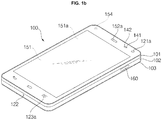
- FIG. 1a is a block diagram for explanation of a mobile terminal 100.
- FIGS. 1b and 1c are conceptual diagrams illustrating an example of the mobile terminal 100 viewed from different directions.
- the mobile terminal 100 is shown having components such as a wireless communication unit 110, an input unit 120, a sensing unit 140, an output unit 150, an interface unit 160, a memory 170, a controller 180, and a power supply unit 190. It is understood that implementing all of the illustrated components is not a requirement, and that greater or fewer components may alternatively be implemented.
- the mobile terminal 100 is shown having wireless communication unit 110 configured with several commonly implemented components.
- the wireless communication unit 110 typically includes one or more components which permit wireless communication between the mobile terminal 100 and a wireless communication system or network within which the mobile terminal is located.
- the wireless communication unit 110 typically includes one or more modules which permit communications such as wireless communications between the mobile terminal 100 and a wireless communication system, communications between the mobile terminal 100 and another mobile terminal, communications between the mobile terminal 100 and an external server. Further, the wireless communication unit 110 typically includes one or more modules which connect the mobile terminal 100 to one or more networks. To facilitate such communications, the wireless communication unit 110 includes one or more of a broadcast receiving module 111, a mobile communication module 112, a wireless Internet module 113, a short-range communication module 114, and a location information module 115.
- the input unit 120 includes a camera 121 for obtaining images or video, a microphone 122, which is one type of audio input device for inputting an audio signal, and a user input unit 123 (for example, a touch key, a push key, a mechanical key, a soft key, and the like) for allowing a user to input information.
- Data for example, audio, video, image, and the like
- controller 180 may analyze and process data (for example, audio, video, image, and the like) according to device parameters, user commands, and combinations thereof.
- the sensing unit 140 is typically implemented using one or more sensors configured to sense internal information of the mobile terminal, the surrounding environment of the mobile terminal, user information, and the like.
- the sensing unit 140 is shown having a proximity sensor 141 and an illumination sensor 142.
- the sensing unit 140 may alternatively or additionally include other types of sensors or devices, such as a touch sensor, an acceleration sensor, a magnetic sensor, a G-sensor, a gyroscope sensor, a motion sensor, an RGB sensor, an infrared (IR) sensor, a finger scan sensor, a ultrasonic sensor, an optical sensor (for example, camera 121), a microphone 122, a battery gauge, an environment sensor (for example, a barometer, a hygrometer, a thermometer, a radiation detection sensor, a thermal sensor, and a gas sensor, among others), and a chemical sensor (for example, an electronic nose, a health care sensor, a biometric sensor, and the like), to name a few.
- the mobile terminal 100 may be configured to utilize information obtained from sensing unit 140, and in particular, information obtained from one or more sensors of the sensing unit 140, and combinations thereof.
- the output unit 150 is typically configured to output various types of information, such as audio, video, tactile output, and the like.
- the output unit 150 is shown having a display unit 151, an audio output module 152, a haptic module 153, and an optical output module 154.
- the display unit 151 may have an inter-layered structure or an integrated structure with a touch sensor in order to facilitate a touch screen.
- the touch screen may provide an output interface between the mobile terminal 100 and a user, as well as function as the user input unit 123 which provides an input interface between the mobile terminal 100 and the user.
- the interface unit 160 serves as an interface with various types of external devices that can be coupled to the mobile terminal 100.
- the interface unit 160 may include any of wired or wireless ports, external power supply ports, wired or wireless data ports, memory card ports, ports for connecting a device having an identification module, audio input/output (I/O) ports, video I/O ports, earphone ports, and the like.
- the mobile terminal 100 may perform assorted control functions associated with a connected external device, in response to the external device being connected to the interface unit 160.
- the memory 170 is typically implemented to store data to support various functions or features of the mobile terminal 100.
- the memory 170 may be configured to store application programs executed in the mobile terminal 100, data or instructions for operations of the mobile terminal 100, and the like. Some of these application programs may be downloaded from an external server via wireless communication. Other application programs may be installed within the mobile terminal 100 at time of manufacturing or shipping, which is typically the case for basic functions of the mobile terminal 100 (for example, receiving a call, placing a call, receiving a message, sending a message, and the like). It is common for application programs to be stored in the memory 170, installed in the mobile terminal 100, and executed by the controller 180 to perform an operation (or function) for the mobile terminal 100.
- the controller 180 typically functions to control overall operation of the mobile terminal 100, in addition to the operations associated with the application programs.
- the controller 180 may provide or process information or functions appropriate for a user by processing signals, data, information and the like, which are input or output by the various components depicted in Fig. 1a , or activating application programs stored in the memory 170.
- the controller 180 controls some or all of the components illustrated in FIGS. 1a-1c according to the execution of an application program that have been stored in the memory 170.
- the power supply unit 190 can be configured to receive external power or provide internal power in order to supply appropriate power required for operating elements and components included in the mobile terminal 100.
- the power supply unit 190 may include a battery, and the battery may be configured to be embedded in the terminal body, or configured to be detachable from the terminal body.
- the mobile terminal 100 is described with reference to a bar-type terminal body.
- the mobile terminal 100 may alternatively be implemented in any of a variety of different configurations. Examples of such configurations include watch-type, clip-type, glasses-type, or as a folder-type, flip-type, slide-type, swing-type, and swivel-type in which two and more bodies are combined with each other in a relatively movable manner, and combinations thereof. Discussion herein will often relate to a particular type of mobile terminal (for example, bar-type, watch-type, glasses-type, and the like). However, such teachings with regard to a particular type of mobile terminal will generally apply to other types of mobile terminals as well.
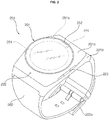
- FIG. 2 is a perspective view illustrating one example of a watch-type mobile terminal 200 in accordance with the present invention.
- the watch-type mobile terminal 200 includes a main body 201 with a display unit 251 and a band 202 connected to the main body 201 to be wearable on the wrist.
- mobile terminal 200 may be configured to include features that are the same or similar to that of mobile terminal 100 of FIGS. 1a-1c .
- the main body 201 may include a case having a certain appearance. As illustrated, the case may include a first case 201a and a second case 201b cooperatively defining an inner space for accommodating various electronic components. Other configurations are possible. For instance, a single case may alternatively be implemented, with such a case being configured to define the inner space, thereby implementing a mobile terminal 200 with a uni-body.
- the watch-type mobile terminal 200 can perform wireless communication, and an antenna for the wireless communication can be installed in the main body 201.
- the antenna may extend its function using the case.
- a case including a conductive material may be electrically connected to the antenna to extend a ground area or a radiation area.
- the display unit 251 is shown located at the front side of the main body 201 so that displayed information is viewable to a user.
- the display unit 251 includes a touch sensor so that the display unit can function as a touch screen.
- window 251a is positioned on the first case 201a to form a front surface of the terminal body together with the first case 201a.
- the illustrated embodiment includes audio output module 252, a camera 221, a microphone 222, and a user input unit 223 positioned on the main body 201.
- audio output module 252 When the display unit 251 is implemented as a touch screen, additional function keys may be minimized or eliminated.
- the user input unit 223 may be omitted.
- the band 202 is commonly worn on the user's wrist and may be made of a flexible material for facilitating wearing of the device.
- the band 202 may be made of fur, rubber, silicon, synthetic resin, or the like.
- the band 202 may also be configured to be detachable from the main body 201. Accordingly, the band 202 may be replaceable with various types of bands according to a user's preference.
- the band 202 may be used for extending the performance of the antenna.
- the band may include therein a ground extending portion (not shown) electrically connected to the antenna to extend a ground area.
- the band 202 may include fastener 202a.
- the fastener 202a may be implemented into a buckle type, a snap-fit hook structure, a Velcro® type, or the like, and include a flexible section or material.
- the drawing illustrates an example that the fastener 202a is implemented using a buckle.
- FIG. 3 is a flowchart for explanation of an operation of a smart watch 200 according to an exemplary embodiment of the present invention.
- a controller 280 of the smart watch 200 may display a watch image set as an initial image on the display unit 251 according to a user command or the like (S310).
- the watch image displayed on the display unit 251 is a digital watch image or an analog watch image.
- the controller 280 may enter a moving circle mode (S330).
- the 'moving circle mode' stated in the specification may refers to an operation mode for displaying notification information in an empty space of the display unit 251 created by adjusting the size and/or position of the watch image.
- the preset event for entering the moving circle mode may be a gesture input of shaking or flicking the wrist by a user or a gesture input of touching and dragging a main body of a smart watch or tapping the main body of the smart watch a predetermined number of times.
- the preset event may be a notification event that occurs in the smart watch 200.
- the controller 280 may reduce the watch image with a predetermined ratio and display the reduced watch image on the display unit 251 (S340). In this case, the controller 280 may display the reduced watch image on a central portion of the display unit 251 or at an edge of the display unit 251.
- the controller 280 may display various notification information items in the empty space on the display unit 251, which is formed by reducing the watch image (S350).
- the notification information items displayed in the empty space of the display unit 251 may include, without being limited to, schedule information, message/email/message reception notification information, missed call notification information, battery related notification information, update related notification information, and so on.
- the controller 280 may change the size of the watch image according to the amount of information to be displayed in the empty space of the display unit 251 (S370).
- the controller 280 may change the size of the watch image according to the amount of detailed information about the selected notification information.
- the controller 280 may move the watch image to the edge of the display unit 251, and simultaneously or sequentially change the size of the watch image according to the amount of detailed information about the selected notification information.
- the controller 280 may display detailed information about the selected notification information in the empty space of the display unit 251, which is enlarged by moving the watch image and/or changing the size of the watch image (S380). Accordingly, the smart watch 200 may effectively display various notification information items without obstructing display of the watch image.
- the controller 280 may enlarge the reduced watch image and display the original watch image on the display unit 251.
- the controller 280 may repeatedly perform the aforementioned operations 350 to 380.
- the preset event may be a gesture input of shaking or flicking the wrist by a user or a gesture input of touching and dragging a main body of a smart watch or tapping the main body of the smart watch a predetermined number of times.
- the preset event may be a check complete event for completing a checking process of all notification information items displayed on the display unit 251.
- a smart watch may output various notification information items in an empty space of a display unit, which is formed by changing the size of a watch image and moving the watch image, thereby enhancing readability for notification and time information as well as allowing the smart watch to feel like a real watch.
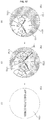
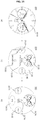
- FIGS. 4 and 5 are diagrams for explaining an operation of a smart watch that reduces a watch image and displays the reduced watch image at various positions of a display unit when entering a moving circle mode.
- the smart watch 200 may display a watch image 410 on the display unit 251 according to a user command or the like.
- the smart watch 200 may reduce the watch image and display the reduced watch image on the display unit 251. In this case, the smart watch 200 may display the reduced watch image in a central portion or an edge of the display unit 251.
- the smart watch 200 may display a reduced watch image 420 in the central portion of the display unit 251. Accordingly, various notification items may be displayed in an empty space formed between the reduced watch image 420 and the edge of the display unit 251.
- the smart watch 200 may display a reduced watch image 430 in a predetermined edge region (e.g., an edge region in the 12 o'clock direction) of a display unit. Accordingly, various notification information items may be displayed in the empty space formed between the reduced watch image 430 and the edge of the display unit 251.
- a predetermined edge region e.g., an edge region in the 12 o'clock direction
- the smart watch 200 may move a reduced watch image 440 in an opposite direction to a direction in which an hour hand is directed to display the reduced watch image 440 at an edge of the display unit 251.
- the smart watch 200 may move a reduced watch image (not shown) in a direction in which an hour hand is directed to display the reduced watch image at the edge of the display unit 251. Accordingly, various notification information items may be displayed in an empty space formed between the reduced watch image 440 and the edge of the display unit 251.
- the smart watch 200 may be configured to move the reduced watch image 440 in a clockwise direction as time goes by, as illustrated in FIG. 5 .
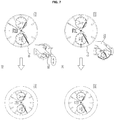
- FIGS. 6 to 8 are diagrams for explaining various methods for entering a moving circle mode in a smart watch according to the present invention.
- the smart watch 200 may display a watch image 610 in the display unit 251 according to a user command or the like.
- the smart watch 200 may enter a moving circle mode in order to effectively display predetermined notification information.
- the smart watch 200 may enter a moving circle mode. It will be apparent to those skilled in the art that the smart watch 200 may enter a moving circle mode using various gesture inputs other than the illustrated gesture inputs 620 and 630.
- a type of the gesture input may be preset and stored by a user or set by default via a manufacturer of a mobile terminal.
- the smart watch 200 may enter a moving circle mode for effectively displaying predetermined notification information.
- the smart watch 200 may enter a moving circle mode. It will be apparent to those skilled in the art that the smart watch 200 may enter a moving circle mode using various gesture inputs other than the illustrated gesture inputs 720 and 730.
- the smart watch 200 may automatically enter a moving circle mode without a separate user input. Accordingly, the smart watch 200 may reduce a watch image, display the reduced watch image in a central portion or an edge portion of a display, and display notification information in a surrounding region of the reduced watch image.
- a type of a notification event that occurs in the smart watch may include, without being limited to, a schedule notification event, a message/email/message reception event, a missed call event, a battery related notification event, an update related notification event, and so on.
- notification information displayed in the empty space of the display unit 251 is configured in such a way that a display position of the notification information varies according to occurrence time of a corresponding notification event.
- the smart watch 200 may display notification information 820 in an empty space of a display, corresponding to occurrence time of the notification event.
- the smart watch 200 may display notification information based on occurrence time of a notification event that has most recently occurred.
- the notification information displayed in the empty space of the display unit 251 may be configured in such a way that a display position of the notification information varies according to a type of a corresponding notification event.
- the smart watch 200 may display notification information 830 at a predetermined position (e.g., in the 9 o'clock direction) according to a type of the notification event.
- a menu for pre-determining a display position of notification information corresponding to a type of a notification event may be provided.
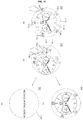
- FIG. 9 is a diagram for explaining an operation of a smart watch that displays predetermined notification information in various ways according to occurrence of a notification event during a moving circle mode.
- the smart watch 200 may reduce a watch image 910 and display the reduced watch image 910 in a central portion or an edge region of the display unit 251.
- the smart watch 200 displays notification information items (i.e., notification icons 930 to 950) corresponding to corresponding notification events in a surrounding region 920 of the watch image 910.
- notification information items i.e., notification icons 930 to 950
- the notification information items displayed in the display unit 251 may be sequentially arranged according to an occurrence order of the notification events.
- the notification information items displayed in the display unit 251 may be displayed in various forms such as an icon image, a text image, or a combination of an icon image and a text image.
- the smart watch 200 may divide the surrounding region 920 of the watch image 910 into three regions 921, 922, and 923 corresponding to a type of notification information and display the three division regions with different colors.
- a color displayed in the respective division region may be configured to correspond to the type of notification information.
- areas occupied by the respective division region may be configured to correspond to a number of the corresponding notification information items.
- the smart watch 200 may display indicators 931, 941, and 951 indicating the type of notification information in the three division regions respectively.
- the smart watch 200 may vary a display position of corresponding notification information according to the touch and drag input.
- the smart watch 200 may vary a display position of the corresponding watch image 910 according to the touch and drag input of the user. In this case, according to change in a position of the watch image 910, the display position of notification information may be varied.
- the smart watch 200 may remove the corresponding notification information 930 from the empty space of the display unit 251.
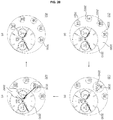
- FIGS. 11 to 14 are diagrams for explaining an operation of a smart watch that displays detailed information about selected notification information in various ways during a moving circle mode.
- the smart watch 200 may display a plurality of notification information items 1130 to 1170 in a surrounding region 1120 of a watch image 1110 during a moving circle mode.
- the notification information items may be displayed in the form of an icon.
- the smart watch 200 may move the watch image 1110 toward an edge of the display unit 251, and simultaneously or sequentially change the size of the watch image 1110 according to the amount of detailed information about the first notification information 1160.
- the smart watch 200 may display detailed information 1181 about the first notification information 1160 in the surrounding region 1120 of the display unit 251, which is enlarged by moving the watch image 1110 and changing the size of the watch image 1110.
- the smart watch 200 may display an execution icon 1183 for execution of an operation associated with the first notification information 1160 and a previous icon 1185 for movement to a previous operation mode in the surrounding region 1120 of a display.
- the first notification information 1160 is reception message notification information
- the information 1181 of a reception message, the answer icon 1183, the previous icon 1185, and so on may be displayed in an empty space of the enlarged display unit 251.
- the smart watch 200 may move the watch image 1110 toward a central portion of the watch image 1110 and may simultaneously restore the watch image 1110 to an original size, as illustrated in (c) of FIG. 11 .
- the smart watch 200 may remove the first notification information 1160 checked by a user from the surrounding region 1120 of the watch image 1110.
- the smart watch 200 may execute a message application corresponding to the first notification information 1160 to display a message writing screen 1190 on the display unit 251, as illustrated in (d) of FIG. 11 .
- the smart watch 200 may move the watch image 1210 toward an edge of the display unit 251 and may simultaneously or sequentially change the size of the watch image 1210 according to the amount of detailed information of the first notification information 1260.
- the smart watch 200 may display detailed information 1280 about the first notification information 1260 in an empty space 1220 of the display unit 251, which is enlarged by moving the watch image 1210 and changing the size of the watch image 1210. Accordingly, a user of the smart watch 200 may check content of the first notification information 1260 through the detailed information 1280.
- the smart watch 200 may transmit a control signal to an associated mobile terminal 100 so as to allow a user to perform an operation associated with the first notification information 1260 through the mobile terminal 100.
- the mobile terminal 100 that receives the control signal from the smart watch 200 may display an execution screen (e.g., a message writing screen 1290) of an application corresponding to the first notification information 1260 on the display unit 151.
- the smart watch 200 may move the watch image 1210 toward a central portion of the display unit 251 and may restore the watch image 1210 to an original size, as illustrated in (c) of FIG. 12 .
- the smart watch 200 may remove the first notification information 1260 checked by a user from the surrounding region 1220 of the watch image 1210.
- the smart watch 200 may display a plurality of notification information items 1330 to 1370 in a surrounding region 1320 of a watch image 1310 in a moving circle mode.
- the smart watch 200 may replace the watch image 1310 with a notification information image 1380 and replace the first notification information 1360 with a reduced watch image (i.e., a watch icon 1390).
- the notification information image 1380 displayed in a central portion of the display unit 251 may include detailed information 1381 about the first notification information 1360, an execution icon 1383 for execution of an operation associated with the first notification information 1360, a previous icon 1385 for movement to a previous operation mode, and so on.
- An operation of the smart watch 200 according to selection of the execution icon 1383 or the previous icon 1385 is the same as the aforementioned operation of the smart watch illustrated in (c) and (d) of FIGS. 11 and a detailed description thereof will thus be omitted.
- the smart watch 200 may replace the watch image 1410 with a notification information image 1480 and replace the first notification information 1460 with a reduced watch image (i.e., a watch icon 1495).
- the notification information image 1380 displayed in a central portion of the display unit 251 may include detailed information 1481 about the first notification information 1460. Accordingly, a user of the smart watch 200 may check content of the first notification information 1460 through the detailed information 1481.
- the smart watch 200 may transmit a control signal to an associated mobile terminal 100 so as to allow a user to perform an operation associated with the first notification information 1460 through the mobile terminal 100.
- the mobile terminal 100 that receives the control signal from the smart watch 200 may display an execution screen (e.g., a message writing screen 1485) of an application corresponding to the first notification information 1460 in the display unit 151.
- the smart watch 200 may display the watch image 1410 in the central portion of the display unit 251, as illustrated in (c) of FIG. 14 .
- the smart watch 200 may remove the first notification information 1460 checked by a user from a surrounding region 1420 of the watch image 1410.
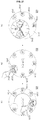
- FIGS. 15 to 17 are diagrams for explaining an operation of a smart watch that performs a quick action function according to a preset gesture input during a moving circle mode.
- the smart watch 200 may display a plurality of notification information items 1530 to 1570 in a surrounding region 1520 of a watch image 1510 in a moving circle mode.
- the smart watch 200 may display detailed information 1580 about the first notification information 1560 in an empty space 1520 of the display unit 251. In this case, the smart watch 200 may remove the notification icons 1530 to 1570 from the empty space 1520 of a display.
- the smart watch 200 may display the watch image 1510 to be transparent/translucent or remove the watch image 1510, and display first icons 1525 for performing a quick action function (or a shortcut function) associated with the first notification information 1560 in a watch region.
- first icons displayed in the watch region may be, but are not limited to, various emoticons.
- the smart watch 200 may display second icons 1545 for performing a quick action function associated with the first notification information 1560 in the watch region.
- second icons displayed in the watch region may be, but are not limited to, various common words.
- the smart watch 200 may directly perform a quick action function associated with the first notification information 1560 without displaying an execution screen of an application corresponding to the first notification information 1560 on the display unit 251. That is, the smart watch 200 may transmit a message including content corresponding to the selected icon to other mobile terminal without displaying a message writing screen on the display unit 251.
- the smart watch 200 may re-display the watch image 1510 in a watch region, as illustrated in (e) of FIG. 15 .
- the smart watch 200 may remove the first notification information 1560 checked by a user from the surrounding region 1520 of the watch image 1510.
- the smart watch 200 may display a plurality of indicators 1630 to 1650 indicating a type of notification information in a surrounding region of a watch image 1610 during a moving circle mode.
- the surrounding region of the watch image 1610 may be divided into three regions 1621, 1622, and 1623 corresponding to respective types of notification information items and the three division regions may be displayed with different colors.
- a color displayed in the respective division region may correspond to the respective types of notification information items.
- the smart watch 200 may directly perform a quick action function associated with notification information corresponding to the first indicator 1640.
- the smart watch 200 may display an execution screen 1670 of an application corresponding to a type of notification information indicated by the first indicator 1640 on the display unit 251.
- the smart watch 200 may divide a surrounding region of a watch image 1710 into three regions 1721, 1722, and 1723 corresponding to types of notification information items and the three division regions may be displayed in different colors. Similarly, a color displayed in the respective division region may correspond to the respective types of notification information items.
- the smart watch 200 may display first to third indicators 1730, 1740, and 1750 indicating types of notification information items in the respective division region. Accordingly, a user of the smart watch 200 may check types of notification information items allocated to the respective division region through the first to third indicators 1730, 1740, and 1750 displayed on a screen.
- the smart watch 200 may directly perform a quick action function associated with notification information corresponding to the second indicator 1740.
- the smart watch 200 may display an execution screen 1770 of an application corresponding to a type of the notification information.
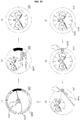
- FIG. 18 is a diagram for explaining an operation of a smart watch that displays schedule information of a user in various ways during a moving circle mode.
- the smart watch 200 when entering a moving circle mode, may reduce a watch image 1810 and display the reduced watch image 1810 in a central portion of the display unit 251.
- the smart watch 200 may display schedule information items 1831 to 1837 preset by the user in a surrounding region (i.e., an empty space 1820 of a display unit) of the watch image 1810.
- schedule information items displayed in the empty space of the display unit 251 may be sequentially arranged according to schedule time.
- the schedule information items displayed in the empty space of the display unit 251 may be configured in such way that a display position of the schedule information varies according to schedule time. For example, when schedule time of second schedule information 1832 is 9 am, the smart watch 200 may display the second schedule information 1832 in the empty space of the display unit 251, which is positioned in the 9 o'clock direction.
- the smart watch 200 when entering a moving circle mode, may reduce the watch image 1810 and display the watch image 1810 at an edge region of the display unit 251.
- the reduced watch image 1810 may be moved in an opposite direction to a direction in which an hour hand is currently directed and displayed at an edge of the display unit 251.
- the smart watch 200 may display the predetermined schedule items 1831 to 1834 pre-set by the user in a surrounding region 1820 of the watch image 1810.
- schedule information may be configured in such a way that display positions of schedule information items displayed in the empty space 1820 of the display unit 251 vary according to schedule time.
- the schedule information items displayed in the empty space 1820 of the display unit 251 may be displayed through schedule icons 1831 to 1834 having the same shape and size.
- the smart watch 200 may display schedule information items 1841 to 1845 preset by a user in the surrounding region 1820 of the watch image 1810.
- schedule information items displayed in the empty space 1820 of the display unit 251 may be displayed through the schedule icons 1841 to 1844, sizes of which vary in proportion to a duration between a start time and an end time of corresponding schedule.
- the smart watch 200 may display a corresponding image so as to stack the schedule icons 1842 and 1843 corresponding to respective corresponding schedules.
- FIG. 19 is a diagram for explaining an operation of a smart watch that displays detailed information about selected schedule information during a moving circle mode.
- the smart watch 200 may display a plurality of schedule information items 1931 to 1937 in a surrounding region 1920 of a watch image 1910 during a moving circle mode.
- third schedule information 1933 is selected among the schedule information items 1931 to 1937 while the watch image 1910 is displayed in a central portion of a display unit 251
- the smart watch 200 may move the watch image 1910 toward an edge of the display unit 251, and simultaneously or sequentially change the size of the watch image 1910 according to the amount of detailed information about the third schedule information 1933.
- the smart watch 200 may change the size of the watch image 1910 according to the amount of detailed information about the third schedule information 1933.
- the smart watch 200 may display detailed information 1941 about the third schedule information 1933 in an empty space 1920 of the display unit 251, which is enlarged by moving the watch image 1910 and/or changing the size of the watch image 1910.
- the smart watch 200 may display an edit icon 1943 for editing the third schedule information 1933 and a previous icon 1945 for movement to a previous operating mode in the empty space 1920 of the display unit.
- the smart watch 200 may restore the watch image 1910 to an original position and/or size.
- the smart watch 200 may display a corresponding image so as to remove the third schedule information 1933 checked by a user from the surrounding region 1920 of the watch image 1910.
- the smart watch 200 may display a schedule edit image (not shown) on the display unit 251. Accordingly, the user may edit third schedule information through the schedule edit image.
- FIG. 20 is a diagram for explaining an operation of a smart watch that performs a reminder function for upcoming schedule information during a moving circle mode.
- the smart watch 200 may display a plurality of schedule information items 2031 to 2034 in a surrounding region 2020 of a watch image 2010 during a moving circle mode.
- the smart watch 200 may perform a reminder function for the third schedule information 2033.
- the smart watch 200 may enlarge a size of a display region corresponding to the third schedule information 2033 and display detailed information 2045 about the third schedule information 2033 in the enlarged display region 2040.
- the smart watch 200 may change the size of the watch image 2010 according to the amount of detailed information about the third schedule information 2033.
- the smart watch 200 may provide an auditory effect such as a warning sound or a haptic effect such as a vibration signal as well as a visual effect so as to attract a user's attention.
- the smart watch 200 may release a reminder function for the third schedule information 2033.
- the smart watch 200 may release the reminder function for the third schedule information 2033.
- the smart watch 200 may restore the size of the reduced watch image 2010 and the size of the enlarged display region 2040 to original sizes and move the first to fourth schedule information items 2031 to 2034 in a counterclockwise direction.
- the smart watch 200 may display upcoming schedule information (i.e., fifth schedule information 2035) in a right region of fourth schedule information 2034.
- FIG. 21 is a diagram for explaining an operation of the smart watch that sequentially displays upcoming schedule information items according to a preset gesture input during a moving circle mode.
- the smart watch 200 may display a plurality of schedule information items 2131 to 2134 in a surrounding region 2120 of a watch image 2110 in a moving circle mode.
- the smart watch 200 may reduce the watch image 2110 and display fifth to seventh schedule information items (i.e., upcoming schedule information items 2135 to 2137 that were hidden by the watch image) in a right region of the display unit 251.
- the smart watch 200 may display the fifth to seventh schedule information items 2135 to 2137 displayed in the right region of the display unit 251 to be distinguished from the first to fourth schedule information items 2131 to 2134.
- the smart watch 200 may update the schedule information items 2131 to 2133 at points where the corresponding watch image 2110 is passed through, at a period of 12 hours.
- the smart watch 200 may update the first to third schedule information items 2131 to 2133 to the eighth to tenth schedule information items 2138 to 2140.
- the smart watch 200 may display the updated schedule information items 2138 to 2140 to be distinguished from the remaining schedule information items 2135 to 2137. Accordingly, the user of the smart watch 200 may rotate the watch image 2110 clockwise so as to easily check upcoming schedule information items.
- the smart watch 200 may restore the position and size of the watch image 2110 to an original position and size and display the first to fourth schedule information items 2131 to 2134 in an empty space 2120 of the display unit.
- FIGS. 22 and 23 are diagrams for explanation of an operation of the smart watch for automatically recommending available schedule time of a user when a notification event associated with schedule recommendation occurs.
- the smart watch 200 may display notification information 2230 corresponding to a corresponding notification event in a surrounding region 2220 of a watch image 2210.
- the smart watch 200 may move the watch image 2210 to an edge of the display unit 251, and simultaneously or sequentially change the size of the watch image 2210 according to the amount of detailed information about the notification information 2230.
- the smart watch 200 may display detailed information 2240 about the notification information 2230 in an empty space 2220 of the display unit 251, which is enlarged by moving the watch image 2210 and/or changing the size of the watch image 2210.
- the smart watch 200 may convert the watch image 2210 positioned at an edge of the display unit into a time recommendation image 2250. In this case, information about available time of the user may be automatically displayed in the time recommendation image 2250.
- the smart watch 200 may display the detailed information 2240 about the corresponding notification information 2230 in an empty space of the display unit without display of an image in the notification information 2230 and simultaneously convert the watch image 2210 into the time recommendation image 2250.
- the smart watch 200 may add a schedule associated with the notification information 2230 to the time zone selected by the user.
- the smart watch 200 may display feedback information 2270 indicating that the schedule is successively added to the time zone selected by the user for a predetermined time zone.
- the smart watch 200 may display the original watch image 2210 in a central portion of the display unit 251 and remove the notification information 2230 to which the schedule is added by the user from the surrounding region 2220 of the watch image 2210.
- the smart watch 200 may display notification information 2330 corresponding to the notification event in a surrounding region 2230 of a watch image 2310.
- the smart watch 200 may move the watch image 2310 to an edge of the display unit 251 and simultaneously change the size of the watch image 2310 according to the amount of detailed information about the notification information 2330.
- the smart watch 200 may display detailed information 2340 about the notification information 2330 in an empty space 2320 of the display unit 251, which is enlarged by moving the watch image 2310 and/or changing the size of the watch image 2310.
- the smart watch 200 may display the detailed information 2340 about the corresponding notification information 2330 in an empty space of the display unit and simultaneously change the position and size of the watch image 2310 without displaying the notification information 2330 on a display screen.
- the smart watch 200 may display a time recommendation image 2360 at an edge of the display unit 251 and display an icon 2370 corresponding to the notification information 2330 in a central portion of the display unit. In this case, information about available time of a user may be automatically displayed in the time recommendation image 2360.
- the smart watch 200 may add a schedule associated with the notification information 2330 to the time zone selected by the user.
- the smart watch 200 may display feedback information 2390 indicating that the schedule is successively added to the time zone selected by the user for a predetermined time period.
- the smart watch 200 may display the original watch image 2310 in a central portion of the display unit 251 and remove the notification information 2330 to which the schedule is added by the user from the surrounding region 2230 of the watch image 2310.
- FIG. 24 is a diagram for explanation of an operation of a smart watch for performing a predetermined edit function based on a drag input of a user during a moving circle mode.
- the smart watch 200 may reduce a watch image 2410 and display the watch image 2410 in a central portion or an edge portion of the display unit 251.
- the smart watch 200 may display schedule information items 2431 and 2432 preset by a user in a surrounding region 2420 of the watch image 2410.
- the schedule information items displayed in the surrounding region 2420 may be configured in such a way that a display position of the schedule information items varies according to schedule time.
- the schedule information items are displayed through the schedule icons 2431 and 2432, sizes of which vary in proportion to a duration between a start time and an end time of corresponding schedule.
- the smart watch 200 may extend schedule time by as much as the dragged distance.
- the smart watch 200 may reduce schedule time by as much as the dragged distance.
- the smart watch 200 may display information about schedule time that is adjusted in real time via a drag input in one region of the display unit 251 during reception of the user input 2440.
- the smart watch 200 may remove the other schedule icon 2431 from the display unit 251 while a schedule is edited according to the user input 2440.
- the smart watch 200 may perform a day repeat function by a rotation number of times for corresponding schedule information.
- corresponding schedule information may be repeatedly set for the same time zone of the next day, and in the case of two number of times rotation, the corresponding schedule information may be repeatedly set for the same time zone of the next day and the day after the next day.
- at least one schedule icon 2433 corresponding to repeatedly set schedule information items may be displayed on an adjacent area of the second schedule icon 2432.
- FIG. 25 is a flowchart for explaining an operation of a smart watch according to another embodiment of the present invention.
- the controller 280 of the smart watch 200 may display a watch image set as an initial image in the display unit 251 according to a user command and so on (S2505).
- the watch image displayed on the display unit 251 may be a digital watch image or an analog watch image.
- the controller 280 may enter a first moving circle mode (S2515).
- the controller 280 may reduce the watch image at a predetermined ratio and display the watch image on the display unit 251 (S2520). In this case, the controller 280 may display the reduced watch image in a central portion of the display unit 251.
- the controller 280 may display a first icon group in an empty space of the display unit 251, which is formed by reducing the watch image (S2525).
- the first icon group displayed in the empty space of the display unit 251 may include various setting icons associated with the smart watch 200 or the mobile terminal 100, without being limited thereto.
- the controller 280 may enter second moving circle mode(S2535).
- the controller 280 may reduce the watch image by a predetermined ratio and display the watch image on the display unit 251 (S2540). Similarly, the controller 280 may display the reduced watch image in a central portion of the display unit 251.
- the controller 280 may display a second icon group in an empty space of the display unit 251, which is formed by reducing the watch image (S2545).
- the second icon group displayed in the empty space of the display unit 251 may include shortcut icons that are predetermined by the user or app icons that are frequently executed by the user, without being limited thereto.
- the controller 280 may provide a separate menu for presetting a plurality of icons to be included in the first icon group or the second icon group.
- the controller 180 may execute a function corresponding to the selected icon (S2555).
- the controller 280 may enlarge the reduced watch image and display the original watch image on the display unit 251.
- the controller 280 may repeatedly perform the aforementioned operations 2550 and 2555.
- the user input for termination of the first moving circle mode may be a pinch-out input having a first direction, without being limited thereto.
- the user input for termination of the second moving circle mode may be a pinch-out input having a second direction, without being limited thereto.
- FIGS. 26 and 27 are diagrams for explaining an operation of a smart watch that enters a moving circle mode and provides a quick setting function in response to a pinch-in input having a first direction.
- the smart watch 200 may display a watch image 2610 on the display unit 251 according to a user command and so on.
- the smart watch 200 may enter a moving circle mode for performing a quick setting function.
- the smart watch 200 may reduce a watch image 2610 by a predetermined ratio and display the reduced watch image in a central portion of the display unit 251.
- the smart watch 200 may display the first icon group in an empty space 2620 of the display unit 251, which is formed by reducing a watch image.
- the first icon group may include a plurality of setting icons 2641 to 2646 associated with an operation of the smart watch 200.
- the smart watch 200 may display other setting icons belonging to the first icon group in a surrounding region 2620 of the watch image 2610.
- the smart watch 200 may directly set a function corresponding to the first setting icon 2641.
- the smart watch 200 may set a bell sound to mute according to a drag input 2660 of a user.
- the smart watch 200 may change the first setting icon 2641 to a second setting icon 2647.
- the smart watch 200 may directly set a function corresponding to the first setting icon.
- the smart watch 200 may display notification information 2670 indicating that a quick setting function is normally performed on the watch image 2610.
- the smart watch 200 may provide an auditory effect such as a warning sound or a haptic effect such as a vibration signal as well as a visual effect so as to attract a user's attention.
- the smart watch 200 may terminate a moving circle mode for performing the quick setting function and display the original watch image 2610 on the display unit 251.
- FIGS. 28 and 29 are diagrams for explaining an operation of a smart watch that enters a moving circle mode and provides a shortcut function in response to a pinch-in input having a second direction.
- the smart watch 200 may display a watch image 2810 on the display unit 251 according to a user command and so on.
- the smart watch 200 may enter a moving circle mode for performing a shortcut function.
- the smart watch 200 may reduce a watch image 2810 by a predetermined ratio and display the reduced watch image 2810 in a central portion of the display unit 251.
- the smart watch 200 may display the second icon group in an empty space 2820 of the display unit 251, which is formed by reducing a watch image.
- the second icon group may include a plurality of app icons 2841 to 2846 that are frequently executed by a user.
- the smart watch 200 may display other app icons belonging to the second icon group in a surrounding region 2820 of the watch image 2810.
- the smart watch 200 may directly execute an application corresponding to the first app icon 2844. That is, the smart watch 200 may execute a shortcut function with respect to an app icon 2844 selected through the user input 2860.
- the smart watch 200 may directly execute an application corresponding to the first app icon 2844.
- the smart watch 200 may temporally display notification information 2870 indicating execution of the selected app icon 2844 on the watch image 2810.
- the smart watch 200 may provide an auditory effect such as a warning sound or a haptic effect such as a vibration signal as well as a visual effect so as to attract a user's attention.
- the smart watch 200 may display an execution image 2880 of an application corresponding to the first app icon 2844 on the display unit 251.
- FIG. 30 is a diagram for explaining an operation of a smart watch that enters a moving circle mode and provides app icons registered as bookmarks in response to a long touch input.
- the smart watch 200 may display a watch image 3010 on the display unit 251 according to a user command and so on.
- the smart watch 200 may enter a moving circle mode for representing app icons registered as bookmarks.
- the smart watch 200 may reduce a watch image 3010 by a predetermined ratio and move the reduced watch image 3010 to be inclined in one direction.
- the smart watch 200 may display a plurality of app icons 3031 to 3038 in a line in an empty space 3020 of the display unit 251, which is formed by reducing and moving the watch image.
- a size of the app icons 3031 to 3038 may be changed according to a width of the empty space 3020 in which each icon is positioned.
- the smart watch 200 may sequentially display other app icons 3040 to 3042 registered as bookmarks in the empty space 3020 of the display unit 251. That is, if there are many app icons registered as bookmarks, a user may flick (or touch and drag) an app icon display region to rotate app icons displayed on the display unit 251.
- the smart watch 200 may execute an application corresponding to the first app icon 3034.
- the smart watch 200 may execute an application corresponding to the first app icon 3034.
- the smart watch 200 may temporally display notification information 3060 indicating an execution of a selected icon 3034 on the watch image 3010.
- the smart watch 200 may provide an auditory effect such as a warning sound or a haptic effect such as a vibration signal as well as a visual effect so as to attract a user's attention.
- the smart watch 200 may display an execution screen 3070 of an application corresponding to the first app icon 3034 on the display unit 251.
- FIG. 31 is a diagram for explaining an operation of a smart watch that provides a call screen including a watch image when receiving a call.
- the smart watch 200 may display a watch image 3110 on the display unit 251 according to a user command and so on.
- the smart watch 200 may reduce a watch image 3110 and move the reduced watch image in a predetermined direction (e.g., the 12 o'clock direction).
- the smart watch 200 may display an call accept icon 3130, a call rejection icon 3140, information 3150 of a caller who requests call, notification information 3160 indicating a call reception state, and so on in an empty space 3120 of a display unit, which is formed by reducing and moving a watch image. That is, the smart watch 200 may display a call waiting screen including the watch image on the display unit 251.
- the smart watch 200 may display a call connection screen 3170 on the display unit 251, as illustrated in (c) of FIG. 31 .
- the call connection screen 3170 may include a record icon 3171, a call termination icon 3172, a dial icon 3173, caller information 3174, and so on along with the watch image 3110 position in the 12 o'clock direction.
- the smart watch 200 may perform an operation for call connection while maintaining a watch image during call reception.
- FIG. 32 is a diagram for explaining an operation of a smart watch that provides a message screen including a watch image during message reception.
- the smart watch 200 may display a watch image 3210 on the display unit 251 according to a user command and so on.
- the smart watch 200 may reduce the watch image 3210 and move the reduced watch image in a predetermined direction (e.g., the 12 o'clock direction).
- the smart watch 200 may display a message text 3230, a reply icon 3240, a call icon 3250, and so on in an empty space 3220 of a display unit, which is formed by reducing and moving a watch image. That is, the smart watch 200 may display a message reception screen including a watch image on the display unit 251.
- the smart watch 200 may display a message writing screen 3260 on the display unit 251, as illustrated in (c) of FIG. 32 .
- the message writing screen 3260 may include a watch image (not shown) positioned in the 12 o'clock direction.
- the smart watch 200 may perform an operation for checking a message while maintaining a watch image during message reception.
- Various embodiments may be implemented using a machine-readable medium having instructions stored thereon for execution by a processor to perform various methods presented herein.
- machine-readable mediums include HDD(Hard Disk Drive), SSD(Solid State Disk), SDD(Silicon Disk Drive), ROM, RAM, CD-ROM, a magnetic tape, a floppy disk, an optical data storage device, the other types of storage mediums presented herein, and combinations thereof.
- the machine-readable medium may be realized in the form of a carrier wave (for example, a transmission over the Internet).
- the processor may include the controller 180 of the mobile terminal.
Landscapes
- Engineering & Computer Science (AREA)
- General Engineering & Computer Science (AREA)
- Theoretical Computer Science (AREA)
- Physics & Mathematics (AREA)
- General Physics & Mathematics (AREA)
- Human Computer Interaction (AREA)
- Computer Networks & Wireless Communication (AREA)
- Signal Processing (AREA)
- User Interface Of Digital Computer (AREA)
- Telephone Function (AREA)
Claims (14)
- Montre intelligente (200) comprenant :un affichage (251) configuré pour afficher une image de montre incluant au moins l'une d'une image de montre numérique et d'une image de montre analogique ; etun organe de commande (280) configuré pour :amener l'affichage à réduire une taille de l'image de montre lorsqu'un événement préréglé survient ; etamener l'affichage à afficher des informations de notification incluant au moins l'une d'informations de planification, d'informations de notification de réception de message, d'informations de notification de réception d'e-mail, d'informations de notification de réception de messagerie, d'informations de notification d'appel manqué, d'informations de notification relatives à la batterie et d'informations de notification relatives à une mise à jour relative à l'événement préréglé dans une zone vide de l'affichage découlant de la réduction de la taille de l'image de montre,caractérisée en ce qu'une position d'affichage des informations de notification varie en fonction d'au moins l'un d'un temps de survenance de l'événement préréglé,dans laquelle l'organe de commande est en outre configuré pour amener l'affichage à afficher une pluralité d'éléments de notification correspondant à une pluralité d'événements préréglés dans une région environnante de l'image de montre lorsqu'une pluralité d'événements préréglés surviennent séquentiellement.
- Montre intelligente selon la revendication 1, dans laquelle l'événement préréglé correspond à :une entrée de geste comprenant un mouvement de la montre intelligente selon un motif prédéterminé ;une entrée de geste comprenant un toucher et un glissement jusqu'à un corps principal de la montre intelligente selon un motif prédéterminé ; ouune entrée de geste comprenant un tapotement sur le corps principal un nombre prédéterminé de fois.
- Montre intelligente selon la revendication 1, dans laquelle l'événement préréglé correspond à un événement de notification qui survient à la montre intelligente.
- Montre intelligente selon l'une quelconque des revendications précédentes, dans laquelle l'organe de commande (280) est en outre configuré pour amener l'affichage à afficher l'image de montre réduite à une région centrale ou dans une région adjacente au bord de l'affichage.
- Montre intelligente selon l'une quelconque des revendications précédentes, dans laquelle l'organe de commande (280) est en outre configuré pour amener l'affichage à afficher des informations détaillées d'un élément de notification sélectionné de la pluralité d'éléments de notification en réponse à une entrée de sélection sur l'élément de notification sélectionné.
- Montre intelligente selon l'une quelconque des revendications précédentes, dans laquelle l'organe de commande (280) est en outre configuré pour amener l'affichage à changer une taille de l'image de montre en fonction d'une quantité d'informations détaillées à afficher dans la zone vide lorsque les informations de notification affichées sont sélectionnées.
- Montre intelligente selon la revendication 6, dans laquelle l'organe de commande (280) est en outre configuré pour afficher les informations détaillées relatives aux informations de notification sélectionnées dans la zone vide.
- Montre intelligente selon la revendication 1, dans laquelle :les informations de notification correspondent à des informations de planification ; etl'organe de commande (280) est en outre configuré pour amener l'affichage à afficher les informations de planification dans la zone vide sur la base d'un temps planifié des informations de planification.
- Montre intelligente selon l'une quelconque des revendications précédentes, dans laquelle l'organe de commande (280) est en outre configuré pour amener l'affichage à afficher un écran d'exploitation d'une application associée aux informations de notification lorsqu'une entrée de geste comprenant un glissement des informations de notification vers l'image de montre affichée est reçue.
- Procédé de commande d'une montre intelligente (200), le procédé comprenant :l'affichage (S310) d'une image de montre incluant au moins l'une d'une image de montre numérique et d'une image de montre analogique sur un affichage ;la réduction (S340) d'une taille de l'image de montre lorsqu'un événement préréglé survient ; etl'affichage (S350) d'informations de notification incluant au moins l'une d'informations de planification, d'informations de notification de réception de message/d'e-mail/de messagerie, d'informations de notification d'appel manqué, d'informations de notification relatives à la batterie et d'informations de notification relatives à une mise à jour dans une zone vide de l'affichage découlant de la réduction de la taille de l'image de montre,caractérisé en ce qu'une position d'affichage des informations de notification varie en fonction d'au moins l'un d'un temps de survenance de l'événement préréglé,dans lequel le procédé comprend en outre l'affichage d'une pluralité d'éléments de notification correspondant à une pluralité d'événements préréglés dans une région environnante de l'image de montre lorsqu'une pluralité d'événements préréglés surviennent séquentiellement.
- Procédé selon la revendication 10, dans lequel l'événement préréglé correspond à un événement de notification qui survient à la montre intelligente.
- Procédé selon la revendication 10 ou 11, comprenant en outre l'affichage de l'image de montre réduite à une région centrale ou dans une région adjacente au bord de l'affichage.
- Procédé selon l'une quelconque des revendications 10 à 12, comprenant en outre : l'affichage d'informations détaillées d'un élément de notification sélectionné de la pluralité d'éléments de notification en réponse à une entrée de sélection sur l'élément de notification sélectionné.
- Procédé selon l'une quelconque des revendications 10 à 13, comprenant en outre le changement d'une taille de l'image de montre en fonction d'une quantité d'informations détaillées à afficher dans la zone vide lorsque les informations de notification affichées sont sélectionnées.
Applications Claiming Priority (1)
| Application Number | Priority Date | Filing Date | Title |
|---|---|---|---|
| KR1020150057456A KR20160126446A (ko) | 2015-04-23 | 2015-04-23 | 웨어러블 디바이스 및 그 제어방법 |
Publications (2)
| Publication Number | Publication Date |
|---|---|
| EP3086187A1 EP3086187A1 (fr) | 2016-10-26 |
| EP3086187B1 true EP3086187B1 (fr) | 2020-01-01 |
Family
ID=55808423
Family Applications (1)
| Application Number | Title | Priority Date | Filing Date |
|---|---|---|---|
| EP16166318.2A Active EP3086187B1 (fr) | 2015-04-23 | 2016-04-21 | Montre intelligente et son procédé de commande |
Country Status (4)
| Country | Link |
|---|---|
| US (1) | US10452224B2 (fr) |
| EP (1) | EP3086187B1 (fr) |
| KR (1) | KR20160126446A (fr) |
| CN (1) | CN106067834B (fr) |
Families Citing this family (57)
| Publication number | Priority date | Publication date | Assignee | Title |
|---|---|---|---|---|
| US20160019360A1 (en) | 2013-12-04 | 2016-01-21 | Apple Inc. | Wellness aggregator |
| US12080421B2 (en) | 2013-12-04 | 2024-09-03 | Apple Inc. | Wellness aggregator |
| JP6322765B2 (ja) | 2014-08-02 | 2018-05-09 | アップル インコーポレイテッド | コンテキスト特化ユーザインターフェース |
| US10452253B2 (en) | 2014-08-15 | 2019-10-22 | Apple Inc. | Weather user interface |
| KR102016160B1 (ko) | 2014-09-02 | 2019-08-29 | 애플 인크. | 경고를 관리하기 위한 축소된 크기의 인터페이스 |
| USD765693S1 (en) | 2014-09-02 | 2016-09-06 | Apple Inc. | Display screen or portion thereof with graphical user interface |
| USD757079S1 (en) | 2014-09-02 | 2016-05-24 | Apple Inc. | Display screen or portion thereof with graphical user interface |
| US9778821B2 (en) * | 2015-06-10 | 2017-10-03 | Citibank, N.A. | Methods and systems for managing a graphical interface |
| KR20170019081A (ko) * | 2015-08-11 | 2017-02-21 | 삼성전자주식회사 | 휴대 장치 및 휴대 장치의 화면 표시방법 |
| US10304347B2 (en) | 2015-08-20 | 2019-05-28 | Apple Inc. | Exercised-based watch face and complications |
| USD801389S1 (en) * | 2015-09-10 | 2017-10-31 | Lg Electronics Inc. | Display panel with icon |
| US10572147B2 (en) * | 2016-03-28 | 2020-02-25 | Verizon Patent And Licensing Inc. | Enabling perimeter-based user interactions with a user device |
| US12175065B2 (en) | 2016-06-10 | 2024-12-24 | Apple Inc. | Context-specific user interfaces for relocating one or more complications in a watch or clock interface |
| US10317897B1 (en) * | 2016-11-16 | 2019-06-11 | Zoox, Inc. | Wearable for autonomous vehicle interaction |
| TWI680401B (zh) * | 2017-01-25 | 2019-12-21 | 華碩電腦股份有限公司 | 電子裝置與其操作方法 |
| US10075206B1 (en) * | 2017-03-13 | 2018-09-11 | Intel Corporation | Customizable wearable electronic devices and methods of assembling the same |
| DK179412B1 (en) | 2017-05-12 | 2018-06-06 | Apple Inc | Context-Specific User Interfaces |
| JP6806627B2 (ja) * | 2017-05-18 | 2021-01-06 | マレリ株式会社 | 情報制御装置 |
| US11640226B2 (en) * | 2017-11-10 | 2023-05-02 | Swirl Design (Pty) Ltd | Displaying information objects based on elliptical frames on a track between inner and outer elliptical borders |
| US11281164B1 (en) * | 2018-01-18 | 2022-03-22 | Amazon Technologies, Inc. | Timer visualization |
| DK180241B1 (en) | 2018-03-12 | 2020-09-08 | Apple Inc | User interfaces for health monitoring |
| US11327650B2 (en) * | 2018-05-07 | 2022-05-10 | Apple Inc. | User interfaces having a collection of complications |
| USD898070S1 (en) * | 2018-05-18 | 2020-10-06 | Lg Electronics Inc. | Display screen with graphical user interface |
| CN113168299A (zh) * | 2018-12-29 | 2021-07-23 | 深圳市柔宇科技股份有限公司 | 一种显示控制方法、存储介质及显示终端 |
| KR102701433B1 (ko) * | 2019-01-07 | 2024-09-03 | 삼성전자 주식회사 | 전자 장치, 및 이의 기능 실행 방법 |
| DK201970532A1 (en) | 2019-05-06 | 2021-05-03 | Apple Inc | Activity trends and workouts |
| US11960701B2 (en) | 2019-05-06 | 2024-04-16 | Apple Inc. | Using an illustration to show the passing of time |
| US11131967B2 (en) | 2019-05-06 | 2021-09-28 | Apple Inc. | Clock faces for an electronic device |
| KR102393717B1 (ko) | 2019-05-06 | 2022-05-03 | 애플 인크. | 전자 디바이스의 제한된 동작 |
| US11741433B2 (en) * | 2019-05-22 | 2023-08-29 | Victor Song | Interactive scheduling, visualization, and tracking of activities |
| US11234077B2 (en) | 2019-06-01 | 2022-01-25 | Apple Inc. | User interfaces for managing audio exposure |
| US11481094B2 (en) | 2019-06-01 | 2022-10-25 | Apple Inc. | User interfaces for location-related communications |
| US11152100B2 (en) * | 2019-06-01 | 2021-10-19 | Apple Inc. | Health application user interfaces |
| US11477609B2 (en) | 2019-06-01 | 2022-10-18 | Apple Inc. | User interfaces for location-related communications |
| CN110297563A (zh) * | 2019-06-28 | 2019-10-01 | 无锡睿勤科技有限公司 | 屏幕显示控制方法及智能手表 |
| US12002588B2 (en) | 2019-07-17 | 2024-06-04 | Apple Inc. | Health event logging and coaching user interfaces |
| CN114286975A (zh) | 2019-09-09 | 2022-04-05 | 苹果公司 | 调查研究用户界面 |
| CN111538452B (zh) * | 2020-04-17 | 2021-07-30 | 维沃移动通信有限公司 | 一种界面显示方法、装置及电子设备 |
| KR102503135B1 (ko) * | 2020-05-11 | 2023-02-23 | 애플 인크. | 시간과 관련된 사용자 인터페이스들 |
| DK202070625A1 (en) | 2020-05-11 | 2022-01-04 | Apple Inc | User interfaces related to time |
| DK181037B1 (en) | 2020-06-02 | 2022-10-10 | Apple Inc | User interfaces for health applications |
| AU2021283914A1 (en) | 2020-06-02 | 2023-01-19 | Apple Inc. | User interfaces for tracking of physical activity events |
| CN111796732B (zh) * | 2020-06-28 | 2024-12-27 | 余喜云 | 一种手表输入数字和手表解绑的方法 |
| CN114076492A (zh) * | 2020-08-17 | 2022-02-22 | 青岛海高设计制造有限公司 | 控制器及制冷系统 |
| US11698710B2 (en) | 2020-08-31 | 2023-07-11 | Apple Inc. | User interfaces for logging user activities |
| US11694590B2 (en) | 2020-12-21 | 2023-07-04 | Apple Inc. | Dynamic user interface with time indicator |
| US11921992B2 (en) | 2021-05-14 | 2024-03-05 | Apple Inc. | User interfaces related to time |
| US11785012B2 (en) | 2021-06-07 | 2023-10-10 | Bank Of America Corporation | Data processing for internet of things (IoT) devices based on recorded user behavior |
| US11630551B1 (en) * | 2021-10-28 | 2023-04-18 | Dallen Yu Chao | Smart keychain or accessory devices, systems, and methods |
| US12493267B2 (en) | 2022-01-24 | 2025-12-09 | Apple Inc. | User interfaces for indicating time |
| CN116540911A (zh) * | 2022-01-26 | 2023-08-04 | 华为技术有限公司 | 信息交互方法、手表及计算机可读存储介质 |
| CN116774867A (zh) * | 2022-03-09 | 2023-09-19 | 华为技术有限公司 | 一种显示方法及设备 |
| US12578975B2 (en) | 2022-09-15 | 2026-03-17 | Apple Inc. | User interfaces for indicating time |
| CN115309300A (zh) * | 2022-10-10 | 2022-11-08 | 荣耀终端有限公司 | 消息显示方法、电子设备及计算机可读存储介质 |
| USD1052602S1 (en) * | 2022-10-26 | 2024-11-26 | Huawei Device Co., Ltd. | Display screen or portion thereof with a graphical user interface |
| USD1053898S1 (en) * | 2022-10-26 | 2024-12-10 | Huawei Device Co., Ltd. | Display screen or portion thereof with a graphical user interface |
| USD1122266S1 (en) * | 2023-08-25 | 2026-04-14 | Huawei Technologies Co., Ltd. | Display screen or portion thereof with a graphical user interface |
Family Cites Families (8)
| Publication number | Priority date | Publication date | Assignee | Title |
|---|---|---|---|---|
| US20030007420A1 (en) | 2001-07-05 | 2003-01-09 | Koninklijke Philips Electronics N.V. | Dial face of watch graphically represents calendar |
| CH701440A2 (fr) | 2009-07-03 | 2011-01-14 | Comme Le Temps Sa | Montre-bracelet à écran tactile et procédé d'affichage sur une montre à écran tactile. |
| US8228292B1 (en) * | 2010-04-02 | 2012-07-24 | Google Inc. | Flipping for motion-based input |
| CA2928172C (fr) * | 2012-01-04 | 2019-07-09 | Nike Innovate C.V. | Montre d'athletisme |
| US9377762B2 (en) * | 2014-06-02 | 2016-06-28 | Google Technology Holdings LLC | Displaying notifications on a watchface |
| CN104123070B (zh) * | 2014-06-16 | 2019-01-15 | 联想(北京)有限公司 | 一种信息处理方法及电子设备 |
| US20160085397A1 (en) * | 2014-09-23 | 2016-03-24 | Qualcomm Incorporated | Smart Watch Notification Manager |
| US10591955B2 (en) * | 2014-12-23 | 2020-03-17 | Intel Corporation | Analog clock display with time events |
-
2015
- 2015-04-23 KR KR1020150057456A patent/KR20160126446A/ko not_active Ceased
-
2016
- 2016-04-21 US US15/135,419 patent/US10452224B2/en not_active Expired - Fee Related
- 2016-04-21 EP EP16166318.2A patent/EP3086187B1/fr active Active
- 2016-04-22 CN CN201610258384.6A patent/CN106067834B/zh not_active Expired - Fee Related
Non-Patent Citations (1)
| Title |
|---|
| None * |
Also Published As
| Publication number | Publication date |
|---|---|
| EP3086187A1 (fr) | 2016-10-26 |
| KR20160126446A (ko) | 2016-11-02 |
| CN106067834B (zh) | 2020-09-25 |
| US20160313869A1 (en) | 2016-10-27 |
| CN106067834A (zh) | 2016-11-02 |
| US10452224B2 (en) | 2019-10-22 |
Similar Documents
| Publication | Publication Date | Title |
|---|---|---|
| EP3086187B1 (fr) | Montre intelligente et son procédé de commande | |
| US9008730B2 (en) | Mobile terminal capable of providing multi-haptic effect and method of controlling the mobile terminal | |
| US9946454B2 (en) | Watch type mobile terminal | |
| US9880524B2 (en) | Watch type mobile terminal and controlling method thereof | |
| US10686990B2 (en) | Mobile terminal and method of controlling the same | |
| KR101688162B1 (ko) | 이동단말기 및 그 제어방법 | |
| US9377762B2 (en) | Displaying notifications on a watchface | |
| US9846507B2 (en) | Mobile terminal and control method thereof | |
| EP2955591B1 (fr) | Terminal de type montre et son procédé de commande | |
| US9389770B2 (en) | Mobile terminal and method of controlling the operation of the mobile terminal | |
| KR102208115B1 (ko) | 이동단말기 및 그 제어방법 | |
| US20120137216A1 (en) | Mobile terminal | |
| EP3002932B1 (fr) | Terminal mobile avec housse | |
| EP3133484A1 (fr) | Terminal mobile et son procédé de contrôle | |
| EP3128410A2 (fr) | Terminal mobile et son procédé de contrôle | |
| KR20170088691A (ko) | 페어링된 장치, 알림 및 어플리케이션의 제어에 관한 한 손 조작 모드를 적용한 이동 통신 단말기 | |
| EP2977884A1 (fr) | Terminal mobile et procédé de commande de celui-ci | |
| EP3151083B1 (fr) | Terminal mobile | |
| US10866668B2 (en) | Display device and control method therefor | |
| KR20160064756A (ko) | 웨어러블 디바이스 | |
| KR20160038572A (ko) | 이동 단말기 및 그 제어 방법 | |
| KR20170038546A (ko) | 와치 타입의 이동 단말기 | |
| KR101623272B1 (ko) | 와치 타입의 이동 단말기 | |
| KR20160063620A (ko) | 워치형 디바이스 | |
| KR20150146216A (ko) | 디스플레이 장치 및 그 제어방법 |
Legal Events
| Date | Code | Title | Description |
|---|---|---|---|
| PUAI | Public reference made under article 153(3) epc to a published international application that has entered the european phase |
Free format text: ORIGINAL CODE: 0009012 |
|
| AK | Designated contracting states |
Kind code of ref document: A1 Designated state(s): AL AT BE BG CH CY CZ DE DK EE ES FI FR GB GR HR HU IE IS IT LI LT LU LV MC MK MT NL NO PL PT RO RS SE SI SK SM TR |
|
| AX | Request for extension of the european patent |
Extension state: BA ME |
|
| STAA | Information on the status of an ep patent application or granted ep patent |
Free format text: STATUS: REQUEST FOR EXAMINATION WAS MADE |
|
| 17P | Request for examination filed |
Effective date: 20170329 |
|
| RBV | Designated contracting states (corrected) |
Designated state(s): AL AT BE BG CH CY CZ DE DK EE ES FI FR GB GR HR HU IE IS IT LI LT LU LV MC MK MT NL NO PL PT RO RS SE SI SK SM TR |
|
| GRAP | Despatch of communication of intention to grant a patent |
Free format text: ORIGINAL CODE: EPIDOSNIGR1 |
|
| STAA | Information on the status of an ep patent application or granted ep patent |
Free format text: STATUS: GRANT OF PATENT IS INTENDED |
|
| RIC1 | Information provided on ipc code assigned before grant |
Ipc: G06F 3/0488 20130101ALI20190626BHEP Ipc: G04G 9/00 20060101ALI20190626BHEP Ipc: G04G 21/08 20100101AFI20190626BHEP Ipc: G06F 3/038 20130101ALI20190626BHEP Ipc: G06F 3/01 20060101ALI20190626BHEP Ipc: G06F 3/0481 20130101ALI20190626BHEP |
|
| INTG | Intention to grant announced |
Effective date: 20190723 |
|
| GRAS | Grant fee paid |
Free format text: ORIGINAL CODE: EPIDOSNIGR3 |
|
| GRAA | (expected) grant |
Free format text: ORIGINAL CODE: 0009210 |
|
| STAA | Information on the status of an ep patent application or granted ep patent |
Free format text: STATUS: THE PATENT HAS BEEN GRANTED |
|
| AK | Designated contracting states |
Kind code of ref document: B1 Designated state(s): AL AT BE BG CH CY CZ DE DK EE ES FI FR GB GR HR HU IE IS IT LI LT LU LV MC MK MT NL NO PL PT RO RS SE SI SK SM TR |
|
| REG | Reference to a national code |
Ref country code: GB Ref legal event code: FG4D |
|
| REG | Reference to a national code |
Ref country code: CH Ref legal event code: EP Ref country code: AT Ref legal event code: REF Ref document number: 1220557 Country of ref document: AT Kind code of ref document: T Effective date: 20200115 |
|
| REG | Reference to a national code |
Ref country code: IE Ref legal event code: FG4D |
|
| REG | Reference to a national code |
Ref country code: DE Ref legal event code: R096 Ref document number: 602016027148 Country of ref document: DE |
|
| REG | Reference to a national code |
Ref country code: NL Ref legal event code: MP Effective date: 20200101 |
|
| REG | Reference to a national code |
Ref country code: LT Ref legal event code: MG4D |
|
| PG25 | Lapsed in a contracting state [announced via postgrant information from national office to epo] |
Ref country code: NL Free format text: LAPSE BECAUSE OF FAILURE TO SUBMIT A TRANSLATION OF THE DESCRIPTION OR TO PAY THE FEE WITHIN THE PRESCRIBED TIME-LIMIT Effective date: 20200101 Ref country code: CZ Free format text: LAPSE BECAUSE OF FAILURE TO SUBMIT A TRANSLATION OF THE DESCRIPTION OR TO PAY THE FEE WITHIN THE PRESCRIBED TIME-LIMIT Effective date: 20200101 Ref country code: PT Free format text: LAPSE BECAUSE OF FAILURE TO SUBMIT A TRANSLATION OF THE DESCRIPTION OR TO PAY THE FEE WITHIN THE PRESCRIBED TIME-LIMIT Effective date: 20200527 Ref country code: LT Free format text: LAPSE BECAUSE OF FAILURE TO SUBMIT A TRANSLATION OF THE DESCRIPTION OR TO PAY THE FEE WITHIN THE PRESCRIBED TIME-LIMIT Effective date: 20200101 Ref country code: FI Free format text: LAPSE BECAUSE OF FAILURE TO SUBMIT A TRANSLATION OF THE DESCRIPTION OR TO PAY THE FEE WITHIN THE PRESCRIBED TIME-LIMIT Effective date: 20200101 Ref country code: NO Free format text: LAPSE BECAUSE OF FAILURE TO SUBMIT A TRANSLATION OF THE DESCRIPTION OR TO PAY THE FEE WITHIN THE PRESCRIBED TIME-LIMIT Effective date: 20200401 Ref country code: RS Free format text: LAPSE BECAUSE OF FAILURE TO SUBMIT A TRANSLATION OF THE DESCRIPTION OR TO PAY THE FEE WITHIN THE PRESCRIBED TIME-LIMIT Effective date: 20200101 |
|
| PG25 | Lapsed in a contracting state [announced via postgrant information from national office to epo] |
Ref country code: IS Free format text: LAPSE BECAUSE OF FAILURE TO SUBMIT A TRANSLATION OF THE DESCRIPTION OR TO PAY THE FEE WITHIN THE PRESCRIBED TIME-LIMIT Effective date: 20200501 Ref country code: GR Free format text: LAPSE BECAUSE OF FAILURE TO SUBMIT A TRANSLATION OF THE DESCRIPTION OR TO PAY THE FEE WITHIN THE PRESCRIBED TIME-LIMIT Effective date: 20200402 Ref country code: HR Free format text: LAPSE BECAUSE OF FAILURE TO SUBMIT A TRANSLATION OF THE DESCRIPTION OR TO PAY THE FEE WITHIN THE PRESCRIBED TIME-LIMIT Effective date: 20200101 Ref country code: LV Free format text: LAPSE BECAUSE OF FAILURE TO SUBMIT A TRANSLATION OF THE DESCRIPTION OR TO PAY THE FEE WITHIN THE PRESCRIBED TIME-LIMIT Effective date: 20200101 Ref country code: SE Free format text: LAPSE BECAUSE OF FAILURE TO SUBMIT A TRANSLATION OF THE DESCRIPTION OR TO PAY THE FEE WITHIN THE PRESCRIBED TIME-LIMIT Effective date: 20200101 Ref country code: BG Free format text: LAPSE BECAUSE OF FAILURE TO SUBMIT A TRANSLATION OF THE DESCRIPTION OR TO PAY THE FEE WITHIN THE PRESCRIBED TIME-LIMIT Effective date: 20200401 |
|
| REG | Reference to a national code |
Ref country code: DE Ref legal event code: R097 Ref document number: 602016027148 Country of ref document: DE |
|
| PG25 | Lapsed in a contracting state [announced via postgrant information from national office to epo] |
Ref country code: DK Free format text: LAPSE BECAUSE OF FAILURE TO SUBMIT A TRANSLATION OF THE DESCRIPTION OR TO PAY THE FEE WITHIN THE PRESCRIBED TIME-LIMIT Effective date: 20200101 Ref country code: SM Free format text: LAPSE BECAUSE OF FAILURE TO SUBMIT A TRANSLATION OF THE DESCRIPTION OR TO PAY THE FEE WITHIN THE PRESCRIBED TIME-LIMIT Effective date: 20200101 Ref country code: EE Free format text: LAPSE BECAUSE OF FAILURE TO SUBMIT A TRANSLATION OF THE DESCRIPTION OR TO PAY THE FEE WITHIN THE PRESCRIBED TIME-LIMIT Effective date: 20200101 Ref country code: ES Free format text: LAPSE BECAUSE OF FAILURE TO SUBMIT A TRANSLATION OF THE DESCRIPTION OR TO PAY THE FEE WITHIN THE PRESCRIBED TIME-LIMIT Effective date: 20200101 Ref country code: RO Free format text: LAPSE BECAUSE OF FAILURE TO SUBMIT A TRANSLATION OF THE DESCRIPTION OR TO PAY THE FEE WITHIN THE PRESCRIBED TIME-LIMIT Effective date: 20200101 Ref country code: SK Free format text: LAPSE BECAUSE OF FAILURE TO SUBMIT A TRANSLATION OF THE DESCRIPTION OR TO PAY THE FEE WITHIN THE PRESCRIBED TIME-LIMIT Effective date: 20200101 |
|
| PLBE | No opposition filed within time limit |
Free format text: ORIGINAL CODE: 0009261 |
|
| STAA | Information on the status of an ep patent application or granted ep patent |
Free format text: STATUS: NO OPPOSITION FILED WITHIN TIME LIMIT |
|
| REG | Reference to a national code |
Ref country code: AT Ref legal event code: MK05 Ref document number: 1220557 Country of ref document: AT Kind code of ref document: T Effective date: 20200101 |
|
| PG25 | Lapsed in a contracting state [announced via postgrant information from national office to epo] |
Ref country code: MC Free format text: LAPSE BECAUSE OF FAILURE TO SUBMIT A TRANSLATION OF THE DESCRIPTION OR TO PAY THE FEE WITHIN THE PRESCRIBED TIME-LIMIT Effective date: 20200101 |
|
| REG | Reference to a national code |
Ref country code: CH Ref legal event code: PL |
|
| 26N | No opposition filed |
Effective date: 20201002 |
|
| PG25 | Lapsed in a contracting state [announced via postgrant information from national office to epo] |
Ref country code: LU Free format text: LAPSE BECAUSE OF NON-PAYMENT OF DUE FEES Effective date: 20200421 Ref country code: IT Free format text: LAPSE BECAUSE OF FAILURE TO SUBMIT A TRANSLATION OF THE DESCRIPTION OR TO PAY THE FEE WITHIN THE PRESCRIBED TIME-LIMIT Effective date: 20200101 Ref country code: CH Free format text: LAPSE BECAUSE OF NON-PAYMENT OF DUE FEES Effective date: 20200430 Ref country code: FR Free format text: LAPSE BECAUSE OF NON-PAYMENT OF DUE FEES Effective date: 20200430 Ref country code: LI Free format text: LAPSE BECAUSE OF NON-PAYMENT OF DUE FEES Effective date: 20200430 Ref country code: AT Free format text: LAPSE BECAUSE OF FAILURE TO SUBMIT A TRANSLATION OF THE DESCRIPTION OR TO PAY THE FEE WITHIN THE PRESCRIBED TIME-LIMIT Effective date: 20200101 |
|
| REG | Reference to a national code |
Ref country code: BE Ref legal event code: MM Effective date: 20200430 |
|
| PG25 | Lapsed in a contracting state [announced via postgrant information from national office to epo] |
Ref country code: BE Free format text: LAPSE BECAUSE OF NON-PAYMENT OF DUE FEES Effective date: 20200430 Ref country code: SI Free format text: LAPSE BECAUSE OF FAILURE TO SUBMIT A TRANSLATION OF THE DESCRIPTION OR TO PAY THE FEE WITHIN THE PRESCRIBED TIME-LIMIT Effective date: 20200101 Ref country code: PL Free format text: LAPSE BECAUSE OF FAILURE TO SUBMIT A TRANSLATION OF THE DESCRIPTION OR TO PAY THE FEE WITHIN THE PRESCRIBED TIME-LIMIT Effective date: 20200101 |
|
| GBPC | Gb: european patent ceased through non-payment of renewal fee |
Effective date: 20200421 |
|
| PG25 | Lapsed in a contracting state [announced via postgrant information from national office to epo] |
Ref country code: GB Free format text: LAPSE BECAUSE OF NON-PAYMENT OF DUE FEES Effective date: 20200421 Ref country code: IE Free format text: LAPSE BECAUSE OF NON-PAYMENT OF DUE FEES Effective date: 20200421 |
|
| PGFP | Annual fee paid to national office [announced via postgrant information from national office to epo] |
Ref country code: DE Payment date: 20210305 Year of fee payment: 6 |
|
| PG25 | Lapsed in a contracting state [announced via postgrant information from national office to epo] |
Ref country code: TR Free format text: LAPSE BECAUSE OF FAILURE TO SUBMIT A TRANSLATION OF THE DESCRIPTION OR TO PAY THE FEE WITHIN THE PRESCRIBED TIME-LIMIT Effective date: 20200101 Ref country code: MT Free format text: LAPSE BECAUSE OF FAILURE TO SUBMIT A TRANSLATION OF THE DESCRIPTION OR TO PAY THE FEE WITHIN THE PRESCRIBED TIME-LIMIT Effective date: 20200101 Ref country code: CY Free format text: LAPSE BECAUSE OF FAILURE TO SUBMIT A TRANSLATION OF THE DESCRIPTION OR TO PAY THE FEE WITHIN THE PRESCRIBED TIME-LIMIT Effective date: 20200101 |
|
| PG25 | Lapsed in a contracting state [announced via postgrant information from national office to epo] |
Ref country code: MK Free format text: LAPSE BECAUSE OF FAILURE TO SUBMIT A TRANSLATION OF THE DESCRIPTION OR TO PAY THE FEE WITHIN THE PRESCRIBED TIME-LIMIT Effective date: 20200101 Ref country code: AL Free format text: LAPSE BECAUSE OF FAILURE TO SUBMIT A TRANSLATION OF THE DESCRIPTION OR TO PAY THE FEE WITHIN THE PRESCRIBED TIME-LIMIT Effective date: 20200101 |
|
| REG | Reference to a national code |
Ref country code: DE Ref legal event code: R119 Ref document number: 602016027148 Country of ref document: DE |
|
| PG25 | Lapsed in a contracting state [announced via postgrant information from national office to epo] |
Ref country code: DE Free format text: LAPSE BECAUSE OF NON-PAYMENT OF DUE FEES Effective date: 20221103 |