EP3093748A1 - Anwendungsprogrammanzeigeverfahren und endgerät - Google Patents
Anwendungsprogrammanzeigeverfahren und endgerät Download PDFInfo
- Publication number
- EP3093748A1 EP3093748A1 EP14876853.4A EP14876853A EP3093748A1 EP 3093748 A1 EP3093748 A1 EP 3093748A1 EP 14876853 A EP14876853 A EP 14876853A EP 3093748 A1 EP3093748 A1 EP 3093748A1
- Authority
- EP
- European Patent Office
- Prior art keywords
- application
- state
- flicking gesture
- preset
- terminal
- Prior art date
- Legal status (The legal status is an assumption and is not a legal conclusion. Google has not performed a legal analysis and makes no representation as to the accuracy of the status listed.)
- Ceased
Links
Images




Classifications
-
- G—PHYSICS
- G06—COMPUTING OR CALCULATING; COUNTING
- G06F—ELECTRIC DIGITAL DATA PROCESSING
- G06F3/00—Input arrangements for transferring data to be processed into a form capable of being handled by the computer; Output arrangements for transferring data from processing unit to output unit, e.g. interface arrangements
- G06F3/01—Input arrangements or combined input and output arrangements for interaction between user and computer
- G06F3/048—Interaction techniques based on graphical user interfaces [GUI]
- G06F3/0487—Interaction techniques based on graphical user interfaces [GUI] using specific features provided by the input device, e.g. functions controlled by the rotation of a mouse with dual sensing arrangements, or of the nature of the input device, e.g. tap gestures based on pressure sensed by a digitiser
- G06F3/0488—Interaction techniques based on graphical user interfaces [GUI] using specific features provided by the input device, e.g. functions controlled by the rotation of a mouse with dual sensing arrangements, or of the nature of the input device, e.g. tap gestures based on pressure sensed by a digitiser using a touch-screen or digitiser, e.g. input of commands through traced gestures
- G06F3/04883—Interaction techniques based on graphical user interfaces [GUI] using specific features provided by the input device, e.g. functions controlled by the rotation of a mouse with dual sensing arrangements, or of the nature of the input device, e.g. tap gestures based on pressure sensed by a digitiser using a touch-screen or digitiser, e.g. input of commands through traced gestures for inputting data by handwriting, e.g. gesture or text
-
- G—PHYSICS
- G06—COMPUTING OR CALCULATING; COUNTING
- G06F—ELECTRIC DIGITAL DATA PROCESSING
- G06F3/00—Input arrangements for transferring data to be processed into a form capable of being handled by the computer; Output arrangements for transferring data from processing unit to output unit, e.g. interface arrangements
- G06F3/01—Input arrangements or combined input and output arrangements for interaction between user and computer
- G06F3/048—Interaction techniques based on graphical user interfaces [GUI]
- G06F3/0481—Interaction techniques based on graphical user interfaces [GUI] based on specific properties of the displayed interaction object or a metaphor-based environment, e.g. interaction with desktop elements like windows or icons, or assisted by a cursor's changing behaviour or appearance
- G06F3/0482—Interaction with lists of selectable items, e.g. menus
-
- G—PHYSICS
- G06—COMPUTING OR CALCULATING; COUNTING
- G06F—ELECTRIC DIGITAL DATA PROCESSING
- G06F3/00—Input arrangements for transferring data to be processed into a form capable of being handled by the computer; Output arrangements for transferring data from processing unit to output unit, e.g. interface arrangements
- G06F3/01—Input arrangements or combined input and output arrangements for interaction between user and computer
- G06F3/048—Interaction techniques based on graphical user interfaces [GUI]
- G06F3/0487—Interaction techniques based on graphical user interfaces [GUI] using specific features provided by the input device, e.g. functions controlled by the rotation of a mouse with dual sensing arrangements, or of the nature of the input device, e.g. tap gestures based on pressure sensed by a digitiser
- G06F3/0488—Interaction techniques based on graphical user interfaces [GUI] using specific features provided by the input device, e.g. functions controlled by the rotation of a mouse with dual sensing arrangements, or of the nature of the input device, e.g. tap gestures based on pressure sensed by a digitiser using a touch-screen or digitiser, e.g. input of commands through traced gestures
- G06F3/04886—Interaction techniques based on graphical user interfaces [GUI] using specific features provided by the input device, e.g. functions controlled by the rotation of a mouse with dual sensing arrangements, or of the nature of the input device, e.g. tap gestures based on pressure sensed by a digitiser using a touch-screen or digitiser, e.g. input of commands through traced gestures by partitioning the display area of the touch-screen or the surface of the digitising tablet into independently controllable areas, e.g. virtual keyboards or menus
Definitions
- Embodiments of the present invention relate to the field of communications technologies, and in particular, to an application display method and a terminal.
- the recently used applications include: an application running in the foreground, an application running in the background, and an application buffered in the background.
- a dedicated button needs to be disposed for triggering display of applications that are recently used by a user.
- Embodiments of the present invention provide an application display method and a terminal, so as to display a recently used application to a user according to a gesture of the user, without a need to dispose a dedicated button, thereby improving operation and control efficiency.
- an embodiment of the present invention provides an application display method, including:
- the displaying an application that is in a first state includes:
- the method further includes:
- the method further includes:
- an embodiment of the present invention provides a terminal, including:
- the display unit displays an application that is in a first state is specifically:
- the acquiring unit is further configured to: after the display unit displays the application that is in the first state, acquire an instruction entered by a user; and the display unit is further configured to display, on a current interface according to the instruction acquired by the acquiring unit, an application interface of an application that is triggered by the instruction, where the application is any application of the application that is in the first state.
- the acquiring unit is further configured to acquire a second flicking gesture after the display unit displays the application that is in the first state, where a start position of the second flicking gesture is located in the first preset operating area; the processing unit is further configured to detect whether the second flicking gesture acquired by the acquiring unit is a second preset flicking gesture; and the display unit is further configured to: when the processing unit detects that the second flicking gesture acquired by the acquiring unit is the second preset flicking gesture, hide the identifier of the application that is in the first state.
- an embodiment of the present invention provides a terminal, where the terminal includes:
- the output device displays an application that is in a first state is specifically:
- the input device is further configured to: after the output device displays the application that is in the first state, acquire an instruction entered by a user; and the output device is further configured to display, on a current interface according to the instruction acquired by the input device, an application interface of an application that is triggered by the instruction, where the application is any application of the application that is in the first state.
- the input device is further configured to acquire a second flicking gesture after the output device displays the application that is in the first state, where a start position of the second flicking gesture is located in the first preset operating area;
- the processor is further configured to detect whether the second flicking gesture acquired by the input device is a second preset flicking gesture;
- the output device is further configured to: when the processor detects that the second flicking gesture acquired by the input device is the second preset flicking gesture, hide the identifier of the application that is in the first state.
- a first flicking gesture is acquired, where a start position of the first flicking gesture is located in a first preset operating area, and when the terminal detects that the first flicking gesture is a first preset flicking gesture, an application that is in a first state is displayed. Therefore, a recently used application can be displayed to a user according to a gesture of the user, without a need to dispose a dedicated button, thereby improving operation and control efficiency.
- a terminal involved in the embodiments of the present invention may be a touchscreen terminal, which includes but is not limited to a mobile phone, a tablet personal computer (PAD), a personal digital assistant (Personal Digital Assistant, PDA for short), a wireless handheld device, a wireless netbook, a portable computer, an MP3 player, an MP4 player, and the like.
- PDA Personal Digital Assistant
- PDA Personal Digital Assistant
- FIG. 2 is a flowchart of an application display method according to an embodiment of the present invention. As shown in FIG. 2 , the method in this embodiment may include the following steps:
- a user of a terminal may start the first flicking gesture from a first preset operating area on a touchscreen, where the touchscreen is a touchscreen of the terminal and the terminal may acquire the first flicking gesture of the user.
- the user may start an operation of a first gesture from the first preset operating area on the touchscreen.
- the terminal may acquire coordinates of a start position of the flicking gesture.
- the terminal may use the flicking gesture as the first flicking gesture and perform S102.
- the first preset operating area may be a bottom display area on the touchscreen of the terminal, a top area on the touchscreen of the terminal, a left-side area on the touchscreen of the terminal, a right-side area on the touchscreen of the terminal, or a virtual navigation bar area on the touchscreen of the terminal.
- the first preset operating area may be rectangular, or the first preset operating area may be circular.
- a terminal When a terminal detects that the first flicking gesture is a first preset flicking gesture, display an application that is in a first state, where the first state includes at least one of the following states: a state of running in the foreground, a state of running in the background, and a state of being buffered in the background.
- the terminal determines an operation track corresponding to the first flicking gesture, where the operation track is a track formed by acting points of an operation, corresponding to information about the first flicking gesture, on the output device.
- a start position of the operation track is located in the first preset operating area of the terminal.
- that a terminal detects that the first flicking gesture is a first preset flicking gesture is specifically as follows: When a distance of the operation track, corresponding to the first flicking gesture, in the first preset operating area is greater than or equal to a preset threshold, the terminal determines that the first flicking gesture is the first preset flicking gesture.
- a terminal detects that the first flicking gesture is a first preset flicking gesture is specifically as follows: The terminal determines that the first flicking gesture is the first preset flicking gesture when an angle between a landscape orientation of the output device of the terminal and a line formed by a start point of an operation track and an end point of the operation track is less than or equal to a first threshold, where the operation track is formed in the first preset operating area by the first preset flicking gesture; or when an angle between a portrait orientation of the output device of the terminal and a line formed by a start point of an operation track and an end point of the operation track is less than or equal to a first threshold, where the operation track is formed in the first preset operating area by the first preset flicking gesture.
- the distance threshold and the angle threshold may be specific values, or may be value ranges.
- the terminal may also determine, according to the distance and the angle of the operation track, that the first flicking gesture is the first preset flicking gesture.
- a terminal may learn that a user of the terminal requests to acquire an application that is in a first state, where the first state includes at least one of the following states: a state of running in the foreground, a state of running in the background, and a state of being buffered in the background.
- the application that is in the first state may include at least one of the following applications: an application running in the foreground, an application running in the background, and an application buffered in the background.
- the application that is in the state of running in the foreground is an application that is running on a current interface.
- the application that is in the state of running in the background is an application that is not running on the current interface but is not closed.
- the application that is in the state of being buffered in the background is an application that is not running on the current interface and is closed, but data required for running the application is still buffered in a memory of a terminal device.
- the application that is in the first state is an application that is recently used by the user of the terminal. Then, the terminal may acquire the application that is in the first state (including a identifier of the application) and display, on the touchscreen, the application that is in the first state. For example, the terminal may display, on the entire touchscreen, the application that is in the first state, or display, in a preset area of the touchscreen, the application that is in the first state.
- a feasible implementation manner of displaying the application that is in the first state may be generating a list for the terminal, where the list includes the application that is in the first state (for example, the identifier of the application), which is not limited in this embodiment of the present invention.
- the user may perform application switching according to the application that is in the first state.
- the recently used application is displayed to the user according to the flicking gesture of the user, without a need to dispose a dedicated button.
- the terminal displays an application that is in a first state may include: The terminal displays, according to preset order, the application that is in the first state, where the preset order may be a descending order of frequency of using an application by the user within a preset time, an ascending order of a difference between a time at which the user uses an application and a current time, or the like.
- a terminal acquires a first flicking gesture, where a start position of the first flicking gesture is located in a first preset operating area of the terminal, and when it is detected that the first flicking gesture is a first preset flicking gesture, the terminal displays an application that is in a first state. Therefore, a recently used application can be displayed to a user according to a gesture of the user, without a need to dispose a dedicated button, thereby improving operation and control efficiency.
- the terminal displays an application that is in a first state includes: The terminal displays, in the preset area, the identifier of the application that is in the first state, where the preset area may be an area that is the same as the first preset operating area.
- the terminal may add a window in the preset area so as to display the identifier of the application that is in the first state. For example, a list is generated in the preset area, where the list includes an icon or a name of the application that is in the first state.
- the terminal may display, in the preset area in the current application interface of the touchscreen, the application that is in the first state, and it is not required to switch an interface when displaying the application that is in the first state. Therefore, the user may switch an application quickly and intuitively in a case in which no area of an application interface is blocked, thereby enhancing user experience.
- the preset area may be: a bottom display area on the touchscreen of the terminal, a top display area on the touchscreen of the terminal, a left-side display area on the touchscreen of the terminal, a right-side display area on the touchscreen of the terminal, or a virtual navigation bar area on the touchscreen of the terminal.
- the first preset flicking gesture is a leftward flicking gesture, a rightward flicking gesture, an upward flicking gesture, or a downward flicking gesture.
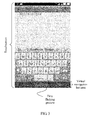
- the user may perform a leftward flicking gesture on the virtual navigation bar on the touchscreen of the terminal, as shown in FIG. 3 .
- the virtual navigation bar shown in FIG. 3 is located in the bottom display area of the touchscreen.
- the terminal may display, in the virtual navigation bar by adding a window, the identifier of the application that is in the first state, as shown in FIG. 4 .
- the user may perform an upward flicking gesture in the bottom display area on the touchscreen of the terminal, as shown in FIG. 5 .
- the first preset operating area shown in FIG. 3 is located in the bottom display area of the touchscreen.
- the terminal may display, in the bottom display area by adding a window, the identifier of the application that is in the first state, as shown in FIG. 6 .
- the terminal displays, only in the bottom display area, the application recently used by the user, so as to switch an application quickly in a case in which no area of a user application interface is blocked. It should be noted that, this embodiment of the present invention is not limited to the foregoing two feasible implementation manners.
- the method in this embodiment further includes: acquiring an instruction entered by a user; and displaying, on a current interface according to the instruction, an application interface of an application that is triggered by the instruction, where the application is any application of the application that is in the first state.
- the user may enter the instruction.
- the user may tap any application (for example, a identifier of the application) of the application that is in the first state and displayed on the touchscreen of the terminal, that is, the user enters a user instruction, where the instruction is used to trigger the application tapped by the user.
- the terminal may acquire the instruction entered by the user and learn that the user requires the terminal to display the application triggered by the instruction; for example, the user needs to switch to the application triggered by the instruction. Further, the terminal may display, on the current interface, the application triggered by the instruction, thereby implementing quick switching between applications.
- FIG. 7 is a flowchart of an application display method according to an embodiment of the present invention. As shown in FIG. 7 , based on the method embodiment shown in FIG. 1 , further, the method in this embodiment may further include the following steps:
- the user of the terminal may start the second flicking gesture from the first preset operating area on the touchscreen. Then, the terminal may acquire the second flicking gesture of the user. Specifically, when determining that a gesture performed by the user on the touchscreen is a flicking gesture, an endpoint terminal may acquire coordinates of a start position of the flicking gesture. When determining that the coordinates of the start position are located in the first preset operating area of the touchscreen, the terminal may use the flicking gesture as the second flicking gesture and perform S202.
- the second preset flicking gesture may be a flicking gesture that is the same as the foregoing first preset flicking gesture.
- the terminal detects that the second flicking gesture is the second preset flicking gesture if the terminal displays only a part of applications that are in the first state but does not display another part of applications, the terminal continues to display the another part of applications that are in the first state; if the terminal already displays all applications that are in the first state to the user, the terminal may hide displayed identifiers of the applications that are in the first state. For example, a window for displaying an application that is in a first state may be closed. If the current interface is an application interface of a running application, the identifier that is previously displayed and is of the application that is in the first state may be hidden, but the application interface of the running application displayed on the current interface may still be retained.
- the second preset flicking gesture may be a flicking gesture inverse to the foregoing first preset flicking gesture.
- the first preset flicking gesture is a leftward flicking gesture
- the second preset flicking gesture is a rightward flicking gesture
- the first preset flicking gesture is a rightward flicking gesture
- the second preset flicking gesture is a leftward flicking gesture
- the first preset flicking gesture is an upward flicking gesture
- the second preset flicking gesture is a downward flicking gesture
- the first preset flicking gesture is a downward flicking gesture
- the second preset flicking gesture is an upward flicking gesture.
- the terminal When the terminal detects that the second flicking gesture is the second preset flicking gesture, it indicates that the user no longer requests to acquire the application that is in the first state. Then, the terminal may hide the displayed identifier of the application that is in the first state. For example, a window for displaying the application that is in the first state may be closed.
- a terminal acquires a second flicking gesture, where a start position of the second flicking gesture is located in a first preset operating area of the terminal, and when it is detected that the second flicking gesture is a second preset flicking gesture, hides a identifier of an application that is in a first state. Therefore, the identifier that is displayed on the terminal and is of the application that is in the first state may be hidden according to a gesture of a user.
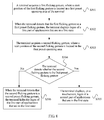
- FIG. 8 is a flowchart of an application display method according to an embodiment of the present invention. As shown in FIG. 8 , further, the method in this embodiment may include the following steps:
- a specific implementation process of S301 in this embodiment is similar to the specific implementation process of S101 in method embodiment 1 of the present invention.
- S301 in this embodiment is similar to the specific implementation process of S101 in method embodiment 1 of the present invention.
- the terminal When the terminal detects that the first flicking gesture is a first preset flicking gesture, the terminal displays identifiers of a first part of applications that are in a first state.
- a display area of a touchscreen of the terminal cannot display, in a display interface, all applications that are in the first state, a part of applications that are in the first state may be displayed. For example, a first part of applications that are in the first state may be displayed. The remaining applications that are in the first state may be displayed when a user performs a next first preset flicking gesture.
- S303 may further be performed.
- the terminal displays, in a preset area of the touchscreen, the identifiers of the first part of applications that are in the first state.
- the terminal acquires a second flicking gesture, where a start position of the second flicking gesture is located in the first preset operating area.
- a specific implementation process of S303 in this embodiment is similar to the specific implementation process of S201 in method embodiment 2 of the present invention.
- S303 in this embodiment is similar to the specific implementation process of S201 in method embodiment 2 of the present invention.
- the terminal detects whether the second flicking gesture is the first preset flicking gesture. If yes, perform the step S305; if not, perform the step S306.
- the terminal detects whether the second flicking gesture is the first preset flicking gesture; if it is detected that the second flicking gesture is the first preset flicking gesture, performs S305, or if it is detected that the second flicking gesture is not the first preset flicking gesture, performs S306.
- the terminal displays, on a touchscreen, identifiers of a second part of applications that are in the first state.
- the terminal may learn that the user of the terminal still requests to acquire the application that is in the first state. Because the identifiers of the first part of applications that are in the first state are already displayed previously, identifiers of the remaining applications that are in the first state may be displayed on the touchscreen at this time. For example, identifiers of a second part of applications that are in the first state may be displayed on the touchscreen.
- the terminal displays, in the preset area of the touchscreen, the identifiers of the second part of applications that are in the first state.
- the terminal When the terminal detects that the second flicking gesture is a second preset flicking gesture, the terminal hides the identifiers of the first part of applications that are in the first state.
- the terminal detects that the second flicking gesture is not the first preset flicking gesture
- the terminal detects that the second flicking gesture is the second preset flicking gesture it indicates that the user no longer requests to acquire the application that is in the first state.
- the identifiers that are displayed on the touchscreen and are of the first part of applications that are in the first state may be hidden. For example, a window for displaying the application that is in the first state may be closed.
- a recently used application can be displayed to a user according to a gesture of the user, without a need to dispose a dedicated button. Further, the application that is recently used by the user may further be displayed in a preset area (for example, a bottom area) of a touchscreen, so as to switch an application quickly in a case in which no area of a user application interface is blocked, thereby enhancing user experience.
- a preset area for example, a bottom area
- an entire operation track of the first preset flicking gesture is located in the first preset operating area.
- an entire operation track of the second preset flicking gesture is located in the first preset operating area.
- FIG. 9 is a schematic structural diagram of a terminal according to an embodiment of the present invention.
- the terminal in this embodiment may include: an acquiring unit 11, a processing unit 12, and a display unit 13.
- the acquiring unit 11 is configured to acquire a first flicking gesture, where a start position of the first flicking gesture is located in a first preset operating area.
- the processing unit 12 is configured to detect whether the first flicking gesture acquired by the acquiring unit 11 is a first preset flicking gesture.
- the display unit 13 is configured to: when the processing unit 12 detects that the first flicking gesture acquired by the acquiring unit 11 is the first preset flicking gesture, display an application that is in a first state, where the first state includes at least one of the following states: a state of running in the foreground, a state of running in the background, and a state of being buffered in the background.
- the first preset operating area is a bottom display area on a touchscreen of the terminal, a top display area on a touchscreen of the terminal, a left-side display area on a touchscreen of the terminal, a right-side display area on a touchscreen of the terminal, or a virtual navigation bar area on a touchscreen of the terminal.
- the display unit 13 displays an application that is in a first state is specifically: the display unit 13 displays, in a preset area, a identifier of the application that is in the first state.
- the preset area is the bottom display area on the touchscreen of the terminal, the top display area on the touchscreen of the terminal, the left-side display area on the touchscreen of the terminal, the right-side display area on the touchscreen of the terminal, or the virtual navigation bar area on the touchscreen of the terminal.
- the first preset flicking gesture is a leftward flicking gesture, a rightward flicking gesture, an upward flicking gesture, or a downward flicking gesture.
- the acquiring unit 11 is further configured to: after the display unit 13 displays the application that is in the first state, acquire an instruction entered by a user.
- the display unit 13 is further configured to display, on a current interface according to the instruction acquired by the acquiring unit 11, an application interface of an application that is triggered by the instruction, where the application is any application of the application that is in the first state.
- the acquiring unit 11 is further configured to acquire a second flicking gesture after the display unit 13 displays the application that is in the first state, where a start position of the second flicking gesture is located in the first preset operating area.
- the processing unit 12 is further configured to detect whether the second flicking gesture acquired by the acquiring unit 11 is a second preset flicking gesture.
- the display unit 13 is further configured to: when the processing unit 12 detects that the second flicking gesture acquired by the acquiring unit 11 is the second preset flicking gesture, hide the identifier of the application that is in the first state.
- the terminal in this embodiment may be configured to execute the technical solutions of the application display method provided in the foregoing embodiments of the present invention, and an implementation principle and a technical effect thereof are similar.
- an implementation principle and a technical effect thereof are similar.
- FIG. 10 is a schematic structural diagram of a terminal according to an embodiment of the present invention.
- the terminal may be a computer system in a handheld form, such as a smartphone, a tablet personal computer (Tablet Personal Computer), a personal digital assistant (personal digital assistant, PDA for short), a mobile Internet device (Mobile Internet Device, MID for short), a wearable device (Wearable Device), or the like.
- Tablet Personal Computer personal computer
- PDA personal digital assistant
- mobile Internet device Mobile Internet Device, MID for short
- Wearable Device wearable Device
- An input device 22 is configured to implement interaction between a user and an electronic device and/or input of information into the electronic device.
- the input device 22 may receive digit or character information that is entered by the user, so as to generate a signal input related to user settings or function control.
- the input device 22 may be a touch panel, or may be another human-machine interaction interface, such as a physical input button or a microphone; or may be another apparatus for acquiring external information, such as a camera.
- the touch panel also referred to as a touchscreen or a touchscreen, may collect an operation action of touching the touch panel or approaching the touch panel, for example, an operation action performed by the user on the touch panel or at a position close to the touch panel by using any proper object or accessory such as a finger or a stylus, and a corresponding connecting apparatus is driven according to a preset program.
- the touch panel may include two parts: a touch detection apparatus and a touch controller.
- the touch detection apparatus detects a touch operation of the user, converts the detected touch operation into an electrical signal, and transmits the electrical signal to the touch controller; the touch controller receives the electrical signal from the touch detection apparatus, converts the electrical signal into touch point coordinates, and then transmits the touch point coordinates to a processor 23.
- the touch controller may further receive and execute a command sent from the processor 23.
- the touch panel may be implemented by using multiple types, such as a resistive type, a capacitive type, an infrared (Infrared) ray, and a surface acoustic wave.
- the physical input button used by the input device 24 may include but is not limited to one or more of a physical keyboard, a functional button (such as a volume control button or a power button), a trackball, a mouse, an operating lever, or the like.
- An input device in a form of a microphone may collect voice that is input by the user or an environment, and convert the voice into a command that is in a form of an electric signal and can be executed by the processor 23.
- the input device 22 may also be various sensing components, for example, a Hall component, configured to detect a physical quantity of the electronic device, for example, force, torque, pressure, stress, a position, a displacement, a speed, acceleration, an angle, an angular velocity, a number of revolutions, a rotational speed, and a time at which a working state changes, which are converted into electricity for detection and control.
- Other sensing components may further include a gravity sensor, a tri-axis accelerometer, a gyroscope, and the like.
- An output device 24 includes but is not limited to an image output device and a sound output device.
- the image output device is configured to output a character, a picture, and/or a video.
- the image output device may include a display panel, for example, a display panel configured in a form of a liquid crystal display (Liquid Crystal Display, LCD for short), an organic light-emitting diode (Organic Light-Emitting Diode, OLED for short), a field emission display (field emission display, FED for short), and the like; or the image output device may include a reflective display, for example, an electrophoretic (electrophoretic) display or a display using an interferometric modulation of light (Interferometric Modulation of Light) technology.
- a display panel for example, a display panel configured in a form of a liquid crystal display (Liquid Crystal Display, LCD for short), an organic light-emitting diode (Organic Light-Emitting Diode, OLED for short),
- the image output device may include a single display or multiple displays in different sizes.
- the touch panel used by the input device 22 may also be used as a display panel of the output device. For example, after detecting a gesture of touching the touch panel or approaching the touch panel, the touch panel transmits the gesture to the processor 23 to determine a type of a touch event, and then the processor 23 provides a corresponding visual output on the display panel according to the type of the touch event.
- the input device 22 and the output device 24 are used as two independent parts to implement input and output functions of the electronic device, but the touch panel and the display panel may be integrated to implement the input and output functions of the electronic device.
- the image output device may display various graphical user interfaces (Graphical User Interface, GUI for short), so as to use the graphical user interfaces as virtual control components, and the graphical user interfaces include but are not limited to a window, a scrollbar, an icon, and a scrapbook, so that the user operates in a touch manner.
- GUI Graphic User Interface
- the processor 23 is a control center of the terminal device. Various interfaces and lines are used to connect to various parts of the entire computer.
- the processor 23 executes various functions of a station and processes data by running or executing a software program and/or an application unit stored in a memory and invoking data stored in the memory 21, so as to perform overall monitoring on the station.
- the terminal may include: the memory 21, the input device 22, the processor 23, and the output device 24, where the memory 21 is configured to store program code for executing an application display method and the memory 21 may include a non-volatile memory (Non-volatile Memory).
- the memory 21 is configured to store program code for executing an application display method and the memory 21 may include a non-volatile memory (Non-volatile Memory).
- the input device 22 may be a touchscreen and the output device 24 may also be a touchscreen.
- the processor 23 may be a central processing unit (Central Processing Unit, CPU for short), or an application specific integrated circuit (Application Specific Integrated Circuit, ASIC for short), or be configured as one or more integrated circuits for implementing this embodiment of the present invention.
- the input device 22, the processor 23, and the output device 24 are configured to invoke the program code stored in the memory 21, so as to execute the following operations.
- the input device 22 is configured to acquire a first flicking gesture, where a start position of the first flicking gesture is located in a first preset operating area.
- the processor 23 is configured to detect whether the first flicking gesture acquired by the input device 22 is a first preset flicking gesture.
- the output device 24 is configured to: when the processor 23 detects that the first flicking gesture acquired by the input device 22 is the first preset flicking gesture, display an application that is in a first state, where the first state includes at least one of the following states: a state of running in the foreground, a state of running in the background, and a state of being buffered in the background.
- the first preset operating area is a bottom display area on a touchscreen of the terminal, a top display area on a touchscreen of the terminal, a left-side display area on a touchscreen of the terminal, a right-side display area on a touchscreen of the terminal, or a virtual navigation bar area on a touchscreen of the terminal.
- the output device 24 displays an application that is in a first state is specifically: the output device 24 displays, in a preset area, a identifier of the application that is in the first state.
- the preset area is the bottom display area on the touchscreen of the terminal, the top display area on the touchscreen of the terminal, the left-side display area on the touchscreen of the terminal, the right-side display area on the touchscreen of the terminal, or the virtual navigation bar area on the touchscreen of the terminal.
- the first preset flicking gesture is a leftward flicking gesture, a rightward flicking gesture, an upward flicking gesture, or a downward flicking gesture.
- the input device 22 is further configured to: after the output device 24 displays the application that is in the first state, acquire an instruction entered by a user.
- the output device 24 is further configured to display, on a current interface according to the instruction acquired by the input device 22, an application interface of an application that is triggered by the instruction, where the application is any application of the application that is in the first state.
- the input device 22 is further configured to acquire a second flicking gesture after the output device 24 displays the application that is in the first state, where a start position of the second flicking gesture is located in the first preset operating area.
- the processor 23 is further configured to detect whether the second flicking gesture acquired by the input device 22 is a second preset flicking gesture.
- the output device 24 is further configured to: when the processor 23 detects that the second flicking gesture acquired by the input device 22 is the second preset flicking gesture, hide the identifier of the application that is in the first state.
- the program may be stored in a computer readable storage medium.
- the foregoing storage medium includes: any medium that can store program code, such as a ROM, a RAM, a magnetic disk, or an optical disc.
Landscapes
- Engineering & Computer Science (AREA)
- General Engineering & Computer Science (AREA)
- Theoretical Computer Science (AREA)
- Human Computer Interaction (AREA)
- Physics & Mathematics (AREA)
- General Physics & Mathematics (AREA)
- User Interface Of Digital Computer (AREA)
- Telephone Function (AREA)
Applications Claiming Priority (1)
| Application Number | Priority Date | Filing Date | Title |
|---|---|---|---|
| PCT/CN2014/070162 WO2015100746A1 (zh) | 2014-01-06 | 2014-01-06 | 应用程序显示方法和终端 |
Publications (2)
| Publication Number | Publication Date |
|---|---|
| EP3093748A1 true EP3093748A1 (de) | 2016-11-16 |
| EP3093748A4 EP3093748A4 (de) | 2017-01-11 |
Family
ID=53493049
Family Applications (1)
| Application Number | Title | Priority Date | Filing Date |
|---|---|---|---|
| EP14876853.4A Ceased EP3093748A4 (de) | 2014-01-06 | 2014-01-06 | Anwendungsprogrammanzeigeverfahren und endgerät |
Country Status (4)
| Country | Link |
|---|---|
| US (4) | US11029839B2 (de) |
| EP (1) | EP3093748A4 (de) |
| CN (3) | CN114895838A (de) |
| WO (1) | WO2015100746A1 (de) |
Families Citing this family (16)
| Publication number | Priority date | Publication date | Assignee | Title |
|---|---|---|---|---|
| EP3093748A4 (de) * | 2014-01-06 | 2017-01-11 | Huawei Device Co., Ltd. | Anwendungsprogrammanzeigeverfahren und endgerät |
| KR102048329B1 (ko) * | 2014-09-19 | 2019-11-25 | 후아웨이 테크놀러지 컴퍼니 리미티드 | 애플리케이션 프로그램 실행 방법 및 장치 |
| US20170024086A1 (en) * | 2015-06-23 | 2017-01-26 | Jamdeo Canada Ltd. | System and methods for detection and handling of focus elements |
| CN105827796B (zh) * | 2015-07-28 | 2020-03-10 | 维沃移动通信有限公司 | 一种移动终端应用的处理方法和装置 |
| KR20180058445A (ko) * | 2016-11-24 | 2018-06-01 | 엘지전자 주식회사 | 이동 단말기 및 그의 동작 방법 |
| KR102725643B1 (ko) * | 2017-01-31 | 2024-11-05 | 삼성전자주식회사 | 어플리케이션을 전환하기 위한 방법 및 그 전자 장치 |
| CN106990903A (zh) * | 2017-03-21 | 2017-07-28 | 北京小米移动软件有限公司 | 显示和隐藏应用程序的方法及装置 |
| CN107547750B (zh) * | 2017-09-11 | 2019-01-25 | Oppo广东移动通信有限公司 | 终端的控制方法、装置和存储介质 |
| US11416126B2 (en) * | 2017-12-20 | 2022-08-16 | Huawei Technologies Co., Ltd. | Control method and apparatus |
| CN108632462A (zh) * | 2018-04-19 | 2018-10-09 | Oppo广东移动通信有限公司 | 分屏显示的处理方法、装置、存储介质及电子设备 |
| CN110881078B (zh) * | 2018-09-06 | 2023-08-01 | 上海伴我科技有限公司 | 一种电子设备的影像资源提供方法 |
| CN109358795A (zh) * | 2018-10-22 | 2019-02-19 | 网易(杭州)网络有限公司 | 界面信息的浏览方法及装置、电子设备 |
| CN110286822B (zh) * | 2019-06-24 | 2021-06-25 | 维沃移动通信有限公司 | 一种操作响应方法及终端设备 |
| CN111124205A (zh) * | 2019-12-20 | 2020-05-08 | 维沃移动通信有限公司 | 应用图标分类方法、装置、电子设备及介质 |
| CN112148167A (zh) * | 2020-09-29 | 2020-12-29 | 维沃移动通信有限公司 | 控件设置方法、装置和电子设备 |
| WO2023182672A1 (ko) | 2022-03-22 | 2023-09-28 | 삼성전자 주식회사 | 전자 장치에서 배경화면 제공 방법 및 장치 |
Family Cites Families (17)
| Publication number | Priority date | Publication date | Assignee | Title |
|---|---|---|---|---|
| US20070039018A1 (en) * | 2005-08-09 | 2007-02-15 | Verance Corporation | Apparatus, systems and methods for broadcast advertising stewardship |
| US8351989B2 (en) | 2007-02-23 | 2013-01-08 | Lg Electronics Inc. | Method of displaying menu in a mobile communication terminal |
| US8065624B2 (en) * | 2007-06-28 | 2011-11-22 | Panasonic Corporation | Virtual keypad systems and methods |
| US20100123658A1 (en) * | 2008-11-17 | 2010-05-20 | Sony Ericsson Mobile Communications Ab | Portable communication device having a touch-sensitive input device with non-linear active areas |
| JP2010211526A (ja) * | 2009-03-10 | 2010-09-24 | Fujitsu Ltd | プログラム、コンピュータ及び制御方法 |
| GB201107273D0 (en) * | 2011-04-28 | 2011-06-15 | Inq Entpr Ltd | Application control in electronic devices |
| US10222974B2 (en) * | 2011-05-03 | 2019-03-05 | Nokia Technologies Oy | Method and apparatus for providing quick access to device functionality |
| KR101948645B1 (ko) * | 2011-07-11 | 2019-02-18 | 삼성전자 주식회사 | 그래픽 오브젝트를 이용한 컨텐츠 제어 방법 및 장치 |
| US9703382B2 (en) * | 2011-08-29 | 2017-07-11 | Kyocera Corporation | Device, method, and storage medium storing program with control for terminating a program |
| CN103092494A (zh) * | 2011-10-28 | 2013-05-08 | 腾讯科技(深圳)有限公司 | 触摸屏终端的应用程序切换方法和装置 |
| US8890825B2 (en) * | 2012-02-20 | 2014-11-18 | Nokia Corporation | Apparatus and method for determining the position of user input |
| KR101356368B1 (ko) * | 2012-02-24 | 2014-01-29 | 주식회사 팬택 | 어플리케이션 전환 장치 및 방법 |
| CN103377067B (zh) * | 2012-04-13 | 2019-01-25 | 富泰华工业(深圳)有限公司 | 应用程序加载系统及方法 |
| CN102945138A (zh) * | 2012-11-14 | 2013-02-27 | 李江涛 | 应用程序的切换方法及终端 |
| CN103064627B (zh) * | 2013-01-11 | 2016-03-02 | 广东欧珀移动通信有限公司 | 一种应用程序管理方法及装置 |
| CN103294402A (zh) * | 2013-06-20 | 2013-09-11 | 青岛海信移动通信技术股份有限公司 | 智能终端的应用界面切换方法及装置 |
| EP3093748A4 (de) | 2014-01-06 | 2017-01-11 | Huawei Device Co., Ltd. | Anwendungsprogrammanzeigeverfahren und endgerät |
-
2014
- 2014-01-06 EP EP14876853.4A patent/EP3093748A4/de not_active Ceased
- 2014-01-06 WO PCT/CN2014/070162 patent/WO2015100746A1/zh not_active Ceased
- 2014-01-06 CN CN202210374567.XA patent/CN114895838A/zh active Pending
- 2014-01-06 CN CN201480012300.XA patent/CN105144068B/zh active Active
- 2014-01-06 CN CN202210374767.5A patent/CN114895839B/zh active Active
- 2014-01-06 US US15/109,779 patent/US11029839B2/en active Active
-
2021
- 2021-05-11 US US17/317,569 patent/US11287970B2/en active Active
-
2022
- 2022-03-28 US US17/706,258 patent/US11573696B2/en active Active
-
2023
- 2023-01-06 US US18/151,310 patent/US11893235B2/en active Active
Also Published As
| Publication number | Publication date |
|---|---|
| US20210333989A1 (en) | 2021-10-28 |
| US20230221859A1 (en) | 2023-07-13 |
| CN105144068A (zh) | 2015-12-09 |
| WO2015100746A1 (zh) | 2015-07-09 |
| US20220334711A1 (en) | 2022-10-20 |
| EP3093748A4 (de) | 2017-01-11 |
| CN114895839B (zh) | 2025-10-24 |
| US20160328143A1 (en) | 2016-11-10 |
| US11287970B2 (en) | 2022-03-29 |
| CN114895838A (zh) | 2022-08-12 |
| CN105144068B (zh) | 2022-04-22 |
| US11029839B2 (en) | 2021-06-08 |
| US11893235B2 (en) | 2024-02-06 |
| CN114895839A (zh) | 2022-08-12 |
| US11573696B2 (en) | 2023-02-07 |
Similar Documents
| Publication | Publication Date | Title |
|---|---|---|
| US11893235B2 (en) | Application display method and terminal | |
| JP5759660B2 (ja) | タッチ・スクリーンを備える携帯式情報端末および入力方法 | |
| EP2993566B1 (de) | Verfahren und vorrichtung zur darstellung einer anwendungsschnittstelle und elektronische vorrichtung | |
| EP3736722B1 (de) | Bildschirmerfassungsverfahren und -vorrichtung | |
| US20150199125A1 (en) | Displaying an application image on two or more displays | |
| US9459704B2 (en) | Method and apparatus for providing one-handed user interface in mobile device having touch screen | |
| CN105264870B (zh) | 使用悬停输入的用户输入 | |
| EP3249498B1 (de) | Verfahren und vorrichtung für anzeigeschirm | |
| US20200379598A1 (en) | Apparatus capable of sensing touch and sensing touch pressure, and control method therefor | |
| CN103677569B (zh) | 一种电子设备的用户界面的处理方法及电子设备 | |
| JP2012168890A (ja) | 表示装置、通信装置及びプログラム | |
| JP2018160239A (ja) | タッチ入力装置及びその制御方法 | |
| US10627953B2 (en) | Information processing apparatus, program, and information processing system | |
| CN106557175A (zh) | 文字输入方法和电子设备 | |
| US10444803B2 (en) | Electronic device | |
| JP2015106173A (ja) | 電子機器 |
Legal Events
| Date | Code | Title | Description |
|---|---|---|---|
| PUAI | Public reference made under article 153(3) epc to a published international application that has entered the european phase |
Free format text: ORIGINAL CODE: 0009012 |
|
| 17P | Request for examination filed |
Effective date: 20160708 |
|
| AK | Designated contracting states |
Kind code of ref document: A1 Designated state(s): AL AT BE BG CH CY CZ DE DK EE ES FI FR GB GR HR HU IE IS IT LI LT LU LV MC MK MT NL NO PL PT RO RS SE SI SK SM TR |
|
| AX | Request for extension of the european patent |
Extension state: BA ME |
|
| A4 | Supplementary search report drawn up and despatched |
Effective date: 20161214 |
|
| RIC1 | Information provided on ipc code assigned before grant |
Ipc: H04M 1/02 20060101ALI20161208BHEP Ipc: G06F 3/0482 20130101ALI20161208BHEP Ipc: G06F 3/0488 20130101AFI20161208BHEP |
|
| DAX | Request for extension of the european patent (deleted) | ||
| RAP1 | Party data changed (applicant data changed or rights of an application transferred) |
Owner name: HUAWEI DEVICE (DONGGUAN) CO., LTD. |
|
| STAA | Information on the status of an ep patent application or granted ep patent |
Free format text: STATUS: EXAMINATION IS IN PROGRESS |
|
| 17Q | First examination report despatched |
Effective date: 20181107 |
|
| RAP1 | Party data changed (applicant data changed or rights of an application transferred) |
Owner name: HUAWEI DEVICE CO., LTD. |
|
| APBK | Appeal reference recorded |
Free format text: ORIGINAL CODE: EPIDOSNREFNE |
|
| APBN | Date of receipt of notice of appeal recorded |
Free format text: ORIGINAL CODE: EPIDOSNNOA2E |
|
| APBR | Date of receipt of statement of grounds of appeal recorded |
Free format text: ORIGINAL CODE: EPIDOSNNOA3E |
|
| APAF | Appeal reference modified |
Free format text: ORIGINAL CODE: EPIDOSCREFNE |
|
| REG | Reference to a national code |
Ref country code: DE Ref legal event code: R003 |
|
| APBT | Appeal procedure closed |
Free format text: ORIGINAL CODE: EPIDOSNNOA9E |
|
| STAA | Information on the status of an ep patent application or granted ep patent |
Free format text: STATUS: THE APPLICATION HAS BEEN REFUSED |
|
| 18R | Application refused |
Effective date: 20240129 |