EP3096214B1 - Endgerätesteuerungsverfahren und endgerätesteuerungsvorrichtung - Google Patents
Endgerätesteuerungsverfahren und endgerätesteuerungsvorrichtung Download PDFInfo
- Publication number
- EP3096214B1 EP3096214B1 EP14879109.8A EP14879109A EP3096214B1 EP 3096214 B1 EP3096214 B1 EP 3096214B1 EP 14879109 A EP14879109 A EP 14879109A EP 3096214 B1 EP3096214 B1 EP 3096214B1
- Authority
- EP
- European Patent Office
- Prior art keywords
- area
- icon
- icons
- hidden
- application
- Prior art date
- Legal status (The legal status is an assumption and is not a legal conclusion. Google has not performed a legal analysis and makes no representation as to the accuracy of the status listed.)
- Active
Links
Images



Classifications
-
- G—PHYSICS
- G06—COMPUTING OR CALCULATING; COUNTING
- G06F—ELECTRIC DIGITAL DATA PROCESSING
- G06F3/00—Input arrangements for transferring data to be processed into a form capable of being handled by the computer; Output arrangements for transferring data from processing unit to output unit, e.g. interface arrangements
- G06F3/01—Input arrangements or combined input and output arrangements for interaction between user and computer
- G06F3/048—Interaction techniques based on graphical user interfaces [GUI]
- G06F3/0481—Interaction techniques based on graphical user interfaces [GUI] based on specific properties of the displayed interaction object or a metaphor-based environment, e.g. interaction with desktop elements like windows or icons, or assisted by a cursor's changing behaviour or appearance
- G06F3/0482—Interaction with lists of selectable items, e.g. menus
-
- G—PHYSICS
- G06—COMPUTING OR CALCULATING; COUNTING
- G06F—ELECTRIC DIGITAL DATA PROCESSING
- G06F3/00—Input arrangements for transferring data to be processed into a form capable of being handled by the computer; Output arrangements for transferring data from processing unit to output unit, e.g. interface arrangements
- G06F3/01—Input arrangements or combined input and output arrangements for interaction between user and computer
- G06F3/048—Interaction techniques based on graphical user interfaces [GUI]
- G06F3/0484—Interaction techniques based on graphical user interfaces [GUI] for the control of specific functions or operations, e.g. selecting or manipulating an object, an image or a displayed text element, setting a parameter value or selecting a range
- G06F3/0486—Drag-and-drop
-
- G—PHYSICS
- G06—COMPUTING OR CALCULATING; COUNTING
- G06F—ELECTRIC DIGITAL DATA PROCESSING
- G06F3/00—Input arrangements for transferring data to be processed into a form capable of being handled by the computer; Output arrangements for transferring data from processing unit to output unit, e.g. interface arrangements
- G06F3/01—Input arrangements or combined input and output arrangements for interaction between user and computer
- G06F3/048—Interaction techniques based on graphical user interfaces [GUI]
- G06F3/0481—Interaction techniques based on graphical user interfaces [GUI] based on specific properties of the displayed interaction object or a metaphor-based environment, e.g. interaction with desktop elements like windows or icons, or assisted by a cursor's changing behaviour or appearance
- G06F3/04817—Interaction techniques based on graphical user interfaces [GUI] based on specific properties of the displayed interaction object or a metaphor-based environment, e.g. interaction with desktop elements like windows or icons, or assisted by a cursor's changing behaviour or appearance using icons
-
- G—PHYSICS
- G06—COMPUTING OR CALCULATING; COUNTING
- G06F—ELECTRIC DIGITAL DATA PROCESSING
- G06F3/00—Input arrangements for transferring data to be processed into a form capable of being handled by the computer; Output arrangements for transferring data from processing unit to output unit, e.g. interface arrangements
- G06F3/01—Input arrangements or combined input and output arrangements for interaction between user and computer
- G06F3/048—Interaction techniques based on graphical user interfaces [GUI]
- G06F3/0484—Interaction techniques based on graphical user interfaces [GUI] for the control of specific functions or operations, e.g. selecting or manipulating an object, an image or a displayed text element, setting a parameter value or selecting a range
- G06F3/04842—Selection of displayed objects or displayed text elements
-
- G—PHYSICS
- G06—COMPUTING OR CALCULATING; COUNTING
- G06F—ELECTRIC DIGITAL DATA PROCESSING
- G06F3/00—Input arrangements for transferring data to be processed into a form capable of being handled by the computer; Output arrangements for transferring data from processing unit to output unit, e.g. interface arrangements
- G06F3/01—Input arrangements or combined input and output arrangements for interaction between user and computer
- G06F3/048—Interaction techniques based on graphical user interfaces [GUI]
- G06F3/0484—Interaction techniques based on graphical user interfaces [GUI] for the control of specific functions or operations, e.g. selecting or manipulating an object, an image or a displayed text element, setting a parameter value or selecting a range
- G06F3/04845—Interaction techniques based on graphical user interfaces [GUI] for the control of specific functions or operations, e.g. selecting or manipulating an object, an image or a displayed text element, setting a parameter value or selecting a range for image manipulation, e.g. dragging, rotation, expansion or change of colour
-
- G—PHYSICS
- G06—COMPUTING OR CALCULATING; COUNTING
- G06F—ELECTRIC DIGITAL DATA PROCESSING
- G06F3/00—Input arrangements for transferring data to be processed into a form capable of being handled by the computer; Output arrangements for transferring data from processing unit to output unit, e.g. interface arrangements
- G06F3/01—Input arrangements or combined input and output arrangements for interaction between user and computer
- G06F3/048—Interaction techniques based on graphical user interfaces [GUI]
- G06F3/0487—Interaction techniques based on graphical user interfaces [GUI] using specific features provided by the input device, e.g. functions controlled by the rotation of a mouse with dual sensing arrangements, or of the nature of the input device, e.g. tap gestures based on pressure sensed by a digitiser
- G06F3/0488—Interaction techniques based on graphical user interfaces [GUI] using specific features provided by the input device, e.g. functions controlled by the rotation of a mouse with dual sensing arrangements, or of the nature of the input device, e.g. tap gestures based on pressure sensed by a digitiser using a touch-screen or digitiser, e.g. input of commands through traced gestures
- G06F3/04883—Interaction techniques based on graphical user interfaces [GUI] using specific features provided by the input device, e.g. functions controlled by the rotation of a mouse with dual sensing arrangements, or of the nature of the input device, e.g. tap gestures based on pressure sensed by a digitiser using a touch-screen or digitiser, e.g. input of commands through traced gestures for inputting data by handwriting, e.g. gesture or text
-
- G—PHYSICS
- G06—COMPUTING OR CALCULATING; COUNTING
- G06F—ELECTRIC DIGITAL DATA PROCESSING
- G06F3/00—Input arrangements for transferring data to be processed into a form capable of being handled by the computer; Output arrangements for transferring data from processing unit to output unit, e.g. interface arrangements
- G06F3/01—Input arrangements or combined input and output arrangements for interaction between user and computer
- G06F3/048—Interaction techniques based on graphical user interfaces [GUI]
- G06F3/0487—Interaction techniques based on graphical user interfaces [GUI] using specific features provided by the input device, e.g. functions controlled by the rotation of a mouse with dual sensing arrangements, or of the nature of the input device, e.g. tap gestures based on pressure sensed by a digitiser
- G06F3/0488—Interaction techniques based on graphical user interfaces [GUI] using specific features provided by the input device, e.g. functions controlled by the rotation of a mouse with dual sensing arrangements, or of the nature of the input device, e.g. tap gestures based on pressure sensed by a digitiser using a touch-screen or digitiser, e.g. input of commands through traced gestures
- G06F3/04886—Interaction techniques based on graphical user interfaces [GUI] using specific features provided by the input device, e.g. functions controlled by the rotation of a mouse with dual sensing arrangements, or of the nature of the input device, e.g. tap gestures based on pressure sensed by a digitiser using a touch-screen or digitiser, e.g. input of commands through traced gestures by partitioning the display area of the touch-screen or the surface of the digitising tablet into independently controllable areas, e.g. virtual keyboards or menus
-
- H—ELECTRICITY
- H04—ELECTRIC COMMUNICATION TECHNIQUE
- H04M—TELEPHONIC COMMUNICATION
- H04M1/00—Substation equipment, e.g. for use by subscribers
- H04M1/72—Mobile telephones; Cordless telephones, i.e. devices for establishing wireless links to base stations without route selection
- H04M1/724—User interfaces specially adapted for cordless or mobile telephones
- H04M1/72448—User interfaces specially adapted for cordless or mobile telephones with means for adapting the functionality of the device according to specific conditions
- H04M1/72463—User interfaces specially adapted for cordless or mobile telephones with means for adapting the functionality of the device according to specific conditions to restrict the functionality of the device
- H04M1/724631—User interfaces specially adapted for cordless or mobile telephones with means for adapting the functionality of the device according to specific conditions to restrict the functionality of the device by limiting the access to the user interface, e.g. locking a touch-screen or a keypad
- H04M1/724634—With partially locked states, e.g. when some telephonic functional locked states or applications remain accessible in the locked states
-
- G—PHYSICS
- G06—COMPUTING OR CALCULATING; COUNTING
- G06F—ELECTRIC DIGITAL DATA PROCESSING
- G06F2203/00—Indexing scheme relating to G06F3/00 - G06F3/048
- G06F2203/048—Indexing scheme relating to G06F3/048
- G06F2203/04808—Several contacts: gestures triggering a specific function, e.g. scrolling, zooming, right-click, when the user establishes several contacts with the surface simultaneously; e.g. using several fingers or a combination of fingers and pen
-
- H—ELECTRICITY
- H04—ELECTRIC COMMUNICATION TECHNIQUE
- H04M—TELEPHONIC COMMUNICATION
- H04M1/00—Substation equipment, e.g. for use by subscribers
- H04M1/66—Substation equipment, e.g. for use by subscribers with means for preventing unauthorised or fraudulent calling
- H04M1/667—Preventing unauthorised calls from a telephone set
- H04M1/67—Preventing unauthorised calls from a telephone set by electronic means
-
- H—ELECTRICITY
- H04—ELECTRIC COMMUNICATION TECHNIQUE
- H04M—TELEPHONIC COMMUNICATION
- H04M2250/00—Details of telephonic subscriber devices
- H04M2250/22—Details of telephonic subscriber devices including a touch pad, a touch sensor or a touch detector
Definitions
- the present invention relates to the technical field of terminal control, and particularly to a terminal control method and a terminal control device.
- App application
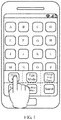
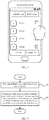
- the method used to hide application icons is as follows: call up a function menu on the desktop and select "Hide Apps" (as shown in Fig. 1 ), and check the applications that need to be hidden on the application list interface shown in Fig. 2 , so as to hide the icons of the selected applications.
- WO 2013/127055 A1 discloses a user interface for a hand-portable electronic device, where the interface has a privacy area that can be hidden from view and displayed when a particular user input is provided.
- US 2010/0024020 A1 discloses a wireless mobile device in which access to certain programs is possible only by traversing a privacy gate.
- the present invention provides a terminal control method as set out in claim 1.
- a management interface of hidden icons can be opened quickly without interface switching, and the operation is convenient and efficient, thereby improving operational efficiency.
- the terminal control method comprises: detecting multiple touch points formed on a screen interface; and displaying a management interface of hidden icons on the screen interface if at least one of the touch points slides to a first direction and at least one of the remaining touch points slides to a second direction opposite to the first direction.
- a hidden icon can be any application icon.
- the hidden icon can be the icon of a private application that the user does not want to be revealed, such as "Diary,” “Account Management,” etc.
- the user can execute hiding or un-hiding on any application icon.
- the method further comprises: displaying the contents initially displayed on the screen interface in a first area, and displaying the management interface of hidden icons in a second area other than the first area on the screen interface.
- the contents initially displayed on the screen interface and the management interface of hidden icons are displayed in the first area and the second area respectively, thus to determine directly whether an application icon has been hidden by checking the area in which the application icon is located.
- the application icon has not been hidden if this application icon is located in the first area; the application icon has been hidden if this application icon is located in the second area.
- a hidden setting of an application icon of the contents initially displayed can be achieved by dragging the application icon into the management interface of hidden icons, or an un-hiding setting can be achieved by dragging the application icon along an opposite direction, thereby simplifying the operation process.
- the contents initially displayed may include all of the contents initially displayed on the screen interface, and as a result, thumbnail display or deformation is needed for the contents initially displayed (such as compressing the gap between icons); alternatively, the contents initially displayed may only include parts of the contents (such as only application icons are displayed), thereby avoiding thumbnail display, which makes the user convenient to view.
- the method further comprises: determining a display position of the first area or the second area on the screen interface according to the position information of the multiple touch points on the screen interface.
- the initial position of the multiple touch points can be included in the second area; as another preferred embodiment, the area formed when the multiple touch points slide along a first direction and a second direction can be deemed as the second area.
- the display position of the management interface of hidden icons can be arbitrary, and there are many other specific methods for determining the display position; therefore, the explanation herein is not intended to be a specific limitation.
- the abovementioned technical solution further comprises: if any application icon in the first area is dragged into the second area, setting the application icon being dragged into the second area to be a hidden icon from a non-hidden icon; and/or, if any application icon in the second area is dragged into the first area, setting the application icon being dragged into the first area to be a non-hidden icon from a hidden icon.
- the display area of initial icons of the screen interface is the first area
- the display area of the management interface of hidden icons is the second area. Since the above two areas are displayed on the screen interface of the terminal simultaneously, the hidden or non-hidden setting of application icons can be achieved by the dragging thereof; therefore, the operation is convenient and efficient, thereby improving operational efficiency.
- it further comprises: if any application icon is dragged into the first area or the second area, rearranging the application icons in the first area and the second area according to a predetermined sequence.
- the display position occupied by the application icon originally will be free, thus causing waste of the display space and disorder of the icon arrangement. Therefore, the free position appeared after the movement of the application icon will be filled in time by rearranging the icons in the first area and the second area, without the need to arrange the icons manually by the user.
- the predetermined sequence of the arrangement of icons can be any one of the following or a combination thereof: the first letter of the name, the time of installation, and the frequency of use, etc.
- any application icon when any application icon is dragged to a target position in the first area or the second area, it further comprises: determining an application icon corresponding to the target position in order for said any application icon to occupy a corresponding display position of the determined application icon, and rearranging other application icons that arranged after the corresponding display position; wherein, if the target position corresponds to a plurality of application icons, the application icon arranged at the end will be deemed as the corresponding application icon.
- the application icon arranged at the end will be determined according to a predetermined arrangement sequence of the terminal.
- the arrangement sequence is as follows: in the horizontal direction, the order of arrangement of the application icons on the left side is higher than that of the application icons on the right side; in the vertical direction, the order of arrangement of the application icons on the upper side is higher than that of the application icons on the lower side.
- the touch points are located in the gap between application icons on the screen interface.
- the touch points are located in the gap between application icons on the screen interface.
- the present invention provides a terminal control device as set out in claim 6.
- the terminal control device comprises: a touch point detecting unit, configured to detect multiple touch points formed on a screen interface of a terminal; a slide determining unit, configured to determine whether at least one of the touch points slides to a first direction and at least one of the remaining touch points slides to a second direction opposite to the first direction; and an interface displaying unit, configured to display a management interface of hidden icons on the screen interface if the determination result of the slide determining unit is yes.
- a hidden icon can be any application icon.
- the hidden icon can be the icon of a private application that the user does not want to be revealed, such as "Diary,” “Account Management,” etc.
- the user can execute hiding or un-hiding on any application icon.
- the interface displaying unit is configured to: display the contents initially displayed on the screen interface in a first area, and display the management interface of hidden icons in a second area other than the first area on the screen interface.
- the contents initially displayed on the screen interface and the management interface of hidden icons are displayed in the first area and the second area respectively, thus to determine directly whether an application icon has been hidden by checking the area in which the application icon is located.
- the application icon has not been hidden if this application icon is located in the first area; the application icon has been hidden if this application icon is located in the second area.
- a hidden setting of an application icon of the contents initially displayed can be achieved by dragging the application icon into the management interface of hidden icons, or an un-hiding setting can be achieved by dragging the application icon along an opposite direction, thereby simplifying the operation process.
- the contents initially displayed may include all of the contents initially displayed on the screen interface, and as a result, thumbnail display or deformation is needed for the contents initially displayed (such as compressing the gap between icons); alternatively, the contents initially displayed may only include parts of the contents (such as displaying application icons only), thereby avoiding thumbnail display, which makes the user convenient to view.
- the device further comprises: a position determining unit, configured to determine a display position of the first area or the second area on the screen interface according to the position information of the multiple touch points on the screen interface, whereby the interface displaying unit will display the first area and the second area.
- a position determining unit configured to determine a display position of the first area or the second area on the screen interface according to the position information of the multiple touch points on the screen interface, whereby the interface displaying unit will display the first area and the second area.
- the initial position of the multiple touch points can be included in the second area; as another preferred embodiment, the area formed when the multiple touch points slide along a first direction and a second direction can be deemed as the second area.
- the display position of the management interface of hidden icons can be arbitrary, and there are many other specific methods for determining the display position; therefore, the explanation herein is not intended to be a specific limitation.
- the abovementioned technical solution further comprises: a hiding setting unit, configured to set the application icon being dragged into the second area to be a hidden icon from a non-hidden icon if any application icon in the first area is dragged into the second area; and/or, set the application icon being dragged into the first area to be a non-hidden icon from a hidden icon if any application icon in the second area is dragged into the first area.
- a hiding setting unit configured to set the application icon being dragged into the second area to be a hidden icon from a non-hidden icon if any application icon in the first area is dragged into the second area.
- the display area of initial icons of the screen interface is the first area
- the display area of the management interface of hidden icons is the second area. Since the above two areas are displayed on the screen interface of the terminal simultaneously, the hidden or non-hidden setting of application icons can be achieved by the dragging thereof; therefore, the operation is convenient and efficient, thereby improving operational efficiency.
- an icon arranging unit configured to rearrange the application icons in the first area and the second area according to a predetermined sequence if any application icon is dragged into the first area or the second area.
- the display position occupied by the application icon originally will be free, thus causing waste of the display space and disorder of the icon arrangement. Therefore, the free position appeared after the movement of the application icon will be filled in time by rearranging the icons in the first area and the second area, without the need to arrange the icons manually by the user.
- the predetermined sequence of the arrangement of icons can be any one of the following or a combination thereof: the first letter of the name, the time of installation, and the frequency of use, etc.
- an icon determining unit configured to, when any application icon is dragged to a target position in the first area or the second area, determine an application icon corresponding to the target position in order for said any application icon to occupy a corresponding display position of the determined application icon; wherein, if the target position corresponds to a plurality of application icons, take the application icon arranged at the end as the corresponding application icon; wherein, the icon arranging unit is configured to rearrange other application icons that arranged after the corresponding display position.
- the application icon arranged at the end will be determined according to a predetermined arrangement sequence of the terminal.
- the arrangement sequence is as follows: in the horizontal direction, the order of arrangement of the application icons on the left side is higher than that of the application icons on the right side; in the vertical direction, the order of arrangement of the application icons on the upper side is higher than that of the application icons on the lower side.
- the touch points are located in the gap between application icons on the screen interface.
- the touch points are located in the gap between application icons on the screen interface.
- the program product includes machine executable instructions, when executed by a computer system, causing the system to execute the following steps: detecting multiple touch points formed on a screen interface; displaying a management interface of hidden icons on the screen interface if at least one of the touch points slides to a first direction and at least one of the remaining touch points slides to a second direction opposite to the first direction.
- Non-volatile machine readable medium storing a program product for terminal control.
- the program product includes machine executable instructions, when executed by a computer system, causing the system to execute the following steps: detecting multiple touch points formed on a screen interface; displaying a management interface of hidden icons on the screen interface if at least one of the touch points slides to a first direction and at least one of the remaining touch points slides to a second direction opposite to the first direction.
- Also disclosed herein is a machine-readable program, configured to cause the machine to execute any of the terminal control methods described in the abovementioned technical solutions.
- Also disclosed herein is a storage medium storing a machine-readable program.
- the machine-readable program is configured to cause the machine to execute any of the terminal control methods described in the abovementioned technical solutions.
- the management interface of hidden icons can be opened quickly without interface switching, and the operation is convenient and efficient.
- FIG. 3 is a flow chart illustrating a terminal control method in accordance with one embodiment of the invention.
- the terminal control method in accordance with one embodiment of the invention comprises: step 302, detecting multiple touch points formed on a screen interface; step 304, displaying a management interface of hidden icons on the screen interface if at least one of the touch points slides to a first direction and at least one of the remaining touch points slides to a second direction opposite to the first direction.
- a hidden icon can be any application icon.
- the hidden icon can be the icon of a private application that the user does not want to be revealed, such as "Diary,” “Account Management,” etc.
- the user can execute hiding or un-hiding on any application icon.
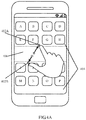
- FIG. 4A illustrates a specific situation that two fingers of the user slide in opposite directions to open the management interface of hidden icons.
- FIG. 4A it is supposed that two touch points are formed on the screen interface of the terminal with two fingers of the user, that is, a touch point 402A and a touch point 402B. If the touch point 402A and the touch point 402B slide in opposite directions, for instance, the touch point 402A slides upward and the touch point 402B slides downward, the management interface of hidden icons will be called up on the screen interface of the terminal without interface switching, and the operation is convenient and efficient.
- the contents initially displayed on the screen interface are displayed in a first area 404, and the management interface of hidden icons is displayed in a second area 406 other than the first area 404 on the screen interface.
- the contents initially displayed on the screen interface and the management interface of hidden icons are displayed in the first area 404 and the second area 406 respectively, thereby determining directly whether an application icon has been hidden by checking the area in which the application icon is located.
- the application icon has not been hidden if this application icon is located in the first area 404; the application icon has been hidden if this application icon is located in the second area 406.
- this technical solution further comprises: determining a display position of the first area 404 or the second area 406 on the screen interface according to the position information of the multiple touch points (such as the touch point 402A and the touch point 402B, etc.) on the screen interface.
- the initial positions of the multiple touch points can be included in the second area 406.
- the initial positions (illustrated by dotted lines) of the touch point 402A and the touch point 402b are included in the second area 406 of FIG. 4A .
- an area formed when the multiple touch points slide along a first direction and a second direction can be deemed as the second area 406.
- the upper and lower frames of the second area 406 correspond to the final positions (illustrated by solid lines) of the touch point 402A and the touch point 402B respectively.
- the upper and lower frames of the second area 406 can slide along with the touch point 402A and the touch point 402B to achieve dynamic position change in the vertical direction, as if the user has "expanded" the second area 406 with fingers.
- FIG. 4A illustrates the embodiment in which the first area 404 and the second area 406 are displayed on the screen interface of the terminal simultaneously.
- a person of ordinary skill in the art will understand that, it can also be possible to only display the management interface of hidden icons on the screen interface through the sliding of multiple touch points, which is equivalent to the display state as shown in FIG. 2 .
- the contents initially displayed may include all of the contents initially displayed on the screen interface, and as a result, thumbnail display or deformation is needed for the contents initially displayed (such as compressing the gap between icons); alternatively, the contents initially displayed may only include parts of the contents (such as only application icons are displayed), thereby avoiding thumbnail display, which makes the user convenient to view.
- it further comprises: if any application icon in the first area 404 is dragged into the second area 406, setting the application icon being dragged into the second area 406 to be a hidden icon from a non-hidden icon.
- the display area of initial icons of the screen interface is the first area 404
- the display area of the management interface of hidden icons is the second area 406. Since the above two areas are displayed on the screen interface of the terminal simultaneously, the hidden or non-hidden setting of application icons can be achieved by the dragging thereof; therefore, the operation is convenient and efficient, thereby improving operational efficiency.
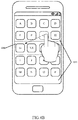
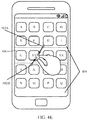
- FIG. 4B is a schematic view illustrating an interface of dragging an application icon to a management interface 402 of hidden icons for hiding.
- the hiding of the icon of application G can be achieved directly by dragging the icon of application G directly to the management interface of hidden icons.
- FIG. 5 is a specific flow chart illustrating the process of hiding application icons in accordance with one embodiment of the invention.
- the specific process of hiding application icons comprises:
- Step 502 sliding two fingers of the user along opposite directions to open the management interface of hidden icons on the desktop of the terminal.
- Step 504 dragging an application icon that is desired to be hidden to the management interface of hidden icons by the user to achieve the hiding of the application icon.
- Step 506 when the dragging of all the application icons that are desired to be hidden is completed, sliding two fingers of the user towards each other to close the management interface of hidden icons.
- Step 508 filling the blank of the hidden application icon with the next icon, and rearranging the icons on the desktop according to a predetermined rule.
- FIG. 4C is a schematic view illustrating an interface of sliding the fingers of the user left and right on the management interface of hidden icons.
- not all of the hidden icons may be displayed on one screen because of the limited display space of the screen interface of the terminal.
- the hidden icons can be spread across multiple screens in order to facilitate the management of all the hidden icons; this enables the user to slide fingers left and right on the management interface of hidden icons to achieve the operation of flipping pages among multiple screens, therefore, the user can check any hidden icon and conduct management, such as deleting, un-hiding, etc.
- it may comprise: if any application icon in the second area 406 is dragged into the first area 404, setting the application icon being dragged into the first area 404 to be a non-hidden icon from a hidden icon.
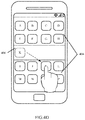
- FIG. 4D is a schematic view illustrating an interface of dragging an application icon to achieve un-hiding.
- application icon K which is an icon that is desired to be hidden, has been found by the user, will be dragged directly to a target position in the first area 404 to achieve the un-hiding thereof.
- the display area of initial icons of the screen interface is the first area 404
- the display area of the management interface of hidden icons is the second area 406. Since the above two areas are displayed on the screen interface of the terminal simultaneously, the hidden or non-hidden setting of application icons can be achieved by the dragging thereof; therefore, the operation is convenient and efficient, thereby improving operational efficiency.
- FIG. 6 is a specific flow chart illustrating the process of un-hiding application icons in accordance with one embodiment of the invention, wherein the process comprises: Step 602, sliding two fingers of the user along opposite directions to open the management interface of hidden icons on the desktop of the terminal.
- Step 604 dragging an application icon that is desired to be non-hidden to the display area on the desktop by the user to achieve the un-hiding of the application icon.
- Step 606 when the dragging of all the application icons that are desired to be non-hidden is completed, sliding two fingers of the user towards each other to close the management interface of hidden icons.
- Step 608 the non-hidden application icon occupying the icon in the target position on the display area on the desktop; rearranging the icons on the desktop according to a predetermined rule.
- it further comprises: rearranging the application icons in the first area 404 and the second area 406 according to a predetermined sequence if any application icon is dragged into the first area 404 or the second area 406.
- the predetermined sequence of the arrangement of icons can be any one of the following or a combination thereof: the first letter of the name, the time of installation, and the frequency of use, etc.
- FIG. 4B the icon of application G has not yet been hidden; in FIG. 4C , the icon of application G has been hidden, and the remaining application icons in the first area 404 will be rearranged (in the figure, the remaining application icons on the interface of the terminal are rearranged automatically according to the sequence of the first letter of the names of the applications).
- any application icon when any application icon is dragged to the target position in the first area 404 or the second area 406, it further comprises: determining an application icon corresponding to the target position in order for said any application icon to occupy a corresponding display position of the determined application icon, and rearranging other application icons that arranged after the corresponding display position; wherein, if the target position corresponds to a plurality of application icons, the application icon arranged at the end will be deemed as the corresponding application icon.
- the application icon arranged at the end will be determined according to a predetermined arrangement sequence of the terminal.
- the arrangement sequence is as follows: in the horizontal direction, the order of arrangement of the application icons on the left side is higher than that of the application icons on the right side; in the vertical direction, the order of arrangement of the application icons on the upper side is higher than that of the application icons on the lower side.
- icon K when the icon of application K is dragged to the first area 404, icon K will occupy the position of icon L if the target position of the dragging of icon K is the position of icon L, and icon L will move backward.
- the position of the icon that is arranged at the end will be selected as the target position of the dragging of icon K if the target position is an intermediate position between icon J and icon L; that is, the position of icon L will be selected as the target position, and icon K will occupy the position of icon L and icon L will move backward, thereby achieving the un-hiding of application K.
- the position of the icon that is arranged at the end will be selected as the target position of the dragging of icon K if the target position is an intermediate position among icon A, icon B, icon E, and icon F; that is, the position of icon F will be selected as the target position, and icon K will occupy the position of icon F and icon F will move backward, thereby achieving the un-hiding of application K.
- FIG. 4E is a schematic view illustrating an interface 402 of closing the management interface of hidden icons.
- the management interface of hidden icons can be closed by sliding two fingers of the user along opposite directions on the management interface of hidden icons, such as sliding the touch point 402A from upper right to lower left, and sliding the touch point 402B from lower left to upper right; then the second area 406 will disappear and the first area 404 will be displayed full screen.
- FIG. 7 is a block diagram illustrating a terminal control device in accordance with one embodiment of the invention.
- the terminal 700 in accordance with the embodiment of the invention comprises: a touch point detecting unit 702, configured to detect multiple touch points formed on a screen interface of a terminal; a slide determining unit 704, configured to determine whether at least one of the touch points slides to a first direction and at least one of the remaining touch points slides to a second direction opposite to the first direction; and an interface displaying unit 706, configured to display a management interface of hidden icons on the screen interface if the determination result of the slide determining unit 704 is yes.
- a hidden icon can be any application icon.
- the hidden icon can be the icon of a private application that the user does not want to be revealed, such as "Diary,” “Account Management,” etc.
- the user can execute hiding or un-hiding on any application icon.
- the interface displaying unit 706 is configured to: display the contents initially displayed on the screen interface in a first area, and display the management interface of hidden icons in a second area other than the first area on the screen interface.
- the contents initially displayed on the screen interface and the management interface of hidden icons are displayed in the first area and the second area respectively, thus to determine directly whether an application icon has been hidden by checking the area in which the application icon is located.
- the application icon has not been hidden if this application icon is located in the first area; the application icon has been hidden if this application icon is located in the second area.
- a hidden setting of an application icon of the contents initially displayed can be achieved by dragging the application icon into the management interface of hidden icons, or an un-hiding setting can be achieved by dragging the application icon along an opposite direction, thereby simplifying the operation process.
- the contents initially displayed may include all of the contents initially displayed on the screen interface, and as a result, thumbnail display or deformation is needed for the contents initially displayed (such as compressing the gap between icons); alternatively, the contents initially displayed may only include parts of the contents (such as displaying application icons only), thereby avoiding thumbnail display, which makes the user convenient to view.
- a position determining unit 708, configured to determine a display position of the first area or the second area on the screen interface according to the position information of the multiple touch points on the screen interface, whereby the interface displaying unit will display the first area and the second area.
- the initial position of the multiple touch points can be included in the second area; as another preferred embodiment, the area formed when the multiple touch points slide along a first direction and a second direction can be deemed as the second area.
- the display position of the management interface of hidden icons can be arbitrary, and there are many other specific methods for determining the display position; therefore, the explanation herein is not intended to be a specific limitation.
- a hiding setting unit 710 configured to set the application icon being dragged into the second area to be a hidden icon from a non-hidden icon if any application icon in the first area is dragged into the second area; and/or, set the application icon being dragged into the first area to be a non-hidden icon from a hidden icon if any application icon in the second area is dragged into the first area.
- the display area of initial icons of the screen interface is the first area
- the display area of the management interface of hidden icons is the second area. Since the above two areas are displayed on the screen interface of the terminal simultaneously, the hidden or non-hidden setting of application icons can be achieved by the dragging thereof; therefore, the operation is convenient and efficient, thereby improving operational efficiency.
- an icon arranging unit 712 configured to rearrange the application icons in the first area and the second area according to a predetermined sequence if any application icon is dragged into the first area or the second area.
- the display position occupied by the application icon originally will be free, thus causing waste of the display space and disorder of the icon arrangement. Therefore, the free position appeared after the movement of the application icon will be filled in time by rearranging the icons in the first area and the second area, without the need to arrange the icons manually by the user.
- the predetermined sequence of the arrangement of icons can be any one of the following or a combination thereof: the first letter of the name, the time of installation, and the frequency of use, etc.
- an icon determining unit 714 configured to, when any application icon is dragged to a target position in the first area or the second area, determine an application icon corresponding to the target position in order for said any application icon to occupy a corresponding display position of the determined application icon; wherein, if the target position corresponds to a plurality of application icons, take the application icon arranged at the end as the corresponding application icon; wherein, the icon arranging unit 712 is configured to rearrange other application icons that arranged after the corresponding display position.
- the application icon arranged at the end will be determined according to a predetermined arrangement sequence of the terminal.
- the arrangement sequence is as follows: in the horizontal direction, the order of arrangement of the application icons on the left side is higher than that of the application icons on the right side; in the vertical direction, the order of arrangement of the application icons on the upper side is higher than that of the application icons on the lower side.
- the touch points are located in the gap between application icons on the screen interface.
- the touch points are located in the gap between application icons on the screen interface.
- a program product stored in a non-volatile machine readable medium for terminal control.
- the program product includes machine executable instructions, when executed by a computer system, causing the system to execute the following: detecting multiple touch points formed on a screen interface; displaying a management interface of hidden icons on the screen interface if at least one of the touch points slides to a first direction and at least one of the remaining touch points slides to a second direction opposite to the first direction.
- a non-volatile machine readable medium storing a program product for terminal control.
- the program product includes machine executable instructions, when executed by a computer system, causing the system to execute the following: detecting multiple touch points formed on a screen interface; displaying a management interface of hidden icons on the screen interface if at least one of the touch points slides to a first direction and at least one of the remaining touch points slides to a second direction opposite to the first direction.
- a machine-readable program configured to cause the machine to execute any of the terminal control methods described in the abovementioned technical solutions.
- a storage medium storing a machine-readable program.
- the machine-readable program is configured to cause the machine to execute any of the terminal control methods described in the abovementioned technical solutions.
- the present invention provides a terminal control method and a terminal, by detecting the movement tracks of multiple touch points on the screen interface of a terminal, the management interface of hidden icons can be opened quickly without interface switching, and the operation is convenient and efficient, thereby improving operational efficiency.
Landscapes
- Engineering & Computer Science (AREA)
- General Engineering & Computer Science (AREA)
- Theoretical Computer Science (AREA)
- Human Computer Interaction (AREA)
- Physics & Mathematics (AREA)
- General Physics & Mathematics (AREA)
- Computer Networks & Wireless Communication (AREA)
- Signal Processing (AREA)
- User Interface Of Digital Computer (AREA)
Claims (8)
- Verfahren zur Endgerätsteuerung, Folgendes umfassend:Detektieren (302) von mehreren Berührungspunkten, die auf einer Bildschirmoberfläche ausgebildet sind; undAnzeigen (304) einer Verwaltungsoberfläche von versteckten Symbolen auf der Bildschirmoberfläche, wobei Inhalte, die anfänglich auf der Bildschirmoberfläche angezeigt werden, in einem ersten Bereich auf der Bildschirmoberfläche angezeigt werden, und die Verwaltungsoberfläche von versteckten Symbolen in einem zweiten, anderen Bereich als dem ersten Bereich auf der Bildschirmoberfläche angezeigt wird,dadurch gekennzeichnet, dassdie Verwaltungsoberfläche von versteckten Symbolen angezeigt wird, wenn zumindest einer der Berührungspunkte in eine erste Richtung gleitet und zumindest einer der restlichen Berührungspunkte in eine zweite Richtung entgegengesetzt zur ersten Richtung gleitet, und dassein Anzeigeabschnitt des ersten Bereichs oder des zweiten Bereichs auf der Bildschirmoberfläche entsprechend Positionsinformationen der mehreren Berührungspunkte auf der Bildschirmoberfläche bestimmt wird; und wobei das Verfahren ferner Folgendes umfasst:wenn ein beliebiges Anwendungssymbol im ersten Bereich in den zweiten Bereich gezogen wird (504), Einstellen des in den zweiten Bereich gezogenen Anwendungssymbols als verstecktes Symbol von einem nicht-versteckten Symbol; und/oderwenn ein beliebiges Anwendungssymbol im zweiten Bereich in den ersten Bereich gezogen wird (604), Einstellen des in den ersten Bereich gezogenen Anwendungssymbols als nicht-verstecktes Symbol von einem versteckten Symbol.
- Verfahren zur Endgerätsteuerung nach Anspruch 1, wobei das Verfahren ferner Folgendes umfasst:
wenn ein Anwendungssymbol in den ersten Bereich oder in den zweiten Bereich gezogen wird, Neuanordnen (508) der Anwendungssymbole im ersten Bereich und im zweiten Bereich entsprechend einer vordefinierten Reihung. - Verfahren zur Endgerätsteuerung nach Anspruch 2, wobei, wenn ein beliebiges Anwendungssymbol in eine Zielposition im ersten Bereich oder im zweiten Bereich gezogen wird, das Verfahren ferner Folgendes umfasst:Bestimmen eines der Zielposition entsprechenden Anwendungssymbols, so dass das beliebige Anwendungssymbol eine entsprechende Anzeigenposition des bestimmten Anwendungssymbols einnimmt, und Neuanordnen anderer Anwendungssymbole, die sich nach der entsprechenden Anzeigenposition anordnen; wobeiwenn die Zielposition einer Vielzahl von Anwendungssymbolen entspricht, das am Ende angeordnete Anwendungssymbol als das entsprechende Anwendungssymbol angesehen wird.
- Verfahren zur Endgerätsteuerung nach einem der Ansprüche 1 bis 3, wobei die Berührungspunkte im Spalt zwischen Anwendungssymbolen auf der Bildschirmoberfläche angeordnet sind.
- Vorrichtung (700) zur Endgerätsteuerung, Folgendes umfassend:eine Berührungspunktdetektionseinheit (702), die konfiguriert ist, um mehrere auf einer Bildschirmoberfläche eines Endgeräts ausgebildete Berührungspunkte zu detektieren;eine Gleitbewegungsbestimmungseinheit (704); undeine Oberflächenanzeigeeinheit (706), die konfiguriert ist, um eine Verwaltungsoberfläche von versteckten Symbolen auf der Bildschirmoberfläche anzuzeigen, wenn das Bestimmungsergebnis der Gleitbewegungsbestimmungseinheit positiv ist,wobei die Oberflächenanzeigeeinheit konfiguriert ist, um Inhalte, die anfänglich in einem ersten Bereich auf der Bildschirmoberfläche angezeigt werden, und die Verwaltungsoberfläche von versteckten Symbolen in einem zweiten, anderen Bereich als dem ersten Bereich auf der Bildschirmoberfläche anzuzeigen,dadurch gekennzeichnet, dassdie Gleitbewegungsbestimmungseinheit konfiguriert ist, um zu bestimmen, ob zumindest einer der Berührungspunkte in eine erste Richtung gleitet und zumindest einer der restlichen Berührungspunkte in eine zweite Richtung entgegengesetzt zur ersten Richtung gleitet, und wobeidie Vorrichtung ferner eine Positionsbestimmungseinheit (708) umfasst, die konfiguriert ist, um eine Anzeigenposition des ersten Bereichs oder des zweiten Bereichs auf der Bildschirmoberfläche entsprechend Positionsinformationen der mehreren Berührungspunkte auf der Bildschirmoberfläche zu bestimmen, und wobeidie Vorrichtung ferner eine Versteck-Einstelleinheit (710) umfasst, die konfiguriert ist, um das Anwendungssymbol, das in den zweiten Bereich gezogen wird, als verstecktes Symbol von einem nicht-versteckten Symbol einzustellen, wenn ein beliebiges Anwendungssymbol im ersten Bereich in den zweiten Bereich gezogen wird; und/oder das Anwendungssymbol, das in den ersten Bereich gezogen wird, als nicht-verstecktes Symbol von einem versteckten Symbol einzustellen, wenn ein Anwendungssymbol im zweiten Bereich in den ersten Bereich gezogen wird.
- Vorrichtung zur Endgerätsteuerung nach Anspruch 5, wobei die Vorrichtung ferner Folgendes umfasst:
eine Symbolanordnungseinheit (712), die konfiguriert ist, um die Anwendungssymbole im ersten Bereich und im zweiten Bereich entsprechend einer vordefinierten Reihung neu anzuordnen, wenn ein Anwendungssymbol in den ersten Bereich oder den zweiten Bereich gezogen wird. - Vorrichtung zur Endgerätsteuerung nach Anspruch 6, wobei die Vorrichtung ferner Folgendes umfasst:eine Symbolbestimmungseinheit (714), die konfiguriert ist, um, wenn ein beliebiges Anwendungssymbol in eine Zielposition im ersten Bereich oder im zweiten Bereich gezogen wird, ein der Zielposition entsprechendes Anwendungssymbol zu bestimmen, so dass das beliebige Anwendungssymbol eine entsprechende Anzeigenposition des bestimmten Anwendungssymbols einnimmt; wobei, wenn die Zielposition einer Vielzahl von Anwendungssymbolen entspricht, das am Ende angeordnete Anwendungssymbol als das entsprechende Anwendungssymbol angesehen wird; und wobeidie Symbolanordnungseinheit konfiguriert ist, um andere Anwendungssymbole, die nach der entsprechenden Anzeigenposition angeordnet sind, neu anzuordnen.
- Vorrichtung zur Endgerätsteuerung nach einem der Ansprüche 5 bis 7, wobei die Berührungspunkte im Spalt zwischen Anwendungssymbolen auf der Bildschirmoberfläche angeordnet sind.
Applications Claiming Priority (1)
| Application Number | Priority Date | Filing Date | Title |
|---|---|---|---|
| PCT/CN2014/070636 WO2015106398A1 (zh) | 2014-01-15 | 2014-01-15 | 终端操控方法和终端操控装置 |
Publications (3)
| Publication Number | Publication Date |
|---|---|
| EP3096214A1 EP3096214A1 (de) | 2016-11-23 |
| EP3096214A4 EP3096214A4 (de) | 2017-09-13 |
| EP3096214B1 true EP3096214B1 (de) | 2019-03-20 |
Family
ID=53542273
Family Applications (1)
| Application Number | Title | Priority Date | Filing Date |
|---|---|---|---|
| EP14879109.8A Active EP3096214B1 (de) | 2014-01-15 | 2014-01-15 | Endgerätesteuerungsverfahren und endgerätesteuerungsvorrichtung |
Country Status (4)
| Country | Link |
|---|---|
| US (1) | US20160274749A1 (de) |
| EP (1) | EP3096214B1 (de) |
| CN (1) | CN105637466A (de) |
| WO (1) | WO2015106398A1 (de) |
Families Citing this family (14)
| Publication number | Priority date | Publication date | Assignee | Title |
|---|---|---|---|---|
| US9996254B2 (en) | 2015-09-23 | 2018-06-12 | Samsung Electronics Co., Ltd. | Hidden application icons |
| CN106980429B (zh) * | 2016-01-16 | 2020-11-17 | 平安科技(深圳)有限公司 | 桌面图标的处理方法及移动终端 |
| WO2018081919A1 (zh) * | 2016-11-01 | 2018-05-11 | 北京小米移动软件有限公司 | 隐藏应用图标的方法及装置 |
| CN108132706A (zh) * | 2017-11-27 | 2018-06-08 | 北京用友政务软件有限公司 | 一种终端设备的操作控制方法、系统及终端设备 |
| CN108509247A (zh) * | 2018-04-08 | 2018-09-07 | 深圳先搜科技有限公司 | 一种极简模式实现方法、系统及终端设备 |
| CN116820289A (zh) * | 2020-03-31 | 2023-09-29 | 腾讯科技(深圳)有限公司 | 信息展示方法、装置、设备及存储介质 |
| CN111596815B (zh) * | 2020-04-16 | 2021-07-23 | 维沃移动通信有限公司 | 应用图标显示方法及电子设备 |
| CN111562961B (zh) * | 2020-04-29 | 2024-01-23 | 维沃移动通信有限公司 | 图标管理方法、装置及电子设备 |
| CN112596641A (zh) * | 2020-12-10 | 2021-04-02 | 咪咕数字传媒有限公司 | 图标调整方法、装置、电子设备及存储介质 |
| CN112558837A (zh) * | 2020-12-23 | 2021-03-26 | 维沃移动通信有限公司 | 图标的处理方法、装置、电子设备和可读存储介质 |
| CN113154656B (zh) * | 2021-03-16 | 2022-06-21 | 珠海格力电器股份有限公司 | 一种风向控制方法、装置及电器设备 |
| CN116166149A (zh) * | 2021-11-25 | 2023-05-26 | 华为技术有限公司 | 一种视窗管理方法、装置和终端设备 |
| CN114760516A (zh) * | 2022-04-11 | 2022-07-15 | 北京字跳网络技术有限公司 | 一种视频处理方法、装置、设备及存储介质 |
| CN117369704A (zh) * | 2022-06-30 | 2024-01-09 | Oppo广东移动通信有限公司 | 分屏显示方法、装置、终端及存储介质 |
Family Cites Families (9)
| Publication number | Priority date | Publication date | Assignee | Title |
|---|---|---|---|---|
| US7676767B2 (en) * | 2005-06-15 | 2010-03-09 | Microsoft Corporation | Peel back user interface to show hidden functions |
| US20100024020A1 (en) * | 2008-07-22 | 2010-01-28 | Ernest Samuel Baugher | Wireless mobile device with privacy groups that independently control access to resident application programs |
| US10152192B2 (en) * | 2011-02-21 | 2018-12-11 | Apple Inc. | Scaling application windows in one or more workspaces in a user interface |
| JP5485220B2 (ja) * | 2011-05-13 | 2014-05-07 | 株式会社Nttドコモ | 表示装置、ユーザインタフェース方法及びプログラム |
| TW201316211A (zh) * | 2011-10-13 | 2013-04-16 | Novatek Microelectronics Corp | 可濾除誤觸面板的手勢判斷方法 |
| WO2013127055A1 (en) * | 2012-02-27 | 2013-09-06 | Nokia Corporation | Apparatus and associated methods |
| KR101417318B1 (ko) * | 2012-08-17 | 2014-07-09 | 주식회사 팬택 | 멀티태스킹이 가능한 사용자 인터페이스 제공방법, 이동 단말기, 컴퓨터 판독 가능 매체 |
| CN103164120A (zh) * | 2013-01-31 | 2013-06-19 | 广东欧珀移动通信有限公司 | 快速显示隐藏的apk图标的方法及其移动终端 |
| TWI514241B (zh) * | 2013-10-31 | 2015-12-21 | Synology Inc | 在螢幕上管理圖式之方法 |
-
2014
- 2014-01-15 EP EP14879109.8A patent/EP3096214B1/de active Active
- 2014-01-15 CN CN201480054762.8A patent/CN105637466A/zh active Pending
- 2014-01-15 WO PCT/CN2014/070636 patent/WO2015106398A1/zh not_active Ceased
-
2016
- 2016-06-02 US US15/171,218 patent/US20160274749A1/en not_active Abandoned
Non-Patent Citations (1)
| Title |
|---|
| None * |
Also Published As
| Publication number | Publication date |
|---|---|
| WO2015106398A1 (zh) | 2015-07-23 |
| EP3096214A1 (de) | 2016-11-23 |
| EP3096214A4 (de) | 2017-09-13 |
| US20160274749A1 (en) | 2016-09-22 |
| CN105637466A (zh) | 2016-06-01 |
Similar Documents
| Publication | Publication Date | Title |
|---|---|---|
| EP3096214B1 (de) | Endgerätesteuerungsverfahren und endgerätesteuerungsvorrichtung | |
| US20160334989A1 (en) | Display Control Method and System for a Touchscreen Interface | |
| US9977523B2 (en) | Apparatus and method for displaying information in a portable terminal device | |
| CN102662584B (zh) | 一种多应用执行方法及移动终端 | |
| US20140289669A1 (en) | User Interface Icon Management Method and Touch Device | |
| US10877624B2 (en) | Method for displaying and electronic device thereof | |
| US20160019092A1 (en) | Method and apparatus for closing program, and storage medium | |
| US20110314421A1 (en) | Access to Touch Screens | |
| WO2017032005A1 (zh) | 一种操作菜单显示方法及终端 | |
| CN108694012B (zh) | 在屏幕上显示对象的方法和系统 | |
| KR20120121149A (ko) | 터치스크린 단말기에서 아이콘 배치 방법 및 장치 | |
| CN104205098A (zh) | 使用阵列模式在浏览器中的内容项之间进行导航 | |
| US10254932B2 (en) | Method and apparatus of selecting item of portable terminal | |
| CN102799381B (zh) | 浏览器窗口的处理方法及装置 | |
| JP6590726B2 (ja) | プログラマブル表示器及びこれを備えるプログラマブルシステム、プログラマブル表示器の設計装置、プログラマブル表示器の設計方法、プログラマブル表示器の操作方法、プログラマブル表示器の設計プログラム及びコンピュータで読み取り可能な記録媒体並びに記憶した機器 | |
| EP2713261A2 (de) | System zur Unterstützung einer manuellen benutzerschnittstellenbasierten Steuerung einer elektronischen Vorrichtung | |
| US11698713B2 (en) | Method, system, and machine-readable data carrier for controlling a user device using a context toolbar | |
| KR20140036576A (ko) | 카테고리 디스플레이를 위한 방법 및 그 방법을 처리하는 전자 장치 | |
| EP3454226B1 (de) | Verfahren und vorrichtung zur anzeige einer benutzeroberfläche | |
| US10331327B2 (en) | Message display method, apparatus and terminal | |
| CN103167154A (zh) | 一种快捷管理手机运行应用程序的方法 | |
| US20190012061A1 (en) | Display control device | |
| CN108052254B (zh) | 一种信息处理方法及电子设备 | |
| CN104461258A (zh) | 用于操作计算机的方法和系统 | |
| CN110502165B (zh) | 快速移动多个app图标的方法 |
Legal Events
| Date | Code | Title | Description |
|---|---|---|---|
| PUAI | Public reference made under article 153(3) epc to a published international application that has entered the european phase |
Free format text: ORIGINAL CODE: 0009012 |
|
| 17P | Request for examination filed |
Effective date: 20160415 |
|
| AK | Designated contracting states |
Kind code of ref document: A1 Designated state(s): AL AT BE BG CH CY CZ DE DK EE ES FI FR GB GR HR HU IE IS IT LI LT LU LV MC MK MT NL NO PL PT RO RS SE SI SK SM TR |
|
| AX | Request for extension of the european patent |
Extension state: BA ME |
|
| DAX | Request for extension of the european patent (deleted) | ||
| RIC1 | Information provided on ipc code assigned before grant |
Ipc: H04M 1/725 20060101ALI20170707BHEP Ipc: H04M 1/67 20060101ALI20170707BHEP Ipc: G06F 3/0488 20130101AFI20170707BHEP |
|
| RIC1 | Information provided on ipc code assigned before grant |
Ipc: H04M 1/725 20060101ALI20170714BHEP Ipc: G06F 3/0488 20130101AFI20170714BHEP Ipc: H04M 1/67 20060101ALI20170714BHEP |
|
| A4 | Supplementary search report drawn up and despatched |
Effective date: 20170811 |
|
| RIC1 | Information provided on ipc code assigned before grant |
Ipc: G06F 3/0488 20130101AFI20170807BHEP Ipc: H04M 1/67 20060101ALI20170807BHEP Ipc: H04M 1/725 20060101ALI20170807BHEP |
|
| STAA | Information on the status of an ep patent application or granted ep patent |
Free format text: STATUS: EXAMINATION IS IN PROGRESS |
|
| 17Q | First examination report despatched |
Effective date: 20180906 |
|
| REG | Reference to a national code |
Ref country code: DE Ref legal event code: R079 Ref document number: 602014043431 Country of ref document: DE Free format text: PREVIOUS MAIN CLASS: G06F0003048800 Ipc: G06F0003048600 |
|
| GRAJ | Information related to disapproval of communication of intention to grant by the applicant or resumption of examination proceedings by the epo deleted |
Free format text: ORIGINAL CODE: EPIDOSDIGR1 |
|
| STAA | Information on the status of an ep patent application or granted ep patent |
Free format text: STATUS: GRANT OF PATENT IS INTENDED |
|
| GRAP | Despatch of communication of intention to grant a patent |
Free format text: ORIGINAL CODE: EPIDOSNIGR1 |
|
| RIC1 | Information provided on ipc code assigned before grant |
Ipc: G06F 3/0481 20130101ALI20181119BHEP Ipc: H04M 1/67 20060101ALN20181119BHEP Ipc: G06F 3/0488 20130101ALI20181119BHEP Ipc: H04M 1/725 20060101ALI20181119BHEP Ipc: G06F 3/0486 20130101AFI20181119BHEP |
|
| INTG | Intention to grant announced |
Effective date: 20181211 |
|
| GRAS | Grant fee paid |
Free format text: ORIGINAL CODE: EPIDOSNIGR3 |
|
| GRAA | (expected) grant |
Free format text: ORIGINAL CODE: 0009210 |
|
| STAA | Information on the status of an ep patent application or granted ep patent |
Free format text: STATUS: THE PATENT HAS BEEN GRANTED |
|
| AK | Designated contracting states |
Kind code of ref document: B1 Designated state(s): AL AT BE BG CH CY CZ DE DK EE ES FI FR GB GR HR HU IE IS IT LI LT LU LV MC MK MT NL NO PL PT RO RS SE SI SK SM TR |
|
| REG | Reference to a national code |
Ref country code: GB Ref legal event code: FG4D |
|
| REG | Reference to a national code |
Ref country code: CH Ref legal event code: EP |
|
| REG | Reference to a national code |
Ref country code: DE Ref legal event code: R096 Ref document number: 602014043431 Country of ref document: DE |
|
| REG | Reference to a national code |
Ref country code: AT Ref legal event code: REF Ref document number: 1111205 Country of ref document: AT Kind code of ref document: T Effective date: 20190415 |
|
| REG | Reference to a national code |
Ref country code: IE Ref legal event code: FG4D |
|
| REG | Reference to a national code |
Ref country code: NL Ref legal event code: FP |
|
| PG25 | Lapsed in a contracting state [announced via postgrant information from national office to epo] |
Ref country code: NO Free format text: LAPSE BECAUSE OF FAILURE TO SUBMIT A TRANSLATION OF THE DESCRIPTION OR TO PAY THE FEE WITHIN THE PRESCRIBED TIME-LIMIT Effective date: 20190620 Ref country code: FI Free format text: LAPSE BECAUSE OF FAILURE TO SUBMIT A TRANSLATION OF THE DESCRIPTION OR TO PAY THE FEE WITHIN THE PRESCRIBED TIME-LIMIT Effective date: 20190320 Ref country code: SE Free format text: LAPSE BECAUSE OF FAILURE TO SUBMIT A TRANSLATION OF THE DESCRIPTION OR TO PAY THE FEE WITHIN THE PRESCRIBED TIME-LIMIT Effective date: 20190320 Ref country code: LT Free format text: LAPSE BECAUSE OF FAILURE TO SUBMIT A TRANSLATION OF THE DESCRIPTION OR TO PAY THE FEE WITHIN THE PRESCRIBED TIME-LIMIT Effective date: 20190320 |
|
| REG | Reference to a national code |
Ref country code: LT Ref legal event code: MG4D |
|
| PG25 | Lapsed in a contracting state [announced via postgrant information from national office to epo] |
Ref country code: HR Free format text: LAPSE BECAUSE OF FAILURE TO SUBMIT A TRANSLATION OF THE DESCRIPTION OR TO PAY THE FEE WITHIN THE PRESCRIBED TIME-LIMIT Effective date: 20190320 Ref country code: LV Free format text: LAPSE BECAUSE OF FAILURE TO SUBMIT A TRANSLATION OF THE DESCRIPTION OR TO PAY THE FEE WITHIN THE PRESCRIBED TIME-LIMIT Effective date: 20190320 Ref country code: GR Free format text: LAPSE BECAUSE OF FAILURE TO SUBMIT A TRANSLATION OF THE DESCRIPTION OR TO PAY THE FEE WITHIN THE PRESCRIBED TIME-LIMIT Effective date: 20190621 Ref country code: BG Free format text: LAPSE BECAUSE OF FAILURE TO SUBMIT A TRANSLATION OF THE DESCRIPTION OR TO PAY THE FEE WITHIN THE PRESCRIBED TIME-LIMIT Effective date: 20190620 Ref country code: RS Free format text: LAPSE BECAUSE OF FAILURE TO SUBMIT A TRANSLATION OF THE DESCRIPTION OR TO PAY THE FEE WITHIN THE PRESCRIBED TIME-LIMIT Effective date: 20190320 |
|
| REG | Reference to a national code |
Ref country code: AT Ref legal event code: MK05 Ref document number: 1111205 Country of ref document: AT Kind code of ref document: T Effective date: 20190320 |
|
| PG25 | Lapsed in a contracting state [announced via postgrant information from national office to epo] |
Ref country code: EE Free format text: LAPSE BECAUSE OF FAILURE TO SUBMIT A TRANSLATION OF THE DESCRIPTION OR TO PAY THE FEE WITHIN THE PRESCRIBED TIME-LIMIT Effective date: 20190320 Ref country code: IT Free format text: LAPSE BECAUSE OF FAILURE TO SUBMIT A TRANSLATION OF THE DESCRIPTION OR TO PAY THE FEE WITHIN THE PRESCRIBED TIME-LIMIT Effective date: 20190320 Ref country code: RO Free format text: LAPSE BECAUSE OF FAILURE TO SUBMIT A TRANSLATION OF THE DESCRIPTION OR TO PAY THE FEE WITHIN THE PRESCRIBED TIME-LIMIT Effective date: 20190320 Ref country code: AL Free format text: LAPSE BECAUSE OF FAILURE TO SUBMIT A TRANSLATION OF THE DESCRIPTION OR TO PAY THE FEE WITHIN THE PRESCRIBED TIME-LIMIT Effective date: 20190320 Ref country code: CZ Free format text: LAPSE BECAUSE OF FAILURE TO SUBMIT A TRANSLATION OF THE DESCRIPTION OR TO PAY THE FEE WITHIN THE PRESCRIBED TIME-LIMIT Effective date: 20190320 Ref country code: ES Free format text: LAPSE BECAUSE OF FAILURE TO SUBMIT A TRANSLATION OF THE DESCRIPTION OR TO PAY THE FEE WITHIN THE PRESCRIBED TIME-LIMIT Effective date: 20190320 Ref country code: SK Free format text: LAPSE BECAUSE OF FAILURE TO SUBMIT A TRANSLATION OF THE DESCRIPTION OR TO PAY THE FEE WITHIN THE PRESCRIBED TIME-LIMIT Effective date: 20190320 Ref country code: PT Free format text: LAPSE BECAUSE OF FAILURE TO SUBMIT A TRANSLATION OF THE DESCRIPTION OR TO PAY THE FEE WITHIN THE PRESCRIBED TIME-LIMIT Effective date: 20190720 |
|
| PG25 | Lapsed in a contracting state [announced via postgrant information from national office to epo] |
Ref country code: PL Free format text: LAPSE BECAUSE OF FAILURE TO SUBMIT A TRANSLATION OF THE DESCRIPTION OR TO PAY THE FEE WITHIN THE PRESCRIBED TIME-LIMIT Effective date: 20190320 Ref country code: SM Free format text: LAPSE BECAUSE OF FAILURE TO SUBMIT A TRANSLATION OF THE DESCRIPTION OR TO PAY THE FEE WITHIN THE PRESCRIBED TIME-LIMIT Effective date: 20190320 |
|
| PG25 | Lapsed in a contracting state [announced via postgrant information from national office to epo] |
Ref country code: AT Free format text: LAPSE BECAUSE OF FAILURE TO SUBMIT A TRANSLATION OF THE DESCRIPTION OR TO PAY THE FEE WITHIN THE PRESCRIBED TIME-LIMIT Effective date: 20190320 Ref country code: IS Free format text: LAPSE BECAUSE OF FAILURE TO SUBMIT A TRANSLATION OF THE DESCRIPTION OR TO PAY THE FEE WITHIN THE PRESCRIBED TIME-LIMIT Effective date: 20190720 |
|
| REG | Reference to a national code |
Ref country code: DE Ref legal event code: R097 Ref document number: 602014043431 Country of ref document: DE |
|
| PLBE | No opposition filed within time limit |
Free format text: ORIGINAL CODE: 0009261 |
|
| STAA | Information on the status of an ep patent application or granted ep patent |
Free format text: STATUS: NO OPPOSITION FILED WITHIN TIME LIMIT |
|
| PG25 | Lapsed in a contracting state [announced via postgrant information from national office to epo] |
Ref country code: DK Free format text: LAPSE BECAUSE OF FAILURE TO SUBMIT A TRANSLATION OF THE DESCRIPTION OR TO PAY THE FEE WITHIN THE PRESCRIBED TIME-LIMIT Effective date: 20190320 |
|
| 26N | No opposition filed |
Effective date: 20200102 |
|
| PG25 | Lapsed in a contracting state [announced via postgrant information from national office to epo] |
Ref country code: SI Free format text: LAPSE BECAUSE OF FAILURE TO SUBMIT A TRANSLATION OF THE DESCRIPTION OR TO PAY THE FEE WITHIN THE PRESCRIBED TIME-LIMIT Effective date: 20190320 |
|
| PG25 | Lapsed in a contracting state [announced via postgrant information from national office to epo] |
Ref country code: TR Free format text: LAPSE BECAUSE OF FAILURE TO SUBMIT A TRANSLATION OF THE DESCRIPTION OR TO PAY THE FEE WITHIN THE PRESCRIBED TIME-LIMIT Effective date: 20190320 |
|
| PG25 | Lapsed in a contracting state [announced via postgrant information from national office to epo] |
Ref country code: MC Free format text: LAPSE BECAUSE OF FAILURE TO SUBMIT A TRANSLATION OF THE DESCRIPTION OR TO PAY THE FEE WITHIN THE PRESCRIBED TIME-LIMIT Effective date: 20190320 |
|
| REG | Reference to a national code |
Ref country code: CH Ref legal event code: PL |
|
| REG | Reference to a national code |
Ref country code: BE Ref legal event code: MM Effective date: 20200131 |
|
| PG25 | Lapsed in a contracting state [announced via postgrant information from national office to epo] |
Ref country code: LU Free format text: LAPSE BECAUSE OF NON-PAYMENT OF DUE FEES Effective date: 20200115 |
|
| PG25 | Lapsed in a contracting state [announced via postgrant information from national office to epo] |
Ref country code: CH Free format text: LAPSE BECAUSE OF NON-PAYMENT OF DUE FEES Effective date: 20200131 Ref country code: BE Free format text: LAPSE BECAUSE OF NON-PAYMENT OF DUE FEES Effective date: 20200131 Ref country code: LI Free format text: LAPSE BECAUSE OF NON-PAYMENT OF DUE FEES Effective date: 20200131 |
|
| PG25 | Lapsed in a contracting state [announced via postgrant information from national office to epo] |
Ref country code: IE Free format text: LAPSE BECAUSE OF NON-PAYMENT OF DUE FEES Effective date: 20200115 |
|
| PG25 | Lapsed in a contracting state [announced via postgrant information from national office to epo] |
Ref country code: MT Free format text: LAPSE BECAUSE OF FAILURE TO SUBMIT A TRANSLATION OF THE DESCRIPTION OR TO PAY THE FEE WITHIN THE PRESCRIBED TIME-LIMIT Effective date: 20190320 Ref country code: CY Free format text: LAPSE BECAUSE OF FAILURE TO SUBMIT A TRANSLATION OF THE DESCRIPTION OR TO PAY THE FEE WITHIN THE PRESCRIBED TIME-LIMIT Effective date: 20190320 |
|
| PG25 | Lapsed in a contracting state [announced via postgrant information from national office to epo] |
Ref country code: MK Free format text: LAPSE BECAUSE OF FAILURE TO SUBMIT A TRANSLATION OF THE DESCRIPTION OR TO PAY THE FEE WITHIN THE PRESCRIBED TIME-LIMIT Effective date: 20190320 |
|
| PGFP | Annual fee paid to national office [announced via postgrant information from national office to epo] |
Ref country code: NL Payment date: 20241224 Year of fee payment: 12 |
|
| PGFP | Annual fee paid to national office [announced via postgrant information from national office to epo] |
Ref country code: DE Payment date: 20250116 Year of fee payment: 12 |
|
| PGFP | Annual fee paid to national office [announced via postgrant information from national office to epo] |
Ref country code: FR Payment date: 20250130 Year of fee payment: 12 |
|
| PGFP | Annual fee paid to national office [announced via postgrant information from national office to epo] |
Ref country code: GB Payment date: 20250123 Year of fee payment: 12 |