EP3104590A1 - Dispositif électronique de composé et procédé d'affichage de données d'images - Google Patents
Dispositif électronique de composé et procédé d'affichage de données d'images Download PDFInfo
- Publication number
- EP3104590A1 EP3104590A1 EP16174063.4A EP16174063A EP3104590A1 EP 3104590 A1 EP3104590 A1 EP 3104590A1 EP 16174063 A EP16174063 A EP 16174063A EP 3104590 A1 EP3104590 A1 EP 3104590A1
- Authority
- EP
- European Patent Office
- Prior art keywords
- filter
- image
- filter effect
- electronic device
- areas
- Prior art date
- Legal status (The legal status is an assumption and is not a legal conclusion. Google has not performed a legal analysis and makes no representation as to the accuracy of the status listed.)
- Withdrawn
Links
Images








Classifications
-
- H—ELECTRICITY
- H04—ELECTRIC COMMUNICATION TECHNIQUE
- H04N—PICTORIAL COMMUNICATION, e.g. TELEVISION
- H04N5/00—Details of television systems
- H04N5/222—Studio circuitry; Studio devices; Studio equipment
- H04N5/262—Studio circuits, e.g. for mixing, switching-over, change of character of image, other special effects ; Cameras specially adapted for the electronic generation of special effects
- H04N5/2621—Cameras specially adapted for the electronic generation of special effects during image pickup, e.g. digital cameras, camcorders, video cameras having integrated special effects capability
-
- G—PHYSICS
- G06—COMPUTING OR CALCULATING; COUNTING
- G06F—ELECTRIC DIGITAL DATA PROCESSING
- G06F3/00—Input arrangements for transferring data to be processed into a form capable of being handled by the computer; Output arrangements for transferring data from processing unit to output unit, e.g. interface arrangements
- G06F3/01—Input arrangements or combined input and output arrangements for interaction between user and computer
- G06F3/048—Interaction techniques based on graphical user interfaces [GUI]
- G06F3/0481—Interaction techniques based on graphical user interfaces [GUI] based on specific properties of the displayed interaction object or a metaphor-based environment, e.g. interaction with desktop elements like windows or icons, or assisted by a cursor's changing behaviour or appearance
- G06F3/0482—Interaction with lists of selectable items, e.g. menus
-
- G—PHYSICS
- G06—COMPUTING OR CALCULATING; COUNTING
- G06F—ELECTRIC DIGITAL DATA PROCESSING
- G06F3/00—Input arrangements for transferring data to be processed into a form capable of being handled by the computer; Output arrangements for transferring data from processing unit to output unit, e.g. interface arrangements
- G06F3/01—Input arrangements or combined input and output arrangements for interaction between user and computer
- G06F3/048—Interaction techniques based on graphical user interfaces [GUI]
- G06F3/0484—Interaction techniques based on graphical user interfaces [GUI] for the control of specific functions or operations, e.g. selecting or manipulating an object, an image or a displayed text element, setting a parameter value or selecting a range
- G06F3/04845—Interaction techniques based on graphical user interfaces [GUI] for the control of specific functions or operations, e.g. selecting or manipulating an object, an image or a displayed text element, setting a parameter value or selecting a range for image manipulation, e.g. dragging, rotation, expansion or change of colour
-
- G—PHYSICS
- G06—COMPUTING OR CALCULATING; COUNTING
- G06Q—INFORMATION AND COMMUNICATION TECHNOLOGY [ICT] SPECIALLY ADAPTED FOR ADMINISTRATIVE, COMMERCIAL, FINANCIAL, MANAGERIAL OR SUPERVISORY PURPOSES; SYSTEMS OR METHODS SPECIALLY ADAPTED FOR ADMINISTRATIVE, COMMERCIAL, FINANCIAL, MANAGERIAL OR SUPERVISORY PURPOSES, NOT OTHERWISE PROVIDED FOR
- G06Q20/00—Payment architectures, schemes or protocols
- G06Q20/08—Payment architectures
- G06Q20/12—Payment architectures specially adapted for electronic shopping systems
- G06Q20/123—Shopping for digital content
-
- G—PHYSICS
- G06—COMPUTING OR CALCULATING; COUNTING
- G06Q—INFORMATION AND COMMUNICATION TECHNOLOGY [ICT] SPECIALLY ADAPTED FOR ADMINISTRATIVE, COMMERCIAL, FINANCIAL, MANAGERIAL OR SUPERVISORY PURPOSES; SYSTEMS OR METHODS SPECIALLY ADAPTED FOR ADMINISTRATIVE, COMMERCIAL, FINANCIAL, MANAGERIAL OR SUPERVISORY PURPOSES, NOT OTHERWISE PROVIDED FOR
- G06Q20/00—Payment architectures, schemes or protocols
- G06Q20/30—Payment architectures, schemes or protocols characterised by the use of specific devices or networks
- G06Q20/32—Payment architectures, schemes or protocols characterised by the use of specific devices or networks using wireless devices
- G06Q20/321—Payment architectures, schemes or protocols characterised by the use of specific devices or networks using wireless devices using wearable devices
-
- G—PHYSICS
- G06—COMPUTING OR CALCULATING; COUNTING
- G06Q—INFORMATION AND COMMUNICATION TECHNOLOGY [ICT] SPECIALLY ADAPTED FOR ADMINISTRATIVE, COMMERCIAL, FINANCIAL, MANAGERIAL OR SUPERVISORY PURPOSES; SYSTEMS OR METHODS SPECIALLY ADAPTED FOR ADMINISTRATIVE, COMMERCIAL, FINANCIAL, MANAGERIAL OR SUPERVISORY PURPOSES, NOT OTHERWISE PROVIDED FOR
- G06Q20/00—Payment architectures, schemes or protocols
- G06Q20/30—Payment architectures, schemes or protocols characterised by the use of specific devices or networks
- G06Q20/32—Payment architectures, schemes or protocols characterised by the use of specific devices or networks using wireless devices
- G06Q20/326—Payment applications installed on the mobile devices
- G06Q20/3267—In-app payments
-
- G—PHYSICS
- G06—COMPUTING OR CALCULATING; COUNTING
- G06T—IMAGE DATA PROCESSING OR GENERATION, IN GENERAL
- G06T5/00—Image enhancement or restoration
- G06T5/20—Image enhancement or restoration using local operators
-
- H—ELECTRICITY
- H04—ELECTRIC COMMUNICATION TECHNIQUE
- H04N—PICTORIAL COMMUNICATION, e.g. TELEVISION
- H04N1/00—Scanning, transmission or reproduction of documents or the like, e.g. facsimile transmission; Details thereof
- H04N1/46—Colour picture communication systems
- H04N1/56—Processing of colour picture signals
- H04N1/60—Colour correction or control
- H04N1/6011—Colour correction or control with simulation on a subsidiary picture reproducer
- H04N1/6013—Colour correction or control with simulation on a subsidiary picture reproducer by simulating several colour corrected versions of the same image simultaneously on the same picture reproducer
-
- H—ELECTRICITY
- H04—ELECTRIC COMMUNICATION TECHNIQUE
- H04N—PICTORIAL COMMUNICATION, e.g. TELEVISION
- H04N23/00—Cameras or camera modules comprising electronic image sensors; Control thereof
- H04N23/60—Control of cameras or camera modules
- H04N23/62—Control of parameters via user interfaces
-
- H—ELECTRICITY
- H04—ELECTRIC COMMUNICATION TECHNIQUE
- H04N—PICTORIAL COMMUNICATION, e.g. TELEVISION
- H04N23/00—Cameras or camera modules comprising electronic image sensors; Control thereof
- H04N23/60—Control of cameras or camera modules
- H04N23/63—Control of cameras or camera modules by using electronic viewfinders
- H04N23/631—Graphical user interfaces [GUI] specially adapted for controlling image capture or setting capture parameters
- H04N23/632—Graphical user interfaces [GUI] specially adapted for controlling image capture or setting capture parameters for displaying or modifying preview images prior to image capturing, e.g. variety of image resolutions or capturing parameters
-
- H—ELECTRICITY
- H04—ELECTRIC COMMUNICATION TECHNIQUE
- H04N—PICTORIAL COMMUNICATION, e.g. TELEVISION
- H04N23/00—Cameras or camera modules comprising electronic image sensors; Control thereof
- H04N23/60—Control of cameras or camera modules
- H04N23/63—Control of cameras or camera modules by using electronic viewfinders
- H04N23/633—Control of cameras or camera modules by using electronic viewfinders for displaying additional information relating to control or operation of the camera
- H04N23/635—Region indicators; Field of view indicators
-
- H—ELECTRICITY
- H04—ELECTRIC COMMUNICATION TECHNIQUE
- H04N—PICTORIAL COMMUNICATION, e.g. TELEVISION
- H04N23/00—Cameras or camera modules comprising electronic image sensors; Control thereof
- H04N23/80—Camera processing pipelines; Components thereof
-
- G—PHYSICS
- G06—COMPUTING OR CALCULATING; COUNTING
- G06T—IMAGE DATA PROCESSING OR GENERATION, IN GENERAL
- G06T2207/00—Indexing scheme for image analysis or image enhancement
- G06T2207/10—Image acquisition modality
- G06T2207/10016—Video; Image sequence
-
- G—PHYSICS
- G06—COMPUTING OR CALCULATING; COUNTING
- G06T—IMAGE DATA PROCESSING OR GENERATION, IN GENERAL
- G06T2207/00—Indexing scheme for image analysis or image enhancement
- G06T2207/20—Special algorithmic details
- G06T2207/20024—Filtering details
Definitions
- the present disclosure relates generally to an electronic device, and more particularly, to a method for displaying an image in an electronic device.
- An electronic device such as a camera or a camcorder may change hardware setting values of an image sensor or convert image data corresponding to a selected image in response to the user's manipulation, thereby allowing a user to generate images in different atmospheres for the same image.
- the electronic device provides a variety of filter effects that can be manipulated and selected by the user. These filter effects may include a shooting mode or an effect mode.
- the shooting mode may include, for example, a night scene shooting mode, a portrait shooting mode, or a scene shooting mode.
- the effect mode may include, for example, a clear filter mode, a soft filter mode, a sepia filter mode, a Lomographic (Lomo) filter mode, and a classic filter mode.
- a method for applying the filter effects may be divided into a hardware method and a post-processing method.
- the hardware method changes hardware setting values which are set in a camera module (e.g., an image sensor) of the electronic device.
- the electronic device may generate an image, to which filter effects are applied, which is not a normal image, e.g., an image which is most approximate to the appearance of the subject that the user actually sees.
- the user may select one of the filter effects provided by the electronic device depending on his/her preference, and the electronic device may provide hardware setting values corresponding to the selected filter effect to the camera module.
- the electronic device may generate and display an image, to which the selected filter effect is applied. In this case, the user should select a filter effect suitable to the atmosphere/environment to be applied to the image, so the user may need to learn a variety of filter effects.
- the post-processing method may obtain the desired filter effect through an image post-processing process for the image.
- the image post-processing method may give special effects by applying a modification to the color, brightness, shape, size and aesthetic element of the image for the original image.
- the image post-processing method may include a pixel-based processing method for processing specific pixels of image data one by one, and an area-based processing method that uses a relationship between a pixel and its adjacent pixel, and may also include a processing method advanced through a combination thereof.
- Various types of filter effects that can be used in the post-processing method may be provided in the form of a filter effect library, and the electronic device may apply the filter effect selected by the user to the stored image, the captured image, or the preview image, and may display the filter effect-applied image.
- the electronic device may provide a preview for each filter effect in order to help the user select a filter effect while the original image is displayed.
- the electronic device may generate thumbnail images to which respective filter effects are applied, and display the thumbnail images on the screen, thereby providing a preview for the filter effects.
- FIG. 1 is a diagram illustrating a conventional screen which provides a filter effect list using thumbnail images.
- FIG. 1 if a filter effect list is requested while an original image 10, to which filter effects are to be applied, is displayed, preview thumbnail images 20 of the original image 10, to which different filter effects are applied, are generated as many as the number of filter effects to be displayed on the screen, and overlaid on the original image 10. Accordingly, the user may check a preview corresponding to each filter effect through the preview thumbnail images 20.
- the preview thumbnail images 20 are thumbnail images for the original image 10. They may have a low image quality and a small size. Thus, the user may know the atmosphere for the filter effect, but the resulting image, to which the filter effect is actually applied, may be different from the user expectations. Therefore, there is a need for a preview electronic device in which the result to which the filter effect is applied can be expected more accurately.
- An aspect of the present disclosure provides a method and apparatus capable of more accurately providing a preview of a filter effect for an image.
- Another aspect of the present disclosure provides a method and apparatus capable of utilizing multiple filter effects to fit a user's intention.
- Another aspect of the present disclosure provides a method and apparatus capable of providing a preview for a new filter effect prior to purchase.
- a method for displaying an image in an electronic device includes displaying an image, and if a filter effect list request is input, dividing at least a portion of the image into a plurality of filter areas, and displaying a preview image in which different filter effects are applied to the plurality of filter areas.
- an electronic device including a display and a processor configured to display an image on the display, and if a filter effect list request is input, divide at least a portion of the image into a plurality of filter areas; and display a preview image in which different filter effects are applied to the plurality of filter areas.
- a or B at least one of A or/and B
- one or more of A or/and B as used herein include all possible combinations of items enumerated with them.
- “A or B,” “at least one of A and B,” or “at least one of A or B” means (1) including at least one A, (2) including at least one B, or (3) including both at least one A and at least one B.
- first and second may modify various elements regardless of an order and/or importance of the corresponding elements, and do not limit the corresponding elements. These terms may be used for the purpose of distinguishing one element from another element.
- a first user device and a second user device may indicate different user devices regardless of the order or importance.
- a first element may be referred to as a second element without departing from the scope the present invention, and similarly, a second element may be referred to as a first element.
- a processor configured to (set to) perform A, B, and C may mean a dedicated processor (e.g., an embedded processor) for performing a corresponding operation, or a generic-purpose processor (e.g., a CPU or an application processor) capable of performing a corresponding operation by executing one or more software programs stored in a memory device.
- a dedicated processor e.g., an embedded processor
- a generic-purpose processor e.g., a CPU or an application processor
- module as used herein may be defined as, for example, a unit including one of hardware, software, and firmware or two or more combinations thereof.
- the term “module” may be interchangeably used with, for example, the terms “unit”, “logic”, “logical block”, “component”, or “circuit”, and the like.
- the “module” may be a minimum unit of an integrated component or a part thereof.
- the “module” may be a minimum unit performing one or more functions or a part thereof.
- the “module” may be mechanically or electronically implemented.
- the “module” may include at least one of an application-specific integrated circuit (ASIC) chip, field-programmable gate arrays (FPGAs), or a programmable-logic device, which is well known or will be developed in the future, for performing certain operations.
- ASIC application-specific integrated circuit
- FPGAs field-programmable gate arrays
- programmable-logic device which is well known or will be developed in the future, for performing certain operations.
- An electronic device may include, for example, a smart phone, a tablet personal computer (PC), a mobile phone, a video phone, an e-book reader, a desktop PC, a laptop PC, a netbook computer, a workstation, a server, a personal digital assistant (PDA), a portable multimedia player (PMP), an MP3 player, a mobile medical device, a camera, or a wearable device.
- a smart phone a tablet personal computer (PC)
- a mobile phone a video phone
- an e-book reader a desktop PC
- laptop PC a laptop PC
- netbook computer a workstation
- server a server
- PDA personal digital assistant
- PMP portable multimedia player
- MP3 player MP3 player
- the wearable device may include at least one of an accessory-type wearable device (e.g., a watch, a ring, a bracelet, an anklet, a necklace, smart glasses, a contact lens, or a head mounted device (HMD)), a fabric/clothing-integrated wearable device (e.g., electronic clothing), a body-mounted wearable device (e.g., a skin pad or an electronic tattoo), or a bio-implantable wearable device (e.g., a implantable circuit).
- an accessory-type wearable device e.g., a watch, a ring, a bracelet, an anklet, a necklace, smart glasses, a contact lens, or a head mounted device (HMD)
- a fabric/clothing-integrated wearable device e.g., electronic clothing
- a body-mounted wearable device e.g., a skin pad or an electronic tattoo
- a bio-implantable wearable device e.g., a implantable circuit
- the electronic device may be a smart home appliance.
- the home appliance may include at least one of, for example, a television, a digital video disk (DVD) player, an audio, a refrigerator, an air conditioner, a vacuum cleaner, an oven, a microwave oven, a washing machine, an air cleaner, a set-top box, a home automation control panel, a security control panel, a TV box (e.g., Samsung HomeSyncTM, Apple TVTM, or Google TVTM), a game console (e.g., XboxTM and PlayStationTM), an electronic dictionary, an electronic key, a camcorder, and an electronic photo frame.
- a television e.g., a digital video disk (DVD) player
- an audio e.g., a refrigerator, an air conditioner, a vacuum cleaner, an oven, a microwave oven, a washing machine, an air cleaner, a set-top box, a home automation control panel, a security control panel, a TV box (e.g., Samsung HomeSyncTM, Apple TVTM,
- the electronic device may include at least one of various medical devices (e.g., various portable medical measuring devices (a blood glucose monitoring device, a heart rate monitoring device, a blood pressure measuring device, a body temperature measuring device, etc.), a magnetic resonance angiography (MRA), a magnetic resonance imaging (MRI), a computed tomography (CT) machine, and an ultrasonic machine), a navigation device, a global positioning system (GPS) receiver, an event data recorder (EDR), a flight data recorder (FDR), a vehicle infotainment devices, an electronic devices for a ship (e.g., a navigation device for a ship, and a gyro-compass), avionics devices, security devices, an automotive head unit, a robot for home or industry, an automatic teller machine (ATM), point of sales (POS) devices, or an Internet of Things (IoT) device (e.g., a light bulb, various sensors, electric or gas meter, a sprinkler device, a fire alarm,
- the electronic device may include at least one of a part of furniture or a building/structure, an electronic board, an electronic signature receiving device, a projector, and various kinds of measuring instruments (e.g., a water meter, an electric meter, a gas meter, and a radio wave meter).
- the electronic device may be a combination of one or more of the aforementioned various devices.
- the electronic device may be a flexible device. Further, the electronic device is not limited to the aforementioned devices, and may include a new electronic device according to the development of new technologies.
- the term "user” may indicate a person who uses an electronic device or a device (e.g., an artificial intelligence electronic device) that uses an electronic device.
- FIG. 2 is a diagram illustrating a network environment including an electronic device, according to an embodiment of the present disclosure.
- the electronic device 101 may include a bus 110, a processor 120, a memory 130, an input/output (I/O) interface 150, a display 160, a communication unit 170 and a camera module 180.
- the electronic device 101 may omit at least one of the components, or may additionally include other embodiments.
- the bus 110 may include, for example, a circuit that connects the components 110 to 180 to each other, and transfers the communication (e.g., a control message and/or data) between the components 110 to 180.
- the processor 120 may include one or more of a central processing unit (CPU), an application processor (AP) or a communication processor (CP).
- the processor 120 may, for example, execute a control and/or communication-related operation or data processing for at least one other component of the electronic device 101.
- the memory 130 may include a volatile and/or non-volatile memory.
- the memory 130 may, for example, store a command or data related to at least one other component of the electronic device 101.
- the memory 130 may store software and/or a program 140.
- the program 140 may include, for example, a kernel 141, a middleware 143, an application programming interface (API) 145, and/or an application program(s) (or 'application') 147. At least some of the kernel 141, the middleware 143 or the API 145 may be referred to as an operating system (OS).
- OS operating system
- the kernel 141 may, for example, control or manage the system resources (e.g., the bus 110, the processor 120, the memory 130 or the like) that are used to execute the operation or function implemented in other programs (e.g., the middleware 143, the API 145, the application program 147 or the like). Further, the kernel 141 may provide an interface by which the middleware 143, the API 145 or the application program 147 can control or manage the system resources by accessing the individual components of the electronic device 101.
- system resources e.g., the bus 110, the processor 120, the memory 130 or the like
- other programs e.g., the middleware 143, the API 145, the application program 147 or the like.
- the kernel 141 may provide an interface by which the middleware 143, the API 145 or the application program 147 can control or manage the system resources by accessing the individual components of the electronic device 101.
- the middleware 143 may, for example, perform an intermediary role so that the API 145 or the application program 147 may exchange data with the kernel 141 by communicating with the kernel 141. Further, the middleware 143 may process one or more work requests received from the application program 147 according to their priority. For example, the middleware 143 may give a priority to use the system resources (e.g., the bus 110, the processor 120, the memory 130 or the like) of the electronic device 101, to at least one of the application programs 147. For example, the middleware 143 may process the one or more work requests according to the priority given to at least one of the application programs 147, thereby performing scheduling or load balancing for the one or more work requests.
- system resources e.g., the bus 110, the processor 120, the memory 130 or the like
- the API 145 is, for example, an interface by which the application program 147 controls the function provided in the kernel 141 or the middleware 143, and may include, for example, at least one interface or function (e.g., an instruction) for file control, window control, image processing or character control.
- interface or function e.g., an instruction
- the I/O interface 150 may, for example, serve as an interface that can transfer a command or data received from the user or other external devices to the other components of the electronic device 101. Further, the I/O interface 150 may output a command or data received from the other components of the electronic device 101, to the user or other external devices.
- the display 160 may include, for example, a liquid crystal display (LCD) display, a light emitting diode (LED) display, an organic light emitting diode (OLED) display, a micro-electromechanical systems (MEMS) display, or an electronic paper display.
- the display 160 may, for example, display a variety of content (e.g., texts, images, videos, icons, symbols or the like), for the user.
- the display 160 may include a touch screen, and may receive a touch input, a gesture input, a proximity input or a hovering input made by, for example, an electronic pen or a part of the user's body.
- the communication interface 170 may, for example, establish communication between the electronic device 101 and a first external electronic device 102, a second external electronic device 104 or a server 106.
- the communication interface 170 may communicate with the second external electronic device 104 or the server 106 by being connected to a network 162 through wireless communication or wired communication.
- the wireless communication may include at least one of, for example, long term evolution (LTE), long term evolution-advanced (LTE-A), code division multiple access (CDMA), wideband code division multiple access (WCDMA), universal mobile telecommunications system (UMTS), wireless broadband (WiBro) or global system for mobile communications (GSM), as a cellular communication protocol.
- LTE long term evolution
- LTE-A long term evolution-advanced
- CDMA code division multiple access
- WCDMA wideband code division multiple access
- UMTS universal mobile telecommunications system
- WiBro wireless broadband
- GSM global system for mobile communications
- the wireless communication may include, for example, short-range communication 164.
- the short-range communication 164 may include at least one of, for example, wireless fidelity (WiFi), Bluetooth, near field communication (NFC) or global navigation satellite system (GNSS).
- WiFi wireless fidelity
- NFC near field communication
- GNSS global navigation satellite system
- GNSS may include at least one of, for example, global positioning system (GPS), global navigation satellite system (Glonass), navigation satellite system (Beidou) or Galileo, the European global satellite-based navigation system, depending on the use area or the bandwidth.
- GPS global positioning system
- Glonass global navigation satellite system
- Beidou navigation satellite system
- Galileo the European global satellite-based navigation system
- the wired communication may include at least one of, for example, universal serial bus (USB), high definition multimedia interface (HDMI), recommended standard 232 (RS-232) or plain old telephone service (POTS).
- the network 162 may include a telecommunications network, for example, at least one of the computer network (e.g., a local area network (LAN) or a wide area network (WAN)), the Internet, or the telephone network.
- LAN local area network
- WAN wide area network
- the Internet or the telephone network.
- the camera module 180 is, for example, a device that can shoot (or capture) still images and videos.
- the camera module 180 may include at least one image sensor (e.g., a front image sensor or a rear image sensor), a lens, an image signal processor (ISP) or a flash (e.g., an LED or xenon lamp).
- ISP image signal processor
- flash e.g., an LED or xenon lamp
- the server 106 may include a group of one or more servers. All or some of the operations executed in the electronic device 101 may be executed in one or multiple other electronic devices (e.g., the electronic devices 102 and 104 or the server 106). In a case where the electronic device 101 should perform a certain function or service automatically or upon request, the electronic device 101 may send a request for at least some of the functions related thereto to the electronic devices 102 and 104 or the server 106, instead of or in addition to spontaneously executing the function or service. The electronic devices 102 and 104 or the server 106 may execute the requested function or additional function, and transfer the results to the electronic device 101. The electronic device 101 may process the received results intact or additionally, to provide the requested function or service. To this end, for example, the cloud computing, distributed computing, or client-server computing technology may be used.
- the server 106 may be a market system server device configured to allow the user to purchase a downloadable filter.
- the electronic device 101 may access the server 106 by the request from the user of the electronic device 101 or the request from the application installed in the electronic device 101.
- the electronic device 101 may select a filter effect in the market, or a filter effect may be recommended by the market. The selected filter effect may be downloaded and stored in the electronic device 101.
- FIG. 3 is a diagram illustrating an electronic device 201 according, to an embodiment of the present disclosure.
- the electronic device 201 may include, for example, the entirety or a part of the electronic device 101 shown in FIG. 2 .
- the electronic device 201 may include at least one processor (e.g., application processor (AP)) 210, a communication module 220, a subscriber identification module (SIM) 224, a memory 230, a sensor module 240, an input device 250, a display 260, an interface 270, an audio module 280, a camera module 291, a power management module 295, a battery 296, an indicator 297 and a motor 298.
- AP application processor
- SIM subscriber identification module
- the processor 210 may, for example, control a plurality of hardware or software components connected to the processor 210 by running the operating system or application program, and may process and compute a variety of data.
- the processor 210 may include the structure that is identical or similar to that of the processor 120 in FIG. 2 .
- the processor 210 may, for example, be implemented as a system on chip (SoC).
- SoC system on chip
- the processor 210 may further include a graphic processing unit (GPU) and/or an image signal processor.
- the processor 210 may include at least some (e.g., a cellular module 221) of the components shown in FIG. 3 .
- the processor 210 may load, on a volatile memory, a command or data received from at least one of other components (e.g., a non-volatile memory) and process the loaded data, and may store a variety of data in a non-volatile memory.
- a command or data received from at least one of other components e.g., a non-volatile memory
- the processor 210 may divide at least a partial area (or a portion) of the displayed image or video into a plurality of filter areas, or set each of the plurality of filter areas including the partial area of the displayed image or video.
- the processor 210 may generate a preview image in which a different filter effect is applied to each of the plurality of filter areas, and display the preview image on the display 260.
- the processor 210 may apply the filter effect to the image data corresponding to each filter area in the full image data of the displayed image or video.
- the processor 210 may generate a resulting image in which the selected filter effect is applied to the entire original image, and display the resulting image on the display 260.
- a plurality of filter effects can be selected, and the processor 210 may generate a resulting image to which all of the plurality of selected filter effects are applied, or may provide a plurality of resulting images, which correspond to the plurality of selected filter effects.
- the processor 210 may adjust the size of the filter area on the displayed preview image in response to a user input, and may provide a sub filter effect of the user-selected filter effect.
- the processor 210 may control an operation of the electronic device 201 for downloading a new filter effect from the server 106.
- the processor 210 may download filter effect data of a preview version for the new filter effect and store the filter effect data in the memory 230, and if there is a filter effect list request, the processor 210 may generate a preview image including a filter effect of a preview version (e.g., a preview filter effect), and display the preview image.
- the preview filter effect may be used during generation of a preview image, but cannot be used during generation of a resulting image. Otherwise, the preview filter effect may be used during generation of a resulting image, but the resulting image cannot be stored in the memory 230.
- the preview image including the preview filter effect is provided, or when the original image, to which the preview filter effect has been applied, is provided, it is possible to provide information for guiding purchase or download of the filter effect data of a formal version, which corresponds to the preview filter effect.
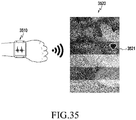
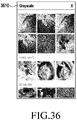
- the electronic device 201 may provide the preview image in conjunction with a wearable device.
- the processor 210 may include a graphic library manager, a filter core, a filter manager and a package manager.
- the graphic library manager may serve as a shader for initializing a graphic library (GL) (e.g., openGL) and expressing the image shape.
- GL graphic library
- the graphic library manager may express the image shape by configuring a texture which is the graphic representation unit, and configuring the desired shape in which the texture is to be represented.
- the filter core is a common module that applies a filter effect to an image, and may manage the basic framework for performing an operation of actually applying the filter effect.
- the filter core may include an interface for providing a filter effect-related API to external applications.
- the filter manager may manage the preloaded or downloaded filter effects, and install a package.
- the filter manager may transfer information on the filter effects to the filter core upon request.
- the filter manager may monitor the package manager to determine whether there are downloaded filter effects, and proceed with installation if there are downloaded filter effects.
- the package manager may install and manage the file that is downloaded from the server 106 and stored.
- the package manager is a manager that is involved in downloading a file from the sever 106 such as the market, and the preview filter effect for the downloaded filter effect or the filter effect data of the formal version may also be downloaded in the same way.
- the communication module 220 may be identical or similar in structure to the communication interface 170 in FIG. 2 .
- the communication module 220 may include, for example, the cellular module 221, a WiFi module 223, a BT module 225, a GNSS module 227 (e.g., a GPS module, a Glonass module, a Beidou module or a Galileo module), an NFC module 228, and a radio frequency (RF) module 229.
- a cellular module 221 e.g., a WiFi module 223, a BT module 225, a GNSS module 227 (e.g., a GPS module, a Glonass module, a Beidou module or a Galileo module), an NFC module 228, and a radio frequency (RF) module 229.
- RF radio frequency
- the cellular module 221 may, for example, provide a voice call service, a video call service, a messaging service or an Internet service over a communication network.
- the cellular module 221 may perform identification and authentication of the electronic device 201 within the communication network using the SIM card 224.
- the cellular module 221 may perform some of the functions that can be provided by the processor 210.
- the cellular module 221 may include a communication processor (CP).
- Each of the WiFi module 223, the BT module 225, the GNSS module 227 or the NFC module 228 may include, for example, a processor for processing the data transmitted or received through the corresponding module. At least some (e.g., two or more) of the cellular module 221, WiFi module 223, the BT module 225, the GNSS module 227 or the NFC module 228 may be included in one integrated chip (IC) or IC package.
- IC integrated chip
- the RF module 229 may, for example, transmit and receive communication signals (e.g., RF signals).
- the RF module 229 may include, for example, a transceiver, a power amplifier module (PAM), a frequency filter, a low noise amplifier (LNA), or an antenna.
- PAM power amplifier module
- LNA low noise amplifier
- At least one of the cellular module 221, the WiFi module 223, the BT module 225, the GNSS module 227 or the NFC module 228 may transmit and receive RF signals through a separate RF module.
- the SIM 224 may include an embedded SIM.
- the SIM 224 may include unique identification information (e.g., integrated circuit card identifier (ICCID)) or subscriber information (e.g., international mobile subscriber identity (IMSI)).
- ICCID integrated circuit card identifier
- IMSI international mobile subscriber identity
- the memory 230 may include, for example, an internal memory 232 or an external memory 234.
- the internal memory 232 may include at least one of, for example, a volatile memory (e.g., dynamic read access memory (RAM) (DRAM), static RAM (SRAM), synchronous dynamic RAM (SDRAM) or the like) or a non-volatile memory (e.g., one time programmable read only memory (ROM) (OTPROM), programmable ROM (PROM), erasable and programmable ROM (EPROM), electrically erasable and programmable ROM (EEPROM), mask ROM, flash ROM, flash memory (e.g., a NAND flash, a NOR flash or the like), hard drive, or solid state drive (SSD)).
- a volatile memory e.g., dynamic read access memory (RAM) (DRAM), static RAM (SRAM), synchronous dynamic RAM (SDRAM) or the like
- a non-volatile memory e.g., one time programmable read only memory
- the external memory 234 may further include a flash drive, for example, compact flash (CF), secure digital (SD), micro secure digital (Micro-SD), mini secure digital (Mini-SD), extreme digital (xD), a multi-media card (MMC), a memory stick or the like.
- CF compact flash
- SD secure digital
- Micro-SD micro secure digital
- Mini-SD mini secure digital
- xD extreme digital
- MMC multi-media card
- the external memory 234 may be functionally and/or physically connected to the electronic device 201 through various interfaces.
- the memory 230 may store a download filter repository and a metadata database.
- the download filter repository is a repository that has stored the downloaded filter effects (e.g., library files and filter effect resources).
- the download filter repository may store filter effect data of the preview version and filter effect data of the formal version.
- the filter effect data of the preview version may be used during generation of the preview image, but its use may be restricted during shooting or during generation of the resulting image.
- the filter effect data of the preview version may be used to induce to download the filter effect data of the formal version in conjunction with the filter effect market.
- the filter effect data of the formal version is a filter effect of the user manual download/purchase version.
- the metadata database is an area where the metadata (e.g., information about names and thumbnails) of the information about the filter effects is stored, and the metadata database may be updated when the filter effects are downloaded to install their package.
- the metadata may be obtained through the filter manager.
- the sensor module 240 may, for example, measure the physical quantity or detect the operating status of the electronic device 201, and convert the measured or detected information into an electrical signal.
- the sensor module 240 may include at least one of, for example, a gesture sensor 240A, a gyro sensor 240B, a barometric pressure sensor 240C, a magnetic sensor 240D, an acceleration sensor 240E, a grip sensor 240F, a proximity sensor 240G, a color sensor (e.g., red-green-blue (RGB) sensor) 240H, a biometric sensor 240I, a temperature/humidity sensor 240J, an illuminance sensor 240K, or a ultra violet (UV) sensor 240M.
- a gesture sensor 240A e.g., a gyro sensor 240B, a barometric pressure sensor 240C, a magnetic sensor 240D, an acceleration sensor 240E, a grip sensor 240F, a proximity sensor
- the sensor module 240 may include, for example, an E-nose sensor, an electromyography (EMG) sensor, an electroencephalogram (EEG) sensor, an electrocardiogram (ECG) sensor, an infrared (IR) sensor, an iris sensor and/or a fingerprint sensor.
- the sensor module 240 may further include a control circuit for controlling at least one or more sensors belonging thereto.
- the electronic device 201 may further include a processor configured to control the sensor module 240, independently of or as a part of the processor 210, thereby to control the sensor module 240 while the processor 210 is in a sleep state.
- the input device 250 may include, for example, a touch panel 252, a (digital) pen sensor 254, a key 256, or an ultrasonic input device 258.
- the touch panel 252 may, for example, use at least one of the capacitive, resistive, infrared or ultrasonic schemes.
- the touch panel 252 may further include a control circuit.
- the touch panel 252 may further include a tactile layer, to provide a tactile or haptic feedback to the user.
- the (digital) pen sensor 254 may be a part of the touch panel 252, or may include a separate recognition sheet.
- the key 256 may include, for example, a physical button, an optical key or a keypad.
- the ultrasonic input device 258 may detect ultrasonic waves generated in an input tool using a microphone 288, to identify the data corresponding to the detected ultrasonic waves.
- the display 260 may include a panel 262, a hologram device 264, or a projector 266.
- the panel 262 may be identical or similar in structure to the display 160 in FIG. 2 .
- the panel 262 may, for example, be implemented to be flexible, transparent or wearable.
- the panel 262, together with the touch panel 252, may be implemented as one module.
- the hologram device 264 may show stereoscopic images in the air using the interference of the light.
- the projector 266 may display images by projecting the light on the screen.
- the screen may, for example, be disposed on the inside or outside of the electronic device 201.
- the display 260 may further include a control circuit for controlling the panel 262, the hologram device 264, or the projector 266.
- the interface 270 may include, for example, an HDMI 272, a USB 274, an optical interface 276 or a D-subminiature (D-sub) 278.
- the interface 270 may, for example, be included in the communication interface 170 shown in FIG. 2 .
- the interface 270 may include, for example, a mobile high-definition link (MHL) interface, a secure digital (SD) card/multi-media card (MMC) interface or an infrared data association (IrDA) interface.
- MHL mobile high-definition link
- SD secure digital
- MMC multi-media card
- IrDA infrared data association
- the audio module 280 may, for example, convert the sounds and the electrical signals bi-directionally. At least some components of the audio module 280 may, for example, be included in the I/O interface 150 shown in FIG. 2 .
- the audio module 280 may, for example, process the sound information that is received or output through a speaker 282, a receiver 284, an earphone 286 or the microphone 288.
- the camera module 291 is, for example, a device capable of capturing still images and videos.
- the camera module 291 may include one or more image sensors (e.g., a front image sensor or a rear image sensor), a lens, an image signal processor (ISP), or a flash (e.g., an LED or xenon lamp).
- image sensors e.g., a front image sensor or a rear image sensor
- lens e.g., a lens
- ISP image signal processor
- flash e.g., an LED or xenon lamp
- the power management module 295 may, for example, manage the power of the electronic device 201.
- the power management module 295 may include, for example, a power management integrated circuit (PMIC), a charger integrated circuit (IC), or a battery gauge.
- the PMIC may have the wired and/or wireless charging schemes.
- the wireless charging scheme may include, for example, a magnetic resonance scheme, a magnetic induction scheme, or an electromagnetic scheme, and the power management module 295 may further include additional circuits (e.g., a coil loop, a resonant circuit, a rectifier or the like) for wireless charging.
- the battery gauge may, for example, measure the remaining capacity, charging voltage, charging current or temperature of the battery 296.
- the battery 296 may include, for example, a rechargeable battery and/or a solar battery.
- the indicator 297 may indicate specific status (e.g., boot status, message status, charging status or the like) of the electronic device 201 or a part (e.g. the processor 210) thereof.
- the motor 298 may convert an electrical signal into mechanical vibrations to generate a vibration or haptic effect.
- the electronic device 201 may include a processing device (e.g., GPU) for mobile TV support.
- the processing device for mobile TV support may, for example, process the media data that is based on the standards such as digital multimedia broadcasting (DMB), digital video broadcasting (DVB) or mediaFLOTM.
- Each of the components described herein may be configured with one or more components, names of which may vary depending on the type of the electronic device.
- the electronic device may include at least one of the components described herein, some of which may be omitted, or may further include additional other components. Further, some of the components of the electronic device may be configured as one entity by being combined, thereby performing the functions of the components before being combined, in the same manner.
- FIG. 4 is a diagram illustrating a program module, according to an embodiment of the present disclosure.
- a program module 310 may include an operating system (OS) for controlling the resources related to the electronic device 101, and/or a variety of the application programs 147 that run on the operating system.
- the operating system may be, for example, AndroidTM, iOSTM, WindowsTM, SymbianTM, TizenTM, BadaTM or the like.
- the program module 310 may include a kernel 320, a middleware 330, an application programming interface (API) 360, and/or an application(s) 370. At least a part of the program module 310 may be preloaded on the electronic device, or downloaded from the external electronic device (e.g., the electronic devices 102 and 104 and the server 106).
- API application programming interface
- the kernel 320 may include, for example, a system resource manager 321 and/or a device driver 323.
- the system resource manager 321 may control, allocate or recover the system resources.
- the system resource manager 321 may include a process manager, a memory manager, a file system manager or the like.
- the device driver 323 may include, for example, a display driver, a camera driver, a Bluetooth driver, a shared memory driver, a USB driver, a keypad driver, a WiFi driver, an audio driver, or an inter-process communication (IPC) driver.
- IPC inter-process communication
- the middleware 330 may provide a function that is required in common by the application(s) 370, or may provide various functions to the application 370 through the API 360 so that the application 370 may efficiently use the limited system resources within the electronic device.
- the middleware 330 may include at least one of a runtime library 335, an application manager 341, a window manager 342, a multimedia manager 343, a resource manager 344, a power manager 345, a database manager 346, a package manager 347, a connectivity manager 348, a notification manager 349, a location manager 350, a graphic manager 351, or a security manager 352.
- the runtime library 335 may include, for example, a library module that a compiler uses to add a new function through a programming language while the application 370 is run.
- the runtime library 335 may perform an I/O management function, a memory management function, an arithmetic function or the like.
- the application manager 341 may, for example, manage the life cycle of at least one of the application(s) 370.
- the window manager 342 may manage the graphic user interface (GUI) resources that are used on the screen.
- the multimedia manager 343 may determine the format required for playback of various media files, and encode or decode the media files using a codec for the format.
- the resource manager 344 may manage resources such as a source code, a memory or a storage space for any one of the application(s) 370.
- the power manager 345 may manage the battery or power by operating with the basic input/output system (BIOS), and provide power information required for an operation of the electronic device.
- the database manager 346 may create, search or update the database that is to be used by at least one of the application(s) 370.
- the package manager 347 may manage installation or update of applications that are distributed in the form of a package file.
- the connectivity manager 348 may, for example, manage wireless connection such as WiFi or Bluetooth.
- the notification manager 349 may indicate or notify events such as message arrival, appointments and proximity in a manner that doesn't interfere with the user.
- the location manager 350 may manage the location information of the electronic device.
- the graphic manager 351 may manage the graphic effect to be provided to the user, or the user interface related thereto.
- the security manager 352 may provide various security functions required for the system security or user authentication.
- the middleware 330 may further include a telephony manager for managing the voice or video call function of the electronic device.
- the middleware 330 may include a middleware module that forms a combination of various functions of the above-described components.
- the middleware 330 may provide a module specialized for the type of the operating system in order to provide a differentiated function. Further, the middleware 330 may dynamically remove some of the existing components, or add new components.
- the API 360 (e.g., the API 145), for example, is a set of API programming functions, and may be provided in a different configuration depending on the operating system. For example, for AndroidTM or iOSTM, the API 360 may provide one API set per platform, and for TizenTM, the API 360 may provide two or more API sets per platform.
- the application 370 may include, for example, one or more applications capable of performing functions such as a home 371, a dialer 372, a short message service/multimedia messaging service (SMS/MMS) 373, an instant message (IM) 374, a browser 375, a camera 376, an alarm 377, a contact 378, a voice dial 379, an Email 380, a calendar 381, a media player 382, an album 383, a clock 384, healthcare (e.g., for measuring the quantity of exercise, the blood glucose or the like), or environmental information provision (e.g., for providing information about the atmospheric pressure, the humidity, the temperature or the like).
- the application 370 may include an information exchange application for supporting information exchange between the electronic device 101 and the electronic devices 102 and 104.
- the information exchange application may include, for example, a notification relay application for delivering specific information to the external electronic devices, or a device management application for managing the external electronic devices.
- the notification relay application may include a function of delivering notification information generated in other applications (e.g., an SMS/MMS application, an Email application, a healthcare application, an environmental information application or the like) of the electronic device, to the external electronic devices (e.g., the electronic devices 102 and 104). Further, the notification relay application may, for example, receive notification information from an external electronic device, and provide the received notification information to the user.
- other applications e.g., an SMS/MMS application, an Email application, a healthcare application, an environmental information application or the like
- the notification relay application may, for example, receive notification information from an external electronic device, and provide the received notification information to the user.
- the device management application may, for example, manage at least one function (e.g., a function of adjusting the turn-on/off of the external electronic device itself (or some components thereof) or the brightness (or the resolution) of the display) of the electronic devices 102 and 104 communicating with the electronic device, and may manage (e.g., install, delete or update) an application operating in the external electronic device or a service (e.g., a call service or a messaging service) provided in the external electronic device.
- a function e.g., a function of adjusting the turn-on/off of the external electronic device itself (or some components thereof) or the brightness (or the resolution) of the display
- the device management application may, for example, manage at least one function (e.g., a function of adjusting the turn-on/off of the external electronic device itself (or some components thereof) or the brightness (or the resolution) of the display) of the electronic devices 102 and 104 communicating with the electronic device, and may manage (e.g., install, delete or update
- the application 370 may include an application (e.g., a healthcare application for a mobile medical device) that is specified depending on the properties (indicating that the type of the electronic device is the mobile medical device) of the electronic devices 102 and 104.
- the application 370 may include an application received or downloaded from the server 106 or the electronic devices 102 and 104.
- the application 370 may include a preloaded application or a third party application that can be downloaded from the server.
- the names of the components of the illustrated program module 310 may vary depending on the type of the operating system.
- At least a part of the program module 310 may be implemented by software, firmware, hardware or a combination thereof. At least a part of the program module 310 may, for example, be implemented (e.g., executed) by the processor 210. At least a part of the program module 310 may include, for example, a module, a program, a routine, an instruction set or a process, for performing one or more functions.
- An electronic device may include a display; and a processor configured to display an image on the display; if a filter effect list request is input, divide at least a partial area of the image into a plurality of filter areas; and display a preview image in which different filter effects are applied to the plurality of filter areas.
- the processor may apply a filter effect corresponding to the at least one filter area to the entire image and display a resulting image.
- the processor may set a filter effect list layer on the image, divide the filter effect list layer into a plurality of filter areas, extract image data corresponding to each of the plurality of filter areas from the image, apply the different filter effect to each of the extracted image data to convert the image data, and generate and display a preview image by combining the converted image data.
- the processor may generate a filtered image corresponding to each of a plurality of filter effects by applying each of a plurality of different filter effects to the image, set a filter effect list layer on the image, divide the filter effect list layer into a plurality of filter areas, extract image data corresponding to each of the plurality of filter areas from a different filtered image, and generate and display a preview image by combining the extracted image data.
- the processor may determine whether a filter effect corresponding to the at least one filter area is a filter effect of a preview version; if the filter effect corresponding to the at least one filter area is the filter effect of the preview version, the processor may provide 'Not-Applicable' information; and if a purchase request for the filter effect of a preview version is received, the processor may download a filter effect of a formal version for the at least one filter effect.
- the processor may provide a sub filter effect of a filter effect corresponding to the at least one filter area by expanding the at least one filter area.
- the processor may capture an image and then, apply each filter effect corresponding to each of the selected filter areas to the captured image, to generate a plurality of resulting images.
- the processor may continuously capture as many images as the number of selected filter areas, and apply a filter effect corresponding to each of the selected filter areas to each of the captured images, to generate a plurality of resulting images.
- the processor may generate video to which filter effects corresponding to the selected filter areas are applied.
- the preview image may be provided in the electronic device and the resulting image may be provided in a wearable device connected to the electronic device.
- FIG. 5 is a flowchart of a method for displaying a preview image for providing a filter effect function by an electronic device 201, according to an embodiment of the present disclosure.
- the processor 210 of the electronic device 201 may display an image on the display 260.
- the user may request a filter effect list through a touch input.
- the processor 210 of the electronic device 201 may detect an input for a filter effect list request in operation 503.
- the processor 210 of the electronic device 201 may divide at least a partial area of the displayed image into a plurality of filter areas in operation 505.
- the processor 210 of the electronic device 201 may determine the number of filter effects to be provided through one screen, and set (or establish) a plurality of filter areas on the displayed image depending on the determined number of filter effects.
- the processor 210 of the electronic device 201 may apply a corresponding filter effect to image data corresponding to each of the plurality of filter areas from among the entire image data of the displayed image, and display a preview image in which a different filter effect is applied to each of the plurality of filter areas. In other words, some areas of the image may be converted and displayed depending on the plurality of different filter effects.
- FIG. 6 is a flowchart of a method for extracting image data corresponding to each filter area from an image, converting the extracted image data, and generating preview image data by combining the converted image data, according to an embodiment of the present disclosure.
- FIG. 7 is a flowchart of a method in which the electronic device 201 generates filtered images, to which each of its available multiple filter effects is applied, extracts image data corresponding to each of the plurality of filter areas from the generated filtered images, and combines the extracted image data to generate a preview image, according to an embodiment of the present disclosure.
- the processor 210 may display an image in operation 601. If there is an input for a filter effect list request in operation 603, the processor 210 may generate, in operation 605, a filter effect handle corresponding to each of all the filter effects that can be provided in the electronic device 201. In operation 607, the processor 210 may store a filter effect handle list. In operation 609, the processor 210 may generate a filter effect list layer. In operation 611, the processor 210 may divide the filter effect list layer into a plurality of filter areas. In operation 613, the processor 210 may extract image data corresponding to each filter area from the image data. In operation 615, the processor 210 may apply a different filter effect to each of the extracted image data to convert each of the extracted image data. In operation 617, the processor 210 may generate and display a preview image by combining the converted image data.
- the processor 210 may display an image in operation 701. If there is an input for a filter effect list request in operation 703, the processor 210 may generate, in operation 705, a filter effect handle corresponding to each of all the filter effects that can be provided in the electronic device 201. In operation 707, the processor 210 may store a filter effect handle list. In operation 709, the processor 210 may apply each of a plurality of filter effects to image data to generate a filtered image corresponding to each of the plurality of filter effects. In operation 711, the processor 210 may generate a filter effect list layer. In operation 713, the processor 210 may divide the filter effect list layer into a plurality of filter areas. In operation 715, the processor 210 may extract image data corresponding to the plurality of filter areas from different filtered images. In operation 717, the processor 210 may generate and display a preview image by combining the extracted image data.
- FIGs. 8A and 8B are flowcharts of a method for downloading a filter effect, according to an embodiment of the present disclosure.
- the processor 210 of the electronic device 201 may transmit a preview filter effect download request to the server 106 in response to an input for the preview filter effect download request.
- the preview filter effect download request may occur in response to a user input, or may automatically occur when an image related application is executed.
- the processor 210 may download a preview filter effect from the server 106.
- the processor 210 may display an image.
- the user may request a filter effect list through a touch input or the like. Accordingly, the processor 210 may detect an input for a filter effect list request in operation 807.
- the processor 210 may divide at least a partial area of the displayed image into a plurality of filter areas, apply the filter effect to image data corresponding to each of the plurality of filter areas, and display a preview image in which a different filter effect is applied to each of the plurality of filter areas.
- the processor may determine in operation 813 whether there is an input for a full-apply request or shooting request for a selected filter effect. If there is another input other than the input for the full-apply request or shooting request for a filter effect, the processor 210 may perform another operation in operation 815.
- the processor 210 may determine in operation 817 whether the selected filter effect is a preview filter effect. If the selected filter effect is not the preview filter effect, the processor 210 may, in operation 825, display a resulting image in which the filter effect is applied to the entire image, or perform shooting to which the filter effect is applied. If the selected filter effect is the preview filter effect, the processor 210 may display the full-apply or shooting impossible message in operation 819. If there is an input for a filter effect purchase request from the user in operation 821, the processor 210 may transmit a filter effect purchase request to the server 106 and receive formal filter effect data from the server 106 in operation 823, thereafter performing operation 825.
- a method for displaying an image in an electronic device may include displaying an image; and if a filter effect list request is input, dividing at least a partial area of the image into a plurality of filter areas, and displaying a preview image in which different filter effects are applied to the plurality of filter areas.
- the method may further include, if a select and apply request for at least one of the plurality of filter areas is received, applying a filter effect corresponding to the at least one filter area to the entire image and displaying a resulting image.
- Dividing at least the portion of the image into the plurality of filter areas may include setting a filter effect list layer on the image; and dividing the filter effect list layer into a plurality of filter areas.
- Displaying the preview image in which different filter effects are applied to the plurality of filter areas may include extracting image data corresponding to each of the plurality of filter areas from the image; applying the different filter effect to each of the extracted image data to convert the image data; and generating and displaying a preview image by combining the converted image data.
- Dividing at least the portion of the image into the plurality of filter areas may include generating a filtered image corresponding to each of a plurality of filter effects by applying each of a plurality of different filter effects to the image; and setting a filter effect list layer on the image; and dividing the filter effect list layer into a plurality of filter areas.
- Displaying the preview image in which different filter effects are applied to the plurality of filter areas may include extracting image data corresponding to each of the plurality of filter areas from a different filtered image; and generating and displaying a preview image by combining the extracted image data.
- the method may further include, if a select and apply request for at least one of the plurality of filter areas is received, determining whether a filter effect corresponding to the at least one filter area is a filter effect of a preview version; if the filter effect corresponding to the at least one filter area is the filter effect of the preview version, providing 'Not-Applicable' information; and if a purchase request for the filter effect of a preview version is received, downloading a filter effect of a formal version for the at least one filter effect.
- the method may further include, if a detailed view request for at least one of the plurality of filter areas is received, providing a sub filter effect of a filter effect corresponding to the at least one filter area by expanding the at least one filter area.
- the method may further include, if at least two of the plurality of filter areas are selected and a shooting request is received, capturing an image and then, applying each filter effect corresponding to each of the selected filter areas to the captured image, to generate a plurality of resulting images.
- the method may further include, if at least two of the plurality of filter areas are selected and a shooting request is received, continuously capturing as many images as the number of selected filter areas, and applying a filter effect corresponding to each of the selected filter areas to each of the captured images, to generate a plurality of resulting images.
- the method may further include, if at least two of the plurality of filter areas are selected and a video shooting request is received, generating video to which filter effects corresponding to the selected filter areas are applied.
- the preview image may be provided in the electronic device and the resulting image may be provided in a wearable device connected to the electronic device.
- FIG. 9 is a diagram illustrating a screen displaying a preview image, according to an embodiment of the present disclosure.
- the electronic device 201 may display a preview image 920 including the source area 921 to which no filter effect is applied, and a plurality of filter areas to which different filter effects are applied, for example, a red filter area 922, a purple filter area 923, a sepia filter area 924, and a green filter area 925.
- the electronic device 201 may change and display another filter effect list in the filter areas, and immediately apply the selected filter effect among the displayed filter effects to the entire image.
- FIG. 10 is a diagram illustrating a detailed view process for a selected filter effect, according to an embodiment of the present disclosure.
- the electronic device 201 may apply a corresponding filter effect to a wider area (e.g., the source area 1011) than the areas where the filter effect list is displayed, thereby making it possible to identify the filter effect in more detail.
- the electronic device 201 may enlarge the red filter area 1012 as in a screen 1020. If a final apply input 1017 occurs, the electronic device 201 may display the resulting image in which the red filter is applied to the entire image, as in a screen 1030.
- the user selects view details, it is possible to utilize the voice, blow action, various gestures, icon touch, connected device or the like as a user input to access the filter effect list, select a filter effect and apply the selected filter effect.
- the user input for selecting, applying and identifying a filter effect may be implemented through a variety of user gestures.
- the user may select one filter effect from the list of various filter effects and perform shooting using the selected filter effect.
- the user may perform shooting as soon as applying one filter effect.
- a gesture or option e.g., long press, double tab and the like
- the user may select a plurality of filter effects through a variety of events. It is possible to provide various shooting methods depending on the user selection after selecting a plurality of filter effects (e.g., through multi-touch event, long press and the like). In a case where the user wants to apply multiple filter effects to one image, it is possible to provide a template that can be divided and shot. Further, it is possible to apply a plurality of filter effects to one image in an overlapping manner, or repeatedly apply a different filter effect to one image, thereby to obtain a plurality of images.
- FIG. 11 is a diagram illustrating a process of generating an image to which a filter effect selected during camera shooting is applied depending on the template selection, according to an embodiment of the present disclosure.
- the template may be recommended depending on the picture content and the aspect ratio. Referring to FIG. 11 , if there is a select input 1111 for a red filter while a preview image is being displayed as in a screen 1110, and if there is an additional select input for a purple filter, select symbols 1121 and 1122 may be displayed on the red filter and the purple filter as in a screen 1120. If there is a final select input 1132 as in a screen 1130, a template may be provided as in a screen 1140.
- template search buttons 1141 and 1142 are selected on the screen 1140, the user may search and select a variety of templates, and if there is a final select input 1151 after a specific template (e.g., a vertical template) is selected as in a screen 1150, a resulting image may be provided as in a screen 1160.
- a specific template e.g., a vertical template
- the electronic device may perform continuous shooting as many times as the number of filter effects, and then apply a respective filter effect to each image or apply a plurality of filter effects to one image, to generate multiple resulting images. Otherwise, the electronic device may generate a resulting image obtained by applying all of a plurality of selected filter effects to one image.
- FIG. 12 is a diagram illustrating a process of selecting a plurality of filter effects during shooting, according to an embodiment of the present disclosure.
- a plurality of filter effects 1221 are selected as in a screen 1220 and then there is a final select input 1231 without template selection as in a screen 1230 while a preview screen including a filter effect list is provided as in a screen 1210
- resulting images may be provided as in FIG. 13 or 14 .
- FIG. 13 is a diagram illustrating resulting images 1310, 1320 and 1330 generated by capturing one image and then applying a plurality of selected filter effects to the captured image, according to an embodiment of the present disclosure
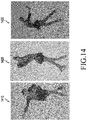
- FIG. 14 is a diagram illustrating resulting images 1410, 1420 and 1430 generated by applying a plurality of selected filter effects to respective images that have been continuously captured as many times as the number of filter effects according to an embodiment of the present disclosure.
- the plurality of selected filter effects can be applied in turn to the continuous shooting, there is no need to set the filter effects one by one for a short time, and the user may check the unexpected photo results without post-correction, enjoying new experiences.
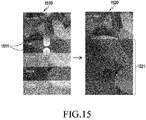
- FIG. 15 is a diagram illustrating a process of providing a sub filter effect for a selected filter effect, according to an embodiment of the present disclosure.
- a sub filter effect 1521 of the red filter may be processed as in a screen 1520, making it possible for the users to select a little bit more variety of colors.
- FIG. 16 is a diagram illustrating this example, according to an embodiment of the present disclosure.
- a red filter area in the image including a portion 1611 to which a red filter is applied and a portion 1612 to which a purple filter is applied as in a screen 1610, and then drags and drops it to a purple filter area as in a screen 1620, the locations of a portion 1632 to which the red filter is applied and a portion 1631 to which the purple filter is applied may be changed as in a screen 1630.
- FIG. 17 is a diagram illustrating this example, according to an embodiment of the present disclosure.
- a window 1713 for determining the size of a red filter area may be provided in the image including a red filter area 1711 and a blue filter area 1712. If the user expands (1714) the size of the window 1713, the size of the red filter area may be adjusted as in a screen 1720.
- the filter template form (1810 and 1820) divided into left and right may be recommended for the landscape mode in FIG. 18
- the filter template form (1910 and 1920) divided into top and bottom may be recommended for the portrait mode in FIG. 19 .
- FIGs. 20 and 21 are diagrams illustrating examples in which only the same color as that of the filter effect among the colors of the image is maintained, according to an embodiment of the present disclosure. If a blue filter and a red filter are selected as in a screen 2010 in FIG. 20 , a resulting image in which only the blue and red colors are expressed in color as may be provided in a screen 2020. If a pink filter is selected as in a screen 2110 in FIG. 21 , a resulting image may be provided as in a screen 2120.
- FIG. 22 is a diagram illustrating this example, according to an embodiment of the present disclosure. If a lemon filter is selected (2211) while a circular color filter effect are displayed as in a screen 2210 in FIG. 22 , the lemon filter may be applied to the inside of the circular color filter effect. If a sky blue filter is selected (2221) as in a screen 2220, the sky blue filter may be applied to the inside of the circular color filter effect. The color in which the filter effect is applied may be applied not only inside the circle, but also outside the circle. Thereafter, if there is a final select input 2222, a resulting image may be provided as in a screen 2230.
- the application may be easily canceled through an 'X' button 2311 or 'Remove Effect' button on the bottom of a screen 2310 in FIG. 23 .
- the filter effect may be removed in the opposite action of the user gesture to apply a filter effect. For example, if the user has entered the filter effect through 'right swipe', the user may remove the filter effect through 'left swipe'.
- the filter effect may be removed through a separate removal action in a user experience (UX) way.
- UX user experience
- it is equivalent to applying one filter.
- the filter being used may be removed and the original image may be displayed.
- a preview-version filter effect means a filter effect in which the filter effect applied in a preview image is the same, but the filter effect cannot be identified in the shooting and entire resulting image due to the policy restrictions.
- a preview filter it is possible to download several preview-version filter effects that are provided from the server during download or update of a camera application, or at the service access time.
- a method of an installed preview-version filter effect may operate such as equally displaying a list on the preview image and partially applying the list. However, in the resulting image to which the shooting time or the overall effect is applied, a 'Not-Applicable' message may be displayed and no effect may be applied.
- the electronic device may transfer information about the filter to the server to request download of a formal version of the preview-version filter. Thereafter, an operation of finding the formal version of the filter package by the server and downloading installing the downloaded formal version in the terminal may be performed in the same way as the operation of the preview filter.
- the filter effects may be configured so as not to be applicable during actual shooting.
- a filter name may be displayed on the taken picture by watermark.
- the screen capture may also display the same effects (watermark, hyperlink, etc.).
- a filter effect name and purchase information 2411 and 2412 may be displayed in an image gallery as in a screen 2410 in FIG. 24 , guiding the download.
- a comment may be written, and shared with other users.
- the filter names and links applied in the photos may also be shared.
- a purchased filter may not be used if its set period expires. Further, if the number of times that the filter can be applied is set, and the filter has been used a predetermined number of times or more, the filter may be newly purchased.
- FIG. 25 is a diagram illustrating a purchase process during shooting with a preview-version filter effect, according to an embodiment of the present disclosure.
- a screen 2510 represents an image captured with a preview filter effect, and a filter effect name may be included in the image.
- the image including the filter effect name may be displayed as in a screen 2530.
- a download guidance message 2540 may be provided, and during the download, a resulting image from which the filter effect name is removed may be provided as in a screen 2550.
- FIG. 26 is a diagram illustrating a process of selecting a plurality of filters, according to an embodiment of the present disclosure, and then quickly select and apply, during shooting, the filter that the user has selected with the left/right swipe without a separate filter selection process after starting video shooting.
- FIG. 26 after selecting a plurality of filter effects 2611, 2612 and 2613 on a filter effect list in operation 2610, if the user plays a video as in operation 2620, a video to which a sepia filter is applied may be played. In this state, if there is a swipe input 2621, the filter may be switched to a green filter as in operation 2630, and if there is a swipe input again, the filter may be switched to a black filter as in operation 2640.
- FIG. 27 is a diagram illustrating a process of playing a video, to which a plurality of filter effects are applied at the same time, according to an embodiment of the present disclosure. If the user selects a plurality of filter effects 2711 and 2712 and sets concurrent application as in operation 2710, a video to which all of the selected filter effects are applied may be played or shot as in operation 2720. This is one video, but when the user plays the video, it is possible to obtain an effect of selecting and playing each of the filters to store a plurality of videos. In this case, it is possible to separately store a plurality of videos during video shooting, or it is possible to generate resulting videos through a process of shooting one original video and then applying a plurality of filter effects thereto.
- FIG. 28 is a diagram illustrating an example of applying a plurality of filter effects at regular time interval, according to an embodiment of the present disclosure. For example, it is possible to turn on the fade mode and set a fade time with [Filter Fade: ON] and [Fade time: 5]. In this way, when the filters are changed, the filters may not be changed at once, but the filters may be slowly switched over several seconds, providing a natural filter effect. Referring to FIG.
- the filters may be slowly switched for the set fade time as in operation 2830, and if the set fade time expires, the filters may be fully switched to no-filter as in operation 2840.
- FIG. 29 is a diagram illustrating an example of applying the gradation function as various effects of a filter, according to an embodiment of the present disclosure. For example, if the user selects a plurality of filters 2911 and 2912 and sets the gradation function to [Gradation: On] as in operation 2910, the gradation function may be applied as in operation 2920.
- FIG. 30 is a diagram illustrating this example, according to an embodiment of the present disclosure. If there is an input 3011 for a filter effect list request during video shooting as in operation 3010, a filter effect list may be displayed as in operation 3020. If there is an input 3022 for filter effect search, a filter effect list may be scrolled as in operation 3030. If there is an input 3031 for filter effect selection, the selected filter effect may be applied to the video being shot as in operation 3040.
- the interval in which the filter effect is applied may be set. For example, if [Time interval] is set during setting, the filter effect may be automatically turned on/off as in operations 3110 and 3120. When the time interval is used together with the fade mode, it is possible to produce various effects in which the screen is slowly brightened and darkened.
- the electronic device 201 and the wearable device may preview the filter effect in each device in conjunction with each other, so the user may select the filter effect by comparing the filter effects. As one device displays a filter effect list and another device displays images to which filter effects are applied, the user may conveniently compare and select the filter effects.
- FIG. 32 is a diagram illustrating an example in which the original image is displayed on a wearable device 3210 and the image to which the filter effect is applied is displayed on an electronic device 3220, according to an embodiment of the present disclosure.
- displaying the image to which the filter effect is applied, on the electronic device 3220 and the original image on the wearable device 3210, or displaying the images in the opposite ways it is possible for the user to simultaneously identify the atmosphere of the filter effect and the atmosphere of the original image.
- one device may provide a preview and another device may provide a controlled filter effect.
- FIG. 33 is a diagram illustrating an example of replacing filters in any one device, according to an embodiment of the present disclosure.
- the user may replace (3320 and 3330) the filter effects through a flick input, using the wearable device.
- FIG. 34 illustrates a process of selecting a filter effect by a glasses-type wearable device and an electronic device in conjunction with each other, according to an embodiment of the present disclosure.
- the filter effect selected by the user may be applied to glasses 3420, 3430 and 3440 of the glasses-type wearable device through wireless communication.
- it is possible to preview the filter effect by sweeping the sensor mounted on the glass frame of the glasses-type wearable device and select the filter by pressing the sensor.
- FIG. 35 illustrates an example of interworking between electronic devices with a heart beat sensor, such as an electronic device 201 and a smart watch 3510, according to an embodiment of the present disclosure.
- the filter effect may be selected depending on the user's heart rate. If the heart rate measured in the smart watch 3510 is transmitted to the electronic device 201, the electronic device 201 may select (3521) the corresponding filter effect as in a screen 3520 depending on the heart rate. For example, a red filter may be selected and applied to the image, for a high heart rate, and a blue filter may be selected and applied to the image, for a low heart rate.
- the corresponding filter information may be included in the metadata, and photo files may be searched based thereon.
- SW software
- HW hardware
- Each of the above-described components of the electronic device may be configured with one or more components, names of which may vary depending on the type of the electronic device.
- the electronic device may include at least one of the above-described components, some of which may be omitted, or may further include additional other components. Further, some of the components of the electronic device may be configured as one entity by being combined, thereby performing the previous functions of the components in the same manner.
- At least a part of the apparatus (e.g., modules or functions thereof) or method (e.g., operations) may, for example, be implemented by an instruction that is stored in a non-transitory computer-readable storage media in the form of a program module. If the instruction is executed by the processor 120, the processor 120 may perform a function corresponding to the instruction.
- the non-transitory computer-readable storage media may be, for example, the memory 130.
- the non-transitory computer-readable storage media may include magnetic media (e.g., a hard disk, a floppy disk, and magnetic tape), optical media (e.g., a compact disc read only memory (CD-ROM) and a digital versatile disc (DVD)), magneto-optical media (e.g., a floptical disk), and a hardware device (e.g., a read only memory (ROM), a random access memory (RAM) or a flash memory).
- a program instruction may include not only a machine code such as a code made by a compiler, but also a high-level language code that can be executed by the computer using an interpreter.
- the above-described hardware device may be configured to operate as one or more software modules to perform the operations according to various embodiments of the present disclosure, and vice versa.
- a module or a program module may include at least one of the above-described components, some of which may be omitted, or may further include additional other components. Operations performed by a module, a program module or other components may be performed in a sequential, parallel, iterative or heuristic way. Some operations may be performed in a different order or omitted, or other operations may be added. Embodiments disclosed herein have been presented for description and understanding of the technical details, but it is not intended to limit the scope of the present disclosure. Therefore, the scope of the present disclosure should be construed to include all changes or various other embodiments based on the technical spirit of the present disclosure.
Landscapes
- Engineering & Computer Science (AREA)
- Multimedia (AREA)
- Signal Processing (AREA)
- Theoretical Computer Science (AREA)
- Business, Economics & Management (AREA)
- Human Computer Interaction (AREA)
- Physics & Mathematics (AREA)
- General Physics & Mathematics (AREA)
- General Engineering & Computer Science (AREA)
- Accounting & Taxation (AREA)
- General Business, Economics & Management (AREA)
- Strategic Management (AREA)
- Computer Networks & Wireless Communication (AREA)
- Finance (AREA)
- User Interface Of Digital Computer (AREA)
- Image Processing (AREA)
Applications Claiming Priority (1)
| Application Number | Priority Date | Filing Date | Title |
|---|---|---|---|
| KR1020150083336A KR20160146281A (ko) | 2015-06-12 | 2015-06-12 | 전자 장치 및 전자 장치에서 이미지 표시 방법 |
Publications (1)
| Publication Number | Publication Date |
|---|---|
| EP3104590A1 true EP3104590A1 (fr) | 2016-12-14 |
Family
ID=56119391
Family Applications (1)
| Application Number | Title | Priority Date | Filing Date |
|---|---|---|---|
| EP16174063.4A Withdrawn EP3104590A1 (fr) | 2015-06-12 | 2016-06-10 | Dispositif électronique de composé et procédé d'affichage de données d'images |
Country Status (4)
| Country | Link |
|---|---|
| US (1) | US9942484B2 (fr) |
| EP (1) | EP3104590A1 (fr) |
| KR (1) | KR20160146281A (fr) |
| CN (1) | CN106254764A (fr) |
Cited By (17)
| Publication number | Priority date | Publication date | Assignee | Title |
|---|---|---|---|---|
| CN110163050A (zh) * | 2018-07-23 | 2019-08-23 | 腾讯科技(深圳)有限公司 | 一种视频处理方法及装置、终端设备、服务器及存储介质 |
| EP4027634A4 (fr) * | 2019-09-27 | 2022-11-02 | Huawei Technologies Co., Ltd. | Procédé et appareil de traitement de capture d'image, dispositif terminal et support de stockage |
| WO2022256200A1 (fr) * | 2021-06-01 | 2022-12-08 | Apple Inc. | Interfaces utilisateur pour la gestion de styles de médias |
| US11539876B2 (en) | 2021-04-30 | 2022-12-27 | Apple Inc. | User interfaces for altering visual media |
| US11617022B2 (en) | 2020-06-01 | 2023-03-28 | Apple Inc. | User interfaces for managing media |
| US11641517B2 (en) | 2016-06-12 | 2023-05-02 | Apple Inc. | User interface for camera effects |
| US11669985B2 (en) | 2018-09-28 | 2023-06-06 | Apple Inc. | Displaying and editing images with depth information |
| US11687224B2 (en) | 2017-06-04 | 2023-06-27 | Apple Inc. | User interface camera effects |
| US11706521B2 (en) | 2019-05-06 | 2023-07-18 | Apple Inc. | User interfaces for capturing and managing visual media |
| US11722764B2 (en) | 2018-05-07 | 2023-08-08 | Apple Inc. | Creative camera |
| US11770601B2 (en) | 2019-05-06 | 2023-09-26 | Apple Inc. | User interfaces for capturing and managing visual media |
| US11778339B2 (en) | 2021-04-30 | 2023-10-03 | Apple Inc. | User interfaces for altering visual media |
| US11895391B2 (en) | 2018-09-28 | 2024-02-06 | Apple Inc. | Capturing and displaying images with multiple focal planes |
| US12112024B2 (en) | 2021-06-01 | 2024-10-08 | Apple Inc. | User interfaces for managing media styles |
| US12155925B2 (en) | 2020-09-25 | 2024-11-26 | Apple Inc. | User interfaces for media capture and management |
| US12154218B2 (en) | 2018-09-11 | 2024-11-26 | Apple Inc. | User interfaces simulated depth effects |
| EP4457602A4 (fr) * | 2021-12-30 | 2025-12-24 | Lemon Inc | Conception d'effets visuels à l'aide de multiples fenêtres de prévisualisation |
Families Citing this family (45)
| Publication number | Priority date | Publication date | Assignee | Title |
|---|---|---|---|---|
| US20170103557A1 (en) * | 2015-10-13 | 2017-04-13 | Adobe Systems Incorporated | Localized brush stroke preview |
| US10225471B2 (en) * | 2016-03-18 | 2019-03-05 | Kenneth L. Poindexter, JR. | System and method for autonomously recording a visual media |
| US20190174069A1 (en) * | 2016-03-18 | 2019-06-06 | Kenneth L. Poindexter, JR. | System and Method for Autonomously Recording a Visual Media |
| CN106651761B (zh) * | 2016-12-27 | 2018-10-19 | 维沃移动通信有限公司 | 一种为图片添加滤镜的方法及移动终端 |
| KR102140078B1 (ko) * | 2017-05-16 | 2020-07-31 | 애플 인크. | 다수의 디스플레이 모드를 갖는 미디어 아이템들을 탐색, 디스플레이, 및 편집하기 위한 디바이스, 방법, 및 그래픽 사용자 인터페이스 |
| DK179932B1 (en) * | 2017-05-16 | 2019-10-11 | Apple Inc. | DEVICES, METHODS, AND GRAPHICAL USER INTERFACES FOR NAVIGATING, DISPLAYING, AND EDITING MEDIA ITEMS WITH MULTIPLE DISPLAY MODES |
| CN107247548B (zh) * | 2017-05-31 | 2018-09-04 | 腾讯科技(深圳)有限公司 | 图像显示方法、图像处理方法及装置 |
| CN107424130B (zh) * | 2017-07-10 | 2020-09-11 | 北京小米移动软件有限公司 | 图片美颜方法和装置 |
| KR102384054B1 (ko) * | 2017-08-01 | 2022-04-07 | 엘지전자 주식회사 | 이동 단말기 및 그 제어 방법 |
| US10742899B1 (en) * | 2017-08-30 | 2020-08-11 | Snap Inc. | Systems, devices, and methods for image enhancement |
| CN107517348A (zh) * | 2017-08-30 | 2017-12-26 | 广东欧珀移动通信有限公司 | 图像的渲染方法和装置 |
| US11112964B2 (en) | 2018-02-09 | 2021-09-07 | Apple Inc. | Media capture lock affordance for graphical user interface |
| CN110221794B (zh) * | 2018-03-02 | 2023-05-23 | 阿里巴巴集团控股有限公司 | 一种对象显示方法及终端 |
| US10375313B1 (en) | 2018-05-07 | 2019-08-06 | Apple Inc. | Creative camera |
| US10936914B2 (en) * | 2018-07-31 | 2021-03-02 | International Business Machines Corporation | Convolutional neural network with augmentation features |
| CN109447896B (zh) * | 2018-09-21 | 2023-07-25 | 维沃移动通信(杭州)有限公司 | 一种图像处理方法及终端设备 |
| CA3114040A1 (fr) * | 2018-09-26 | 2020-04-02 | Guardian Glass, LLC | Systeme de realite augmentee et methode pour des substrats, des articlesrevetus et des unites de vitrage isolant et/ou d'autres elements semblables |
| CN110971924B (zh) * | 2018-09-30 | 2022-12-02 | 武汉斗鱼网络科技有限公司 | 一种直播过程中美颜的方法、设备、存储介质及系统 |
| KR102138193B1 (ko) * | 2018-10-19 | 2020-07-27 | 스노우 주식회사 | 복수의 카메라 패키지로 이루어진 카메라 어플리케이션을 포함하는 시스템 및 그 제어 방법 |
| US10748290B2 (en) * | 2018-10-31 | 2020-08-18 | Fei Company | Smart metrology on microscope images |
| CN111182196A (zh) * | 2018-11-13 | 2020-05-19 | 奇酷互联网络科技(深圳)有限公司 | 拍照预览方法、智能终端及具有存储功能的装置 |
| US10511726B1 (en) * | 2019-02-06 | 2019-12-17 | Planetart, Llc | Custom recommendations application for creating photo book cover |
| US10645294B1 (en) | 2019-05-06 | 2020-05-05 | Apple Inc. | User interfaces for capturing and managing visual media |
| CN110430356A (zh) * | 2019-06-25 | 2019-11-08 | 华为技术有限公司 | 一种修图方法与电子设备 |
| CN113497898B (zh) * | 2020-04-02 | 2023-04-07 | 抖音视界有限公司 | 视频特效配置文件生成方法、视频渲染方法及装置 |
| CN114640783B (zh) * | 2020-12-15 | 2024-03-05 | 华为技术有限公司 | 一种拍照方法及相关设备 |
| USD992593S1 (en) * | 2021-01-08 | 2023-07-18 | Samsung Electronics Co., Ltd. | Display screen or portion thereof with graphical user interface |
| CN113014803A (zh) * | 2021-02-04 | 2021-06-22 | 维沃移动通信有限公司 | 滤镜添加方法、装置及电子设备 |
| CN113190148A (zh) * | 2021-03-29 | 2021-07-30 | 北京达佳互联信息技术有限公司 | 图像的处理方法、装置、电子设备、存储介质及程序产品 |
| USD995544S1 (en) * | 2021-04-12 | 2023-08-15 | Phonot Co., Ltd. | Display panel with graphical user interface |
| US12051131B2 (en) * | 2021-05-19 | 2024-07-30 | Snap Inc. | Presenting shortcuts based on a scan operation within a messaging system |
| EP4341805A1 (fr) | 2021-05-19 | 2024-03-27 | Snap Inc. | Combinaison de fonctions en raccourcis dans un système de messagerie |
| CN113727017B (zh) * | 2021-06-16 | 2022-07-05 | 荣耀终端有限公司 | 拍摄方法、图形界面及相关装置 |
| CN113473017A (zh) * | 2021-07-01 | 2021-10-01 | 北京字跳网络技术有限公司 | 一种图像处理方法、装置、设备及存储介质 |
| CN113473019A (zh) * | 2021-07-01 | 2021-10-01 | 北京字跳网络技术有限公司 | 一种图像处理方法、装置、设备及存储介质 |
| CN113691737B (zh) * | 2021-08-30 | 2022-09-06 | 荣耀终端有限公司 | 视频的拍摄方法、设备、存储介质 |
| CN113747240B (zh) * | 2021-09-10 | 2023-04-07 | 荣耀终端有限公司 | 视频处理方法、设备和存储介质 |
| US12506953B2 (en) | 2021-12-03 | 2025-12-23 | Apple Inc. | Device, methods, and graphical user interfaces for capturing and displaying media |
| CN114598815B (zh) * | 2022-03-02 | 2024-01-05 | 北京字跳网络技术有限公司 | 一种拍摄方法、装置、电子设备和存储介质 |
| US12450854B2 (en) | 2022-09-22 | 2025-10-21 | Apple Inc. | User interfaces for capturing media and manipulating virtual objects |
| CN116033282A (zh) * | 2022-12-21 | 2023-04-28 | 维沃移动通信有限公司 | 拍摄处理方法和电子设备 |
| US12373919B2 (en) | 2023-01-04 | 2025-07-29 | Samsung Electronics Co., Ltd. | Image-filtering interface |
| US20240373121A1 (en) | 2023-05-05 | 2024-11-07 | Apple Inc. | User interfaces for controlling media capture settings |
| USD1113946S1 (en) * | 2023-06-30 | 2026-02-17 | Microgrid Encorp LLC | Display screen or portion thereof with graphical user interface |
| US20250238129A1 (en) | 2024-01-18 | 2025-07-24 | Apple Inc. | User interfaces integrating hardware buttons |
Citations (3)
| Publication number | Priority date | Publication date | Assignee | Title |
|---|---|---|---|---|
| US8214766B1 (en) * | 2008-07-09 | 2012-07-03 | Adobe Systems Incorporated | Method and system for preview control for image adjustment |
| EP2634751A1 (fr) * | 2012-03-01 | 2013-09-04 | BlackBerry Limited | Poignée de traînée permettant d'appliquer des filtres d'images à un éditeur d'images |
| WO2013175784A1 (fr) * | 2012-05-22 | 2013-11-28 | 株式会社ニコン | Appareil photographique électronique, dispositif d'affichage d'image et programme d'affichage d'image |
Family Cites Families (4)
| Publication number | Priority date | Publication date | Assignee | Title |
|---|---|---|---|---|
| KR100810254B1 (ko) | 2006-03-14 | 2008-03-06 | 삼성전자주식회사 | 이동 통신 단말기에서 다양한 편집 효과가 적용된 이미지를프리뷰하는 방법 |
| US20110285895A1 (en) * | 2010-05-21 | 2011-11-24 | Chung Shan Institute Of Science And Technology | Image Sensing Device and Processing System |
| CN104010124A (zh) * | 2013-02-22 | 2014-08-27 | 腾讯科技(深圳)有限公司 | 一种显示滤镜效果的方法、装置和移动终端 |
| CN103795925A (zh) * | 2014-02-08 | 2014-05-14 | 厦门美图网科技有限公司 | 一种可交互的主副画面实时渲染的拍照方法 |
-
2015
- 2015-06-12 KR KR1020150083336A patent/KR20160146281A/ko not_active Ceased
-
2016
- 2016-06-10 EP EP16174063.4A patent/EP3104590A1/fr not_active Withdrawn
- 2016-06-13 CN CN201610412308.6A patent/CN106254764A/zh active Pending
- 2016-06-13 US US15/180,864 patent/US9942484B2/en active Active
Patent Citations (4)
| Publication number | Priority date | Publication date | Assignee | Title |
|---|---|---|---|---|
| US8214766B1 (en) * | 2008-07-09 | 2012-07-03 | Adobe Systems Incorporated | Method and system for preview control for image adjustment |
| EP2634751A1 (fr) * | 2012-03-01 | 2013-09-04 | BlackBerry Limited | Poignée de traînée permettant d'appliquer des filtres d'images à un éditeur d'images |
| WO2013175784A1 (fr) * | 2012-05-22 | 2013-11-28 | 株式会社ニコン | Appareil photographique électronique, dispositif d'affichage d'image et programme d'affichage d'image |
| US20150172534A1 (en) * | 2012-05-22 | 2015-06-18 | Nikon Corporation | Electronic camera, image display device, and storage medium storing image display program |
Non-Patent Citations (1)
| Title |
|---|
| SAMSUNG: "Samsung GALAXY Gear Mobile Device: User Manual", 26 October 2013 (2013-10-26), XP055308516, Retrieved from the Internet <URL:http://www.brandsmartusa.com/pdfs/manuals/20172596.pdf> [retrieved on 20161007] * |
Cited By (26)
| Publication number | Priority date | Publication date | Assignee | Title |
|---|---|---|---|---|
| US12132981B2 (en) | 2016-06-12 | 2024-10-29 | Apple Inc. | User interface for camera effects |
| US11641517B2 (en) | 2016-06-12 | 2023-05-02 | Apple Inc. | User interface for camera effects |
| US11962889B2 (en) | 2016-06-12 | 2024-04-16 | Apple Inc. | User interface for camera effects |
| US12314553B2 (en) | 2017-06-04 | 2025-05-27 | Apple Inc. | User interface camera effects |
| US11687224B2 (en) | 2017-06-04 | 2023-06-27 | Apple Inc. | User interface camera effects |
| US12170834B2 (en) | 2018-05-07 | 2024-12-17 | Apple Inc. | Creative camera |
| US11722764B2 (en) | 2018-05-07 | 2023-08-08 | Apple Inc. | Creative camera |
| CN110163050A (zh) * | 2018-07-23 | 2019-08-23 | 腾讯科技(深圳)有限公司 | 一种视频处理方法及装置、终端设备、服务器及存储介质 |
| CN110163050B (zh) * | 2018-07-23 | 2022-09-27 | 腾讯科技(深圳)有限公司 | 一种视频处理方法及装置、终端设备、服务器及存储介质 |
| US12154218B2 (en) | 2018-09-11 | 2024-11-26 | Apple Inc. | User interfaces simulated depth effects |
| US12394077B2 (en) | 2018-09-28 | 2025-08-19 | Apple Inc. | Displaying and editing images with depth information |
| US11895391B2 (en) | 2018-09-28 | 2024-02-06 | Apple Inc. | Capturing and displaying images with multiple focal planes |
| US11669985B2 (en) | 2018-09-28 | 2023-06-06 | Apple Inc. | Displaying and editing images with depth information |
| US12192617B2 (en) | 2019-05-06 | 2025-01-07 | Apple Inc. | User interfaces for capturing and managing visual media |
| US11770601B2 (en) | 2019-05-06 | 2023-09-26 | Apple Inc. | User interfaces for capturing and managing visual media |
| US11706521B2 (en) | 2019-05-06 | 2023-07-18 | Apple Inc. | User interfaces for capturing and managing visual media |
| EP4027634A4 (fr) * | 2019-09-27 | 2022-11-02 | Huawei Technologies Co., Ltd. | Procédé et appareil de traitement de capture d'image, dispositif terminal et support de stockage |
| US12081862B2 (en) | 2020-06-01 | 2024-09-03 | Apple Inc. | User interfaces for managing media |
| US11617022B2 (en) | 2020-06-01 | 2023-03-28 | Apple Inc. | User interfaces for managing media |
| US12155925B2 (en) | 2020-09-25 | 2024-11-26 | Apple Inc. | User interfaces for media capture and management |
| US11778339B2 (en) | 2021-04-30 | 2023-10-03 | Apple Inc. | User interfaces for altering visual media |
| US12101567B2 (en) | 2021-04-30 | 2024-09-24 | Apple Inc. | User interfaces for altering visual media |
| US11539876B2 (en) | 2021-04-30 | 2022-12-27 | Apple Inc. | User interfaces for altering visual media |
| US12112024B2 (en) | 2021-06-01 | 2024-10-08 | Apple Inc. | User interfaces for managing media styles |
| WO2022256200A1 (fr) * | 2021-06-01 | 2022-12-08 | Apple Inc. | Interfaces utilisateur pour la gestion de styles de médias |
| EP4457602A4 (fr) * | 2021-12-30 | 2025-12-24 | Lemon Inc | Conception d'effets visuels à l'aide de multiples fenêtres de prévisualisation |
Also Published As
| Publication number | Publication date |
|---|---|
| US20160366344A1 (en) | 2016-12-15 |
| CN106254764A (zh) | 2016-12-21 |
| US9942484B2 (en) | 2018-04-10 |
| KR20160146281A (ko) | 2016-12-21 |
Similar Documents
| Publication | Publication Date | Title |
|---|---|---|
| US9942484B2 (en) | Electronic device and method for displaying image therein | |
| US10503280B2 (en) | Display driving integrated circuit and electronic device having the same | |
| US10990196B2 (en) | Screen output method and electronic device supporting same | |
| KR102390809B1 (ko) | 영상을 제공하기 위한 방법, 전자 장치 및 저장 매체 | |
| KR102345610B1 (ko) | 스크린 미러링 서비스 제공장치 및 방법 | |
| KR102360453B1 (ko) | 카메라 설정 방법 및 장치 | |
| US10304419B2 (en) | Screen controlling method and electronic device supporting the same | |
| KR102264806B1 (ko) | 스크린 미러링 서비스 제공방법 및 장치 | |
| KR102326154B1 (ko) | 저전력 모드의 표시 방법 및 이를 지원하는 전자 장치 | |
| EP3447621A1 (fr) | Dispositif électronique et procédé de fonctionnement d'applications | |
| CN115097982B (zh) | 处理内容的方法及其电子设备 | |
| EP3101578B1 (fr) | Dispositif électronique permettant d'effectuer une authentification personnelle et procédé associé | |
| KR20170105213A (ko) | 전자 장치 및 전자 장치의 디스플레이 구동 방법 | |
| EP3110122B1 (fr) | Dispositif électronique et procédé de génération de fichier d'image dans un dispositif électronique | |
| CN108427533A (zh) | 电子设备及用于确定电子设备的环境的方法 | |
| US20180173701A1 (en) | Method for contents tagging and electronic device supporting the same | |
| CN107037966A (zh) | 感测输入的压力的电子设备和用于操作电子设备的方法 | |
| EP3291051A1 (fr) | Procédé pour afficher des informations temporelles en état de faible puissance et dispositif électronique le comprenant | |
| US20170094219A1 (en) | Method and electronic device for providing video of a specified playback time | |
| US10613724B2 (en) | Control method for selecting and pasting content | |
| KR102507536B1 (ko) | 콘텐츠 정보를 제공하기 위한 방법 및 그 전자 장치 | |
| US20170235442A1 (en) | Method and electronic device for composing screen | |
| US11210828B2 (en) | Method and electronic device for outputting guide | |
| US11191439B2 (en) | Electronic device and method for capturing contents | |
| KR102687576B1 (ko) | 전자 장치의 디스플레이 상에 표시되는 화면을 인쇄하는 방법 및 그를 위한 상기 전자 장치 |
Legal Events
| Date | Code | Title | Description |
|---|---|---|---|
| PUAI | Public reference made under article 153(3) epc to a published international application that has entered the european phase |
Free format text: ORIGINAL CODE: 0009012 |
|
| STAA | Information on the status of an ep patent application or granted ep patent |
Free format text: STATUS: THE APPLICATION HAS BEEN PUBLISHED |
|
| AK | Designated contracting states |
Kind code of ref document: A1 Designated state(s): AL AT BE BG CH CY CZ DE DK EE ES FI FR GB GR HR HU IE IS IT LI LT LU LV MC MK MT NL NO PL PT RO RS SE SI SK SM TR |
|
| AX | Request for extension of the european patent |
Extension state: BA ME |
|
| STAA | Information on the status of an ep patent application or granted ep patent |
Free format text: STATUS: REQUEST FOR EXAMINATION WAS MADE |
|
| 17P | Request for examination filed |
Effective date: 20170216 |
|
| RBV | Designated contracting states (corrected) |
Designated state(s): AL AT BE BG CH CY CZ DE DK EE ES FI FR GB GR HR HU IE IS IT LI LT LU LV MC MK MT NL NO PL PT RO RS SE SI SK SM TR |
|
| STAA | Information on the status of an ep patent application or granted ep patent |
Free format text: STATUS: EXAMINATION IS IN PROGRESS |
|
| 17Q | First examination report despatched |
Effective date: 20180301 |
|
| STAA | Information on the status of an ep patent application or granted ep patent |
Free format text: STATUS: THE APPLICATION IS DEEMED TO BE WITHDRAWN |
|
| 18D | Application deemed to be withdrawn |
Effective date: 20230103 |