EP3119345B1 - Système et procédé d'interface laser dentaire - Google Patents
Système et procédé d'interface laser dentaire Download PDFInfo
- Publication number
- EP3119345B1 EP3119345B1 EP15765014.4A EP15765014A EP3119345B1 EP 3119345 B1 EP3119345 B1 EP 3119345B1 EP 15765014 A EP15765014 A EP 15765014A EP 3119345 B1 EP3119345 B1 EP 3119345B1
- Authority
- EP
- European Patent Office
- Prior art keywords
- user interface
- display
- dental laser
- dental
- station
- Prior art date
- Legal status (The legal status is an assumption and is not a legal conclusion. Google has not performed a legal analysis and makes no representation as to the accuracy of the status listed.)
- Active
Links
Images












Classifications
-
- G—PHYSICS
- G16—INFORMATION AND COMMUNICATION TECHNOLOGY [ICT] SPECIALLY ADAPTED FOR SPECIFIC APPLICATION FIELDS
- G16H—HEALTHCARE INFORMATICS, i.e. INFORMATION AND COMMUNICATION TECHNOLOGY [ICT] SPECIALLY ADAPTED FOR THE HANDLING OR PROCESSING OF MEDICAL OR HEALTHCARE DATA
- G16H20/00—ICT specially adapted for therapies or health-improving plans, e.g. for handling prescriptions, for steering therapy or for monitoring patient compliance
- G16H20/40—ICT specially adapted for therapies or health-improving plans, e.g. for handling prescriptions, for steering therapy or for monitoring patient compliance relating to mechanical, radiation or invasive therapies, e.g. surgery, laser therapy, dialysis or acupuncture
-
- A—HUMAN NECESSITIES
- A61—MEDICAL OR VETERINARY SCIENCE; HYGIENE
- A61C—DENTISTRY; APPARATUS OR METHODS FOR ORAL OR DENTAL HYGIENE
- A61C1/00—Dental machines for boring or cutting ; General features of dental machines or apparatus, e.g. hand-piece design
- A61C1/0007—Control devices or systems
-
- A—HUMAN NECESSITIES
- A61—MEDICAL OR VETERINARY SCIENCE; HYGIENE
- A61C—DENTISTRY; APPARATUS OR METHODS FOR ORAL OR DENTAL HYGIENE
- A61C1/00—Dental machines for boring or cutting ; General features of dental machines or apparatus, e.g. hand-piece design
- A61C1/0046—Dental lasers
-
- G—PHYSICS
- G06—COMPUTING OR CALCULATING; COUNTING
- G06F—ELECTRIC DIGITAL DATA PROCESSING
- G06F3/00—Input arrangements for transferring data to be processed into a form capable of being handled by the computer; Output arrangements for transferring data from processing unit to output unit, e.g. interface arrangements
- G06F3/01—Input arrangements or combined input and output arrangements for interaction between user and computer
- G06F3/048—Interaction techniques based on graphical user interfaces [GUI]
- G06F3/0481—Interaction techniques based on graphical user interfaces [GUI] based on specific properties of the displayed interaction object or a metaphor-based environment, e.g. interaction with desktop elements like windows or icons, or assisted by a cursor's changing behaviour or appearance
- G06F3/0482—Interaction with lists of selectable items, e.g. menus
-
- G—PHYSICS
- G06—COMPUTING OR CALCULATING; COUNTING
- G06F—ELECTRIC DIGITAL DATA PROCESSING
- G06F3/00—Input arrangements for transferring data to be processed into a form capable of being handled by the computer; Output arrangements for transferring data from processing unit to output unit, e.g. interface arrangements
- G06F3/01—Input arrangements or combined input and output arrangements for interaction between user and computer
- G06F3/048—Interaction techniques based on graphical user interfaces [GUI]
- G06F3/0484—Interaction techniques based on graphical user interfaces [GUI] for the control of specific functions or operations, e.g. selecting or manipulating an object, an image or a displayed text element, setting a parameter value or selecting a range
- G06F3/04842—Selection of displayed objects or displayed text elements
-
- G—PHYSICS
- G06—COMPUTING OR CALCULATING; COUNTING
- G06F—ELECTRIC DIGITAL DATA PROCESSING
- G06F3/00—Input arrangements for transferring data to be processed into a form capable of being handled by the computer; Output arrangements for transferring data from processing unit to output unit, e.g. interface arrangements
- G06F3/01—Input arrangements or combined input and output arrangements for interaction between user and computer
- G06F3/048—Interaction techniques based on graphical user interfaces [GUI]
- G06F3/0484—Interaction techniques based on graphical user interfaces [GUI] for the control of specific functions or operations, e.g. selecting or manipulating an object, an image or a displayed text element, setting a parameter value or selecting a range
- G06F3/04847—Interaction techniques to control parameter settings, e.g. interaction with sliders or dials
-
- G—PHYSICS
- G06—COMPUTING OR CALCULATING; COUNTING
- G06F—ELECTRIC DIGITAL DATA PROCESSING
- G06F3/00—Input arrangements for transferring data to be processed into a form capable of being handled by the computer; Output arrangements for transferring data from processing unit to output unit, e.g. interface arrangements
- G06F3/01—Input arrangements or combined input and output arrangements for interaction between user and computer
- G06F3/048—Interaction techniques based on graphical user interfaces [GUI]
- G06F3/0487—Interaction techniques based on graphical user interfaces [GUI] using specific features provided by the input device, e.g. functions controlled by the rotation of a mouse with dual sensing arrangements, or of the nature of the input device, e.g. tap gestures based on pressure sensed by a digitiser
- G06F3/0488—Interaction techniques based on graphical user interfaces [GUI] using specific features provided by the input device, e.g. functions controlled by the rotation of a mouse with dual sensing arrangements, or of the nature of the input device, e.g. tap gestures based on pressure sensed by a digitiser using a touch-screen or digitiser, e.g. input of commands through traced gestures
-
- G—PHYSICS
- G16—INFORMATION AND COMMUNICATION TECHNOLOGY [ICT] SPECIALLY ADAPTED FOR SPECIFIC APPLICATION FIELDS
- G16H—HEALTHCARE INFORMATICS, i.e. INFORMATION AND COMMUNICATION TECHNOLOGY [ICT] SPECIALLY ADAPTED FOR THE HANDLING OR PROCESSING OF MEDICAL OR HEALTHCARE DATA
- G16H40/00—ICT specially adapted for the management or administration of healthcare resources or facilities; ICT specially adapted for the management or operation of medical equipment or devices
- G16H40/60—ICT specially adapted for the management or administration of healthcare resources or facilities; ICT specially adapted for the management or operation of medical equipment or devices for the operation of medical equipment or devices
- G16H40/63—ICT specially adapted for the management or administration of healthcare resources or facilities; ICT specially adapted for the management or operation of medical equipment or devices for the operation of medical equipment or devices for local operation
Definitions
- dental laser station can include various control systems, displays, and one or more user interfaces of various forms that can be used to control the tool, and/or monitor and communicate some function or operational characteristic of the tool.
- the present invention relates to a method of controlling a dental laser system as defined in claim 1 and said dental laser system as defined in claim 9.
- Said method of controlling a dental laser system comprising providing a dental laser station, coupling at least one controller to the dental laser station to control certain functions of the dental laser station, and providing a graphical user interface for providing input to the controller.
- the graphical user interface comprises a control wheel including a plurality of segments selectable by a touch of a user and a menu navigation portion adjacent the segments for displaying information related to menu navigation, and displaying at least one of treatment categories, treatment procedures or laser control options on at least some of the plurality of segments, and upon selection of a segment, actuating the controller to initiate a control sequence.
- the control sequence includes initiating an action based on the selected segment, receiving from the dental station data indicative of a status or operation of the dental station, and providing an icon or graphical update within the at least one user interface.
- control wheel extends 360 degrees. In some further embodiments, the control wheel substantially surrounds the menu navigation portion. In some embodiments, the menu navigation portion includes a plurality of sections for providing information related to submenus. In some other embodiments, the graphical user interface further includes a laser tip recommendation.
- the graphical user interface further includes a slide bar for providing input to the controller.
- the graphical user interface further includes associative icons that relate to separate categories, procedures, steps or options.
- the graphical user interface further includes at least one of help videos or graphics.
- Embodiments of the invention described herein include systems and methods to enable the control and/or monitoring of complex dental laser stations using interfaces that can be customized or easily changed using a single control.
- Embodiments of the invention include control systems, displays, and associated user interfaces that can be used to control some aspect of a dental laser station, and/or communicate some function or operational characteristic of the tool to the user.
- the invention can include control systems, displays, and user interfaces that can be used to control dental laser stations or related dental restorative and oral disease prevention tools.
- the various embodiments of the invention described herein include systems and methods to enable the operate and/or monitor the functional aspects of dental laser stations using interfaces that can be customized for a specific dental procedure and/or for any specific dental specialty including, but not limited to general dentistry, oral and maxillofacial dentistry, orthodontic dentistry, endodontic dentistry, pediatric dentistry, cosmetic dentistry, and so on.
- the invention includes a graphical user interface (hereafter "GUI") that comprises a menu that is organized based upon a one or more GUI category buttons, any one of which can have one or more control system attributes.
- GUI graphical user interface
- category buttons may be defined as but not limited to: dentin, enamel, anterior deciduous, hemostasis, perio, endo, incision/excision, desensitation and osseus.
- the buttons may be "soft" buttons in the GUI (i.e., graphically displayed buttons), hard buttons adjacent on the machine, and/or a remote control or WiFi linked system.
- the attributes can be singularly controlled and/or controlled in control system in two or more groupings. This control may take the form but not limited to a knob metaphor of a category button that can control one or more attribute systems.
- the knob metaphor may be turned left for less power, slower speed, less percentage, etc., or for more power, faster speed, higher percentage, etc.
- This can enable the control of up to twelve or more attribute systems such as not limited to: Air - %, Power - watts, Pulse -ms, H20 %, illumination %, aiming beam %, diode power - w, YSGG power.
- These relationships can increase/decrease, can be changed, modified interactively, or singularly/interactively based upon waveform systems to optimize the dental procedures.
- the menu is in the form of a circular pie chart. This system may be used with a laser system or in combination with other systems.
- a procedure set up menu can allow a user to interactively modify the menu, including, for example, to add or subtract category buttons, to modify attribute values, and/or to allow personification of a specific doctor's preference system.
- the display can comprise "soft" buttons that are graphically rendered in a GUI, and/or hard buttons adjacent on a dental tool or control equipment, and/or a remote control or a WiFi linked system.
- the user interface can be graphically rendered in a display or can form part of the display (i.e. a GUI), and/or can be a user interface embodied in the physical hardware of a dental tool or control equipment, and/or a remote control or WiFi linked system.
- the GUI can include at least one GUI that is rendered on and/or is contained within a touchscreen display.
- the display can comprise a touchscreen display that is configured to enable a user to interact with the displayed GUI using a single, multiple or repeated physical contact with the display.
- user actions with the GUI can include contact of at least a portion of the display to represent an input to the display and/or input or selection of any information within the display or GUI.
- FIG. 1 illustrates a display 100 with a user interface 110 in an example start-up mode in accordance with some embodiments of the invention.
- the user interface 110 can be graphically rendered in the display 100 or form part of the display 100 that can be coupled to or integrated with a computing system and/or controller that is booted from a cold status (e.g., as a first time start up).
- the display 100 including user interface 110 can be housed within or be coupled to one or more control and/or monitoring tools that can be configured to interface with one or more dental laser stations.
- the display 100 including user interface 110 can be housed within the dental laser station or be coupled to a docking station 20 that can interface with a dental laser station 10 (e.g., see docking station 20 coupled to a dental laser station 10 shown in FIG. 3 ).
- the dental laser station 10 can comprise a dental laser.
- the dental laser station 10 can comprise any dentistry equipment including or not including a laser.
- Some other embodiments of the user interface 110 can be used for a wide variety of laser equipment.
- the user interface 110 can include one or more alerts, status updates, and/or check status prompts.
- the one or more alerts, status updates, and/or check status prompts can include a check of the completeness of a specific configuration related to the dental laser station 10, docking station 20, display 100, or combinations thereof.
- a user can tap on the display 100 to wake display from hibernation or suspension.
- the screen can provide a system status such as an updated legend or animation to show the progress of the wake-up and/or an intro display 120.
- the user interface 110 can include one or messages and/or icons of function such as function icons 115, and/or status icons 125.
- the user interface 110 can display status icons 125 that can be configured to display information and/or provide a status update or alert regarding one or more functional, operational parameters related to the display 100 and/or the dental laser station 10 and/or the docking station 20.
- the status icons 125 can comprise a status icon 125a, and/or status icon 125b, and/or status icon 125c, and/or status icon 125d.
- the status icon 125a can be updated with a warning dialog if the docking station 20 is not docked.
- the status icon 125b can be updated with a warning dialog if the dental laser station and/or the docking station 20 are unplugged.
- the status icon 125c can be updated with a warning dialog if the breaker is not on.
- the status icon 125d can be updated with a warning dialog if the key is not in the on position.
- the viewing user can be presented with video tutorial options to assist in various operational aspects of the system (i.e., the docking station 20 coupled to the dental laser station 10).
- the user interface 110 can include a video display 130 and associated video controls 135 that can be displayed during a first-time start up and/or when a new software update has occurred.
- the video display 130 can reset after first start up, which can be controlled by leaving unchecked a choice indicator defining whether a video should be shown at start up or not (displayed in the user interface 110). Using the video controls 135, a user can view a system tutorial video, and then proceed to enter a product license registration after a prompt on the display 100.
- FIG. 3 illustrates a display 100 with a user interface 110 for controlling a dental laser station 10 including example embodiments of docking station guide labels or icons.
- the dental laser station 10 can include a coupled docking station 20.
- a mobile interface 25 including the display 100 can be coupled to the dental laser station 10 using the docking station 20.
- the mobile interface 25 can comprise a mobile controller and/or computing device such as a tablet or a laptop computer that can be coupled to the docking station 20.
- the mobile interface 25 can comprise a smart phone or other mobile display device that can be coupled to the docking station 20.
- access, control and status icons 140 can be included with the dental laser station 10, docking station 20, and/or mobile interface 25.
- the access, control and status icons 140 can be physically coupled to the dental laser station 10, docking station 20, and/or mobile interface 25.
- the access, control and status icons 140 can be rendered on the display 100.
- FIG. 4 illustrates a display 100 with a user interface 110 for controlling a dental laser station 10 including a priming check screen in accordance with some embodiments of the invention.
- the tool icon 145 can be displayed to enable a user to interact with the tool icon 145 to confirm a priming check of a coupled handpiece.
- an account selection page can be displayed prior to the priming check screen of FIG. 4.
- FIG. 5 illustrates a display 100 with a user interface 110 for controlling a dental laser station 10 including a priming status in accordance with some embodiments of the invention.
- tool icon 147 can be displayed confirming a tool and tip priming with a status bar 149.
- FIG. 6 illustrates a display 100 with a user interface 110 for controlling a dental laser station 10 displaying a control wheel 150 in accordance with some embodiments of the invention.
- the control wheel 150 can be used to control and communicate one or more functions of the dental laser station 10.
- control wheel 150 can include a central display 155 at least partially surrounded by an outer display 175.
- the central display 155 can display information related to the function of the dental laser station 10.
- the central display 155 can include at least one user interaction element.
- the outer display 175 can be formed from segments 200.
- the segments 200 can comprise a single segment. In other embodiments, the segments 200 can comprise multiple segments.
- any one of the segments 200 can be actuatable by a user.
- any one of the segments 200 can be selected by a user through a user interaction with the display 100.
- any of the segments 200 can include banner content 225.
- the banner content 225 can comprise a notification or description of the underlying segment 200.
- following a user selection of a specific segment 200 the contents of a variation of the contents of the specific banner content 225 of the chose segment 200 can be displayed in the central display 155, and the banner content 225 can be updated based on the selected content. For example, FIG.
- FIG. 7 illustrates a display 100 with a user interface 110 for controlling a dental laser station 10 displaying a control wheel 150 illustrating an example where a user selection of a "learning center” segment 200 can cause the control wheel 150 to update to banner content 225 related to "learning center".
- FIGS. 8-11 Further example embodiments of various menu and items selections from the "learning center” can be seen in FIGS. 8-11 .
- FIG. 8 illustrates a display 100 with a user interface 110 for controlling a dental laser station 10 displaying a control wheel 150 in accordance with some embodiments of the invention following a selection of "white papers" in the example of FIG. 7
- FIG. 9 illustrates a display 100 with a user interface 110 for controlling a dental laser station 10 displaying a control wheel 150 in accordance with some embodiments of the invention following a selection of "news" in the example of FIG. 7 .
- FIG. 10 illustrates a display 100 with a user interface 110 for controlling a dental laser station 10 displaying a control wheel 150 in accordance with some embodiments of the invention following a selection of "training and education” in the example of FIG. 7 .
- FIG. 11 illustrates a display 100 with a user interface 110 for controlling a dental laser station 10 displaying a control wheel 150 in accordance with some embodiments of the invention following a selection of "procedures" in the example of FIG. 7 .
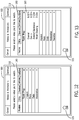
- FIG. 12 illustrates a display 100 with a user interface 110 for controlling a dental laser station 10 showing a video and animations menu (video menu 160) in accordance with some embodiments of the invention.
- the display 100 illustrated in FIG. 12 can be reached by a user following a selection of "Videos and Animations" in the example of FIG. 7 .
- FIG. 13 illustrating a display 100 with a user interface 110 for controlling a dental laser station 10 showing a video and animations menu (menu 160), in embodiments of the invention, using the video menu 160, a user can select one or more videos or animations, for example, by selecting a videos icon 165.
- menu 160 a video and animations menu
- the user can use the control wheel 150 to set or update various setting of the dental laser station 10.
- the control wheel 150 can be used to access, set or adjust one or more setting of the dental laser station 10 following a user selection of any one of the segments 200 as shown.
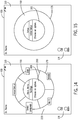
- FIG. 16 illustrates a display 100 with a user interface 110 for controlling a dental laser station 10 displaying a control wheel 150 configured to enable a user to change a user configuration setup in accordance with some embodiments of the invention.
- FIG. 17 illustrates a display 100 with a user interface 110 for controlling a dental laser station 10 displaying an entry screen with data entry 170 configured for entry of a username of a new user.
- users can be renamed, deleted, or cleared.
- FIG. 18 illustrating a display 100 with a user interface 110 for controlling a dental laser station 10
- FIG. 19 illustrating a display 100 with a user interface 110 for controlling a dental laser station 10 displaying a control wheel 150 in accordance with some embodiments of the invention.
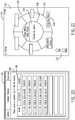
- FIG. 20 illustrates a display 100 with a user interface 110 for controlling a dental laser station 10 displaying a session menu 180 in accordance with some embodiments of the invention.
- the session menu 180 can enable a user to review sessions by date, by procedure, and/or by doctor.
- FIG. 21 illustrates a display 100 with a user interface 110 for controlling a dental laser station 10 displaying a control wheel 150 configured with web portal access in accordance with some embodiments of the invention.
- the user can use the control wheel 150 to access a discussion forum or breaking news in a web portal by selecting at least one of the segments 200.
- FIG. 22 illustrates a display 100 with a user interface 110 for controlling a dental laser station 10 displaying a control wheel 10 configured to access and/or update system information in accordance with some embodiments of the invention.
- FIG. 23 illustrates a display 100 with a user interface 110 for controlling a dental laser station 10 displaying a control wheel 150 configured with options related to maintenance in accordance with some embodiments of the invention.
- FIG. 24 illustrates a display 100 with a user interface 110 for controlling a dental laser station 10 displaying a control wheel 150 configured for a service mode in accordance with some embodiments of the invention.
- Embodiments of the invention described herein can include a display or access to various menus, legends, and information displays describing or related to any descriptions, symbols and graphics displayed by the dental laser station 10 including any device coupled to the docking station 20, and any mobile interface 25.
- FIG. 25 illustrates an icon legend 185 of a display 100 with a user interface 110 for controlling a dental laser station 10 in accordance with some embodiments of the invention.
- FIG. 26 illustrates handpieces and tips selection menu 190 of a display 100 with a user interface 110 for controlling a dental laser station 10 in accordance with some embodiments of the invention.
- FIG. 25 illustrates an icon legend 185 of a display 100 with a user interface 110 for controlling a dental laser station 10 in accordance with some embodiments of the invention.
- FIG. 26 illustrates handpieces and tips selection menu 190 of a display 100 with a user interface 110 for controlling a dental laser station 10 in accordance with some embodiments of the invention.
- FIG. 27 illustrates a key menu with key legend 195 of a display 100 with a user interface 110 for controlling a dental laser station 10 in accordance with some embodiments of the invention
- FIG. 28 illustrates an information menu including an input legend 197 of a display 100 with a user interface 110 for controlling a dental laser station 10 in accordance with some embodiments of the invention.
- the display 100 can display any of the information including text, symbols and graphics shown in FIGS. 25-28 .
- the information including text, symbols and graphics shown in FIGS. 25-28 can be including in documentation provided to the user and/or printed on a label or other attachment coupled to the dental laser station 10.
- a user can initiate a treatment or procedure category.
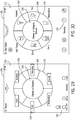
- FIGS. 29-30 illustrate example display 100 with a user interface 110 for controlling a dental laser station 10 displaying a control wheel configured to enable a user to select at least on category in accordance with some embodiments of the invention.
- the selected category is highlighted in the control wheel 150.
- FIG. 31 illustrates a display 100 with a user interface 110 for controlling a dental laser station 10 displaying a control wheel 150 including a highlighted segment 200a in accordance with some embodiments of the invention.
- FIG. 32 illustrates a display 100 with a user interface 110 for controlling a dental laser station 10 displaying a control wheel 150 configured to enable a user to select at least one procedure in accordance with some embodiments of the invention.
- FIG. 33 illustrates a display 100 with a user interface 110 for controlling a dental laser station 10 displaying a tip selection menu in accordance with some embodiments of the invention.
- the display 100 can be configured to display a user interface 110 including a tool display 300 comprising tip selection icons 305.
- the user interface 110 can show the currently selected tool (current tool 315) and/or a recommended tool based on the selected procedure (recommended tool 320).
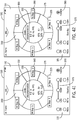
- FIGS. 34-47 illustrate displays 100 with example user interfaces 110 for controlling a dental laser station 10 displaying control wheels 150 configured for an example procedure in accordance with some embodiments of the invention.
- the example procedure comprises a series of selected steps for a decontamination within an endodontic category, however other example procedures can include display similar to those displayed in FIGS. 34-47 .
- the control wheel 150 can be used to select one or more steps of the procedure. For example, as shown in FIGS. 36-39 , the control wheel 150 can highlight selected step 1 (shown as highlighted segment 355). Further, the control wheel 150 can show a parameter display 350 indicating one or more parameters of the dental laser station 10. In some embodiments, one or more of the parameters can be modified using a slider bar 375 displayed in the user interface 110.
- the status of the dental laser can be displayed as an indicator within the user interface 110, for example showing dental laser "ready", “firing", or in "standby” mode.
- a user can proceed with any further steps of a procedure.
- a user can proceed with a selected second step 360.
- a user can be provided with an option to select a favorite procedure and/or step of a procedure (shown as favorite icon 390), and following selection, a favorited icon 395 can be displayed in the user interface 110.
- the control wheel 150 can comprise a saved step selection 215 to enable a user to save a selected step.
- tool parameters can be shown and changed using the user interface 110.
- FIG. 48 illustrates a display 100 with a user interface 110 for controlling a dental laser station 10 including an example parameter display in accordance with some embodiments of the invention.
- the user interface can include a control display 400, and/or mode display 425, and/or chosen tip display 450.
- the chosen tip display 450 can include a tip verification display 475 depicting a current tip 480, and a recommended tip 485.
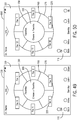
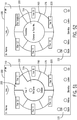
- FIGS. 49-55 illustrate displays 100 with user interfaces 110 for controlling a dental laser station 10 displaying example control wheels 150 in accordance with some embodiments of the invention.
- FIGS. 49-52 illustrate displays 100 with user interfaces 110 configured for favorites selection using the control wheel 150 for controlling a dental laser station 10 displaying a control wheel 150 in accordance with some embodiments of the invention.
- FIG. 51 shows a selected segment 210 identifying a user-selected favorite.
- the user interface can display information related to a specific tool or tip that is in use and/ has been selected.
- FIG. 53 illustrates a display 100 with a user interface 110 for controlling a dental laser station 10 displaying a control wheel 150 that includes a tip marker 308.
- FIG. 55 illustrates a display 100 with a user interface 110 for controlling a dental laser station 10 displaying a control wheel 150 in accordance with some embodiments of the invention that includes a message window 230 displaying a request for the used to change a tip type.
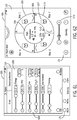
- FIGS. 56-57 illustrate displays 100 with user interfaces 110 for controlling a dental laser station 10 including an example tip check displays with FIG. 56 showing current tip 480 and recommended tip 485, and FIG. 57 showing current/recommended tip 490.
- FIGS. 58-59 illustrate displays 100 with user interfaces 110 for controlling a dental laser station 10 displaying example control wheels 150 including a notification of the tip type (shown as tip marker 308) in accordance with some embodiments of the invention.
- FIGS. 60-61 illustrate displays 100 with user interfaces 110 for controlling a dental laser station 10 including control parameter selection tools in accordance with some embodiments of the invention.
- user interface 110 can include a control display 500 configured to monitor various parameters of the dental laser station 10.
- one or more slider bars 505 can be displayed to enable the user to change one or more of the parameters displayed in the control display 500.
- FIG. 62 illustrates a display 100 with a user interface 110 for controlling a dental laser station display 10 an example control wheel 150 in accordance with some other embodiments of the invention.
- any one of the segments 200 can comprise one or more graphic icons 227 that can be configured by the dental laser station 10.
- the user interface 110 can also include at least one control slider 117 that can be configured to control at least one parameter of the dental laser station 10. Including any parameters displayed in the central display 155.
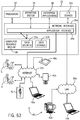
- FIG. 63 illustrates a computer system 30 for implementing displays with user interfaces for controlling a dental laser station in accordance with some embodiments of the invention.
- computer system 30 comprises operating and processing modules of a dental laser station control system and method for a display with a user interface to enable a user to control one or more dental laser stations.
- the computer system 30 can process one or more software modules of the aforementioned dentistry control system and method and display information related to dental devices within at least one user interface.
- the dentistry control system and method can manage the organization of data and data flow between the various components of the dentistry control system and method.
- the system 30 can include at least one computing device, including one or more processors 32.
- Some processors 32 can include processors 32 residing in one or more conventional server platforms.
- the system 30 can include a network interface 35a and an application interface 35b coupled to at least one processors 32 capable of running at least one operating system 34.
- the system 30 can include a network interface 35a and an application interface 35b coupled to at least one processors 32 capable of running one or more of the software modules (e.g., enterprise applications 38).
- Some embodiments of the invention also relate to a device or an apparatus for performing these operations.
- the apparatus can be specially constructed for the required purpose, such as a special purpose computer.
- the computer can also perform other processing, program execution or routines that are not part of the special purpose, while still being capable of operating for the special purpose.
- the operations can be processed by a general purpose computer selectively activated or configured by one or more computer programs stored in the computer memory, cache, or obtained over a network.
- data can be processed by other computers on the network, e.g. a cloud of computing resources.
- the invention can employ various computer-implemented operations involving dentistry control data stored in computer systems.
- the above-described databases and models throughout the dentistry control can store analytical models and other data on computer-readable storage media within the system 30 and on computer-readable storage media coupled to the system 30.
- the above-described applications of the dentistry control system can be stored on computer-readable storage media within the system 30 and on computer-readable storage media coupled to the system 30.
- These operations are those requiring physical manipulation of physical quantities. Usually, though not necessarily, these quantities take the form of electrical, electromagnetic, or magnetic signals, optical or magneto-optical form capable of being stored, transferred, combined, compared and otherwise manipulated.
- Some embodiments include the system 30 comprising at least one computer readable medium 36 coupled to at least one data storage device 37b, and/or at least one data source 37a, and/or at least one input/output device 37c.
- the invention embodied by the dentistry control system can also be embodied as computer readable code on a computer readable medium 36.
- the computer readable medium 36 can be any data storage device that can store data, which can thereafter be read by a computer system (such as the system 30).
- Examples of the computer readable medium 36 can include hard drives, network attached storage (NAS), read-only memory, random-access memory, FLASH based memory, CD-ROMs, CD-Rs, CD-RWs, DVDs, magnetic tapes, other optical and non-optical data storage devices, or any other physical or material medium which can be used to tangibly store the desired information or data or instructions and which can be accessed by a computer or processor (including processors 32).
- NAS network attached storage
- read-only memory random-access memory
- FLASH based memory CD-ROMs, CD-Rs, CD-RWs, DVDs, magnetic tapes, other optical and non-optical data storage devices, or any other physical or material medium which can be used to tangibly store the desired information or data or instructions and which can be accessed by a computer or processor (including processors 32).
- the computer readable medium 36 can also be distributed over a conventional computer network via the network interface 35a so that the dentistry control system embodied by the computer readable code can be stored and executed in a distributed fashion.
- one or more components of the system 30 can be tethered to send and/or receive data through a local area network ("LAN") 39a.
- one or more components of the system 30 can be tethered to send or receive data through an internet 39b (e.g., a wireless internet).
- at least one software application 38 running on one or more processors 32 can be configured to be coupled for communication over a network 39a, 39b.
- one or more components of the network 39a, 39b can include one or more resources for data storage, including any other form of computer readable media beyond the media 36 for storing information and including any form of computer readable media for communicating information from one electronic device to another electronic device.
- the network 39a, 39b can include wide area networks ("WAN"), direct connections (e.g., through a universal serial bus port) or other forms of computer-readable media 36, or any combination thereof.
- WAN wide area networks
- one or more components of the network 39a, 39b can include a number of client devices which can be personal computers 40 including for example desktop computers 40d, laptop computers 40a, 40e, digital assistants and/or personal digital assistants (shown as 40c), cellular phones or mobile phones or smart phones (shown as 40b), pagers, digital tablets, internet appliances, and other processor-based devices.
- a client device can be any type of external or internal devices such as a mouse, a CD-ROM, DVD, a keyboard, a display, or other input or output devices 37c.
- various other forms of computer-readable media 36 can transmit or carry instructions to a computer 40, including a router, private or public network, or other transmission device or channel, both wired and wireless.
- the software modules 38 can be configured to send and receive data from a database (e.g., from a computer readable medium 36 including data sources 37a and data storage 37b that can comprise a database), and data can be received by the software modules 38 from at least one other source.
- At least one of the software modules 38 can be configured within the system 30 to output data to at least one user 31 via at least one digital display (e.g., to a computer 40 comprising a digital display).
- the system 30 as described can enable one or more users 31 to receive, analyze, input, modify, create and send data to and from the system 30, including to and from one or more enterprise applications 38 running on the system 30.
- Some embodiments include at least one user 31 coupled to a computer 40 accessing one or more modules of the dentistry control system including at least one enterprise applications 38 via a stationary I/O device 37c through a LAN 39a.
- the system 30 can enable at least one user 31 (through computer 40) accessing enterprise applications 38 via a stationary or mobile I/O device 37c through an internet 39a.
- the software modules 38 can include a server-based software platform that can include dentistry control software modules suitable for hosting at least one user 31 account and at least one patient account or record. Further, some embodiments of invention includes the software modules 38 that can include at least one server-based software platform that can include dentistry control software modules suitable for hosting at least at least one patient account or record. In some embodiments, using the system 30, the dentistry control system and method can manage multiple user accounts and/or multiple patient accounts.
- the apparatus can be specially constructed for the required purpose, such as a special purpose computer.
- the computer can also perform other processing, program execution or routines that are not part of the special purpose, while still being capable of operating for the special purpose.
- the operations can be processed by a general purpose computer selectively activated or configured by one or more computer programs stored in the computer memory, cache, or obtained over a network.
- data is obtained over a network the data can be processed by other computers on the network, e.g. a cloud of computing resources.
- the embodiments used in the present invention can also be defined as a machine that transforms data from one state to another state.
- the data can represent an article, that can be represented as an electronic signal and electronically manipulate data.
- the transformed data can, in some cases, be visually depicted on a display, representing the physical object that results from the transformation of data.
- the transformed data can be saved to storage generally or in particular formats that enable the construction or depiction of a physical and tangible object.
- the manipulation can be performed by a processor.
- the processor thus transforms the data from one thing to another.
- the methods can be processed by one or more machines or processors that can be connected over a network.
- Computer-readable storage media refers to physical or tangible storage (as opposed to signals) and includes without limitation volatile and non-volatile, removable and non-removable storage media implemented in any method or technology for the tangible storage of information such as computer-readable instructions, data structures, program modules or other data.
Landscapes
- Engineering & Computer Science (AREA)
- Health & Medical Sciences (AREA)
- General Engineering & Computer Science (AREA)
- Theoretical Computer Science (AREA)
- Physics & Mathematics (AREA)
- Epidemiology (AREA)
- Public Health (AREA)
- General Health & Medical Sciences (AREA)
- Human Computer Interaction (AREA)
- General Physics & Mathematics (AREA)
- Oral & Maxillofacial Surgery (AREA)
- Life Sciences & Earth Sciences (AREA)
- Animal Behavior & Ethology (AREA)
- Dentistry (AREA)
- Veterinary Medicine (AREA)
- Medical Informatics (AREA)
- Biomedical Technology (AREA)
- Primary Health Care (AREA)
- Optics & Photonics (AREA)
- Water Supply & Treatment (AREA)
- Urology & Nephrology (AREA)
- Surgery (AREA)
- Nuclear Medicine, Radiotherapy & Molecular Imaging (AREA)
- Business, Economics & Management (AREA)
- General Business, Economics & Management (AREA)
- Dental Tools And Instruments Or Auxiliary Dental Instruments (AREA)
Claims (15)
- Procédé de commande d'un système laser dentaire consistant :à fournir une station laser dentaire (10) ;à coupler au moins un dispositif de commande (25) à la station laser dentaire (10) pour commander certaines fonctions de la station laser dentaire (10) ;à fournir une interface utilisateur graphique (110) pour fournir une entrée au dispositif de commande (25), l'interface utilisateur graphique (110) comprenant :une roue de commande (150) comprenant une pluralité de segments (200) pouvant être sélectionnés par un toucher d'un utilisateur et une partie de navigation intramenu (155) adjacente aux segments (200) pour afficher des informations se rapportant à une navigation intramenu ;à afficher des catégories de traitement et/ou des procédures de traitement sur au moins certains segments de la pluralité de segments (200) ;lors de la sélection d'un segment (200), à mettre en évidence le segment sélectionné et à activer le dispositif de commande (25) pour déclencher une séquence de commande consistantà déclencher une action basée sur le segment sélectionné (200) ;à mettre à jour la roue de commande (150) avec une série d'étapes (Étape 1, Étape 2, ..., Étape 6) de la catégorie, ou de la procédure, de traitement sélectionnée ;à recevoir, de la station dentaire (10), des données indiquant un état ou une opération de la station dentaire (10) ; età fournir une icône ou une mise à jour graphique dans l'interface utilisateur graphique (110).
- Procédé selon la revendication 1, dans lequel la roue de commande (150) s'étend sur 360 degrés.
- Procédé selon la revendication 1 ou 2, dans lequel la roue de commande (150) entoure sensiblement la partie de navigation intramenu (155).
- Procédé selon la revendication 1, 2 ou 3, dans lequel la partie de navigation intramenu (155) comprend une pluralité de sections pour fournir des informations se rapportant à des sous-menus.
- Procédé selon l'une quelconque des revendications 1 à 4, dans lequel l'interface utilisateur graphique (110) comprend en outre une recommandation de pointe laser.
- Procédé selon l'une quelconque des revendications 1 à 5, dans lequel l'interface utilisateur graphique (110) comprend en outre une barre coulissante (375) pour fournir une entrée au dispositif de commande (25).
- Procédé selon l'une quelconque des revendications 1 à 6, dans lequel l'interface utilisateur graphique (110) comprend en outre des icônes associatives qui se rapportent à des catégories, des procédures, des étapes ou des options distinctes.
- Procédé selon l'une quelconque des revendications 1 à 7, dans lequel l'interface utilisateur graphique (110) comprend en outre des vidéos ou des graphiques d'aide.
- Système laser dentaire comprenant :une station laser dentaire (10) ;au moins un dispositif de commande (25) qui est couplé à la station laser dentaire (10) pour commander certaines fonctions de la station laser dentaire (10) ;une interface utilisateur graphique (110) pour fournir une entrée au dispositif de commande (25), l'interface utilisateur graphique (110) comprenant :une roue de commande (150) comprenant une pluralité de segments (200) pouvant être sélectionnés par un toucher d'un utilisateur et une partie de navigation intramenu (155) adjacente aux segments (200) pour afficher des informations se rapportant à une navigation intramenu ;dans lequel le système laser dentaire est configuré :pour afficher des catégories de traitement ou des procédures de traitement sur au moins certains segments de la pluralité de segments (200) ;lors de la sélection d'un segment (200), pour mettre en évidence le segment sélectionné et pour activer le dispositif de commande (25) pour déclencher une séquence de commande consistantà déclencher une action basée sur le segment sélectionné (200) ;à mettre à jour la roue de commande (150) avec une série d'étapes (Étape 1, Étape 2, ..., Étape 6) de la catégorie, ou de la procédure, de traitement sélectionnée ;à recevoir, de la station dentaire (10), des données indiquant un état ou une opération de la station dentaire (10) ; età fournir une icône ou une mise à jour graphique dans la ou les interfaces utilisateur graphiques (110).
- Système selon la revendication 9, dans lequel la roue de commande (150) s'étend sur 360 degrés.
- Système selon la revendication 9 ou 10, dans lequel la roue de commande (150) entoure sensiblement la partie de navigation intramenu (155).
- Système selon l'une quelconque des revendications 9 à 11, dans lequel la partie de navigation intramenu (155) comprend une pluralité de sections pour fournir des informations se rapportant à des sous-menus.
- Système selon l'une quelconque des revendications 9 à 12, dans lequel l'interface utilisateur graphique (110) comprend en outre une recommandation de pointe laser.
- Système selon l'une quelconque des revendications 9 à 13, dans lequel l'interface utilisateur graphique (110) comprend en outre une barre coulissante (375) pour fournir une entrée au dispositif de commande.
- Système selon l'une quelconque des revendications 9 à 14, dans lequel l'interface utilisateur graphique (110) comprend en outre des icônes associatives qui se rapportent à des catégories, des procédures, des étapes ou des options distinctes ; et/ou comprend en outre des vidéos ou des graphiques d'aide.
Priority Applications (1)
| Application Number | Priority Date | Filing Date | Title |
|---|---|---|---|
| EP20192757.1A EP3782577A1 (fr) | 2014-03-21 | 2015-03-23 | Système et procédé d'interface laser dentaire |
Applications Claiming Priority (2)
| Application Number | Priority Date | Filing Date | Title |
|---|---|---|---|
| US201461968632P | 2014-03-21 | 2014-03-21 | |
| PCT/US2015/022093 WO2015143456A1 (fr) | 2014-03-21 | 2015-03-23 | Système et procédé d'interface laser dentaire |
Related Child Applications (1)
| Application Number | Title | Priority Date | Filing Date |
|---|---|---|---|
| EP20192757.1A Division EP3782577A1 (fr) | 2014-03-21 | 2015-03-23 | Système et procédé d'interface laser dentaire |
Publications (3)
| Publication Number | Publication Date |
|---|---|
| EP3119345A1 EP3119345A1 (fr) | 2017-01-25 |
| EP3119345A4 EP3119345A4 (fr) | 2017-12-13 |
| EP3119345B1 true EP3119345B1 (fr) | 2020-08-26 |
Family
ID=54142113
Family Applications (2)
| Application Number | Title | Priority Date | Filing Date |
|---|---|---|---|
| EP20192757.1A Withdrawn EP3782577A1 (fr) | 2014-03-21 | 2015-03-23 | Système et procédé d'interface laser dentaire |
| EP15765014.4A Active EP3119345B1 (fr) | 2014-03-21 | 2015-03-23 | Système et procédé d'interface laser dentaire |
Family Applications Before (1)
| Application Number | Title | Priority Date | Filing Date |
|---|---|---|---|
| EP20192757.1A Withdrawn EP3782577A1 (fr) | 2014-03-21 | 2015-03-23 | Système et procédé d'interface laser dentaire |
Country Status (7)
| Country | Link |
|---|---|
| US (4) | US9864485B2 (fr) |
| EP (2) | EP3782577A1 (fr) |
| KR (1) | KR20160138174A (fr) |
| CN (1) | CN106456278A (fr) |
| CA (1) | CA2943347A1 (fr) |
| ES (1) | ES2828950T3 (fr) |
| WO (1) | WO2015143456A1 (fr) |
Families Citing this family (51)
| Publication number | Priority date | Publication date | Assignee | Title |
|---|---|---|---|---|
| US10835355B2 (en) | 2006-04-20 | 2020-11-17 | Sonendo, Inc. | Apparatus and methods for treating root canals of teeth |
| EP3311770B1 (fr) | 2006-04-20 | 2023-06-21 | Sonendo, Inc. | Appareil de traitement des canaux radiculaires des dents |
| US12114924B2 (en) | 2006-08-24 | 2024-10-15 | Pipstek, Llc | Treatment system and method |
| US7980854B2 (en) | 2006-08-24 | 2011-07-19 | Medical Dental Advanced Technologies Group, L.L.C. | Dental and medical treatments and procedures |
| CN102724929B (zh) | 2009-11-13 | 2016-04-13 | 索南多股份有限公司 | 用于牙科治疗的液体射流设备和方法 |
| CN107115154B (zh) | 2010-10-21 | 2021-06-15 | 索南多股份有限公司 | 用于牙髓治疗的设备、方法和组合 |
| US11173019B2 (en) | 2012-03-22 | 2021-11-16 | Sonendo, Inc. | Apparatus and methods for cleaning teeth |
| US10631962B2 (en) | 2012-04-13 | 2020-04-28 | Sonendo, Inc. | Apparatus and methods for cleaning teeth and gingival pockets |
| US10363120B2 (en) | 2012-12-20 | 2019-07-30 | Sonendo, Inc. | Apparatus and methods for cleaning teeth and root canals |
| ES2883954T3 (es) | 2012-12-20 | 2021-12-09 | Sonendo Inc | Aparato de limpieza de dientes y de conductos radiculares |
| EP3885144B1 (fr) | 2013-02-04 | 2024-02-28 | Sonendo, Inc. | Système de traitement dentaire |
| EP2991576B1 (fr) | 2013-05-01 | 2022-12-28 | Sonendo, Inc. | Appareil et système pour traiter des dents |
| EP3013277B1 (fr) | 2013-06-26 | 2023-07-19 | Sonendo, Inc. | Appareil et procédés de plombage dentaire et de dévitalisation |
| USD768185S1 (en) * | 2014-02-11 | 2016-10-04 | Samsung Electronics Co., Ltd. | Display screen or portion thereof with animated graphical user interface |
| CN106456278A (zh) | 2014-03-21 | 2017-02-22 | 宝镭适有限公司 | 牙科用激光界面系统和方法 |
| USD773518S1 (en) * | 2014-05-08 | 2016-12-06 | Express Scripts, Inc. | Display screen with a graphical user interface |
| USD774540S1 (en) * | 2014-05-08 | 2016-12-20 | Express Scripts, Inc. | Display screen with a graphical user interface |
| JP1538309S (fr) * | 2014-07-25 | 2015-11-24 | ||
| US11490990B2 (en) * | 2015-11-12 | 2022-11-08 | Millennium Healtcare Technologies, Inc. | Laser-assisted periodontics |
| US11273006B2 (en) * | 2016-01-29 | 2022-03-15 | Millennium Healthcare Technologies, Inc. | Laser-assisted periodontics |
| US10806544B2 (en) | 2016-04-04 | 2020-10-20 | Sonendo, Inc. | Systems and methods for removing foreign objects from root canals |
| USD802014S1 (en) * | 2016-04-28 | 2017-11-07 | Rubicon Global Holdings, Llc | Display screen with animated icon |
| USD824935S1 (en) * | 2016-07-20 | 2018-08-07 | Biolase, Inc. | Display screen including a dental laser graphical user interface |
| USD912689S1 (en) * | 2016-07-22 | 2021-03-09 | L&L Candle Company, Llc | Display screen with graphical user interface for controlling an electronic candle |
| US10434024B2 (en) | 2016-08-15 | 2019-10-08 | Kavo Dental Technologies, Llc | Modular dental tool and docking station |
| WO2018064380A1 (fr) | 2016-09-28 | 2018-04-05 | Biolase, Inc. | Système et procédé de gui de commande laser |
| WO2018067868A1 (fr) * | 2016-10-05 | 2018-04-12 | Biolase, Inc. | Système et procédé dentaires |
| US11202687B2 (en) | 2016-12-23 | 2021-12-21 | Biolase, Inc. | Dental system and method |
| USD843417S1 (en) * | 2017-04-19 | 2019-03-19 | Navix International Limited | Display screen or portion thereof with icon |
| WO2019040941A1 (fr) * | 2017-08-25 | 2019-02-28 | Biolase, Inc. | Système de pièce à main fractionnaire |
| KR101864412B1 (ko) * | 2017-12-28 | 2018-06-04 | (주)휴톰 | 학습용 데이터 관리방법, 장치 및 프로그램 |
| US20190213899A1 (en) * | 2018-01-11 | 2019-07-11 | International Business Machines Corporation | Generating selectable control items for a learner |
| WO2020132143A1 (fr) | 2018-12-19 | 2020-06-25 | Tdo Software, Inc. | Système de base de données de planification |
| USD1002670S1 (en) | 2019-12-10 | 2023-10-24 | Braun Gmbh | Display with icon for oral-care appliance |
| USD971250S1 (en) * | 2020-04-20 | 2022-11-29 | The Fourth Paradigm (Beijing) Tech Co Ltd | Display screen with a machine learning graphical user interface |
| JP1694959S (fr) | 2020-06-09 | 2021-09-13 | ||
| JP1687910S (fr) | 2020-06-09 | 2021-06-21 | ||
| JP1687909S (fr) * | 2020-06-09 | 2021-06-21 | ||
| JP1687911S (fr) | 2020-06-09 | 2021-06-21 | ||
| USD997355S1 (en) | 2020-10-07 | 2023-08-29 | Sonendo, Inc. | Dental treatment instrument |
| EP4297682A1 (fr) * | 2021-02-28 | 2024-01-03 | Coloplast A/S | Dispositif électronique pour le fonctionnement d'un système de chirurgie laser endo-urologique et procédé associé |
| USD1036498S1 (en) * | 2022-07-25 | 2024-07-23 | Digital Surgery Limited | Portion of a display screen with a graphical user interface |
| USD1036497S1 (en) * | 2022-07-25 | 2024-07-23 | Digital Surgery Limited | Portion of a display screen with a graphical user interface |
| USD1036499S1 (en) * | 2022-07-25 | 2024-07-23 | Digital Surgery Limited | Portion of a display screen with a graphical user interface |
| US12251282B2 (en) | 2022-09-08 | 2025-03-18 | Enamel Pure | Systems and methods for dental treatment and remote oversight |
| USD1118938S1 (en) | 2022-09-23 | 2026-03-17 | Sonendo, Inc. | Dental console |
| USD1079727S1 (en) * | 2023-03-09 | 2025-06-17 | Ivoclar Vivadent Ag | Display screen or portion thereof with icon |
| USD1081693S1 (en) * | 2023-03-09 | 2025-07-01 | Ivoclar Vivadent Ag | Display screen or portion thereof with icon |
| USD1078781S1 (en) * | 2023-12-22 | 2025-06-10 | Bigo Technology Pte. Ltd. | Display screen or portion thereof with graphical user interface |
| US12333722B1 (en) | 2024-03-28 | 2025-06-17 | Enamel Pure, Inc. | Systems and methods for predicting medical conditions usingmachine learning correlating dental images and medical data |
| USD1105149S1 (en) * | 2024-07-19 | 2025-12-09 | Risun Technology (Shenzhen) Limited | Electric toothbrush with graphical user interface |
Citations (1)
| Publication number | Priority date | Publication date | Assignee | Title |
|---|---|---|---|---|
| US20040044295A1 (en) * | 2002-08-19 | 2004-03-04 | Orthosoft Inc. | Graphical user interface for computer-assisted surgery |
Family Cites Families (47)
| Publication number | Priority date | Publication date | Assignee | Title |
|---|---|---|---|---|
| DE4238259C2 (de) * | 1992-11-12 | 1995-06-22 | Kaltenbach & Voigt | Bedienungsteil für ein Gerät zur medizinischen Behandlung des menschlichen oder tierischen Körpers |
| US5676387A (en) * | 1994-09-23 | 1997-10-14 | Kirkpatrick; Patricia L. | Apparatus for transporting garment bags |
| US8496474B2 (en) | 1997-06-20 | 2013-07-30 | Align Technology, Inc. | Computer automated development of an orthodontic treatment plan and appliance |
| US5961626A (en) | 1997-10-10 | 1999-10-05 | Motorola, Inc. | Method and processing interface for transferring data between host systems and a packetized processing system |
| US6081895A (en) | 1997-10-10 | 2000-06-27 | Motorola, Inc. | Method and system for managing data unit processing |
| AU1452199A (en) * | 1997-11-07 | 1999-05-31 | Hill-Rom, Inc. | Medical equipment controller |
| US7010369B2 (en) * | 1997-11-07 | 2006-03-07 | Hill-Rom Services, Inc. | Medical equipment controller |
| US6030222A (en) * | 1998-12-01 | 2000-02-29 | Tarver; Jeanna G. | Dye compositions and methods for whitening teeth using same |
| US6550012B1 (en) | 1998-12-11 | 2003-04-15 | Network Associates, Inc. | Active firewall system and methodology |
| US20030013959A1 (en) | 1999-08-20 | 2003-01-16 | Sorin Grunwald | User interface for handheld imaging devices |
| US6733455B2 (en) | 1999-08-20 | 2004-05-11 | Zonare Medical Systems, Inc. | System and method for adaptive clutter filtering in ultrasound color flow imaging |
| US6896658B2 (en) | 2001-10-20 | 2005-05-24 | Zonare Medical Systems, Inc. | Simultaneous multi-mode and multi-band ultrasonic imaging |
| US6773399B2 (en) | 2001-10-20 | 2004-08-10 | Zonare Medical Systems, Inc. | Block-switching in ultrasound imaging |
| US6936008B2 (en) | 1999-08-20 | 2005-08-30 | Zonare Medical Systems, Inc. | Ultrasound system with cableless coupling assembly |
| US6685645B1 (en) | 2001-10-20 | 2004-02-03 | Zonare Medical Systems, Inc. | Broad-beam imaging |
| US20020173721A1 (en) | 1999-08-20 | 2002-11-21 | Novasonics, Inc. | User interface for handheld imaging devices |
| US6251073B1 (en) | 1999-08-20 | 2001-06-26 | Novasonics, Inc. | Miniaturized ultrasound apparatus and method |
| US7311722B2 (en) * | 2001-01-22 | 2007-12-25 | Eric Larsen | Photodynamic stimulation device and methods |
| US6793653B2 (en) | 2001-12-08 | 2004-09-21 | Computer Motion, Inc. | Multifunctional handle for a medical robotic system |
| CN101501755A (zh) * | 2003-04-30 | 2009-08-05 | 英华达股份有限公司 | 用于手持计算设备的放射式菜单界面 |
| US7594188B2 (en) * | 2003-08-21 | 2009-09-22 | Carl Zeiss Ag | Operating menu for a surgical microscope |
| DE10346668A1 (de) | 2003-10-08 | 2005-05-04 | Kaltenbach & Voigt | Eingabegerät zum Aktivieren und Steuern von Funktionen mehrerer Geräte eines zahnärztlichen oder dentalen Behandlungs-/Arbeitsplatzes |
| CN1797295A (zh) * | 2004-12-25 | 2006-07-05 | 鸿富锦精密工业(深圳)有限公司 | 一种用于选择动态选项的图形用户界面 |
| US20070239488A1 (en) * | 2006-04-05 | 2007-10-11 | Derosso Robert | Computerized dental patient record |
| EP2111251B1 (fr) * | 2007-01-19 | 2018-09-12 | Joseph Neev | Dispositifs pour générer des micro-dislocations pour applications biomédicales |
| US8352881B2 (en) * | 2007-03-08 | 2013-01-08 | International Business Machines Corporation | Method, apparatus and program storage device for providing customizable, immediate and radiating menus for accessing applications and actions |
| US20090225060A1 (en) | 2007-05-03 | 2009-09-10 | Rizoiu Ioana M | Wrist-mounted laser with animated, page-based graphical user-interface |
| JP2010532681A (ja) * | 2007-06-29 | 2010-10-14 | スリーエム イノベイティブ プロパティズ カンパニー | 歯科用モデルのための、ビデオ補助境界マーキング |
| EP2017707B1 (fr) * | 2007-07-06 | 2017-04-12 | Dassault Systèmes | Objet fenêtre d'interface utilisateur graphique et procédé pour la navigation parmi des objets associés |
| US7951139B2 (en) * | 2008-01-18 | 2011-05-31 | Inlight Corporation | Laser surgical apparatus |
| US20120124520A1 (en) * | 2008-07-16 | 2012-05-17 | National University Of Ireland | Graphical User Interface Component |
| US8662900B2 (en) * | 2009-06-04 | 2014-03-04 | Zimmer Dental Inc. | Dental implant surgical training simulation system |
| US8375329B2 (en) * | 2009-09-01 | 2013-02-12 | Maxon Computer Gmbh | Method of providing a graphical user interface using a concentric menu |
| DE102010036906A1 (de) * | 2010-08-06 | 2012-02-09 | Tavendo Gmbh | Konfigurierbares Pie-Menü |
| WO2012074918A2 (fr) * | 2010-11-29 | 2012-06-07 | Dentsply International Inc. | Dispositif dentaire à émission de laser et procédés associés |
| CN102915173B (zh) * | 2011-08-04 | 2015-11-25 | 腾讯科技(深圳)有限公司 | 菜单实现方法和系统 |
| US9052805B2 (en) * | 2011-10-19 | 2015-06-09 | Biolase, Inc. | System and method for controlling multiple lasers using a graphical user interface |
| KR101879333B1 (ko) * | 2011-12-06 | 2018-07-17 | 엘지전자 주식회사 | 이동 단말기 및 그의 아이콘 배열방법 |
| US20130219340A1 (en) * | 2012-02-21 | 2013-08-22 | Sap Ag | Navigation on a Portable Electronic Device |
| JP6013051B2 (ja) * | 2012-07-02 | 2016-10-25 | 東芝メディカルシステムズ株式会社 | 超音波診断装置及びその操作支援方法 |
| US8910082B2 (en) * | 2012-08-10 | 2014-12-09 | Modiface Inc. | Method and system for modification of digital images through rotational cascading-effect interface |
| US20140170588A1 (en) * | 2012-12-13 | 2014-06-19 | Dentsply International Inc. | Dental laser-emitting device and methods |
| US20140195979A1 (en) * | 2013-01-10 | 2014-07-10 | Appsense Limited | Interactive user interface |
| JP6492015B2 (ja) * | 2013-02-05 | 2019-03-27 | コンバージェント デンタル, インコーポレイテッド | 歯科レーザ装置、ならびに交換可能ハンドピースおよび可変フットペダルとの使用方法 |
| ES2828224T3 (es) * | 2013-03-12 | 2021-05-25 | Biolase Inc | Unidad láser dental con enlace de comunicación al centro de asistencia |
| US20140379356A1 (en) * | 2013-06-20 | 2014-12-25 | Rohit Sachdeva | Method and system for integrated orthodontic treatment planning using unified workstation |
| CN106456278A (zh) | 2014-03-21 | 2017-02-22 | 宝镭适有限公司 | 牙科用激光界面系统和方法 |
-
2015
- 2015-03-23 CN CN201580015198.3A patent/CN106456278A/zh active Pending
- 2015-03-23 CA CA2943347A patent/CA2943347A1/fr active Pending
- 2015-03-23 KR KR1020167029368A patent/KR20160138174A/ko not_active Withdrawn
- 2015-03-23 EP EP20192757.1A patent/EP3782577A1/fr not_active Withdrawn
- 2015-03-23 ES ES15765014T patent/ES2828950T3/es active Active
- 2015-03-23 WO PCT/US2015/022093 patent/WO2015143456A1/fr not_active Ceased
- 2015-03-23 EP EP15765014.4A patent/EP3119345B1/fr active Active
- 2015-03-23 US US14/666,287 patent/US9864485B2/en active Active
-
2018
- 2018-01-09 US US15/866,173 patent/US10877630B2/en active Active
-
2020
- 2020-11-25 US US17/104,590 patent/US11250941B2/en active Active
-
2022
- 2022-01-04 US US17/568,124 patent/US11568978B2/en active Active
Patent Citations (1)
| Publication number | Priority date | Publication date | Assignee | Title |
|---|---|---|---|---|
| US20040044295A1 (en) * | 2002-08-19 | 2004-03-04 | Orthosoft Inc. | Graphical user interface for computer-assisted surgery |
Also Published As
| Publication number | Publication date |
|---|---|
| CA2943347A1 (fr) | 2015-09-24 |
| US20210082562A1 (en) | 2021-03-18 |
| WO2015143456A1 (fr) | 2015-09-24 |
| CN106456278A (zh) | 2017-02-22 |
| EP3782577A1 (fr) | 2021-02-24 |
| US11250941B2 (en) | 2022-02-15 |
| US20150268803A1 (en) | 2015-09-24 |
| EP3119345A1 (fr) | 2017-01-25 |
| EP3119345A4 (fr) | 2017-12-13 |
| US20180129384A1 (en) | 2018-05-10 |
| KR20160138174A (ko) | 2016-12-02 |
| US11568978B2 (en) | 2023-01-31 |
| US20220208334A1 (en) | 2022-06-30 |
| ES2828950T3 (es) | 2021-05-28 |
| US10877630B2 (en) | 2020-12-29 |
| US9864485B2 (en) | 2018-01-09 |
Similar Documents
| Publication | Publication Date | Title |
|---|---|---|
| US11250941B2 (en) | Dental laser interface system and method | |
| JP6066545B2 (ja) | 二次選択フィードバックを伝達する | |
| US10452249B2 (en) | Tooltip feedback for zoom using scroll wheel | |
| US9141345B2 (en) | Simplified user controls for authoring workflows | |
| JP2004527022A5 (fr) | ||
| Langote et al. | Human-computer interaction in healthcare: Comprehensive review. | |
| US20080109722A1 (en) | Direct presentation of help information relative to selectable menu items in a computer controlled display interface | |
| CN105725964A (zh) | 用户终端装置和用于驱动用户终端装置的方法 | |
| CN104584016A (zh) | 用于算法指南的可视化的方法和系统 | |
| KR20210056674A (ko) | 전자차트 조회방법 이를 위한 전자차트 제공장치 | |
| US8214802B1 (en) | Providing visual preview of intermediate steps of software configuration | |
| US9424238B2 (en) | Methods and systems for order set processing and validation | |
| CN117709318A (zh) | 信息产生方法、电子装置及计算机程序产品 | |
| CN103576612A (zh) | 一种数控车床和数控铣床的终端用户向导系统和方法以及数控车床和数控铣床 | |
| US10089442B2 (en) | Executable guideline solution with multiple alternative views on recommended care steps | |
| EP2595564B1 (fr) | Manipulation de surface en conception de prothèse dentaire | |
| KR102209739B1 (ko) | 데스크 및 진료실 간 병력정보 연동 표시방법, 연동 서비스 제공방법 및 이를 제공하는 치과용 업무 통합관리 시스템 | |
| WO2016117669A1 (fr) | Système d'affichage d'informations médicales, serveur et programme | |
| US20190138164A1 (en) | User interface for efficient user-software interaction | |
| KR102574227B1 (ko) | 의료 화면을 제공하는 방법, 디바이스 및 기록매체 | |
| JP2018120565A (ja) | コンピュータ実装方法およびコンピュータ | |
| EP2133765A1 (fr) | Interface utilisateur et son procédé | |
| Wiklund et al. | Applying Human Factors Engineering: Naturally Safe Software–User Interfaces | |
| KR20220158447A (ko) | 3d 데이터 기반 의료용 비주얼 데이터 제공 방법 및 그 시스템 | |
| CN107077251A (zh) | 用于处理用于控制输注操作的输入的方法 |
Legal Events
| Date | Code | Title | Description |
|---|---|---|---|
| STAA | Information on the status of an ep patent application or granted ep patent |
Free format text: STATUS: THE INTERNATIONAL PUBLICATION HAS BEEN MADE |
|
| PUAI | Public reference made under article 153(3) epc to a published international application that has entered the european phase |
Free format text: ORIGINAL CODE: 0009012 |
|
| STAA | Information on the status of an ep patent application or granted ep patent |
Free format text: STATUS: REQUEST FOR EXAMINATION WAS MADE |
|
| 17P | Request for examination filed |
Effective date: 20160830 |
|
| AK | Designated contracting states |
Kind code of ref document: A1 Designated state(s): AL AT BE BG CH CY CZ DE DK EE ES FI FR GB GR HR HU IE IS IT LI LT LU LV MC MK MT NL NO PL PT RO RS SE SI SK SM TR |
|
| AX | Request for extension of the european patent |
Extension state: BA ME |
|
| DAV | Request for validation of the european patent (deleted) | ||
| DAX | Request for extension of the european patent (deleted) | ||
| A4 | Supplementary search report drawn up and despatched |
Effective date: 20171115 |
|
| RIC1 | Information provided on ipc code assigned before grant |
Ipc: A61C 19/04 20060101ALI20171109BHEP Ipc: A61C 1/00 20060101AFI20171109BHEP Ipc: G06F 19/00 20110101ALI20171109BHEP Ipc: A61B 18/20 20060101ALI20171109BHEP Ipc: A61C 13/00 20060101ALI20171109BHEP |
|
| REG | Reference to a national code |
Ref country code: DE Ref legal event code: R079 Ref document number: 602015058033 Country of ref document: DE Free format text: PREVIOUS MAIN CLASS: A61C0001000000 Ipc: G16H0020400000 |
|
| RIC1 | Information provided on ipc code assigned before grant |
Ipc: G06F 3/048 20130101ALI20190822BHEP Ipc: G16H 20/40 20180101AFI20190822BHEP |
|
| GRAP | Despatch of communication of intention to grant a patent |
Free format text: ORIGINAL CODE: EPIDOSNIGR1 |
|
| STAA | Information on the status of an ep patent application or granted ep patent |
Free format text: STATUS: GRANT OF PATENT IS INTENDED |
|
| INTG | Intention to grant announced |
Effective date: 20191004 |
|
| GRAJ | Information related to disapproval of communication of intention to grant by the applicant or resumption of examination proceedings by the epo deleted |
Free format text: ORIGINAL CODE: EPIDOSDIGR1 |
|
| STAA | Information on the status of an ep patent application or granted ep patent |
Free format text: STATUS: REQUEST FOR EXAMINATION WAS MADE |
|
| GRAP | Despatch of communication of intention to grant a patent |
Free format text: ORIGINAL CODE: EPIDOSNIGR1 |
|
| STAA | Information on the status of an ep patent application or granted ep patent |
Free format text: STATUS: GRANT OF PATENT IS INTENDED |
|
| INTC | Intention to grant announced (deleted) | ||
| INTG | Intention to grant announced |
Effective date: 20200311 |
|
| GRAS | Grant fee paid |
Free format text: ORIGINAL CODE: EPIDOSNIGR3 |
|
| GRAA | (expected) grant |
Free format text: ORIGINAL CODE: 0009210 |
|
| STAA | Information on the status of an ep patent application or granted ep patent |
Free format text: STATUS: THE PATENT HAS BEEN GRANTED |
|
| AK | Designated contracting states |
Kind code of ref document: B1 Designated state(s): AL AT BE BG CH CY CZ DE DK EE ES FI FR GB GR HR HU IE IS IT LI LT LU LV MC MK MT NL NO PL PT RO RS SE SI SK SM TR |
|
| REG | Reference to a national code |
Ref country code: GB Ref legal event code: FG4D |
|
| REG | Reference to a national code |
Ref country code: CH Ref legal event code: EP |
|
| REG | Reference to a national code |
Ref country code: AT Ref legal event code: REF Ref document number: 1307142 Country of ref document: AT Kind code of ref document: T Effective date: 20200915 |
|
| REG | Reference to a national code |
Ref country code: IE Ref legal event code: FG4D |
|
| REG | Reference to a national code |
Ref country code: DE Ref legal event code: R096 Ref document number: 602015058033 Country of ref document: DE |
|
| REG | Reference to a national code |
Ref country code: LT Ref legal event code: MG4D |
|
| PG25 | Lapsed in a contracting state [announced via postgrant information from national office to epo] |
Ref country code: FI Free format text: LAPSE BECAUSE OF FAILURE TO SUBMIT A TRANSLATION OF THE DESCRIPTION OR TO PAY THE FEE WITHIN THE PRESCRIBED TIME-LIMIT Effective date: 20200826 Ref country code: HR Free format text: LAPSE BECAUSE OF FAILURE TO SUBMIT A TRANSLATION OF THE DESCRIPTION OR TO PAY THE FEE WITHIN THE PRESCRIBED TIME-LIMIT Effective date: 20200826 Ref country code: BG Free format text: LAPSE BECAUSE OF FAILURE TO SUBMIT A TRANSLATION OF THE DESCRIPTION OR TO PAY THE FEE WITHIN THE PRESCRIBED TIME-LIMIT Effective date: 20201126 Ref country code: LT Free format text: LAPSE BECAUSE OF FAILURE TO SUBMIT A TRANSLATION OF THE DESCRIPTION OR TO PAY THE FEE WITHIN THE PRESCRIBED TIME-LIMIT Effective date: 20200826 Ref country code: GR Free format text: LAPSE BECAUSE OF FAILURE TO SUBMIT A TRANSLATION OF THE DESCRIPTION OR TO PAY THE FEE WITHIN THE PRESCRIBED TIME-LIMIT Effective date: 20201127 Ref country code: NO Free format text: LAPSE BECAUSE OF FAILURE TO SUBMIT A TRANSLATION OF THE DESCRIPTION OR TO PAY THE FEE WITHIN THE PRESCRIBED TIME-LIMIT Effective date: 20201126 Ref country code: PT Free format text: LAPSE BECAUSE OF FAILURE TO SUBMIT A TRANSLATION OF THE DESCRIPTION OR TO PAY THE FEE WITHIN THE PRESCRIBED TIME-LIMIT Effective date: 20201228 Ref country code: SE Free format text: LAPSE BECAUSE OF FAILURE TO SUBMIT A TRANSLATION OF THE DESCRIPTION OR TO PAY THE FEE WITHIN THE PRESCRIBED TIME-LIMIT Effective date: 20200826 |
|
| REG | Reference to a national code |
Ref country code: NL Ref legal event code: MP Effective date: 20200826 |
|
| REG | Reference to a national code |
Ref country code: AT Ref legal event code: MK05 Ref document number: 1307142 Country of ref document: AT Kind code of ref document: T Effective date: 20200826 |
|
| PG25 | Lapsed in a contracting state [announced via postgrant information from national office to epo] |
Ref country code: RS Free format text: LAPSE BECAUSE OF FAILURE TO SUBMIT A TRANSLATION OF THE DESCRIPTION OR TO PAY THE FEE WITHIN THE PRESCRIBED TIME-LIMIT Effective date: 20200826 Ref country code: LV Free format text: LAPSE BECAUSE OF FAILURE TO SUBMIT A TRANSLATION OF THE DESCRIPTION OR TO PAY THE FEE WITHIN THE PRESCRIBED TIME-LIMIT Effective date: 20200826 Ref country code: NL Free format text: LAPSE BECAUSE OF FAILURE TO SUBMIT A TRANSLATION OF THE DESCRIPTION OR TO PAY THE FEE WITHIN THE PRESCRIBED TIME-LIMIT Effective date: 20200826 Ref country code: PL Free format text: LAPSE BECAUSE OF FAILURE TO SUBMIT A TRANSLATION OF THE DESCRIPTION OR TO PAY THE FEE WITHIN THE PRESCRIBED TIME-LIMIT Effective date: 20200826 Ref country code: IS Free format text: LAPSE BECAUSE OF FAILURE TO SUBMIT A TRANSLATION OF THE DESCRIPTION OR TO PAY THE FEE WITHIN THE PRESCRIBED TIME-LIMIT Effective date: 20201226 |
|
| PG25 | Lapsed in a contracting state [announced via postgrant information from national office to epo] |
Ref country code: CZ Free format text: LAPSE BECAUSE OF FAILURE TO SUBMIT A TRANSLATION OF THE DESCRIPTION OR TO PAY THE FEE WITHIN THE PRESCRIBED TIME-LIMIT Effective date: 20200826 Ref country code: DK Free format text: LAPSE BECAUSE OF FAILURE TO SUBMIT A TRANSLATION OF THE DESCRIPTION OR TO PAY THE FEE WITHIN THE PRESCRIBED TIME-LIMIT Effective date: 20200826 Ref country code: EE Free format text: LAPSE BECAUSE OF FAILURE TO SUBMIT A TRANSLATION OF THE DESCRIPTION OR TO PAY THE FEE WITHIN THE PRESCRIBED TIME-LIMIT Effective date: 20200826 Ref country code: RO Free format text: LAPSE BECAUSE OF FAILURE TO SUBMIT A TRANSLATION OF THE DESCRIPTION OR TO PAY THE FEE WITHIN THE PRESCRIBED TIME-LIMIT Effective date: 20200826 Ref country code: SM Free format text: LAPSE BECAUSE OF FAILURE TO SUBMIT A TRANSLATION OF THE DESCRIPTION OR TO PAY THE FEE WITHIN THE PRESCRIBED TIME-LIMIT Effective date: 20200826 |
|
| REG | Reference to a national code |
Ref country code: DE Ref legal event code: R097 Ref document number: 602015058033 Country of ref document: DE |
|
| REG | Reference to a national code |
Ref country code: ES Ref legal event code: FG2A Ref document number: 2828950 Country of ref document: ES Kind code of ref document: T3 Effective date: 20210528 |
|
| PG25 | Lapsed in a contracting state [announced via postgrant information from national office to epo] |
Ref country code: AL Free format text: LAPSE BECAUSE OF FAILURE TO SUBMIT A TRANSLATION OF THE DESCRIPTION OR TO PAY THE FEE WITHIN THE PRESCRIBED TIME-LIMIT Effective date: 20200826 Ref country code: AT Free format text: LAPSE BECAUSE OF FAILURE TO SUBMIT A TRANSLATION OF THE DESCRIPTION OR TO PAY THE FEE WITHIN THE PRESCRIBED TIME-LIMIT Effective date: 20200826 |
|
| PG25 | Lapsed in a contracting state [announced via postgrant information from national office to epo] |
Ref country code: SK Free format text: LAPSE BECAUSE OF FAILURE TO SUBMIT A TRANSLATION OF THE DESCRIPTION OR TO PAY THE FEE WITHIN THE PRESCRIBED TIME-LIMIT Effective date: 20200826 |
|
| PLBE | No opposition filed within time limit |
Free format text: ORIGINAL CODE: 0009261 |
|
| STAA | Information on the status of an ep patent application or granted ep patent |
Free format text: STATUS: NO OPPOSITION FILED WITHIN TIME LIMIT |
|
| 26N | No opposition filed |
Effective date: 20210527 |
|
| PG25 | Lapsed in a contracting state [announced via postgrant information from national office to epo] |
Ref country code: SI Free format text: LAPSE BECAUSE OF FAILURE TO SUBMIT A TRANSLATION OF THE DESCRIPTION OR TO PAY THE FEE WITHIN THE PRESCRIBED TIME-LIMIT Effective date: 20200826 |
|
| PG25 | Lapsed in a contracting state [announced via postgrant information from national office to epo] |
Ref country code: MC Free format text: LAPSE BECAUSE OF FAILURE TO SUBMIT A TRANSLATION OF THE DESCRIPTION OR TO PAY THE FEE WITHIN THE PRESCRIBED TIME-LIMIT Effective date: 20200826 |
|
| REG | Reference to a national code |
Ref country code: CH Ref legal event code: PL |
|
| REG | Reference to a national code |
Ref country code: BE Ref legal event code: MM Effective date: 20210331 |
|
| PG25 | Lapsed in a contracting state [announced via postgrant information from national office to epo] |
Ref country code: CH Free format text: LAPSE BECAUSE OF NON-PAYMENT OF DUE FEES Effective date: 20210331 Ref country code: LU Free format text: LAPSE BECAUSE OF NON-PAYMENT OF DUE FEES Effective date: 20210323 Ref country code: LI Free format text: LAPSE BECAUSE OF NON-PAYMENT OF DUE FEES Effective date: 20210331 Ref country code: IE Free format text: LAPSE BECAUSE OF NON-PAYMENT OF DUE FEES Effective date: 20210323 |
|
| PG25 | Lapsed in a contracting state [announced via postgrant information from national office to epo] |
Ref country code: BE Free format text: LAPSE BECAUSE OF NON-PAYMENT OF DUE FEES Effective date: 20210331 |
|
| PG25 | Lapsed in a contracting state [announced via postgrant information from national office to epo] |
Ref country code: HU Free format text: LAPSE BECAUSE OF FAILURE TO SUBMIT A TRANSLATION OF THE DESCRIPTION OR TO PAY THE FEE WITHIN THE PRESCRIBED TIME-LIMIT; INVALID AB INITIO Effective date: 20150323 |
|
| PG25 | Lapsed in a contracting state [announced via postgrant information from national office to epo] |
Ref country code: CY Free format text: LAPSE BECAUSE OF FAILURE TO SUBMIT A TRANSLATION OF THE DESCRIPTION OR TO PAY THE FEE WITHIN THE PRESCRIBED TIME-LIMIT Effective date: 20200826 |
|
| P01 | Opt-out of the competence of the unified patent court (upc) registered |
Effective date: 20230526 |
|
| PG25 | Lapsed in a contracting state [announced via postgrant information from national office to epo] |
Ref country code: MK Free format text: LAPSE BECAUSE OF FAILURE TO SUBMIT A TRANSLATION OF THE DESCRIPTION OR TO PAY THE FEE WITHIN THE PRESCRIBED TIME-LIMIT Effective date: 20200826 |
|
| PG25 | Lapsed in a contracting state [announced via postgrant information from national office to epo] |
Ref country code: MT Free format text: LAPSE BECAUSE OF FAILURE TO SUBMIT A TRANSLATION OF THE DESCRIPTION OR TO PAY THE FEE WITHIN THE PRESCRIBED TIME-LIMIT Effective date: 20200826 |
|
| PGFP | Annual fee paid to national office [announced via postgrant information from national office to epo] |
Ref country code: ES Payment date: 20250416 Year of fee payment: 11 |
|
| PG25 | Lapsed in a contracting state [announced via postgrant information from national office to epo] |
Ref country code: TR Free format text: LAPSE BECAUSE OF FAILURE TO SUBMIT A TRANSLATION OF THE DESCRIPTION OR TO PAY THE FEE WITHIN THE PRESCRIBED TIME-LIMIT Effective date: 20200826 |
|
| PGFP | Annual fee paid to national office [announced via postgrant information from national office to epo] |
Ref country code: GB Payment date: 20260327 Year of fee payment: 12 |
|
| PGFP | Annual fee paid to national office [announced via postgrant information from national office to epo] |
Ref country code: DE Payment date: 20260327 Year of fee payment: 12 |
|
| PGFP | Annual fee paid to national office [announced via postgrant information from national office to epo] |
Ref country code: IT Payment date: 20260319 Year of fee payment: 12 |
|
| PGFP | Annual fee paid to national office [announced via postgrant information from national office to epo] |
Ref country code: FR Payment date: 20260325 Year of fee payment: 12 |