EP3144811B1 - Procédé de commande pour terminal intelligent - Google Patents
Procédé de commande pour terminal intelligent Download PDFInfo
- Publication number
- EP3144811B1 EP3144811B1 EP14895686.5A EP14895686A EP3144811B1 EP 3144811 B1 EP3144811 B1 EP 3144811B1 EP 14895686 A EP14895686 A EP 14895686A EP 3144811 B1 EP3144811 B1 EP 3144811B1
- Authority
- EP
- European Patent Office
- Prior art keywords
- user
- pressure value
- intelligent terminal
- remove
- emoticon
- Prior art date
- Legal status (The legal status is an assumption and is not a legal conclusion. Google has not performed a legal analysis and makes no representation as to the accuracy of the status listed.)
- Active
Links
Images



Classifications
-
- G—PHYSICS
- G06—COMPUTING OR CALCULATING; COUNTING
- G06F—ELECTRIC DIGITAL DATA PROCESSING
- G06F3/00—Input arrangements for transferring data to be processed into a form capable of being handled by the computer; Output arrangements for transferring data from processing unit to output unit, e.g. interface arrangements
- G06F3/01—Input arrangements or combined input and output arrangements for interaction between user and computer
- G06F3/03—Arrangements for converting the position or the displacement of a member into a coded form
- G06F3/041—Digitisers, e.g. for touch screens or touch pads, characterised by the transducing means
- G06F3/0416—Control or interface arrangements specially adapted for digitisers
-
- G—PHYSICS
- G06—COMPUTING OR CALCULATING; COUNTING
- G06F—ELECTRIC DIGITAL DATA PROCESSING
- G06F3/00—Input arrangements for transferring data to be processed into a form capable of being handled by the computer; Output arrangements for transferring data from processing unit to output unit, e.g. interface arrangements
- G06F3/01—Input arrangements or combined input and output arrangements for interaction between user and computer
- G06F3/048—Interaction techniques based on graphical user interfaces [GUI]
- G06F3/0484—Interaction techniques based on graphical user interfaces [GUI] for the control of specific functions or operations, e.g. selecting or manipulating an object, an image or a displayed text element, setting a parameter value or selecting a range
- G06F3/04842—Selection of displayed objects or displayed text elements
-
- G—PHYSICS
- G06—COMPUTING OR CALCULATING; COUNTING
- G06F—ELECTRIC DIGITAL DATA PROCESSING
- G06F3/00—Input arrangements for transferring data to be processed into a form capable of being handled by the computer; Output arrangements for transferring data from processing unit to output unit, e.g. interface arrangements
- G06F3/01—Input arrangements or combined input and output arrangements for interaction between user and computer
- G06F3/03—Arrangements for converting the position or the displacement of a member into a coded form
- G06F3/041—Digitisers, e.g. for touch screens or touch pads, characterised by the transducing means
- G06F3/0414—Digitisers, e.g. for touch screens or touch pads, characterised by the transducing means using force sensing means to determine a position
-
- G—PHYSICS
- G06—COMPUTING OR CALCULATING; COUNTING
- G06F—ELECTRIC DIGITAL DATA PROCESSING
- G06F3/00—Input arrangements for transferring data to be processed into a form capable of being handled by the computer; Output arrangements for transferring data from processing unit to output unit, e.g. interface arrangements
- G06F3/01—Input arrangements or combined input and output arrangements for interaction between user and computer
- G06F3/048—Interaction techniques based on graphical user interfaces [GUI]
- G06F3/0481—Interaction techniques based on graphical user interfaces [GUI] based on specific properties of the displayed interaction object or a metaphor-based environment, e.g. interaction with desktop elements like windows or icons, or assisted by a cursor's changing behaviour or appearance
- G06F3/04817—Interaction techniques based on graphical user interfaces [GUI] based on specific properties of the displayed interaction object or a metaphor-based environment, e.g. interaction with desktop elements like windows or icons, or assisted by a cursor's changing behaviour or appearance using icons
-
- G—PHYSICS
- G06—COMPUTING OR CALCULATING; COUNTING
- G06F—ELECTRIC DIGITAL DATA PROCESSING
- G06F3/00—Input arrangements for transferring data to be processed into a form capable of being handled by the computer; Output arrangements for transferring data from processing unit to output unit, e.g. interface arrangements
- G06F3/01—Input arrangements or combined input and output arrangements for interaction between user and computer
- G06F3/048—Interaction techniques based on graphical user interfaces [GUI]
- G06F3/0481—Interaction techniques based on graphical user interfaces [GUI] based on specific properties of the displayed interaction object or a metaphor-based environment, e.g. interaction with desktop elements like windows or icons, or assisted by a cursor's changing behaviour or appearance
- G06F3/0482—Interaction with lists of selectable items, e.g. menus
-
- G—PHYSICS
- G06—COMPUTING OR CALCULATING; COUNTING
- G06F—ELECTRIC DIGITAL DATA PROCESSING
- G06F3/00—Input arrangements for transferring data to be processed into a form capable of being handled by the computer; Output arrangements for transferring data from processing unit to output unit, e.g. interface arrangements
- G06F3/01—Input arrangements or combined input and output arrangements for interaction between user and computer
- G06F3/048—Interaction techniques based on graphical user interfaces [GUI]
- G06F3/0484—Interaction techniques based on graphical user interfaces [GUI] for the control of specific functions or operations, e.g. selecting or manipulating an object, an image or a displayed text element, setting a parameter value or selecting a range
-
- G—PHYSICS
- G06—COMPUTING OR CALCULATING; COUNTING
- G06F—ELECTRIC DIGITAL DATA PROCESSING
- G06F3/00—Input arrangements for transferring data to be processed into a form capable of being handled by the computer; Output arrangements for transferring data from processing unit to output unit, e.g. interface arrangements
- G06F3/01—Input arrangements or combined input and output arrangements for interaction between user and computer
- G06F3/048—Interaction techniques based on graphical user interfaces [GUI]
- G06F3/0484—Interaction techniques based on graphical user interfaces [GUI] for the control of specific functions or operations, e.g. selecting or manipulating an object, an image or a displayed text element, setting a parameter value or selecting a range
- G06F3/04845—Interaction techniques based on graphical user interfaces [GUI] for the control of specific functions or operations, e.g. selecting or manipulating an object, an image or a displayed text element, setting a parameter value or selecting a range for image manipulation, e.g. dragging, rotation, expansion or change of colour
-
- G—PHYSICS
- G06—COMPUTING OR CALCULATING; COUNTING
- G06F—ELECTRIC DIGITAL DATA PROCESSING
- G06F3/00—Input arrangements for transferring data to be processed into a form capable of being handled by the computer; Output arrangements for transferring data from processing unit to output unit, e.g. interface arrangements
- G06F3/01—Input arrangements or combined input and output arrangements for interaction between user and computer
- G06F3/048—Interaction techniques based on graphical user interfaces [GUI]
- G06F3/0487—Interaction techniques based on graphical user interfaces [GUI] using specific features provided by the input device, e.g. functions controlled by the rotation of a mouse with dual sensing arrangements, or of the nature of the input device, e.g. tap gestures based on pressure sensed by a digitiser
- G06F3/0488—Interaction techniques based on graphical user interfaces [GUI] using specific features provided by the input device, e.g. functions controlled by the rotation of a mouse with dual sensing arrangements, or of the nature of the input device, e.g. tap gestures based on pressure sensed by a digitiser using a touch-screen or digitiser, e.g. input of commands through traced gestures
-
- G—PHYSICS
- G06—COMPUTING OR CALCULATING; COUNTING
- G06F—ELECTRIC DIGITAL DATA PROCESSING
- G06F9/00—Arrangements for program control, e.g. control units
- G06F9/06—Arrangements for program control, e.g. control units using stored programs, i.e. using an internal store of processing equipment to receive or retain programs
- G06F9/46—Multiprogramming arrangements
- G06F9/48—Program initiating; Program switching, e.g. by interrupt
-
- G—PHYSICS
- G06—COMPUTING OR CALCULATING; COUNTING
- G06T—IMAGE DATA PROCESSING OR GENERATION, IN GENERAL
- G06T13/00—Animation
-
- G—PHYSICS
- G06—COMPUTING OR CALCULATING; COUNTING
- G06T—IMAGE DATA PROCESSING OR GENERATION, IN GENERAL
- G06T13/00—Animation
- G06T13/80—Two-dimensional [2D] animation, e.g. using sprites
-
- G—PHYSICS
- G06—COMPUTING OR CALCULATING; COUNTING
- G06F—ELECTRIC DIGITAL DATA PROCESSING
- G06F2203/00—Indexing scheme relating to G06F3/00 - G06F3/048
- G06F2203/041—Indexing scheme relating to G06F3/041 - G06F3/045
- G06F2203/04105—Pressure sensors for measuring the pressure or force exerted on the touch surface without providing the touch position
Definitions
- the present invention relates to the terminal field, and specifically, to an intelligent terminal control method and an apparatus.
- Common operable objects include a picture, an application program, a document, and the like.
- Common operation methods include operations such as compressing, decompressing, copying, pasting, opening, and removing.
- Document WO 2013/169846 A1 discloses an electronic device, with a touch-sensitive surface and a display, including one or more sensors to detect intensity of contacts with the touch-sensitive surface.
- the device detects a contact on the touch-sensitive surface while a focus selector corresponding to the contact is at a respective location on the display associated with additional information not initially displayed on the display.
- the device While the focus selector is at the respective location, upon determining that the contact has an intensity above a respective intensity threshold before a predefined delay time has elapsed with the focus selector at the respective location, the device displays the additional information associated with the respective location without waiting until the predefined delay time has elapsed; and upon determining that the contact has an intensity below the respective intensity threshold, the device waits until the predefined delay time has elapsed to display the additional information associated with the respective location.
- Embodiments of the present invention provide an intelligent terminal control method and an apparatus. By using the method provided in technical solutions of the present invention, a user can quickly control an operable object, which improves user experience.
- a first aspect of the embodiments of the present invention discloses an intelligent terminal control method, and the method includes:
- the compressing the object selected by the user includes: compressing, in the object management window according to a preset compression rate, the object selected by the user.
- the compressing the object selected by the user includes: performing, in the object management window, storage capacity compression on the object selected by the user.
- a second aspect of the embodiments of the present invention discloses another intelligent terminal control method, and the method includes:
- the displaying a remove trigger when the pressure value is greater than or equal to a preset threshold includes:
- the method further includes:
- the displaying a remove trigger when the pressure value is greater than or equal to a preset threshold includes:
- a third aspect of the embodiments of the present invention discloses another intelligent terminal control method, and the method includes:
- a fourth aspect of the embodiments of the present invention discloses an intelligent terminal, and the intelligent terminal includes:
- the compression unit is specifically configured to compress, in the object management window according to a preset compression rate, the object selected by the user.
- the compression unit is specifically configured to compress, in the object management window, storage capacity compression on the object selected by the user.
- a fifth aspect of the embodiments of the present invention discloses another intelligent terminal, and the intelligent terminal includes:
- the display unit is specifically configured to display a remove animation when the pressure value is greater than or equal to the preset threshold; and the execution unit is specifically configured to execute, when the remove animation is fully displayed, the remove operation on the object selected by the user.
- the intelligent terminal further includes a judging unit, where the judging unit is configured to determine, when the detection unit detects that the user finishes the input, whether the display unit fully displays the remove animation; and the execution unit is further configured to, when the remove animation is not fully displayed, stop displaying the remove animation, and reversely demonstrate, from a stop point, the displayed remove animation from back to front.
- the display unit is specifically configured to display a remove confirmation button when the pressure value is greater than or equal to the preset threshold; and the execution unit is further configured to execute, when the remove confirmation button is selected, the remove operation on the object selected by the user.
- a sixth aspect of the embodiments of the present invention discloses another intelligent terminal, and the intelligent terminal includes:
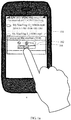
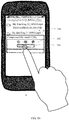
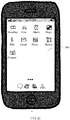
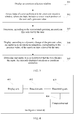
- FIGS. 1 , 1a , 1b , 4 , 4a , 6 and 8 show embodiments of the present invention
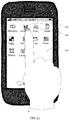
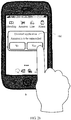
- FIGS. 2 , 2a to 2g , 3 , 5 , 7 , 9 and 10 show examples which are not part of the present invention, but helpful for the understanding thereof.
- FIGS. 1 , 1a , 1b , 4 , 4a , 6 and 8 show embodiments of the present invention
- FIGS. 2 , 2a to 2g , 3 , 5 , 7 , 9 and 10 show examples which are not part of the present invention, but helpful for the understanding thereof.
- FIG. 1 the following describes an intelligent terminal control method in an embodiment of the present invention, where the control method facilitates a user operation on a video, a folder, or a document in an intelligent terminal.
- the method specifically includes steps 101 to 104.
- each folder, video, or document is an operable object.
- the intelligent terminal includes a smartphone, a tablet computer, a wearable device, and the like.
- the intelligent terminal After being started, the intelligent terminal automatically enters the object management window, or the intelligent terminal may enter the object management window by using a user operation.
- the intelligent terminal When the user performs an operation in the object management window, the intelligent terminal needs to detect the screen touch position of the user, and obtain the pressure value of a screen touch.
- the pressure value may be obtained by a component such as a pressure sensor.
- the intelligent terminal determines, according to the screen touch position of the user, an object to be operated on, and the object to be operated on is the object selected by the user.
- the preset threshold may be set by the intelligent terminal by default or be configured by the user.
- the compressing the object selected by the user includes: compressing, in the object management window according to a preset compression rate, the object selected by the user.
- the method before the compressing the object selected by the user, the method further includes:
- the compressing the object selected by the user includes: performing, in the object management window, storage capacity compression on the object selected by the user.
- a user taps a document on an object management window, and when an intelligent terminal detects that a pressure value of a screen touch position of the user is greater than or equal to a preset threshold, the document is compressed to generate a package.
- a user taps a screen of an intelligent terminal to enter a file list, selects multiple files, and applies pressure on the screen, and when the intelligent terminal detects that a pressure value of the pressure is greater than or equal to a preset threshold, the file selected by the user is compressed into a package.
- a user taps a package on an object management window, and when an intelligent terminal detects that the user taps the package, and a pressure value applied on a screen of the intelligent terminal is greater than or equal to a preset threshold, decompression is performed on the package. Similarly, by using the method, the user may select multiple packages for decompression.
- an object selected by a user is compressed or decompressed by detecting a pressure value, and a package may be generated or a package may be decompressed to generate a file on a default path or a path set by the user.
- the control method facilitates a user operation on an application program and a document in an intelligent terminal.
- the method specifically includes steps 201 to 205.
- each application program, folder, video, image, or document is an operable object.
- the intelligent terminal includes a smartphone, a tablet computer, a wearable device, and the like.
- the intelligent terminal After being started, the intelligent terminal automatically enters the object management window, or the intelligent terminal may enter the object management window by using a user operation.
- the intelligent terminal When the user performs an operation in the object management window, the intelligent terminal needs to detect the screen touch position of the user, and obtain the pressure value of a screen touch.
- the pressure value may be obtained by a component such as a pressure sensor.
- the intelligent terminal determines, according to the screen touch position of the user, an object to be operated on, and the object to be operated on is the object selected by the user. For example, if the screen displays multiple objects that can be selected, such as photo thumbnails, and the user touches one of the thumbnails, it is determined that the user selects a photo corresponding to the thumbnail. If the screen displays one photo in full screen, and the user touches to select any position of the photo, it is determined that the user selects this photo object.
- a first implementation manner of the remove trigger may be a remove confirmation button, and may be displayed, for example, in a form of a dialog box. The user may tap Yes or No in the dialog box to determine an operation of the user itself.
- a second implementation manner of the remove trigger may be an animation.
- the remove trigger may be the remove confirmation button, and may be displayed, for example, in the form of the dialog box. If the user taps Yes or Confirm in the dialog box, the remove trigger is activated, and the intelligent terminal executes the remove operation on the object selected by the user.
- the object selected by the user may include an application program, a document, a folder, a video, an image, and the like.
- the remove operation includes removing files such as a folder, a document, a video, and an image, and also includes an application program uninstallation operation.
- the displaying a remove trigger when the pressure value is greater than or equal to a preset threshold includes:
- the object selected by the user may include an application program, a document, a folder, a video, an image, and the like.
- the remove operation includes removing files such as a folder, a document, a video, and an image, and also includes an application program uninstallation operation.
- the method further includes:
- a remove operation is executed on an object selected by a user; when the object selected by the user is an application program or an operating system program, an uninstall operation is performed on the application program or the operating system program; when the object selected by the user is an object of the following types, the object is removed.
- the object types include a picture, a text, a video, music, a contact, a message, an email, an application note, a search record, a shopping record, a forum post, an alarm, and the like.
- a user is prompted, in a remove animation manner, that an intelligent terminal is to remove an object selected by the user. For example, in a process of removing (including uninstalling an application program), one or more cracks occur in an object icon selected by a user until the object icon totally falls apart, as shown in FIG. 2d to FIG. 2g . If the user cancels the operation, the cracks decrease until the icon restores to its original state, as shown in FIG. 2g to 2d .
- FIG. 3 describes an intelligent terminal control method, and the control method includes steps 301 to 305:
- a suitable emoticon is generally selected on the emoticon selection window to express an emotional tendency.
- the intelligent terminal When the user performs an operation on an emoticon selection window, the intelligent terminal needs to detect the screen touch position of the user, and obtain the pressure value of a screen touch.
- the pressure value may be obtained by using a pressure sensor.
- the intelligent terminal determines, according to the screen touch position of the user, an emoticon type to be operated on, where the emoticon type to be operated on includes emoticons such as happiness, sadness, and each emoticon is a collection.
- emoticons such as happiness, sadness
- each emoticon is a collection.
- a collection of happiness includes: smile, laugh, guffaw, and the like.
- a different pressure value causes a change to the emoticon or the emoticon animation selected by the user.
- the emoticon type selected by the user is a happiness type (for example, a smile icon)
- a face icon stays in a smile state
- the pressure value is greater than or equal to the second preset threshold and less than a third preset threshold
- the face icon stays in a guffaw state.
- the determining and applying the currently displayed emoticon or emoticon animation includes the emoticon displayed on the screen when the finger of the user leaves the screen.
- the applying the emoticon includes sending the emoticon, selecting the emoticon, or the like.
- a change in a form occurs, according to a value of pressure applied by a user on a screen, in an emoticon type selected by a user. For example, when the pressure applied by the user on the screen is less than a first preset value, a selected object may be smile; when the pressure applied by the user on the screen is greater than or equal to the first preset value, the selected object may be guffaw.
- the first preset value may be set by an intelligent terminal by default or may be configured by the user.
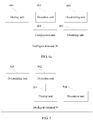
- FIG. 4 is an intelligent terminal 40, where the intelligent terminal 40 may be a wearable device, a smartphone, a tablet computer, and the like.
- the intelligent terminal includes a display unit 401, a detection unit 402, a determining unit 403, and a compression unit 404.
- the display unit 401 is configured to display an object management window.
- the object management window includes many objects, and the objects may be a folder, a video, a document, or the like.
- the detection unit 402 is configured to detect input of a user performed in the object management window, where the input includes a screen touch position of the user and a pressure value.
- the detection unit 402 detects the screen touch position of the user and obtains the pressure value of a screen touch.
- the determining unit 403 is configured to determine, according to the screen touch position detected by the detected unit 402, an object selected by the user.
- the determining unit 403 determines the object selected by the user such as a video, a document, and folder.
- the compression unit 404 is configured to compress, when the pressure value is greater than or equal to a preset threshold, the object selected by the user.
- the compression unit 404 compresses the object selected by the user.
- compression manners for example, performing compression according to a preset compression rate or performing storage capacity compression.
- the compression unit 404 is specifically configured to compress, in the object management window according to the preset compression rate, the object selected by the user.
- the object selected by the user may be one or more.
- the intelligent terminal 40 further includes an obtaining unit 405.
- the obtaining unit 405 is specifically configured to obtain a compression rate according to the pressure value.
- the compression unit 404 is specifically configured to compress, in the object management window according to the obtained compression rate, the object selected by the user.
- the compression unit 404 is further specifically configured to compress, in the object management window, storage capacity compression on the object selected by the user.
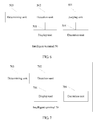
- FIG. 5 is an intelligent terminal 50, and the intelligent terminal 50 includes a display unit 501, a detection unit 502, a determining unit 503, and an execution unit 504.
- the display unit 501 is configured to display an object management window.
- the object management window includes many objects, and an object may be an application program, a folder, a video, an image, a document, or the like.
- the detection unit 502 is configured to detect input of a user performed in the object management window, where the input includes a screen touch position of the user and a pressure value.
- the detection unit 502 needs to detect the screen touch position of the user and obtain the pressure value of a screen touch.
- the determining unit 503 is configured to determine, according to the screen touch position, an object selected by the user.
- the user may select one or more objects at one time, and the determining unit 503 performs confirmation according to the user selection. For example, if the screen displays multiple objects that can be selected, such as photo thumbnails, and the user touches one of the thumbnails, it is determined that the user selects a photo corresponding to the thumbnail. If the screen displays one photo in full screen, and the user touches to select any position of the photo, it is determined that the user selects this photo object.
- the display unit 501 is further configured to display a remove trigger when the pressure value is greater than or equal to a preset threshold.
- a first implementation manner of the remove trigger may be a remove confirmation button, and may be displayed, for example, in a form of a dialog box. The user may tap Yes or No in the dialog box to determine an operation of the user itself.
- a second implementation manner of the remove trigger may be an animation.
- the execution unit 504 is configured to execute, when the remove trigger displayed by the display unit 501 is activated, a remove operation on the object selected by the user.
- the remove trigger may be the remove confirmation button, and may be displayed, for example, in the form of the dialog box. If the user taps Yes or Confirm in the dialog box, the remove trigger is activated, and the remove operation is executed on the object selected by the user.
- the object selected by the user may include an application program, a document, a folder, a video, an image, and the like.
- the remove operation includes removing files such as a folder, a document, a video, and an image, and also includes an application program uninstallation operation.
- the display unit 501 is specifically configured to display a remove animation when the pressure value is greater than or equal to the preset threshold.
- the execution unit 504 is specifically configured to execute, when the remove animation is fully displayed, the remove operation on the object selected by the user.
- the intelligent terminal 50 further includes a judging unit 601.
- the judging unit 601 is configured to determine, when the detection unit detects that the user finishes the input, whether the display unit fully displays the remove animation.
- the execution unit 504 is further configured to, when the remove animation is not fully displayed, stop displaying the remove animation, and reversely demonstrate, from a stop point, the displayed remove animation from back to front.
- the intelligent terminal demonstrates the remove animation
- the user only needs to release screen touch input to abandon the remove operation. Because the remove animation stops without being fully demonstrated, the remove trigger is not activated, and the remove operation is not executed on the object selected by the user.
- the display unit 501 is specifically configured to display the remove confirmation button when the pressure value is greater than or equal to the preset threshold.
- the execution unit 504 is further configured to execute, when the remove confirmation button is selected, the remove operation on the object selected by the user.
- FIG. 7 is an intelligent terminal 70, and the intelligent terminal 70 includes a display unit 701, a detection unit 702, a determining unit 703, and an execution unit 704.
- the display unit 701 is configured to display an emoticon selection window.
- a suitable emoticon is generally selected on the emoticon. selection window to express an emotional tendency.
- the detection unit 702 is configured to detect input of a user performed on the emoticon selection window, where the input includes a screen touch position of the user and a pressure value.
- the detection unit 702 needs to detect the screen touch position of the user and obtain the pressure value of a screen touch.
- the determining unit 703 is configured to determine, according to the screen touch position, an emoticon type selected by the user.
- the display unit 701 is further configured to determine, according to the pressure value, an emoticon or an emoticon animation, corresponding to the pressure value, of the emoticon type selected by the user.
- a different pressure value causes a change to a form of the object selected by the user.
- the emoticon type selected by the user is a happiness type (for example, a smile icon)
- a face icon stays in a smile state
- the pressure value is greater than or equal to the second preset threshold and less than a third preset threshold
- the face icon stays in a guffaw state.
- the execution unit 704 is configured to determine and apply, when the detection unit 702 detects that the user finishes the input, the emoticon or emoticon animation currently displayed by the display unit 701.
- FIG. 8 describes a structure of an intelligent terminal according to another embodiment of the present invention, where the structure of the intelligent terminal includes at least one processor 801 (for example, a CPU), a memory 802, at least one network window 803, at least one communications bus 804, a display 805, and a pressure sensor 806.
- the processor 801 is configured to execute an executable module, such as a computer program, stored in the memory 802.
- the pressure sensor 806 is configured to obtain a pressure value.
- the memory 802 may include a high-speed random access memory (RAM: Random Access Memory) and may further include a non-volatile memory (non-volatile memory), for example, at least an eMMC (Embedded Multi Media Card, embedded multimedia card) memory.
- eMMC embedded Multi Media Card, embedded multimedia card
- the memory 802 stores a program 8021, and the program 8021 may be executed by the processor 801.
- This program includes:
- the compressing the object selected by the user includes: compressing, according to a preset compression rate in the object management window, the object selected by the user into a package.
- the program before the compressing the object selected by the user, the program further includes:
- the compressing the object selected by the user includes: performing, in the object management window, storage capacity compression on the object selected by the user.
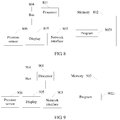
- FIG. 9 describes a structure of an intelligent terminal according to another illustrative example, where the structure of the intelligent terminal includes at least one processor 901 (for example, a CPU), a memory 902, at least one network window 903, at least one communications bus 904, a display 905, and a pressure sensor 906.
- the pressure sensor 906 is configured to obtain a pressure value.
- the processor 901 is configured to execute an executable module, such as a computer program, stored in the memory 902.
- the memory 902 may include a high-speed random access memory (RAM: Random Access Memory) and may further include a non-volatile memory (non-volatile memory), for example, at least an eMMC (Embedded Multi Media Card, embedded multimedia card) memory.
- eMMC embedded Multi Media Card, embedded multimedia card
- the memory 902 stores a program 9021, and the program 9021 may be executed by the processor 901.
- This program includes:
- the displaying a remove trigger when the pressure value is greater than or equal to a preset threshold includes:
- the displaying a remove trigger when the pressure value is greater than or equal to a preset threshold includes:
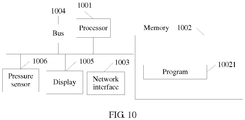
- FIG. 10 describes a structure of an intelligent terminal according to another illustrative example, where the structure of the intelligent terminal includes at least one processor 1001 (for example, a CPU), a memory 1002, at least one network window 1003, at least one communications bus 1004, a display 1005, and a pressure sensor 1006.
- the pressure sensor 1006 is configured to obtain a pressure value.
- the processor 1001 is configured to execute an executable module, such as a computer program, stored in the memory 1002.
- the memory 1002 may include a high-speed random access memory (RAM: Random Access Memory) and may further include a non-volatile memory (non-volatile memory), for example, at least an eMMC (Embedded Multi Media Card, embedded multimedia card) memory.
- eMMC embedded Multi Media Card, embedded multimedia card
- the memory 1002 stores a program 10021, and the program 10021 may be executed by the processor 1001.
- This program includes:
- the program may be stored in a computer readable storage medium. When the program runs, the processes of the methods in the embodiments are performed.
- the foregoing storage medium may include: a magnetic disk, an optical disc, a read-only memory (Read-Only Memory, ROM), or a random access memory (Random Access Memory, RAM).
Landscapes
- Engineering & Computer Science (AREA)
- Theoretical Computer Science (AREA)
- General Engineering & Computer Science (AREA)
- Physics & Mathematics (AREA)
- General Physics & Mathematics (AREA)
- Human Computer Interaction (AREA)
- Software Systems (AREA)
- User Interface Of Digital Computer (AREA)
- Telephone Function (AREA)
Claims (4)
- Procédé de commande de terminal intelligent, le procédé consistant à : afficher (101) une fenêtre de gestion d'objet ; détecter (102) une entrée d'un utilisateur effectuée dans la fenêtre de gestion d'objet, l'entrée comprenant une position d'écran tactile de l'utilisateur et une valeur de pression ; déterminer (103), selon la position d'écran tactile, un objet sélectionné par l'utilisateur ; et compresser (104), lorsque la valeur de pression est supérieure ou égale à un seuil prédéfini, l'objet sélectionné par l'utilisateur, dans lequel avant la compression (104) de l'objet sélectionné par l'utilisateur, le procédé consiste en outre à : obtenir un taux de compression en fonction de la valeur de pression ; et la compression de l'objet sélectionné par l'utilisateur consistant à : compresser, dans la fenêtre de gestion d'objet en fonction du taux de compression obtenu, l'objet sélectionné par l'utilisateur.
- Procédé selon la revendication 1, dans lequel la compression (104) de l'objet sélectionné par l'utilisateur consiste à : effectuer, dans la fenêtre de gestion d'objet, une compression de la capacité de stockage sur l'objet sélectionné par l'utilisateur.
- Terminal intelligent (40), dans lequel le terminal intelligent comprend : une unité d'affichage (401), configurée pour afficher une fenêtre de gestion d'objet ; une unité de détection (402), configurée pour détecter une entrée d'un utilisateur effectuée dans la fenêtre de gestion d'objet, l'entrée comprenant une position d'écran tactile de l'utilisateur et une valeur de pression ; une unité de détermination (403), configurée pour déterminer, selon la position d'écran tactile détectée par l'unité de détection (402), un objet sélectionné par l'utilisateur ; et une unité de compression (404), configurée pour compresser, lorsque la valeur de pression est supérieure ou égale à un seuil prédéfini, l'objet sélectionné par l'utilisateur, le terminal intelligent (40) comprenant en outre une unité d'obtention (405), l'unité d'obtention (405) étant spécifiquement configurée pour obtenir un taux de compression en fonction de la valeur de pression ; et l'unité de compression (404) est spécifiquement configurée pour compresser, dans la fenêtre de gestion d'objet en fonction du taux de compression obtenu, l'objet sélectionné par l'utilisateur.
- Terminal intelligent (40) selon la revendication 3, dans lequel : l'unité de compression (404) est spécifiquement configurée pour compresser, dans la fenêtre de gestion d'objet, la capacité de stockage sur l'objet sélectionné par l'utilisateur.
Applications Claiming Priority (2)
| Application Number | Priority Date | Filing Date | Title |
|---|---|---|---|
| CN201410295103.5A CN104063280B (zh) | 2014-06-25 | 2014-06-25 | 一种智能终端的控制方法 |
| PCT/CN2014/094709 WO2015196764A1 (fr) | 2014-06-25 | 2014-12-23 | Procédé de commande pour terminal intelligent |
Publications (3)
| Publication Number | Publication Date |
|---|---|
| EP3144811A1 EP3144811A1 (fr) | 2017-03-22 |
| EP3144811A4 EP3144811A4 (fr) | 2017-07-05 |
| EP3144811B1 true EP3144811B1 (fr) | 2020-10-21 |
Family
ID=51551003
Family Applications (1)
| Application Number | Title | Priority Date | Filing Date |
|---|---|---|---|
| EP14895686.5A Active EP3144811B1 (fr) | 2014-06-25 | 2014-12-23 | Procédé de commande pour terminal intelligent |
Country Status (6)
| Country | Link |
|---|---|
| US (1) | US10599252B2 (fr) |
| EP (1) | EP3144811B1 (fr) |
| JP (2) | JP6363736B2 (fr) |
| KR (1) | KR102010507B1 (fr) |
| CN (1) | CN104063280B (fr) |
| WO (1) | WO2015196764A1 (fr) |
Families Citing this family (59)
| Publication number | Priority date | Publication date | Assignee | Title |
|---|---|---|---|---|
| WO2014143776A2 (fr) | 2013-03-15 | 2014-09-18 | Bodhi Technology Ventures Llc | Fourniture d'interactions à distance avec un dispositif hôte à l'aide d'un dispositif sans fil |
| US10313506B2 (en) | 2014-05-30 | 2019-06-04 | Apple Inc. | Wellness aggregator |
| CN104063280B (zh) * | 2014-06-25 | 2017-09-12 | 华为技术有限公司 | 一种智能终端的控制方法 |
| EP4036685A1 (fr) | 2014-06-27 | 2022-08-03 | Apple Inc. | Interface utilisateur de taille réduite |
| EP3195098B1 (fr) | 2014-07-21 | 2024-10-23 | Apple Inc. | Interface utilisateur distante |
| JP6322765B2 (ja) | 2014-08-02 | 2018-05-09 | アップル インコーポレイテッド | コンテキスト特化ユーザインターフェース |
| US10452253B2 (en) | 2014-08-15 | 2019-10-22 | Apple Inc. | Weather user interface |
| JP2017527033A (ja) * | 2014-09-02 | 2017-09-14 | アップル インコーポレイテッド | ユーザ入力を受信するためのユーザインタフェース |
| EP3254452B1 (fr) | 2015-02-02 | 2018-12-26 | Apple Inc. | Dispositif, procédé et interface utilisateur graphique permettant d'établir une relation et une connexion entre deux dispositifs |
| WO2016144385A1 (fr) | 2015-03-08 | 2016-09-15 | Apple Inc. | Partage de constructions graphiques configurables par l'utilisateur |
| CN106293367B (zh) * | 2015-05-21 | 2020-04-07 | 阿里巴巴集团控股有限公司 | 数据对象删除方法及设备 |
| US10275116B2 (en) | 2015-06-07 | 2019-04-30 | Apple Inc. | Browser with docked tabs |
| CN104866231A (zh) * | 2015-06-12 | 2015-08-26 | 联想(北京)有限公司 | 信息处理方法、装置及电子设备 |
| CN105117245A (zh) * | 2015-08-04 | 2015-12-02 | 小米科技有限责任公司 | 卸载应用程序的方法和装置 |
| US10304347B2 (en) | 2015-08-20 | 2019-05-28 | Apple Inc. | Exercised-based watch face and complications |
| CN105138222B (zh) * | 2015-08-26 | 2018-12-04 | 美国掌赢信息科技有限公司 | 一种选择表情图标的方法和电子设备 |
| CN105138242A (zh) * | 2015-09-09 | 2015-12-09 | 广东欧珀移动通信有限公司 | 一种应用程序的卸载方法及移动终端 |
| CN105468282B (zh) * | 2015-11-16 | 2019-02-12 | Oppo广东移动通信有限公司 | 一种图标编辑的启动方法及终端设备 |
| CN105320544B (zh) * | 2015-11-17 | 2019-06-14 | Oppo广东移动通信有限公司 | 一种应用程序的卸载方法及装置 |
| CN105335068A (zh) * | 2015-11-18 | 2016-02-17 | 广东欧珀移动通信有限公司 | 一种应用删除方法及终端设备 |
| JP6656364B2 (ja) * | 2015-12-22 | 2020-03-04 | 華為技術有限公司Huawei Technologies Co.,Ltd. | 圧力を使用することによってオブジェクトをフィルタリングするための方法および装置 |
| CN105653193A (zh) * | 2015-12-31 | 2016-06-08 | 宇龙计算机通信科技(深圳)有限公司 | 一种搜索的方法及终端 |
| CN105677185A (zh) * | 2016-01-11 | 2016-06-15 | 广东欧珀移动通信有限公司 | 数据压缩方法及移动终端 |
| CN105739898A (zh) * | 2016-01-29 | 2016-07-06 | 深圳天珑无线科技有限公司 | 通过压力触控技术按压功能按钮的快捷操作方法及设备 |
| JP6695438B2 (ja) * | 2016-02-19 | 2020-05-20 | 華為技術有限公司Huawei Technologies Co.,Ltd. | 感圧タッチスクリーン上で複数のオブジェクトを操作するための方法および装置 |
| CN107193461A (zh) * | 2016-03-15 | 2017-09-22 | 中兴通讯股份有限公司 | 操作应用程序的方法及装置、终端 |
| CN106020550A (zh) * | 2016-05-27 | 2016-10-12 | 珠海市魅族科技有限公司 | 输入控制方法和输入控制电子终端 |
| US12175065B2 (en) | 2016-06-10 | 2024-12-24 | Apple Inc. | Context-specific user interfaces for relocating one or more complications in a watch or clock interface |
| DK201770423A1 (en) | 2016-06-11 | 2018-01-15 | Apple Inc | Activity and workout updates |
| US10873786B2 (en) | 2016-06-12 | 2020-12-22 | Apple Inc. | Recording and broadcasting application visual output |
| KR102051981B1 (ko) | 2016-09-07 | 2019-12-04 | 이철우 | 다차원 반응형 영상 생성장치, 방법 및 프로그램, 및 다차원 반응형 영상 재생방법 및 프로그램 |
| CN110109592B (zh) | 2016-09-23 | 2022-09-23 | 苹果公司 | 头像创建和编辑 |
| CN108536363A (zh) * | 2017-03-03 | 2018-09-14 | 上海传英信息技术有限公司 | 应用于移动终端的程序组件显示处理方法及系统 |
| DK179412B1 (en) | 2017-05-12 | 2018-06-06 | Apple Inc | Context-Specific User Interfaces |
| CN107122119B (zh) * | 2017-05-25 | 2020-12-22 | 网易(杭州)网络有限公司 | 信息处理方法、装置、电子设备及计算机可读存储介质 |
| KR102313755B1 (ko) * | 2017-06-07 | 2021-10-18 | 엘지전자 주식회사 | 이동 단말기 및 그 제어 방법 |
| US11327650B2 (en) | 2018-05-07 | 2022-05-10 | Apple Inc. | User interfaces having a collection of complications |
| DK180171B1 (en) | 2018-05-07 | 2020-07-14 | Apple Inc | USER INTERFACES FOR SHARING CONTEXTUALLY RELEVANT MEDIA CONTENT |
| US12602142B2 (en) | 2018-05-07 | 2026-04-14 | Apple Inc. | User interfaces for sharing contextually relevant media content |
| CN111507143B (zh) | 2019-01-31 | 2023-06-02 | 北京字节跳动网络技术有限公司 | 表情图像效果生成方法、装置和电子设备 |
| KR102393717B1 (ko) | 2019-05-06 | 2022-05-03 | 애플 인크. | 전자 디바이스의 제한된 동작 |
| US11131967B2 (en) | 2019-05-06 | 2021-09-28 | Apple Inc. | Clock faces for an electronic device |
| US11960701B2 (en) | 2019-05-06 | 2024-04-16 | Apple Inc. | Using an illustration to show the passing of time |
| CN110515622B (zh) * | 2019-08-28 | 2023-03-31 | 百度在线网络技术(北京)有限公司 | 按钮状态的控制方法、装置、电子设备及存储介质 |
| DK180392B1 (en) | 2019-09-09 | 2021-03-12 | Apple Inc | Techniques for managing display usage |
| KR102734876B1 (ko) * | 2019-09-27 | 2024-11-28 | 애플 인크. | 그래픽 객체들을 맞춤화하기 위한 사용자 인터페이스들 |
| DK202070625A1 (en) | 2020-05-11 | 2022-01-04 | Apple Inc | User interfaces related to time |
| US11372659B2 (en) | 2020-05-11 | 2022-06-28 | Apple Inc. | User interfaces for managing user interface sharing |
| EP4439263A3 (fr) | 2020-05-11 | 2024-10-16 | Apple Inc. | Interfaces utilisateur pour gérer un partage d'interface utilisateur |
| US11921998B2 (en) | 2020-05-11 | 2024-03-05 | Apple Inc. | Editing features of an avatar |
| US11694590B2 (en) | 2020-12-21 | 2023-07-04 | Apple Inc. | Dynamic user interface with time indicator |
| US11720239B2 (en) | 2021-01-07 | 2023-08-08 | Apple Inc. | Techniques for user interfaces related to an event |
| US12182373B2 (en) | 2021-04-27 | 2024-12-31 | Apple Inc. | Techniques for managing display usage |
| US11921992B2 (en) | 2021-05-14 | 2024-03-05 | Apple Inc. | User interfaces related to time |
| WO2022245669A1 (fr) | 2021-05-15 | 2022-11-24 | Apple Inc. | Interfaces utilisateur pour des entraînements de groupe |
| EP4323857B1 (fr) | 2021-05-21 | 2025-04-23 | Apple Inc. | Interfaces utilisateur d'éditeur d'autocollants d'avatar |
| US12493267B2 (en) | 2022-01-24 | 2025-12-09 | Apple Inc. | User interfaces for indicating time |
| US12417596B2 (en) | 2022-09-23 | 2025-09-16 | Apple Inc. | User interfaces for managing live communication sessions |
| US20250238129A1 (en) | 2024-01-18 | 2025-07-24 | Apple Inc. | User interfaces integrating hardware buttons |
Family Cites Families (39)
| Publication number | Priority date | Publication date | Assignee | Title |
|---|---|---|---|---|
| JP2005142929A (ja) | 2003-11-07 | 2005-06-02 | Sony Ericsson Mobilecommunications Japan Inc | 携帯端末 |
| US7619616B2 (en) | 2004-12-21 | 2009-11-17 | Microsoft Corporation | Pressure sensitive controls |
| KR101395780B1 (ko) | 2007-07-27 | 2014-05-16 | 삼성전자주식회사 | 촉각 감지를 위한 압력 센서 어레이 장치 및 방법 |
| CN101488069A (zh) | 2008-01-16 | 2009-07-22 | 宏达国际电子股份有限公司 | 功能切换方法及系统 |
| JP2009265815A (ja) * | 2008-04-23 | 2009-11-12 | Fujifilm Corp | 画像ファイル管理装置及びデジタルカメラ |
| US10983665B2 (en) * | 2008-08-01 | 2021-04-20 | Samsung Electronics Co., Ltd. | Electronic apparatus and method for implementing user interface |
| CN101685370A (zh) | 2008-09-26 | 2010-03-31 | 联想(北京)有限公司 | 一种进行浏览控制的方法、装置及电子设备 |
| KR101640463B1 (ko) | 2009-05-19 | 2016-07-18 | 삼성전자 주식회사 | 휴대 단말기의 운용 방법 및 이를 지원하는 휴대 단말기 |
| US8988191B2 (en) | 2009-08-27 | 2015-03-24 | Symbol Technologies, Inc. | Systems and methods for pressure-based authentication of an input on a touch screen |
| US8363020B2 (en) | 2009-08-27 | 2013-01-29 | Symbol Technologies, Inc. | Methods and apparatus for pressure-based manipulation of content on a touch screen |
| JP5182260B2 (ja) | 2009-09-02 | 2013-04-17 | ソニー株式会社 | 操作制御装置、操作制御方法およびコンピュータプログラム |
| JP5750875B2 (ja) * | 2010-12-01 | 2015-07-22 | ソニー株式会社 | 情報処理装置、情報処理方法及びプログラム |
| KR101304321B1 (ko) | 2010-01-22 | 2013-09-11 | 전자부품연구원 | 싱글 터치 압력에 기반한 ui 제공방법 및 이를 적용한 전자기기 |
| US8839150B2 (en) * | 2010-02-10 | 2014-09-16 | Apple Inc. | Graphical objects that respond to touch or motion input |
| WO2011102689A2 (fr) | 2010-02-19 | 2011-08-25 | Soon Jo Woo | Appareil d'entrée de clé plurilingue et procédé associé |
| JP5573487B2 (ja) | 2010-08-20 | 2014-08-20 | ソニー株式会社 | 情報処理装置、プログラム及び操作制御方法 |
| CN101980117A (zh) | 2010-10-20 | 2011-02-23 | 宇龙计算机通信科技(深圳)有限公司 | 触摸操控方法及触摸操控装置 |
| KR101498457B1 (ko) * | 2010-10-22 | 2015-03-05 | 에스케이플래닛 주식회사 | 복수의 터치를 이용하여 파일압축을 수행하는 단말 및 파일압축방법 |
| US9262002B2 (en) * | 2010-11-03 | 2016-02-16 | Qualcomm Incorporated | Force sensing touch screen |
| CN102479040B (zh) * | 2010-11-25 | 2015-06-24 | 联想(北京)有限公司 | 一种触摸处理方法及便携移动终端 |
| KR101813028B1 (ko) * | 2010-12-17 | 2017-12-28 | 엘지전자 주식회사 | 이동 단말기 및 그 디스플레이 제어 방법 |
| JP2012215942A (ja) * | 2011-03-31 | 2012-11-08 | Ntt Docomo Inc | 入力装置及び入力対象文字選択方法 |
| US8508494B2 (en) | 2011-06-01 | 2013-08-13 | Motorola Mobility Llc | Using pressure differences with a touch-sensitive display screen |
| US8587542B2 (en) | 2011-06-01 | 2013-11-19 | Motorola Mobility Llc | Using pressure differences with a touch-sensitive display screen |
| JP2013016082A (ja) | 2011-07-05 | 2013-01-24 | Canon Inc | ユーザインタフェース装置及びその制御方法 |
| US9417754B2 (en) * | 2011-08-05 | 2016-08-16 | P4tents1, LLC | User interface system, method, and computer program product |
| KR101933054B1 (ko) * | 2011-12-16 | 2019-03-18 | 삼성전자주식회사 | 휴대단말에서 시각 효과 제공 방법 및 장치 |
| US9400600B2 (en) | 2011-12-16 | 2016-07-26 | Samsung Electronics Co., Ltd. | Method, apparatus, and graphical user interface for providing visual effects on a touchscreen display |
| KR20130092328A (ko) * | 2012-02-10 | 2013-08-20 | 주식회사 켐트로닉스 | 압력센서를 이용하여 화면에 표시되는 아이템의 크기를 조절할 수 있는 디스플레이장치 |
| CN103294183B (zh) | 2012-03-05 | 2017-03-01 | 联想(北京)有限公司 | 终端设备及其对压力进行反馈的方法 |
| EP2648086A3 (fr) | 2012-04-07 | 2018-04-11 | Samsung Electronics Co., Ltd | Procédé de commande d'objet réalisé dans un dispositif comprenant un affichage transparent, dispositif et support d'enregistrement lisible par ordinateur associé |
| CN103376981A (zh) | 2012-04-19 | 2013-10-30 | 富泰华工业(深圳)有限公司 | 绘图系统及方法、以及具有该绘图系统的触控式电子装置 |
| WO2013169846A1 (fr) | 2012-05-09 | 2013-11-14 | Yknots Industries Llc | Dispositif, procédé et interface graphique utilisateur pour afficher des informations supplémentaires en réponse à un contact d'utilisateur |
| EP2847659B1 (fr) * | 2012-05-09 | 2019-09-04 | Apple Inc. | Dispositif, procédé et interface graphique utilisateur permettant une transition entre des états d'affichage en réponse à un geste |
| US8816989B2 (en) | 2012-05-22 | 2014-08-26 | Lenovo (Singapore) Pte. Ltd. | User interface navigation utilizing pressure-sensitive touch |
| CN102830905A (zh) | 2012-07-02 | 2012-12-19 | 人民搜索网络股份公司 | 基于点击力度的触摸屏设备解锁装置及方法 |
| KR101399145B1 (ko) | 2012-09-20 | 2014-05-30 | 한국과학기술원 | 터치스크린 기반 스마트폰의 안전한 파지 및 조작을 위한 gui 위젯 |
| US9891759B2 (en) | 2012-09-28 | 2018-02-13 | Apple Inc. | Frustrated total internal reflection and capacitive sensing |
| CN104063280B (zh) * | 2014-06-25 | 2017-09-12 | 华为技术有限公司 | 一种智能终端的控制方法 |
-
2014
- 2014-06-25 CN CN201410295103.5A patent/CN104063280B/zh active Active
- 2014-12-23 WO PCT/CN2014/094709 patent/WO2015196764A1/fr not_active Ceased
- 2014-12-23 US US15/319,354 patent/US10599252B2/en active Active
- 2014-12-23 KR KR1020177000381A patent/KR102010507B1/ko active Active
- 2014-12-23 JP JP2016571704A patent/JP6363736B2/ja active Active
- 2014-12-23 EP EP14895686.5A patent/EP3144811B1/fr active Active
-
2018
- 2018-06-28 JP JP2018123550A patent/JP6677425B2/ja active Active
Non-Patent Citations (1)
| Title |
|---|
| None * |
Also Published As
| Publication number | Publication date |
|---|---|
| JP2017520840A (ja) | 2017-07-27 |
| BR112016030175A2 (pt) | 2018-07-17 |
| US20170123571A1 (en) | 2017-05-04 |
| CN104063280B (zh) | 2017-09-12 |
| CN104063280A (zh) | 2014-09-24 |
| KR102010507B1 (ko) | 2019-08-13 |
| KR20170016451A (ko) | 2017-02-13 |
| EP3144811A1 (fr) | 2017-03-22 |
| EP3144811A4 (fr) | 2017-07-05 |
| JP6363736B2 (ja) | 2018-07-25 |
| JP6677425B2 (ja) | 2020-04-08 |
| JP2018185836A (ja) | 2018-11-22 |
| US10599252B2 (en) | 2020-03-24 |
| WO2015196764A1 (fr) | 2015-12-30 |
| BR112016030175A8 (pt) | 2022-06-28 |
Similar Documents
| Publication | Publication Date | Title |
|---|---|---|
| EP3144811B1 (fr) | Procédé de commande pour terminal intelligent | |
| RU2663338C1 (ru) | Способ для открывания файла в папке и терминал | |
| CN107395877B (zh) | 一种终端防误触方法及终端 | |
| KR102223698B1 (ko) | 변경을 커밋하기 전에 문서에서 제안된 변경의 효과 보기 | |
| US20100042933A1 (en) | Region selection control for selecting browser rendered elements | |
| CN105373326B (zh) | 数据处理系统及方法 | |
| CN105677182B (zh) | 一种信息处理方法及终端 | |
| WO2017005085A1 (fr) | Procédé, appareil et terminal de compression de données | |
| CN105242807B (zh) | 一种消息查看方法及终端 | |
| CN105556450A (zh) | 用于控制设备的柔性设备、方法以及用于通过柔性设备显示对象的方法和装置 | |
| CN105335045A (zh) | 变更桌面图标的方法及系统 | |
| CN103853443A (zh) | 一种输入界面切换方法及装置、电子设备 | |
| CN104965731A (zh) | 一种数据处理方法及电子终端 | |
| CN106034178A (zh) | 一种智能终端上应用的切换方法及装置 | |
| CN104410790A (zh) | 一种信息处理方法及电子设备 | |
| JP2015011370A (ja) | 情報処理装置、gui操作支援方法、及びプログラム | |
| JP6656364B2 (ja) | 圧力を使用することによってオブジェクトをフィルタリングするための方法および装置 | |
| EP2849058A1 (fr) | Procédé et dispositif pour afficher un message associé à une application | |
| US20140237368A1 (en) | Proxying non-interactive controls to enable narration | |
| TWI639942B (zh) | 快速複製粘貼系統及方法 | |
| US9292511B2 (en) | Information processing method and electronic device | |
| CN107402911A (zh) | 用于终端的文本编辑方法和装置 | |
| BR112016030175B1 (pt) | Métodos de controle de terminais inteligentes e terminais inteligentes | |
| KR20190063937A (ko) | 표시 영역 자동 분할 방법 및 장치 | |
| WO2017201946A1 (fr) | Procédé et dispositif permettant de faire fonctionner un objet cible |
Legal Events
| Date | Code | Title | Description |
|---|---|---|---|
| STAA | Information on the status of an ep patent application or granted ep patent |
Free format text: STATUS: THE INTERNATIONAL PUBLICATION HAS BEEN MADE |
|
| PUAI | Public reference made under article 153(3) epc to a published international application that has entered the european phase |
Free format text: ORIGINAL CODE: 0009012 |
|
| STAA | Information on the status of an ep patent application or granted ep patent |
Free format text: STATUS: REQUEST FOR EXAMINATION WAS MADE |
|
| 17P | Request for examination filed |
Effective date: 20161212 |
|
| AK | Designated contracting states |
Kind code of ref document: A1 Designated state(s): AL AT BE BG CH CY CZ DE DK EE ES FI FR GB GR HR HU IE IS IT LI LT LU LV MC MK MT NL NO PL PT RO RS SE SI SK SM TR |
|
| AX | Request for extension of the european patent |
Extension state: BA ME |
|
| REG | Reference to a national code |
Ref country code: DE Ref legal event code: R079 Ref document number: 602014071576 Country of ref document: DE Free format text: PREVIOUS MAIN CLASS: G06F0009480000 Ipc: G06F0003048800 |
|
| A4 | Supplementary search report drawn up and despatched |
Effective date: 20170602 |
|
| RIC1 | Information provided on ipc code assigned before grant |
Ipc: G06F 3/0481 20130101ALI20170529BHEP Ipc: G06F 3/0484 20130101ALI20170529BHEP Ipc: G06F 3/0488 20130101AFI20170529BHEP Ipc: G06F 3/0482 20130101ALI20170529BHEP |
|
| DAX | Request for extension of the european patent (deleted) | ||
| GRAP | Despatch of communication of intention to grant a patent |
Free format text: ORIGINAL CODE: EPIDOSNIGR1 |
|
| STAA | Information on the status of an ep patent application or granted ep patent |
Free format text: STATUS: GRANT OF PATENT IS INTENDED |
|
| INTG | Intention to grant announced |
Effective date: 20200608 |
|
| GRAS | Grant fee paid |
Free format text: ORIGINAL CODE: EPIDOSNIGR3 |
|
| GRAA | (expected) grant |
Free format text: ORIGINAL CODE: 0009210 |
|
| STAA | Information on the status of an ep patent application or granted ep patent |
Free format text: STATUS: THE PATENT HAS BEEN GRANTED |
|
| AK | Designated contracting states |
Kind code of ref document: B1 Designated state(s): AL AT BE BG CH CY CZ DE DK EE ES FI FR GB GR HR HU IE IS IT LI LT LU LV MC MK MT NL NO PL PT RO RS SE SI SK SM TR |
|
| REG | Reference to a national code |
Ref country code: GB Ref legal event code: FG4D |
|
| REG | Reference to a national code |
Ref country code: CH Ref legal event code: EP |
|
| REG | Reference to a national code |
Ref country code: IE Ref legal event code: FG4D |
|
| REG | Reference to a national code |
Ref country code: DE Ref legal event code: R096 Ref document number: 602014071576 Country of ref document: DE |
|
| REG | Reference to a national code |
Ref country code: AT Ref legal event code: REF Ref document number: 1326500 Country of ref document: AT Kind code of ref document: T Effective date: 20201115 |
|
| REG | Reference to a national code |
Ref country code: AT Ref legal event code: MK05 Ref document number: 1326500 Country of ref document: AT Kind code of ref document: T Effective date: 20201021 |
|
| REG | Reference to a national code |
Ref country code: NL Ref legal event code: MP Effective date: 20201021 |
|
| PG25 | Lapsed in a contracting state [announced via postgrant information from national office to epo] |
Ref country code: PT Free format text: LAPSE BECAUSE OF FAILURE TO SUBMIT A TRANSLATION OF THE DESCRIPTION OR TO PAY THE FEE WITHIN THE PRESCRIBED TIME-LIMIT Effective date: 20210222 Ref country code: NO Free format text: LAPSE BECAUSE OF FAILURE TO SUBMIT A TRANSLATION OF THE DESCRIPTION OR TO PAY THE FEE WITHIN THE PRESCRIBED TIME-LIMIT Effective date: 20210121 Ref country code: NL Free format text: LAPSE BECAUSE OF FAILURE TO SUBMIT A TRANSLATION OF THE DESCRIPTION OR TO PAY THE FEE WITHIN THE PRESCRIBED TIME-LIMIT Effective date: 20201021 Ref country code: FI Free format text: LAPSE BECAUSE OF FAILURE TO SUBMIT A TRANSLATION OF THE DESCRIPTION OR TO PAY THE FEE WITHIN THE PRESCRIBED TIME-LIMIT Effective date: 20201021 Ref country code: RS Free format text: LAPSE BECAUSE OF FAILURE TO SUBMIT A TRANSLATION OF THE DESCRIPTION OR TO PAY THE FEE WITHIN THE PRESCRIBED TIME-LIMIT Effective date: 20201021 Ref country code: GR Free format text: LAPSE BECAUSE OF FAILURE TO SUBMIT A TRANSLATION OF THE DESCRIPTION OR TO PAY THE FEE WITHIN THE PRESCRIBED TIME-LIMIT Effective date: 20210122 |
|
| REG | Reference to a national code |
Ref country code: LT Ref legal event code: MG4D |
|
| PG25 | Lapsed in a contracting state [announced via postgrant information from national office to epo] |
Ref country code: AT Free format text: LAPSE BECAUSE OF FAILURE TO SUBMIT A TRANSLATION OF THE DESCRIPTION OR TO PAY THE FEE WITHIN THE PRESCRIBED TIME-LIMIT Effective date: 20201021 Ref country code: ES Free format text: LAPSE BECAUSE OF FAILURE TO SUBMIT A TRANSLATION OF THE DESCRIPTION OR TO PAY THE FEE WITHIN THE PRESCRIBED TIME-LIMIT Effective date: 20201021 Ref country code: BG Free format text: LAPSE BECAUSE OF FAILURE TO SUBMIT A TRANSLATION OF THE DESCRIPTION OR TO PAY THE FEE WITHIN THE PRESCRIBED TIME-LIMIT Effective date: 20210121 Ref country code: SE Free format text: LAPSE BECAUSE OF FAILURE TO SUBMIT A TRANSLATION OF THE DESCRIPTION OR TO PAY THE FEE WITHIN THE PRESCRIBED TIME-LIMIT Effective date: 20201021 Ref country code: IS Free format text: LAPSE BECAUSE OF FAILURE TO SUBMIT A TRANSLATION OF THE DESCRIPTION OR TO PAY THE FEE WITHIN THE PRESCRIBED TIME-LIMIT Effective date: 20210221 Ref country code: PL Free format text: LAPSE BECAUSE OF FAILURE TO SUBMIT A TRANSLATION OF THE DESCRIPTION OR TO PAY THE FEE WITHIN THE PRESCRIBED TIME-LIMIT Effective date: 20201021 Ref country code: LV Free format text: LAPSE BECAUSE OF FAILURE TO SUBMIT A TRANSLATION OF THE DESCRIPTION OR TO PAY THE FEE WITHIN THE PRESCRIBED TIME-LIMIT Effective date: 20201021 |
|
| PG25 | Lapsed in a contracting state [announced via postgrant information from national office to epo] |
Ref country code: HR Free format text: LAPSE BECAUSE OF FAILURE TO SUBMIT A TRANSLATION OF THE DESCRIPTION OR TO PAY THE FEE WITHIN THE PRESCRIBED TIME-LIMIT Effective date: 20201021 |
|
| REG | Reference to a national code |
Ref country code: DE Ref legal event code: R097 Ref document number: 602014071576 Country of ref document: DE |
|
| PG25 | Lapsed in a contracting state [announced via postgrant information from national office to epo] |
Ref country code: CZ Free format text: LAPSE BECAUSE OF FAILURE TO SUBMIT A TRANSLATION OF THE DESCRIPTION OR TO PAY THE FEE WITHIN THE PRESCRIBED TIME-LIMIT Effective date: 20201021 Ref country code: EE Free format text: LAPSE BECAUSE OF FAILURE TO SUBMIT A TRANSLATION OF THE DESCRIPTION OR TO PAY THE FEE WITHIN THE PRESCRIBED TIME-LIMIT Effective date: 20201021 Ref country code: SM Free format text: LAPSE BECAUSE OF FAILURE TO SUBMIT A TRANSLATION OF THE DESCRIPTION OR TO PAY THE FEE WITHIN THE PRESCRIBED TIME-LIMIT Effective date: 20201021 Ref country code: LT Free format text: LAPSE BECAUSE OF FAILURE TO SUBMIT A TRANSLATION OF THE DESCRIPTION OR TO PAY THE FEE WITHIN THE PRESCRIBED TIME-LIMIT Effective date: 20201021 Ref country code: RO Free format text: LAPSE BECAUSE OF FAILURE TO SUBMIT A TRANSLATION OF THE DESCRIPTION OR TO PAY THE FEE WITHIN THE PRESCRIBED TIME-LIMIT Effective date: 20201021 Ref country code: SK Free format text: LAPSE BECAUSE OF FAILURE TO SUBMIT A TRANSLATION OF THE DESCRIPTION OR TO PAY THE FEE WITHIN THE PRESCRIBED TIME-LIMIT Effective date: 20201021 |
|
| REG | Reference to a national code |
Ref country code: CH Ref legal event code: PL |
|
| PLBE | No opposition filed within time limit |
Free format text: ORIGINAL CODE: 0009261 |
|
| STAA | Information on the status of an ep patent application or granted ep patent |
Free format text: STATUS: NO OPPOSITION FILED WITHIN TIME LIMIT |
|
| PG25 | Lapsed in a contracting state [announced via postgrant information from national office to epo] |
Ref country code: MC Free format text: LAPSE BECAUSE OF FAILURE TO SUBMIT A TRANSLATION OF THE DESCRIPTION OR TO PAY THE FEE WITHIN THE PRESCRIBED TIME-LIMIT Effective date: 20201021 Ref country code: DK Free format text: LAPSE BECAUSE OF FAILURE TO SUBMIT A TRANSLATION OF THE DESCRIPTION OR TO PAY THE FEE WITHIN THE PRESCRIBED TIME-LIMIT Effective date: 20201021 |
|
| REG | Reference to a national code |
Ref country code: BE Ref legal event code: MM Effective date: 20201231 |
|
| 26N | No opposition filed |
Effective date: 20210722 |
|
| PG25 | Lapsed in a contracting state [announced via postgrant information from national office to epo] |
Ref country code: IE Free format text: LAPSE BECAUSE OF NON-PAYMENT OF DUE FEES Effective date: 20201223 Ref country code: IT Free format text: LAPSE BECAUSE OF FAILURE TO SUBMIT A TRANSLATION OF THE DESCRIPTION OR TO PAY THE FEE WITHIN THE PRESCRIBED TIME-LIMIT Effective date: 20201021 Ref country code: LU Free format text: LAPSE BECAUSE OF NON-PAYMENT OF DUE FEES Effective date: 20201223 Ref country code: AL Free format text: LAPSE BECAUSE OF FAILURE TO SUBMIT A TRANSLATION OF THE DESCRIPTION OR TO PAY THE FEE WITHIN THE PRESCRIBED TIME-LIMIT Effective date: 20201021 |
|
| PG25 | Lapsed in a contracting state [announced via postgrant information from national office to epo] |
Ref country code: LI Free format text: LAPSE BECAUSE OF NON-PAYMENT OF DUE FEES Effective date: 20201231 Ref country code: CH Free format text: LAPSE BECAUSE OF NON-PAYMENT OF DUE FEES Effective date: 20201231 Ref country code: SI Free format text: LAPSE BECAUSE OF FAILURE TO SUBMIT A TRANSLATION OF THE DESCRIPTION OR TO PAY THE FEE WITHIN THE PRESCRIBED TIME-LIMIT Effective date: 20201021 |
|
| REG | Reference to a national code |
Ref country code: GB Ref legal event code: 732E Free format text: REGISTERED BETWEEN 20220203 AND 20220209 |
|
| REG | Reference to a national code |
Ref country code: DE Ref legal event code: R081 Ref document number: 602014071576 Country of ref document: DE Owner name: XFUSION DIGITAL TECHNOLOGIES CO., LTD., ZHENGZ, CN Free format text: FORMER OWNER: HUAWEI TECHNOLOGIES CO., LTD., SHENZHEN, GUANGDONG, CN |
|
| PG25 | Lapsed in a contracting state [announced via postgrant information from national office to epo] |
Ref country code: IS Free format text: LAPSE BECAUSE OF FAILURE TO SUBMIT A TRANSLATION OF THE DESCRIPTION OR TO PAY THE FEE WITHIN THE PRESCRIBED TIME-LIMIT Effective date: 20210221 Ref country code: TR Free format text: LAPSE BECAUSE OF FAILURE TO SUBMIT A TRANSLATION OF THE DESCRIPTION OR TO PAY THE FEE WITHIN THE PRESCRIBED TIME-LIMIT Effective date: 20201021 Ref country code: MT Free format text: LAPSE BECAUSE OF FAILURE TO SUBMIT A TRANSLATION OF THE DESCRIPTION OR TO PAY THE FEE WITHIN THE PRESCRIBED TIME-LIMIT Effective date: 20201021 Ref country code: CY Free format text: LAPSE BECAUSE OF FAILURE TO SUBMIT A TRANSLATION OF THE DESCRIPTION OR TO PAY THE FEE WITHIN THE PRESCRIBED TIME-LIMIT Effective date: 20201021 |
|
| PG25 | Lapsed in a contracting state [announced via postgrant information from national office to epo] |
Ref country code: MK Free format text: LAPSE BECAUSE OF FAILURE TO SUBMIT A TRANSLATION OF THE DESCRIPTION OR TO PAY THE FEE WITHIN THE PRESCRIBED TIME-LIMIT Effective date: 20201021 |
|
| PG25 | Lapsed in a contracting state [announced via postgrant information from national office to epo] |
Ref country code: BE Free format text: LAPSE BECAUSE OF NON-PAYMENT OF DUE FEES Effective date: 20201231 |
|
| PGFP | Annual fee paid to national office [announced via postgrant information from national office to epo] |
Ref country code: DE Payment date: 20251028 Year of fee payment: 12 |
|
| PGFP | Annual fee paid to national office [announced via postgrant information from national office to epo] |
Ref country code: GB Payment date: 20251030 Year of fee payment: 12 |
|
| PGFP | Annual fee paid to national office [announced via postgrant information from national office to epo] |
Ref country code: FR Payment date: 20251110 Year of fee payment: 12 |