EP3183155B1 - Multitouch-chording-sprache - Google Patents
Multitouch-chording-sprache Download PDFInfo
- Publication number
- EP3183155B1 EP3183155B1 EP15833691.7A EP15833691A EP3183155B1 EP 3183155 B1 EP3183155 B1 EP 3183155B1 EP 15833691 A EP15833691 A EP 15833691A EP 3183155 B1 EP3183155 B1 EP 3183155B1
- Authority
- EP
- European Patent Office
- Prior art keywords
- command
- gesture
- touch sensing
- input
- sensing surface
- Prior art date
- Legal status (The legal status is an assumption and is not a legal conclusion. Google has not performed a legal analysis and makes no representation as to the accuracy of the status listed.)
- Active
Links
Images





Classifications
-
- G—PHYSICS
- G06—COMPUTING OR CALCULATING; COUNTING
- G06F—ELECTRIC DIGITAL DATA PROCESSING
- G06F3/00—Input arrangements for transferring data to be processed into a form capable of being handled by the computer; Output arrangements for transferring data from processing unit to output unit, e.g. interface arrangements
- G06F3/01—Input arrangements or combined input and output arrangements for interaction between user and computer
- G06F3/02—Input arrangements using manually operated switches, e.g. using keyboards or dials
- G06F3/023—Arrangements for converting discrete items of information into a coded form, e.g. arrangements for interpreting keyboard generated codes as alphanumeric codes, operand codes or instruction codes
- G06F3/0233—Character input methods
- G06F3/0235—Character input methods using chord techniques
-
- B—PERFORMING OPERATIONS; TRANSPORTING
- B60—VEHICLES IN GENERAL
- B60K—ARRANGEMENT OR MOUNTING OF PROPULSION UNITS OR OF TRANSMISSIONS IN VEHICLES; ARRANGEMENT OR MOUNTING OF PLURAL DIVERSE PRIME-MOVERS IN VEHICLES; AUXILIARY DRIVES FOR VEHICLES; INSTRUMENTATION OR DASHBOARDS FOR VEHICLES; ARRANGEMENTS IN CONNECTION WITH COOLING, AIR INTAKE, GAS EXHAUST OR FUEL SUPPLY OF PROPULSION UNITS IN VEHICLES
- B60K35/00—Instruments specially adapted for vehicles; Arrangement of instruments in or on vehicles
- B60K35/10—Input arrangements, i.e. from user to vehicle, associated with vehicle functions or specially adapted therefor
-
- B—PERFORMING OPERATIONS; TRANSPORTING
- B60—VEHICLES IN GENERAL
- B60K—ARRANGEMENT OR MOUNTING OF PROPULSION UNITS OR OF TRANSMISSIONS IN VEHICLES; ARRANGEMENT OR MOUNTING OF PLURAL DIVERSE PRIME-MOVERS IN VEHICLES; AUXILIARY DRIVES FOR VEHICLES; INSTRUMENTATION OR DASHBOARDS FOR VEHICLES; ARRANGEMENTS IN CONNECTION WITH COOLING, AIR INTAKE, GAS EXHAUST OR FUEL SUPPLY OF PROPULSION UNITS IN VEHICLES
- B60K35/00—Instruments specially adapted for vehicles; Arrangement of instruments in or on vehicles
- B60K35/60—Instruments characterised by their location or relative disposition in or on vehicles
-
- B—PERFORMING OPERATIONS; TRANSPORTING
- B60—VEHICLES IN GENERAL
- B60K—ARRANGEMENT OR MOUNTING OF PROPULSION UNITS OR OF TRANSMISSIONS IN VEHICLES; ARRANGEMENT OR MOUNTING OF PLURAL DIVERSE PRIME-MOVERS IN VEHICLES; AUXILIARY DRIVES FOR VEHICLES; INSTRUMENTATION OR DASHBOARDS FOR VEHICLES; ARRANGEMENTS IN CONNECTION WITH COOLING, AIR INTAKE, GAS EXHAUST OR FUEL SUPPLY OF PROPULSION UNITS IN VEHICLES
- B60K35/00—Instruments specially adapted for vehicles; Arrangement of instruments in or on vehicles
- B60K35/80—Arrangements for controlling instruments
-
- B—PERFORMING OPERATIONS; TRANSPORTING
- B62—LAND VEHICLES FOR TRAVELLING OTHERWISE THAN ON RAILS
- B62D—MOTOR VEHICLES; TRAILERS
- B62D1/00—Steering controls, i.e. means for initiating a change of direction of the vehicle
- B62D1/02—Steering controls, i.e. means for initiating a change of direction of the vehicle vehicle-mounted
- B62D1/04—Hand wheels
- B62D1/046—Adaptations on rotatable parts of the steering wheel for accommodation of switches
-
- G—PHYSICS
- G06—COMPUTING OR CALCULATING; COUNTING
- G06F—ELECTRIC DIGITAL DATA PROCESSING
- G06F3/00—Input arrangements for transferring data to be processed into a form capable of being handled by the computer; Output arrangements for transferring data from processing unit to output unit, e.g. interface arrangements
- G06F3/01—Input arrangements or combined input and output arrangements for interaction between user and computer
- G06F3/017—Gesture based interaction, e.g. based on a set of recognized hand gestures
-
- G—PHYSICS
- G06—COMPUTING OR CALCULATING; COUNTING
- G06F—ELECTRIC DIGITAL DATA PROCESSING
- G06F3/00—Input arrangements for transferring data to be processed into a form capable of being handled by the computer; Output arrangements for transferring data from processing unit to output unit, e.g. interface arrangements
- G06F3/01—Input arrangements or combined input and output arrangements for interaction between user and computer
- G06F3/03—Arrangements for converting the position or the displacement of a member into a coded form
- G06F3/041—Digitisers, e.g. for touch screens or touch pads, characterised by the transducing means
- G06F3/0414—Digitisers, e.g. for touch screens or touch pads, characterised by the transducing means using force sensing means to determine a position
-
- G—PHYSICS
- G06—COMPUTING OR CALCULATING; COUNTING
- G06F—ELECTRIC DIGITAL DATA PROCESSING
- G06F3/00—Input arrangements for transferring data to be processed into a form capable of being handled by the computer; Output arrangements for transferring data from processing unit to output unit, e.g. interface arrangements
- G06F3/01—Input arrangements or combined input and output arrangements for interaction between user and computer
- G06F3/03—Arrangements for converting the position or the displacement of a member into a coded form
- G06F3/041—Digitisers, e.g. for touch screens or touch pads, characterised by the transducing means
- G06F3/0416—Control or interface arrangements specially adapted for digitisers
- G06F3/04166—Details of scanning methods, e.g. sampling time, grouping of sub areas or time sharing with display driving
-
- G—PHYSICS
- G06—COMPUTING OR CALCULATING; COUNTING
- G06F—ELECTRIC DIGITAL DATA PROCESSING
- G06F3/00—Input arrangements for transferring data to be processed into a form capable of being handled by the computer; Output arrangements for transferring data from processing unit to output unit, e.g. interface arrangements
- G06F3/01—Input arrangements or combined input and output arrangements for interaction between user and computer
- G06F3/048—Interaction techniques based on graphical user interfaces [GUI]
- G06F3/0481—Interaction techniques based on graphical user interfaces [GUI] based on specific properties of the displayed interaction object or a metaphor-based environment, e.g. interaction with desktop elements like windows or icons, or assisted by a cursor's changing behaviour or appearance
- G06F3/0482—Interaction with lists of selectable items, e.g. menus
-
- G—PHYSICS
- G06—COMPUTING OR CALCULATING; COUNTING
- G06F—ELECTRIC DIGITAL DATA PROCESSING
- G06F3/00—Input arrangements for transferring data to be processed into a form capable of being handled by the computer; Output arrangements for transferring data from processing unit to output unit, e.g. interface arrangements
- G06F3/01—Input arrangements or combined input and output arrangements for interaction between user and computer
- G06F3/048—Interaction techniques based on graphical user interfaces [GUI]
- G06F3/0484—Interaction techniques based on graphical user interfaces [GUI] for the control of specific functions or operations, e.g. selecting or manipulating an object, an image or a displayed text element, setting a parameter value or selecting a range
- G06F3/04847—Interaction techniques to control parameter settings, e.g. interaction with sliders or dials
-
- G—PHYSICS
- G06—COMPUTING OR CALCULATING; COUNTING
- G06F—ELECTRIC DIGITAL DATA PROCESSING
- G06F3/00—Input arrangements for transferring data to be processed into a form capable of being handled by the computer; Output arrangements for transferring data from processing unit to output unit, e.g. interface arrangements
- G06F3/01—Input arrangements or combined input and output arrangements for interaction between user and computer
- G06F3/048—Interaction techniques based on graphical user interfaces [GUI]
- G06F3/0487—Interaction techniques based on graphical user interfaces [GUI] using specific features provided by the input device, e.g. functions controlled by the rotation of a mouse with dual sensing arrangements, or of the nature of the input device, e.g. tap gestures based on pressure sensed by a digitiser
- G06F3/0488—Interaction techniques based on graphical user interfaces [GUI] using specific features provided by the input device, e.g. functions controlled by the rotation of a mouse with dual sensing arrangements, or of the nature of the input device, e.g. tap gestures based on pressure sensed by a digitiser using a touch-screen or digitiser, e.g. input of commands through traced gestures
- G06F3/04883—Interaction techniques based on graphical user interfaces [GUI] using specific features provided by the input device, e.g. functions controlled by the rotation of a mouse with dual sensing arrangements, or of the nature of the input device, e.g. tap gestures based on pressure sensed by a digitiser using a touch-screen or digitiser, e.g. input of commands through traced gestures for inputting data by handwriting, e.g. gesture or text
-
- G—PHYSICS
- G06—COMPUTING OR CALCULATING; COUNTING
- G06F—ELECTRIC DIGITAL DATA PROCESSING
- G06F3/00—Input arrangements for transferring data to be processed into a form capable of being handled by the computer; Output arrangements for transferring data from processing unit to output unit, e.g. interface arrangements
- G06F3/01—Input arrangements or combined input and output arrangements for interaction between user and computer
- G06F3/048—Interaction techniques based on graphical user interfaces [GUI]
- G06F3/0487—Interaction techniques based on graphical user interfaces [GUI] using specific features provided by the input device, e.g. functions controlled by the rotation of a mouse with dual sensing arrangements, or of the nature of the input device, e.g. tap gestures based on pressure sensed by a digitiser
- G06F3/0488—Interaction techniques based on graphical user interfaces [GUI] using specific features provided by the input device, e.g. functions controlled by the rotation of a mouse with dual sensing arrangements, or of the nature of the input device, e.g. tap gestures based on pressure sensed by a digitiser using a touch-screen or digitiser, e.g. input of commands through traced gestures
- G06F3/04886—Interaction techniques based on graphical user interfaces [GUI] using specific features provided by the input device, e.g. functions controlled by the rotation of a mouse with dual sensing arrangements, or of the nature of the input device, e.g. tap gestures based on pressure sensed by a digitiser using a touch-screen or digitiser, e.g. input of commands through traced gestures by partitioning the display area of the touch-screen or the surface of the digitising tablet into independently controllable areas, e.g. virtual keyboards or menus
-
- B—PERFORMING OPERATIONS; TRANSPORTING
- B60—VEHICLES IN GENERAL
- B60K—ARRANGEMENT OR MOUNTING OF PROPULSION UNITS OR OF TRANSMISSIONS IN VEHICLES; ARRANGEMENT OR MOUNTING OF PLURAL DIVERSE PRIME-MOVERS IN VEHICLES; AUXILIARY DRIVES FOR VEHICLES; INSTRUMENTATION OR DASHBOARDS FOR VEHICLES; ARRANGEMENTS IN CONNECTION WITH COOLING, AIR INTAKE, GAS EXHAUST OR FUEL SUPPLY OF PROPULSION UNITS IN VEHICLES
- B60K2360/00—Indexing scheme associated with groups B60K35/00 or B60K37/00 relating to details of instruments or dashboards
- B60K2360/11—Instrument graphical user interfaces or menu aspects
- B60K2360/113—Scrolling through menu items
-
- B—PERFORMING OPERATIONS; TRANSPORTING
- B60—VEHICLES IN GENERAL
- B60K—ARRANGEMENT OR MOUNTING OF PROPULSION UNITS OR OF TRANSMISSIONS IN VEHICLES; ARRANGEMENT OR MOUNTING OF PLURAL DIVERSE PRIME-MOVERS IN VEHICLES; AUXILIARY DRIVES FOR VEHICLES; INSTRUMENTATION OR DASHBOARDS FOR VEHICLES; ARRANGEMENTS IN CONNECTION WITH COOLING, AIR INTAKE, GAS EXHAUST OR FUEL SUPPLY OF PROPULSION UNITS IN VEHICLES
- B60K2360/00—Indexing scheme associated with groups B60K35/00 or B60K37/00 relating to details of instruments or dashboards
- B60K2360/11—Instrument graphical user interfaces or menu aspects
- B60K2360/115—Selection of menu items
-
- B—PERFORMING OPERATIONS; TRANSPORTING
- B60—VEHICLES IN GENERAL
- B60K—ARRANGEMENT OR MOUNTING OF PROPULSION UNITS OR OF TRANSMISSIONS IN VEHICLES; ARRANGEMENT OR MOUNTING OF PLURAL DIVERSE PRIME-MOVERS IN VEHICLES; AUXILIARY DRIVES FOR VEHICLES; INSTRUMENTATION OR DASHBOARDS FOR VEHICLES; ARRANGEMENTS IN CONNECTION WITH COOLING, AIR INTAKE, GAS EXHAUST OR FUEL SUPPLY OF PROPULSION UNITS IN VEHICLES
- B60K2360/00—Indexing scheme associated with groups B60K35/00 or B60K37/00 relating to details of instruments or dashboards
- B60K2360/143—Touch sensitive instrument input devices
-
- B—PERFORMING OPERATIONS; TRANSPORTING
- B60—VEHICLES IN GENERAL
- B60K—ARRANGEMENT OR MOUNTING OF PROPULSION UNITS OR OF TRANSMISSIONS IN VEHICLES; ARRANGEMENT OR MOUNTING OF PLURAL DIVERSE PRIME-MOVERS IN VEHICLES; AUXILIARY DRIVES FOR VEHICLES; INSTRUMENTATION OR DASHBOARDS FOR VEHICLES; ARRANGEMENTS IN CONNECTION WITH COOLING, AIR INTAKE, GAS EXHAUST OR FUEL SUPPLY OF PROPULSION UNITS IN VEHICLES
- B60K2360/00—Indexing scheme associated with groups B60K35/00 or B60K37/00 relating to details of instruments or dashboards
- B60K2360/146—Instrument input by gesture
-
- B—PERFORMING OPERATIONS; TRANSPORTING
- B60—VEHICLES IN GENERAL
- B60K—ARRANGEMENT OR MOUNTING OF PROPULSION UNITS OR OF TRANSMISSIONS IN VEHICLES; ARRANGEMENT OR MOUNTING OF PLURAL DIVERSE PRIME-MOVERS IN VEHICLES; AUXILIARY DRIVES FOR VEHICLES; INSTRUMENTATION OR DASHBOARDS FOR VEHICLES; ARRANGEMENTS IN CONNECTION WITH COOLING, AIR INTAKE, GAS EXHAUST OR FUEL SUPPLY OF PROPULSION UNITS IN VEHICLES
- B60K2360/00—Indexing scheme associated with groups B60K35/00 or B60K37/00 relating to details of instruments or dashboards
- B60K2360/55—Remote control arrangements
-
- B—PERFORMING OPERATIONS; TRANSPORTING
- B60—VEHICLES IN GENERAL
- B60K—ARRANGEMENT OR MOUNTING OF PROPULSION UNITS OR OF TRANSMISSIONS IN VEHICLES; ARRANGEMENT OR MOUNTING OF PLURAL DIVERSE PRIME-MOVERS IN VEHICLES; AUXILIARY DRIVES FOR VEHICLES; INSTRUMENTATION OR DASHBOARDS FOR VEHICLES; ARRANGEMENTS IN CONNECTION WITH COOLING, AIR INTAKE, GAS EXHAUST OR FUEL SUPPLY OF PROPULSION UNITS IN VEHICLES
- B60K2360/00—Indexing scheme associated with groups B60K35/00 or B60K37/00 relating to details of instruments or dashboards
- B60K2360/77—Instrument locations other than the dashboard
- B60K2360/782—Instrument locations other than the dashboard on the steering wheel
-
- G—PHYSICS
- G06—COMPUTING OR CALCULATING; COUNTING
- G06F—ELECTRIC DIGITAL DATA PROCESSING
- G06F2203/00—Indexing scheme relating to G06F3/00 - G06F3/048
- G06F2203/041—Indexing scheme relating to G06F3/041 - G06F3/045
- G06F2203/04104—Multi-touch detection in digitiser, i.e. details about the simultaneous detection of a plurality of touching locations, e.g. multiple fingers or pen and finger
-
- G—PHYSICS
- G06—COMPUTING OR CALCULATING; COUNTING
- G06F—ELECTRIC DIGITAL DATA PROCESSING
- G06F2203/00—Indexing scheme relating to G06F3/00 - G06F3/048
- G06F2203/048—Indexing scheme relating to G06F3/048
- G06F2203/04808—Several contacts: gestures triggering a specific function, e.g. scrolling, zooming, right-click, when the user establishes several contacts with the surface simultaneously; e.g. using several fingers or a combination of fingers and pen
Definitions
- Embodiments of the present invention relate generally to human-vehicle interfaces, and, more specifically, to a multitouch chording language.
- a modern vehicle typically includes a steering wheel with a collection of fixed-function buttons for controlling various auxiliary components within the vehicle.
- a conventional steering wheel could include volume buttons for increasing and decreasing the volume of the stereo system.
- the set of buttons placed on the steering wheel usually provides access to a limited subset of the functions that the driver may wish to perform.
- most modern steering wheels only provide controls related to the stereo system and cruise control. These limitations arise from the fact that the steering wheel provides limited area on which to place fixed-function buttons.
- One problem with the approach described above is that the driver of the vehicle is required to remove at least one hand from the steering wheel in order to control any auxiliary components that lack corresponding buttons on the steering wheel.
- the driver since conventional steering wheels usually do not include buttons related to climate control, the driver must remove one of their hands from the steering wheel in order to adjust the temperature, fan speed, air conditioner (A/C), and so forth.
- A/C air conditioner
- This arrangement is problematic because the driver must divert focus away from the act of driving in order to interact with certain auxiliary components. Consequently, the ability of the driver to control the vehicle may be reduced, thereby diminishing the safety of the driver and other occupants of the vehicle.
- a typical steering wheel includes fixed-function buttons for controlling only a subset of the auxiliary components in the vehicle. Consequently, the driver is required to divert attention away from driving in order to access the other auxiliary components, potentially reducing the ability of the driver to safely operate the vehicle.
- US 2006/047386 A1 , US 2012/179328 A1 , DE 10 2010 005483 A1 , US 2011/169750 A1 , DE 10 2012 011179 A1 , US 2011/030502 A1 and DE 10 2012 010125 A1 all relate to controlling the operation of a plurality of auxiliary components within a vehicle by means of touch sensitive surfaces integrated in the steering wheel.
- One or more embodiments set forth include a computer-implemented method for controlling the operation of a plurality of auxiliary components within a vehicle as mentioned in claim 1.
- At least one advantage of the techniques set forth herein is that the driver of the vehicle need not remove either hand from the steering wheel in order to adjust the operation of auxiliary components within the vehicle, thereby improving driver safety.
- the driver can interact wth those auxiliary components without averting visual focus, further improving driver safety. With these techniques, vehicle accidents due to driver distraction may be reduced.
- FIG. 1 illustrates a multitouch control system 100 configured to control one or more auxiliary components 180 within a vehicle, according to various embodiments.
- multitouch control system 100 includes a steering wheel 110 coupled to a computing device 120 that, in turn, is coupled to a multimedia system 140, a navigation device 150, climate control 160, and cruise control 170, collectively referred to as auxiliary components 180.
- Steering wheel 110 may be manipulated, in a conventional fashion, to control the direction of a vehicle (not shown) where multitouch control system 100 resides.
- Steering wheel 110 includes left-hand touch sensing surface 112 and right-hand touch sensing surface 114.
- Left-hand touch sensing surface 112 and right-hand touch sensing surface 114 are multitouch sensing surfaces that may rely on a wide variety of different possible types of sensing for detecting multiple simultaneous touch contacts, including, for example, and without limitation, resistive sensing, capacitive sensing, visual sensing, thermal sensing, ultrasonic sensing, infrared sensing, laser-based sensing, radar-based sensing, time-of-flight sensing and structured light-based sensors, and so forth.
- Left-hand touch sensing surface 112 is configured so that a user of multitouch control system 100 (generally the driver of the vehicle) may input gestures to that touch sensing surface.
- a "gesture" may be any single or multi-finger touch sensing surface interaction, including, for example, a single of multi-finger tap gesture, a single or multi-finger tap-and-hold gesture, a single or multi-finger tap-and-slide or swipe gesture, and so forth, without limitation.
- Right-hand touch sensing surface 114 is configured similarly to left-hand touch sensing surface 112, i.e., the user of multitouch control system 100 may input gestures to that touch sensing surface.
- Left-hand touch sensing surface 112 and right-hand touch sensing surface 114 may be coupled to, or included within, steering wheel 110 according to a wide variety of different positions and/or orientations. Generally, those touch sensing surfaces are located to allow the user to input gestures without removing either hand from steering wheel 110, as described in greater detail below in conjunction with Figures 2A-2B .
- a user of multitouch control system 100 inputs gestures into left-hand touch sensing surface 112 and right-hand touch sensing surface 114 in order to control the operation of multimedia system 140, navigation device 150, climate control 160, cruise control 170, and potentially other auxiliary components (not shown) beyond auxiliary components 180.
- Other auxiliary components could include, for example, a power window subsystem, a power locks subsystem, headlight controls, windshield wiper controls, traction or anti-slip settings, four-wheel drive controls, seat adjustment systems, interior lighting, a powered side and rear view mirror system, and so forth, without limitation.
- computing device 120 interprets the left-hand gesture as a selection of a mode associated with a particular auxiliary component 180. If the user also inputs a right-hand gesture to right-hand touch sensing surface 114 at approximately the same time, computing device 120 interprets the right-hand gesture as a command to be issued to that auxiliary component.
- the user could input a single tap to left-hand touch sensing surface 112 to indicate the selection of a multimedia mode associated with multimedia system 140, and input an upward swipe to right-hand touch sensing surface 114 to indicate a volume increase for music currently being played by multimedia system 140.
- Computing device 120 is configured to receive and interpret a wide variety of different gestures from left-hand touch sensing surface 112 and right-hand touch sensing surface 114, as described below in conjunction with Figures 4A-4D .
- Computing device 120 includes a processing unit 122, input/output (I/O) devices 124, and a memory unit 126, coupled together.
- Processing unit 122 may be any technically feasible unit configured to process data, including, for example, a central processing unit (CPU) or application-specific integrated circuit (ASIC), without limitation.
- I/O devices 124 include devices configured to receive input (such as, e.g., a set of buttons, without limitation) devices configured to deliver output (such as, e.g., a display screen, without limitation), as well as devices capable of both receiving input and delivering output (such as, e.g., a universal serial bus (USB) port, without limitation).
- input such as, e.g., a set of buttons, without limitation
- devices configured to deliver output (such as, e.g., a display screen, without limitation)
- USB universal serial bus
- Memory unit 126 may be any technically feasible unit configured to store data and program code, including, for example, a random access memory (RAM) module or a hard disk, without limitation.
- Memory unit 126 includes a multitouch interface application 130 that, when executed by processing unit 122, issues commands to auxiliary components 180 in response to gestures received from left-hand touch sensing surface 112 and right-hand touch sensing surface 114.
- Multitouch interface application 130 includes a mode map 132 and a command map 134.
- Mode map 132 defines a mapping between left-hand gestures and modes associated with auxiliary components 180
- command map 134 includes a mapping between right-hand gestures and commands associated with those auxiliary components.
- multitouch interface application 130 receives gestures from left-hand touch sensing surface 112 and interprets those gestures, based on mode map 132, as selections of particular modes associated with an auxiliary component. Multitouch interface application 130 also receives gestures from right-hand touch sensing surface 114 and interprets those gestures, based on a selected mode and based on command map 134, as commands to be issued to the auxiliary component associated with the selected mode.
- multitouch interface application 130 may identify a specific subset of commands within command map 134 that correspond to the auxiliary component associated with the selected mode. As such, multitouch interface application 130 identifies a relevant portion of command map 134 upon receiving a selection of a mode (via a left-hand gesture), and then interprets a right-hand gesture based on the relevant portion of command map 134.
- multitouch interface application 130 receives a single tap (left-hand gesture) and an upward swipe (right-hand gesture) at approximately the same time.
- multitouch interface application 130 could then identify a subset of commands within command map 134 relevant to multimedia system 140.
- multitouch interface application 130 could interpret the upward swipe as corresponding to a "volume increase" command based on the identified subset of command map 134.
- Multitouch interface application 130 could then issue a volume increase command to multimedia system 140 in order to increase the volume.
- An exemplary mapping between specific modes and specific portions of command map 134 is described in greater detail below in conjunction with Figure 3 .
- the user of multitouch control system 100 is capable of controlling the operation of a multitude of auxiliary components without removing either hand from steering wheel 110.
- control of the vehicle where multitouch control system 100 resides may be improved.
- the user need not avert visual focus to auxiliary components, the user can maintain focus on driving.
- multitouch interface application 130 may also interpret right-hand gestures as corresponding to mode selections and left-hand gestures as corresponding to commands, and that the particular "handedness" of embodiments of the invention is immaterial.
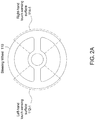
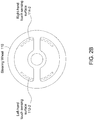
- FIGS 2A-2B illustrate exemplary configurations of left-hand touch sensing surface 112 and right-hand touch sensing surface 114 included within steering wheel 110, according to various embodiments.
- steering wheel 110 includes left-hand touch sensing surface 112-1 and right-hand touch sensing surface 114-1 coupled to a central hub of steering wheel 110 and extending radially outwards. The user may extend their fingers slightly in order to input left-hand gestures and right-hand gestures to those touch sensing surfaces without removing either hand from steering wheel 110.
- steering wheel 110 includes left-hand touch sensing surface 112-2 and right-hand touch sensing surface 114-2 coupled to an inner surface of that steering wheel.
- the user need not extend their fingers to input gestures to those touch sensing surfaces, because nominally, the user grasps steering wheel 110 at the location of left-hand touch sensing surface 112 and right-hand touch sensing surface 114.
- the techniques described herein are not limited to steering wheels and may be applicable to any type of bi-manual mechanism including, for example, and without limitation, handle bars (e.g., on motorcycles, all-terrain vehicles (ATVs), snow mobiles, jet skis, etc., without limitation), control yokes, cyclics and collectives (e.g., on airplanes and helicopters, etc., without limitation), other types of bi-manual control mechanisms, and any other type of mechanism that includes a different handle or hand position for each hand of the user.
- handle bars e.g., on motorcycles, all-terrain vehicles (ATVs), snow mobiles, jet skis, etc., without limitation
- control yokes e.g., on airplanes and helicopters, etc., without limitation
- cyclics and collectives e.g., on airplanes and helicopters, etc., without limitation
- bi-manual control mechanisms e.g., on airplanes and helicopters, etc., without limitation
- steering wheel 110 includes one or more touch sensing surfaces distributed around steering wheel 110, and multitouch interface application 130 interprets gesture inputs as corresponding to particular hands of the user regardless of the rotational state of steering wheel 110.
- multitouch interface application 130 may be configured to establish "virtual sensing zones" that maintain specific positions despite rotation of steering wheel 110.
- multitouch interface application 130 may establish a left-hand virtual sensing zone that is generally associated with the left side of steering wheel 130 and remains associated with that left side when steering wheel 130 is rotated. Likewise, multitouch interface application 130 may establish a right-hand virtual sensing zone that is generally associated with the right side of steering wheel 130 and remains associated with that right side when steering wheel 130 is rotated.
- multitouch interface application 130 may identify the particular virtual sensing zone with which each gesture input should be associated by accounting for the rotational state of the steering wheel (e.g., via a rotary sensor, without limitation).
- steering wheel 110 when steering wheel 110 is in a non-rotated state (i.e., the user drives in a straight line), the left hand of the user could reside on a first portion of steering wheel 110 and the right hand of the user could resides on a second portion of steering wheel 110.
- the user then rotates steering wheel 110 by 180 degrees, (i.e., the user drives along a curve) the first portion of steering wheel 110 and the second portion of steering wheel 110 would then exchange positions, and the left hand of the user would then reside on the second portion and the right hand of the user would then reside on the first portion.
- multitouch interface application 130 could interpret gesture inputs received from the left hand of the user as corresponding to the left-hand virtual sensing zone, regardless of the exact position of that left hand on steering wheel 110.
- multitouch interface application 130 could interpret gesture inputs received from the right hand of the user as corresponding to the right-hand virtual sensing zone regardless of the exact position of that right hand on steering wheel 110.
- multitouch interface application 130 may determine which hand of the user provided each gesture input regardless of where on steering wheel 130 that input was actually received, and then initiate action based on those gesture inputs in the fashion described above in conjunction with Figure 1 .
- multitouch interface application 130 may distinguish between a left-hand gesture input and a right-hand gesture input by analyzing received gesture inputs and/or analyzing other sensor data associated with the hands of the user.
- multitouch interface application 130 could implement a palm scanner to associate a particular hand of the user with a specific gesture input.
- multitouch interface application 130 could perform a tracking operation to track the hands of the user, and then analyze tracking data to identify which hand provided each gesture input. The tracking operation could rely on visual tracking cameras, infrared camera, laser-based sensors, detection of one or more wearable devices worn by the user, and so forth, without limitation. With this approach, multitouch interface application 130 may distinguish between right-hand and left-hand gestures in situations where the hands of the user are crossed.
- multitouch control system 100 may implement both virtual sensing zones and hand tracking operations, in a combination of the two previously mentioned embodiments.
- Mode map 132 includes a collection of modes and corresponding left-hand gestures. The gestures included within mode map 132 may be understood based on legend 300.
- multimedia mode 302 corresponds to a single-finger tap-and-hold gesture
- navigation mode 304 corresponds to a two-finger tap-and-hold gesture
- climate control mode 306 corresponds to a three-finger tap-and-hold gesture
- cruise control mode 308 corresponds to a four-finger tap-and-hold gesture.
- Multitouch interface application 130 shown in Figure 1 may select any of the aforementioned modes when the corresponding left-hand gesture is received from left-hand touch screen 112. Again, the particular handedness discussed herein is provided for exemplary purposes only, and not meant to limit the scope of the invention.
- multitouch interface application 130 may then receive a right-hand gesture from right-hand touch sensing surface 114.
- Multitouch interface application 130 may interpret a particular right-hand gesture differently depending on the mode selected via the left-hand gesture. Specifically, when multimedia mode 302 is selected, multitouch interface application 130 interprets right-hand gestures based on multimedia command map 134-2. When navigation mode 304 is selected, multitouch interface application 130 interprets right-hand gestures based on navigation command map 134-4. When climate control mode 306 is selected, multitouch interface application 130 interprets right-hand gestures based on climate control command map 134-6. When cruise control mode 308 is selected, multitouch interface application 130 interprets right-hand gestures based on cruise control command map 134-8.
- multitouch interface application 130 may select a relevant command sub-map within command map 134 based on the currently selected mode, and then interpret right-hand gestures based on that relevant command sub-map.
- multitouch interface application 130 may rely on separate and distinct command maps that each correspond to a different mode. Upon receipt of a particular mode selection via a left-hand gesture, multitouch interface application 130 may retrieve the appropriate command map needed to interpret right-hand gestures for that mode.
- Figures 4A-4D described in greater detail below, illustrate various exemplary scenarios where multitouch interface application 130 relies on the different command sub-maps shown in Figure 3 for interpreting right-hand gestures.
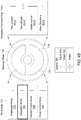
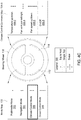
- Figures 4A-4D illustrate exemplary scenarios where multitouch interface application 130 within multitouch control system 100 interprets specific right-hand gestures differently, based on a currently selected mode, as different commands, according to various embodiments.
- mode map 132 is associated with left-hand touch sensing surface 112 and multimedia command maps 134-2, 134-4, 134-6, and 134-8 may be associated with right-hand touch sensing surface 114.
- multimedia command maps 134-2, 134-4, 134-6, and 134-8 may be associated with right-hand touch sensing surface 114.
- the position and orientation of these different maps, and the gestures indicated therein, is immaterial, and should not be interpreted as being relevant to the operation of multitouch control system 100 or multitouch interface application 130 included therein.
- mapping between the different maps mentioned above (and included gesture inputs) and the corresponding touch sensing surfaces is a logical mapping, and should not be interpreted as a physical mapping.
- depictions of gesture inputs in these Figures are provided for illustrative purposes only, and are not meant to limit the physical configurations of gesture inputs that may be received.
- the exemplary touch contacts illustrated in Figures 4A-4B are shown as being aligned vertically, this alignment is not required, and multitouch interface application 130 may similarly interpret multiple touch contacts that are distributed or aligned in any possible fashion.
- mode map 132 is associated with left-hand touch sensing surface 112.
- the user of multitouch control system 100 inputs a one-finger tap-and-hold gesture into left-hand touch sensing surface 112, which multitouch interface application 130 interprets, based on mode map 132, as corresponding to multimedia mode 302.
- multitouch interface application 130 retrieves multimedia command map 134-2, which includes commands specific to multimedia system 140.
- multimedia command map 134-2 is associated with right-hand touch sensing surface 114 and includes a set of commands that may be issued to multimedia system 140 in order to cause that system to perform various operations. Those commands include volume up/down 402-2, next/previous track 402-4, next/previous album 402-6, and mute 402-8.
- the user of multitouch control system 100 may initiate a given operation by inputting the left-hand gesture corresponding to multimedia mode 302 in conjunction with inputting a right-hand gesture associated with the command corresponding to the desired operation.
- the user could increase or decrease the volume of multimedia system 140 by inputting a one-finger tap-and-hold gesture into left-hand touch sensing surface 112 and, at approximately the same time, inputting a one-finger upward or downward swipe gesture, respectively, into right-hand touch sensing surface 114, without limitation.
- the user could select the next track or previous track of an album multimedia system 140 is configured to play by inputting a one-finger tap-and-hold gesture into left-hand touch sensing surface 112 and, at approximately the same time, inputting a one-finger rightward or leftward swipe gesture, respectively, into right-hand touch sensing surface 114, without limitation.
- the user could select the next album or previous album of a set of albums multimedia system 140 is configured to play by inputting a one-finger tap-and-hold gesture into left-hand touch sensing surface 112 and, at approximately the same time, inputting a two-finger rightward or leftward swipe gesture, respectively, into right-hand touch sensing surface 114, without limitation.
- the user could mute audio generated by multimedia system by inputting a one-finger tap-and-hold gesture into left-hand touch sensing surface 112 and, at approximately the same time, inputting a single tap gesture into right-hand touch sensing surface 114, without limitation.
- Figure 4A illustrates other exemplary functionality of multitouch control system 100.
- multitouch interface application 130 interprets, based on mode map 132, as corresponding to navigation mode 304.
- multitouch interface application 130 retrieves navigation command map 134-4, which includes commands specific to navigation device 150.
- navigation command map 134-4 is associated with right-hand touch sensing surface 114 and includes a set of commands that may be issued to navigation device 150 in order to cause that device to perform various operations associated with vehicle navigation, including, without limitation, operations related to a navigation map.
- Those commands include pan up/down 404-2, pan left/right 404-4, rotate clockwise (CW) / counterclockwise (CCW) 404-6, and mute directions 404-8.
- the user of multitouch control system 100 may initiate a given operation by inputting the left-hand gesture corresponding to navigation mode 304 in conjunction with inputting a right-hand gesture associated with the command corresponding to the desired operation.
- the user could pan the navigation map generated by navigation device 150 up or down by inputting a two-finger tap-and-hold gesture into left-hand touch sensing surface 112 and, at approximately the same time, inputting a one-finger upward or downward swipe gesture, respectively, into right-hand touch sensing surface 114, without limitation.
- the user could pan the navigation map left or right by inputting a two-finger tap-and-hold gesture into left-hand touch sensing surface 112 and, at approximately the same time, inputting a one-finger rightward or leftward swipe gesture, respectively, into right-hand touch sensing surface 114, without limitation.
- the user could rotate the navigation map clockwise or counterclockwise by inputting a two-finger tap-and-hold gesture into left-hand touch sensing surface 112 and, at approximately the same time, inputting a two-finger upward or downward swipe gesture, respectively, into right-hand touch sensing surface 114, without limitation.
- the user could mute directions dictated by navigation device 150 by inputting a two-finger tap-and-hold gesture into left-hand touch sensing surface 112 and, at approximately the same time, inputting a one-finger tap gesture into right-hand touch sensing surface 114, without limitation.
- Figure 4C illustrates other exemplary functionality of multitouch control system 100.
- multitouch interface application 130 interprets, based on mode map 132, as corresponding to climate control mode 306.
- climate control mode 306 multitouch interface application 130 retrieves climate control command map 134-6, which includes commands specific to climate control 160.
- climate control command map 134-6 is associated with right-hand touch sensing surface 114 and includes a set of commands that may be issued to climate control 160 in order to effect climate changes within the cabin of the vehicle. Those commands include temperature up/down 406-2, fan vent pan left/right 406-4, fan speed up/down 406-6, and fan on/off 406-8.
- the user of multitouch control system 100 may initiate a given operation by inputting the left-hand gesture corresponding to climate control mode 306 in conjunction with inputting a right-hand gesture associated with the command corresponding to the desired operation.
- the user could increase or decrease the cabin temperature of the vehicle where multitouch control system 100 resides by inputting a three-finger tap-and-hold gesture into left-hand touch sensing surface 112 and, at approximately the same time, inputting a one-finger upward or downward swipe gesture, respectively, into right-hand touch sensing surface 114, without limitation.
- the user could reorient a fan vent within the vehicle to the left or right by inputting a three-finger tap-and-hold gesture into left-hand touch sensing surface 112 and, at approximately the same time, inputting a one-finger rightward or leftward swipe gesture, respectively, into right-hand touch sensing surface 114, without limitation.
- the user could increase or decrease the speed of a fan within the vehicle by inputting a three-finger tap-and-hold gesture into left-hand touch sensing surface 112 and, at approximately the same time, inputting a two-finger upward or downward swipe gesture, respectively, into right-hand touch sensing surface 114, without limitation.
- the user could turn on and off fan of climate control 160 by inputting a three-finger tap-and-hold gesture into left-hand touch sensing surface 112 and, at approximately the same time, inputting a single tap gesture into right-hand touch sensing surface 114, without limitation.
- Figure 4D illustrates other exemplary functionality of multitouch control system 100.
- multitouch interface application 130 interprets, based on mode map 132, as corresponding to cruise control mode 308.
- cruise control mode 308 multitouch interface application 130 retrieves cruise control command map 134-8, which includes commands specific to cruise control 170.
- cruise control command map 134-8 is associated with right-hand touch sensing surface 114 and includes a set of commands that may be issued to cruise control 170 in order to change cruise control settings of the vehicle. Those commands include speed up/down 408-2, speed select 408-4, cruise set/cancel 408-6, and on/off 408-8.
- the user of multitouch control system 100 may initiate a given operation by inputting the left-hand gesture corresponding to cruise control mode 308 in conjunction with inputting a right-hand gesture associated with the command corresponding to the desired operation.
- the user could increase or decrease the speed of the vehicle where multitouch control system 100 resides by inputting a four-finger tap-and-hold gesture into left-hand touch sensing surface 112 and, at approximately the same time, inputting a one-finger upward or downward swipe gesture, respectively, into right-hand touch sensing surface 114, without limitation.
- the user could select a specific speed for the vehicle (e.g. from a set of menu options, without limitation) by inputting a four-finger tap-and-hold gesture into left-hand touch sensing surface 112 and, at approximately the same time, inputting a one-finger rightward or leftward swipe gesture into right-hand touch sensing surface 114 to select a given speed, without limitation.
- the user could set or cancel cruise control for the vehicle by inputting a four-finger tap-and-hold gesture into left-hand touch sensing surface 112 and, at approximately the same time, inputting a three-finger tap gesture into right-hand touch sensing surface 114, without limitation.
- the user could turn cruise control 170 on or off by inputting a four-finger tap-and-hold gesture into left-hand touch sensing surface 112 and, at approximately the same time, inputting a single tap gesture into right-hand touch sensing surface 114, without limitation.
- multitouch control system 100 may be implemented using any type of gesture language that defines mode-related gestures associated with one touch sensing surface and command-related gestures associated with another touch sensing surface, where those command-related gestures correspond to a currently selected mode.
- mode-related gestures associated with one touch sensing surface
- command-related gestures associated with another touch sensing surface
- those command-related gestures correspond to a currently selected mode.
- handedness of the examples discussed herein is selected for illustrative purposes only, and may be transposed in various embodiments.
- multitouch interface application 130 may receive a single gesture input and interpret the number of touch contacts (corresponding to the number of fingers used to input the gesture) as a selection of a mode. Multitouch interface application 130 may then interpret the gesture, based on the selected mode, as a command relevant to that mode. For example, and without limitation, the user could input a three-finger upward swipe into one of the touch sensing surfaces within multitouch control system 100, and multitouch interface application 130 would interpret the three-finger contact as a selection of climate control mode 306 and interpret the upward swipe as specifying a temperature increase for climate control 170.
- the user could input a two-finger tap into one of the touch sensing surfaces within multitouch control system 100, and multitouch interface application 130 would interpret the two-finger tap as a selection of navigation mode 304, and then further interpret that two-finger tap as a command to generate a route to a favorite location.
- FIG. 5 illustrates data and processing stages associated with multitouch control system 100 of Figure 1 , according to various embodiments.
- computing device 120 is configured to receive a left-hand gesture 500 from left-hand touch sensing surface 112 and receive a right-hand gesture 510 from right-hand touch sensing surface 114.
- the user of multitouch control system 100 may input left-hand gesture 500 and right-hand gesture 510 at approximately the same time, or those gestures may be input at different times, although generally, those gestures should arrive at computing device 120 within a preset interval of time.
- Computing device 120 implements the preset interval of time so that erroneous gestures input to just one of left-hand touch sensing surface 112 and right-hand touch sensing surface 114 do not initiate unwanted auxiliary component operations.
- computing device 120 is configured to buffer gestures received from left-hand touch sensing surface 112 or right-hand touch sensing surface 114 for at least the preset interval of time until another gesture arrives.
- computing device 120 when left-hand gesture 500 is received, computing device 120 translates that gesture, based on mode map 132, into a selection of a mode associated with a particular auxiliary component 180. Computing device 130 may also retrieve a specific command sub-map based on the selected mode, such as, e.g. multimedia command map 134-2 or navigation map 134-4, without limitation.
- computing device 120 determines whether right-hand gesture 510 arrived within the preset interval of time relative to left-hand gesture 500. If right-hand gesture 510 arrives within the preset interval of time, then computing device 120 translates right-hand gesture 510, based on the selected command sub-map, into a command 520 that targets a specific auxiliary component 180. Computing device 120 then issues command 520 to that target component.
- command 520 is shown, for exemplary purposes, as targeting climate control 160, although command 520 may target any auxiliary component 180 depending on the selected mode.
- left-hand gesture 500 may arrive at computing device 120 before right-hand gesture 510 or after right-hand gesture 510.
- computing device 120 buffers any received gestures until another gesture arrives, provided the preset interval of time has not elapsed, and so the ordering of gestures is unimportant.
- computing device 120 simply buffers right-hand-gesture for the preset interval of time, and, if left-hand gesture 500 arrives within the preset interval, computing device 120 then identifies the selected mode and relevant command in like fashion as described above.
- the functionality of multitouch control system 100 described thus far is also described, in stepwise fashion, below in conjunction with Figure 6 .
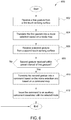
- Figure 6 is a flow diagram of method steps for controlling an auxiliary component within a vehicle using a multitouch chording language, according to various embodiments. Although the method steps are described in conjunction with the systems of Figures 1-5 , persons skilled in the art will understand that any system configured to perform the method steps, in any order, is within the scope of the present invention.
- a method 600 begins at step 602, where multitouch interface application 130, executing on computing device 120 within multitouch control system 100, receives a first input gesture from a first touch sensing surface.
- the first touch screen could be, for example, either of left-hand touch sensing surface 112 and right-hand touch sensing surface 114, although in a typical implementation where the driver sits on the left side of the vehicle, the first touch sensing surface would be left-hand touch sensing surface 112, without limitation.
- the first input gesture could be any identifiable touch input, including, for example, a single or multi-finger tap, tap-and-hold, swipe, etc., without limitation.
- multitouch interface application 130 translates the first input gesture into a mode selection based on a mode map, such as, e.g., mode map 132, without limitation.
- the mode map includes a mapping between gestures and mode selections, where each possible selection of mode corresponds to a different one of auxiliary components 180.
- multitouch interface application 130 receives a second input gesture from a second touch sensing surface.
- the second touch screen could be, e.g., either of left-hand touch sensing surface 112 and right-hand touch sensing surface 114.
- the second touch sensing surface would be right-hand touch sensing surface 114, without limitation.
- the second input gesture could be any identifiable touch input, including, for example, a single or multi-finger tap, tap-and-hold, swipe, etc., without limitation.
- multitouch interface application 130 determines whether the second input gesture was received within a preset interval of the first input gesture.
- Multitouch interface application 130 implements the preset interval so that spurious gestures received individually into either the first or second touch sensing surface may be ignored, and only gestures received into both the first and second touch sensing surfaces in conjunction with one another, within the preset interval, are processed by multitouch interface application 130.
- the preset interval may be configured based on, e.g., user preferences, without limitation. If multitouch interface application 130 determines that the first and second input gestures were not received within the preset interval of one another, then the method 600 ends. Alternatively, if multitouch interface application 130 determines that the first and second input gestures were, in fact, received within the preset interval of one another, then the method 600 proceeds to step 610.
- multitouch interface application 130 translates the second input gesture into a command based on the mode selected at step 604 and based on a command map, such as, e.g., command map 134, without limitation.
- a command map such as, e.g., command map 134
- multitouch interface application 130 may identify a command sub-map within the command map.
- the command sub-map may include a mapping between gestures and a subset of commands specific to the auxiliary component 180 associated with the selected mode.
- multitouch interface application 130 issues the command to the auxiliary component associated with the selected mode.
- the method 600 then ends.
- Persons skilled in the art will recognize that the method 600 may be implemented repeatedly to process gestures received from the first and second touch sensing surfaces.
- a multitouch interface application provides a user with access to a multitouch chording language for controlling auxiliary components within a vehicle, where a particular command for a given auxiliary component is specified by a combination of a left-hand gesture and a right-hand gesture.
- the multitouch interface application receives left-hand gestures from a left-hand touch sensing surface, where a given left-hand gesture corresponds to a selection of mode associated within a given auxiliary component.
- the multitouch interface application also receives right-hand gestures from a right-hand touch sensing surface, where a given right-hand gesture, in conjunction with a left-hand gesture, corresponds to a command for the given auxiliary component.
- the multitouch interface application issues the command to the auxiliary component associated with the selected mode.
- At least one advantage of the techniques set forth herein is that the driver of a vehicle that implements the multitouch interface application need not remove either hand from the steering wheel in order to adjust the operation of auxiliary components within the vehicle, thereby improving driver safety.
- the driver can interact with multitouch interface application without averting visual focus, further improving driver safety. With these techniques, vehicle accidents due to driver distraction may be reduced.
- One embodiment of the invention may be implemented as a program product for use with a computer system.
- the program(s) of the program product define functions of the embodiments (including the methods described herein) and can be contained on a variety of computer-readable storage media.
- Illustrative computer-readable storage media include, but are not limited to: (i) non-writable storage media (e.g., read-only memory devices within a computer such as compact disc read only memory (CD-ROM) disks readable by a CD-ROM drive, flash memory, read only memory (ROM) chips or any type of solid-state non-volatile semiconductor memory) on which information is permanently stored; and (ii) writable storage media (e.g., floppy disks within a diskette drive or hard-disk drive or any type of solid-state random-access semiconductor memory) on which alterable information is stored.
- non-writable storage media e.g., read-only memory devices within a computer such as compact disc read only memory (CD-ROM
Landscapes
- Engineering & Computer Science (AREA)
- General Engineering & Computer Science (AREA)
- Theoretical Computer Science (AREA)
- Human Computer Interaction (AREA)
- Physics & Mathematics (AREA)
- General Physics & Mathematics (AREA)
- Chemical & Material Sciences (AREA)
- Combustion & Propulsion (AREA)
- Transportation (AREA)
- Mechanical Engineering (AREA)
- User Interface Of Digital Computer (AREA)
Claims (13)
- Computerimplementiertes Verfahren zum Steuern des Betriebs einer Vielzahl von Zusatzkomponenten (180) innerhalb eines Fahrzeugs, wobei das Verfahren Folgendes umfasst:Empfangen (602) einer ersten Eingabegeste über eine erste berührungserfassende Fläche (112);Übersetzen (604), auf Grundlage einer Moduszuordnung (132), der ersten Eingabegeste in eine Auswahl eines ersten Modus, der einer ersten Zusatzkomponente, die in der Vielzahl von Zusatzkomponenten beinhaltet ist, entspricht; wobei die Moduszuordnung eine Übersetzung von Eingabegesten in unterschiedliche Modi bereitstellt und jeder Modus einer anderen Zusatzkomponente, die in der Vielzahl von Zusatzkomponenten beinhaltet ist, entspricht;als Reaktion darauf Identifizieren einer ersten Befehlszuordnung (134), die dem ersten Modus zugeordnet ist und der ersten Zusatzkomponente entspricht, wobei die erste Befehlszuordnung eine Übersetzung von Eingabegesten in unterschiedliche Befehle bereitstellt, die den Betrieb der ersten Zusatzkomponente steuern;Empfangen (606) einer zweiten Eingabegeste über eine zweite berührungserfassende Fläche (114), wobei die zweite Eingabegeste vor der ersten Eingabegeste empfangen wird, und ferner umfassend Zwischenspeichern der zweiten Eingabe für ein vorab festgelegtes Zeitintervall;Übersetzen (610) der zweiten Eingabegeste in einen ersten Befehl, der sich auf den Betrieb der ersten Zusatzkomponente bezieht, in Übereinstimmung mit der ersten Befehlszuordnung (134); undBewirken (612), dass der erste Befehl an die erste Zusatzkomponente übertragen wird.
- Computerimplementiertes Verfahren nach Anspruch 1, wobei die Moduszuordnung für jede unterschiedliche Eingabegeste in einem ersten Satz von Eingabegesten eine unterschiedliche Zusatzkomponente in der Vielzahl von Zusatzkomponenten angibt.
- Computerimplementiertes Verfahren nach Anspruch 2,
wobei das Zuordnen von Befehlen für jede unterschiedliche Eingabegeste in einem zweiten Satz von Eingabegesten einen unterschiedlichen Befehl angibt oder
wobei das Zuordnen von Befehlen eine Vielzahl von Untersätzen von Befehlen beinhaltet, wobei jeder unterschiedliche Untersatz von Befehlen einer unterschiedlichen Eingabegeste in dem ersten Satz von Eingabegesten entspricht und Befehle speziell für eine unterschiedliche Zusatzkomponente in der Vielzahl von Zusatzkomponenten beinhaltet. - Computerimplementiertes Verfahren nach einem der vorstehenden Ansprüche, ferner umfassend Bestimmen, dass die Zeit zwischen dem Empfang der ersten Eingabegeste und dem Empfang der zweiten Eingabegeste innerhalb eines konfigurierbaren Zeitintervalls liegt.
- Computerimplementiertes Verfahren nach einem der vorstehenden Ansprüche, wobei sowohl die erste berührungserfassende Fläche als auch die zweite berührungserfassende Fläche in ein Lenkrad integriert ist, das sich innerhalb des Fahrzeugs befindet.
- Computerimplementiertes Verfahren nach einem der vorstehenden Ansprüche, ferner umfassend:Empfangen einer dritten Eingabegeste;Interpretieren einer Anzahl von Berührungskontakten, die der dritten Eingabegeste zugeordnet sind, als eine Auswahl eines zweiten Modus, der einer zweiten Zusatzkomponente in der Vielzahl von Zusatzkomponenten entspricht; undInterpretieren einer Dauer, die der dritten Geste zugeordnet ist, oder einer Ausrichtung, die der dritten Geste zugeordnet ist, als ein zweiter Befehl, wobei der zweite Befehl an die zweite Zusatzkomponente übertragen wird.
- Computerimplementiertes Verfahren nach einem der vorstehenden Ansprüche, wobei die Vielzahl von Zusatzkomponenten innerhalb des Fahrzeugs mindestens zwei von einem Multimediasystem, einem Navigationsgerät, einer Klimaanlage, einer Geschwindigkeitsregelung, einem Untersystem für elektrisch angetriebene Fenster, einem Zentralverriegelungsuntersystem, einer Scheinwerfersteuerung, einer Scheibenwischersteuerung, einer Traktions- oder Antischlupfsteuerung, einer Allradantriebssteuerung, einem Sitzeinstellungssystem, einem System für elektrisch angetriebene Seiten- und Rückspiegel und einer Innenbeleuchtungssteuerung beinhaltet.
- System (100) zum Steuern des Betriebs einer Vielzahl von Zusatzkomponenten (180) innerhalb eines Fahrzeugs, das Folgendes umfasst:eine erste berührungserfassende Fläche (112);eine zweite berührungserfassende Fläche (114); undeine Rechenvorrichtung (120), umfassend:
eine Verarbeitungseinheit (122), die zu Folgendem konfiguriert ist:Empfangen (602) einer ersten Eingabegeste über die erste berührungserfassende Fläche;Übersetzen (604), auf Grundlage einer Moduszuordnung, der ersten Eingabegeste in eine Auswahl eines ersten Modus, der einer ersten Zusatzkomponente, die in der Vielzahl von Zusatzkomponenten beinhaltet ist, entspricht, wobei die Moduszuordnung eine Übersetzung von Eingabegesten in unterschiedliche Modi bereitstellt und jeder Modus einer anderen Zusatzkomponente, die in der Vielzahl von Zusatzkomponenten beinhaltet ist, entspricht;als Reaktion darauf Identifizieren eine ersten Befehls, der dem ersten Modus zugeordnet ist und der ersten Zusatzkomponente entspricht, wobei die erste Befehlszuordnung eine Übersetzung von Eingabegesten in unterschiedliche Befehle bereitstellt, die den Betrieb der ersten Zusatzkomponente steuern;Empfangen (606) einer zweiten Eingabegeste über die zweite berührungserfassende Fläche, wobei die zweite Eingabegeste vor der ersten Eingabegeste empfangen wird, und ferner umfassend Zwischenspeichern der zweiten Eingabe für ein vorab festgelegtes Zeitintervall,Übersetzen (610) einer zweiten Eingabegeste in einen ersten Befehl, der sich auf den Betrieb der ersten Zusatzkomponente bezieht, in Übereinstimmung mit der ersten Befehlszuordnung,Bewirken (612), dass der erste Befehl an die erste Zusatzkomponente übertragen wird. - System nach Anspruch 8, wobei die über die erste berührungserfassende Fläche und die zweite berührungserfassende Fläche empfangene Eingabe eine erste Gesteneingabe, die die erste Zusatzkomponente angibt, bzw. eine zweite Gesteneingabe, die einen Untersatz von Befehlen in der Vielzahl von Befehlen angibt, umfasst.
- System nach Anspruch 9, wobei die Verarbeitungseinheit ferner dazu konfiguriert ist, den ersten Befehl innerhalb des Untersatzes von Befehlen auf Grundlage der ersten Gesteneingabe zu identifizieren.
- System nach einem der Ansprüche 8-10, wobei die erste berührungserfassende Fläche an ein Lenkrad innerhalb des Fahrzeugs gekoppelt und in der Nähe einer ersten Hand eines Fahrers des Fahrzeugs positioniert ist und die zweite berührungserfassende Fläche ebenfalls an das Lenkrad gekoppelt und in der Nähe einer zweiten Hand des Fahrers des Fahrzeugs positioniert ist.
- Nichttransitorisches computerlesbares Medium, das Programmanweisungen speichert, die bei Ausführung durch eine Verarbeitungseinheit die Verarbeitungseinheit dazu veranlassen, den Betrieb einer Vielzahl von Zusatzkomponenten innerhalb eines Fahrzeugs durch Durchführen eines Verfahrens nach einem der Ansprüche 1-7 zu steuern.
- Nichttransitorisches computerlesbares Medium nach Anspruch 12,
wobei das Zuordnen von Befehlen eine Befehlszuordnung umfasst, die Befehle speziell für die erste Zusatzkomponente, die in der Vielzahl von Zusatzkomponenten beinhaltet ist, beinhaltet, oder
wobei das Zuordnen von Befehlen eine Befehlsunterzuordnung umfasst, die innerhalb einer Befehlszuordnung, die eine Vielzahl von Befehlsunterzuordnungen beinhaltet, identifiziert ist, wobei jede unterschiedliche Befehlsunterzuordnung in der Vielzahl von Befehlsunterzuordnungen Befehle speziell für eine unterschiedliche Zusatzkomponente, die in der Vielzahl von Zusatzkomponenten beinhaltet ist, beinhaltet.
Applications Claiming Priority (2)
| Application Number | Priority Date | Filing Date | Title |
|---|---|---|---|
| US14/464,532 US9720591B2 (en) | 2014-08-20 | 2014-08-20 | Multitouch chording language |
| PCT/US2015/043338 WO2016028473A1 (en) | 2014-08-20 | 2015-08-01 | Multitouch chording language |
Publications (3)
| Publication Number | Publication Date |
|---|---|
| EP3183155A1 EP3183155A1 (de) | 2017-06-28 |
| EP3183155A4 EP3183155A4 (de) | 2018-05-30 |
| EP3183155B1 true EP3183155B1 (de) | 2021-04-28 |
Family
ID=55348341
Family Applications (1)
| Application Number | Title | Priority Date | Filing Date |
|---|---|---|---|
| EP15833691.7A Active EP3183155B1 (de) | 2014-08-20 | 2015-08-01 | Multitouch-chording-sprache |
Country Status (5)
| Country | Link |
|---|---|
| US (1) | US9720591B2 (de) |
| EP (1) | EP3183155B1 (de) |
| KR (1) | KR102386429B1 (de) |
| CN (1) | CN106573627B (de) |
| WO (1) | WO2016028473A1 (de) |
Families Citing this family (25)
| Publication number | Priority date | Publication date | Assignee | Title |
|---|---|---|---|---|
| DE102014116292A1 (de) * | 2014-11-07 | 2016-05-12 | Visteon Global Technologies, Inc. | System zur Informationsübertragung in einem Kraftfahrzeug |
| US10635290B2 (en) * | 2015-06-11 | 2020-04-28 | Karma Automotive Llc | Virtual joy stick controls for adjustable components in vehicles |
| GB201604403D0 (en) * | 2016-03-15 | 2016-04-27 | Jaguar Land Rover Ltd | Method, apparatus and computer program for controlling a vehicle |
| KR101852675B1 (ko) * | 2016-05-25 | 2018-06-04 | 연세대학교 산학협력단 | 차량의 장치들을 제어하기 위한 장치 및 방법 |
| US10127198B2 (en) | 2016-05-26 | 2018-11-13 | International Business Machines Corporation | Real-time text layout conversion control and management on a mobile electronic device |
| US9971483B2 (en) * | 2016-05-26 | 2018-05-15 | International Business Machines Corporation | Contextual-based real-time text layout conversion control and management on a mobile electronic device |
| CN107783687A (zh) * | 2016-08-26 | 2018-03-09 | 法乐第(北京)网络科技有限公司 | 控制智能后视镜的方法、装置、可触控操作的智能后视镜 |
| JP2018034747A (ja) * | 2016-09-02 | 2018-03-08 | 株式会社デンソー | 車両用操作システム及びコンピュータプログラム |
| US10802125B2 (en) | 2016-10-03 | 2020-10-13 | FLIR Belgium BVBA | Touch-gesture control for side-looking sonar systems |
| CN116279746B (zh) | 2017-02-27 | 2026-03-17 | 深圳引望智能技术有限公司 | 车载系统的控制方法和装置 |
| CN108136980A (zh) * | 2017-03-20 | 2018-06-08 | 深圳市柔宇科技有限公司 | 汽车转向盘及车载电子设备交互控制方法 |
| CN107097838A (zh) * | 2017-03-24 | 2017-08-29 | 东华大学 | 一种多功能方向盘 |
| DE102017206111A1 (de) | 2017-04-10 | 2018-10-11 | Osram Gmbh | Bedienvorrichtung, verfahren und fahrzeug |
| DE102018100196A1 (de) * | 2018-01-05 | 2019-07-11 | Bcs Automotive Interface Solutions Gmbh | Verfahren zum Betreiben einer Mensch-Maschinen-Schnittstelle sowie Mensch-Maschinen-Schnittstelle |
| US20190227634A1 (en) * | 2018-01-19 | 2019-07-25 | International Business Machines Corporation | Contextual gesture-based image searching |
| US11203309B2 (en) | 2018-02-09 | 2021-12-21 | Continental Automotive Systems, Inc. | Touchpad for mirror posture adjustment |
| US11027822B2 (en) * | 2018-06-21 | 2021-06-08 | Rockwell Collins, Inc. | Control system for touchless operation of mechanical input devices |
| US20200393914A1 (en) | 2019-06-14 | 2020-12-17 | Riley Ford Keen | Fluid Chord/Character Entry |
| CN110333782B (zh) * | 2019-06-25 | 2023-10-20 | 浙江吉利控股集团有限公司 | 一种大灯照射角度调节方法及其系统 |
| EP4149091A4 (de) * | 2020-06-05 | 2024-03-06 | Samsung Electronics Co., Ltd. | Elektronische vorrichtung mit mehreren anzeigen und verfahren zum betrieb davon |
| CN113548061B (zh) * | 2021-06-25 | 2023-04-18 | 北京百度网讯科技有限公司 | 人机交互方法、装置、电子设备以及存储介质 |
| CN114044046A (zh) * | 2021-11-01 | 2022-02-15 | 南宁小欧技术开发有限公司 | 一种车辆行驶时的车窗玻璃的透明度调节方法及车辆 |
| CN116198525B (zh) * | 2023-02-21 | 2024-08-09 | 肇庆小鹏新能源投资有限公司 | 车载系统控制方法、车辆及存储介质 |
| CN117752478B (zh) * | 2024-02-22 | 2024-06-18 | 浙江强脑科技有限公司 | 一种仿生手的双手势控制方法、装置、设备及存储介质 |
| US12517647B2 (en) * | 2024-05-23 | 2026-01-06 | Toyota Jidosha Kabushiki Kaisha | Providing user interface for controlling a touch screen in a vehicle using multiple finger gestures |
Citations (2)
| Publication number | Priority date | Publication date | Assignee | Title |
|---|---|---|---|---|
| DE102010005483A1 (de) * | 2009-02-03 | 2010-08-05 | Volkswagen Ag | Kraftfahrzeug |
| DE102012010125A1 (de) * | 2012-05-23 | 2012-12-13 | Daimler Ag | Kraftfahrzeug, Bedienvorrichtung und Kraftfahrzeug-Lenkrad |
Family Cites Families (19)
| Publication number | Priority date | Publication date | Assignee | Title |
|---|---|---|---|---|
| JP2001246994A (ja) | 2000-03-02 | 2001-09-11 | Tokai Rika Co Ltd | 制御装置 |
| DE10148535A1 (de) | 2001-10-01 | 2003-04-10 | Daimler Chrysler Ag | Verfahren zur Erfassung der Lenkbereitschaft eines Fahrers |
| US7295904B2 (en) * | 2004-08-31 | 2007-11-13 | International Business Machines Corporation | Touch gesture based interface for motor vehicle |
| US20080071177A1 (en) | 2005-04-28 | 2008-03-20 | Pioneer Corporation | Bioinformation Sensor |
| US7987030B2 (en) | 2005-05-25 | 2011-07-26 | GM Global Technology Operations LLC | Vehicle illumination system and method |
| EP1939061B1 (de) * | 2006-12-28 | 2010-11-03 | Magneti Marelli S.p.A. | Tastsignalanordnung zum Warnen des Fahrers eines Fahrzeugs sowie eine Lenkvorrichtung für ein Fahrzeug und ein Fahrerassistenzsystem mit einer solchen Anordnung |
| CN101367401A (zh) * | 2008-09-12 | 2009-02-18 | 广州伟韬电子科技有限公司 | 一种带触摸感应器的汽车方向盘 |
| US9073554B2 (en) * | 2009-07-29 | 2015-07-07 | The Invention Science Fund I, Llc | Systems and methods for providing selective control of a vehicle operational mode |
| DE102010026291B4 (de) * | 2009-08-06 | 2024-08-22 | Volkswagen Ag | Kraftfahrzeug |
| US20110169750A1 (en) | 2010-01-14 | 2011-07-14 | Continental Automotive Systems, Inc. | Multi-touchpad multi-touch user interface |
| JP5656046B2 (ja) * | 2010-01-20 | 2015-01-21 | 株式会社ユピテル | 車両用情報表示装置 |
| TW201214237A (en) | 2010-09-16 | 2012-04-01 | Asustek Comp Inc | Touch display device and control method thereof |
| US8738224B2 (en) | 2011-01-12 | 2014-05-27 | GM Global Technology Operations LLC | Steering wheel system |
| DE102011111123A1 (de) * | 2011-08-20 | 2013-02-21 | GM Global Technology Operations LLC (n. d. Gesetzen des Staates Delaware) | Vorrichtung zur Steuerung von Funktionen elektronischer Ein-richtungen eines Fahrzeugs und Fahrzeug mit der Vorrichtung |
| CH705918A2 (de) * | 2011-12-19 | 2013-06-28 | Ralf Trachte | Feld-Analysen für flexible Computer-Eingabe. |
| KR101899810B1 (ko) | 2012-02-07 | 2018-11-02 | 엘지전자 주식회사 | 이동 단말기 및 그 제어방법 |
| DE102012011179A1 (de) * | 2012-06-06 | 2013-12-12 | Gm Global Technology Operations, Llc | Vorrichtung zur Bedienung einesKraftfahrzeuges |
| KR101328441B1 (ko) | 2012-06-07 | 2013-11-20 | 자동차부품연구원 | 차량용 스티어링 휠의 사용자 인터페이스 장치 |
| KR20140067813A (ko) * | 2012-11-27 | 2014-06-05 | 현대모비스 주식회사 | 자동차 |
-
2014
- 2014-08-20 US US14/464,532 patent/US9720591B2/en active Active
-
2015
- 2015-08-01 CN CN201580041130.2A patent/CN106573627B/zh active Active
- 2015-08-01 WO PCT/US2015/043338 patent/WO2016028473A1/en not_active Ceased
- 2015-08-01 KR KR1020177004430A patent/KR102386429B1/ko active Active
- 2015-08-01 EP EP15833691.7A patent/EP3183155B1/de active Active
Patent Citations (2)
| Publication number | Priority date | Publication date | Assignee | Title |
|---|---|---|---|---|
| DE102010005483A1 (de) * | 2009-02-03 | 2010-08-05 | Volkswagen Ag | Kraftfahrzeug |
| DE102012010125A1 (de) * | 2012-05-23 | 2012-12-13 | Daimler Ag | Kraftfahrzeug, Bedienvorrichtung und Kraftfahrzeug-Lenkrad |
Also Published As
| Publication number | Publication date |
|---|---|
| US9720591B2 (en) | 2017-08-01 |
| US20160054914A1 (en) | 2016-02-25 |
| CN106573627B (zh) | 2020-06-16 |
| KR102386429B1 (ko) | 2022-04-14 |
| WO2016028473A1 (en) | 2016-02-25 |
| EP3183155A1 (de) | 2017-06-28 |
| KR20170043534A (ko) | 2017-04-21 |
| EP3183155A4 (de) | 2018-05-30 |
| CN106573627A (zh) | 2017-04-19 |
Similar Documents
| Publication | Publication Date | Title |
|---|---|---|
| EP3183155B1 (de) | Multitouch-chording-sprache | |
| CN108569338B (zh) | 车道变换装置、包括该车道变换装置的系统及其方法 | |
| US9104243B2 (en) | Vehicle operation device | |
| US9389695B2 (en) | Steering wheel input device having gesture recognition and angle compensation capabilities | |
| CN103324098B (zh) | 输入装置 | |
| CN106240623A (zh) | 可缩回方向盘手势控制 | |
| JP2018150043A (ja) | 自動車における情報伝送のためのシステム | |
| US10365772B2 (en) | Touch detection apparatus and vehicle navigation apparatus | |
| JP6806223B1 (ja) | 表示制御装置、車両、表示の制御方法及びプログラム | |
| ES2867677T3 (es) | Interfaz de usuario y método para ajustar una configuración de un medio de transporte por medio de una unidad de visualización de una interfaz de usuario | |
| CN105966202B (zh) | 通风口调节系统 | |
| CN108367769B (zh) | 转向控制装置 | |
| CN105788935A (zh) | 拨盘式控制装置、具有该装置的车辆以及控制车辆的方法 | |
| US20140058633A1 (en) | Vehicle-mounted apparatus control device and program | |
| CN108733283A (zh) | 上下文车辆用户界面 | |
| US20150253950A1 (en) | Manipulating device | |
| CN105511662A (zh) | 用于车辆的二元操作触屏装置 | |
| US20160306532A1 (en) | Air conditioner control system and control method thereof | |
| US9846495B2 (en) | Human machine interface system for controlling vehicular graphical user interface display | |
| CN103465845A (zh) | 操作机动车的装置 | |
| US20170123534A1 (en) | Display zoom operation with both hands on steering wheel | |
| CN114179810A (zh) | 用于单车辙的或者多车辙的车辆的方法和驾驶员辅助系统 | |
| JP6424749B2 (ja) | 車両用情報処理装置、車両用情報処理システム、および車両用情報処理プログラム | |
| JP2015199383A (ja) | ジェスチャ入力装置 | |
| KR101646551B1 (ko) | 지문에 의한 차량 제어장치 및 그 방법 |
Legal Events
| Date | Code | Title | Description |
|---|---|---|---|
| STAA | Information on the status of an ep patent application or granted ep patent |
Free format text: STATUS: THE INTERNATIONAL PUBLICATION HAS BEEN MADE |
|
| PUAI | Public reference made under article 153(3) epc to a published international application that has entered the european phase |
Free format text: ORIGINAL CODE: 0009012 |
|
| STAA | Information on the status of an ep patent application or granted ep patent |
Free format text: STATUS: REQUEST FOR EXAMINATION WAS MADE |
|
| 17P | Request for examination filed |
Effective date: 20170215 |
|
| AK | Designated contracting states |
Kind code of ref document: A1 Designated state(s): AL AT BE BG CH CY CZ DE DK EE ES FI FR GB GR HR HU IE IS IT LI LT LU LV MC MK MT NL NO PL PT RO RS SE SI SK SM TR |
|
| AX | Request for extension of the european patent |
Extension state: BA ME |
|
| DAV | Request for validation of the european patent (deleted) | ||
| DAX | Request for extension of the european patent (deleted) | ||
| A4 | Supplementary search report drawn up and despatched |
Effective date: 20180504 |
|
| RIC1 | Information provided on ipc code assigned before grant |
Ipc: B62D 1/04 20060101ALI20180426BHEP Ipc: G06F 3/023 20060101ALI20180426BHEP Ipc: G06F 3/0488 20130101ALI20180426BHEP Ipc: B60K 35/00 20060101ALI20180426BHEP Ipc: B60K 37/06 20060101ALI20180426BHEP Ipc: G06F 3/041 20060101ALI20180426BHEP Ipc: G06F 3/01 20060101ALI20180426BHEP Ipc: G06F 3/0484 20130101ALI20180426BHEP Ipc: G06F 17/28 20060101ALI20180426BHEP Ipc: B60W 50/08 20120101AFI20180426BHEP |
|
| STAA | Information on the status of an ep patent application or granted ep patent |
Free format text: STATUS: EXAMINATION IS IN PROGRESS |
|
| 17Q | First examination report despatched |
Effective date: 20190917 |
|
| GRAP | Despatch of communication of intention to grant a patent |
Free format text: ORIGINAL CODE: EPIDOSNIGR1 |
|
| STAA | Information on the status of an ep patent application or granted ep patent |
Free format text: STATUS: GRANT OF PATENT IS INTENDED |
|
| RIC1 | Information provided on ipc code assigned before grant |
Ipc: B60W 50/08 20200101AFI20201112BHEP Ipc: B60K 35/00 20060101ALI20201112BHEP Ipc: G06F 3/023 20060101ALI20201112BHEP Ipc: G06F 3/0484 20130101ALI20201112BHEP Ipc: G06F 3/041 20060101ALI20201112BHEP Ipc: G06F 3/01 20060101ALI20201112BHEP Ipc: G06F 3/0488 20130101ALI20201112BHEP Ipc: B62D 1/04 20060101ALI20201112BHEP Ipc: B60K 37/06 20060101ALI20201112BHEP |
|
| INTG | Intention to grant announced |
Effective date: 20201210 |
|
| GRAS | Grant fee paid |
Free format text: ORIGINAL CODE: EPIDOSNIGR3 |
|
| GRAA | (expected) grant |
Free format text: ORIGINAL CODE: 0009210 |
|
| STAA | Information on the status of an ep patent application or granted ep patent |
Free format text: STATUS: THE PATENT HAS BEEN GRANTED |
|
| AK | Designated contracting states |
Kind code of ref document: B1 Designated state(s): AL AT BE BG CH CY CZ DE DK EE ES FI FR GB GR HR HU IE IS IT LI LT LU LV MC MK MT NL NO PL PT RO RS SE SI SK SM TR |
|
| REG | Reference to a national code |
Ref country code: GB Ref legal event code: FG4D |
|
| REG | Reference to a national code |
Ref country code: CH Ref legal event code: EP |
|
| REG | Reference to a national code |
Ref country code: DE Ref legal event code: R096 Ref document number: 602015068766 Country of ref document: DE |
|
| REG | Reference to a national code |
Ref country code: AT Ref legal event code: REF Ref document number: 1386751 Country of ref document: AT Kind code of ref document: T Effective date: 20210515 |
|
| REG | Reference to a national code |
Ref country code: IE Ref legal event code: FG4D |
|
| REG | Reference to a national code |
Ref country code: LT Ref legal event code: MG9D |
|
| REG | Reference to a national code |
Ref country code: AT Ref legal event code: MK05 Ref document number: 1386751 Country of ref document: AT Kind code of ref document: T Effective date: 20210428 |
|
| PG25 | Lapsed in a contracting state [announced via postgrant information from national office to epo] |
Ref country code: FI Free format text: LAPSE BECAUSE OF FAILURE TO SUBMIT A TRANSLATION OF THE DESCRIPTION OR TO PAY THE FEE WITHIN THE PRESCRIBED TIME-LIMIT Effective date: 20210428 Ref country code: LT Free format text: LAPSE BECAUSE OF FAILURE TO SUBMIT A TRANSLATION OF THE DESCRIPTION OR TO PAY THE FEE WITHIN THE PRESCRIBED TIME-LIMIT Effective date: 20210428 Ref country code: NL Free format text: LAPSE BECAUSE OF FAILURE TO SUBMIT A TRANSLATION OF THE DESCRIPTION OR TO PAY THE FEE WITHIN THE PRESCRIBED TIME-LIMIT Effective date: 20210428 Ref country code: HR Free format text: LAPSE BECAUSE OF FAILURE TO SUBMIT A TRANSLATION OF THE DESCRIPTION OR TO PAY THE FEE WITHIN THE PRESCRIBED TIME-LIMIT Effective date: 20210428 Ref country code: AT Free format text: LAPSE BECAUSE OF FAILURE TO SUBMIT A TRANSLATION OF THE DESCRIPTION OR TO PAY THE FEE WITHIN THE PRESCRIBED TIME-LIMIT Effective date: 20210428 Ref country code: BG Free format text: LAPSE BECAUSE OF FAILURE TO SUBMIT A TRANSLATION OF THE DESCRIPTION OR TO PAY THE FEE WITHIN THE PRESCRIBED TIME-LIMIT Effective date: 20210728 |
|
| PG25 | Lapsed in a contracting state [announced via postgrant information from national office to epo] |
Ref country code: GR Free format text: LAPSE BECAUSE OF FAILURE TO SUBMIT A TRANSLATION OF THE DESCRIPTION OR TO PAY THE FEE WITHIN THE PRESCRIBED TIME-LIMIT Effective date: 20210729 Ref country code: LV Free format text: LAPSE BECAUSE OF FAILURE TO SUBMIT A TRANSLATION OF THE DESCRIPTION OR TO PAY THE FEE WITHIN THE PRESCRIBED TIME-LIMIT Effective date: 20210428 Ref country code: IS Free format text: LAPSE BECAUSE OF FAILURE TO SUBMIT A TRANSLATION OF THE DESCRIPTION OR TO PAY THE FEE WITHIN THE PRESCRIBED TIME-LIMIT Effective date: 20210828 Ref country code: PT Free format text: LAPSE BECAUSE OF FAILURE TO SUBMIT A TRANSLATION OF THE DESCRIPTION OR TO PAY THE FEE WITHIN THE PRESCRIBED TIME-LIMIT Effective date: 20210830 Ref country code: PL Free format text: LAPSE BECAUSE OF FAILURE TO SUBMIT A TRANSLATION OF THE DESCRIPTION OR TO PAY THE FEE WITHIN THE PRESCRIBED TIME-LIMIT Effective date: 20210428 Ref country code: NO Free format text: LAPSE BECAUSE OF FAILURE TO SUBMIT A TRANSLATION OF THE DESCRIPTION OR TO PAY THE FEE WITHIN THE PRESCRIBED TIME-LIMIT Effective date: 20210728 Ref country code: RS Free format text: LAPSE BECAUSE OF FAILURE TO SUBMIT A TRANSLATION OF THE DESCRIPTION OR TO PAY THE FEE WITHIN THE PRESCRIBED TIME-LIMIT Effective date: 20210428 Ref country code: SE Free format text: LAPSE BECAUSE OF FAILURE TO SUBMIT A TRANSLATION OF THE DESCRIPTION OR TO PAY THE FEE WITHIN THE PRESCRIBED TIME-LIMIT Effective date: 20210428 |
|
| REG | Reference to a national code |
Ref country code: NL Ref legal event code: MP Effective date: 20210428 |
|
| PG25 | Lapsed in a contracting state [announced via postgrant information from national office to epo] |
Ref country code: ES Free format text: LAPSE BECAUSE OF FAILURE TO SUBMIT A TRANSLATION OF THE DESCRIPTION OR TO PAY THE FEE WITHIN THE PRESCRIBED TIME-LIMIT Effective date: 20210428 Ref country code: RO Free format text: LAPSE BECAUSE OF FAILURE TO SUBMIT A TRANSLATION OF THE DESCRIPTION OR TO PAY THE FEE WITHIN THE PRESCRIBED TIME-LIMIT Effective date: 20210428 Ref country code: SK Free format text: LAPSE BECAUSE OF FAILURE TO SUBMIT A TRANSLATION OF THE DESCRIPTION OR TO PAY THE FEE WITHIN THE PRESCRIBED TIME-LIMIT Effective date: 20210428 Ref country code: SM Free format text: LAPSE BECAUSE OF FAILURE TO SUBMIT A TRANSLATION OF THE DESCRIPTION OR TO PAY THE FEE WITHIN THE PRESCRIBED TIME-LIMIT Effective date: 20210428 Ref country code: CZ Free format text: LAPSE BECAUSE OF FAILURE TO SUBMIT A TRANSLATION OF THE DESCRIPTION OR TO PAY THE FEE WITHIN THE PRESCRIBED TIME-LIMIT Effective date: 20210428 Ref country code: EE Free format text: LAPSE BECAUSE OF FAILURE TO SUBMIT A TRANSLATION OF THE DESCRIPTION OR TO PAY THE FEE WITHIN THE PRESCRIBED TIME-LIMIT Effective date: 20210428 Ref country code: DK Free format text: LAPSE BECAUSE OF FAILURE TO SUBMIT A TRANSLATION OF THE DESCRIPTION OR TO PAY THE FEE WITHIN THE PRESCRIBED TIME-LIMIT Effective date: 20210428 |
|
| REG | Reference to a national code |
Ref country code: DE Ref legal event code: R097 Ref document number: 602015068766 Country of ref document: DE |
|
| PLBE | No opposition filed within time limit |
Free format text: ORIGINAL CODE: 0009261 |
|
| STAA | Information on the status of an ep patent application or granted ep patent |
Free format text: STATUS: NO OPPOSITION FILED WITHIN TIME LIMIT |
|
| REG | Reference to a national code |
Ref country code: CH Ref legal event code: PL |
|
| PG25 | Lapsed in a contracting state [announced via postgrant information from national office to epo] |
Ref country code: MC Free format text: LAPSE BECAUSE OF FAILURE TO SUBMIT A TRANSLATION OF THE DESCRIPTION OR TO PAY THE FEE WITHIN THE PRESCRIBED TIME-LIMIT Effective date: 20210428 |
|
| 26N | No opposition filed |
Effective date: 20220131 |
|
| REG | Reference to a national code |
Ref country code: BE Ref legal event code: MM Effective date: 20210831 |
|
| PG25 | Lapsed in a contracting state [announced via postgrant information from national office to epo] |
Ref country code: LI Free format text: LAPSE BECAUSE OF NON-PAYMENT OF DUE FEES Effective date: 20210831 Ref country code: CH Free format text: LAPSE BECAUSE OF NON-PAYMENT OF DUE FEES Effective date: 20210831 |
|
| PG25 | Lapsed in a contracting state [announced via postgrant information from national office to epo] |
Ref country code: IS Free format text: LAPSE BECAUSE OF FAILURE TO SUBMIT A TRANSLATION OF THE DESCRIPTION OR TO PAY THE FEE WITHIN THE PRESCRIBED TIME-LIMIT Effective date: 20210828 Ref country code: LU Free format text: LAPSE BECAUSE OF NON-PAYMENT OF DUE FEES Effective date: 20210801 Ref country code: AL Free format text: LAPSE BECAUSE OF FAILURE TO SUBMIT A TRANSLATION OF THE DESCRIPTION OR TO PAY THE FEE WITHIN THE PRESCRIBED TIME-LIMIT Effective date: 20210428 |
|
| PG25 | Lapsed in a contracting state [announced via postgrant information from national office to epo] |
Ref country code: IT Free format text: LAPSE BECAUSE OF FAILURE TO SUBMIT A TRANSLATION OF THE DESCRIPTION OR TO PAY THE FEE WITHIN THE PRESCRIBED TIME-LIMIT Effective date: 20210428 Ref country code: IE Free format text: LAPSE BECAUSE OF NON-PAYMENT OF DUE FEES Effective date: 20210801 Ref country code: FR Free format text: LAPSE BECAUSE OF NON-PAYMENT OF DUE FEES Effective date: 20210831 Ref country code: BE Free format text: LAPSE BECAUSE OF NON-PAYMENT OF DUE FEES Effective date: 20210831 |
|
| PG25 | Lapsed in a contracting state [announced via postgrant information from national office to epo] |
Ref country code: HU Free format text: LAPSE BECAUSE OF FAILURE TO SUBMIT A TRANSLATION OF THE DESCRIPTION OR TO PAY THE FEE WITHIN THE PRESCRIBED TIME-LIMIT; INVALID AB INITIO Effective date: 20150801 |
|
| PG25 | Lapsed in a contracting state [announced via postgrant information from national office to epo] |
Ref country code: CY Free format text: LAPSE BECAUSE OF FAILURE TO SUBMIT A TRANSLATION OF THE DESCRIPTION OR TO PAY THE FEE WITHIN THE PRESCRIBED TIME-LIMIT Effective date: 20210428 |
|
| P01 | Opt-out of the competence of the unified patent court (upc) registered |
Effective date: 20230527 |
|
| PG25 | Lapsed in a contracting state [announced via postgrant information from national office to epo] |
Ref country code: MK Free format text: LAPSE BECAUSE OF FAILURE TO SUBMIT A TRANSLATION OF THE DESCRIPTION OR TO PAY THE FEE WITHIN THE PRESCRIBED TIME-LIMIT Effective date: 20210428 |
|
| PG25 | Lapsed in a contracting state [announced via postgrant information from national office to epo] |
Ref country code: TR Free format text: LAPSE BECAUSE OF FAILURE TO SUBMIT A TRANSLATION OF THE DESCRIPTION OR TO PAY THE FEE WITHIN THE PRESCRIBED TIME-LIMIT Effective date: 20210428 |
|
| PG25 | Lapsed in a contracting state [announced via postgrant information from national office to epo] |
Ref country code: MT Free format text: LAPSE BECAUSE OF FAILURE TO SUBMIT A TRANSLATION OF THE DESCRIPTION OR TO PAY THE FEE WITHIN THE PRESCRIBED TIME-LIMIT Effective date: 20210428 |
|
| PGFP | Annual fee paid to national office [announced via postgrant information from national office to epo] |
Ref country code: DE Payment date: 20250724 Year of fee payment: 11 |
|
| PGFP | Annual fee paid to national office [announced via postgrant information from national office to epo] |
Ref country code: GB Payment date: 20250724 Year of fee payment: 11 |