EP3203465A1 - Bildanzeigeverfahren, benutzerendgerät und videoempfangsausrüstung - Google Patents
Bildanzeigeverfahren, benutzerendgerät und videoempfangsausrüstung Download PDFInfo
- Publication number
- EP3203465A1 EP3203465A1 EP14905244.1A EP14905244A EP3203465A1 EP 3203465 A1 EP3203465 A1 EP 3203465A1 EP 14905244 A EP14905244 A EP 14905244A EP 3203465 A1 EP3203465 A1 EP 3203465A1
- Authority
- EP
- European Patent Office
- Prior art keywords
- video
- display
- window
- video stream
- mirror
- Prior art date
- Legal status (The legal status is an assumption and is not a legal conclusion. Google has not performed a legal analysis and makes no representation as to the accuracy of the status listed.)
- Ceased
Links
Images


Classifications
-
- G—PHYSICS
- G09—EDUCATION; CRYPTOGRAPHY; DISPLAY; ADVERTISING; SEALS
- G09G—ARRANGEMENTS OR CIRCUITS FOR CONTROL OF INDICATING DEVICES USING STATIC MEANS TO PRESENT VARIABLE INFORMATION
- G09G5/00—Control arrangements or circuits for visual indicators common to cathode-ray tube indicators and other visual indicators
- G09G5/14—Display of multiple viewports
-
- H—ELECTRICITY
- H04—ELECTRIC COMMUNICATION TECHNIQUE
- H04N—PICTORIAL COMMUNICATION, e.g. TELEVISION
- H04N21/00—Selective content distribution, e.g. interactive television or video on demand [VOD]
- H04N21/40—Client devices specifically adapted for the reception of or interaction with content, e.g. set-top-box [STB]; Operations thereof
- H04N21/43—Processing of content or additional data, e.g. demultiplexing additional data from a digital video stream; Elementary client operations, e.g. monitoring of home network or synchronising decoder's clock; Client middleware
- H04N21/436—Interfacing a local distribution network, e.g. communicating with another STB or one or more peripheral devices inside the home
- H04N21/4363—Adapting the video stream to a specific local network, e.g. a Bluetooth® network
- H04N21/43637—Adapting the video stream to a specific local network, e.g. a Bluetooth® network involving a wireless protocol, e.g. Bluetooth®, RF or wireless LAN [IEEE 802.11]
-
- G—PHYSICS
- G06—COMPUTING OR CALCULATING; COUNTING
- G06F—ELECTRIC DIGITAL DATA PROCESSING
- G06F15/00—Digital computers in general; Data processing equipment in general
- G06F15/16—Combinations of two or more digital computers each having at least an arithmetic unit, a program unit and a register, e.g. for a simultaneous processing of several programs
-
- G—PHYSICS
- G06—COMPUTING OR CALCULATING; COUNTING
- G06F—ELECTRIC DIGITAL DATA PROCESSING
- G06F3/00—Input arrangements for transferring data to be processed into a form capable of being handled by the computer; Output arrangements for transferring data from processing unit to output unit, e.g. interface arrangements
- G06F3/14—Digital output to display device ; Cooperation and interconnection of the display device with other functional units
- G06F3/1454—Digital output to display device ; Cooperation and interconnection of the display device with other functional units involving copying of the display data of a local workstation or window to a remote workstation or window so that an actual copy of the data is displayed simultaneously on two or more displays, e.g. teledisplay
-
- H—ELECTRICITY
- H04—ELECTRIC COMMUNICATION TECHNIQUE
- H04M—TELEPHONIC COMMUNICATION
- H04M1/00—Substation equipment, e.g. for use by subscribers
- H04M1/72—Mobile telephones; Cordless telephones, i.e. devices for establishing wireless links to base stations without route selection
- H04M1/724—User interfaces specially adapted for cordless or mobile telephones
- H04M1/72403—User interfaces specially adapted for cordless or mobile telephones with means for local support of applications that increase the functionality
- H04M1/72409—User interfaces specially adapted for cordless or mobile telephones with means for local support of applications that increase the functionality by interfacing with external accessories
- H04M1/72412—User interfaces specially adapted for cordless or mobile telephones with means for local support of applications that increase the functionality by interfacing with external accessories using two-way short-range wireless interfaces
-
- H—ELECTRICITY
- H04—ELECTRIC COMMUNICATION TECHNIQUE
- H04N—PICTORIAL COMMUNICATION, e.g. TELEVISION
- H04N21/00—Selective content distribution, e.g. interactive television or video on demand [VOD]
- H04N21/40—Client devices specifically adapted for the reception of or interaction with content, e.g. set-top-box [STB]; Operations thereof
- H04N21/41—Structure of client; Structure of client peripherals
- H04N21/414—Specialised client platforms, e.g. receiver in car or embedded in a mobile appliance
- H04N21/41407—Specialised client platforms, e.g. receiver in car or embedded in a mobile appliance embedded in a portable device, e.g. video client on a mobile phone, PDA, laptop
-
- H—ELECTRICITY
- H04—ELECTRIC COMMUNICATION TECHNIQUE
- H04N—PICTORIAL COMMUNICATION, e.g. TELEVISION
- H04N21/00—Selective content distribution, e.g. interactive television or video on demand [VOD]
- H04N21/40—Client devices specifically adapted for the reception of or interaction with content, e.g. set-top-box [STB]; Operations thereof
- H04N21/43—Processing of content or additional data, e.g. demultiplexing additional data from a digital video stream; Elementary client operations, e.g. monitoring of home network or synchronising decoder's clock; Client middleware
- H04N21/431—Generation of visual interfaces for content selection or interaction; Content or additional data rendering
- H04N21/4312—Generation of visual interfaces for content selection or interaction; Content or additional data rendering involving specific graphical features, e.g. screen layout, special fonts or colors, blinking icons, highlights or animations
- H04N21/4316—Generation of visual interfaces for content selection or interaction; Content or additional data rendering involving specific graphical features, e.g. screen layout, special fonts or colors, blinking icons, highlights or animations for displaying supplemental content in a region of the screen, e.g. an advertisement in a separate window
-
- H—ELECTRICITY
- H04—ELECTRIC COMMUNICATION TECHNIQUE
- H04N—PICTORIAL COMMUNICATION, e.g. TELEVISION
- H04N21/00—Selective content distribution, e.g. interactive television or video on demand [VOD]
- H04N21/40—Client devices specifically adapted for the reception of or interaction with content, e.g. set-top-box [STB]; Operations thereof
- H04N21/43—Processing of content or additional data, e.g. demultiplexing additional data from a digital video stream; Elementary client operations, e.g. monitoring of home network or synchronising decoder's clock; Client middleware
- H04N21/436—Interfacing a local distribution network, e.g. communicating with another STB or one or more peripheral devices inside the home
- H04N21/43615—Interfacing a Home Network, e.g. for connecting the client to a plurality of peripherals
-
- H—ELECTRICITY
- H04—ELECTRIC COMMUNICATION TECHNIQUE
- H04N—PICTORIAL COMMUNICATION, e.g. TELEVISION
- H04N21/00—Selective content distribution, e.g. interactive television or video on demand [VOD]
- H04N21/40—Client devices specifically adapted for the reception of or interaction with content, e.g. set-top-box [STB]; Operations thereof
- H04N21/45—Management operations performed by the client for facilitating the reception of or the interaction with the content or administrating data related to the end-user or to the client device itself, e.g. learning user preferences for recommending movies, resolving scheduling conflicts
- H04N21/462—Content or additional data management e.g. creating a master electronic programme guide from data received from the Internet and a Head-end or controlling the complexity of a video stream by scaling the resolution or bit-rate based on the client capabilities
- H04N21/4622—Retrieving content or additional data from different sources, e.g. from a broadcast channel and the Internet
-
- H—ELECTRICITY
- H04—ELECTRIC COMMUNICATION TECHNIQUE
- H04N—PICTORIAL COMMUNICATION, e.g. TELEVISION
- H04N21/00—Selective content distribution, e.g. interactive television or video on demand [VOD]
- H04N21/40—Client devices specifically adapted for the reception of or interaction with content, e.g. set-top-box [STB]; Operations thereof
- H04N21/47—End-user applications
-
- G—PHYSICS
- G09—EDUCATION; CRYPTOGRAPHY; DISPLAY; ADVERTISING; SEALS
- G09G—ARRANGEMENTS OR CIRCUITS FOR CONTROL OF INDICATING DEVICES USING STATIC MEANS TO PRESENT VARIABLE INFORMATION
- G09G2340/00—Aspects of display data processing
- G09G2340/04—Changes in size, position or resolution of an image
- G09G2340/0464—Positioning
-
- G—PHYSICS
- G09—EDUCATION; CRYPTOGRAPHY; DISPLAY; ADVERTISING; SEALS
- G09G—ARRANGEMENTS OR CIRCUITS FOR CONTROL OF INDICATING DEVICES USING STATIC MEANS TO PRESENT VARIABLE INFORMATION
- G09G2340/00—Aspects of display data processing
- G09G2340/04—Changes in size, position or resolution of an image
- G09G2340/0492—Change of orientation of the displayed image, e.g. upside-down, mirrored
-
- G—PHYSICS
- G09—EDUCATION; CRYPTOGRAPHY; DISPLAY; ADVERTISING; SEALS
- G09G—ARRANGEMENTS OR CIRCUITS FOR CONTROL OF INDICATING DEVICES USING STATIC MEANS TO PRESENT VARIABLE INFORMATION
- G09G2340/00—Aspects of display data processing
- G09G2340/12—Overlay of images, i.e. displayed pixel being the result of switching between the corresponding input pixels
-
- G—PHYSICS
- G09—EDUCATION; CRYPTOGRAPHY; DISPLAY; ADVERTISING; SEALS
- G09G—ARRANGEMENTS OR CIRCUITS FOR CONTROL OF INDICATING DEVICES USING STATIC MEANS TO PRESENT VARIABLE INFORMATION
- G09G2354/00—Aspects of interface with display user
-
- G—PHYSICS
- G09—EDUCATION; CRYPTOGRAPHY; DISPLAY; ADVERTISING; SEALS
- G09G—ARRANGEMENTS OR CIRCUITS FOR CONTROL OF INDICATING DEVICES USING STATIC MEANS TO PRESENT VARIABLE INFORMATION
- G09G2370/00—Aspects of data communication
- G09G2370/16—Use of wireless transmission of display information
-
- G—PHYSICS
- G09—EDUCATION; CRYPTOGRAPHY; DISPLAY; ADVERTISING; SEALS
- G09G—ARRANGEMENTS OR CIRCUITS FOR CONTROL OF INDICATING DEVICES USING STATIC MEANS TO PRESENT VARIABLE INFORMATION
- G09G2370/00—Aspects of data communication
- G09G2370/20—Details of the management of multiple sources of image data
-
- H—ELECTRICITY
- H04—ELECTRIC COMMUNICATION TECHNIQUE
- H04N—PICTORIAL COMMUNICATION, e.g. TELEVISION
- H04N21/00—Selective content distribution, e.g. interactive television or video on demand [VOD]
- H04N21/40—Client devices specifically adapted for the reception of or interaction with content, e.g. set-top-box [STB]; Operations thereof
- H04N21/47—End-user applications
- H04N21/478—Supplemental services, e.g. displaying phone caller identification, shopping application
-
- H—ELECTRICITY
- H04—ELECTRIC COMMUNICATION TECHNIQUE
- H04N—PICTORIAL COMMUNICATION, e.g. TELEVISION
- H04N5/00—Details of television systems
- H04N5/44—Receiver circuitry for the reception of television signals according to analogue transmission standards
- H04N5/445—Receiver circuitry for the reception of television signals according to analogue transmission standards for displaying additional information
- H04N5/45—Picture in picture, e.g. displaying simultaneously another television channel in a region of the screen
Definitions
- Embodiments of the present invention relate to the field of image display, and more specifically, to an image display method, a user terminal, and a video receiving device.
- a WLAN device may support a mirroring display service. Specifically, an image displayed on a screen of one WLAN device may be displayed on another WLAN device in a mirroring manner.
- Miracast is a typical technology that can provide the mirroring display service.
- a Miracast device provides simplified discovery and settings, so that a user may quickly transfer a video between devices. For example, the user may view a photo taken by a smart phone on a large-screen television, share a laptop screen in real time by using a projector in a meeting room, or watch, on a tablet computer, a live show that is transferred by using a home television set top box.
- the mirroring display service supports only a full-screen mirroring display mode, that is, an image displayed on a screen of one WLAN device can be displayed on another WLAN device only in a full-screen mirroring display mode. Consequently, the mode cannot flexibly meet a user requirement.
- Embodiments of the present invention provide an image display method, a user terminal, and a video receiving device, which can flexibly implement a mirroring display service.
- an image display method including: receiving video window description information that is of a mirror video stream and that is sent by a user terminal by using a wireless local area network, where the mirror video stream is a mirror image of an image displayed on a screen of the user terminal, and the video window description information is used to indicate information about a first display window of the mirror video stream; determining, according to the video window description information, a location and a size of the first display window, where the first display window is one of at least two display windows on the screen of the user terminal, the at least two display windows are configured to separately display a corresponding video stream, and the at least two display windows include at least the first display window and a second display window; and displaying the mirror video stream in the first display window, and displaying a video stream from another video source in the second display window, where the another video source is different from the user terminal.
- the image display method before the determining, according to the video window description information, a location and a size of the first display window, the image display method further includes: determining, according to the video window description information, whether the mirror video stream is displayed in full screen, and when it is determined that the mirror video stream is not displayed in full screen, enabling a function of separately displaying the corresponding video stream in the at least two display windows.
- the video window description information includes at least one of the following parameters: a horizontal offset, a vertical offset, a horizontal size, or a vertical size, where the horizontal offset and the vertical offset are used to indicate a coordinate position of the upper left corner of the first display window, and the horizontal size and the vertical size are used to respectively indicate a horizontal size and a vertical size of the first display window.
- the receiving video window description information that is of a mirror video stream and that is sent by a user terminal by using a wireless local area network includes: receiving the mirror video stream that is sent by the user terminal by using the wireless local area network, where the mirror video stream carries the video window description information; or receiving a control instruction that is corresponding to the mirror video stream and that is sent by the user terminal by using the wireless local area network, where the control instruction carries the video window description information.
- an image display method includes: generating video window description information of a mirror video stream, where the mirror video stream is a mirror image of an image displayed on a screen of a user terminal, and the video window description information is used to indicate information about a first display window of the mirror video stream; and sending, by using a wireless local area network, the video window description information to a video receiving device, so that the video receiving device determines, according to the video window description information, a location and a size of the first display window, where the first display window is one of at least two display windows on the screen of the user terminal, and the at least two display windows are configured to separately display a corresponding video stream.
- the video window description information includes at least one of the following parameters: a horizontal offset, a vertical offset, a horizontal size, or a vertical size, where the horizontal offset and the vertical offset are used to indicate a coordinate position of the upper left corner of the first display window, and the horizontal size and the vertical size are separately used to indicate a horizontal size and a vertical size of the first display window.
- the sending, by using a wireless local area network, the video window description information to a video receiving device includes: sending, by using the wireless local area network, the mirror video stream to the video receiving device, where the mirror video stream carries the video window description information; or sending, by using the wireless local area network, a control instruction corresponding to the mirror video stream to the video receiving device, where the control instruction carries the video window description information.
- the generating video window description information of a mirror video stream includes: receiving, from a user, operation input of the image displayed on the screen of the user terminal; and generating the video window description information according to the operation input.
- a video receiving device including: a first receive port, configured to receive video window description information that is of a mirror video stream and that is sent by a user terminal by using a wireless local area network, where the mirror video stream is a mirror image of an image displayed on a screen of the user terminal, and the video window description information is used to indicate information about a first display window of the mirror video stream; a second receive port, configured to receive a video stream from another video source, where the another video source is different from the user terminal; and a display controller, configured to determine, according to the video window description information, a location and a size of the first display window, where the first display window is one of at least two display windows on the screen of the user terminal, the at least two display windows are configured to separately display a corresponding video stream, and the at least two display windows include at least the first display window and a second display window; where the display controller is further configured to control the first display window to display the mirror video stream, and control the second display window to display the video stream from
- the display controller is further configured to: before determining, according to the video window description information, a location and a size of the first display window, determine, according to the video window description information, whether the mirror video stream is displayed in full screen; and when determining that the mirror video stream is not displayed in full screen, enable a function of separately displaying the corresponding video stream in the at least two display windows.
- the video window description information includes at least one of the following parameters: a horizontal offset, a vertical offset, a horizontal size, or a vertical size, where the horizontal offset and the vertical offset are used to indicate a coordinate position of the upper left corner of the first display window, and the horizontal size and the vertical size are used to respectively indicate a horizontal size and a vertical size of the first display window.
- the first receive port is specifically configured to receive the mirror video stream that is sent by the user terminal, where the mirror video stream carries the video window description information; or the first receive port is specifically configured to receive a control instruction that is corresponding to the mirror video stream and that is sent by the user terminal, where the control instruction carries the video window description information.
- a user terminal including: a controller, configured to generate video window description information of a mirror video stream, where the mirror video stream is a mirror image of an image displayed on a screen of a user terminal, and the video window description information is used to indicate information about a first display window of the mirror video stream; and a transmitter, configured to send the video window description information to a video receiving device by using a wireless local area network, so that the video receiving device determines, according to the video window description information, a location and a size of the first display window, where the first display window is one of at least two display windows on the screen of the user terminal, and the at least two display windows are configured to separately display a corresponding video stream.
- the video window description information includes at least one of the following parameters: a horizontal offset, a vertical offset, a horizontal size, or a vertical size, where the horizontal offset and the vertical offset are used to indicate a coordinate position of the upper left corner of the first display window, and the horizontal size and the vertical size are separately used to indicate a horizontal size and a vertical size of the first display window.
- the transmitter is specifically configured to send the mirror video stream to the video receiving device, where the mirror video stream carries the video window description information; or the transmitter is specifically configured to send a control instruction corresponding to the mirror video stream to the video receiving device, where the control instruction carries the video window description information.
- the user terminal further includes an input device, configured to receive, from a user, operation input of the image displayed on the screen of the user terminal; and the controller is specifically configured to generate the video window description information according to the operation input.
- a multi-window display technology and a mirroring display technology are combined, and a location and a size of a display window of a mirror video stream are determined according to video window description information of the mirror video stream, and the mirror video stream and a video stream from another video source are separately displayed on different display windows. Therefore, a mirroring display service can be flexibly implemented.
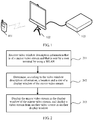
- FIG. 1 is a schematic diagram of an exemplary system scenario in which an embodiment of the present invention may be applied.
- a user terminal 101 is connected to a video receiving device 102 by using a WLAN.
- the user terminal 101 may generate a mirror video stream according to an image displayed on a screen of the user terminal 101, and then send, by using the WLAN, the mirror video stream to the video receiving device 102.
- the user terminal 101 may be referred to as user equipment (UE, User Equipment), or may be referred to as a mobile terminal (Mobile Terminal), mobile user equipment, or the like, for example, a mobile phone or a computer with a mobile terminal, such as a portable, a pocket-sized, a handheld, or an in-vehicle mobile apparatus, or a mobile apparatus built in a computer.
- the user terminal 101 may also be a stationary device, such as a personal computer, a desktop computer, or a server device.
- the user terminal 101 supports a WLAN technology, for example, supports a wireless fidelity (Wi-Fi, Wireless Fidelity) protocol or another similar protocol, and the user terminal 101 has a corresponding WLAN transmit port.
- Wi-Fi Wireless Fidelity
- the video receiving device 102 may be a device that is configured to receive and process a video stream, such as a display, a television, a set top box, a wireless router, or a wireless forwarder.
- the video receiving device 102 supports the WLAN technology, for example, supports the wireless fidelity (Wi-Fi, Wireless Fidelity) protocol or the another similar protocol, and the video receiving device 102 has a corresponding WLAN receive port.
- the video receiving device 102 may further support another video transmission technology, for example, may support a cable television (cable) technology, an Ethernet technology, a Bluetooth technology, or an infrared technology, and the video receiving device 102 receives another video stream from another video source 103.
- the video receiving device 102 supports a multi-window display function.
- the multi-window display function is used to separately display a corresponding video stream in at least two display windows.
- the display windows may partially or completely overlap each other, or may be completely non-overlapping.
- a typical multi-window display function is a picture in picture (PIP, Picture in picture) function.
- the PIP function is used to separately display a corresponding video stream in at least two pictures that include a primary picture and a secondary picture.
- the picture in picture function supports one primary picture and one or more secondary pictures, where the primary picture is displayed in full screen, and the secondary picture is less than the primary picture and overlaps with the primary picture for displaying. Therefore, a user may display multiple programs on one screen, that is, insert one or more compressed secondary pictures into a primary picture that is normally watched, so as to monitor another channel while enjoying the primary picture.
- the multi-window display function also supports a "two-window” or a "multi-window” display mode; for example, two display windows are basically of a same size, and their locations on a screen do not overlap each other.
- FIG. 2 is a flowchart of an image display method according to an embodiment of the present invention. The method in FIG. 2 is executed by a video receiving device (for example, the video receiving device 102 in FIG. 1 ).
- a video receiving device for example, the video receiving device 102 in FIG. 1 .
- a multi-window display technology and a mirroring display technology are combined, and a location and a size of a display window of a mirror video stream are determined according to video window description information of the mirror video stream, and the mirror video stream and a video stream from another video source are separately displayed on different display windows. Therefore, a mirroring display service can be flexibly implemented.
- the mirror video stream may be used as one video source for a multi-window display service, so as to implement a new multi-window display service.
- the user terminal in this embodiment of the present invention can control a location and a size of the secondary picture according to the video window description information, thereby enriching performance of a mirroring video service and enhancing user experience.
- the user terminal is connected to the video receiving device by using the WLAN, that is, the video receiving device may receive, by using the WLAN, the mirror video stream and the video window description information from user equipment.
- the another video source may be a cable television (cable), a satellite, a broadcast television, a WLAN, Bluetooth, or infrared.
- the video window description information may be a part of the mirror video stream, or may be separate from the mirror video stream and independently transmitted.
- the video receiving device may receive the mirror video stream that is sent by the user terminal, where the mirror video stream carries the video window description information.
- the video receiving device may receive a control instruction that is corresponding to the mirror video stream and that is sent by the user terminal, where the control instruction carries the video window description information.
- the video window description information may include at least one of the following parameters: a horizontal offset (horizontal offset), a vertical offset (vertical offset), a horizontal size (horizontal size), or a vertical size (vertical size).
- the horizontal offset and the vertical offset are used to indicate a coordinate position that is on the screen and that is of the upper left corner of the display window of the mirror video stream, and the horizontal size and the vertical size are used to respectively indicate a horizontal size and a vertical size of the display window of the mirror video stream.
- the horizontal offset and the vertical offset may also be used to indicate a coordinate position that is on the screen and that is of another reference point (such as the upper right corner, the lower left corner, the lower right corner, or the central point) of the display window of the mirror video stream.
- the horizontal offset may be a distance relative to the left edge of the screen, or may be a distance relative to the right edge of the screen;
- the vertical offset may be a distance relative to the upper edge of the screen, or may be a distance relative to the lower edge of the screen.
- the horizontal size may be indicated as a length value, a quantity of pixels, or a percentage relative to the horizontal size of the screen (or a horizontal size of another display window, for example, a horizontal size of the foregoing first display window);
- the vertical size may be indicated as a length value, a quantity of pixels, or a percentage relative to a screen vertical size (or a horizontal size of another display window, for example, a vertical size of the foregoing first display window).
- the video window description information does not necessarily include all the four of horizontal offset, vertical offset, horizontal size, and vertical size.
- the video window description information may include only the horizontal offset and the vertical offset.
- the size of the display window of the mirror video stream may be a default value or a fixed value.
- video window description information may include only a horizontal offset and a vertical offset, but not include a horizontal size or a vertical size.
- a video receiving device adjusts only a location of the display window without changing a size of the display window.
- video window description information may include only a horizontal size and a vertical size, but not include a horizontal offset or a vertical offset.
- a video receiving device adjusts only a size of the display window of the mirror video stream and keeps a location of the display window of the mirror video stream unchanged, for example, keeps the central point (or another reference point) of the display window of the mirror video stream unchanged.
- the video window description information may include another parameter, such as a layer parameter, an angle-of-rotation parameter, an aspect ratio parameter, a transparency parameter, a contrast ratio parameter, a luminance parameter, a frame frequency parameter, or a scanning mode.
- a layer parameter of a specific secondary picture is used to indicate that the specific secondary picture may be overlapped by another secondary picture or may overlap another secondary picture.
- An angle-of-rotation parameter of the secondary picture may indicate an angle-of-rotation relationship between the image displayed on the screen of the user terminal and the mirror image displayed in the secondary picture, for example, the image displayed on the user terminal may have a 90-degree angle-of-rotation relative to the mirror image; or the user may adjust an angle-of-rotation of the mirror image by rotating the user equipment.
- the aspect ratio parameter, the transparency parameter, the contrast ratio parameter, and the luminance parameter respectively indicate an aspect ratio, a transparency, a contrast ratio, and a luminance of the secondary picture.
- the video window description information may use a video window descriptor (Video Window Descriptor) in a Miracast protocol.
- An example of the video window descriptor may include: an 8-bit descriptor_tag, used to identify the video window descriptor; an 8-bit descriptor_length, used to indicate a length of the video window descriptor; a 14-bit horizontal_offset, used to indicate a horizontal offset of the upper left corner of the mirror image; a 14-bit vertical_offset, used to indicate a vertical offset of the upper left corner of the mirror image; and a 4-bit window_priority, used to indicate a layer priority of the mirror image, where a highest priority indicates always being placed on the top layer.
- the video window descriptor may further include the horizontal size and the vertical size (for example, in a form of resolution like 640x480 or 1280 ⁇ 720); alternatively or additionally, another example of the video window descriptor may further include another parameter, such as the aspect ratio, the frame frequency, or the scanning mode (for example, an i indicates interlaced scanning, and a p indicates progressive scanning).
- the video window description information may be an existing video window descriptor in the Miracast protocol, or may be obtained by extending an existing video window descriptor.
- a person skilled in the art may readily design an appropriate parameter form according to a requirement and all variations shall fall within the protection scope of the present invention.
- the video receiving device may further determine, according to the video window description information, whether the mirror video stream is displayed in full screen; when determining that the mirror video stream is not displayed in full screen, enable a function of separately displaying the corresponding video stream in the at least two display windows, for example, enable the picture in picture function.
- the video window description information indicates that the upper left corner of the display window of the mirror video stream is not located on the upper left corner of a display screen of the mirror video stream (for example, the foregoing horizontal offset or the vertical offset is not 0), it can be determined that the mirror video stream is not displayed in full screen.
- the video window description information indicates that the size of the display window of the mirror video stream is less than a size of the screen (for example, a horizontal size included in the video window description information is less than a horizontal size of a terminal screen), it can be determined that the mirror video stream is not displayed in full screen.
- a specific standard for determining that the mirror video stream is not displayed in full screen and the specific standard may be designed according to a parameter included in the video window description information.
- the video window description information may include a special parameter (for example, a particular bit "1" or "0") to indicate whether the mirror video stream is displayed in full screen.
- the multi-window display function (for example, the picture in picture function) may be disabled or exited, and only the mirror video stream is displayed.
- a mirroring display service can be flexibly implemented, and user experience is enhanced.
- image displaying on the screen of the user terminal may be stopped, so as to achieve an effect of power saving.
- the screen of the user terminal may also continue displaying an image the same as the mirror video stream or display another image, such as a message "a mirroring display service has been enabled" for reminding the user, or a control menu, or auxiliary information of another type, which also helps enhance user experience.
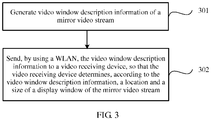
- FIG. 3 is a flowchart of an image display method according to another embodiment of the present invention.
- the method in FIG. 3 is executed by a user terminal (for example, the user terminal 101 in FIG. 1 ).
- the video window description information to a video receiving device, so that the video receiving device determines, according to the video window description information, a location and a size of the first display window, where the first display window is one of at least two display windows on the screen of the user terminal, and the at least two display windows are configured to separately display a corresponding video stream.
- a multi-window display technology and a mirroring display technology are combined, and a location and a size of a display window of a mirror video stream are determined according to video window description information of the mirror video stream, and the mirror video stream and a video stream from another video source are separately displayed on different display windows. Therefore, a mirroring display service can be flexibly implemented.
- the mirror video stream may be used as one video source for a multi-window display service, so as to implement a new multi-window display service.
- the user terminal in this embodiment of the present invention can control a location and a size of the secondary picture according to the video window description information, thereby enriching performance of a mirroring video service and enhancing user experience.
- the video window description information includes at least one of the following parameters: a horizontal offset, a vertical offset, a horizontal size, or a vertical size, where the horizontal offset and the vertical offset are used to indicate a coordinate position that is on the screen and that is of the upper left corner of the display window of the mirror video stream, and the horizontal size and the vertical size are used to respectively indicate a horizontal size and a vertical size of the display window of the mirror video stream.
- the horizontal offset and the vertical offset may also be used to indicate a coordinate position that is on the screen and that is of another reference point (such as the upper right corner, the lower left corner, the lower right corner, or the central point) of the display window of the mirror video stream.
- the horizontal offset may be a distance relative to the left edge of the screen, or may be a distance relative to the right edge of the screen;
- the vertical offset may be a distance relative to the upper edge of the screen, or may be a distance relative to the lower edge of the screen.
- the horizontal size may be indicated as a length value, a quantity of pixels, or a percentage relative to the horizontal size of the screen (or a horizontal size of another display window, for example, a horizontal size of the foregoing first display window);
- the vertical size may be indicated as a length value, a quantity of pixels, or a percentage relative to a screen vertical size (or a horizontal size of another display window, for example, a vertical size of the foregoing first display window).
- the terms indicating a direction like the "horizontal” and the “vertical” are relative to the screen, or relative to a coordinate system in which the screen is located, rather than relative to another reference object like the ground.
- the upper left corner within a displayable area of the screen is used as the origin of coordinates of the foregoing coordinate system
- a horizontal direction is used as the x-axis
- a vertical direction is used as the y-axis.
- this embodiment of the present invention imposes no limitation on a specific form of the coordinate system.
- the video window description information does not necessarily include all the four of horizontal offset, vertical offset, horizontal size, and vertical size.
- the video window description information may include only the horizontal offset and the vertical offset.
- the size of the display window of the mirror video stream may be a default value or a fixed value.
- video window description information may include only a horizontal offset and a vertical offset, but not include a horizontal size or a vertical size.
- a video receiving device adjusts only a location of the display window without changing a size of the display window.
- video window description information may include only a horizontal size and a vertical size, but not include a horizontal offset or a vertical offset.
- a video receiving device adjusts only a size of the display window of the mirror video stream and keeps a location of the display window of the mirror video stream unchanged, for example, keeps the central point (or another reference point) of the display window of the mirror video stream unchanged.
- the video window description information may include another parameter, such as a layer parameter, an angle-of-rotation parameter, an aspect ratio parameter, a transparency parameter, a contrast ratio parameter, or a luminance parameter.
- another parameter such as a layer parameter, an angle-of-rotation parameter, an aspect ratio parameter, a transparency parameter, a contrast ratio parameter, or a luminance parameter.
- the secondary picture in the picture in picture function is used as the display window of the mirror video stream is used as an example.
- a layer parameter of a specific secondary picture is used to indicate that the specific secondary picture may be overlapped by another secondary picture or may overlap another secondary picture.
- An angle-of-rotation parameter of the secondary picture may indicate an angle-of-rotation relationship between the image displayed on the screen of the user terminal and the mirror image displayed in the secondary picture, for example, the image displayed on the user terminal may have a 90-degree angle-of-rotation relative to the mirror image; or the user may adjust an angle-of-rotation of the mirror image by rotating the user equipment.
- the aspect ratio parameter, the transparency parameter, the contrast ratio parameter, and the luminance parameter respectively indicate an aspect ratio, a transparency, a contrast ratio, and a luminance of the secondary picture.
- the video window description information may use a video window descriptor (Video Window Descriptor) in a Miracast protocol.
- An example of the video window descriptor may include: an 8-bit descriptor_tag, used to identify the video window descriptor; an 8-bit descriptor_length, used to indicate a length of the video window descriptor; a 14-bit horizontal_offset, used to indicate a horizontal offset of the upper left corner of the mirror image; a 14-bit vertical_offset, used to indicate a vertical offset of the upper left corner of the mirror image; and a 4-bit window_priority, used to indicate a layer priority of the mirror image, where a highest priority indicates always being placed on the top layer.
- the video window descriptor may further include the horizontal size and the vertical size (for example, in a form of resolution like 640x480 or 1280 ⁇ 720); alternatively or additionally, another example of the video window descriptor may further include another parameter, such as the aspect ratio, the frame frequency, or the scanning mode (for example, an i indicates interlaced scanning, and a p indicates progressive scanning).
- the video window description information may be an existing video window descriptor in the Miracast protocol, or may be obtained by extending an existing video window descriptor.
- a person skilled in the art may readily design an appropriate parameter form according to a requirement and all variations shall fall within the protection scope of the present invention.
- the video window description information may be a part of the mirror video stream, or may be separate from the mirror video stream and independently transmitted.
- the user terminal may send the mirror video stream to the video receiving device, where the mirror video stream carries the video window description information; or the user terminal may send a control instruction corresponding to the mirror video stream to the video receiving device, where the control instruction carries the video window description information.
- the user terminal is connected to the video receiving device by using the WLAN, that is, the video receiving device may receive the mirror video stream and the video window description information from the user equipment by using the WLAN.
- the user terminal may receive operation input of an image displayed on the screen from the user of the user terminal, and generate the video window description information according to the operation input.
- This embodiment of the present invention imposes no limitation on a form of the operation input from the user.
- the user may perform touch input, for example, a dragging operation from the user indicates adjusting the location of the display window of the mirror video stream, a pinching and stretching operation from the user indicates adjusting the size of the display window of the mirror video stream, and a tapping operation from the user indicates enabling or disabling a multi-window display function.
- the user may perform a menu input operation, and the user terminal presents, to the user, a multi-level menu, which is provided for the user to adjust the location, the size, or another display parameter of the secondary picture.
- image displaying on the screen of the user terminal may be stopped, so as to achieve an effect of power saving.
- the screen of the user terminal may also continue displaying an image the same as the mirror video stream or display another image, such as a message "a mirroring display service has been enabled" for reminding the user, or a control menu, or auxiliary information of another type, which also helps enhance user experience.
- the operation input from the user may be executed before the mirroring display service is enabled or in an initialization process of the mirroring display service, or may also be executed after the mirroring display service is enabled.
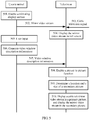
- FIG. 4 is a schematic flowchart of a mirroring display service according to an embodiment of the present invention.
- a video receiving device is a television
- a multi-window display service is a picture in picture service.
- the picture in picture service includes a primary picture and a secondary picture, where a video source of the primary picture is a cable television signal, and a video source of the secondary picture is a mirror video stream of a user terminal.
- a mirroring display service can be flexibly implemented, and user experience is enhanced.
- FIG. 5 is a schematic flowchart of a mirroring display service according to an embodiment of the present invention.
- a video receiving device is a television
- a multi-window display service is a picture in picture service.
- the picture in picture service includes a primary picture and a secondary picture, where a video source of the primary picture is a cable television signal, and a video source of the secondary picture is a mirror video stream of a user terminal.
- a mirroring display service can be flexibly implemented, and user experience is enhanced.
- FIG. 6 is a block diagram of a video receiving device according to an embodiment of the present invention.
- An example of a video receiving device 60 in FIG. 6 is the video receiving device 102 in FIG. 1 .
- the video receiving device 60 includes a first receive port 61, a second receive port 62, and a display controller 63.
- the first receive port 61 is configured to receive video window description information that is of a mirror video stream and that is sent by a user terminal by using a WLAN.
- the mirror video stream is a mirror image of an image displayed on a screen of the user terminal, and the video window description information is used to indicate information about a first display window of the mirror video stream.
- the second receive port 62 is configured to receive a video stream from another video source, where the another video source is different from the user terminal.
- the display controller 63 is configured to determine, according to the video window description information, a location and a size of the first display window, where the first display window is one of at least two display windows on the screen of the user terminal, the at least two display windows are configured to separately display a corresponding video stream, and the at least two display windows include at least the first display window and a second display window.
- the display controller 63 is further configured to control the first display window to display the mirror video stream, and control the second display window to display the video stream from the another video source.
- a multi-window display technology and a mirroring display technology are combined, and a location and a size of a display window of a mirror video stream are determined according to video window description information of the mirror video stream, and the mirror video stream and a video stream from another video source are separately displayed on different display windows. Therefore, a mirroring display service can be flexibly implemented.
- the mirror video stream may be used as one video source for a multi-window display service, so as to implement a new multi-window display service.
- the user terminal in this embodiment of the present invention can control a location and a size of the secondary picture according to the video window description information, thereby enriching performance of a mirroring video service and enhancing user experience.
- the video receiving device 60 in FIG. 6 may implement various operations or functions related to the video receiving device in the embodiments shown in FIG. 1 to FIG. 5 , and to avoid repetition, details are not described herein.
- the first receive port 61 may be a WLAN port, for example, a wireless receiver that supports a Wi-Fi protocol.
- the first receive port 61 transmits wireless data/signaling by using a WLAN that is established between the first receive port 61 and the user terminal; for example, the first receive port 61 receives the mirror video stream and the video window description information from the user terminal.
- the second receive port 62 may be a video transmission port of another type, for example, may be a wired cable television port or Ethernet port, or may be a wireless Bluetooth port or a wireless infrared port.
- the second receive port 62 receives a video stream from another video source.
- the display controller 63 may be implemented by a processor or a processing chip, such as a central processing unit (CPU, Central Processing Unit) or a graphic processing unit (GPU, Graphic Processing Unit).
- CPU Central Processing Unit
- GPU Graphic Processing Unit
- the video streams that are received by the first receive port 61 and the second receive port 62 are used as multiple inputs of a multi-window display function, so as to control different display windows to display different video streams.
- the video receiving device 60 may include a display, where the display controller 63 controls the display to display an image.
- the video receiving device 60 may not include a display, and be connected to an external display by a cable or in wireless mode.
- the display controller 63 may send a control instruction to the external display, so that the external display displays multiple display windows; or the display controller 63 may perform image processing, generate a corresponding video stream of a whole picture that includes multiple display windows, and send the generated video stream to the external display for displaying.
- the video window description information includes at least one of the following parameters: a horizontal offset, a vertical offset, a horizontal size, or a vertical size, where the horizontal offset and the vertical offset are used to indicate a coordinate position that is on the screen and that is of the upper left corner of the display window of the mirror video stream, and the horizontal size and the vertical size are used to respectively indicate a horizontal size and a vertical size of the display window of the mirror video stream.
- the horizontal offset and the vertical offset may also be used to indicate a coordinate position that is on the screen and that is of another reference point (such as the upper right corner, the lower left corner, the lower right corner, or the central point) of the display window of the mirror video stream.
- the horizontal offset may be a distance relative to the left edge of the screen, or may be a distance relative to the right edge of the screen;
- the vertical offset may be a distance relative to the upper edge of the screen, or may be a distance relative to the lower edge of the screen.
- the horizontal size may be indicated as a length value, a quantity of pixels, or a percentage relative to the horizontal size of the screen (or a horizontal size of another display window, for example, a horizontal size of the foregoing first display window);
- the vertical size may be indicated as a length value, a quantity of pixels, or a percentage relative to a screen vertical size (or a horizontal size of another display window, for example, a vertical size of the foregoing first display window).
- the video window description information does not necessarily include all the four of horizontal offset, vertical offset, horizontal size, and vertical size.
- the video window description information may include only the horizontal offset and the vertical offset.
- the size of the display window of the mirror video stream may be a default value or a fixed value.
- video window description information may include only a horizontal offset and a vertical offset, but not include a horizontal size or a vertical size.
- a video receiving device adjusts only a location of the display window without changing a size of the display window.
- video window description information may include only a horizontal size and a vertical size, but not include a horizontal offset or a vertical offset.
- a video receiving device adjusts only a size of the display window of the mirror video stream and keeps a location of the display window of the mirror video stream unchanged, for example, keeps the central point (or another reference point) of the display window of the mirror video stream unchanged.
- the video window description information may include another parameter, such as a layer parameter, an angle-of-rotation parameter, an aspect ratio parameter, a transparency parameter, a contrast ratio parameter, or a luminance parameter.
- another parameter such as a layer parameter, an angle-of-rotation parameter, an aspect ratio parameter, a transparency parameter, a contrast ratio parameter, or a luminance parameter.
- the secondary picture in the picture in picture function is used as the display window of the mirror video stream is used as an example.
- a layer parameter of a specific secondary picture is used to indicate that the specific secondary picture may be overlapped by another secondary picture or may overlap another secondary picture.
- An angle-of-rotation parameter of the secondary picture may indicate an angle-of-rotation relationship between the image displayed on the screen of the user terminal and the mirror image displayed in the secondary picture, for example, the image displayed on the user terminal may have a 90-degree angle-of-rotation relative to the mirror image; or the user may adjust an angle-of-rotation of the mirror image by rotating the user equipment.
- the aspect ratio parameter, the transparency parameter, the contrast ratio parameter, and the luminance parameter respectively indicate an aspect ratio, a transparency, a contrast ratio, and a luminance of the secondary picture.
- the video window description information may use a video window descriptor (Video Window Descriptor) in a Miracast protocol.
- An example of the video window descriptor may include: an 8-bit descriptor_tag, used to identify the video window descriptor; an 8-bit descriptor_length, used to indicate a length of the video window descriptor; a 14-bit horizontal_offset, used to indicate a horizontal offset of the upper left corner of the mirror image; a 14-bit vertical_offset, used to indicate a vertical offset of the upper left corner of the mirror image; and a 4-bit window_priority, used to indicate a layer priority of the mirror image, where a highest priority indicates always being placed on the top layer.
- the video window descriptor may further include the horizontal size and the vertical size (for example, in a form of resolution like 640x480 or 1280 ⁇ 720); alternatively or additionally, another example of the video window descriptor may further include another parameter, such as the aspect ratio, the frame frequency, or the scanning mode (for example, an i indicates interlaced scanning, and a p indicates progressive scanning).
- the video window description information may be an existing video window descriptor in the Miracast protocol, or may be obtained by extending an existing video window descriptor.
- a person skilled in the art may readily design an appropriate parameter form according to a requirement and all variations shall fall within the protection scope of the present invention.
- the display controller 63 is further configured to: before determining, according to the video window description information, the location and the size of the secondary picture in the picture in picture function, determine, according to the video window description information, whether the mirror video stream is displayed in full screen; and when determining that the mirror video stream is not displayed in full screen, enable the function of separately display a corresponding video stream in the at least two display windows, for example, enable the picture in picture function.
- the first receive port 61 may receive the mirror video stream sent by the user terminal, where the mirror video stream carries the video window description information.
- the first receive port 61 may receive a control instruction that is corresponding to the mirror video stream and that is sent by the user terminal, where the control instruction carries the video window description information.
- a mirroring display service can be flexibly implemented, and user experience is enhanced.
- FIG. 7 is a block diagram of a user terminal according to an embodiment of the present invention.
- An example of a user terminal 70 in FIG. 7 is the user terminal 101 in FIG. 1 .
- the user terminal 70 includes a controller 71 and a transmitter 72.
- the controller 71 is configured to generate video window description information of a mirror video stream.
- the mirror video stream is a mirror image of an image displayed on a screen of the user terminal 70, and the video window description information is used to indicate information about a first display window of the mirror video stream.
- the transmitter 72 is configured to send, by using a WLAN, the video window description information to a video receiving device, so that the video receiving device determines, according to the video window description information, a location and a size of the first display window, where the first display window is one of at least two display windows on the screen of the user terminal, and the at least two display windows are configured to separately display a corresponding video stream.
- a multi-window display technology and a mirroring display technology are combined, and a location and a size of a display window of a mirror video stream are determined according to video window description information of the mirror video stream, and the mirror video stream and a video stream from another video source are separately displayed on different display windows. Therefore, a mirroring display service can be flexibly implemented.
- the mirror video stream may be used as one video source for a multi-window display service, so as to implement a new multi-window display service.
- the user terminal in this embodiment of the present invention can control a location and a size of the secondary picture according to the video window description information, thereby enriching performance of a mirroring video service and enhancing user experience.
- the user terminal 70 in FIG. 7 may implement various operations or functions related to the user terminal in the embodiments shown in FIG. 1 to FIG. 5 , and to avoid repetition, details are not described herein.
- the controller 71 may be implemented by a processor or a processing chip, such as a CPU or a GPU.
- the transmitter 72 may be implemented by a WLAN transmitter.
- the video window description information includes at least one of the following parameters: a horizontal offset, a vertical offset, a horizontal size, or a vertical size, where the horizontal offset and the vertical offset are used to indicate a coordinate position that is on the screen and that is of the upper left corner of the display window of the mirror video stream, and the horizontal size and the vertical size are used to respectively indicate a horizontal size and a vertical size of the display window of the mirror video stream.
- the horizontal offset and the vertical offset may also be used to indicate a coordinate position that is on the screen and that is of another reference point (such as the upper right corner, the lower left corner, the lower right corner, or the central point) of the display window of the mirror video stream.
- the horizontal offset may be a distance relative to the left edge of the screen, or may be a distance relative to the right edge of the screen;
- the vertical offset may be a distance relative to the upper edge of the screen, or may be a distance relative to the lower edge of the screen.
- the horizontal size may be indicated as a length value, a quantity of pixels, or a percentage relative to the horizontal size of the screen (or a horizontal size of another display window, for example, a horizontal size of the foregoing first display window);
- the vertical size may be indicated as a length value, a quantity of pixels, or a percentage relative to a screen vertical size (or a horizontal size of another display window, for example, a vertical size of the foregoing first display window).
- the video window description information does not necessarily include all the four of horizontal offset, vertical offset, horizontal size, and vertical size.
- the video window description information may include only the horizontal offset and the vertical offset.
- the size of the display window of the mirror video stream may be a default value or a fixed value.
- video window description information may include only a horizontal offset and a vertical offset, but not include a horizontal size or a vertical size.
- a video receiving device adjusts only a location of the display window without changing a size of the display window.
- video window description information may include only a horizontal size and a vertical size, but not include a horizontal offset or a vertical offset.
- a video receiving device adjusts only a size of the display window of the mirror video stream and keeps a location of the display window of the mirror video stream unchanged, for example, keeps the central point (or another reference point) of the display window of the mirror video stream unchanged.
- the video window description information may include another parameter, such as a layer parameter, an angle-of-rotation parameter, an aspect ratio parameter, a transparency parameter, a contrast ratio parameter, or a luminance parameter.
- another parameter such as a layer parameter, an angle-of-rotation parameter, an aspect ratio parameter, a transparency parameter, a contrast ratio parameter, or a luminance parameter.
- the secondary picture in the picture in picture function is used as the display window of the mirror video stream is used as an example.
- a layer parameter of a specific secondary picture is used to indicate that the specific secondary picture may be overlapped by another secondary picture or may overlap another secondary picture.
- An angle-of-rotation parameter of the secondary picture may indicate an angle-of-rotation relationship between the image displayed on the screen of the user terminal and the mirror image displayed in the secondary picture, for example, the image displayed on the user terminal may have a 90-degree angle-of-rotation relative to the mirror image; or the user may adjust an angle-of-rotation of the mirror image by rotating the user equipment.
- the aspect ratio parameter, the transparency parameter, the contrast ratio parameter, and the luminance parameter respectively indicate an aspect ratio, a transparency, a contrast ratio, and a luminance of the secondary picture.
- the video window description information may use a video window descriptor (Video Window Descriptor) in a Miracast protocol.
- An example of the video window descriptor may include: an 8-bit descriptor_tag, used to identify the video window descriptor; an 8-bit descriptor_length, used to indicate a length of the video window descriptor; a 14-bit horizontal_offset, used to indicate a horizontal offset of the upper left corner of the mirror image; a 14-bit vertical_offset, used to indicate a vertical offset of the upper left corner of the mirror image; and a 4-bit window_priority, used to indicate a layer priority of the mirror image, where a highest priority indicates always being placed on the top layer.
- the video window descriptor may further include the horizontal size and the vertical size (for example, in a form of resolution like 640x480 or 1280 ⁇ 720); alternatively or additionally, another example of the video window descriptor may further include another parameter, such as the aspect ratio, the frame frequency, or the scanning mode (for example, an i indicates interlaced scanning, and a p indicates progressive scanning).
- the video window description information may be an existing video window descriptor in the Miracast protocol, or may be obtained by extending an existing video window descriptor.
- a person skilled in the art may readily design an appropriate parameter form according to a requirement and all variations shall fall within the protection scope of the present invention.
- the transmitter 72 may send the mirror video stream to the video receiving device, where the mirror video stream carries the video window description information.
- the transmitter 72 may send a control instruction corresponding to the mirror video stream to the video receiving device, where the control instruction carries the video window description information.
- the transmitter 72 may send the mirror video stream to the video receiving device by using a wireless local area network.
- the user terminal 70 may further include an input device 73, configured to receive operation input of an image displayed on a screen of the user terminal 70 from a user.
- the input device 73 may be a touchscreen, a keyboard, or a device of another type.
- a controller 72 may generate the video window description information according to the operation input.
- a mirroring display service can be flexibly implemented, and user experience is enhanced.
- the controller 72 may control the screen of the user terminal 70 to stop displaying an image, so as to achieve an effect of power saving.
- the controller 72 may control the screen of the user terminal 70 to continue displaying an image the same as the mirror video stream, or to display another image, such as a message "a mirroring display service has been enabled" for reminding the user, or a control menu, or auxiliary information of another type, which also helps enhance user experience.
- the disclosed system, apparatus, and method may be implemented in other manners.
- the described apparatus embodiment is merely exemplary.
- the unit division is merely logical function division and may be other division in actual implementation.
- a plurality of units or components may be combined or integrated into another system, or some features may be ignored or not performed.
- the displayed or discussed mutual couplings or direct couplings or communication connections may be implemented by using some interfaces.
- the indirect couplings or communication connections between the apparatuses or units may be implemented in electronic, mechanical, or other forms.
- the units described as separate parts may or may not be physically separate, and parts displayed as units may or may not be physical units, may be located in one position, or may be distributed on a plurality of network units. Some or all of the units may be selected according to actual needs to achieve the objectives of the solutions of the embodiments.
- functional units in the embodiments of the present invention may be integrated into one processing unit, or each of the units may exist alone physically, or two or more units are integrated into one unit.
- the functions When the functions are implemented in the form of a software functional unit and sold or used as an independent product, the functions may be stored in a computer-readable storage medium. Based on such an understanding, the technical solutions of the present invention essentially, or the part contributing to the prior art, or some of the technical solutions may be implemented in a form of a software product.
- the software product is stored in a storage medium, and includes several instructions for instructing a computer device (which may be a personal computer, a server, or a network device) to perform all or some of the steps of the methods described in the embodiments of the present invention.
- the foregoing storage medium includes: any medium that can store program code, such as a USB flash drive, a removable hard disk, a read-only memory (ROM, Read-Only Memory), a random access memory (RAM, Random Access Memory), a magnetic disk, or an optical disc.
- program code such as a USB flash drive, a removable hard disk, a read-only memory (ROM, Read-Only Memory), a random access memory (RAM, Random Access Memory), a magnetic disk, or an optical disc.
Landscapes
- Engineering & Computer Science (AREA)
- Signal Processing (AREA)
- Theoretical Computer Science (AREA)
- Multimedia (AREA)
- Computer Networks & Wireless Communication (AREA)
- Computer Hardware Design (AREA)
- General Physics & Mathematics (AREA)
- Physics & Mathematics (AREA)
- General Engineering & Computer Science (AREA)
- Human Computer Interaction (AREA)
- Business, Economics & Management (AREA)
- Marketing (AREA)
- Software Systems (AREA)
- Databases & Information Systems (AREA)
- Controls And Circuits For Display Device (AREA)
- Two-Way Televisions, Distribution Of Moving Picture Or The Like (AREA)
- User Interface Of Digital Computer (AREA)
Applications Claiming Priority (1)
| Application Number | Priority Date | Filing Date | Title |
|---|---|---|---|
| PCT/CN2014/089584 WO2016065514A1 (zh) | 2014-10-27 | 2014-10-27 | 图像显示方法、用户终端和视频接收设备 |
Publications (2)
| Publication Number | Publication Date |
|---|---|
| EP3203465A1 true EP3203465A1 (de) | 2017-08-09 |
| EP3203465A4 EP3203465A4 (de) | 2017-10-11 |
Family
ID=55856338
Family Applications (1)
| Application Number | Title | Priority Date | Filing Date |
|---|---|---|---|
| EP14905244.1A Ceased EP3203465A4 (de) | 2014-10-27 | 2014-10-27 | Bildanzeigeverfahren, benutzerendgerät und videoempfangsausrüstung |
Country Status (5)
| Country | Link |
|---|---|
| US (1) | US20170318334A1 (de) |
| EP (1) | EP3203465A4 (de) |
| JP (1) | JP2018503281A (de) |
| CN (1) | CN107077831A (de) |
| WO (1) | WO2016065514A1 (de) |
Cited By (2)
| Publication number | Priority date | Publication date | Assignee | Title |
|---|---|---|---|---|
| WO2017160710A1 (en) | 2016-03-15 | 2017-09-21 | Roku, Inc. | Efficient communication interface for casting interactively controlled visual content |
| US20220105378A1 (en) * | 2019-01-22 | 2022-04-07 | Akuis S.R.L. | Exercise machine |
Families Citing this family (6)
| Publication number | Priority date | Publication date | Assignee | Title |
|---|---|---|---|---|
| US20170228359A1 (en) * | 2016-02-08 | 2017-08-10 | Prysm, Inc. | Browser Based Snap Grid |
| CN111612838A (zh) * | 2020-05-29 | 2020-09-01 | 杭州海康威视数字技术股份有限公司 | 一种图像获取方法、装置及电子设备 |
| CN114071197B (zh) * | 2020-07-30 | 2024-04-12 | 华为技术有限公司 | 投屏数据处理方法和装置 |
| CN113542841A (zh) * | 2021-06-16 | 2021-10-22 | 杭州当贝网络科技有限公司 | 投屏方法和投屏系统 |
| TWI825918B (zh) * | 2022-03-13 | 2023-12-11 | 瑞昱半導體股份有限公司 | 顯示控制方法與相關顯示控制裝置以及顯示設備 |
| FR3143154B1 (fr) * | 2022-12-07 | 2024-12-06 | Thales Sa | Procédé de traitement de données vidéo provenant d’une source vidéo non certifiée |
Family Cites Families (12)
| Publication number | Priority date | Publication date | Assignee | Title |
|---|---|---|---|---|
| JP2005149440A (ja) * | 2003-11-20 | 2005-06-09 | Hitachi Ltd | 画面共有制御方法 |
| US10152190B2 (en) * | 2003-12-15 | 2018-12-11 | Open Invention Network, Llc | Systems and methods for improved application sharing in a multimedia collaboration session |
| US8381136B2 (en) * | 2004-05-24 | 2013-02-19 | Scenera Technologies, Llc | Handheld electronic device supporting multiple display mechanisms |
| CN102918490B (zh) * | 2010-04-01 | 2014-07-23 | 思杰系统有限公司 | 与在平板计算装置的虚拟桌面内显示的远程应用交互 |
| US20120042275A1 (en) * | 2010-08-10 | 2012-02-16 | Microsoft Corporation | Cloning specific windows on a wireless display surface |
| KR101286358B1 (ko) * | 2011-08-11 | 2013-07-15 | 엘지전자 주식회사 | 영상표시방법 및 장치 |
| TW201334535A (zh) * | 2012-02-13 | 2013-08-16 | Quanta Comp Inc | 在視訊會議中協同操作分享內容的方法、視訊會議系統以及電腦程式產品 |
| KR101952682B1 (ko) * | 2012-04-23 | 2019-02-27 | 엘지전자 주식회사 | 이동 단말기 및 그 제어방법 |
| CN103530073A (zh) * | 2012-07-05 | 2014-01-22 | 罗侍田 | 一种计算机图形内核镜像显示技术 |
| CN102883135B (zh) * | 2012-11-01 | 2015-08-26 | 成都飞视美视频技术有限公司 | 屏幕共享及控制方法 |
| JP2016511603A (ja) * | 2013-02-26 | 2016-04-14 | マーシブ テクノロジーズ,インコーポレイティド | マルチユーザ制御及び共有ディスプレイに対するメディアストリーミングのためのシステム及び方法 |
| CN104104709A (zh) * | 2013-04-12 | 2014-10-15 | 上海帛茂信息科技有限公司 | 可与多个显示设备进行通讯的方法及使用该方法的电子设备 |
-
2014
- 2014-10-27 EP EP14905244.1A patent/EP3203465A4/de not_active Ceased
- 2014-10-27 WO PCT/CN2014/089584 patent/WO2016065514A1/zh not_active Ceased
- 2014-10-27 US US15/522,451 patent/US20170318334A1/en not_active Abandoned
- 2014-10-27 JP JP2017522661A patent/JP2018503281A/ja not_active Withdrawn
- 2014-10-27 CN CN201480082841.XA patent/CN107077831A/zh active Pending
Cited By (5)
| Publication number | Priority date | Publication date | Assignee | Title |
|---|---|---|---|---|
| WO2017160710A1 (en) | 2016-03-15 | 2017-09-21 | Roku, Inc. | Efficient communication interface for casting interactively controlled visual content |
| EP3430500A4 (de) * | 2016-03-15 | 2019-08-07 | Roku, Inc. | Effiziente kommunikationsschnittstelle zum giessen von interaktiv gesteuerten visuellen inhalten |
| EP4160386A1 (de) * | 2016-03-15 | 2023-04-05 | Roku, Inc. | Effiziente kommunikationsschnittstelle zum giessen von interaktiv gesteuerten visuellen inhalten |
| US20220105378A1 (en) * | 2019-01-22 | 2022-04-07 | Akuis S.R.L. | Exercise machine |
| US11766584B2 (en) * | 2019-01-22 | 2023-09-26 | Akuis S.R.L. | Exercise machine |
Also Published As
| Publication number | Publication date |
|---|---|
| US20170318334A1 (en) | 2017-11-02 |
| JP2018503281A (ja) | 2018-02-01 |
| EP3203465A4 (de) | 2017-10-11 |
| WO2016065514A1 (zh) | 2016-05-06 |
| CN107077831A (zh) | 2017-08-18 |
Similar Documents
| Publication | Publication Date | Title |
|---|---|---|
| US20170318334A1 (en) | Image Display Method, User Terminal, and Video Receiving Device | |
| TWI629086B (zh) | 針對輸出裝置及網路品質的雲遊戲資料流動態調整 | |
| US9892716B2 (en) | Image display program, image display method, and image display system | |
| US20140157321A1 (en) | Information processing apparatus, information processing method, and computer readable medium | |
| EP2953341B1 (de) | Mobile Vorrichtung, System damit und Bildqualitätsabgleichsverfahren dafür | |
| US9899002B2 (en) | Information processing methods for displaying parts of an object on multiple electronic devices | |
| JP2004264769A (ja) | 情報処理装置およびプログラム | |
| CN106803984B (zh) | 一种兼容vr和电视功能的方法和装置 | |
| CN103491409A (zh) | 一种多屏控制系统、多屏控制系统的实现方法和遥控器 | |
| US20210117144A1 (en) | Implementing wireless displays that handle rotation and/or portrait-first sinks | |
| TW201539312A (zh) | 顯示裝置及其圖像顯示方法 | |
| CN105094663A (zh) | 用户终端设备、用于控制用户终端设备的方法及其多媒体系统 | |
| EP2869587A1 (de) | Multimediavorrichtung und fernbedienungsvorrichtung zur synchronisierung eines bildschirms sowie verfahren dafür | |
| CN107870754A (zh) | 一种控制设备上展示的内容的方法及装置 | |
| CN105359542A (zh) | 显示装置和显示方法 | |
| KR20200068884A (ko) | 디스플레이 장치 및 그 제어 방법 | |
| CN116095403A (zh) | 一种智能设备及显示方法 | |
| CN104978157A (zh) | 显示装置及其图像显示方法 | |
| KR102508148B1 (ko) | 디지털 디바이스 및 그를 이용한 컬러 제어 시스템 및 방법 | |
| WO2017020545A1 (zh) | 调节电视机背光亮度的方法和调节电视机背光亮度的盒子 | |
| CN111078926A (zh) | 一种人像缩略图像的确定方法及显示设备 | |
| WO2022089076A1 (zh) | 显示设备、移动终端、图片同步缩放方法 | |
| US10645144B2 (en) | Computer-implemented method for controlling a remote device with a local device | |
| CN117950613A (zh) | 折叠屏终端屏幕显示方法、系统、计算机设备及可读介质 | |
| CN115278322A (zh) | 显示设备、控制设备及显示设备的控制方法 |
Legal Events
| Date | Code | Title | Description |
|---|---|---|---|
| STAA | Information on the status of an ep patent application or granted ep patent |
Free format text: STATUS: THE INTERNATIONAL PUBLICATION HAS BEEN MADE |
|
| PUAI | Public reference made under article 153(3) epc to a published international application that has entered the european phase |
Free format text: ORIGINAL CODE: 0009012 |
|
| STAA | Information on the status of an ep patent application or granted ep patent |
Free format text: STATUS: REQUEST FOR EXAMINATION WAS MADE |
|
| 17P | Request for examination filed |
Effective date: 20170504 |
|
| AK | Designated contracting states |
Kind code of ref document: A1 Designated state(s): AL AT BE BG CH CY CZ DE DK EE ES FI FR GB GR HR HU IE IS IT LI LT LU LV MC MK MT NL NO PL PT RO RS SE SI SK SM TR |
|
| AX | Request for extension of the european patent |
Extension state: BA ME |
|
| A4 | Supplementary search report drawn up and despatched |
Effective date: 20170907 |
|
| RIC1 | Information provided on ipc code assigned before grant |
Ipc: G06F 3/14 20060101AFI20170901BHEP Ipc: G09G 5/14 20060101ALN20170901BHEP Ipc: G06F 3/0484 20130101ALI20170901BHEP Ipc: H04N 5/45 20110101ALN20170901BHEP |
|
| DAX | Request for extension of the european patent (deleted) | ||
| STAA | Information on the status of an ep patent application or granted ep patent |
Free format text: STATUS: EXAMINATION IS IN PROGRESS |
|
| 17Q | First examination report despatched |
Effective date: 20181206 |
|
| REG | Reference to a national code |
Ref country code: DE Ref legal event code: R003 |
|
| STAA | Information on the status of an ep patent application or granted ep patent |
Free format text: STATUS: THE APPLICATION HAS BEEN REFUSED |
|
| 18R | Application refused |
Effective date: 20210830 |