EP3242189A1 - Procédé de commande tactile, ensemble de commande tactile et dispositif électronique - Google Patents
Procédé de commande tactile, ensemble de commande tactile et dispositif électronique Download PDFInfo
- Publication number
- EP3242189A1 EP3242189A1 EP14909353.6A EP14909353A EP3242189A1 EP 3242189 A1 EP3242189 A1 EP 3242189A1 EP 14909353 A EP14909353 A EP 14909353A EP 3242189 A1 EP3242189 A1 EP 3242189A1
- Authority
- EP
- European Patent Office
- Prior art keywords
- touch
- touch sensor
- signal
- generates
- trigger
- Prior art date
- Legal status (The legal status is an assumption and is not a legal conclusion. Google has not performed a legal analysis and makes no representation as to the accuracy of the status listed.)
- Withdrawn
Links
Images



Classifications
-
- G—PHYSICS
- G06—COMPUTING OR CALCULATING; COUNTING
- G06F—ELECTRIC DIGITAL DATA PROCESSING
- G06F3/00—Input arrangements for transferring data to be processed into a form capable of being handled by the computer; Output arrangements for transferring data from processing unit to output unit, e.g. interface arrangements
- G06F3/01—Input arrangements or combined input and output arrangements for interaction between user and computer
- G06F3/03—Arrangements for converting the position or the displacement of a member into a coded form
- G06F3/041—Digitisers, e.g. for touch screens or touch pads, characterised by the transducing means
- G06F3/0416—Control or interface arrangements specially adapted for digitisers
-
- G—PHYSICS
- G06—COMPUTING OR CALCULATING; COUNTING
- G06F—ELECTRIC DIGITAL DATA PROCESSING
- G06F3/00—Input arrangements for transferring data to be processed into a form capable of being handled by the computer; Output arrangements for transferring data from processing unit to output unit, e.g. interface arrangements
- G06F3/01—Input arrangements or combined input and output arrangements for interaction between user and computer
- G06F3/03—Arrangements for converting the position or the displacement of a member into a coded form
- G06F3/033—Pointing devices displaced or positioned by the user, e.g. mice, trackballs, pens or joysticks; Accessories therefor
- G06F3/0362—Pointing devices displaced or positioned by the user, e.g. mice, trackballs, pens or joysticks; Accessories therefor with detection of one-dimensional [1D] translations or rotations of an operating part of the device, e.g. scroll wheels, sliders, knobs, rollers or belts
-
- G—PHYSICS
- G06—COMPUTING OR CALCULATING; COUNTING
- G06F—ELECTRIC DIGITAL DATA PROCESSING
- G06F3/00—Input arrangements for transferring data to be processed into a form capable of being handled by the computer; Output arrangements for transferring data from processing unit to output unit, e.g. interface arrangements
- G06F3/01—Input arrangements or combined input and output arrangements for interaction between user and computer
- G06F3/048—Interaction techniques based on graphical user interfaces [GUI]
- G06F3/0487—Interaction techniques based on graphical user interfaces [GUI] using specific features provided by the input device, e.g. functions controlled by the rotation of a mouse with dual sensing arrangements, or of the nature of the input device, e.g. tap gestures based on pressure sensed by a digitiser
- G06F3/0488—Interaction techniques based on graphical user interfaces [GUI] using specific features provided by the input device, e.g. functions controlled by the rotation of a mouse with dual sensing arrangements, or of the nature of the input device, e.g. tap gestures based on pressure sensed by a digitiser using a touch-screen or digitiser, e.g. input of commands through traced gestures
- G06F3/04883—Interaction techniques based on graphical user interfaces [GUI] using specific features provided by the input device, e.g. functions controlled by the rotation of a mouse with dual sensing arrangements, or of the nature of the input device, e.g. tap gestures based on pressure sensed by a digitiser using a touch-screen or digitiser, e.g. input of commands through traced gestures for inputting data by handwriting, e.g. gesture or text
Definitions
- This disclosure relates generally to a control technical filed, and more particularly relates to a touch operating method, a touch operation assembly, and an electronic device having the same.
- the touch technology has been widely configured in various types of electronic equipments to improve the facility of equipment control. Relying on the rich operating interfaces provided by touch screen display devices, the user can touch the corresponding display area to trigger the associated function in an intuitive manner, according to a specific function option presented on the operating interfaces.
- the number of physical buttons installed may be limited due to product design considerations, which reduces the functionality provided for user control.
- the related art is not able to provide a manipulating method which is compatible with the product's characteristics and can enhance the user operating experience.
- One objective of the disclosure lies in providing a touch operating method, a touch operation assembly and an electronic device having the same in order to resolve the problems present in the related art.
- the disclosure provides a touch operation assembly that comprises:
- the disclosure further provides an electronic device comprising the above touch operation assembly.
- the disclosure further provides a touch operating method, the method comprising:
- touch operation assembly electronic device, and touch operating method provided by embodiments of the disclosure
- different operations can be provided based on the order in which the touch signals are detected through a combination of a first touch sensor and a second touch sensor.
- more operations can be expanded with a limited physical structure and the operations as defined don't need to rely on the operating interfaces, thus to enhance the user operating experience.
- the touch operation assembly 1 may comprise a first touch sensor 11, a second touch sensor 20, and a judging module 30.
- the first touch sensor 11 and the second touch sensor 20 may be configured to generate touch signals in response to a touch operation, namely they may produce a touch signal when detecting a touch.
- the judging module 30 is configured to judge whether the second touch sensor 20 produces a touch signal when detecting the first touch sensor 11 produces a touch signal, and trigger a first operation if the second touch sensor 20 produces the touch signal.
- the judging module 30 is further configured to judge whether the first touch sensor 11 produces a touch signal when the second touch sensor 20 produces a touch signal, and trigger a second operation if the first touch sensor 11 produces a touch signal.
- the first operation and the second operation may be different operations corresponding to the same manipulating function.
- the manipulating function can be volume adjustment, video fast forward and backward adjustment, menu entering or exiting operation, etc.
- FIG. 2 an embodiment illustrated in FIG. 2 will be combined to described in detail, as shown in the figure, the first touch sensor 11 is circular shaped and the second touch sensor 12 is annular shaped as, where the second touch sensor 20 surrounds the first touch sensor 11 and is spaced apart from the first touch sensor 11.
- the first touch sensor 11 When the user's finger slides from the first touch sensor 11 to the second touch sensor 20, the first touch sensor 11 generates the touch signal firstly and second touch sensor 20 generates a touch signal afterwards.
- the judging module 30 determines that these two touch signals are detected one after another and triggers a first operation, the first operation may be entering the next level menu according to a function menu item where a focus point currently located on.
- the second touch sensor 20 when the user's finger slides from the second touch sensor 20 to the first touch sensor 11, the second touch sensor 20 generates the touch signal firstly and the first touch sensor 11 may generate the touch signal afterwards, and at this point, the judging module 30 may determine that the two touch signals are detected one after another, and trigger a second operation, the second operation may be returning to a previous level menu.
- the first operation may be increasing the volume, while the corresponding second operation may be reducing the volume; the first operation also may be fast forward a video, while the corresponding second operation may be fast backward the video.
- the judging module 30 may further be configured to: continuously perform an associated second operation or an associated first operation when detecting that the touch signal of the first touch sensor or the second touch sensor is generated afterwards and is continuous, until the continuous signal generated afterwards is terminated. So that, the user's operations can be simplified in specific scenarios. For example, in the case when the first operation is increasing the volume, then when the user slides the finger from first touch sensor 11 to second touch sensor 20 and hold the touch on the second touch sensor 20 for a certain period of time, the first touch sensor 11 may first generate a touch signal, and second touch sensor 20 may afterwards generate a touch signal for a continuous period of time, namely a continuous signal.
- the judging module 30 may determine the two touch signals are detected one after another and therefore may trigger the first operation for increasing the volume. Furthermore, since the second touch sensor 20 continues to generate the touch signal, the judging module 30 may continue to increase the volume in accordance with the continuous signal until the user's finger leaves second touch sensor 20. As a result, the user can increase or decrease the volume more convenient.
- the specific application scenario is not limited to adjusting the volume; it can also be adjusting the progression of a video or any other scenario applying this operation suitably.
- a number of different operations can be triggered when there are a number of second touch sensors. For example, if the number of the second touch sensors is N, then the number of different operations that can be defined in combination with the first touch sensor is 2N. As shown in FIG. 2 , within the area in which the second touch sensor 20 is disposed in the above embodiment, a number of separated second touch sensors 20A, 20B, and 20C are set. The second touch sensors 20A, 20B, 20C can be respectively combined with the first touch sensor 11 to define a volume adjustment function, a video fast forward and fast backward function, and a menu entering and exiting function, respectively.
- the judging module 30 may first receive a touch signal generated by first touch sensor 11, and then receive a touch signal generated by second touch sensor 20A. At this point, the judging module 30 may trigger a volume increasing operation. In reverse, when the user's finger slides from second touch sensor 20A to first touch sensor 11, the second touch sensor 20A may first generate a touch signal, and the first touch sensor 11 may generate a touch signal afterwards. At this point, the judging module 30 may trigger a volume decreasing operation. When the user's finger slides from the first touch sensor 11 to the second touch sensor 20B, the judging module 30 may first receive a touch signal produced by first touch sensor 11, and then receive a touch signal produced by second touch sensor 20B.
- first touch sensor 11 and second touch sensor 20C can be operated in a manner similar to that described above in relation to FIG. 2 , and so they will not be detail described again.
- manipulating functions may specifically define the first operation and the second operation according to the application characteristics of different electronic devices.
- Those person skilled in the art will be able to implement the definition in accordance with the particular application principles of the embodiments described above.
- the manipulation can be performed by a continuous operation such as a slide across the two touch sensors as the embodiments described above.
- the manipulation can be triggered through combining two hands. Therefore, multiple operations can be defined without relying on the interface menus, which reduces the complexity of the menu item settings, and the operations can be clearly defined, which are user-friendly.
- the judging module 30 may further be configured to judge whether the touch signals respectively generated by first touch sensor 11 and the second touch sensor 20 that are successively detected are within a preset effective time interval, and if yes, the first operation would be triggered.
- the judging module 30 may further be configured to judge whether the touch signals respectively generated by second touch sensor 20 and the first touch sensor 11 that are successively detected are within the preset effective time interval, and if yes, the second operation may be triggered. That is, when the judging module 30 firstly detects the touch signal generated by first touch sensor 11, the judging module 30 may judge whether the second touch sensor 20 generates a touch signal in the preset effective time interval, and if yes, then triggers the first operation.
- the judging module 30 may judge whether first touch sensor 11 generates a touch signal in the preset effective time interval, and if yes, then triggers the second operation. Furthermore, the judging module 30 may judge whether a difference between the successive trigger times of the touch signals generated by the first touch sensor 11 and the second touch sensor 20 is within the preset effective time interval and correspondingly triggers the first operation or second operation if the difference is within the preset effective time interval. Therefore, the effectiveness and accuracy of the user's operation can be ensured.
- the touch operation assembly 1 may further include a manipulating button 12 for triggering a third operation after being pressed.
- the manipulating button 12 may be disposed together with first touch sensor 11 or second touch sensor 20 and thus constitute a manipulating module 10.
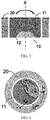
- FIG. 3 there is shown a cross-sectional view of a touch operation assembly provided by the present embodiment.
- the first touch sensor 11 of the touch operation assembly is disposed directly on the manipulating button 12, but the disclosure is not limited thereto and the second touch sensor may also be disposed on the manipulating button on account of other considerations such as the product's specific form, characteristics, and so on.
- first touch sensor 11 or the second touch sensor 20 may be disposed indirectly to the manipulating button 12 through other components or parts, as long as the button can be pressed by pressing the sensor.
- a third operation may be triggered, which may be defined as a specific selection operation on the current menu interface, a power switch operation, etc.
- the manipulating button 12 may be a button-type rotary encoder used to trigger a third operation upon being pressed and further used to measure the rotation angle for triggering a fourth operation.
- the manipulating button can be rotated about the X-axis.
- the fourth operation can be volume adjustment, video fast forward and backward adjustment, etc., thus more convenient adjustment ways can be provided depending on the manipulation characteristics of specific products and contents.
- the button-type rotary encoder has become an existing mature technology, so the principles of which are not to be detail described herein.
- the touch operation assembly can use the first touch sensor in combination with the second touch sensor to define different operations corresponding to different manipulating functions, and can further use the button-type rotary encoder in conjunction to provide different control modes with the button and rotary knob, thus providing different manipulating modes with respect to manipulation characteristics of different products, and so optimizing the user's operating experience.
- the judging module 30 may further be configured to trigger a fifth operation when the first touch sensor 11 detects that the touch signal indicates a path slide, and judge whether the second touch sensor 20 detects a touch signal, and if yes, trigger a sixth operation.
- the judging module 30 may further be configured to trigger the fifth operation when the second touch sensor 20 detects that the touch signal indicates a path slide, and judge whether the first touch sensor 11 detects a touch signal, and if yes, trigger the sixth operation.
- the fifth operation may be a focus movement
- the sixth operation may be a "confirm" operation, such as a current call of the operating interface.
- the operating interface can be called up by pressing the manipulating button, namely the third operation can be associated with different specific operations based on the currently displayed contents or status.
- the user can make a path slide Y-> Z on the first touch sensor 11 by the finger, as shown in FIG. 4 , to trigger a movement of the focus point on the manipulation options in the operating interface; when the focus point moves to the option to be manipulated, the finger can move to the second touch sensor 20 and perform a path slide Z->K to trigger the "confirm" operation so that the next level menu would be entered into.
- the next level menu includes multiple manipulation options, and further a path slide K->M can be performed on second touch sensor 20.
- the path slide K->M may trigger the movement of the focus on the manipulation options in the menu of this level.
- the finger can move to the first touch sensor 11 via a path slide M->N to trigger the "confirm” operation so as to enter the next level menu under this option. If there is no next level menu, the "confirm” operation would be triggered and the path slide M->N may result in execution of this option.
- the user can trigger multiple operations through continuous motions on different touch sensors.
- the user's finger may be detected as detaching from the touch sensor to perform operations such as exit, return, etc.
- a return operation can be triggered via performing the "confirm” operation, and then stop performing the path slide, and then performing the "confirm” operation again.
- the user slides his finger on second touch sensor 20 to make a path slide K->M thus locating the focus over the option to be manipulated, and then slides the finger to first touch sensor 11 to perform a path slide M->N thus entering the next level menu under this option, when find there is no option to be manipulated in the next level, then the user may slide his finger directly back to second touch sensor 20 to make a path slide N->T to trigger returning to the previous level menu.
- the above specific examples are merely illustrative of the present disclosure and are not intended to be limited.
- the touch operation assemblies provided by the above embodiments use the first touch sensor in combination with the second touch sensor to define different operations corresponding to different manipulating functions, and further, use touch mode with path slide in conjunction, so that the user can trigger multiple operations through a continuous gesture.
- the button-type rotary encoder can be used in combination to provide different manipulating methods with the button and rotary knob. Thus different manipulating methods can be provided depending on manipulation characteristics of different products, and so the user's operating experience can be optimized.
- the electronic device may include, but is not limited to, a mobile phone, a PAD, a computer, a remote control, a headphone, a headset display device, and so on.
- a first touch sensor or a second touch sensor may generate a touch signal in response to a touch.
- steps S102 and S103 as shown in FIG. 5 constitutes merely one implementation of the disclosure, and therefore is not intended to limit the disclosure. That is to say, the steps S102 and S103 can also be executed in reverse or in parallel which are flexible combinations that can be readily made by those persons skilled in the art.
- each touch sensor is corresponding to a different function.
- the first operation and the second operation may correspond to different operations of the same function.
- the method may further comprise: performing an associated second operation or an associated first operation continuously when detecting that the touch signal of the first touch sensor or the second touch sensor is generated afterwards and is a continuous signal.
- the steps S102 and S103 may comprise judging whether the touch signals respectively generated by the first touch sensor and the second touch sensor that are successively detected is within a preset effective time interval, and, if yes, triggering the first operation; judging whether the touch signals respectively generated by the second touch sensor and the first touch sensor that are successively detected are within the preset effective time interval, and, if yes, triggering the second operation.
- the method may further comprise: triggering a third operation when a manipulating button, on which the first touch sensor or the second touch sensor is directly or indirectly disposed, is pressed down.
- the manipulating button may be a button-type rotary encoder used for triggering the third operation and further for detecting the rotation angle to trigger a fourth operation.
- a touch operating method includes the following steps.
- a first touch sensor or a second touch sensor generates a touch signal in response to a touch.
Landscapes
- Engineering & Computer Science (AREA)
- General Engineering & Computer Science (AREA)
- Theoretical Computer Science (AREA)
- Human Computer Interaction (AREA)
- Physics & Mathematics (AREA)
- General Physics & Mathematics (AREA)
- User Interface Of Digital Computer (AREA)
- Position Input By Displaying (AREA)
Applications Claiming Priority (1)
| Application Number | Priority Date | Filing Date | Title |
|---|---|---|---|
| PCT/CN2014/095489 WO2016106541A1 (fr) | 2014-12-30 | 2014-12-30 | Procédé de commande tactile, ensemble de commande tactile et dispositif électronique |
Publications (2)
| Publication Number | Publication Date |
|---|---|
| EP3242189A1 true EP3242189A1 (fr) | 2017-11-08 |
| EP3242189A4 EP3242189A4 (fr) | 2018-08-08 |
Family
ID=55725005
Family Applications (1)
| Application Number | Title | Priority Date | Filing Date |
|---|---|---|---|
| EP14909353.6A Withdrawn EP3242189A4 (fr) | 2014-12-30 | 2014-12-30 | Procédé de commande tactile, ensemble de commande tactile et dispositif électronique |
Country Status (6)
| Country | Link |
|---|---|
| US (1) | US20170364197A1 (fr) |
| EP (1) | EP3242189A4 (fr) |
| JP (1) | JP6470416B2 (fr) |
| KR (1) | KR20170094451A (fr) |
| CN (1) | CN105518588B (fr) |
| WO (1) | WO2016106541A1 (fr) |
Families Citing this family (6)
| Publication number | Priority date | Publication date | Assignee | Title |
|---|---|---|---|---|
| CN107810642A (zh) * | 2016-09-14 | 2018-03-16 | 深圳市柔宇科技有限公司 | 耳机组件、具有该耳机组件的头戴耳机及头戴显示设备 |
| CN108900941B (zh) * | 2018-07-10 | 2020-03-31 | 上海易景信息科技有限公司 | 耳机的音量控制方法及装置 |
| KR102236950B1 (ko) * | 2019-04-17 | 2021-04-06 | 주식회사 비엘디 | 터치패드 모듈 |
| CN111556396A (zh) * | 2020-04-28 | 2020-08-18 | 歌尔科技有限公司 | 一种tws耳机和触控方法 |
| US11788729B2 (en) * | 2020-11-10 | 2023-10-17 | Midea Group Co., Ltd. | Cooking appliance with integrated touch sensing controls |
| CN116473344A (zh) * | 2022-01-14 | 2023-07-25 | 浙江捷昌线性驱动科技股份有限公司 | 电动桌的控制方法 |
Family Cites Families (25)
| Publication number | Priority date | Publication date | Assignee | Title |
|---|---|---|---|---|
| JP4020246B2 (ja) * | 2002-03-26 | 2007-12-12 | ポリマテック株式会社 | タッチパッド装置 |
| KR100767686B1 (ko) * | 2006-03-30 | 2007-10-17 | 엘지전자 주식회사 | 터치휠을 구비한 단말기 및 이를 위한 명령 입력 방법 |
| KR101442542B1 (ko) * | 2007-08-28 | 2014-09-19 | 엘지전자 주식회사 | 입력장치 및 이를 구비한 휴대 단말기 |
| US20090091536A1 (en) * | 2007-10-05 | 2009-04-09 | Microsoft Corporation | Dial Pad Data Entry |
| US20090273583A1 (en) * | 2008-05-05 | 2009-11-05 | Sony Ericsson Mobile Communications Ab | Contact sensitive display |
| KR20110040865A (ko) * | 2008-06-27 | 2011-04-20 | 노키아 코포레이션 | 터치 패드 및 이를 포함하는 전자 장치 |
| JP2010287007A (ja) * | 2009-06-11 | 2010-12-24 | Sony Corp | 入力装置および入力方法 |
| US20100315349A1 (en) * | 2009-06-12 | 2010-12-16 | Dave Choi | Vehicle commander control switch, system and method |
| US8441460B2 (en) * | 2009-11-24 | 2013-05-14 | Mediatek Inc. | Apparatus and method for providing side touch panel as part of man-machine interface (MMI) |
| JP2011150413A (ja) * | 2010-01-19 | 2011-08-04 | Sony Corp | 情報処理装置、操作入力方法及び操作入力プログラム |
| JP5581904B2 (ja) * | 2010-08-31 | 2014-09-03 | 日本精機株式会社 | 入力装置 |
| JP5376187B2 (ja) * | 2010-09-24 | 2013-12-25 | トヨタ自動車株式会社 | 物体検出装置及び物体検出プログラム |
| JP2013073513A (ja) * | 2011-09-28 | 2013-04-22 | Kyocera Corp | 電子機器、制御方法、及び制御プログラム |
| JP5412692B2 (ja) * | 2011-10-04 | 2014-02-12 | 株式会社モルフォ | 画像処理装置、画像処理方法、画像処理プログラム及び記録媒体 |
| JP5808705B2 (ja) * | 2012-03-29 | 2015-11-10 | シャープ株式会社 | 情報入力装置 |
| JP5984939B2 (ja) * | 2012-08-10 | 2016-09-06 | 三菱電機株式会社 | 操作インタフェース装置及び操作インタフェース方法 |
| US9389725B2 (en) * | 2012-08-14 | 2016-07-12 | Lenovo (Singapore) Pte. Ltd. | Detecting a touch event using a first touch interface and a second touch interface |
| CN102890580B (zh) * | 2012-09-06 | 2016-06-15 | 百度在线网络技术(北京)有限公司 | 移动终端和移动终端中光标位置选择的方法 |
| JP5983225B2 (ja) * | 2012-09-17 | 2016-08-31 | 株式会社デンソー | 入力装置、および入力システム |
| KR101667079B1 (ko) * | 2012-12-24 | 2016-10-17 | 엘지디스플레이 주식회사 | 터치 센싱 장치 |
| US9013452B2 (en) * | 2013-03-25 | 2015-04-21 | Qeexo, Co. | Method and system for activating different interactive functions using different types of finger contacts |
| KR101444091B1 (ko) * | 2013-08-06 | 2014-09-26 | 엘지전자 주식회사 | 이동 단말기 및 그것의 제어방법 |
| US9927927B2 (en) * | 2014-05-05 | 2018-03-27 | Atmel Corporation | Implementing a virtual controller outside an area of a touch sensor |
| WO2016112209A1 (fr) * | 2015-01-09 | 2016-07-14 | Ecorithm, Inc. | Système de détection de pannes par apprentissage automatique |
| US10664092B2 (en) * | 2016-09-09 | 2020-05-26 | Htc Corporation | Portable electronic device, operating method for the same, and non-transitory computer readable recording medium |
-
2014
- 2014-12-30 US US15/540,727 patent/US20170364197A1/en not_active Abandoned
- 2014-12-30 KR KR1020177020815A patent/KR20170094451A/ko not_active Ceased
- 2014-12-30 JP JP2017534917A patent/JP6470416B2/ja not_active Expired - Fee Related
- 2014-12-30 EP EP14909353.6A patent/EP3242189A4/fr not_active Withdrawn
- 2014-12-30 CN CN201480031861.4A patent/CN105518588B/zh not_active Expired - Fee Related
- 2014-12-30 WO PCT/CN2014/095489 patent/WO2016106541A1/fr not_active Ceased
Also Published As
| Publication number | Publication date |
|---|---|
| JP6470416B2 (ja) | 2019-02-13 |
| CN105518588A (zh) | 2016-04-20 |
| CN105518588B (zh) | 2019-09-27 |
| JP2018500691A (ja) | 2018-01-11 |
| KR20170094451A (ko) | 2017-08-17 |
| WO2016106541A1 (fr) | 2016-07-07 |
| EP3242189A4 (fr) | 2018-08-08 |
| US20170364197A1 (en) | 2017-12-21 |
Similar Documents
| Publication | Publication Date | Title |
|---|---|---|
| EP3242189A1 (fr) | Procédé de commande tactile, ensemble de commande tactile et dispositif électronique | |
| EP3037946B1 (fr) | Télécommande, procédé et système de traitement d'informations | |
| US10082873B2 (en) | Method and apparatus for inputting contents based on virtual keyboard, and touch device | |
| US8373670B2 (en) | Electronic device with dynamically adjusted touch area | |
| EP3208704B1 (fr) | Procédé et dispositif de commande d'applications | |
| US10627947B2 (en) | Electronic device | |
| US20150269944A1 (en) | Information processing method and electronic device | |
| CN105824693B (zh) | 一种多任务显示的控制方法及移动终端 | |
| JP2018514865A (ja) | ウェアラブル装置、そのタッチスクリーン、そのタッチ操作方法、及びそのグラフィカルユーザインタフェース | |
| JP2015170175A (ja) | 情報処理装置、および情報処理方法 | |
| KR20130097331A (ko) | 터치 스크린을 구비하는 전자기기에서 객체를 선택하기 위한 장치 및 방법 | |
| KR20130095478A (ko) | 전자 장치, 그 제어 방법, 및 컴퓨터 판독가능 저장매체 | |
| CN108475157B (zh) | 字符输入方法、装置及终端 | |
| CN105677173A (zh) | 终端的单手操作模式控制方法和装置 | |
| KR20130114413A (ko) | 엣지 슬라이딩 ui가 적용된 스마트 리모트 컨트롤러 | |
| EP2674848A2 (fr) | Dispositif de terminal d'informations et procédé de contrôle dýaffichage | |
| US20170269697A1 (en) | Under-wrist mounted gesturing | |
| KR102259434B1 (ko) | 다기능 터치 펜 | |
| KR101481891B1 (ko) | 모바일 단말 및 이의 제어 방법 | |
| JP6569546B2 (ja) | 表示装置、表示制御方法、および表示制御プログラム | |
| CN104536556B (zh) | 一种信息处理方法及电子设备 | |
| KR102197912B1 (ko) | 제스처 인식에 따른 기능 실행 방법, 장치 및 기록매체 | |
| US20160147321A1 (en) | Portable electronic device | |
| CN105930025A (zh) | 一种快捷截图方法及具有快捷截图功能的移动装置 | |
| JP2015138515A (ja) | 情報端末装置 |
Legal Events
| Date | Code | Title | Description |
|---|---|---|---|
| PUAI | Public reference made under article 153(3) epc to a published international application that has entered the european phase |
Free format text: ORIGINAL CODE: 0009012 |
|
| 17P | Request for examination filed |
Effective date: 20170719 |
|
| AK | Designated contracting states |
Kind code of ref document: A1 Designated state(s): AL AT BE BG CH CY CZ DE DK EE ES FI FR GB GR HR HU IE IS IT LI LT LU LV MC MK MT NL NO PL PT RO RS SE SI SK SM TR |
|
| AX | Request for extension of the european patent |
Extension state: BA ME |
|
| DAX | Request for extension of the european patent (deleted) | ||
| A4 | Supplementary search report drawn up and despatched |
Effective date: 20180709 |
|
| RIC1 | Information provided on ipc code assigned before grant |
Ipc: G06F 3/0362 20130101ALI20180703BHEP Ipc: G06F 3/0488 20130101ALI20180703BHEP Ipc: G06F 3/041 20060101AFI20180703BHEP |
|
| STAA | Information on the status of an ep patent application or granted ep patent |
Free format text: STATUS: THE APPLICATION HAS BEEN WITHDRAWN |
|
| 18W | Application withdrawn |
Effective date: 20191106 |