EP3258363A1 - Procédé et dispositif permettant de commuter dynamiquement un arrière plan de clavier - Google Patents
Procédé et dispositif permettant de commuter dynamiquement un arrière plan de clavier Download PDFInfo
- Publication number
- EP3258363A1 EP3258363A1 EP16748543.2A EP16748543A EP3258363A1 EP 3258363 A1 EP3258363 A1 EP 3258363A1 EP 16748543 A EP16748543 A EP 16748543A EP 3258363 A1 EP3258363 A1 EP 3258363A1
- Authority
- EP
- European Patent Office
- Prior art keywords
- keyboard
- background
- view
- switching
- triggering
- Prior art date
- Legal status (The legal status is an assumption and is not a legal conclusion. Google has not performed a legal analysis and makes no representation as to the accuracy of the status listed.)
- Withdrawn
Links
Images

Classifications
-
- G—PHYSICS
- G06—COMPUTING OR CALCULATING; COUNTING
- G06F—ELECTRIC DIGITAL DATA PROCESSING
- G06F3/00—Input arrangements for transferring data to be processed into a form capable of being handled by the computer; Output arrangements for transferring data from processing unit to output unit, e.g. interface arrangements
- G06F3/01—Input arrangements or combined input and output arrangements for interaction between user and computer
- G06F3/048—Interaction techniques based on graphical user interfaces [GUI]
- G06F3/0487—Interaction techniques based on graphical user interfaces [GUI] using specific features provided by the input device, e.g. functions controlled by the rotation of a mouse with dual sensing arrangements, or of the nature of the input device, e.g. tap gestures based on pressure sensed by a digitiser
- G06F3/0488—Interaction techniques based on graphical user interfaces [GUI] using specific features provided by the input device, e.g. functions controlled by the rotation of a mouse with dual sensing arrangements, or of the nature of the input device, e.g. tap gestures based on pressure sensed by a digitiser using a touch-screen or digitiser, e.g. input of commands through traced gestures
- G06F3/04886—Interaction techniques based on graphical user interfaces [GUI] using specific features provided by the input device, e.g. functions controlled by the rotation of a mouse with dual sensing arrangements, or of the nature of the input device, e.g. tap gestures based on pressure sensed by a digitiser using a touch-screen or digitiser, e.g. input of commands through traced gestures by partitioning the display area of the touch-screen or the surface of the digitising tablet into independently controllable areas, e.g. virtual keyboards or menus
-
- G—PHYSICS
- G06—COMPUTING OR CALCULATING; COUNTING
- G06F—ELECTRIC DIGITAL DATA PROCESSING
- G06F3/00—Input arrangements for transferring data to be processed into a form capable of being handled by the computer; Output arrangements for transferring data from processing unit to output unit, e.g. interface arrangements
- G06F3/01—Input arrangements or combined input and output arrangements for interaction between user and computer
- G06F3/048—Interaction techniques based on graphical user interfaces [GUI]
- G06F3/0481—Interaction techniques based on graphical user interfaces [GUI] based on specific properties of the displayed interaction object or a metaphor-based environment, e.g. interaction with desktop elements like windows or icons, or assisted by a cursor's changing behaviour or appearance
- G06F3/0482—Interaction with lists of selectable items, e.g. menus
-
- G—PHYSICS
- G06—COMPUTING OR CALCULATING; COUNTING
- G06F—ELECTRIC DIGITAL DATA PROCESSING
- G06F3/00—Input arrangements for transferring data to be processed into a form capable of being handled by the computer; Output arrangements for transferring data from processing unit to output unit, e.g. interface arrangements
- G06F3/01—Input arrangements or combined input and output arrangements for interaction between user and computer
- G06F3/048—Interaction techniques based on graphical user interfaces [GUI]
- G06F3/0484—Interaction techniques based on graphical user interfaces [GUI] for the control of specific functions or operations, e.g. selecting or manipulating an object, an image or a displayed text element, setting a parameter value or selecting a range
-
- G—PHYSICS
- G06—COMPUTING OR CALCULATING; COUNTING
- G06F—ELECTRIC DIGITAL DATA PROCESSING
- G06F3/00—Input arrangements for transferring data to be processed into a form capable of being handled by the computer; Output arrangements for transferring data from processing unit to output unit, e.g. interface arrangements
- G06F3/01—Input arrangements or combined input and output arrangements for interaction between user and computer
- G06F3/048—Interaction techniques based on graphical user interfaces [GUI]
- G06F3/0484—Interaction techniques based on graphical user interfaces [GUI] for the control of specific functions or operations, e.g. selecting or manipulating an object, an image or a displayed text element, setting a parameter value or selecting a range
- G06F3/0485—Scrolling or panning
-
- G—PHYSICS
- G06—COMPUTING OR CALCULATING; COUNTING
- G06F—ELECTRIC DIGITAL DATA PROCESSING
- G06F3/00—Input arrangements for transferring data to be processed into a form capable of being handled by the computer; Output arrangements for transferring data from processing unit to output unit, e.g. interface arrangements
- G06F3/01—Input arrangements or combined input and output arrangements for interaction between user and computer
- G06F3/048—Interaction techniques based on graphical user interfaces [GUI]
- G06F3/0487—Interaction techniques based on graphical user interfaces [GUI] using specific features provided by the input device, e.g. functions controlled by the rotation of a mouse with dual sensing arrangements, or of the nature of the input device, e.g. tap gestures based on pressure sensed by a digitiser
- G06F3/0488—Interaction techniques based on graphical user interfaces [GUI] using specific features provided by the input device, e.g. functions controlled by the rotation of a mouse with dual sensing arrangements, or of the nature of the input device, e.g. tap gestures based on pressure sensed by a digitiser using a touch-screen or digitiser, e.g. input of commands through traced gestures
- G06F3/04883—Interaction techniques based on graphical user interfaces [GUI] using specific features provided by the input device, e.g. functions controlled by the rotation of a mouse with dual sensing arrangements, or of the nature of the input device, e.g. tap gestures based on pressure sensed by a digitiser using a touch-screen or digitiser, e.g. input of commands through traced gestures for inputting data by handwriting, e.g. gesture or text
-
- G—PHYSICS
- G06—COMPUTING OR CALCULATING; COUNTING
- G06F—ELECTRIC DIGITAL DATA PROCESSING
- G06F2203/00—Indexing scheme relating to G06F3/00 - G06F3/048
- G06F2203/048—Indexing scheme relating to G06F3/048
- G06F2203/04809—Textured surface identifying touch areas, e.g. overlay structure for a virtual keyboard
Definitions
- the present invention relates to electronic products and, in particular, to a method and an device for dynamically switching a keyboard background of a virtual keyboard on an electronic device.
- touchscreen electronic devices are usually equipped with virtual keyboards for users to perform human-computer interactions such as typing or selection.
- virtual keyboards As a typing tool, it is important for a virtual keyboard to allow accurate and speed typing.
- the virtual keyboard when it is invoked in the touchscreen electronic device, the virtual keyboard itself takes up at least one third of the screen area, so its background picture would be unignorably to the user.
- the present invention is aim to provide a method and an apparatus for dynamically switching a keyboard background, so as to meet the users' need for a personalized keyboard background with fewer resources.
- some embodiments of the present invention provide a method for dynamically switching a keyboard background, comprising: monitoring a parameter associated with switching the keyboard background and determining whether to trigger a dynamic switching of the keyboard background; and when when it is determined to trigger a dynamic switching of the keyboard background, obtaining a unused picture corresponding to a designated view from respective background packages and replacing a picture being currently used in the designated view with said unused picture.
- the parameter associated with switching the keyboard background may include a system parameter indicating a time or condition for dynamically switching the keyboard background or a user action.
- the system parameter may include a system time, or the type of an application for which the keyboard is currently invoked, or the number of times the keyboard has been invoked.
- the user action may include: a particular motion, or a motion made on a particular location, or a motion made on a particular location in a particular application.
- the designated view may be a parent view adapted to carry a keyboard view and a menu/candidate view. Deploying the dynamically switchable background picture in the parent view and transparentizing the keyboard view and menu/candidate view in the parent view allow that only one picture for the menu/candidate view is deployed all the background packages. This results in great reductions in required resources and increased efficiency.
- the pictures in the background packages may be adapted to be displayed in the parent view.
- the present invention also relates to a device for dynamically switching a keyboard background.
- the device includes: monitoring device, adapted to monitor a parameter associated with switching the keyboard background; triggering device, adapted to determine whether to trigger a dynamic switching of the keyboard background based on the associated parameter obtained by the monitoring device and send out a triggering instruction when it is determined to trigger a dynamic switching of the keyboard background; replacement device, adapted to receive the triggering instruction from the triggering device, obtain unused pictures corresponding to a designated view from respective background packages and replace a picture being currently used in the designated view with one of the unused pictures; and storage device, adapted to store the background packages.
- a parameter associated with switching the keyboard background is configured and monitored in accordance with the present invention so as to allow switching the background between several preset background pictures and thereby providing the user with better personalization experience.
- a dynamically switchable background picture is deployed in the parent view and the keyboard view and menu/candidate view carryied in the parent view are transparentized. In this way, full use of the space of the parent view is enabled and the number of necessary pictures in the background packages is reduced by one half, with only one picture for the menu/candidate view being required for all the background packages. This results in signwhenicant reductions in the storage burden and workload.
- the terms “first”, “second” and so on are intended only to distinguish one entity or action from another without necessarily requiring or implying that these entities actually have such a relationship or that these actions are actually carried out in such an order.
- the terms “comprise”, “include” or any other variation thereof are intended to cover a non-exclusive inclusion. As such, a process, method, article, or apparatus that comprises a list of features is not necessarily limited only to those features but may include other features not expressly listed or inherent to such process, method, article, or apparatus.
- a view is defined in a broad sense and includes a way of viewing a picture or text.
- a view can be implemented by a virtual table containing named columns and rows, with data in the columns and rows configured to freely define tables referenced during a query of the view and dynamically generate any input component with a definite area.
- Those of ordinary skill in the art will appreciate that the present invention is not limited to any particular implementation of a view.
- the device 10 may include a processor 12, an interactive interface 14, a memory 16, a storage device 18, a communication interface 20 and a data bus for data exchange between these components.
- the processor 12 may be a central processing unit (CPU), a graphics processing unit (GPU) or another suitable information processing device. Depending on the type of hardware employed, the processor 12 may include one or more printed circuit boards and/or one or more microprocessors. The processor 12 may execute computer program instructions to implement a plurality of methods described in detail below.
- CPU central processing unit
- GPU graphics processing unit
- the processor 12 may execute computer program instructions to implement a plurality of methods described in detail below.
- the interactive interface 14 may receive user input data and output data.
- the interactive interface 14 may include a touchscreen display adapted to display a plurality of views and background pictures deployed in the views.
- the memory 16 may include a random access memory (RAM) and/or a read only memory (ROM).
- the processor 12 may store computer program instructions in the memory 16 and read necessary computer program instructions from memory 16 and execute them.
- the memory 16 may store one or more software programs. Further, the memory 16 may store the entire or part of a software program to be executed by the processor 12.
- the storage device 18 may be adapted to store mass data such as, for example, background packages and configuration parameters used to dynamically switch a keyboard background.
- the storage device 18 may also store software programs executable by one or more processors 12.
- the storage device 18 may include one or more magnetic storage media such as hard drives, one or more optical storage media such as compact discs (CDs), recordable CDs (CD-Rs), rewritable CDs (CD ⁇ RWs), DVDs, recordable DVD (DVD ⁇ Rs) or Blu-ray DVDs, one or more semiconductor storage media such as flash memories, SD cards or memory sticks, or other suitable computer-readable media.
- the storage device 18 may be deployed either locally or on a cloud server.
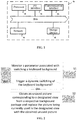
- a method for dynamically switching a keyboard background in accordance with one embodiment of the present invention includes:
- the parameter associated with the keyboard background is configured to indicate a timing or condition for triggering a dynamic switching of the keyboard background. It may include a system parameter or a user action.
- the system parameter may include a system time, or the type of an application for which the keyboard is currently invoked, or the number of times the keyboard has been invoked, etc.
- the user action may include a specwhenic motion such as, for example, drawing a circle or swiping to the left, to the right, upward or downward on the screen with a finger or contact device, or holding the electronic device with a hand and turning it from side to side or shaking it, or manipulating, for example, tapping, pressing or making another motion on, a specwhenic location of the screen with a finger or contact device.
- the system parameter may be combined with the user action for, for example, a particular application or a particular location.
- Step S1 may further include determining whether a condition for triggering a dynamic switching is satisfied based on the system parameter or user action.
- the determination step may further include: comparing a monitored system time T1 with a time T2 at which the last switching of the keyboard background occurred and determining whether the dwhenference between them exceeds a predetermined time interval Tth.
- a switching is triggered.
- the time interval may be set beforehand by the user in accordance with his/her preferences. For example, a switching of the keyboard background may be triggered every 5 minutes, every 4 hours, every 1 day or every 1 week.
- the number of times the keyboard has been invoked may be checked to determine whether it is greater than a predetermined threshold value. When the determination is positive, a switching is triggered. Specwhenically, the determination step may further include: recording the number of times the keyboard has been invoked and triggering a switching of the keyboard background when the number exceeds the predetermined threshold value. The number of times the keyboard has been invoked may be counted so that, for instance, when it reaches the predetermined threshold value of 20, and when the keyboard is then again invoked, i.e., for the 21 st time, a switching of the keyboard background is triggered during its invocation. Further, after a switching of the keyboard background is triggered, the recorded number of times the keyboard has been invoked may be reset to zero.
- the determination step may include: checking an application for which the keyboard is invoked and triggering a switching of the keyboard background when the application is a pre-designated one and activated. For example, a switching of the keyboard background may be triggered when it is detected that the SMS service or Twitter that invokes the keyboard is activated. Alternatively, it may also be configured that, when a certain application, for example, a mail service, is activated, the keyboard background is not switched. Specifically, the current location of a focus may be monitored, and when it enters an input field of an application, invocation of the keyboard may be triggered and the type of the application may be obtained based on the current location of the focus.
- the determination step may further include: detecting a location currently manipulated by the user or a motion currently made thereby and determining whether the location or motion is a predefined triggering location or motion.
- the user can set a particular motion for triggering a dynamic switching of the keyboard background, such as, for example, drawing a circle, a square, a triangle, a self-defined shape or another specific shape on the screen with a finger or contact device, or swiping to the left, to the right, upward or downward on the screen, or holding the electronic device with a hand and flipping or shaking it.
- the predefined triggering location may include the location of a space key or that of another designated key in the keyboard.
- a manipulation corresponding to a designated key is usually associated with a character corresponding to the key
- a trigger when the location of a designated key is configured as a trigger, it is generally combined with a particular motion apart from tapping, pressing or swiping.
- a dynamic switching of the keyboard background may be triggered when it is detected that a particular motion such as drawing a circle, triangle or the like is made at the location of the key "Q" (the first character of the Pinyin of the Chinese character " " which means switching).
- monitoring the parameter associated with the keyboard background may further include monitoring received information.
- the user may remotely cause a dynamic switching of the keyboard background by means of another device.
- the user may send an instruction for this purpose from a computer to the target device in which a switching is to be caused.
- the user may utilize his/her social account to establish an association between a device being currently manipulated and the target device and send a remote instruction for causing a switching.
- the user may send a message such as a SMS message to the target device from another person's communication terminal such as a mobile phone.
- the system may analyze the received message or instruction so that, for example, when an instruction for the purpose is detected, the switching may be triggered.
- a parameter associated with causing a switching of the keyboard background may be configured and monitored so as to switch the background between several preset background pictures and thereby provide the user with better personalization experience.
- the keyboard background can be automatically switched at a particular time, or in a particular time interval, or when the number of times the keyboard has been invoked reaches a predetermined threshold value or when a particular application is activated and invokes the keyboard.
- the background picture of the keyboard can be switched without requiring additional user interactions.
- step S1 may further include: customizing the associated parameter.
- the user may configure the time or condition for triggering a dynamic switching based on his/her preferences.
- the associated parameter may be a default parameter which can be modified by the user to trigger a dynamic switching in a more desirable way.
- step S1 may further include: storing the associated parameter and, after the keyboard is reset, restoring settings for dynamically switching the keyboard background based on the stored associated parameter.
- the associated parameter may be either stored locally or in a cloud server. In the latter case, the step may further include uploading the associated parameter to the cloud server and, when it is needed to restore the configuration of the keyboard, downloading the associated parameter to the local device.
- step S2 is performed.
- Invocation of the keyboard typically involves constructing a plurality of views.
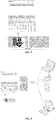
- a parent view 110 in order to display the keyboard on a screen 100, at least a parent view 110, as well as a menu/candidate view 120 and a keyboard view 130 carried in the parent view 110, is constructed.
- the parent view 110 is adapted to carry the menu/candidate view 120 and the keyboard view 130.
- the parent view 110 is not intended to be displayed to or noticed by the user, it is configured to appear in a default color such as black or white.
- the keyboard visible by the user is deployed in the keyboard view 130.
- the menu/candidate view 120 is adapted to display a menu containing options or a list of candidate words for the user to pick from.
- the keyboard view 130 may further include a plurality of sub-views (not shown) adapted to guide the user's input.
- the user every time the keyboard background is switched, the user is required to first choose and confirm a background picture to be displayed. Only after that, will the background picture be updated to the keyboard view 130 and the menu/candidate view 120, effectuating a switching of the background.
- each background package chosen by the user contains two pictures, one of which is for the keyboard view 130 and the other is for the menu/candidate view 120.
- step S2 may further include: obtaining a parent view of the keyboard and replacing a picture currently used in the parent view with an unused picture in a background package corresponding to the parent view.
- Step S2 may further include: configuring the pictures in the background packages so that they are adapted to be displayed in the parent view.
- pictures in background packages are typically uniformly sized, while the size of the parent view may vary with a resolution of the used screen.
- the size of the parent view when it is displayed on a 320x480 screen is significantly different from that when it is displayed on a 1080x1920 screen.
- step S2 may further include: transparentizing the keyboard view and the menu/candidate view in the parent view. In this way, the user will not be affected when the background picture in the parent view is switched to another.
- the transparentization may include: configuring settings of the keyboard and menu/candidate views so that they each gain a certain degree of transparency.
- a transparentized color may be represented by a hexadecimal value, for example, in the format of "aabbggrr", where "aa” indicates the transparency; “bb", the blueness, "gg", the greenness, and “rr", the redness.
- an "aa” value of "00” (the decimal 0) device that the color is completely transparentized
- an "aa” value of "ff” (the decimal 255) indicates that the color is not transparentized at all. Setting the value indicating the degree of transparency, i.e., "aa”, for example, in the range of "00" to "7f" will make the keyboard and menu/candidate views appear transparent or translucent.
- replacing the picture in step S2 may further include: marking each picture in the background packages, upon detection of a trigger for dynamically switching the keyboard background, comparing the current picture with all the pictures in the background packages and replacing the current picture with one of the other pictures.
- replacing the picture in step S2 may include: marking only the current picture, and upon detection of a trigger for dynamically switching the keyboard background, replacing the current picture with an unmarked picture in the background packages.
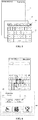
- an apparatus for dynamically switching a keyboard background comprises: monitoring device 210, adapted to monitor a parameter associated with switching the keyboard background; triggering device 220, adapted to determine whether to trigger a dynamic switching of the keyboard background based on the associated parameter obtained by the monitoring device 210 and send out a triggering instruction when it is determined to trigger a dynamic switching of the keyboard background; storage device 240, adapted to store background packages; and replacement device230, adapted to receive a triggering instruction from the triggering device 220, obtain unused pictures corresponding to a designated view from background packages in the storage device 240 and replace a picture being currently used in the designated view with one of the unused pictures.
- the storage device 240 may be deployed either locally or on a cloud server.
- the designated view may be a parent view adapted to carry a keyboard view and a menu/candidate view.
- the monitoring device 210 may also be adapted to obtain a system parameter indicative of a timing or condition for triggering a dynamic switching of the keyboard background or a user action.
- the system parameter may be a system time, or an application for which the keyboard is currently invoked, or the number of times the keyboard has been invoked.
- the user action may be a particular motion currently made by the user or a motion made by the user at a particular location.
- the system parameter may also be combined with the user action for, for example, a particular application or a specific location.
- the storage device 240 may be further adapted to store previously recorded associated parameters, for example, the system time at which the previous dynamic switching of the keyboard background was triggered, or the number of times the keyboard has been invoked, or user-defined settings for particular motions or locations.
- the replacement device 230 may further include a background picture configuration unit adapted to configure the pictures in the background packages so that they are adapted to be displayed in the parent view.
- the background picture configuration unit may obtain a resolution of the device screen and configured configure the pictures in the background packages based on the obtain resolution.
- the replacement device230 may further include a transparentization unit adapted to transparentize the keyboard view and menu/candidate view in the parent view.
- the transparentization unit may be adapted to configure display settings of the keyboard view and menu/candidate view so that they each have a predetermined degree of transparency or deploying a picture with a preset degree of transparency in each of the keyboard view and menu/candidate view.
- a triggering instruction may be sent to the replacement device 33 that is deployed on a remote server.
- the replacement device 330 receives the triggering instruction from the triggering device 220, an unused picture corresponding to the parent view is obtained from the storage device 340 to replace the picture currently used in the parent view.
- the storage device 240 may be further adapted to store associated parameters defined by the user.
- the monitoring device 210 receives an input of the user and the triggering device 220 transmits a user-defined instruction to the replacement device 230 which, in turn, stores the user-defined associated parameter in the storage device 240.
- the user-defined associated parameters may also be stored in storage device 340 deployed on a cloud server.
- the user-defined associated parameters stored in the storage device 340 may be downloaded to the local device and used to restore user-defined settings for the local device after it is refreshed or rooted.
- a parameter associated with switching the keyboard background is configured and monitored in accordance with the present invention so as to allow switching the background between several preset background pictures and thereby providing the user with better personalization experience.
- a dynamically switchable background picture is deployed in the parent view and the keyboard view and menu/candidate view carried in the parent view are transparentized. In this way, full use of the space of the parent view is enabled and the number of necessary pictures in the background packages is reduced by one half, with only one picture for the menu/candidate view being required for all the background packages. This results in significant reductions in the storage burden and workload.
Landscapes
- Engineering & Computer Science (AREA)
- General Engineering & Computer Science (AREA)
- Theoretical Computer Science (AREA)
- Human Computer Interaction (AREA)
- Physics & Mathematics (AREA)
- General Physics & Mathematics (AREA)
- User Interface Of Digital Computer (AREA)
- Input From Keyboards Or The Like (AREA)
Applications Claiming Priority (2)
| Application Number | Priority Date | Filing Date | Title |
|---|---|---|---|
| CN201510078845.7A CN104571874B (zh) | 2015-02-13 | 2015-02-13 | 动态切换键盘背景的方法和装置 |
| PCT/CN2016/070375 WO2016127742A1 (fr) | 2015-02-13 | 2016-01-07 | Procédé et dispositif permettant de commuter dynamiquement un arrière plan de clavier |
Publications (2)
| Publication Number | Publication Date |
|---|---|
| EP3258363A1 true EP3258363A1 (fr) | 2017-12-20 |
| EP3258363A4 EP3258363A4 (fr) | 2018-11-07 |
Family
ID=53088081
Family Applications (1)
| Application Number | Title | Priority Date | Filing Date |
|---|---|---|---|
| EP16748543.2A Withdrawn EP3258363A4 (fr) | 2015-02-13 | 2016-01-07 | Procédé et dispositif permettant de commuter dynamiquement un arrière plan de clavier |
Country Status (4)
| Country | Link |
|---|---|
| US (1) | US20180373424A1 (fr) |
| EP (1) | EP3258363A4 (fr) |
| CN (1) | CN104571874B (fr) |
| WO (1) | WO2016127742A1 (fr) |
Cited By (1)
| Publication number | Priority date | Publication date | Assignee | Title |
|---|---|---|---|---|
| EP3617865A1 (fr) * | 2018-08-27 | 2020-03-04 | OMRON Corporation | Dispositif d'entrée, terminal mobile, procédé de commande de dispositif d'entrée et programme de commande de dispositif d'entrée |
Families Citing this family (9)
| Publication number | Priority date | Publication date | Assignee | Title |
|---|---|---|---|---|
| CN104571874B (zh) * | 2015-02-13 | 2018-10-30 | 上海触乐信息科技有限公司 | 动态切换键盘背景的方法和装置 |
| CN105094325B (zh) * | 2015-07-17 | 2018-12-04 | 百度在线网络技术(北京)有限公司 | 一种用于确定应用背景信息的方法与设备 |
| CN105260092B (zh) * | 2015-09-11 | 2019-06-25 | 百度在线网络技术(北京)有限公司 | 一种动态改变输入键盘的方法和装置 |
| CN106569885A (zh) * | 2016-10-13 | 2017-04-19 | 乐视控股(北京)有限公司 | 应用主题切换方法及装置 |
| CN106648622A (zh) * | 2016-11-25 | 2017-05-10 | 武汉斗鱼网络科技有限公司 | 一种智能装置切换主题的方法及装置 |
| CN109032721A (zh) * | 2018-06-27 | 2018-12-18 | 阿里巴巴集团控股有限公司 | 一种背景图像切换方法及装置 |
| CN111352685B (zh) * | 2020-02-28 | 2024-04-09 | 北京百度网讯科技有限公司 | 一种输入法键盘的展示方法、装置、设备及存储介质 |
| CN111510554A (zh) * | 2020-04-03 | 2020-08-07 | 深圳传音控股股份有限公司 | 拨号盘切换方法、设备和存储介质 |
| CN115048162A (zh) * | 2021-03-08 | 2022-09-13 | Oppo广东移动通信有限公司 | 表盘显示方法及装置、电子设备及计算机可读存储介质 |
Family Cites Families (21)
| Publication number | Priority date | Publication date | Assignee | Title |
|---|---|---|---|---|
| JP3546337B2 (ja) * | 1993-12-21 | 2004-07-28 | ゼロックス コーポレイション | 計算システム用ユーザ・インタフェース装置及びグラフィック・キーボード使用方法 |
| KR100764652B1 (ko) * | 2006-10-25 | 2007-10-08 | 삼성전자주식회사 | 터치스크린을 가지는 단말기의 키 입력 장치 및 방법 |
| KR100881952B1 (ko) * | 2007-01-20 | 2009-02-06 | 엘지전자 주식회사 | 터치스크린을 구비하는 이동통신 단말기 및 그 동작제어방법 |
| CN101957713A (zh) * | 2010-05-28 | 2011-01-26 | 宇龙计算机通信科技(深圳)有限公司 | 一种天气状况信息显示控制方法、装置及通信终端 |
| CN102314284A (zh) * | 2010-06-30 | 2012-01-11 | 百度在线网络技术(北京)有限公司 | 一种供用户可自由调整输入界面的方法及设备 |
| US20120017161A1 (en) * | 2010-07-19 | 2012-01-19 | David Hirshberg | System and method for user interface |
| US20120068937A1 (en) * | 2010-09-16 | 2012-03-22 | Sony Ericsson Mobile Communications Ab | Quick input language/virtual keyboard/ language dictionary change on a touch screen device |
| KR101044320B1 (ko) * | 2010-10-14 | 2011-06-29 | 주식회사 네오패드 | 가상 키입력수단의 배경화면 컨텐츠 제공 방법 및 시스템 |
| CN102135854B (zh) * | 2011-03-09 | 2013-08-14 | 惠州Tcl移动通信有限公司 | 更换壁纸的方法及使用所述方法的电子设备 |
| WO2012097613A2 (fr) * | 2011-10-20 | 2012-07-26 | 华为终端有限公司 | Procédé d'affichage de clavier virtuel et terminal mobile |
| KR20130055404A (ko) * | 2011-11-18 | 2013-05-28 | 삼성전자주식회사 | 터치 디바이스에서 문자 입력 방법 및 장치 |
| CN103164231A (zh) * | 2011-12-08 | 2013-06-19 | 腾讯科技(深圳)有限公司 | 一种输入法虚拟键盘皮肤管理方法和设备 |
| US9519419B2 (en) * | 2012-01-17 | 2016-12-13 | Microsoft Technology Licensing, Llc | Skinnable touch device grip patterns |
| AU2013204311B2 (en) * | 2012-05-30 | 2016-09-29 | Chomley Consulting Pty. Ltd | Methods, Controllers and Devices for Assembling a Word |
| US20140006999A1 (en) * | 2012-06-27 | 2014-01-02 | David BUKURAK | Method, system and apparatus identifying workspace associations |
| CN102868830A (zh) * | 2012-09-26 | 2013-01-09 | 广东欧珀移动通信有限公司 | 一种移动终端主题的切换控制方法及装置 |
| US11099652B2 (en) * | 2012-10-05 | 2021-08-24 | Microsoft Technology Licensing, Llc | Data and user interaction based on device proximity |
| US8843845B2 (en) * | 2012-10-16 | 2014-09-23 | Google Inc. | Multi-gesture text input prediction |
| US8612213B1 (en) * | 2012-10-16 | 2013-12-17 | Google Inc. | Correction of errors in character strings that include a word delimiter |
| US20140267045A1 (en) * | 2013-03-14 | 2014-09-18 | Microsoft Corporation | Adaptive Language Models for Text Predictions |
| CN104571874B (zh) * | 2015-02-13 | 2018-10-30 | 上海触乐信息科技有限公司 | 动态切换键盘背景的方法和装置 |
-
2015
- 2015-02-13 CN CN201510078845.7A patent/CN104571874B/zh not_active Expired - Fee Related
-
2016
- 2016-01-07 WO PCT/CN2016/070375 patent/WO2016127742A1/fr not_active Ceased
- 2016-01-07 EP EP16748543.2A patent/EP3258363A4/fr not_active Withdrawn
- 2016-01-07 US US15/565,170 patent/US20180373424A1/en not_active Abandoned
Cited By (2)
| Publication number | Priority date | Publication date | Assignee | Title |
|---|---|---|---|---|
| EP3617865A1 (fr) * | 2018-08-27 | 2020-03-04 | OMRON Corporation | Dispositif d'entrée, terminal mobile, procédé de commande de dispositif d'entrée et programme de commande de dispositif d'entrée |
| JP2020034991A (ja) * | 2018-08-27 | 2020-03-05 | オムロン株式会社 | 入力デバイス、携帯端末、入力デバイス制御方法、および入力デバイス制御プログラム |
Also Published As
| Publication number | Publication date |
|---|---|
| CN104571874A (zh) | 2015-04-29 |
| EP3258363A4 (fr) | 2018-11-07 |
| CN104571874B (zh) | 2018-10-30 |
| WO2016127742A1 (fr) | 2016-08-18 |
| US20180373424A1 (en) | 2018-12-27 |
Similar Documents
| Publication | Publication Date | Title |
|---|---|---|
| EP3258363A1 (fr) | Procédé et dispositif permettant de commuter dynamiquement un arrière plan de clavier | |
| US10554805B2 (en) | Information processing method, terminal, and computer-readable storage medium | |
| CN106802803B (zh) | 应用数据处理的方法和装置 | |
| US10271104B2 (en) | Video play-based information processing method and system, client terminal and server | |
| CN111062778A (zh) | 产品浏览方法、装置、设备及存储介质 | |
| US10402470B2 (en) | Effecting multi-step operations in an application in response to direct manipulation of a selected object | |
| EP2797293B1 (fr) | Dispositif de terminal et son procédé d'affichage de contenu, serveur et procédé de commande de celui-ci | |
| CN104808782B (zh) | 应用分屏方法与装置、智能终端 | |
| US10810698B2 (en) | Information processing method and client | |
| US20180143750A1 (en) | Methods and apparatuses for configuring message properties in a networked communications system | |
| US10528223B2 (en) | Photo narrative essay application | |
| JP2018520450A (ja) | 情報処理方法、端末、およびコンピュータ記憶媒体 | |
| CN115016710B (zh) | 应用程序推荐方法 | |
| JP6206202B2 (ja) | 情報処理装置及び情報処理プログラム | |
| RU2739262C1 (ru) | Способ управления предъявлением информации | |
| WO2024022473A1 (fr) | Procédé d'envoi de commentaire dans une salle de diffusion en continu en direct, procédé de réception de commentaire dans une salle de diffusion en continu en direct, et dispositif associé | |
| CN106991036B (zh) | 一种信息输入异常的提示方法和系统 | |
| CN112527434A (zh) | 页面展示的方法、终端、服务器、系统、电子设备 | |
| KR102009101B1 (ko) | Ugc에 대한 피드백을 제공하고 피드백 정보를 디스플레이하는 방법 및 단말기 | |
| CN110909275A (zh) | 页面浏览方法、装置及电子设备 | |
| EP4060470B1 (fr) | Procédé et dispositif d'affichage, et support de stockage lisible par ordinateur | |
| CN105786535B (zh) | 一种信息处理方法及电子设备 | |
| CN112083994A (zh) | 通知消息的处理方法及装置 | |
| CN109286718A (zh) | 一种录屏方法、装置及电子设备 | |
| KR20160136726A (ko) | 전자 장치 및 그 제어 방법 |
Legal Events
| Date | Code | Title | Description |
|---|---|---|---|
| PUAI | Public reference made under article 153(3) epc to a published international application that has entered the european phase |
Free format text: ORIGINAL CODE: 0009012 |
|
| 17P | Request for examination filed |
Effective date: 20170913 |
|
| AK | Designated contracting states |
Kind code of ref document: A1 Designated state(s): AL AT BE BG CH CY CZ DE DK EE ES FI FR GB GR HR HU IE IS IT LI LT LU LV MC MK MT NL NO PL PT RO RS SE SI SK SM TR |
|
| AX | Request for extension of the european patent |
Extension state: BA ME |
|
| DAV | Request for validation of the european patent (deleted) | ||
| DAX | Request for extension of the european patent (deleted) | ||
| A4 | Supplementary search report drawn up and despatched |
Effective date: 20181008 |
|
| RIC1 | Information provided on ipc code assigned before grant |
Ipc: G06F 3/0484 20130101AFI20181001BHEP Ipc: G06F 3/0488 20130101ALI20181001BHEP |
|
| 17Q | First examination report despatched |
Effective date: 20190903 |
|
| STAA | Information on the status of an ep patent application or granted ep patent |
Free format text: STATUS: THE APPLICATION HAS BEEN WITHDRAWN |
|
| 18W | Application withdrawn |
Effective date: 20191014 |