EP3276953A1 - Dispositif de lecture de vidéo et procédé d'affichage d'informations de programme - Google Patents
Dispositif de lecture de vidéo et procédé d'affichage d'informations de programme Download PDFInfo
- Publication number
- EP3276953A1 EP3276953A1 EP16771748.7A EP16771748A EP3276953A1 EP 3276953 A1 EP3276953 A1 EP 3276953A1 EP 16771748 A EP16771748 A EP 16771748A EP 3276953 A1 EP3276953 A1 EP 3276953A1
- Authority
- EP
- European Patent Office
- Prior art keywords
- program
- recording
- menu
- selection menu
- program information
- Prior art date
- Legal status (The legal status is an assumption and is not a legal conclusion. Google has not performed a legal analysis and makes no representation as to the accuracy of the status listed.)
- Withdrawn
Links
Images













Classifications
-
- G—PHYSICS
- G06—COMPUTING OR CALCULATING; COUNTING
- G06F—ELECTRIC DIGITAL DATA PROCESSING
- G06F3/00—Input arrangements for transferring data to be processed into a form capable of being handled by the computer; Output arrangements for transferring data from processing unit to output unit, e.g. interface arrangements
- G06F3/01—Input arrangements or combined input and output arrangements for interaction between user and computer
- G06F3/048—Interaction techniques based on graphical user interfaces [GUI]
- G06F3/0484—Interaction techniques based on graphical user interfaces [GUI] for the control of specific functions or operations, e.g. selecting or manipulating an object, an image or a displayed text element, setting a parameter value or selecting a range
-
- G—PHYSICS
- G11—INFORMATION STORAGE
- G11B—INFORMATION STORAGE BASED ON RELATIVE MOVEMENT BETWEEN RECORD CARRIER AND TRANSDUCER
- G11B27/00—Editing; Indexing; Addressing; Timing or synchronising; Monitoring; Measuring tape travel
- G11B27/10—Indexing; Addressing; Timing or synchronising; Measuring tape travel
- G11B27/34—Indicating arrangements
-
- G—PHYSICS
- G06—COMPUTING OR CALCULATING; COUNTING
- G06F—ELECTRIC DIGITAL DATA PROCESSING
- G06F3/00—Input arrangements for transferring data to be processed into a form capable of being handled by the computer; Output arrangements for transferring data from processing unit to output unit, e.g. interface arrangements
- G06F3/01—Input arrangements or combined input and output arrangements for interaction between user and computer
- G06F3/048—Interaction techniques based on graphical user interfaces [GUI]
- G06F3/0481—Interaction techniques based on graphical user interfaces [GUI] based on specific properties of the displayed interaction object or a metaphor-based environment, e.g. interaction with desktop elements like windows or icons, or assisted by a cursor's changing behaviour or appearance
- G06F3/0482—Interaction with lists of selectable items, e.g. menus
-
- G—PHYSICS
- G11—INFORMATION STORAGE
- G11B—INFORMATION STORAGE BASED ON RELATIVE MOVEMENT BETWEEN RECORD CARRIER AND TRANSDUCER
- G11B27/00—Editing; Indexing; Addressing; Timing or synchronising; Monitoring; Measuring tape travel
- G11B27/10—Indexing; Addressing; Timing or synchronising; Measuring tape travel
- G11B27/102—Programmed access in sequence to addressed parts of tracks of operating record carriers
-
- H—ELECTRICITY
- H04—ELECTRIC COMMUNICATION TECHNIQUE
- H04N—PICTORIAL COMMUNICATION, e.g. TELEVISION
- H04N21/00—Selective content distribution, e.g. interactive television or video on demand [VOD]
- H04N21/40—Client devices specifically adapted for the reception of or interaction with content, e.g. set-top-box [STB]; Operations thereof
- H04N21/41—Structure of client; Structure of client peripherals
- H04N21/414—Specialised client platforms, e.g. receiver in car or embedded in a mobile appliance
- H04N21/4147—PVR [Personal Video Recorder]
-
- H—ELECTRICITY
- H04—ELECTRIC COMMUNICATION TECHNIQUE
- H04N—PICTORIAL COMMUNICATION, e.g. TELEVISION
- H04N21/00—Selective content distribution, e.g. interactive television or video on demand [VOD]
- H04N21/40—Client devices specifically adapted for the reception of or interaction with content, e.g. set-top-box [STB]; Operations thereof
- H04N21/43—Processing of content or additional data, e.g. demultiplexing additional data from a digital video stream; Elementary client operations, e.g. monitoring of home network or synchronising decoder's clock; Client middleware
- H04N21/431—Generation of visual interfaces for content selection or interaction; Content or additional data rendering
-
- H—ELECTRICITY
- H04—ELECTRIC COMMUNICATION TECHNIQUE
- H04N—PICTORIAL COMMUNICATION, e.g. TELEVISION
- H04N21/00—Selective content distribution, e.g. interactive television or video on demand [VOD]
- H04N21/40—Client devices specifically adapted for the reception of or interaction with content, e.g. set-top-box [STB]; Operations thereof
- H04N21/43—Processing of content or additional data, e.g. demultiplexing additional data from a digital video stream; Elementary client operations, e.g. monitoring of home network or synchronising decoder's clock; Client middleware
- H04N21/431—Generation of visual interfaces for content selection or interaction; Content or additional data rendering
- H04N21/4312—Generation of visual interfaces for content selection or interaction; Content or additional data rendering involving specific graphical features, e.g. screen layout, special fonts or colors, blinking icons, highlights or animations
- H04N21/4316—Generation of visual interfaces for content selection or interaction; Content or additional data rendering involving specific graphical features, e.g. screen layout, special fonts or colors, blinking icons, highlights or animations for displaying supplemental content in a region of the screen, e.g. an advertisement in a separate window
-
- H—ELECTRICITY
- H04—ELECTRIC COMMUNICATION TECHNIQUE
- H04N—PICTORIAL COMMUNICATION, e.g. TELEVISION
- H04N21/00—Selective content distribution, e.g. interactive television or video on demand [VOD]
- H04N21/40—Client devices specifically adapted for the reception of or interaction with content, e.g. set-top-box [STB]; Operations thereof
- H04N21/43—Processing of content or additional data, e.g. demultiplexing additional data from a digital video stream; Elementary client operations, e.g. monitoring of home network or synchronising decoder's clock; Client middleware
- H04N21/442—Monitoring of processes or resources, e.g. detecting the failure of a recording device, monitoring the downstream bandwidth, the number of times a movie has been viewed, the storage space available from the internal hard disk
- H04N21/44213—Monitoring of end-user related data
- H04N21/44222—Analytics of user selections, e.g. selection of programmes or purchase activity
-
- H—ELECTRICITY
- H04—ELECTRIC COMMUNICATION TECHNIQUE
- H04N—PICTORIAL COMMUNICATION, e.g. TELEVISION
- H04N21/00—Selective content distribution, e.g. interactive television or video on demand [VOD]
- H04N21/40—Client devices specifically adapted for the reception of or interaction with content, e.g. set-top-box [STB]; Operations thereof
- H04N21/45—Management operations performed by the client for facilitating the reception of or the interaction with the content or administrating data related to the end-user or to the client device itself, e.g. learning user preferences for recommending movies, resolving scheduling conflicts
- H04N21/4508—Management of client data or end-user data
- H04N21/4532—Management of client data or end-user data involving end-user characteristics, e.g. viewer profile, preferences
-
- H—ELECTRICITY
- H04—ELECTRIC COMMUNICATION TECHNIQUE
- H04N—PICTORIAL COMMUNICATION, e.g. TELEVISION
- H04N21/00—Selective content distribution, e.g. interactive television or video on demand [VOD]
- H04N21/40—Client devices specifically adapted for the reception of or interaction with content, e.g. set-top-box [STB]; Operations thereof
- H04N21/47—End-user applications
- H04N21/472—End-user interface for requesting content, additional data or services; End-user interface for interacting with content, e.g. for content reservation or setting reminders, for requesting event notification, for manipulating displayed content
- H04N21/47214—End-user interface for requesting content, additional data or services; End-user interface for interacting with content, e.g. for content reservation or setting reminders, for requesting event notification, for manipulating displayed content for content reservation or setting reminders; for requesting event notification, e.g. of sport results or stock market
-
- H—ELECTRICITY
- H04—ELECTRIC COMMUNICATION TECHNIQUE
- H04N—PICTORIAL COMMUNICATION, e.g. TELEVISION
- H04N21/00—Selective content distribution, e.g. interactive television or video on demand [VOD]
- H04N21/40—Client devices specifically adapted for the reception of or interaction with content, e.g. set-top-box [STB]; Operations thereof
- H04N21/47—End-user applications
- H04N21/482—End-user interface for programme selection
-
- H—ELECTRICITY
- H04—ELECTRIC COMMUNICATION TECHNIQUE
- H04N—PICTORIAL COMMUNICATION, e.g. TELEVISION
- H04N21/00—Selective content distribution, e.g. interactive television or video on demand [VOD]
- H04N21/40—Client devices specifically adapted for the reception of or interaction with content, e.g. set-top-box [STB]; Operations thereof
- H04N21/47—End-user applications
- H04N21/482—End-user interface for programme selection
- H04N21/4821—End-user interface for programme selection using a grid, e.g. sorted out by channel and broadcast time
-
- H—ELECTRICITY
- H04—ELECTRIC COMMUNICATION TECHNIQUE
- H04N—PICTORIAL COMMUNICATION, e.g. TELEVISION
- H04N21/00—Selective content distribution, e.g. interactive television or video on demand [VOD]
- H04N21/40—Client devices specifically adapted for the reception of or interaction with content, e.g. set-top-box [STB]; Operations thereof
- H04N21/47—End-user applications
- H04N21/482—End-user interface for programme selection
- H04N21/4826—End-user interface for programme selection using recommendation lists, e.g. of programmes or channels sorted out according to their score
-
- H—ELECTRICITY
- H04—ELECTRIC COMMUNICATION TECHNIQUE
- H04N—PICTORIAL COMMUNICATION, e.g. TELEVISION
- H04N21/00—Selective content distribution, e.g. interactive television or video on demand [VOD]
- H04N21/80—Generation or processing of content or additional data by content creator independently of the distribution process; Content per se
- H04N21/83—Generation or processing of protective or descriptive data associated with content; Content structuring
- H04N21/84—Generation or processing of descriptive data, e.g. content descriptors
-
- H—ELECTRICITY
- H04—ELECTRIC COMMUNICATION TECHNIQUE
- H04N—PICTORIAL COMMUNICATION, e.g. TELEVISION
- H04N5/00—Details of television systems
- H04N5/76—Television signal recording
-
- H—ELECTRICITY
- H04—ELECTRIC COMMUNICATION TECHNIQUE
- H04N—PICTORIAL COMMUNICATION, e.g. TELEVISION
- H04N5/00—Details of television systems
- H04N5/76—Television signal recording
- H04N5/91—Television signal processing therefor
- H04N5/93—Regeneration of the television signal or of selected parts thereof
Definitions
- the present disclosure relates to a recording and playback apparatus that records and plays back broadcast programs, and a method for displaying program information.
- a recording and playback apparatus that records and plays back broadcast programs and includes a storage apparatus with increased capacity can record a significant number of programs.
- a recording and playback apparatus disclosed in PTL 1 includes a plurality of tuners and can simultaneously receive a plurality of channels, and is capable of continuously recording programs of one or more channels. Such a function is hereinafter referred to as "channel recording".
- the present disclosure provides a recording and playback apparatus and a method for displaying program information that are capable of selecting and playing back a desired program from among recorded programs, with a relatively small amount of time and trouble.
- a recording and playback apparatus of the present disclosure includes a user input unit, a receiver, a recorder, a player, a user interface creator, and a controller.
- the user input unit accepts a user command.
- the receiver receives a plurality of programs and pieces of program information of the programs.
- the recorder records the plurality of received programs and the pieces of received program information in a recording medium.
- the player plays back the recorded programs.
- the user interface creator creates a plurality of selection screens for selecting, by a user, a desired program from among the plurality of recorded programs.
- the controller controls the player and the user interface creator. Each of the selection screens created by the user interface creator arranges and displays the plurality of pieces of program information classified by different classification methods each other.
- the player plays back the program related to the selected program information.
- the controller controls the user interface creator such that a user interface image is created, the user interface image being for selecting any of the pieces of program information by the user and being displayed around video of the program being played back.
- the user interface image has a region representing the pieces of program information or a classification type that is classified using a classification method, the classification method conforming to a classification method for the selection screen used when the program being played back is selected.
- a method for displaying program information of the present disclosure is a method for displaying program information in a recording and playback apparatus, and includes accepting a user command; receiving a plurality of programs and pieces of program information of the programs; recording the plurality of received programs and the pieces of received program information in a recording medium; creating one of a plurality of selection screens, the selection screens being for selecting, by a user, a desired program from among the plurality of recorded programs, and arranging and displaying the plurality of pieces of program information classified by different classification methods each other; playing back, when one of the pieces of program information is selected on one of the selection screens, the program related to the selected program information; and creating a user interface image when a predetermined user command is received during the playback of the program, the user interface image being for selecting any of the pieces of program information by the user and being displayed around video of the program being played back.
- the user interface image has a region representing the pieces of program information or a classification type of the program information that is classified using a classification method, the classification method conforming to
- the recording and playback apparatuses and methods for displaying program information of the present disclosure allow a user to select and play back a desired program from among recorded programs, with a relatively small amount of time and trouble.
- buttons regions or areas displayed on screen 40 of display 4 and operable by the user are referred to as "buttons”.
- FIG. 1 is a block diagram schematically showing an exemplary configuration of a television system including recording and playback apparatus 1 of the first exemplary embodiment.
- the television system includes antenna ANT, recording and playback apparatus 1, remote controller 2, program information server apparatus 3, and display 4.
- Recording and playback apparatus 1 is connected to antenna ANT.
- Recording and playback apparatus 1 can record a plurality of programs which are broadcast from broadcast stations through broadcast waves, and play back the recorded programs.
- Recording and playback apparatus 1 has a normal recording function and a channel recording function.
- the normal recording function is a function of recording a program that is being broadcast and specified by a user or a program that is programmed to record by the user.
- the channel recording function is a function of continuously recording programs of one or more channels. Therefore, recording and playback apparatus 1 having the channel recording function can continuously record substantially all programs that are broadcast on channels which are recording targets.
- Remote controller 2 can communicate with recording and playback apparatus 1 wirelessly (e.g., Bluetooth (registered trademark) or infrared rays). Remote controller 2 can obtain an instruction (user command) which is input by the user, and wirelessly transmit the user command to recording and playback apparatus 1.
- recording and playback apparatus 1 wirelessly (e.g., Bluetooth (registered trademark) or infrared rays).
- Remote controller 2 can obtain an instruction (user command) which is input by the user, and wirelessly transmit the user command to recording and playback apparatus 1.
- Program information server apparatus 3 can communicate with recording and playback apparatus 1 through a network such as the Internet, and provide recording and playback apparatus 1 with program information which is information related to a program being played back on recording and playback apparatus 1.
- Display 4 is, for example, a television receiver.
- Display 4 is connected to recording and playback apparatus 1 through an interface such as HDMI (High Definition Multimedia Interface) (registered trademark), and can display a program played back by recording and playback apparatus 1, on screen 40.
- HDMI High Definition Multimedia Interface
- Recording and playback apparatus 1 includes normal recorder 10, channel recorder 20, control circuit 31, RC (remote control) receiver 32, communication circuit 33, program DB (database) creating circuit 34, program playback circuit 35, UI (user interface) creating circuit 36, and screen superimposing circuit 37.
- Normal recorder 10 includes tuner 11, tuner 12, tuner 13, normal recording circuit 14, and storage apparatus 15.
- Channel recorder 20 includes tuner 21, tuner 22, tuner 23, tuner 24, tuner 25, tuner 26, channel recording circuit 27, and storage apparatus 28.
- Normal recorder 10 can record a program that is being broadcast and specified by the user or a program that is programmed to record by the user.
- Channel recorder 20 can continuously record programs of one or more channels. Therefore, channel recorder 20 can continuously record substantially all programs that are broadcast on channels which are recording targets.
- Tuners 11 to 13 and tuners 21 to 26 are examples of at least one receiver. Tuners 11 to 13 and tuners 21 to 26 are connected to antenna ANT, and can receive a plurality of programs that are broadcast from broadcast stations by terrestrial broadcasting or satellite broadcasting (BS (Broadcasting Satellite) broadcasting, CS (Communications Satellite) broadcasting, or the like), and program information of the programs.
- BS Broadcasting Satellite
- CS Commonations Satellite
- Normal recording circuit 14 records the plurality of programs and the program information of the programs which are received by tuners 11 to 13, in storage apparatus 15.
- Channel recording circuit 27 records the plurality of programs and the program information of the programs which are received by tuners 21 to 26, in storage apparatus 28.
- Storage apparatus 15 and storage apparatus 28 are examples of a storage unit and may be composed of one or a plurality of hard disk drives, etc.
- Channel recorder 20 may, for example, go inactive for a period of a predetermined length of a day for maintenance of recording and playback apparatus 1.
- RC receiver 32 is an example of a user input unit. RC receiver 32 can obtain user commands (control signals) from remote controller 2 by wirelessly communicating with remote controller 2.
- Communication circuit 33 can obtain program information related to a program being played back on recording and playback apparatus 1 from program information server apparatus 3 by communicating with program information server apparatus 3.
- the program information related to the program being played back on recording and playback apparatus 1 includes, for example, a list of scenes of the program being played back, programs similar to the program being played back, and program ranking.
- Communication circuit 33 may obtain other information such as news by communicating with program information server apparatus 3.
- Program DB creating circuit 34 can create a program database including attribute information, such as title names, recording time, and genres, and information about recording positions, which are the program information of the programs recorded in storage apparatuses 15, 28.
- Program playback circuit 35 is an example of a player. Program playback circuit 35 can play back one of the plurality of programs recorded in storage apparatuses 15, 28.
- UI creating circuit 36 is an example of a user interface creator.
- UI creating circuit 36 can create a plurality of user interface images, based on program database information.
- the user interface images are images to be displayed on screen 40 of display 4 so that the user can select one of the plurality of programs recorded in storage apparatuses 15, 28.
- Screen superimposing circuit 37 is an example of a screen superimposer. Screen superimposing circuit 37 can generate an output video signal, based on a video signal of a program played back and a user interface image.
- Control circuit 31 is an example of a controller. Control circuit 31 can control normal recording circuit 14, channel recording circuit 27, program playback circuit 35, and UI creating circuit 36, based on user commands.
- Video created using the output video signal which is generated by screen superimposing circuit 37 is displayed on screen 40 of display 4.
- FIG. 2 is a top view of remote controller 2 of the first exemplary embodiment.
- FIG. 2 shows an example of a plurality of keys included in remote controller 2.
- cursor key 51 includes an up key, a down key, a left key, and a right key.
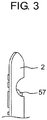
- FIG. 3 is a side view of remote controller 2 of the first exemplary embodiment.
- a back of remote controller 2 (a back side of a side where the plurality of keys are provided) is provided with an indentation in which a user's finger can be inserted. Then, motion key 57 is disposed in the indentation so that the user can easily shake remote controller 2 up and down or left and right with motion key 57 kept pressed.
- Remote controller 2 may include a gyro sensor that operates when motion key 57 is pressed. Remote controller 2 may detect, by the gyro sensor, an amount of movement when remote controller 2 is shaken up and down or left and right, and transmit the detected amount of movement to recording and playback apparatus 1. UI creating circuit 36 in recording and playback apparatus 1 may move a cursor on screen 40, according to the amount of movement of remote controller 2 which is detected by remote controller 2 and transmitted from remote controller 2. This function is hereinafter referred to as a "motion function".
- recording and playback apparatus 1 presents a plurality of program selection menus to the user.
- recording and playback apparatus 1 mainly presents following three program selection menus to the user.
- a channel recording list is a program selection menu for enabling the user to select a desired program from a plurality of programs recorded by channel recorder 20.
- the channel recording list has a program table format where a plurality of pieces of program information are arranged two-dimensionally by channel and time.
- a normal recording list is a program selection menu for enabling the user to select a desired program from a plurality of programs recorded by normal recorder 10.
- the normal recording list has a format where a plurality of pieces of program information are arranged chronologically.
- a category list is a program selection menu for enabling the user to select a desired program from the plurality of programs recorded by channel recorder 20.
- the category list has a format where a plurality of pieces of program information are classified and arranged by category.
- program selection menus i.e., the channel recording list, the normal recording list, and the category list
- pieces of program information of a plurality of recorded programs are classified and arranged by different classification methods.
- a recording and playback apparatus that allows the user to select and play back his/her desired program from among recorded programs, with a relatively small amount of time and trouble by suppressing complication of user operations.
- UI creating circuit 36 creates UI images of program selection menus with a plurality of pairs where pieces of program information of a plurality of programs recorded in storage apparatuses 15, 28 are classified and arranged by a plurality of classification methods.
- UI creating circuit 36 creates, for example, a program selection menu for the channel recording list
- UI creating circuit 36 creates a UI image where a channel and a date (or time) are paired up.
- Each program selection menu has a first program selection menu and a second program selection menu.
- the first program selection menu and the second program selection menu include a plurality of arrays of a plurality of pieces of program information classified by a same classification method.
- the channel recording list has a first program selection menu and a second program selection menu that are displayed on display 4 in a channel recording list format.
- the normal recording list has a first program selection menu and a second program selection menu that are displayed on display 4 in a normal recording list format.
- the category list has a first program selection menu and a second program selection menu that are displayed on display 4 in a category list format.
- the first program selection menu is displayed on display 4 when a recorded program is not being played back
- the second program selection menu is displayed on display 4 when a recorded program is being played back, such that the second program selection menu is partially superimposed on video of the program being played back.
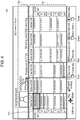
- Fig. 4 is a diagram schematically showing an example of screen 100 of a first program selection menu for a channel recording list that is displayed on display 4 (see FIG. 1 ) when channel recording list key 53 of remote controller 2 is pressed down in a state in which recording and playback apparatus 1 of the first exemplary embodiment is not playing back a recorded program.
- FIG. 5 is a diagram schematically showing an example of screen 110 that is displayed on display 4 (see FIG. 1 ) when recording and playback apparatus 1 of the first exemplary embodiment is playing back a program selected in the first program selection menu for a channel recording list shown in FIG. 4 .
- a first program selection menu for a channel recording list is displayed on display 4 by control circuit 31.
- Screen 100 of FIG. 4 shows an example of the first program selection menu for a channel recording list.
- the first program selection menu for a channel recording list includes program table area 101 and description area 102.
- program table area 101 has a program table format where pieces of program information of a plurality of programs recorded by channel recorder 20 are arranged two-dimensionally with a horizontal axis being a channel and a vertical axis being time. Therefore, in the first program selection menu for a channel recording list, the plurality of programs recorded by channel recorder 20 are classified into a plurality of arrays corresponding to each of a plurality of channels having broadcast the programs. Then, in a display field of each channel, programs of the channel are arranged chronologically.
- the user can select one piece of program information among the plurality of pieces of program information displayed in program table area 101 by moving cursor 103 within program table area 101, using cursor key 51 of remote controller 2.
- Description area 102 displays description of a program corresponding to the program information selected by cursor 103.
- OK key 52 of remote controller 2 is pressed down, recording and playback apparatus 1 starts playback of the program corresponding to the program information selected by cursor 103.
- video of the program selected by the user is displayed on display 4.
- a second program selection menu is displayed on display 4 by control circuit 31 so as to be partially superimposed on video of the program being played back.
- the second program selection menu is a program selection menu that uses a classification method conforming to a classification method for a program selection menu used when the program being played back is selected. For example, when a program selected in a first program selection menu for a channel recording list is being played back, if a user command for instructing to call a second program selection menu is input, then a second program selection menu conforming to a channel recording list format is displayed on display 4 so as to be partially superimposed on video of the program being played back.
- a second program selection menu conforming to a normal recording list format is displayed on display 4
- a program selected in a first program selection menu for a category list is being played back
- a second program selection menu conforming to a category list format is displayed on display 4.
- a user command for instructing to call a second program selection menu is input to remote controller 2 by pressing down playback menu key 56 of remote controller 2, and transmitted to recording and playback apparatus 1 from remote controller 2.
- FIG. 6 is a diagram schematically showing an example of screen 120 that is displayed on display 4 (see FIG. 1 ) when playback menu key 56 of remote controller 2 is pressed down in a state in which recording and playback apparatus 1 of the first exemplary embodiment is playing back a program selected in the first program selection menu for a channel recording list shown in FIG. 4 .
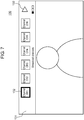
- FIG. 7 is a diagram schematically showing an example of screen 130 that is displayed on display 4 (see FIG. 1 ) when the up key of remote controller 2 is pressed down after screen 120 shown in FIG. 6 is displayed in recording and playback apparatus 1 of the first exemplary embodiment.
- FIG. 8 is a diagram schematically showing an example of screen 140 that is displayed on display 4 (see FIG. 1 ) when the left key of remote controller 2 is pressed down after screen 120 shown in FIG. 6 is displayed in recording and playback apparatus 1 of the first exemplary embodiment.
- Screen 120 of FIG. 6 , screen 130 of FIG. 7 , and screen 140 of FIG. 8 show examples of the second program selection menu for a channel recording list.
- the second program selection menu includes a plurality of tab menus 121 to 124 and a plurality of detailed menus for respective tab menus 121 to 124.
- detailed menu 131 is a detailed menu corresponding to tab menu 121
- detailed menu 141 is a detailed menu corresponding to tab menu 122.
- control circuit 31 allows display 4 to display a plurality of tab menus 121 to 124. As exemplified in FIG. 6 , tab menus 121 to 124 are displayed along a top side, a left side, a bottom side, and a right side of screen 40 of display 4, respectively.
- control circuit 31 allows display 4 to display a detailed menu corresponding to the selected one tab menu.
- a user command for selecting one of the plurality of tab menus 121 to 124 is input to remote controller 2, for example, by pressing down any of the up key, down key, left key, and right key of cursor key 51 of remote controller 2, and transmitted to recording and playback apparatus 1 from remote controller 2.
- Detailed menus corresponding to respective tab menus 121 to 124 are also displayed, for example, along the top side, left side, bottom side, and right side of screen 40 of display 4.
- detailed menu 131 corresponding to tab menu 121 is displayed along the top side of screen 40 of display 4, as exemplified in FIG. 7 and as with tab menu 121.
- Detailed menu 131 includes a plurality of icons (in an example shown in FIG. 7 , a plurality of icons corresponding to channels CH1 to CH6, respectively). By clicking an icon, a plurality of pieces of program information are arranged and displayed.
- detailed menu 141 corresponding to tab menu 122 is displayed along the left side of screen 40 of display 4, as exemplified in FIG. 8 and as with tab menu 122.
- Detailed menu 141 includes an array of a plurality of pieces of program information included in a classification to which program information of the program being played back belongs (in an example shown in FIG. 8 , an array of pieces of program information of a plurality of programs having been broadcast on channel CH1).
- control circuit 31 may highlight, in detailed menu 131, an icon corresponding to an array of a classification to which the program being played back belongs (in the example shown in FIG. 7 , channel CH1), by cursor 132 or other display methods.
- control circuit 31 may highlight, in detailed menu 141, program information of the program being played back, by cursor 142 or other display methods.
- a detailed menu corresponding to tab menu 123 is displayed along the bottom side of screen 40 of display 4 (not shown), as with tab menu 123.
- the detailed menu (not shown) displays, for example, pieces of program information of recommended programs similar to the program being played back.
- a detailed menu for tab menu 124 is displayed along the right side of screen 40 of display 4 (not shown), as with tab menu 124.
- the detailed menu (not shown) displays, for example, a list of representative scenes of the program being played back. Note that the pieces of program information of recommended programs and the list of scenes are obtained, for example, from program information server apparatus 3.
- display positions of tab menus 121 to 124 shown in FIG. 6 are merely an example. Positions of tab menus 121 to 124 displayed on screen 40 of display 4 may be switched.
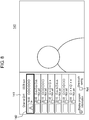
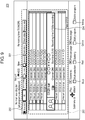
- FIG. 9 is a diagram schematically showing an example of screen 200 of a first program selection menu for a normal recording list that is displayed on display 4 (see FIG. 1 ) when normal recording list key 54 of remote controller 2 is pressed down in a state in which recording and playback apparatus 1 of the first exemplary embodiment is not playing back a recorded program.
- FIG. 10 is a diagram schematically showing an example of screen 210 that is displayed on display 4 (see FIG. 1 ) when recording and playback apparatus 1 of the first exemplary embodiment is playing back a program selected in the first program selection menu for a normal recording list shown in FIG. 9 .
- a first program selection menu for a normal recording list is displayed on display 4 by control circuit 31.
- Screen 200 of FIG. 9 shows an example of the first program selection menu for a normal recording list.
- the first program selection menu for a normal recording list includes a plurality of tags 201 and program list 203.
- a plurality of programs recorded by normal recorder 10 are classified by a plurality of predetermined tags 201 representing program categories (e.g., genres). Then, in the first program selection menu for a normal recording list, those plurality of tags 201 are arranged and displayed on display 4.
- program categories e.g., genres
- the user can select one of the plurality of tags 201 by moving cursor 202 over the plurality of tags 201, using cursor key 51 of remote controller 2.
- pieces of program information of a plurality of programs having the tag are displayed in program list 203 in a chronologically arranged format.
- an "all" tag represents all programs recorded by normal recorder 10. Therefore, when the "all" tag is selected by cursor 202, some of pieces of program information of all programs recorded by normal recorder 10 (a number of pieces of program information that can be displayed on screen 40 of display 4) are displayed in program list 203. As such, a plurality of programs recorded by normal recorder 10 are classified so as to correspond respectively to the plurality of tags 201. Then, when any of the plurality of tags 201 is selected by the user, an array where a plurality of pieces of program information having the tag are arranged chronologically is displayed in program list 203.
- the user can select one of the plurality of pieces of program information displayed in program list 203 by moving cursor 204 within program list 203, using cursor key 51 of remote controller 2.
- OK key 52 of remote controller 2 has been pressed down, recording and playback apparatus 1 starts playback of a program corresponding to the program information selected by cursor 204.
- video of the program selected by the user is displayed on display 4.
- FIG. 11 is a diagram schematically showing an example of screen 220 that is displayed on display 4 (see FIG. 1 ) when playback menu key 56 of remote controller 2 is pressed down in a state in which recording and playback apparatus 1 of the first exemplary embodiment is playing back a program selected in the first program selection menu for a normal recording list shown in FIG. 9 .
- FIG. 12 is a diagram schematically showing an example of screen 230 that is displayed on display 4 (see FIG. 1 ) when the up key of remote controller 2 is pressed down after screen 220 shown in FIG. 11 is displayed in recording and playback apparatus 1 of the first exemplary embodiment.
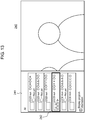
- FIG. 13 is a diagram schematically showing an example of screen 240 that is displayed on display 4 (see FIG. 1 ) when the left key of remote controller 2 is pressed down after screen 220 shown in FIG. 11 is displayed in recording and playback apparatus 1 of the first exemplary embodiment.
- Screen 220 of FIG. 11 , screen 230 of FIG. 12 , and screen 240 of FIG. 13 show examples of a second program selection menu for a normal recording list.
- the second program selection menu includes a plurality of tab menus 221 to 224 and a plurality of detailed menus corresponding to respective tab menus 221 to 224.
- detailed menu 231 is a detailed menu corresponding to tab menu 221
- detailed menu 241 is a detailed menu corresponding to tab menu 222.
- control circuit 31 allows display 4 to display a plurality of tab menus 221 to 224.
- tab menus 221 to 224 are displayed along a top side, a left side, a bottom side, and a right side of screen 40 of display 4, respectively.
- control circuit 31 allows display 4 to display a detailed menu corresponding to the selected one tab menu.
- a user command for selecting one of the plurality of tab menus 221 to 224 is input to remote controller 2, for example, by pressing down any of the up key, down key, left key, and right key of cursor key 51 of remote controller 2, and transmitted to recording and playback apparatus 1 from remote controller 2.
- Detailed menus for respective tab menus 221 to 224 are also displayed, for example, along the top side, left side, bottom side, and right side of screen 40 of display 4.
- detailed menu 231 corresponding to tab menu 221 is displayed along the top side of screen 40 of display 4, as exemplified in FIG. 12 and as with tab menu 221.
- Detailed menu 231 includes a plurality of icons (in an example shown in FIG. 12 , a plurality of icons corresponding to the plurality of tags 201 shown in FIG. 9 , respectively). By clicking an icon, a plurality of pieces of program information are arranged and displayed.
- detailed menu 241 corresponding to tab menu 222 is displayed along the left side of screen 40 of display 4, as exemplified in FIG. 13 and as with tab menu 222.
- Detailed menu 241 includes an array of a plurality of pieces of program information included in a classification to which program information of the program being played back belongs (in an example shown in FIG. 13 , pieces of program information of a plurality of programs having the "all" tag).
- control circuit 31 may highlight, in detailed menu 231, an icon corresponding to a tag representing an array of pieces of program information of the program being played back (in the example shown in FIG. 12 , the "all" tag), by cursor 232 or other display methods.
- control circuit 31 may highlight, in detailed menu 241, a piece of program information of the program being played back, by cursor 242 or other display methods.
- a detailed menu corresponding to tab menu 223 is displayed along the bottom side of screen 40 of display 4 (not shown), as with tab menu 223.
- the detailed menu (not shown) displays, for example, pieces of program information of recommended programs similar to the program being played back.
- a detailed menu corresponding to tab menu 224 is displayed along the right side of screen 40 of display 4 (not shown), as with tab menu 224.
- the detailed menu (not shown) displays, for example, a list of representative scenes of the program being played back.
- the pieces of program information of recommended programs and the list of scenes are obtained, for example, as described above, from program information server apparatus 3.
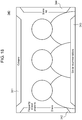
- FIG. 14 is a diagram schematically showing an example of screen 300 of a first page of a first program selection menu for a category list that is displayed on display 4 (see FIG. 1 ) when category list key 55 of remote controller 2 is pressed down in a state in which recording and playback apparatus 1 of the first exemplary embodiment is not playing back a recorded program.
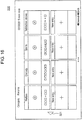
- FIG. 15 is a diagram schematically showing an example of screen 310 of a second page of the first program selection menu for a category list that is displayed on display 4 (see FIG. 1 ) when category list key 55 of remote controller 2 is pressed down in a state in which recording and playback apparatus 1 of the first exemplary embodiment is not playing back a recorded program.
- FIG. 16 is a diagram schematically showing an example of screen 320 of a third page of the first program selection menu for a category list that is displayed on display 4 (see FIG. 1 ) when category list key 55 of remote controller 2 is pressed down in a state in which recording and playback apparatus 1 of the first exemplary embodiment is not playing back a recorded program.
- FIG. 17 is a diagram schematically showing an example of screen 330 that is displayed on display 4 (see FIG. 1 ) when recording and playback apparatus 1 of the first exemplary embodiment is playing back a program selected in the first program selection menu for a category list shown in FIGS. 14 to 16 .
- a plurality of programs recorded by channel recorder 20 are classified into a plurality of arrays corresponding to a plurality of categories, respectively, and displayed on display 4.
- a plurality of programs recorded by channel recorder 20 are classified into a plurality of arrays corresponding to a plurality of categories, respectively, and displayed on display 4.
- only newly recorded programs are classified into a plurality of arrays corresponding to a plurality of categories, respectively, and displayed on display 4 and presented to the user.
- a first program selection menu for a category list is displayed on display 4 by control circuit 31.
- Screen 300 of FIG. 14 , screen 310 of FIG. 15 , and screen 320 of FIG. 16 show examples of the first program selection menu for a category list.
- the first program selection menu for a category list may include a plurality of pages.
- the present exemplary embodiment shows an example in which a first program selection menu for a category list includes three pages (screens 300, 310, and 320).
- the first page of the first program selection menu for a category list includes history area 301 showing categories of programs with a high viewing frequency by a user that uses recording and playback apparatus 1 (programs that are frequently viewed by the user); ranking area 302 showing program ranking; and news area 303 showing a list of most talked-about news.
- the program ranking and the list of most talked-about news are obtained, for example, from program information server apparatus 3, as with pieces of program information of recommended programs and a list of scenes.
- the second page of the first program selection menu for a category list (screen 310) displays categories of programs classified by genre.
- the third page of the first program selection menu for a category list (screen 320) displays categories of programs searched by conditions (genres, keywords, and the like) set by the user. Button of each category displayed on each of screens 300, 310, and 320 displays, for example, a thumbnail image of one of a plurality of programs included in that category.
- the user can display any one of the three pages (screens 300, 310, and 320) on display 4 by turning the pages of the first program selection menu for a category list, using cursor key 51 of remote controller 2.
- the user can also turn the pages of the first program selection menu using the motion function of remote controller 2, instead of pressing down cursor key 51.
- the pages of the first program selection menu may be turned by selecting button 305 shown in FIG. 14 , or button 311 to 312 shown in FIG. 15 , or button 321 shown in FIG. 16 by a cursor that moves by the motion function when motion key 57 of remote controller 2 is pressed down by the user.
- the user can select one of the plurality of pieces of program information displayed in the first program selection menu by moving cursor 304 within the first program selection menu using cursor key 51 of remote controller 2.
- OK key 52 of remote controller 2 is pressed down, recording and playback apparatus 1 starts playback of a program corresponding to the program information selected by cursor 304.
- video of the program selected by the user is displayed on display 4.
- the first page of the first program selection menu for a category list is displayed, if one of the plurality of categories displayed in history area 301 is selected, unviewed programs in that category are played back and displayed on display 4 in order of oldest first (in chronological order), according to a user's playback history.
- the categories of a plurality of rankings displayed in ranking area 302 When one of the categories of a plurality of rankings displayed in ranking area 302 is selected, programs in that category are played back and displayed on display 4 in order of ranking.
- scenes of news in that category are played back and displayed on display 4 in descending order of a number of broadcasts.
- FIG. 18 is a diagram schematically showing an example of screen 340 that is displayed on display 4 (see FIG. 1 ) when playback menu key 56 of remote controller 2 is pressed down in a state in which recording and playback apparatus 1 of the first exemplary embodiment is playing back a program selected in the first program selection menu for a category list shown in FIGS. 14 to 16 .
- FIG. 19 is a diagram schematically showing an example of screen 350 that is displayed on display 4 (see FIG. 1 ) when the up key of remote controller 2 is pressed down after screen 340 shown in FIG. 18 is displayed in recording and playback apparatus 1 of the first exemplary embodiment.
- FIG. 20 is a diagram schematically showing an example of screen 360 that is displayed on display 4 (see FIG. 1 ) when the left key of remote controller 2 is pressed down after screen 340 shown in FIG. 18 is displayed in recording and playback apparatus 1 of the first exemplary embodiment.
- Screen 340 of FIG. 18 , screen 350 of FIG. 19 , and screen 360 of FIG. 20 show examples of a second program selection menu for a category list.
- the second program selection menu includes a plurality of tab menus 341 to 344 and a plurality of detailed menus corresponding to respective tab menus 341 to 344.
- detailed menu 351 is a detailed menu corresponding to tab menu 341
- detailed menu 361 is a detailed menu corresponding to tab menu 342.
- control circuit 31 allows display 4 to display a plurality of tab menus 341 to 344.
- tab menus 341 to 344 are displayed along a top side, a left side, a bottom side, and a right side of screen 40 of display 4, respectively.
- control circuit 31 allows display 4 to display a detailed menu corresponding to the selected one tab menu.
- a user command for selecting one of the plurality of tab menus 341 to 344 is input to remote controller 2, for example, by pressing down any of the up key, down key, left key, and right key of cursor key 51 of remote controller 2, and transmitted to recording and playback apparatus 1 from remote controller 2.
- Detailed menus for respective tab menus 341 to 344 are also displayed, for example, along the top side, left side, bottom side, and right side of screen 40 of display 4.
- detailed menu 351 corresponding to tab menu 341 is displayed along the top side of screen 40 of display 4, as exemplified in FIG. 19 and as with tab menu 341.
- Detailed menu 351 includes a plurality of icons (in an example shown in FIG. 19 , a plurality of icons corresponding to the plurality of categories shown in FIGS. 14 to 16 , respectively). By clicking an icon, a plurality of pieces of program information are arranged and displayed.
- information area 352 in a first row of detailed menu 351 arranges and displays a plurality of icons corresponding to the categories shown in FIG. 14 , respectively.
- Genre area 353 in a second row of detailed menu 351 arranges and displays a plurality of icons corresponding to the categories shown in FIG. 15 , respectively.
- Favorite area 354 in a third row of detailed menu 351 arranges and displays a plurality of icons corresponding to the categories shown in FIG. 16 , respectively.
- detailed menu 361 corresponding to tab menu 342 is displayed along the left side of screen 40 of display 4, as exemplified in FIG. 20 and as with tab menu 342.
- Detailed menu 361 includes an array of a plurality of pieces of program information included in a category to which program information of the program being played back belongs (in an example shown in FIG. 20 , pieces of program information of a plurality of programs that belong to a "frequently viewed programs - drama" category).
- an array of pieces of program information displayed in detailed menu 361 shows, for example, ranking for a number of recordings or most talked-about news
- the pieces of program information are arranged and displayed in order of ranking.
- the pieces of program information displayed in detailed menu 361 shows a genre such as a drama
- the pieces of program information are arranged and displayed in order of oldest first.
- the pieces of program information are arranged and displayed in order of newest first.
- control circuit 31 may highlight, in detailed menu 351, an icon corresponding to a category to which program information of the program being played back belongs (in the example shown in FIG. 19 , the "frequently viewed programs - drama" category), by cursor 355 or other display methods.
- control circuit 31 may highlight, in detailed menu 361, program information of the program being played back, by cursor 362 or other display methods.
- a detailed menu corresponding to tab menu 343 is displayed along the bottom side of screen 40 of display 4 (not shown), as with tab menu 343.
- the detailed menu (not shown) displays, for example, pieces of program information of recommended programs similar to the program being played back.
- a detailed menu corresponding to tab menu 344 is displayed along the right side of screen 40 of display 4 (not shown), as with tab menu 344.
- the detailed menu (not shown) displays, for example, a list of representative scenes of the program being played back.
- the pieces of program information of recommended programs and the list of scenes are obtained, for example, as described above, from program information server apparatus 3.
- first program selection menu for a category list may include only a screen of one page, or may include screens of two pages, or may include screens of four or more pages.
- first program selection menus for a channel recording list and for a normal recording list may include screens of two or more pages.
- control circuit 31 can allow display 4 to display another second program selection menu, according to the user command. Namely, when one detailed menu among the detailed menu of the channel recording list shown in FIG. 7 , the detailed menu of the normal recording list shown in FIG. 12 , and the detailed menu of the category list shown in FIG. 19 is displayed on display 4, control circuit 31 can switch the detailed menu displayed on display 4 to another one of those detailed menus, according to a user command.
- the user can switch a second program selection menu displayed on display 4, using cursor key 51 of remote controller 2.
- the user can also switch a second program selection menu using the motion function of remote controller 2, instead of pressing down cursor key 51.
- the second program selection menu may be switched by selecting button 133 shown in FIG. 7 , or button 233 shown in FIG. 12 , or button 356, 357 shown in FIG. 19 by a cursor that moves by the motion function when motion key 57 of remote controller 2 is pressed down by the user.
- Recording and playback apparatus 1 may create a third program selection menu and display the third program selection menu on display 4 in a state in which a recorded program is being played back.
- the third program selection menu is a program selection menu for allowing the user to easily select and play back another program information adjacent to program information of a program being played back in a plurality of arrays where pieces of program information are arranged, in a program selection menu (a channel recording list, a normal recording list, or a category list) used when the program being played back is selected.
- the third program selection menu is created for a purpose of enabling the user to more easily select another program information than a first program selection menu and a second program selection menu.
- UI creating circuit 36 creates a UI image of a third program selection menu to be displayed on display 4, when a recorded program is being played back.
- the third program selection menu includes at least one piece of program information adjacent to program information of a program being played back in a plurality of arrays of a plurality of pieces of program information which are classified by at least one of a plurality of classification methods.
- the third program selection menu is a program selection menu that uses a classification method conforming to a program selection menu that is used when the program being played back is selected. For example, when a program selected in a first program selection menu (or a second program selection menu) for a channel recording list is being played back, if a user command for instructing to call a third program selection menu is input, then a third program selection menu conforming to a channel recording list format is displayed on display 4.
- a third program selection menu conforming to a normal recording list format is displayed on display 4
- a program selected in a first program selection menu (or a second program selection menu) for a category list is being played back
- a third program selection menu conforming to a category list format is displayed on display 4.
- a user command for instructing to call a third program selection menu is input to remote controller 2, for example, by pressing down one of the up/down/left/right keys of remote controller 2, and transmitted to recording and playback apparatus 1 from remote controller 2.
- FIG. 21 is a diagram schematically showing an example of screen 400 that is displayed on display 4 (see FIG. 1 ) when one of the up/down/left/right keys of remote controller 2 is pressed down in a state in which recording and playback apparatus 1 of the first exemplary embodiment is playing back a program selected in the first program selection menu for a channel recording list shown in FIG. 4 .
- Screen 400 of FIG. 21 shows an example of a third program selection menu for a channel recording list.
- the third program selection menu for a channel recording list includes at least one piece of program information adjacent to program information of a program being played back in arrays of a plurality of pieces of program information for the respective channels in the first program selection menu for a channel recording list shown in FIG. 4 .
- Screen 400 which is an example of the third program selection menu for a channel recording list includes, at a center of screen 400, button 401 corresponding to a program being played back.
- Button 401 displays a thumbnail image, a channel, recording date and time, a title name, and program content information of the program.
- the third program selection menu for a channel recording list further includes button 402, button 403, button 404, and button 405.
- Button 402 is a button disposed above button 401 within screen 400 and corresponding to a program immediately before the program being played back (a program that is represented by program information displayed immediately above program information representing the program being played back in the first program selection menu for a channel recording list. See FIG. 4 ).
- Button 403 is a button disposed below button 401 within screen 400 and corresponding to a program immediately after the program being played back (a program that is represented by program information displayed immediately below the program information representing the program being played back in the first program selection menu for a channel recording list. See FIG. 4 ).
- Button 404 is a button disposed on a left side of button 401 within screen 400 and corresponding to a channel adjacent, on a left, to a channel having broadcast the program being played back (a channel including program information that is displayed on a left side of the program information representing the program being played back in the first program selection menu for a channel recording list. See FIG. 4 ).
- Button 405 is a button disposed on a right side of button 401 within screen 400 and corresponding to a channel adjacent, on a right, to the channel having broadcast the program being played back (a channel including program information that is displayed on a right side of the program information representing the program being played back in the first program selection menu for a channel recording list. See FIG. 4 ).
- screen 100 of the first program selection menu for a channel recording list exemplified in FIG. 4 has cursor 103 at a left edge, it is assumed that cursor 103 moves to a position of channel CH6 by further moving cursor 103 left. At this time, entire displayed program information may slide in a right direction. As such, it is assumed that in screen 100 of the first program selection menu for a channel recording list exemplified in FIG. 4 , an array of channel CH6 is disposed on a left side of an array of channel CH1 and the array of channel CH1 is disposed on a right side of the array of channel CH6.
- screen 100 has cursor 103 at an upper end, it is assumed that when cursor 103 is moved up, the entire displayed program information slides in a down direction and pieces of program information between 6:00 pm and 7:00 pm are displayed, and cursor 103 moves to a position of a piece of program information between 6:00 pm and 7:00 pm.
- Button 402 displays recording date and time and a title name which are a part of program information of a program at time immediately before the program being played back.
- Button 403 displays recording date and time and a title name which are a part of program information of a program at time immediately after the program being played back.
- Button 404 displays a character string representing a channel adjacent, on a left, to a channel including program information of the program being played back in the first program selection menu for a channel recording list shown in FIG. 4 (in case where there is no channel adjacent on the left, a channel displayed at a right edge of the first program selection menu for a channel recording list).
- Button 405 displays a character string representing a channel adjacent, on a right, to the channel including program information of the program being played back in the first program selection menu for the channel recording list of FIG. 4 (in case where there is no channel adjacent on the right, a channel displayed at a left edge of the first program selection menu for a channel recording list).
- the user can select one of the plurality of buttons displayed in the third program selection menu, by moving cursor 406 within the third program selection menu for a channel recording list, using cursor key 51 of remote controller 2. Namely, the user can select one of a plurality of pieces of program information displayed in the third program selection menu.
- Program information selection operation which is performed by the user on the third program selection menu is hereinafter referred to as "zapping".
- zapping function a function of implementing zapping.
- a program is selected that temporally overlaps the program being played back in terms of a start time and that is included in a channel adjacent (adjacent on a right or left) to a channel including the program being played back in the first program selection menu for a channel recording list exemplified in FIG. 4 .
- buttons 402 to 405 are updated in a same manner as that described above, according to the program information that is newly displayed on button 401.
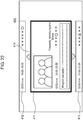
- FIG. 22 is a diagram schematically showing an example of screen 410 that is displayed on display 4 (see FIG. 1 ) when one of the up/down/left/right keys of remote controller 2 is pressed down in a state in which recording and playback apparatus 1 of the first exemplary embodiment is playing back a program selected in the first program selection menu for a category list shown in FIGS. 14 to 16 .
- Screen 410 of FIG. 22 shows an example of a third program selection menu for a category list.
- the third program selection menu for a category list includes at least one piece of program information adjacent to program information of a program being played back in an array of a plurality of pieces of program information in a category list.
- the third program selection menu for a category list includes pieces of program information of programs immediately before and immediately after a program being played back in an array of a category to which the program being played back belongs (e.g., an array in detailed menu 361 shown in FIG. 20 ) (e.g., pieces of program information arranged immediately above and immediately below program information of a program being played back in the array in detailed menu 361 shown in FIG. 20 ).
- Screen 410 which is an example of the third program selection menu for a category list includes, at a center of screen 410, button 411 corresponding to the program being played back.
- Button 411 displays a thumbnail image, a channel, recording date and time, a title name, and program content information of the program.
- the third program selection menu for a category list further includes button 412 and button 413.
- Button 412 is a button disposed above button 411 within screen 410 and corresponding to a program immediately before the program being played back (e.g., a program that is represented by program information displayed immediately above program information representing the program being played back in the array in detailed menu 361 shown in FIG. 20 ).
- Button 413 is a button disposed below button 411 within screen 410 and corresponding to a program immediately after the program being played back (e.g., a program that is represented by program information displayed immediately below the program information representing the program being played back in the array in detailed menu 361 shown in FIG. 20 ).
- Button 412 displays recording date and time and a title name which are a part of program information of the program immediately before the program being played back.
- Button 413 displays recording date and time and a title name which are a part of program information of the program immediately after the program being played back.
- the user can select one of the plurality of buttons displayed in the third program selection menu, by moving cursor 414 within the third program selection menu for a category list, using cursor key 51 of remote controller 2. Namely, the user can select one of a plurality of pieces of program information displayed in the third program selection menu.
- this selection operation is also referred to as zapping, and a function of implementing the zapping is also referred to as a zapping function.
- buttons 412, 413 are updated in a same manner as that described above, according to the program information that is newly displayed on button 411.
- OK key 52 of remote controller 2 is pressed down, recording and playback apparatus 1 starts playback of the thumbnail image of the program corresponding to the button selected by cursor 414.
- the third program selection menu for a category list exemplified in FIG. 22 is for an array of the "frequently viewed programs - drama" category in detailed menu 361 exemplified in FIG. 20 , but this is merely an example.
- screen 410 of the third program selection menu for a category list exemplified in FIG. 22 does not display buttons corresponding to the left key and right key of cursor key 51 of remote controller 2, buttons for moving to other categories using the left key and right key of cursor key 51 may be added to screen 410.
- screen 410 of the third program selection menu for a category list exemplified in FIG. 22 corresponds to a plurality of pieces of program information that are arranged in the "frequently viewed programs - drama" category in detailed menu 361 exemplified in FIG. 20 .
- the plurality of pieces of program information are arranged chronologically in an up-down direction within detailed menu 361, but are not arranged in a left-right direction.
- screen 410 exemplified in FIG. 22 only displays buttons corresponding to the up key and down key of cursor key 51, and does not display buttons corresponding to the left key and right key of cursor key 51.
- FIGS. 23 and 24 exemplify third program selection menus that display buttons corresponding to the up/down/left/right keys of cursor key 51.
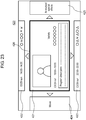
- FIG. 23 is a diagram schematically showing an example of screen 420 that is displayed on display 4 (see FIG. 1 ) when one of the up/down/left/right keys of remote controller 2 is pressed down in a state in which recording and playback apparatus 1 of the first exemplary embodiment is playing back a program selected in the first program selection menu for a category list shown in FIGS. 14 to 16 .
- Screen 420 of FIG. 23 shows an example of the third program selection menu for a category list.
- the third program selection menus for a category list shown in FIGS. 23 and 24 are corresponding to arrays of buttons classified by each genre in a first program selection menu for a category list and corresponding to arrays of icons classified by each genre in a second program selection menu for a category list.
- screen 420 of the third program selection menu for a category list exemplified in FIG. 23 is corresponding to arrays of buttons classified by each genre on screen 310 of the first program selection menu for a category list shown in FIG. 15 or corresponding to arrays of icons classified by each genre on screen 350 of the second program selection menu for a category list shown in FIG. 19 .
- Screen 420 exemplified in FIG. 23 displays, at a center, button 421 corresponding to a program represented by one piece of program information belonging to variety among a plurality of pieces of program information classified by each genre in the category list.
- Button 421 displays a thumbnail image, a channel, recording date and time, a title name, and program content information of the program.
- screen 420 of the third program selection menu for a category list exemplified in FIG. 23 includes button 422 and button 423 in regions above and below button 421, and includes button 424 and button 425 in regions on left and right sides of button 421.
- Button 422 is a button corresponding to a program that belongs to a same genre as the program displayed on button 421 and that is chronologically immediately before the program displayed on button 421, and button 423 is a button that likewise corresponds to a program immediately after the program displayed on button 421.
- Button 424 and button 425 represent genres that differ from a genre represented by button 421.
- button 424 is a button corresponding, on screen 310 shown in FIG. 15 , to a genre (e.g., movie) that is represented by button 313 adjacent, on a left, to button 314 representing a genre (e.g., variety) to which the program displayed on button 421 belongs, or corresponding, on screen 350 shown in FIG. 19 , to a genre (e.g., movie) represented by icon 358a adjacent, on a left, to icon 358b representing a genre (e.g., variety) to which the program displayed on button 421 belongs.
- Button 425 is a button that likewise corresponds to a genre (e.g., animation/special effects) adjacent, on a right, to button 314 or icon 358b.
- a third program selection menu for a category list displays button 424 corresponding to, for example, "genre - movie" in a region on a left side of button 421 on screen 420 and displays button 425 corresponding to, for example, "genre - animation/special effects” in a region on a right side of button 421 on screen 420, as with arrays of buttons for respective genres on screen 310 of the first program selection menu for a category list or arrays of icons for respective genres on screen 350 of the second program selection menu for a category list, which are classified by a same classification method as the third program selection menu.
- arrays of buttons 424, 425 on screen 420 of the third program selection menu for a category list are synchronized with arrays of buttons on screen 310 of the first program selection menu for a category list shown in FIG. 15 or arrays of icons on screen 350 of the second program selection menu for a category list shown in FIG. 19 .
- buttons on screen 310 shown in FIG. 15 "genre - movie” button 313 is arranged on a left side of "genre - variety” button 314, and "genre - animation/special effects” button 315 is arranged on a right side of "genre - variety” button 314.
- buttons 424, 425 are synchronized with those arrays, and buttons 424, 425 display their corresponding genre names. For example, button 424 displays “movie” which is a name of a genre and button 425 displays "animation/special effects" which is a name of a genre.
- Button 422 displays recording date and time and a title name of program information of a program immediately before a program being played back (a program that belongs to a same genre as the program displayed on button 421 and that is chronologically immediately before the program displayed on button 421).
- Button 423 displays recording date and time and a title name of program information of a program immediately after the program being played back (a program that belongs to a same genre as the program displayed on button 421 and that is chronologically immediately after the program displayed on button 421).
- buttons 422 to 425 are updated in a same manner as that described above, according to the program information that is newly displayed on button 421.
- button 424 that is a movement destination of cursor 426 moves to the center of screen 420 and becomes new button 421. Then, a thumbnail image, a channel, recording date and time, a title name, and program content information of a program corresponding to button 424 (e.g., a program belonging to "genre - movie") which is before the movement are newly displayed on button 421, and pieces of program information to be displayed on buttons 422 to 425 are updated according to the program information that is newly displayed on button 421.
- a program corresponding to button 424 e.g., a program belonging to "genre - movie
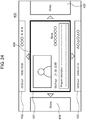
- FIG. 24 an example of a screen (screen 430) of a third program selection menu for a category list that is displayed on display 4 in case where button 424 on screen 420 exemplified in FIG. 23 moves to the center of screen 420 is shown in FIG. 24 .
- FIG. 24 is a diagram schematically showing an example of screen 430 that is displayed on display 4 (see FIG. 1 ) by operating, by the user, screen 420 shown in FIG. 23 in recording and playback apparatus 1 of the first exemplary embodiment.
- Screen 430 of FIG. 24 shows an example of the third program selection menu for a category list.
- Screen 430 exemplified in FIG. 24 displays, on button 431 at a center of screen 430, program information (a thumbnail image, a channel, recording date and time, a title name, and program content information) belonging to "genre - movie".
- program information a thumbnail image, a channel, recording date and time, a title name, and program content information
- button 316 representing "genre - drama” is arranged adjacent, on a left, to button 313 representing "genre - movie”
- button 314 representing "genre - variety” is arranged adjacent, on a right, to button 313.
- icon 358d representing "genre - drama” is arranged adjacent, on a left, to icon 358a representing “genre - movie”
- icon 358b representing "genre - variety” is arranged adjacent, on a right, to icon 358a. Therefore, on screen 430, button 434 arranged on a left side of button 431 displays “drama” which is a name of a genre, and button 435 arranged on a right side of button 431 displays "variety” which is a name of a genre.
- button 425 that is a movement destination of cursor 426 moves to the center of screen 420 and becomes new button 421.
- a thumbnail image, a channel, recording date and time, a title name, and program content information of a program corresponding to button 425 e.g., a program belonging to "genre - animation/special effects" which is before the movement are newly displayed on button 421.
- pieces of program information to be displayed on buttons 422 to 425 are updated according to the program information that is newly displayed on button 421.
- button 425 shown in FIG. 23 has moved to the center of screen 420 and become new button 421
- button 424 arranged on the left side of button 421 newly displays "variety” which is a name of a genre
- button 425 arranged on the right side of button 421 newly displays "music” which is a name of a genre, based on the arrays of buttons on screen 310 shown in FIG. 15 or the arrays of icons on screen 350 shown in FIG. 19 .
- the arrays of buttons displayed in the third program selection menu for a category list are associated with the arrays of buttons representing genres in the first program selection menu for a category list exemplified in FIGS. 14 to 16 or the arrays of icons representing genres in the second program selection menu for a category list exemplified in FIG. 19 .
- control circuit 31 allows display 4 to display a first program selection menu that uses a same classification method as a first program selection menu or a second program selection menu that is used when the program whose playback has ended is selected.
- Control circuit 31 may highlight the program whose playback has ended, in the first program selection menu that is displayed on display 4 after the playback of the program has ended.
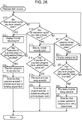
- FIG. 25 is a flowchart showing an example of a program playback process performed by control circuit 31 included in recording and playback apparatus 1 of the first exemplary embodiment.
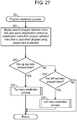
- Control circuit 31 performs a playback start process and starts playback of one of a plurality of recorded programs (step S1). A detail of the playback start process at step S1 will be described later.
- control circuit 31 determines whether a user command for instructing to call a second program selection menu has been received (i.e., whether playback menu key 56 of remote controller 2 has been pressed down) (step S2).
- control circuit 31 performs a program reselection process (step S3).
- Control circuit 31 starts playback of another program different than the program being played back, as necessary. A detail of the program reselection process at step S3 will be described later. After control circuit 31 performs the process at step S3, control circuit 31 brings processing back to step S2.
- control circuit 31 determines whether a user command for instructing to call a third program selection menu has been received (i.e., whether the up/down/left/right key of cursor key 51 of remote controller 2 has been pressed down in a state in which the recorded program is being played back) (step S4).
- control circuit 31 performs a program zapping process (step S5).
- Control circuit 31 starts playback of another program different than the program being played back, as necessary. A detail of the program zapping process at step S5 will be described later. After control circuit 31 performs the process at step S5, control circuit 31 brings processing back to step S2.
- control circuit 31 determines whether a user command for instructing to stop the playback of the program has been received (i.e., whether stop key 58 of remote controller 2 (see FIG. 2 ) has been pressed down) (step S6).
- control circuit 31 determines whether the program being played back has ended (i.e., whether the program being played back has been played back until an end) (step S7).
- control circuit 31 brings processing back to step S2.
- control circuit 31 performs a playback end process and allows display 4 to display one of a channel recording list, a normal recording list, and a category list (step S8). A detail of the playback end process at step S8 will be described later.
- FIG. 26 is a flowchart showing an example of a subroutine of the playback start process performed by control circuit 31 included in recording and playback apparatus 1 of the first exemplary embodiment.
- control circuit 31 determines whether a user command for instructing to display a channel recording list has been received (i.e., whether channel recording list key 53 of remote controller 2 has been pressed down in a state in which a recorded program is not being played back) (step S11).
- control circuit 31 displays a first program selection menu for a channel recording list (see FIG. 4 ) on display 4 (step S12).
- control circuit 31 determines whether a user command for instructing to play back a program corresponding to program information selected by cursor 103 in the first program selection menu for a channel recording list (hereinafter, referred to as a "program being selected") has been received (i.e., whether OK key 52 of remote controller 2 has been pressed down) (step S13).
- control circuit 31 brings processing back to step S12.
- control circuit 31 starts playback of the program being selected (see FIG. 5 ) (step S14).
- control circuit 31 stores a fact that the program selected in the first program selection menu for a channel recording list is being played back (step S15). Thereafter, control circuit 31 returns the subroutine of the playback start process and brings processing back to step S2 shown in FIG. 25 .
- control circuit 31 determines whether a user command for instructing to display a normal recording list has been received (i.e., whether normal recording list key 54 of remote controller 2 has been pressed down in a state in which a recorded program is not being played back) (step S16).
- control circuit 31 displays a first program selection menu for a normal recording list (see FIG. 9 ) on display 4 (step S17).
- control circuit 31 determines whether a user command for instructing to play back a program corresponding to program information selected by cursor 204 in the first program selection menu for a normal recording list (hereinafter, referred to as a "program being selected") has been received (i.e., whether OK key 52 of remote controller 2 has been pressed down or not) (step S18).
- control circuit 31 brings processing back to step S17.
- control circuit 31 starts playback of the program being selected (see FIG. 10 ) (step S19).
- control circuit 31 stores a fact that the program selected in the first program selection menu for a normal recording list is being played back (step S20). Thereafter, control circuit 31 returns the subroutine of the playback start process and brings processing back to step S2 shown in FIG. 25 .
- control circuit 31 determines whether a user command for instructing to display a category list has been received (i.e., whether category list key 55 of remote controller 2 has been pressed down in a state in which a recorded program is not being played back) (step S21).
- control circuit 31 brings processing back to step S11.
- control circuit 31 displays a first program selection menu for a category list (see FIGS. 14 to 16 ) on display 4 (step S22).
- control circuit 31 determines whether a user command for instructing to play back a program corresponding to program information selected by cursor 304 in the first program selection menu for a category list (hereinafter, referred to as a "program being selected") has been received (i.e., whether OK key 52 of remote controller 2 has been pressed down) (step S23).
- control circuit 31 brings processing back to step S22.
- control circuit 31 starts playback of the program being selected (see FIG. 17 ) (step S24).
- control circuit 31 stores a fact that the program selected in the first program selection menu for a category list is being played back (step S25). Thereafter, control circuit 31 returns the subroutine of the playback start process and brings processing back to step S2 shown in FIG. 25 .
- FIG. 27 is a flowchart showing an example of a subroutine of the program reselection process performed by control circuit 31 included in recording and playback apparatus 1 of the first exemplary embodiment.
- control circuit 31 displays, on display 4, a second program selection menu (see FIG. 6 , 11 , or 18 ) that classified by a same classification method as a program selection menu used when the program being played back is selected (step S31).
- control circuit 31 determines whether a user command for instructing to display a detailed menu along the top side of screen 40 of display 4 has been received (i.e., the up key of cursor key 51 of remote controller 2 has been pressed down) (step S32).
- control circuit 31 performs a top menu reselection process (step S33). A detail of the top menu reselection process at step S33 will be described later.
- control circuit 31 After control circuit 31 performs the process at step S33, control circuit 31 returns the subroutine of the program reselection process and brings processing back to step S2 shown in FIG. 25 .
- control circuit 31 determines whether a user command for instructing to display a detailed menu along the left side of screen 40 of display 4 has been received (i.e., whether the left key of cursor key 51 of remote controller 2 has been pressed down) (step S34).
- control circuit 31 In case where it is determined at step S34 that a user command for instructing to display a detailed menu along the left side of screen 40 has not been received (NO at step S34), control circuit 31 returns the subroutine of the program reselection process and brings processing back to step S2 shown in FIG. 25 .
- control circuit 31 performs a left menu reselection process (step S35). A detail of the left menu reselection process at step S35 will be described later.
- control circuit 31 After control circuit 31 performs the process at step S35, control circuit 31 returns the subroutine of the program reselection process and brings processing back to step S2 shown in FIG. 25 .
- FIG. 28 is a flowchart showing an example of a subroutine of the top menu reselection process performed by control circuit 31 included in recording and playback apparatus 1 of the first exemplary embodiment.
- control circuit 31 determines whether a program selected in a channel recording list (a first program selection menu or a second program selection menu or a third program selection menu for a channel recording list) is being played back (step S41).
- control circuit 31 displays detailed menu 131 along the top side of screen 40 of display 4 (see FIG. 7 ), in a second program selection menu for the channel recording list (step S42).
- control circuit 31 highlights (see FIG. 7 ), in displayed detailed menu 131, a button corresponding to a channel having broadcast the program being played back, for example, by cursor 132 (step S43).
- Cursor 132 is movable by a user command.
- control circuit 31 determines whether a user command for instructing to play back a program on a channel corresponding to the button selected by cursor 132 (hereinafter, referred to as a "channel being selected") in detailed menu 131 of the second program selection menu for the channel recording list has been received (i.e., whether OK key 52 of remote controller 2 has been pressed down) (step S44).
- control circuit 31 In case where it is determined at step S44 that a user command for instructing to play back a program on a channel being selected has not been received (NO at step S44), control circuit 31 returns the subroutine of the top menu reselection process and brings processing back to step S2 shown in FIG. 25 .
- control circuit 31 In case where it is determined at step S44 that a user command for instructing to play back a program on a channel being selected has been received (YES at step S44), control circuit 31 starts playback of the program on the channel being selected (step S45). Thereafter, control circuit 31 returns the subroutine of the top menu reselection process and brings processing back to step S2 shown in FIG. 25 .
- control circuit 31 determines whether a program selected in a normal recording list (a first program selection menu, a second program selection menu, or a third program selection menu for a normal recording list) is being played back (step S46).
- control circuit 31 displays detailed menu 231 along the top side of screen 40 of display 4 (see FIG. 12 ), in a second program selection menu for the normal recording list (step S47).
- control circuit 31 highlights (see FIG. 12 ), in displayed detailed menu 231, a button corresponding to a tab of the program being played back, for example, by cursor 232 (step S48).
- Cursor 232 is movable by a user command.
- control circuit 31 determines whether a user command for instructing to play back a program of a tab corresponding to the button selected by cursor 232 (hereinafter, referred to as a "tab being selected") in detailed menu 231 of the second program selection menu for the normal recording list has been received (i.e., whether OK key 52 of remote controller 2 has been pressed down) (step S49).
- control circuit 31 In case where it is determined at step S49 that a user command for instructing to play back a program of a tab being selected has not been received (NO at step S49), control circuit 31 returns the subroutine of the top menu reselection process and brings processing back to step S2 shown in FIG. 25 .
- control circuit 31 In case where it is determined at step S49 that a user command for instructing to play back a program of a tab being selected has been received (YES at step S49), control circuit 31 starts playback of the program of the tab being selected (step S50). Thereafter, control circuit 31 returns the subroutine of the top menu reselection process and brings processing back to step S2 shown in FIG. 25 .
- control circuit 31 In case where it is determined at step S46 that a program selected in a normal recording list is not being played back (NO at step S46), control circuit 31 is playing back a program selected in a category list. At this time, control circuit 31 displays detailed menu 351 along the top side of screen 40 of display 4 (see FIG. 19 ), in a second program selection menu for the category list (step S51).
- control circuit 31 highlights (see FIG. 19 ), in displayed detailed menu 351, a button corresponding to a category of the program being played back, for example, by cursor 355 (step S52).
- Cursor 355 is movable by a user command.
- control circuit 31 determines whether a user command for instructing to play back a program of a category corresponding to the button selected by cursor 355 (hereinafter, referred to as a "category being selected") in detailed menu 351 of the second program selection menu for the category list has been received (i.e., whether OK key 52 of remote controller 2 has been pressed down) (step S53).
- control circuit 31 In case where it is determined at step S53 that a user command for instructing to play back a program of a category being selected has not been received (NO at step S53), control circuit 31 returns the subroutine of the top menu reselection process and brings processing back to step S2 shown in FIG. 25 .
- control circuit 31 In case where it is determined at step S53 that a user command for instructing to play back a program of a category being selected has been received (YES at step S53), control circuit 31 starts playback of the program of the category being selected (step S54). Thereafter, control circuit 31 returns the subroutine of the top menu reselection process and brings processing back to step S2 shown in FIG. 25 .
- control circuit 31 may switch the displayed detailed menu to another detailed menu, according to a user command. That is, in the top menu reselection process, when one of detailed menu 131 for a channel recording list (see FIG. 7 ), detailed menu 231 for a category list (see FIG. 12 ), and detailed menu 351 for a normal recording list (see FIG. 19 ) is displayed along the top side of screen 40 of display 4, control circuit 31 may switch the displayed detailed menu to another detailed menu, according to a user command.
- control circuit 31 stores a fact that the program that is selected using the detailed menu displayed after the switching is being played back, as with the processes at steps S15, S20, and S25 shown in FIG. 26 .
- FIG. 29 is a flowchart showing an example of a subroutine of the left menu reselection process performed by control circuit 31 included in recording and playback apparatus 1 of the first exemplary embodiment.
- control circuit 31 determines whether a program selected in a channel recording list (a first program selection menu or a second program selection menu or a third program selection menu for a channel recording list) is being played back (step S61).
- control circuit 31 displays detailed menu 141 along the left side of screen 40 of display 4 (see FIG. 8 ), in a second program selection menu for the channel recording list (step S62).
- control circuit 31 highlights (see FIG. 8 ), in displayed detailed menu 141, a button corresponding to the program being played back, for example, by cursor 142 (step S63).
- Cursor 142 is movable by a user command.
- control circuit 31 determines whether a user command for instructing to play back a program corresponding to the button selected by cursor 142 (hereinafter, referred to as a "program being selected") in detailed menu 141 of the second program selection menu for the channel recording list has been received (i.e., whether OK key 52 of remote controller 2 has been pressed down) (step S64).
- control circuit 31 In case where it is determined at step S64 that a user command for instructing to play back a program being selected has not been received (NO at step S64), control circuit 31 returns the subroutine of the left menu reselection process and brings processing back to step S2 shown in FIG. 25 .
- control circuit 31 In case where it is determined at step S64 that a user command for instructing to play back a program being selected has been received (YES at step S64), control circuit 31 starts playback of the program being selected (step S65). Thereafter, control circuit 31 returns the subroutine of the left menu reselection process and brings processing back to step S2 shown in FIG. 25 .
- control circuit 31 determines whether a program selected in a normal recording list (a first program selection menu or a second program selection menu or a third program selection menu for a normal recording list) is being played back (step S66).
- control circuit 31 displays detailed menu 241 along the left side of screen 40 of display 4 (see FIG. 13 ), in a second program selection menu for the normal recording list (step S67).
- control circuit 31 highlights (see FIG. 13 ), in displayed detailed menu 241, a button corresponding to the program being played back, for example, by cursor 242 (step S68).
- Cursor 242 is movable by a user command.
- control circuit 31 determines whether a user command for instructing to play back a program corresponding to the button selected by cursor 242 (hereinafter, referred to as a "program being selected") in detailed menu 241 of the second program selection menu for the normal recording list has been received (i.e., whether OK key 52 of remote controller 2 has been pressed down) (step S69).
- control circuit 31 In case where it is determined at step S69 that a user command for instructing to play back a program being selected has not been received (NO at step S69), control circuit 31 returns the subroutine of the left menu reselection process and brings processing back to step S2 shown in FIG. 25 .
- control circuit 31 In case where it is determined at step S69 that a user command for instructing to play back a program being selected has been received (YES at step S69), control circuit 31 starts playback of the program being selected (step S70). Thereafter, control circuit 31 returns the subroutine of the left menu reselection process and brings processing back to step S2 shown in FIG. 25 .
- control circuit 31 In case where it is determined at step S66 that a program selected in a normal recording list is not being played back (NO at step S66), control circuit 31 is playing back a program selected in a category list. At this time, control circuit 31 displays detailed menu 361 along the left side of screen 40 of display 4 (see FIG. 20 ), in a second program selection menu for the category list (step S71).
- control circuit 31 highlights (see FIG. 20 ), in displayed detailed menu 361, a button corresponding to the program being played back, for example, by cursor 362 (step S72).
- Cursor 362 is movable by a user command.
- control circuit 31 determines whether a user command for instructing to play back a program corresponding to the button selected by cursor 362 (hereinafter, referred to as a "program being selected") in detailed menu 361 of the second program selection menu for the category list has been received (i.e., whether OK key 52 of remote controller 2 has been pressed down) (step S73).
- control circuit 31 In case where it is determined at step S73 that a user command for instructing to play back a program being selected has not been received (NO at step S73), control circuit 31 returns the subroutine of the left menu reselection process and brings processing back to step S2 shown in FIG. 25 .
- control circuit 31 In case where it is determined at step S73 that a user command for instructing to play back a program being selected has been received (YES at step S73), control circuit 31 starts playback of the program being selected (step S74). Thereafter, control circuit 31 returns the subroutine of the left menu reselection process and brings processing back to step S2 shown in FIG. 25 .
- FIG. 30 is a flowchart showing an example of a subroutine of the program zapping process performed by control circuit 31 included in recording and playback apparatus 1 of the first exemplary embodiment.
- control circuit 31 determines whether a program selected in a channel recording list (a first program selection menu, a second program selection menu, or a third program selection menu for a channel recording list) is being played back (step S81).
- control circuit 31 displays a third program selection menu for channel recording list (see FIG. 21 ) on display 4 (step S82).
- control circuit 31 determines whether the up key or down key of remote controller 2 has been pressed down (step S83).
- control circuit 31 displays, in the third program selection menu for the channel recording list, program information of a program that is temporally before or after the program being played back in the first program selection menu for the channel recording list (see FIG. 4 ) (step S84).
- control circuit 31 determines whether the left key or right key of remote controller 2 has been pressed down (step S85).
- control circuit 31 brings processing back to step S83.
- control circuit 31 displays, in the third program selection menu for the channel recording list, information about a program on a channel on a left or right of a channel having broadcast the program being played back in the first program selection menu for the channel recording list (see FIG. 4 ) (step S86).
- control circuit 31 determines whether a user command for instructing to play back a program corresponding to program information selected in the third program selection menu for the channel recording list (hereinafter, referred to as a "program being selected") has been received (i.e., whether OK key 52 of remote controller 2 has been pressed down) (step S87).
- control circuit 31 In case where it is determined at step S87 that a user command for instructing to play back a program being selected has not been received (NO at step S87), control circuit 31 returns the subroutine of the program zapping process and brings processing back to step S2 shown in FIG. 25 .
- control circuit 31 In case where it is determined at step S87 that a user command for instructing to play back a program being selected has been received (YES at step S87), control circuit 31 starts playback of the program being selected (step S88). Thereafter, control circuit 31 returns the subroutine of the program zapping process and brings processing back to step S2 shown in FIG. 25 .
- control circuit 31 determines whether a program selected in a category list (a first program selection menu, a second program selection menu, or a third program selection menu for a category list) is being played back (step S89).
- control circuit 31 In case where it is determined at step S89 that a program selected in a category list is not being played back (NO at step S89), control circuit 31 returns the subroutine of the program zapping process and brings processing back to step S2 shown in FIG. 25 .
- control circuit 31 displays a third program selection menu for the category list (see FIG. 22 ) on display 4 (step S90).
- control circuit 31 determines whether the up key or down key of remote controller 2 has been pressed down (step S91).
- control circuit 31 In case where it is determined at step S91 that either the up key or down key of remote controller 2 has not been pressed down (NO at step S91), control circuit 31 returns the subroutine of the program zapping process and brings processing back to step S2 shown in FIG. 25 .
- control circuit 31 displays, in the third program selection menu for the category list, program information of a program that is temporally before or after the program being played back in detailed menu 361 of a second program selection menu for the category list (see FIG. 20 ) (step S92).
- control circuit 31 determines whether a user command for instructing to play back a program corresponding to program information selected in the third program selection menu for the category list (hereinafter, referred to as a "program being selected") has been received (i.e., whether OK key 52 of remote controller 2 has been pressed down) (step S93).
- control circuit 31 In case where it is determined at step S93 that a user command for instructing to play back a program being selected has not been received (NO at step S93), control circuit 31 returns the subroutine of the program zapping process and brings processing back to step S2 shown in FIG. 25 .
- control circuit 31 In case where it is determined at step S93 that a user command for instructing to play back a program being selected has been received (YES at step S93), control circuit 31 starts playback of the program being selected (step S94). Thereafter, control circuit 31 returns the subroutine of the program zapping process and brings processing back to step S2 shown in FIG. 25 .
- FIG. 31 is a flowchart showing an example of a subroutine of the playback end process performed by control circuit 31 included in recording and playback apparatus 1 of the first exemplary embodiment.
- Control circuit 31 determines whether playback of a program selected in a channel recording list (a first program selection menu, a second program selection menu, or a third program selection menu for a channel recording list) has ended (step S101). Note that a program playback end is performed by control circuit 31 in case where it is determined at step S6 shown in FIG. 25 that a user command for instructing to stop the playback of the program has been received (YES at step S6). Alternatively, in case where it is determined at step S7 shown in FIG. 25 that the program being played back has ended (YES at step S7), control circuit 31 determines that the playback of the program has ended.
- control circuit 31 displays a first program selection menu for the channel recording list (see FIG. 4 ) on display 4 (step S102).
- control circuit 31 highlights (see FIG. 4 ), in the first program selection menu for the channel recording list, a button corresponding to program information representing the program whose playback has ended, for example, by cursor 103 (step S103). Thereafter, control circuit 31 returns the subroutine of the playback end process and ends the process.
- control circuit 31 determines whether playback of a program selected in a normal recording list (a first program selection menu or a second program selection menu or a third program selection menu for a normal recording list) has ended (step S104). Note that the determination at step S104 as to whether playback of a program has end is substantially the same as the determination at step S101 and thus description thereof is omitted.
- control circuit 31 displays a first program selection menu for the normal recording list (see FIG. 9 ) on display 4 (step S105).
- control circuit 31 highlights (see FIG. 9 ), in the first program selection menu for the normal recording list, a button corresponding to program information representing the program whose playback has ended, for example, by cursor 204 (step S106). Thereafter, control circuit 31 returns the subroutine of the playback end process and ends the process.
- control circuit 31 displays a first program selection menu for the category list (see FIGS. 14 to 16 ) (step S107).
- control circuit 31 highlights (see FIG. 14 ), in the first program selection menu for the category list, a button corresponding to program information representing the program whose playback has ended, for example, by cursor 304 (step S108). Thereafter, control circuit 31 returns the subroutine of the playback end process and ends the process.
- a recording and playback apparatus includes a user input unit, a receiver, a recorder, a player, a user interface creator, and a controller.
- the user input unit accepts a user command.
- the receiver receives a plurality of programs and pieces of program information of the programs.
- the recorder records the plurality of received programs and the pieces of received program information in a recording medium.
- the player plays back the recorded programs.
- the user interface creator creates a plurality of selection screens for selecting, by a user, a desired program from among the plurality of recorded programs.
- the controller controls the player and the user interface creator. Each of the selection screens created by the user interface creator arranges and displays the plurality of pieces of program information classified by different classification methods each other.
- the player plays back a program related to the selected program information.
- the controller controls the user interface creator such that a user interface image is created, the user interface image being for selecting any of the pieces of program information by the user and being displayed around video of the program being played back.
- the user interface image has a region representing the pieces of program information or a classification type that is classified by using a classification method, the classification method conforming to a classification method for the selection screen used when the program being played back is selected.
- a method for displaying program information is a method for displaying program information in a recording and playback apparatus, and includes: accepting a user command; receiving a plurality of programs and pieces of program information of the programs; recording the plurality of received programs and the pieces of received program information in a recording medium; creating one of a plurality of selection screens, the selection screens being for selecting, by a user, a desired program from among the plurality of recorded programs, and arranging and displaying the plurality of pieces of program information classified by different classification methods; playing back, when one of the pieces of program information is selected on one of the selection screens, a program related to the selected program information; and creating a user interface image in case where a predetermined user command is received during the playback of the program, the user interface image being for selecting any of the pieces of program information by the user and being displayed around video of the program being played back.
- the user interface image has a region representing the pieces of program information or a classification type that is classified using a classification method, the classification method conforming
- recording and playback apparatus 1 is an example of the recording and playback apparatus.
- RC receiver 32 is an example of the user input unit.
- Tuners 11 to 13 and tuners 21 to 26 each are an example of the receiver.
- Normal recording circuit 14 and channel recording circuit 27 each are an example of the recorder.
- Program playback circuit 35 is an example of the player.
- UI creating circuit 36 is an example of the user interface creator.
- Control circuit 31 is an example of the controller.
- Storage apparatus 15 and storage apparatus 28 each are an example of the recording medium.
- Screen 100 of a first program selection menu for a channel recording list shown in FIG. 4 screen 200 of a first program selection menu for a normal recording list shown in FIG. 9 , and screens 300, 310, 320 of a first program selection menu for a category list shown in FIGS.
- buttons 404, 405 shown in FIG. 21 buttons 424, 425 shown in FIG. 23 , and buttons 434, 435 shown in FIG. 24 each are an example of the region representing a classification type.
- recording and playback apparatus 1 includes RC receiver 32; tuners 11 to 13 and tuners 21 to 26; normal recording circuit 14 and channel recording circuit 27; program playback circuit 35; UI creating circuit 36; and control circuit 31.
- RC receiver 32 accepts a user command which is transmitted from remote controller 2.
- Tuners 11 to 13 and tuners 21 to 26 receive a plurality of programs and pieces of program information of the programs.
- Normal recording circuit 14 records the plurality of received programs and the pieces of received program information in storage apparatus 15.
- Channel recording circuit 27 records the plurality of received programs and the pieces of received program information in storage apparatus 28.
- Program playback circuit 35 plays back the recorded programs.
- UI creating circuit 36 creates a plurality of selection screens for selecting, by a user, a desired program from among the plurality of recorded programs (e.g., screen 100 of a first program selection menu for a channel recording list shown in FIG. 4 , screen 200 of a first program selection menu for a normal recording list shown in FIG. 9 , and screens 300, 310, 320 of a first program selection menu for a category list shown in FIGS. 14 to 16 ).
- Control circuit 31 controls program playback circuit 35 and UI creating circuit 36.
- Each of the selection screens created by UI creating circuit 36 arranges and displays the plurality of pieces of program information classified by different classification methods each other.
- program playback circuit 35 plays back a program related to the selected program information.
- RC receiver 32 receives a predetermined user command (e.g., a user command created by pressing down one of the up/down/left/right keys of remote controller 2) during the playback of the program by program playback circuit 35
- control circuit 31 controls UI creating circuit 36 such that a user interface image (e.g., screen 400 of the third program selection menu for a channel recording list shown in FIG. 21 or screens 410, 420, 430 of the third program selection menus for a category list shown in FIGS.
- the user interface image being for selecting any of the pieces of program information by the user and being displayed around video of the program being played back.
- the user interface image displays a region (e.g., button 404, 405 shown in FIG. 21 , button 424, 425 shown in FIG. 23 , or button 434, 435 shown in FIG. 24 ) representing the pieces of program information or a classification type that is classified using a classification method, the classification method conforming to a classification method for the selection screen used when the program being played back is selected.
- a region that is displayed around the video of the program being played back and that represents one of the programs may correspond to program information arranged adjacent, on the selection screen, to the program information of the program being played back.
- buttons 402 to 405 on screen 400 of the third program selection menu for a channel recording list shown in FIG. 21 correspond to arrays of pieces of program information on screen 100 of the first program selection menu for a channel recording list shown in FIG. 4 .
- buttons 412, 413 on screen 410 of the third program selection menu for a category list shown in FIG. 22 correspond to an array of pieces of program information on screen 360 of the second program selection menu for a category list shown in FIG. 20 .
- buttons 424, 425 on screen 420 of the third program selection menu for a category list shown in FIG. 23 and buttons 434, 435 on screen 430 of the third program selection menu for a category list shown in FIG. 24 correspond to arrays of buttons representing genres on screen 310 of the first program selection menu for a category list shown in FIG. 15 or arrays of icons representing genres on screen 350 of the second program selection menu for a category list shown in FIG. 19 .
- the controller may display a recorded program instead of the video of the program being played back, the recorded program belonging to a selected region representing program information or a classification type.
- control circuit 31 of recording and playback apparatus 1 controls each circuit such that a program corresponding to program information displayed on button 402 (e.g., a program recorded in storage apparatus 28) is played back by program playback circuit 35 and displayed on display 4, instead of video of the program being played back.
- the user interface image may display a region representing a classification type of the classification method for the selection screen used when the program being played back is selected.
- Screen 130 of a second program selection menu for a channel recording list shown in FIG. 7 screen 230 of a second program selection menu for a normal recording list shown in FIG. 12 , and screen 350 of a second program selection menu for a category list shown in FIG. 19 each are an example of the user interface image.
- control circuit 31 controls UI creating circuit 36 such that a user interface image (e.g., screen 130 of a second program selection menu for a channel recording list shown in FIG. 7 , screen 230 of a second program selection menu for a normal recording list shown in FIG. 12 , or screen 350 of a second program selection menu for a category list shown in FIG.
- a user interface image e.g., screen 130 of a second program selection menu for a channel recording list shown in FIG. 7 , screen 230 of a second program selection menu for a normal recording list shown in FIG. 12 , or screen 350 of a second program selection menu for a category list shown in FIG.
- the user interface image being for selecting program information by the user and being displayed so as to be partially superimposed on video of the program being played back.
- the user interface image displays a region representing a classification type of a classification method for a selection screen used when the program being played back is selected.
- the controller may highlight a region of a classification type to which the program being played back by the player belongs.
- control circuit 31 highlights a region of a classification type to which a program being played back by program playback circuit 35 belongs.
- the region representing a classification type in the user interface image may be displayed by an icon or a tag.
- the controller may control the user interface creator such that, when the playback of the program selected from the one of the selection screens and played back is stopped, the one of the selection screens is displayed.
- control circuit 31 controls UI creating circuit 36 such that, when playback of a program selected from one selection screen and played back is stopped, the one selection screen is displayed.
- the recorder may have a first recording function of recording individual programs specified by the user; and a second recording function of continuously recording a plurality of programs that are broadcast on a predetermined channel group.
- the selection screens may include a first selection screen for selecting, by the user, a desired program from among the plurality of programs recorded using the first recording function; and a second selection screen for selecting, by the user, a desired program from among the plurality of programs recorded using the second recording function.
- the normal recording function is an example of the first recording function.
- the channel recording function is an example of the second recording function.
- the predetermined channel group is a plurality of channels set in advance by the user, etc., and channels CH1 to CH6 shown in FIG. 4 are an example of the predetermined channel group.
- the normal recording list is an example of the first selection screen.
- the channel recording list is an example of the second selection screen.
- normal recording circuit 14 has the normal recording function of recording individual programs specified by the user
- channel recording circuit 27 has the channel recording function of continuously recording a plurality of programs that are broadcast on a predetermined channel group (e.g., channels CH1 to CH6).
- Selection screens include: a normal recording list for selecting, by the user, a desired program from among the plurality of programs recorded using the normal recording function; and a channel recording list for selecting, by the user, a desired program from among the plurality of programs recorded using the channel recording function.
- recording and playback apparatus 1 that records and plays back a plurality of programs having been broadcast.
- Recording and playback apparatus 1 includes storage apparatuses 15, 28, at least one tuner 11 to 13, 21 to 26, normal recording circuit 14, channel recording circuit 27, program playback circuit 35, UI creating circuit 36, screen superimposing circuit 37, RC receiver 32, and control circuit 31.
- At least one tuner 11 to 13, 21 to 26 receives a plurality of programs having been broadcast and pieces of program information of the programs.
- Normal recording circuit 14 records a plurality of programs and pieces of program information of the programs which are received by at least one of tuners 11 to 13, in storage apparatus 15.
- Channel recording circuit 27 records a plurality of programs and pieces of program information of the programs which are received by at least one of tuners 21 to 26, in storage apparatus 28.
- Program playback circuit 35 plays back one of the plurality of programs recorded in storage apparatuses 15, 28.
- UI creating circuit 36 creates a plurality of user interface images (UI images) for enabling the user to select one of the plurality of programs recorded in storage apparatuses 15, 28.
- Screen superimposing circuit 37 generates an output video signal, based on a video signal of a played-back program and a UI image.
- RC receiver 32 obtains user commands from remote controller 2.
- Control circuit 31 controls normal recording circuit 14, channel recording circuit 27, program playback circuit 35, and UI creating circuit 36, based on the user commands.
- UI creating circuit 36 creates UI images of program selection menus with a plurality of pairs where the pieces of program information of the plurality of programs recorded in storage apparatuses 15, 28 are classified and arranged by a plurality of classification methods.
- Each program selection menu has a first program selection menu and a second program selection menu.
- the first program selection menu and the second program selection menu include a plurality of arrays of a plurality of pieces of program information classified by a same classification method.
- recording and playback apparatus 1 when a recorded program is not being played back the first program selection menu is displayed, and when a recorded program is being played back the second program selection menu is displayed so as to be partially superimposed on video of the program being played back.
- control circuit 31 displays a second program selection menu such that the second program selection menu is partially superimposed on video of the program being played back, the second program selection menu using a classification method that conforms to a classification method for a program selection menu used when the program being played back is selected.
- the second program selection menu includes a plurality of tab menus and a plurality of detailed menus corresponding to the respective tab menus.
- control circuit 31 allows a plurality of tab menus to be displayed.
- control circuit 31 allows a detailed menu corresponding to the selected one tab menu to be displayed.
- a first detailed menu among a plurality of detailed menus corresponding to the first tab menu includes a plurality of icons representing a plurality of arrays.
- a second detailed menu among a plurality of detailed menus corresponding to the second tab menu includes an array to which a program being played back belongs.
- control circuit 31 when a user command for selecting the first tab menu is input, control circuit 31 allows, in the first detailed menu, an icon of an array to which the program being played back belongs to be highlighted.
- control circuit 31 allows, in the second detailed menu, the program being played back to be highlighted.
- control circuit 31 allows another second program selection menu to be displayed.
- control circuit 31 when playback of a recorded program has ended, control circuit 31 allows a first program selection menu to be displayed, the first program selection menu using a same classification method as a classification method for a program selection menu used when the program whose playback has ended is selected.
- control circuit 31 allows, in the first program selection menu, the program whose playback has ended to be highlighted.
- UI creating circuit 36 further creates a UI image of a third program selection menu which is displayed when a recorded program is being played back.
- the third program selection menu includes at least one piece of program information adjacent to program information of the program being played back in a plurality of arrays of a plurality of programs that are classified by at least one of a plurality of classification methods.
- tuners 21 to 26 receive a plurality of programs that are broadcast on a plurality of channels and pieces of program information of the programs, and in one of a plurality of classification methods the plurality of pieces of program information are classified into a plurality of arrays corresponding to the plurality of channels, respectively.
- the plurality of programs are classified into a plurality of arrays corresponding to a plurality of categories, respectively.
- normal recording circuit 14 records, in storage apparatus 15, a plurality of programs selected by the user as a plurality of first programs
- channel recording circuit 27 records, in storage apparatus 28, a plurality of programs that are broadcast on at least one predetermined channel as a plurality of second programs.
- the plurality of recorded first programs are classified into a plurality of arrays by a first classification method among a plurality of classification methods
- the plurality of recorded second programs are classified into a plurality of arrays by a second classification method among the plurality of classification methods.
- recording and playback apparatus 1 of the present exemplary embodiment the user can select and play back a desired program from among a plurality of recorded programs, with a relatively small amount of time and trouble.
- recording and playback apparatus 1 of the present exemplary embodiment when a recorded program is being played back, a third program selection menu is displayed. By this, it becomes unnecessary to stop the playback of the program to display a first program selection menu. Hence, the user can select and play back another program, with a relatively small amount of time and trouble by zapping.
- Recording and playback apparatus 1 of the present exemplary embodiment uses a normal recording list having a format where a plurality of programs are arranged chronologically, in order for the user to select any of programs recorded by normal recorder 10.
- recording and playback apparatus 1 uses a channel recording list having a program table format where a plurality of programs are arranged two-dimensionally by channel and time, and a category list having a format where a plurality of programs are classified and arranged by category, in order for the user to select any of programs recorded by channel recorder 20.
- control circuit 31 allows, for each of the channel recording list, the normal recording list, and the category list, a first program selection menu and a second program selection menu to be displayed such that the first program selection menu and the second program selection menu are associated with each other.
- control circuit 31 controls, for each of the channel recording list, the normal recording list, and the category list, content, a page of a program selection menu to be displayed, and a position to be highlighted of the first program selection menu and the second program selection menu.
- recording and playback apparatus 1 of the present exemplary embodiment for example, when a user command for instructing to call a second program selection menu is input in a state in which a program selected using a first program selection menu for a channel recording list is being played back, a second program selection menu for the channel recording list is displayed.
- recording and playback apparatus 1 when a program selected using the second program selection menu for the channel recording list is played back and the playback of the program is stopped, the first program selection menu for the channel recording list is displayed.
- a third program selection menu for the channel recording list is displayed, the third program selection menu including program information adjacent to program information of the program being played back in a plurality of arrays in the channel recording list.
- the user can select program information of a program that is temporally before or after the program being played back, by pressing down the up key or down key of cursor key 51, and select a channel adjacent, on a left or right, to a channel of the program being played back, by pressing down the left key or right key of cursor key 51.
- recording and playback apparatus 1 when cursor key 51 of remote controller 2 is pressed down in a state in which a program selected using a program selection menu for a category list is being played back, a third program selection menu for the category list is displayed, the third program selection menu including program information adjacent to program information of the program being played back in a plurality of arrays in the category list.
- the user when the third program selection menu for the category list is displayed, the user can select program information that is before or after program information of the program being played back, by pressing down the up key or down key of cursor key 51.
- the first exemplary embodiment is described as exemplification of a technique disclosed in the present application.
- the technique in the present disclosure is not limited thereto and can also be applied to an exemplary embodiment where changes, substitutions, additions, omissions, etc., are made.
- normal recording circuit 14, channel recording circuit 27, control circuit 31, program DB creating circuit 34, program playback circuit 35, UI creating circuit 36, and screen superimposing circuit 37 are shown as different blocks, some or all of these blocks may be configured as a single block. In addition, these blocks may be implemented by hardware, or may be implemented by software that is executed on a processor.
- arrays of program information, arrays of channels, and the like, which are shown in the drawings as examples of a program selection menu are merely examples.
- Program information, channels, and the like, which are displayed in a program selection menu may be appropriately set according to reception conditions of broadcast signals, broadcast programs, etc.
- the components described in the accompanying drawings and detailed description not only include components essential to solve the problem, but may also include, in order to exemplify the above-described technique, components that are not essential to solve the problem. Hence, it should not be acknowledged such that describing those non-essential components in the accompanying drawings or detailed description directly means that those non-essential components are essential.
- the present disclosure is applicable to a recording and playback apparatus including a large-capacity storage apparatus. Specifically, the present disclosure is applicable to a recording and playback apparatus such as a video recorder, a video receiving apparatus such as a television receiver having a recording and playback function, etc.
Landscapes
- Engineering & Computer Science (AREA)
- Multimedia (AREA)
- Signal Processing (AREA)
- Human Computer Interaction (AREA)
- General Engineering & Computer Science (AREA)
- Theoretical Computer Science (AREA)
- Databases & Information Systems (AREA)
- General Physics & Mathematics (AREA)
- Physics & Mathematics (AREA)
- Business, Economics & Management (AREA)
- General Health & Medical Sciences (AREA)
- Social Psychology (AREA)
- Health & Medical Sciences (AREA)
- Computer Networks & Wireless Communication (AREA)
- Marketing (AREA)
- Strategic Management (AREA)
- Finance (AREA)
- Software Systems (AREA)
- Television Signal Processing For Recording (AREA)
- Management Or Editing Of Information On Record Carriers (AREA)
- Indexing, Searching, Synchronizing, And The Amount Of Synchronization Travel Of Record Carriers (AREA)
- Signal Processing For Digital Recording And Reproducing (AREA)
Applications Claiming Priority (3)
| Application Number | Priority Date | Filing Date | Title |
|---|---|---|---|
| JP2015067429 | 2015-03-27 | ||
| JP2016047716 | 2016-03-11 | ||
| PCT/JP2016/001737 WO2016157860A1 (fr) | 2015-03-27 | 2016-03-25 | Dispositif de lecture de vidéo et procédé d'affichage d'informations de programme |
Publications (2)
| Publication Number | Publication Date |
|---|---|
| EP3276953A1 true EP3276953A1 (fr) | 2018-01-31 |
| EP3276953A4 EP3276953A4 (fr) | 2018-01-31 |
Family
ID=57005567
Family Applications (1)
| Application Number | Title | Priority Date | Filing Date |
|---|---|---|---|
| EP16771748.7A Withdrawn EP3276953A4 (fr) | 2015-03-27 | 2016-03-25 | Dispositif de lecture de vidéo et procédé d'affichage d'informations de programme |
Country Status (4)
| Country | Link |
|---|---|
| US (1) | US20180046337A1 (fr) |
| EP (1) | EP3276953A4 (fr) |
| JP (1) | JPWO2016157860A1 (fr) |
| WO (1) | WO2016157860A1 (fr) |
Families Citing this family (3)
| Publication number | Priority date | Publication date | Assignee | Title |
|---|---|---|---|---|
| JP7470557B2 (ja) * | 2020-03-31 | 2024-04-18 | 本田技研工業株式会社 | レコメンドシステム、及びレコメンド方法 |
| JP7182754B2 (ja) * | 2020-06-12 | 2022-12-05 | 株式会社Mixi | 情報処理装置,情報処理装置の制御方法及び制御プログラム |
| CN112235603B (zh) * | 2020-10-15 | 2022-04-05 | 脸萌有限公司 | 视频分发系统、方法、计算设备、用户设备及视频播放方法 |
Family Cites Families (42)
| Publication number | Priority date | Publication date | Assignee | Title |
|---|---|---|---|---|
| US20020010918A1 (en) * | 1994-12-28 | 2002-01-24 | E-Guide, Inc. | Apparatus and methods for a television on-screen guide |
| US6341195B1 (en) * | 1994-12-28 | 2002-01-22 | E-Guide, Inc. | Apparatus and methods for a television on-screen guide |
| KR100696087B1 (ko) * | 1999-02-08 | 2007-03-20 | 코닌클리케 필립스 일렉트로닉스 엔.브이. | 전자 프로그램 가이드 디스플레이 방법 및 장치 |
| JP2001077771A (ja) * | 1999-09-07 | 2001-03-23 | Matsushita Electric Ind Co Ltd | 放送受信装置およびプログラム記録媒体 |
| US20030099456A1 (en) * | 2000-01-06 | 2003-05-29 | Nikon Corporation & Nikon Technologies Inc. | Image recorder |
| US7218837B2 (en) * | 2000-09-25 | 2007-05-15 | Victor Company Of Japan, Ltd. | Program-signal recording and reproducing apparatus |
| US6976228B2 (en) * | 2001-06-27 | 2005-12-13 | Nokia Corporation | Graphical user interface comprising intersecting scroll bar for selection of content |
| US20030005429A1 (en) * | 2001-06-28 | 2003-01-02 | Nicholas Colsey | EPG with video previews |
| CN1331348C (zh) * | 2001-09-26 | 2007-08-08 | 三菱电机株式会社 | 广播接收机 |
| JP2003209776A (ja) * | 2002-01-16 | 2003-07-25 | Pioneer Electronic Corp | ソース選択装置、ソース選択方法、ソース選択処理プログラム、および放送チャンネル選択処理プログラム |
| JP2004056462A (ja) * | 2002-07-19 | 2004-02-19 | Sony Corp | 映像検索支援方法及び映像検索支援装置、並びに放送受信装置 |
| US20080177994A1 (en) * | 2003-01-12 | 2008-07-24 | Yaron Mayer | System and method for improving the efficiency, comfort, and/or reliability in Operating Systems, such as for example Windows |
| US7542659B2 (en) * | 2003-02-21 | 2009-06-02 | Panasonic Corporation | Recording medium, playback device, recording method, playback method, and computer program |
| US8555165B2 (en) * | 2003-05-08 | 2013-10-08 | Hillcrest Laboratories, Inc. | Methods and systems for generating a zoomable graphical user interface |
| US8046705B2 (en) * | 2003-05-08 | 2011-10-25 | Hillcrest Laboratories, Inc. | Systems and methods for resolution consistent semantic zooming |
| US20040268393A1 (en) * | 2003-05-08 | 2004-12-30 | Hunleth Frank A. | Control framework with a zoomable graphical user interface for organizing, selecting and launching media items |
| JP4332153B2 (ja) * | 2003-06-18 | 2009-09-16 | パナソニック株式会社 | 記録装置、再生装置、記録方法、再生方法 |
| JP4177731B2 (ja) * | 2003-07-28 | 2008-11-05 | 株式会社東芝 | 電子機器、画面制御方法および画面制御プログラム |
| JP4124110B2 (ja) * | 2003-11-26 | 2008-07-23 | ソニー株式会社 | コンテンツ視聴支援装置及びコンテンツ視聴支援方法、並びにコンピュータ・プログラム |
| JP4333409B2 (ja) * | 2004-02-27 | 2009-09-16 | ソニー株式会社 | 情報処理装置および方法、並びにプログラム |
| JP4249223B2 (ja) * | 2004-04-16 | 2009-04-02 | パナソニック株式会社 | 再生装置、及び記録方法 |
| US20060136246A1 (en) * | 2004-12-22 | 2006-06-22 | Tu Edgar A | Hierarchical program guide |
| WO2006074266A2 (fr) * | 2005-01-05 | 2006-07-13 | Hillcrest Laboratories, Inc. | Procedes et systemes de mise a l'echelle et de mise en page permettant de gerer de un a plusieurs objets |
| JP2006222705A (ja) * | 2005-02-10 | 2006-08-24 | Hitachi Ltd | 記録再生装置および記録再生方法 |
| JP2008536196A (ja) * | 2005-02-14 | 2008-09-04 | ヒルクレスト・ラボラトリーズ・インコーポレイテッド | 3dポインティングを使用してテレビアプリケーションを向上させる方法およびシステム |
| JP4841553B2 (ja) * | 2005-08-17 | 2011-12-21 | パナソニック株式会社 | 映像シーン分類装置、映像シーン分類方法、プログラム、記録媒体、集積回路およびサーバ−クライアントシステム |
| JP2007274561A (ja) * | 2006-03-31 | 2007-10-18 | Toshiba Corp | 記録再生装置 |
| JP2008028602A (ja) * | 2006-07-20 | 2008-02-07 | Sony Corp | 受信装置および受信装置における番組選択方法 |
| US20080066135A1 (en) * | 2006-09-11 | 2008-03-13 | Apple Computer, Inc. | Search user interface for media device |
| US8243017B2 (en) * | 2006-09-11 | 2012-08-14 | Apple Inc. | Menu overlay including context dependent menu icon |
| US20080062137A1 (en) * | 2006-09-11 | 2008-03-13 | Apple Computer, Inc. | Touch actuation controller for multi-state media presentation |
| US20080065722A1 (en) * | 2006-09-11 | 2008-03-13 | Apple Computer, Inc. | Media device playlists |
| US8832742B2 (en) * | 2006-10-06 | 2014-09-09 | United Video Properties, Inc. | Systems and methods for acquiring, categorizing and delivering media in interactive media guidance applications |
| US8381249B2 (en) * | 2006-10-06 | 2013-02-19 | United Video Properties, Inc. | Systems and methods for acquiring, categorizing and delivering media in interactive media guidance applications |
| CN101682744B (zh) * | 2008-02-15 | 2013-01-30 | 松下电器产业株式会社 | 再现装置、记录装置、再现方法及记录方法 |
| US8734256B2 (en) * | 2008-09-15 | 2014-05-27 | Panasonic Avionics Corporation | System and method for hosting multiplayer games |
| JP4585597B1 (ja) * | 2009-06-29 | 2010-11-24 | 株式会社東芝 | 表示処理装置、プログラムおよび表示処理方法 |
| AU2010299386B2 (en) * | 2009-09-25 | 2014-10-09 | Panasonic Corporation | Recording medium, reproduction device and integrated circuit |
| JP2012234341A (ja) * | 2011-04-28 | 2012-11-29 | Toshiba Corp | 映像表示装置およびメニュー画面表示方法 |
| WO2013099282A1 (fr) * | 2011-12-28 | 2013-07-04 | パナソニック株式会社 | Dispositif de lecture de contenu et procédé de lecture de contenu |
| US9489981B2 (en) * | 2012-03-15 | 2016-11-08 | Echostar Technologies L.L.C. | Successive initialization of television channel recording |
| US20180063474A1 (en) * | 2015-03-27 | 2018-03-01 | Panasonic Intellectual Property Management Co., Ltd. | Video playback device and program information display method |
-
2016
- 2016-03-25 EP EP16771748.7A patent/EP3276953A4/fr not_active Withdrawn
- 2016-03-25 WO PCT/JP2016/001737 patent/WO2016157860A1/fr not_active Ceased
- 2016-03-25 JP JP2017509281A patent/JPWO2016157860A1/ja active Pending
- 2016-03-25 US US15/554,429 patent/US20180046337A1/en not_active Abandoned
Also Published As
| Publication number | Publication date |
|---|---|
| WO2016157860A1 (fr) | 2016-10-06 |
| US20180046337A1 (en) | 2018-02-15 |
| EP3276953A4 (fr) | 2018-01-31 |
| JPWO2016157860A1 (ja) | 2018-01-11 |
Similar Documents
| Publication | Publication Date | Title |
|---|---|---|
| JP3645720B2 (ja) | Epg情報表示方法、及びプログラム記録媒体 | |
| JP4478214B2 (ja) | 番組ガイド制御装置及び方法 | |
| JP4420474B2 (ja) | 電子番組ガイド表示制御装置及び方法 | |
| CN102802087B (zh) | 处理多个应用的显示装置及其控制方法 | |
| KR101175215B1 (ko) | 정보 처리 장치, 정보 처리 방법 및 그 프로그램 | |
| JP5770408B2 (ja) | 映像コンテンツ視聴端末 | |
| JP5739904B2 (ja) | メディアガイダンスアプリケーションにおいて番組項目をナビゲートするためのシステムおよび方法 | |
| KR100900949B1 (ko) | Epg 생성장치 및 epg 생성방법 | |
| EP2406947A2 (fr) | Accès interactif à du contenu multimédia ou autres contenus liés à un programme en cours de visualisation | |
| KR20060045955A (ko) | 정보 처리 장치 및 방법, 및 프로그램 | |
| US20140344860A1 (en) | Broadcast image output device, broadcast image output method, and televison | |
| EP3276952A1 (fr) | Dispositif de lecture vidéo et procédé d'affichage d'informations de programme | |
| US20180046337A1 (en) | Video playback device and program information display method | |
| JP4987556B2 (ja) | キーワード設定方法 | |
| JP4498093B2 (ja) | 放送受信装置、プログラム、及び記録媒体 | |
| JP4597157B2 (ja) | 番組ガイド制御装置及び方法 | |
| JP3702524B2 (ja) | 電子番組ガイド表示制御装置及び方法 | |
| US10057619B2 (en) | Remote control system and electronic device | |
| JP2009076988A (ja) | コンテンツ情報表示装置、コンテンツ情報の表示方法 | |
| JP6323761B2 (ja) | 遠隔制御システム及び電子機器 | |
| JP6290109B2 (ja) | 電子機器、電子機器による表示方法 | |
| JP3952415B2 (ja) | 電子番組ガイド表示制御装置及び方法 | |
| JP4618388B2 (ja) | 電子番組ガイド表示制御装置及び方法 | |
| JP2007006407A (ja) | 放送受信機及び放送受信機のリモコン装置 |
Legal Events
| Date | Code | Title | Description |
|---|---|---|---|
| PUAI | Public reference made under article 153(3) epc to a published international application that has entered the european phase |
Free format text: ORIGINAL CODE: 0009012 |
|
| 17P | Request for examination filed |
Effective date: 20170828 |
|
| A4 | Supplementary search report drawn up and despatched |
Effective date: 20180103 |
|
| AK | Designated contracting states |
Kind code of ref document: A1 Designated state(s): AL AT BE BG CH CY CZ DE DK EE ES FI FR GB GR HR HU IE IS IT LI LT LU LV MC MK MT NL NO PL PT RO RS SE SI SK SM TR |
|
| AX | Request for extension of the european patent |
Extension state: BA ME |
|
| DAV | Request for validation of the european patent (deleted) | ||
| DAX | Request for extension of the european patent (deleted) | ||
| STAA | Information on the status of an ep patent application or granted ep patent |
Free format text: STATUS: THE APPLICATION HAS BEEN WITHDRAWN |
|
| 18W | Application withdrawn |
Effective date: 20181010 |