EP3287885A1 - Commande d'un dispositif électronique comportant un écran d'affichage et un clavier mobile par rapport à l'écran affichage - Google Patents
Commande d'un dispositif électronique comportant un écran d'affichage et un clavier mobile par rapport à l'écran affichage Download PDFInfo
- Publication number
- EP3287885A1 EP3287885A1 EP17186132.1A EP17186132A EP3287885A1 EP 3287885 A1 EP3287885 A1 EP 3287885A1 EP 17186132 A EP17186132 A EP 17186132A EP 3287885 A1 EP3287885 A1 EP 3287885A1
- Authority
- EP
- European Patent Office
- Prior art keywords
- keyboard
- display
- relative
- electronic device
- touch
- Prior art date
- Legal status (The legal status is an assumption and is not a legal conclusion. Google has not performed a legal analysis and makes no representation as to the accuracy of the status listed.)
- Granted
Links
Images


Classifications
-
- G—PHYSICS
- G06—COMPUTING OR CALCULATING; COUNTING
- G06F—ELECTRIC DIGITAL DATA PROCESSING
- G06F1/00—Details not covered by groups G06F3/00 - G06F13/00 and G06F21/00
- G06F1/16—Constructional details or arrangements
- G06F1/1613—Constructional details or arrangements for portable computers
- G06F1/1615—Constructional details or arrangements for portable computers with several enclosures having relative motions, each enclosure supporting at least one I/O or computing function
- G06F1/1624—Constructional details or arrangements for portable computers with several enclosures having relative motions, each enclosure supporting at least one I/O or computing function with sliding enclosures, e.g. sliding keyboard or display
-
- G—PHYSICS
- G06—COMPUTING OR CALCULATING; COUNTING
- G06F—ELECTRIC DIGITAL DATA PROCESSING
- G06F1/00—Details not covered by groups G06F3/00 - G06F13/00 and G06F21/00
- G06F1/16—Constructional details or arrangements
- G06F1/1613—Constructional details or arrangements for portable computers
- G06F1/1633—Constructional details or arrangements of portable computers not specific to the type of enclosures covered by groups G06F1/1615 - G06F1/1626
- G06F1/1662—Details related to the integrated keyboard
- G06F1/1671—Special purpose buttons or auxiliary keyboards, e.g. retractable mini keypads, keypads or buttons that remain accessible at closed laptop
-
- G—PHYSICS
- G06—COMPUTING OR CALCULATING; COUNTING
- G06F—ELECTRIC DIGITAL DATA PROCESSING
- G06F1/00—Details not covered by groups G06F3/00 - G06F13/00 and G06F21/00
- G06F1/16—Constructional details or arrangements
- G06F1/1613—Constructional details or arrangements for portable computers
- G06F1/1633—Constructional details or arrangements of portable computers not specific to the type of enclosures covered by groups G06F1/1615 - G06F1/1626
- G06F1/1675—Miscellaneous details related to the relative movement between the different enclosures or enclosure parts
- G06F1/1677—Miscellaneous details related to the relative movement between the different enclosures or enclosure parts for detecting open or closed state or particular intermediate positions assumed by movable parts of the enclosure, e.g. detection of display lid position with respect to main body in a laptop, detection of opening of the cover of battery compartment
-
- G—PHYSICS
- G06—COMPUTING OR CALCULATING; COUNTING
- G06F—ELECTRIC DIGITAL DATA PROCESSING
- G06F3/00—Input arrangements for transferring data to be processed into a form capable of being handled by the computer; Output arrangements for transferring data from processing unit to output unit, e.g. interface arrangements
- G06F3/01—Input arrangements or combined input and output arrangements for interaction between user and computer
- G06F3/03—Arrangements for converting the position or the displacement of a member into a coded form
- G06F3/033—Pointing devices displaced or positioned by the user, e.g. mice, trackballs, pens or joysticks; Accessories therefor
- G06F3/0362—Pointing devices displaced or positioned by the user, e.g. mice, trackballs, pens or joysticks; Accessories therefor with detection of one-dimensional [1D] translations or rotations of an operating part of the device, e.g. scroll wheels, sliders, knobs, rollers or belts
-
- G—PHYSICS
- G06—COMPUTING OR CALCULATING; COUNTING
- G06F—ELECTRIC DIGITAL DATA PROCESSING
- G06F3/00—Input arrangements for transferring data to be processed into a form capable of being handled by the computer; Output arrangements for transferring data from processing unit to output unit, e.g. interface arrangements
- G06F3/01—Input arrangements or combined input and output arrangements for interaction between user and computer
- G06F3/048—Interaction techniques based on graphical user interfaces [GUI]
- G06F3/0481—Interaction techniques based on graphical user interfaces [GUI] based on specific properties of the displayed interaction object or a metaphor-based environment, e.g. interaction with desktop elements like windows or icons, or assisted by a cursor's changing behaviour or appearance
- G06F3/0482—Interaction with lists of selectable items, e.g. menus
-
- G—PHYSICS
- G06—COMPUTING OR CALCULATING; COUNTING
- G06F—ELECTRIC DIGITAL DATA PROCESSING
- G06F3/00—Input arrangements for transferring data to be processed into a form capable of being handled by the computer; Output arrangements for transferring data from processing unit to output unit, e.g. interface arrangements
- G06F3/01—Input arrangements or combined input and output arrangements for interaction between user and computer
- G06F3/048—Interaction techniques based on graphical user interfaces [GUI]
- G06F3/0484—Interaction techniques based on graphical user interfaces [GUI] for the control of specific functions or operations, e.g. selecting or manipulating an object, an image or a displayed text element, setting a parameter value or selecting a range
- G06F3/04842—Selection of displayed objects or displayed text elements
-
- G—PHYSICS
- G06—COMPUTING OR CALCULATING; COUNTING
- G06F—ELECTRIC DIGITAL DATA PROCESSING
- G06F3/00—Input arrangements for transferring data to be processed into a form capable of being handled by the computer; Output arrangements for transferring data from processing unit to output unit, e.g. interface arrangements
- G06F3/01—Input arrangements or combined input and output arrangements for interaction between user and computer
- G06F3/048—Interaction techniques based on graphical user interfaces [GUI]
- G06F3/0487—Interaction techniques based on graphical user interfaces [GUI] using specific features provided by the input device, e.g. functions controlled by the rotation of a mouse with dual sensing arrangements, or of the nature of the input device, e.g. tap gestures based on pressure sensed by a digitiser
-
- G—PHYSICS
- G06—COMPUTING OR CALCULATING; COUNTING
- G06F—ELECTRIC DIGITAL DATA PROCESSING
- G06F3/00—Input arrangements for transferring data to be processed into a form capable of being handled by the computer; Output arrangements for transferring data from processing unit to output unit, e.g. interface arrangements
- G06F3/01—Input arrangements or combined input and output arrangements for interaction between user and computer
- G06F3/048—Interaction techniques based on graphical user interfaces [GUI]
- G06F3/0487—Interaction techniques based on graphical user interfaces [GUI] using specific features provided by the input device, e.g. functions controlled by the rotation of a mouse with dual sensing arrangements, or of the nature of the input device, e.g. tap gestures based on pressure sensed by a digitiser
- G06F3/0488—Interaction techniques based on graphical user interfaces [GUI] using specific features provided by the input device, e.g. functions controlled by the rotation of a mouse with dual sensing arrangements, or of the nature of the input device, e.g. tap gestures based on pressure sensed by a digitiser using a touch-screen or digitiser, e.g. input of commands through traced gestures
-
- H—ELECTRICITY
- H04—ELECTRIC COMMUNICATION TECHNIQUE
- H04M—TELEPHONIC COMMUNICATION
- H04M1/00—Substation equipment, e.g. for use by subscribers
- H04M1/02—Constructional features of telephone sets
- H04M1/0202—Portable telephone sets, e.g. cordless phones, mobile phones or bar type handsets
- H04M1/0206—Portable telephones comprising a plurality of mechanically joined movable body parts, e.g. hinged housings
- H04M1/0208—Portable telephones comprising a plurality of mechanically joined movable body parts, e.g. hinged housings characterized by the relative motions of the body parts
- H04M1/0235—Slidable or telescopic telephones, i.e. with a relative translation movement of the body parts; Telephones using a combination of translation and other relative motions of the body parts
- H04M1/0237—Sliding mechanism with one degree of freedom
-
- H—ELECTRICITY
- H04—ELECTRIC COMMUNICATION TECHNIQUE
- H04M—TELEPHONIC COMMUNICATION
- H04M1/00—Substation equipment, e.g. for use by subscribers
- H04M1/02—Constructional features of telephone sets
- H04M1/0202—Portable telephone sets, e.g. cordless phones, mobile phones or bar type handsets
- H04M1/0206—Portable telephones comprising a plurality of mechanically joined movable body parts, e.g. hinged housings
- H04M1/0241—Portable telephones comprising a plurality of mechanically joined movable body parts, e.g. hinged housings using relative motion of the body parts to change the operational status of the telephone set, e.g. switching on/off, answering incoming call
- H04M1/0245—Portable telephones comprising a plurality of mechanically joined movable body parts, e.g. hinged housings using relative motion of the body parts to change the operational status of the telephone set, e.g. switching on/off, answering incoming call using open/close detection
Definitions
- the present disclosure relates to an electronic device including a display and a keyboard that is moveable relative to the display and to the control of such an electronic device.
- Portable electronic devices include several types of devices including mobile stations such as simple cellular telephones, smart telephones (smart phones), Personal Digital Assistants (PDAs), and tablet computers with wireless network communications or near-field communications connectivity such as Bluetooth® capabilities.
- mobile stations such as simple cellular telephones, smart telephones (smart phones), Personal Digital Assistants (PDAs), and tablet computers with wireless network communications or near-field communications connectivity such as Bluetooth® capabilities.
- PDAs Personal Digital Assistants
- tablet computers with wireless network communications or near-field communications connectivity such as Bluetooth® capabilities.
- Portable electronic devices such as PDAs, or tablet computers are generally intended for handheld use and ease of portability.
- Displays that are moveable relative to a keyboard, from a position in which the keyboard is hidden to a position in which the keyboard is exposed for use are particularly useful on portable electronic devices, which are small and may have limited space for user input and output.
- Improvements in electronic devices that include input devices such as keyboards are desirable.
- the following describes an electronic device including a keyboard and a display moveable relative to the keyboard, between a first position in which the keyboard is not exposed and a second position in which the keyboard is exposed for use, and a method of controlling the electronic device.
- the method includes, detecting movement of the display relative to the keyboard, to a third position, between the first position and the second position, in which the keyboard is partially exposed, determining a location of the display relative to the keyboard when the display is in the third position relative to the keyboard, identifying an action associated with the third position, and performing the action associated with the third position.
- the disclosure generally relates to an electronic device, such as a portable electronic device.
- portable electronic devices include mobile, or handheld, wireless communication devices such as pagers, cellular phones, cellular smart-phones, wireless organizers, personal digital assistants, wirelessly enabled notebook computers, tablet computers, mobile internet devices, electronic navigation devices, and so forth.
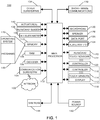
- FIG. 1 A block diagram of an example of an electronic device 100 is shown in FIG. 1 .
- the electronic device 100 includes multiple components, such as a processor 102 that controls the overall operation of the electronic device 100. Communication functions, including data and voice communications, are performed through a communication subsystem 104. Data received by the electronic device 100 is decompressed and decrypted by a decoder 106. The communication subsystem 104 receives messages from and sends messages to a wireless network 150.
- the wireless network 150 may be any type of wireless network, including, but not limited to, data wireless networks, voice wireless networks, and networks that support both voice and data communications.
- a power source 142 such as one or more rechargeable batteries or a port to an external power supply, powers the electronic device 100.
- the processor 102 interacts with other components, such as a Random Access Memory (RAM) 108, memory 110, a touch-sensitive display 118, a physical keyboard 120, an auxiliary input/output (I/O) subsystem 124, a data port 126, a speaker 128, a microphone 130, short-range communications 132 and other device subsystems 134.
- the touch-sensitive display 118 includes a display 112 and touch sensors 114 that are coupled to at least one controller 116 that is utilized to interact with the processor 102. Input via a graphical user interface is provided via the touch-sensitive display 118. Thus, the touch sensors 114 and the controller 116 are utilized as an input device.
- the keyboard may be, for example, a physical keyboard 120 that includes a plurality of mechanical keys that have mechanical switches or contacts for input to the electronic device 100 when a mechanical key of the keyboard is depressed by a sufficient force to oppose a bias of the mechanical key.
- touch sensors 122 are disposed on the physical keyboard 120 and the touch sensors 122 are coupled to a controller 123.
- the touch-sensitive display 118 is moveable relative to the physical keyboard 120.
- a keyboard sensor 138 is utilized to detect a location of the touch-sensitive display 118 relative to the physical keyboard 120 of the electronic device 100.
- the processor 102 may also interact with an accelerometer 136 that may be utilized to detect direction of gravitational forces or gravity-induced reaction forces.
- the electronic device 100 may utilize a Subscriber Identity Module or a Removable User Identity Module (SIM/RUIM) card 144 for communication with a network, such as the wireless network 150.
- SIM/RUIM Removable User Identity Module
- user identification information may be programmed into memory 110.
- the electronic device 100 includes an operating system 146 and software programs, applications, or components 148 that are executed by the processor 102 and are typically stored in a persistent, updatable store such as the memory 110. Additional applications or programs may be loaded onto the electronic device 100 through the wireless network 150, the auxiliary I/O subsystem 124, the data port 126, the short-range communications subsystem 132, or any other suitable subsystem 134.
- a received signal such as a text message, an e-mail message, or web page download is processed by the communication subsystem 104 and input to the processor 102.
- the processor 102 processes the received signal for output to the display 112 and/or to the auxiliary I/O subsystem 124.
- a subscriber may generate data items, for example e-mail messages, which may be transmitted over the wireless network 150 through the communication subsystem 104.
- the speaker 128 outputs audible information converted from electrical signals
- the microphone 130 converts audible information into electrical signals for processing.
- the touch-sensitive display 118 may be any suitable touch-sensitive display, such as a capacitive touch-sensitive display.
- a capacitive touch-sensitive display includes capacitive touch sensors 114.
- the capacitive touch sensors may comprise any suitable material, such as indium tin oxide (ITO).
- One or more touches may be detected by the touch-sensitive display 118.
- the processor 102 may determine attributes of the touch, including a location of the touch.
- Touch location data may include data for an area of contact or data for a single point of contact, such as a point at or near a center of the area of contact.
- the location of a detected touch may include x and y components, e.g., horizontal and vertical components, respectively, with respect to one's view of the touch-sensitive display 118.
- a touch may be detected from any suitable input member, such as a finger, thumb, appendage, or other objects, for example, a stylus, pen, or other pointer, depending on the nature of the touch-sensitive display 118. Multiple simultaneous touches may be detected.
- a tap which is a particular type of touch may be a touch that ends within a threshold period of time.
- the touch contact with the touch-sensitive display 118 is relatively short because contact ends within a threshold period of time of beginning.
- One or more gestures may also be detected by the touch-sensitive display 118.
- a gesture such as a swipe, also known as a flick, is a particular type of touch on a touch-sensitive display 118 and may begin at an origin point and continue to an end point, for example, a concluding end of the gesture.
- a gesture may be identified by attributes of the gesture, including the origin point, the end point, the distance travelled, the duration, the velocity, and the direction, for example.
- a gesture may be long or short in distance and/or duration. Two points of the gesture may be utilized to determine a direction of the gesture.
- a gesture may also include a hover.
- a hover may be a touch at a location that is generally unchanged over a period of time or is associated with the same selection item for a period of time.
- the touch sensors 122 on the physical keyboard 120 may be any suitable touch sensors, such as capacitive touch-sensors and may comprise any suitable material, such as indium tin oxide (ITO).
- the touch sensors 122 disposed on the physical keyboard 120 may be coupled to the same controller 116 as the touch sensors of touch-sensitive display 118 such that a single controller is utilized rather than two controllers 116, 123.
- One or more touches on the keys of the keyboard 120 may be detected.
- the processor 102 may determine attributes of the touch, including a location of the touch.
- Touch location data may include data for an area of contact or data for a single point of contact, such as a point at or near a center of the area of contact.
- the location of a detected touch may include x and y components, e.g., horizontal and vertical components, respectively, with respect to one's view of the keyboard 120.
- a touch may be detected from any suitable input member and multiple simultaneous touches may be detected.
- One or more gestures may also be detected by the touch sensors 122 disposed on the keyboard 120.
- a gesture on the keys of the keyboard 120 may be identified by attributes of the gesture, including the origin point, the end point, the distance travelled, the duration, the velocity, and the direction, for example.
- a gesture may be long or short in distance and/or duration. Two points of the gesture may be utilized to determine a direction of the gesture.
- a gesture may also include a hover.
- the touch-sensitive display 118 includes a display area in which information may be displayed, and a non-display area extending around the periphery of the display area. Information is not displayed in the non-display area by the display, which non-display area is utilized to accommodate, for example, electronic traces or electrical connections, adhesives or other sealants, and/or protective coatings around the edges of the display area.
- the non-display area may be referred to as an inactive area and is not part of the physical housing or frame of the electronic device. Typically, no pixels of the display are in the non-display area, thus no image is displayed by the display 112 in the non-display area.
- Touch sensors may be disposed in the non-display area, which touch sensors may be extended from the touch sensors in the display area or distinct or separate touch sensors from the touch sensors in the display area.
- a touch on the touch-sensitive display 118, including a gesture, may be associated with the display area, the non-display area, or both areas.
- the touch sensors may extend across substantially the entire non-display area or may be disposed in only part of the non-display area.
- FIG. 2 A front view of an example of the electronic device 100 is shown in FIG. 2 .
- the electronic device 100 includes a display housing 202 in which the touch-sensitive display 118 is disposed.
- the display housing 202 is utilized to house or support components including at least some of the components shown in FIG. 1 .
- the physical keyboard 120 is disposed in a keyboard housing 204, which is shown in FIG. 3 , below the touch-sensitive display 118 in the orientation illustrated in FIG. 3 .
- the physical keyboard 120 includes a plurality of mechanical keys 206. Each one of the mechanical keys 206 of the keyboard is associated with characters or a function such that the characters are entered utilizing the mechanical keys 206.
- the keyboard housing 204 may also be utilized to house or support components including at least some of the components shown in FIG. 1 .
- the display housing 202 is moveable relative to the keyboard housing 204 by sliding the display housing 202 between a first position in which the keyboard housing 204 is stacked with the display housing 202 such that the physical keyboard 120 is disposed between the display housing 202 and a back of the keyboard housing 204, as shown in FIG. 2 , and a second position in which the keyboard housing 204 extends from the display housing 202 to expose the physical keyboard 120 below the touch-sensitive display 118 in the orientation in which the portable electronic device 100 is illustrated in FIG. 3 .
- the touch-sensitive display 118 is moveable relative to the physical keyboard 120, between the first position, shown in FIG. 2 , in which the physical keyboard is not exposed and the second position, shown in FIG. 3 , in which the physical keyboard 120 is exposed for use.
- the physical keyboard 120 is therefore selectively exposable for use.
- the keyboard sensor 138 referred to above with reference to FIG. 1 , is arranged and constructed to detect a position of the display housing 202 relative to the keyboard housing 204.
- the keyboard sensor 138 is coupled to the processor 102 to detect that the touch-sensitive display 118 is in the first position, the second position, or in a location between the first and the second positions.
- the processor 102 in connection with the keyboard sensor 138 may detect the number of rows of the physical keyboard 120 that are exposed, the percentage that the physical keyboard 120 is exposed, or may detect any intermediate position of the touch-sensitive display, between the first position and the second position, in which the physical keyboard is partially exposed. Thus, the keyboard sensor 138 together with the processor 102 detects movement of the touch-sensitive display 118 relative to the physical keyboard 120.
- the physical keyboard 120 may be a QWERTY keyboard.
- other keyboard layouts may be successfully implemented, such as an AZERTY keyboard, a QWERTZ keyboard, or any other suitable keyboard.
- Information may be displayed on the touch-sensitive display 118.
- the information displayed may include any suitable information such as icons, text, pictures, video, documents, a webpage, or any other suitable information.
- the information may be associated with, for example, a home page, a menu or submenu, an application or applications, and so forth.
- the information may be selectable, for example, by a touch on the touch-sensitive display 118, or by a touch, such as a hover gesture, a tap, a double tap, or other suitable touch, on the physical keyboard 120.
- a virtual keyboard may also be displayed.
- the keys of the virtual keyboard may be selectable by a touch on an area of the touch-sensitive display 118 associated with the respective key.
- Display of the virtual keyboard may be discontinued in response to movement of the display housing 202 relative to the keyboard housing 204 to the second position, as shown in FIG.3 , to thereby expose the physical keyboard 120.
- FIG. 4 A flowchart illustrating a method of controlling an electronic device that has a display moveable relative to the keyboard, such as the electronic device 100, is shown in FIG. 4 .
- the method may be carried out by software executed, for example, by a processor 102 in a portable electronic device 100. Coding of software for carrying out such a method is within the scope of a person of ordinary skill in the art given the present description.
- the method may contain additional or fewer processes than shown and/or described, and may be performed in a different order.
- Computer-readable code executable by at least one processor of the portable electronic device to perform the method may be stored in a computer-readable medium, such as a non-transitory computer-readable device.
- the method illustrated in FIG. 4 may be carried out, for example, any time the portable electronic device 120 is on and is running the operating system or an application.
- a touch may be detected on the touch-sensitive display 118 at 402.
- the movement of the touch-sensitive display 118 relative to the physical keyboard 120 may be detected while information is displayed, such as a home page, a menu or submenu, or information related to an application.
- the information includes items that are selectable to perform an action such as launching an application, performing a task within an application, opening a window or screen, locking the portable electronic device 100, or any other suitable action.
- a visual indicator may be displayed to identify one of the items from the information displayed.
- the movement of the touch-sensitive display 118 relative to the physical keyboard 120 may be detected when no information is displayed on the touch-sensitive display 118 or information, including selectable items, may be displayed in response to detecting the movement to facilitate selection of the selectable item to perform an action.
- the location of the touch-sensitive display 118 relative to the physical keyboard 120 is determined at 404. As movement of the touch-sensitive display 118 relative to the physical keyboard 120 occurs and the location of the touch-sensitive display 118 is determined, a visual indicator may be displayed to identify one of the items from the information displayed.
- the visual indicator may be any suitable indicator, such as highlighting of information, or display of an associated word, phrase, icon, or other identifier on the touch-sensitive display 118.
- Detecting the selection event may include detecting that movement of the touch-sensitive display 118 relative to the physical keyboard 120, which is detected at 402, is discontinued for a period of time. For example, movement of the touch-sensitive display 118 relative to the physical keyboard 120 may be discontinued with the touch-sensitive display 118 in a third position relative to the physical keyboard 120, and the period of time that the movement is discontinued is compared to a threshold period of time. In response to determining that the period of time that movement is discontinued meets the threshold period of time, the method continues at 408.
- the threshold period of time may be any suitable period of time, such as three seconds, or any other suitable period of time.
- An action associated with the location of the touch-sensitive display 118 relative to the physical keyboard 120 is identified at 408.
- the action is thus dependent on the location of the touch-sensitive display 118 when the movement of the touch-sensitive display 118 relative to the physical keyboard 120 is discontinued.
- the action that is identified may be dependent on the application or applications running on the portable electronic device 100 when the movement is detected or may be dependent on the state of the electronic device at the time movement is detected.
- the action may be confirmed or cancelled at 410.
- the action may be confirmed, for example, by further movement of the touch-sensitive display 118 relative to the physical keyboard 120, to the second position in which the physical keyboard 120 is exposed for use, after the selection event is detected at 404.
- the action may be confirmed and the method continues at 412.
- the action may also be cancelled at 410, for example, by further movement of the touch-sensitive display 118 relative to the physical keyboard 120, to the first position in which the physical keyboard 120 is not exposed.
- the action identified at 408 is performed at 412.
- an application may be launched or opened, a task within an application may be performed, the portable electronic device 100 may be locked, or any other suitable action may be performed.
- confirmation of the action may be received after the action is performed.
- the action may be performed and then confirmed or cancelled based on further movement of the touch-sensitive display 118 relative to the physical keyboard 120.
- icons are displayed in a column on the touch-sensitive display 118.
- Each of the icons is associated with an action.
- the icons include a lock 502 associated with locking the portable electronic device 100, a calendar icon 504 associated with entry of a calendar event, a phone icon 506 associated with a cellular telephone action, a mail icon 508 associated with an electronic message application, and a music icon 510 associated with a music application.
- movement of the touch-sensitive display 118 relative to the physical keyboard 120 is detected at 402 and the method continues at 404.
- the location of the touch-sensitive display 118 relative to the physical keyboard 120 is determined at 404.
- the location of the touch-sensitive display 118 relative to the physical keyboard 120 is repeatedly determined and the icon associated with the location of the touch-sensitive display 118 relative to the physical keyboard 120 is displayed at a larger size to provide a visual indication of the associated icon.
- two rows of keys of the physical keyboard 120 are exposed and the phone icon 506 is displayed at a larger size.
- the movement of the touch-sensitive display 118 relative to the physical keyboard 120 continues to the position illustrated in FIG. 6 in which three rows of keys of the physical keyboard are exposed.
- the phone icon is displayed at a smaller size compared to the size of the phone icon illustrated in FIG. 5 and the mail icon 508 is displayed at a larger size, visually indicating the mail icon.
- Movement of the touch-sensitive display 118 relative to the physical keyboard 120 is discontinued for four seconds, a period of time that meets the threshold period of time, and the action associated with the mail icon 508 is selected.
- the instant message composition interface is opened at 412 for composing an instant message.
- the instant message composition interface is prepopulated with a recipient, which may be the contact from whom the most recent message was sent or received. Alternatively, the application may be launched without preselecting a recipient.
- an action may be performed based on movement of the touch-sensitive display 118 relative to the physical keyboard 120.
- the user may pause the relative movement to perform an action, reducing the time and number of steps to select an item or action.
Landscapes
- Engineering & Computer Science (AREA)
- Theoretical Computer Science (AREA)
- General Engineering & Computer Science (AREA)
- Physics & Mathematics (AREA)
- Human Computer Interaction (AREA)
- General Physics & Mathematics (AREA)
- Computer Hardware Design (AREA)
- Signal Processing (AREA)
- Mathematical Physics (AREA)
- User Interface Of Digital Computer (AREA)
Applications Claiming Priority (1)
| Application Number | Priority Date | Filing Date | Title |
|---|---|---|---|
| US15/247,261 US10248161B2 (en) | 2016-08-25 | 2016-08-25 | Control of an electronic device including display and keyboard moveable relative to the display |
Publications (2)
| Publication Number | Publication Date |
|---|---|
| EP3287885A1 true EP3287885A1 (fr) | 2018-02-28 |
| EP3287885B1 EP3287885B1 (fr) | 2020-03-25 |
Family
ID=59677037
Family Applications (1)
| Application Number | Title | Priority Date | Filing Date |
|---|---|---|---|
| EP17186132.1A Active EP3287885B1 (fr) | 2016-08-25 | 2017-08-14 | Commande d'un dispositif électronique comportant un écran d'affichage et un clavier mobile par rapport à l'écran d'affichage |
Country Status (2)
| Country | Link |
|---|---|
| US (1) | US10248161B2 (fr) |
| EP (1) | EP3287885B1 (fr) |
Citations (4)
| Publication number | Priority date | Publication date | Assignee | Title |
|---|---|---|---|---|
| US20030038786A1 (en) * | 2001-08-17 | 2003-02-27 | Nguyen Huy P. | Handheld computer having moveable segments that are interactive with an integrated display |
| JP2007274727A (ja) * | 2007-05-21 | 2007-10-18 | Toshiba Corp | 携帯端末 |
| EP2031837A2 (fr) * | 2007-09-03 | 2009-03-04 | LG Electronics Inc. | Terminal mobile et son procédé de reconnaissance tactile |
| US20090154082A1 (en) * | 2005-09-30 | 2009-06-18 | Mikko Nurmi | Electronic device, computer porgram product and control method |
Family Cites Families (9)
| Publication number | Priority date | Publication date | Assignee | Title |
|---|---|---|---|---|
| EP1298909B1 (fr) * | 2001-09-28 | 2007-04-11 | Telefonaktiebolaget LM Ericsson (publ) | Terminal mobil de communication |
| JP2003179678A (ja) * | 2001-10-03 | 2003-06-27 | Nec Corp | 携帯電話機 |
| US7474298B2 (en) * | 2002-05-31 | 2009-01-06 | Palm, Inc. | Mobile device having an adjustable length to selectively expose a surface component |
| KR100511305B1 (ko) * | 2003-04-15 | 2005-08-31 | 엘지전자 주식회사 | 슬라이드형 휴대단말기의 메뉴 선택구조 및 장치 및 방법 |
| JP3974589B2 (ja) * | 2004-03-22 | 2007-09-12 | 株式会社東芝 | 携帯情報端末 |
| KR100616544B1 (ko) * | 2004-04-30 | 2006-08-29 | 삼성전기주식회사 | 슬라이드형 이동통신단말기 및 그 자동구동방법 |
| US7388578B2 (en) * | 2004-07-01 | 2008-06-17 | Nokia Corporation | Touch display PDA phone with slide keypad |
| JP4450008B2 (ja) | 2007-04-17 | 2010-04-14 | 株式会社カシオ日立モバイルコミュニケーションズ | 電子機器 |
| CN101981987B (zh) | 2008-01-30 | 2014-12-03 | 谷歌公司 | 移动设备事件的通知 |
-
2016
- 2016-08-25 US US15/247,261 patent/US10248161B2/en active Active
-
2017
- 2017-08-14 EP EP17186132.1A patent/EP3287885B1/fr active Active
Patent Citations (4)
| Publication number | Priority date | Publication date | Assignee | Title |
|---|---|---|---|---|
| US20030038786A1 (en) * | 2001-08-17 | 2003-02-27 | Nguyen Huy P. | Handheld computer having moveable segments that are interactive with an integrated display |
| US20090154082A1 (en) * | 2005-09-30 | 2009-06-18 | Mikko Nurmi | Electronic device, computer porgram product and control method |
| JP2007274727A (ja) * | 2007-05-21 | 2007-10-18 | Toshiba Corp | 携帯端末 |
| EP2031837A2 (fr) * | 2007-09-03 | 2009-03-04 | LG Electronics Inc. | Terminal mobile et son procédé de reconnaissance tactile |
Also Published As
| Publication number | Publication date |
|---|---|
| US20180059808A1 (en) | 2018-03-01 |
| EP3287885B1 (fr) | 2020-03-25 |
| US10248161B2 (en) | 2019-04-02 |
Similar Documents
| Publication | Publication Date | Title |
|---|---|---|
| EP3239804B1 (fr) | Commande d'un dispositif électronique comportant un écran d'affichage et un clavier mobile par rapport à l'écran | |
| US10101877B2 (en) | Portable electronic device including touch-sensitive display and method of providing access to an application | |
| US10203858B2 (en) | Portable electronic device and method of controlling the display of information | |
| US9838999B2 (en) | Portable electronic device and method of controlling notifications | |
| US10180780B2 (en) | Portable electronic device including touch-sensitive display and method of controlling selection of information | |
| CA2911850C (fr) | Dispositif electronique portatif et procede de commande d'affichage d'elements pouvant etre selectionnes | |
| US10503257B2 (en) | Portable electronic device and method of providing haptic feedback | |
| EP3115864B1 (fr) | Dispositif électronique portable comprenant un clavier et procédé de commande de celui-ci | |
| US20160299588A1 (en) | Portable electronic device including touch-sensitive display and method of controlling selection of information | |
| EP3352068B1 (fr) | Dispositif électronique portable incluant un clavier physique et procédé de commande de sélection d'informations | |
| US20120007876A1 (en) | Electronic device and method of tracking displayed information | |
| EP3287885B1 (fr) | Commande d'un dispositif électronique comportant un écran d'affichage et un clavier mobile par rapport à l'écran d'affichage | |
| EP2405333A1 (fr) | Dispositif électronique et procédé de suivi des informations affichées | |
| EP3477458B1 (fr) | Dispositif électronique et procédé de fourniture de touches sélectionnables d'un clavier | |
| HK40007643A (en) | Electronic device and method of providing selectable keys of a keyboard |
Legal Events
| Date | Code | Title | Description |
|---|---|---|---|
| PUAI | Public reference made under article 153(3) epc to a published international application that has entered the european phase |
Free format text: ORIGINAL CODE: 0009012 |
|
| STAA | Information on the status of an ep patent application or granted ep patent |
Free format text: STATUS: THE APPLICATION HAS BEEN PUBLISHED |
|
| AK | Designated contracting states |
Kind code of ref document: A1 Designated state(s): AL AT BE BG CH CY CZ DE DK EE ES FI FR GB GR HR HU IE IS IT LI LT LU LV MC MK MT NL NO PL PT RO RS SE SI SK SM TR |
|
| AX | Request for extension of the european patent |
Extension state: BA ME |
|
| STAA | Information on the status of an ep patent application or granted ep patent |
Free format text: STATUS: REQUEST FOR EXAMINATION WAS MADE |
|
| 17P | Request for examination filed |
Effective date: 20180807 |
|
| RBV | Designated contracting states (corrected) |
Designated state(s): AL AT BE BG CH CY CZ DE DK EE ES FI FR GB GR HR HU IE IS IT LI LT LU LV MC MK MT NL NO PL PT RO RS SE SI SK SM TR |
|
| REG | Reference to a national code |
Ref country code: DE Ref legal event code: R079 Ref document number: 602017013507 Country of ref document: DE Free format text: PREVIOUS MAIN CLASS: G06F0003048700 Ipc: G06F0003048200 |
|
| RIC1 | Information provided on ipc code assigned before grant |
Ipc: G06F 3/0482 20130101AFI20191023BHEP Ipc: G06F 1/16 20060101ALI20191023BHEP Ipc: G06F 3/0362 20130101ALI20191023BHEP Ipc: G06F 3/0487 20130101ALI20191023BHEP Ipc: G06F 3/0484 20130101ALI20191023BHEP Ipc: H04M 1/02 20060101ALI20191023BHEP |
|
| GRAP | Despatch of communication of intention to grant a patent |
Free format text: ORIGINAL CODE: EPIDOSNIGR1 |
|
| STAA | Information on the status of an ep patent application or granted ep patent |
Free format text: STATUS: GRANT OF PATENT IS INTENDED |
|
| INTG | Intention to grant announced |
Effective date: 20191204 |
|
| GRAS | Grant fee paid |
Free format text: ORIGINAL CODE: EPIDOSNIGR3 |
|
| GRAA | (expected) grant |
Free format text: ORIGINAL CODE: 0009210 |
|
| STAA | Information on the status of an ep patent application or granted ep patent |
Free format text: STATUS: THE PATENT HAS BEEN GRANTED |
|
| AK | Designated contracting states |
Kind code of ref document: B1 Designated state(s): AL AT BE BG CH CY CZ DE DK EE ES FI FR GB GR HR HU IE IS IT LI LT LU LV MC MK MT NL NO PL PT RO RS SE SI SK SM TR |
|
| REG | Reference to a national code |
Ref country code: GB Ref legal event code: FG4D |
|
| REG | Reference to a national code |
Ref country code: AT Ref legal event code: REF Ref document number: 1249322 Country of ref document: AT Kind code of ref document: T Effective date: 20200415 Ref country code: IE Ref legal event code: FG4D |
|
| REG | Reference to a national code |
Ref country code: DE Ref legal event code: R096 Ref document number: 602017013507 Country of ref document: DE |
|
| PG25 | Lapsed in a contracting state [announced via postgrant information from national office to epo] |
Ref country code: RS Free format text: LAPSE BECAUSE OF FAILURE TO SUBMIT A TRANSLATION OF THE DESCRIPTION OR TO PAY THE FEE WITHIN THE PRESCRIBED TIME-LIMIT Effective date: 20200325 Ref country code: FI Free format text: LAPSE BECAUSE OF FAILURE TO SUBMIT A TRANSLATION OF THE DESCRIPTION OR TO PAY THE FEE WITHIN THE PRESCRIBED TIME-LIMIT Effective date: 20200325 Ref country code: NO Free format text: LAPSE BECAUSE OF FAILURE TO SUBMIT A TRANSLATION OF THE DESCRIPTION OR TO PAY THE FEE WITHIN THE PRESCRIBED TIME-LIMIT Effective date: 20200625 |
|
| PG25 | Lapsed in a contracting state [announced via postgrant information from national office to epo] |
Ref country code: SE Free format text: LAPSE BECAUSE OF FAILURE TO SUBMIT A TRANSLATION OF THE DESCRIPTION OR TO PAY THE FEE WITHIN THE PRESCRIBED TIME-LIMIT Effective date: 20200325 Ref country code: LV Free format text: LAPSE BECAUSE OF FAILURE TO SUBMIT A TRANSLATION OF THE DESCRIPTION OR TO PAY THE FEE WITHIN THE PRESCRIBED TIME-LIMIT Effective date: 20200325 Ref country code: BG Free format text: LAPSE BECAUSE OF FAILURE TO SUBMIT A TRANSLATION OF THE DESCRIPTION OR TO PAY THE FEE WITHIN THE PRESCRIBED TIME-LIMIT Effective date: 20200625 Ref country code: GR Free format text: LAPSE BECAUSE OF FAILURE TO SUBMIT A TRANSLATION OF THE DESCRIPTION OR TO PAY THE FEE WITHIN THE PRESCRIBED TIME-LIMIT Effective date: 20200626 Ref country code: HR Free format text: LAPSE BECAUSE OF FAILURE TO SUBMIT A TRANSLATION OF THE DESCRIPTION OR TO PAY THE FEE WITHIN THE PRESCRIBED TIME-LIMIT Effective date: 20200325 |
|
| REG | Reference to a national code |
Ref country code: NL Ref legal event code: MP Effective date: 20200325 |
|
| REG | Reference to a national code |
Ref country code: LT Ref legal event code: MG4D |
|
| PG25 | Lapsed in a contracting state [announced via postgrant information from national office to epo] |
Ref country code: NL Free format text: LAPSE BECAUSE OF FAILURE TO SUBMIT A TRANSLATION OF THE DESCRIPTION OR TO PAY THE FEE WITHIN THE PRESCRIBED TIME-LIMIT Effective date: 20200325 |
|
| PG25 | Lapsed in a contracting state [announced via postgrant information from national office to epo] |
Ref country code: RO Free format text: LAPSE BECAUSE OF FAILURE TO SUBMIT A TRANSLATION OF THE DESCRIPTION OR TO PAY THE FEE WITHIN THE PRESCRIBED TIME-LIMIT Effective date: 20200325 Ref country code: SK Free format text: LAPSE BECAUSE OF FAILURE TO SUBMIT A TRANSLATION OF THE DESCRIPTION OR TO PAY THE FEE WITHIN THE PRESCRIBED TIME-LIMIT Effective date: 20200325 Ref country code: IS Free format text: LAPSE BECAUSE OF FAILURE TO SUBMIT A TRANSLATION OF THE DESCRIPTION OR TO PAY THE FEE WITHIN THE PRESCRIBED TIME-LIMIT Effective date: 20200725 Ref country code: EE Free format text: LAPSE BECAUSE OF FAILURE TO SUBMIT A TRANSLATION OF THE DESCRIPTION OR TO PAY THE FEE WITHIN THE PRESCRIBED TIME-LIMIT Effective date: 20200325 Ref country code: SM Free format text: LAPSE BECAUSE OF FAILURE TO SUBMIT A TRANSLATION OF THE DESCRIPTION OR TO PAY THE FEE WITHIN THE PRESCRIBED TIME-LIMIT Effective date: 20200325 Ref country code: PT Free format text: LAPSE BECAUSE OF FAILURE TO SUBMIT A TRANSLATION OF THE DESCRIPTION OR TO PAY THE FEE WITHIN THE PRESCRIBED TIME-LIMIT Effective date: 20200818 Ref country code: CZ Free format text: LAPSE BECAUSE OF FAILURE TO SUBMIT A TRANSLATION OF THE DESCRIPTION OR TO PAY THE FEE WITHIN THE PRESCRIBED TIME-LIMIT Effective date: 20200325 Ref country code: LT Free format text: LAPSE BECAUSE OF FAILURE TO SUBMIT A TRANSLATION OF THE DESCRIPTION OR TO PAY THE FEE WITHIN THE PRESCRIBED TIME-LIMIT Effective date: 20200325 |
|
| REG | Reference to a national code |
Ref country code: AT Ref legal event code: MK05 Ref document number: 1249322 Country of ref document: AT Kind code of ref document: T Effective date: 20200325 |
|
| REG | Reference to a national code |
Ref country code: DE Ref legal event code: R097 Ref document number: 602017013507 Country of ref document: DE |
|
| PG25 | Lapsed in a contracting state [announced via postgrant information from national office to epo] |
Ref country code: AT Free format text: LAPSE BECAUSE OF FAILURE TO SUBMIT A TRANSLATION OF THE DESCRIPTION OR TO PAY THE FEE WITHIN THE PRESCRIBED TIME-LIMIT Effective date: 20200325 Ref country code: DK Free format text: LAPSE BECAUSE OF FAILURE TO SUBMIT A TRANSLATION OF THE DESCRIPTION OR TO PAY THE FEE WITHIN THE PRESCRIBED TIME-LIMIT Effective date: 20200325 Ref country code: IT Free format text: LAPSE BECAUSE OF FAILURE TO SUBMIT A TRANSLATION OF THE DESCRIPTION OR TO PAY THE FEE WITHIN THE PRESCRIBED TIME-LIMIT Effective date: 20200325 Ref country code: ES Free format text: LAPSE BECAUSE OF FAILURE TO SUBMIT A TRANSLATION OF THE DESCRIPTION OR TO PAY THE FEE WITHIN THE PRESCRIBED TIME-LIMIT Effective date: 20200325 |
|
| PLBE | No opposition filed within time limit |
Free format text: ORIGINAL CODE: 0009261 |
|
| STAA | Information on the status of an ep patent application or granted ep patent |
Free format text: STATUS: NO OPPOSITION FILED WITHIN TIME LIMIT |
|
| PG25 | Lapsed in a contracting state [announced via postgrant information from national office to epo] |
Ref country code: PL Free format text: LAPSE BECAUSE OF FAILURE TO SUBMIT A TRANSLATION OF THE DESCRIPTION OR TO PAY THE FEE WITHIN THE PRESCRIBED TIME-LIMIT Effective date: 20200325 |
|
| 26N | No opposition filed |
Effective date: 20210112 |
|
| PG25 | Lapsed in a contracting state [announced via postgrant information from national office to epo] |
Ref country code: MC Free format text: LAPSE BECAUSE OF FAILURE TO SUBMIT A TRANSLATION OF THE DESCRIPTION OR TO PAY THE FEE WITHIN THE PRESCRIBED TIME-LIMIT Effective date: 20200325 |
|
| REG | Reference to a national code |
Ref country code: CH Ref legal event code: PL |
|
| PG25 | Lapsed in a contracting state [announced via postgrant information from national office to epo] |
Ref country code: CH Free format text: LAPSE BECAUSE OF NON-PAYMENT OF DUE FEES Effective date: 20200831 Ref country code: LU Free format text: LAPSE BECAUSE OF NON-PAYMENT OF DUE FEES Effective date: 20200814 Ref country code: LI Free format text: LAPSE BECAUSE OF NON-PAYMENT OF DUE FEES Effective date: 20200831 |
|
| REG | Reference to a national code |
Ref country code: BE Ref legal event code: MM Effective date: 20200831 |
|
| PG25 | Lapsed in a contracting state [announced via postgrant information from national office to epo] |
Ref country code: SI Free format text: LAPSE BECAUSE OF FAILURE TO SUBMIT A TRANSLATION OF THE DESCRIPTION OR TO PAY THE FEE WITHIN THE PRESCRIBED TIME-LIMIT Effective date: 20200325 |
|
| PG25 | Lapsed in a contracting state [announced via postgrant information from national office to epo] |
Ref country code: BE Free format text: LAPSE BECAUSE OF NON-PAYMENT OF DUE FEES Effective date: 20200831 Ref country code: IE Free format text: LAPSE BECAUSE OF NON-PAYMENT OF DUE FEES Effective date: 20200814 |
|
| PG25 | Lapsed in a contracting state [announced via postgrant information from national office to epo] |
Ref country code: TR Free format text: LAPSE BECAUSE OF FAILURE TO SUBMIT A TRANSLATION OF THE DESCRIPTION OR TO PAY THE FEE WITHIN THE PRESCRIBED TIME-LIMIT Effective date: 20200325 Ref country code: MT Free format text: LAPSE BECAUSE OF FAILURE TO SUBMIT A TRANSLATION OF THE DESCRIPTION OR TO PAY THE FEE WITHIN THE PRESCRIBED TIME-LIMIT Effective date: 20200325 Ref country code: CY Free format text: LAPSE BECAUSE OF FAILURE TO SUBMIT A TRANSLATION OF THE DESCRIPTION OR TO PAY THE FEE WITHIN THE PRESCRIBED TIME-LIMIT Effective date: 20200325 |
|
| PG25 | Lapsed in a contracting state [announced via postgrant information from national office to epo] |
Ref country code: MK Free format text: LAPSE BECAUSE OF FAILURE TO SUBMIT A TRANSLATION OF THE DESCRIPTION OR TO PAY THE FEE WITHIN THE PRESCRIBED TIME-LIMIT Effective date: 20200325 Ref country code: AL Free format text: LAPSE BECAUSE OF FAILURE TO SUBMIT A TRANSLATION OF THE DESCRIPTION OR TO PAY THE FEE WITHIN THE PRESCRIBED TIME-LIMIT Effective date: 20200325 |
|
| REG | Reference to a national code |
Ref country code: DE Ref legal event code: R081 Ref document number: 602017013507 Country of ref document: DE Owner name: MALIKIE INNOVATIONS LTD., IE Free format text: FORMER OWNER: BLACKBERRY LIMITED, WATERLOO, ONTARIO, CA |
|
| REG | Reference to a national code |
Ref country code: GB Ref legal event code: 732E Free format text: REGISTERED BETWEEN 20240620 AND 20240627 |
|
| PGFP | Annual fee paid to national office [announced via postgrant information from national office to epo] |
Ref country code: DE Payment date: 20250827 Year of fee payment: 9 |
|
| PGFP | Annual fee paid to national office [announced via postgrant information from national office to epo] |
Ref country code: GB Payment date: 20250826 Year of fee payment: 9 |
|
| PGFP | Annual fee paid to national office [announced via postgrant information from national office to epo] |
Ref country code: FR Payment date: 20250825 Year of fee payment: 9 |