EP3301558A1 - Procédé et dispositif pour le partage de contenu - Google Patents
Procédé et dispositif pour le partage de contenu Download PDFInfo
- Publication number
- EP3301558A1 EP3301558A1 EP17173514.5A EP17173514A EP3301558A1 EP 3301558 A1 EP3301558 A1 EP 3301558A1 EP 17173514 A EP17173514 A EP 17173514A EP 3301558 A1 EP3301558 A1 EP 3301558A1
- Authority
- EP
- European Patent Office
- Prior art keywords
- content
- content element
- sharing
- user
- page
- Prior art date
- Legal status (The legal status is an assumption and is not a legal conclusion. Google has not performed a legal analysis and makes no representation as to the accuracy of the status listed.)
- Withdrawn
Links
Images





Classifications
-
- G—PHYSICS
- G06—COMPUTING OR CALCULATING; COUNTING
- G06F—ELECTRIC DIGITAL DATA PROCESSING
- G06F3/00—Input arrangements for transferring data to be processed into a form capable of being handled by the computer; Output arrangements for transferring data from processing unit to output unit, e.g. interface arrangements
- G06F3/01—Input arrangements or combined input and output arrangements for interaction between user and computer
- G06F3/048—Interaction techniques based on graphical user interfaces [GUI]
- G06F3/0484—Interaction techniques based on graphical user interfaces [GUI] for the control of specific functions or operations, e.g. selecting or manipulating an object, an image or a displayed text element, setting a parameter value or selecting a range
- G06F3/04845—Interaction techniques based on graphical user interfaces [GUI] for the control of specific functions or operations, e.g. selecting or manipulating an object, an image or a displayed text element, setting a parameter value or selecting a range for image manipulation, e.g. dragging, rotation, expansion or change of colour
-
- G—PHYSICS
- G06—COMPUTING OR CALCULATING; COUNTING
- G06F—ELECTRIC DIGITAL DATA PROCESSING
- G06F3/00—Input arrangements for transferring data to be processed into a form capable of being handled by the computer; Output arrangements for transferring data from processing unit to output unit, e.g. interface arrangements
- G06F3/01—Input arrangements or combined input and output arrangements for interaction between user and computer
- G06F3/048—Interaction techniques based on graphical user interfaces [GUI]
- G06F3/0484—Interaction techniques based on graphical user interfaces [GUI] for the control of specific functions or operations, e.g. selecting or manipulating an object, an image or a displayed text element, setting a parameter value or selecting a range
-
- G—PHYSICS
- G06—COMPUTING OR CALCULATING; COUNTING
- G06F—ELECTRIC DIGITAL DATA PROCESSING
- G06F3/00—Input arrangements for transferring data to be processed into a form capable of being handled by the computer; Output arrangements for transferring data from processing unit to output unit, e.g. interface arrangements
- G06F3/01—Input arrangements or combined input and output arrangements for interaction between user and computer
- G06F3/048—Interaction techniques based on graphical user interfaces [GUI]
- G06F3/0481—Interaction techniques based on graphical user interfaces [GUI] based on specific properties of the displayed interaction object or a metaphor-based environment, e.g. interaction with desktop elements like windows or icons, or assisted by a cursor's changing behaviour or appearance
- G06F3/04817—Interaction techniques based on graphical user interfaces [GUI] based on specific properties of the displayed interaction object or a metaphor-based environment, e.g. interaction with desktop elements like windows or icons, or assisted by a cursor's changing behaviour or appearance using icons
-
- G—PHYSICS
- G06—COMPUTING OR CALCULATING; COUNTING
- G06F—ELECTRIC DIGITAL DATA PROCESSING
- G06F3/00—Input arrangements for transferring data to be processed into a form capable of being handled by the computer; Output arrangements for transferring data from processing unit to output unit, e.g. interface arrangements
- G06F3/01—Input arrangements or combined input and output arrangements for interaction between user and computer
- G06F3/048—Interaction techniques based on graphical user interfaces [GUI]
- G06F3/0484—Interaction techniques based on graphical user interfaces [GUI] for the control of specific functions or operations, e.g. selecting or manipulating an object, an image or a displayed text element, setting a parameter value or selecting a range
- G06F3/04842—Selection of displayed objects or displayed text elements
-
- G—PHYSICS
- G06—COMPUTING OR CALCULATING; COUNTING
- G06F—ELECTRIC DIGITAL DATA PROCESSING
- G06F3/00—Input arrangements for transferring data to be processed into a form capable of being handled by the computer; Output arrangements for transferring data from processing unit to output unit, e.g. interface arrangements
- G06F3/01—Input arrangements or combined input and output arrangements for interaction between user and computer
- G06F3/048—Interaction techniques based on graphical user interfaces [GUI]
- G06F3/0484—Interaction techniques based on graphical user interfaces [GUI] for the control of specific functions or operations, e.g. selecting or manipulating an object, an image or a displayed text element, setting a parameter value or selecting a range
- G06F3/0486—Drag-and-drop
-
- G—PHYSICS
- G06—COMPUTING OR CALCULATING; COUNTING
- G06F—ELECTRIC DIGITAL DATA PROCESSING
- G06F3/00—Input arrangements for transferring data to be processed into a form capable of being handled by the computer; Output arrangements for transferring data from processing unit to output unit, e.g. interface arrangements
- G06F3/01—Input arrangements or combined input and output arrangements for interaction between user and computer
- G06F3/048—Interaction techniques based on graphical user interfaces [GUI]
- G06F3/0487—Interaction techniques based on graphical user interfaces [GUI] using specific features provided by the input device, e.g. functions controlled by the rotation of a mouse with dual sensing arrangements, or of the nature of the input device, e.g. tap gestures based on pressure sensed by a digitiser
- G06F3/0488—Interaction techniques based on graphical user interfaces [GUI] using specific features provided by the input device, e.g. functions controlled by the rotation of a mouse with dual sensing arrangements, or of the nature of the input device, e.g. tap gestures based on pressure sensed by a digitiser using a touch-screen or digitiser, e.g. input of commands through traced gestures
-
- G—PHYSICS
- G06—COMPUTING OR CALCULATING; COUNTING
- G06F—ELECTRIC DIGITAL DATA PROCESSING
- G06F3/00—Input arrangements for transferring data to be processed into a form capable of being handled by the computer; Output arrangements for transferring data from processing unit to output unit, e.g. interface arrangements
- G06F3/01—Input arrangements or combined input and output arrangements for interaction between user and computer
- G06F3/048—Interaction techniques based on graphical user interfaces [GUI]
- G06F3/0487—Interaction techniques based on graphical user interfaces [GUI] using specific features provided by the input device, e.g. functions controlled by the rotation of a mouse with dual sensing arrangements, or of the nature of the input device, e.g. tap gestures based on pressure sensed by a digitiser
- G06F3/0488—Interaction techniques based on graphical user interfaces [GUI] using specific features provided by the input device, e.g. functions controlled by the rotation of a mouse with dual sensing arrangements, or of the nature of the input device, e.g. tap gestures based on pressure sensed by a digitiser using a touch-screen or digitiser, e.g. input of commands through traced gestures
- G06F3/04883—Interaction techniques based on graphical user interfaces [GUI] using specific features provided by the input device, e.g. functions controlled by the rotation of a mouse with dual sensing arrangements, or of the nature of the input device, e.g. tap gestures based on pressure sensed by a digitiser using a touch-screen or digitiser, e.g. input of commands through traced gestures for inputting data by handwriting, e.g. gesture or text
-
- G—PHYSICS
- G06—COMPUTING OR CALCULATING; COUNTING
- G06Q—INFORMATION AND COMMUNICATION TECHNOLOGY [ICT] SPECIALLY ADAPTED FOR ADMINISTRATIVE, COMMERCIAL, FINANCIAL, MANAGERIAL OR SUPERVISORY PURPOSES; SYSTEMS OR METHODS SPECIALLY ADAPTED FOR ADMINISTRATIVE, COMMERCIAL, FINANCIAL, MANAGERIAL OR SUPERVISORY PURPOSES, NOT OTHERWISE PROVIDED FOR
- G06Q10/00—Administration; Management
- G06Q10/40—Business processes related to social networking or social networking services
-
- H—ELECTRICITY
- H04—ELECTRIC COMMUNICATION TECHNIQUE
- H04M—TELEPHONIC COMMUNICATION
- H04M1/00—Substation equipment, e.g. for use by subscribers
- H04M1/72—Mobile telephones; Cordless telephones, i.e. devices for establishing wireless links to base stations without route selection
- H04M1/724—User interfaces specially adapted for cordless or mobile telephones
- H04M1/72403—User interfaces specially adapted for cordless or mobile telephones with means for local support of applications that increase the functionality
-
- H—ELECTRICITY
- H04—ELECTRIC COMMUNICATION TECHNIQUE
- H04M—TELEPHONIC COMMUNICATION
- H04M1/00—Substation equipment, e.g. for use by subscribers
- H04M1/72—Mobile telephones; Cordless telephones, i.e. devices for establishing wireless links to base stations without route selection
- H04M1/724—User interfaces specially adapted for cordless or mobile telephones
- H04M1/72403—User interfaces specially adapted for cordless or mobile telephones with means for local support of applications that increase the functionality
- H04M1/7243—User interfaces specially adapted for cordless or mobile telephones with means for local support of applications that increase the functionality with interactive means for internal management of messages
- H04M1/72439—User interfaces specially adapted for cordless or mobile telephones with means for local support of applications that increase the functionality with interactive means for internal management of messages for image or video messaging
-
- H—ELECTRICITY
- H04—ELECTRIC COMMUNICATION TECHNIQUE
- H04N—PICTORIAL COMMUNICATION, e.g. TELEVISION
- H04N1/00—Scanning, transmission or reproduction of documents or the like, e.g. facsimile transmission; Details thereof
- H04N1/00127—Connection or combination of a still picture apparatus with another apparatus, e.g. for storage, processing or transmission of still picture signals or of information associated with a still picture
- H04N1/00204—Connection or combination of a still picture apparatus with another apparatus, e.g. for storage, processing or transmission of still picture signals or of information associated with a still picture with a digital computer or a digital computer system, e.g. an internet server
- H04N1/00209—Transmitting or receiving image data, e.g. facsimile data, via a computer, e.g. using e-mail, a computer network, the internet, I-fax
-
- H—ELECTRICITY
- H04—ELECTRIC COMMUNICATION TECHNIQUE
- H04M—TELEPHONIC COMMUNICATION
- H04M2250/00—Details of telephonic subscriber devices
- H04M2250/22—Details of telephonic subscriber devices including a touch pad, a touch sensor or a touch detector
Definitions
- the present invention relates to mobile internet technology field, and more particularly, to a method and a device for sharing content.
- users may forward and share content whenever and wherever by a social media platform. For instance, for a browsed web page, a user may realize overall sharing of the web page by forwarding a link address corresponding to the web page. However, in some scenarios, the user may only want to forward and share a paragraph of text, a picture, a video clip or other part of the content in the web page. For these scenarios, the present invention provides a new and more flexible solution for sharing content.
- a method for sharing content is provided, which is applied in an electronic apparatus and comprises:
- obtaining an operation signal of the user for triggering content sharing and entering a content sharing mode comprises:
- obtaining a content element selected by the user from the currently displayed page comprises:
- sharing the content element comprises:
- the content element comprises at least one of text content, a picture, a link address, an audio and a video.
- dragging the content element to a displayed icon of an application to realize sharing the content element comprises:
- sharing the content element in the target application comprises:
- a device for sharing content which is applied in an electronic apparatus and comprises:
- the processing module comprises:
- the content sharing module comprises:
- the content sharing module comprises:
- the content element includes at least one of text content, a picture, a link address, an audio and a video.
- the content sharing sub module comprises:
- the content sharing unit comprises:
- a device for sharing content comprises:
- processor configured to perform the method according to the first aspect of embodiments of the present invention.
- the steps of the method for sharing content are determined by computer program instructions.
- the present invention is also directed to a computer program for executing the steps of the method for sharing content as described above when this program is executed by a computer.
- This program can use any programming language and take the form of source code, object code or a code intermediate between source code and object code, such as a partially compiled form, or any other desirable form.
- the present invention is also directed to a computer-readable information medium containing instructions of a computer program as described above.
- the information medium can be any entity or device capable of storing the program.
- the support can include storage means such as a ROM, for example a CD ROM or a microelectronic circuit ROM, or magnetic storage means, for example a diskette (floppy disk) or a hard disk.
- the information medium can be an integrated circuit in which the program is incorporated, the circuit being adapted to execute the method in question or to be used in its execution.
- the operation signal of the user for triggering content sharing is obtained in the currently displayed page, the content sharing mode is entered, the content element selected by the user from the currently displayed page is obtained, and the content element is shared.
- the operation signal for triggering content sharing triggering to enter the content sharing mode in the currently displayed page, the user may freely select and share the content element in the currently displayed page under the content sharing mode.
- first and second are used herein for describing various elements, these elements should not be limited by these terms. These terms are only used for distinguishing one element from another element.
- a first sequencing criterion may also be called a second sequencing criterion, and similarly, the second sequencing criterion may also be called the first sequencing criterion, without departing from the scope of the present invention.
- the term “if” used herein may be understood to mean “when” or “upon” or “in response to the determination of”.
- the technical solutions provided in embodiments of the present invention are applied in an electronic apparatus.
- the electronic apparatus may be various kinds of terminals that are capable of performing touch operation by a touch screen, such as a smart phone, a tablet computer, a personal digital assistant (PDA for short) or other touch screen terminal with a processor and a display and output device.
- a touch screen such as a smart phone, a tablet computer, a personal digital assistant (PDA for short) or other touch screen terminal with a processor and a display and output device.
- PDA personal digital assistant
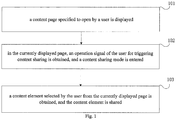
- Fig. 1 is a flow chart of a method for sharing content according to an exemplary embodiment of the present invention.
- the method for sharing content is applied in an electronic apparatus with a touch screen.
- the method for sharing content may include following blocks.
- a content page specified to open by a user is displayed.
- the content page may include a web page, an instant chat session page, a video playing page, a music playing page, or a page for displaying locally stored information, which are specified to open (or opened) by the user.
- obtaining an operation signal of the user for triggering content sharing, and entering a content sharing mode may include: detecting an operation gesture input by the user in the currently displayed page; and when the detected operation gesture is a preset operation gesture, obtaining the operation signal of the user for triggering content sharing (i.e. the detected operation gesture is determined as the operation signal of the user for triggering content sharing), and entering the content sharing mode.
- the preset operation gesture may be an operation gesture for triggering the currently displayed page to be displayed as contracting inward from four corners of a display screen.
- the content elements in the currently displayed page are all in an editable state.
- the user may perform operations such as clicking to select, clicking to view, copy and paste to a content element in the currently displayed page, and entrances (e.g. in the form of icons, etc.) of applications for sharing content with other persons or objects on a network (e.g. Internet, local area network, etc.) may be provided to the user in the currently displayed page. So the user may select the content element in the currently displayed page, and then share the selected content element on the network by the displayed sharing entrances.
- a network e.g. Internet, local area network, etc.
- a content element selected by the user from the currently displayed page is obtained, and the content element is shared.
- sharing the content element includes: displaying icons of applications installed in the electronic apparatus for the user to share content; and dragging the content element to a displayed icon of an application to realize sharing the content element.
- the content element may include at least one of text content, a picture, a link address, an audio and a video.
- dragging the content element to a displayed icon of an application to realize sharing the content element includes: detecting a dragging operation to the content element; if the dragging operation to the content element is detected, dynamically displaying the content element according to the dragging operation; when detecting the content element is moved (or dragged) to an icon of a target application in the displayed icons of the applications, sharing the content element in (or via) the target application.
- the target application includes a communication application or a text editing application.
- sharing the content element in the target application includes: when detecting the content element is moved to the icon of the target application in the displayed icons of the applications, opening the target application; when the target application is the communication application, selecting a contact to share from the target application, and sharing the content element with the contact; when the target application is the text editing application, inserting the content element to a target editing page of the text editing application.
- the operation signal of the user for triggering content sharing is obtained in the currently displayed page, the content sharing mode is entered, the content element selected by the user from the currently displayed page is obtained, and the content element is shared.
- the operation signal for triggering content sharing triggering to enter the content sharing mode in the currently displayed page, the user may freely select and share the content element in the currently displayed page under the content sharing mode.
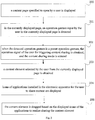
- Fig. 2 is a flow chart of a method for sharing content according to an exemplary embodiment of the present invention. The method is applied to the above electronic apparatus, and may include following blocks.
- a content page specified to open by a user is displayed.
- the content page may include a web page, an instant chat session page, a video playing page, a music playing page, or a page for displaying locally stored information, which are specified to open by the user.
- the page for displaying locally stored information may include a contact list page, a call records page, or a picture library, etc.
- the web page is taken as an example of the content page specified to open by the user in this embodiment for illustrating.
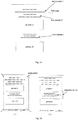
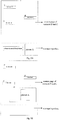
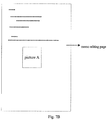
- an interface of a web page is exemplarily given, which includes text content 1, text content 2, text content 3, a picture A and a picture B.
- a touch screen includes a touch detecting assembly and a touch screen controller, in which the touch detecting assembly is mounted in the front of a display screen, configured to detect a touch position of the user (when human body touches the touch screen similar to an electrostatic induction sheet, a current induction signal may be generated, and the touch detecting assembly may know a touch point of the user by sensing the current induction signal), then related touch information is transferred to the touch screen controller.
- the touch screen controller converts the touch information into a coordinate of the touch point, and transfers the coordinate of the touch point to a CPU (Central Processing Unit) to process. Meanwhile, the touch screen controller may also receive and execute instructions sent from the CPU.
- CPU Central Processing Unit
- the electronic apparatus may detect the operation gesture of the user based on changes of the current induction signals of the touch screen.
- the user may preset an operation gesture for triggering to enter the content sharing mode according to his own habits.
- An operating system records this operation gesture.
- the preset operation gesture may be a preset sliding trace or an operation gesture for triggering a certain operation.
- the preset operation gesture may be an operation gesture for triggering the currently displayed page to be displayed as contracting inward from four corners of the display screen.
- the content sharing mode is triggered to enter, and the user may select and share the content element in the currently displayed page under the content sharing mode.
- the content element for the user to select may include at least one of text content, a picture, a link address, an audio and a video.
- the user may click a content element that is laid out based on a page layout in the currently displayed page, such as a certain picture, a certain paragraph of text, a video or a link address in the currently displayed page.
- a content element selected by the user from the currently displayed page is obtained.
- the content element selected by the user from the currently displayed page is determined based on the selecting operation of the user, and the content element selected by the user is processed, which include: extracting and highlighting the content element selected by the user from the currently displayed page; or extracting and editing the content element selected by the user from the currently displayed page, and highlighting the edited content element.
- FIG. 3B a schematic diagram illustrating a user triggering the currently displayed page to enter a content sharing mode is exemplarily given.
- the currently displayed page is triggered, such as the displayed page in Fig. 3A is triggered to be displayed as contracting inward from four corners of the display screen, and then the content sharing mode is entered.
- the content element selected by the user from the currently displayed page (the picture A selected by the user) is extracted and highlighted, so as to perform sharing operation to the content element selected (the picture A).
- the icons of the applications for the user to share are displayed in a bottom region of the display screen of the electronic apparatus, such as the application A, the application B and the application C shown in Fig. 3B (1) and Fig. 3B (2).
- the content element selected by the user may be edited before sharing the content element selected by the user.
- the content element is a picture
- the displaying size, layout and other displaying state of the selected picture may be edited.
- a reediting operation may be performed to the text content, such as adding text description, deleting some words, or changing font style, font size or font color etc.
- the picture A selected by the user in Fig. 3B (2) may be cut to obtain a picture A whose size meets requirement of the user, and then, the picture A after cut is shared.
- the content sharing mode is triggered to enter.
- the currently displayed page may be displayed as contracting inward from four corners of the display screen by a preset scale, and the icons of the applications installed in the electronic apparatus for the user to share content are displayed at the bottom of the display screen, as shown in Fig.3B (1) and Fig. 3B (2).
- types of applications installed in the electronic apparatus are detected.
- icons of applications that satisfy a preset type condition in the applications installed in the electronic apparatus are arranged and displayed in order in a preset region of the display screen (such as the bottom region of the electronic display screen).
- the applications that satisfy the preset type condition are applications in which the sharing operation may be performed to the content element. For example, communication applications or text edit applications installed in the electronic apparatus may be satisfied.
- Displaying icons of applications installed in the electronic apparatus for the user to share content may mean follows.
- the icons are displayed in an order according to installation time of the applications that satisfy the preset type condition, for example, applications with earlier installation time than other applications of the applications installed in the electronic apparatus may be arranged to be displayed first.
- the icons may be displayed in an order according to using times or using frequency of the applications that satisfy the preset type condition, for example, applications with more usage times or with higher usage frequency than other applications of the applications installed in the electronic apparatus may be arranged to be displayed first.
- the content element is dragged to a displayed icon of an application to realize sharing the content element.
- the user may realize sharing the content element by an operation of dragging the selected content element.
- dragging the content element to a displayed icon of an application to realize sharing the content element includes: detecting a dragging operation to the content element; if the dragging operation to the content element is detected, dynamically displaying the content element according to the dragging operation; when detecting the content element is moved (or dragged) to an icon of a target application in the displayed icons of the applications, sharing the content element in the target application.
- the target application may include but be not limited to a communication application or a text editing application.
- the text editing application may be an office application software such as Word and PPT, or an editing software for a memo, a note and the like.
- the communication application may be an instant messaging application, a SMS (Short Messaging Service), a telephone application, or a communication tool such as social networking service (SNS for short) application software.
- sharing the content element in the target application includes: when detecting the content element is moved to the icon of the target application in the displayed icons of the applications, opening the target application; when the target application is the communication application, selecting a contact to share from the target application, and sharing the content element to the contact; when the target application is the text editing application, inserting the content element to a target editing page of the text editing application.
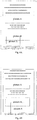
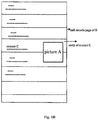
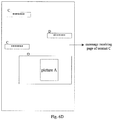
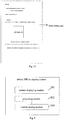
- FIG. 4A when detecting the dragging operation to the content element from the user, the content element (such as the picture A) is displayed dynamically according to the dragging operation.
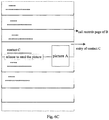
- the target application is opened, as shown in Fig. 4B and Fig. 4C . And then, the user may perform a sharing operation to the content element in the opened target application.
- the user may select a contact to share in a contact session page, a contact list page, or a call records page of the communication application, and share the content element to the selected contact.
- sharing the content element with a contact of the communication application may include: opening the contact session page of the communication application, and sending the content element to a contact of the contact session page; or opening the contact list page of the communication application, selecting a contact from the contacts, and sending the content element to the selected contact; or opening the call records page of the communication application, selecting a contact from the call records page, and sending the content element to the selected contact.
- sharing the content element with a contact of the communication application may further include: dragging the content element to a contact session page, a contact list page, or a call records page of the opened target application, further dragging the content element to a preset position of the contact session page, the contact list page, or the call records page, and sending the content element to a contact corresponding to the preset position.
- sending the content element e.g. the picture A
- sending the content element refers to sending an original picture of the content element to the contact of the communication application.
- the preset position may be a message input box area of the contact session page, an entry position of a contact in the contact list page, or an entry position of a call record in the call records page.
- Fig. 5A to Fig. 5E all are schematic diagrams illustrating an implementation procedure of a content element shared in a contact session page according to an exemplary embodiment of the present invention.
- the content element is dragged to a display interface of the opened target application B, in which the display interface of the application B is a contact session page, and the content element (such as the picture A) is still displayed in the contact session page, as shown in Fig. 5A .
- the content element After detecting the dragging operation to the content element from the user, the content element is moved in the current display interface according the dragging operation, process of which may refer to Fig. 5B .
- the content element is input to the message input box, referring to Fig. 5C .
- the content element may be sent to a contact of the current session, referring to Fig. 5E , realizing an operation of sharing the content element to the contact.
- the user before sharing the content element to the contact, the user is informed to perform a picture sharing operation, as shown in Fig. 5D , words of "release to send the picture" is informed to the user, to inform the user that releasing the dragging operation to the content element may realize a sending operation of the content element.
- implement process of the above Fig. 5A to Fig. 5E may be simplified.
- the user When detecting the content element is dragged to the message input box of the contact session page, the user is directly informed whether to send the picture, such as "release to send the picture".
- the content element When detecting the user releasing the dragging operation to the content element, the content element is directly sent to the contact of the current session.
- a contact list page of the communication application when detecting the content element is dragged to an entry position of a contact in the contact list page, the content element is sent to the contact.
- a call records page of the communication application when detecting the content element is dragged to an entry position of a call record in the call records page, the content element is sent to a contact corresponding to the call record.
- Fig. 6A to Fig. 6D all are schematic diagrams illustrating an implementation procedure of a content element shared in call records according to an exemplary embodiment of the present invention.
- the content element is dragged to the target application B, and then the target application B is opened, in which a display interface of the application B is a call records page, and the content element is still displayed in the call records page, as shown in Fig. 6A .
- the content element is moved in the current display interface according the dragging operation, process of which may refer to Fig. 6B .
- the content element When the content element is dragged to an entry of a contact in the contact list page, if detecting the user releases the dragging operation to the content element, the content element is sent to a contact corresponding to the call record, referring to Fig. 6D , realizing an operation of sharing the content element to the contact.
- the user before sharing the content element to the contact, the user is informed to perform a picture sharing operation, as shown in Fig. 6C , words of "release to send the picture" is informed to the user, to inform the user that releasing the dragging operation to the content element may realize a sending operation of the content element.
- implement process of the above Fig. 6A to Fig. 6D may be simplified.
- the user When detecting the content element is dragged to the entry of a call record in the call records page, the user is directly informed whether to send the picture, such as "release to send the picture".
- the content element When detecting the user releasing the dragging operation to the content element, the content element is directly sent to the contact corresponding to the call record.
- the way of sending the content element to a contact of the communication applications is similar to the above that in the message session page or in the call records page, which should not be described in detail herein.
- the content element when the target application is a text editing application, after opening the text editing application, the content element may be inserted to a target position of the text editing application by dragging the content element, realizing sharing the content element.
- inserting the content element to a target editing page of the text editing application may be follows.
- the target editing page is a memo editing page
- the content element is inserted to the text row of the memo editing page.
- the target editing page is an office editing software, if detecting the content element is dragged to a position of a text editing page, the content element is inserted to the position.
- Fig. 7A to Fig. 7C all are schematic diagrams illustrating an implementation procedure of a content element shared in a memo according to an exemplary embodiment of the present invention.
- the content element is dragged to a display interface of the opened target application B, in which the display interface of the application B is a memo editing page, and the content element is still displayed in the memo editing page, as shown in Fig. 7A .
- the content element is moved in the current display interface according the dragging operation, process of which may refer to Fig. 7B .
- the way of inserting the content element to the text editing page is similar to the above that inserting the content element to the memo editing page, which should not be described in detail herein.
- the method before performing a sharing operation to the content element, the method further includes: informing the user whether to share the content element, so as to avoid the accidentally touching operation.
- the operation signal of the user for triggering content sharing is obtained in the currently displayed page, the content sharing mode is entered, the content element selected by the user from the currently displayed page is obtained, and the content element is shared.
- the operation signal for triggering content sharing triggering to enter the content sharing mode in the currently displayed page, the user may freely select and share the content element in the currently displayed page under the content sharing mode.
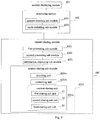
- Fig. 8 is a block diagram of a device 300 for sharing content according to an exemplary embodiment of the present invention.
- the device 300 for sharing content is applied in an electronic apparatus with a touch screen.
- the device 300 for sharing content may include a content displaying module 301, a processing module 302 and a content sharing module 303.
- the content displaying module 301 is configured to display a content page specified to open by a user.
- the processing module 302 is configured to obtain an operation signal of the user for triggering content sharing in the currently displayed page, and to enter a content sharing mode.
- the content sharing module 303 is configured to obtain a content element selected by the user from the currently displayed page, and to share the content element.
- the operation signal of the user for triggering content sharing is obtained in the currently displayed page, the content sharing mode is entered, the content element selected by the user from the currently displayed page is obtained, and the content element is shared.
- the operation signal for triggering content sharing triggering to enter the content sharing mode in the currently displayed page, the user may freely select and share the content element in the currently displayed page under the content sharing mode.
- Fig. 9 is a block diagram of a device for sharing content according to another exemplary embodiment of the present invention.
- the device for sharing content is applied in an electronic apparatus with a touch screen.
- the device for sharing content may include: a content displaying module 401, a processing module 402, and a content sharing module 403.
- the content displaying module 401 is configured to display a content page specified to open by a user.
- the content page may include a web page, an instant chat session page, a video playing page, a music playing page, a music playing page, or a page for displaying locally stored information, which are specified to open by the user.
- the processing module 402 is configured to obtain an operation signal of the user for triggering content sharing in the currently displayed page, and to enter a content sharing mode.
- the processing module 402 may include a gesture detecting sub module 4021 and a mode switching sub module 4022.
- the gesture detecting sub module 4021 is configured to detect an operation gesture input by the user in the currently displayed page.
- the mode switching sub module 4022 is configured to obtain the operation signal of the user for triggering content sharing, and to enter the content sharing mode, when the detected operation gesture is a preset operation gesture.
- the preset operation gesture may be an operation gesture for triggering the currently displayed page to be displayed as contracting inward from four corners of a display screen.
- the content sharing module 403 is configured to obtain a content element selected by the user from the currently displayed page, and to share the content element.
- the content sharing module 403 may include a first processing sub module 4031 or a second processing sub module 4032.
- the first processing sub module 4031 is configured to extract and highlight the content element selected by the user from the currently displayed page.
- the second processing sub module 4032 is configured to extract and edit the content element selected by the user from the currently displayed page, and to highlight the edited content element.
- the content sharing module 403 may further include an information displaying sub module 4033, and a content sharing sub module 4034.
- the information displaying sub module 4033 is configured to display icons of applications installed in the electronic apparatus for the user to share content.
- the content sharing sub module 4034 is configured to drag the content element to a displayed icon of an application to realize sharing the content element.
- the content element may include at least one of text content, a picture, a link address, an audio and a video.
- the content sharing sub module 4034 may include a detecting unit 4034a, a controlling unit 4034b, and a content sharing unit 4034c.
- the detecting unit 4034a is configured to detect a dragging operation to the content element.
- the controlling unit 4034b is configured to dynamically display the content element according to the dragging operation, if the dragging operation to the content element is detected.
- the content sharing unit 4034c is configured to share the content element in the target application, when detecting the content element is moved to an icon of a target application in the displayed icons of the applications.
- the target application includes a communication application or a text editing application.
- the content sharing unit 4034c may include a first sharing sub unit 01, a second sharing sub unit 02 and a third sharing sub unit 03.
- the first sharing sub unit 01 is configured to open the target application, when detecting the content element is moved to the icon of the target application in the displayed icons of the applications.
- the second sharing sub unit 02 is configured to select a contact to share from the target application, and to share the content element to the contact, when the target application is the communication application.
- the third sharing sub unit 03 is configured to insert the content element to a target editing page of the text editing application, when the target application is the text editing application.
- the operation signal of the user for triggering content sharing is obtained in the currently displayed page, the content sharing mode is entered, the content element selected by the user from the currently displayed page is obtained, and the content element is shared.
- the operation signal for triggering content sharing triggering to enter the content sharing mode in the currently displayed page, the user may freely select and share the content element in the currently displayed page under the content sharing mode.
- the device 50 may be a mobile phone, a tablet computer or other electronic apparatus with a touch sreen.
- the device 500 may include the following one or more components: a processing component 502, a memory 504, a power component 506, a multimedia component 508, an audio component 510, an Input/Output (I/O) interface 512, a sensor component 514, and a communication component 516.
- a processing component 502 a memory 504
- a power component 506 a multimedia component 508, an audio component 510, an Input/Output (I/O) interface 512, a sensor component 514, and a communication component 516.
- I/O Input/Output
- the processing component 502 typically controls overall operations of the electronic device 500, such as the operations associated with display, telephone calls, data communications, camera operations, and recording operations.
- the processing component 502 may include one or more processors 520 to execute instructions to perform all or part of the steps in the above described methods.
- the processing component 502 may include one or more modules which facilitate the interaction between the processing component 502 and other components.
- the processing component 502 may include a multimedia module to facilitate the interaction between the multimedia component 508 and the processing component 502.
- the memory 504 is configured to store various types of data to support the operation of the electronic device 500. Examples of such data include instructions for any applications or methods operated on the electronic device 500, contact data, phonebook data, messages, pictures, video, etc.
- the memory 504 may be implemented using any type of volatile or non-volatile memory devices, or a combination thereof, such as a static random access memory (SRAM), an electrically erasable programmable read-only memory (EEPROM), an erasable programmable read-only memory (EPROM), a programmable read-only memory (PROM), a read-only memory (ROM), a magnetic memory, a flash memory, a magnetic or optical disk.
- SRAM static random access memory
- EEPROM electrically erasable programmable read-only memory
- EPROM erasable programmable read-only memory
- PROM programmable read-only memory
- ROM read-only memory
- magnetic memory a magnetic memory
- flash memory a flash memory
- magnetic or optical disk a magnetic
- the power component 506 provides power to various components of the electronic device 500.
- the power component 506 may include a power management system, one or more power sources, and any other components associated with the generation, management, and distribution of power in the electronic device 500.
- the multimedia component 508 includes a screen providing an output interface between the electronic device 500 and the user, and the four corner of the screen are rounded.
- the screen may include a liquid crystal display (LCD) and a press panel (TP). If the screen includes the press panel, the screen may be implemented as a press screen to receive input signals from the user.
- the press panel includes one or more press sensors to sense presses, swipes, and other gestures on the press panel. The press sensors may not only sense a boundary of a press or swipe action, but also sense a duration time and a pressure associated with the press or swipe action.
- the multimedia component 508 includes a front camera and/or a rear camera. The front camera and/or the rear camera may receive external multimedia data while the electronic device 500 is in an operation mode, such as a photographing mode or a video mode. Each of the front camera and the rear camera may be a fixed optical lens system or have focus and optical zoom capability.
- the audio component 510 is configured to output and/or input audio signals.
- the audio component 510 includes a microphone (MIC) configured to receive an external audio signal when the electronic device 500 is in an operation mode, such as a call mode, a recording mode, and a voice recognition mode.
- the received audio signal may be further stored in the memory 504 or transmitted via the communication component 516.
- the audio component 510 further includes a speaker to output audio signals.
- the I/O interface 512 provides an interface for the processing component 502 and peripheral interface modules, such as a keyboard, a click wheel, buttons, and the like.
- the buttons may include, but are not limited to, a home button, a volume button, a starting button, and a locking button.
- the sensor component 514 includes one or more sensors to provide status assessments of various aspects of the electronic device 500. For instance, the sensor component 514 may detect an open/closed status of the electronic device 500 and relative positioning of components (e.g. the display and the keypad of the electronic device 500. The sensor component 514 may also detect a change in position of the electronic device 500 or of a component in the electronic device 500, a presence or absence of user contact with the electronic device 500, an orientation or an acceleration/deceleration of the electronic device 500, and a change in temperature of the electronic device 500. The sensor component 514 may include a proximity sensor configured to detect the presence of nearby objects without any physical contact.
- the sensor component 514 may also include a light sensor, such as a CMOS or CCD image sensor, for use in imaging applications.
- the sensor component 514 may also include an accelerometer sensor, a gyroscope sensor, a magnetic sensor, a pressure sensor, or a temperature sensor.
- the communication component 516 is configured to facilitate wired or wireless communication between the electronic device 500 and other devices.
- the electronic device 500 can access a wireless network based on a communication standard, such as WIFI, 2G, or 3G, or a combination thereof.
- the communication component 516 receives a broadcast signal or broadcast associated information from an external broadcast management system via a broadcast channel.
- the communication component 516 further includes a near field communication (NFC) module to facilitate short-range communications.
- the NFC module may be implemented based on a radio frequency identification (RFID) technology, an infrared data association (IrDA) technology, an ultra-wideband (UWB) technology, a Bluetooth (BT) technology, and other technologies.
- RFID radio frequency identification
- IrDA infrared data association
- UWB ultra-wideband
- BT Bluetooth
- the electronic device 500 may be implemented with one or more application specific integrated circuits (ASICs), digital signal processors (DSPs), digital signal processing devices (DSPDs), programmable logic devices (PLDs), field programmable gate arrays (FPGAs), controllers, micro-controllers, microprocessors, or other electronic components, for performing the above described methods.
- ASICs application specific integrated circuits
- DSPs digital signal processors
- DSPDs digital signal processing devices
- PLDs programmable logic devices
- FPGAs field programmable gate arrays
- controllers micro-controllers, microprocessors, or other electronic components, for performing the above described methods.
- a non-transitory computer readable storage medium including instructions, such as the memory 504 including instructions.
- the instructions may be performed by the processor 520 of the electronic device 500 so as to realize the method for generating information.
- the non-transitory computer-readable storage medium may be a ROM, a RAM, a CD-ROM, a magnetic tape, a floppy disc, an optical data storage device, and the like.
- a non-transitory computer readable storage medium is provided, when the instructions in the storage medium are performed by the processor of the device 500, the device 500 may execute the above method for sharing content.
Landscapes
- Engineering & Computer Science (AREA)
- General Engineering & Computer Science (AREA)
- Theoretical Computer Science (AREA)
- Human Computer Interaction (AREA)
- Physics & Mathematics (AREA)
- General Physics & Mathematics (AREA)
- Business, Economics & Management (AREA)
- Signal Processing (AREA)
- General Business, Economics & Management (AREA)
- Multimedia (AREA)
- Computer Networks & Wireless Communication (AREA)
- Tourism & Hospitality (AREA)
- Marketing (AREA)
- Human Resources & Organizations (AREA)
- Entrepreneurship & Innovation (AREA)
- Economics (AREA)
- Strategic Management (AREA)
- Quality & Reliability (AREA)
- Operations Research (AREA)
- Computing Systems (AREA)
- User Interface Of Digital Computer (AREA)
- Information Transfer Between Computers (AREA)
Applications Claiming Priority (1)
| Application Number | Priority Date | Filing Date | Title |
|---|---|---|---|
| CN201610865379.1A CN106502527A (zh) | 2016-09-29 | 2016-09-29 | 一种内容分享的方法、装置及终端 |
Publications (1)
| Publication Number | Publication Date |
|---|---|
| EP3301558A1 true EP3301558A1 (fr) | 2018-04-04 |
Family
ID=58291252
Family Applications (3)
| Application Number | Title | Priority Date | Filing Date |
|---|---|---|---|
| EP17171121.1A Ceased EP3301557A1 (fr) | 2016-09-29 | 2017-05-15 | Procédé, appareil et produit-programme d'ordinateur permettant de partager un contenu |
| EP17173514.5A Withdrawn EP3301558A1 (fr) | 2016-09-29 | 2017-05-30 | Procédé et dispositif pour le partage de contenu |
| EP17193283.3A Active EP3301559B1 (fr) | 2016-09-29 | 2017-09-26 | Dispositif et procédé de partage de contenu |
Family Applications Before (1)
| Application Number | Title | Priority Date | Filing Date |
|---|---|---|---|
| EP17171121.1A Ceased EP3301557A1 (fr) | 2016-09-29 | 2017-05-15 | Procédé, appareil et produit-programme d'ordinateur permettant de partager un contenu |
Family Applications After (1)
| Application Number | Title | Priority Date | Filing Date |
|---|---|---|---|
| EP17193283.3A Active EP3301559B1 (fr) | 2016-09-29 | 2017-09-26 | Dispositif et procédé de partage de contenu |
Country Status (4)
| Country | Link |
|---|---|
| US (3) | US20180088784A1 (fr) |
| EP (3) | EP3301557A1 (fr) |
| CN (1) | CN106502527A (fr) |
| WO (2) | WO2018058728A1 (fr) |
Families Citing this family (48)
| Publication number | Priority date | Publication date | Assignee | Title |
|---|---|---|---|---|
| CN112152908A (zh) | 2015-02-16 | 2020-12-29 | 钉钉控股(开曼)有限公司 | 通讯方法 |
| CN105681056B (zh) | 2016-01-13 | 2019-03-19 | 阿里巴巴集团控股有限公司 | 对象分配方法及装置 |
| CN107305459A (zh) * | 2016-04-25 | 2017-10-31 | 阿里巴巴集团控股有限公司 | 语音和多媒体消息的发送方法及装置 |
| CN107368995A (zh) | 2016-05-13 | 2017-11-21 | 阿里巴巴集团控股有限公司 | 任务处理方法及装置 |
| US10783320B2 (en) * | 2017-05-16 | 2020-09-22 | Apple Inc. | Device, method, and graphical user interface for editing screenshot images |
| CN107506106A (zh) * | 2017-07-31 | 2017-12-22 | 努比亚技术有限公司 | 处理消息的方法、设备及计算机可存储介质 |
| CN109426420A (zh) * | 2017-08-24 | 2019-03-05 | 西安中兴新软件有限责任公司 | 一种双屏终端图片发送方法和装置 |
| CN107608592B (zh) * | 2017-09-28 | 2020-12-25 | Oppo广东移动通信有限公司 | 一种列表中的列表项的选择方法及装置 |
| JP7014958B2 (ja) * | 2017-10-23 | 2022-02-02 | 富士通株式会社 | 編集プログラム、編集装置、及び、編集方法 |
| CN107864278A (zh) * | 2017-10-31 | 2018-03-30 | 努比亚技术有限公司 | 一种发送对象的方法和装置 |
| WO2019171548A1 (fr) * | 2018-03-08 | 2019-09-12 | 三菱電機株式会社 | Dispositif d'aide à la création d'écran, système d'affichage, procédé d'aide à la création d'écran et programme d'aide à la création d'écran |
| CN108616443A (zh) * | 2018-03-30 | 2018-10-02 | 北京三快在线科技有限公司 | 联系人信息展示方法及装置 |
| CN109753199B (zh) * | 2018-06-21 | 2019-12-06 | 北京字节跳动网络技术有限公司 | 一种应用页面展示方法及移动终端 |
| US10901584B2 (en) * | 2018-06-03 | 2021-01-26 | Apple Inc. | Devices, methods, and systems for manipulating user interfaces |
| CN108986009A (zh) * | 2018-06-11 | 2018-12-11 | 北京三快在线科技有限公司 | 图片的生成方法、装置及电子设备 |
| CN110875975A (zh) * | 2018-08-29 | 2020-03-10 | 阿里巴巴集团控股有限公司 | 一种信息处理方法及设备 |
| CN109684110A (zh) * | 2018-12-28 | 2019-04-26 | 北京小米移动软件有限公司 | 多媒体资源分享方法、装置及存储介质 |
| CN109740086A (zh) * | 2019-01-10 | 2019-05-10 | 北京字节跳动网络技术有限公司 | 用于展示页面的方法和装置 |
| CN109814786B (zh) * | 2019-01-25 | 2020-11-17 | 维沃移动通信有限公司 | 图像存储方法及终端设备 |
| CN111612558A (zh) * | 2019-02-25 | 2020-09-01 | 福特全球技术公司 | 行程邀约的方法和系统 |
| CN110401766B (zh) * | 2019-05-22 | 2021-12-21 | 华为技术有限公司 | 一种拍摄方法及终端 |
| CN110174994B (zh) * | 2019-05-27 | 2021-09-03 | 网易(杭州)网络有限公司 | 聊天消息转发的方法及装置、电子设备、存储介质 |
| CN110308860B (zh) * | 2019-07-11 | 2022-01-25 | Oppo广东移动通信有限公司 | 截屏方法及相关装置 |
| CN110362256A (zh) * | 2019-07-22 | 2019-10-22 | 珠海格力电器股份有限公司 | 一种将截屏图片作为快捷便签的方法、装置及终端 |
| CN110851040B (zh) * | 2019-10-28 | 2021-07-20 | 维沃移动通信有限公司 | 一种信息处理方法及电子设备 |
| CN111107222B (zh) * | 2019-12-18 | 2021-08-24 | 维沃移动通信有限公司 | 一种界面共享方法及电子设备 |
| CN111258486B (zh) * | 2020-01-09 | 2024-03-05 | 腾讯科技(深圳)有限公司 | 信息分享方法、装置、电子设备及存储介质 |
| US12045556B2 (en) * | 2020-01-17 | 2024-07-23 | Myscript | Document layout management |
| KR102785660B1 (ko) | 2020-02-20 | 2025-03-21 | 라인플러스 주식회사 | 인스턴트 메시징 애플리케이션을 통한 콘텐츠 평가 방법 및 시스템 |
| CN111290675B (zh) * | 2020-03-02 | 2023-02-17 | Oppo广东移动通信有限公司 | 截屏图片的分享方法、装置、终端及存储介质 |
| US11604562B2 (en) * | 2020-06-10 | 2023-03-14 | Snap Inc. | Interface carousel for use with image processing software development kit |
| CN111866379A (zh) * | 2020-07-03 | 2020-10-30 | Oppo广东移动通信有限公司 | 一种图像处理方法、图像处理装置、电子设备和存储介质 |
| CN115220626B (zh) * | 2020-07-16 | 2024-11-05 | Oppo广东移动通信有限公司 | 一种显示方法、装置及存储介质 |
| CN112054950B (zh) * | 2020-08-29 | 2022-05-13 | 腾讯科技(深圳)有限公司 | 资源传输方法、装置、终端及介质 |
| US11112945B1 (en) * | 2020-09-30 | 2021-09-07 | Snap Inc. | Content detection and transmission in response to receiving user interactions |
| CN112328411B (zh) * | 2020-11-06 | 2024-11-08 | 北京小米移动软件有限公司 | 一种信息输入方法、装置、终端及存储介质 |
| CN114518919A (zh) * | 2020-11-19 | 2022-05-20 | Oppo广东移动通信有限公司 | 内容分享方法及装置、设备、存储介质 |
| CN114911400A (zh) * | 2021-02-08 | 2022-08-16 | 花瓣云科技有限公司 | 分享图片的方法和电子设备 |
| CN115145738A (zh) * | 2021-03-16 | 2022-10-04 | 华为技术有限公司 | 应用程序的分享方法和分享装置 |
| CN113473223B (zh) * | 2021-05-31 | 2023-07-04 | 北京达佳互联信息技术有限公司 | 素材处理方法、装置、电子设备及存储介质 |
| CN113849092A (zh) * | 2021-09-18 | 2021-12-28 | 维沃移动通信有限公司 | 内容分享方法、装置和电子设备 |
| CN114327179B (zh) * | 2021-11-30 | 2022-12-16 | 荣耀终端有限公司 | 应用启动方法、电子设备及可读存储介质 |
| CN114598815B (zh) * | 2022-03-02 | 2024-01-05 | 北京字跳网络技术有限公司 | 一种拍摄方法、装置、电子设备和存储介质 |
| CN117234324A (zh) * | 2022-06-08 | 2023-12-15 | 北京字跳网络技术有限公司 | 信息输入页面的图像获取方法、装置、设备、介质 |
| CN115237290A (zh) * | 2022-07-11 | 2022-10-25 | 北京达佳互联信息技术有限公司 | 资源公开范围的确定方法、装置、设备及存储介质 |
| CN115268756B (zh) * | 2022-08-30 | 2024-09-17 | 联想(北京)有限公司 | 一种截屏图像分享方法及装置 |
| CN118502625A (zh) * | 2022-10-24 | 2024-08-16 | 荣耀终端有限公司 | 信息的显示方法、电子设备及可读存储介质 |
| CN118092756A (zh) * | 2022-11-15 | 2024-05-28 | 北京字跳网络技术有限公司 | 显示控制方法、装置、终端和存储介质 |
Citations (2)
| Publication number | Priority date | Publication date | Assignee | Title |
|---|---|---|---|---|
| US20130227455A1 (en) * | 2012-02-24 | 2013-08-29 | Samsung Electronics Co. Ltd. | Method of sharing content and mobile terminal thereof |
| US20130326340A1 (en) * | 2012-06-01 | 2013-12-05 | Lg Electronics Inc. | Mobile terminal and control method thereof |
Family Cites Families (27)
| Publication number | Priority date | Publication date | Assignee | Title |
|---|---|---|---|---|
| CN102902679B (zh) * | 2011-07-26 | 2017-05-24 | 中兴通讯股份有限公司 | 键盘式终端及其电子文档的定位方法 |
| EP2749119B1 (fr) * | 2011-08-24 | 2017-11-29 | LG Electronics Inc. | Terminal mobile et son procédé de commande |
| KR101894395B1 (ko) * | 2012-02-24 | 2018-09-04 | 삼성전자주식회사 | 캡쳐 데이터 제공 방법 및 이를 위한 이동 단말기 |
| KR101885775B1 (ko) * | 2012-02-24 | 2018-08-07 | 삼성전자주식회사 | 컨텐트 캡쳐 방법 및 이를 위한 이동 단말기 |
| KR101919008B1 (ko) * | 2012-02-24 | 2018-11-19 | 삼성전자주식회사 | 정보 제공 방법 및 이를 위한 이동 단말기 |
| KR101867513B1 (ko) * | 2012-05-29 | 2018-06-15 | 엘지전자 주식회사 | 이동 단말기 및 그 제어방법 |
| EP2680125A3 (fr) * | 2012-06-28 | 2015-01-28 | Orange | Interface utilisateur améliorée pour transférer un contenu multimédia |
| US20140015711A1 (en) * | 2012-07-10 | 2014-01-16 | Skytraq Technology, Inc. | Wireless communication system and time synchronization method of the same |
| KR20140030361A (ko) * | 2012-08-27 | 2014-03-12 | 삼성전자주식회사 | 휴대단말기의 문자 인식장치 및 방법 |
| KR101935039B1 (ko) * | 2012-09-11 | 2019-01-03 | 엘지전자 주식회사 | 이동 단말기 및 이동 단말기의 제어 방법 |
| CN103116440A (zh) * | 2013-01-23 | 2013-05-22 | 深圳市金立通信设备有限公司 | 一种在终端上移动图标的方法及终端 |
| US20140253574A1 (en) * | 2013-03-05 | 2014-09-11 | Research In Motion Limited | Development Environment For Capture Of Image Data From A Mobile Device |
| WO2014157908A1 (fr) * | 2013-03-27 | 2014-10-02 | Samsung Electronics Co., Ltd. | Dispositif et procédé permettant d'afficher le résultat d'exécution d'une application |
| CN104125508B (zh) * | 2013-04-25 | 2017-11-17 | 华为技术有限公司 | 视频分享方法和终端 |
| CN104216905B (zh) * | 2013-06-03 | 2018-10-30 | 华为终端(东莞)有限公司 | 应用分享的方法和装置 |
| CN103309850A (zh) * | 2013-06-25 | 2013-09-18 | 北京小米科技有限责任公司 | 内容编辑方法、装置及终端 |
| KR20150057341A (ko) * | 2013-11-19 | 2015-05-28 | 엘지전자 주식회사 | 이동 단말기 및 이의 제어 방법 |
| CN103793146B (zh) * | 2014-02-27 | 2017-06-20 | 朱印 | 一种图像处理方法及装置 |
| US20150350141A1 (en) * | 2014-05-31 | 2015-12-03 | Apple Inc. | Message user interfaces for capture and transmittal of media and location content |
| CN104090762B (zh) * | 2014-07-10 | 2017-04-19 | 福州瑞芯微电子股份有限公司 | 一种截图处理装置和方法 |
| US9606716B2 (en) * | 2014-10-24 | 2017-03-28 | Google Inc. | Drag-and-drop on a mobile device |
| KR102328823B1 (ko) * | 2014-11-12 | 2021-11-19 | 삼성전자 주식회사 | 화면 내 빈 영역 활용 방법 및 장치 |
| TWI537885B (zh) * | 2015-01-07 | 2016-06-11 | 晶睿通訊股份有限公司 | 監控方法與監控系統 |
| US10075485B2 (en) * | 2015-06-25 | 2018-09-11 | Nbcuniversal Media Llc | Animated snapshots |
| KR102477849B1 (ko) * | 2015-09-15 | 2022-12-15 | 엘지전자 주식회사 | 이동 단말기 및 그것의 제어방법 |
| CN105426086A (zh) * | 2015-12-23 | 2016-03-23 | 小米科技有限责任公司 | 页面中搜索功能框的显示处理方法及装置 |
| CN105955607B (zh) * | 2016-04-22 | 2020-06-19 | 北京小米移动软件有限公司 | 内容分享方法和装置 |
-
2016
- 2016-09-29 CN CN201610865379.1A patent/CN106502527A/zh active Pending
- 2016-10-31 WO PCT/CN2016/103977 patent/WO2018058728A1/fr not_active Ceased
- 2016-11-07 WO PCT/CN2016/104914 patent/WO2018058749A1/fr not_active Ceased
-
2017
- 2017-03-14 US US15/458,730 patent/US20180088784A1/en not_active Abandoned
- 2017-05-15 EP EP17171121.1A patent/EP3301557A1/fr not_active Ceased
- 2017-05-30 EP EP17173514.5A patent/EP3301558A1/fr not_active Withdrawn
- 2017-06-07 US US15/615,837 patent/US20180091660A1/en not_active Abandoned
- 2017-06-28 US US15/635,956 patent/US20180088764A1/en not_active Abandoned
- 2017-09-26 EP EP17193283.3A patent/EP3301559B1/fr active Active
Patent Citations (2)
| Publication number | Priority date | Publication date | Assignee | Title |
|---|---|---|---|---|
| US20130227455A1 (en) * | 2012-02-24 | 2013-08-29 | Samsung Electronics Co. Ltd. | Method of sharing content and mobile terminal thereof |
| US20130326340A1 (en) * | 2012-06-01 | 2013-12-05 | Lg Electronics Inc. | Mobile terminal and control method thereof |
Non-Patent Citations (1)
| Title |
|---|
| DANIEL HUBER: "Screenshot Crop & Share - Android App", YOU TUBE, 15 June 2016 (2016-06-15), pages 1, XP054977665, Retrieved from the Internet <URL:https://www.youtube.com/watch?v=DlFfwWKK97U> [retrieved on 20170824] * |
Also Published As
| Publication number | Publication date |
|---|---|
| WO2018058749A1 (fr) | 2018-04-05 |
| EP3301559A1 (fr) | 2018-04-04 |
| CN106502527A (zh) | 2017-03-15 |
| EP3301559B1 (fr) | 2021-01-20 |
| WO2018058728A1 (fr) | 2018-04-05 |
| US20180088784A1 (en) | 2018-03-29 |
| US20180091660A1 (en) | 2018-03-29 |
| US20180088764A1 (en) | 2018-03-29 |
| EP3301557A1 (fr) | 2018-04-04 |
Similar Documents
| Publication | Publication Date | Title |
|---|---|---|
| EP3301558A1 (fr) | Procédé et dispositif pour le partage de contenu | |
| US10942616B2 (en) | Multimedia resource management method and apparatus, and storage medium | |
| CN107544809B (zh) | 显示页面的方法和装置 | |
| EP3098701B1 (fr) | Procédé et appareil de gestion d'application de terminal | |
| CN106489129A (zh) | 一种内容分享的方法及装置 | |
| CN106489126A (zh) | 一种内容分享的方法及装置 | |
| CN107908351B (zh) | 应用界面的显示方法、装置及存储介质 | |
| EP3244303B1 (fr) | Procédé et dispositif d'affichage d'une interface d'application | |
| EP3136216A1 (fr) | Procédé de contrôle d'un terminal mobile et terminal mobile | |
| EP3171554A1 (fr) | Dispositif et procédé d'affichage de message | |
| CN106527882A (zh) | 一种内容分享的方法、装置及终端 | |
| CN106527883B (zh) | 一种内容分享的方法、装置及终端 | |
| EP2924552B1 (fr) | Procédé et terminal mobile pour exécuter des instructions de l'utilisateur | |
| CN110968364B (zh) | 添加快捷插件的方法、装置及智能设备 | |
| CN106775202B (zh) | 一种信息传输的方法及装置 | |
| CN105739857A (zh) | 控制移动终端的方法及装置 | |
| EP3435218B1 (fr) | Procédé et dispositif d'affichage d'application et support d'informations | |
| CN105511777B (zh) | 触控显示屏上的会话显示方法及装置 | |
| CN110929484A (zh) | 文本处理方法、装置及存储介质 | |
| EP3382508A1 (fr) | Procédé et dispositif de commande de casques de réalité virtuelle | |
| EP3301888A1 (fr) | Dispositif et procédé de traitement d'appels pour notes d'appel | |
| CN112181265B (zh) | 一种触控信号处理方法、装置及介质 | |
| CN107967097A (zh) | 文本编辑方法及装置 | |
| CN106919309A (zh) | 电子设备的操作控制方法及装置 | |
| CN110196747A (zh) | 信息处理方法及装置 |
Legal Events
| Date | Code | Title | Description |
|---|---|---|---|
| PUAI | Public reference made under article 153(3) epc to a published international application that has entered the european phase |
Free format text: ORIGINAL CODE: 0009012 |
|
| AK | Designated contracting states |
Kind code of ref document: A1 Designated state(s): AL AT BE BG CH CY CZ DE DK EE ES FI FR GB GR HR HU IE IS IT LI LT LU LV MC MK MT NL NO PL PT RO RS SE SI SK SM TR |
|
| AX | Request for extension of the european patent |
Extension state: BA ME |
|
| STAA | Information on the status of an ep patent application or granted ep patent |
Free format text: STATUS: THE APPLICATION IS DEEMED TO BE WITHDRAWN |
|
| 18D | Application deemed to be withdrawn |
Effective date: 20181005 |