EP3301651A2 - Editor für spritegrafikensammlung - Google Patents
Editor für spritegrafikensammlung Download PDFInfo
- Publication number
- EP3301651A2 EP3301651A2 EP17193486.2A EP17193486A EP3301651A2 EP 3301651 A2 EP3301651 A2 EP 3301651A2 EP 17193486 A EP17193486 A EP 17193486A EP 3301651 A2 EP3301651 A2 EP 3301651A2
- Authority
- EP
- European Patent Office
- Prior art keywords
- spritesheet
- image
- spritesheets
- images
- project
- Prior art date
- Legal status (The legal status is an assumption and is not a legal conclusion. Google has not performed a legal analysis and makes no representation as to the accuracy of the status listed.)
- Granted
Links
Images



Classifications
-
- G—PHYSICS
- G06—COMPUTING OR CALCULATING; COUNTING
- G06F—ELECTRIC DIGITAL DATA PROCESSING
- G06F8/00—Arrangements for software engineering
- G06F8/70—Software maintenance or management
- G06F8/77—Software metrics
-
- A—HUMAN NECESSITIES
- A63—SPORTS; GAMES; AMUSEMENTS
- A63F—CARD, BOARD, OR ROULETTE GAMES; INDOOR GAMES USING SMALL MOVING PLAYING BODIES; VIDEO GAMES; GAMES NOT OTHERWISE PROVIDED FOR
- A63F13/00—Video games, i.e. games using an electronically generated display having two or more dimensions
- A63F13/60—Generating or modifying game content before or while executing the game program, e.g. authoring tools specially adapted for game development or game-integrated level editor
-
- A—HUMAN NECESSITIES
- A63—SPORTS; GAMES; AMUSEMENTS
- A63F—CARD, BOARD, OR ROULETTE GAMES; INDOOR GAMES USING SMALL MOVING PLAYING BODIES; VIDEO GAMES; GAMES NOT OTHERWISE PROVIDED FOR
- A63F13/00—Video games, i.e. games using an electronically generated display having two or more dimensions
- A63F13/60—Generating or modifying game content before or while executing the game program, e.g. authoring tools specially adapted for game development or game-integrated level editor
- A63F13/63—Generating or modifying game content before or while executing the game program, e.g. authoring tools specially adapted for game development or game-integrated level editor by the player, e.g. authoring using a level editor
-
- G—PHYSICS
- G06—COMPUTING OR CALCULATING; COUNTING
- G06F—ELECTRIC DIGITAL DATA PROCESSING
- G06F3/00—Input arrangements for transferring data to be processed into a form capable of being handled by the computer; Output arrangements for transferring data from processing unit to output unit, e.g. interface arrangements
- G06F3/01—Input arrangements or combined input and output arrangements for interaction between user and computer
- G06F3/048—Interaction techniques based on graphical user interfaces [GUI]
- G06F3/0484—Interaction techniques based on graphical user interfaces [GUI] for the control of specific functions or operations, e.g. selecting or manipulating an object, an image or a displayed text element, setting a parameter value or selecting a range
- G06F3/04845—Interaction techniques based on graphical user interfaces [GUI] for the control of specific functions or operations, e.g. selecting or manipulating an object, an image or a displayed text element, setting a parameter value or selecting a range for image manipulation, e.g. dragging, rotation, expansion or change of colour
-
- G—PHYSICS
- G06—COMPUTING OR CALCULATING; COUNTING
- G06F—ELECTRIC DIGITAL DATA PROCESSING
- G06F8/00—Arrangements for software engineering
- G06F8/30—Creation or generation of source code
- G06F8/33—Intelligent editors
-
- G—PHYSICS
- G06—COMPUTING OR CALCULATING; COUNTING
- G06F—ELECTRIC DIGITAL DATA PROCESSING
- G06F8/00—Arrangements for software engineering
- G06F8/70—Software maintenance or management
- G06F8/71—Version control; Configuration management
-
- G—PHYSICS
- G06—COMPUTING OR CALCULATING; COUNTING
- G06T—IMAGE DATA PROCESSING OR GENERATION, IN GENERAL
- G06T11/00—Two-dimensional [2D] image generation
- G06T11/60—Creating or editing images; Combining images with text
-
- A—HUMAN NECESSITIES
- A63—SPORTS; GAMES; AMUSEMENTS
- A63F—CARD, BOARD, OR ROULETTE GAMES; INDOOR GAMES USING SMALL MOVING PLAYING BODIES; VIDEO GAMES; GAMES NOT OTHERWISE PROVIDED FOR
- A63F13/00—Video games, i.e. games using an electronically generated display having two or more dimensions
- A63F13/50—Controlling the output signals based on the game progress
- A63F13/52—Controlling the output signals based on the game progress involving aspects of the displayed game scene
-
- A—HUMAN NECESSITIES
- A63—SPORTS; GAMES; AMUSEMENTS
- A63F—CARD, BOARD, OR ROULETTE GAMES; INDOOR GAMES USING SMALL MOVING PLAYING BODIES; VIDEO GAMES; GAMES NOT OTHERWISE PROVIDED FOR
- A63F2300/00—Features of games using an electronically generated display having two or more dimensions, e.g. on a television screen, showing representations related to the game
- A63F2300/20—Features of games using an electronically generated display having two or more dimensions, e.g. on a television screen, showing representations related to the game characterised by details of the game platform
- A63F2300/203—Image generating hardware
-
- A—HUMAN NECESSITIES
- A63—SPORTS; GAMES; AMUSEMENTS
- A63F—CARD, BOARD, OR ROULETTE GAMES; INDOOR GAMES USING SMALL MOVING PLAYING BODIES; VIDEO GAMES; GAMES NOT OTHERWISE PROVIDED FOR
- A63F2300/00—Features of games using an electronically generated display having two or more dimensions, e.g. on a television screen, showing representations related to the game
- A63F2300/60—Methods for processing data by generating or executing the game program
- A63F2300/66—Methods for processing data by generating or executing the game program for rendering three dimensional images
- A63F2300/6607—Methods for processing data by generating or executing the game program for rendering three dimensional images for animating game characters, e.g. skeleton kinematics
Definitions
- aspects described herein generally relate to computer graphics, and more specifically to methods and systems for dynamically arranging individual images onto a spritesheet.
- Computer games often make use of large numbers of bitmap images, such as various backdrop images or individual frames of an animation. Game development tools commonly apply an optimisation where they place multiple individual images on to a single large image without any overlaps.
- the larger combined image is commonly referred to as a texture atlas or (as in this document) a spritesheet.
- Spritesheets are commonly used in the games industry. However, their use typically requires one-off pre- or post-processing steps at either the project load or build points. For example a spritesheet may be prepared, and then imported in its entirety to a game. Alternatively a game may be designed using many individual images, and then arrange these on to spritesheets at build time. Each of these approaches has shortcomings for a game editor that allows the user to make changes and displays their results to them in real-time.
- Importing pre-processed spritesheets can be inconvenient to edit. Making an alteration requires changing the source image and then repeating the manual pre-process and import steps. Depending on the tool, further changes may be required to indicate the new locations of images on the spritesheet, or if whole spritesheets were added or removed as a consequence of the change.
- Post-processing spritesheets means the editor loses all of the efficiency benefits of spritesheets, because it processes individual images until the user builds the game. This means the editor may use more memory, run more slowly, hit system limits, compress data less efficiently, and take longer to load. It also means the build step must process all of the spritesheets, which can take some time and slow down the user's testing workflow. In some circumstances spritesheets can also render differently to individual images. For example on some graphics hardware mipmaps may be enabled with a POT spritesheet, but not with a NPOT individual image. Therefore stretching an image smaller than its original size could be displayed with a different quality in the editor compared to the built game, which is misleading for the developer.
- Embodiments of the present disclosure aim to improve upon systems for arranging individual images onto a spritesheet in development software, particularly for games.
- the arrangement of images is updated in response to user input as the user adds, modifies or deletes images in a development project.
- Part of the method includes limiting the maximum amount of processing required in response to a user's alteration of an image. From the user side, the user opens a project in a software project editor, which includes an image editor, adds an image to the project/modifies an image in the spritesheet/deletes an image; then commits a change to the image (by clicking "save” or simply closing an edit window); and the user continues editing the project, which might include loading a further image or continuing to work on game code.
- the project includes one or more spritesheet collections each including one or more spritesheets.
- the spritesheet (and spritesheet collection) which include the image are identified, and the spritesheet (and if necessary the collection) is first rebuilt including the newly added/modified image.
- the process of reordering images also occurs when an image is deleted from the project.
- the new arrangement of the spritesheet collection is compared to the stored version, and any spritesheets which are different are marked as "needs rendering", while the others remain unchanged. Only when a user attempts to load an image from a spritesheet marked "needs rendering" does the render actually take place. Now when the user finishes editing, only those sheets which need to be rendered form part of the build processing.
- a method comprising: receiving instructions to open a software project, the project comprising one or more spritesheet collections, the spritesheet collections comprising one or more spritesheets; receiving edit instructions relating to a digital image, the instructions received via a software image editor while the project is in an edit mode; and receiving instructions to apply the changes to the digital image; characterised in that the method further comprises, while the project is still in an edit mode: identifying an association between the digital image and a first spritesheet in a first spritesheet collection, automatically updating the arrangement of images in one or more of the spritesheets in the first spritesheet collection to incorporate the changes made to the digital image; marking any updated spritesheets as requiring rendering; and rendering an updated spritesheet when an image contained therein is displayed in the editor.
- Updating the arrangement may comprise using a packing algorithm.
- Updating the arrangement may comprise adding a further spritesheet to the first spritesheet collection.
- the project may comprise a plurality of spritesheet collections, and the packing algorithm may be restricted to updating the arrangement of images in the spritesheets of the first spritesheet collection. In this way, processing does not enter a runaway situation and have to edit many multiples of spritesheet collections, which would greatly slow down work on a project. The processing is kept streamlined.
- Marking an updated spritesheet as requiring rendering may comprise comparing the first spritesheet collection to a pre-existing version of the first spritesheet collection to identify changes.
- Receiving edit instructions may include instructions to delete an image, wherein updating the arrangement of images comprises removing the digital image from the first spritesheet
- Receiving edit instructions may include instructions to create an image, wherein identifying an association comprises adding the digital image to the first spritesheet.
- Receiving instructions to apply changes may comprise closing an image edit window.
- Rendering the first updated spritesheet may be performed asynchronously with user operation of the software project.
- the project may be a game development project.
- the method may further comprise detecting a user idle state, and rendering further spritesheets while in the user idle state.
- the rendering may be scheduled across different cores of a multi-core processor.
- a method of automatically maintaining a collection of images within a software game development project the images being arranged onto one or more spritesheets; the one or more spritesheets being arranged into one or more spritesheet collections, wherein the method comprises: automatically arranging images within a first spritesheet when an image is modified by a user, and marking the first spritesheet as requiring rendering, and rendering the first spritesheet upon a user requesting display of an image within the first spritesheet.
- the rendering may be limited to only the spritesheet collection comprising the first spritesheet.
- the user request for display of an image may be received while the project is in an edit mode.
- a method of updating spritesheets in response to user instructions comprising: receiving instructions to modify an image, the image being associated with a spritesheet, the associated spritesheet comprising digitally compressed image data relating to one or more images; in response to the modify instructions, updating the arrangement of images within the associated spritesheet; the method further comprising, upon receipt of a user request for display of any image contained in the first spritesheet for modifying: creating a decompressed version of the any image contained in the first spritesheet, and displaying the decompressed image.
- the instructions to modify the image may be received from an image editor, and displaying the decompressed image may include displaying the decompressed image within an image editor.
- a placeholder may be displayed in the image editor while the decompressed image is being created.
- the method may further comprise maintaining a cached version of the associated spritesheet, and displaying an unmodified version of the any image contained in the associated spritesheet while the decompressed image is being created.
- the user can conveniently edit individual images instead of working with whole spritesheets.
- the user never has to identify which areas of a spritesheet correspond to images, or be responsible for adding or removing spritesheets.
- spritesheets apply to the software project editor as well as the built project, including: reduced memory usage of the software project editor, improved run-time performance of the software project editor, the software project editor avoids system limits.
- the way the software project editor displays the content to the user is guaranteed to be identical to the way it is displayed after build.
- the project build step does not need to arrange spritesheets, since the work was done earlier. This speeds up the testing workflow.
- the user can continue working in parallel to spritesheets being arranged or rendered.
- aspects described herein relate to automatic and dynamic methods for arranging spritesheets while a user edits a project within a software program, as well as systems arranged to carry out the methods.
- This approach includes displaying to the user individual images, and arranging them in to spritesheets automatically as the user makes changes.
- FIG. 1 shows an example spritesheet which contains many individual images from different in-game objects, including animation frames.
- Spritesheets are used because they are more efficient than handling individual images in several ways. Firstly, memory usage is reduced. There are fewer, larger bitmap images in use so there is less per-image overhead. If the graphics hardware implementing the program requires Power of Two (POT) sizes, this also reduces wasted memory due to having to pad every individual image to a POT size. Secondly, some graphics hardware is less efficient at processing non-Power of Two (NPOT) images. Using a POT spritesheet with NPOT images arranged on it may be more efficient. Some graphics techniques such as mipmaps may require, or work best with, POT images. Further, spritesheets can improve runtime rendering performance, since fewer "change image" commands are necessary (e.g., bindTexture() in OpenGL).
- System limits can also be avoided for large projects. For example an operating system may have an upper limit of 10000 graphics objects per process. Since each spritesheet only counts as one towards this limit, and may comprise many individual images, their use allows a much higher number of images to be used in practice.
- spritesheets When using compression, as is commonplace where image processing and storage is concerned, the total data size when compressed may be reduced. For example a spritesheet with ten similar images on it may compress to a smaller size than ten individual images, each individually compressed. Finally, spritesheets can improve the loading (or downloading when served over the Internet) time of a project, since processing fewer, larger images commonly has better throughput than many individual images.
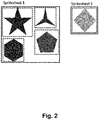
- Figure 2 shows a spritesheet collection of two spritesheets. Any image which is worked upon within a project falling within the techniques described herein is arranged on a spritesheet with other images from the project. The image is associated with a spritesheet, and therefore also with a spritesheet collection. In a spritesheet, images are packed so that they do not overlap.
- Images are stored in a compressed format (e.g. PNG, JPEG) which is not directly renderable. This prevents images being rendered directly in the editor from their individual data source. This is why the images must be rendered from their spritesheet, since this is the only place where there is decompressed image pixel data that can be rendered. As a consequence, the process of editing an image involves decompressing the image pixel data, allowing the user to change it, and then recompressing it when they finish. This reduces the amount of memory used.
- a compressed format e.g. PNG, JPEG
- the user has the ability to make changes that affect the spritesheet arrangement shown in Figure 2 .
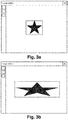
- the user could edit the image to be a lot wider, so it will no longer fit in the same place on its spritesheet, as shown in Figure 3b .
- This modified image obviously no longer fits in the same place on the spritesheet shown in Figure 2 . If the modified image were to still fit in the same place, the image on the spritesheet could be updated in-place.
- the editor first recompresses the image data (e.g., to PNG or JPEG). Then the editor identifies that this image has changed. It first identifies the spritesheet collection that the image belongs to, which could involve creating a new spritesheet collection. Then it rebuilds the whole spritesheet collection that the image belongs to.
- a game development project can contain multiple spritesheet collections; by only rebuilding the image's own spritesheet collection, the amount of work to be done is limited. This prevents small changes having to potentially rebuild all the images in the entire project.
- the user applies those changes to the image by closing the edit window, or performing a save command, or similar.
- the subsequent processing of the spritesheets and spritesheet collections, as well as the underlying image data, is performed in parallel to the user's continued work on the project.
- the processing may also be scheduled across different CPU cores to make best use of system resources.
- a placeholder will be displayed.
- the editor may also have to switch all other images contained on that spritesheet to a placeholder until the new spritesheet is ready.
- the system may cache the old spritesheet until it is no longer needed, in order to keep displaying the unmodified images while a new spritesheet is being prepared.
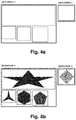
- the first phase is to arrange all the image rectangles in to position on a series of spritesheets. No pixel data is written yet, since the processing is dealing at first purely with the geometry of the images. Once the packing algorithm completes, there will be a list of rectangles as represented by Figure 4 .
- any non-overlapping rectangle packing algorithm can be used to arrange the images onto the spritesheets and across the spritesheet collection.
- the algorithm must impose a maximum spritesheet size due to the technical limitations in graphics hardware (which always have a maximum texture size).
- the algorithm must support "spilling" images over to another spritesheet when they no longer fit on to a spritesheet of the maximum size. Therefore it is essential that a spritesheet collection is able to have one or more spritesheets, since it is not always possible to simply pack all images on to a single large spritesheet. Using multiple smaller spritesheets may also require less memory. It is also preferable to choose a POT size for the spritesheet, so the packing algorithm may restrict the possible spritesheet sizes accordingly.
- the new set of arranged spritesheets in the modified spritesheet collection is compared to the previous version.
- spritesheet 1 has changed.
- the wider image is different and has resulted in other images on the same spritesheet being placed in new locations. Therefore the modified spritesheet must replace the old spritesheet.
- Spritesheet 2 has not changed, so the existing version can be preserved. Since the editor has identified that Spritesheet 2 has not changed, it is ignored from this point on and the remainder of the process only affects Spritesheet 1.
- the changed Spritesheet 1 is replaced with the new one and marked as "needs rendering". If any of the images on the spritesheet are not currently being displayed, the process stops here. This prevents having to do processor intensive rendering work for content which is not visible. As soon as any of the images on the spritesheet which is marked "needs rendering" are displayed, which may be immediately for any content already on-screen, the rendering process begins for that spritesheet. Rendering involves creating a bitmap image for the spritesheet with the individual image bitmaps copied on to it in the locations given by the arranged rectangles.
- the rendering phase also happens in parallel to the user continuing to work in the editor, and may be scheduled on different CPU cores to make best use of system resources. Note since images are compressed, rendering them to a spritesheet requires first decompressing them then copying their pixel data in to place on the spritesheet.
- cached version of an image's decompressed pixel data may optionally be held. This means that the placeholder display which takes place when a spritesheet containing an image is being rendered can be minimised.
- Figure 4b shows the spritesheet once the rendering process has finished. At this point any placeholder showing for these images in the editor can be updated with the image content again.
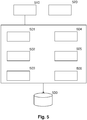
- FIG. 5 shows a system 500 according to one or more illustrative aspects described herein.
- a computing device 500 comprises a processor 501, and a nonvolatile memory 502.
- Processor 501 may comprise one or more individual processor cores.
- Image edit module 503 is provided, as is packing module 504, rendering module 505, and project build module 506.
- the computing device 500 further comprises a display 510 and a user interface 520.
- the computing device 500 may be a desktop computer, laptop or tablet device or smartphone or other computing device. In some examples the display will be integrated into the computing device.
- the user interface 620 may be a standard keyboard or mouse arrangement, or may utilise a touch screen where appropriate.
- Computing device further comprises a spritesheet database 530.
- Figure 6 shows a flowchart showing an illustrative process from the point of view of a user.
- a user opens a project in 6.02, the details of which are displayed on display 510.
- the project may be a game development project, in which the user constructs the framework of a game which includes rules, instructions and images.
- the spritesheet in which the image is contained must be rendered.
- the spritesheet is located in step 6.06 from the spritesheet database 530 and rendered by rendering module 505 in step 6.08.
- an image is rendered from a part of a spritesheet, which contains image data, which is why the spritesheet must be rendered before the image can appear in an image edit window on the display.
- the user is able to edit the image in step 6.10 using the tools provided by the image edit module described above when in an edit mode.
- Once finished editing the user commits the changes to the image in step 6.12. This is done while the project remains in edit mode.
- an edit mode change is committed, the user can continue to work on the project either by continuing to develop the structure of the project, or by working on further images which are to be displayed. Committing a change may be implemented through closing the image edit window on the display, or saving a project, or other user action.
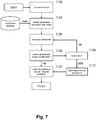
- a process is outlined which takes place in parallel to a user's continued operation of the project in an edit mode. When the user has committed a change, the image is compressed at step 7.02.
- the spritesheet associated with the image is identified from the spritesheet database in step 7.04.
- step 7.06 the sprite sheet that has been identified is rearranged using the packing module 504.
- the packing module 504 utilises a packing algorithm as described above to achieve optimal arrangement of the images in the spritesheet. If the rearrangement of the images on the spritesheet results in an image or images not fitting on the spritesheet, then further spritesheets may require modification. This is identified in step 7.08, and step 7.09 deals with the creation of new spritesheets, where necessary. If a new sheet spritesheet is to be created, this is done at 7.10 and the surplus image or images are added to the new spritesheet.
- step 7.12 all modified or new spritesheets are marked as requiring rendering.
- the indication that a spritesheet requires rendering is created in metadata relating to the spritesheet. This metadata may, for example form part of the spritesheet data itself, or may be stored in a lookup table relating to the spritesheets.
- Figure 8 shows the parallel process which takes place while the process of Figure 7 is in progress.
- the user may select a further image from the project for editing in step 8.02.
- the image edit module verifies whether the image is marked as for rendering in step 8.04. If the further image is not part of a spritesheet associated with a previously edited image, then the spritesheet will have been loaded with the project initialisation, and will not be marked for rendering. Therefore the further image can be loaded and displayed directly at step 8.05. If the further image is marked for rendering, a placeholder may be displayed in place of the further image at step 8.06.
- Rendering module 5.05 proceeds to load and render the further image at 8.08, and once this process is complete the place holder is replaced with the image in step 8.10. In this way, the user works in parallel to the arrangement or rendering of spritesheets, and so the editing workflow is not interrupted to any large extent by the process of using spritesheets.
- the "arrangement" phase described above performs arrangement for images within a spritesheet collection. This is to guarantee a maximum scope to the amount of arrangement (and subsequently, rendering) work that must be done in response to a change. This is especially important given that spritesheets are updated immediately upon the user's changes, being committed and the user usually wants to see the result of their changes as soon as possible. Without separate spritesheet collections, the worst-case scenario is that a small change to a large project will cause a "runaway" cascade of changes across all spritesheets, causing a long wait for the user before they see the results of their change.
- Spritesheet collections contain a list of individual images that belong to them. These are the set of images that are arranged in to multiple spritesheets, and they cannot be empty (there must be at least one image in a spritesheet collection). The resulting spritesheets also belong to the spritesheet collection. An image can only belong to one spritesheet collection, and the spritesheet containing its pixel data must belong to the same spritesheet collection.
- spritesheet collections may include a maximum image count. For example, if the limit is 100, then all the images in a project are separated in to multiple spritesheet collections, each with up to 100 images in it.
- a logical grouping may be created based on the organisation of the project. For example, all the animation frames for an animated object may be placed in the same spritesheet collection. This does not necessarily impose a maximum number of images in the collection, but due to the fact that projects generally consist of multiple separate animated objects, this still provides a useful level of separation such that a single change does not cause unrelated objects to have their spritesheets re-arranged.
- a spritesheet collection may relate to the animation frames of one object only.
- Spritesheet collections store individual images in a compressed format (e.g., PNG). Individual images are only decompressed upon the user editing them, or at the point they are rendered to the spritesheet. This is important to reduce the memory usage requirements of the system; otherwise every image's decompressed pixel data would be duplicated - once for the image, and once in the spritesheet.
- PNG compressed format
- one or more images in the editor may briefly revert to a placeholder, and then switch back to their updated content after a moment. This is the duration that the arrange and render phases take to complete, during which there is no spritesheet associated with the images showing placeholders.
- the image editor may still provide an option for the user to review the set of spritesheets it has created. This allows the user to see if any particular images are causing sub-optimal packing according to the packing algorithm in use, or wasting memory.
- the user is not allowed to manually change the arrangement of any of the spritesheets. This is always done automatically, since in general the user making changes would have little purpose; upon the next change in the same spritesheet collection all their modifications would be thrown away when a new set of spritesheets is arranged automatically.
Landscapes
- Engineering & Computer Science (AREA)
- Theoretical Computer Science (AREA)
- General Engineering & Computer Science (AREA)
- Software Systems (AREA)
- Physics & Mathematics (AREA)
- General Physics & Mathematics (AREA)
- Multimedia (AREA)
- Human Computer Interaction (AREA)
- Computer Security & Cryptography (AREA)
- Processing Or Creating Images (AREA)
Applications Claiming Priority (1)
| Application Number | Priority Date | Filing Date | Title |
|---|---|---|---|
| US15/280,090 US10282202B2 (en) | 2016-09-29 | 2016-09-29 | In-editor spritesheeting |
Publications (3)
| Publication Number | Publication Date |
|---|---|
| EP3301651A2 true EP3301651A2 (de) | 2018-04-04 |
| EP3301651A3 EP3301651A3 (de) | 2018-04-11 |
| EP3301651B1 EP3301651B1 (de) | 2019-04-24 |
Family
ID=59997147
Family Applications (1)
| Application Number | Title | Priority Date | Filing Date |
|---|---|---|---|
| EP17193486.2A Active EP3301651B1 (de) | 2016-09-29 | 2017-09-27 | Editor für spritegrafikensammlung |
Country Status (2)
| Country | Link |
|---|---|
| US (1) | US10282202B2 (de) |
| EP (1) | EP3301651B1 (de) |
Families Citing this family (3)
| Publication number | Priority date | Publication date | Assignee | Title |
|---|---|---|---|---|
| US10639608B2 (en) | 2010-04-08 | 2020-05-05 | Siemens Medical Solutions Usa, Inc. | System, device and method for preparing tracers and transferring materials during radiosynthesis |
| CN109985384B (zh) * | 2019-03-21 | 2022-10-04 | 网易(杭州)网络有限公司 | 贴图动态调整方法及装置 |
| US11144315B2 (en) * | 2019-09-06 | 2021-10-12 | Roblox Corporation | Determining quality of an electronic game based on developer engagement metrics |
Family Cites Families (5)
| Publication number | Priority date | Publication date | Assignee | Title |
|---|---|---|---|---|
| US8010624B2 (en) | 2008-03-27 | 2011-08-30 | Amazon Technologies, Inc. | Dynamic composition for image transmission |
| US8411092B2 (en) * | 2010-06-14 | 2013-04-02 | Nintendo Co., Ltd. | 2D imposters for simplifying processing of plural animation objects in computer graphics generation |
| JP5449460B2 (ja) | 2011-06-28 | 2014-03-19 | 富士フイルム株式会社 | 画像処理装置、画像処理方法および画像処理プログラム |
| US9710950B2 (en) | 2012-04-27 | 2017-07-18 | Adobe Systems Incorporated | Extensible sprite sheet generation mechanism for declarative data formats and animation sequence formats |
| US20140002373A1 (en) * | 2012-06-29 | 2014-01-02 | Nicholas W. Oakley | Display for electronic device |
-
2016
- 2016-09-29 US US15/280,090 patent/US10282202B2/en active Active
-
2017
- 2017-09-27 EP EP17193486.2A patent/EP3301651B1/de active Active
Non-Patent Citations (1)
| Title |
|---|
| None |
Also Published As
| Publication number | Publication date |
|---|---|
| EP3301651B1 (de) | 2019-04-24 |
| US20180088938A1 (en) | 2018-03-29 |
| EP3301651A3 (de) | 2018-04-11 |
| US10282202B2 (en) | 2019-05-07 |
Similar Documents
| Publication | Publication Date | Title |
|---|---|---|
| KR102419745B1 (ko) | 게임 렌더링 방법, 및 게임 자원 파일 생성 방법, 장치, 및 기기 | |
| EP1485874B1 (de) | System, verfahren und computerprogrammprodukt zur erzeugung eines shader-programms | |
| US10186068B2 (en) | Method, apparatus and system for rendering an image | |
| US5872573A (en) | Method and system for improving legibility of text and graphic objects laid over continuous-tone graphics | |
| CN102089786B (zh) | 在性能分析期间将图形指令映射到相关联的图形数据的方法和设备 | |
| US9355464B2 (en) | Dynamic generation of texture atlases | |
| KR20210066727A (ko) | 그래픽 처리 시스템 | |
| US9886735B2 (en) | Hybrid engine for central processing unit and graphics processor | |
| JPS60134357A (ja) | 画像フアイル登録・検索方式 | |
| EP3301651B1 (de) | Editor für spritegrafikensammlung | |
| CN112765108B (zh) | 一种文档加载方法、计算设备及可读存储介质 | |
| EP4198962A1 (de) | Systeme und verfahren zur interaktiven darstellung eines sichtbaren teils einer darstellungsfläche auf einer benutzervorrichtung | |
| US20100158379A1 (en) | Image background removal | |
| CN113223187A (zh) | 广告成品图批量制作方法、系统、设备及可读存储介质 | |
| CN112070875A (zh) | 图像处理方法、装置、电子设备和存储介质 | |
| US20130063462A1 (en) | Tile-based image processing using mipmaps | |
| US11275870B2 (en) | Designing an assembly of parts in a three-dimensional scene | |
| CN109800039A (zh) | 一种用户界面展示方法、装置、电子设备及存储介质 | |
| JP2011511991A (ja) | グラフィックディジタル文書の動画化装置および方法 | |
| CN119416473A (zh) | 一种用于快速实现增材制造的3d模拟系统 | |
| CN119075304A (zh) | 虚拟场景的渲染方法、装置、电子设备及存储介质 | |
| US20120042268A1 (en) | Processing user interfaces | |
| JP2002169843A (ja) | 設計支援システム | |
| CN113138820B (zh) | 一种视频数据处理方法、装置、计算设备及可读存储介质 | |
| KR20150027638A (ko) | 렌더링 방법 및 장치 |
Legal Events
| Date | Code | Title | Description |
|---|---|---|---|
| PUAI | Public reference made under article 153(3) epc to a published international application that has entered the european phase |
Free format text: ORIGINAL CODE: 0009012 |
|
| STAA | Information on the status of an ep patent application or granted ep patent |
Free format text: STATUS: THE APPLICATION HAS BEEN PUBLISHED |
|
| PUAL | Search report despatched |
Free format text: ORIGINAL CODE: 0009013 |
|
| AK | Designated contracting states |
Kind code of ref document: A2 Designated state(s): AL AT BE BG CH CY CZ DE DK EE ES FI FR GB GR HR HU IE IS IT LI LT LU LV MC MK MT NL NO PL PT RO RS SE SI SK SM TR |
|
| AX | Request for extension of the european patent |
Extension state: BA ME |
|
| AK | Designated contracting states |
Kind code of ref document: A3 Designated state(s): AL AT BE BG CH CY CZ DE DK EE ES FI FR GB GR HR HU IE IS IT LI LT LU LV MC MK MT NL NO PL PT RO RS SE SI SK SM TR |
|
| AX | Request for extension of the european patent |
Extension state: BA ME |
|
| RIC1 | Information provided on ipc code assigned before grant |
Ipc: G06T 11/60 20060101AFI20180306BHEP |
|
| STAA | Information on the status of an ep patent application or granted ep patent |
Free format text: STATUS: REQUEST FOR EXAMINATION WAS MADE |
|
| 17P | Request for examination filed |
Effective date: 20181011 |
|
| RBV | Designated contracting states (corrected) |
Designated state(s): AL AT BE BG CH CY CZ DE DK EE ES FI FR GB GR HR HU IE IS IT LI LT LU LV MC MK MT NL NO PL PT RO RS SE SI SK SM TR |
|
| GRAP | Despatch of communication of intention to grant a patent |
Free format text: ORIGINAL CODE: EPIDOSNIGR1 |
|
| STAA | Information on the status of an ep patent application or granted ep patent |
Free format text: STATUS: GRANT OF PATENT IS INTENDED |
|
| INTG | Intention to grant announced |
Effective date: 20181130 |
|
| GRAS | Grant fee paid |
Free format text: ORIGINAL CODE: EPIDOSNIGR3 |
|
| GRAA | (expected) grant |
Free format text: ORIGINAL CODE: 0009210 |
|
| STAA | Information on the status of an ep patent application or granted ep patent |
Free format text: STATUS: THE PATENT HAS BEEN GRANTED |
|
| AK | Designated contracting states |
Kind code of ref document: B1 Designated state(s): AL AT BE BG CH CY CZ DE DK EE ES FI FR GB GR HR HU IE IS IT LI LT LU LV MC MK MT NL NO PL PT RO RS SE SI SK SM TR |
|
| REG | Reference to a national code |
Ref country code: GB Ref legal event code: FG4D |
|
| REG | Reference to a national code |
Ref country code: CH Ref legal event code: EP |
|
| REG | Reference to a national code |
Ref country code: AT Ref legal event code: REF Ref document number: 1125025 Country of ref document: AT Kind code of ref document: T Effective date: 20190515 Ref country code: IE Ref legal event code: FG4D |
|
| REG | Reference to a national code |
Ref country code: DE Ref legal event code: R096 Ref document number: 602017003494 Country of ref document: DE |
|
| REG | Reference to a national code |
Ref country code: NL Ref legal event code: MP Effective date: 20190424 |
|
| REG | Reference to a national code |
Ref country code: LT Ref legal event code: MG4D |
|
| PG25 | Lapsed in a contracting state [announced via postgrant information from national office to epo] |
Ref country code: NL Free format text: LAPSE BECAUSE OF FAILURE TO SUBMIT A TRANSLATION OF THE DESCRIPTION OR TO PAY THE FEE WITHIN THE PRESCRIBED TIME-LIMIT Effective date: 20190424 |
|
| PG25 | Lapsed in a contracting state [announced via postgrant information from national office to epo] |
Ref country code: FI Free format text: LAPSE BECAUSE OF FAILURE TO SUBMIT A TRANSLATION OF THE DESCRIPTION OR TO PAY THE FEE WITHIN THE PRESCRIBED TIME-LIMIT Effective date: 20190424 Ref country code: HR Free format text: LAPSE BECAUSE OF FAILURE TO SUBMIT A TRANSLATION OF THE DESCRIPTION OR TO PAY THE FEE WITHIN THE PRESCRIBED TIME-LIMIT Effective date: 20190424 Ref country code: AL Free format text: LAPSE BECAUSE OF FAILURE TO SUBMIT A TRANSLATION OF THE DESCRIPTION OR TO PAY THE FEE WITHIN THE PRESCRIBED TIME-LIMIT Effective date: 20190424 Ref country code: NO Free format text: LAPSE BECAUSE OF FAILURE TO SUBMIT A TRANSLATION OF THE DESCRIPTION OR TO PAY THE FEE WITHIN THE PRESCRIBED TIME-LIMIT Effective date: 20190724 Ref country code: PT Free format text: LAPSE BECAUSE OF FAILURE TO SUBMIT A TRANSLATION OF THE DESCRIPTION OR TO PAY THE FEE WITHIN THE PRESCRIBED TIME-LIMIT Effective date: 20190824 Ref country code: SE Free format text: LAPSE BECAUSE OF FAILURE TO SUBMIT A TRANSLATION OF THE DESCRIPTION OR TO PAY THE FEE WITHIN THE PRESCRIBED TIME-LIMIT Effective date: 20190424 Ref country code: ES Free format text: LAPSE BECAUSE OF FAILURE TO SUBMIT A TRANSLATION OF THE DESCRIPTION OR TO PAY THE FEE WITHIN THE PRESCRIBED TIME-LIMIT Effective date: 20190424 Ref country code: LT Free format text: LAPSE BECAUSE OF FAILURE TO SUBMIT A TRANSLATION OF THE DESCRIPTION OR TO PAY THE FEE WITHIN THE PRESCRIBED TIME-LIMIT Effective date: 20190424 |
|
| PG25 | Lapsed in a contracting state [announced via postgrant information from national office to epo] |
Ref country code: BG Free format text: LAPSE BECAUSE OF FAILURE TO SUBMIT A TRANSLATION OF THE DESCRIPTION OR TO PAY THE FEE WITHIN THE PRESCRIBED TIME-LIMIT Effective date: 20190724 Ref country code: RS Free format text: LAPSE BECAUSE OF FAILURE TO SUBMIT A TRANSLATION OF THE DESCRIPTION OR TO PAY THE FEE WITHIN THE PRESCRIBED TIME-LIMIT Effective date: 20190424 Ref country code: LV Free format text: LAPSE BECAUSE OF FAILURE TO SUBMIT A TRANSLATION OF THE DESCRIPTION OR TO PAY THE FEE WITHIN THE PRESCRIBED TIME-LIMIT Effective date: 20190424 Ref country code: GR Free format text: LAPSE BECAUSE OF FAILURE TO SUBMIT A TRANSLATION OF THE DESCRIPTION OR TO PAY THE FEE WITHIN THE PRESCRIBED TIME-LIMIT Effective date: 20190725 Ref country code: PL Free format text: LAPSE BECAUSE OF FAILURE TO SUBMIT A TRANSLATION OF THE DESCRIPTION OR TO PAY THE FEE WITHIN THE PRESCRIBED TIME-LIMIT Effective date: 20190424 |
|
| REG | Reference to a national code |
Ref country code: CH Ref legal event code: PK Free format text: BERICHTIGUNGEN |
|
| REG | Reference to a national code |
Ref country code: AT Ref legal event code: MK05 Ref document number: 1125025 Country of ref document: AT Kind code of ref document: T Effective date: 20190424 |
|
| RIN2 | Information on inventor provided after grant (corrected) |
Inventor name: GULLEN, ASHLEY |
|
| PG25 | Lapsed in a contracting state [announced via postgrant information from national office to epo] |
Ref country code: IS Free format text: LAPSE BECAUSE OF FAILURE TO SUBMIT A TRANSLATION OF THE DESCRIPTION OR TO PAY THE FEE WITHIN THE PRESCRIBED TIME-LIMIT Effective date: 20190824 |
|
| REG | Reference to a national code |
Ref country code: DE Ref legal event code: R097 Ref document number: 602017003494 Country of ref document: DE |
|
| PG25 | Lapsed in a contracting state [announced via postgrant information from national office to epo] |
Ref country code: RO Free format text: LAPSE BECAUSE OF FAILURE TO SUBMIT A TRANSLATION OF THE DESCRIPTION OR TO PAY THE FEE WITHIN THE PRESCRIBED TIME-LIMIT Effective date: 20190424 Ref country code: SK Free format text: LAPSE BECAUSE OF FAILURE TO SUBMIT A TRANSLATION OF THE DESCRIPTION OR TO PAY THE FEE WITHIN THE PRESCRIBED TIME-LIMIT Effective date: 20190424 Ref country code: EE Free format text: LAPSE BECAUSE OF FAILURE TO SUBMIT A TRANSLATION OF THE DESCRIPTION OR TO PAY THE FEE WITHIN THE PRESCRIBED TIME-LIMIT Effective date: 20190424 Ref country code: DK Free format text: LAPSE BECAUSE OF FAILURE TO SUBMIT A TRANSLATION OF THE DESCRIPTION OR TO PAY THE FEE WITHIN THE PRESCRIBED TIME-LIMIT Effective date: 20190424 Ref country code: AT Free format text: LAPSE BECAUSE OF FAILURE TO SUBMIT A TRANSLATION OF THE DESCRIPTION OR TO PAY THE FEE WITHIN THE PRESCRIBED TIME-LIMIT Effective date: 20190424 Ref country code: CZ Free format text: LAPSE BECAUSE OF FAILURE TO SUBMIT A TRANSLATION OF THE DESCRIPTION OR TO PAY THE FEE WITHIN THE PRESCRIBED TIME-LIMIT Effective date: 20190424 |
|
| PG25 | Lapsed in a contracting state [announced via postgrant information from national office to epo] |
Ref country code: IT Free format text: LAPSE BECAUSE OF FAILURE TO SUBMIT A TRANSLATION OF THE DESCRIPTION OR TO PAY THE FEE WITHIN THE PRESCRIBED TIME-LIMIT Effective date: 20190424 Ref country code: SM Free format text: LAPSE BECAUSE OF FAILURE TO SUBMIT A TRANSLATION OF THE DESCRIPTION OR TO PAY THE FEE WITHIN THE PRESCRIBED TIME-LIMIT Effective date: 20190424 |
|
| PLBE | No opposition filed within time limit |
Free format text: ORIGINAL CODE: 0009261 |
|
| STAA | Information on the status of an ep patent application or granted ep patent |
Free format text: STATUS: NO OPPOSITION FILED WITHIN TIME LIMIT |
|
| PG25 | Lapsed in a contracting state [announced via postgrant information from national office to epo] |
Ref country code: TR Free format text: LAPSE BECAUSE OF FAILURE TO SUBMIT A TRANSLATION OF THE DESCRIPTION OR TO PAY THE FEE WITHIN THE PRESCRIBED TIME-LIMIT Effective date: 20190424 |
|
| 26N | No opposition filed |
Effective date: 20200127 |
|
| PG25 | Lapsed in a contracting state [announced via postgrant information from national office to epo] |
Ref country code: SI Free format text: LAPSE BECAUSE OF FAILURE TO SUBMIT A TRANSLATION OF THE DESCRIPTION OR TO PAY THE FEE WITHIN THE PRESCRIBED TIME-LIMIT Effective date: 20190424 Ref country code: MC Free format text: LAPSE BECAUSE OF FAILURE TO SUBMIT A TRANSLATION OF THE DESCRIPTION OR TO PAY THE FEE WITHIN THE PRESCRIBED TIME-LIMIT Effective date: 20190424 |
|
| PG25 | Lapsed in a contracting state [announced via postgrant information from national office to epo] |
Ref country code: IE Free format text: LAPSE BECAUSE OF NON-PAYMENT OF DUE FEES Effective date: 20190927 Ref country code: LU Free format text: LAPSE BECAUSE OF NON-PAYMENT OF DUE FEES Effective date: 20190927 |
|
| REG | Reference to a national code |
Ref country code: BE Ref legal event code: MM Effective date: 20190930 |
|
| PG25 | Lapsed in a contracting state [announced via postgrant information from national office to epo] |
Ref country code: BE Free format text: LAPSE BECAUSE OF NON-PAYMENT OF DUE FEES Effective date: 20190930 |
|
| REG | Reference to a national code |
Ref country code: CH Ref legal event code: PL |
|
| PG25 | Lapsed in a contracting state [announced via postgrant information from national office to epo] |
Ref country code: CY Free format text: LAPSE BECAUSE OF FAILURE TO SUBMIT A TRANSLATION OF THE DESCRIPTION OR TO PAY THE FEE WITHIN THE PRESCRIBED TIME-LIMIT Effective date: 20190424 |
|
| PG25 | Lapsed in a contracting state [announced via postgrant information from national office to epo] |
Ref country code: MT Free format text: LAPSE BECAUSE OF FAILURE TO SUBMIT A TRANSLATION OF THE DESCRIPTION OR TO PAY THE FEE WITHIN THE PRESCRIBED TIME-LIMIT Effective date: 20190424 Ref country code: HU Free format text: LAPSE BECAUSE OF FAILURE TO SUBMIT A TRANSLATION OF THE DESCRIPTION OR TO PAY THE FEE WITHIN THE PRESCRIBED TIME-LIMIT; INVALID AB INITIO Effective date: 20170927 |
|
| PG25 | Lapsed in a contracting state [announced via postgrant information from national office to epo] |
Ref country code: LI Free format text: LAPSE BECAUSE OF NON-PAYMENT OF DUE FEES Effective date: 20200930 Ref country code: CH Free format text: LAPSE BECAUSE OF NON-PAYMENT OF DUE FEES Effective date: 20200930 |
|
| PG25 | Lapsed in a contracting state [announced via postgrant information from national office to epo] |
Ref country code: MK Free format text: LAPSE BECAUSE OF FAILURE TO SUBMIT A TRANSLATION OF THE DESCRIPTION OR TO PAY THE FEE WITHIN THE PRESCRIBED TIME-LIMIT Effective date: 20190424 |
|
| PGFP | Annual fee paid to national office [announced via postgrant information from national office to epo] |
Ref country code: DE Payment date: 20250919 Year of fee payment: 9 |
|
| PGFP | Annual fee paid to national office [announced via postgrant information from national office to epo] |
Ref country code: GB Payment date: 20250917 Year of fee payment: 9 |
|
| PGFP | Annual fee paid to national office [announced via postgrant information from national office to epo] |
Ref country code: FR Payment date: 20250922 Year of fee payment: 9 |