EP3306455A1 - Verfahren und vorrichtung zum wechseln mehrerer ordner und computerspeichermedium - Google Patents
Verfahren und vorrichtung zum wechseln mehrerer ordner und computerspeichermedium Download PDFInfo
- Publication number
- EP3306455A1 EP3306455A1 EP16799150.4A EP16799150A EP3306455A1 EP 3306455 A1 EP3306455 A1 EP 3306455A1 EP 16799150 A EP16799150 A EP 16799150A EP 3306455 A1 EP3306455 A1 EP 3306455A1
- Authority
- EP
- European Patent Office
- Prior art keywords
- alternative
- folder
- folders
- current
- switching
- Prior art date
- Legal status (The legal status is an assumption and is not a legal conclusion. Google has not performed a legal analysis and makes no representation as to the accuracy of the status listed.)
- Ceased
Links
Images

Classifications
-
- G—PHYSICS
- G06—COMPUTING OR CALCULATING; COUNTING
- G06F—ELECTRIC DIGITAL DATA PROCESSING
- G06F3/00—Input arrangements for transferring data to be processed into a form capable of being handled by the computer; Output arrangements for transferring data from processing unit to output unit, e.g. interface arrangements
- G06F3/01—Input arrangements or combined input and output arrangements for interaction between user and computer
- G06F3/048—Interaction techniques based on graphical user interfaces [GUI]
- G06F3/0484—Interaction techniques based on graphical user interfaces [GUI] for the control of specific functions or operations, e.g. selecting or manipulating an object, an image or a displayed text element, setting a parameter value or selecting a range
-
- G—PHYSICS
- G06—COMPUTING OR CALCULATING; COUNTING
- G06F—ELECTRIC DIGITAL DATA PROCESSING
- G06F3/00—Input arrangements for transferring data to be processed into a form capable of being handled by the computer; Output arrangements for transferring data from processing unit to output unit, e.g. interface arrangements
- G06F3/01—Input arrangements or combined input and output arrangements for interaction between user and computer
- G06F3/048—Interaction techniques based on graphical user interfaces [GUI]
- G06F3/0484—Interaction techniques based on graphical user interfaces [GUI] for the control of specific functions or operations, e.g. selecting or manipulating an object, an image or a displayed text element, setting a parameter value or selecting a range
- G06F3/0485—Scrolling or panning
-
- G—PHYSICS
- G06—COMPUTING OR CALCULATING; COUNTING
- G06F—ELECTRIC DIGITAL DATA PROCESSING
- G06F16/00—Information retrieval; Database structures therefor; File system structures therefor
- G06F16/10—File systems; File servers
- G06F16/14—Details of searching files based on file metadata
- G06F16/148—File search processing
-
- G—PHYSICS
- G06—COMPUTING OR CALCULATING; COUNTING
- G06F—ELECTRIC DIGITAL DATA PROCESSING
- G06F16/00—Information retrieval; Database structures therefor; File system structures therefor
- G06F16/10—File systems; File servers
- G06F16/16—File or folder operations, e.g. details of user interfaces specifically adapted to file systems
-
- G—PHYSICS
- G06—COMPUTING OR CALCULATING; COUNTING
- G06F—ELECTRIC DIGITAL DATA PROCESSING
- G06F3/00—Input arrangements for transferring data to be processed into a form capable of being handled by the computer; Output arrangements for transferring data from processing unit to output unit, e.g. interface arrangements
- G06F3/01—Input arrangements or combined input and output arrangements for interaction between user and computer
- G06F3/048—Interaction techniques based on graphical user interfaces [GUI]
- G06F3/0481—Interaction techniques based on graphical user interfaces [GUI] based on specific properties of the displayed interaction object or a metaphor-based environment, e.g. interaction with desktop elements like windows or icons, or assisted by a cursor's changing behaviour or appearance
- G06F3/0482—Interaction with lists of selectable items, e.g. menus
-
- G—PHYSICS
- G06—COMPUTING OR CALCULATING; COUNTING
- G06F—ELECTRIC DIGITAL DATA PROCESSING
- G06F3/00—Input arrangements for transferring data to be processed into a form capable of being handled by the computer; Output arrangements for transferring data from processing unit to output unit, e.g. interface arrangements
- G06F3/01—Input arrangements or combined input and output arrangements for interaction between user and computer
- G06F3/048—Interaction techniques based on graphical user interfaces [GUI]
- G06F3/0481—Interaction techniques based on graphical user interfaces [GUI] based on specific properties of the displayed interaction object or a metaphor-based environment, e.g. interaction with desktop elements like windows or icons, or assisted by a cursor's changing behaviour or appearance
- G06F3/0483—Interaction with page-structured environments, e.g. book metaphor
-
- G—PHYSICS
- G06—COMPUTING OR CALCULATING; COUNTING
- G06F—ELECTRIC DIGITAL DATA PROCESSING
- G06F3/00—Input arrangements for transferring data to be processed into a form capable of being handled by the computer; Output arrangements for transferring data from processing unit to output unit, e.g. interface arrangements
- G06F3/01—Input arrangements or combined input and output arrangements for interaction between user and computer
- G06F3/048—Interaction techniques based on graphical user interfaces [GUI]
- G06F3/0487—Interaction techniques based on graphical user interfaces [GUI] using specific features provided by the input device, e.g. functions controlled by the rotation of a mouse with dual sensing arrangements, or of the nature of the input device, e.g. tap gestures based on pressure sensed by a digitiser
- G06F3/0488—Interaction techniques based on graphical user interfaces [GUI] using specific features provided by the input device, e.g. functions controlled by the rotation of a mouse with dual sensing arrangements, or of the nature of the input device, e.g. tap gestures based on pressure sensed by a digitiser using a touch-screen or digitiser, e.g. input of commands through traced gestures
- G06F3/04883—Interaction techniques based on graphical user interfaces [GUI] using specific features provided by the input device, e.g. functions controlled by the rotation of a mouse with dual sensing arrangements, or of the nature of the input device, e.g. tap gestures based on pressure sensed by a digitiser using a touch-screen or digitiser, e.g. input of commands through traced gestures for inputting data by handwriting, e.g. gesture or text
-
- G—PHYSICS
- G06—COMPUTING OR CALCULATING; COUNTING
- G06F—ELECTRIC DIGITAL DATA PROCESSING
- G06F9/00—Arrangements for program control, e.g. control units
- G06F9/06—Arrangements for program control, e.g. control units using stored programs, i.e. using an internal store of processing equipment to receive or retain programs
- G06F9/44—Arrangements for executing specific programs
- G06F9/451—Execution arrangements for user interfaces
Definitions
- the disclosure relates to the technical field of data processing, and particularly to a method and device for switching between multiple folders and a computer storage medium.
- a touch screen technology has been popularized and applied on a large scale, and application of the touch screen technology to intelligent equipment such as a mobile phone and a tablet computer provides great convenience for people and improves utilization efficiency for a user when using the intelligent equipment.
- embodiments of the disclosure provide a method and device for switching between multiple folders and a computer storage medium, so as to improve response efficiency of folders.
- a first aspect of the embodiments of the disclosure provide a method for switching between multiple folders, which includes that:
- the step that whether there are one or more alternative folders associated with the current folder is determined, and in the case that there are one or more alternative folders associated with the current folder, the one or more alternative folders are loaded may specifically include that:
- the step that whether switching between folders is required is determined, and in the case that switching between folders is required, an alternative folder is selected according to a switching manner, and an interface of the selected alternative folder is displayed may include that:
- the method may further include that:
- the method may further include that:
- a second aspect of the embodiments of the disclosure provides a device for switching between multiple folders, which may include:
- the loading module may include:
- the switching module may be configured to determine whether a sliding operation is received, and in the case that a sliding operation is received, select an alternative sequence number according to a sliding direction of the sliding operation and a sequencing manner between the current sequence number and the one or more alternative sequence numbers, and display an alternative folder corresponding to the selected alternative sequence number.
- the device may further include:
- the device may further include:
- a third aspect of the embodiments of the disclosure provides a computer storage medium, in which a computer-executable instruction may be stored, the computer-executable instruction being configured to execute the method for switching between multiple folders according to at least one of claims 1-5.
- the alternative folders associated with the current folder are loaded, and in such a manner, after an indication of entering a folder is received, the alternative folders may be displayed directly without having to wait for display after loading, so that response efficiency of displaying and opening the alternative folder is improved.
- software and hardware resources in electronic equipment such as a mobile phone are utilized more completely and more effectively, an effective utilization rate of the electronic equipment and intelligence of the electronic equipment are improved, and meanwhile, the efficiency of browsing folders and searching a file by a user is further improved.
- a method for switching between multiple folders includes the following steps: an operation on a folder is acquired, and an interface of a current folder is displayed; whether there are one or more alternative folders associated with the current folder is determined, and if YES, the alternative folders are loaded; and whether to switch between folders is determined, and if YES, an alternative folder is determined according to a switching manner, and an interface of the alternative folder is displayed.
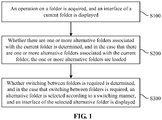
- a method for switching between multiple folders includes the following steps.
- Step S100 an operation on a folder is acquired, and an interface of a current folder is displayed.
- the operation on a folder may include at least one of: choosing or selecting a folder, opening a file and choosing and opening a folder. For example, when a user chooses or enters a certain folder, the folder is determined as the current folder, and the current folder is displayed.
- a user operation or user indication input by the user may be received by virtue of a human-computer interaction interface, for example, a touch screen, a suspended touch screen, a mouse and a touchpad.
- a system displays the current folder
- a displayed content includes a folder display interface
- the interface includes a content and/or directory in the folder
- the system loads and displays the current folder in a page form.
- Step S200 whether there are one or more alternative folders associated with the current folder is determined, and if there are one or more alternative folders associated with the current folder, the one or more alternative folders are loaded. For example, a display interface of each alternative folder associated with the current folder is loaded.
- Folders under the same directory or the same type of display interface may be considered to be associated.
- the folders under the same directory or the same type of display interface may have the same directory path or sequence number arrangement rule.
- the same type of display interface may include a desktop and a management interface of an application.
- the desktop may usually be a main display interface of, for example, a mobile phone or a tablet computer with a display screen.
- a number of the alternative folders associated with the current folder may be one, two or more, and may also be zero, which depends on a number of folders under the directory or display interface where the current folder is located.
- the alternative folders associated with the current folder are preloaded in a memory space, so that a display speed of the alternative folders is increased.
- Step S200 includes the following steps.
- Step S210 a current sequence number corresponding to the current folder is acquired.
- Step S220 whether there are alternative sequence numbers associated with the current sequence number is determined, and if YES, the alternative sequence numbers are acquired.
- Step S230 alternative folders corresponding to the alternative sequence numbers are loaded according to the alternative sequence numbers.
- a sequence number is set for each folder.
- the sequence number is a folder index sequence number or directory sequence number automatically allocated by the system when the corresponding folder is created, or is a sequence number defined by the user, or is defined according to a location of the folder on a screen.
- a sequence number of the current folder is the current sequence number, and when the user opens the current folder, the system acquires the current sequence number of the current folder.
- every time when a folder is created a unique sequence number is automatically generated, and a lifecycle of the sequence number is the same as a lifecycle of the corresponding folder.
- a sequence number of each folder is set sequentially.
- Sequence numbers of folders are sequencable. For example, sequence numbers of folders under the same directory may correspond to names of the folders, and then sequence numbers of the folders under the same directory may be sequenced according to a letter sequence of the names of the folders.
- sequence numbers of folders displayed on a desktop correspond to locations of the folders displayed on the desktop
- a desktop screen of an existing mobile phone usually has multiple sub-screens
- the sequence numbers of the folders may be correspondingly set according to a sub-screen number and locations of the folders located on the sub-screen, for example, the sequence number of the folder at the top of a left side of the first sub-screen is set to be 001, the sequence number of the folder on a right side of the folder with the sequence number 001 is set to be 002, and the sequence number of the folder at the bottom of a right side of the last sub-screen is set to be the last sequence number, so as to implement sequential arrangement in such a manner.
- names of folders may also be adopted as sequence numbers of folders, and a letter sequence of the folder names is determined as a sequence of the sequence numbers.
- the current sequence number of the current folder is acquired, the alternative sequence numbers associated with the current sequence number are acquired, and the acquired alternative sequence numbers correspond to alternative folders which are located under the same directory with the current folder.
- the system determines whether there are alternative sequence numbers associated with the current sequence number at first, if YES, acquires the alternative sequence numbers, and loads the alternative folders corresponding to the alternative sequence numbers according to the alternative sequence numbers.
- the loaded alternative folders are not directly displayed, and a loading manner is to preload contents in the alternative folders in the memory space of the system, so that an efficiency of displaying the alternative folders is improved.
- Step S300 whether to switch between the folders is determined, and if YES, an alternative folder is determined according to a switching manner, and an interface of the alternative folder is displayed.
- determination is implemented according to whether a user indication indicating the folder need to be switched is received, and if folder switching is determined to be executed, a folder is determined according to the switching manner, and the folder is displayed.
- Step S300 of the embodiment may usually be executed after Step S200.
- Step S300 may include that: after the alternative folders are loaded, whether to switch the folders is determined.
- Step S300 and Step S200 may also be executed synchronously.
- Electronic equipment such as a mobile phone or a tablet computer loads the alternative folders and receives the indication, input by the user, of indicating the folders to be switched simultaneously. In such a manner, in a loading process, it is determined folders need to be switched, and the alternative folder is finally determined according to a judgment result and the loaded alternative folders. Therefore, a response speed of the electronic equipment may be increased, a response delay may be reduced, and a satisfaction degree of the user may be increased.
- Step S300 is specifically implemented as follows:
- sliding of the screen refers to a sliding operation of the user on the screen.
- the sliding direction is a direction of the sliding operation.
- the sliding operation may correspond to sliding of a finger of the user or a finger substitute on the touch screen.
- the folder may be switched by sliding the screen.
- the user when browsing the folders, only need to use the finger to slide the screen to switch the folder directly without returning to a previous directory through a function button and then entering the other folders of the same level.
- the user slides the screen to switch from the current folder to the alternative folder.
- the system determines whether the user slides the screen or not at first, and if the user slides the screen, sequentially or reversely selects an alternative sequence number on the basis of the current sequence number according to a direction in which the user slides the screen, then displays the alternative folder corresponding to the alternative sequence number, and the system displays the switched alternative folder.
- the system may rapidly call the content in the alternative folder and display the content in the alternative folder. Therefore, folder switching efficiency is improved. At the same time, users can switch folders with only one action, which greatly improves the efficiency of browsing folders and searching files.
- the step that determining the alternative sequence number according to the sliding direction and the sequencing manner of the current sequence number and the alternative sequence numbers and displaying the alternative folder corresponding to the alternative sequence number is specifically implemented as follows:
- the sliding operation received from the user may be a sliding operation from right to left or a sliding operation from left to right.
- switching to a previous folder or next folder under the same directory is implemented correspondingly.
- a sequence number of a folder currently displayed on a mobile phone is 5, the user slides the folder leftwards, a sequence number obtained by the system in a manner of ascending on the basis of the sequence number 5 is 6, then the folder is switched to a folder with the sequence number 6 after sliding, and in case of rightward sliding, the folder is switched to a folder with a sequence number 4.
- the user of the mobile phone slides rightwards for switching to the folder with the sequence number 4, and the user slides leftwards for switching to the folder with the sequence number 6. Therefore, using habits of different users may be met.
- Step S200 the method includes that:
- the folder name(s) of the alternative folder(s) corresponding to the one or two alternative sequence numbers adjacent to the current sequence number may be displayed on the content display interface of the current folder.
- the folder name(s) are displayed on two sides of a current folder name, so that the user may know about the previous browsed or next to-be-browsed folder in advance when browsing the current folder.
- whether the current sequence number has adjacent alternative sequences or not is determined according to the current sequence number, and if YES, one or two alternative sequence numbers are acquired, and the alternative folders corresponding to the alternative sequence numbers are loaded.
- sequence numbers under the same directory include 1, 2, 3, 4, —9, if the sequence number of the currently displayed folder is 3, the two alternative sequence numbers 2 and 4 are acquired, the system loads folders corresponding to the two alternative sequence numbers 2 and 4 into the memory space, and the user may switch from the interface of the folder with the sequence number 3 to the folder with the sequence number 2 or the folder with the sequence number 4 by sliding, and when the user slides for switching to the folder with the sequence number 4, the system displays a content of the folder with the sequence number 4, simultaneously loads the folders with the sequence numbers 3 and 5 in the memory, and deletes the loaded folder with the sequence number 2 from the memory space.
- the current sequence number has only one adjacent sequence number, only the adjacent alternative sequence number is acquired. For example, the current sequence number is 1, and then the sequence number 2 is acquired as the alternative sequence number.
- the alternative folders may be preloaded to improve the switching efficiency, and meanwhile, insufficient memory space of the system and reduction of system performance caused by loading of excessive alternative folders may be avoided.
- Step S300 before Step S300, the method further includes Step S250:
- the sliding page component may be a ViewPager control of an Android system.
- the ViewPager control has a sliding function, and a previous or next page may be displayed per sliding.
- the system loads the contents of the folders under the same directory into the ViewPager control in a page form, and for further reducing memory occupancy, only a previous folder and next folder of the currently displayed folder are loaded into the ViewPager control every time.
- Step S100 the method further includes the following step.
- Step S101 preparations are made.
- the screen of the mobile phone is in a to-be-operated stage.
- the screen of the mobile phone displays the desktop at this moment, and there are various applications and folders displayed on the desktop.
- the screen of the mobile phone may also display a content interface of one folder at this moment, various applications and subfolders of the folder are displayed on the interface of the folder, and when the user requires to browse one subfolder on the desktop or in the interface of the folder, the system determines the folder as the current folder according to an operation on the folder performed by the user.
- the operation on the folder includes: a sliding instruction and a clicking instruction.
- the user may select a folder to be opened in a manner of sliding the screen or clicking the screen.
- the screen of the mobile phone displays the desktop at this moment, when the user requires to browse a content in a folder on the desktop, the user is required to click the corresponding folder on the screen, the operation of screen clicking of the user may be understood as an additional folder selection, and the system receives this screen clicking instruction, opens the folder and displays the folder.
- the screen of the mobile phone displays a content interface of a folder at this moment, when the user requires to browse a subfolder of the folder, the user clicks the corresponding subfolder on the screen, and the system receives this screen clicking instruction, opens the subfolder and displays the subfolder; and when the user requires to browse other folders under the same directory of the folder, since the other folders under the same directory has been preloaded in the memory of the system, the user is only required to slide the screen, the operation of screen sliding of the user may be understood as folder selection, and the system receives this screen sliding instruction for switching to the other folders under the same directory, and displays the folder.
- the disclosure further includes devices for switching between multiple folders corresponding to these methods, that is, the method for switching between multiple folders of each embodiment corresponds to an embodiment of a device for switching between multiple folders.
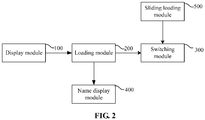
- a device for switching between multiple folders includes a display module, a loading module and a switching module, wherein the display module is configured to acquire an operation on a folder and display a interface of a current folder; the loading module is configured to determine whether there are alternative folders associated with the current folder, and if YES, load the alternative folders; and the switching module is configured to determine whether switching between folders is required, and if YES, determine an alternative folder according to a switching manner and display an interface of the alternative folder.
- the device for switching between multiple folders includes:
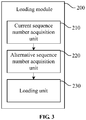
- the loading module 200 includes:
- the switching module 300 is configured to determine whether a screen is slid or not, and if YES, determine an alternative sequence number according to a sliding direction and a sequencing manner of the current sequence number and the alternative sequence numbers, and display an alternative folder corresponding to the alternative sequence number. For example, the switching module 300 is configured to determine whether a sliding operation is received or not, and if YES, determine an alternative sequence number according to a sliding direction of the sliding operation and a sequencing manner of the current sequence number and the alternative sequence numbers, and display an alternative folder corresponding to the alternative sequence number.
- the device further includes:
- the device further includes:
- a related function module corresponding to the method for switching between multiple folders of any related embodiment is arranged in the device for switching between multiple folders.
- the display module 100 provided by the embodiment may correspond to a display touch screen in electronic equipment such as a mobile phone or a tablet computer.
- the loading module 200 and the switching module 300 may correspond to a processor or processing circuit in the electronic equipment.
- the processor may include a processing chip with an information processing capability, for example, an Application Processor (AP), a Central Processing Unit (CPU), a Digital Signal Processor (DSP) or a Field Programmable Gate Array (FPGA).
- AP Application Processor
- CPU Central Processing Unit
- DSP Digital Signal Processor
- FPGA Field Programmable Gate Array
- the processing circuit may include an application-specific integrated circuit.
- the processor executes a predetermined code to implement the operations of the loading module 200 and the switching module 300.
- An embodiment further provides a computer storage medium, in which a computer-executable instruction is stored, the computer-executable instruction being configured to execute at least one of the methods for switching between multiple folders in the abovementioned embodiments. For example, the method shown in FIG. 1 may be executed.
- the computer storage medium may be various storage media such as an optical disk, a magnetic disk and a hard disk, and is optionally a non-transitory storage medium.
- each module is only divided according to a function logic, but is not limited to such division as long as a corresponding function may be realized.
- a specific name of each function unit is also only adopted for distinguishing and not intended to limit the scope of protection of the disclosure.
Landscapes
- Engineering & Computer Science (AREA)
- Theoretical Computer Science (AREA)
- General Engineering & Computer Science (AREA)
- Physics & Mathematics (AREA)
- General Physics & Mathematics (AREA)
- Human Computer Interaction (AREA)
- Software Systems (AREA)
- Data Mining & Analysis (AREA)
- Databases & Information Systems (AREA)
- Library & Information Science (AREA)
- User Interface Of Digital Computer (AREA)
- Telephone Function (AREA)
- Information Retrieval, Db Structures And Fs Structures Therefor (AREA)
Applications Claiming Priority (2)
| Application Number | Priority Date | Filing Date | Title |
|---|---|---|---|
| CN201510270965.7A CN104951181B (zh) | 2015-05-25 | 2015-05-25 | 多文件夹切换方法与装置 |
| PCT/CN2016/079330 WO2016188261A1 (zh) | 2015-05-25 | 2016-04-14 | 多文件夹切换方法、装置和计算机存储介质 |
Publications (2)
| Publication Number | Publication Date |
|---|---|
| EP3306455A1 true EP3306455A1 (de) | 2018-04-11 |
| EP3306455A4 EP3306455A4 (de) | 2018-05-23 |
Family
ID=54165865
Family Applications (1)
| Application Number | Title | Priority Date | Filing Date |
|---|---|---|---|
| EP16799150.4A Ceased EP3306455A4 (de) | 2015-05-25 | 2016-04-14 | Verfahren und vorrichtung zum wechseln mehrerer ordner und computerspeichermedium |
Country Status (4)
| Country | Link |
|---|---|
| US (1) | US20180150196A1 (de) |
| EP (1) | EP3306455A4 (de) |
| CN (1) | CN104951181B (de) |
| WO (1) | WO2016188261A1 (de) |
Families Citing this family (7)
| Publication number | Priority date | Publication date | Assignee | Title |
|---|---|---|---|---|
| CN104951181B (zh) * | 2015-05-25 | 2018-11-23 | 深圳市万普拉斯科技有限公司 | 多文件夹切换方法与装置 |
| CN105426083B (zh) * | 2015-12-07 | 2018-11-16 | 魅族科技(中国)有限公司 | 一种文件夹切换方法及终端 |
| CN106020604A (zh) * | 2016-05-18 | 2016-10-12 | 北京金山安全软件有限公司 | 一种切换文件夹的方法、装置及电子设备 |
| CN109740085B (zh) * | 2019-01-10 | 2019-12-24 | 北京字节跳动网络技术有限公司 | 一种页面内容的展示方法、装置、设备及存储介质 |
| CN110058646A (zh) * | 2019-03-15 | 2019-07-26 | 努比亚技术有限公司 | 一种桌面显示方法、穿戴式设备及存储介质 |
| CN110456953A (zh) * | 2019-06-27 | 2019-11-15 | 维沃移动通信有限公司 | 文件夹界面切换方法及终端设备 |
| CN114968929B (zh) * | 2021-02-23 | 2025-09-23 | 中国联合网络通信集团有限公司 | 文件夹跳转的实现方法及装置 |
Family Cites Families (16)
| Publication number | Priority date | Publication date | Assignee | Title |
|---|---|---|---|---|
| JP2003223363A (ja) * | 2001-11-21 | 2003-08-08 | Ricoh Co Ltd | 文書処理装置 |
| JP4533007B2 (ja) * | 2004-06-09 | 2010-08-25 | キヤノン株式会社 | 画像管理装置、画像管理方法、及びプログラム |
| FR2880709B1 (fr) * | 2005-01-11 | 2014-04-25 | Vision Objects | Procede de recherche, reconnaissance et localisation dans l'encre, dispositif, programme et langage correspondants |
| CN101571786B (zh) * | 2008-04-30 | 2015-11-25 | 宏达国际电子股份有限公司 | 用户界面切换方法及使用该方法的电子装置与存储介质 |
| US8271898B1 (en) * | 2009-06-04 | 2012-09-18 | Mellmo Inc. | Predictive scrolling |
| US8760474B2 (en) * | 2011-11-02 | 2014-06-24 | Microsoft Corporation | Virtualized data presentation in a carousel panel |
| US20140164923A1 (en) * | 2012-12-12 | 2014-06-12 | Adobe Systems Incorporated | Intelligent Adaptive Content Canvas |
| CN103176699A (zh) * | 2013-03-14 | 2013-06-26 | 东莞宇龙通信科技有限公司 | 一种操作导航的方法及装置 |
| US9207849B2 (en) * | 2013-03-29 | 2015-12-08 | Microsoft Technology Licensing, Llc | Start and application navigation |
| CN104346361B (zh) * | 2013-07-30 | 2019-03-26 | 中国电信股份有限公司 | 一种文件浏览方法和系统 |
| CN103500070B (zh) * | 2013-10-23 | 2018-01-12 | 北京三星通信技术研究有限公司 | 触控操作的方法、装置及终端装置 |
| US9588979B2 (en) * | 2013-12-31 | 2017-03-07 | Barnes & Noble College Booksellers, Llc | UI techniques for navigating a file manager of an electronic computing device |
| CN104461237A (zh) * | 2014-11-25 | 2015-03-25 | 北京麒麟合盛科技有限公司 | 文件夹的切换方法和装置 |
| CN105653114A (zh) * | 2015-04-15 | 2016-06-08 | 宇龙计算机通信科技(深圳)有限公司 | 文件夹的处理方法及装置 |
| CN104951181B (zh) * | 2015-05-25 | 2018-11-23 | 深圳市万普拉斯科技有限公司 | 多文件夹切换方法与装置 |
| CN105426083B (zh) * | 2015-12-07 | 2018-11-16 | 魅族科技(中国)有限公司 | 一种文件夹切换方法及终端 |
-
2015
- 2015-05-25 CN CN201510270965.7A patent/CN104951181B/zh active Active
-
2016
- 2016-04-14 EP EP16799150.4A patent/EP3306455A4/de not_active Ceased
- 2016-04-14 US US15/576,532 patent/US20180150196A1/en not_active Abandoned
- 2016-04-14 WO PCT/CN2016/079330 patent/WO2016188261A1/zh not_active Ceased
Also Published As
| Publication number | Publication date |
|---|---|
| US20180150196A1 (en) | 2018-05-31 |
| CN104951181B (zh) | 2018-11-23 |
| EP3306455A4 (de) | 2018-05-23 |
| WO2016188261A1 (zh) | 2016-12-01 |
| CN104951181A (zh) | 2015-09-30 |
Similar Documents
| Publication | Publication Date | Title |
|---|---|---|
| EP3306455A1 (de) | Verfahren und vorrichtung zum wechseln mehrerer ordner und computerspeichermedium | |
| US9304668B2 (en) | Method and apparatus for customizing a display screen of a user interface | |
| US20200264742A1 (en) | Method and apparatus for adding icon to interface of android system, and mobile terminal | |
| CN106055202B (zh) | 一种复制粘贴方法及移动终端 | |
| CN107861784B (zh) | 一种桌面图标的整理方法、装置及移动终端 | |
| CN105094557B (zh) | 一种显示控制方法及装置、电子设备 | |
| EP2854380A1 (de) | Verfahren zum schnellen betrieb einer datei eines smartphones und smartphone | |
| CN107357483B (zh) | 数据分享方法及装置、计算机设备和计算机可读存储介质 | |
| CN107832330B (zh) | 一种搜索方法及终端设备 | |
| US20170038946A1 (en) | Display Control Method and Device, and Electronic Apparatus | |
| CN107329645B (zh) | 一种图像显示方法及移动终端 | |
| CN109284034B (zh) | 终端壁纸预览的方法、系统、存储介质和手机 | |
| WO2018166434A1 (zh) | 图标的处理方法及移动终端 | |
| CN104898922A (zh) | 一种图标排列方法及终端 | |
| CN104216600A (zh) | 一种提供应用程序的功能的方法及触屏智能终端设备 | |
| CN105094736A (zh) | 显示控制方法、显示控制装置和电子设备 | |
| CN113253883A (zh) | 应用界面显示方法、装置和电子设备 | |
| CN103279276B (zh) | 定位信息的方法及装置 | |
| US9959010B1 (en) | Method for displaying information, and terminal equipment | |
| CN111949180A (zh) | 图标整理方法、装置、存储介质及电子设备 | |
| CN104484107A (zh) | 一种图片处理方法 | |
| CN110502165B (zh) | 快速移动多个app图标的方法 | |
| CN104063143B (zh) | 文件管理方法、装置及电子设备 | |
| CN113805752A (zh) | 对象移动方法和电子设备 | |
| CN104461359A (zh) | 一种终端 |
Legal Events
| Date | Code | Title | Description |
|---|---|---|---|
| STAA | Information on the status of an ep patent application or granted ep patent |
Free format text: STATUS: THE INTERNATIONAL PUBLICATION HAS BEEN MADE |
|
| PUAI | Public reference made under article 153(3) epc to a published international application that has entered the european phase |
Free format text: ORIGINAL CODE: 0009012 |
|
| STAA | Information on the status of an ep patent application or granted ep patent |
Free format text: STATUS: REQUEST FOR EXAMINATION WAS MADE |
|
| 17P | Request for examination filed |
Effective date: 20171221 |
|
| AK | Designated contracting states |
Kind code of ref document: A1 Designated state(s): AL AT BE BG CH CY CZ DE DK EE ES FI FR GB GR HR HU IE IS IT LI LT LU LV MC MK MT NL NO PL PT RO RS SE SI SK SM TR |
|
| AX | Request for extension of the european patent |
Extension state: BA ME |
|
| A4 | Supplementary search report drawn up and despatched |
Effective date: 20180420 |
|
| RIC1 | Information provided on ipc code assigned before grant |
Ipc: G06F 9/451 20180101ALN20180416BHEP Ipc: G06F 3/0488 20130101ALN20180416BHEP Ipc: G06F 3/0482 20130101ALN20180416BHEP Ipc: G06F 3/0485 20130101AFI20180416BHEP |
|
| DAV | Request for validation of the european patent (deleted) | ||
| DAX | Request for extension of the european patent (deleted) | ||
| STAA | Information on the status of an ep patent application or granted ep patent |
Free format text: STATUS: EXAMINATION IS IN PROGRESS |
|
| 17Q | First examination report despatched |
Effective date: 20200121 |
|
| REG | Reference to a national code |
Ref country code: DE Ref legal event code: R003 |
|
| STAA | Information on the status of an ep patent application or granted ep patent |
Free format text: STATUS: THE APPLICATION HAS BEEN REFUSED |
|
| 18R | Application refused |
Effective date: 20210402 |