EP3335103B1 - Dispositifs, procédés et interfaces utilisateurs graphiques permettant de manipuler des interfaces utilisateurs avec des gestes physiques - Google Patents
Dispositifs, procédés et interfaces utilisateurs graphiques permettant de manipuler des interfaces utilisateurs avec des gestes physiques Download PDFInfo
- Publication number
- EP3335103B1 EP3335103B1 EP16756866.6A EP16756866A EP3335103B1 EP 3335103 B1 EP3335103 B1 EP 3335103B1 EP 16756866 A EP16756866 A EP 16756866A EP 3335103 B1 EP3335103 B1 EP 3335103B1
- Authority
- EP
- European Patent Office
- Prior art keywords
- contact
- touch
- intensity
- detecting
- sensitive surface
- Prior art date
- Legal status (The legal status is an assumption and is not a legal conclusion. Google has not performed a legal analysis and makes no representation as to the accuracy of the status listed.)
- Active
Links
Images



















Classifications
-
- G—PHYSICS
- G06—COMPUTING OR CALCULATING; COUNTING
- G06F—ELECTRIC DIGITAL DATA PROCESSING
- G06F3/00—Input arrangements for transferring data to be processed into a form capable of being handled by the computer; Output arrangements for transferring data from processing unit to output unit, e.g. interface arrangements
- G06F3/01—Input arrangements or combined input and output arrangements for interaction between user and computer
- G06F3/03—Arrangements for converting the position or the displacement of a member into a coded form
- G06F3/041—Digitisers, e.g. for touch screens or touch pads, characterised by the transducing means
- G06F3/0416—Control or interface arrangements specially adapted for digitisers
-
- G—PHYSICS
- G06—COMPUTING OR CALCULATING; COUNTING
- G06F—ELECTRIC DIGITAL DATA PROCESSING
- G06F3/00—Input arrangements for transferring data to be processed into a form capable of being handled by the computer; Output arrangements for transferring data from processing unit to output unit, e.g. interface arrangements
- G06F3/01—Input arrangements or combined input and output arrangements for interaction between user and computer
- G06F3/03—Arrangements for converting the position or the displacement of a member into a coded form
- G06F3/041—Digitisers, e.g. for touch screens or touch pads, characterised by the transducing means
- G06F3/0412—Digitisers structurally integrated in a display
-
- G—PHYSICS
- G06—COMPUTING OR CALCULATING; COUNTING
- G06F—ELECTRIC DIGITAL DATA PROCESSING
- G06F3/00—Input arrangements for transferring data to be processed into a form capable of being handled by the computer; Output arrangements for transferring data from processing unit to output unit, e.g. interface arrangements
- G06F3/01—Input arrangements or combined input and output arrangements for interaction between user and computer
- G06F3/048—Interaction techniques based on graphical user interfaces [GUI]
- G06F3/0487—Interaction techniques based on graphical user interfaces [GUI] using specific features provided by the input device, e.g. functions controlled by the rotation of a mouse with dual sensing arrangements, or of the nature of the input device, e.g. tap gestures based on pressure sensed by a digitiser
- G06F3/0488—Interaction techniques based on graphical user interfaces [GUI] using specific features provided by the input device, e.g. functions controlled by the rotation of a mouse with dual sensing arrangements, or of the nature of the input device, e.g. tap gestures based on pressure sensed by a digitiser using a touch-screen or digitiser, e.g. input of commands through traced gestures
-
- G—PHYSICS
- G06—COMPUTING OR CALCULATING; COUNTING
- G06F—ELECTRIC DIGITAL DATA PROCESSING
- G06F3/00—Input arrangements for transferring data to be processed into a form capable of being handled by the computer; Output arrangements for transferring data from processing unit to output unit, e.g. interface arrangements
- G06F3/01—Input arrangements or combined input and output arrangements for interaction between user and computer
- G06F3/048—Interaction techniques based on graphical user interfaces [GUI]
- G06F3/0487—Interaction techniques based on graphical user interfaces [GUI] using specific features provided by the input device, e.g. functions controlled by the rotation of a mouse with dual sensing arrangements, or of the nature of the input device, e.g. tap gestures based on pressure sensed by a digitiser
- G06F3/0488—Interaction techniques based on graphical user interfaces [GUI] using specific features provided by the input device, e.g. functions controlled by the rotation of a mouse with dual sensing arrangements, or of the nature of the input device, e.g. tap gestures based on pressure sensed by a digitiser using a touch-screen or digitiser, e.g. input of commands through traced gestures
- G06F3/04883—Interaction techniques based on graphical user interfaces [GUI] using specific features provided by the input device, e.g. functions controlled by the rotation of a mouse with dual sensing arrangements, or of the nature of the input device, e.g. tap gestures based on pressure sensed by a digitiser using a touch-screen or digitiser, e.g. input of commands through traced gestures for inputting data by handwriting, e.g. gesture or text
-
- G—PHYSICS
- G06—COMPUTING OR CALCULATING; COUNTING
- G06F—ELECTRIC DIGITAL DATA PROCESSING
- G06F2203/00—Indexing scheme relating to G06F3/00 - G06F3/048
- G06F2203/041—Indexing scheme relating to G06F3/041 - G06F3/045
- G06F2203/04104—Multi-touch detection in digitiser, i.e. details about the simultaneous detection of a plurality of touching locations, e.g. multiple fingers or pen and finger
-
- G—PHYSICS
- G06—COMPUTING OR CALCULATING; COUNTING
- G06F—ELECTRIC DIGITAL DATA PROCESSING
- G06F2203/00—Indexing scheme relating to G06F3/00 - G06F3/048
- G06F2203/048—Indexing scheme relating to G06F3/048
- G06F2203/04808—Several contacts: gestures triggering a specific function, e.g. scrolling, zooming, right-click, when the user establishes several contacts with the surface simultaneously; e.g. using several fingers or a combination of fingers and pen
Definitions
- This relates generally to electronic devices with touch-sensitive surfaces, including but not limited to electronic devices with touch-sensitive surfaces that detect inputs for manipulating user interfaces.
- touch-sensitive surfaces as input devices for computers and other electronic computing devices has increased significantly in recent years.
- exemplary touch-sensitive surfaces include touchpads and touch-screen displays. Such surfaces are widely used to manipulate user interfaces on a display.
- Exemplary manipulations include performing operations such as zooming, adjusting the position and/or size of one or more user interface objects, and activating buttons or opening files/applications represented by user interface objects, as well as undoing or redoing operations performed in the user interface.
- a user will, in some circumstances, need to perform such manipulations on user interfaces in a file management program (e.g., Finder from Apple Inc. of Cupertino, California), a messaging application (e.g., Messages from Apple Inc. of Cupertino, California), an image management application (e.g., Photos from Apple Inc. of Cupertino, California), a camera application (e.g., Camera from Apple Inc. of Cupertino, California), a map application (e.g., Maps from Apple Inc. of Cupertino, California), a note taking application (e.g., Notes from Apple Inc.
- a file management program e.g., Finder from Apple Inc. of Cupertino, California
- a messaging application e.g., Messages from Apple Inc. of Cupertino, California
- an image management application e.g., Photos from Apple Inc. of Cupertino, California
- a camera application e.g., Camera from
- digital content management applications e.g., Music and iTunes from Apple Inc. of Cupertino, California
- a news application e.g., News from Apple Inc. of Cupertino, California
- a phone application e.g., Phone from Apple Inc. of Cupertino, California
- an email application e.g., Mail from Apple Inc. of Cupertino, California
- a browser application e.g., Safari from Apple Inc. of Cupertino, California
- drawing application e.g., Keynote from Apple Inc. of Cupertino, California
- a word processing application e.g., Pages from Apple Inc. of Cupertino, California
- a spreadsheet application e.g., a spreadsheet application
- US 2015/0067605 A1 discloses an electronic device with a display, touch-sensitive surface and one or more sensors to detect intensity of contacts with the touch-sensitive surface.
- contact intensity criteria are met if one or more of the following measures exceeds a threshold: an average intensity of the contacts, a sum of intensity of the contacts, a maximum intensity of the contacts, a minimum intensity of the contacts, or a difference in intensity between the contacts.
- a threshold an average intensity of the contacts, a sum of intensity of the contacts, a maximum intensity of the contacts, a minimum intensity of the contacts, or a difference in intensity between the contacts.
- these measures are, optionally, considered when evaluating whether the contact intensity criteria are met.
- the average intensity of the contacts performing pinch and depinch gestures is used to determine whether the gestures have met contact intensity criteria.
- ES 2392895 A1 discloses a method provided on a touch device to input commands and data using changes in pressure or surface area and shape of one or more points in contact that activate a touch surface according to one or more thresholds decision pressure differ in two or more different levels. Depending on the pressure exerted on the surface at one or more points, or the area size thereof as well as their shape and distribution various processes assigned to these pressure levels or contact areas can be activated. In one embodiment, compound multitouch gestures can be detected, based on time, distance, and the difference in pressure between the contact areas on the screen.
- EP2590067 A2 discloses a method comprising receiving a first sensor signal from a touch-sensitive input device in response to a first contact of a first object on the touch-sensitive input device, receiving a second sensor signal from the touch-sensitive input device in response to a second contact of a second object on the touch-sensitive input device substantially simultaneously with the first contact, the second sensor signal comprising a, generating a signal based at least in part on the first sensor signal and the second sensor signal, the signal configured to cause a haptic effect, and outputting the signal.
- US2011/050576 A1 discloses virtual keypads which determine an intended user key entry based upon location of keystrokes as well as other keystroke characteristics such as keystroke shape and/or pressure. Keystrokes on overlapping or multi-character keys may be disambiguated using measured pressures applied to the pressure sensing touch screen as well as other keystroke characteristics such as keystroke shape.
- US2014/237408 A1 discloses determining from touch input data if movement of at least one of first and second touch inputs has occurred, and if movement has occurred, moving a graphical interactive object in accordance with the determined movement; determining from the touch input data if an increased pressure compared to a threshold of at least one of the first and second touch inputs has occurred, and if an increased pressure has occurred, processing the graphical interactive object in response to the determined increased pressure.
- Such methods and interfaces optionally complement or replace conventional methods for manipulating user interfaces.
- Such methods and interfaces reduce the number, extent, and/or nature of the inputs from a user and produce a more efficient human-machine interface.
- Such methods and interfaces conserve power and increase the time between battery charges.
- the device is a desktop computer.
- the device is portable (e.g., a notebook computer, tablet computer, or handheld device).
- the device is a personal electronic device (e.g., a wearable electronic device, such as a watch).
- the device has a touchpad.
- the device has a touch-sensitive display (also known as a "touch screen” or “touch-screen display”).
- the device has a graphical user interface (GUI), one or more processors, memory and one or more modules, programs or sets of instructions stored in the memory for performing multiple functions.
- GUI graphical user interface
- the user interacts with the GUI primarily through stylus and/or finger contacts and gestures on the touch-sensitive surface.
- the functions optionally include image editing, drawing, presenting, word processing, spreadsheet making, game playing, telephoning, video conferencing, e-mailing, instant messaging, workout support, digital photographing, digital videoing, web browsing, digital music playing, note taking, and/or digital video playing. Executable instructions for performing these functions are, optionally, included in a non-transitory computer readable storage medium or other computer program product configured for execution by one or more processors.
- electronic devices with displays, touch-sensitive surfaces and optionally one or more sensors to detect intensity of contacts with the touch-sensitive surface are provided with faster, more efficient methods and interfaces for manipulating user interfaces, thereby increasing the effectiveness, efficiency, and user satisfaction with such devices.
- Such methods and interfaces may complement or replace conventional methods for manipulating user interfaces.
- the devices and GUIs described herein make manipulation of user interfaces more efficient and intuitive for a user.
- the device provides additional intensity-based functionality that complements conventional functionality.
- additional functions provided by intensity-based inputs e.g., operation/command shortcuts provided by intensity-based gestures
- intensity-based gestures are seamlessly integrated with conventional functions provided by conventional tap, swipe, and pinch/depinch gestures.
- a user can continue to use conventional (non-intensity-based) gestures to perform conventional functions (e.g., a two-finger depinch gesture to perform a zoom function), without accidentally activating the additional functions.
- a number of different approaches for manipulating user interfaces are described herein. Using one or more of these approaches (optionally in conjunction with each other) helps to provide a user interface that intuitively provides users with additional functionality. Using one or more of these approaches (optionally in conjunction with each other) reduces the number, extent, and/or nature of the inputs from a user and provides a more efficient human-machine interface. This enables users to use devices that have touch-sensitive surfaces faster and more efficiently. For battery-operated devices, these improvements conserve power and increase the time between battery charges.
- Figures 1A-1B , 2 , and 3 provide a description of exemplary devices.
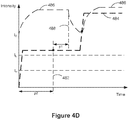
- Figures 4C-4E illustrate exemplary dynamic intensity thresholds.
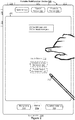
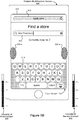
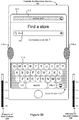
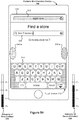
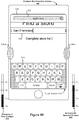
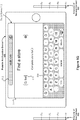
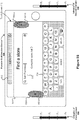
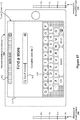
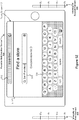
- Figures 4A-4B and 5A-5Z illustrate exemplary user interfaces for manipulating user interfaces with physical gestures.
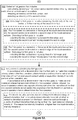
- Figures 6A-6D illustrate a flow diagram of a method of manipulating user interfaces with physical gestures. The user interfaces in Figures 5A-5Z are used to illustrate the processes in Figures 6A-6D .
- first, second, etc. are, in some instances, used herein to describe various elements, these elements should not be limited by these terms. These terms are only used to distinguish one element from another.
- a first contact could be termed a second contact, and, similarly, a second contact could be termed a first contact, without departing from the scope of the various described embodiments.
- the first contact and the second contact are both contacts, but they are not the same contact, unless the context clearly indicates otherwise.
- the term “if' is, optionally, construed to mean “when” or “upon” or “in response to determining” or “in response to detecting,” depending on the context.
- the phrase “if it is determined” or “if [a stated condition or event] is detected” is, optionally, construed to mean “upon determining” or “in response to determining” or “upon detecting [the stated condition or event]” or “in response to detecting [the stated condition or event],” depending on the context.
- the device is a portable communications device, such as a mobile telephone, that also contains other functions, such as PDA and/or music player functions.
- portable multifunction devices include, without limitation, the iPhone®, iPod Touch®, and iPad® devices from Apple Inc. of Cupertino, California.
- Other portable electronic devices such as laptops or tablet computers with touch-sensitive surfaces (e.g., touch-screen displays and/or touchpads), are, optionally, used.
- the device is not a portable communications device, but is a desktop computer with a touch-sensitive surface (e.g., a touch-screen display and/or a touchpad).
- an electronic device that includes a display and a touch-sensitive surface is described. It should be understood, however, that the electronic device optionally includes one or more other physical user-interface devices, such as a physical keyboard, a mouse and/or a joystick.
- the device typically supports a variety of applications, such as one or more of the following: a drawing application, a presentation application, a word processing application, a website creation application, a disk authoring application, a spreadsheet application, a gaming application, a telephone application, a video conferencing application, an e-mail application, an instant messaging application, a workout support application, a photo management application, a digital camera application, a digital video camera application, a web browsing application, a digital music player application, and/or a digital video player application.
- applications such as one or more of the following: a drawing application, a presentation application, a word processing application, a website creation application, a disk authoring application, a spreadsheet application, a gaming application, a telephone application, a video conferencing application, an e-mail application, an instant messaging application, a workout support application, a photo management application, a digital camera application, a digital video camera application, a web browsing application, a digital music player application, and/or a digital video player application.
- the various applications that are executed on the device optionally use at least one common physical user-interface device, such as the touch-sensitive surface.
- One or more functions of the touch-sensitive surface as well as corresponding information displayed on the device are, optionally, adjusted and/or varied from one application to the next and/or within a respective application.
- a common physical architecture (such as the touch-sensitive surface) of the device optionally supports the variety of applications with user interfaces that are intuitive and transparent to the user.
- FIG. 1A is a block diagram illustrating portable multifunction device 100 with touch-sensitive display system 112 in accordance with some embodiments.
- Touch-sensitive display system 112 is sometimes called a "touch screen" for convenience, and is sometimes simply called a touch-sensitive display.
- Device 100 includes memory 102 (which optionally includes one or more non-transitory computer readable storage mediums), memory controller 122, one or more processing units (CPUs) 120, peripherals interface 118, RF circuitry 108, audio circuitry 110, speaker 111, microphone 113, input/output (I/O) subsystem 106, other input or control devices 116, and external port 124.
- Device 100 optionally includes one or more optical sensors 164.
- Device 100 optionally includes one or more intensity sensors 165 for detecting intensity of contacts on device 100 (e.g., a touch-sensitive surface such as touch-sensitive display system 112 of device 100).
- Device 100 optionally includes one or more tactile output generators 167 for generating tactile outputs on device 100 (e.g., generating tactile outputs on a touch-sensitive surface such as touch-sensitive display system 112 of device 100 or touchpad 355 of device 300).
- These components optionally communicate over one or more communication buses or signal lines 103.
- the term "tactile output” refers to physical displacement of a device relative to a previous position of the device, physical displacement of a component (e.g., a touch-sensitive surface) of a device relative to another component (e.g., housing) of the device, or displacement of the component relative to a center of mass of the device that will be detected by a user with the user's sense of touch.
- a component e.g., a touch-sensitive surface
- another component e.g., housing
- the tactile output generated by the physical displacement will be interpreted by the user as a tactile sensation corresponding to a perceived change in physical characteristics of the device or the component of the device.
- a touch-sensitive surface e.g., a touch-sensitive display or trackpad
- movement of a touch-sensitive surface is, optionally, interpreted by the user as a "down click" or "up click" of a physical actuator button.
- a user will feel a tactile sensation such as an "down click” or “up click” even when there is no movement of a physical actuator button associated with the touch-sensitive surface that is physically pressed (e.g., displaced) by the user's movements.
- movement of the touch-sensitive surface is, optionally, interpreted or sensed by the user as "roughness" of the touch-sensitive surface, even when there is no change in smoothness of the touch-sensitive surface. While such interpretations of touch by a user will be subject to the individualized sensory perceptions of the user, there are many sensory perceptions of touch that are common to a large majority of users.
- a tactile output is described as corresponding to a particular sensory perception of a user (e.g., an "up click,” a “down click,” “roughness")
- the generated tactile output corresponds to physical displacement of the device or a component thereof that will generate the described sensory perception for a typical (or average) user.
- device 100 is only one example of a portable multifunction device, and that device 100 optionally has more or fewer components than shown, optionally combines two or more components, or optionally has a different configuration or arrangement of the components.
- the various components shown in Figure 1A are implemented in hardware, software, firmware, or a combination thereof, including one or more signal processing and/or application specific integrated circuits.
- Memory 102 optionally includes high-speed random access memory and optionally also includes non-volatile memory, such as one or more magnetic disk storage devices, flash memory devices, or other non-volatile solid-state memory devices. Access to memory 102 by other components of device 100, such as CPU(s) 120 and the peripherals interface 118, is, optionally, controlled by memory controller 122.
- Peripherals interface 118 can be used to couple input and output peripherals of the device to CPU(s) 120 and memory 102.
- the one or more processors 120 run or execute various software programs and/or sets of instructions stored in memory 102 to perform various functions for device 100 and to process data.
- peripherals interface 118, CPU(s) 120, and memory controller 122 are, optionally, implemented on a single chip, such as chip 104. In some other embodiments, they are, optionally, implemented on separate chips.
- RF (radio frequency) circuitry 108 receives and sends RF signals, also called electromagnetic signals.
- RF circuitry 108 converts electrical signals to/from electromagnetic signals and communicates with communications networks and other communications devices via the electromagnetic signals.
- RF circuitry 108 optionally includes well-known circuitry for performing these functions, including but not limited to an antenna system, an RF transceiver, one or more amplifiers, a tuner, one or more oscillators, a digital signal processor, a CODEC chipset, a subscriber identity module (SIM) card, memory, and so forth.
- an antenna system an RF transceiver, one or more amplifiers, a tuner, one or more oscillators, a digital signal processor, a CODEC chipset, a subscriber identity module (SIM) card, memory, and so forth.
- SIM subscriber identity module
- RF circuitry 108 optionally communicates with networks, such as the Internet, also referred to as the World Wide Web (WWW), an intranet and/or a wireless network, such as a cellular telephone network, a wireless local area network (LAN) and/or a metropolitan area network (MAN), and other devices by wireless communication.
- networks such as the Internet, also referred to as the World Wide Web (WWW), an intranet and/or a wireless network, such as a cellular telephone network, a wireless local area network (LAN) and/or a metropolitan area network (MAN), and other devices by wireless communication.
- networks such as the Internet, also referred to as the World Wide Web (WWW), an intranet and/or a wireless network, such as a cellular telephone network, a wireless local area network (LAN) and/or a metropolitan area network (MAN), and other devices by wireless communication.
- WLAN wireless local area network
- MAN metropolitan area network
- the wireless communication optionally uses any of a plurality of communications standards, protocols and technologies, including but not limited to Global System for Mobile Communications (GSM), Enhanced Data GSM Environment (EDGE), high-speed downlink packet access (HSDPA), high-speed uplink packet access (HSUPA), Evolution, Data-Only (EV-DO), HSPA, HSPA+, Dual-Cell HSPA (DC-HSPDA), long term evolution (LTE), near field communication (NFC), wideband code division multiple access (W-CDMA), code division multiple access (CDMA), time division multiple access (TDMA), Bluetooth, Wireless Fidelity (Wi-Fi) (e.g., IEEE 802.11a, IEEE 802.11ac, IEEE 802.11ax, IEEE 802.1 1b, IEEE 802.11g and/or IEEE 802.11n), voice over Internet Protocol (VoIP), Wi-MAX, a protocol for e-mail (e.g., Internet message access protocol (IMAP) and/or post office protocol (POP)), instant messaging (e.g.
- Audio circuitry 110, speaker 111, and microphone 113 provide an audio interface between a user and device 100.
- Audio circuitry 110 receives audio data from peripherals interface 118, converts the audio data to an electrical signal, and transmits the electrical signal to speaker 111.
- Speaker 111 converts the electrical signal to human-audible sound waves.
- Audio circuitry 110 also receives electrical signals converted by microphone 113 from sound waves.
- Audio circuitry 110 converts the electrical signal to audio data and transmits the audio data to peripherals interface 118 for processing. Audio data is, optionally, retrieved from and/or transmitted to memory 102 and/or RF circuitry 108 by peripherals interface 118.
- audio circuitry 110 also includes a headset jack (e.g., 212, Figure 2 ). The headset jack provides an interface between audio circuitry 110 and removable audio input/output peripherals, such as output-only headphones or a headset with both output (e.g., a headphone for one or both ears) and input (e.g., a microphone).
- I/O subsystem 106 couples input/output peripherals on device 100, such as touch-sensitive display system 112 and other input or control devices 116, with peripherals interface 118.
- I/O subsystem 106 optionally includes display controller 156, optical sensor controller 158, intensity sensor controller 159, haptic feedback controller 161, and one or more input controllers 160 for other input or control devices.
- the one or more input controllers 160 receive/send electrical signals from/to other input or control devices 116.
- the other input or control devices 116 optionally include physical buttons (e.g., push buttons, rocker buttons, etc.), dials, slider switches, joysticks, click wheels, and so forth.
- input controller(s) 160 are, optionally, coupled with any (or none) of the following: a keyboard, infrared port, USB port, stylus, and/or a pointer device such as a mouse.
- the one or more buttons optionally include an up/down button for volume control of speaker 111 and/or microphone 113.
- the one or more buttons optionally include a push button (e.g., 206, Figure 2 ).
- Touch-sensitive display system 112 provides an input interface and an output interface between the device and a user.
- Display controller 156 receives and/or sends electrical signals from/to touch-sensitive display system 112.
- Touch-sensitive display system 112 displays visual output to the user.
- the visual output optionally includes graphics, text, icons, video, and any combination thereof (collectively termed "graphics"). In some embodiments, some or all of the visual output corresponds to user-interface objects.
- Touch-sensitive display system 112 has a touch-sensitive surface, sensor or set of sensors that accepts input from the user based on haptic and/or tactile contact.
- Touch-sensitive display system 112 and display controller 156 (along with any associated modules and/or sets of instructions in memory 102) detect contact (and any movement or breaking of the contact) on touch-sensitive display system 112 and converts the detected contact into interaction with user-interface objects (e.g., one or more soft keys, icons, web pages or images) that are displayed on touch-sensitive display system 112.
- user-interface objects e.g., one or more soft keys, icons, web pages or images
- a point of contact between touch-sensitive display system 112 and the user corresponds to a finger of the user or a stylus.
- Touch-sensitive display system 112 optionally uses LCD (liquid crystal display) technology, LPD (light emitting polymer display) technology, or LED (light emitting diode) technology, although other display technologies are used in other embodiments.
- Touch-sensitive display system 112 and display controller 156 optionally detect contact and any movement or breaking thereof using any of a plurality of touch sensing technologies now known or later developed, including but not limited to capacitive, resistive, infrared, and surface acoustic wave technologies, as well as other proximity sensor arrays or other elements for determining one or more points of contact with touch-sensitive display system 112.
- capacitive, resistive, infrared, and surface acoustic wave technologies as well as other proximity sensor arrays or other elements for determining one or more points of contact with touch-sensitive display system 112.
- projected mutual capacitance sensing technology is used, such as that found in the iPhone®, iPod Touch®, and iPad® from Apple Inc. of Cupertino, California.
- Touch-sensitive display system 112 optionally has a video resolution in excess of 100 dpi. In some embodiments, the touch screen video resolution is in excess of 400 dpi (e.g., 500 dpi, 800 dpi, or greater).
- the user optionally makes contact with touch-sensitive display system 112 using any suitable object or appendage, such as a stylus, a finger, and so forth.
- the user interface is designed to work with finger-based contacts and gestures, which can be less precise than stylus-based input due to the larger area of contact of a finger on the touch screen.
- the device translates the rough finger-based input into a precise pointer/cursor position or command for performing the actions desired by the user.
- device 100 in addition to the touch screen, device 100 optionally includes a touchpad (not shown) for activating or deactivating particular functions.
- the touchpad is a touch-sensitive area of the device that, unlike the touch screen, does not display visual output.
- the touchpad is, optionally, a touch-sensitive surface that is separate from touch-sensitive display system 112 or an extension of the touch-sensitive surface formed by the touch screen.
- Power system 162 for powering the various components.
- Power system 162 optionally includes a power management system, one or more power sources (e.g., battery, alternating current (AC)), a recharging system, a power failure detection circuit, a power converter or inverter, a power status indicator (e.g., a light-emitting diode (LED)) and any other components associated with the generation, management and distribution of power in portable devices.
- power sources e.g., battery, alternating current (AC)
- AC alternating current
- a recharging system e.g., a recharging system
- a power failure detection circuit e.g., a power failure detection circuit
- a power converter or inverter e.g., a power converter or inverter
- a power status indicator e.g., a light-emitting diode (LED)
- Device 100 optionally also includes one or more optical sensors 164.
- Figure 1A shows an optical sensor coupled with optical sensor controller 158 in I/O subsystem 106.
- Optical sensor(s) 164 optionally include charge-coupled device (CCD) or complementary metal-oxide semiconductor (CMOS) phototransistors.
- CMOS complementary metal-oxide semiconductor
- Optical sensor(s) 164 receive light from the environment, projected through one or more lens, and converts the light to data representing an image.
- imaging module 143 also called a camera module
- optical sensor(s) 164 optionally capture still images and/or video.
- an optical sensor is located on the back of device 100, opposite touch-sensitive display system 112 on the front of the device, so that the touch screen is enabled for use as a viewfinder for still and/or video image acquisition.
- another optical sensor is located on the front of the device so that the user's image is obtained (e.g., for selfies, for videoconferencing while the user views the other video conference participants on the touch screen, etc.).
- Device 100 optionally also includes one or more contact intensity sensors 165.
- Figure 1A shows a contact intensity sensor coupled with intensity sensor controller 159 in I/O subsystem 106.
- Contact intensity sensor(s) 165 optionally include one or more piezoresistive strain gauges, capacitive force sensors, electric force sensors, piezoelectric force sensors, optical force sensors, capacitive touch-sensitive surfaces, or other intensity sensors (e.g., sensors used to measure the force (or pressure) of a contact on a touch-sensitive surface).
- Contact intensity sensor(s) 165 receive contact intensity information (e.g., pressure information or a proxy for pressure information) from the environment.
- contact intensity information e.g., pressure information or a proxy for pressure information
- At least one contact intensity sensor is collocated with, or proximate to, a touch-sensitive surface (e.g., touch-sensitive display system 112). In some embodiments, at least one contact intensity sensor is located on the back of device 100, opposite touch-screen display system 112 which is located on the front of device 100.
- a touch-sensitive surface e.g., touch-sensitive display system 112
- at least one contact intensity sensor is located on the back of device 100, opposite touch-screen display system 112 which is located on the front of device 100.
- Device 100 optionally also includes one or more proximity sensors 166.
- Figure 1A shows proximity sensor 166 coupled with peripherals interface 118.
- proximity sensor 166 is coupled with input controller 160 in I/O subsystem 106.
- the proximity sensor turns off and disables touch-sensitive display system 112 when the multifunction device is placed near the user's ear (e.g., when the user is making a phone call).
- Device 100 optionally also includes one or more tactile output generators 167.
- Figure 1A shows a tactile output generator coupled with haptic feedback controller 161 in I/O subsystem 106.
- Tactile output generator(s) 167 optionally include one or more electroacoustic devices such as speakers or other audio components and/or electromechanical devices that convert energy into linear motion such as a motor, solenoid, electroactive polymer, piezoelectric actuator, electrostatic actuator, or other tactile output generating component (e.g., a component that converts electrical signals into tactile outputs on the device).
- tactile output generator(s) 167 receive tactile feedback generation instructions from haptic feedback module 133 and generates tactile outputs on device 100 that are capable of being sensed by a user of device 100.
- At least one tactile output generator is collocated with, or proximate to, a touch-sensitive surface (e.g., touch-sensitive display system 112) and, optionally, generates a tactile output by moving the touch-sensitive surface vertically (e.g., in/out of a surface of device 100) or laterally (e.g., back and forth in the same plane as a surface of device 100).
- at least one tactile output generator sensor is located on the back of device 100, opposite touch-sensitive display system 112, which is located on the front of device 100.
- Device 100 optionally also includes one or more accelerometers 168.
- Figure 1A shows accelerometer 168 coupled with peripherals interface 118.
- accelerometer 168 is, optionally, coupled with an input controller 160 in I/O subsystem 106.
- information is displayed on the touch-screen display in a portrait view or a landscape view based on an analysis of data received from the one or more accelerometers.
- Device 100 optionally includes, in addition to accelerometer(s) 168, a magnetometer (not shown) and a GPS (or GLONASS or other global navigation system) receiver (not shown) for obtaining information concerning the location and orientation (e.g., portrait or landscape) of device 100.
- GPS or GLONASS or other global navigation system
- the software components stored in memory 102 include operating system 126, communication module (or set of instructions) 128, contact/motion module (or set of instructions) 130, graphics module (or set of instructions) 132, haptic feedback module (or set of instructions) 133, text input module (or set of instructions) 134, Global Positioning System (GPS) module (or set of instructions) 135, and applications (or sets of instructions) 136.
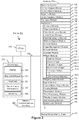
- memory 102 stores device/global internal state 157, as shown in Figures 1A and 3 .
- Device/global internal state 157 includes one or more of: active application state, indicating which applications, if any, are currently active; display state, indicating what applications, views or other information occupy various regions of touch-sensitive display system 112; sensor state, including information obtained from the device's various sensors and other input or control devices 116; and location and/or positional information concerning the device's location and/or attitude.
- Operating system 126 e.g., iOS, Darwin, RTXC, LINUX, UNIX, OS X, WINDOWS, or an embedded operating system such as VxWorks
- Operating system 126 includes various software components and/or drivers for controlling and managing general system tasks (e.g., memory management, storage device control, power management, etc.) and facilitates communication between various hardware and software components.
- Communication module 128 facilitates communication with other devices over one or more external ports 124 and also includes various software components for handling data received by RF circuitry 108 and/or external port 124.
- External port 124 e.g., Universal Serial Bus (USB), FIREWIRE, etc.
- USB Universal Serial Bus
- FIREWIRE FireWire
- the external port is a multi-pin (e.g., 30-pin) connector that is the same as, or similar to and/or compatible with the 30-pin connector used in some iPhone®, iPod Touch®, and iPad® devices from Apple Inc. of Cupertino, California.
- the external port is a Lightning connector that is the same as, or similar to and/or compatible with the Lightning connector used in some iPhone®, iPod Touch®, and iPad® devices from Apple Inc. of Cupertino, California.
- Contact/motion module 130 optionally detects contact with touch-sensitive display system 112 (in conjunction with display controller 156) and other touch-sensitive devices (e.g., a touchpad or physical click wheel).
- Contact/motion module 130 includes various software components for performing various operations related to detection of contact (e.g., by a finger or by a stylus), such as determining if contact has occurred (e.g., detecting a finger-down event), determining an intensity of the contact (e.g., the force or pressure of the contact or a substitute for the force or pressure of the contact), determining if there is movement of the contact and tracking the movement across the touch-sensitive surface (e.g., detecting one or more finger-dragging events), and determining if the contact has ceased (e.g., detecting a finger-up event or a break in contact).
- determining if contact has occurred e.g., detecting a finger-down event
- an intensity of the contact e.g., the force or pressure of the contact or a
- Contact/motion module 130 receives contact data from the touch-sensitive surface. Determining movement of the point of contact, which is represented by a series of contact data, optionally includes determining speed (magnitude), velocity (magnitude and direction), and/or an acceleration (a change in magnitude and/or direction) of the point of contact. These operations are, optionally, applied to single contacts (e.g., one finger contacts or stylus contacts) or to multiple simultaneous contacts (e.g., "multitouch"/multiple finger contacts and/or stylus contacts). In some embodiments, contact/motion module 130 and display controller 156 detect contact on a touchpad.
- Contact/motion module 130 optionally detects a gesture input by a user.
- Different gestures on the touch-sensitive surface have different contact patterns (e.g., different motions, timings, and/or intensities of detected contacts).
- a gesture is, optionally, detected by detecting a particular contact pattern.
- detecting a finger tap gesture includes detecting a finger-down event followed by detecting a finger-up (lift off) event at the same position (or substantially the same position) as the finger-down event (e.g., at the position of an icon).
- detecting a finger swipe gesture on the touch-sensitive surface includes detecting a finger-down event followed by detecting one or more finger-dragging events, and subsequently followed by detecting a finger-up (lift off) event.
- tap, swipe, drag, and other gestures are optionally detected for a stylus by detecting a particular contact pattern for the stylus.
- Graphics module 132 includes various known software components for rendering and displaying graphics on touch-sensitive display system 112 or other display, including components for changing the visual impact (e.g., brightness, transparency, saturation, contrast or other visual property) of graphics that are displayed.
- graphics includes any object that can be displayed to a user, including without limitation text, web pages, icons (such as user-interface objects including soft keys), digital images, videos, animations and the like.
- graphics module 132 stores data representing graphics to be used. Each graphic is, optionally, assigned a corresponding code. Graphics module 132 receives, from applications etc., one or more codes specifying graphics to be displayed along with, if necessary, coordinate data and other graphic property data, and then generates screen image data to output to display controller 156.
- Haptic feedback module 133 includes various software components for generating instructions (e.g., instructions used by haptic feedback controller 161) to produce tactile outputs using tactile output generator(s) 167 at one or more locations on device 100 in response to user interactions with device 100.
- instructions e.g., instructions used by haptic feedback controller 161
- tactile output generator(s) 167 at one or more locations on device 100 in response to user interactions with device 100.
- Text input module 134 which is, optionally, a component of graphics module 132, provides soft keyboards for entering text in various applications (e.g., contacts 137, e-mail 140, IM 141, browser 147, and any other application that needs text input).
- applications e.g., contacts 137, e-mail 140, IM 141, browser 147, and any other application that needs text input).
- GPS module 135 determines the location of the device and provides this information for use in various applications (e.g., to telephone 138 for use in location-based dialing, to camera 143 as picture/video metadata, and to applications that provide location-based services such as weather widgets, local yellow page widgets, and map/navigation widgets).
- applications e.g., to telephone 138 for use in location-based dialing, to camera 143 as picture/video metadata, and to applications that provide location-based services such as weather widgets, local yellow page widgets, and map/navigation widgets).
- Applications 136 optionally include the following modules (or sets of instructions), or a subset or superset thereof:
- Examples of other applications 136 that are, optionally, stored in memory 102 include other word processing applications, other image editing applications, drawing applications, presentation applications, JAVA-enabled applications, encryption, digital rights management, voice recognition, and voice replication.
- contacts module 137 includes executable instructions to manage an address book or contact list (e.g., stored in application internal state 192 of contacts module 137 in memory 102 or memory 370), including: adding name(s) to the address book; deleting name(s) from the address book; associating telephone number(s), e-mail address(es), physical address(es) or other information with a name; associating an image with a name; categorizing and sorting names; providing telephone numbers and/or e-mail addresses to initiate and/or facilitate communications by telephone 138, video conference 139, e-mail 140, or IM 141; and so forth.
- an address book or contact list e.g., stored in application internal state 192 of contacts module 137 in memory 102 or memory 370
- telephone module 138 includes executable instructions to enter a sequence of characters corresponding to a telephone number, access one or more telephone numbers in address book 137, modify a telephone number that has been entered, dial a respective telephone number, conduct a conversation and disconnect or hang up when the conversation is completed.
- the wireless communication optionally uses any of a plurality of communications standards, protocols and technologies.
- videoconferencing module 139 includes executable instructions to initiate, conduct, and terminate a video conference between a user and one or more other participants in accordance with user instructions.
- e-mail client module 140 includes executable instructions to create, send, receive, and manage e-mail in response to user instructions.
- e-mail client module 140 makes it very easy to create and send e-mails with still or video images taken with camera module 143.
- the instant messaging module 141 includes executable instructions to enter a sequence of characters corresponding to an instant message, to modify previously entered characters, to transmit a respective instant message (for example, using a Short Message Service (SMS) or Multimedia Message Service (MMS) protocol for telephony-based instant messages or using XMPP, SIMPLE, Apple Push Notification Service (APNs) or IMPS for Internet-based instant messages), to receive instant messages and to view received instant messages.
- SMS Short Message Service
- MMS Multimedia Message Service
- XMPP extensible Markup Language
- SIMPLE Apple Push Notification Service
- IMPS Internet Messaging Protocol
- transmitted and/or received instant messages optionally include graphics, photos, audio files, video files and/or other attachments as are supported in a MMS and/or an Enhanced Messaging Service (EMS).
- EMS Enhanced Messaging Service
- instant messaging refers to both telephony-based messages (e.g., messages sent using SMS or MMS) and Internet-based messages (e.g., messages sent using XMPP, SIMPLE, APNs, or IMPS).
- workout support module 142 includes executable instructions to create workouts (e.g., with time, distance, and/or calorie burning goals); communicate with workout sensors (in sports devices and smart watches); receive workout sensor data; calibrate sensors used to monitor a workout; select and play music for a workout; and display, store and transmit workout data.
- camera module 143 includes executable instructions to capture still images or video (including a video stream) and store them into memory 102, modify characteristics of a still image or video, and/or delete a still image or video from memory 102.
- image management module 144 includes executable instructions to arrange, modify (e.g., edit), or otherwise manipulate, label, delete, present (e.g., in a digital slide show or album), and store still and/or video images.
- modify e.g., edit
- present e.g., in a digital slide show or album
- browser module 147 includes executable instructions to browse the Internet in accordance with user instructions, including searching, linking to, receiving, and displaying web pages or portions thereof, as well as attachments and other files linked to web pages.
- calendar module 148 includes executable instructions to create, display, modify, and store calendars and data associated with calendars (e.g., calendar entries, to do lists, etc.) in accordance with user instructions.
- widget modules 149 are mini-applications that are, optionally, downloaded and used by a user (e.g., weather widget 149-1, stocks widget 149-2, calculator widget 149-3, alarm clock widget 149-4, and dictionary widget 149-5) or created by the user (e.g., user-created widget 149-6).
- a widget includes an HTML (Hypertext Markup Language) file, a CSS (Cascading Style Sheets) file, and a JavaScript file.
- a widget includes an XML (Extensible Markup Language) file and a JavaScript file (e.g., Yahoo! Widgets).
- the widget creator module 150 includes executable instructions to create widgets (e.g., turning a user-specified portion of a web page into a widget).
- search module 151 includes executable instructions to search for text, music, sound, image, video, and/or other files in memory 102 that match one or more search criteria (e.g., one or more user-specified search terms) in accordance with user instructions.
- search criteria e.g., one or more user-specified search terms
- video and music player module 152 includes executable instructions that allow the user to download and play back recorded music and other sound files stored in one or more file formats, such as MP3 or AAC files, and executable instructions to display, present or otherwise play back videos (e.g., on touch-sensitive display system 112, or on an external display connected wirelessly or via external port 124).
- device 100 optionally includes the functionality of an MP3 player, such as an iPod (trademark of Apple Inc.).
- notes module 153 includes executable instructions to create and manage notes, to do lists, and the like in accordance with user instructions.
- map module 154 includes executable instructions to receive, display, modify, and store maps and data associated with maps (e.g., driving directions; data on stores and other points of interest at or near a particular location; and other location-based data) in accordance with user instructions.
- maps e.g., driving directions; data on stores and other points of interest at or near a particular location; and other location-based data
- online video module 155 includes executable instructions that allow the user to access, browse, receive (e.g., by streaming and/or download), play back (e.g., on the touch screen 112, or on an external display connected wirelessly or via external port 124), send an e-mail with a link to a particular online video, and otherwise manage online videos in one or more file formats, such as H.264.
- instant messaging module 141 rather than e-mail client module 140, is used to send a link to a particular online video.
- modules and applications correspond to a set of executable instructions for performing one or more functions described above and the methods described in this specification (e.g., the computer-implemented methods and other information processing methods described herein).
- modules i.e., sets of instructions
- memory 102 optionally stores a subset of the modules and data structures identified above.
- memory 102 optionally stores additional modules and data structures not described above.
- device 100 is a device where operation of a predefined set of functions on the device is performed exclusively through a touch screen and/or a touchpad.
- a touch screen and/or a touchpad as the primary input control device for operation of device 100, the number of physical input control devices (such as push buttons, dials, and the like) on device 100 is, optionally, reduced.
- the predefined set of functions that are performed exclusively through a touch screen and/or a touchpad optionally include navigation between user interfaces.
- the touchpad when touched by the user, navigates device 100 to a main, home, or root menu from any user interface that is displayed on device 100.
- a "menu button" is implemented using a touchpad.
- the menu button is a physical push button or other physical input control device instead of a touchpad.
- FIG 1B is a block diagram illustrating exemplary components for event handling in accordance with some embodiments.
- memory 102 in Figures 1A or 370 ( Figure 3 ) includes event sorter 170 (e.g., in operating system 126) and a respective application 136-1 (e.g., any of the aforementioned applications 136, 137-155, 380-390).
- event sorter 170 e.g., in operating system 126
- application 136-1 e.g., any of the aforementioned applications 136, 137-155, 380-390.
- Event sorter 170 receives event information and determines the application 136-1 and application view 191 of application 136-1 to which to deliver the event information.
- Event sorter 170 includes event monitor 171 and event dispatcher module 174.
- application 136-1 includes application internal state 192, which indicates the current application view(s) displayed on touch-sensitive display system 112 when the application is active or executing.
- device/global internal state 157 is used by event sorter 170 to determine which application(s) is (are) currently active, and application internal state 192 is used by event sorter 170 to determine application views 191 to which to deliver event information.
- application internal state 192 includes additional information, such as one or more of: resume information to be used when application 136-1 resumes execution, user interface state information that indicates information being displayed or that is ready for display by application 136-1, a state queue for enabling the user to go back to a prior state or view of application 136-1, and a redo/undo queue of previous actions taken by the user.
- Event monitor 171 receives event information from peripherals interface 118.
- Event information includes information about a sub-event (e.g., a user touch on touch-sensitive display system 112, as part of a multi-touch gesture).
- Peripherals interface 118 transmits information it receives from I/O subsystem 106 or a sensor, such as proximity sensor 166, accelerometer(s) 168, and/or microphone 113 (through audio circuitry 110).
- Information that peripherals interface 118 receives from I/O subsystem 106 includes information from touch-sensitive display system 112 or a touch-sensitive surface.
- event monitor 171 sends requests to the peripherals interface 118 at predetermined intervals. In response, peripherals interface 118 transmits event information. In other embodiments, peripheral interface 118 transmits event information only when there is a significant event (e.g., receiving an input above a predetermined noise threshold and/or for more than a predetermined duration).
- event sorter 170 also includes a hit view determination module 172 and/or an active event recognizer determination module 173.
- Hit view determination module 172 provides software procedures for determining where a sub-event has taken place within one or more views, when touch-sensitive display system 112 displays more than one view. Views are made up of controls and other elements that a user can see on the display.
- the application views (of a respective application) in which a touch is detected optionally correspond to programmatic levels within a programmatic or view hierarchy of the application. For example, the lowest level view in which a touch is detected is, optionally, called the hit view, and the set of events that are recognized as proper inputs are, optionally, determined based, at least in part, on the hit view of the initial touch that begins a touch-based gesture.
- Hit view determination module 172 receives information related to sub-events of a touch-based gesture.
- hit view determination module 172 identifies a hit view as the lowest view in the hierarchy which should handle the sub-event. In most circumstances, the hit view is the lowest level view in which an initiating sub-event occurs (i.e., the first sub-event in the sequence of sub-events that form an event or potential event).
- the hit view typically receives all sub-events related to the same touch or input source for which it was identified as the hit view.
- Active event recognizer determination module 173 determines which view or views within a view hierarchy should receive a particular sequence of sub-events. In some embodiments, active event recognizer determination module 173 determines that only the hit view should receive a particular sequence of sub-events. In other embodiments, active event recognizer determination module 173 determines that all views that include the physical location of a sub-event are actively involved views, and therefore determines that all actively involved views should receive a particular sequence of sub-events. In other embodiments, even if touch sub-events were entirely confined to the area associated with one particular view, views higher in the hierarchy would still remain as actively involved views.
- Event dispatcher module 174 dispatches the event information to an event recognizer (e.g., event recognizer 180). In embodiments including active event recognizer determination module 173, event dispatcher module 174 delivers the event information to an event recognizer determined by active event recognizer determination module 173. In some embodiments, event dispatcher module 174 stores in an event queue the event information, which is retrieved by a respective event receiver module 182.
- operating system 126 includes event sorter 170.
- application 136-1 includes event sorter 170.
- event sorter 170 is a stand-alone module, or a part of another module stored in memory 102, such as contact/motion module 130.
- application 136-1 includes a plurality of event handlers 190 and one or more application views 191, each of which includes instructions for handling touch events that occur within a respective view of the application's user interface.
- Each application view 191 of the application 136-1 includes one or more event recognizers 180.
- a respective application view 191 includes a plurality of event recognizers 180.
- one or more of event recognizers 180 are part of a separate module, such as a user interface kit (not shown) or a higher level object from which application 136-1 inherits methods and other properties.
- a respective event handler 190 includes one or more of: data updater 176, object updater 177, GUI updater 178, and/or event data 179 received from event sorter 170.
- Event handler 190 optionally utilizes or calls data updater 176, object updater 177 or GUI updater 178 to update the application internal state 192.
- one or more of the application views 191 includes one or more respective event handlers 190.
- one or more of data updater 176, object updater 177, and GUI updater 178 are included in a respective application view 191.
- a respective event recognizer 180 receives event information (e.g., event data 179) from event sorter 170, and identifies an event from the event information.
- Event recognizer 180 includes event receiver 182 and event comparator 184.
- event recognizer 180 also includes at least a subset of: metadata 183, and event delivery instructions 188 (which optionally include sub-event delivery instructions).
- Event receiver 182 receives event information from event sorter 170.
- the event information includes information about a sub-event, for example, a touch or a touch movement.
- the event information also includes additional information, such as location of the sub-event.
- the event information optionally also includes speed and direction of the sub-event.
- events include rotation of the device from one orientation to another (e.g., from a portrait orientation to a landscape orientation, or vice versa), and the event information includes corresponding information about the current orientation (also called device attitude) of the device.
- Event comparator 184 compares the event information to predefined event or sub-event definitions and, based on the comparison, determines an event or sub-event, or determines or updates the state of an event or sub-event.
- event comparator 184 includes event definitions 186.
- Event definitions 186 contain definitions of events (e.g., predefined sequences of sub-events), for example, event 1 (187-1), event 2 (187-2), and others.
- sub-events in an event 187 include, for example, touch begin, touch end, touch movement, touch cancellation, and multiple touching.
- the definition for event 1 (187-1) is a double tap on a displayed object.
- the double tap for example, comprises a first touch (touch begin) on the displayed object for a predetermined phase, a first lift-off (touch end) for a predetermined phase, a second touch (touch begin) on the displayed object for a predetermined phase, and a second lift-off (touch end) for a predetermined phase.
- the definition for event 2 (187-2) is a dragging on a displayed object.
- the dragging for example, comprises a touch (or contact) on the displayed object for a predetermined phase, a movement of the touch across touch-sensitive display system 112, and lift-off of the touch (touch end).
- the event also includes information for one or more associated event handlers 190.
- event definition 187 includes a definition of an event for a respective user-interface object.
- event comparator 184 performs a hit test to determine which user-interface object is associated with a sub-event. For example, in an application view in which three user-interface objects are displayed on touch-sensitive display system 112, when a touch is detected on touch-sensitive display system 112, event comparator 184 performs a hit test to determine which of the three user-interface objects is associated with the touch (sub-event). If each displayed object is associated with a respective event handler 190, the event comparator uses the result of the hit test to determine which event handler 190 should be activated. For example, event comparator 184 selects an event handler associated with the sub-event and the object triggering the hit test.
- the definition for a respective event 187 also includes delayed actions that delay delivery of the event information until after it has been determined whether the sequence of sub-events does or does not correspond to the event recognizer's event type.
- a respective event recognizer 180 determines that the series of sub-events do not match any of the events in event definitions 186, the respective event recognizer 180 enters an event impossible, event failed, or event ended state, after which it disregards subsequent sub-events of the touch-based gesture. In this situation, other event recognizers, if any, that remain active for the hit view continue to track and process sub-events of an ongoing touch-based gesture.
- a respective event recognizer 180 includes metadata 183 with configurable properties, flags, and/or lists that indicate how the event delivery system should perform sub-event delivery to actively involved event recognizers.
- metadata 183 includes configurable properties, flags, and/or lists that indicate how event recognizers interact, or are enabled to interact, with one another.
- metadata 183 includes configurable properties, flags, and/or lists that indicate whether sub-events are delivered to varying levels in the view or programmatic hierarchy.
- a respective event recognizer 180 activates event handler 190 associated with an event when one or more particular sub-events of an event are recognized.
- a respective event recognizer 180 delivers event information associated with the event to event handler 190. Activating an event handler 190 is distinct from sending (and deferred sending) sub-events to a respective hit view.
- event recognizer 180 throws a flag associated with the recognized event, and event handler 190 associated with the flag catches the flag and performs a predefined process.
- event delivery instructions 188 include sub-event delivery instructions that deliver event information about a sub-event without activating an event handler. Instead, the sub-event delivery instructions deliver event information to event handlers associated with the series of sub-events or to actively involved views. Event handlers associated with the series of sub-events or with actively involved views receive the event information and perform a predetermined process.
- data updater 176 creates and updates data used in application 136-1. For example, data updater 176 updates the telephone number used in contacts module 137, or stores a video file used in video player module 145.
- object updater 177 creates and updates objects used in application 136-1. For example, object updater 177 creates a new user-interface object or updates the position of a user-interface object.
- GUI updater 178 updates the GUI. For example, GUI updater 178 prepares display information and sends it to graphics module 132 for display on a touch-sensitive display.
- event handler(s) 190 includes or has access to data updater 176, object updater 177, and GUI updater 178.
- data updater 176, object updater 177, and GUI updater 178 are included in a single module of a respective application 136-1 or application view 191. In other embodiments, they are included in two or more software modules.
- event handling of user touches on touch-sensitive displays also applies to other forms of user inputs to operate multifunction devices 100 with input-devices, not all of which are initiated on touch screens.
- mouse movement and mouse button presses optionally coordinated with single or multiple keyboard presses or holds; contact movements such as taps, drags, scrolls, etc., on touch-pads; pen stylus inputs; movement of the device; oral instructions; detected eye movements; biometric inputs; and/or any combination thereof are optionally utilized as inputs corresponding to sub-events which define an event to be recognized.
- FIG. 2 illustrates a portable multifunction device 100 having a touch screen (e.g., touch-sensitive display system 112, Figure 1A ) in accordance with some embodiments.
- the touch screen optionally displays one or more graphics within user interface (UI) 200.
- UI user interface
- a user is enabled to select one or more of the graphics by making a gesture on the graphics, for example, with one or more fingers 202 (not drawn to scale in the figure) or one or more styluses 203 (not drawn to scale in the figure).
- selection of one or more graphics occurs when the user breaks contact with the one or more graphics.
- the gesture optionally includes one or more taps, one or more swipes (from left to right, right to left, upward and/or downward) and/or a rolling of a finger (from right to left, left to right, upward and/or downward) that has made contact with device 100.
- inadvertent contact with a graphic does not select the graphic.
- a swipe gesture that sweeps over an application icon optionally does not select the corresponding application when the gesture corresponding to selection is a tap.
- Device 100 optionally also includes one or more physical buttons, such as "home" or menu button 204.
- menu button 204 is, optionally, used to navigate to any application 136 in a set of applications that are, optionally executed on device 100.
- the menu button is implemented as a soft key in a GUI displayed on the touch-screen display.
- device 100 includes the touch-screen display, menu button 204, push button 206 for powering the device on/off and locking the device, volume adjustment button(s) 208, Subscriber Identity Module (SIM) card slot 210, head set jack 212, and docking/charging external port 124.
- Push button 206 is, optionally, used to turn the power on/off on the device by depressing the button and holding the button in the depressed state for a predefined time interval; to lock the device by depressing the button and releasing the button before the predefined time interval has elapsed; and/or to unlock the device or initiate an unlock process.
- device 100 also accepts verbal input for activation or deactivation of some functions through microphone 113.
- Device 100 also, optionally, includes one or more contact intensity sensors 165 for detecting intensity of contacts on touch-sensitive display system 112 and/or one or more tactile output generators 167 for generating tactile outputs for a user of device 100.
- FIG. 3 is a block diagram of an exemplary multifunction device with a display and a touch-sensitive surface in accordance with some embodiments.
- Device 300 need not be portable.
- device 300 is a laptop computer, a desktop computer, a tablet computer, a multimedia player device, a navigation device, an educational device (such as a child's learning toy), a gaming system, or a control device (e.g., a home or industrial controller).
- Device 300 typically includes one or more processing units (CPU's) 310, one or more network or other communications interfaces 360, memory 370, and one or more communication buses 320 for interconnecting these components.
- Communication buses 320 optionally include circuitry (sometimes called a chipset) that interconnects and controls communications between system components.
- Device 300 includes input/output (I/O) interface 330 comprising display 340, which is typically a touch-screen display.
- I/O interface 330 also optionally includes a keyboard and/or mouse (or other pointing device) 350 and touchpad 355, tactile output generator 357 for generating tactile outputs on device 300 (e.g., similar to tactile output generator(s) 167 described above with reference to Figure 1A ), sensors 359 (e.g., optical, acceleration, proximity, touch-sensitive, and/or contact intensity sensors similar to contact intensity sensor(s) 165 described above with reference to Figure 1A ).
- I/O interface 330 also optionally includes a keyboard and/or mouse (or other pointing device) 350 and touchpad 355, tactile output generator 357 for generating tactile outputs on device 300 (e.g., similar to tactile output generator(s) 167 described above with reference to Figure 1A ), sensors 359 (e.g., optical, acceleration, proximity, touch-sensitive, and/or contact intensity sensors similar to contact intensity sensor(s)
- Memory 370 includes high-speed random access memory, such as DRAM, SRAM, DDR RAM or other random access solid state memory devices; and optionally includes non-volatile memory, such as one or more magnetic disk storage devices, optical disk storage devices, flash memory devices, or other non-volatile solid state storage devices. Memory 370 optionally includes one or more storage devices remotely located from CPU(s) 310. In some embodiments, memory 370 stores programs, modules, and data structures analogous to the programs, modules, and data structures stored in memory 102 of portable multifunction device 100 ( Figure 1A ), or a subset thereof. Furthermore, memory 370 optionally stores additional programs, modules, and data structures not present in memory 102 of portable multifunction device 100.
- memory 370 of device 300 optionally stores drawing module 380, presentation module 382, word processing module 384, website creation module 386, disk authoring module 388, and/or spreadsheet module 390, while memory 102 of portable multifunction device 100 ( Figure 1A ) optionally does not store these modules.
- Each of the above identified elements in Figure 3 is, optionally, stored in one or more of the previously mentioned memory devices.
- Each of the above identified modules corresponds to a set of instructions for performing a function described above.
- the above identified modules or programs i.e., sets of instructions
- memory 370 optionally stores a subset of the modules and data structures identified above.
- memory 370 optionally stores additional modules and data structures not described above.
- UI user interfaces
- Figure 4A illustrates an exemplary user interface for a menu of applications on portable multifunction device 100 in accordance with some embodiments. Similar user interfaces are, optionally, implemented on device 300.
- user interface 400 includes the following elements, or a subset or superset thereof:
- icon labels illustrated in Figure 4A are merely exemplary.
- icon 422 for video and music player module 152 is labeled "Music" or "Music Player.”
- Other labels are, optionally, used for various application icons.
- a label for a respective application icon includes a name of an application corresponding to the respective application icon.
- a label for a particular application icon is distinct from a name of an application corresponding to the particular application icon.
- Figure 4B illustrates an exemplary user interface on a device (e.g., device 300, Figure 3 ) with a touch-sensitive surface 451 (e.g., a tablet or touchpad 355, Figure 3 ) that is separate from the display 450.
- Device 300 also, optionally, includes one or more contact intensity sensors (e.g., one or more of sensors 357) for detecting intensity of contacts on touch-sensitive surface 451 and/or one or more tactile output generators 359 for generating tactile outputs for a user of device 300.
- contact intensity sensors e.g., one or more of sensors 357
- tactile output generators 359 for generating tactile outputs for a user of device 300.
- Figure 4B illustrates an exemplary user interface on a device (e.g., device 300, Figure 3 ) with a touch-sensitive surface 451 (e.g., a tablet or touchpad 355, Figure 3 ) that is separate from the display 450.
- a touch-sensitive surface 451 e.g., a tablet or touchpad 355, Figure 3
- the device detects inputs on a touch-sensitive surface that is separate from the display, as shown in FIG. 4B .
- the touch-sensitive surface (e.g., 451 in Figure 4B ) has a primary axis (e.g., 452 in Figure 4B ) that corresponds to a primary axis (e.g., 453 in Figure 4B ) on the display (e.g., 450).
- the device detects contacts (e.g., 460 and 462 in Figure 4B ) with the touch-sensitive surface 451 at locations that correspond to respective locations on the display (e.g., in Figure 4B , 460 corresponds to 468 and 462 corresponds to 470).
- user inputs e.g., contacts 460 and 462, and movements thereof
- the device on the touch-sensitive surface e.g., 451 in Figure 4B
- the device on the touch-sensitive surface e.g., 451 in Figure 4B
- the device on the touch-sensitive surface e.g., 451 in Figure 4B
- similar methods are, optionally, used for other user interfaces described herein.
- finger inputs e.g., finger contacts, finger tap gestures, finger swipe gestures, etc.
- one or more of the finger inputs are replaced with input from another input device (e.g., a mouse based input or a stylus input).
- a swipe gesture is, optionally, replaced with a mouse click (e.g., instead of a contact) followed by movement of the cursor along the path of the swipe (e.g., instead of movement of the contact).
- a tap gesture is, optionally, replaced with a mouse click while the cursor is located over the location of the tap gesture (e.g., instead of detection of the contact followed by ceasing to detect the contact).
- a tap gesture is, optionally, replaced with a mouse click while the cursor is located over the location of the tap gesture (e.g., instead of detection of the contact followed by ceasing to detect the contact).
- multiple user inputs it should be understood that multiple computer mice are, optionally, used simultaneously, or a mouse and finger contacts are, optionally, used simultaneously.
- the term "focus selector” refers to an input element that indicates a current part of a user interface with which a user is interacting.
- the cursor acts as a "focus selector," so that when an input (e.g., a press input) is detected on a touch-sensitive surface (e.g., touchpad 355 in Figure 3 or touch-sensitive surface 451 in Figure 4B ) while the cursor is over a particular user interface element (e.g., a button, window, slider or other user interface element), the particular user interface element is adjusted in accordance with the detected input.
- a detected contact on the touch-screen acts as a "focus selector," so that when an input (e.g., a press input by the contact) is detected on the touch-screen display at a location of a particular user interface element (e.g., a button, window, slider or other user interface element), the particular user interface element is adjusted in accordance with the detected input.
- a particular user interface element e.g., a button, window, slider or other user interface element
- focus is moved from one region of a user interface to another region of the user interface without corresponding movement of a cursor or movement of a contact on a touch-screen display (e.g., by using a tab key or arrow keys to move focus from one button to another button); in these implementations, the focus selector moves in accordance with movement of focus between different regions of the user interface.
- the focus selector is generally the user interface element (or contact on a touch-screen display) that is controlled by the user so as to communicate the user's intended interaction with the user interface (e.g., by indicating, to the device, the element of the user interface with which the user is intending to interact).
- a focus selector e.g., a cursor, a contact, or a selection box
- a press input is detected on the touch-sensitive surface (e.g., a touchpad or touch screen) will indicate that the user is intending to activate the respective button (as opposed to other user interface elements shown on a display of the device).
- the term "intensity" of a contact on a touch-sensitive surface refers to the force or pressure (force per unit area) of a contact (e.g., a finger contact or a stylus contact) on the touch-sensitive surface, or to a substitute (proxy) for the force or pressure of a contact on the touch-sensitive surface.
- the intensity of a contact has a range of values that includes at least four distinct values and more typically includes hundreds of distinct values (e.g., at least 256). Intensity of a contact is, optionally, determined (or measured) using various approaches and various sensors or combinations of sensors.
- one or more force sensors underneath or adjacent to the touch-sensitive surface are, optionally, used to measure force at various points on the touch-sensitive surface.
- force measurements from multiple force sensors are combined (e.g., a weighted average or a sum) to determine an estimated force of a contact.
- a pressure-sensitive tip of a stylus is, optionally, used to determine a pressure of the stylus on the touch-sensitive surface.
- the size of the contact area detected on the touch-sensitive surface and/or changes thereto, the capacitance of the touch-sensitive surface proximate to the contact and/or changes thereto, and/or the resistance of the touch-sensitive surface proximate to the contact and/or changes thereto are, optionally, used as a substitute for the force or pressure of the contact on the touch-sensitive surface.
- the substitute measurements for contact force or pressure are used directly to determine whether an intensity threshold has been exceeded (e.g., the intensity threshold is described in units corresponding to the substitute measurements).
- the substitute measurements for contact force or pressure are converted to an estimated force or pressure and the estimated force or pressure is used to determine whether an intensity threshold has been exceeded (e.g., the intensity threshold is a pressure threshold measured in units of pressure).
- the intensity threshold is a pressure threshold measured in units of pressure.
- contact/motion module 130 uses a set of one or more intensity thresholds to determine whether an operation has been performed by a user (e.g., to determine whether a user has "clicked" on an icon).
- at least a subset of the intensity thresholds are determined in accordance with software parameters (e.g., the intensity thresholds are not determined by the activation thresholds of particular physical actuators and can be adjusted without changing the physical hardware of device 100). For example, a mouse "click" threshold of a trackpad or touch-screen display can be set to any of a large range of predefined thresholds values without changing the trackpad or touch-screen display hardware.
- a user of the device is provided with software settings for adjusting one or more of the set of intensity thresholds (e.g., by adjusting individual intensity thresholds and/or by adjusting a plurality of intensity thresholds at once with a system-level click "intensity" parameter).
- the term "characteristic intensity" of a contact refers to a characteristic of the contact based on one or more intensities of the contact.
- the characteristic intensity is based on multiple intensity samples.
- the characteristic intensity is, optionally, based on a predefined number of intensity samples, or a set of intensity samples collected during a predetermined time period (e.g., 0.05, 0.1, 0.2, 0.5, 1, 2, 5, 10 seconds) relative to a predefined event (e.g., after detecting the contact, prior to detecting liftoff of the contact, before or after detecting a start of movement of the contact, prior to detecting an end of the contact, before or after detecting an increase in intensity of the contact, and/or before or after detecting a decrease in intensity of the contact).
- a predefined time period e.g., 0.05, 0.1, 0.2, 0.5, 1, 2, 5, 10 seconds
- a characteristic intensity of a contact is, optionally based on one or more of: a maximum value of the intensities of the contact, a mean value of the intensities of the contact, an average value of the intensities of the contact, a top 10 percentile value of the intensities of the contact, a value at the half maximum of the intensities of the contact, a value at the 90 percent maximum of the intensities of the contact, or the like.
- the duration of the contact is used in determining the characteristic intensity (e.g., when the characteristic intensity is an average of the intensity of the contact over time).
- the characteristic intensity is compared to a set of one or more intensity thresholds to determine whether an operation has been performed by a user.
- the set of one or more intensity thresholds may include a first intensity threshold and a second intensity threshold.
- a contact with a characteristic intensity that does not exceed the first threshold results in a first operation
- a contact with a characteristic intensity that exceeds the first intensity threshold and does not exceed the second intensity threshold results in a second operation
- a contact with a characteristic intensity that exceeds the second intensity threshold results in a third operation.
- a comparison between the characteristic intensity and one or more intensity thresholds is used to determine whether or not to perform one or more operations (e.g., whether to perform a respective option or forgo performing the respective operation) rather than being used to determine whether to perform a first operation or a second operation.
- a portion of a gesture is identified for purposes of determining a characteristic intensity.
- a touch-sensitive surface may receive a continuous swipe contact transitioning from a start location and reaching an end location (e.g., a drag gesture), at which point the intensity of the contact increases.
- the characteristic intensity of the contact at the end location may be based on only a portion of the continuous swipe contact, and not the entire swipe contact (e.g., only the portion of the swipe contact at the end location).
- a smoothing algorithm may be applied to the intensities of the swipe contact prior to determining the characteristic intensity of the contact.
- the smoothing algorithm optionally includes one or more of: an unweighted sliding-average smoothing algorithm, a triangular smoothing algorithm, a median filter smoothing algorithm, and/or an exponential smoothing algorithm.
- these smoothing algorithms eliminate narrow spikes or dips in the intensities of the swipe contact for purposes of determining a characteristic intensity.
- the user interface figures optionally include various intensity diagrams that show the current intensity of the contact on the touch-sensitive surface relative to one or more intensity thresholds (e.g., a contact detection intensity threshold IT 0 , a light press intensity threshold IT L , a deep press intensity threshold IT D , and/or one or more other intensity thresholds (e.g., an intensity threshold IT H that is lower than IT L ).
- intensity thresholds e.g., a contact detection intensity threshold IT 0 , a light press intensity threshold IT L , a deep press intensity threshold IT D , and/or one or more other intensity thresholds (e.g., an intensity threshold IT H that is lower than IT L ).
- This intensity diagram is typically not part of the displayed user interface, but is provided to aid in the interpretation of the figures.
- the light press intensity threshold corresponds to an intensity at which the device will perform operations typically associated with clicking a button of a physical mouse or a trackpad.
- the deep press intensity threshold corresponds to an intensity at which the device will perform operations that are different from operations typically associated with clicking a button of a physical mouse or a trackpad.
- the device when a contact is detected with a characteristic intensity below the light press intensity threshold (e.g., and above a nominal contact-detection intensity threshold IT 0 below which the contact is no longer detected), the device will move a focus selector in accordance with movement of the contact on the touch-sensitive surface without performing an operation associated with the light press intensity threshold or the deep press intensity threshold.
- these intensity thresholds are consistent between different sets of user interface figures.
- the response of the device to inputs detected by the device depends on criteria based on the contact intensity during the input. For example, for some "light press” inputs, the intensity of a contact exceeding a first intensity threshold during the input triggers a first response. In some embodiments, the response of the device to inputs detected by the device depends on criteria that include both the contact intensity during the input and time-based criteria. For example, for some "deep press” inputs, the intensity of a contact exceeding a second intensity threshold during the input, greater than the first intensity threshold for a light press, triggers a second response only if a delay time has elapsed between meeting the first intensity threshold and meeting the second intensity threshold.
- This delay time is typically less than 200 ms in duration (e.g., 40, 100, or 120 ms, depending on the magnitude of the second intensity threshold, with the delay time increasing as the second intensity threshold increases).
- This delay time helps to avoid accidental deep press inputs.
- there is a reduced-sensitivity time period that occurs after the time at which the first intensity threshold is met. During the reduced-sensitivity time period, the second intensity threshold is increased. This temporary increase in the second intensity threshold also helps to avoid accidental deep press inputs. For other deep press inputs, the response to detection of a deep press input does not depend on time-based criteria.
- one or more of the input intensity thresholds and/or the corresponding outputs vary based on one or more factors, such as user settings, contact motion, input timing, application running, rate at which the intensity is applied, number of concurrent inputs, user history, environmental factors (e.g., ambient noise), focus selector position, and the like. Exemplary factors are described in U.S. Patent Application Serial Nos. 14/399,606 and 14/624,296 , which are cited herein as a reference.
- FIG. 4C illustrates a dynamic intensity threshold 480 that changes over time based in part on the intensity of touch input 476 over time.
- Dynamic intensity threshold 480 is a sum of two components, first component 474 that decays over time after a predefined delay time p1 from when touch input 476 is initially detected, and second component 478 that trails the intensity of touch input 476 over time.
- the initial high intensity threshold of first component 474 reduces accidental triggering of a "deep press” response, while still allowing an immediate “deep press” response if touch input 476 provides sufficient intensity.
- Second component 478 reduces unintentional triggering of a "deep press” response by gradual intensity fluctuations of in a touch input.
- touch input 476 satisfies dynamic intensity threshold 480 (e.g., at point 481 in Figure 4C )
- the "deep press" response is triggered.
- Figure 4D illustrates another dynamic intensity threshold 486 (e.g., intensity threshold IT D ).
- Figure 4D also illustrates three other intensity thresholds: an intensity threshold IT L , an intensity threshold IT H ., and an intensity threshold IT 0 .
- touch input 484 satisfies the intensity threshold IT H and the intensity threshold IT L prior to time p2
- no response is provided until delay time p2 has elapsed at time 482.
- dynamic intensity threshold 486 decays over time, with the decay starting at time 488 after a predefined delay time p1 has elapsed from time 482 (when the response associated with the intensity threshold IT L was triggered).
- This type of dynamic intensity threshold reduces accidental triggering of a response associated with the intensity threshold IT D immediately after, or concurrently with, triggering a response associated with the intensity threshold IT L .
- touch input 484 satisfies dynamic intensity threshold 486 (e.g., at point 483 in Figure 4D )
- the "deep press" response is triggered.
- Figure 4E illustrate yet another dynamic intensity threshold 492 (e.g., intensity threshold IT D ).
- a response associated with the intensity threshold IT L is triggered after the delay time p2 has elapsed from when touch input 490 is initially detected.
- Dynamic intensity threshold 492 decays after the predefined delay time p1 has elapsed from when touch input 490 is initially detected.
- a decrease in intensity of touch input 490 after triggering the response associated with the intensity threshold IT L (at time 482), followed by an increase in the intensity of touch input 490, without releasing touch input 490, can trigger a response associated with the intensity threshold IT D (e.g., at time 494) even when the intensity of touch input 490 is below another intensity threshold, for example, the intensity threshold IT L .
- An increase of characteristic intensity of the contact from an intensity below the light press intensity threshold IT L to an intensity between the light press intensity threshold IT L and the deep press intensity threshold IT D is sometimes referred to as a "light press” input.
- An increase of characteristic intensity of the contact from an intensity below the deep press intensity threshold IT D to an intensity above the deep press intensity threshold IT D is sometimes referred to as a "deep press” input.
- An increase of characteristic intensity of the contact from an intensity below the contact-detection intensity threshold IT 0 to an intensity between the contact-detection intensity threshold IT 0 and the light press intensity threshold IT L is sometimes referred to as detecting the contact on the touch-surface.
- a decrease of characteristic intensity of the contact from an intensity above the contact-detection intensity threshold IT 0 to an intensity below the contact-detection intensity threshold IT 0 is sometimes referred to as detecting liftoff of the contact from the touch-surface.
- IT 0 is zero. In some embodiments, IT 0 is greater than zero.
- a shaded circle or oval is used to represent intensity of a contact on the touch-sensitive surface. In some illustrations, a circle or oval without shading is used represent a respective contact on the touch-sensitive surface without specifying the intensity of the respective contact.
- one or more operations are performed in response to detecting a gesture that includes a respective press input or in response to detecting the respective press input performed with a respective contact (or a plurality of contacts), where the respective press input is detected based at least in part on detecting an increase in intensity of the contact (or plurality of contacts) above a press-input intensity threshold.
- the respective operation is performed in response to detecting the increase in intensity of the respective contact above the press-input intensity threshold (e.g., the respective operation is performed on a "down stroke" of the respective press input).
- the press input includes an increase in intensity of the respective contact above the press-input intensity threshold and a subsequent decrease in intensity of the contact below the press-input intensity threshold, and the respective operation is performed in response to detecting the subsequent decrease in intensity of the respective contact below the press-input threshold (e.g., the respective operation is performed on an "up stroke" of the respective press input).
- the device employs intensity hysteresis to avoid accidental inputs sometimes termed "jitter," where the device defines or selects a hysteresis intensity threshold with a predefined relationship to the press-input intensity threshold (e.g., the hysteresis intensity threshold is X intensity units lower than the press-input intensity threshold or the hysteresis intensity threshold is 75%, 90%, or some reasonable proportion of the press-input intensity threshold).
- the hysteresis intensity threshold is X intensity units lower than the press-input intensity threshold or the hysteresis intensity threshold is 75%, 90%, or some reasonable proportion of the press-input intensity threshold.
- the press input includes an increase in intensity of the respective contact above the press-input intensity threshold and a subsequent decrease in intensity of the contact below the hysteresis intensity threshold that corresponds to the press-input intensity threshold, and the respective operation is performed in response to detecting the subsequent decrease in intensity of the respective contact below the hysteresis intensity threshold (e.g., the respective operation is performed on an "up stroke" of the respective press input).
- the press input is detected only when the device detects an increase in intensity of the contact from an intensity at or below the hysteresis intensity threshold to an intensity at or above the press-input intensity threshold and, optionally, a subsequent decrease in intensity of the contact to an intensity at or below the hysteresis intensity, and the respective operation is performed in response to detecting the press input (e.g., the increase in intensity of the contact or the decrease in intensity of the contact, depending on the circumstances).
- the description of operations performed in response to a press input associated with a press-input intensity threshold or in response to a gesture including the press input are, optionally, triggered in response to detecting: an increase in intensity of a contact above the press-input intensity threshold, an increase in intensity of a contact from an intensity below the hysteresis intensity threshold to an intensity above the press-input intensity threshold, a decrease in intensity of the contact below the press-input intensity threshold, or a decrease in intensity of the contact below the hysteresis intensity threshold corresponding to the press-input intensity threshold.
- the operation is, optionally, performed in response to detecting a decrease in intensity of the contact below a hysteresis intensity threshold corresponding to, and lower than, the press-input intensity threshold.
- the triggering of these responses also depends on time-based criteria being met (e.g., a delay time has elapsed between a first intensity threshold being met and a second intensity threshold being met).
- UI user interfaces
- portable multifunction device 100 or device 300 with a display, a touch-sensitive surface, and one or more sensors to detect intensity of contacts with the touch-sensitive surface.
- Figures 5A-5Z illustrate exemplary user interfaces for manipulating user interfaces with physical gestures in accordance with some embodiments.
- the user interfaces in these figures are used to illustrate the processes described below, including the processes in Figures 6A-6D .
- the device detects inputs on a touch-sensitive surface 451 that is separate from the display 450, as shown in Figure 4B .
- the device is an electronic device with a separate display (e.g., display 450, Figure 4B ) and a separate touch-sensitive surface (e.g., touch-sensitive surface 451, Figure 4B ).
- the device is portable multifunction device 100, the display is touch-sensitive display system 112, and the touch-sensitive surface includes tactile output generators 167 on the display ( Figure 1A ).
- the embodiments described with reference to Figures 5A-5Z and 6A-6D will be discussed with reference to operations performed on a device with a touch-sensitive display system 112.
- the focus selector is, optionally: a respective finger or stylus contact, a representative point corresponding to a finger or stylus contact (e.g., a centroid of a respective contact or a point associated with a respective contact), or a centroid of two or more contacts detected on the touch-sensitive display system 112.
- analogous operations are, optionally, performed on a device with a display 450 and a separate touch-sensitive surface 451 in response to detecting the contacts described in 5A-5Z on the touch-sensitive surface 451 while displaying the user interfaces shown in Figures 5A-5Z on the display 450.
- Figures 5A-5Z illustrate exemplary user interfaces for manipulating user interfaces with physical gestures in accordance with some embodiments.
- physical gestures include bending (e.g., with so-called “bend out” and “bend in” gestures), twisting (e.g., with so-called “clockwise twist” and “counterclockwise twist” gestures), and squeezing (e.g., with a so-called “squeeze” gesture).
- a user performing these physical gestures experiences the gestures as bending, twisting, or squeezing the device.
- a user may bend or twist the device by pressing on the back of the device with his/her fingers while bending or twisting the device with his/her thumbs on the touch-sensitive surface.
- his/her fingers and/or thumbs are stationary.
- the physical gestures are detected from a change in pressure of one or more contacts and/or from a rolling of the contacts (e.g., rolling of the thumbs and/or fingers).
- Figure 4A shows touch screen 112 with additional details of device 100 (e.g., speaker 111, optical sensor 164, proximity sensor 166, etc.), for sake of clarity, Figures 5A-5Z simply show touch screen 112 of device 100, without showing other details of device 100.
- Figure 5A illustrates an example of displaying a user interface 510 (e.g., in portrait mode) of a browser application (e.g., Safari from Apple Inc. of Cupertino, California) on a display (e.g., touch screen 112) of a device (e.g., device 100).
- a browser application e.g., Safari from Apple Inc. of Cupertino, California
- user interface 510 includes address bar 512, search box 516, and keyboard 514.
- a user may enter electronic text using keyboard 514, and the electronic text is displayed in search box 516.
- Figures 5A-5D illustrate an example of detecting a so-called "bend out” gesture.
- detecting a bend out gesture includes concurrently detecting a first contact (e.g., contact 530) and a second contact (e.g., contact 532) moving relative to each other on the touch-sensitive surface (e.g., touch screen 112), detecting an intensity of the first contact (e.g., represented by intensity of first contact 506), and detecting an intensity of the second contact (e.g., represented by intensity of second contact 508).
- the first contact (e.g., contact 530) is detected at a first edge of the touch-sensitive surface (e.g., a left edge of touch screen 112) and the second contact (e.g., contact 532) is detected at a second edge of the touch-sensitive surface (e.g., a right edge of touch screen 112)
- detecting the bend out gesture includes detecting the first contact (e.g., contact 530) moving toward the first edge (e.g., the left edge) and detecting the second contact (e.g., contact 532) moving toward the second edge (e.g., the right edge).
- the first contact and the second contact are two simultaneous thumb contacts (e.g., contacts 530 and 532) on the touch-sensitive surface (e.g., touch screen 112) and detecting the bend out gesture includes detecting the two simultaneous thumb contacts on the touch-sensitive surface moving apart in opposite directions.
- a first operation is performed (e.g., undo typing of "Francisco" in search box 516, as shown in Figure 5C ).
- the respective intensity threshold is a deep press intensity threshold IT D .
- the respective intensity threshold is a light press intensity threshold IT L .
- contact 530 has an intensity above a deep press intensity threshold IT D and contact 532 has a similar intensity above a deep press intensity threshold IT D .
- the undo typing operation deletes the entire word "Francisco,” in some embodiments, an undo typing operation may delete fewer or more characters than shown in these examples.
- Figures 5D-5G illustrate an example of detecting a so-called "bend in” gesture.
- detecting a bend in gesture includes concurrently detecting a first contact (e.g., contact 534) and a second contact (e.g., contact 536) moving relative to each other on the touch-sensitive surface (e.g., touch screen 112), detecting an intensity of the first contact (e.g., represented by intensity of first contact 506), and detecting an intensity of the second contact (e.g., represented by intensity of second contact 508).
- the first contact (e.g., contact 534) is detected at a first edge of the touch-sensitive surface (e.g., a left edge of touch screen 112) and the second contact (e.g., contact 536) is detected at a second edge of the touch-sensitive surface (e.g., a right edge of touch screen 112)
- detecting the bend in gesture includes detecting the first contact (e.g., contact 534) moving away from the first edge (e.g., the left edge) and detecting the second contact (e.g., contact 536) moving away from the second edge (e.g., the right edge).
- the first contact and the second contact are two simultaneous thumb contacts (e.g., contacts 534 and 536) on the touch-sensitive surface (e.g., touch screen 112) and detecting the bend in gesture includes detecting the two simultaneous thumb contacts on the touch-sensitive surface moving toward each other.
- a first operation is performed (e.g., redo typing of "Francisco" in search box 516, as shown in Figure 5F ).
- the respective intensity threshold is a deep press intensity threshold IT D .
- the respective intensity threshold is a light press intensity threshold IT L .
- contact 534 has an intensity above a deep press intensity threshold IT D and contact 536 has a similar intensity above a deep press intensity threshold IT D .
- the redo typing operation inserts the entire word "Francisco,” in some embodiments, a redo typing operation may insert fewer or more characters than shown in these examples.
- Figures 5G-5J illustrate an example of detecting a bend out gesture, as described above with respect to Figures 5A-5D .
- the intensities of the first contact and the second contact e.g., contact 540 has an intensity above a "hint" intensity threshold IT H and contact 542 has an intensity above a light press intensity threshold IT L
- do not satisfy the respective intensity threshold e.g., where both intensities are above a light press intensity threshold IT L or, alternatively, where both intensities are above a deep press intensity threshold IT D ).
- a second operation that is different from the first operation is performed (e.g., zooming in user interface 510, as shown in Figure 5I ).
- Figures 5J-5M illustrate an example of detecting a bend in gesture, as described above with respect to Figures 5D-5G .
- the intensities of the first contact and the second contact e.g., contact 544 has an intensity above a "hint" intensity threshold IT H and contact 546 has an intensity above a light press intensity threshold IT L
- do not satisfy the respective intensity threshold e.g., where both intensities are above a light press intensity threshold IT L or, alternatively, where both intensities are above a deep press intensity threshold IT D ).
- a second operation that is different from the first operation is performed (e.g., zooming out user interface 510, as shown in Figure 5L ).
- Figure 5N illustrates an example of displaying a user interface 511 (e.g., in landscape mode) of a browser application (e.g., Safari from Apple Inc. of Cupertino, California) on a display (e.g., touch screen 112) of a device (e.g., device 100).
- a browser application e.g., Safari from Apple Inc. of Cupertino, California
- user interface 511 includes address bar 512, search box 516, and keyboard 514.
- a user may enter electronic text using keyboard 514, and the electronic text is displayed in search box 516.
- Figures 5N-5Q illustrate an example of detecting a so-called "clockwise twist" gesture.
- detecting a clockwise twist gesture includes concurrently detecting a first contact (e.g., contact 548) and a second contact (e.g., contact 550) moving relative to each other on the touch-sensitive surface (e.g., touch screen 112), detecting an intensity of the first contact (e.g., represented by intensity of first contact 506), and detecting an intensity of the second contact (e.g., represented by intensity of second contact 508).
- detecting a clockwise twist gesture includes detecting the first contact (e.g., a left thumb, contact 548) moving in the first direction (e.g., downward) along the first edge (e.g., left edge) of the touch-sensitive surface and detecting the second contact (e.g., a right thumb, contact 550) moving in a second direction (e.g., upward) along the second edge (e.g., right edge) of the touch-sensitive surface.
- first contact e.g., a left thumb, contact 548 moving in the first direction (e.g., downward) along the first edge (e.g., left edge) of the touch-sensitive surface
- the second contact e.g., a right thumb, contact 550 moving in a second direction (e.g., upward) along the second edge (e.g., right edge) of the touch-sensitive surface.
- a first operation is performed (e.g., undo typing of "Francisco" in search box 516, as shown in Figure 5P ).
- the respective intensity threshold is a deep press intensity threshold IT D .
- the respective intensity threshold is a light press intensity threshold IT L .
- contact 548 has an intensity above a deep press intensity threshold IT D and contact 550 has a similar intensity above a deep press intensity threshold IT D .
- the undo typing operation deletes the entire word "Francisco," in some embodiments, an undo typing operation may delete fewer or more characters than shown in these examples.
- Figures 5Q-5T illustrate an example of detecting a so-called "counterclockwise twist” gesture.
- detecting a counterclockwise twist gesture includes concurrently detecting a first contact (e.g., contact 552) and a second contact (e.g., contact 554) moving relative to each other on the touch-sensitive surface (e.g., touch screen 112), detecting an intensity of the first contact (e.g., represented by intensity of first contact 506), and detecting an intensity of the second contact (e.g., represented by intensity of second contact 508).
- detecting a counterclockwise twist gesture includes detecting the first contact (e.g., a left thumb, contact 552), moving in the first direction (e.g., upward) along the first edge (e.g., left edge) of the touch-sensitive surface and detecting the second contact (e.g., a right thumb, contact 554) moving in a second direction (e.g., downward) along the second edge (e.g., right edge) of the touch-sensitive surface.
- a first operation is performed (e.g., redo typing of "Francisco" in search box 516, as shown in Figure 5S ).
- the respective intensity threshold is a deep press intensity threshold IT D .
- the respective intensity threshold is a light press intensity threshold IT L .
- contact 552 has an intensity above a deep press intensity threshold IT D and contact 554 has a similar intensity above a deep press intensity threshold IT D .
- the redo typing operation inserts the entire word "Francisco," in some embodiments, a redo typing operation may insert fewer or more characters than shown in these examples.
- Figures 5T-5W illustrate an example of detecting a clockwise twist gesture, as described above with respect to Figures 5N-5Q .
- the intensities of the first contact and the second contact e.g., contact 556 has an intensity above a "hint" intensity threshold IT H and contact 558 has an intensity above a light press intensity threshold IT L
- do not satisfy the respective intensity threshold e.g., where both intensities are above a light press intensity threshold IT L or, alternatively, where both intensities are above a deep press intensity threshold IT D ).
- a second operation is performed (e.g., displaying a zoomed-in view of user interface 511, as shown in Figure 5V ).
- Figures 5W-5Z illustrate an example of detecting a counterclockwise twist gesture, as described above with respect to Figures 5Q-5T .
- the intensities of the first contact and the second contact e.g., contact 560 has an intensity above a "hint" intensity threshold IT H and contact 562 has an intensity above a light press intensity threshold IT L
- do not satisfy the respective intensity threshold e.g., where both intensities are above a light press intensity threshold IT L or, alternatively, where both intensities are above a deep press intensity threshold IT D ).
- a second operation that is different from the first operation is performed (e.g., displaying a zoomed-out view of user interface 511, as shown in Figure 5Y ).
- Figures 6A-6D are flow diagrams illustrating method 600 of manipulating user interfaces with physical gestures in accordance with some embodiments.
- Method 600 is performed at an electronic device (e.g., device 300, Figure 3 , or portable multifunction device 100, Figure 1A ) with a display, a touch-sensitive surface, and one or more sensors to detect intensity of contacts with the touch-sensitive surface.
- the display is a touch-screen display and the touch-sensitive surface is on or integrated with the display.
- the display is separate from the touch-sensitive surface.
- method 600 provides an intuitive and efficient way to manipulate user interfaces with physical gestures.
- the method reduces the number, extent, and/or nature of the inputs from a user when manipulating user interfaces, thereby creating a more efficient human-machine interface.
- the device detects (602) a first gesture (e.g., a so-called “bend out,” “bend in,” “clockwise twist,” or “counterclockwise twist” gesture) that includes concurrently detecting a first contact and a second contact moving relative to each other on the touch-sensitive surface, detecting an intensity of the first contact, and detecting an intensity of the second contact.
- a first gesture e.g., a so-called “bend out,” “bend in,” “clockwise twist,” or “counterclockwise twist” gesture
- Figures 5B-5C show detecting a first gesture (e.g., a bend out gesture) that includes concurrently detecting a first contact (e.g., contact 530) and a second contact (e.g., contact 532) moving relative to each other on the touch-sensitive surface (e.g., touch screen 112), detecting an intensity of the first contact (e.g., represented by intensity of first contact 506), and detecting an intensity of the second contact (e.g., represented by intensity of second contact 508).
- a first gesture e.g., a bend out gesture
- a first contact e.g., contact 530
- a second contact e.g., contact 532 moving relative to each other on the touch-sensitive surface (e.g., touch screen 112)
- an intensity of the first contact e.g., represented by intensity of first contact 506
- an intensity of the second contact e.g., represented by intensity of second contact 508.
- detecting the first gesture includes (604) comparing the intensity of the first contact and the intensity of the second contact. For example, in Figures 5B-5C , detecting the first gesture includes comparing the intensity of the first contact (e.g., intensity of contact 530, which is above a deep press intensity threshold IT D ) and the intensity of the second contact (e.g., intensity of contact 532, which is above a deep press intensity threshold IT D ).
- the intensity of the first contact e.g., intensity of contact 530, which is above a deep press intensity threshold IT D
- the intensity of the second contact e.g., intensity of contact 532, which is above a deep press intensity threshold IT D
- the first contact (e.g., contact 530, Figure 5B ) is (606) detected at a first edge of the touch-sensitive surface (e.g., a left edge) and the second contact (e.g., contact 532, Figure 5B ) is detected at a second edge of the touch-sensitive surface (e.g.,. a right edge), and detecting the first gesture includes: detecting the first contact moving toward the first edge (e.g., from contact 530-a to contact 530-b); and detecting the second contact moving toward the second edge (e.g., from contact 532-a to contact 532-b) (e.g., as shown in Figures 5B-5C ).
- the first contact (e.g., contact 534, Figure 5E ) is (608) detected at a first edge of the touch-sensitive surface (e.g., a left edge) and the second contact (e.g., contact 536, Figure 5E ) is detected at a second edge of the touch-sensitive surface (e.g.,. a right edge), and detecting the first gesture includes: detecting the first contact moving away from the first edge (e.g., from contact 534-a to contact 534-b); and detecting the second contact moving away from the second edge (e.g., from contact 536-a to contact 536-b) (e.g., as shown in Figures 5E-5F ).
- the device in response to detecting the first gesture: in accordance with a determination that the first gesture meets first operation criteria, wherein the first operation criteria include a criterion that is met when the intensities of the first and second contact satisfy a respective intensity threshold, performs (610) a first operation; and, in accordance with a determination that the first gesture meets second operation criteria that are distinct from the first operation criteria, wherein the second operation criteria are capable of being met when the intensities of the first and second contacts do not satisfy the respective intensity threshold, performs a second operation that is different from the first operation.
- the first operation is a text-modification operation such as undoing typing or redoing typing.
- the second operation is a zooming operation such as a zoom-in command/operation or a zoom-out command/operation.
- Figures 5B-5C show performing a first operation (e.g., undo typing of "Francisco" in search box 516, as shown in Figure 5C ) in accordance with a determination that the first gesture (e.g., the bend out gesture) meets first operation criteria
- Figures 5H-5I show performing a second operation (e.g., displaying a zoomed-in view of user interface 510, as shown in Figure 5I ) in accordance with a determination that the first gesture meets second operation criteria.
- the device includes (612) sensors that are configured to detect a range of contact intensities, from an input-detection intensity threshold (e.g., a contact detection intensity threshold IT 0 ) at which a contact is detected as present on the touch- sensitive surface through a plurality of contact intensities that are higher than the input-detection intensity threshold (e.g., a "hint" intensity threshold IT H , a light press intensity threshold IT L , and a deep press intensity threshold IT D ); and the respective intensity threshold is higher than the input-detection intensity threshold.
- Figures 5B-5C show the respective intensity threshold as a light press intensity threshold IT L or a deep press intensity threshold IT D .
- the first operation criteria are (614) met when a difference between the intensity of the first contact and the intensity of the second contact is less than a similarity threshold and when the first intensity and the second intensity are greater than the respective intensity threshold (e.g., the two concurrently detected intensities are the same or substantially the same intensity, and the intensity is greater than the respective intensity threshold, as shown in Figures 5B-5C ); and the second operation criteria are met when the difference between the intensity of the first contact and the intensity of the second contact is greater than the similarity threshold. (e.g., the two concurrently detected intensities are not the same or substantially the same, as shown in Figures 5H-5I ).
- the device in accordance with a determination that the difference between the intensity of the first contact and the intensity of the second contact is less than the similarity threshold and that the first intensity and the second intensity are less than the respective intensity threshold, (e.g., the two concurrently detected intensities are the same or substantially the same intensity, and the intensity is less than the respective intensity threshold) forgoes (616) performance of the first operation. For example, if the intensities of contacts 530 and 532 in Figures 5B-5C were less than the respective intensity threshold (e.g., deep press intensity threshold IT D ), then the device would forgo performance of the first operation (and the undo typing command would not be performed).
- the respective intensity threshold e.g., deep press intensity threshold IT D
- the device in accordance with a determination that the difference between the intensity of the first contact and the intensity of the second contact is less than the similarity threshold and that the first intensity and the second intensity are less than the respective intensity threshold, (e.g., the two concurrently detected intensities are the same or substantially the same intensity, and the intensity is less than the respective intensity threshold) performs (618) a third operation that is different from the first operation.
- the third operation is zooming (e.g., as shown in Figures 5H-5I ) or scrolling the content.
- the third operation is the same as the second operation.
- the third operation is different from the second operation.
- the first operation in accordance with a determination that the first and second contacts are moving toward each other (e.g., a so-called "bend in” gesture), is (620) a first type of operation (e.g., undoing typing or an undo command/operation); and in accordance with a determination that the first and second contacts are moving away from each other (e.g., a so-called "bend out” gesture), the first operation is a second type of operation that is the reverse of the first type of operation (e.g., redoing typing or a redo command/operation).
- the first operation in accordance with a determination that the first and second contacts are moving toward each other (e.g., a "bend in” gesture), the first operation is the second type of operation (e.g., redoing typing or a redo command/operation, as shown in Figures 5E-5F ) and in accordance with a determination that the first and second contacts are moving away from each other (e.g., a so-called "bend out” gesture), the first operation is the first type of operation (e.g., undoing typing or an undo command/operation, as shown in Figures 5B-5C ).
- the first type of operation e.g., undoing typing or an undo command/operation
- the first operation is (622) a text-modification operation and the second operation is a zooming operation.
- the first operation is an undo command/operation (e.g., as shown in Figures 5B-5C ) and the second operation is a zoom-in command/operation (e.g., as shown in Figures 5H-5I ).
- the first operation is a redo command/operation (e.g., as shown in Figures 5E-5F ) and the second operation is a zoom-out command/operation (e.g., as shown in Figures 5K-5L ).
- the first operation criteria include (624) a criterion that is met when movement of the first and second contacts is less than a predefined movement threshold (e.g., movement of the first and second contacts is small). In some embodiments, if movement of the first and second contacts is greater than the predefined movement threshold, the device performs an operation (e.g., zooming or scrolling the content) that is different from the first operation.
- a predefined movement threshold e.g., movement of the first and second contacts is small.
- detecting the first gesture includes (626): detecting the first contact moving in a first direction along a first edge of the touch-sensitive surface; and detecting the second contact moving in a second direction along a second edge of the touch-sensitive surface, wherein the second direction is opposite to the first direction and the second edge is opposite to the first edge.
- detecting a "clockwise twist" gesture includes detecting the first contact (e.g., a left thumb) moving in the first direction (e.g., downward) along the first edge (e.g., left edge) of the touch-sensitive surface and detecting the second contact (e.g., a right thumb) moving in a second direction (e.g., upward) along the second edge (e.g., right edge) of the touch-sensitive surface (e.g., as shown in Figures 5O-5P ).
- first contact e.g., a left thumb
- the second contact e.g., a right thumb
- detecting a "counterclockwise twist" gesture includes detecting the first contact (e.g., a left thumb) moving in the first direction (e.g., upward) along the first edge (e.g., left edge) of the touch-sensitive surface and detecting the second contact (e.g., a right thumb) moving in a second direction (e.g., downward) along the second edge (e.g., right edge) of the touch-sensitive surface (e.g., as shown in Figures 5R-5S ).
- first contact e.g., a left thumb
- the second contact e.g., a right thumb
- the first operation in accordance with a determination that the first gesture is a clockwise twist gesture, is a first type of operation (e.g., undoing typing or an undo command/operation, as shown in Figures 5O-5P ) and in accordance with a determination that the first gesture is a counterclockwise twist gesture, the first operation is a second type of operation that is the reverse of the first type of operation (e.g., redoing typing or a redo command/operation, as shown in Figures 5R-5S ), as discussed below with respect to operation 628.
- a first type of operation e.g., undoing typing or an undo command/operation, as shown in Figures 5O-5P
- the first operation in accordance with a determination that the first gesture is a counterclockwise twist gesture, is a second type of operation that is the reverse of the first type of operation (e.g., redoing typing or a redo command/operation, as shown in Figures 5R-5S ), as discussed below with respect to operation 6
- the first operation is (628) a first type of operation (e.g., undoing typing or an undo command/operation, as shown in Figures 5O-5P ); and in accordance with a determination that the first contact is moving in the second direction (e.g., upward in a so-called "counterclockwise twist” gesture) and the second contact is moving in the first direction (e.g., downward in a so-called "counterclockwise twist” gesture), the first operation is a second type of operation that is the reverse of the first type of operation (e.g., redoing typing or a redo command/operation, as shown in Figures 5R-5S )
- the first operation is a second type of operation that is the reverse of the first type of operation (e.g., redoing typing or a redo command/operation, as shown in Figures 5R-5S )
- the first operation is a second type of operation that is the reverse of the first type of operation (e.g., redoing typing or a redo command/operation
- performing the first operation includes (630) performing a first function from a first set of functions (e.g., text-modification operations such as undo typing and redo typing); and in accordance with a determination that the first gesture is a twist gesture (e.g., a clockwise twist or counterclockwise twist gesture), performing the first operation includes performing a second function from a second set of functions (e.g., zooming operations such as zoom in and zoom out, text-modification operations distinct from the first set of functions such as delete, etc.) distinct from the first set of functions.
- a bend gesture e.g., a bend in or a bend out gesture
- performing the first operation includes performing a second function from a second set of functions (e.g., zooming operations such as zoom in and zoom out, text-modification operations distinct from the first set of functions such as delete, etc.) distinct from the first set of functions.
- the first contact and the second contact are (632) two simultaneous thumb contacts on the touch-sensitive surface.
- the first contact (e.g., contact 530) and the second contact (e.g., contact 532) are two simultaneous thumb contacts on the touch-sensitive surface (e.g., touch screen 112) (e.g., as shown in Figure 5B ).
- detecting the first gesture includes (634) detecting the two simultaneous thumb contacts on the touch-sensitive surface moving apart in opposite directions (e.g., as shown in Figures 5B-5C ).
- detecting the bend out gesture includes detecting a change in the shape and/or area of the two simultaneous thumb contacts (e.g., contacts 530 and 532, Figures 5B-5C ) on the touch-sensitive surface during the gesture.
- detecting the first gesture includes (636) detecting the two simultaneous thumb contacts on the touch-sensitive surface moving toward each other (e.g., as shown in Figures 5E-5F ).
- detecting the bend in gesture includes detecting a change in the shape and/or area of the two simultaneous thumb contacts (e.g., contacts 534 and 535, Figures 5E-5F ) on the touch-sensitive surface during the gesture.
- the first gesture meets (638) the first operation criteria when at least one thumb contact of the two simultaneous thumb contacts exceeds a first intensity threshold (e.g., the respective intensity threshold discussed above); and the first gesture meets the second operation criteria when the first gesture does not meet the first operation criteria.
- the first gesture meets the first operation criteria when both thumb contacts exceed the first intensity threshold (e.g., as shown in Figures 5B-5C and 5E-5F ).
- the first gesture meets the first operation criteria when both thumb contacts exceed the first intensity threshold within a predetermined time period.
- the first intensity threshold is the same as the respective intensity threshold (as described in operation 612).
- the device detects a squeeze gesture that includes a thumb contact on a first side of the touch-sensitive surface (e.g., a left side) and one or more finger contacts on a second side of the touch-sensitive surface (e.g., a right side), wherein the second side is opposite from the first side; determines whether the thumb contact and the one or more finger contacts in the squeeze gesture meet predetermined intensity criteria; and, in response to determining that the thumb contact and the one or more finger contacts in the squeeze gesture meet predetermined intensity criteria, executes a command (e.g., a delete command).
- the squeeze gesture meets predetermined intensity criteria when the thumb contact and at least one of the finger contacts are of equal intensity.
- the squeeze gesture meets predetermined intensity criteria when at least the thumb contact or at least one of the one or more finger contacts exceeds an intensity threshold (e.g., the respective intensity threshold, as described in operation 612). In some embodiments, the squeeze gesture meets predetermined intensity criteria when both the thumb contact and at least one of the one or more finger contacts exceed the intensity threshold. In some embodiments, the squeeze gesture meets predetermined intensity criteria when the intensity of contacts in the squeeze gesture (of the thumb contact and at least one finger contact) exceeds an intensity threshold and the thumb contact and at least one of the finger contacts are of equal intensity. In some embodiments, the squeeze gesture meets predetermined intensity criteria when both the thumb contact and at least one of the one or more finger contacts exceed the intensity threshold within a predetermined time period.
- an intensity threshold e.g., the respective intensity threshold, as described in operation 612
- the squeeze gesture meets predetermined intensity criteria when both the thumb contact and at least one of the one or more finger contacts exceed the intensity threshold.
- the squeeze gesture meets predetermined intensity criteria when the intensity of contacts in the squeeze gesture (of
- the device includes sensors that are configured to detect a range of contact intensity from an input-detection intensity threshold at which a contact is detected as present on the touch- sensitive surface through a plurality of contact intensities that are higher than the input-detection intensity threshold; and the intensity threshold is higher than the input-detection intensity threshold.
- Figure 7 shows a functional block diagram of an electronic device 700 configured in accordance with the principles of the various described embodiments.
- the functional blocks of the device are, optionally, implemented by hardware, software, firmware, or a combination thereof to carry out the principles of the various described embodiments. It is understood by persons of skill in the art that the functional blocks described in Figure 7 are, optionally, combined or separated into sub-blocks to implement the principles of the various described embodiments. Therefore, the description herein optionally supports any possible combination or separation or further definition of the functional blocks described herein.
- an electronic device 700 includes a display unit 702 configured to configured to display a user interface; a touch-sensitive surface unit 704 configured to receive user inputs; one or more sensor units 706 configured to detect intensity of contacts with the touch-sensitive surface unit 704; and a processing unit 708 coupled to the display unit 702, the touch-sensitive surface unit 704 and the one or more sensor units 706.
- the processing unit 708 includes a display enabling unit 710, a detecting unit 712, a first operation unit 714, a second operation unit 716, and a third operation unit 718.
- the processing unit 708 is configured to: detect a first gesture (e.g., with the detecting unit 712) that includes concurrently detecting a first contact and a second contact moving relative to each other on the touch-sensitive surface unit 704, detecting an intensity of the first contact, and detecting an intensity of the second contact; and, in response to detecting the first gesture: in accordance with a determination that the first gesture meets first operation criteria, wherein the first operation criteria include a criterion that is met when the intensities of the first and second contact satisfy a respective intensity threshold, perform a first operation (e.g., with the first operation unit 714); and, in accordance with a determination that the first gesture meets second operation criteria that are distinct from the first operation criteria, wherein the second operation criteria are capable of being met when the intensities of the first and second contacts do not satisfy the respective intensity threshold, perform a second operation that is different from the first operation (e.g., with the second operation unit 716).
- a first gesture e.g., with the detecting unit
- detecting the first gesture includes comparing the intensity of the first contact and the intensity of the second contact.
- the first operation criteria are met when a difference between the intensity of the first contact and the intensity of the second contact is less than a similarity threshold and when the first intensity and the second intensity are greater than the respective intensity threshold; and the second operation criteria are met when the difference between the intensity of the first contact and the intensity of the second contact is greater than the similarity threshold.
- the processing unit 708 is configured to: in accordance with a determination that the difference between the intensity of the first contact and the intensity of the second contact is less than the similarity threshold and that the first intensity and the second intensity are less than the respective intensity threshold, forgo performance of the first operation (e.g., with the first operation unit 714).
- the processing unit 708 is configured to: in accordance with a determination that the difference between the intensity of the first contact and the intensity of the second contact is less than the similarity threshold and that the first intensity and the second intensity are less than the respective intensity threshold, perform a third operation that is different from the first operation (e.g., with the third operation unit 718).
- the device includes sensors that are configured to detect a range of contact intensities, from an input-detection intensity threshold at which a contact is detected as present on the touch- sensitive surface through a plurality of contact intensities that are higher than the input-detection intensity threshold; and the respective intensity threshold is higher than the input-detection intensity threshold.
- the first operation in accordance with a determination that the first and second contacts are moving toward each other, is a first type of operation; and in accordance with a determination that the first and second contacts are moving away from each other, the first operation is a second type of operation that is the reverse of the first type of operation.
- the first operation is a text-modification operation and the second operation is a zooming operation.
- the first operation criteria include a criterion that is met when movement of the first and second contacts is less than a predefined movement threshold.
- the first contact is detected at a first edge of the touch-sensitive surface unit 704 and the second contact is detected at a second edge of the touch-sensitive surface unit 704, and detecting the first gesture includes: detecting the first contact moving toward the first edge; and detecting the second contact moving toward the second edge.
- the first contact is detected at a first edge of the touch-sensitive surface unit 704 and the second contact is detected at a second edge of the touch-sensitive surface unit 704, and detecting the first gesture includes: detecting the first contact moving away from the first edge; and detecting the second contact moving away from the second edge.
- detecting the first gesture includes: detecting the first contact moving in a first direction along a first edge of the touch-sensitive surface unit 704; and detecting the second contact moving in a second direction along a second edge of the touch-sensitive surface unit 704, wherein the second direction is opposite to the first direction and the second edge is opposite to the first edge.
- the first operation in accordance with a determination that the first contact is moving in the first direction and the second contact is moving in the second direction, the first operation is a first type of operation; and in accordance with a determination that the first contact is moving in the second direction and the second contact is moving in the first direction, the first operation is a second type of operation that is the reverse of the first type of operation.
- the first contact and the second contact are two simultaneous thumb contacts on the touch-sensitive surface unit 704.
- detecting the first gesture includes detecting the two simultaneous thumb contacts on the touch-sensitive surface unit 704 moving apart in opposite directions.
- detecting the first gesture includes detecting the two simultaneous thumb contacts on the touch-sensitive surface unit 704 moving toward each other.
- the first gesture meets the first operation criteria when at least one thumb contact of the two simultaneous thumb contacts exceeds a first intensity threshold; and the first gesture meets the second operation criteria when the first gesture does not meet the first operation criteria.
- performing the first operation includes performing a first function from a first set of functions; and in accordance with a determination that the first gesture is a twist gesture, performing the first operation includes performing a second function from a second set of functions distinct from the first set of functions.
- detection operation 602 and performing operation 610 are, optionally, implemented by event sorter 170, event recognizer 180, and event handler 190.
- Event monitor 171 in event sorter 170 detects a contact on touch-sensitive display 112, and event dispatcher module 174 delivers the event information to application 136-1.
- a respective event recognizer 180 of application 136-1 compares the event information to respective event definitions 186, and determines whether a first contact at a first location on the touch-sensitive surface (or whether rotation of the device) corresponds to a predefined event or sub-event, such as selection of an object on a user interface, or rotation of the device from one orientation to another.
- event recognizer 180 activates an event handler 190 associated with the detection of the event or sub-event.
- Event handler 190 optionally uses or calls data updater 176 or object updater 177 to update the application internal state 192.
- event handler 190 accesses a respective GUI updater 178 to update what is displayed by the application.
- it would be clear to a person having ordinary skill in the art how other processes can be implemented based on the components depicted in Figures 1A-1B .
Landscapes
- Engineering & Computer Science (AREA)
- General Engineering & Computer Science (AREA)
- Theoretical Computer Science (AREA)
- Human Computer Interaction (AREA)
- Physics & Mathematics (AREA)
- General Physics & Mathematics (AREA)
- User Interface Of Digital Computer (AREA)
- Telephone Function (AREA)
Claims (18)
- Un procédé (600), comprenant :
sur un dispositif électronique (100) avec un afficheur, une surface sensible au toucher, et un ou plusieurs capteurs pour détecter des intensités de contacts avec la surface sensible au toucher :la détection (601) d'un premier geste, qui comprend :la détection d'un premier contact (530) se déplaçant en travers de la surface sensible au toucher,la détection concomitante d'un second contact (532) se déplaçant en travers de la surface sensible au toucher,le premier contact et le second contact se déplaçant l'un par rapport à l'autre en travers de la surface sensible au toucher,la détection d'une intensité (506) du premier contact, etla détection d'une intensité (508) du second contact ; eten réponse à la détection du premier geste (610) :suite à une détermination que le premier geste vérifie des critères de première opération, l'exécution d'une première opération, les critères de première opération comprenant le fait que :l'intensité du premier contact est supérieure à un seuil d'intensité respectif,l'intensité du second contact est supérieure au seuil d'intensité respectif, etune différence entre l'intensité du premier contact et l'intensité du second contact est inférieure à un seuil de similarité ; etsuite à une détermination que le premier geste vérifie des critères de seconde opération qui sont distincts des critères de première opération, l'exécution d'une seconde opération qui est différente de la première opération, dans laquelle :les critères de seconde opération sont vérifiés lorsque la différence entre l'intensité du premier contact et l'intensité du second contact est supérieure au seuil de similarité, etles critères de seconde opération sont susceptibles d'être vérifiés lorsque les intensités des premier et second contacts sont inférieures au seuil d'intensité respectif. - Le procédé de la revendication 1, comprenant :
suite à une détermination que la différence entre l'intensité du premier contact et l'intensité du second contact est inférieure au seuil de similarité et que la première intensité et la seconde intensité sont inférieures au seuil d'intensité respectif, le renoncement à l'exécution de la première opération. - Le procédé de l'une des revendications 1 à 2, comprenant :
suite à une détermination que la différence entre l'intensité du premier contact et l'intensité du second contact est inférieure au seuil de similarité et que la première intensité et la seconde intensité sont inférieures au seuil d'intensité respectif, l'exécution d'une troisième opération qui est différente de la première opération. - Le procédé de l'une des revendications 1 à 3, dans lequel :le dispositif comprend des capteurs qui sont configurés pour détecter une plage d'intensités de contact, à partir d'un seuil d'intensité de détection d'entrée auquel un contact est détecté comme étant présent sur la surface sensible au toucher par l'intermédiaire d'une pluralité d'intensités de contact qui sont supérieures au seuil d'intensité de détection d'entrée ; etle seuil d'intensité respectif est supérieur au seuil d'intensité de détection d'entrée.
- Le procédé de l'une des revendications 1 à 4, dans lequel :suite à une détermination que le premier et le second contact se déplacent en se rapprochant l'un de l'autre, la première opération est un premier type d'opération ; etsuite à une détermination que le premier et le second contact se déplacent en s'éloignant l'un de l'autre, la première opération est un second type d'opération qui est l'inverse du premier type d'opération.
- Le procédé de l'une des revendications 1 à 5, dans lequel la première opération est une opération de modification de texte et la seconde opération est une opération de zoom.
- Le procédé de l'une des revendications 1 à 6, dans lequel les critères de première opération comprennent un critère qui est vérifié lorsque le déplacement des premier et second contacts est inférieur à un seuil de déplacement prédéfini.
- Le procédé de l'une des revendications 1 à 7, dans lequel le premier contact est détecté sur un premier bord de la surface sensible au toucher et le second contact est détecté sur un second bord de la surface sensible au toucher, et la détection du premier geste comprend :la détection du premier contact qui se déplace en se rapprochant du premier bord ; etla détection du second contact qui se déplace en se rapprochant du second bord.
- Le procédé de l'une des revendications 1 à 7, dans lequel le premier contact est détecté sur un premier bord de la surface sensible au toucher et le second contact est détecté sur un second bord de la surface sensible au toucher, et la détection du premier geste comprend :la détection du premier contact qui se déplace en s'éloignant du premier bord ; etla détection du second contact qui se déplace en s'éloignant du second bord.
- Le procédé de l'une des revendications 1 à 7, dans lequel la détection du premier geste comprend :la détection du premier contact qui se déplace dans un premier sens le long du premier bord de la surface sensible au toucher ; etla détection du second contact qui se déplace dans un second sens le long d'un second bord de la surface sensible au toucher, le second sens étant opposé du premier sens et le second bord étant à l'opposé au premier bord.
- Le procédé de la revendication 10, dans lequel :suite à une détermination que le premier contact se déplace dans le premier sens et que le second contact se déplace dans le second sens, la première opération est un premier type d'opération ; etsuite à une détermination que le premier contact se déplace dans le second sens et que le second contact se déplace dans le premier sens, la première opération est un second type d'opération qui est l'inverse du premier type d'opération.
- Le procédé de l'une des revendications 1 à 11, dans lequel le premier contact et le second contact sont deux contacts du pouce simultanés sur la surface sensible au toucher.
- Le procédé de la revendication 12, dans lequel la détection du premier geste comprend la détection des deux contacts du pouce simultanés sur la surface sensible au toucher qui se déplacent dans des sens opposés en s'éloignant.
- Le procédé de la revendication 12, dans lequel la détection du premier geste comprend la détection des deux contacts du pouce simultanés sur la surface sensible au toucher qui se déplacent l'un vers l'autre.
- Le procédé de l'une des revendications 12 à 14, dans lequel en outre :le premier geste vérifie les critères de première opération lorsqu'au moins un contact du pouce des deux contacts simultanés du pouce dépasse un premier seuil d'intensité ; etle premier geste vérifie le critère de seconde opération lorsque le premier geste ne vérifie pas le critère de première opération.
- Le procédé de l'une des revendications 1 à 15, dans lequel :suite à une détermination que le premier geste est un geste de courbure, l'exécution de la première opération comprend l'exécution d'une première fonction parmi un premier ensemble de fonctions ; etsuite à une détermination que le premier geste est un geste de torsion, l'exécution de la première opération comprend l'exécution d'une seconde fonction parmi un second ensemble de fonctions, distinct du premier ensemble de fonctions.
- Un dispositif électronique (100) comprenant :un afficheur ;une surface sensible au toucher ;un ou plusieurs capteurs pour détecter des intensités de contacts avec la surface sensible au toucher ;un ou plusieurs processeurs ;une mémoire ; etun ou plusieurs programmes, les un ou plusieurs programmes étant stockés dans la mémoire et étant configurés pour être exécutés par les un ou plusieurs processeurs, les un ou plusieurs programmes comprenant des instructions pour mettre en œuvre l'un des procédés des revendications 1 à 16.
- Un support de stockage lisible par calculateur stockant un ou plusieurs programmes, les un ou plusieurs programmes comprenant des instructions qui, lorsqu'elles sont exécutées par un dispositif électronique (100) avec un afficheur, une surface sensible au toucher, et un ou plusieurs capteurs pour détecter des intensités de contacts avec la surface sensible au toucher, font en sorte que le dispositif électronique met en œuvre l'un des procédés des revendications 1 à 16.
Applications Claiming Priority (4)
| Application Number | Priority Date | Filing Date | Title |
|---|---|---|---|
| US201562203387P | 2015-08-10 | 2015-08-10 | |
| US201562235385P | 2015-09-30 | 2015-09-30 | |
| US15/009,676 US10248308B2 (en) | 2015-08-10 | 2016-01-28 | Devices, methods, and graphical user interfaces for manipulating user interfaces with physical gestures |
| PCT/US2016/046405 WO2017027624A1 (fr) | 2015-08-10 | 2016-08-10 | Dispositifs, procédés et interfaces utilisateurs graphiques permettant de manipuler des interfaces utilisateurs avec des gestes physiques |
Publications (2)
| Publication Number | Publication Date |
|---|---|
| EP3335103A1 EP3335103A1 (fr) | 2018-06-20 |
| EP3335103B1 true EP3335103B1 (fr) | 2020-09-23 |
Family
ID=56799572
Family Applications (1)
| Application Number | Title | Priority Date | Filing Date |
|---|---|---|---|
| EP16756866.6A Active EP3335103B1 (fr) | 2015-08-10 | 2016-08-10 | Dispositifs, procédés et interfaces utilisateurs graphiques permettant de manipuler des interfaces utilisateurs avec des gestes physiques |
Country Status (4)
| Country | Link |
|---|---|
| US (1) | US10248308B2 (fr) |
| EP (1) | EP3335103B1 (fr) |
| CN (1) | CN107924277B (fr) |
| WO (1) | WO2017027624A1 (fr) |
Families Citing this family (113)
| Publication number | Priority date | Publication date | Assignee | Title |
|---|---|---|---|---|
| US9318108B2 (en) | 2010-01-18 | 2016-04-19 | Apple Inc. | Intelligent automated assistant |
| US8977255B2 (en) | 2007-04-03 | 2015-03-10 | Apple Inc. | Method and system for operating a multi-function portable electronic device using voice-activation |
| US8676904B2 (en) | 2008-10-02 | 2014-03-18 | Apple Inc. | Electronic devices with voice command and contextual data processing capabilities |
| US10255566B2 (en) | 2011-06-03 | 2019-04-09 | Apple Inc. | Generating and processing task items that represent tasks to perform |
| US10276170B2 (en) | 2010-01-18 | 2019-04-30 | Apple Inc. | Intelligent automated assistant |
| US10057736B2 (en) | 2011-06-03 | 2018-08-21 | Apple Inc. | Active transport based notifications |
| US9417754B2 (en) | 2011-08-05 | 2016-08-16 | P4tents1, LLC | User interface system, method, and computer program product |
| WO2013169849A2 (fr) | 2012-05-09 | 2013-11-14 | Industries Llc Yknots | Dispositif, procédé et interface utilisateur graphique permettant d'afficher des objets d'interface utilisateur correspondant à une application |
| WO2013169865A2 (fr) | 2012-05-09 | 2013-11-14 | Yknots Industries Llc | Dispositif, procédé et interface d'utilisateur graphique pour déplacer un objet d'interface d'utilisateur en fonction d'une intensité d'une entrée d'appui |
| WO2013169846A1 (fr) | 2012-05-09 | 2013-11-14 | Yknots Industries Llc | Dispositif, procédé et interface graphique utilisateur pour afficher des informations supplémentaires en réponse à un contact d'utilisateur |
| WO2013169843A1 (fr) | 2012-05-09 | 2013-11-14 | Yknots Industries Llc | Dispositif, procédé et interface graphique utilisateur pour manipuler des objets graphiques encadrés |
| EP2847662B1 (fr) | 2012-05-09 | 2020-02-19 | Apple Inc. | Dispositif, procédé et interface d'utilisateur graphique pour obtenir une rétroaction destinée à modifier des états d'activation d'un objet d'interface d'utilisateur |
| WO2013169851A2 (fr) | 2012-05-09 | 2013-11-14 | Yknots Industries Llc | Dispositif, procédé et interface d'utilisateur graphique pour faciliter l'interaction de l'utilisateur avec des commandes dans une interface d'utilisateur |
| WO2013169842A2 (fr) | 2012-05-09 | 2013-11-14 | Yknots Industries Llc | Dispositif, procédé, et interface utilisateur graphique permettant de sélectionner un objet parmi un groupe d'objets |
| EP2847659B1 (fr) | 2012-05-09 | 2019-09-04 | Apple Inc. | Dispositif, procédé et interface graphique utilisateur permettant une transition entre des états d'affichage en réponse à un geste |
| JP6031186B2 (ja) | 2012-05-09 | 2016-11-24 | アップル インコーポレイテッド | ユーザインタフェースオブジェクトを選択するためのデバイス、方法及びグラフィカルユーザインタフェース |
| CN104508618B (zh) | 2012-05-09 | 2018-01-05 | 苹果公司 | 用于针对在用户界面中执行的操作提供触觉反馈的设备、方法和图形用户界面 |
| US10417037B2 (en) | 2012-05-15 | 2019-09-17 | Apple Inc. | Systems and methods for integrating third party services with a digital assistant |
| HK1215094A1 (zh) | 2012-12-29 | 2016-08-12 | Apple Inc. | 用於根據具有模擬三維特徵的控制圖標的外觀變化來移動光標的設備、方法和圖形用戶界面 |
| WO2014105274A1 (fr) | 2012-12-29 | 2014-07-03 | Yknots Industries Llc | Dispositif, procédé et interface utilisateur graphique pour naviguer dans des hiérarchies d'interface utilisateur |
| WO2014105279A1 (fr) | 2012-12-29 | 2014-07-03 | Yknots Industries Llc | Dispositif, procédé et interface utilisateur graphique pour une commutation entre des interfaces utilisateur |
| CN107831991B (zh) | 2012-12-29 | 2020-11-27 | 苹果公司 | 用于确定是滚动还是选择内容的设备、方法和图形用户界面 |
| AU2013368441B2 (en) | 2012-12-29 | 2016-04-14 | Apple Inc. | Device, method, and graphical user interface for forgoing generation of tactile output for a multi-contact gesture |
| AU2013368443B2 (en) | 2012-12-29 | 2016-03-24 | Apple Inc. | Device, method, and graphical user interface for transitioning between touch input to display output relationships |
| DE112014000709B4 (de) | 2013-02-07 | 2021-12-30 | Apple Inc. | Verfahren und vorrichtung zum betrieb eines sprachtriggers für einen digitalen assistenten |
| US10652394B2 (en) | 2013-03-14 | 2020-05-12 | Apple Inc. | System and method for processing voicemail |
| US10748529B1 (en) | 2013-03-15 | 2020-08-18 | Apple Inc. | Voice activated device for use with a voice-based digital assistant |
| US10176167B2 (en) | 2013-06-09 | 2019-01-08 | Apple Inc. | System and method for inferring user intent from speech inputs |
| KR101959188B1 (ko) | 2013-06-09 | 2019-07-02 | 애플 인크. | 디지털 어시스턴트의 둘 이상의 인스턴스들에 걸친 대화 지속성을 가능하게 하기 위한 디바이스, 방법 및 그래픽 사용자 인터페이스 |
| KR101749009B1 (ko) | 2013-08-06 | 2017-06-19 | 애플 인크. | 원격 디바이스로부터의 활동에 기초한 스마트 응답의 자동 활성화 |
| WO2015184186A1 (fr) | 2014-05-30 | 2015-12-03 | Apple Inc. | Procédé d'entrée à simple énoncé multi-commande |
| US9715875B2 (en) | 2014-05-30 | 2017-07-25 | Apple Inc. | Reducing the need for manual start/end-pointing and trigger phrases |
| US10170123B2 (en) | 2014-05-30 | 2019-01-01 | Apple Inc. | Intelligent assistant for home automation |
| US9338493B2 (en) | 2014-06-30 | 2016-05-10 | Apple Inc. | Intelligent automated assistant for TV user interactions |
| US10095396B2 (en) | 2015-03-08 | 2018-10-09 | Apple Inc. | Devices, methods, and graphical user interfaces for interacting with a control object while dragging another object |
| US9632664B2 (en) | 2015-03-08 | 2017-04-25 | Apple Inc. | Devices, methods, and graphical user interfaces for manipulating user interface objects with visual and/or haptic feedback |
| US9645732B2 (en) | 2015-03-08 | 2017-05-09 | Apple Inc. | Devices, methods, and graphical user interfaces for displaying and using menus |
| US9886953B2 (en) | 2015-03-08 | 2018-02-06 | Apple Inc. | Virtual assistant activation |
| US9990107B2 (en) | 2015-03-08 | 2018-06-05 | Apple Inc. | Devices, methods, and graphical user interfaces for displaying and using menus |
| US10048757B2 (en) | 2015-03-08 | 2018-08-14 | Apple Inc. | Devices and methods for controlling media presentation |
| US9639184B2 (en) | 2015-03-19 | 2017-05-02 | Apple Inc. | Touch input cursor manipulation |
| US20170045981A1 (en) | 2015-08-10 | 2017-02-16 | Apple Inc. | Devices and Methods for Processing Touch Inputs Based on Their Intensities |
| US10152208B2 (en) | 2015-04-01 | 2018-12-11 | Apple Inc. | Devices and methods for processing touch inputs based on their intensities |
| US10460227B2 (en) | 2015-05-15 | 2019-10-29 | Apple Inc. | Virtual assistant in a communication session |
| US10200824B2 (en) | 2015-05-27 | 2019-02-05 | Apple Inc. | Systems and methods for proactively identifying and surfacing relevant content on a touch-sensitive device |
| US9860451B2 (en) | 2015-06-07 | 2018-01-02 | Apple Inc. | Devices and methods for capturing and interacting with enhanced digital images |
| US9830048B2 (en) | 2015-06-07 | 2017-11-28 | Apple Inc. | Devices and methods for processing touch inputs with instructions in a web page |
| US9891811B2 (en) | 2015-06-07 | 2018-02-13 | Apple Inc. | Devices and methods for navigating between user interfaces |
| US10346030B2 (en) | 2015-06-07 | 2019-07-09 | Apple Inc. | Devices and methods for navigating between user interfaces |
| US10200598B2 (en) | 2015-06-07 | 2019-02-05 | Apple Inc. | Devices and methods for capturing and interacting with enhanced digital images |
| US20160378747A1 (en) | 2015-06-29 | 2016-12-29 | Apple Inc. | Virtual assistant for media playback |
| US9880735B2 (en) | 2015-08-10 | 2018-01-30 | Apple Inc. | Devices, methods, and graphical user interfaces for manipulating user interface objects with visual and/or haptic feedback |
| US10235035B2 (en) | 2015-08-10 | 2019-03-19 | Apple Inc. | Devices, methods, and graphical user interfaces for content navigation and manipulation |
| US10416800B2 (en) | 2015-08-10 | 2019-09-17 | Apple Inc. | Devices, methods, and graphical user interfaces for adjusting user interface objects |
| KR101675396B1 (ko) * | 2015-08-17 | 2016-11-11 | 주식회사 티비알 | 키보드의 버튼 눌림 인식 방법 |
| US10747498B2 (en) | 2015-09-08 | 2020-08-18 | Apple Inc. | Zero latency digital assistant |
| US10740384B2 (en) | 2015-09-08 | 2020-08-11 | Apple Inc. | Intelligent automated assistant for media search and playback |
| US10671428B2 (en) | 2015-09-08 | 2020-06-02 | Apple Inc. | Distributed personal assistant |
| US10331312B2 (en) | 2015-09-08 | 2019-06-25 | Apple Inc. | Intelligent automated assistant in a media environment |
| US11587559B2 (en) | 2015-09-30 | 2023-02-21 | Apple Inc. | Intelligent device identification |
| US10691473B2 (en) | 2015-11-06 | 2020-06-23 | Apple Inc. | Intelligent automated assistant in a messaging environment |
| US10956666B2 (en) | 2015-11-09 | 2021-03-23 | Apple Inc. | Unconventional virtual assistant interactions |
| US10223066B2 (en) | 2015-12-23 | 2019-03-05 | Apple Inc. | Proactive assistance based on dialog communication between devices |
| US12223282B2 (en) | 2016-06-09 | 2025-02-11 | Apple Inc. | Intelligent automated assistant in a home environment |
| US10586535B2 (en) | 2016-06-10 | 2020-03-10 | Apple Inc. | Intelligent digital assistant in a multi-tasking environment |
| DK201670540A1 (en) | 2016-06-11 | 2018-01-08 | Apple Inc | Application integration with a digital assistant |
| DK179415B1 (en) | 2016-06-11 | 2018-06-14 | Apple Inc | Intelligent device arbitration and control |
| US12197817B2 (en) | 2016-06-11 | 2025-01-14 | Apple Inc. | Intelligent device arbitration and control |
| US11204787B2 (en) | 2017-01-09 | 2021-12-21 | Apple Inc. | Application integration with a digital assistant |
| DK180048B1 (en) | 2017-05-11 | 2020-02-04 | Apple Inc. | MAINTAINING THE DATA PROTECTION OF PERSONAL INFORMATION |
| US10726832B2 (en) | 2017-05-11 | 2020-07-28 | Apple Inc. | Maintaining privacy of personal information |
| DK179745B1 (en) | 2017-05-12 | 2019-05-01 | Apple Inc. | SYNCHRONIZATION AND TASK DELEGATION OF A DIGITAL ASSISTANT |
| DK179496B1 (en) | 2017-05-12 | 2019-01-15 | Apple Inc. | USER-SPECIFIC Acoustic Models |
| DK201770428A1 (en) | 2017-05-12 | 2019-02-18 | Apple Inc. | LOW-LATENCY INTELLIGENT AUTOMATED ASSISTANT |
| DK201770411A1 (en) | 2017-05-15 | 2018-12-20 | Apple Inc. | Multi-modal interfaces |
| US10303715B2 (en) | 2017-05-16 | 2019-05-28 | Apple Inc. | Intelligent automated assistant for media exploration |
| DK179560B1 (en) | 2017-05-16 | 2019-02-18 | Apple Inc. | FAR-FIELD EXTENSION FOR DIGITAL ASSISTANT SERVICES |
| US20180336892A1 (en) | 2017-05-16 | 2018-11-22 | Apple Inc. | Detecting a trigger of a digital assistant |
| US10818288B2 (en) | 2018-03-26 | 2020-10-27 | Apple Inc. | Natural assistant interaction |
| US10928918B2 (en) | 2018-05-07 | 2021-02-23 | Apple Inc. | Raise to speak |
| US11145294B2 (en) | 2018-05-07 | 2021-10-12 | Apple Inc. | Intelligent automated assistant for delivering content from user experiences |
| DK179822B1 (da) | 2018-06-01 | 2019-07-12 | Apple Inc. | Voice interaction at a primary device to access call functionality of a companion device |
| US10892996B2 (en) | 2018-06-01 | 2021-01-12 | Apple Inc. | Variable latency device coordination |
| DK201870355A1 (en) | 2018-06-01 | 2019-12-16 | Apple Inc. | VIRTUAL ASSISTANT OPERATION IN MULTI-DEVICE ENVIRONMENTS |
| DK180639B1 (en) | 2018-06-01 | 2021-11-04 | Apple Inc | DISABILITY OF ATTENTION-ATTENTIVE VIRTUAL ASSISTANT |
| US10877660B2 (en) * | 2018-06-03 | 2020-12-29 | Apple Inc. | Devices and methods for processing inputs using gesture recognizers |
| US11462215B2 (en) | 2018-09-28 | 2022-10-04 | Apple Inc. | Multi-modal inputs for voice commands |
| US11422692B2 (en) | 2018-09-28 | 2022-08-23 | Apple Inc. | System and method of controlling devices using motion gestures |
| US11475898B2 (en) | 2018-10-26 | 2022-10-18 | Apple Inc. | Low-latency multi-speaker speech recognition |
| US11348573B2 (en) | 2019-03-18 | 2022-05-31 | Apple Inc. | Multimodality in digital assistant systems |
| US11822780B2 (en) * | 2019-04-15 | 2023-11-21 | Apple Inc. | Devices, methods, and systems for performing content manipulation operations |
| US11475884B2 (en) | 2019-05-06 | 2022-10-18 | Apple Inc. | Reducing digital assistant latency when a language is incorrectly determined |
| DK201970509A1 (en) | 2019-05-06 | 2021-01-15 | Apple Inc | Spoken notifications |
| US11307752B2 (en) | 2019-05-06 | 2022-04-19 | Apple Inc. | User configurable task triggers |
| US11423908B2 (en) | 2019-05-06 | 2022-08-23 | Apple Inc. | Interpreting spoken requests |
| US11140099B2 (en) | 2019-05-21 | 2021-10-05 | Apple Inc. | Providing message response suggestions |
| US11289073B2 (en) | 2019-05-31 | 2022-03-29 | Apple Inc. | Device text to speech |
| DK201970510A1 (en) | 2019-05-31 | 2021-02-11 | Apple Inc | Voice identification in digital assistant systems |
| US11496600B2 (en) | 2019-05-31 | 2022-11-08 | Apple Inc. | Remote execution of machine-learned models |
| DK180129B1 (en) | 2019-05-31 | 2020-06-02 | Apple Inc. | User activity shortcut suggestions |
| US11227599B2 (en) | 2019-06-01 | 2022-01-18 | Apple Inc. | Methods and user interfaces for voice-based control of electronic devices |
| US11360641B2 (en) | 2019-06-01 | 2022-06-14 | Apple Inc. | Increasing the relevance of new available information |
| CN110288169B (zh) * | 2019-07-24 | 2021-08-03 | 中国水利水电科学研究院 | 地下水浅埋区作物灌溉制度分区优化方法 |
| US11488406B2 (en) | 2019-09-25 | 2022-11-01 | Apple Inc. | Text detection using global geometry estimators |
| US11061543B1 (en) | 2020-05-11 | 2021-07-13 | Apple Inc. | Providing relevant data items based on context |
| US12301635B2 (en) | 2020-05-11 | 2025-05-13 | Apple Inc. | Digital assistant hardware abstraction |
| US11183193B1 (en) | 2020-05-11 | 2021-11-23 | Apple Inc. | Digital assistant hardware abstraction |
| US11755276B2 (en) | 2020-05-12 | 2023-09-12 | Apple Inc. | Reducing description length based on confidence |
| US11490204B2 (en) | 2020-07-20 | 2022-11-01 | Apple Inc. | Multi-device audio adjustment coordination |
| US11438683B2 (en) | 2020-07-21 | 2022-09-06 | Apple Inc. | User identification using headphones |
| JP2022122637A (ja) * | 2021-02-10 | 2022-08-23 | シャープ株式会社 | 表示装置、表示方法、及び表示プログラム |
| CN113157185B (zh) * | 2021-05-17 | 2022-07-15 | 上海临冠数据科技有限公司 | 一种用于撤销重做的手势操作方法及装置 |
| US12572326B2 (en) | 2021-09-16 | 2026-03-10 | Apple Inc. | Digital assistant for moving and copying graphical elements |
Citations (2)
| Publication number | Priority date | Publication date | Assignee | Title |
|---|---|---|---|---|
| ES2392895A1 (es) * | 2012-07-25 | 2012-12-14 | Universidad Politécnica de Madrid | Método de entrada de datos en dispositivos electrónicos con pantalla táctil. |
| US20150067605A1 (en) * | 2012-05-09 | 2015-03-05 | Apple Inc. | Device, Method, and Graphical User Interface for Scrolling Nested Regions |
Family Cites Families (928)
| Publication number | Priority date | Publication date | Assignee | Title |
|---|---|---|---|---|
| JPS58182746A (ja) | 1982-04-20 | 1983-10-25 | Fujitsu Ltd | タツチ式入力装置 |
| JPS6074003A (ja) | 1983-09-30 | 1985-04-26 | Ryozo Setoguchi | 形状創成装置 |
| US5184120A (en) | 1991-04-04 | 1993-02-02 | Motorola, Inc. | Menu selection using adaptive force sensing resistor |
| DE69324067T2 (de) | 1992-06-08 | 1999-07-15 | Synaptics Inc | Objekt-Positionsdetektor |
| JP2994888B2 (ja) | 1992-11-25 | 1999-12-27 | シャープ株式会社 | 入力処理装置および入力処理方法 |
| US5428730A (en) | 1992-12-15 | 1995-06-27 | International Business Machines Corporation | Multimedia system having software mechanism providing standardized interfaces and controls for the operation of multimedia devices |
| US5555354A (en) | 1993-03-23 | 1996-09-10 | Silicon Graphics Inc. | Method and apparatus for navigation within three-dimensional information landscape |
| JPH0798769A (ja) | 1993-06-18 | 1995-04-11 | Hitachi Ltd | 情報処理装置及びその画面編集方法 |
| US5463722A (en) | 1993-07-23 | 1995-10-31 | Apple Computer, Inc. | Automatic alignment of objects in two-dimensional and three-dimensional display space using an alignment field gradient |
| BE1007462A3 (nl) | 1993-08-26 | 1995-07-04 | Philips Electronics Nv | Dataverwerkings inrichting met aanraakscherm en krachtopnemer. |
| JPH07151512A (ja) | 1993-10-05 | 1995-06-16 | Mitsutoyo Corp | 三次元測定機の操作装置 |
| JPH07104915A (ja) | 1993-10-06 | 1995-04-21 | Toshiba Corp | グラフィックユーザインタフェース装置 |
| EP0712513B1 (fr) | 1993-10-29 | 1997-06-04 | Taligent, Inc. | Systeme de logiciel integre pour programme d'edition graphique |
| EP0661620B1 (fr) | 1993-12-30 | 2001-03-21 | Xerox Corporation | Dispositif et méthode pour exécution de commandes multiples et concatenées de gestes à un système d'interface utilisateur de gestes |
| US5559301A (en) | 1994-09-15 | 1996-09-24 | Korg, Inc. | Touchscreen interface having pop-up variable adjustment displays for controllers and audio processing systems |
| WO1996009579A1 (fr) | 1994-09-22 | 1996-03-28 | Izak Van Cruyningen | Menus surgissant a indications directionnelles |
| US5805144A (en) | 1994-12-14 | 1998-09-08 | Dell Usa, L.P. | Mouse pointing device having integrated touchpad |
| JPH08227341A (ja) | 1995-02-22 | 1996-09-03 | Mitsubishi Electric Corp | ユーザインターフェース |
| US5657246A (en) | 1995-03-07 | 1997-08-12 | Vtel Corporation | Method and apparatus for a video conference user interface |
| US5793360A (en) | 1995-05-05 | 1998-08-11 | Wacom Co., Ltd. | Digitizer eraser system and method |
| US5717438A (en) | 1995-08-25 | 1998-02-10 | International Business Machines Corporation | Multimedia document using time box diagrams |
| US5844560A (en) | 1995-09-29 | 1998-12-01 | Intel Corporation | Graphical user interface control element |
| US5793377A (en) | 1995-11-22 | 1998-08-11 | Autodesk, Inc. | Method and apparatus for polar coordinate snap in a computer implemented drawing tool |
| US5801692A (en) | 1995-11-30 | 1998-09-01 | Microsoft Corporation | Audio-visual user interface controls |
| US5825352A (en) | 1996-01-04 | 1998-10-20 | Logitech, Inc. | Multiple fingers contact sensing method for emulating mouse buttons and mouse operations on a touch sensor pad |
| US5946647A (en) | 1996-02-01 | 1999-08-31 | Apple Computer, Inc. | System and method for performing an action on a structure in computer-generated data |
| JPH09269883A (ja) | 1996-03-29 | 1997-10-14 | Seiko Epson Corp | 情報処理装置および情報処理方法 |
| US5819293A (en) | 1996-06-06 | 1998-10-06 | Microsoft Corporation | Automatic Spreadsheet forms |
| JP4484255B2 (ja) | 1996-06-11 | 2010-06-16 | 株式会社日立製作所 | タッチパネルを備えた情報処理装置および情報処理方法 |
| US6208329B1 (en) | 1996-08-13 | 2001-03-27 | Lsi Logic Corporation | Supplemental mouse button emulation system, method and apparatus for a coordinate based data input device |
| CA2264167A1 (fr) | 1996-08-28 | 1998-03-05 | Via, Inc. | Systemes et procedes relatifs a un ecran tactile |
| EP0859307A1 (fr) | 1997-02-18 | 1998-08-19 | International Business Machines Corporation | Mécanisme de commande pour interface utilisateur graphique |
| US6031989A (en) | 1997-02-27 | 2000-02-29 | Microsoft Corporation | Method of formatting and displaying nested documents |
| US6073036A (en) | 1997-04-28 | 2000-06-06 | Nokia Mobile Phones Limited | Mobile station with touch input having automatic symbol magnification function |
| US6002397A (en) | 1997-09-30 | 1999-12-14 | International Business Machines Corporation | Window hatches in graphical user interface |
| US6088019A (en) | 1998-06-23 | 2000-07-11 | Immersion Corporation | Low cost force feedback device with actuator for non-primary axis |
| US6448977B1 (en) | 1997-11-14 | 2002-09-10 | Immersion Corporation | Textures and other spatial sensations for a relative haptic interface device |
| US6088027A (en) | 1998-01-08 | 2000-07-11 | Macromedia, Inc. | Method and apparatus for screen object manipulation |
| JPH11203044A (ja) | 1998-01-16 | 1999-07-30 | Sony Corp | 情報処理システム |
| US8479122B2 (en) | 2004-07-30 | 2013-07-02 | Apple Inc. | Gestures for touch sensitive input devices |
| US9292111B2 (en) | 1998-01-26 | 2016-03-22 | Apple Inc. | Gesturing with a multipoint sensing device |
| US7614008B2 (en) | 2004-07-30 | 2009-11-03 | Apple Inc. | Operation of a computer with touch screen interface |
| US7760187B2 (en) | 2004-07-30 | 2010-07-20 | Apple Inc. | Visual expander |
| US6219034B1 (en) | 1998-02-23 | 2001-04-17 | Kristofer E. Elbing | Tactile computer interface |
| US6208340B1 (en) | 1998-05-26 | 2001-03-27 | International Business Machines Corporation | Graphical user interface including a drop-down widget that permits a plurality of choices to be selected in response to a single selection of the drop-down widget |
| JPH11355617A (ja) | 1998-06-05 | 1999-12-24 | Fuji Photo Film Co Ltd | 画像表示器付きカメラ |
| US6563487B2 (en) | 1998-06-23 | 2003-05-13 | Immersion Corporation | Haptic feedback for directional control pads |
| US6429846B2 (en) | 1998-06-23 | 2002-08-06 | Immersion Corporation | Haptic feedback for touchpads and other touch controls |
| US6243080B1 (en) | 1998-07-14 | 2001-06-05 | Ericsson Inc. | Touch-sensitive panel with selector |
| US6111575A (en) | 1998-09-24 | 2000-08-29 | International Business Machines Corporation | Graphical undo/redo manager and method |
| DE19849460B4 (de) | 1998-10-28 | 2009-11-05 | Völckers, Oliver | Numerische digitale Telefontastatur für ein Telefongerät mit einem Display und Verfahren zur schnellen Textauswahl aus einer Liste mittels der numerischen Telefontastatur |
| US6252594B1 (en) | 1998-12-11 | 2001-06-26 | International Business Machines Corporation | Method and system for aiding a user in scrolling through a document using animation, voice cues and a dockable scroll bar |
| US7469381B2 (en) | 2007-01-07 | 2008-12-23 | Apple Inc. | List scrolling and document translation, scaling, and rotation on a touch-screen display |
| EP1028583A1 (fr) | 1999-02-12 | 2000-08-16 | Hewlett-Packard Company | Caméra numérique avec enregistrement de son |
| JP2001034775A (ja) | 1999-05-17 | 2001-02-09 | Fuji Photo Film Co Ltd | 履歴画像表示方法 |
| US6396523B1 (en) | 1999-07-29 | 2002-05-28 | Interlink Electronics, Inc. | Home entertainment device remote control |
| US6489978B1 (en) | 1999-08-06 | 2002-12-03 | International Business Machines Corporation | Extending the opening time of state menu items for conformations of multiple changes |
| US6459442B1 (en) | 1999-09-10 | 2002-10-01 | Xerox Corporation | System for applying application behaviors to freeform data |
| US8482535B2 (en) | 1999-11-08 | 2013-07-09 | Apple Inc. | Programmable tactile touch screen displays and man-machine interfaces for improved vehicle instrumentation and telematics |
| US6664991B1 (en) | 2000-01-06 | 2003-12-16 | Microsoft Corporation | Method and apparatus for providing context menus on a pen-based device |
| US6661438B1 (en) | 2000-01-18 | 2003-12-09 | Seiko Epson Corporation | Display apparatus and portable information processing apparatus |
| JP2001202192A (ja) | 2000-01-18 | 2001-07-27 | Sony Corp | 情報処理装置及びその方法並びにプログラム格納媒体 |
| US6512530B1 (en) | 2000-01-19 | 2003-01-28 | Xerox Corporation | Systems and methods for mimicking an image forming or capture device control panel control element |
| US6822635B2 (en) | 2000-01-19 | 2004-11-23 | Immersion Corporation | Haptic interface for laptop computers and other portable devices |
| US7138983B2 (en) | 2000-01-31 | 2006-11-21 | Canon Kabushiki Kaisha | Method and apparatus for detecting and interpreting path of designated position |
| JP3845738B2 (ja) | 2000-02-09 | 2006-11-15 | カシオ計算機株式会社 | オブジェクト移動装置及び記録媒体 |
| WO2001061456A2 (fr) | 2000-02-14 | 2001-08-23 | Geophoenix, Inc. | Procede et appareil pour visualiser des informations dans un espace virtuel |
| JP2001265481A (ja) | 2000-03-21 | 2001-09-28 | Nec Corp | ページ情報表示方法及び装置並びにページ情報表示用プログラムを記憶した記憶媒体 |
| JP2001306207A (ja) | 2000-04-27 | 2001-11-02 | Just Syst Corp | ドラッグアンドドロップ処理を支援するプログラムを記録した記録媒体 |
| US6583798B1 (en) | 2000-07-21 | 2003-06-24 | Microsoft Corporation | On-object user interface |
| JP4501243B2 (ja) | 2000-07-24 | 2010-07-14 | ソニー株式会社 | テレビジョン受像機およびプログラム実行方法 |
| US20020015064A1 (en) | 2000-08-07 | 2002-02-07 | Robotham John S. | Gesture-based user interface to multi-level and multi-modal sets of bit-maps |
| JP3949912B2 (ja) | 2000-08-08 | 2007-07-25 | 株式会社エヌ・ティ・ティ・ドコモ | 携帯型電子機器、電子機器、振動発生器、振動による報知方法および報知制御方法 |
| US6906697B2 (en) | 2000-08-11 | 2005-06-14 | Immersion Corporation | Haptic sensations for tactile feedback interface devices |
| US6590568B1 (en) | 2000-11-20 | 2003-07-08 | Nokia Corporation | Touch screen drag and drop input technique |
| US6943778B1 (en) | 2000-11-20 | 2005-09-13 | Nokia Corporation | Touch screen input technique |
| DE10059906A1 (de) | 2000-12-01 | 2002-06-06 | Bs Biometric Systems Gmbh | Druckempfindliche Fläche eines Bildschirms oder Displays |
| GB2370739A (en) | 2000-12-27 | 2002-07-03 | Nokia Corp | Flashlight cursor for set-top boxes |
| US20050183017A1 (en) | 2001-01-31 | 2005-08-18 | Microsoft Corporation | Seekbar in taskbar player visualization mode |
| TW502180B (en) | 2001-03-30 | 2002-09-11 | Ulead Systems Inc | Previewing method of editing multimedia effect |
| US7012595B2 (en) | 2001-03-30 | 2006-03-14 | Koninklijke Philips Electronics N.V. | Handheld electronic device with touch pad |
| US8125492B1 (en) | 2001-05-18 | 2012-02-28 | Autodesk, Inc. | Parameter wiring |
| TW521205B (en) | 2001-06-05 | 2003-02-21 | Compal Electronics Inc | Touch screen capable of controlling amplification with pressure |
| US20020186257A1 (en) | 2001-06-08 | 2002-12-12 | Cadiz Jonathan J. | System and process for providing dynamic communication access and information awareness in an interactive peripheral display |
| US7190379B2 (en) | 2001-06-29 | 2007-03-13 | Contex A/S | Method for resizing and moving an object on a computer screen |
| US20050134578A1 (en) | 2001-07-13 | 2005-06-23 | Universal Electronics Inc. | System and methods for interacting with a control environment |
| US7103848B2 (en) | 2001-09-13 | 2006-09-05 | International Business Machines Corporation | Handheld electronic book reader with annotation and usage tracking capabilities |
| US6965645B2 (en) | 2001-09-25 | 2005-11-15 | Microsoft Corporation | Content-based characterization of video frame sequences |
| US20030206169A1 (en) | 2001-09-26 | 2003-11-06 | Michael Springer | System, method and computer program product for automatically snapping lines to drawing elements |
| AU2002336708A1 (en) | 2001-11-01 | 2003-05-12 | Immersion Corporation | Method and apparatus for providing tactile sensations |
| JP2003157131A (ja) | 2001-11-22 | 2003-05-30 | Nippon Telegr & Teleph Corp <Ntt> | 入力方法、表示方法、メディア情報合成表示方法、入力装置、メディア情報合成表示装置、入力プログラム、メディア情報合成表示プログラム、これらのプログラムを記録した記録媒体 |
| JP2003186597A (ja) | 2001-12-13 | 2003-07-04 | Samsung Yokohama Research Institute Co Ltd | 携帯端末装置 |
| US20030112269A1 (en) | 2001-12-17 | 2003-06-19 | International Business Machines Corporation | Configurable graphical element for monitoring dynamic properties of a resource coupled to a computing environment |
| US7346855B2 (en) | 2001-12-21 | 2008-03-18 | Microsoft Corporation | Method and system for switching between multiple computer applications |
| US20030184574A1 (en) | 2002-02-12 | 2003-10-02 | Phillips James V. | Touch screen interface with haptic feedback device |
| US6888537B2 (en) | 2002-02-13 | 2005-05-03 | Siemens Technology-To-Business Center, Llc | Configurable industrial input devices that use electrically conductive elastomer |
| ATE328319T1 (de) | 2002-03-08 | 2006-06-15 | Revelations In Design Lp | Steuerkonsole für elektrische geräte |
| TWI234115B (en) | 2002-04-03 | 2005-06-11 | Htc Corp | Method and device of setting threshold pressure for touch panel |
| US20030189647A1 (en) | 2002-04-05 | 2003-10-09 | Kang Beng Hong Alex | Method of taking pictures |
| JP2004062648A (ja) | 2002-07-30 | 2004-02-26 | Kyocera Corp | 表示制御装置及びこれに用いられる表示制御プログラム |
| US20030222915A1 (en) | 2002-05-30 | 2003-12-04 | International Business Machines Corporation | Data processor controlled display system with drag and drop movement of displayed items from source to destination screen positions and interactive modification of dragged items during the movement |
| US11275405B2 (en) | 2005-03-04 | 2022-03-15 | Apple Inc. | Multi-functional hand-held device |
| JP2004054861A (ja) | 2002-07-16 | 2004-02-19 | Sanee Denki Kk | タッチ式マウス |
| US20040015662A1 (en) | 2002-07-22 | 2004-01-22 | Aron Cummings | Memory card, memory card controller, and software therefor |
| US20040056849A1 (en) | 2002-07-25 | 2004-03-25 | Andrew Lohbihler | Method and apparatus for powering, detecting and locating multiple touch input devices on a touch screen |
| JP4115198B2 (ja) | 2002-08-02 | 2008-07-09 | 株式会社日立製作所 | タッチパネルを備えた表示装置 |
| JP4500485B2 (ja) | 2002-08-28 | 2010-07-14 | 株式会社日立製作所 | タッチパネルを備えた表示装置 |
| US20040138849A1 (en) | 2002-09-30 | 2004-07-15 | Albrecht Schmidt | Load sensing surface as pointing device |
| EP1406150A1 (fr) | 2002-10-01 | 2004-04-07 | Sony Ericsson Mobile Communications AB | Procédé et dispositif de rétroaction tactile et dispositif portable l'incorporant |
| US20050114785A1 (en) | 2003-01-07 | 2005-05-26 | Microsoft Corporation | Active content wizard execution with improved conspicuity |
| US7224362B2 (en) | 2003-01-30 | 2007-05-29 | Agilent Technologies, Inc. | Systems and methods for providing visualization and network diagrams |
| US7685538B2 (en) | 2003-01-31 | 2010-03-23 | Wacom Co., Ltd. | Method of triggering functions in a computer application using a digitizer having a stylus and a digitizer system |
| US7185291B2 (en) | 2003-03-04 | 2007-02-27 | Institute For Information Industry | Computer with a touch screen |
| US20040219968A1 (en) | 2003-05-01 | 2004-11-04 | Fiden Daniel P. | Gaming machine with interactive pop-up windows |
| GB0312465D0 (en) | 2003-05-30 | 2003-07-09 | Therefore Ltd | A data input method for a computing device |
| US7051282B2 (en) | 2003-06-13 | 2006-05-23 | Microsoft Corporation | Multi-layer graphical user interface |
| US20040267823A1 (en) | 2003-06-24 | 2004-12-30 | Microsoft Corporation | Reconcilable and undoable file system |
| US8682097B2 (en) | 2006-02-14 | 2014-03-25 | DigitalOptics Corporation Europe Limited | Digital image enhancement with reference images |
| JP2005031786A (ja) | 2003-07-08 | 2005-02-03 | Fujitsu Ten Ltd | 文字入力装置 |
| WO2005008444A2 (fr) | 2003-07-14 | 2005-01-27 | Matt Pallakoff | Systeme et procede pour client multimedia portable |
| US7721228B2 (en) | 2003-08-05 | 2010-05-18 | Yahoo! Inc. | Method and system of controlling a context menu |
| US9024884B2 (en) | 2003-09-02 | 2015-05-05 | Apple Inc. | Touch-sensitive electronic apparatus for media applications, and methods therefor |
| JP2005092386A (ja) | 2003-09-16 | 2005-04-07 | Sony Corp | 画像選択装置および画像選択方法 |
| US7411575B2 (en) | 2003-09-16 | 2008-08-12 | Smart Technologies Ulc | Gesture recognition method and touch system incorporating the same |
| US20050091604A1 (en) | 2003-10-22 | 2005-04-28 | Scott Davis | Systems and methods that track a user-identified point of focus |
| JP2005135106A (ja) | 2003-10-29 | 2005-05-26 | Sony Corp | 表示画像制御装置及び方法 |
| US8164573B2 (en) | 2003-11-26 | 2012-04-24 | Immersion Corporation | Systems and methods for adaptive interpretation of input from a touch-sensitive input device |
| JP2005157842A (ja) | 2003-11-27 | 2005-06-16 | Fujitsu Ltd | ブラウザプログラム、ブラウジング方法、及びブラウジング装置 |
| ES2292924T3 (es) | 2003-12-01 | 2008-03-16 | Sony Ericsson Mobile Communications Ab | Camara para registrar una secuencia de imagenes. |
| EP2256594B1 (fr) | 2003-12-01 | 2019-12-25 | BlackBerry Limited | Previsualisation d'un nouvel évènement sur un dispositif a écran relativement petit |
| US7454713B2 (en) | 2003-12-01 | 2008-11-18 | Sony Ericsson Mobile Communications Ab | Apparatus, methods and computer program products providing menu expansion and organization functions |
| US20050125742A1 (en) | 2003-12-09 | 2005-06-09 | International Business Machines Corporation | Non-overlapping graphical user interface workspace |
| US7774721B2 (en) | 2003-12-15 | 2010-08-10 | Microsoft Corporation | Intelligent backward resource navigation |
| EP1557744B1 (fr) | 2004-01-20 | 2008-04-16 | Sony Deutschland GmbH | Saisie de données commandée par touches haptiques |
| US20050190280A1 (en) | 2004-02-27 | 2005-09-01 | Haas William R. | Method and apparatus for a digital camera scrolling slideshow |
| WO2005086854A2 (fr) | 2004-03-09 | 2005-09-22 | Freedom Scientific, Inc. | Amelioration de vision affaiblie pour interface utilisateur graphique |
| GB2412831A (en) | 2004-03-30 | 2005-10-05 | Univ Newcastle | Highlighting important information by blurring less important information |
| US20050223338A1 (en) | 2004-04-05 | 2005-10-06 | Nokia Corporation | Animated user-interface in electronic devices |
| US20050229112A1 (en) | 2004-04-13 | 2005-10-13 | Clay Timothy M | Method and system for conveying an image position |
| US7787026B1 (en) | 2004-04-28 | 2010-08-31 | Media Tek Singapore Pte Ltd. | Continuous burst mode digital camera |
| EP1745355A2 (fr) | 2004-05-05 | 2007-01-24 | Koninklijke Philips Electronics N.V. | Navigation dans des elements de medias |
| JP4063246B2 (ja) | 2004-05-11 | 2008-03-19 | 日本電気株式会社 | ページ情報表示装置 |
| BRPI0511299A (pt) | 2004-05-21 | 2007-12-04 | Pressco Tech Inc | interface de preparação de usuário para re-inspeção gráfica |
| JP4869568B2 (ja) | 2004-06-14 | 2012-02-08 | ソニー株式会社 | 入力装置および電子機器 |
| US8453065B2 (en) | 2004-06-25 | 2013-05-28 | Apple Inc. | Preview and installation of user interface elements in a display environment |
| US8281241B2 (en) | 2004-06-28 | 2012-10-02 | Nokia Corporation | Electronic device and method for providing extended user interface |
| US7743348B2 (en) | 2004-06-30 | 2010-06-22 | Microsoft Corporation | Using physical objects to adjust attributes of an interactive display application |
| US20060001657A1 (en) | 2004-07-02 | 2006-01-05 | Logitech Europe S.A. | Scrolling device |
| US20060020904A1 (en) | 2004-07-09 | 2006-01-26 | Antti Aaltonen | Stripe user interface |
| US8381135B2 (en) | 2004-07-30 | 2013-02-19 | Apple Inc. | Proximity detector in handheld device |
| JP2008508628A (ja) | 2004-08-02 | 2008-03-21 | コーニンクレッカ フィリップス エレクトロニクス エヌ ヴィ | タッチスクリーンにおける圧力制御ナビゲーション |
| WO2006013518A2 (fr) | 2004-08-02 | 2006-02-09 | Koninklijke Philips Electronics N.V. | Ecran tactile a retroaction visuelle dependant de la pression |
| US7178111B2 (en) | 2004-08-03 | 2007-02-13 | Microsoft Corporation | Multi-planar three-dimensional user interface |
| US7728821B2 (en) | 2004-08-06 | 2010-06-01 | Touchtable, Inc. | Touch detecting interactive display |
| US7724242B2 (en) | 2004-08-06 | 2010-05-25 | Touchtable, Inc. | Touch driven method and apparatus to integrate and display multiple image layers forming alternate depictions of same subject matter |
| GB2417176A (en) | 2004-08-12 | 2006-02-15 | Ibm | Mouse cursor display |
| FR2874432A1 (fr) | 2004-08-20 | 2006-02-24 | Gervais Danone Sa | Procede d'analyse de produits industriels alimentaires, cosmetiques et/ou d'hygiene, interface de mesure pour la mise en oeuvre du procede et systeme electronique de mise en oeuvre de l'interface |
| BRPI0419047A (pt) | 2004-09-15 | 2007-12-11 | Nokia Corp | dispositivo para monitorar conteúdo, aplicativo de software adaptado para rolar conteúdo em uma tela em uma janela de aplicativo, e, método para uso em um aplicativo de software adaptado para rolar conteúdo em uma tela em uma janela de aplicativo |
| JP2006091446A (ja) | 2004-09-24 | 2006-04-06 | Fuji Photo Film Co Ltd | カメラ |
| US8232969B2 (en) | 2004-10-08 | 2012-07-31 | Immersion Corporation | Haptic feedback for button and scrolling action simulation in touch input devices |
| US8677274B2 (en) | 2004-11-10 | 2014-03-18 | Apple Inc. | Highlighting items for search results |
| FR2878344B1 (fr) | 2004-11-22 | 2012-12-21 | Sionnest Laurent Guyot | Dispositif de commandes et d'entree de donnees |
| US7847789B2 (en) | 2004-11-23 | 2010-12-07 | Microsoft Corporation | Reducing accidental touch-sensitive device activation |
| US20060136834A1 (en) | 2004-12-15 | 2006-06-22 | Jiangen Cao | Scrollable toolbar with tool tip on small screens |
| US7458038B2 (en) | 2004-12-20 | 2008-11-25 | Microsoft Corporation | Selection indication fields |
| US7619616B2 (en) | 2004-12-21 | 2009-11-17 | Microsoft Corporation | Pressure sensitive controls |
| US7683889B2 (en) | 2004-12-21 | 2010-03-23 | Microsoft Corporation | Pressure based selection |
| US7629966B2 (en) | 2004-12-21 | 2009-12-08 | Microsoft Corporation | Hard tap |
| US8341541B2 (en) | 2005-01-18 | 2012-12-25 | Microsoft Corporation | System and method for visually browsing of open windows |
| US7552397B2 (en) | 2005-01-18 | 2009-06-23 | Microsoft Corporation | Multiple window behavior system |
| US7574434B2 (en) | 2005-02-25 | 2009-08-11 | Sony Corporation | Method and system for navigating and selecting media from large data sets |
| JP5550211B2 (ja) | 2005-03-04 | 2014-07-16 | アップル インコーポレイテッド | 多機能ハンドヘルド装置 |
| JP4166229B2 (ja) | 2005-03-14 | 2008-10-15 | 株式会社日立製作所 | タッチパネルを備えた表示装置 |
| US20060213754A1 (en) | 2005-03-17 | 2006-09-28 | Microsoft Corporation | Method and system for computer application program task switching via a single hardware button |
| US7454702B2 (en) | 2005-03-21 | 2008-11-18 | Microsoft Corporation | Tool for selecting ink and other objects in an electronic document |
| US7478339B2 (en) | 2005-04-01 | 2009-01-13 | Microsoft Corporation | Method and apparatus for application window grouping and management |
| US8023568B2 (en) | 2005-04-15 | 2011-09-20 | Avid Technology, Inc. | Capture, editing and encoding of motion pictures encoded with repeating fields or frames |
| US7471284B2 (en) | 2005-04-15 | 2008-12-30 | Microsoft Corporation | Tactile scroll bar with illuminated document position indicator |
| US9569093B2 (en) | 2005-05-18 | 2017-02-14 | Power2B, Inc. | Displays and information input devices |
| US7609178B2 (en) | 2006-04-20 | 2009-10-27 | Pressure Profile Systems, Inc. | Reconfigurable tactile sensor input device |
| US20070024646A1 (en) | 2005-05-23 | 2007-02-01 | Kalle Saarinen | Portable electronic apparatus and associated method |
| US7797641B2 (en) | 2005-05-27 | 2010-09-14 | Nokia Corporation | Mobile communications terminal and method therefore |
| US9141718B2 (en) | 2005-06-03 | 2015-09-22 | Apple Inc. | Clipview applications |
| US7710397B2 (en) | 2005-06-03 | 2010-05-04 | Apple Inc. | Mouse with improved input mechanisms using touch sensors |
| JP2006345209A (ja) | 2005-06-08 | 2006-12-21 | Sony Corp | 入力装置、情報処理装置、情報処理方法、及びプログラム |
| US7903090B2 (en) | 2005-06-10 | 2011-03-08 | Qsi Corporation | Force-based input device |
| TWI296395B (en) | 2005-06-24 | 2008-05-01 | Benq Corp | Method for zooming image on touch screen |
| US8542196B2 (en) | 2005-07-22 | 2013-09-24 | Move Mobile Systems, Inc. | System and method for a thumb-optimized touch-screen user interface |
| US8049731B2 (en) | 2005-07-29 | 2011-11-01 | Interlink Electronics, Inc. | System and method for implementing a control function via a sensor having a touch sensitive control input surface |
| US20080297475A1 (en) | 2005-08-02 | 2008-12-04 | Woolf Tod M | Input Device Having Multifunctional Keys |
| TW200715192A (en) | 2005-10-07 | 2007-04-16 | Elan Microelectronics Corp | Method for a window to generate different moving speed |
| JP2007116384A (ja) | 2005-10-20 | 2007-05-10 | Funai Electric Co Ltd | 電子番組情報表示装置 |
| US7725839B2 (en) | 2005-11-15 | 2010-05-25 | Microsoft Corporation | Three-dimensional active file explorer |
| US7331245B2 (en) | 2005-11-22 | 2008-02-19 | Avago Technologies Ecbu Ip Pte Ltd | Pressure distribution sensor and sensing method |
| JP2007148927A (ja) | 2005-11-29 | 2007-06-14 | Alps Electric Co Ltd | 入力装置及びこれを用いたスクロール制御方法 |
| WO2007068091A1 (fr) | 2005-12-12 | 2007-06-21 | Audiokinetic Inc. | Procede et systeme de creation numerique multiversion |
| US8325398B2 (en) | 2005-12-22 | 2012-12-04 | Canon Kabushiki Kaisha | Image editing system, image management apparatus, and image editing program |
| US20070152959A1 (en) | 2005-12-29 | 2007-07-05 | Sap Ag | Pressure-sensitive button |
| US7509588B2 (en) | 2005-12-30 | 2009-03-24 | Apple Inc. | Portable electronic device with interface reconfiguration mode |
| US7797642B1 (en) | 2005-12-30 | 2010-09-14 | Google Inc. | Method, system, and graphical user interface for meeting-spot-related contact lists |
| AU2006332488A1 (en) | 2005-12-30 | 2007-07-12 | Apple Inc. | Portable electronic device with multi-touch input |
| US20070168369A1 (en) | 2006-01-04 | 2007-07-19 | Companionlink Software, Inc. | User interface for a portable electronic device |
| US7603633B2 (en) | 2006-01-13 | 2009-10-13 | Microsoft Corporation | Position-based multi-stroke marking menus |
| US7486282B2 (en) | 2006-01-27 | 2009-02-03 | Microsoft Corporation | Size variant pressure eraser |
| US7536654B2 (en) | 2006-02-06 | 2009-05-19 | Microsoft Corporation | Photo browse and zoom |
| US8510669B2 (en) | 2006-02-06 | 2013-08-13 | Yahoo! Inc. | Method and system for presenting photos on a website |
| US7532837B2 (en) | 2006-03-09 | 2009-05-12 | Kabushiki Kaisha Toshiba | Multifunction peripheral with template registration and template registration method |
| KR100746874B1 (ko) | 2006-03-16 | 2007-08-07 | 삼성전자주식회사 | 이동 단말기에서 터치패드를 이용한 서비스 제공 장치 및방법 |
| GB0605587D0 (en) | 2006-03-20 | 2006-04-26 | British Broadcasting Corp | Graphical user interface methods and systems |
| US8405618B2 (en) | 2006-03-24 | 2013-03-26 | Northwestern University | Haptic device with indirect haptic feedback |
| JP2007264808A (ja) | 2006-03-27 | 2007-10-11 | Nikon Corp | 表示入力装置及び撮像装置 |
| US8780139B2 (en) | 2006-03-27 | 2014-07-15 | Adobe Systems Incorporated | Resolution monitoring when using visual manipulation tools |
| US7656413B2 (en) | 2006-03-29 | 2010-02-02 | Autodesk, Inc. | Large display attention focus system |
| US7538760B2 (en) | 2006-03-30 | 2009-05-26 | Apple Inc. | Force imaging input device and system |
| US8040142B1 (en) | 2006-03-31 | 2011-10-18 | Cypress Semiconductor Corporation | Touch detection techniques for capacitive touch sense systems |
| US7607088B2 (en) | 2006-04-18 | 2009-10-20 | International Business Machines Corporation | Computer program product, apparatus and method for displaying a plurality of entities in a tooltip for a cell of a table |
| CA2646015C (fr) | 2006-04-21 | 2015-01-20 | Anand Agarawala | Systeme pour organiser et visualiser des objets d'affichage |
| KR100771626B1 (ko) | 2006-04-25 | 2007-10-31 | 엘지전자 주식회사 | 단말기 및 이를 위한 명령 입력 방법 |
| JP4737539B2 (ja) | 2006-05-03 | 2011-08-03 | 株式会社ソニー・コンピュータエンタテインメント | マルチメディア再生装置および背景画像表示方法 |
| US20070299923A1 (en) | 2006-06-16 | 2007-12-27 | Skelly George J | Methods and systems for managing messaging |
| US7921116B2 (en) | 2006-06-16 | 2011-04-05 | Microsoft Corporation | Highly meaningful multimedia metadata creation and associations |
| US7880728B2 (en) | 2006-06-29 | 2011-02-01 | Microsoft Corporation | Application switching via a touch screen interface |
| JP2008009759A (ja) | 2006-06-29 | 2008-01-17 | Toyota Motor Corp | タッチパネル装置 |
| JP4751780B2 (ja) | 2006-07-07 | 2011-08-17 | 株式会社エヌ・ティ・ティ・ドコモ | キー入力装置 |
| EP1882902A1 (fr) | 2006-07-27 | 2008-01-30 | Aisin AW Co., Ltd. | Appareil et procédé de navigation guidant l'utilisateur d'un véhicule à l'aide d'un écran tactile |
| JP2008033739A (ja) | 2006-07-31 | 2008-02-14 | Sony Corp | 力覚フィードバックおよび圧力測定に基づくタッチスクリーンインターラクション方法および装置 |
| US8255815B2 (en) | 2006-08-04 | 2012-08-28 | Apple Inc. | Motion picture preview icons |
| US20080051989A1 (en) | 2006-08-25 | 2008-02-28 | Microsoft Corporation | Filtering of data layered on mapping applications |
| US8106856B2 (en) | 2006-09-06 | 2012-01-31 | Apple Inc. | Portable electronic device for photo management |
| US8564544B2 (en) | 2006-09-06 | 2013-10-22 | Apple Inc. | Touch screen device, method, and graphical user interface for customizing display of content category icons |
| US7930650B2 (en) | 2006-09-11 | 2011-04-19 | Apple Inc. | User interface with menu abstractions and content abstractions |
| US7743338B2 (en) | 2006-09-11 | 2010-06-22 | Apple Inc. | Image rendering with image artifact along a multidimensional path |
| US8564543B2 (en) | 2006-09-11 | 2013-10-22 | Apple Inc. | Media player with imaged based browsing |
| US20080094398A1 (en) | 2006-09-19 | 2008-04-24 | Bracco Imaging, S.P.A. | Methods and systems for interacting with a 3D visualization system using a 2D interface ("DextroLap") |
| US8245154B2 (en) | 2006-11-03 | 2012-08-14 | International Business Machines Corporation | Most-recently-used task switching among parent and child windows |
| US20080106523A1 (en) | 2006-11-07 | 2008-05-08 | Conrad Richard H | Ergonomic lift-clicking method and apparatus for actuating home switches on computer input devices |
| WO2008064142A2 (fr) | 2006-11-20 | 2008-05-29 | Pham Don N | Système de touche séquentielle interactif pour saisir des caractères sur de petits pavés numériques |
| JP2008146453A (ja) | 2006-12-12 | 2008-06-26 | Sony Corp | 映像信号出力装置、操作入力処理方法 |
| KR20080058121A (ko) | 2006-12-21 | 2008-06-25 | 삼성전자주식회사 | 휴대단말기에서의 촉각형 사용자 인터페이스 제공 장치 및방법 |
| US20080163119A1 (en) | 2006-12-28 | 2008-07-03 | Samsung Electronics Co., Ltd. | Method for providing menu and multimedia device using the same |
| US7956847B2 (en) | 2007-01-05 | 2011-06-07 | Apple Inc. | Gestures for controlling, manipulating, and editing of media files using touch sensitive devices |
| US7877707B2 (en) | 2007-01-06 | 2011-01-25 | Apple Inc. | Detecting and interpreting real-world and security gestures on touch and hover sensitive devices |
| US8519963B2 (en) * | 2007-01-07 | 2013-08-27 | Apple Inc. | Portable multifunction device, method, and graphical user interface for interpreting a finger gesture on a touch screen display |
| US20080168395A1 (en) | 2007-01-07 | 2008-07-10 | Bas Ording | Positioning a Slider Icon on a Portable Multifunction Device |
| CN101578582A (zh) | 2007-01-11 | 2009-11-11 | 皇家飞利浦电子股份有限公司 | 用于提供撤消/重做机制的方法和设备 |
| CN101241397B (zh) | 2007-02-07 | 2012-03-07 | 罗伯特·博世有限公司 | 具有鼠标功能的键盘及其输入方法 |
| GB2446702A (en) | 2007-02-13 | 2008-08-20 | Qrg Ltd | Touch Control Panel with Pressure Sensor |
| US8650505B2 (en) | 2007-02-28 | 2014-02-11 | Rpx Corporation | Multi-state unified pie user interface |
| EP2129111B1 (fr) | 2007-03-06 | 2013-01-09 | Panasonic Corporation | Dispositif d'imagerie, dispositif d'édition, procédé de traitement d'image et programme |
| WO2008109172A1 (fr) | 2007-03-07 | 2008-09-12 | Wiklof Christopher A | Enregistreur avec capture rétrospective |
| US8352881B2 (en) | 2007-03-08 | 2013-01-08 | International Business Machines Corporation | Method, apparatus and program storage device for providing customizable, immediate and radiating menus for accessing applications and actions |
| US7895533B2 (en) | 2007-03-13 | 2011-02-22 | Apple Inc. | Interactive image thumbnails |
| US20080244448A1 (en) | 2007-04-01 | 2008-10-02 | Katharina Goering | Generation of menu presentation relative to a given menu orientation |
| US20080259046A1 (en) | 2007-04-05 | 2008-10-23 | Joseph Carsanaro | Pressure sensitive touch pad with virtual programmable buttons for launching utility applications |
| US7973778B2 (en) | 2007-04-16 | 2011-07-05 | Microsoft Corporation | Visual simulation of touch pressure |
| US8140996B2 (en) | 2007-04-17 | 2012-03-20 | QNX Software Systems Limtied | System for endless loop scrolling and display |
| CN101290553A (zh) | 2007-04-17 | 2008-10-22 | 索尼(中国)有限公司 | 具有显示屏的电子设备 |
| US20100127983A1 (en) | 2007-04-26 | 2010-05-27 | Pourang Irani | Pressure Augmented Mouse |
| JP2008283629A (ja) | 2007-05-14 | 2008-11-20 | Sony Corp | 撮像装置、撮像信号処理方法、プログラム |
| US8621348B2 (en) | 2007-05-25 | 2013-12-31 | Immersion Corporation | Customizing haptic effects on an end user device |
| WO2008146784A1 (fr) | 2007-05-29 | 2008-12-04 | Access Co., Ltd. | Terminal, procédé de gestion d'historique, et support d'enregistrement utilisable par ordinateur pour une gestion d'historique |
| US7801950B2 (en) | 2007-06-01 | 2010-09-21 | Clustrmaps Ltd. | System for analyzing and visualizing access statistics for a web site |
| JP2008305174A (ja) | 2007-06-07 | 2008-12-18 | Sony Corp | 情報処理装置、情報処理方法、プログラム |
| US20080303795A1 (en) | 2007-06-08 | 2008-12-11 | Lowles Robert J | Haptic display for a handheld electronic device |
| US8667418B2 (en) | 2007-06-08 | 2014-03-04 | Apple Inc. | Object stack |
| US20080307359A1 (en) | 2007-06-08 | 2008-12-11 | Apple Inc. | Grouping Graphical Representations of Objects in a User Interface |
| US8302033B2 (en) | 2007-06-22 | 2012-10-30 | Apple Inc. | Touch screen device, method, and graphical user interface for providing maps, directions, and location-based information |
| US9772751B2 (en) | 2007-06-29 | 2017-09-26 | Apple Inc. | Using gestures to slide between user interfaces |
| US20090046110A1 (en) | 2007-08-16 | 2009-02-19 | Motorola, Inc. | Method and apparatus for manipulating a displayed image |
| US20110210931A1 (en) | 2007-08-19 | 2011-09-01 | Ringbow Ltd. | Finger-worn device and interaction methods and communication methods |
| KR20090019161A (ko) | 2007-08-20 | 2009-02-25 | 삼성전자주식회사 | 전자 장치 및 이를 조작하는 방법 |
| KR101424259B1 (ko) | 2007-08-22 | 2014-07-31 | 삼성전자주식회사 | 휴대단말에서 입력 피드백 제공 방법 및 장치 |
| US8826132B2 (en) | 2007-09-04 | 2014-09-02 | Apple Inc. | Methods and systems for navigating content on a portable device |
| US9477395B2 (en) | 2007-09-04 | 2016-10-25 | Apple Inc. | Audio file interface |
| US20090089293A1 (en) | 2007-09-28 | 2009-04-02 | Bccg Ventures, Llc | Selfish data browsing |
| US8098235B2 (en) | 2007-09-28 | 2012-01-17 | Immersion Corporation | Multi-touch device having dynamic haptic effects |
| US8125458B2 (en) | 2007-09-28 | 2012-02-28 | Microsoft Corporation | Detecting finger orientation on a touch-sensitive device |
| TWI417764B (zh) | 2007-10-01 | 2013-12-01 | Giga Byte Comm Inc | A control method and a device for performing a switching function of a touch screen of a hand-held electronic device |
| KR20090036877A (ko) | 2007-10-10 | 2009-04-15 | 삼성전자주식회사 | 다중 프로젝션 윈도우 환경에서 기준자 기반으로오브젝트를 관리하는 방법 및 그 시스템 |
| CN101414231B (zh) | 2007-10-17 | 2011-09-21 | 鸿富锦精密工业(深圳)有限公司 | 触摸屏装置及其图像显示方法 |
| US20090102805A1 (en) | 2007-10-18 | 2009-04-23 | Microsoft Corporation | Three-dimensional object simulation using audio, visual, and tactile feedback |
| DE102007052008A1 (de) | 2007-10-26 | 2009-04-30 | Andreas Steinhauser | Single- oder multitouchfähiger Touchscreen oder Touchpad bestehend aus einem Array von Drucksensoren sowie Herstellung solcher Sensoren |
| JP4974236B2 (ja) | 2007-10-30 | 2012-07-11 | アズビル株式会社 | 情報連携ウィンドウシステムおよびプログラム |
| JP2009129171A (ja) | 2007-11-22 | 2009-06-11 | Denso It Laboratory Inc | 移動体に搭載される情報処理装置 |
| US20090140985A1 (en) | 2007-11-30 | 2009-06-04 | Eric Liu | Computing device that determines and uses applied pressure from user interaction with an input interface |
| US20090167507A1 (en) | 2007-12-07 | 2009-07-02 | Nokia Corporation | User interface |
| US8140974B2 (en) | 2007-12-14 | 2012-03-20 | Microsoft Corporation | Presenting secondary media objects to a user |
| JP4605214B2 (ja) | 2007-12-19 | 2011-01-05 | ソニー株式会社 | 情報処理装置、情報処理方法及びプログラム |
| TW200930009A (en) | 2007-12-21 | 2009-07-01 | Inventec Appliances Corp | Procedure of acting personally hot function setting |
| US8233671B2 (en) | 2007-12-27 | 2012-07-31 | Intel-Ge Care Innovations Llc | Reading device with hierarchal navigation |
| US9170649B2 (en) | 2007-12-28 | 2015-10-27 | Nokia Technologies Oy | Audio and tactile feedback based on visual environment |
| US8373549B2 (en) | 2007-12-31 | 2013-02-12 | Apple Inc. | Tactile feedback in an electronic device |
| US9857872B2 (en) | 2007-12-31 | 2018-01-02 | Apple Inc. | Multi-touch display screen with localized tactile feedback |
| US9063627B2 (en) | 2008-01-04 | 2015-06-23 | Tactus Technology, Inc. | User interface and methods |
| US8196042B2 (en) | 2008-01-21 | 2012-06-05 | Microsoft Corporation | Self-revelation aids for interfaces |
| US8504945B2 (en) | 2008-02-01 | 2013-08-06 | Gabriel Jakobson | Method and system for associating content with map zoom function |
| US8314801B2 (en) | 2008-02-29 | 2012-11-20 | Microsoft Corporation | Visual state manager for control skinning |
| US8650507B2 (en) | 2008-03-04 | 2014-02-11 | Apple Inc. | Selecting of text using gestures |
| US8717305B2 (en) | 2008-03-04 | 2014-05-06 | Apple Inc. | Touch event model for web pages |
| US8645827B2 (en) | 2008-03-04 | 2014-02-04 | Apple Inc. | Touch event model |
| US20090276730A1 (en) | 2008-03-04 | 2009-11-05 | Alexandre Aybes | Techniques for navigation of hierarchically-presented data |
| KR101012300B1 (ko) | 2008-03-07 | 2011-02-08 | 삼성전자주식회사 | 터치스크린을 구비한 휴대 단말기의 사용자 인터페이스장치 및 그 방법 |
| JP4670879B2 (ja) | 2008-03-11 | 2011-04-13 | ブラザー工業株式会社 | 接触入力型の情報処理装置、接触入力型の情報処理方法、及び情報処理プログラム |
| KR101007045B1 (ko) | 2008-03-12 | 2011-01-12 | 주식회사 애트랩 | 접촉센서 장치 및 이 장치의 포인팅 좌표 결정 방법 |
| US20090237374A1 (en) | 2008-03-20 | 2009-09-24 | Motorola, Inc. | Transparent pressure sensor and method for using |
| US20090247112A1 (en) | 2008-03-28 | 2009-10-01 | Sprint Communications Company L.P. | Event disposition control for mobile communications device |
| JP5200641B2 (ja) | 2008-04-10 | 2013-06-05 | ソニー株式会社 | リスト表示装置及びリスト表示方法 |
| US8209628B1 (en) | 2008-04-11 | 2012-06-26 | Perceptive Pixel, Inc. | Pressure-sensitive manipulation of displayed objects |
| US8259208B2 (en) | 2008-04-15 | 2012-09-04 | Sony Corporation | Method and apparatus for performing touch-based adjustments within imaging devices |
| JP5428189B2 (ja) | 2008-04-17 | 2014-02-26 | 三洋電機株式会社 | ナビゲーション装置 |
| US20090267906A1 (en) | 2008-04-25 | 2009-10-29 | Nokia Corporation | Touch sensitive apparatus |
| US20090271731A1 (en) | 2008-04-27 | 2009-10-29 | Htc Corporation | Electronic device and user interface display method thereof |
| JP4792058B2 (ja) | 2008-04-28 | 2011-10-12 | 株式会社東芝 | 情報処理装置、制御方法およびプログラム |
| KR101461954B1 (ko) | 2008-05-08 | 2014-11-14 | 엘지전자 주식회사 | 단말기 및 그 제어 방법 |
| US20090280860A1 (en) | 2008-05-12 | 2009-11-12 | Sony Ericsson Mobile Communications Ab | Mobile phone with directional force feedback and method |
| US7958447B2 (en) | 2008-05-23 | 2011-06-07 | International Business Machines Corporation | Method and system for page navigating user interfaces for electronic devices |
| US20090295739A1 (en) | 2008-05-27 | 2009-12-03 | Wes Albert Nagara | Haptic tactile precision selection |
| US20090307633A1 (en) | 2008-06-06 | 2009-12-10 | Apple Inc. | Acceleration navigation of media device displays |
| CN101604208A (zh) | 2008-06-12 | 2009-12-16 | 欧蜀平 | 一种易于使用的键盘及其软件 |
| KR101498623B1 (ko) | 2008-06-25 | 2015-03-04 | 엘지전자 주식회사 | 휴대 단말기 및 그 제어방법 |
| WO2009155981A1 (fr) | 2008-06-26 | 2009-12-30 | Uiq Technology Ab | Geste sur un agencement sensible au toucher |
| JP4896932B2 (ja) | 2008-06-26 | 2012-03-14 | 京セラ株式会社 | 入力装置 |
| WO2009158549A2 (fr) | 2008-06-28 | 2009-12-30 | Apple Inc. | Sélection par menu radial |
| US8477228B2 (en) | 2008-06-30 | 2013-07-02 | Verizon Patent And Licensing Inc. | Camera data management and user interface apparatuses, systems, and methods |
| JP4938733B2 (ja) | 2008-06-30 | 2012-05-23 | 株式会社ソニー・コンピュータエンタテインメント | メニュー画面表示方法およびメニュー画面表示装置 |
| EP3258361B1 (fr) | 2008-07-01 | 2020-08-12 | LG Electronics Inc. -1- | Terminal mobile utilisant un capteur de pression et procede de controle du terminal mobile |
| US20100013613A1 (en) | 2008-07-08 | 2010-01-21 | Jonathan Samuel Weston | Haptic feedback projection system |
| US10095375B2 (en) | 2008-07-09 | 2018-10-09 | Apple Inc. | Adding a contact to a home screen |
| JP4198190B1 (ja) | 2008-07-11 | 2008-12-17 | 任天堂株式会社 | 画像通信システム、画像通信装置、および画像通信プログラム |
| EP2327201B1 (fr) | 2008-07-15 | 2018-09-05 | Immersion Corporation | Systèmes et procédés de transmission de messages haptiques |
| US8274484B2 (en) | 2008-07-18 | 2012-09-25 | Microsoft Corporation | Tracking input in a screen-reflective interface environment |
| KR101495559B1 (ko) | 2008-07-21 | 2015-02-27 | 삼성전자주식회사 | 사용자 명령 입력 방법 및 그 장치 |
| JP5100556B2 (ja) | 2008-07-30 | 2012-12-19 | キヤノン株式会社 | 情報処理方法及び装置 |
| US10983665B2 (en) | 2008-08-01 | 2021-04-20 | Samsung Electronics Co., Ltd. | Electronic apparatus and method for implementing user interface |
| CN101650615B (zh) | 2008-08-13 | 2011-01-26 | 怡利电子工业股份有限公司 | 按压式触控板的光标控制器与键盘的自动切换方法 |
| US8604364B2 (en) | 2008-08-15 | 2013-12-10 | Lester F. Ludwig | Sensors, algorithms and applications for a high dimensional touchpad |
| JP4600548B2 (ja) | 2008-08-27 | 2010-12-15 | ソニー株式会社 | 再生装置、再生方法、およびプログラム |
| US10375223B2 (en) | 2008-08-28 | 2019-08-06 | Qualcomm Incorporated | Notifying a user of events in a computing device |
| US8913176B2 (en) | 2008-09-05 | 2014-12-16 | Lg Electronics Inc. | Mobile terminal and method of performing multi-focusing and photographing image including plurality of objects using the same |
| JP4636146B2 (ja) | 2008-09-05 | 2011-02-23 | ソニー株式会社 | 画像処理方法、画像処理装置、プログラム及び画像処理システム |
| WO2010032402A1 (fr) | 2008-09-16 | 2010-03-25 | パナソニック株式会社 | Dispositif d'affichage de données, circuit intégré, procédé d'affichage de données, programme d'affichage de données, et support d'enregistrement |
| JP5494485B2 (ja) | 2008-09-17 | 2014-05-14 | 日本電気株式会社 | 入力装置及びその制御方法並びに入力装置を備えた電子機器 |
| US20100070908A1 (en) | 2008-09-18 | 2010-03-18 | Sun Microsystems, Inc. | System and method for accepting or rejecting suggested text corrections |
| US9041650B2 (en) | 2008-09-18 | 2015-05-26 | Apple Inc. | Using measurement of lateral force for a tracking input device |
| US8769427B2 (en) | 2008-09-19 | 2014-07-01 | Google Inc. | Quick gesture input |
| US8359547B2 (en) | 2008-10-01 | 2013-01-22 | Nintendo Co., Ltd. | Movable user interface indicator of at least one parameter that is adjustable with different operations for increasing and decreasing the parameter and/or methods of providing the same |
| US8462107B2 (en) | 2008-10-03 | 2013-06-11 | International Business Machines Corporation | Pointing device and method with error prevention features |
| EP3654141A1 (fr) | 2008-10-06 | 2020-05-20 | Samsung Electronics Co., Ltd. | Procédé et appareil pour afficher une interface graphique utilisateur en fonction d'un motif de contact de l'utilisateur |
| US9442648B2 (en) | 2008-10-07 | 2016-09-13 | Blackberry Limited | Portable electronic device and method of controlling same |
| CA2680666A1 (fr) | 2008-10-08 | 2010-04-08 | Research In Motion Limited | Dispositif electronique a ecran tactile conscient |
| US20100085314A1 (en) | 2008-10-08 | 2010-04-08 | Research In Motion Limited | Portable electronic device and method of controlling same |
| EP2175357B1 (fr) | 2008-10-08 | 2012-11-21 | Research In Motion Limited | Dispositif électronique portable et son procédé de contrôle |
| EP2175343A1 (fr) | 2008-10-08 | 2010-04-14 | Research in Motion Limited | Procédé et dispositif électronique portable doté d'une interface d'utilisateur graphique qui agence les icônes de manière dynamique |
| EP2175349A1 (fr) | 2008-10-08 | 2010-04-14 | Research in Motion Limited | Procédé et système d'affichage d'une image sur un dispositif de communication électronique portable |
| JP2010097353A (ja) | 2008-10-15 | 2010-04-30 | Access Co Ltd | 情報端末 |
| KR101510738B1 (ko) | 2008-10-20 | 2015-04-10 | 삼성전자주식회사 | 휴대단말의 대기화면 구성 방법 및 장치 |
| KR101569176B1 (ko) | 2008-10-30 | 2015-11-20 | 삼성전자주식회사 | 오브젝트 실행 방법 및 장치 |
| WO2010051493A2 (fr) | 2008-10-31 | 2010-05-06 | Nettoons, Inc. | Visualisation d'une animation en temps réel sur le web, création, et distribution |
| US8704775B2 (en) | 2008-11-11 | 2014-04-22 | Adobe Systems Incorporated | Biometric adjustments for touchscreens |
| US20100123686A1 (en) | 2008-11-19 | 2010-05-20 | Sony Ericsson Mobile Communications Ab | Piezoresistive force sensor integrated in a display |
| JP4752900B2 (ja) | 2008-11-19 | 2011-08-17 | ソニー株式会社 | 画像処理装置、画像表示方法および画像表示プログラム |
| US9116569B2 (en) | 2008-11-26 | 2015-08-25 | Blackberry Limited | Touch-sensitive display method and apparatus |
| US20100138776A1 (en) | 2008-11-30 | 2010-06-03 | Nokia Corporation | Flick-scrolling |
| CN102239470B (zh) | 2008-12-04 | 2018-03-16 | 三菱电机株式会社 | 显示输入装置及导航装置 |
| US20100146507A1 (en) | 2008-12-05 | 2010-06-10 | Kang Dong-Oh | System and method of delivery of virtual machine using context information |
| US8638311B2 (en) | 2008-12-08 | 2014-01-28 | Samsung Electronics Co., Ltd. | Display device and data displaying method thereof |
| GB2478230B (en) | 2008-12-15 | 2014-05-14 | Hewlett Packard Development Co | Gesture based edit mode |
| JP2010165337A (ja) | 2008-12-15 | 2010-07-29 | Sony Corp | 情報処理装置、情報処理方法およびプログラム |
| US9246487B2 (en) | 2008-12-16 | 2016-01-26 | Dell Products Lp | Keyboard with user configurable granularity scales for pressure sensitive keys |
| US8711011B2 (en) | 2008-12-16 | 2014-04-29 | Dell Products, Lp | Systems and methods for implementing pressure sensitive keyboards |
| US20100149096A1 (en) | 2008-12-17 | 2010-06-17 | Migos Charles J | Network management using interaction with display surface |
| KR101352264B1 (ko) | 2008-12-18 | 2014-01-17 | 엘지디스플레이 주식회사 | 멀티 터치 감지방법 및 장치 |
| US8451236B2 (en) | 2008-12-22 | 2013-05-28 | Hewlett-Packard Development Company L.P. | Touch-sensitive display screen with absolute and relative input modes |
| JP4975722B2 (ja) | 2008-12-22 | 2012-07-11 | 京セラ株式会社 | 入力装置および入力装置の制御方法 |
| US8453057B2 (en) | 2008-12-22 | 2013-05-28 | Verizon Patent And Licensing Inc. | Stage interaction for mobile device |
| US8686952B2 (en) | 2008-12-23 | 2014-04-01 | Apple Inc. | Multi touch with multi haptics |
| US20100156823A1 (en) | 2008-12-23 | 2010-06-24 | Research In Motion Limited | Electronic device including touch-sensitive display and method of controlling same to provide tactile feedback |
| JP4885938B2 (ja) | 2008-12-25 | 2012-02-29 | 京セラ株式会社 | 入力装置 |
| JP4746085B2 (ja) | 2008-12-25 | 2011-08-10 | 京セラ株式会社 | 入力装置 |
| JP4683126B2 (ja) | 2008-12-26 | 2011-05-11 | ブラザー工業株式会社 | 入力装置 |
| US9131188B2 (en) | 2008-12-30 | 2015-09-08 | Lg Electronics Inc. | Image display device and controlling method thereof |
| US8219927B2 (en) | 2009-01-06 | 2012-07-10 | Microsoft Corporation | Revealing of truncated content on scrollable grid |
| US8446376B2 (en) | 2009-01-13 | 2013-05-21 | Microsoft Corporation | Visual response to touch inputs |
| JP2010176174A (ja) | 2009-01-27 | 2010-08-12 | Fujifilm Corp | 電子機器および電子機器の操作入力制御方法、並びに電子機器の操作入力制御プログラム |
| JP5173870B2 (ja) | 2009-01-28 | 2013-04-03 | 京セラ株式会社 | 入力装置 |
| EP2214087B1 (fr) | 2009-01-30 | 2015-07-08 | BlackBerry Limited | Dispositif électronique portable disposant d'un écran tactile et procédé d'utilisation d'un écran tactile d'un dispositif électronique portable |
| JP4723656B2 (ja) | 2009-02-03 | 2011-07-13 | 京セラ株式会社 | 入力装置 |
| US9152292B2 (en) | 2009-02-05 | 2015-10-06 | Hewlett-Packard Development Company, L.P. | Image collage authoring |
| US9176747B2 (en) | 2009-02-17 | 2015-11-03 | Sandisk Il Ltd. | User-application interface |
| US20100214239A1 (en) | 2009-02-23 | 2010-08-26 | Compal Electronics, Inc. | Method and touch panel for providing tactile feedback |
| CN101498979B (zh) | 2009-02-26 | 2010-12-29 | 苏州瀚瑞微电子有限公司 | 利用电容式触摸屏实现虚拟键盘的方法 |
| KR100993064B1 (ko) | 2009-03-02 | 2010-11-08 | 주식회사 팬택 | 터치 스크린 적용 음원 재생 장치에서의 음원 선택 재생 방법 |
| JP5267229B2 (ja) | 2009-03-09 | 2013-08-21 | ソニー株式会社 | 情報処理装置、情報処理方法及び情報処理プログラム |
| JP5157969B2 (ja) | 2009-03-09 | 2013-03-06 | ソニー株式会社 | 情報処理装置、閾値設定方法及びそのプログラム |
| WO2010105012A1 (fr) | 2009-03-12 | 2010-09-16 | Immersion Corporation | Systèmes et procédés pour un moteur de texture |
| US20100235734A1 (en) | 2009-03-16 | 2010-09-16 | Bas Ording | Methods and Graphical User Interfaces for Editing on a Multifunction Device with a Touch Screen Display |
| US8572513B2 (en) | 2009-03-16 | 2013-10-29 | Apple Inc. | Device, method, and graphical user interface for moving a current position in content at a variable scrubbing rate |
| US9852761B2 (en) | 2009-03-16 | 2017-12-26 | Apple Inc. | Device, method, and graphical user interface for editing an audio or video attachment in an electronic message |
| CN102037437B (zh) | 2009-03-23 | 2014-04-16 | 松下电器产业株式会社 | 信息处理装置、信息处理方法、记录介质、以及集成电路 |
| JP5252378B2 (ja) | 2009-03-26 | 2013-07-31 | ヤマハ株式会社 | ミキサ装置のウィンドウ制御方法、ミキサ装置、およびミキサ装置のウィンドウ制御プログラム |
| WO2010116308A1 (fr) | 2009-04-05 | 2010-10-14 | Radion Engineering Co. Ltd. | Système et procédé d'affichage et d'entrée unifiés |
| US20100271312A1 (en) | 2009-04-22 | 2010-10-28 | Rachid Alameh | Menu Configuration System and Method for Display on an Electronic Device |
| JP5325979B2 (ja) | 2009-04-24 | 2013-10-23 | 京セラ株式会社 | 入力装置 |
| US8878793B2 (en) | 2009-04-24 | 2014-11-04 | Kyocera Corporation | Input apparatus |
| KR20100118458A (ko) | 2009-04-28 | 2010-11-05 | 엘지전자 주식회사 | 이미지 처리 방법 및 이를 적용한 카메라가 장착된 이동 통신 단말기 |
| US9354795B2 (en) | 2009-04-29 | 2016-05-31 | Lenovo (Singapore) Pte. Ltd | Refining manual input interpretation on touch surfaces |
| US8418082B2 (en) | 2009-05-01 | 2013-04-09 | Apple Inc. | Cross-track edit indicators and edit selections |
| US8627207B2 (en) | 2009-05-01 | 2014-01-07 | Apple Inc. | Presenting an editing tool in a composite display area |
| US8669945B2 (en) | 2009-05-07 | 2014-03-11 | Microsoft Corporation | Changing of list views on mobile device |
| US8427503B2 (en) | 2009-05-18 | 2013-04-23 | Nokia Corporation | Method, apparatus and computer program product for creating graphical objects with desired physical features for usage in animation |
| KR101640463B1 (ko) | 2009-05-19 | 2016-07-18 | 삼성전자 주식회사 | 휴대 단말기의 운용 방법 및 이를 지원하는 휴대 단말기 |
| US20140078318A1 (en) | 2009-05-22 | 2014-03-20 | Motorola Mobility Llc | Electronic Device with Sensing Assembly and Method for Interpreting Consecutive Gestures |
| US8549432B2 (en) | 2009-05-29 | 2013-10-01 | Apple Inc. | Radial menus |
| US9148618B2 (en) | 2009-05-29 | 2015-09-29 | Apple Inc. | Systems and methods for previewing newly captured image content and reviewing previously stored image content |
| KR101560718B1 (ko) | 2009-05-29 | 2015-10-15 | 엘지전자 주식회사 | 이동 단말기 및 이동 단말기에서의 정보 표시 방법 |
| KR20100129424A (ko) | 2009-06-01 | 2010-12-09 | 한국표준과학연구원 | 터치스크린의 접촉위치 및 접촉힘의 세기를 이용한 사용자 인터페이스 제공 방법 및 장치 |
| US9372536B2 (en) | 2009-06-05 | 2016-06-21 | Empire Technology Development Llc | Touch screen with tactile feedback |
| US8681106B2 (en) | 2009-06-07 | 2014-03-25 | Apple Inc. | Devices, methods, and graphical user interfaces for accessibility using a touch-sensitive surface |
| US9405456B2 (en) | 2009-06-08 | 2016-08-02 | Xerox Corporation | Manipulation of displayed objects by virtual magnetism |
| US8621387B2 (en) | 2009-06-08 | 2013-12-31 | Apple Inc. | User interface for multiple display regions |
| US20100313158A1 (en) | 2009-06-08 | 2010-12-09 | Lg Electronics Inc. | Method for editing data in mobile terminal and mobile terminal using the same |
| US8823749B2 (en) | 2009-06-10 | 2014-09-02 | Qualcomm Incorporated | User interface methods providing continuous zoom functionality |
| KR101598335B1 (ko) | 2009-06-11 | 2016-02-29 | 엘지전자 주식회사 | 휴대 단말기 및 그 동작방법 |
| US9330503B2 (en) | 2009-06-19 | 2016-05-03 | Microsoft Technology Licensing, Llc | Presaging and surfacing interactivity within data visualizations |
| US8593415B2 (en) | 2009-06-19 | 2013-11-26 | Lg Electronics Inc. | Method for processing touch signal in mobile terminal and mobile terminal using the same |
| US9626094B2 (en) | 2009-06-26 | 2017-04-18 | Kyocera Corporation | Communication device and electronic device |
| CN105260110A (zh) | 2009-07-03 | 2016-01-20 | 泰克图斯科技公司 | 用户界面增强系统 |
| US20110010626A1 (en) | 2009-07-09 | 2011-01-13 | Jorge Fino | Device and Method for Adjusting a Playback Control with a Finger Gesture |
| KR101608764B1 (ko) | 2009-07-14 | 2016-04-04 | 엘지전자 주식회사 | 이동 단말기 및 이것의 디스플레이 제어 방법 |
| WO2011011025A1 (fr) | 2009-07-24 | 2011-01-27 | Research In Motion Limited | Procédé et appareil pour un afficheur tactile |
| JP5197521B2 (ja) | 2009-07-29 | 2013-05-15 | 京セラ株式会社 | 入力装置 |
| US9244562B1 (en) | 2009-07-31 | 2016-01-26 | Amazon Technologies, Inc. | Gestures and touches on force-sensitive input devices |
| JP5398408B2 (ja) | 2009-08-07 | 2014-01-29 | オリンパスイメージング株式会社 | カメラ、カメラの制御方法、表示制御装置、および表示制御方法 |
| US20110070342A1 (en) | 2009-08-26 | 2011-03-24 | Wilkens Patrick J | Method for evaluating and orientating baked product |
| US20110055135A1 (en) | 2009-08-26 | 2011-03-03 | International Business Machines Corporation | Deferred Teleportation or Relocation in Virtual Worlds |
| JP2011048669A (ja) | 2009-08-27 | 2011-03-10 | Kyocera Corp | 入力装置 |
| US8363020B2 (en) | 2009-08-27 | 2013-01-29 | Symbol Technologies, Inc. | Methods and apparatus for pressure-based manipulation of content on a touch screen |
| JP2011048686A (ja) | 2009-08-27 | 2011-03-10 | Kyocera Corp | 入力装置 |
| JP5310389B2 (ja) | 2009-08-27 | 2013-10-09 | ソニー株式会社 | 情報処理装置、情報処理方法、及びプログラム |
| JP5304544B2 (ja) | 2009-08-28 | 2013-10-02 | ソニー株式会社 | 情報処理装置、情報処理方法、及びプログラム |
| JP5593655B2 (ja) | 2009-08-31 | 2014-09-24 | ソニー株式会社 | 情報処理装置、情報処理方法およびプログラム |
| US8390583B2 (en) * | 2009-08-31 | 2013-03-05 | Qualcomm Incorporated | Pressure sensitive user interface for mobile devices |
| JP5267388B2 (ja) | 2009-08-31 | 2013-08-21 | ソニー株式会社 | 情報処理装置、情報処理方法およびプログラム |
| KR20110023977A (ko) | 2009-09-01 | 2011-03-09 | 삼성전자주식회사 | 휴대단말기의 위젯 관리 방법 및 장치 |
| US8451238B2 (en) | 2009-09-02 | 2013-05-28 | Amazon Technologies, Inc. | Touch-screen user interface |
| JP2011053971A (ja) | 2009-09-02 | 2011-03-17 | Sony Corp | 情報処理装置、情報処理方法およびプログラム |
| JP5310403B2 (ja) | 2009-09-02 | 2013-10-09 | ソニー株式会社 | 情報処理装置、情報処理方法およびプログラム |
| JP2011053974A (ja) | 2009-09-02 | 2011-03-17 | Sony Corp | 操作制御装置、操作制御方法およびコンピュータプログラム |
| US9262063B2 (en) | 2009-09-02 | 2016-02-16 | Amazon Technologies, Inc. | Touch-screen user interface |
| JP5182260B2 (ja) | 2009-09-02 | 2013-04-17 | ソニー株式会社 | 操作制御装置、操作制御方法およびコンピュータプログラム |
| TW201109990A (en) | 2009-09-04 | 2011-03-16 | Higgstec Inc | Touch gesture detecting method of a touch panel |
| JP5278259B2 (ja) | 2009-09-07 | 2013-09-04 | ソニー株式会社 | 入力装置、入力方法及びプログラム |
| US20110057886A1 (en) | 2009-09-10 | 2011-03-10 | Oliver Ng | Dynamic sizing of identifier on a touch-sensitive display |
| EP2302496A1 (fr) | 2009-09-10 | 2011-03-30 | Research In Motion Limited | Dimensionnement dynamique d'un identifiant sur un affichage tactile |
| KR20110028834A (ko) | 2009-09-14 | 2011-03-22 | 삼성전자주식회사 | 터치스크린을 구비한 휴대 단말기의 터치 압력을 이용한 사용자 인터페이스 제공 방법 및 장치 |
| US8264471B2 (en) | 2009-09-22 | 2012-09-11 | Sony Mobile Communications Ab | Miniature character input mechanism |
| EP2480957B1 (fr) | 2009-09-22 | 2017-08-09 | Apple Inc. | Dispositif, procédé et interface utilisateur graphique pour manipuler des objets d'interface utilisateur |
| JP5393377B2 (ja) | 2009-09-25 | 2014-01-22 | 京セラ株式会社 | 入力装置 |
| US8421762B2 (en) | 2009-09-25 | 2013-04-16 | Apple Inc. | Device, method, and graphical user interface for manipulation of user interface objects with activation regions |
| US8436806B2 (en) | 2009-10-02 | 2013-05-07 | Research In Motion Limited | Method of synchronizing data acquisition and a portable electronic device configured to perform the same |
| US9141260B2 (en) | 2009-10-08 | 2015-09-22 | Red Hat, Inc. | Workspace management tool |
| US20110084910A1 (en) | 2009-10-13 | 2011-04-14 | Research In Motion Limited | Portable electronic device including touch-sensitive display and method of controlling same |
| KR101092592B1 (ko) | 2009-10-14 | 2011-12-13 | 주식회사 팬택 | 이동통신단말기 및 이의 터치 인터페이스 제공 방법 |
| US10068728B2 (en) | 2009-10-15 | 2018-09-04 | Synaptics Incorporated | Touchpad with capacitive force sensing |
| CA2680602C (fr) | 2009-10-19 | 2011-07-26 | Ibm Canada Limited - Ibm Canada Limitee | Systeme et methode permettant la generation et l'affichage de menus a contexte hybride |
| US20110102829A1 (en) | 2009-10-30 | 2011-05-05 | Jourdan Arlene T | Image size warning |
| US8677284B2 (en) | 2009-11-04 | 2014-03-18 | Alpine Electronics, Inc. | Method and apparatus for controlling and displaying contents in a user interface |
| JP5328611B2 (ja) | 2009-11-05 | 2013-10-30 | シャープ株式会社 | 携帯情報端末 |
| JP2011107823A (ja) | 2009-11-13 | 2011-06-02 | Canon Inc | 表示制御装置及び表示制御方法 |
| KR101611440B1 (ko) | 2009-11-16 | 2016-04-11 | 삼성전자주식회사 | 이미지 처리 방법 및 장치 |
| US8665227B2 (en) | 2009-11-19 | 2014-03-04 | Motorola Mobility Llc | Method and apparatus for replicating physical key function with soft keys in an electronic device |
| KR101620058B1 (ko) | 2009-11-23 | 2016-05-24 | 삼성전자주식회사 | 가상 머신 간 화면 전환 장치 및 방법 |
| US8799816B2 (en) | 2009-12-07 | 2014-08-05 | Motorola Mobility Llc | Display interface and method for displaying multiple items arranged in a sequence |
| US9268466B2 (en) | 2009-12-09 | 2016-02-23 | Citrix Systems, Inc. | Methods and systems for updating a dock with a user interface element representative of a remote application |
| US8633916B2 (en) | 2009-12-10 | 2014-01-21 | Apple, Inc. | Touch pad with force sensors and actuator feedback |
| US9557735B2 (en) | 2009-12-10 | 2017-01-31 | Fisher-Rosemount Systems, Inc. | Methods and apparatus to manage process control status rollups |
| JP5490508B2 (ja) | 2009-12-11 | 2014-05-14 | 京セラ株式会社 | タッチセンサを有する装置、触感呈示方法及び触感呈示プログラム |
| US8358281B2 (en) | 2009-12-15 | 2013-01-22 | Apple Inc. | Device, method, and graphical user interface for management and manipulation of user interface elements |
| US8381125B2 (en) | 2009-12-16 | 2013-02-19 | Apple Inc. | Device and method for resizing user interface content while maintaining an aspect ratio via snapping a perimeter to a gridline |
| US8274592B2 (en) | 2009-12-22 | 2012-09-25 | Eastman Kodak Company | Variable rate browsing of an image collection |
| US8525839B2 (en) | 2010-01-06 | 2013-09-03 | Apple Inc. | Device, method, and graphical user interface for providing digital content products |
| US8698762B2 (en) | 2010-01-06 | 2014-04-15 | Apple Inc. | Device, method, and graphical user interface for navigating and displaying content in context |
| US8510677B2 (en) | 2010-01-06 | 2013-08-13 | Apple Inc. | Device, method, and graphical user interface for navigating through a range of values |
| KR101616875B1 (ko) | 2010-01-07 | 2016-05-02 | 삼성전자주식회사 | 터치 패널 및 이를 구비한 전자기기 |
| US20110175826A1 (en) | 2010-01-15 | 2011-07-21 | Bradford Allen Moore | Automatically Displaying and Hiding an On-screen Keyboard |
| US9715332B1 (en) | 2010-08-26 | 2017-07-25 | Cypress Lake Software, Inc. | Methods, systems, and computer program products for navigating between visual components |
| US10007393B2 (en) | 2010-01-19 | 2018-06-26 | Apple Inc. | 3D view of file structure |
| JP5636678B2 (ja) | 2010-01-19 | 2014-12-10 | ソニー株式会社 | 表示制御装置、表示制御方法及び表示制御プログラム |
| US20110179381A1 (en) | 2010-01-21 | 2011-07-21 | Research In Motion Limited | Portable electronic device and method of controlling same |
| KR101304321B1 (ko) | 2010-01-22 | 2013-09-11 | 전자부품연구원 | 싱글 터치 압력에 기반한 ui 제공방법 및 이를 적용한 전자기기 |
| US8914732B2 (en) | 2010-01-22 | 2014-12-16 | Lg Electronics Inc. | Displaying home screen profiles on a mobile terminal |
| US8683363B2 (en) | 2010-01-26 | 2014-03-25 | Apple Inc. | Device, method, and graphical user interface for managing user interface content and user interface elements |
| JP2011176794A (ja) | 2010-01-26 | 2011-09-08 | Canon Inc | 撮像装置及び撮像方法 |
| JP5635274B2 (ja) | 2010-01-27 | 2014-12-03 | 京セラ株式会社 | 触感呈示装置および触感呈示方法 |
| US8261213B2 (en) | 2010-01-28 | 2012-09-04 | Microsoft Corporation | Brush, carbon-copy, and fill gestures |
| US20110185299A1 (en) | 2010-01-28 | 2011-07-28 | Microsoft Corporation | Stamp Gestures |
| US20110193881A1 (en) | 2010-02-05 | 2011-08-11 | Sony Ericsson Mobile Communications Ab | Regulation of navigation speed among displayed items and tilt angle thereof responsive to user applied pressure |
| US8988367B2 (en) | 2010-02-05 | 2015-03-24 | Broadcom Corporation | Systems and methods for providing enhanced touch sensing |
| US8839150B2 (en) | 2010-02-10 | 2014-09-16 | Apple Inc. | Graphical objects that respond to touch or motion input |
| KR101673918B1 (ko) | 2010-02-11 | 2016-11-09 | 삼성전자주식회사 | 휴대단말에서 복수의 정보들을 제공하는 방법 및 장치 |
| US9417787B2 (en) | 2010-02-12 | 2016-08-16 | Microsoft Technology Licensing, Llc | Distortion effects to indicate location in a movable data collection |
| US8782556B2 (en) | 2010-02-12 | 2014-07-15 | Microsoft Corporation | User-centric soft keyboard predictive technologies |
| EP2362615A1 (fr) | 2010-02-15 | 2011-08-31 | Research In Motion Limited | Méthode, programme et système pour afficher une icône représentant un contact et l'état du contact sur plusieurs services de communications dans un afficheur d'un dispositif de communication mobile |
| US20110202879A1 (en) | 2010-02-15 | 2011-08-18 | Research In Motion Limited | Graphical context short menu |
| JP2011197848A (ja) | 2010-03-18 | 2011-10-06 | Rohm Co Ltd | タッチパネル入力装置 |
| US8799827B2 (en) | 2010-02-19 | 2014-08-05 | Microsoft Corporation | Page manipulations using on and off-screen gestures |
| US9310994B2 (en) | 2010-02-19 | 2016-04-12 | Microsoft Technology Licensing, Llc | Use of bezel as an input mechanism |
| US9965165B2 (en) | 2010-02-19 | 2018-05-08 | Microsoft Technology Licensing, Llc | Multi-finger gestures |
| US9367205B2 (en) | 2010-02-19 | 2016-06-14 | Microsoft Technolgoy Licensing, Llc | Radial menus with bezel gestures |
| US9274682B2 (en) | 2010-02-19 | 2016-03-01 | Microsoft Technology Licensing, Llc | Off-screen gestures to create on-screen input |
| EP2360507B1 (fr) | 2010-02-22 | 2014-11-05 | DST Innovations Limited | Éléments d'affichage |
| CA2828222A1 (fr) | 2010-02-23 | 2011-09-01 | Muv Interactive Ltd. | Systeme destine a projeter un contenu sur une surface d'affichage dont la taille, la forme et l'emplacement/l'orientation peuvent etre parametres par un utilisateur, et appareil et procedes utiles associes a celui-ci |
| JP4891463B2 (ja) | 2010-02-23 | 2012-03-07 | 京セラ株式会社 | 電子機器 |
| US8751970B2 (en) | 2010-02-25 | 2014-06-10 | Microsoft Corporation | Multi-screen synchronous slide gesture |
| WO2011105091A1 (fr) | 2010-02-26 | 2011-09-01 | 日本電気株式会社 | Dispositif de commande, dispositif de gestion, procédé de traitement de données du dispositif de commande et programme |
| US9361018B2 (en) | 2010-03-01 | 2016-06-07 | Blackberry Limited | Method of providing tactile feedback and apparatus |
| JP5413250B2 (ja) | 2010-03-05 | 2014-02-12 | ソニー株式会社 | 画像処理装置、画像処理方法およびプログラム |
| US8941600B2 (en) | 2010-03-05 | 2015-01-27 | Mckesson Financial Holdings | Apparatus for providing touch feedback for user input to a touch sensitive surface |
| US20110221684A1 (en) | 2010-03-11 | 2011-09-15 | Sony Ericsson Mobile Communications Ab | Touch-sensitive input device, mobile device and method for operating a touch-sensitive input device |
| JP2011192179A (ja) | 2010-03-16 | 2011-09-29 | Kyocera Corp | 文字入力装置、文字入力方法及び文字入力プログラム |
| JP2011192215A (ja) | 2010-03-16 | 2011-09-29 | Kyocera Corp | 文字入力装置、文字入力方法及び文字入力プログラム |
| US8756522B2 (en) | 2010-03-19 | 2014-06-17 | Blackberry Limited | Portable electronic device and method of controlling same |
| US9069416B2 (en) | 2010-03-25 | 2015-06-30 | Google Inc. | Method and system for selecting content using a touchscreen |
| US8725706B2 (en) | 2010-03-26 | 2014-05-13 | Nokia Corporation | Method and apparatus for multi-item searching |
| WO2011121375A1 (fr) | 2010-03-31 | 2011-10-06 | Nokia Corporation | Appareils, procédés et programmes informatiques pour un stylet virtuel |
| US8826184B2 (en) | 2010-04-05 | 2014-09-02 | Lg Electronics Inc. | Mobile terminal and image display controlling method thereof |
| JP2011221640A (ja) | 2010-04-06 | 2011-11-04 | Sony Corp | 情報処理装置、情報処理方法およびプログラム |
| US20110252357A1 (en) | 2010-04-07 | 2011-10-13 | Imran Chaudhri | Device, Method, and Graphical User Interface for Managing Concurrently Open Software Applications |
| US9170708B2 (en) | 2010-04-07 | 2015-10-27 | Apple Inc. | Device, method, and graphical user interface for managing folders |
| US9823831B2 (en) | 2010-04-07 | 2017-11-21 | Apple Inc. | Device, method, and graphical user interface for managing concurrently open software applications |
| US10788976B2 (en) | 2010-04-07 | 2020-09-29 | Apple Inc. | Device, method, and graphical user interface for managing folders with multiple pages |
| US20110248948A1 (en) | 2010-04-08 | 2011-10-13 | Research In Motion Limited | Touch-sensitive device and method of control |
| EP2375309A1 (fr) | 2010-04-08 | 2011-10-12 | Research in Motion Limited | Dispositif électronique portable avec délais locaux pour le déclenchement du retour tactile |
| EP2375314A1 (fr) | 2010-04-08 | 2011-10-12 | Research in Motion Limited | Dispositif tactile procédé de commande |
| US9417695B2 (en) | 2010-04-08 | 2016-08-16 | Blackberry Limited | Tactile feedback method and apparatus |
| EP2378406B1 (fr) | 2010-04-13 | 2018-08-22 | LG Electronics Inc. | Terminal mobile et procédé de contrôle du fonctionnement du terminal mobile |
| US9026932B1 (en) | 2010-04-16 | 2015-05-05 | Amazon Technologies, Inc. | Edge navigation user interface |
| US9285988B2 (en) | 2010-04-20 | 2016-03-15 | Blackberry Limited | Portable electronic device having touch-sensitive display with variable repeat rate |
| KR101704531B1 (ko) | 2010-04-22 | 2017-02-08 | 삼성전자주식회사 | 휴대 단말기의 텍스트 정보 표시 방법 및 장치 |
| JP2011242386A (ja) | 2010-04-23 | 2011-12-01 | Immersion Corp | 接触センサと触覚アクチュエータとの透明複合圧電材結合体 |
| JP2011232947A (ja) | 2010-04-27 | 2011-11-17 | Lenovo Singapore Pte Ltd | 情報処理装置、そのウィンドウ表示方法、およびコンピュータが実行可能なプログラム |
| JP2011238125A (ja) | 2010-05-12 | 2011-11-24 | Sony Corp | 画像処理装置および方法、並びにプログラム |
| US8466889B2 (en) | 2010-05-14 | 2013-06-18 | Research In Motion Limited | Method of providing tactile feedback and electronic device |
| EP2386935B1 (fr) | 2010-05-14 | 2015-02-11 | BlackBerry Limited | Procédé pour fournir une réponse tactile et dispositif électronique |
| WO2011146740A2 (fr) | 2010-05-19 | 2011-11-24 | Google Inc. | Mouvement de glissement permettant de changer de touches d'ordinateur |
| US20110296351A1 (en) | 2010-05-26 | 2011-12-01 | T-Mobile Usa, Inc. | User Interface with Z-axis Interaction and Multiple Stacks |
| US8860672B2 (en) | 2010-05-26 | 2014-10-14 | T-Mobile Usa, Inc. | User interface with z-axis interaction |
| US8669946B2 (en) | 2010-05-28 | 2014-03-11 | Blackberry Limited | Electronic device including touch-sensitive display and method of controlling same |
| KR101626301B1 (ko) | 2010-05-28 | 2016-06-01 | 엘지전자 주식회사 | 휴대 단말기 및 그 동작 제어방법 |
| JP5190560B2 (ja) | 2010-05-28 | 2013-04-24 | 楽天株式会社 | コンテンツ出力装置、コンテンツ出力方法、コンテンツ出力プログラム、及びコンテンツ出力プログラムが記録された記録媒体 |
| EP2390772A1 (fr) | 2010-05-31 | 2011-11-30 | Sony Ericsson Mobile Communications AB | Interface d'utilisateur avec une entrée tridimensionnelle d'utilisateur |
| AP2012006600A0 (en) | 2010-06-01 | 2012-12-31 | Nokia Corp | A method, a device and a system for receiving userinput |
| JP2011257941A (ja) | 2010-06-08 | 2011-12-22 | Panasonic Corp | 文字入力装置、文字装飾方法、及び文字装飾プログラム |
| US9329767B1 (en) | 2010-06-08 | 2016-05-03 | Google Inc. | User-specific customization based on characteristics of user-interaction |
| US20120089951A1 (en) | 2010-06-10 | 2012-04-12 | Cricket Communications, Inc. | Method and apparatus for navigation within a multi-level application |
| US20110304559A1 (en) | 2010-06-11 | 2011-12-15 | Research In Motion Limited | Portable electronic device including touch-sensitive display and method of changing tactile feedback |
| US20110304577A1 (en) | 2010-06-11 | 2011-12-15 | Sp Controls, Inc. | Capacitive touch screen stylus |
| US9106194B2 (en) | 2010-06-14 | 2015-08-11 | Sony Corporation | Regulation of audio volume and/or rate responsive to user applied pressure and related methods |
| US8477109B1 (en) | 2010-06-24 | 2013-07-02 | Amazon Technologies, Inc. | Surfacing reference work entries on touch-sensitive displays |
| US8542205B1 (en) | 2010-06-24 | 2013-09-24 | Amazon Technologies, Inc. | Refining search results based on touch gestures |
| KR20120002727A (ko) | 2010-07-01 | 2012-01-09 | 주식회사 팬택 | 3d ui 표시 장치 |
| US8972903B2 (en) | 2010-07-08 | 2015-03-03 | Apple Inc. | Using gesture to navigate hierarchically ordered user interface screens |
| US20120013541A1 (en) | 2010-07-14 | 2012-01-19 | Research In Motion Limited | Portable electronic device and method of controlling same |
| US20120013542A1 (en) | 2010-07-16 | 2012-01-19 | Research In Motion Limited | Portable electronic device and method of determining a location of a touch |
| US8854316B2 (en) | 2010-07-16 | 2014-10-07 | Blackberry Limited | Portable electronic device with a touch-sensitive display and navigation device and method |
| US20120019448A1 (en) | 2010-07-22 | 2012-01-26 | Nokia Corporation | User Interface with Touch Pressure Level Sensing |
| JP2012027875A (ja) | 2010-07-28 | 2012-02-09 | Sony Corp | 電子機器、処理方法及びプログラム |
| JP5529663B2 (ja) | 2010-07-28 | 2014-06-25 | 京セラ株式会社 | 入力装置 |
| US8402533B2 (en) | 2010-08-06 | 2013-03-19 | Google Inc. | Input to locked computing device |
| US8593418B2 (en) | 2010-08-08 | 2013-11-26 | Qualcomm Incorporated | Method and system for adjusting display content |
| AU2011288893A1 (en) | 2010-08-09 | 2013-02-28 | Intelligent Mechatronic Systems Inc. | Interface for mobile device and computing device |
| US8698765B1 (en) | 2010-08-17 | 2014-04-15 | Amazon Technologies, Inc. | Associating concepts within content items |
| JP5625612B2 (ja) | 2010-08-19 | 2014-11-19 | 株式会社リコー | 操作表示装置および操作表示方法 |
| US8576184B2 (en) | 2010-08-19 | 2013-11-05 | Nokia Corporation | Method and apparatus for browsing content files |
| JP5510185B2 (ja) | 2010-08-20 | 2014-06-04 | ソニー株式会社 | 情報処理装置、プログラム及び表示制御方法 |
| JP5573487B2 (ja) | 2010-08-20 | 2014-08-20 | ソニー株式会社 | 情報処理装置、プログラム及び操作制御方法 |
| JP2011048832A (ja) | 2010-08-27 | 2011-03-10 | Kyocera Corp | 入力装置 |
| JP5732783B2 (ja) | 2010-09-02 | 2015-06-10 | ソニー株式会社 | 情報処理装置、情報処理装置の入力制御方法及びプログラム |
| KR101739054B1 (ko) | 2010-09-08 | 2017-05-24 | 삼성전자주식회사 | 디바이스상의 움직임 제어 방법 및 장치 |
| US10645344B2 (en) | 2010-09-10 | 2020-05-05 | Avigilion Analytics Corporation | Video system with intelligent visual display |
| US20120066648A1 (en) | 2010-09-14 | 2012-03-15 | Xerox Corporation | Move and turn touch screen interface for manipulating objects in a 3d scene |
| US9164670B2 (en) | 2010-09-15 | 2015-10-20 | Microsoft Technology Licensing, Llc | Flexible touch-based scrolling |
| JP6049990B2 (ja) | 2010-09-15 | 2016-12-21 | 京セラ株式会社 | 携帯電子機器、画面制御方法および画面制御プログラム |
| KR101657122B1 (ko) | 2010-09-15 | 2016-09-30 | 엘지전자 주식회사 | 이동 단말기 및 그 제어 방법 |
| EP2431870B1 (fr) | 2010-09-17 | 2019-11-27 | LG Electronics Inc. | Terminal mobile et son procédé de contrôle |
| GB201015720D0 (en) | 2010-09-20 | 2010-10-27 | Gammons Richard | Findability of data elements |
| EP2434389B1 (fr) | 2010-09-24 | 2019-01-23 | BlackBerry Limited | Dispositif électronique portable et son procédé de commande |
| US9030419B1 (en) | 2010-09-28 | 2015-05-12 | Amazon Technologies, Inc. | Touch and force user interface navigation |
| JP5725533B2 (ja) | 2010-09-29 | 2015-05-27 | Necカシオモバイルコミュニケーションズ株式会社 | 情報処理装置および入力方法 |
| US8817053B2 (en) | 2010-09-30 | 2014-08-26 | Apple Inc. | Methods and systems for opening a file |
| US9323442B2 (en) | 2010-09-30 | 2016-04-26 | Apple Inc. | Managing items in a user interface |
| US20120089942A1 (en) | 2010-10-07 | 2012-04-12 | Research In Motion Limited | Method and portable electronic device for presenting text |
| EP2447818A1 (fr) | 2010-10-07 | 2012-05-02 | Research in Motion Limited | Procédé et dispositif électronique portable pour la présentation de texte |
| JP5664103B2 (ja) | 2010-10-08 | 2015-02-04 | ソニー株式会社 | 情報処理装置、情報処理方法及びプログラム |
| KR20130052743A (ko) | 2010-10-15 | 2013-05-23 | 삼성전자주식회사 | 항목 선택 방법 |
| KR101726607B1 (ko) | 2010-10-19 | 2017-04-13 | 삼성전자주식회사 | 휴대 단말기의 화면 제어 방법 및 장치 |
| US20120102437A1 (en) | 2010-10-22 | 2012-04-26 | Microsoft Corporation | Notification Group Touch Gesture Dismissal Techniques |
| JP5710934B2 (ja) | 2010-10-25 | 2015-04-30 | シャープ株式会社 | コンテンツ表示装置、およびコンテンツ表示方法 |
| US8655085B2 (en) | 2010-10-28 | 2014-02-18 | Microsoft Corporation | Burst mode image compression and decompression |
| US20120105367A1 (en) | 2010-11-01 | 2012-05-03 | Impress Inc. | Methods of using tactile force sensing for intuitive user interface |
| US9262002B2 (en) | 2010-11-03 | 2016-02-16 | Qualcomm Incorporated | Force sensing touch screen |
| US8587547B2 (en) | 2010-11-05 | 2013-11-19 | Apple Inc. | Device, method, and graphical user interface for manipulating soft keyboards |
| US8547354B2 (en) | 2010-11-05 | 2013-10-01 | Apple Inc. | Device, method, and graphical user interface for manipulating soft keyboards |
| US9760241B1 (en) | 2010-11-05 | 2017-09-12 | Amazon Technologies, Inc. | Tactile interaction with content |
| CN103180802B (zh) | 2010-11-09 | 2018-11-09 | 皇家飞利浦电子股份有限公司 | 具有触觉反馈的用户接口 |
| JP5719205B2 (ja) | 2010-11-22 | 2015-05-13 | シャープ株式会社 | 電子機器および表示制御方法 |
| US8560960B2 (en) | 2010-11-23 | 2013-10-15 | Apple Inc. | Browsing and interacting with open windows |
| JP2012118825A (ja) | 2010-12-01 | 2012-06-21 | Fujitsu Ten Ltd | 表示装置 |
| US9069452B2 (en) | 2010-12-01 | 2015-06-30 | Apple Inc. | Morphing a user-interface control object |
| US10503255B2 (en) | 2010-12-02 | 2019-12-10 | Immersion Corporation | Haptic feedback assisted text manipulation |
| US9223445B2 (en) | 2010-12-02 | 2015-12-29 | Atmel Corporation | Position-sensing and force detection panel |
| JP5700783B2 (ja) | 2010-12-07 | 2015-04-15 | 任天堂株式会社 | 情報処理プログラム、情報処理装置、情報処理システム、及び情報処理方法 |
| US9223461B1 (en) | 2010-12-08 | 2015-12-29 | Wendell Brown | Graphical user interface |
| US9244606B2 (en) | 2010-12-20 | 2016-01-26 | Apple Inc. | Device, method, and graphical user interface for navigation of concurrently open software applications |
| JP5698529B2 (ja) | 2010-12-29 | 2015-04-08 | 任天堂株式会社 | 表示制御プログラム、表示制御装置、表示制御システム、および表示制御方法 |
| US9354804B2 (en) | 2010-12-29 | 2016-05-31 | Microsoft Technology Licensing, Llc | Touch event anticipation in a computing device |
| US20120179967A1 (en) | 2011-01-06 | 2012-07-12 | Tivo Inc. | Method and Apparatus for Gesture-Based Controls |
| US9471145B2 (en) | 2011-01-06 | 2016-10-18 | Blackberry Limited | Electronic device and method of displaying information in response to a gesture |
| US20120180001A1 (en) | 2011-01-06 | 2012-07-12 | Research In Motion Limited | Electronic device and method of controlling same |
| KR101892630B1 (ko) | 2011-01-10 | 2018-08-28 | 삼성전자주식회사 | 터치 디스플레이 장치 및 그 디스플레이 방법 |
| US20120185787A1 (en) | 2011-01-13 | 2012-07-19 | Microsoft Corporation | User interface interaction behavior based on insertion point |
| US20120183271A1 (en) | 2011-01-17 | 2012-07-19 | Qualcomm Incorporated | Pressure-based video recording |
| US9519418B2 (en) | 2011-01-18 | 2016-12-13 | Nokia Technologies Oy | Method and apparatus for providing a multi-stage device transition mechanism initiated based on a touch gesture |
| JP5452738B2 (ja) | 2011-02-10 | 2014-03-26 | 京セラ株式会社 | 入力装置 |
| US20120218203A1 (en) | 2011-02-10 | 2012-08-30 | Kanki Noriyoshi | Touch drawing display apparatus and operation method thereof, image display apparatus allowing touch-input, and controller for the display apparatus |
| CN103477304A (zh) | 2011-02-10 | 2013-12-25 | 三星电子株式会社 | 包含触摸屏显示器的便携式设备以及控制它的方法 |
| US8780140B2 (en) | 2011-02-16 | 2014-07-15 | Sony Corporation | Variable display scale control device and variable playing speed control device |
| US8756503B2 (en) | 2011-02-21 | 2014-06-17 | Xerox Corporation | Query generation from displayed text documents using virtual magnets |
| US9727177B2 (en) | 2011-02-23 | 2017-08-08 | Kyocera Corporation | Electronic device with a touch sensor |
| US8593420B1 (en) | 2011-03-04 | 2013-11-26 | Amazon Technologies, Inc. | Providing tactile output and interaction |
| US9195321B2 (en) | 2011-03-17 | 2015-11-24 | Intellitact Llc | Input device user interface enhancements |
| US8479110B2 (en) | 2011-03-20 | 2013-07-02 | William J. Johnson | System and method for summoning user interface objects |
| US11580155B2 (en) | 2011-03-28 | 2023-02-14 | Kodak Alaris Inc. | Display device for displaying related digital images |
| US20120249853A1 (en) | 2011-03-28 | 2012-10-04 | Marc Krolczyk | Digital camera for reviewing related images |
| US8872773B2 (en) | 2011-04-05 | 2014-10-28 | Blackberry Limited | Electronic device and method of controlling same |
| US20120256846A1 (en) | 2011-04-05 | 2012-10-11 | Research In Motion Limited | Electronic device and method of controlling same |
| US20120256857A1 (en) | 2011-04-05 | 2012-10-11 | Mak Genevieve Elizabeth | Electronic device and method of controlling same |
| US20120260220A1 (en) | 2011-04-06 | 2012-10-11 | Research In Motion Limited | Portable electronic device having gesture recognition and a method for controlling the same |
| US8736716B2 (en) | 2011-04-06 | 2014-05-27 | Apple Inc. | Digital camera having variable duration burst mode |
| US10222974B2 (en) | 2011-05-03 | 2019-03-05 | Nokia Technologies Oy | Method and apparatus for providing quick access to device functionality |
| CN103518176B (zh) | 2011-05-12 | 2016-03-02 | 阿尔卑斯电气株式会社 | 输入装置及使用所述输入装置的多个点的载荷检测方法 |
| US9152288B2 (en) | 2011-05-19 | 2015-10-06 | Microsoft Technology Licensing, Llc | Remote multi-touch |
| US8952987B2 (en) | 2011-05-19 | 2015-02-10 | Qualcomm Incorporated | User interface elements augmented with force detection |
| EP2710486B1 (fr) | 2011-05-20 | 2021-06-30 | Citrix Systems, Inc. | Intégration d'interpréteur sur un dispositif mobile pour une application s'exécutant à distance sur un serveur |
| US9658766B2 (en) | 2011-05-27 | 2017-05-23 | Microsoft Technology Licensing, Llc | Edge gesture |
| US9104440B2 (en) | 2011-05-27 | 2015-08-11 | Microsoft Technology Licensing, Llc | Multi-application environment |
| US9798408B2 (en) | 2011-05-27 | 2017-10-24 | Kyocera Corporation | Electronic device |
| US20120304132A1 (en) | 2011-05-27 | 2012-11-29 | Chaitanya Dev Sareen | Switching back to a previously-interacted-with application |
| KR101802759B1 (ko) | 2011-05-30 | 2017-11-29 | 엘지전자 주식회사 | 이동 단말기 및 이것의 디스플레이 제어 방법 |
| US9092130B2 (en) | 2011-05-31 | 2015-07-28 | Apple Inc. | Devices, methods, and graphical user interfaces for document manipulation |
| KR101290145B1 (ko) | 2011-05-31 | 2013-07-26 | 삼성전자주식회사 | 터치 스크린 제어 방법 및 장치, 컴퓨터에 의해 독출될 수 있는 기록 매체, 그리고 단말장치 |
| US8508494B2 (en) | 2011-06-01 | 2013-08-13 | Motorola Mobility Llc | Using pressure differences with a touch-sensitive display screen |
| US8587542B2 (en) | 2011-06-01 | 2013-11-19 | Motorola Mobility Llc | Using pressure differences with a touch-sensitive display screen |
| US9310958B2 (en) | 2011-06-02 | 2016-04-12 | Lenovo (Singapore) Pte. Ltd. | Dock for favorite applications |
| CN105955617B (zh) | 2011-06-03 | 2019-07-12 | 谷歌有限责任公司 | 用于选择文本的手势 |
| US9513799B2 (en) | 2011-06-05 | 2016-12-06 | Apple Inc. | Devices, methods, and graphical user interfaces for providing control of a touch-based user interface absent physical touch capabilities |
| US8661337B2 (en) | 2011-06-05 | 2014-02-25 | Apple Inc. | Techniques for use of snapshots with browsing transitions |
| US20140123080A1 (en) | 2011-06-07 | 2014-05-01 | Beijing Lenovo Software Ltd. | Electrical Device, Touch Input Method And Control Method |
| TWI431516B (zh) | 2011-06-21 | 2014-03-21 | 廣達電腦股份有限公司 | 觸覺回饋方法及其電子裝置 |
| US9304668B2 (en) | 2011-06-28 | 2016-04-05 | Nokia Technologies Oy | Method and apparatus for customizing a display screen of a user interface |
| WO2013002779A1 (fr) | 2011-06-29 | 2013-01-03 | Research In Motion Limited | Procédé et appareil de prévisualisation de caractères |
| US20130014057A1 (en) | 2011-07-07 | 2013-01-10 | Thermal Matrix USA, Inc. | Composite control for a graphical user interface |
| EP2733591B1 (fr) | 2011-07-11 | 2019-05-08 | KDDI Corporation | Dispositif à interface utilisateur pouvant exécuter une entrée par le contact d'un doigt dans une pluralité de modes, procédé de détermination d'opération d'entrée et programme |
| US9158455B2 (en) | 2011-07-12 | 2015-10-13 | Apple Inc. | Multifunctional environment for image cropping |
| JP5325943B2 (ja) | 2011-07-12 | 2013-10-23 | 富士フイルム株式会社 | 情報処理装置、情報処理方法及びプログラム |
| US20130016042A1 (en) | 2011-07-12 | 2013-01-17 | Ville Makinen | Haptic device with touch gesture interface |
| US9086794B2 (en) | 2011-07-14 | 2015-07-21 | Microsoft Technology Licensing, Llc | Determining gestures on context based menus |
| US20130212515A1 (en) | 2012-02-13 | 2013-08-15 | Syntellia, Inc. | User interface for text input |
| WO2013015070A1 (fr) | 2011-07-22 | 2013-01-31 | Kddi株式会社 | Dispositif d'interface utilisateur permettant le défilement d'image sans accompagnement du mouvement de doigt, procédé de défilement d'image, et programme |
| US8713482B2 (en) | 2011-07-28 | 2014-04-29 | National Instruments Corporation | Gestures for presentation of different views of a system diagram |
| JP5295328B2 (ja) | 2011-07-29 | 2013-09-18 | Kddi株式会社 | スクリーンパッドによる入力が可能なユーザインタフェース装置、入力処理方法及びプログラム |
| KR101830965B1 (ko) | 2011-08-03 | 2018-02-22 | 엘지전자 주식회사 | 이동 단말기 및 이동 단말기의 제어 방법 |
| US9417754B2 (en) | 2011-08-05 | 2016-08-16 | P4tents1, LLC | User interface system, method, and computer program product |
| US20130044062A1 (en) | 2011-08-16 | 2013-02-21 | Nokia Corporation | Method and apparatus for translating between force inputs and temporal inputs |
| US20130047100A1 (en) | 2011-08-17 | 2013-02-21 | Google Inc. | Link Disambiguation For Touch Screens |
| US20130050131A1 (en) | 2011-08-23 | 2013-02-28 | Garmin Switzerland Gmbh | Hover based navigation user interface control |
| KR101351162B1 (ko) | 2011-08-30 | 2014-01-14 | 주식회사 팬택 | 플리킹을 이용한 리스트 선택 지원 단말 장치 및 방법 |
| US20130050143A1 (en) | 2011-08-31 | 2013-02-28 | Samsung Electronics Co., Ltd. | Method of providing of user interface in portable terminal and apparatus thereof |
| WO2013029641A1 (fr) | 2011-08-31 | 2013-03-07 | Sony Ericsson Mobile Communications Ab | Procédé de fonctionnement d'une interface utilisateur tactile |
| US8743069B2 (en) | 2011-09-01 | 2014-06-03 | Google Inc. | Receiving input at a computing device |
| TWI475470B (zh) | 2011-09-07 | 2015-03-01 | Acer Inc | 電子裝置及應用程式操作方法 |
| US20130067411A1 (en) | 2011-09-08 | 2013-03-14 | Google Inc. | User gestures indicating rates of execution of functions |
| JP5576841B2 (ja) | 2011-09-09 | 2014-08-20 | Kddi株式会社 | 押圧による画像のズームが可能なユーザインタフェース装置、画像ズーム方法及びプログラム |
| US9071854B2 (en) | 2011-09-12 | 2015-06-30 | Disney Enterprises, Inc. | System and method for transmitting a services list to a playback device |
| US9612670B2 (en) | 2011-09-12 | 2017-04-04 | Microsoft Technology Licensing, Llc | Explicit touch selection and cursor placement |
| US8976128B2 (en) | 2011-09-12 | 2015-03-10 | Google Technology Holdings LLC | Using pressure differences with a touch-sensitive display screen |
| US9069460B2 (en) | 2011-09-12 | 2015-06-30 | Google Technology Holdings LLC | Using pressure differences with a touch-sensitive display screen |
| US9501213B2 (en) | 2011-09-16 | 2016-11-22 | Skadool, Inc. | Scheduling events on an electronic calendar utilizing fixed-positioned events and a draggable calendar grid |
| US9519350B2 (en) | 2011-09-19 | 2016-12-13 | Samsung Electronics Co., Ltd. | Interface controlling apparatus and method using force |
| US20130074003A1 (en) | 2011-09-21 | 2013-03-21 | Nokia Corporation | Method and apparatus for integrating user interfaces |
| US8959430B1 (en) | 2011-09-21 | 2015-02-17 | Amazon Technologies, Inc. | Facilitating selection of keys related to a selected key |
| JP2013070303A (ja) | 2011-09-26 | 2013-04-18 | Kddi Corp | 画面への押圧で撮影が可能な撮影装置、撮影方法及びプログラム |
| US20130082824A1 (en) | 2011-09-30 | 2013-04-04 | Nokia Corporation | Feedback response |
| US20130086056A1 (en) | 2011-09-30 | 2013-04-04 | Matthew G. Dyor | Gesture based context menus |
| JP2012027940A (ja) | 2011-10-05 | 2012-02-09 | Toshiba Corp | 電子機器 |
| US10394441B2 (en) | 2011-10-15 | 2019-08-27 | Apple Inc. | Device, method, and graphical user interface for controlling display of application windows |
| US8634807B2 (en) | 2011-10-17 | 2014-01-21 | Blackberry Limited | System and method for managing electronic groups |
| US9170607B2 (en) | 2011-10-17 | 2015-10-27 | Nokia Technologies Oy | Method and apparatus for determining the presence of a device for executing operations |
| US8810535B2 (en) | 2011-10-18 | 2014-08-19 | Blackberry Limited | Electronic device and method of controlling same |
| CA2792662C (fr) | 2011-10-18 | 2017-11-14 | Research In Motion Limited | Methode de rendu d'une interface utilisateur |
| CA2792900C (fr) | 2011-10-18 | 2017-09-05 | Research In Motion Limited | Methode de rendu d'une interface utilisateur |
| EP2584445A1 (fr) | 2011-10-18 | 2013-04-24 | Research In Motion Limited | Procédé d'animation d'un réarrangement d'éléments d'interface utilisateur sur un écran d'affichage d'un dispositif électronique |
| US8984448B2 (en) | 2011-10-18 | 2015-03-17 | Blackberry Limited | Method of rendering a user interface |
| US9218105B2 (en) | 2011-10-18 | 2015-12-22 | Blackberry Limited | Method of modifying rendered attributes of list elements in a user interface |
| DE102012110278B8 (de) | 2011-11-02 | 2025-07-17 | Beijing Lenovo Software Ltd. | Verfahren und Vorrichtungen zur Fensterdarstellung und Verfahren und Vorrichtungen zur Berührungsbedienung von Anwendungen |
| US9582178B2 (en) * | 2011-11-07 | 2017-02-28 | Immersion Corporation | Systems and methods for multi-pressure interaction on touch-sensitive surfaces |
| EP2776906A4 (fr) | 2011-11-09 | 2015-07-22 | Blackberry Ltd | Dispositif d'affichage tactile ayant un pavé tactile double |
| JP5520918B2 (ja) | 2011-11-16 | 2014-06-11 | 富士ソフト株式会社 | タッチパネル操作方法及びプログラム |
| KR101888457B1 (ko) | 2011-11-16 | 2018-08-16 | 삼성전자주식회사 | 복수 개의 어플리케이션을 실행하는 터치스크린을 가지는 장치 및 그 제어 방법 |
| CN107562281B (zh) | 2011-11-18 | 2020-12-22 | 森顿斯公司 | 检测触摸输入力 |
| KR101796481B1 (ko) | 2011-11-28 | 2017-12-04 | 삼성전자주식회사 | 저전력 셔터랙 제거 방법, 카메라 모듈 및 이를 구비하는 모바일 기기 |
| KR101873744B1 (ko) | 2011-11-29 | 2018-07-03 | 엘지전자 주식회사 | 이동단말기 및 그 제어방법 |
| KR101824007B1 (ko) | 2011-12-05 | 2018-01-31 | 엘지전자 주식회사 | 이동 단말기 및 그의 멀티 태스킹 방법 |
| US8581870B2 (en) | 2011-12-06 | 2013-11-12 | Apple Inc. | Touch-sensitive button with two levels |
| US8633911B2 (en) | 2011-12-14 | 2014-01-21 | Synaptics Incorporated | Force sensing input device and method for determining force information |
| EP2605129B1 (fr) | 2011-12-16 | 2019-03-13 | BlackBerry Limited | Procédé de rendu d'une interface utilisateur |
| US20130154933A1 (en) | 2011-12-20 | 2013-06-20 | Synaptics Incorporated | Force touch mouse |
| US20130154959A1 (en) | 2011-12-20 | 2013-06-20 | Research In Motion Limited | System and method for controlling an electronic device |
| JPWO2013094371A1 (ja) | 2011-12-22 | 2015-04-27 | ソニー株式会社 | 表示制御装置、表示制御方法およびコンピュータプログラム |
| US9257098B2 (en) | 2011-12-23 | 2016-02-09 | Nokia Technologies Oy | Apparatus and methods for displaying second content in response to user inputs |
| CN103186329B (zh) | 2011-12-27 | 2017-08-18 | 富泰华工业(深圳)有限公司 | 电子设备及其触摸输入控制方法 |
| KR102006470B1 (ko) | 2011-12-28 | 2019-08-02 | 삼성전자 주식회사 | 사용자 디바이스에서 멀티태스킹 운용 방법 및 장치 |
| US9116611B2 (en) | 2011-12-29 | 2015-08-25 | Apple Inc. | Devices, methods, and graphical user interfaces for providing multitouch inputs and hardware-based features using a single touch input |
| US10248278B2 (en) | 2011-12-30 | 2019-04-02 | Nokia Technologies Oy | Method and apparatus for intuitive multitasking |
| US8756511B2 (en) | 2012-01-03 | 2014-06-17 | Lg Electronics Inc. | Gesture based unlocking of a mobile terminal |
| JP2015508357A (ja) | 2012-01-09 | 2015-03-19 | エアビクティ インコーポレイテッド | 携帯デバイス用ユーザインタフェース |
| KR101710547B1 (ko) | 2012-01-10 | 2017-02-27 | 엘지전자 주식회사 | 이동 단말기 및 이동 단말기의 제어 방법 |
| US9619038B2 (en) | 2012-01-23 | 2017-04-11 | Blackberry Limited | Electronic device and method of displaying a cover image and an application image from a low power condition |
| JP2013153376A (ja) | 2012-01-26 | 2013-08-08 | Sony Corp | 画像処理装置、画像処理方法および記録媒体 |
| JP5410555B2 (ja) | 2012-01-26 | 2014-02-05 | 京セラドキュメントソリューションズ株式会社 | タッチパネル装置 |
| US20130198690A1 (en) | 2012-02-01 | 2013-08-01 | Microsoft Corporation | Visual indication of graphical user interface relationship |
| KR101973631B1 (ko) | 2012-02-01 | 2019-04-29 | 엘지전자 주식회사 | 전자 기기 및 전자 기기의 제어 방법 |
| US9164779B2 (en) | 2012-02-10 | 2015-10-20 | Nokia Technologies Oy | Apparatus and method for providing for remote user interaction |
| US9146914B1 (en) | 2012-02-17 | 2015-09-29 | Google Inc. | System and method for providing a context sensitive undo function |
| KR101894567B1 (ko) | 2012-02-24 | 2018-09-03 | 삼성전자 주식회사 | 락스크린 운용 방법 및 이를 지원하는 단말기 |
| KR101356368B1 (ko) | 2012-02-24 | 2014-01-29 | 주식회사 팬택 | 어플리케이션 전환 장치 및 방법 |
| EP2631737A1 (fr) | 2012-02-24 | 2013-08-28 | Research In Motion Limited | Procédé et appareil pour fournir une interface utilisateur contextuelle sur un dispositif |
| TWI519155B (zh) | 2012-02-24 | 2016-01-21 | 宏達國際電子股份有限公司 | 影像連續拍攝方法與相關影像擷取系統 |
| US9898174B2 (en) | 2012-02-28 | 2018-02-20 | Google Llc | Previewing expandable content items |
| KR20130099647A (ko) | 2012-02-29 | 2013-09-06 | 한국과학기술원 | 사이드 인터페이스를 이용한 사용자 단말 컨텐츠 제어방법 및 제어장치 |
| US9817568B2 (en) | 2012-02-29 | 2017-11-14 | Blackberry Limited | System and method for controlling an electronic device |
| US9542013B2 (en) | 2012-03-01 | 2017-01-10 | Nokia Technologies Oy | Method and apparatus for determining recipients of a sharing operation based on an indication associated with a tangible object |
| CN102662646B (zh) | 2012-03-01 | 2015-09-23 | 华为技术有限公司 | 传感数据处理方法及计算节点 |
| US9131192B2 (en) | 2012-03-06 | 2015-09-08 | Apple Inc. | Unified slider control for modifying multiple image properties |
| US20130234929A1 (en) | 2012-03-07 | 2013-09-12 | Evernote Corporation | Adapting mobile user interface to unfavorable usage conditions |
| EP2825943A1 (fr) | 2012-03-13 | 2015-01-21 | Telefonaktiebolaget LM Ericsson (Publ) | Appareil et procédé de navigation sur un écran tactile de l'appareil |
| CN102662573B (zh) | 2012-03-24 | 2016-04-27 | 上海量明科技发展有限公司 | 通过触压获得选择项的方法及终端 |
| US10673691B2 (en) | 2012-03-24 | 2020-06-02 | Fred Khosropour | User interaction platform |
| US9063644B2 (en) | 2012-03-26 | 2015-06-23 | The Boeing Company | Adjustment mechanisms for virtual knobs on a touchscreen interface |
| CN102662571B (zh) | 2012-03-26 | 2016-05-25 | 华为技术有限公司 | 解锁屏幕保护的方法及用户设备 |
| US11474645B2 (en) | 2012-03-27 | 2022-10-18 | Nokia Technologies Oy | Method and apparatus for force sensing |
| US9116571B2 (en) | 2012-03-27 | 2015-08-25 | Adonit Co., Ltd. | Method and system of data input for an electronic device equipped with a touch screen |
| KR101924095B1 (ko) | 2012-04-06 | 2018-11-30 | 엘지전자 주식회사 | 전자 기기 및 전자 기기의 제어 방법 |
| US9146655B2 (en) | 2012-04-06 | 2015-09-29 | Samsung Electronics Co., Ltd. | Method and device for executing object on display |
| US20130271355A1 (en) | 2012-04-13 | 2013-10-17 | Nokia Corporation | Multi-segment wearable accessory |
| TWI459287B (zh) | 2012-04-20 | 2014-11-01 | Hon Hai Prec Ind Co Ltd | 觸控操作方法及使用其的電子系統 |
| US9727153B2 (en) | 2012-05-02 | 2017-08-08 | Sony Corporation | Terminal apparatus, display control method and recording medium |
| WO2013169846A1 (fr) | 2012-05-09 | 2013-11-14 | Yknots Industries Llc | Dispositif, procédé et interface graphique utilisateur pour afficher des informations supplémentaires en réponse à un contact d'utilisateur |
| EP2847659B1 (fr) | 2012-05-09 | 2019-09-04 | Apple Inc. | Dispositif, procédé et interface graphique utilisateur permettant une transition entre des états d'affichage en réponse à un geste |
| WO2013169875A2 (fr) | 2012-05-09 | 2013-11-14 | Yknots Industries Llc | Dispositif, méthode et interface utilisateur graphique d'affichage de contenu associé à une affordance correspondante |
| WO2013169849A2 (fr) | 2012-05-09 | 2013-11-14 | Industries Llc Yknots | Dispositif, procédé et interface utilisateur graphique permettant d'afficher des objets d'interface utilisateur correspondant à une application |
| JP6031186B2 (ja) | 2012-05-09 | 2016-11-24 | アップル インコーポレイテッド | ユーザインタフェースオブジェクトを選択するためのデバイス、方法及びグラフィカルユーザインタフェース |
| WO2013169851A2 (fr) | 2012-05-09 | 2013-11-14 | Yknots Industries Llc | Dispositif, procédé et interface d'utilisateur graphique pour faciliter l'interaction de l'utilisateur avec des commandes dans une interface d'utilisateur |
| CN104508618B (zh) | 2012-05-09 | 2018-01-05 | 苹果公司 | 用于针对在用户界面中执行的操作提供触觉反馈的设备、方法和图形用户界面 |
| WO2013169842A2 (fr) | 2012-05-09 | 2013-11-14 | Yknots Industries Llc | Dispositif, procédé, et interface utilisateur graphique permettant de sélectionner un objet parmi un groupe d'objets |
| CN104487930A (zh) | 2012-05-09 | 2015-04-01 | 苹果公司 | 用于移动和放置用户界面对象的设备、方法和图形用户界面 |
| CN104395860B (zh) | 2012-05-09 | 2018-06-22 | 苹果公司 | 用于确定计算设备中的反馈的阈值 |
| EP2847662B1 (fr) | 2012-05-09 | 2020-02-19 | Apple Inc. | Dispositif, procédé et interface d'utilisateur graphique pour obtenir une rétroaction destinée à modifier des états d'activation d'un objet d'interface d'utilisateur |
| WO2013169843A1 (fr) | 2012-05-09 | 2013-11-14 | Yknots Industries Llc | Dispositif, procédé et interface graphique utilisateur pour manipuler des objets graphiques encadrés |
| WO2013169865A2 (fr) | 2012-05-09 | 2013-11-14 | Yknots Industries Llc | Dispositif, procédé et interface d'utilisateur graphique pour déplacer un objet d'interface d'utilisateur en fonction d'une intensité d'une entrée d'appui |
| US9898155B2 (en) | 2012-05-11 | 2018-02-20 | Samsung Electronics Co., Ltd. | Multiple window providing apparatus and method |
| US9454303B2 (en) | 2012-05-16 | 2016-09-27 | Google Inc. | Gesture touch inputs for controlling video on a touchscreen |
| EP2850510A2 (fr) | 2012-05-18 | 2015-03-25 | Apple Inc. | Dispositif, procédé et interface d'utilisateur graphique pour manipuler des interfaces d'utilisateur reposant sur des entrées de capteur d'empreintes digitales |
| US9360942B2 (en) | 2012-05-21 | 2016-06-07 | Door Number 3 | Cursor driven interface for layer control |
| US8816989B2 (en) | 2012-05-22 | 2014-08-26 | Lenovo (Singapore) Pte. Ltd. | User interface navigation utilizing pressure-sensitive touch |
| US9251763B2 (en) | 2012-05-25 | 2016-02-02 | Picmonkey, Llc | System and method for image collage editing |
| US11269486B2 (en) | 2012-05-29 | 2022-03-08 | Samsung Electronics Co., Ltd. | Method for displaying item in terminal and terminal using the same |
| US9418672B2 (en) | 2012-06-05 | 2016-08-16 | Apple Inc. | Navigation application with adaptive instruction text |
| CN102799347B (zh) | 2012-06-05 | 2017-01-04 | 北京小米科技有限责任公司 | 应用于触屏设备的用户界面交互方法、装置及触屏设备 |
| KR101909030B1 (ko) | 2012-06-08 | 2018-10-17 | 엘지전자 주식회사 | 비디오 편집 방법 및 이를 위한 디지털 디바이스 |
| JP2013257657A (ja) | 2012-06-11 | 2013-12-26 | Fujitsu Ltd | 情報端末装置及び表示制御方法 |
| KR20130142301A (ko) | 2012-06-19 | 2013-12-30 | 삼성전자주식회사 | 단말기의 메뉴환경 설정 장치 및 방법 |
| US20140002374A1 (en) | 2012-06-29 | 2014-01-02 | Lenovo (Singapore) Pte. Ltd. | Text selection utilizing pressure-sensitive touch |
| US20140026098A1 (en) | 2012-07-19 | 2014-01-23 | M2J Think Box, Inc. | Systems and methods for navigating an interface of an electronic device |
| US9298295B2 (en) | 2012-07-25 | 2016-03-29 | Facebook, Inc. | Gestures for auto-correct |
| KR102014775B1 (ko) | 2012-07-30 | 2019-08-27 | 엘지전자 주식회사 | 휴대 단말기 및 그 제어 방법 |
| JP2014032506A (ja) | 2012-08-02 | 2014-02-20 | Sharp Corp | 情報処理装置、選択操作検出方法およびプログラム |
| JP6267961B2 (ja) | 2012-08-10 | 2018-01-24 | パナソニック インテレクチュアル プロパティ コーポレーション オブ アメリカPanasonic Intellectual Property Corporation of America | 映像提供方法および送信装置 |
| KR101946365B1 (ko) | 2012-08-20 | 2019-02-11 | 엘지전자 주식회사 | 디스플레이 디바이스 및 그 제어 방법 |
| US9280206B2 (en) | 2012-08-20 | 2016-03-08 | Samsung Electronics Co., Ltd. | System and method for perceiving images with multimodal feedback |
| US9250783B2 (en) | 2012-08-21 | 2016-02-02 | Apple Inc. | Toggle gesture during drag gesture |
| US9720586B2 (en) | 2012-08-21 | 2017-08-01 | Nokia Technologies Oy | Apparatus and method for providing for interaction with content within a digital bezel |
| KR101946366B1 (ko) | 2012-08-23 | 2019-02-11 | 엘지전자 주식회사 | 디스플레이 디바이스 및 그 제어 방법 |
| TWI484405B (zh) | 2012-08-23 | 2015-05-11 | 禾瑞亞科技股份有限公司 | 圖形使用者界面的顯示方法及使用該方法的電子裝置 |
| JP6077794B2 (ja) | 2012-08-29 | 2017-02-08 | キヤノン株式会社 | 情報処理装置及びその制御方法、並びにプログラム |
| KR101956170B1 (ko) | 2012-08-29 | 2019-03-08 | 삼성전자 주식회사 | 카메라의 이미지 저장 장치 및 방법 |
| US9696879B2 (en) | 2012-09-07 | 2017-07-04 | Google Inc. | Tab scrubbing using navigation gestures |
| US20140078343A1 (en) | 2012-09-20 | 2014-03-20 | Htc Corporation | Methods for generating video and multiple still images simultaneously and apparatuses using the same |
| US9063563B1 (en) | 2012-09-25 | 2015-06-23 | Amazon Technologies, Inc. | Gesture actions for interface elements |
| US9372538B2 (en) | 2012-09-28 | 2016-06-21 | Denso International America, Inc. | Multiple-force, dynamically-adjusted, 3-D touch surface with feedback for human machine interface (HMI) |
| US9671943B2 (en) | 2012-09-28 | 2017-06-06 | Dassault Systemes Simulia Corp. | Touch-enabled complex data entry |
| KR101867494B1 (ko) | 2012-10-05 | 2018-07-17 | 텍추얼 랩스 컴퍼니 | 저지연 유저 입력 프로세싱과 피드백용 하이브리드 시스템 및 방법 |
| US20140109016A1 (en) | 2012-10-16 | 2014-04-17 | Yu Ouyang | Gesture-based cursor control |
| KR102032336B1 (ko) | 2012-10-19 | 2019-11-08 | 한국전자통신연구원 | 압력 변화를 통한 촉각 피드백을 제공하는 터치 패널 및 그것의 동작 방법 |
| US20140111670A1 (en) | 2012-10-23 | 2014-04-24 | Nvidia Corporation | System and method for enhanced image capture |
| US20140118268A1 (en) | 2012-11-01 | 2014-05-01 | Google Inc. | Touch screen operation using additional inputs |
| US9448694B2 (en) | 2012-11-09 | 2016-09-20 | Intel Corporation | Graphical user interface for navigating applications |
| US10185416B2 (en) | 2012-11-20 | 2019-01-22 | Samsung Electronics Co., Ltd. | User gesture input to wearable electronic device involving movement of device |
| US20140152581A1 (en) | 2012-11-30 | 2014-06-05 | Lenovo (Singapore) Pte. Ltd. | Force as a device action modifier |
| JP5786909B2 (ja) | 2012-11-30 | 2015-09-30 | キヤノンマーケティングジャパン株式会社 | 情報処理装置、情報処理システム、情報の表示方法、制御方法、及びプログラム |
| KR20140071118A (ko) | 2012-12-03 | 2014-06-11 | 삼성전자주식회사 | 가상 버튼을 디스플레이하기 위한 방법 및 그 전자 장치 |
| US10282088B2 (en) | 2012-12-06 | 2019-05-07 | Samsung Electronics Co., Ltd. | Configuration of application execution spaces and sub-spaces for sharing data on a mobile tough screen device |
| US9189131B2 (en) | 2012-12-11 | 2015-11-17 | Hewlett-Packard Development Company, L.P. | Context menus |
| JP5794399B2 (ja) | 2012-12-12 | 2015-10-14 | 株式会社村田製作所 | タッチ式入力装置 |
| US20140168093A1 (en) | 2012-12-13 | 2014-06-19 | Nvidia Corporation | Method and system of emulating pressure sensitivity on a surface |
| US20140168153A1 (en) | 2012-12-17 | 2014-06-19 | Corning Incorporated | Touch screen systems and methods based on touch location and touch force |
| KR20140079110A (ko) | 2012-12-18 | 2014-06-26 | 엘지전자 주식회사 | 이동 단말기 및 그 동작 방법 |
| KR101457632B1 (ko) | 2012-12-20 | 2014-11-10 | 주식회사 팬택 | 프로그램 알림 기능을 갖는 휴대용 전자 기기 및 이를 위한 프로그램 알림 방법 |
| WO2014094283A1 (fr) | 2012-12-20 | 2014-06-26 | Intel Corporation | Écran tactile comprenant des capteurs de force |
| US9244576B1 (en) | 2012-12-21 | 2016-01-26 | Cypress Semiconductor Corporation | User interface with child-lock feature |
| WO2014100953A1 (fr) | 2012-12-24 | 2014-07-03 | Nokia Corporation | Appareil et procédés associés |
| HK1215094A1 (zh) | 2012-12-29 | 2016-08-12 | Apple Inc. | 用於根據具有模擬三維特徵的控制圖標的外觀變化來移動光標的設備、方法和圖形用戶界面 |
| AU2013368441B2 (en) | 2012-12-29 | 2016-04-14 | Apple Inc. | Device, method, and graphical user interface for forgoing generation of tactile output for a multi-contact gesture |
| WO2014105279A1 (fr) | 2012-12-29 | 2014-07-03 | Yknots Industries Llc | Dispositif, procédé et interface utilisateur graphique pour une commutation entre des interfaces utilisateur |
| AU2013368443B2 (en) | 2012-12-29 | 2016-03-24 | Apple Inc. | Device, method, and graphical user interface for transitioning between touch input to display output relationships |
| CN107831991B (zh) | 2012-12-29 | 2020-11-27 | 苹果公司 | 用于确定是滚动还是选择内容的设备、方法和图形用户界面 |
| WO2014105274A1 (fr) | 2012-12-29 | 2014-07-03 | Yknots Industries Llc | Dispositif, procédé et interface utilisateur graphique pour naviguer dans des hiérarchies d'interface utilisateur |
| KR102072582B1 (ko) | 2012-12-31 | 2020-02-03 | 엘지전자 주식회사 | 듀얼 디스플레이 방법 및 장치 |
| US10082949B2 (en) | 2013-01-17 | 2018-09-25 | Samsung Electronics Co., Ltd. | Apparatus and method for application peel |
| JP6075854B2 (ja) | 2013-01-21 | 2017-02-08 | キヤノン株式会社 | 表示制御装置、その制御方法、およびプログラム、並びに撮像装置および記憶媒体 |
| US9141259B2 (en) | 2013-01-21 | 2015-09-22 | International Business Machines Corporation | Pressure navigation on a touch sensitive user interface |
| KR20140097902A (ko) | 2013-01-30 | 2014-08-07 | 삼성전자주식회사 | 햅틱 패턴을 생성하는 휴대 단말 및 방법 |
| KR102133410B1 (ko) | 2013-01-31 | 2020-07-14 | 삼성전자 주식회사 | 멀티태스킹 운용 방법 및 이를 지원하는 단말기 |
| US20140210798A1 (en) | 2013-01-31 | 2014-07-31 | Hewlett-Packard Development Company, L.P. | Digital Drawing Using A Touch-Sensitive Device To Detect A Position And Force For An Input Event |
| WO2014123756A1 (fr) | 2013-02-05 | 2014-08-14 | Nokia Corporation | Procédé et appareil pour un élément d'interface d'élément coulissant |
| EP2767896B1 (fr) | 2013-02-14 | 2019-01-16 | LG Electronics Inc. | Terminal mobile et son procédé de commande |
| US20140237408A1 (en) * | 2013-02-15 | 2014-08-21 | Flatfrog Laboratories Ab | Interpretation of pressure based gesture |
| KR101761190B1 (ko) | 2013-02-22 | 2017-07-25 | 삼성전자 주식회사 | 휴대 단말기의 사용자 인터페이스 제공 방법 및 장치 |
| JP2014165663A (ja) | 2013-02-25 | 2014-09-08 | Kyocera Corp | 携帯端末装置、プログラムおよび携帯端末装置の制御方法 |
| CN103186345B (zh) | 2013-02-25 | 2016-09-14 | 北京极兴莱博信息科技有限公司 | 一种文段选择方法及装置 |
| CN104020868B (zh) * | 2013-02-28 | 2017-09-01 | 联想(北京)有限公司 | 一种信息处理的方法及电子设备 |
| US8769431B1 (en) | 2013-02-28 | 2014-07-01 | Roy Varada Prasad | Method of single-handed software operation of large form factor mobile electronic devices |
| US10203815B2 (en) | 2013-03-14 | 2019-02-12 | Apple Inc. | Application-based touch sensitivity |
| US9690476B2 (en) | 2013-03-14 | 2017-06-27 | Blackberry Limited | Electronic device and method of displaying information in response to a gesture |
| US9451230B1 (en) | 2013-03-15 | 2016-09-20 | Google Inc. | Playback adjustments for digital media items |
| US9225677B2 (en) | 2013-03-15 | 2015-12-29 | Facebook, Inc. | Systems and methods for displaying a digest of messages or notifications without launching applications associated with the messages or notifications |
| WO2014143706A1 (fr) | 2013-03-15 | 2014-09-18 | Tk Holdings Inc. | Interfaces homme-machine adaptatives pour une commande sensible à la pression dans un environnement de fonctionnement distrait et son procédé d'utilisation |
| US9355472B2 (en) | 2013-03-15 | 2016-05-31 | Apple Inc. | Device, method, and graphical user interface for adjusting the appearance of a control |
| CN105144071B (zh) | 2013-03-15 | 2019-11-19 | 苹果公司 | 用于管理用户界面的方法和电子设备 |
| US9507495B2 (en) | 2013-04-03 | 2016-11-29 | Blackberry Limited | Electronic device and method of displaying information in response to a gesture |
| US9389718B1 (en) | 2013-04-04 | 2016-07-12 | Amazon Technologies, Inc. | Thumb touch interface |
| US9146672B2 (en) | 2013-04-10 | 2015-09-29 | Barnes & Noble College Booksellers, Llc | Multidirectional swipe key for virtual keyboard |
| US20140306897A1 (en) | 2013-04-10 | 2014-10-16 | Barnesandnoble.Com Llc | Virtual keyboard swipe gestures for cursor movement |
| KR102091235B1 (ko) | 2013-04-10 | 2020-03-18 | 삼성전자주식회사 | 휴대 단말기에서 메시지를 편집하는 장치 및 방법 |
| EP2995068A4 (fr) | 2013-05-08 | 2016-12-07 | Nokia Technologies Oy | Appareil et procédés associés |
| KR20140132632A (ko) | 2013-05-08 | 2014-11-18 | 삼성전자주식회사 | 휴대 장치 및 휴대 장치의 오브젝트 표시 방법 |
| US20140344765A1 (en) | 2013-05-17 | 2014-11-20 | Barnesandnoble.Com Llc | Touch Sensitive UI Pinch and Flick Techniques for Managing Active Applications |
| US9319589B2 (en) | 2013-05-31 | 2016-04-19 | Sony Corporation | Device and method for capturing images and selecting a desired image by tilting the device |
| US9307112B2 (en) | 2013-05-31 | 2016-04-05 | Apple Inc. | Identifying dominant and non-dominant images in a burst mode capture |
| US10282067B2 (en) | 2013-06-04 | 2019-05-07 | Sony Corporation | Method and apparatus of controlling an interface based on touch operations |
| US9477393B2 (en) | 2013-06-09 | 2016-10-25 | Apple Inc. | Device, method, and graphical user interface for displaying application status information |
| US9733716B2 (en) | 2013-06-09 | 2017-08-15 | Apple Inc. | Proxy gesture recognizer |
| US10481769B2 (en) | 2013-06-09 | 2019-11-19 | Apple Inc. | Device, method, and graphical user interface for providing navigation and search functionalities |
| KR102113674B1 (ko) | 2013-06-10 | 2020-05-21 | 삼성전자주식회사 | 다중 터치를 이용한 객체 선택 장치, 방법 및 컴퓨터 판독 가능한 기록 매체 |
| US9400601B2 (en) | 2013-06-21 | 2016-07-26 | Nook Digital, Llc | Techniques for paging through digital content on touch screen devices |
| CN103309618A (zh) | 2013-07-02 | 2013-09-18 | 姜洪明 | 移动操作系统 |
| KR102080746B1 (ko) | 2013-07-12 | 2020-02-24 | 엘지전자 주식회사 | 이동 단말기 및 그것의 제어 방법 |
| US9342228B2 (en) | 2013-07-17 | 2016-05-17 | Blackberry Limited | Device and method for filtering messages using sliding touch input |
| KR20150013991A (ko) | 2013-07-25 | 2015-02-06 | 삼성전자주식회사 | 휴대단말기의 어플리케이션 실행 방법 및 장치 |
| US9335897B2 (en) | 2013-08-08 | 2016-05-10 | Palantir Technologies Inc. | Long click display of a context menu |
| KR20150019165A (ko) | 2013-08-12 | 2015-02-25 | 엘지전자 주식회사 | 이동 단말기 및 이의 제어방법 |
| KR102101741B1 (ko) | 2013-08-16 | 2020-05-29 | 엘지전자 주식회사 | 이동 단말기 및 이의 제어방법 |
| US9547525B1 (en) | 2013-08-21 | 2017-01-17 | Google Inc. | Drag toolbar to enter tab switching interface |
| CN104423740B (zh) | 2013-08-30 | 2018-07-13 | 唐山东唐电气股份有限公司 | 基于电容式触控装置的感测方法 |
| KR102332675B1 (ko) | 2013-09-02 | 2021-11-30 | 삼성전자 주식회사 | 전자 장치의 컨텐츠 공유 방법 및 장치 |
| KR20150026649A (ko) | 2013-09-03 | 2015-03-11 | 삼성전자주식회사 | 전자 장치에서 제스처를 설정하는 장치 및 방법 |
| US20150071547A1 (en) | 2013-09-09 | 2015-03-12 | Apple Inc. | Automated Selection Of Keeper Images From A Burst Photo Captured Set |
| JP6138641B2 (ja) | 2013-09-13 | 2017-05-31 | 株式会社Nttドコモ | 地図情報表示装置、地図情報表示方法、及び地図情報表示プログラム |
| US9407964B2 (en) | 2013-10-25 | 2016-08-02 | Verizon Patent And Licensing Inc. | Method and system for navigating video to an instant time |
| KR20150049700A (ko) | 2013-10-30 | 2015-05-08 | 삼성전자주식회사 | 전자 장치에서 입력을 제어하는 방법 및 장치 |
| US10067651B2 (en) | 2013-11-15 | 2018-09-04 | Thomson Reuters Global Resources Unlimited Company | Navigable layering of viewable areas for hierarchical content |
| CN103677632A (zh) | 2013-11-19 | 2014-03-26 | 三星电子(中国)研发中心 | 一种虚拟键盘调整方法和移动终端 |
| JP6177669B2 (ja) | 2013-11-20 | 2017-08-09 | 株式会社Nttドコモ | 画像表示装置およびプログラム |
| US20150153897A1 (en) | 2013-12-03 | 2015-06-04 | Microsoft Corporation | User interface adaptation from an input source identifier change |
| JP2015114836A (ja) | 2013-12-11 | 2015-06-22 | キヤノン株式会社 | 画像処理装置、触感制御方法及びプログラム |
| CN114237485B (zh) | 2013-12-11 | 2025-05-02 | 北京三星通信技术研究有限公司 | 触控操作的方法及装置 |
| US9483118B2 (en) | 2013-12-27 | 2016-11-01 | Rovi Guides, Inc. | Methods and systems for selecting media guidance functions based on tactile attributes of a user input |
| CN103793134A (zh) | 2013-12-30 | 2014-05-14 | 深圳天珑无线科技有限公司 | 一种触摸屏终端多界面切换的方法及触摸屏终端 |
| KR20150081125A (ko) | 2014-01-03 | 2015-07-13 | 삼성전자주식회사 | 전자 장치 스크린에서의 입자 효과 디스플레이 |
| CN104834456A (zh) | 2014-02-12 | 2015-08-12 | 深圳富泰宏精密工业有限公司 | 触控界面多任务切换方法、系统及电子装置 |
| US10126807B2 (en) | 2014-02-18 | 2018-11-13 | Cambridge Touch Technologies Ltd. | Dynamic switching of power modes for touch screens using force touch |
| CN103838465B (zh) | 2014-03-08 | 2018-03-02 | 广东欧珀移动通信有限公司 | 一种生动有趣的桌面图标显示方法及装置 |
| US9436348B2 (en) | 2014-03-18 | 2016-09-06 | Blackberry Limited | Method and system for controlling movement of cursor in an electronic device |
| KR102129798B1 (ko) | 2014-05-08 | 2020-07-03 | 엘지전자 주식회사 | 비히클 및 그 제어 방법 |
| US9032321B1 (en) | 2014-06-16 | 2015-05-12 | Google Inc. | Context-based presentation of a user interface |
| US9477653B2 (en) | 2014-06-26 | 2016-10-25 | Blackberry Limited | Character entry for an electronic device using a position sensing keyboard |
| US9294719B2 (en) | 2014-06-30 | 2016-03-22 | Salesforce.Com, Inc. | Systems, methods, and apparatuses for implementing in-app live support functionality |
| US20160004393A1 (en) | 2014-07-01 | 2016-01-07 | Google Inc. | Wearable device user interface control |
| TW201602893A (zh) | 2014-07-07 | 2016-01-16 | 欣興電子股份有限公司 | 附加資訊提供方法及使用其的觸控顯示裝置 |
| US9363644B2 (en) | 2014-07-16 | 2016-06-07 | Yahoo! Inc. | System and method for detection of indoor tracking units |
| US20160019718A1 (en) | 2014-07-16 | 2016-01-21 | Wipro Limited | Method and system for providing visual feedback in a virtual reality environment |
| US9600114B2 (en) | 2014-07-31 | 2017-03-21 | International Business Machines Corporation | Variable pressure touch system |
| KR20160021524A (ko) | 2014-08-18 | 2016-02-26 | 엘지전자 주식회사 | 이동 단말기 및 이의 제어방법 |
| US10203858B2 (en) | 2014-08-28 | 2019-02-12 | Blackberry Limited | Portable electronic device and method of controlling the display of information |
| CN115700434A (zh) | 2014-09-02 | 2023-02-07 | 苹果公司 | 用于可变触觉输出的语义框架 |
| US20160132139A1 (en) | 2014-11-11 | 2016-05-12 | Qualcomm Incorporated | System and Methods for Controlling a Cursor Based on Finger Pressure and Direction |
| CN104331239A (zh) | 2014-11-26 | 2015-02-04 | 上海斐讯数据通信技术有限公司 | 单手操作手持设备的方法及系统 |
| KR20150021977A (ko) | 2015-01-19 | 2015-03-03 | 인포뱅크 주식회사 | 휴대용 단말기에서의 ui 구성 방법 |
| US20160224220A1 (en) | 2015-02-04 | 2016-08-04 | Wipro Limited | System and method for navigating between user interface screens |
| US9632664B2 (en) | 2015-03-08 | 2017-04-25 | Apple Inc. | Devices, methods, and graphical user interfaces for manipulating user interface objects with visual and/or haptic feedback |
| US9990107B2 (en) | 2015-03-08 | 2018-06-05 | Apple Inc. | Devices, methods, and graphical user interfaces for displaying and using menus |
| US9645732B2 (en) | 2015-03-08 | 2017-05-09 | Apple Inc. | Devices, methods, and graphical user interfaces for displaying and using menus |
| US10095396B2 (en) | 2015-03-08 | 2018-10-09 | Apple Inc. | Devices, methods, and graphical user interfaces for interacting with a control object while dragging another object |
| US10048757B2 (en) | 2015-03-08 | 2018-08-14 | Apple Inc. | Devices and methods for controlling media presentation |
| US9639184B2 (en) | 2015-03-19 | 2017-05-02 | Apple Inc. | Touch input cursor manipulation |
| US9785305B2 (en) | 2015-03-19 | 2017-10-10 | Apple Inc. | Touch input cursor manipulation |
| US20170045981A1 (en) | 2015-08-10 | 2017-02-16 | Apple Inc. | Devices and Methods for Processing Touch Inputs Based on Their Intensities |
| US9830048B2 (en) | 2015-06-07 | 2017-11-28 | Apple Inc. | Devices and methods for processing touch inputs with instructions in a web page |
| US9891811B2 (en) | 2015-06-07 | 2018-02-13 | Apple Inc. | Devices and methods for navigating between user interfaces |
| US10346030B2 (en) | 2015-06-07 | 2019-07-09 | Apple Inc. | Devices and methods for navigating between user interfaces |
| DK179360B1 (en) | 2015-06-07 | 2018-05-22 | Apple Inc | Devices, methods and graphical user interfaces for providing and interacting with notifications |
| US9860451B2 (en) | 2015-06-07 | 2018-01-02 | Apple Inc. | Devices and methods for capturing and interacting with enhanced digital images |
| US20170046058A1 (en) | 2015-08-10 | 2017-02-16 | Apple Inc. | Devices, Methods, and Graphical User Interfaces for Adjusting User Interface Objects |
| US10235035B2 (en) | 2015-08-10 | 2019-03-19 | Apple Inc. | Devices, methods, and graphical user interfaces for content navigation and manipulation |
| US10416800B2 (en) | 2015-08-10 | 2019-09-17 | Apple Inc. | Devices, methods, and graphical user interfaces for adjusting user interface objects |
| US9880735B2 (en) | 2015-08-10 | 2018-01-30 | Apple Inc. | Devices, methods, and graphical user interfaces for manipulating user interface objects with visual and/or haptic feedback |
| US10506165B2 (en) | 2015-10-29 | 2019-12-10 | Welch Allyn, Inc. | Concussion screening system |
| KR101749933B1 (ko) | 2015-11-12 | 2017-06-22 | 엘지전자 주식회사 | 이동 단말기 및 그 제어방법 |
-
2016
- 2016-01-28 US US15/009,676 patent/US10248308B2/en active Active
- 2016-08-10 WO PCT/US2016/046405 patent/WO2017027624A1/fr not_active Ceased
- 2016-08-10 CN CN201680047125.7A patent/CN107924277B/zh active Active
- 2016-08-10 EP EP16756866.6A patent/EP3335103B1/fr active Active
Patent Citations (2)
| Publication number | Priority date | Publication date | Assignee | Title |
|---|---|---|---|---|
| US20150067605A1 (en) * | 2012-05-09 | 2015-03-05 | Apple Inc. | Device, Method, and Graphical User Interface for Scrolling Nested Regions |
| ES2392895A1 (es) * | 2012-07-25 | 2012-12-14 | Universidad Politécnica de Madrid | Método de entrada de datos en dispositivos electrónicos con pantalla táctil. |
Also Published As
| Publication number | Publication date |
|---|---|
| CN107924277B (zh) | 2021-04-27 |
| US10248308B2 (en) | 2019-04-02 |
| WO2017027624A1 (fr) | 2017-02-16 |
| CN107924277A (zh) | 2018-04-17 |
| US20170046060A1 (en) | 2017-02-16 |
| EP3335103A1 (fr) | 2018-06-20 |
Similar Documents
| Publication | Publication Date | Title |
|---|---|---|
| US11977726B2 (en) | Devices, methods, and graphical user interfaces for interacting with a control object while dragging another object | |
| US11954323B2 (en) | Devices, methods, and graphical user interfaces for initiating a payment action in a messaging session | |
| EP3335103B1 (fr) | Dispositifs, procédés et interfaces utilisateurs graphiques permettant de manipuler des interfaces utilisateurs avec des gestes physiques | |
| US11354015B2 (en) | Adaptive user interfaces | |
| US10635299B2 (en) | Device, method, and graphical user interface for manipulating windows in split screen mode | |
| US10019065B2 (en) | Device, method, and user interface for processing intensity of touch contacts | |
| AU2013368440B2 (en) | Device, method, and graphical user interface for navigating user interface hierarchies | |
| US11023091B2 (en) | Device, method, and graphical user interface for improving visibility of affordances | |
| US20180088750A1 (en) | Devices, Methods, and Graphical User Interfaces for Creating and Displaying Application Windows | |
| US10540071B2 (en) | Device, method, and graphical user interface for displaying a zoomed-in view of a user interface |
Legal Events
| Date | Code | Title | Description |
|---|---|---|---|
| STAA | Information on the status of an ep patent application or granted ep patent |
Free format text: STATUS: THE INTERNATIONAL PUBLICATION HAS BEEN MADE |
|
| PUAI | Public reference made under article 153(3) epc to a published international application that has entered the european phase |
Free format text: ORIGINAL CODE: 0009012 |
|
| STAA | Information on the status of an ep patent application or granted ep patent |
Free format text: STATUS: REQUEST FOR EXAMINATION WAS MADE |
|
| 17P | Request for examination filed |
Effective date: 20180206 |
|
| AK | Designated contracting states |
Kind code of ref document: A1 Designated state(s): AL AT BE BG CH CY CZ DE DK EE ES FI FR GB GR HR HU IE IS IT LI LT LU LV MC MK MT NL NO PL PT RO RS SE SI SK SM TR |
|
| AX | Request for extension of the european patent |
Extension state: BA ME |
|
| RAP1 | Party data changed (applicant data changed or rights of an application transferred) |
Owner name: APPLE INC. |
|
| DAV | Request for validation of the european patent (deleted) | ||
| DAX | Request for extension of the european patent (deleted) | ||
| GRAP | Despatch of communication of intention to grant a patent |
Free format text: ORIGINAL CODE: EPIDOSNIGR1 |
|
| STAA | Information on the status of an ep patent application or granted ep patent |
Free format text: STATUS: GRANT OF PATENT IS INTENDED |
|
| INTG | Intention to grant announced |
Effective date: 20200407 |
|
| GRAS | Grant fee paid |
Free format text: ORIGINAL CODE: EPIDOSNIGR3 |
|
| GRAA | (expected) grant |
Free format text: ORIGINAL CODE: 0009210 |
|
| STAA | Information on the status of an ep patent application or granted ep patent |
Free format text: STATUS: THE PATENT HAS BEEN GRANTED |
|
| AK | Designated contracting states |
Kind code of ref document: B1 Designated state(s): AL AT BE BG CH CY CZ DE DK EE ES FI FR GB GR HR HU IE IS IT LI LT LU LV MC MK MT NL NO PL PT RO RS SE SI SK SM TR |
|
| REG | Reference to a national code |
Ref country code: GB Ref legal event code: FG4D |
|
| REG | Reference to a national code |
Ref country code: CH Ref legal event code: EP |
|
| REG | Reference to a national code |
Ref country code: DE Ref legal event code: R096 Ref document number: 602016044551 Country of ref document: DE |
|
| REG | Reference to a national code |
Ref country code: IE Ref legal event code: FG4D |
|
| REG | Reference to a national code |
Ref country code: AT Ref legal event code: REF Ref document number: 1317067 Country of ref document: AT Kind code of ref document: T Effective date: 20201015 |
|
| PG25 | Lapsed in a contracting state [announced via postgrant information from national office to epo] |
Ref country code: GR Free format text: LAPSE BECAUSE OF FAILURE TO SUBMIT A TRANSLATION OF THE DESCRIPTION OR TO PAY THE FEE WITHIN THE PRESCRIBED TIME-LIMIT Effective date: 20201224 Ref country code: BG Free format text: LAPSE BECAUSE OF FAILURE TO SUBMIT A TRANSLATION OF THE DESCRIPTION OR TO PAY THE FEE WITHIN THE PRESCRIBED TIME-LIMIT Effective date: 20201223 Ref country code: SE Free format text: LAPSE BECAUSE OF FAILURE TO SUBMIT A TRANSLATION OF THE DESCRIPTION OR TO PAY THE FEE WITHIN THE PRESCRIBED TIME-LIMIT Effective date: 20200923 Ref country code: HR Free format text: LAPSE BECAUSE OF FAILURE TO SUBMIT A TRANSLATION OF THE DESCRIPTION OR TO PAY THE FEE WITHIN THE PRESCRIBED TIME-LIMIT Effective date: 20200923 Ref country code: FI Free format text: LAPSE BECAUSE OF FAILURE TO SUBMIT A TRANSLATION OF THE DESCRIPTION OR TO PAY THE FEE WITHIN THE PRESCRIBED TIME-LIMIT Effective date: 20200923 Ref country code: NO Free format text: LAPSE BECAUSE OF FAILURE TO SUBMIT A TRANSLATION OF THE DESCRIPTION OR TO PAY THE FEE WITHIN THE PRESCRIBED TIME-LIMIT Effective date: 20201223 |
|
| REG | Reference to a national code |
Ref country code: AT Ref legal event code: MK05 Ref document number: 1317067 Country of ref document: AT Kind code of ref document: T Effective date: 20200923 |
|
| PG25 | Lapsed in a contracting state [announced via postgrant information from national office to epo] |
Ref country code: RS Free format text: LAPSE BECAUSE OF FAILURE TO SUBMIT A TRANSLATION OF THE DESCRIPTION OR TO PAY THE FEE WITHIN THE PRESCRIBED TIME-LIMIT Effective date: 20200923 Ref country code: LV Free format text: LAPSE BECAUSE OF FAILURE TO SUBMIT A TRANSLATION OF THE DESCRIPTION OR TO PAY THE FEE WITHIN THE PRESCRIBED TIME-LIMIT Effective date: 20200923 |
|
| REG | Reference to a national code |
Ref country code: NL Ref legal event code: MP Effective date: 20200923 |
|
| REG | Reference to a national code |
Ref country code: LT Ref legal event code: MG4D |
|
| PG25 | Lapsed in a contracting state [announced via postgrant information from national office to epo] |
Ref country code: EE Free format text: LAPSE BECAUSE OF FAILURE TO SUBMIT A TRANSLATION OF THE DESCRIPTION OR TO PAY THE FEE WITHIN THE PRESCRIBED TIME-LIMIT Effective date: 20200923 Ref country code: SM Free format text: LAPSE BECAUSE OF FAILURE TO SUBMIT A TRANSLATION OF THE DESCRIPTION OR TO PAY THE FEE WITHIN THE PRESCRIBED TIME-LIMIT Effective date: 20200923 Ref country code: LT Free format text: LAPSE BECAUSE OF FAILURE TO SUBMIT A TRANSLATION OF THE DESCRIPTION OR TO PAY THE FEE WITHIN THE PRESCRIBED TIME-LIMIT Effective date: 20200923 Ref country code: RO Free format text: LAPSE BECAUSE OF FAILURE TO SUBMIT A TRANSLATION OF THE DESCRIPTION OR TO PAY THE FEE WITHIN THE PRESCRIBED TIME-LIMIT Effective date: 20200923 Ref country code: PT Free format text: LAPSE BECAUSE OF FAILURE TO SUBMIT A TRANSLATION OF THE DESCRIPTION OR TO PAY THE FEE WITHIN THE PRESCRIBED TIME-LIMIT Effective date: 20210125 Ref country code: CZ Free format text: LAPSE BECAUSE OF FAILURE TO SUBMIT A TRANSLATION OF THE DESCRIPTION OR TO PAY THE FEE WITHIN THE PRESCRIBED TIME-LIMIT Effective date: 20200923 |
|
| PG25 | Lapsed in a contracting state [announced via postgrant information from national office to epo] |
Ref country code: IS Free format text: LAPSE BECAUSE OF FAILURE TO SUBMIT A TRANSLATION OF THE DESCRIPTION OR TO PAY THE FEE WITHIN THE PRESCRIBED TIME-LIMIT Effective date: 20210123 Ref country code: PL Free format text: LAPSE BECAUSE OF FAILURE TO SUBMIT A TRANSLATION OF THE DESCRIPTION OR TO PAY THE FEE WITHIN THE PRESCRIBED TIME-LIMIT Effective date: 20200923 Ref country code: AT Free format text: LAPSE BECAUSE OF FAILURE TO SUBMIT A TRANSLATION OF THE DESCRIPTION OR TO PAY THE FEE WITHIN THE PRESCRIBED TIME-LIMIT Effective date: 20200923 Ref country code: AL Free format text: LAPSE BECAUSE OF FAILURE TO SUBMIT A TRANSLATION OF THE DESCRIPTION OR TO PAY THE FEE WITHIN THE PRESCRIBED TIME-LIMIT Effective date: 20200923 Ref country code: ES Free format text: LAPSE BECAUSE OF FAILURE TO SUBMIT A TRANSLATION OF THE DESCRIPTION OR TO PAY THE FEE WITHIN THE PRESCRIBED TIME-LIMIT Effective date: 20200923 |
|
| REG | Reference to a national code |
Ref country code: DE Ref legal event code: R097 Ref document number: 602016044551 Country of ref document: DE |
|
| PG25 | Lapsed in a contracting state [announced via postgrant information from national office to epo] |
Ref country code: SK Free format text: LAPSE BECAUSE OF FAILURE TO SUBMIT A TRANSLATION OF THE DESCRIPTION OR TO PAY THE FEE WITHIN THE PRESCRIBED TIME-LIMIT Effective date: 20200923 |
|
| PLBE | No opposition filed within time limit |
Free format text: ORIGINAL CODE: 0009261 |
|
| STAA | Information on the status of an ep patent application or granted ep patent |
Free format text: STATUS: NO OPPOSITION FILED WITHIN TIME LIMIT |
|
| PG25 | Lapsed in a contracting state [announced via postgrant information from national office to epo] |
Ref country code: SI Free format text: LAPSE BECAUSE OF FAILURE TO SUBMIT A TRANSLATION OF THE DESCRIPTION OR TO PAY THE FEE WITHIN THE PRESCRIBED TIME-LIMIT Effective date: 20200923 Ref country code: DK Free format text: LAPSE BECAUSE OF FAILURE TO SUBMIT A TRANSLATION OF THE DESCRIPTION OR TO PAY THE FEE WITHIN THE PRESCRIBED TIME-LIMIT Effective date: 20200923 |
|
| 26N | No opposition filed |
Effective date: 20210624 |
|
| PG25 | Lapsed in a contracting state [announced via postgrant information from national office to epo] |
Ref country code: IT Free format text: LAPSE BECAUSE OF FAILURE TO SUBMIT A TRANSLATION OF THE DESCRIPTION OR TO PAY THE FEE WITHIN THE PRESCRIBED TIME-LIMIT Effective date: 20200923 |
|
| REG | Reference to a national code |
Ref country code: CH Ref legal event code: PL |
|
| PG25 | Lapsed in a contracting state [announced via postgrant information from national office to epo] |
Ref country code: MC Free format text: LAPSE BECAUSE OF FAILURE TO SUBMIT A TRANSLATION OF THE DESCRIPTION OR TO PAY THE FEE WITHIN THE PRESCRIBED TIME-LIMIT Effective date: 20200923 |
|
| REG | Reference to a national code |
Ref country code: BE Ref legal event code: MM Effective date: 20210831 |
|
| GBPC | Gb: european patent ceased through non-payment of renewal fee |
Effective date: 20210810 |
|
| PG25 | Lapsed in a contracting state [announced via postgrant information from national office to epo] |
Ref country code: LI Free format text: LAPSE BECAUSE OF NON-PAYMENT OF DUE FEES Effective date: 20210831 Ref country code: CH Free format text: LAPSE BECAUSE OF NON-PAYMENT OF DUE FEES Effective date: 20210831 |
|
| PG25 | Lapsed in a contracting state [announced via postgrant information from national office to epo] |
Ref country code: LU Free format text: LAPSE BECAUSE OF NON-PAYMENT OF DUE FEES Effective date: 20210810 |
|
| PG25 | Lapsed in a contracting state [announced via postgrant information from national office to epo] |
Ref country code: IE Free format text: LAPSE BECAUSE OF NON-PAYMENT OF DUE FEES Effective date: 20210810 Ref country code: GB Free format text: LAPSE BECAUSE OF NON-PAYMENT OF DUE FEES Effective date: 20210810 Ref country code: FR Free format text: LAPSE BECAUSE OF NON-PAYMENT OF DUE FEES Effective date: 20210831 Ref country code: BE Free format text: LAPSE BECAUSE OF NON-PAYMENT OF DUE FEES Effective date: 20210831 |
|
| PG25 | Lapsed in a contracting state [announced via postgrant information from national office to epo] |
Ref country code: HU Free format text: LAPSE BECAUSE OF FAILURE TO SUBMIT A TRANSLATION OF THE DESCRIPTION OR TO PAY THE FEE WITHIN THE PRESCRIBED TIME-LIMIT; INVALID AB INITIO Effective date: 20160810 |
|
| PG25 | Lapsed in a contracting state [announced via postgrant information from national office to epo] |
Ref country code: NL Free format text: LAPSE BECAUSE OF NON-PAYMENT OF DUE FEES Effective date: 20200923 Ref country code: CY Free format text: LAPSE BECAUSE OF FAILURE TO SUBMIT A TRANSLATION OF THE DESCRIPTION OR TO PAY THE FEE WITHIN THE PRESCRIBED TIME-LIMIT Effective date: 20200923 |
|
| P01 | Opt-out of the competence of the unified patent court (upc) registered |
Effective date: 20230526 |
|
| PG25 | Lapsed in a contracting state [announced via postgrant information from national office to epo] |
Ref country code: MK Free format text: LAPSE BECAUSE OF FAILURE TO SUBMIT A TRANSLATION OF THE DESCRIPTION OR TO PAY THE FEE WITHIN THE PRESCRIBED TIME-LIMIT Effective date: 20200923 |
|
| PG25 | Lapsed in a contracting state [announced via postgrant information from national office to epo] |
Ref country code: TR Free format text: LAPSE BECAUSE OF FAILURE TO SUBMIT A TRANSLATION OF THE DESCRIPTION OR TO PAY THE FEE WITHIN THE PRESCRIBED TIME-LIMIT Effective date: 20200923 |
|
| PG25 | Lapsed in a contracting state [announced via postgrant information from national office to epo] |
Ref country code: MT Free format text: LAPSE BECAUSE OF FAILURE TO SUBMIT A TRANSLATION OF THE DESCRIPTION OR TO PAY THE FEE WITHIN THE PRESCRIBED TIME-LIMIT Effective date: 20200923 |
|
| PGFP | Annual fee paid to national office [announced via postgrant information from national office to epo] |
Ref country code: DE Payment date: 20250618 Year of fee payment: 10 |