EP3336712A1 - Procédé et dispositif d'édition de données - Google Patents
Procédé et dispositif d'édition de données Download PDFInfo
- Publication number
- EP3336712A1 EP3336712A1 EP15903361.2A EP15903361A EP3336712A1 EP 3336712 A1 EP3336712 A1 EP 3336712A1 EP 15903361 A EP15903361 A EP 15903361A EP 3336712 A1 EP3336712 A1 EP 3336712A1
- Authority
- EP
- European Patent Office
- Prior art keywords
- enlarged area
- movable state
- data
- gesture information
- enlarged
- Prior art date
- Legal status (The legal status is an assumption and is not a legal conclusion. Google has not performed a legal analysis and makes no representation as to the accuracy of the status listed.)
- Ceased
Links
Images




Classifications
-
- G—PHYSICS
- G06—COMPUTING OR CALCULATING; COUNTING
- G06F—ELECTRIC DIGITAL DATA PROCESSING
- G06F3/00—Input arrangements for transferring data to be processed into a form capable of being handled by the computer; Output arrangements for transferring data from processing unit to output unit, e.g. interface arrangements
- G06F3/01—Input arrangements or combined input and output arrangements for interaction between user and computer
- G06F3/048—Interaction techniques based on graphical user interfaces [GUI]
- G06F3/0484—Interaction techniques based on graphical user interfaces [GUI] for the control of specific functions or operations, e.g. selecting or manipulating an object, an image or a displayed text element, setting a parameter value or selecting a range
- G06F3/04845—Interaction techniques based on graphical user interfaces [GUI] for the control of specific functions or operations, e.g. selecting or manipulating an object, an image or a displayed text element, setting a parameter value or selecting a range for image manipulation, e.g. dragging, rotation, expansion or change of colour
-
- G—PHYSICS
- G06—COMPUTING OR CALCULATING; COUNTING
- G06F—ELECTRIC DIGITAL DATA PROCESSING
- G06F3/00—Input arrangements for transferring data to be processed into a form capable of being handled by the computer; Output arrangements for transferring data from processing unit to output unit, e.g. interface arrangements
- G06F3/01—Input arrangements or combined input and output arrangements for interaction between user and computer
- G06F3/048—Interaction techniques based on graphical user interfaces [GUI]
- G06F3/0487—Interaction techniques based on graphical user interfaces [GUI] using specific features provided by the input device, e.g. functions controlled by the rotation of a mouse with dual sensing arrangements, or of the nature of the input device, e.g. tap gestures based on pressure sensed by a digitiser
- G06F3/0488—Interaction techniques based on graphical user interfaces [GUI] using specific features provided by the input device, e.g. functions controlled by the rotation of a mouse with dual sensing arrangements, or of the nature of the input device, e.g. tap gestures based on pressure sensed by a digitiser using a touch-screen or digitiser, e.g. input of commands through traced gestures
- G06F3/04883—Interaction techniques based on graphical user interfaces [GUI] using specific features provided by the input device, e.g. functions controlled by the rotation of a mouse with dual sensing arrangements, or of the nature of the input device, e.g. tap gestures based on pressure sensed by a digitiser using a touch-screen or digitiser, e.g. input of commands through traced gestures for inputting data by handwriting, e.g. gesture or text
-
- G—PHYSICS
- G06—COMPUTING OR CALCULATING; COUNTING
- G06F—ELECTRIC DIGITAL DATA PROCESSING
- G06F40/00—Handling natural language data
- G06F40/10—Text processing
- G06F40/166—Editing, e.g. inserting or deleting
-
- H—ELECTRICITY
- H04—ELECTRIC COMMUNICATION TECHNIQUE
- H04W—WIRELESS COMMUNICATION NETWORKS
- H04W88/00—Devices specially adapted for wireless communication networks, e.g. terminals, base stations or access point devices
- H04W88/02—Terminal devices
-
- G—PHYSICS
- G06—COMPUTING OR CALCULATING; COUNTING
- G06F—ELECTRIC DIGITAL DATA PROCESSING
- G06F3/00—Input arrangements for transferring data to be processed into a form capable of being handled by the computer; Output arrangements for transferring data from processing unit to output unit, e.g. interface arrangements
- G06F3/01—Input arrangements or combined input and output arrangements for interaction between user and computer
- G06F3/048—Interaction techniques based on graphical user interfaces [GUI]
- G06F3/0484—Interaction techniques based on graphical user interfaces [GUI] for the control of specific functions or operations, e.g. selecting or manipulating an object, an image or a displayed text element, setting a parameter value or selecting a range
- G06F3/04842—Selection of displayed objects or displayed text elements
Definitions
- the present invention relates to the field of communications technologies, and in particular, to a data editing method and apparatus.
- a terminal has more powerful application functions and has become an indispensable tool in daily life of people, and mobile offices are more widely applied in daily life of people.
- a user may communicate with a contact by using an instant messaging tool on the terminal, or receive and send an email, process a document, read a book, or browse a web page by using the terminal.
- a data editing function of the mobile working cannot be conveniently used on the terminal.
- a smartphone or a tablet computer has a relatively small touch display screen, content of data information displayed on a display screen is also small-sized.
- a user uses a finger as a cursor to perform an operation, the user cannot easily and accurately adjust a position of the finger when editing data.
- handles are usually set at positions to be edited. A piece of data is selected by using upper and lower handles. Then, the positions of the handles are changed, and are fine-tuned. However, the data is easily blocked by the upper and lower handles, and it is quite difficult to control the handles. Consequently, it is still relatively inconvenient to edit data.
- Embodiments of the present invention provide a data editing method and apparatus, so as to improve operation flexibility of data editing.
- a data editing method including:
- the creating the enlarged area according to an indication position indicated on a screen of a terminal by the first gesture information includes:
- the adjusting a position of the enlarged area in the movable state according to the operation performed by the user on the enlarged area in the movable state includes:
- the adjusting a position of the enlarged area in the movable state according to the operation performed by the user on the enlarged area in the movable state includes:
- the moving the enlarged area in the movable state step by step in the moving direction according to a stepping unit includes:
- the first gesture information, the second gesture information and the third gesture information each include finger joint information, pressing information, or double-tap information.
- the method further includes:
- a data editing apparatus including: an obtaining unit, a processing unit, and an editing unit, where the obtaining unit is configured to obtain first gesture information, second gesture information, and third gesture information entered by a user, and is configured to obtain an operation performed by the user on an enlarged area in a stationary state or the movable state, where the first gesture information is used to create the enlarged area, the second gesture information is used to adjust the enlarged area to be in the stationary state or the movable state, and the third gesture information is used to activate data displayed in an enlarged manner within the adjusted enlarged area to an editable state; the processing unit is configured to create the enlarged area according to an indication position indicated on a screen of a terminal by the first gesture information obtained by the obtaining unit; the processing unit is further configured to adjust, according to the second gesture information obtained by the obtaining unit, the enlarged area to be in the stationary state or the movable state, where data within the enlarged area in the stationary state or the movable state is in a non-editable
- the processing unit is specifically configured to create, in the following manner, the enlarged area according to the indication position indicated on the screen of the terminal by the first gesture information: selecting, in a row direction in which data is displayed and by using the indication position indicated on the screen of the terminal by the first gesture information as a center, M characters as characters to be enlarged, where M is a positive integer; and creating, by invoking an enlargement tool control, an enlarged area in which the M characters can be displayed.
- the processing unit is specifically configured to adjust, in the following manner, a position of the enlarged area in the movable state according to the operation performed by the user on the enlarged area in the movable state:
- the processing unit is specifically configured to adjust, in the following manner, a position of the enlarged area in the movable state according to the operation performed by the user on the enlarged area in the movable state:
- the processing unit is specifically configured to move, in the following manner, the enlarged area in the movable state step by step in the moving direction according to the stepping unit:
- the first gesture information, the second gesture information and the third gesture information each include finger joint information, pressing information, or double-tap information.
- the obtaining unit is further configured to obtain fourth gesture information entered by the user; and the processing unit is further configured to remove the enlarged area according to the fourth gesture information obtained by the obtaining unit.
- the data editing apparatus is a terminal.
- an enlarged area is pre-created according to an indication position indicated by first gesture information entered by a user. Then, the created enlarged area is adjusted, according to second gesture information entered by the user, to be in a stationary state or a movable state, and is further adjusted. Then, data displayed in an enlarged manner is edited within the adjusted enlarged area.
- the user can conveniently and accurately adjust a position of a cursor when performing editing, and the user can adjust a position of the enlarged area, improving operation flexibility of a data editing function.
- an enlarged area is pre-created according to an indication position indicated by first gesture information entered by a user. Then, the created enlarged area is adjusted according to second gesture information entered by the user, so that the enlarged area is adjusted to a position convenient for the user to perform an operation. Then, data displayed in an enlarged manner is edited within the adjusted enlarged area.
- the user can conveniently and accurately adjust a position of a cursor when performing editing, and the user can adjust a position of the enlarged area, further improving operation flexibility of a data editing function.
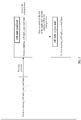
- FIG. 1 is a flowchart of implementing a data editing method according to an embodiment of the present invention.
- the method shown in FIG. 1 is executed by a terminal (Terminal).
- the terminal involved in this embodiment of the present invention may also be referred to as a mobile terminal (Mobile Terminal), a mobile station (Mobile Station, MS), user equipment (User Equipment, UE), and the like.
- the terminal may communicate with one or more core networks by using a radio access network (Radio Access Network, RAN).
- the terminal may be a mobile phone (or referred to as a cellular phone) or a computer with a mobile terminal.
- the terminal may be a portable, pocket-sized, handheld, computer-built in, or in-vehicle mobile apparatus, which exchanges voice and/or data with the radio access network.
- the data editing method according to this embodiment of the present invention includes the following steps.
- S 101 Obtain first gesture information entered by a user.
- the first gesture information entered by the user may be finger joint information, pressing information, double-tap information, or the like.
- the first gesture information is used to create an enlarged area.
- S102 Create an enlarged area according to an indication position indicated on a screen of a terminal by the first gesture information.
- the user may perform an operation on the screen of the terminal according to the first gesture information such as finger joint information, pressing information, or double-tap information.
- the terminal identifies the indication position indicated on the screen of the terminal by the first gesture information, and creates the enlarged area according to the identified indication position.
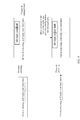
- the terminal may create, by using a method procedure shown in FIG. 2 , the enlarged area according to the indication position indicated on the screen of the terminal by the first gesture information.
- the method procedure includes:
- S1021 Select, in a row direction in which data is displayed and by using the indication position indicated on the screen of the terminal by the first gesture information as a center, M characters as characters to be enlarged, where M is a positive integer.
- S 1022 Create, by invoking an enlargement tool control, an enlarged area in which the M characters can be displayed.
- the enlargement tool control is a tool control that the terminal originally has.
- An existing method may be used to display the M characters in an enlarged manner by using the enlargement tool control. This is not limited in this embodiment of the present invention.
- S103 Obtain second gesture information entered by the user, and adjust the enlarged area to be in a stationary state or a movable state.
- the second gesture information is entered by the user and is used to adjust the enlarged area to be in the stationary state or the movable state.
- Data within the enlarged area in the stationary state or the movable state is in a non-editable state.
- S104 Obtain an operation performed by the user on the enlarged area in the stationary state or the movable state, and adjust the enlarged area in the stationary state or the movable state according to the operation by the user on the enlarged area in the stationary state or the movable state.
- the user may perform an operation on the enlarged area in the stationary state or the movable state.
- the terminal adjusts the enlarged area according to the operation performed by the user on the enlarged area, to make it convenient for the user to edit data content displayed within the enlarged area.
- the user may edit, at a fixed position, the data content displayed within the enlarged area, improving operability of a data editing function within the enlarged area.
- the user may adjust a position of the enlarged area in the movable state.
- the operation performed on the enlarged area may be moving a cursor within the enlarged area, or may be moving the enlarged area by sliding a finger, or may be entering gesture information.
- the adjustment performed on the enlarged area may be moving the enlarged area, to move the enlarged area to a position convenient for the user to perform editing. According to an actual case, in a process of moving the enlarged area, the data content displayed in an enlarged manner within the enlarged area may remain unchanged.
- the data content displayed in an enlarged manner within the enlarged area may also be changed, to make it convenient for the user to display data content at each position in an enlarged manner, and edit the data content displayed in an enlarged manner.
- a second indication position that is on the screen of the terminal and that corresponds to the adjusted enlarged area can be determined.
- Data displayed in an enlarged manner is edited within the adjusted enlarged area, and the data displayed in an enlarged manner is data indicated by the second indication position.
- the data content displayed in an enlarged manner within the adjusted enlarged area is the data indicated by the second indication position corresponding to the enlarged area. Therefore, as an enlarged area is moved, data content displayed in an enlarged manner within the enlarged area is also changed into data content indicated by a position of the adjusted enlarged area, so that the user edits the data content more easily and conveniently.
- S105 Obtain third gesture information entered by the user, activate, according to the third gesture information, data displayed in an enlarged manner within the adjusted enlarged area to an editable state, and edit the data displayed in an enlarged manner within the adjusted enlarged area.
- the enlarged area is in the stationary state or the movable state, and the data within the enlarged area is in the non-editable state.
- the user may enter the third gesture information, and activate the data within the enlarged area to the editable state according to the third gesture information.
- the third gesture information includes, but is not limited to: finger joint information, pressing information, and double-tap information.
- an enlarged area is pre-created according to an indication position indicated by first gesture information entered by a user. Then, the created enlarged area is adjusted, according to second gesture information entered by the user, to be in a stationary state or a movable state, and is further adjusted. Then, data displayed in an enlarged manner within the adjusted enlarged area is edited. In this way, the user can conveniently and accurately adjust a position of a cursor when performing editing, and the user can adjust a position of the enlarged area, improving operation flexibility of a data editing function.
- the first gesture information entered by the user may be finger joint information, pressure pressing information, double-tap information, or the like. Specific gesture information is not limited in this embodiment of the present invention, and pressure pressing is used below as an example for description.
- the screen of the terminal may be a touchscreen, and the user may directly perform pressure pressing on the screen of the terminal by using a finger.
- the terminal detects that the first gesture information entered by the user is pressure pressing, and determines a position of the pressure pressing. As shown in FIG. 3 , the position of the pressure pressing is between characters “your” and “mail”, so that according to the position of the pressing and by using the position of the pressing as a center, characters "will", “reply”, "your” and “mail” may be selected as data content to be displayed in an enlarged manner.
- the terminal After determining the data content to be displayed in an enlarged manner, the terminal invokes an enlargement tool control, and displays the characters "will", “reply”, “your” and “mail” in an enlarged manner. That is, an enlarged area is created according to the position indicated by the pressing gesture input by the user. An area framed within a dash-line box in the figure is the enlarged area needing to be created.
- a cursor may be moved within the enlarged area. As shown in FIG. 3 , the cursor may be moved to the left or the right, and text editing is performed.
- the enlarged area may be removed by entering gesture information by the user.
- the user may further perform pressure pressing on the screen of the terminal, to remove the enlarged area.
- the user may adjust the enlarged area. That is, the enlarged area may be adjusted according to an input operation performed by the user on the enlarged area.
- the adjustment of the enlarged area may have the following cases.
- the operation performed by the user on the enlarged area is moving the cursor within the enlarged area
- a position of the moved cursor within the enlarged area is detected, and the enlarged area is adjusted according to the position to which the cursor is moved.
- the enlarged area is moved to the left by N characters by using the cursor as a start position, where N is a positive integer; or if the cursor is moved to a rightmost edge of the enlarged area, the enlarged area is moved to the right by N characters by using the cursor as a start position, where N is a positive integer.
- FIG. 5 is a schematic diagram of adjusting the enlarged area according to movement of the cursor within the enlarged area. After the cursor is moved to the leftmost edge of the enlarged area, the enlarged area is moved to the left by eight characters, and data content at a second indication position corresponding to the adjusted enlarged area is displayed in an enlarged manner within the adjusted enlarged area, to implement that as the cursor moves, the enlarged area automatically extends to display the data content in an enlarged manner.
- FIG. 5 describes an example in which the cursor is moved to the left in a row direction in which data is displayed. An implementation process in which the cursor is moved to the right is similar to this, and is not described in detail herein.
- the enlarged area may be adjusted in the following manner according to the operation performed by the user on the enlarged area: if the operation performed by the user on the enlarged area is moving the enlarged area, determining a moving direction of the enlarged area; and moving the enlarged area step by step in the moving direction according to a stepping unit, where the stepping unit is a minimum unit determined according to the moving direction for moving the enlarged area.
- the moving direction in which the user moves the enlarged area is a horizontal direction, and the horizontal direction involved in this embodiment of the present invention is the row direction in which data is displayed, the enlarged area is moved, by using a center of the enlarged area as an origin and by using at least one character string as the stepping unit, step by step in the row direction in which data is displayed, as shown in FIG. 6 .
- FIG. 6 describes an example in which the user slides a finger to the left in the horizontal direction, that is, the enlarged area is moved to the left.
- An implementation process in which the enlarged area is moved to the right is similar to this, and is not described in detail herein.
- the enlarged area is moved step by step in the row direction in which data is displayed, so that the data content indicated by the second indication position corresponding to the enlarged area whose position has been adjusted is complete data.
- the character string may be a one-byte English character, and a two-byte Chinese character.
- a moving speed of moving the enlarged area by the user may be controlled by a speed at which the finger of the user is slid within the enlarged area. If the finger is slid to the leftmost edge or the rightmost edge of the enlarged area, and stays for a period of time, where the period of time may be preset, it indicates that the enlarged area is kept being moved to the left or the right.
- the enlarged area may be moved step by step by using at least one character string as the stepping unit, until the enlarged area is moved to the leftmost edge or the rightmost edge of the screen of the terminal.
- the moving direction in which the user moves the enlarged area is a vertical direction
- the vertical direction is a column direction in which data is displayed, by using a center of the enlarged area as an origin and by using at least one integer row as the stepping unit, the enlarged area is moved step by step in the column direction in which data is displayed, as shown in FIG. 7 .
- FIG. 7 describes an example in which the user slides a finger upwardly in the vertical direction, that is, the enlarged area is moved upwardly.
- An implementation process in which the enlarged area is moved downwardly is similar to this, and is not described in detail herein.
- the enlarged area is moved step by step in the column direction in which data is displayed, so that there is a vertical correspondence in the vertical direction between data content displayed in an enlarged manner within the enlarged area whose position has been adjusted and data content displayed within the enlarged area whose position is not adjusted. For example, there are M characters in the enlarged area that is not adjusted. After the enlarged area is moved upwardly by one row, M straight upward characters are displayed within the enlarged area.
- the moving speed of moving the enlarged area by the user may be controlled by a speed at which the finger of the user is slid within the enlarged area. If the finger is slid to a bottom edge or a top edge of the enlarged area, and stays for a period of time, where the period of time may be preset, it indicates that the enlarged area is kept being moved downwardly or upwardly.
- the enlarged area may be moved step by step by using at least one integer row as the stepping unit, until the enlarged area is moved to the bottom edge or the top edge of the screen of the terminal.
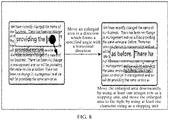
- the moving direction in which the user moves the enlarged area is an angular direction which forms a specified angle with the row direction in which data is displayed, by using a center of the enlarged area as an origin, the enlarged area is moved step by step by using at least one integer row as the stepping unit, in a column direction in which data is displayed and that corresponds to the angular direction, and the enlarged area is moved by using at least one integer row as the stepping unit, in a row direction in which data is displayed and that corresponds to the angular direction, as shown in FIG. 8 .
- the enlarged area is moved step by step by using at least one integer row as the stepping unit, in the column direction in which data is displayed and that corresponds to the angular direction, and is moved by using at least one integer row as the stepping unit, in the row direction in which data is displayed and that corresponds to the angular direction, so that there is a correspondence between the data content displayed in an enlarged manner in the enlarged area whose position has been adjusted and the data content displayed within the enlarged area whose position is not adjusted.
- the moving speed of moving the enlarged area by the user may be controlled by a speed at which the finger of the user is slid within the enlarged area. If the finger stays for a period of time in a process of sliding in the angular direction, the period of time being preset, it indicates that the enlarged area is moved in the forward direction of the angular direction from time to time, until to an edge of the screen of the terminal.
- a third case is a third case:
- the second gesture information includes, but is not limited to: finger joint information, pressing information, and double-tap information.
- the terminal may adjust, according to the second gesture information entered by the user, the enlarged area to be in the movable state. That is, the user may move the enlarged area, including: movement in a horizontal direction, in a vertical direction, or in an angular direction that forms an angle with the horizontal direction, as involved in the foregoing embodiments.
- the enlarged area is adjusted to a position convenient for an operation, and data content displayed within the enlarged area is edited.
- the terminal may further adjust, according to the second gesture information entered by the user, the enlarged area to be in the stationary state, that is, the enlarged area is non-movable, so that the user can edit, at a fixed position, the data content displayed within the enlarged area, improving operability of a data editing function within the enlarged area.
- the enlarged area is in the stationary state or the movable state, and the data within the enlarged area is in a non-editable state.
- the user may enter third gesture information, and activate the data within the enlarged area to an editable state according to the third gesture information.
- the third gesture information includes, but is not limited to: finger joint information, pressing information, and double-tap information.
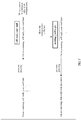
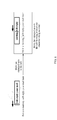
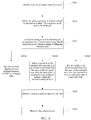
- FIG. 9 For a schematic diagram of adjusting an enlarged area to be in a stationary state or a movable state according to an embodiment of the present invention, refer to FIG. 9 and FIG. 10 .
- a user makes the enlarged area in the movable state by entering second gesture information such as pressure pressing information, finger joint information, or double-tap information.
- the enlarged area in the movable state may be moved in any direction according to an input operation by the user on the enlarged area.
- data in the enlarged area is in a non-editable state, but data content displayed in an enlarged manner within the enlarged area is changed as a position of the enlarged area changes.
- third gesture information such as pressing information, finger joint information, or double-tap information
- the data within the enlarged area may be activated to an editable state, and the user edits the data content displayed in an enlarged manner within the enlarged area.
- the user may enter fourth gesture information such as pressing information, finger joint information, or double-tap information, and remove the enlarged area according to the fourth gesture information.
- a user makes, according to second gesture information such as pressure pressing information, finger joint information, or double-tap information, the enlarged area to be in the stationary state.
- the enlarged area in the stationary state cannot be moved, and the enlarged area in the stationary state is in a non-editable state.
- third gesture information such as pressing information, finger joint information, or double-tap information
- data within the enlarged area may be activated to an editable state, and the user edits data content displayed in an enlarged manner within the enlarged area.
- fourth gesture information such as pressing information, finger joint information, or double-tap information, and remove the enlarged area according to the fourth gesture information.
- FIG. 11 is another flowchart of a data content editing method according to an embodiment of the present invention. As shown in FIG. 11 , the method includes:
- an enlarged area is pre-created according to an indication position indicated by first gesture information entered by a user. Then, according to second gesture information entered by the user, the created enlarged area is moved, and set to be in a movable state or a stationary state. Data content at an indication position indicated by the second gesture information is displayed in an enlarged manner within the adjusted enlarged area, and data displayed in an enlarged manner is edited.
- the user can conveniently and accurately adjust a position of a cursor when performing editing, and the user can adjust a position of the enlarged area, further improving operation flexibility of a data editing function.
- an embodiment of the present invention provides a data editing apparatus 100.
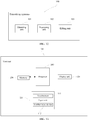
- the data editing apparatus 100 includes an obtaining unit 101, a processing unit 102, and an editing unit 103.
- the obtaining unit 101 is configured to obtain first gesture information, second gesture information, and third gesture information entered by a user, and is configured to obtain an operation performed by the user on an enlarged area in a stationary state or a movable state, where the first gesture information is used to create the enlarged area, the second gesture information is used to adjust the enlarged area to be in the stationary state or the movable state, and the third gesture information is used to activate data displayed in an enlarged manner within the adjusted enlarged area to an editable state;
- the processing unit 102 is configured to create the enlarged area according to an indication position indicated on a screen of a terminal by the first gesture information obtained by the obtaining unit 101.
- the processing unit 102 is further configured to adjust, according to the second gesture information obtained by the obtaining unit 101, the enlarged area to be in the stationary state or the movable state, where data within the enlarged area in the stationary state or the movable state is in a non-editable state.
- the processing unit 102 is further configured to adjust the enlarged area in the stationary state or the movable state according to the operation that is performed by the user on the enlarged area in the stationary state or the movable state and that is obtained by the obtaining unit 101, where if the enlarged area is in the stationary state, the enlarged area is adjusted to a fixed position on the screen of the terminal, or if the enlarged area is in the movable state, a position of the enlarged area in the movable state is adjusted according to the operation performed by the user on the enlarged area in the movable state.
- the editing unit 103 is configured to activate the data displayed in an enlarged manner within the adjusted enlarged area to the editable state according to the third gesture information entered by the user and obtained by the obtaining unit 101, and edit the data displayed in an enlarged manner within the adjusted enlarged area.
- the processing unit 102 is specifically configured to create, in the following manner, the enlarged area according to the indication position indicated on the screen of the terminal by the first gesture information:
- the processing unit 102 is specifically configured to adjust, in the following manner, a position of the enlarged area in the movable state according to the operation performed by the user on the enlarged area in the movable state: if the operation performed by the user on the enlarged area in the movable state is moving a cursor within the enlarged area in the movable state, detecting a position of the moved cursor within the enlarged area in the movable state; and if the cursor is moved to a leftmost edge of the enlarged area in the movable state, moving the enlarged area in the movable state to the left by N characters by using the cursor as a start position, where N is a positive integer; or if the cursor is moved to a rightmost edge of the enlarged area in the movable state, moving the enlarged area in the movable state to the right by N characters by using the cursor as a start position, where N is a positive integer.
- the processing unit 102 is specifically configured to adjust, in the following manner, a position of the enlarged area in the movable state according to the operation performed by the user on the enlarged area in the movable state: if the operation performed by the user on the enlarged area in the movable state is moving the enlarged area, determining a moving direction; and moving the enlarged area in the movable state step by step in the moving direction according to a stepping unit, where the stepping unit is a minimum unit determined according to the moving direction for moving the enlarged area.
- the processing unit 102 is specifically configured to move, in the following manner, the enlarged area in the movable state step by step in the moving direction according to the stepping unit:
- the first gesture information, the second gesture information and the third gesture information that are obtained by the obtaining unit 101 each include finger joint information, pressing information, or double-tap information.
- the obtaining unit 101 is further configured to obtain fourth gesture information entered by the user; and the processing unit 102 is further configured to remove the enlarged area according to the fourth gesture information obtained by the obtaining unit 101.
- an enlarged area is pre-created according to an indication position indicated by first gesture information entered by a user. Then, the created enlarged area is adjusted, according to second gesture information entered by the user, to be in a stationary state or a movable state, and is further adjusted. Then, data displayed in an enlarged manner is edited within the adjusted enlarged area.
- the user can conveniently and accurately adjust a position of a cursor when performing editing, and the user can adjust a position of the enlarged area, improving operation flexibility of a data editing function.
- the data editing apparatus 100 involved in this embodiment of the present invention may be a handheld device, an in-vehicle device, a wearable device, a computing device, and various user equipment (User Equipment, UE), mobile stations (Mobile station, MS) terminals (terminal), terminal devices (Terminal Equipment), and the like.
- UE User Equipment
- MS mobile stations
- terminal terminal
- Terminal Equipment Terminal Equipment
- FIG. 13 shows a structural block diagram of the terminal 100.
- the terminal 100 may include an input unit 110, a display unit 120, a memory 130, a processor 140, and other components.
- FIG. 12 is merely an example of the terminal 100, and does not constitute a limitation to the terminal 100, and the terminal 100 may include more or fewer components than those shown in the figure, or some components may be combined, or different components may be used.
- the input unit 110 may be configured to receive entered figure or character information, and generate key signal input related to a user setting and function control of the portable multi-function apparatus.
- the input unit 110 may include a touchscreen 111 and another input device 112.
- the touchscreen 111 may collect a touch operation of a user on or near the touchscreen 111 (such as an operation of the user on or near the touchscreen by using any suitable object such as a finger, a joint, or a touch pen), and drive a corresponding connection apparatus according to a preset program.
- the touchscreen may detect a touch action of the user on the touchscreen, convert the touch action into a touch signal and send the touch signal to the processor 140.
- the touchscreen can receive and execute a command sent from the processor 140.
- the touch signal includes at least information about touch point coordinates.
- the touchscreen 111 may provide an input interface and an output interface between the terminal 100 and the user.
- the touchscreen may be a resistive, capacitive, infrared, and surface acoustic wave type touchscreen.
- the input unit 110 may further include the another input device.
- the another input device 112 may include, but is not limited to: one or more of a physical keyboard, a functional key (such as a volume control key or a switch key), a trackball, a mouse, and a joystick.
- the display unit 120 may be configured to display data content, information entered by the user, information provided to the user, or various menus of the terminal 100.
- the touchscreen 111 may cover a display panel. After detecting a touch operation on or near the touchscreen 111, the touchscreen 111 transfers the touch operation to the processor 140, to determine a type of the touch event. Then, the processor 140 provides corresponding visual output on the display panel according to the type of the touch event.
- the touchscreen and the display unit may be integrated into one component to implement an input function, an output function, and a display function of the terminal 100.
- the touchscreen combines functions of the touchscreen and the display unit. In some embodiments, the touchscreen and the display unit may be used as two separate components.
- the memory 130 may be configured to store an instruction and data.
- the memory 130 may mainly include an instruction storage area and a data storage area.
- the data storage area can store an association relationship between a joint touch gesture and an application program function.
- the instruction storage area can store an operating system, an instruction required by at least one function, and the like.
- the instruction enables the processor 140 to execute the data editing method involved in the foregoing embodiment of the present invention.
- the processor 140 is a control center of the terminal 100, and is connected to various parts of a mobile phone by using various interfaces and lines.
- the processor 140 performs various functions and data processing of the terminal 100 by running or executing the instruction stored in the memory 130 and invoking the data stored in the memory 130, thereby implementing overall monitoring on the mobile phone.
- the processor 140 may include one or more processing units.
- the processor 140 may be integrated with an application processor and a modem processor.
- the application processor mainly processes an operating system, a user interface, an application program, and the like.
- the modem processor mainly processes wireless communication. It may be understood that the foregoing modem processor may not be integrated into the processor 140.
- the processor and the memory may be implemented on a single chip. In other embodiments, the processor and the memory may be implemented on separate chips.
- the terminal 100 may further include a power source, an external interface, a radio frequency unit, an audio circuit, a speaker, a camera, a flash, and the like, which is not described in detail herein.
Landscapes
- Engineering & Computer Science (AREA)
- Theoretical Computer Science (AREA)
- General Engineering & Computer Science (AREA)
- Physics & Mathematics (AREA)
- General Physics & Mathematics (AREA)
- Human Computer Interaction (AREA)
- Computational Linguistics (AREA)
- General Health & Medical Sciences (AREA)
- Health & Medical Sciences (AREA)
- Audiology, Speech & Language Pathology (AREA)
- Artificial Intelligence (AREA)
- Computer Networks & Wireless Communication (AREA)
- Signal Processing (AREA)
- User Interface Of Digital Computer (AREA)
Applications Claiming Priority (1)
| Application Number | Priority Date | Filing Date | Title |
|---|---|---|---|
| PCT/CN2015/089283 WO2017041254A1 (fr) | 2015-09-09 | 2015-09-09 | Procédé et dispositif d'édition de données |
Publications (2)
| Publication Number | Publication Date |
|---|---|
| EP3336712A1 true EP3336712A1 (fr) | 2018-06-20 |
| EP3336712A4 EP3336712A4 (fr) | 2018-08-29 |
Family
ID=58240525
Family Applications (1)
| Application Number | Title | Priority Date | Filing Date |
|---|---|---|---|
| EP15903361.2A Ceased EP3336712A4 (fr) | 2015-09-09 | 2015-09-09 | Procédé et dispositif d'édition de données |
Country Status (4)
| Country | Link |
|---|---|
| US (1) | US10963143B2 (fr) |
| EP (1) | EP3336712A4 (fr) |
| CN (3) | CN113608653A (fr) |
| WO (1) | WO2017041254A1 (fr) |
Cited By (1)
| Publication number | Priority date | Publication date | Assignee | Title |
|---|---|---|---|---|
| WO2020247308A1 (fr) * | 2019-06-01 | 2020-12-10 | Apple Inc. | Techniques de sélection de texte |
Families Citing this family (4)
| Publication number | Priority date | Publication date | Assignee | Title |
|---|---|---|---|---|
| CN111723554A (zh) * | 2019-03-19 | 2020-09-29 | 北京京东尚科信息技术有限公司 | 一种确定触摸设备文本编辑位置的方法和装置 |
| CN112162681A (zh) * | 2020-07-31 | 2021-01-01 | 维沃移动通信有限公司 | 文本操作执行方法、装置及电子设备 |
| US12045449B2 (en) * | 2021-06-04 | 2024-07-23 | Apple Inc. | Activity stream foundations |
| CN117215474A (zh) * | 2023-11-07 | 2023-12-12 | 深圳市七彩虹禹贡科技发展有限公司 | 一种终端分屏显示方法及系统 |
Family Cites Families (18)
| Publication number | Priority date | Publication date | Assignee | Title |
|---|---|---|---|---|
| US5471578A (en) * | 1993-12-30 | 1995-11-28 | Xerox Corporation | Apparatus and method for altering enclosure selections in a gesture based input system |
| US5999169A (en) * | 1996-08-30 | 1999-12-07 | International Business Machines Corporation | Computer graphical user interface method and system for supporting multiple two-dimensional movement inputs |
| KR100813062B1 (ko) * | 2006-05-03 | 2008-03-14 | 엘지전자 주식회사 | 휴대용 단말기 및 이를 이용한 텍스트 표시 방법 |
| US7856605B2 (en) * | 2006-10-26 | 2010-12-21 | Apple Inc. | Method, system, and graphical user interface for positioning an insertion marker in a touch screen display |
| US20090189862A1 (en) * | 2008-01-24 | 2009-07-30 | Viberg Daniel | Method, computer program product and device for text editing |
| US9032338B2 (en) | 2011-05-30 | 2015-05-12 | Apple Inc. | Devices, methods, and graphical user interfaces for navigating and editing text |
| US9092130B2 (en) * | 2011-05-31 | 2015-07-28 | Apple Inc. | Devices, methods, and graphical user interfaces for document manipulation |
| JP5752572B2 (ja) | 2011-11-24 | 2015-07-22 | シャープ株式会社 | 表示制御装置、表示方法、制御プログラム、および記録媒体 |
| CN103257815A (zh) * | 2012-02-20 | 2013-08-21 | 索尼爱立信移动通讯有限公司 | 一种触摸位置定位方法、文本选择方法、装置及电子设备 |
| CN103677594B (zh) | 2012-09-04 | 2018-04-27 | 中兴通讯股份有限公司 | 文本处理方法和装置 |
| CN103777877A (zh) | 2012-10-22 | 2014-05-07 | 中兴通讯股份有限公司 | 一种触摸屏触摸操作的处理方法及装置 |
| CN103049206B (zh) | 2012-12-21 | 2016-08-03 | 东莞宇龙通信科技有限公司 | 文本编辑方法及通信终端 |
| CN103164163A (zh) | 2013-03-27 | 2013-06-19 | 东莞宇龙通信科技有限公司 | 显示调整的方法及装置 |
| CN104111787B (zh) * | 2013-04-18 | 2018-09-28 | 三星电子(中国)研发中心 | 一种在触摸屏界面上实现文本编辑的方法和装置 |
| WO2015027505A1 (fr) * | 2013-08-31 | 2015-03-05 | 华为技术有限公司 | Procédé de traitement de texte et dispositif à écran tactile |
| CN103902218A (zh) * | 2013-12-27 | 2014-07-02 | 深圳市同洲电子股份有限公司 | 一种移动终端屏幕显示的方法及移动终端 |
| CN103777866B (zh) * | 2014-02-24 | 2019-11-08 | 苏州浩辰软件股份有限公司 | 用于放大镜的数据编辑方法及装置 |
| US9594489B2 (en) * | 2014-08-12 | 2017-03-14 | Microsoft Technology Licensing, Llc | Hover-based interaction with rendered content |
-
2015
- 2015-09-09 US US15/758,729 patent/US10963143B2/en active Active
- 2015-09-09 WO PCT/CN2015/089283 patent/WO2017041254A1/fr not_active Ceased
- 2015-09-09 CN CN202110734740.8A patent/CN113608653A/zh active Pending
- 2015-09-09 EP EP15903361.2A patent/EP3336712A4/fr not_active Ceased
- 2015-09-09 CN CN202110736136.9A patent/CN113608654A/zh active Pending
- 2015-09-09 CN CN201580082890.8A patent/CN108027811B/zh active Active
Cited By (4)
| Publication number | Priority date | Publication date | Assignee | Title |
|---|---|---|---|---|
| WO2020247308A1 (fr) * | 2019-06-01 | 2020-12-10 | Apple Inc. | Techniques de sélection de texte |
| US11379113B2 (en) | 2019-06-01 | 2022-07-05 | Apple Inc. | Techniques for selecting text |
| US12019863B2 (en) | 2019-06-01 | 2024-06-25 | Apple Inc. | Techniques for selecting text |
| EP4567574A3 (fr) * | 2019-06-01 | 2025-08-06 | Apple Inc. | Techniques de sélection de texte |
Also Published As
| Publication number | Publication date |
|---|---|
| CN108027811B (zh) | 2021-06-29 |
| US10963143B2 (en) | 2021-03-30 |
| WO2017041254A1 (fr) | 2017-03-16 |
| CN108027811A (zh) | 2018-05-11 |
| US20180275857A1 (en) | 2018-09-27 |
| EP3336712A4 (fr) | 2018-08-29 |
| CN113608654A (zh) | 2021-11-05 |
| CN113608653A (zh) | 2021-11-05 |
Similar Documents
| Publication | Publication Date | Title |
|---|---|---|
| KR101862123B1 (ko) | 휴대단말기의 입력 장치 및 방법 | |
| JP5204305B2 (ja) | 携帯用端末機におけるパターン認識を用いたユーザインターフェース装置及び方法 | |
| US10146407B2 (en) | Physical object detection and touchscreen interaction | |
| CN104123078B (zh) | 输入信息的方法和设备 | |
| CN105677305B (zh) | 图标管理的方法、装置及终端 | |
| JP6427559B2 (ja) | 手書き入力のための永久同期システム | |
| EP3002664B1 (fr) | Procédé de traitement de texte et dispositif à écran tactile | |
| US10963143B2 (en) | Data editing method and apparatus | |
| CN101689092A (zh) | 提供用于触摸屏设备的滚动机构的方法、装置和计算机程序产品 | |
| US9025878B2 (en) | Electronic apparatus and handwritten document processing method | |
| CN105183184A (zh) | 一种字符处理方法及终端 | |
| WO2017044209A1 (fr) | Changement d'une couche d'interaction sur une interface utilisateur graphique | |
| JP5102894B1 (ja) | 文字入力装置及び携帯端末装置 | |
| JP2014006904A (ja) | タッチ情報認識方法及び電子装置 | |
| JP7023743B2 (ja) | 情報処理装置、情報処理方法、及びプログラム | |
| JPWO2014192156A1 (ja) | 電子機器および処理方法 | |
| KR20150008958A (ko) | 휴대 단말기에서 전자문서 작성 방법 및 장치 | |
| CN104049933A (zh) | 一种信息处理的方法及电子设备 | |
| GB2516345A (en) | Physical object detection and touchscreen interaction | |
| JP2011028356A (ja) | 情報処理装置,プログラム,及び表示要素の装飾方法 | |
| US10635224B2 (en) | Information input method and apparatus for touch screen | |
| CN103399793B (zh) | 一种自动切换同类内容的方法及系统 | |
| EP2871570A2 (fr) | Appareil électronique, procédé et support de stockage | |
| CN105376392A (zh) | 一种移动终端操控方法及装置 | |
| HK1241095A1 (en) | Method and apparatus for rapidly dividing screen, electronic device, display interface and storage medium |
Legal Events
| Date | Code | Title | Description |
|---|---|---|---|
| STAA | Information on the status of an ep patent application or granted ep patent |
Free format text: STATUS: THE INTERNATIONAL PUBLICATION HAS BEEN MADE |
|
| PUAI | Public reference made under article 153(3) epc to a published international application that has entered the european phase |
Free format text: ORIGINAL CODE: 0009012 |
|
| STAA | Information on the status of an ep patent application or granted ep patent |
Free format text: STATUS: REQUEST FOR EXAMINATION WAS MADE |
|
| 17P | Request for examination filed |
Effective date: 20180314 |
|
| AK | Designated contracting states |
Kind code of ref document: A1 Designated state(s): AL AT BE BG CH CY CZ DE DK EE ES FI FR GB GR HR HU IE IS IT LI LT LU LV MC MK MT NL NO PL PT RO RS SE SI SK SM TR |
|
| AX | Request for extension of the european patent |
Extension state: BA ME |
|
| A4 | Supplementary search report drawn up and despatched |
Effective date: 20180801 |
|
| RIC1 | Information provided on ipc code assigned before grant |
Ipc: G06F 17/24 20060101AFI20180726BHEP Ipc: H04W 88/02 20090101ALI20180726BHEP |
|
| DAV | Request for validation of the european patent (deleted) | ||
| DAX | Request for extension of the european patent (deleted) | ||
| STAA | Information on the status of an ep patent application or granted ep patent |
Free format text: STATUS: EXAMINATION IS IN PROGRESS |
|
| 17Q | First examination report despatched |
Effective date: 20210401 |
|
| REG | Reference to a national code |
Ref country code: DE Ref legal event code: R003 |
|
| STAA | Information on the status of an ep patent application or granted ep patent |
Free format text: STATUS: THE APPLICATION HAS BEEN REFUSED |
|
| 18R | Application refused |
Effective date: 20220922 |