EP3343112A1 - Affichage interactif pour un dispositif de cuisson et procédé de fonctionnement dudit affichage interactif - Google Patents
Affichage interactif pour un dispositif de cuisson et procédé de fonctionnement dudit affichage interactif Download PDFInfo
- Publication number
- EP3343112A1 EP3343112A1 EP17197876.0A EP17197876A EP3343112A1 EP 3343112 A1 EP3343112 A1 EP 3343112A1 EP 17197876 A EP17197876 A EP 17197876A EP 3343112 A1 EP3343112 A1 EP 3343112A1
- Authority
- EP
- European Patent Office
- Prior art keywords
- virtual
- touch
- sensitive display
- timeline
- instance
- Prior art date
- Legal status (The legal status is an assumption and is not a legal conclusion. Google has not performed a legal analysis and makes no representation as to the accuracy of the status listed.)
- Withdrawn
Links
Images



Classifications
-
- G—PHYSICS
- G06—COMPUTING OR CALCULATING; COUNTING
- G06F—ELECTRIC DIGITAL DATA PROCESSING
- G06F3/00—Input arrangements for transferring data to be processed into a form capable of being handled by the computer; Output arrangements for transferring data from processing unit to output unit, e.g. interface arrangements
- G06F3/01—Input arrangements or combined input and output arrangements for interaction between user and computer
- G06F3/048—Interaction techniques based on graphical user interfaces [GUI]
- G06F3/0487—Interaction techniques based on graphical user interfaces [GUI] using specific features provided by the input device, e.g. functions controlled by the rotation of a mouse with dual sensing arrangements, or of the nature of the input device, e.g. tap gestures based on pressure sensed by a digitiser
- G06F3/0488—Interaction techniques based on graphical user interfaces [GUI] using specific features provided by the input device, e.g. functions controlled by the rotation of a mouse with dual sensing arrangements, or of the nature of the input device, e.g. tap gestures based on pressure sensed by a digitiser using a touch-screen or digitiser, e.g. input of commands through traced gestures
- G06F3/04886—Interaction techniques based on graphical user interfaces [GUI] using specific features provided by the input device, e.g. functions controlled by the rotation of a mouse with dual sensing arrangements, or of the nature of the input device, e.g. tap gestures based on pressure sensed by a digitiser using a touch-screen or digitiser, e.g. input of commands through traced gestures by partitioning the display area of the touch-screen or the surface of the digitising tablet into independently controllable areas, e.g. virtual keyboards or menus
-
- F—MECHANICAL ENGINEERING; LIGHTING; HEATING; WEAPONS; BLASTING
- F24—HEATING; RANGES; VENTILATING
- F24C—DOMESTIC STOVES OR RANGES ; DETAILS OF DOMESTIC STOVES OR RANGES, OF GENERAL APPLICATION
- F24C7/00—Stoves or ranges heated by electric energy
- F24C7/08—Arrangement or mounting of control or safety devices
- F24C7/082—Arrangement or mounting of control or safety devices on ranges, e.g. control panels, illumination
-
- A—HUMAN NECESSITIES
- A47—FURNITURE; DOMESTIC ARTICLES OR APPLIANCES; COFFEE MILLS; SPICE MILLS; SUCTION CLEANERS IN GENERAL
- A47J—KITCHEN EQUIPMENT; COFFEE MILLS; SPICE MILLS; APPARATUS FOR MAKING BEVERAGES
- A47J37/00—Baking; Roasting; Grilling; Frying
- A47J37/06—Roasters; Grills; Sandwich grills
- A47J37/0623—Small-size cooking ovens, i.e. defining an at least partially closed cooking cavity
- A47J37/0664—Accessories
-
- G—PHYSICS
- G06—COMPUTING OR CALCULATING; COUNTING
- G06F—ELECTRIC DIGITAL DATA PROCESSING
- G06F3/00—Input arrangements for transferring data to be processed into a form capable of being handled by the computer; Output arrangements for transferring data from processing unit to output unit, e.g. interface arrangements
- G06F3/01—Input arrangements or combined input and output arrangements for interaction between user and computer
- G06F3/048—Interaction techniques based on graphical user interfaces [GUI]
- G06F3/0481—Interaction techniques based on graphical user interfaces [GUI] based on specific properties of the displayed interaction object or a metaphor-based environment, e.g. interaction with desktop elements like windows or icons, or assisted by a cursor's changing behaviour or appearance
- G06F3/04817—Interaction techniques based on graphical user interfaces [GUI] based on specific properties of the displayed interaction object or a metaphor-based environment, e.g. interaction with desktop elements like windows or icons, or assisted by a cursor's changing behaviour or appearance using icons
-
- G—PHYSICS
- G06—COMPUTING OR CALCULATING; COUNTING
- G06F—ELECTRIC DIGITAL DATA PROCESSING
- G06F3/00—Input arrangements for transferring data to be processed into a form capable of being handled by the computer; Output arrangements for transferring data from processing unit to output unit, e.g. interface arrangements
- G06F3/01—Input arrangements or combined input and output arrangements for interaction between user and computer
- G06F3/048—Interaction techniques based on graphical user interfaces [GUI]
- G06F3/0484—Interaction techniques based on graphical user interfaces [GUI] for the control of specific functions or operations, e.g. selecting or manipulating an object, an image or a displayed text element, setting a parameter value or selecting a range
- G06F3/04847—Interaction techniques to control parameter settings, e.g. interaction with sliders or dials
-
- H—ELECTRICITY
- H05—ELECTRIC TECHNIQUES NOT OTHERWISE PROVIDED FOR
- H05B—ELECTRIC HEATING; ELECTRIC LIGHT SOURCES NOT OTHERWISE PROVIDED FOR; CIRCUIT ARRANGEMENTS FOR ELECTRIC LIGHT SOURCES, IN GENERAL
- H05B6/00—Heating by electric, magnetic or electromagnetic fields
- H05B6/64—Heating using microwaves
- H05B6/6435—Aspects relating to the user interface of the microwave heating apparatus
-
- G—PHYSICS
- G06—COMPUTING OR CALCULATING; COUNTING
- G06F—ELECTRIC DIGITAL DATA PROCESSING
- G06F2203/00—Indexing scheme relating to G06F3/00 - G06F3/048
- G06F2203/048—Indexing scheme relating to G06F3/048
- G06F2203/04808—Several contacts: gestures triggering a specific function, e.g. scrolling, zooming, right-click, when the user establishes several contacts with the surface simultaneously; e.g. using several fingers or a combination of fingers and pen
Definitions
- the present invention generally relates to cooking devices, and more particularly, to cooking devices having interactive displays.
- Modern day cooking devices often require a user to supply input using a variety of input mechanisms such as buttons, switches, knobs, and the like. As a result, the user may have to rely on one or more of these input mechanisms when operating a particular cooking device. This is not only time consuming, but may lead to errors. Furthermore, current cooking devices often suffer from poor display features for conveying information to the user. As a result, a user is required to invest more time than is necessary in order to extract relevant information from that which is displayed. Accordingly, there is a need for a cooking device that is not only user-intuitive, but offers an enhanced interactive experience.
- a cooking device is provided.
- a touch-sensitive display is configured to display a virtual timeline spanning a period of time, and a virtual track positioned relative to the virtual timeline.
- the virtual track is populated with one or more instance blocks that each represent an operation of the cooking device and each have a start time and a duration that is visually related to the virtual timeline.
- the touch-sensitive display is further configured to register one or more touch events on at least one of the virtual timeline and the virtual track for specifying a delay to the start time of each operation, and in response, shifts the one or more instance blocks along a length of the virtual track such that the one or more instance blocks are positioned relative to the virtual timeline in accordance with the delay.
- a controller is in communication with the touch-sensitive display and is configured to control the operation of one or more heating elements of the cooking device based on the delay.
- a touch-sensitive display for displaying an operation tracking screen for a cooking device.
- the touch-sensitive display includes a virtual timeline spanning a period of time, and at least one virtual progress bar having one or more instance blocks positioned relative to the virtual timeline and each representing an operation of the cooking device.
- a virtual progress indicator is configured to move across the virtual timeline and the at least one virtual progress bar in real time to indicate the progress of the operation represented by each of the instance blocks.
- a method of controlling a cooking device includes the steps of: displaying a virtual timeline spanning a period of time, and a virtual track positioned relative to the virtual timeline, the virtual track being populated with one or more instance blocks that each represent an operation of the cooking device and each having a start time and a duration that is visually related to the virtual timeline; registering one or more touch events on at least one of the virtual timeline and the virtual track for specifying a delay to the start time of each operation; in response to registering the one or more touch events, shifting the one or more instance blocks along a length of the virtual track such that the one or more instance blocks are positioned relative to the virtual timeline in accordance with the delay; and controlling the operation of one or more heating elements of the cooking device based on the delay.
- the term "and/or,” when used in a list of two or more items, means that any one of the listed items can be employed by itself, or any combination of two or more of the listed items can be employed.
- the composition can contain A alone; B alone; C alone; A and B in combination; A and C in combination; B and C in combination; or A, B, and C in combination.
- a cooking device is shown in the form of a double oven generally indicated by reference numeral 10.
- the double oven 10 is a wall-mounted or built-in oven, and includes a cabinet 12 that defining two separate oven cavities shown as upper oven cavity 14 and lower oven cavity 16.
- the upper and lower oven cavities 14, 16 are each selectively sealed by a door 18 that is pivotally coupled to the cabinet 12.
- the upper and lower oven cavities 14, 16 each include one or more heating elements 19 operable during one or more modes of operation, and may support one or more repositionable racks 20 in any manner known in the art.
- the details of the double oven 10 provided herein are for illustrative purposes.
- the present disclosure is directed to a user-interface 21 in communication with a controller 22, and is not meant to be limited for use with any particular oven.
- the disclosure provided herein may extend to other devices used for cooking or other applications such as laundry, for example.
- the user-interface 21 includes a touch-sensitive display 24 configured to display a plurality of interactive user-interface screens.
- the touch-sensitive display 24 may be any type known in the art including, but not limited to, resistive, capacitive, acoustic, and infrared.
- the touch-sensitive display 24 is configured to register user-input via one or more touch events to enable a user to make selections related to the operation of the double oven 10.
- the user-input is provided to the controller 22, and in response, the controller 22 controls the operation of the double oven 10 based on the user-input. For example, the controller 22 may operate the heating element(s) 19 of the upper and/or lower cavity 14, 16 to implement one or more user-selected operations therein.
- the touch-sensitive display 24 is configured to display a welcome screen 26 that includes a home menu icon 28, the current date and time, and other selectable features that will not be discussed herein for the sake of brevity.
- the home menu icon 28 is selected via a touch event (i.e., touching the home menu icon 28).
- the touch-sensitive display 24 is configured to register the touch event, and in response, display a home screen 32 depicted in FIG. 3 .
- the home screen 32 enables the user to select between the upper and lower oven cavities 14, 16.
- the home screen 32 includes a virtual button 33 associated with the upper oven cavity 14, and a virtual button 34 associated with the lower cavity 16. Additionally, it is contemplated that the home screen 32 may show other information, selectable options, and the like.
- virtual buttons 33 and 34 each include descriptive indicia exemplarily appearing as text and/or a graphical icon visually relating virtual buttons 33 and 34 to the upper and lower oven cavities 14, 16, respectively.
- a user simply touches the corresponding virtual button 33, 34.
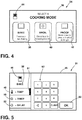
- the touch event selecting the upper oven cavity 14 or the lower oven cavity 16 is registered by the touch-sensitive display 24, and in response, the touch-sensitive display 24 displays a mode selection screen 36 depicted in FIG. 4 .
- the mode selection screen 36 enables a user to select between a plurality of modes of operation (e.g., cooking modes) available to whichever oven cavity 14, 16 was selected from the home screen 32.
- the mode selection screen 36 includes virtual button 38 associated with a bake mode, virtual button 40 associated with a broil mode, and virtual button 42 associated with a proof mode.
- Virtual buttons 38-42 may each include descriptive indicia exemplarily appearing as text and/or a graphical icon visually relating the virtual buttons 38-42 to the corresponding mode of operation.
- the mode selection screen 36 includes an oven cavity icon 44 indicating the selected cavity (e.g., upper oven cavity 14).
- a user touches the corresponding virtual button 38-42. It is to be understood that the same modes of operation are generally available to both the upper and lower oven cavities 14, 16. Alternatively, the upper and lower oven cavities 14, 16 may each include different modes of operation in addition to ones not specifically mentioned herein.
- the touch-sensitive display 24 displays a mode settings screen 46 depicted in FIGS. 5-9 .
- the mode settings screen 46 enables the user to customize one or more settings related to the mode of operation selected from the mode selection screen 36.
- the mode settings screen 46 includes virtual button 48 associated with a temperature setting, virtual button 50 associated with a timer setting, virtual button 51 associated with an end-stage operation setting, virtual button 52 associated with a delay setting, virtual button 54 associated with a favorites menu, and virtual button 56 associated with an information menu.
- Virtual buttons 48-56 may each include descriptive indicia exemplarily appearing as text and/or a graphical icon visually relating the virtual buttons 48-56 to the corresponding setting or menu option.
- the mode settings screen 46 also includes oven cavity icon 44 indicating the selected cavity (e.g., the upper oven cavity 14), and a mode descriptor 58 embodied as text indicating the selected mode of operation (e.g., BAKE).
- the user first selects virtual button 48 to input the temperature setting, which relates to an operating temperature of the selected mode of operation.
- the temperature setting is inputted by touching virtual button 48 and entering a desired temperature in degrees Celsius or Fahrenheit using virtual number pad 60 depicted in FIG. 5 .
- Virtual button 48 may be highlighted, flashed, or otherwise exhibit a perceptible change in constitution to notify a user of its selection. As exemplarily depicted in FIG. 5 , a portion 61 of virtual button 48 is highlighted when selected by the user. It will be understood that the selection of other virtual buttons may produce similar visual responses.
- the desired temperature may be subsequently displayed on virtual button 48 and may replace any descriptive indicia appearing thereon if necessary.
- each digit of the desired temperature may be displayed dynamically as it is being entered by the user or once the desired temperature has been entered in its entirety and confirmed by the user.
- the user may confirm entry of the desired temperature by touching virtual confirmation button 62 or touching another virtual button, typically virtual button 50.
- Selection of virtual button 50 enables the user to input the duration for the selected mode of operation.
- the duration is inputted by touching virtual button 50 and entering a desired duration using virtual number pad 60.
- the desired duration may be entered in hours, minutes, seconds, or a combination thereof.
- the desired duration may be subsequently displayed on virtual button 50 and may replace any descriptive indicia appearing thereon if necessary.
- the desired duration may be displayed dynamically as it is being entered by the user or once the desired duration has been entered in its entirety and confirmed by the user. The user confirms the desired duration by touching virtual confirmation button 62.
- the touch-sensitive display 24 is configured to display virtual button 51 on the mode settings screen 46 depicted in FIGS. 6-9 .
- the virtual button 51 appears between virtual buttons 50 and 52.
- Selection of virtual button 51 enables the user to specify an end-stage operation for supplementing the selected mode of operation.
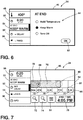
- the end-stage operation setting is inputted by touching virtual button 51, thereby prompting a list 64 of available end-stage operations to be displayed on the mode settings screen 46 depicted in FIG. 6 .
- the end-stage operations are exemplarily shown as a "Hold Temperature” operation, a "Keep Warm” operation, and a “Turn Off” operation, each of which is selectable via a touch event.
- Selection of the "Hold Temperature” operation specifies for the selected temperature setting to be maintained for a period of time after the expiration of the selected timer setting.
- Selection of the "Keep Warm” operation specifies for the selected temperature to be adjusted, if necessary, to a predetermined temperature that is ideal for keeping food warm and is maintained for a period of time after the expiration of the selected timer setting.
- selection of the "Turn Off” operation specifies for the mode of operation to be immediately ended after the expiration of the selected timer setting. The selection of an end-stage operation is confirmed by touching confirmation button 62. It is contemplated that the selected end stage operation (e.g., the "Keep Warm” operation) may be displayed on virtual button 51 and may replace any descriptive indicia appearing thereon if necessary.
- the user may specify the duration for the selected end stage operation. It should be appreciated, however, that the user is not necessarily required to select an end stage operation. For example, the "Turn OFF" operation or other operation may be provided as default, thereby allowing the user to skip the selection of an end stage operation.
- the delay setting enables the user to adjust or delay a start time of the selected mode of operation, and is next selected by touching the virtual button 52, which prompts the touch-sensitive display 24 to display a virtual timeline 66 and a virtual track 68 on the mode settings screen 46 depicted in FIG. 7 .
- the virtual timeline 66 includes digital time indicia 70 located at intervals along the virtual timeline 66 and adjustable using virtual toggle buttons 72 and 74.
- the virtual timeline 66 spans a time period including the current time up to a later time.
- the virtual track 68 may be positioned directly above the virtual timeline 66 and is populated with a number of instance blocks, each representing an operation selected previously by the user and each having a start time and a duration that is visually related to the virtual timeline 66.
- the virtual track 68 includes a first instance block 76 corresponding to the selected mode of operation (e.g., the bake operation) followed by a second instance block 78 corresponding to the selected end stage operation (e.g., the "Keep Warm" operation).
- the first and second instance blocks 76, 78 may be displayed in different colors and may include text displayed thereon to indicate the nature of the operation.
- the first and second instance blocks 76, 78 are each scaled based on their duration and are initially positioned in order at the earliest available start time relative to the virtual timeline 66.
- the first instance block 76 is scaled according to the selected timer setting (e.g., 20 minutes) and is positioned at the earliest available start time whereas the second instance block 78 is scaled according to a user-specified duration (e.g., 1 hour) and is positioned after the first instance block 76.
- a corresponding end time block 79 may be displayed on the mode settings screen 46.
- the end time block 79 includes a projected end time (e.g., 4:05 PM) for the selected mode of operation based on the position of the first instance block 76 relative to the virtual timeline 66.
- the projected end time may be that of the selected end stage operation based on the position of the second instance block 78 relative to the virtual timeline 66.
- the user performs one or more touch events on the virtual track 68, the virtual timeline 66, or a combination thereof. For example, if the user wishes to delay the start time to a desired start time (e.g., 5 PM) inside the time period of the virtual timeline 66, the user need only touch the corresponding portion (e.g., point 80) of the virtual track 68.
- the touch-sensitive display 24 is configured to register the touch event and responds by shifting the first and second instance blocks 76, 78 along the length of the virtual track 68 such that the first and second instance blocks 76, 78 are positioned relative to the virtual timeline 66 in accordance with the delay. That is, the first instance block 76 is positioned to have its start time coincide with the desired start time and is followed in turn by the second instance block 78.
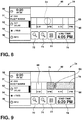
- the user If the user wishes to delay the start time to a desired start time (e.g., 6 PM) outside the time period of the virtual timeline 66, the user first touches a later point (e.g., point 82) on the virtual timeline 66.
- the touch-sensitive display 24 is configured to register the touch event and responds by advancing the virtual timeline 66 and the virtual track 68 as depicted in FIG. 8 .
- the time period of the virtual timeline 66 now includes later times previously unavailable.
- the user touches a point (e.g., point 84) on the virtual track 68 that corresponds to the desired start time inside the virtual timeline 66.
- the touch-sensitive display 24 is configured to register the touch event and responds by shifting the first and second instance blocks 76, 78 along the length of the virtual track 68 such that the first and second instance blocks 76, 78 are positioned relative to the virtual timeline 66 in accordance with the delay. That is, the first instance block 76 is positioned to have its start time coincide with the desired start time and is followed in turn by the second instance block 78 as depicted in FIG. 9 .
- the projected end time in end time block 79 is updated in turn (e.g., 6:20 PM).
- the desired start time may be fine-tuned using toggle buttons 72 and 74, if necessary, and a subsequent touching of virtual button 52 sets the delay setting according to the desired start time.
- the touch-sensitive display 24 registers the touch event and responds by displaying a start screen 86 depicted in FIG. 10 .
- a user desiring no delay need simply touch virtual button 52 twice to accomplish the same.
- a shortcut may be provided to skip the inputting of the delay setting, if desired.
- the start screen 86 includes the virtual timeline 66 and the virtual track 68, both of which are updated, if necessary, to show the instance block(s) at the desired start time, which may or may not be delayed.
- the first and second instance blocks 76, 78 are positioned on the virtual track 68 in accordance with the desired start time of 6 PM, as described previously herein.
- the start screen 86 may also display information relevant to the selected operation(s) such as the selected temperature setting, timer setting, and oven cavity, for example. If satisfied with his or her selections, the user touches virtual start button 88, and in response, the controller 22 controls the operation of the double oven 10 according to the selections made by the user.
- the virtual start button 88 may be positioned on the virtual track 68 or anywhere else on the start screen 86.
- the virtual start button 88 may also be made accessible from the mode settings screen 46 depicted in FIGS. 7 , 9 , and 10 , if desired.
- the start screen 86 includes virtual button 90 with which the user is able to select (via a touch event) an unused oven cavity (e.g., lower oven cavity 16). From there, the user may make selections related to one or more operations to be carried out in the unused oven cavity whilst navigating through the mode selection screen 36 and the mode settings screen 46, as described herein with reference to FIGS. 4-9 . In this manner, a number of operations may be assigned to both oven cavities in relatively quick succession.
- an unused oven cavity e.g., lower oven cavity 16
- the user may touch virtual button 54 ( FIGS. 6-9 ) and select a favorite operation to be performed in the selected cavity at predefined settings.
- the favorite operation may be selected from a list of favorites stored in memory and may have a name previously assigned thereto by the user.
- the start screen 86 is automatically updated in accordance with the predefined settings of the favorite operation.
- the user need only touch virtual start button 88 to set the favorite operation in motion.
- the user may touch virtual button 56 and select a recent operation from a running list of recent operations stored in memory.
- the recent operation includes predefined settings and is selectable via a touch event, thereby causing the start screen 86 to be automatically updated in accordance with the predefined settings of the recent operation.
- the user need only touch virtual start button 90 to set the recent operation in motion.
- selection of virtual button 56 enables the user to access a variety of information concerning double oven 10.
- the information may be embodied as text, images, and/or videos serving to assist the user in understanding and employing the features of the double oven 10 as well as general troubleshooting.
- the mode settings screen 46 includes a virtual navigation icon 91, that when touched, enables the user to navigate the various screens and menus described herein.
- the touch-sensitive display 24 Upon registering a touch event on virtual start button 88, the touch-sensitive display 24 is configured to display an operation tracking screen 92 depicted in FIG. 11 .
- the operation tracking screen 92 enables the user to visually track the progress of one or more selected operation(s) intended to be carried out in a selected oven cavity or cavities.
- the operation tracking screen 92 includes a virtual timeline 94 and at least one virtual progress bar such as virtual progress bar 96, which is positioned relative the virtual timeline 94.
- the virtual timeline 94 includes digital time indicia 98 located at intervals along the virtual timeline 94.
- the virtual timeline 94 spans a time period including a past time, the current time, and a later time.
- the virtual progress bar 96 includes a plurality of instance blocks, exemplarily shown as instance blocks 100-106, each representing a selected operation intended to be carried out in the lower oven cavity 16, and each being scaled by its duration relative the virtual timeline 94.
- Each operation, along with its start time and duration, may be selected via user-input or otherwise automatically implemented by the controller 22.
- the virtual progress bar 96 is located directly below the virtual timeline 94 to visually associate the virtual progress bar 96 with the lower oven cavity 16.
- a virtual progress bar e.g., virtual progress bar 96'
- Virtual progress bar 96' may be displayed at its illustrated position relative to the virtual timeline 94 as a result of selections made previously, or subsequent to touching virtual button 108 and making selections related to operations intended to be carried out in the upper oven cavity 14 pursuant to any of the methodologies described previously herein.
- one or both of virtual progress bars 96 and 96' may be displayed based on whether operations are intended to be carried out in one or both of the upper and lower oven cavities 14, 16.
- the relative positions of the virtual progress bars 96, 96' are provided for purposes of illustration and are independent of one another.
- a virtual progress bar may be located beyond the time period of the virtual timeline 94 such that is it not visible until the virtual timeline 94 is advanced.
- instance block 100 represents a preheating operation that ends once the temperature in the lower oven cavity 16 reaches a selected temperature setting (e.g., 325°F) for a first mode of operation (e.g., a bake operation) represented by instance block 104.
- Instance block 102 represents a maintenance operation whereby the selected temperature setting is maintained up until the scheduled start time of the first mode of operation.
- instance block 106 represents a second mode of operation (e.g., a broil operation) that commences after the scheduled duration of the first mode of operation.
- instance block 106 may represent an end-stage operation (e.g., the "Keep Warm" operation).
- the scheduled start times and durations for the operations associated with instance blocks 100-106 may be specified by the user according to any of the methodologies described previously herein.
- the operation tracking screen 92 also includes a virtual progress indicator 110 that is configured to move across the virtual timeline 94 and virtual progress bar 96 in real time in order to indicate the progress of the operation(s) relative to the virtual timeline 94.
- the virtual progress indicator 110 is embodied as a vertical bar and its position relative the virtual timeline 94 and virtual progress bar 96 indicates that the operations represented by instance blocks 100 and 102 have ended, the operation represented by instance block 104 is in progress, and the operation represented by instance block 106 has not yet started. Additionally, the position of the virtual progress indicator 110 indicates that the operation(s) of virtual progress bar 96' have yet to start. It is contemplated that the instance blocks 100-106 of virtual progress bar 96 may each be displayed in different colors or exhibit other distinguishing visual effects. The instance block(s) of virtual progress bar 96 may exhibit similar visual effects.
- instance block 104 may be highlighted or made to flash in order to indicate that the associated operation is in progress. Additionally or alternatively, text indicating an operation in progress may be flashed inside the virtual progress bar 96 or elsewhere on the operation tracking screen 92. As is further illustrated, information related to an operation in progress may be displayed on the operation tracking screen 92. Such information may include an operation descriptor (e.g., BAKE), a temperature setting (e.g., 325°F), and a countdown of a timer setting related to an operation in progress.
- an operation descriptor e.g., BAKE
- a temperature setting e.g., 325°F
- a countdown of a timer setting related to an operation in progress.
- Additional information that may be displayed on the operation tracking screen 92 includes the oven cavity icon 44, the start time (e.g., 5:07 PM), a projected end time (e.g., 6:48 PM), and the current time (e.g., 6:03 PM).
- Information related to operations carried out in the lower oven cavity 16 is displayed below the virtual timeline 94 for visual reference.
- similar information (not shown) related to operations carried out in the upper oven cavity 14 is displayed above the virtual timeline 94.
- the instance blocks of the virtual progress bars 96 and 96' may be displayed concurrently, or in progression based on the position of the virtual progress indicator 110. For example, each of the instance blocks is progressively displayed when the virtual progress indicator 110 reaches its scheduled start time. Thus, by virtue of the position of the virtual progress indicator 110 in the depicted embodiment, only instance blocks 100-104 are displayed whereas instance block 106 is hidden until the virtual progress indicator 110 reaches its scheduled start time. Likewise, the instance block(s) of virtual progress bar 96' are hidden. In some embodiments, it is contemplated that the instance blocks (e.g., instance blocks 100 and 102) representing completed operations may be subsequently hidden or otherwise obscured to indicate their passing.
- a virtual pointer icon 112 may be displayed concurrently or in progression to enable the user to ascertain a start point for a mode of operation.
- a virtual pointer icon 112 is assigned to each of instance blocks 104 and 106.
- the virtual timeline 94 is advanced such that later times become available for display. As a result, the remaining portion of virtual progress bar 96' will become displayed on operation tracking screen 92.
- the user may be notified that the operation(s) carried out in the upper and/or lower cavity 14, 16 has completed. For example, a text notification may be displayed on the operation tracking screen 92.
- the user may also save the completed operation(s) to favorites and assign a name thereto. Additionally, the completed operation(s) are automatically added to the list of recent operations.
- the double oven 10 is configured to operate in a showroom mode, whereby the controller 22 is prevented from controlling the operation of the heating element(s) 19.
- the touch-sensitive display 24 remains operational to allow the user to navigate through the various screens and menus described herein for demonstration and viewing purposes. For example, the user may still make selections on the mode settings screen 46, including specifying a delay, and may subsequently track the progress of a selected operation(s) via the operation tracking screen 92. It is further contemplated that the touch-screen display 24 and related functionality may be presented on a webpage for similar purposes.
- a potential purchaser of the double oven 10 may navigate through the various screens and menus in accordance with the methodologies described herein using a mouse or other selection device of a computer displaying the webpage. In this manner, the potential purchaser gains firsthand knowledge and experience with respect to the features of the double oven 10, and as a result, the potential purchaser may make more informed purchasing decisions.
Landscapes
- Engineering & Computer Science (AREA)
- General Engineering & Computer Science (AREA)
- Theoretical Computer Science (AREA)
- Human Computer Interaction (AREA)
- Physics & Mathematics (AREA)
- General Physics & Mathematics (AREA)
- Electromagnetism (AREA)
- Chemical & Material Sciences (AREA)
- Combustion & Propulsion (AREA)
- Mechanical Engineering (AREA)
- Food Science & Technology (AREA)
- User Interface Of Digital Computer (AREA)
- Electric Ovens (AREA)
Applications Claiming Priority (1)
| Application Number | Priority Date | Filing Date | Title |
|---|---|---|---|
| US15/393,319 US10691334B2 (en) | 2016-12-29 | 2016-12-29 | Cooking device with interactive display |
Publications (1)
| Publication Number | Publication Date |
|---|---|
| EP3343112A1 true EP3343112A1 (fr) | 2018-07-04 |
Family
ID=60190595
Family Applications (1)
| Application Number | Title | Priority Date | Filing Date |
|---|---|---|---|
| EP17197876.0A Withdrawn EP3343112A1 (fr) | 2016-12-29 | 2017-10-23 | Affichage interactif pour un dispositif de cuisson et procédé de fonctionnement dudit affichage interactif |
Country Status (2)
| Country | Link |
|---|---|
| US (1) | US10691334B2 (fr) |
| EP (1) | EP3343112A1 (fr) |
Families Citing this family (9)
| Publication number | Priority date | Publication date | Assignee | Title |
|---|---|---|---|---|
| US10757766B2 (en) * | 2016-11-30 | 2020-08-25 | Illinois Tool Works, Inc. | RF oven control and interface |
| USD885414S1 (en) * | 2016-12-30 | 2020-05-26 | Whirlpool Corporation | Appliance display screen or portion thereof with graphic user interface |
| US10191456B2 (en) * | 2017-05-01 | 2019-01-29 | Desktop Metal, Inc. | Method and system for software defined metallurgy |
| KR102567454B1 (ko) * | 2018-01-08 | 2023-08-17 | 삼성전자주식회사 | 조리 과정에 대한 타임라인을 결정할 수 있는 전자 장치 |
| DE102019121443B3 (de) * | 2019-08-08 | 2020-12-10 | Rational Aktiengesellschaft | Verfahren zur Visualisierung einer Programmplanung, Dialogschnittstelle dafür sowie Gargerät dafür |
| CA199798S (en) * | 2020-03-30 | 2024-06-21 | Lg Electronics Inc | Display panel with graphical user interface |
| US20240310052A1 (en) * | 2023-03-13 | 2024-09-19 | Haier Us Appliance Solutions, Inc. | Systems for finishing modes in cooking appliances |
| USD1122950S1 (en) | 2023-12-22 | 2026-04-21 | Electrolux Appliances Aktiebolag | Display panel with graphical user interface for controlling a household appliance |
| USD1103197S1 (en) * | 2024-01-03 | 2025-11-25 | Samsung Electronics Co., Ltd. | Display screen or portion thereof with transitional graphical user interface |
Citations (3)
| Publication number | Priority date | Publication date | Assignee | Title |
|---|---|---|---|---|
| US20110062143A1 (en) * | 2009-09-16 | 2011-03-17 | Whirlpool Corporation | Sliding control system for a cooking appliance |
| US20120003364A1 (en) * | 2009-01-27 | 2012-01-05 | Rational Ag | Method for selecting and arranging program representatives and a cooking device therefor |
| WO2013133486A1 (fr) * | 2012-03-04 | 2013-09-12 | Lg Electronics Inc. | Dispositif, procédé et interface utilisateur chronologique pour commander des dispositifs domestiques |
Family Cites Families (45)
| Publication number | Priority date | Publication date | Assignee | Title |
|---|---|---|---|---|
| JPS60253738A (ja) | 1984-05-29 | 1985-12-14 | Toshiba Corp | 加熱調理装置 |
| US5438180A (en) * | 1993-01-21 | 1995-08-01 | Whirlpool Corporation | Electronic input control for a cooking oven having independent selection of function and sentence programming |
| CA2181842C (fr) | 1995-08-07 | 2007-03-06 | James R. Barger | Minuterie de rechauffement pour four |
| JP3182361B2 (ja) * | 1997-01-27 | 2001-07-03 | 三洋電機株式会社 | 電子レンジ |
| US6847778B1 (en) * | 1999-03-30 | 2005-01-25 | Tivo, Inc. | Multimedia visual progress indication system |
| US6486453B1 (en) | 1999-09-13 | 2002-11-26 | Maytag Corporation | Menu driven control system for a cooking appliance |
| US7022949B2 (en) * | 2003-04-10 | 2006-04-04 | Electrolux Home Products, Inc. | Electric cooking range having multiple-zone power control system and wipe resistant control panel |
| US7186955B2 (en) * | 2001-10-09 | 2007-03-06 | Electrolux Home Products, Inc. | Electronic power control for cooktop heaters |
| US6904969B2 (en) * | 2001-10-15 | 2005-06-14 | Whirlpool Corporation | Time-bake cycle for a refrigerated oven |
| US7131549B2 (en) | 2002-10-18 | 2006-11-07 | Oldemark Llc | Double sided grill with automated control including localized prompting and confirmation of manual operations |
| US6933477B2 (en) | 2003-04-10 | 2005-08-23 | Maytag Corporation | Menu driven control system for a cooking appliance |
| US7496857B2 (en) * | 2003-04-25 | 2009-02-24 | Yahoo! Inc. | Systems and methods for relating events to a date or date range selection |
| US7567981B2 (en) * | 2004-01-08 | 2009-07-28 | Uvarta, Inc. | Storage medium |
| US7516405B2 (en) | 2004-01-12 | 2009-04-07 | International Business Machines Corporation | Displaying help resources |
| US20070158335A1 (en) * | 2004-12-10 | 2007-07-12 | Mansbery David I | Method and control interface for food preparation on a cooking appliance |
| US8676656B2 (en) | 2005-06-09 | 2014-03-18 | Whirlpool Corporation | Method for product demonstration |
| US7476828B2 (en) | 2005-06-10 | 2009-01-13 | Marc Genua | Media microwave oven |
| AU2006284975A1 (en) | 2005-08-30 | 2007-03-08 | Turbochef Technologies, Inc. | Selection systems and methods |
| US20070090185A1 (en) * | 2005-10-25 | 2007-04-26 | Clean Energy Developments Corp. | Device and method for shopping and data collection |
| US8053708B2 (en) * | 2006-11-10 | 2011-11-08 | Electrolux Home Porducts, Inc. | User-configurable interface for a cooking appliance |
| DE102006057923A1 (de) | 2006-12-08 | 2008-06-19 | Rational Ag | Verfahren zum Anzeigen insbesondere eines Aufheiz- oder Abkühlfortschrittes und Gargerät zum Durchführen solch eines Verfahrens |
| EP3840532B1 (fr) * | 2008-03-10 | 2022-08-31 | Panasonic Holdings Corporation | Dispositif de cuisson par induction |
| KR20090127580A (ko) | 2008-06-09 | 2009-12-14 | 삼성전자주식회사 | 디스플레이장치 및 이를 구비한 가전제품 |
| EP2186463B1 (fr) | 2008-11-12 | 2012-01-25 | Electrolux Home Products Corporation N.V. | Appareil domestique avec fonction de mode de démonstration |
| EP2224384A1 (fr) * | 2009-02-25 | 2010-09-01 | Siemens Aktiengesellschaft | Procédé et système de programmation d'un processus de fabrication |
| US20100241962A1 (en) * | 2009-03-23 | 2010-09-23 | Peterson Troy A | Multiple content delivery environment |
| US20110087987A1 (en) | 2009-10-09 | 2011-04-14 | Electrolux Home Products, Inc. | Appliance interface system |
| EP2336837B1 (fr) | 2009-12-17 | 2012-09-12 | Electrolux Home Products Corporation N.V. | Ensemble électrique pour le fonctionnement sélectif d'un appareil domestique dans un mode de démonstration ou mode standard |
| EP2592974B1 (fr) * | 2010-07-15 | 2019-09-11 | Breville PTY Limited | Multicuiseur |
| US10140301B2 (en) * | 2010-09-01 | 2018-11-27 | Apple Inc. | Device, method, and graphical user interface for selecting and using sets of media player controls |
| US20120239762A1 (en) * | 2011-03-14 | 2012-09-20 | Electrolux Home Products, Inc. | Remote Communication Systems and Methods for Appliances |
| US20120331378A1 (en) * | 2011-06-22 | 2012-12-27 | Digitalviews, Inc. | System and method for timeline visualization and interaction |
| US10260754B2 (en) | 2011-07-12 | 2019-04-16 | Viking Range, Llc | Advanced electronic control display |
| US20130079073A1 (en) * | 2011-09-19 | 2013-03-28 | Pejman Sharifi | Next-generation fantasy football |
| US20130277353A1 (en) | 2012-04-23 | 2013-10-24 | Dacor, Inc. | Android controlled oven |
| US9554689B2 (en) | 2013-01-17 | 2017-01-31 | Bsh Home Appliances Corporation | User interface—demo mode |
| WO2014124105A2 (fr) | 2013-02-07 | 2014-08-14 | Electrolux Home Products, Inc. | Interface utilisateur de commande pour appareil, et procédé associé |
| JP6308728B2 (ja) * | 2013-06-18 | 2018-04-11 | キヤノン株式会社 | 放射線撮影システム及び放射線撮影システムの作動方法 |
| JP6432889B2 (ja) * | 2013-10-21 | 2018-12-05 | パナソニックIpマネジメント株式会社 | 操作装置及び操作方法 |
| DE102013113772A1 (de) | 2013-12-10 | 2015-06-11 | Pas Deutschland Gmbh | Verfahren zur Bedienerführung, Blendenbauteil, Herstellung eines Blendenbauteils sowie Haushaltsgerät mit einem Blendenbauteil |
| US9980321B2 (en) * | 2014-03-14 | 2018-05-22 | Spectrum Brands, Inc. | Wirelessly operable cooking appliance |
| CN205433271U (zh) | 2014-08-19 | 2016-08-10 | 美亚知识产权有限公司 | 食物制备系统、控制旋钮、套件和烹饪装置 |
| US20160246645A1 (en) * | 2015-02-23 | 2016-08-25 | Calay Venture S.à. r. I. | Parallel utilization of an electronic device |
| US9361011B1 (en) * | 2015-06-14 | 2016-06-07 | Google Inc. | Methods and systems for presenting multiple live video feeds in a user interface |
| US10983688B2 (en) * | 2016-06-12 | 2021-04-20 | Apple Inc. | Content scrubber bar with real-world time indications |
-
2016
- 2016-12-29 US US15/393,319 patent/US10691334B2/en active Active
-
2017
- 2017-10-23 EP EP17197876.0A patent/EP3343112A1/fr not_active Withdrawn
Patent Citations (3)
| Publication number | Priority date | Publication date | Assignee | Title |
|---|---|---|---|---|
| US20120003364A1 (en) * | 2009-01-27 | 2012-01-05 | Rational Ag | Method for selecting and arranging program representatives and a cooking device therefor |
| US20110062143A1 (en) * | 2009-09-16 | 2011-03-17 | Whirlpool Corporation | Sliding control system for a cooking appliance |
| WO2013133486A1 (fr) * | 2012-03-04 | 2013-09-12 | Lg Electronics Inc. | Dispositif, procédé et interface utilisateur chronologique pour commander des dispositifs domestiques |
Also Published As
| Publication number | Publication date |
|---|---|
| US20180188947A1 (en) | 2018-07-05 |
| US10691334B2 (en) | 2020-06-23 |
Similar Documents
| Publication | Publication Date | Title |
|---|---|---|
| US10691334B2 (en) | Cooking device with interactive display | |
| AU2007302408B2 (en) | Cooking appliance | |
| JP6461147B2 (ja) | 飲料調製システム及び飲料調製のための方法 | |
| US20100198425A1 (en) | Programmable thermostat | |
| US11015827B2 (en) | User interface for boost control of an environmental control system | |
| CN102651991B (zh) | 厨房设备 | |
| CA2910884C (fr) | Systeme de modification rapide pour la programmation d'un thermostat | |
| EP3320270B1 (fr) | Table de cuisson comprenant une unité de commande | |
| US20110062143A1 (en) | Sliding control system for a cooking appliance | |
| CA2894359A1 (fr) | Mise en evidence graphique pour programmation d'une commande | |
| US10996820B2 (en) | Method for displaying an operating menu and activating a cooking appliance | |
| EP3450612A1 (fr) | Machine à laver le linge et procédé de sélection de modes de lavage d'une machine à laver le linge | |
| JP2022098534A (ja) | 加熱調理器 | |
| CN1849484A (zh) | 用于家用器具的和信息显示的控制器 | |
| EP2941091B1 (fr) | Plaque de cuisson à réseau de chauffage configurable libre et commande à écran tactile, procédé pour faire fonctionner une telle plaque et produit de programme informatique | |
| JP6126055B2 (ja) | 操作装置 | |
| EP3473935B1 (fr) | Appareil de cuisson avec fonction de grille sélectionnable par l'utilisateur | |
| US11829563B2 (en) | Method for operating a safety-critical function using a touch sensor | |
| CN114341970B (zh) | 显示组件 | |
| JP2021071231A (ja) | スチームコンベクションオーブン |
Legal Events
| Date | Code | Title | Description |
|---|---|---|---|
| PUAI | Public reference made under article 153(3) epc to a published international application that has entered the european phase |
Free format text: ORIGINAL CODE: 0009012 |
|
| STAA | Information on the status of an ep patent application or granted ep patent |
Free format text: STATUS: THE APPLICATION HAS BEEN PUBLISHED |
|
| AK | Designated contracting states |
Kind code of ref document: A1 Designated state(s): AL AT BE BG CH CY CZ DE DK EE ES FI FR GB GR HR HU IE IS IT LI LT LU LV MC MK MT NL NO PL PT RO RS SE SI SK SM TR |
|
| AX | Request for extension of the european patent |
Extension state: BA ME |
|
| STAA | Information on the status of an ep patent application or granted ep patent |
Free format text: STATUS: THE APPLICATION IS DEEMED TO BE WITHDRAWN |
|
| 18D | Application deemed to be withdrawn |
Effective date: 20190105 |