EP3349471A1 - Dispositif d'affichage d'image et procédé de fonctionnement correspondant - Google Patents
Dispositif d'affichage d'image et procédé de fonctionnement correspondant Download PDFInfo
- Publication number
- EP3349471A1 EP3349471A1 EP17206893.4A EP17206893A EP3349471A1 EP 3349471 A1 EP3349471 A1 EP 3349471A1 EP 17206893 A EP17206893 A EP 17206893A EP 3349471 A1 EP3349471 A1 EP 3349471A1
- Authority
- EP
- European Patent Office
- Prior art keywords
- image display
- display apparatus
- wheel key
- key input
- control device
- Prior art date
- Legal status (The legal status is an assumption and is not a legal conclusion. Google has not performed a legal analysis and makes no representation as to the accuracy of the status listed.)
- Ceased
Links
Images





Classifications
-
- H—ELECTRICITY
- H04—ELECTRIC COMMUNICATION TECHNIQUE
- H04N—PICTORIAL COMMUNICATION, e.g. TELEVISION
- H04N21/00—Selective content distribution, e.g. interactive television or video on demand [VOD]
- H04N21/40—Client devices specifically adapted for the reception of or interaction with content, e.g. set-top-box [STB]; Operations thereof
- H04N21/41—Structure of client; Structure of client peripherals
- H04N21/422—Input-only peripherals, i.e. input devices connected to specially adapted client devices, e.g. global positioning system [GPS]
- H04N21/42204—User interfaces specially adapted for controlling a client device through a remote control device; Remote control devices therefor
- H04N21/42206—User interfaces specially adapted for controlling a client device through a remote control device; Remote control devices therefor characterized by hardware details
- H04N21/42212—Specific keyboard arrangements
-
- G—PHYSICS
- G06—COMPUTING OR CALCULATING; COUNTING
- G06F—ELECTRIC DIGITAL DATA PROCESSING
- G06F3/00—Input arrangements for transferring data to be processed into a form capable of being handled by the computer; Output arrangements for transferring data from processing unit to output unit, e.g. interface arrangements
- G06F3/01—Input arrangements or combined input and output arrangements for interaction between user and computer
- G06F3/03—Arrangements for converting the position or the displacement of a member into a coded form
- G06F3/0304—Detection arrangements using opto-electronic means
- G06F3/0312—Detection arrangements using opto-electronic means for tracking the rotation of a spherical or circular member, e.g. optical rotary encoders used in mice or trackballs using a tracking ball or in mouse scroll wheels
-
- H—ELECTRICITY
- H04—ELECTRIC COMMUNICATION TECHNIQUE
- H04N—PICTORIAL COMMUNICATION, e.g. TELEVISION
- H04N21/00—Selective content distribution, e.g. interactive television or video on demand [VOD]
- H04N21/40—Client devices specifically adapted for the reception of or interaction with content, e.g. set-top-box [STB]; Operations thereof
- H04N21/41—Structure of client; Structure of client peripherals
- H04N21/4104—Peripherals receiving signals from specially adapted client devices
- H04N21/4112—Peripherals receiving signals from specially adapted client devices having fewer capabilities than the client, e.g. thin client having less processing power or no tuning capabilities
-
- H—ELECTRICITY
- H04—ELECTRIC COMMUNICATION TECHNIQUE
- H04N—PICTORIAL COMMUNICATION, e.g. TELEVISION
- H04N21/00—Selective content distribution, e.g. interactive television or video on demand [VOD]
- H04N21/40—Client devices specifically adapted for the reception of or interaction with content, e.g. set-top-box [STB]; Operations thereof
- H04N21/41—Structure of client; Structure of client peripherals
- H04N21/422—Input-only peripherals, i.e. input devices connected to specially adapted client devices, e.g. global positioning system [GPS]
- H04N21/42204—User interfaces specially adapted for controlling a client device through a remote control device; Remote control devices therefor
-
- H—ELECTRICITY
- H04—ELECTRIC COMMUNICATION TECHNIQUE
- H04N—PICTORIAL COMMUNICATION, e.g. TELEVISION
- H04N21/00—Selective content distribution, e.g. interactive television or video on demand [VOD]
- H04N21/40—Client devices specifically adapted for the reception of or interaction with content, e.g. set-top-box [STB]; Operations thereof
- H04N21/41—Structure of client; Structure of client peripherals
- H04N21/422—Input-only peripherals, i.e. input devices connected to specially adapted client devices, e.g. global positioning system [GPS]
- H04N21/42204—User interfaces specially adapted for controlling a client device through a remote control device; Remote control devices therefor
- H04N21/42206—User interfaces specially adapted for controlling a client device through a remote control device; Remote control devices therefor characterized by hardware details
- H04N21/4221—Dedicated function buttons, e.g. for the control of an EPG, subtitles, aspect ratio, picture-in-picture or teletext
-
- H—ELECTRICITY
- H04—ELECTRIC COMMUNICATION TECHNIQUE
- H04N—PICTORIAL COMMUNICATION, e.g. TELEVISION
- H04N21/00—Selective content distribution, e.g. interactive television or video on demand [VOD]
- H04N21/40—Client devices specifically adapted for the reception of or interaction with content, e.g. set-top-box [STB]; Operations thereof
- H04N21/41—Structure of client; Structure of client peripherals
- H04N21/422—Input-only peripherals, i.e. input devices connected to specially adapted client devices, e.g. global positioning system [GPS]
- H04N21/42204—User interfaces specially adapted for controlling a client device through a remote control device; Remote control devices therefor
- H04N21/42206—User interfaces specially adapted for controlling a client device through a remote control device; Remote control devices therefor characterized by hardware details
- H04N21/42212—Specific keyboard arrangements
- H04N21/42213—Specific keyboard arrangements for facilitating data entry
- H04N21/42216—Specific keyboard arrangements for facilitating data entry for quick navigation, e.g. through an EPG
-
- G—PHYSICS
- G06—COMPUTING OR CALCULATING; COUNTING
- G06F—ELECTRIC DIGITAL DATA PROCESSING
- G06F3/00—Input arrangements for transferring data to be processed into a form capable of being handled by the computer; Output arrangements for transferring data from processing unit to output unit, e.g. interface arrangements
- G06F3/01—Input arrangements or combined input and output arrangements for interaction between user and computer
- G06F3/03—Arrangements for converting the position or the displacement of a member into a coded form
- G06F3/033—Pointing devices displaced or positioned by the user, e.g. mice, trackballs, pens or joysticks; Accessories therefor
- G06F3/0362—Pointing devices displaced or positioned by the user, e.g. mice, trackballs, pens or joysticks; Accessories therefor with detection of one-dimensional [1D] translations or rotations of an operating part of the device, e.g. scroll wheels, sliders, knobs, rollers or belts
-
- G—PHYSICS
- G06—COMPUTING OR CALCULATING; COUNTING
- G06F—ELECTRIC DIGITAL DATA PROCESSING
- G06F3/00—Input arrangements for transferring data to be processed into a form capable of being handled by the computer; Output arrangements for transferring data from processing unit to output unit, e.g. interface arrangements
- G06F3/01—Input arrangements or combined input and output arrangements for interaction between user and computer
- G06F3/048—Interaction techniques based on graphical user interfaces [GUI]
- G06F3/0487—Interaction techniques based on graphical user interfaces [GUI] using specific features provided by the input device, e.g. functions controlled by the rotation of a mouse with dual sensing arrangements, or of the nature of the input device, e.g. tap gestures based on pressure sensed by a digitiser
- G06F3/0488—Interaction techniques based on graphical user interfaces [GUI] using specific features provided by the input device, e.g. functions controlled by the rotation of a mouse with dual sensing arrangements, or of the nature of the input device, e.g. tap gestures based on pressure sensed by a digitiser using a touch-screen or digitiser, e.g. input of commands through traced gestures
-
- H—ELECTRICITY
- H04—ELECTRIC COMMUNICATION TECHNIQUE
- H04N—PICTORIAL COMMUNICATION, e.g. TELEVISION
- H04N23/00—Cameras or camera modules comprising electronic image sensors; Control thereof
- H04N23/60—Control of cameras or camera modules
- H04N23/66—Remote control of cameras or camera parts, e.g. by remote control devices
Definitions
- Methods and apparatuses consistent with example embodiments relate to an image display apparatus and a method of operating the same, and more particularly, to an image display apparatus whose operations may be controlled based on wheel-type control operations and a method of operating the same.
- An image display apparatus is a device having a function of displaying an image that a user may view.
- a user may view a broadcast via an image display apparatus.
- An image display apparatus displays an image based on a broadcast signal selected by a user from broadcast signals transmitted from a broadcasting station on a display.
- a smart television which has functions to provide various additional contents, is available.
- a smart TV aims to analyze and provide what a user desires without any manipulation by the user instead of being manually operated according to a user's selection.
- a user of an image display apparatus may have to repeatedly input a key (e.g., left/right directional keys) to adjust a speed of the fast-forward/rewind operations, and an operation not intended by the user may be performed due to an error of key input.
- a key e.g., left/right directional keys
- an image display apparatus including a display configured to display a screen, a communicator configured to communicate with a control device, and a processor configured to control the communicator to transmit an activation signal to the control device, in response to the image display apparatus being in a pre-set state, control the communicator to receive a control signal corresponding to a wheel key input that is sensed by the control device in response to the activation signal being transmitted, and control an operation of the image display apparatus, according to an interaction that is determined based on the control signal that is received and state information of the screen.
- the pre-set state may include a state in which the image display apparatus is controllable by the wheel key input.
- the processor may be further configured to control the display to change the screen, based on the interaction that is determined.
- the processor may be further configured to determine whether the image display apparatus is in the pre-set state, based on information of a source apparatus connected to the image display apparatus.
- the processor may be further configured to detect depth information of the screen, and determine whether the image display apparatus is in the pre-set state, based on the depth information.
- the processor may be further configured to, in response to the screen including an object controllable by the wheel key input, determine that the image display apparatus is in the pre-set state.
- the control signal may include information of any one or any combination of a rotation direction, a rotation angle, and a number of rotations of the wheel key input sensed by the control device.
- the processor may be further configured to determine the interaction, based on the information of any one or any combination of the rotation direction, the rotation angle, and the number of rotations of the wheel key input sensed by the control device.
- the processor may be further configured to, in response to the screen including a video being reproduced by the image display apparatus, fast-forward or rewind the video, based on the rotation direction of the wheel key input sensed by the control device, and control a speed for fast-forwarding or rewinding the video, based on the rotation angle or the number of rotations of the wheel key input sensed by the control device.
- the processor may be further configured to, in response to the screen including a slider bar allowing a cursor to move on the slider bar, move the cursor on the slider bar in a first direction or a second direction, based on the rotation direction of the wheel key input sensed by the control device.
- a method of operating an image display apparatus including transmitting an activation signal to a control device, in response to the image display apparatus being in a pre-set state, receiving a control signal corresponding to a wheel key input that is sensed by the control device in response to the activation signal being transmitted, and controlling an operation of the image display apparatus, according to an interaction that is determined based on the control signal that is received and state information of a screen that is displayed on a display.
- the pre-set state may include a state in which the image display apparatus is controllable by the wheel key input.
- the controlling of the operation of the image display apparatus may include changing the screen, based on the interaction that is determined.
- the method may further include determining whether the image display apparatus is in the pre-set state, based on information of a source apparatus connected to the image display apparatus.
- the method may further include detecting depth information of the screen, and determining whether the image display apparatus is in the pre-set state, based on the depth information.
- the method may further include, in response to the screen including an object controllable by the wheel key input, determining that the image display apparatus is in the pre-set state.
- the control signal may include information of any one or any combination of a rotation direction, a rotation angle, and a number of rotations of the wheel key input sensed by the control device.
- the method may further include determining the interaction, based on the information of any one or any combination of the rotation direction, the rotation angle, and the number of rotations of the wheel key input sensed by the control device.
- the controlling of the operation of the image display apparatus may include, in response to the screen including a video being reproduced by the image display apparatus, fast-forwarding or rewinding the video, based on the rotation direction of the wheel key input sensed by the control device, and controlling a speed for fast-forwarding or rewinding the video, based on the rotation angle or the number of rotations of the wheel key input sensed by the control device.
- a non-transitory computer-readable storage medium may store instructions to cause a processor to perform the method.
- example embodiments may have different forms and may not be construed as being limited to the descriptions set forth herein. Therefore, the example embodiments are described below, by referring to the figures, to explain aspects. Expressions such as "at least one of,” when preceding a list of elements, modify the entire list of elements and do not modify the individual elements of the list.
- the general terms that are currently and widely used are selected in consideration of functions of structural elements in the example embodiments of the present disclosure.
- meanings of the terms may be changed according to intention, a judicial precedent, appearance of a new technology, and the like.
- a term that is not commonly used may be selected. In such a case, the meaning of the term will be described in detail at the corresponding part in the description of the present disclosure. Therefore, the terms used in the example embodiments of the present disclosure may be defined based on the meanings of the terms and the descriptions provided herein.
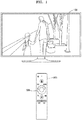
- FIG. 1 is a diagram showing an image display apparatus and a control device, according to an example embodiment.
- An image display apparatus 100 may be a television (TV). However, it is an example, and the image display apparatus 100 may be embodied as an electronic device capable of receiving a broadcast signal and displaying an image based on the broadcast signal.
- the image display apparatus 100 may be a mobile phone, a tablet PC, a digital camera, a camcorder, a laptop computer, a desktop computer, an e-book terminal, a digital broadcast terminal, a personal digital assistant (PDA), a portable multimedia player (PMP), a navigation device, an MP3 player, a wearable device, etc.
- Example embodiments may be easily implemented in a display device having a large display like a TV, but the present disclosure is not limited thereto.
- the image display apparatus 100 may be a stationary type or a mobile type and may be a digital broadcasting receiver capable of receiving digital broadcast. Furthermore, the image display apparatus 100 may be implemented not only as a flat display device, but also as a curved display device having a display with a curvature or a flexible display device capable of adjusting a curvature. Output resolution of the image display apparatus 100 may include, for example, high definition (HD), full HD, ultra HD, or a resolution clearer than ultra HD.
- HD high definition
- full HD full HD
- ultra HD or a resolution clearer than ultra HD.
- a control device 300 may be implemented as various types of devices for controlling the image display apparatus 100, such as a remote control or a mobile phone. Furthermore, the control device 300 may control the image display apparatus 100 via a short-range communication including infrared ray communication or Bluetooth. The control device 300 may control functions of the image display apparatus 100 by using any one or any combination of a key (including a hard key button, a soft key, a wheel key, etc.), a touch pad, a microphone capable of receiving a user's voice, and a sensor capable of recognizing a motion of the control device 300.
- a key including a hard key button, a soft key, a wheel key, etc.
- a touch pad a microphone capable of receiving a user's voice
- a sensor capable of recognizing a motion of the control device 300.
- the term "user” refers to a person who controls functions or operations of the image display apparatus 100 by using the control device 300 and may include a viewer, an administrator, or an installation engineer.
- the control device 300 may include a wheel key 335.
- the wheel key 335 may be configured to have a ring-like shape as shown in FIG. 1 and may be configured to receive an input rotating clockwise or counterclockwise.
- the wheel key 335 may be implemented to receive an input that rotates the wheel key 335 itself.
- the wheel key 335 may be implemented as a touch pad and may receive an input that is dragged clockwise or counterclockwise while the wheel key 335 is being touched.
- the present disclosure is not limited thereto.
- the image display apparatus 100 may transmit an activation signal to the control device 300 when the image display apparatus 100 may be controlled by a wheel key input. For example, the image display apparatus 100 may determine whether the image display apparatus 100 may be controlled by a wheel key input, based on a signal received from a connected source apparatus. Alternatively, based on a video signal corresponding to a screen image displayed on a display, it may be determined whether the image display apparatus 100 may be controlled by a wheel key input.
- a state in which the image display apparatus 100 may be controlled by a wheel key input refers to a state in which a function or an operation of the image display apparatus 100 may be controlled based on a control signal corresponding to a wheel key input received from the control device 300.
- the control device 300 may sense values regarding a rotation direction, the number of rotations, and a rotation angle corresponding to the wheel key input.
- the control device 300 may transmit a control signal corresponding to the sensed values corresponding to the wheel key input to the image display apparatus 100.
- control device 300 may sense values of a rotation direction, the number of rotations, and a rotation angle corresponding to a sensed wheel key input only when an activation signal is received and transmit a control signal corresponding to the sensed values to the image display apparatus 100.
- the image display apparatus 100 may determine a user interaction based on a control signal received from the control device 300 and state information regarding a displayed screen image and control an operation of the image display apparatus according to the determined user interaction. For example, the image display apparatus 100 may select a menu or change a playback speed of a video being played back in the image display apparatus on a screen image displayed on the display, based on a control signal corresponding to a wheel key input. Alternatively, based on a control signal corresponding to a wheel key input, the image display apparatus 100 may change an orientation of a 360-degree image displayed on the display. However, the present disclosure is not limited thereto.
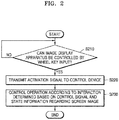
- FIG. 2 is a flowchart of a method of operating an image display apparatus, according to an example embodiment.
- the image display apparatus 100 may determine whether the image display apparatus 100 is in a pre-set state (operation S210). When the image display apparatus 100 is in the pre-set state, the image display apparatus 100 may transmit an activation signal to the control device 300 (operation S220).
- the pre-set state may include a state in which the image display apparatus 100 may be controlled by a wheel key input regarding a wheel key included in the control device 300.
- the image display apparatus 100 may determine whether the image display apparatus may be controlled by a wheel key input regarding a wheel key included in the control device 300 based on a video signal and a control signal received from a source apparatus connected to the image display apparatus 100.
- the image display apparatus 100 may determine whether the image display apparatus may be controlled by a wheel key input regarding a wheel key included in the control device 300, based on a video signal corresponding to a screen image displayed on a display.
- the depth information of the screen may be a history of key input signals received from the control device 300.
- the present disclosure is not limited thereto.
- the image display apparatus 100 may transmit an activation signal to the control device 300 via a short-range communication including infrared ray communication or Bluetooth.
- control device 300 may transmit a control signal corresponding to a sensed wheel key input to the image display apparatus 100.
- the image display apparatus 100 may receive a control signal corresponding to a wheel key input from the control device 300.
- the image display apparatus 100 may control an operation or a function of the image display apparatus 100 according to an interaction determined based on the received control signal and state information regarding a screen image displayed on a display (operation S230).
- a screen image displayed on a display includes a slide bar that may be moved by a cursor in horizontal directions and a control signal received from the control device 300 is a control signal corresponding to an input that rotates a wheel key clockwise
- the image display apparatus 100 may move the cursor on the slide bar to the right based on the control signal.
- a screen image including a video being played back is displayed on the display and a control signal received from the control device 300 is a control signal corresponding to an input that rotates the wheel key twice counterclockwise
- the image display apparatus 100 may perform an operation for rewinding the video being played back at double speed.
- the present disclosure is not limited thereto, and the image display apparatus 100 according to an example embodiment may determine various interactions appropriate to a current situation based on a received control signal and state information regarding a screen image and control an operation of the image display apparatus 100.
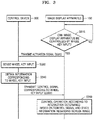
- FIG. 3 is a flowchart showing a method of operating a control device and an image display apparatus, according to an example embodiment.
- the image display apparatus 100 determines whether the image display apparatus 100 may be controlled by a wheel key input (operation S310) and, when it is determined that the image display apparatus 100 may be controlled by a wheel key input, may transmit an activation signal to the control device 300 (operation S320).
- the control device 300 may detect a wheel key input (operation S330).
- the control device 300 may include a wheel key and may receive an input that rotates the wheel key clockwise or counterclockwise or an input that is dragged clockwise or counterclockwise while the wheel key is being touched.
- the present disclosure is not limited thereto.
- the control device 300 may obtain information corresponding to the wheel key input (operation S340). For example, the control device 300 may sense values regarding a rotation direction, the number of rotations, and a rotation angle corresponding to the wheel key input.
- the control device 300 may sense information corresponding to a wheel key input only for a wheel key input received after an activation signal is received from the image display apparatus 100 and may not sense information corresponding to a wheel key input for a wheel key input received before an activation signal is received.
- control device 300 may sense information corresponding to a wheel key input only for a wheel key input received within a pre-set time range from a time point at which an activation signal is received.
- control device 300 may sense information corresponding to a wheel key input every time a wheel key input is received.
- control device 300 may transmit a control signal corresponding to the wheel key input to the image display apparatus 100 (operation S350).
- control signal corresponding to the wheel key input may include information corresponding to the wheel key input.
- control signal corresponding to the wheel key input may include information regarding a rotation direction, the number of rotations, and a rotation angle corresponding to the wheel key input
- the image display apparatus 100 may control an operation of the image display apparatus 100 according to an interaction determined based on the control signal received from the control device 300 and state information regarding a displayed screen image (operation S360).
- the operation S360 of FIG. 3 corresponds to the operation S230 of FIG. 2 , and thus detailed description thereof will be omitted.
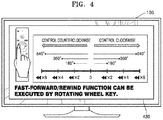
- FIG. 4 is a diagram showing an example of a screen image displayed on an image display apparatus, according to an example embodiment.
- the image display apparatus 100 when the image display apparatus 100 according to an example embodiment may be controlled by a wheel key input, the image display apparatus 100 may display a guide message indicating that a wheel key of the control device 300 may be used.
- the image display apparatus 100 may determine that the image display apparatus 100 may be controlled by a wheel key input.
- the image display apparatus 100 may display a guide message 430 indicating that a video may be fast-forwarded or rewound by a wheel key input together with a video content playback screen image.
- the guide message 430 may indicate that the video fast forward/rewind operations may be performed at different speeds according to rotation directions and rotation angels of a wheel key input.
- the present disclosure is not limited thereto, and the image display apparatus 100 may display a guide message in various ways.
- FIG. 5 is a diagram for describing a method by which an image display apparatus controls playback of a video, based on a wheel key input, according to an example embodiment.
- the image display apparatus 100 may play back a pre-stored video or may play back a video received from an external apparatus.
- the image display apparatus 100 may process video data received from a source apparatus connected to the image display apparatus 100 and play back the video.
- the image display apparatus 100 may display a video screen image being played back on a display. Furthermore, the image display apparatus 100 may receive information regarding an external device (e.g., a source device connected to the image display apparatus 100) and may recognize an operation or function provided by the external device based on the information regarding the external device. The image display apparatus 100 may determine whether the operation or function provided by the external device may be controlled by a wheel key input and, when the operation or function provided by the external device may be controlled by a wheel key input, may transmit an activation signal to the control device 300.
- an external device e.g., a source device connected to the image display apparatus 100
- the image display apparatus 100 may determine whether the operation or function provided by the external device may be controlled by a wheel key input and, when the operation or function provided by the external device may be controlled by a wheel key input, may transmit an activation signal to the control device 300.
- the image display apparatus 100 may recognize that a video may be fast-forwarded or rewound while a video is being played back and fast-forwarding or rewinding of the video may be controlled based on an input of the wheel key 335 included in the control device 300.
- the image display apparatus 100 may display a guide message indicating an operation or function that may be executed by a wheel key input to a user as described above with reference to FIG. 4 .
- the present disclosure is not limited thereto.
- the image display apparatus 100 may receive a control signal corresponding to a wheel key input from the control device 300.
- the control signal may include information regarding a rotation direction, the number of rotations, and a rotation angle corresponding to the wheel key input.
- the image display apparatus 100 may fast-forward or rewind a video based on a received control signal. For example, when the image display apparatus 100 receives a control signal corresponding to an input that rotates the wheel key 335 clockwise by 180 degrees, the image display apparatus 100 may control to fast-forward a video being played back at double speed. Alternatively, when the image display apparatus 100 receives a control signal corresponding to an input that rotates the wheel key 335 counterclockwise by 360-degrees, the image display apparatus 100 may control to rewind the video being played back at quadruple speed. Alternatively, the image display apparatus 100 may determine fast-forwarding/rewinding speeds according to the number of rotations of a wheel key as well as a rotation angle of the wheel key. However, the present disclosure is not limited thereto.
- FIG. 6 is a diagram for describing a method by which an image display apparatus searches for a scene, based on a wheel key input, according to an example embodiment.
- the image display apparatus 100 may provide a function for searching scenes included in video content.
- the image display apparatus 100 may display a playback screen image regarding video content and may display a time control bar 610 for adjusting playback time point of the video content.
- the total length of the time control bar 610 corresponds to the total playback time of the video content, and the image display apparatus 100 may display the total playback time (e.g., 01:40:23) of the video content being played back together with the control bar 610.
- the time control bar 610 may include a cursor 620, and the cursor 620 may be moved horizontally on the time control bar 610. As video content is played back, the cursor 620 may be moved on the time control bar 610, and a point at which the cursor 620 is located may indicate a time point corresponding to a currently played-back scene (image frame) in a total playback time.
- the image display apparatus 100 may also receive an input that moves the cursor 620 on the time control bar 610. As the cursor 620 moves, the image display apparatus 100 may display a scene 630 corresponding to a point at which the cursor 620 is located in a thumbnail form. Therefore, a user may search for scenes included in video content by moving the cursor 620 on the time control bar 610.
- an operation for moving the cursor 620 horizontally on the time control bar 610 may be controlled by a wheel key input.
- the image display apparatus 100 may transmit an activation signal to the control device 300 when entering a scene searching mode or when the cursor 620 and the time control bar 610 are displayed as shown in FIG. 6 .
- the control device 300 may transmit a control signal corresponding to a wheel key input sensed by the control device 300 to the image display apparatus 100.
- the control signal may include information regarding a rotation direction, the number of rotations, and a rotation angle corresponding to the wheel key input.
- the image display apparatus 100 may search for scenes included in video content based on a received control signal. For example, when the image display apparatus 100 receives a control signal corresponding to an input that rotates a wheel key clockwise by a first angle, the image display apparatus 100 may move the cursor 620 on the time control bar 610 to the right by a first distance. Alternatively, when the image display apparatus 100 receives a control signal corresponding to an input that rotates the wheel key counterclockwise by a second angle, the image display apparatus 100 may move the cursor 620 on the time control bar 610 to the left by a second distance. At this time, a moving distance of the cursor 620 may be proportional to a rotation angle of the wheel key.
- the image display apparatus 100 may display the scene 630 corresponding to a point to which the cursor 620 has moved.
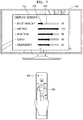
- FIG. 7 is a diagram for describing a method by which an image display apparatus controls an operation of a slider bar, based on a wheel key input, according to an example embodiment.
- the image display apparatus 100 may display a menu screen image 710 for setting a display screen of the image display apparatus 100.
- the menu screen image 710 may include setting items, such as a screen mode setting item, a backlight setting item, a contrast setting item, a brightness setting item, a sharpness setting item, and a color density setting item, but the present disclosure is not limited thereto.
- the image display apparatus 100 may recognize that items included in the menu screen image 710 may be set by a wheel key input, based on information regarding the menu screen image 710. For example, the image display apparatus 100 may recognize that a cursor may be moved on a slider bar according to a wheel key input, based on information indicating that the menu screen image 710 includes the slider bar and the cursor for adjusting values for respective items.
- the image display apparatus 100 may transmit an activation signal to the control device 300 when the image display apparatus 100 may be controlled by a wheel key input.
- the control device 300 may transmit a control signal corresponding to a wheel key input sensed by the control device 300 to the image display apparatus 100.
- the control signal may include information regarding a rotation direction, the number of rotations, and a rotation angle corresponding to the wheel key input.
- the image display apparatus 100 may move a cursor 730 on a slider bar 720 based on a received control signal. For example, when the image display apparatus 100 receives a control signal corresponding to an input that rotates a wheel key clockwise by a first angle, the image display apparatus 100 may move the cursor 730 on the slider bar 720 to the right by a first distance. Alternatively, when the image display apparatus 100 receives a control signal corresponding to an input that rotates the wheel key counterclockwise by a second angle, the image display apparatus 100 may move the cursor 730 on the slider bar 720 to the left by a second distance. At this time, a moving distance of the cursor 730 may be proportional to a rotation angle of the wheel key.
- the image display apparatus 100 may set a value corresponding to a point to which the cursor 730 has moved as a set value for a corresponding item and display the set value.
- FIG. 8 is a diagram for describing a method by which an image display apparatus controls a 360-degree image, based on a wheel key input, according to an example embodiment.
- the image display apparatus 100 may display a 360-degree image.
- the 360-degree image may be an image having a 360-degree angle of view.
- the 360-degree image may be an image generated based on a plurality of images covering all angles in a 360-degree rotation captured by using at least one camera.
- the image display apparatus 100 may display an image of an area (an image in a direction 810) in a 360-degree image on a display and display an indicator 820 indicating that a direction or a location of an area of the 360-degree image to be displayed on the display may be controlled.
- the indicator 820 may include arrows in 4 directions.
- the image display apparatus 100 may recognize that a 360-degree image may be controlled by a wheel key input when the image display apparatus 100 enters a 360-degree image mode. For example, the image display apparatus 100 may recognize that a direction and a location of an area of the 360-degree images displayed on the display may be changed by a wheel key input.
- the image display apparatus 100 may transmit an activation signal to the control device 300 when the image display apparatus 100 may be controlled by a wheel key input.
- the control device 300 may transmit a control signal corresponding to a wheel key input sensed by the control device 300 to the image display apparatus 100.
- the control signal may include information regarding a rotation direction, the number of rotations, and a rotation angle corresponding to the wheel key input.
- the image display apparatus 100 may change a direction of an image displayed on the display based on a received control signal. For example, when the image display apparatus 100 receives a control signal corresponding to an input that rotates a wheel key clockwise or counterclockwise by a first angle, the image display apparatus 100 may move an area of a 360-degree image displayed on the display in azimuthal directions or an altitude direction by a second angle and display an image corresponding to the moved area on the display.
- the second angle may be proportional to the first angle, but the present disclosure is not limited thereto.
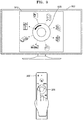
- FIG. 9 is a diagram for describing a method by which an image display apparatus selects an Internet of Things (loT) device to be controlled, based on a wheel key input, according to an example embodiment.
- LoT Internet of Things
- the image display apparatus 100 may control an loT apparatus existing around the image display apparatus 100 and display an loT apparatus selecting menu screen image 910 for selecting an loT apparatus to be controlled.
- the loT apparatus selecting menu screen image 910 may include at least one loT apparatus that may be controlled by the image display apparatus 100.
- the loT apparatus may be a general apparatus (or object) applied to an loT system.
- the loT apparatus may include a refrigerator, an air conditioner, a CCTV, a TV, a washing machine, a cleaner, an oven, a dehumidifier, a lamp, a fire alarm, a temperature sensor, a humidity sensor, an acoustic sensor, a motion sensor, a proximity sensor, a gas detecting sensor, and a heat detecting sensor, but the present disclosure is not limited thereto.
- the loT apparatus selecting menu screen image 910 may include an object 920 corresponding to a wheel key included in the control device 300 and may display loT apparatuses around the object 920 in directions in which the corresponding loT apparatuses are located from the image display apparatus 100.
- the image display apparatus 100 may recognize that an loT apparatus selection may be controlled by a wheel key input when entering the loT apparatus selecting menu screen image 910.
- the image display apparatus 100 may transmit an activation signal to the control device 300 when the image display apparatus 100 may be controlled by a wheel key input.
- the control device 300 may transmit a control signal corresponding to a wheel key input sensed by the control device 300 to the image display apparatus 100.
- the control signal may include information regarding a rotation direction, the number of rotations, and a rotation angle corresponding to the wheel key input.
- the image display apparatus 100 may select an loT apparatus displayed on the display based on a received control signal. For example, when the image display apparatus 100 receives a control signal corresponding to an input that rotates a wheel key in a clockwise or counterclockwise direction by an angle, the image display apparatus 100 may control to select an loT apparatus located at the corresponding angle. At this time, the image display apparatus 100 may display a direction and an angle for rotating a wheel key on the object 920, thereby allowing a user to easily select the loT apparatus.
- FIG. 10 is a diagram for describing a method by which an image display apparatus performs page up/down operations, based on a wheel key input, according to an example embodiment.
- the image display apparatus 100 may display a list including a plurality of items.
- the list may be a channel list 1010, and the channel list 1010 may include a plurality of channel items.
- a channel item may include a channel number, a channel name, and a program name being broadcasted on a corresponding channel.
- the image display apparatus 100 may display only some of the channel items included in the channel list 1010 and control to display the remaining channel items based on an input that scrolls the channel list 1010 in vertical directions or horizontal directions.
- the image display apparatus 100 may recognized that page up/down operations regarding the channel list 1010 may be controlled.
- the image display apparatus 100 may transmit an activation signal to the control device 300 when the image display apparatus 100 may be controlled by a wheel key input.
- the image display apparatus 100 may receive a control signal corresponding to a wheel key input regarding the wheel key 335 from the control device 300.
- the control signal may include information regarding a rotation direction, the number of rotations, and a rotation angle corresponding to the wheel key input.
- the image display apparatus 100 may perform page up/down regarding the channel list 1010 based on the received control signal. For example, when channel items corresponding to channels 10 through 16 are currently displayed in the channel list 1010 and a control signal corresponding to an input that rotates the wheel key 335 clockwise once by 360 degrees is received, the image display apparatus 100 may display channel items corresponding to channels 17 through 23, which are channels next to the channels 10 through 16, in the channel list 1010.
- the image display apparatus 100 may display channel items corresponding to channels 3 through 9, which are channels before the channels 10 through 16, in the channel list 1010.
- the image display apparatus 100 may scroll the channel list 1010 vertically or horizontally by a distance and display the channel list 1010.
- the present disclosure is not limited thereto.
- FIG. 11 is a diagram for describing a method by which an image display apparatus rotates an image, based on a wheel key input, according to an example embodiment.
- the display of the image display apparatus 100 may be rotated by 360 degrees. Furthermore, the image display apparatus 100 may detect a rotation of the display by using a gyro sensor or the like.
- the image display apparatus 100 may rotate the display counterclockwise by 90 degrees as shown in FIG. 11 .
- the image display apparatus 100 may transmit an activation signal to the control device when a rotation of the display is recognized.
- the image display apparatus 100 may display a guide message informing to a user that an image being displayed on the display may be rotated by a wheel key input.
- the image display apparatus 100 may receive a control signal corresponding to a wheel key input from the control device 300.
- the control signal may include information regarding a rotation direction, the number of rotations, and a rotation angle corresponding to the wheel key input.
- the image display apparatus 100 may rotate an image being displayed on the display based on a received control signal. For example, when the image display apparatus 100 receives a control signal corresponding to an input that rotates a wheel key clockwise by 90 degrees, the image display apparatus 100 may rotate the image being displayed on the display clockwise by 90 degrees. Referring to FIG. 11 , the image display apparatus 100 may display a second image 1120, which corresponds to a first image 1110 that was displayed on the display and is rotated clockwise by 90 degrees. At this time, the image display apparatus 100 may adjust an aspect ratio or a resolution of the rotated second image 1120 according to an aspect ratio of the rotated display.
- FIG. 12 is a block diagram showing a configuration of an electronic device, according to an example embodiment.
- the image display apparatus 100 may include a processor 120, a display 130, and a communicator 140.
- the communicator 140 may be a transceiver (transmitter and receiver) or communication interface that communicates, and may include one or more components for performing a communication between the image display apparatus 100 and an external device (e.g., the control device 300).
- the communicator 140 may transmit an activation signal to the control device 300 and receive a control signal corresponding to a wheel key input from the control device 300, via a short-range communication.
- the short-range communication may include Wi-Fi, NFC, Bluetooth, and an infrared-type Zigbee, but are not limited thereto.
- the processor 120 controls the overall operations of the image display apparatus 100 and signal flows between internal components of the image display apparatus 100 and processes data.
- the processor 120 may execute an operating system (OS) and various applications stored in a storage when a user input is received or a pre-set condition is satisfied.
- OS operating system
- the processor 120 determines whether the image display apparatus 100 may be controlled by a wheel key input and, when the image display apparatus 100 may be controlled by a wheel key input, may control the communicator 140 to transmit an activation signal to the control device 300. Furthermore, in response to the activation signal, the processor 120 may determine various interactions appropriate to the current situation based on a received control signal and state information regarding a screen image being displayed on the display 130. Furthermore, the processor 120 may control an operation of the image display apparatus 100 according to a determined interaction.
- the processor 120 may include one or more processors and a memory.
- the one or more processors may execute one or more programs stored in the memory, and the one or more processors may include a single core, dual cores, triple cores, quad cores, and cores of multiples thereof.
- the memory may store various data, programs, or applications for driving and controlling the image display apparatus 100.
- a program stored in the memory may include one or more instructions.
- Programs (one or more instructions) or applications stored in the memory may be executed by the one or more processors.
- the display 130 converts a video signal, a data signal, an OSD signal, and a control signal processed by the processor 120 and generates a driving signal.
- the display 130 may be implemented as a plasma display panel (PDP), a liquid crystal display (LCD), an organic light-emitting display (OLED), and a flexible display and may also be implemented as a 3-dimensional (3D) display.
- the display 130 may be configured as a touch screen and used as an input device as well as an output device.
- the display 130 may display a screen image changed according to a determined interaction.
- the present disclosure is not limited thereto.
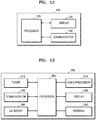
- FIG. 13 is a block diagram showing a configuration of an image display apparatus, according to another example embodiment.
- An image display apparatus 200 of FIG. 13 may be a modified example embodiment of the image display apparatus 100 of FIG. 1 .
- the image display apparatus 200 may include a tuner 210, a processor 220, a display 230, a communicator 240, a storage 250, a detector 260, and a video processor 270.
- the processor 220 of FIG. 13 may correspond to the processor 120 of FIG. 12
- the communicator 240 of FIG. 13 may correspond to the communicator 140 of FIG. 11
- the display 230 of FIG. 13 may correspond to the display 130 of FIG. 12 . Descriptions identical to those given above with reference to FIG. 12 will be omitted below.
- the tuner 210 may receive a broadcasting signal received via a wire or wirelessly and tune and select only the frequency of a channel to be received by the image display apparatus 100 from many radio wave components through amplification, mixing, resonance, or the like.
- a broadcasting signal includes audio, video, and additional information (e.g., electronic service guide (ESG), electronic program guide (EPG), etc.).
- the tuner 210 may receive a broadcasting signal in a frequency band corresponding to a channel number based on a user input (e.g., a control signal received from the control device 300 including a channel number input, a channel up/down input, and a channel input in an EPG screen image).
- a user input e.g., a control signal received from the control device 300 including a channel number input, a channel up/down input, and a channel input in an EPG screen image.
- the tuner 210 may receive broadcasting signals from various sources such as ground wave broadcasts, cable broadcasts, satellite broadcasts, Internet broadcasts, and the like.
- the tuner 210 may receive a broadcasting signal from a source, such as an analog broadcast or a digital broadcast.
- the communicator 240 may transmit and receive data or signals to and from an external device or a server under the control of the processor 220.
- the processor 220 may transmit and receive content to an external device connected via the communicator 240, download an application from an external device, or perform web browsing.
- the communicator 240 may transmit and receive data or signals to and from the image display apparatus 200 according to any one or any combination of a wireless local area network (LAN) (e.g., Wi-Fi), Bluetooth, and wired Ethernet in correspondence to the performance and structure of the image display apparatus 200.
- LAN wireless local area network
- the video processor 270 processes video data received by the image display device 200.
- the video processor 270 may perform various image processing operations with regard to video data, such as decoding, scaling, noise filtering, frame rate conversion, and resolution conversion.
- the detector 260 receives an optical signal (including a control signal) from the external control device 300 via an optical window of the bezel of the display 220.
- the detector 260 may receive an optical signal corresponding to a user input (e.g., a touch, a press, a touch gesture, a voice, or a motion) from the control device 300.
- the processor 220 may extract a control signal from the received optical signal.
- the detector 260 detects a voice of a user, an image of the user, or an interaction of the user.
- the detector 260 may include a microphone for receiving a voice uttered by a user. The microphone may transform a received voice into an electric signal and output the electric signal to the processor 220
- the detector 260 may detect a user input and transmit a detected signal to the processor 220.
- the detector 260 may detect a user input corresponding to channel up/down, power on/off, channel selection, and display screen setting from the control device 300.
- the detector 260 may detect a wheel key input regarding a wheel key included in the control device 300.
- the storage 250 may store various data, programs, or applications for operating and controlling the image display device 200 under the control of the processor 220.
- the storage 250 may include a broadcast receiving module, a channel control module, a volume control module, a communication control module, a voice recognition module, a motion recognition module, an optical receiving module, a display control module, an audio control module, an external input control module, a power control module, a module for controlling a wirelessly connected external device (e.g., connected via a Bluetooth communication), a voice database (DB), or a motion DB.
- a wirelessly connected external device e.g., connected via a Bluetooth communication
- DB voice database
- the modules and the DB of the storage 250 may be embodied in the form of software for controlling the image display device 200 to perform a broadcast reception control function, a channel control function, a volume control function, a communication control function, a voice recognition function, a motion recognition function, an optical reception control function, a display control function, an audio control function, an external input control function, a power control function, or a function for controlling a wirelessly connected external device (e.g., connected via a Bluetooth communication).
- the processor 220 may perform the above-stated functions by using the software modules stored in the storage 250.
- the block diagrams of the image display devices 100 and 200 shown in FIGS. 12 and 13 are block diagrams showing example embodiments. Components shown in FIGS. 12 and 13 may be integrated with one another, may include additional components, or may be omitted according to the specifications of the actual image display devices 100 and 200. In other words, two or more components may be combined into a single component or a single component may be split into two or more components. Furthermore, functions performed by respective components are for describing example embodiments and do not construe the present disclosure.
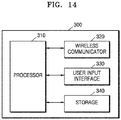
- FIG. 14 is a block diagram showing a configuration of a control device, according to an example embodiment.
- control device 300 may include a processor 310, a wireless communicator 320, a user input interface 330, and a storage 340.
- the wireless communicator 320 may transmit and receive signals to and from any one of the image display apparatuses according to the example embodiments described above.
- the wireless communicator 320 may receive an activation signal from the image display apparatus 100.
- the wireless communicator 320 may include an RF module capable of transmitting and receiving signals to and from the image display apparatus 100 according to the RF communication standard.
- the control device 300 may include an IR module capable of transmitting and receiving signals to and from the image display apparatus 100 according to the IR communication standard.
- the control device 300 may transmit commands, such as power on/off, channel change, volume change, and the like, to the image display apparatus 100 via the IR module.
- the user input interface 330 may include a keypad, a button, a wheel key, a touch pad, or a touch screen.
- a user may manipulate the user input interface 330 to input commands related to the image display apparatus 100 to the control device 300.
- the user input interface 330 includes a hard key button
- the user may input a command related to the image display apparatus 100 to the control device 300 through an operation of pressing the hard key button.
- the user input interface 330 includes a wheel key
- the user input interface 330 may receive an input that rotates the wheel key clockwise or counterclockwise.
- the wheel key is implemented as a touch pad, an input that is dragged clockwise or counterclockwise while the wheel key is being touched may be received.
- the user input interface 330 may sense values regarding a rotation direction, the number of rotations, and a rotation angle corresponding to the wheel key input.
- the user input interface 330 may sense values regarding a rotation direction, the number of rotations, and a rotation angle corresponding to a sensed wheel key input only when an activation signal is received from the image display apparatus 100.
- the storage 340 may store various types of programs and application data for controlling or operating the control device 300.
- the processor 310 controls various matters related to control of the control device 300.
- the processor 310 may transmit a signal corresponding to manipulation of a key of the user input interface 330 or a signal corresponding to a motion of the control device 300 to the image display apparatus 100 via the wireless communicator 320.
- the processor 310 may transmit a control signal corresponding to a wheel key input sensed by the user input interface 330 to the image display apparatus 100.
- the image display apparatus 100 may identify information regarding an operation of the control device 300 and manipulation of a key of the control device 300 from a signal transmitted from the control device 300 and control the image display apparatus 100 according to the information.
- the block diagram of the control device 300 shown in FIG. 14 is a block diagram showing an example embodiment.
- Components shown in FIG. 14 may be integrated with one another, may include additional components, or may be omitted according to the specifications of the actual control device 300. In other words, two or more components may be combined into a single component or a single component may be split into two or more components.
- functions performed by respective components are for describing example embodiments and do not construe the present disclosure.
- An image display apparatus operates to activate a wheel key of a control device only in when the image display apparatus may be controlled by a wheel key input, thereby reducing unnecessary power consumption of the control device.
- An image display apparatus may receive a control signal corresponding to a wheel key input sensed by a control device only when the image display apparatus may be controlled by a wheel key input, thereby reducing an unnecessary use of a RF bandwidth.
- An image display apparatus may control an operation by using a wheel key input instead of repetitive inputs of button keys, thereby improving user convenience.
- the above-described example embodiments of the present disclosure may be implemented as programmable instructions executable by a variety of computer components and stored in a computer readable recording medium.
- the computer readable recording medium may include program instructions, a data file, a data structure, or any combination thereof.
- the program instructions stored in the computer readable recording medium may be designed and configured for the present disclosure or can be publicly known and available to those of ordinary skill in the field of software.
- Examples of the computer readable recording medium include a hardware device specially configured to store and perform program instructions, for example, a magnetic medium, such as a hard disk, a floppy disk, and a magnetic tape, an optical recording medium, such as a CD-ROM, a DVD, and the like, a magneto-optical medium, such as a floptical disc, a ROM, a RAM, a flash memory, and the like.
- Examples of the program instructions include machine codes made by, for example, a compiler, as well as high-level language codes executable by a computer using an interpreter. (The above hardware device can be configured to operate as one or more software modules to perform the operation in an example embodiment, and vice versa.)
Landscapes
- Engineering & Computer Science (AREA)
- Multimedia (AREA)
- Signal Processing (AREA)
- Human Computer Interaction (AREA)
- General Engineering & Computer Science (AREA)
- Theoretical Computer Science (AREA)
- Physics & Mathematics (AREA)
- General Physics & Mathematics (AREA)
- Controls And Circuits For Display Device (AREA)
- User Interface Of Digital Computer (AREA)
Applications Claiming Priority (1)
| Application Number | Priority Date | Filing Date | Title |
|---|---|---|---|
| KR1020170004170A KR20180082812A (ko) | 2017-01-11 | 2017-01-11 | 영상 표시 장치 및 그 동작 방법 |
Publications (1)
| Publication Number | Publication Date |
|---|---|
| EP3349471A1 true EP3349471A1 (fr) | 2018-07-18 |
Family
ID=60915161
Family Applications (1)
| Application Number | Title | Priority Date | Filing Date |
|---|---|---|---|
| EP17206893.4A Ceased EP3349471A1 (fr) | 2017-01-11 | 2017-12-13 | Dispositif d'affichage d'image et procédé de fonctionnement correspondant |
Country Status (4)
| Country | Link |
|---|---|
| US (1) | US10477134B2 (fr) |
| EP (1) | EP3349471A1 (fr) |
| KR (1) | KR20180082812A (fr) |
| CN (1) | CN108307215A (fr) |
Families Citing this family (11)
| Publication number | Priority date | Publication date | Assignee | Title |
|---|---|---|---|---|
| KR102598082B1 (ko) * | 2016-10-28 | 2023-11-03 | 삼성전자주식회사 | 영상 표시 장치, 모바일 장치 및 그 동작방법 |
| KR102373510B1 (ko) * | 2017-08-11 | 2022-03-11 | 삼성전자주식회사 | 디스플레이를 회전함에 따라 컨텐츠를 시각화 하는 디스플레이 장치 및 이의 제어 방법 |
| US11233671B2 (en) * | 2018-11-28 | 2022-01-25 | Motorola Mobility Llc | Smart internet of things menus with cameras |
| CN113079410B (zh) * | 2020-01-03 | 2023-05-23 | 三星电子株式会社 | 显示装置及其控制方法 |
| US10845943B1 (en) * | 2020-02-14 | 2020-11-24 | Carmax Business Services, Llc | Systems and methods for generating a 360-degree viewing experience |
| KR102931798B1 (ko) | 2020-07-01 | 2026-02-26 | 삼성전자주식회사 | 디스플레이 장치 및 그의 제어 방법 |
| EP4373101A4 (fr) | 2021-12-28 | 2024-10-09 | Samsung Electronics Co., Ltd. | Dispositif d'affichage et procédé pour le commander |
| KR20230161204A (ko) | 2022-05-18 | 2023-11-27 | 삼성전자주식회사 | 전자 장치 및 그 제어 방법 |
| JP2023177422A (ja) * | 2022-06-02 | 2023-12-14 | キヤノン株式会社 | 画像処理装置、画像処理方法及びプログラム |
| CN118891606A (zh) | 2022-06-16 | 2024-11-01 | 三星电子株式会社 | 电子装置及其ui提供方法 |
| EP4474958A4 (fr) | 2022-07-12 | 2025-07-02 | Samsung Electronics Co Ltd | Dispositif d'interface utilisateur de dispositif d'affichage et son procédé de commande |
Citations (4)
| Publication number | Priority date | Publication date | Assignee | Title |
|---|---|---|---|---|
| JP2006211125A (ja) * | 2005-01-26 | 2006-08-10 | Sony Corp | 情報処理装置および方法、プログラム並びに記録媒体 |
| EP2536164A1 (fr) * | 2011-06-17 | 2012-12-19 | Samsung Electronics Co., Ltd. | Appareil d'affichage pour dispositif de télécommande de réglage et procédé d'affichage correspondant |
| US20130286293A1 (en) * | 2012-03-29 | 2013-10-31 | Sony Corporation | Remote control device, information processing apparatus, information processing system, and remote control method |
| US20140267931A1 (en) * | 2013-03-14 | 2014-09-18 | Comcast Cable Communications, Llc | Remote control activation based on predicted events |
Family Cites Families (10)
| Publication number | Priority date | Publication date | Assignee | Title |
|---|---|---|---|---|
| US8176432B2 (en) * | 2001-11-20 | 2012-05-08 | UEI Electronics Inc. | Hand held remote control device having an improved user interface |
| KR100447902B1 (ko) * | 2002-04-15 | 2004-09-08 | 주식회사 대우일렉트로닉스 | 디지털 티브이에서 장르별 프로그램 탐색 방법 |
| CN101193233A (zh) * | 2007-06-20 | 2008-06-04 | 深圳创维-Rgb电子有限公司 | 一种电视机的按键控制装置及电视机 |
| KR101405998B1 (ko) * | 2007-12-17 | 2014-06-11 | 삼성전자주식회사 | 입력 장치, 및 이를 이용하는 화상형성장치와 그 방법 |
| US20090303097A1 (en) * | 2008-06-09 | 2009-12-10 | Echostar Technologies Llc | Systems, methods and apparatus for changing an operational mode of a remote control |
| WO2012050544A1 (fr) * | 2010-10-14 | 2012-04-19 | Thomson Licensing | Télécommande pour un système vidéo 3d |
| CN103713746B (zh) * | 2013-12-18 | 2017-01-04 | 深圳市宇恒互动科技开发有限公司 | 三维惯性遥控装置的输入方法及三维惯性遥控装置 |
| KR102240640B1 (ko) * | 2014-07-03 | 2021-04-15 | 엘지전자 주식회사 | 표시장치 및 이의 제어방법 |
| CN204362242U (zh) * | 2015-01-22 | 2015-05-27 | 王海忠 | 滚轮式遥控器 |
| KR102348027B1 (ko) | 2015-02-27 | 2022-01-07 | 삼성전자주식회사 | 접속 모듈 및 이를 포함하는 전자 장치 |
-
2017
- 2017-01-11 KR KR1020170004170A patent/KR20180082812A/ko not_active Withdrawn
- 2017-12-13 US US15/840,728 patent/US10477134B2/en active Active
- 2017-12-13 EP EP17206893.4A patent/EP3349471A1/fr not_active Ceased
- 2017-12-29 CN CN201711499223.7A patent/CN108307215A/zh active Pending
Patent Citations (4)
| Publication number | Priority date | Publication date | Assignee | Title |
|---|---|---|---|---|
| JP2006211125A (ja) * | 2005-01-26 | 2006-08-10 | Sony Corp | 情報処理装置および方法、プログラム並びに記録媒体 |
| EP2536164A1 (fr) * | 2011-06-17 | 2012-12-19 | Samsung Electronics Co., Ltd. | Appareil d'affichage pour dispositif de télécommande de réglage et procédé d'affichage correspondant |
| US20130286293A1 (en) * | 2012-03-29 | 2013-10-31 | Sony Corporation | Remote control device, information processing apparatus, information processing system, and remote control method |
| US20140267931A1 (en) * | 2013-03-14 | 2014-09-18 | Comcast Cable Communications, Llc | Remote control activation based on predicted events |
Also Published As
| Publication number | Publication date |
|---|---|
| US20180199001A1 (en) | 2018-07-12 |
| US10477134B2 (en) | 2019-11-12 |
| KR20180082812A (ko) | 2018-07-19 |
| CN108307215A (zh) | 2018-07-20 |
Similar Documents
| Publication | Publication Date | Title |
|---|---|---|
| US10477134B2 (en) | Image display device and operating method for the same | |
| US12216880B2 (en) | Mobile terminal, image display device and user interface provision method using the same | |
| US11722218B2 (en) | Image display device and operation method thereof | |
| US10453246B2 (en) | Image display apparatus and method of operating the same | |
| US10701302B2 (en) | Image display apparatus and operation method thereof | |
| KR20180057473A (ko) | 디스플레이 장치 및 컨텐츠를 디스플레이하는 방법 | |
| US20160191841A1 (en) | Display device and display method | |
| US10110843B2 (en) | Image display device and operating method of the same | |
| US20160119685A1 (en) | Display method and display device | |
| US10582257B2 (en) | Server, image display apparatus, and method of operating the image display apparatus | |
| US20230036884A1 (en) | Display device | |
| US11323763B2 (en) | Display apparatus and method of operating the same | |
| US10924795B2 (en) | Image display device and operating method thereof | |
| US10089060B2 (en) | Device for controlling sound reproducing device and method of controlling the device | |
| US20170185246A1 (en) | Image display apparatus and method of displaying image | |
| EP3396968A1 (fr) | Afficheur et son procédé de fonctionnement | |
| KR20170101077A (ko) | 서버, 영상 표시 장치 및 그 동작 방법 |
Legal Events
| Date | Code | Title | Description |
|---|---|---|---|
| PUAI | Public reference made under article 153(3) epc to a published international application that has entered the european phase |
Free format text: ORIGINAL CODE: 0009012 |
|
| STAA | Information on the status of an ep patent application or granted ep patent |
Free format text: STATUS: THE APPLICATION HAS BEEN PUBLISHED |
|
| AK | Designated contracting states |
Kind code of ref document: A1 Designated state(s): AL AT BE BG CH CY CZ DE DK EE ES FI FR GB GR HR HU IE IS IT LI LT LU LV MC MK MT NL NO PL PT RO RS SE SI SK SM TR |
|
| AX | Request for extension of the european patent |
Extension state: BA ME |
|
| STAA | Information on the status of an ep patent application or granted ep patent |
Free format text: STATUS: REQUEST FOR EXAMINATION WAS MADE |
|
| 17P | Request for examination filed |
Effective date: 20180813 |
|
| RBV | Designated contracting states (corrected) |
Designated state(s): AL AT BE BG CH CY CZ DE DK EE ES FI FR GB GR HR HU IE IS IT LI LT LU LV MC MK MT NL NO PL PT RO RS SE SI SK SM TR |
|
| STAA | Information on the status of an ep patent application or granted ep patent |
Free format text: STATUS: EXAMINATION IS IN PROGRESS |
|
| 17Q | First examination report despatched |
Effective date: 20181120 |
|
| STAA | Information on the status of an ep patent application or granted ep patent |
Free format text: STATUS: THE APPLICATION HAS BEEN REFUSED |
|
| 18R | Application refused |
Effective date: 20201124 |