EP3355563B1 - Système, procédé, et appareil de traitement d'informations - Google Patents
Système, procédé, et appareil de traitement d'informations Download PDFInfo
- Publication number
- EP3355563B1 EP3355563B1 EP16867578.3A EP16867578A EP3355563B1 EP 3355563 B1 EP3355563 B1 EP 3355563B1 EP 16867578 A EP16867578 A EP 16867578A EP 3355563 B1 EP3355563 B1 EP 3355563B1
- Authority
- EP
- European Patent Office
- Prior art keywords
- data source
- general
- image
- image input
- manager
- Prior art date
- Legal status (The legal status is an assumption and is not a legal conclusion. Google has not performed a legal analysis and makes no representation as to the accuracy of the status listed.)
- Active
Links
Images



Classifications
-
- H—ELECTRICITY
- H04—ELECTRIC COMMUNICATION TECHNIQUE
- H04N—PICTORIAL COMMUNICATION, e.g. TELEVISION
- H04N1/00—Scanning, transmission or reproduction of documents or the like, e.g. facsimile transmission; Details thereof
- H04N1/00127—Connection or combination of a still picture apparatus with another apparatus, e.g. for storage, processing or transmission of still picture signals or of information associated with a still picture
- H04N1/00204—Connection or combination of a still picture apparatus with another apparatus, e.g. for storage, processing or transmission of still picture signals or of information associated with a still picture with a digital computer or a digital computer system, e.g. an internet server
- H04N1/00244—Connection or combination of a still picture apparatus with another apparatus, e.g. for storage, processing or transmission of still picture signals or of information associated with a still picture with a digital computer or a digital computer system, e.g. an internet server with a server, e.g. an internet server
-
- H—ELECTRICITY
- H04—ELECTRIC COMMUNICATION TECHNIQUE
- H04N—PICTORIAL COMMUNICATION, e.g. TELEVISION
- H04N1/00—Scanning, transmission or reproduction of documents or the like, e.g. facsimile transmission; Details thereof
- H04N1/00127—Connection or combination of a still picture apparatus with another apparatus, e.g. for storage, processing or transmission of still picture signals or of information associated with a still picture
-
- H—ELECTRICITY
- H04—ELECTRIC COMMUNICATION TECHNIQUE
- H04N—PICTORIAL COMMUNICATION, e.g. TELEVISION
- H04N1/00—Scanning, transmission or reproduction of documents or the like, e.g. facsimile transmission; Details thereof
- H04N1/00912—Arrangements for controlling a still picture apparatus or components thereof not otherwise provided for
- H04N1/00954—Scheduling operations or managing resources
-
- G—PHYSICS
- G06—COMPUTING OR CALCULATING; COUNTING
- G06F—ELECTRIC DIGITAL DATA PROCESSING
- G06F13/00—Interconnection of, or transfer of information or other signals between, memories, input/output devices or central processing units
- G06F13/10—Program control for peripheral devices
-
- G—PHYSICS
- G06—COMPUTING OR CALCULATING; COUNTING
- G06F—ELECTRIC DIGITAL DATA PROCESSING
- G06F16/00—Information retrieval; Database structures therefor; File system structures therefor
- G06F16/50—Information retrieval; Database structures therefor; File system structures therefor of still image data
- G06F16/51—Indexing; Data structures therefor; Storage structures
-
- G—PHYSICS
- G06—COMPUTING OR CALCULATING; COUNTING
- G06F—ELECTRIC DIGITAL DATA PROCESSING
- G06F16/00—Information retrieval; Database structures therefor; File system structures therefor
- G06F16/50—Information retrieval; Database structures therefor; File system structures therefor of still image data
- G06F16/58—Retrieval characterised by using metadata, e.g. metadata not derived from the content or metadata generated manually
- G06F16/5866—Retrieval characterised by using metadata, e.g. metadata not derived from the content or metadata generated manually using information manually generated, e.g. tags, keywords, comments, manually generated location and time information
-
- H—ELECTRICITY
- H04—ELECTRIC COMMUNICATION TECHNIQUE
- H04N—PICTORIAL COMMUNICATION, e.g. TELEVISION
- H04N1/00—Scanning, transmission or reproduction of documents or the like, e.g. facsimile transmission; Details thereof
-
- H—ELECTRICITY
- H04—ELECTRIC COMMUNICATION TECHNIQUE
- H04N—PICTORIAL COMMUNICATION, e.g. TELEVISION
- H04N1/00—Scanning, transmission or reproduction of documents or the like, e.g. facsimile transmission; Details thereof
- H04N1/00962—Input arrangements for operating instructions or parameters, e.g. updating internal software
-
- H—ELECTRICITY
- H04—ELECTRIC COMMUNICATION TECHNIQUE
- H04N—PICTORIAL COMMUNICATION, e.g. TELEVISION
- H04N1/00—Scanning, transmission or reproduction of documents or the like, e.g. facsimile transmission; Details thereof
- H04N1/00962—Input arrangements for operating instructions or parameters, e.g. updating internal software
- H04N1/00973—Input arrangements for operating instructions or parameters, e.g. updating internal software from a remote device, e.g. receiving via the internet instructions input to a computer terminal
Definitions
- the present invention relates to the field of information technologies, and in particular, to an image processing system, method, and apparatus.
- An image input device can convert conventional paper data and the like into electronic images, so that data processing efficiency is significantly improved.
- the application client may invoke a first interface between the application client and a data source manager, and start the data source manager. Then, the data source manager loads a data source provided by the image input device in a specified directory, invokes a second interface between the data source manager and the data source, and starts the data source. The data source may instruct the image input device to obtain the image, and return the obtained image to the application client by using the second interface and the first interface.
- An image obtained by an image input device can be obtained only by using a data source provided by the image input device.
- the image input device does not provide a data source, the image cannot be obtained, causing a great limitation.
- TWAIN Specification Version 2.1 The article titled " TWAIN Specification Version 2.1",published on 8 July 2009, pages 1-664 , describes the TWAIN Specification, a standard software protocol and API (application programming interface) for communication between software applications and image acquisition devices (the source of the data).
- API application programming interface
- US 7266761 B2 provided an architecture illustrated in fig. 1 , a digital camera 108 only maps to digital camera data source, a scanner 110 only maps to digital scanner source, and an image database 112 only maps to image database data source.
- each TWAIN stub data source 302 corresponds to a supported image input device 309.
- US 2006/015569 A1 describes methods and systems for initiating a task and receiving task data via a TWAIN interface, wherein the data source may be a TWAIN data source.
- the methods and systems are configured for communicating with scanners or similar peripherals over a network using a TWAIN interface.
- this application provides an image processing system, method, a terminal, and a general-purpose data source as defined by the independent claims. Further embodiments are provided in the dependent claims.
- the technical solutions are as follows:
- an image processing system and the system includes: an application client, a data source manager, a general-purpose data source, and at least one image input device corresponding to the general-purpose data source.
- the general-purpose data source is applicable to image input devices of different types.
- the application client sends an image processing instruction for the general-purpose data source to the data source manager, and the data source manager sends the image processing instruction to the general-purpose data source.
- the general-purpose data source may process, according to the image processing instruction, an image that is obtained by an image input device specified by the image processing instruction, and return a processing result to the application client by using the data source manager.
- the general-purpose data source is oriented to the at least one image input device, may obtain a device identifier of the at least one image input device, and may further determine a specified device identifier from at least one device identifier according to the image processing instruction, so as to process an image that is obtained by an image input device indicated by the specified device identifier.
- the system further includes a general-purpose device manager.
- the general-purpose device manager can generate a general-purpose data source for the image input device, and establish a mapping relationship between a device identifier of the image input device and the general-purpose data source.
- the system includes a terminal and a server.
- a TWAIN server is installed on the server, a TWAIN client is installed in the terminal, and the TWAIN server is in communication connection with the TWAIN client.
- the application client is located on the server, and the data source manager, the general-purpose device manager, and the general-purpose data source are located in the terminal.
- any combination of the data source manager, the general-purpose device manager, and the general-purpose data source may be built in the TWAIN client, and any one of the data source manager, the general-purpose device manager, or the general-purpose data source that is not in the combination may be external to the TWAIN client.
- the data source manager, the general-purpose device manager, and the general-purpose data source may be external to the TWAIN client; or the data source manager and the general-purpose data source are external to the TWAIN client, and the general-purpose device manager is built in the TWAIN client; or the data source manager, the general-purpose device manager, and the general-purpose data source are built in the TWAIN client; or the general-purpose data source is external to the TWAIN client, and the data source manager and the general-purpose device manager are built in the TWAIN client.
- an application client triggers an image processing instruction, and sends the image processing instruction to a data source manager.
- the image processing instruction is used to instruct to process an image that is obtained by an image input device corresponding to a general-purpose data source.
- the data source manager processes the image obtained by the image input device, and returns a processing result.
- a general-purpose device manager generates the general-purpose data source, and establishes a mapping relationship between the general-purpose data source and a device identifier of the image input device, to determine the image input device corresponding to the general-purpose data source, so that the general-purpose data source can process the image obtained by the corresponding image input device.
- the general-purpose device manager may query, according to the established mapping relationship, the device identifier corresponding to the general-purpose data source.
- the general-purpose device manager presets a general-purpose data source. After traversing a device identifier of at least one currently configured image input device, the general-purpose device manager generates, according to the preset general-purpose data source, at least one general-purpose data source that is the same as the preset general-purpose data source. Then, the general-purpose device manager establishes a mapping relationship between a device identifier of each image input device and a corresponding general-purpose data source.
- the general-purpose device manager copies the preset general-purpose data source multiple times according to a quantity of image input devices currently configured in the terminal, to obtain the at least one general-purpose data source, and then establishes the mapping relationship between the device identifier of each image input device and the corresponding general-purpose data source.
- the general-purpose data source is oriented to the at least one image input device, may obtain a device identifier of the at least one image input device, and may further determine a specified device identifier from at least one device identifier according to the image processing instruction, so as to process an image that is obtained by an image input device indicated by the specified device identifier.
- the general-purpose data source may determine the specified device identifier from the at least one device identifier, and may further switch the specified device identifier. For example, when a first device identifier is the specified device identifier, a second device identifier is switched to the specified device identifier.
- the general-purpose device manager may generate one general-purpose data source for each image input device, or different image input devices share a general-purpose data source.
- the general-purpose device manager may query, according to the established mapping relationship, the device identifier corresponding to the genera-purpose data source.
- a general-purpose data source that performs the foregoing image processing method, and provides a terminal that implements the general-purpose data source, so that the general-purpose data source can perform the foregoing provided image processing method.
- a general-purpose device manager that performs the foregoing image processing method, and provides a terminal that implements the general-purpose device manager, so that the general-purpose device manager can perform the foregoing provided image processing method.
- the technical solutions provided in this application bring the following beneficial effects:
- the general-purpose data source is introduced, and the general-purpose data source processes the image obtained by the image input device.
- the general-purpose data source processes, according to the image processing instruction, the image obtained by the image input device, and sends the processing result to the data source manager. In this way, a problem is avoided that the image obtained by the image input device cannot be processed because the image input device does not provide a data source, and flexibility is improved.
- a general-purpose device manager is configured to: obtain, by means of traversal, an image input device configured in a terminal; generate a corresponding general-purpose data source for the image input device configured in the terminal; maintain a mapping relationship between the image input device and the general-purpose data source; and wait for the general-purpose data source to query the image input device corresponding to the general-purpose data source.
- the general-purpose device manager is further configured to: monitor a removal/insertion status of the image input device, and delete, in a timely manner, a general-purpose data source corresponding to a removed image input device.
- a data source manager is responsible for negotiating interaction between an application client and a general-purpose data source, and serves as a bridge for interactive data transfer between the application client and the general-purpose data source.
- a general-purpose data source is applicable to multiple types of image input devices, and may be loaded and identified by a data source manager.
- the general-purpose data source interacts with an application client by using the data source manager, and can actively query a corresponding image input device from a general-purpose device manager.
- the general-purpose data source invokes an interface between the general-purpose data source and the image input device to implement necessary functions such as turning on a video device, setting a video parameter, setting a collection manner, obtaining image data, and turning off a video device, and may further implement richer functions such as real-time video image preview, simple image processing, and user screen parameter storage.
- An existing data source is provided by an image input device, and is applicable only to a particular image input device.
- the general-purpose data source in the embodiments of the present invention may be compatible with multiple types of image input devices. Therefore, even though an image input device does not provide a data source, the general-purpose data source can be used to process an image obtained by the image input device.
- a TWAIN (Toolkit Without An Interesting Name, toolkit without an interesting name) client and a TWAIN server establish a virtual path, and communicate with each other by using the virtual path.
- a general-purpose device manager may be built in the TWAIN client. Therefore, the TWAIN client has a function of the general-purpose device manager, and can enumerate an image input device configured in a terminal, obtain a device identifier of each image input device and related information about the image input device, generate a corresponding general-purpose data source for the image input device, maintain a mapping relationship between the image input device and the general-purpose data source, and wait for the general-purpose data source to query the image input device corresponding to the general-purpose data source.
- a data source manager may be built in the TWAIN client. Therefore, the TWAIN client implements a function of the data source manager, and can manage the general-purpose data source; and is responsible for negotiating interaction between an application client and the general-purpose data source.
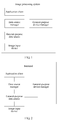
- FIG. 1 is a schematic structural diagram of an image processing system according to an embodiment of the present invention.
- the image processing system includes: an application client, a data source manager, a general-purpose data source, and at least one image input device corresponding to the general-purpose data source.
- the application client is configured to send an image processing instruction for the general-purpose data source to the data source manager.
- the data source manager is configured to: when receiving the image processing instruction, send the image processing instruction to the general-purpose data source.
- the general-purpose data source is configured to: when receiving the image processing instruction, process, according to the image processing instruction, an image that is obtained by an image input device specified by the image processing instruction; and send a processing result to the data source manager.
- the data source manager is further configured to: when receiving the processing result, send the processing result to the application client.
- the application client sends the image processing instruction for the general-purpose data source to the data source manager.
- the data source manager receives the image processing instruction, and sends the image processing instruction to the general-purpose data source.
- the general-purpose data source receives the image processing instruction, processes, according to the image processing instruction, the image obtained by the image input device, and sends the processing result to the data source manager.
- the data source manager sends the processing result to the application client.
- the application client receives the processing result.
- the general-purpose data source corresponding to the image input device is generated in advance, and the general-purpose data source may be configured to process the image obtained by the image input device. In this way, a problem is avoided that the image obtained by the image input device cannot be processed because the image input device does not provide a data source, and flexibility is improved.
- the general-purpose data source is further configured to: determine, according to the image processing instruction, a specified device identifier from a device identifier of the at least one image input device; and process an image that is obtained by an image input device indicated by the specified device identifier.
- the system further includes a general-purpose device manager.
- the general-purpose device manager is configured to: obtain a device identifier of the image input device, generate a general-purpose data source according to the device identifier of the image input device, and establish a mapping relationship between the device identifier and the generated general-purpose data source.
- the system may be further configured in a terminal.
- the application client, the data source manager, the general-purpose data source, and the general-purpose device manager are located in the terminal.
- the image input device may be external to the terminal, and may be connected to the terminal by using a protocol such as the USB (Universal Serial Bus, Universal Serial Bus) protocol or the SPI (Serial Peripheral Interface, serial peripheral interface) protocol.
- the image input device may be a scanner or a high-speed document scanner connected to the terminal.
- the image input device may be built in the terminal.
- the image input device may be an album configured in the terminal. This is not limited in this embodiment of the present invention.
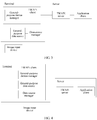
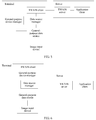
- the system may further include a terminal and a server.
- the application client, the data source manager, the general-purpose data source, and the general-purpose device manager may be configured in the following manners.
- Image processing systems in FIG. 3 to FIG. 6 may be remote virtual desktop systems.
- the server includes the application client and the TWAIN server
- the terminal includes the TWAIN client and the general-purpose data source.
- the general-purpose data source in the terminal is mapped to the server by using the TWAIN server and the TWAIN client, and this is equivalent to a virtual general-purpose data source on the server, so as to process an image in the remote virtual desktop system.
- the server may be one server or multiple servers in a server cluster.
- the application client may be located on one server or different servers in the server cluster.
- FIG. 7 is a flowchart of an image processing method according to an embodiment of the present invention. This embodiment of the present invention is applied to the image processing system shown in FIG. 2 , and is executed by an application client, a data source manager, a general-purpose device manager, and a general-purpose data source. Referring to FIG. 7 , the method includes the following steps.
- the general-purpose device manager generates a general-purpose data source for at least one image input device, and establishes a mapping relationship between a device identifier of the at least one image input device and the generated general-purpose data source, so that the general-purpose data source processes an image obtained by a corresponding image input device.
- a process of establishing the mapping relationship may include the following step (1) or (2).
- the general-purpose device manager generates one general-purpose data source for each of the at least one image input device, and establishes a mapping relationship between a device identifier of each image input device and a general-purpose data source generated for the corresponding image input device.
- the device identifier of the image input device is used to uniquely determine the image input device, and may be a device sequence number, a device name, or the like of the image input device. This is not limited in this embodiment.
- the general-purpose device manager presets a general-purpose data source, and after traversing a device identifier of at least one image input device currently configured in the terminal, generates, according to the preset general-purpose data source, at least one general-purpose data source that is the same as the preset general-purpose data source. Then, the general-purpose device manager establishes a mapping relationship between a device identifier of each image input device and a corresponding general-purpose data source. Optionally, the general-purpose device manager may copy the preset general-purpose data source multiple times according to a quantity of image input devices currently configured in the terminal, to obtain the at least one general-purpose data source, and then establish the mapping relationship.
- the at least one general-purpose data source When the at least one general-purpose data source is generated, to distinguish different general-purpose data sources, the at least one general-purpose data source may be named according to a device identifier of an image input device and a preset rule, so that a name of the at least one general-purpose data source includes a device identifier of a corresponding image input device, and names of all general-purpose data sources are different.
- a general-purpose data source may be generated in different file directories. In this case, names of general-purpose data sources in the different file directories may be the same, or may be different. This is not limited in this embodiment of the present invention.
- the at least one general-purpose data source may be stored in a specified directory, so that the data source manager can load the general-purpose data source in the specified directory, and start the general-purpose data source.
- the specified directory may be determined by the data source manager. This is not limited in this embodiment of the present invention.
- the general-purpose device manager obtains device identifiers of three image input devices, and the device identifiers of the three image input devices are a video 1, a video 2, and a video 3.
- the general-purpose device manager traverses a device identifier of at least one image input device currently configured in the terminal, generates one general-purpose data source for multiple image input devices in the at least one image input device, and establishes a mapping relationship between a device identifier of each image input device and a general-purpose data source generated for the corresponding image input device.
- the multiple image input devices share the general-purpose data source.
- a preset quantity may be determined by the general-purpose device manager, or may be pre-determined by the terminal. This is not limited in this embodiment.
- a process of generating the general-purpose data source and establishing the mapping relationship in step (2) is similar to that in step (1). Details are not described herein again.
- a difference between step (1) and step (2) lies in that one general-purpose data source is generated for each image input device by using a ratio of 1:1 in step (1), but one general-purpose data source is generated for M image input devices by using a ratio of M:1 (M represents a quantity of image input devices that share the general-purpose data source) in step (2).
- M represents a quantity of image input devices that share the general-purpose data source
- a general-purpose data source may perform processing only for one image input device each time, when multiple image input devices share the general-purpose data source, the general-purpose data source may determine a specified image input device in the multiple image input devices, that is, determine a default image input device, so as to subsequently process an image obtained by the specified image input device.
- the general-purpose data source may further switch the specified image input device. Specifically, the general-purpose data source may first use a first device identifier as a specified device identifier, to indicate that an image input device indicated by the first device identifier is the specified image input device. The general-purpose data source may further provide a display screen on the terminal, and provide, on the display screen, a switch function for an image input device.
- the general-purpose data source determines that an instruction of switching an image input device is received, determines, as the second device identifier, a device identifier that is indicated by the instruction of switching an image input device, and uses the second device identifier as the specified device identifier, instead of determining the first device identifier as the specified device identifier. Therefore, it is determined that an image input device indicated by the second device identifier is a currently specified image input device of the general-purpose data source.
- the display screen may be a dialog box, a pop-up operation window, or the like. This is not limited in this embodiment of the present invention.
- the general-purpose device manager may delete a mapping relationship between the image input device and a device identifier of a general-purpose data source.
- the general-purpose device manager may further delete the general-purpose data source.
- the terminal may further generate one general-purpose data source for all image input devices according to a ratio of M:1 (M represents a total quantity of image input devices).
- M represents a total quantity of image input devices.
- the M image input devices may share the general-purpose data source.
- the general-purpose device manager does not need to be configured in the terminal, and only one general-purpose data source needs to be generated.
- the general-purpose data source may traverse currently configured image input devices, and a mapping relationship between the general-purpose data source and a device identifier of each image input device may be established.
- the general-purpose data source is introduced in this embodiment of the present invention, and the general-purpose data source processes an image obtained by an image input device. If only one general-purpose data source is introduced, multiple image input devices share the general-purpose data source, and the general-purpose device manager does not need to be introduced; or if multiple general-purpose data sources are introduced, the general-purpose device manager needs to be introduced, and the general-purpose device manager generates the multiple general-purpose data sources, and establishes a mapping relationship between each general-purpose data source and a device identifier of an image input device.
- the application client sends an image obtaining instruction for the general-purpose data source to the data source manager.
- the application client and the data source manager are configured in the terminal.
- An image input device may be further configured in the terminal. The user may process, by using the application client, an image obtained by the image input device.
- the application client may be a chat application client, a browser application client, an album management application client, or the like. This is not limited in this embodiment of the present invention.
- the image input device may obtain an image, and provide the obtained image for the application client.
- the image input device may be a device of a particular type.
- the device of a particular type may be, for example, a video device or a device of another type.
- the image input device may be a scanner, a high-speed document scanner, or the like connected to the terminal, or may be an album inside the terminal. This is not limited in this embodiment of the present invention.
- the general-purpose device manager and the general-purpose data source may be further configured in the terminal. That is, before step 701, the method further includes: configuring the general-purpose device manager in the terminal; and when the terminal is connected to the image input device, generating, by the general-purpose device manager, a general-purpose data source corresponding to the image input device.
- the general-purpose data source is configured to process an image obtained by the image input device
- the data source manager is configured to manage the general-purpose data source.
- the general-purpose device manager may be an executable program or in an executable type, or the like.
- the general-purpose device manager may be an executable program or a daemon process used for a system service, or in a CTwainVideoManager type in a TWAIN client.
- the general-purpose data source may be a dynamic library or in a dynamic type with an extension ds, for example, may be a data source file hw_video.ds that meets the TWAIN protocol specification, or may be in a CTwainVideo type in the TWAIN client.
- the general-purpose data source when the general-purpose data source is the dynamic library with the extension ds, the general-purpose data source may be stored in a specified directory of the TWAIN client. This is not limited in this embodiment of the present invention.
- the application client interacts with the data source manager by using a first interface, and the first interface may be a DSM Entry interface, or the like.
- the data source manager interacts with the general-purpose data source by using a second interface, and the second interface may be a DS_Entry interface, or the like.
- the general-purpose data source interacts with the image input device by using a third interface, and the third interface may be a DirectShow interface, a V4L2 (Video 4 Linux 2) interface, or the like. This is not limited in this embodiment of the present invention.
- first interface and the second interface may be interfaces based on the TWAIN protocol.
- the application client supports the TWAIN protocol, and may be Photoshop, or the like. This is not limited in this embodiment of the present invention.
- the application client sends the image obtaining instruction for the image input device to the data source manager.
- the image obtaining instruction is used to obtain the image obtained by the image input device corresponding to the general-purpose data source.
- the application client displays general-purpose data sources that are corresponding to all image input devices currently configured in the terminal.
- the user may select any general-purpose data source in the application client.
- the general-purpose data source may display an image obtained by a corresponding image input device, and the user may trigger an operation of obtaining any image.
- the application client sends the image obtaining instruction to the data source manager by invoking the first interface, to instruct the data source manager to obtain the image.
- the data source manager receives the image obtaining instruction, and sends the image obtaining instruction to the general-purpose data source.
- the data source manager may send the image obtaining instruction to the general-purpose data source by invoking the second interface between the data source manager and the general-purpose data source, so that the general-purpose data source obtains the image from the corresponding image input device.
- the general-purpose data source receives the image obtaining instruction, obtains, according to the image obtaining instruction, the image obtained by the image input device, and sends the image to the data source manager.
- the general-purpose data source may determine, according to the image obtaining instruction, a specified device identifier from multiple device identifiers corresponding to the general-purpose data source, and obtain, by invoking the third interface between the general-purpose data source and the specified device identifier, an image that is obtained by an image input device indicated by the specified device identifier. Then, the general-purpose data source sends the image to the data source manager by invoking the second interface.
- the method further includes: sending, by the general-purpose data source, a query request to the general-purpose device manager; receiving, by the general-purpose device manager, the query request, querying, according to the established mapping relationship between the device identifier of the image input device and the general-purpose data source, a device identifier of at least one image input device corresponding to the general-purpose data source, and sending the at least one device identifier to the general-purpose data source; and receiving, by the general-purpose data source, the at least one device identifier, so as to obtain an image that is obtained by an image input device corresponding to the at least one device identifier.
- a general-purpose data source identifier is used to indicate the general-purpose data source, and the general-purpose data source may obtain the general-purpose data source identifier, and send a query request to the general-purpose device manager.
- the query request includes the general-purpose data source identifier.
- the general-purpose device manager may query, according to the general-purpose data source identifier, a device identifier of at least one image input device corresponding to the general-purpose data source identifier.
- the general-purpose data source identifier may be a name of the general-purpose data source, a sequence number included in the name, and the like. This is not limited in this embodiment of the present invention.
- the data source manager sends the image to the application client.
- the application client receives the image.
- the data source manager When receiving the image, the data source manager sends the image to the application client by invoking the first interface. After receiving the image, the application client may display or store the image.
- an example in which the application client obtains the image obtained by the image input device is used merely for description.
- the application client selects a general-purpose data source after the application client selects a general-purpose data source, before the application client obtains an image by using the general-purpose data source, the to-be-obtained image may be further processed.
- the image obtained by the image input device may be processed in either of the following manners.
- the general-purpose data source is introduced, and the general-purpose data source obtains the image obtained by the image input device.
- the general-purpose data source obtains, according to the image obtaining instruction, the image obtained by the image input device, performs setting according to the image setting option to perform particular processing on the image, and sends the processed image to the data source manager.
- the image obtained by the image input device cannot be obtained because the image input device does not provide a data source, and flexibility is improved.
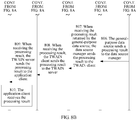
- FIG. 8A and FIG. 8B are a flowchart of an image processing method according to an embodiment of the present invention.
- This embodiment of the present invention is applied to the image processing system shown in FIG. 3 , and is executed by an application client, a TWAIN server, a general-purpose device manager, a general-purpose data source, and a data source manager.
- the data source manager and the general-purpose data source are external to the TWAIN client, and the general-purpose device manager is built in the TWAIN client.
- the method includes the following steps.
- the general-purpose device manager in the TWAIN client generates a general-purpose data source for the at least one image input device, and establishes a mapping relationship between the at least one device identifier and the generated general-purpose data source.
- a process of establishing the mapping relationship in step 801 is similar to that in step 701. Details are not described herein again.
- the general-purpose device manager is first initialized, and the general-purpose device manager performs step 801 to establish the mapping relationship. Then, the TWAIN client loads the data source manager, and starts the data source manager. After the initialization, the TWAIN client establishes a connection to the TWAIN server. A TWAIN redirection mapping process is completed.
- the application client sends an image processing instruction for the general-purpose data source to the TWAIN server.
- the application client when the application client needs to process an image obtained by an image input device configured in a terminal, the application client obtains an instruction parameter according to image information of a to-be-processed image, packs the instruction parameter according to a specified protocol to generate the image processing instruction, and sends the image processing instruction to the TWAIN server.
- the instruction parameter includes an identifier of the application client, the image information of the to-be-processed image, and an image processing type.
- the image information is used to indicate which image is the to-be-processed image, and may be a name, a type, or the like of the image.
- the image processing type is used to indicate a type of an operation that is to be performed on the image.
- the operation may be a cropping operation, a color adjustment operation, a luminance adjustment operation, or the like. This is not limited in this embodiment of the present invention.
- the specified protocol may be the TWAIN protocol, or the like. This is not limited in this embodiment of the present invention.
- the instruction parameter may further include an image parameter specified by a user.
- the application client may display multiple image setting options on a provided display screen. When the user expects to process the image, the user may first perform setting by using the multiple displayed image setting options, and the application client may obtain the image parameter specified by the user.
- the TWAIN server sends the image processing instruction to the TWAIN client.
- the TWAIN client sends the image processing instruction to the data source manager.
- the TWAIN server After receiving the image processing instruction, the TWAIN server sends the image processing instruction to the TWAIN client.
- the TWAIN client When receiving the image processing instruction, the TWAIN client unpacks the image processing instruction to obtain the instruction parameter in the image processing instruction, and then sends the instruction parameter in the image processing instruction to the data source manager by invoking a first interface.
- the data source manager receives the image processing instruction, and sends the image processing instruction to the general-purpose data source.
- the data source manager When receiving the instruction parameter in the image processing instruction, the data source manager obtains, according to the mapping relationship that is between the device identifier and the general-purpose data source and that is established by the general-purpose device manager, the general-purpose data source that is corresponding to the image input device and that is built in the TWAIN client. Then, the data source manager sends the instruction parameter in the image processing instruction to the general-purpose data source by invoking a second interface.
- the general-purpose data source receives the image processing instruction, processes, according to the image processing instruction, an image obtained by the image input device, and sends a processing result to the data source manager.
- Step 806 is similar to step 704. Details are not described herein again.
- the general-purpose data source may process, according to the image parameter, the image obtained by the image input device, so as to obtain an image that matches the image parameter.
- the data source manager sends the processing result to the TWAIN client.
- the TWAIN client sends the processing result to the TWAIN server.
- the TWAIN client packs the processing result according to the specified protocol to obtain a processing result packet, and sends the processing result packet to the TWAIN server.
- the TWAIN server sends the processing result to the application client.
- the application client receives the processing result.
- the TWAIN server When receiving the processing result packet, the TWAIN server unpacks the processing result packet to obtain the processing result, and sends the processing result to the application client.
- the application client receives the processing result.
- the data source manager is external to the TWAIN client merely for description.
- the data source manager may be built in the TWAIN client. This is not limited in this embodiment of the present invention.
- the data source manager in the terminal may be configured to manage a data source provided by the image input device and the general-purpose data source generated by the general-purpose device manager.
- the terminal may include two data source managers: a first data source manager and a second data source manager.
- the first data source manager is specially configured to manage the data source provided by the image input device
- the second data source manager is specially configured to manage the general-purpose data source generated by the general-purpose device manager. This is not limited in this embodiment of the present invention.
- the general-purpose data source is introduced, and the general-purpose data source processes the image obtained by the image input device.
- the general-purpose data source processes, according to the image processing instruction, the image obtained by the image input device, and sends the processing result to the data source manager. In this way, a problem is avoided that the image obtained by the image input device cannot be processed because the image input device does not provide a data source, and flexibility is improved.
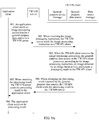
- FIG. 9A is a flowchart of an image processing method according to an embodiment of the present invention.
- This embodiment of the present invention is applied to the image processing system shown in FIG. 4 , and is executed by an application client, a TWAIN server, a TWAIN client, a data source manager, a general-purpose device manager, and a general-purpose data source.
- the data source manager, the general-purpose device manager, and the general-purpose data source in the image processing system shown in FIG. 4 are built in the TWAIN client.
- the method includes the following steps.
- the application client sends an image processing instruction for the general-purpose data source to the TWAIN server.
- the TWAIN server sends the image processing instruction to the TWAIN client.
- the general-purpose data source in the TWAIN client processes, according to the image processing instruction, an image obtained by the image input device, and returns a processing result to the TWAIN client.
- the TWAIN client may implement a function of the data source manager, that is, the TWAIN client may instantiate the general-purpose data source, and send an instruction to the general-purpose data source.
- the general-purpose data source performs processing according to the instruction.
- the TWAIN client sends the processing result to the TWAIN server.
- the TWAIN server sends the processing result to the application client.
- the application client receives the processing result.
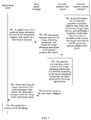
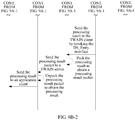
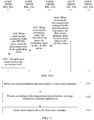
- FIG. 9B-1 and FIG. 9B-2 an operation procedure in which the application client processes the image obtained by the image input device may be shown in FIG. 9B-1 and FIG. 9B-2 . Specific steps are as follows:
- the general-purpose data source is introduced, and the general-purpose data source processes the image obtained by the image input device.
- the general-purpose data source processes, according to the image processing instruction, the image obtained by the image input device, and sends the processing result to the data source manager. In this way, a problem is avoided that the image obtained by the image input device cannot be processed because the image input device does not provide a data source, and flexibility is improved.
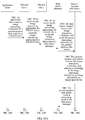
- FIG. 10A and FIG. 10B are a flowchart of an image processing method according to an embodiment of the present invention.
- This embodiment of the present invention is applied to the image processing system shown in FIG. 5 , and is executed by an application client, a TWAIN server, a TWAIN client, a data source manager, a general-purpose device manager, and a general-purpose data source.
- the data source manager, the general-purpose device manager, and the general-purpose data source in the image processing system shown in FIG. 5 are all external to the TWAIN client.
- the method includes the following steps:
- the general-purpose data source is introduced, and the general-purpose data source processes the image obtained by the image input device.
- the general-purpose data source processes, according to the image processing instruction, the image obtained by the image input device, and sends the processing result to the data source manager. In this way, a problem is avoided that the image obtained by the image input device cannot be processed because the image input device does not provide a data source, and flexibility is improved.
- the image processing method provided in steps 1001 to 1009 may be further applied to the image processing system shown in FIG. 6 .
- the general-purpose data source is external to the TWAIN client, and the data source manager and the general-purpose device manager are built in the TWAIN client. A specific process is not described herein.
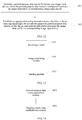
- FIG. 11 is a flowchart of an image processing method according to an embodiment of the present invention. This embodiment of the present invention is executed by a general-purpose data source. Referring to FIG. 11 , the method includes the following steps.
- the general-purpose data source is introduced, and the general-purpose data source processes the image obtained by the image input device.
- the general-purpose data source processes, according to the image processing instruction, the image obtained by the image input device, and sends the processing result to the data source manager. In this way, a problem is avoided that the image obtained by the image input device cannot be processed because the image input device does not provide a data source, and flexibility is improved.
- the general-purpose data source is generated by a general-purpose device manager, and the processing, according to the image processing instruction, the image obtained by the image input device includes:
- the processing, according to the image processing instruction, the image obtained by the image input device includes:
- the method further includes:
- FIG. 12 is a flowchart of an image processing method according to an embodiment of the present invention. This embodiment of the present invention is executed by a general-purpose device manager. Referring to FIG. 12 , the method includes the following steps.
- the general-purpose device manager is introduced.
- the general-purpose device manager generates the general-purpose data source for the image input device, and the general-purpose data source processes the image obtained by the image input device.
- the general-purpose data source processes, according to the image processing instruction, the image obtained by the image input device, and sends a processing result to the data source manager. In this way, a problem is avoided that the image obtained by the image input device cannot be processed because the image input device does not provide a data source, and flexibility is improved.
- the method further includes:
- the method further includes:
- FIG. 13 is a schematic structural diagram of a general-purpose data source according to an embodiment of the present invention.
- the general-purpose data source includes:
- the image obtained by the image input device is processed.
- the general-purpose data source processes, according to the image processing instruction, the image obtained by the image input device, and sends the processing result to the data source manager. In this way, a problem is avoided that the image obtained by the image input device cannot be processed because the image input device does not provide a data source, and flexibility is improved.
- the general-purpose data source is generated by a general-purpose device manager.
- the sending module 1303 is further configured to: send a query request to the general-purpose device manager, so that the general-purpose device manager queries, according to an established mapping relationship between the general-purpose data source and a device identifier of the image input device, the device identifier of the image input device corresponding to the general-purpose data source, and returns the device identifier.
- the receiving module 1301 is further configured to receive the device identifier returned by the general-purpose device manager.
- the image processing module 1302 is further configured to process the image that is obtained by the image input device corresponding to the device identifier.
- the image processing module 1302 is further configured to: determine a specified device identifier from a device identifier of the at least one image input device according to the image processing instruction; and process an image that is obtained by an image input device indicated by the specified device identifier.
- the general-purpose data source further includes a determining module.
- the receiving module 1301 is further configured to: when a first device identifier in the device identifier of the at least one image input device is the specified device identifier, receive an instruction of switching an image input device.
- the determining module is configured to determine, as the specified device identifier, a second device identifier that is indicated by the instruction of switching an image input device.
- FIG. 14 is a schematic structural diagram of a general-purpose device manager according to an embodiment of the present invention.
- the general-purpose device manager includes:
- the general-purpose device manager is introduced.
- the general-purpose device manager generates the general-purpose data source for the image input device, and the general-purpose data source processes the image obtained by the image input device.
- the general-purpose data source processes, according to the image processing instruction, the image obtained by the image input device, and sends a processing result to the data source manager. In this way, a problem is avoided that the image obtained by the image input device cannot be processed because the image input device does not provide a data source, and flexibility is improved.
- the general-purpose data source generation module 1401 is further configured to generate one general-purpose data source for each of the at least one image input device.
- the mapping relationship establishment module 1402 is further configured to establish a mapping relationship between a device identifier of each image input device and a general-purpose data source generated for the corresponding image input device.
- the apparatus further includes:
- the functions may be allocated to different function modules for implementation according to a requirement. That is, internal structures of the data source manager, the general-purpose device manager, and the general-purpose data source are divided into different function modules to implement all or some of the functions described above.
- the image processing apparatus provided in the foregoing embodiment pertains to a same concept as the image processing method embodiment. For a specific implementation process of the image processing apparatus, refer to the method embodiment. Details are not described herein again.
- FIG. 15 is a possible schematic structural diagram of the foregoing terminal according to an embodiment of the present invention.
- the terminal includes a processor 1501 and a memory 1502, and the processor 1501 is connected to the memory 1502 by using a bus.
- the memory 1502 is configured to store a computer-executable instruction.
- the processor 1501 executes the computer-executable instruction stored in the memory 1502, to implement a general-purpose data source, so that the general-purpose data source performs the image processing method in the foregoing embodiments.
- another interface (such as a network interface or a general-purpose IO interface) may be additionally provided in the terminal, and a drive program corresponding to the interface is stored in the memory 1502.
- a driver of the image input device is installed in the terminal, and the terminal has an interface that matches the image input device, and is externally connected to the image input device in a matched manner by using the interface.
- FIG. 16 is an optional schematic structural diagram of the foregoing terminal according to an embodiment of the present invention.
- the terminal includes a processor 1601 and a memory 1602, and the processor 1601 is connected to the memory 1602 by using a bus.
- the memory 1602 is configured to store a computer-executable instruction.
- the processor 1601 executes the computer-executable instruction stored in the memory 1602, to implement a general-purpose device manager, so that the general-purpose device manager performs the image processing method in the foregoing embodiments.
- another interface (such as a network interface or a general-purpose IO interface) may be additionally provided in the terminal, and a drive program corresponding to the interface is stored in the memory 1602.
- a driver of the image input device is installed in the terminal, and the terminal has an interface that matches the image input device, and is externally connected to the image input device in a matched manner by using the interface.
- the program may be stored in a computer-readable storage medium.
- the storage medium mentioned above may be a read-only memory, a magnetic disk, an optical disc, or the like.
Landscapes
- Engineering & Computer Science (AREA)
- Theoretical Computer Science (AREA)
- General Engineering & Computer Science (AREA)
- Signal Processing (AREA)
- Multimedia (AREA)
- General Physics & Mathematics (AREA)
- Physics & Mathematics (AREA)
- Databases & Information Systems (AREA)
- Data Mining & Analysis (AREA)
- Library & Information Science (AREA)
- Software Systems (AREA)
- Computing Systems (AREA)
- Facsimiles In General (AREA)
Claims (13)
- Système de traitement d'image, le système comprenant : un client d'application, un gestionnaire de source de données, une source de données polyvalente et au moins deux dispositifs d'entrée d'image correspondant à la source de données polyvalente ; la source de données polyvalente étant configurée pour : changer une relation de concordance entre la source de données polyvalente et un dispositif d'entrée d'image précédemment mis en concordance pour une relation de concordance entre la source de données polyvalente et un dispositif d'entrée d'image spécifié ;
le client d'application étant configuré pour envoyer une instruction de traitement d'image pour la source de données polyvalente au gestionnaire de source de données ; le gestionnaire de source de données étant configuré pour : à la réception de l'instruction de traitement d'image, envoyer l'instruction de traitement d'image à la source de données polyvalente ;
la source de données polyvalente étant configurée pour : à la réception de l'instruction de traitement d'image, traiter, selon l'instruction de traitement d'image, une image qui est obtenue par le dispositif d'entrée d'image spécifié, qui est spécifié par l'instruction de traitement d'image ; et envoyer un résultat de traitement au gestionnaire de source de données ; et
le gestionnaire de source de données étant en outre configuré pour : à la réception du résultat de traitement, envoyer le résultat de traitement au client d'application. - Système selon la revendication 1, dans lequel la source de données polyvalente est en outre configurée pour :déterminer, selon l'instruction de traitement d'image, un identifiant de dispositif spécifié parmi des identifiants de dispositif des au moins deux dispositifs d'entrée d'image ; ettraiter une image qui est obtenue par le dispositif d'entrée d'image spécifié, indiqué par l'identifiant de dispositif spécifié.
- Système selon la revendication 1, le système comprenant en outre un gestionnaire de dispositif polyvalent, et
le gestionnaire de dispositif polyvalent étant configuré pour : obtenir un identifiant de dispositif du dispositif d'entrée d'image, générer une source de données polyvalente selon l'identifiant de dispositif du dispositif d'entrée d'image et établir une relation de concordance entre l'identifiant de dispositif et la source de données polyvalente générée. - Système selon la revendication 3, le système comprenant un terminal et un serveur ; et le client d'application étant situé sur le serveur et le gestionnaire de source de données, le gestionnaire de dispositif polyvalent et la source de données polyvalente étant situés dans le terminal ;
un serveur TWAIN étant installé sur le serveur, un client TWAIN étant installé dans le terminal et le serveur TWAIN étant connecté en communication avec le client TWAIN ; et le gestionnaire de source de données, le gestionnaire de dispositif polyvalent et la source de données polyvalente étant externes au client TWAIN ; ou le client d'application étant situé sur le serveur et le gestionnaire de source de données et la source de données polyvalente étant situés dans le terminal ; un serveur TWAIN étant installé sur le serveur, un client TWAIN étant installé dans le terminal et le serveur TWAIN étant connecté en communication avec le client TWAIN ; et le gestionnaire de source de données et la source de données polyvalente étant externes au client TWAIN et le gestionnaire de dispositif polyvalent étant intégré dans le client TWAIN ; ou
le client d'application étant situé sur le serveur ; un serveur TWAIN étant installé sur le serveur, un client TWAIN étant installé dans le terminal et le serveur TWAIN étant connecté en communication avec le client TWAIN ; et le gestionnaire de source de données, le gestionnaire de dispositif polyvalent et la source de données polyvalente étant intégrés dans le client TWAIN ; ou
le client d'application étant situé sur le serveur ; un serveur TWAIN étant installé sur le serveur, un client TWAIN étant installé dans le terminal et le serveur TWAIN étant connecté en communication avec le client TWAIN ; et la source de données polyvalente étant externe au client TWAIN et le gestionnaire de source de données et le gestionnaire de dispositif polyvalent étant intégrés dans le client TWAIN. - Procédé de traitement d'image, le procédé étant exécuté par une source de données polyvalente, la source de données polyvalente correspondant à au moins deux dispositifs d'entrée d'image ; et
le procédé comprenant les étapes consistant à :changer une relation de concordance entre la source de données polyvalente et un dispositif d'entrée d'image précédemment mis en concordance pour une relation de concordance entre la source de données polyvalente et un dispositif d'entrée d'image spécifié ;recevoir (1101) une instruction de traitement d'image envoyée par un gestionnaire de source de données, l'instruction de traitement d'image étant déclenchée par un client d'application et l'instruction de traitement d'image étant utilisée pour donner l'instruction de traiter une image qui est obtenue par le dispositif d'entrée d'image spécifié, correspondant à la source de données polyvalente ;traiter (1102), selon l'instruction de traitement d'image, l'image obtenue par le dispositif d'entrée d'image spécifié ; etenvoyer (1103) un résultat de traitement au gestionnaire de source de données. - Procédé selon la revendication 5, dans lequel la source de données polyvalente est générée par un gestionnaire de dispositif polyvalent et dans lequel le traitement, selon l'instruction de traitement d'image, de l'image obtenue par le dispositif d'entrée d'image spécifié comprend les étapes consistant à :envoyer une demande de requête au gestionnaire de dispositif polyvalent, de sorte que le gestionnaire de dispositif polyvalent requête, selon une relation de concordance établie entre la source de données polyvalente et un identifiant de dispositif du dispositif d'entrée d'image spécifié, l'identifiant de dispositif du dispositif d'entrée d'image spécifié correspondant à la source de données polyvalente, et renvoie l'identifiant de dispositif ;recevoir l'identifiant de dispositif renvoyé par le gestionnaire de dispositif polyvalent ; ettraiter l'image qui est obtenue par le dispositif d'entrée d'image spécifié correspondant à l'identifiant de dispositif.
- Procédé selon la revendication 5, dans lequel le traitement, selon l'instruction de traitement d'image, de l'image obtenue par le dispositif d'entrée d'image spécifié comprend les étapes consistant à :déterminer, selon l'instruction de traitement d'image, un identifiant de dispositif spécifié parmi des identifiants de dispositif des au moins deux dispositifs d'entrée d'image ; ettraiter une image qui est obtenue par le dispositif d'entrée d'image spécifié, indiqué par l'identifiant de dispositif spécifié.
- Procédé selon la revendication 7, le procédé comprenant en outre les étapes consistant à :quand un premier identifiant de dispositif parmi les identifiants de dispositif des au moins deux dispositifs d'entrée d'image est l'identifiant de dispositif spécifié, recevoir une instruction de changement d'un dispositif d'entrée d'image ; etdéterminer, comme l'identifiant de dispositif spécifié, un second identifiant de dispositif qui est indiqué par l'instruction de changement d'un dispositif d'entrée d'image.
- Source de données polyvalente, la source de données polyvalente comprenant :un module, configuré pour : changer une relation de concordance entre la source de données polyvalente et un dispositif d'entrée d'image précédemment mis en concordance pour une relation de concordance entre la source de données polyvalente et un dispositif d'entrée d'image spécifié ;un module de réception (1301), configuré pour : recevoir une instruction de traitement d'image envoyée par un gestionnaire de source de données, l'instruction de traitement d'image étant déclenchée par un client d'application et l'instruction de traitement d'image étant utilisée pour donner l'instruction de traiter une image qui est obtenue par le dispositif d'entrée d'image spécifié, correspondant à la source de données polyvalente ;un module de traitement d'image (1302), configuré pour traiter, selon l'instruction de traitement d'image, l'image obtenue par le dispositif d'entrée d'image spécifié ; etun module d'envoi (1303), configuré pour envoyer un résultat de traitement au gestionnaire de source de données.
- Source de données polyvalente selon la revendication 9, la source de données polyvalente étant générée par un gestionnaire de dispositif polyvalent ;
le module d'envoi (1303) étant en outre configuré pour : envoyer une demande de requête au gestionnaire de dispositif polyvalent, de sorte que le gestionnaire de dispositif polyvalent requête, selon une relation de concordance établie entre la source de données polyvalente et un identifiant de dispositif du dispositif d'entrée d'image spécifié, l'identifiant de dispositif du dispositif d'entrée d'image spécifié correspondant à la source de données polyvalente, et renvoie l'identifiant de dispositif ; le module de réception (1301) étant en outre configuré pour recevoir l'identifiant de dispositif renvoyé par le gestionnaire de dispositif polyvalent ; et
le module de traitement d'image (1302) étant en outre configuré pour traiter l'image qui est obtenue par le dispositif d'entrée d'image spécifié correspondant à l'identifiant de dispositif. - Source de données polyvalente selon la revendication 9, dans laquelle le module de traitement d'image (1302) est en outre configuré pour :déterminer, selon l'instruction de traitement d'image, un identifiant de dispositif spécifié parmi des identifiants de dispositif d'au moins deux dispositifs d'entrée d'image ; ettraiter une image qui est obtenue par le dispositif d'entrée d'image spécifié, indiqué par l'identifiant de dispositif spécifié.
- Source de données polyvalente selon la revendication 11, la source de données polyvalente comprenant en outre un module de détermination ;
le module de réception (1301) étant en outre configuré pour: quand un premier identifiant de dispositif parmi les identifiants de dispositif des au moins deux dispositifs d'entrée d'image est l'identifiant de dispositif spécifié, recevoir une instruction de changement d'un dispositif d'entrée d'image ; et
le module de détermination étant configuré pour déterminer, comme l'identifiant de dispositif spécifié, un second identifiant de dispositif qui est indiqué par l'instruction de changement d'un dispositif d'entrée d'image. - Terminal, le terminal comprenant un processeur et une mémoire, et le processeur étant connecté à la mémoire au moyen d'un bus ; et
la mémoire étant configurée pour stocker une instruction exécutable par ordinateur, et quand le terminal fonctionne, le processeur exécutant l'instruction exécutable par ordinateur stockée dans la mémoire pour mettre en œuvre une source de données polyvalente, de sorte que la source de données polyvalente réalise le procédé de traitement d'image selon l'une quelconque des revendications 5 à 8.
Applications Claiming Priority (2)
| Application Number | Priority Date | Filing Date | Title |
|---|---|---|---|
| CN201510825073.9A CN105472197B (zh) | 2015-11-24 | 2015-11-24 | 图像处理系统、方法和装置 |
| PCT/CN2016/080095 WO2017088349A1 (fr) | 2015-11-24 | 2016-04-23 | Système, procédé, et appareil de traitement d'informations |
Publications (3)
| Publication Number | Publication Date |
|---|---|
| EP3355563A1 EP3355563A1 (fr) | 2018-08-01 |
| EP3355563A4 EP3355563A4 (fr) | 2018-09-26 |
| EP3355563B1 true EP3355563B1 (fr) | 2020-10-28 |
Family
ID=55609435
Family Applications (1)
| Application Number | Title | Priority Date | Filing Date |
|---|---|---|---|
| EP16867578.3A Active EP3355563B1 (fr) | 2015-11-24 | 2016-04-23 | Système, procédé, et appareil de traitement d'informations |
Country Status (4)
| Country | Link |
|---|---|
| US (1) | US11829409B2 (fr) |
| EP (1) | EP3355563B1 (fr) |
| CN (1) | CN105472197B (fr) |
| WO (1) | WO2017088349A1 (fr) |
Families Citing this family (5)
| Publication number | Priority date | Publication date | Assignee | Title |
|---|---|---|---|---|
| CN105472197B (zh) * | 2015-11-24 | 2019-01-18 | 华为技术有限公司 | 图像处理系统、方法和装置 |
| CN109769092A (zh) * | 2019-03-05 | 2019-05-17 | 山东浪潮通软信息科技有限公司 | 一种设备可扩展的影像处理方法 |
| CN111796893A (zh) * | 2020-06-12 | 2020-10-20 | 彭程 | 数据交互方法与电子设备 |
| US20250036446A1 (en) * | 2023-07-24 | 2025-01-30 | Omnissa, Llc | Unified scanner redirection method across different transfer modes |
| US20250130840A1 (en) * | 2023-10-18 | 2025-04-24 | Omnissa, Llc | Method to improve scanner redirection performance with nested mode |
Family Cites Families (15)
| Publication number | Priority date | Publication date | Assignee | Title |
|---|---|---|---|---|
| US6650761B1 (en) * | 1999-05-19 | 2003-11-18 | Digimarc Corporation | Watermarked business cards and methods |
| US6003093A (en) * | 1996-12-19 | 1999-12-14 | Canon Kabushiki Kaisha | Architecture for image processing application |
| US7039876B2 (en) * | 1997-10-06 | 2006-05-02 | Canon Kabushiki Kaisha | User interface for image acquisition devices |
| US7266761B2 (en) * | 1999-06-15 | 2007-09-04 | Microsoft Corporation | Special API interface for interfacing an application with a TWAIN module, negotiating and presenting a user interface for inserting an image into a document |
| JP2001285570A (ja) * | 2000-01-27 | 2001-10-12 | Canon Inc | 画像入力システム及び装置及び方法並びに記憶媒体 |
| CN1157656C (zh) * | 2002-12-30 | 2004-07-14 | 北京北大方正电子有限公司 | 一种外挂式影像捕捉设备功能扩充方法 |
| US20060015569A1 (en) * | 2003-12-16 | 2006-01-19 | Lexmark International, Inc. | Method and system for initiating a task and receiving task data via a TWAIN interface |
| US7712110B2 (en) * | 2004-09-28 | 2010-05-04 | Citrix Systems, Inc. | System and method for remoting twain function calls from a user session to a client system |
| US20060069815A1 (en) * | 2004-09-29 | 2006-03-30 | Warner William T Iii | Method and system for initiating a task and receiving task data via TWAIN interface from network-attached peripheral |
| KR101161344B1 (ko) * | 2007-07-11 | 2012-06-29 | 삼성전자주식회사 | 트웨인 드라이버를 이용한 스캐닝 방법 및 스캐닝 시스템 |
| US20110304740A1 (en) * | 2010-06-10 | 2011-12-15 | Apteryx, Inc. | Universal image capture manager |
| US20150073697A1 (en) * | 2012-11-27 | 2015-03-12 | CloudCar Inc. | Geographical location aggregation from multiple sources |
| US10673922B2 (en) * | 2014-02-19 | 2020-06-02 | RealCloud Imaging Inc. | Cloud based 2D dental imaging system with HTML web browser acquisition |
| CN105472197B (zh) * | 2015-11-24 | 2019-01-18 | 华为技术有限公司 | 图像处理系统、方法和装置 |
| US11100469B2 (en) * | 2016-10-25 | 2021-08-24 | International Business Machines Corporation | Cross-domain collaborative data log |
-
2015
- 2015-11-24 CN CN201510825073.9A patent/CN105472197B/zh active Active
-
2016
- 2016-04-23 WO PCT/CN2016/080095 patent/WO2017088349A1/fr not_active Ceased
- 2016-04-23 EP EP16867578.3A patent/EP3355563B1/fr active Active
-
2018
- 2018-05-02 US US15/969,210 patent/US11829409B2/en active Active
Non-Patent Citations (1)
| Title |
|---|
| None * |
Also Published As
| Publication number | Publication date |
|---|---|
| US20180253447A1 (en) | 2018-09-06 |
| CN105472197B (zh) | 2019-01-18 |
| US11829409B2 (en) | 2023-11-28 |
| WO2017088349A1 (fr) | 2017-06-01 |
| EP3355563A1 (fr) | 2018-08-01 |
| EP3355563A4 (fr) | 2018-09-26 |
| CN105472197A (zh) | 2016-04-06 |
Similar Documents
| Publication | Publication Date | Title |
|---|---|---|
| US11829409B2 (en) | Image processing system, method, and apparatus | |
| US20220210223A1 (en) | Peer to Peer Remote Application Discovery | |
| JP5993947B2 (ja) | リモートデスクトップからのサービス結果のためにネイティブビューアーを使用すること | |
| US9648378B2 (en) | Virtual user interface including playback control provided over computer network for client device playing media from another source | |
| TWI242137B (en) | Card-type network interface, terminal for network conference and network conference system | |
| US7085805B1 (en) | Remote device management in grouped server environment | |
| CN100385435C (zh) | 提供颜色管理的系统和方法 | |
| US20060136828A1 (en) | System and method for sharing display screen between information processing apparatuses | |
| US20110173256A1 (en) | System and method for hosting browser-based screen sharing | |
| JP2001523864A (ja) | 多数のクライアント−サーバ・セッションおよび以前のセッションへのユーザのダイナミック再接続をサポートするサーバ・オペレーティング・システム | |
| US20240289541A1 (en) | Method, apparatus, electronic device and computer readable storage medium for task creation | |
| WO2016007180A1 (fr) | Fourniture d'accès à distance à des applications par le biais de connexions d'interface | |
| CN112653608B (zh) | 一种显示设备、移动终端及跨网数据传输的方法 | |
| US20250036446A1 (en) | Unified scanner redirection method across different transfer modes | |
| CN116156069B (zh) | 一种在云桌面上的扫描仪映射方法及其终端 | |
| US8370434B2 (en) | Workflow system and method of controlling the same | |
| JP6930278B2 (ja) | 複合機、リブート方法、およびコンピュータプログラム | |
| CN112351202B (zh) | 多媒体数据交互方法、系统、装置、电子设备和存储介质 | |
| CN111610920B (zh) | 多设备控制方法、装置和系统 | |
| CN115827135A (zh) | 云桌面处理方法、系统、电子设备和可读存储介质 | |
| CN113709541A (zh) | 基于web的多终端设备互动方法、系统、终端设备 | |
| JP2007066061A (ja) | データ送信装置、受信装置、送信システム、受信システム、方法及び端末装置 | |
| CN118672539B (zh) | 图形远程显示的方法、图形显示服务容器和服务节点 | |
| CN114035761B (zh) | 一种数据传输的方法、系统、装置和存储介质 | |
| WO2023071095A1 (fr) | Procédé de traitement de fichier, dispositif terminal, serveur et dispositif associé |
Legal Events
| Date | Code | Title | Description |
|---|---|---|---|
| STAA | Information on the status of an ep patent application or granted ep patent |
Free format text: STATUS: THE INTERNATIONAL PUBLICATION HAS BEEN MADE |
|
| PUAI | Public reference made under article 153(3) epc to a published international application that has entered the european phase |
Free format text: ORIGINAL CODE: 0009012 |
|
| STAA | Information on the status of an ep patent application or granted ep patent |
Free format text: STATUS: REQUEST FOR EXAMINATION WAS MADE |
|
| 17P | Request for examination filed |
Effective date: 20180427 |
|
| AK | Designated contracting states |
Kind code of ref document: A1 Designated state(s): AL AT BE BG CH CY CZ DE DK EE ES FI FR GB GR HR HU IE IS IT LI LT LU LV MC MK MT NL NO PL PT RO RS SE SI SK SM TR |
|
| AX | Request for extension of the european patent |
Extension state: BA ME |
|
| A4 | Supplementary search report drawn up and despatched |
Effective date: 20180829 |
|
| RIC1 | Information provided on ipc code assigned before grant |
Ipc: G06F 13/10 20060101ALI20180823BHEP Ipc: H04N 1/00 20060101AFI20180823BHEP |
|
| DAV | Request for validation of the european patent (deleted) | ||
| DAX | Request for extension of the european patent (deleted) | ||
| STAA | Information on the status of an ep patent application or granted ep patent |
Free format text: STATUS: EXAMINATION IS IN PROGRESS |
|
| 17Q | First examination report despatched |
Effective date: 20190425 |
|
| GRAP | Despatch of communication of intention to grant a patent |
Free format text: ORIGINAL CODE: EPIDOSNIGR1 |
|
| STAA | Information on the status of an ep patent application or granted ep patent |
Free format text: STATUS: GRANT OF PATENT IS INTENDED |
|
| INTG | Intention to grant announced |
Effective date: 20200514 |
|
| GRAS | Grant fee paid |
Free format text: ORIGINAL CODE: EPIDOSNIGR3 |
|
| GRAA | (expected) grant |
Free format text: ORIGINAL CODE: 0009210 |
|
| STAA | Information on the status of an ep patent application or granted ep patent |
Free format text: STATUS: THE PATENT HAS BEEN GRANTED |
|
| AK | Designated contracting states |
Kind code of ref document: B1 Designated state(s): AL AT BE BG CH CY CZ DE DK EE ES FI FR GB GR HR HU IE IS IT LI LT LU LV MC MK MT NL NO PL PT RO RS SE SI SK SM TR |
|
| REG | Reference to a national code |
Ref country code: GB Ref legal event code: FG4D |
|
| REG | Reference to a national code |
Ref country code: CH Ref legal event code: EP |
|
| REG | Reference to a national code |
Ref country code: AT Ref legal event code: REF Ref document number: 1329415 Country of ref document: AT Kind code of ref document: T Effective date: 20201115 |
|
| REG | Reference to a national code |
Ref country code: DE Ref legal event code: R096 Ref document number: 602016046901 Country of ref document: DE |
|
| REG | Reference to a national code |
Ref country code: IE Ref legal event code: FG4D |
|
| REG | Reference to a national code |
Ref country code: AT Ref legal event code: MK05 Ref document number: 1329415 Country of ref document: AT Kind code of ref document: T Effective date: 20201028 |
|
| REG | Reference to a national code |
Ref country code: NL Ref legal event code: MP Effective date: 20201028 |
|
| PG25 | Lapsed in a contracting state [announced via postgrant information from national office to epo] |
Ref country code: GR Free format text: LAPSE BECAUSE OF FAILURE TO SUBMIT A TRANSLATION OF THE DESCRIPTION OR TO PAY THE FEE WITHIN THE PRESCRIBED TIME-LIMIT Effective date: 20210129 Ref country code: FI Free format text: LAPSE BECAUSE OF FAILURE TO SUBMIT A TRANSLATION OF THE DESCRIPTION OR TO PAY THE FEE WITHIN THE PRESCRIBED TIME-LIMIT Effective date: 20201028 Ref country code: RS Free format text: LAPSE BECAUSE OF FAILURE TO SUBMIT A TRANSLATION OF THE DESCRIPTION OR TO PAY THE FEE WITHIN THE PRESCRIBED TIME-LIMIT Effective date: 20201028 Ref country code: PT Free format text: LAPSE BECAUSE OF FAILURE TO SUBMIT A TRANSLATION OF THE DESCRIPTION OR TO PAY THE FEE WITHIN THE PRESCRIBED TIME-LIMIT Effective date: 20210301 Ref country code: NO Free format text: LAPSE BECAUSE OF FAILURE TO SUBMIT A TRANSLATION OF THE DESCRIPTION OR TO PAY THE FEE WITHIN THE PRESCRIBED TIME-LIMIT Effective date: 20210128 |
|
| REG | Reference to a national code |
Ref country code: LT Ref legal event code: MG4D |
|
| PG25 | Lapsed in a contracting state [announced via postgrant information from national office to epo] |
Ref country code: SE Free format text: LAPSE BECAUSE OF FAILURE TO SUBMIT A TRANSLATION OF THE DESCRIPTION OR TO PAY THE FEE WITHIN THE PRESCRIBED TIME-LIMIT Effective date: 20201028 Ref country code: PL Free format text: LAPSE BECAUSE OF FAILURE TO SUBMIT A TRANSLATION OF THE DESCRIPTION OR TO PAY THE FEE WITHIN THE PRESCRIBED TIME-LIMIT Effective date: 20201028 Ref country code: LV Free format text: LAPSE BECAUSE OF FAILURE TO SUBMIT A TRANSLATION OF THE DESCRIPTION OR TO PAY THE FEE WITHIN THE PRESCRIBED TIME-LIMIT Effective date: 20201028 Ref country code: IS Free format text: LAPSE BECAUSE OF FAILURE TO SUBMIT A TRANSLATION OF THE DESCRIPTION OR TO PAY THE FEE WITHIN THE PRESCRIBED TIME-LIMIT Effective date: 20210228 Ref country code: BG Free format text: LAPSE BECAUSE OF FAILURE TO SUBMIT A TRANSLATION OF THE DESCRIPTION OR TO PAY THE FEE WITHIN THE PRESCRIBED TIME-LIMIT Effective date: 20210128 Ref country code: AT Free format text: LAPSE BECAUSE OF FAILURE TO SUBMIT A TRANSLATION OF THE DESCRIPTION OR TO PAY THE FEE WITHIN THE PRESCRIBED TIME-LIMIT Effective date: 20201028 Ref country code: ES Free format text: LAPSE BECAUSE OF FAILURE TO SUBMIT A TRANSLATION OF THE DESCRIPTION OR TO PAY THE FEE WITHIN THE PRESCRIBED TIME-LIMIT Effective date: 20201028 |
|
| PG25 | Lapsed in a contracting state [announced via postgrant information from national office to epo] |
Ref country code: NL Free format text: LAPSE BECAUSE OF FAILURE TO SUBMIT A TRANSLATION OF THE DESCRIPTION OR TO PAY THE FEE WITHIN THE PRESCRIBED TIME-LIMIT Effective date: 20201028 Ref country code: HR Free format text: LAPSE BECAUSE OF FAILURE TO SUBMIT A TRANSLATION OF THE DESCRIPTION OR TO PAY THE FEE WITHIN THE PRESCRIBED TIME-LIMIT Effective date: 20201028 |
|
| REG | Reference to a national code |
Ref country code: DE Ref legal event code: R097 Ref document number: 602016046901 Country of ref document: DE |
|
| PG25 | Lapsed in a contracting state [announced via postgrant information from national office to epo] |
Ref country code: CZ Free format text: LAPSE BECAUSE OF FAILURE TO SUBMIT A TRANSLATION OF THE DESCRIPTION OR TO PAY THE FEE WITHIN THE PRESCRIBED TIME-LIMIT Effective date: 20201028 Ref country code: EE Free format text: LAPSE BECAUSE OF FAILURE TO SUBMIT A TRANSLATION OF THE DESCRIPTION OR TO PAY THE FEE WITHIN THE PRESCRIBED TIME-LIMIT Effective date: 20201028 Ref country code: LT Free format text: LAPSE BECAUSE OF FAILURE TO SUBMIT A TRANSLATION OF THE DESCRIPTION OR TO PAY THE FEE WITHIN THE PRESCRIBED TIME-LIMIT Effective date: 20201028 Ref country code: SM Free format text: LAPSE BECAUSE OF FAILURE TO SUBMIT A TRANSLATION OF THE DESCRIPTION OR TO PAY THE FEE WITHIN THE PRESCRIBED TIME-LIMIT Effective date: 20201028 Ref country code: RO Free format text: LAPSE BECAUSE OF FAILURE TO SUBMIT A TRANSLATION OF THE DESCRIPTION OR TO PAY THE FEE WITHIN THE PRESCRIBED TIME-LIMIT Effective date: 20201028 Ref country code: SK Free format text: LAPSE BECAUSE OF FAILURE TO SUBMIT A TRANSLATION OF THE DESCRIPTION OR TO PAY THE FEE WITHIN THE PRESCRIBED TIME-LIMIT Effective date: 20201028 |
|
| PG25 | Lapsed in a contracting state [announced via postgrant information from national office to epo] |
Ref country code: DK Free format text: LAPSE BECAUSE OF FAILURE TO SUBMIT A TRANSLATION OF THE DESCRIPTION OR TO PAY THE FEE WITHIN THE PRESCRIBED TIME-LIMIT Effective date: 20201028 |
|
| PLBE | No opposition filed within time limit |
Free format text: ORIGINAL CODE: 0009261 |
|
| STAA | Information on the status of an ep patent application or granted ep patent |
Free format text: STATUS: NO OPPOSITION FILED WITHIN TIME LIMIT |
|
| 26N | No opposition filed |
Effective date: 20210729 |
|
| PG25 | Lapsed in a contracting state [announced via postgrant information from national office to epo] |
Ref country code: IT Free format text: LAPSE BECAUSE OF FAILURE TO SUBMIT A TRANSLATION OF THE DESCRIPTION OR TO PAY THE FEE WITHIN THE PRESCRIBED TIME-LIMIT Effective date: 20201028 Ref country code: AL Free format text: LAPSE BECAUSE OF FAILURE TO SUBMIT A TRANSLATION OF THE DESCRIPTION OR TO PAY THE FEE WITHIN THE PRESCRIBED TIME-LIMIT Effective date: 20201028 |
|
| PG25 | Lapsed in a contracting state [announced via postgrant information from national office to epo] |
Ref country code: SI Free format text: LAPSE BECAUSE OF FAILURE TO SUBMIT A TRANSLATION OF THE DESCRIPTION OR TO PAY THE FEE WITHIN THE PRESCRIBED TIME-LIMIT Effective date: 20201028 Ref country code: MC Free format text: LAPSE BECAUSE OF FAILURE TO SUBMIT A TRANSLATION OF THE DESCRIPTION OR TO PAY THE FEE WITHIN THE PRESCRIBED TIME-LIMIT Effective date: 20201028 |
|
| PG25 | Lapsed in a contracting state [announced via postgrant information from national office to epo] |
Ref country code: LU Free format text: LAPSE BECAUSE OF NON-PAYMENT OF DUE FEES Effective date: 20210423 |
|
| REG | Reference to a national code |
Ref country code: BE Ref legal event code: MM Effective date: 20210430 |
|
| PG25 | Lapsed in a contracting state [announced via postgrant information from national office to epo] |
Ref country code: LI Free format text: LAPSE BECAUSE OF NON-PAYMENT OF DUE FEES Effective date: 20210430 Ref country code: CH Free format text: LAPSE BECAUSE OF NON-PAYMENT OF DUE FEES Effective date: 20210430 |
|
| REG | Reference to a national code |
Ref country code: DE Ref legal event code: R081 Ref document number: 602016046901 Country of ref document: DE Owner name: HUAWEI CLOUD COMPUTING TECHNOLOGIES CO., LTD.,, CN Free format text: FORMER OWNER: HUAWEI TECHNOLOGIES CO., LTD., SHENZHEN, GUANGDONG, CN |
|
| PG25 | Lapsed in a contracting state [announced via postgrant information from national office to epo] |
Ref country code: IE Free format text: LAPSE BECAUSE OF NON-PAYMENT OF DUE FEES Effective date: 20210423 |
|
| REG | Reference to a national code |
Ref country code: GB Ref legal event code: 732E Free format text: REGISTERED BETWEEN 20220428 AND 20220504 |
|
| PG25 | Lapsed in a contracting state [announced via postgrant information from national office to epo] |
Ref country code: IS Free format text: LAPSE BECAUSE OF FAILURE TO SUBMIT A TRANSLATION OF THE DESCRIPTION OR TO PAY THE FEE WITHIN THE PRESCRIBED TIME-LIMIT Effective date: 20210228 |
|
| PG25 | Lapsed in a contracting state [announced via postgrant information from national office to epo] |
Ref country code: BE Free format text: LAPSE BECAUSE OF NON-PAYMENT OF DUE FEES Effective date: 20210430 |
|
| P01 | Opt-out of the competence of the unified patent court (upc) registered |
Effective date: 20230524 |
|
| PG25 | Lapsed in a contracting state [announced via postgrant information from national office to epo] |
Ref country code: CY Free format text: LAPSE BECAUSE OF FAILURE TO SUBMIT A TRANSLATION OF THE DESCRIPTION OR TO PAY THE FEE WITHIN THE PRESCRIBED TIME-LIMIT Effective date: 20201028 |
|
| PG25 | Lapsed in a contracting state [announced via postgrant information from national office to epo] |
Ref country code: HU Free format text: LAPSE BECAUSE OF FAILURE TO SUBMIT A TRANSLATION OF THE DESCRIPTION OR TO PAY THE FEE WITHIN THE PRESCRIBED TIME-LIMIT; INVALID AB INITIO Effective date: 20160423 |
|
| PG25 | Lapsed in a contracting state [announced via postgrant information from national office to epo] |
Ref country code: MK Free format text: LAPSE BECAUSE OF FAILURE TO SUBMIT A TRANSLATION OF THE DESCRIPTION OR TO PAY THE FEE WITHIN THE PRESCRIBED TIME-LIMIT Effective date: 20201028 |
|
| PG25 | Lapsed in a contracting state [announced via postgrant information from national office to epo] |
Ref country code: TR Free format text: LAPSE BECAUSE OF FAILURE TO SUBMIT A TRANSLATION OF THE DESCRIPTION OR TO PAY THE FEE WITHIN THE PRESCRIBED TIME-LIMIT Effective date: 20201028 |
|
| PG25 | Lapsed in a contracting state [announced via postgrant information from national office to epo] |
Ref country code: MT Free format text: LAPSE BECAUSE OF FAILURE TO SUBMIT A TRANSLATION OF THE DESCRIPTION OR TO PAY THE FEE WITHIN THE PRESCRIBED TIME-LIMIT Effective date: 20201028 |
|
| PGFP | Annual fee paid to national office [announced via postgrant information from national office to epo] |
Ref country code: FR Payment date: 20250310 Year of fee payment: 10 |
|
| PGFP | Annual fee paid to national office [announced via postgrant information from national office to epo] |
Ref country code: DE Payment date: 20250305 Year of fee payment: 10 |
|
| PGFP | Annual fee paid to national office [announced via postgrant information from national office to epo] |
Ref country code: GB Payment date: 20260312 Year of fee payment: 11 |