EP3386207A1 - Procédé de fonctionnement d'un système de traitement de données destiné à fournir un contenu vidéo interactif - Google Patents
Procédé de fonctionnement d'un système de traitement de données destiné à fournir un contenu vidéo interactif Download PDFInfo
- Publication number
- EP3386207A1 EP3386207A1 EP17164996.5A EP17164996A EP3386207A1 EP 3386207 A1 EP3386207 A1 EP 3386207A1 EP 17164996 A EP17164996 A EP 17164996A EP 3386207 A1 EP3386207 A1 EP 3386207A1
- Authority
- EP
- European Patent Office
- Prior art keywords
- video
- activation
- processing system
- data processing
- data stream
- Prior art date
- Legal status (The legal status is an assumption and is not a legal conclusion. Google has not performed a legal analysis and makes no representation as to the accuracy of the status listed.)
- Withdrawn
Links
Images


Classifications
-
- H—ELECTRICITY
- H04—ELECTRIC COMMUNICATION TECHNIQUE
- H04N—PICTORIAL COMMUNICATION, e.g. TELEVISION
- H04N21/00—Selective content distribution, e.g. interactive television or video on demand [VOD]
- H04N21/40—Client devices specifically adapted for the reception of or interaction with content, e.g. set-top-box [STB]; Operations thereof
- H04N21/47—End-user applications
- H04N21/472—End-user interface for requesting content, additional data or services; End-user interface for interacting with content, e.g. for content reservation or setting reminders, for requesting event notification, for manipulating displayed content
- H04N21/4722—End-user interface for requesting content, additional data or services; End-user interface for interacting with content, e.g. for content reservation or setting reminders, for requesting event notification, for manipulating displayed content for requesting additional data associated with the content
- H04N21/4725—End-user interface for requesting content, additional data or services; End-user interface for interacting with content, e.g. for content reservation or setting reminders, for requesting event notification, for manipulating displayed content for requesting additional data associated with the content using interactive regions of the image, e.g. hot spots
-
- G—PHYSICS
- G06—COMPUTING OR CALCULATING; COUNTING
- G06F—ELECTRIC DIGITAL DATA PROCESSING
- G06F16/00—Information retrieval; Database structures therefor; File system structures therefor
- G06F16/70—Information retrieval; Database structures therefor; File system structures therefor of video data
- G06F16/74—Browsing; Visualisation therefor
- G06F16/748—Hypervideo
-
- H—ELECTRICITY
- H04—ELECTRIC COMMUNICATION TECHNIQUE
- H04N—PICTORIAL COMMUNICATION, e.g. TELEVISION
- H04N21/00—Selective content distribution, e.g. interactive television or video on demand [VOD]
- H04N21/80—Generation or processing of content or additional data by content creator independently of the distribution process; Content per se
- H04N21/85—Assembly of content; Generation of multimedia applications
- H04N21/858—Linking data to content, e.g. by linking an URL to a video object, by creating a hotspot
- H04N21/8583—Linking data to content, e.g. by linking an URL to a video object, by creating a hotspot by creating hot-spots
Definitions
- the invention relates to a method for providing an interactive video content, which in particular enables a special way of interacting with a user with a data processing system on which the video content is provided.
- a particular area of application here is the efficient interaction of a user with a data processing system to efficiently retrieve scientific and technical content. Due to the increasing use of complex technologies, many tasks, especially in working life, require ever more specialized scientific and technical knowledge. In addition, the state of knowledge of civilization continues to grow, so that an individual in a single field of expertise can not even know anything about all the previous contents and findings, or even learn from all the additional findings. However, in order to be able to exploit the known knowledge as comprehensively as possible, efficient access to it is very valuable. For this purpose, it is known to use technical aids such as in particular data processing systems.
- Modern data processing systems such as personal computers can display content in a variety of ways.
- videos can be played. Videos have the advantage of being able to convey the content in a particularly vivid manner to the viewer in a particularly short time.
- videos that are downloaded over the Internet can be played back. This is done regularly in a browser.
- a browser offers a user regularly various options for interaction.
- links can be clicked on Internet pages, whereby the links open new Internet pages or trigger other functions. Through the browser, the user can thus interact with the data processing system in an efficient manner and find the desired content very quickly.
- a method for operating a data processing system for providing an interactive video content is to be presented, which in particular can enable a particularly efficient way of interacting with a user using a data processing system.
- a method for producing a data stream required for this purpose will be presented.
- the method described here describes a new way of providing interactive video content.
- This type of deployment can also be referred to as interaction technology. It creates interaction possibilities for a user with a video.
- the method or the interaction technology are explained in more detail below with reference to a large number of practical examples.
- Below (depending on the context) illustrative examples from the field of medicine, computer and software development, the hobby field, etc. are presented, in which the way of providing interactive video content described by the method is presented.
- the selection of examples is not limitative of the applicability of the method and the technology described.
- the method refers to two-dimensional videos that are sequenced formed by (two-dimensional) frames and which are displayed on screens or projectors.
- the process or technology greatly expands the user's ability to interact with the video.
- the method is also transferable to videos that are presented to the user on a curved display surface or with the aid of 3D glasses to give the user a spatial impression. This includes, for example, so-called 360 ° videos taken with a 360 ° camera.
- the method is also transferable to three-dimensional videos containing three-dimensional video data.
- the steps a) and b) are preferably carried out simultaneously and in particular synchronized in time.
- the user can interact particularly efficiently with the data processing system, in particular using the reproduced video.
- that object may be assigned an activation area that is synchronized with the object or motion of the object in the video.
- the user can click this activation area with a computer mouse. Because this activation area is transparent to the user, the user feels the application feel immediately clicking on the object in the video. This can be used, for example, to allow the user to specifically trigger further actions on the object shown in the video, for example to call up further contents. This is particularly useful if in the video a plurality of individual moving objects is shown.
- activation area By the term “activatable” activation area is meant here only that the activation area allows interaction with the user. Of the The term “activatable” thus corresponds for example to the term “clickable” or “switchable”, depending on the context in which the method is used here. In particular, the activation area is associated with an object represented in the video and which is clicked on by the user or provided in an equivalent manner to receive an interaction from the user.
- Such an interaction of the user with the data processing system can be particularly efficient, in particular, because desired contents for individual objects in a video can be made available particularly quickly and conveniently at the request of the user.
- the described method can be used for videos in the medical field.
- the user can, for example, click on individual organs in the video of an operation and thus retrieve corresponding contents. This can be dispensed with an extensive description of the video, from which the user would have to pick out the relevant content for him.
- a regular jump back and forth in the timing of the video is at least partially obsolete.
- Such a jump back and forth in the timeline of the video is now regularly required to capture the content of educational videos. This is especially true when complex videos are explained in longer videos.
- Examples are videos for explaining an installation of a computer program, video for explaining manual work, etc. It is often the case that the user only looks at large parts of the content with a small amount of attention because the actions explained there are familiar or catchy. If then an action is briefly explained, which requires an increased attention of the user, because the user is not familiar with this action, this is often the user only retrospectively clear and rewinding or jumping back is required.
- the interaction technology proposed here it is possible to allow users to interact with a video in a particularly efficient manner and to render such untargeted jumping back and forth in the video at least partially obsolete.
- the user can interact with the data processing system by taking advantage of the time-varying presentation of content through video.
- an interaction of the user with the data processing system can be made possible, which is also temporally variable according to the temporally variable representation of the video.
- the term of the data processing system is to be interpreted broadly here. Any system designed and arranged to provide, process and / or store content to a user and to interact with the user may be considered.
- the data processing system may be a home computer, a television (in particular a so-called smart TV), an on-board computer of a motor vehicle, a smartphone or a tablet.
- the data processing system preferably has at least one display device.
- a display device can serve a screen or monitor.
- a projector can be provided, which allows an optical representation of content on a surface such as a screen.
- display devices for outputting three-dimensional data can also be used, for example 3D glasses.
- the data processing system preferably comprises an input device, in particular an input device, with which the user can select a point and / or a region on a surface. This is especially true for common two-dimensional video data, regardless of whether this video data is intended for a flat display surface or for a curved display surface.
- input devices are optionally used, with which points and / or regions in three-dimensional data can be selected.
- the input device may be, for example, a keyboard, a computer mouse or a touchscreen.
- the input device may also be a data glove that allows interaction with certain (spatial) areas within the three-dimensional video.
- any suitable input technology can be used for the input device.
- the user Via the input device, the user can interact with the data processing system. Interaction is to be understood here in particular that the user can influence by an action (such as, for example, the actuation of a key of a computer mouse), which further actions the data processing system performs.
- step a) the video is played back. This is preferably done in such a way that the video with the display device of the data processing system is rendered visible to the user.
- a playback component (in particular a playback software) is preferably provided on the data processing system.
- the playback component is preferably a video player, which is integrated in particular in a browser of a computer.
- the video content needed to play the video is provided by the first stream of data loaded and processed by the data processing system.
- the first data stream may comprise a computer file in which the video is encoded in a video file format (video file).
- the first data stream may for example be kept in a memory (such as a hard disk, a USB stick, a DVD or a CD) and be loaded by the data processing system of this. Also, the first data stream can be provided via an Internet connection and / or via a local network connection. In particular, in that case the rendering of the video may also be referred to as streaming.
- video representation level is used here to illustrate the presentation of the display device and is used in particular for differentiation from the at least one activation level. Such a description of a presentation with different levels is also common in graphics programs.
- the levels do not have to be spatial / physical or actual.
- the levels specify an order in which individual objects contained in the levels (the video player, activation areas, etc.) are displayed on a display device. These objects can overlap each other.
- step b) at least one activation area is provided in an activation level.
- a provision component is preferably provided, which serves to provide the activation area.
- the provisioning component is in particular a provisioning software and, for example, a computer program that can implement data records contained in the second data stream to the activation area.
- the activation area is superimposed on the video in particular.
- overlay is to be interpreted here functionally. It does not matter that the activation areas and the activation levels actually overlap physically. Rather, it is essential that the video presentation level and the activation level are separated from each other by software and that the activation level or the activation range for the user is activatable.
- the video presentation level and the activation level can in particular be realized by superimposed areas, which can be generated in particular with the ⁇ div> attribute.
- the activation area or the associated activation level can, for example, also be referred to as an overlay of the video.
- the provisioning component may be implemented, for example, in Javascript and / or jQuery. However, any other programming language and programming environment can be used to implement the provisioning component.
- the at least one activation area is preferably designed such that the user triggers an action assigned to the respective activation area by clicking on the activation area by means of a computer mouse or by means of a touchscreen.
- the at least one activation area may be implemented as a kind of button which directs the user in the manner of a link from a website (on which the video is reproduced) to another website. It is not critical to the operation whether or not the activation area is visibly highlighted in any way. This is possible in particular by design elements arranged in the activation level. For example, a visible border of the activation area can be provided here. However, the activation region can also be realized quite deliberately without any optical marking and thus be transparent or invisible in particular. In any case, the user can see the object associated with the activation area. If the user clicks on the activation area in the activation level, then the user can visually be shown this, for example by a change of the representation, or otherwise, for example by a tactile feedback.
- one or more objects shown in the video are each assigned an activation area.
- the activation range corresponds preferably at any time the shape and position of the object shown. This refers in particular to the shape and position of a (fictional) outline around the object. It is regularly and, in particular in the case of transparent or invisible activation areas, that it is not regularly necessary for the imaginary border line and the shape of the object to correspond exactly. The user does not see transparent activation areas but takes these areas only because of their activability. In any case, the user is more used to clicking objects centrally. In this respect, a secure activatability by the user is also ensured if the shape and the position of the activation area corresponds to the shape and the position of the object only insofar as is necessary so that the user feels the exact match. Thus, if an object moves through the reproduced video, the user may preferentially trigger an action assigned to that object at any time by clicking within the boundary line of the activation area of the respective object.
- the at least one activation area is a region of the display device of the data processing system that at least partially overlaps the video presentation level.
- the video presentation plane is preferably to be understood as being limited such that the video presentation layer only covers the area of the display device in which the video is reproduced.
- the activation levels have an extent corresponding to the extent of the video presentation level, with the activation levels and the video presentation level completely and accurately matching.
- each point of the video presentation level is assigned either no activation area or exactly one activation area.
- each activation area is arranged in an activation level.
- each activation area it is also possible for each activation area to have its own activation level in which the respective activation area is arranged. If several activation levels exist, they can be sorted according to a defined level order.
- overlapping activation areas are provided, it is usually possible to activate the activation area in the overlap area, the activation level of which is arranged higher up according to a level order. For example, if the user clicks on the overlap area of multiple activation areas with a computer mouse, the action associated with the activation area of the activation level located higher up is preferably triggered.
- Data for the at least one activation area (in particular data relating to the reaction to be triggered by activation of the at least one activation area, parameters for the shape and position of the at least one activation area) and possibly also for the optical design of the activation area are provided in the second data stream.
- the second data stream also contains a parameter that specifies an order of the activation levels.
- the second data stream of an activation area preferably comprises one or more files or one or more data sequences.
- the parameters described are preferably specified for each time point of the video and stored in the second data stream.
- the concept of the time of the video refers to a discrete subdivision of the running time of the video, in particular according to the video frames (frames).
- the video is preferably subdivided into a plurality of discrete points in time, wherein each time point in each case one frame of the video and at least one parameter of the type described with respect to the at least one activation area is assigned.
- the individual images of the video may not have to be present as a closed data block in the first data stream.
- individual images are constructed from a plurality of individual values, which can also apply to a plurality of individual images. This is achieved, for example, by backward referencing to previous individual images.
- single image here does not mean a concrete section of the first data stream, but the image content, which represents a re-component at a specific time.
- one video includes a certain fixed number of frames (eg, 25 frames) per second of video length contained in the first data stream.
- a corresponding number of data records preferably also exist in the second data stream per second.
- a second data stream may for example be kept in a memory (such as a hard disk, a USB stick, a DVD or a CD) and loaded by the data processing system from this memory.
- the second data streams can also be provided via an Internet connection and / or via a local network connection.
- Various of the second data streams may be provided from different sources or from a common source.
- a change is predetermined for the at least one activation region.
- the change preferably corresponds to the change of the corresponding object.
- the change may be, for example, a shift, a change in shape and / or a change in the act optical design of the at least one activation area. If, for example, an object moves through the video from right to left and becomes smaller, the change in the corresponding activation area preferably consists in a corresponding shift from right to left and in a corresponding reduction.
- synchronizing a change of the at least one activation area with the reproduction of the video is meant here synchronization of a change of the at least one activation area with operations represented in the video.
- the term "process” here encompasses everything that happens in the video and in particular movements of objects shown in the video. This refers to movements in the presentation level of the video, rather than actual movements of objects that take place during the video recording. Movements of objects in the display plane arise once by a movement of objects during the recording and on the other hand by a movement or change a camera with the recording takes place. For example, zooming the camera may also result in movement of an object in the presentation plane. Optionally, both camera movement and actual object movement may occur together. Cases are also possible in which actual movements of objects and camera movements at least partially cancel each other out so that no or only a reduced movement arises in the presentation plane.
- the change in the at least one activation area is at least partially synchronized with operations in the video.
- the pure timing of playing the video can be understood first.
- a movement and / or change of an object shown in the video constitutes a process in the video.
- the temporal synchronization between the change of at least one activation area and a process in the video is preferably carried out in such a way that a respective embodiment of the at least one activation area is assigned to each time point of the video.
- the at least one activation area is preferably provided in the type (shape / size and position) assigned to the individual times of the video.
- the term "provided" means that the activation area is activatable for the user and (if the activation area is intended to be visible to the user) is displayed.
- the temporal synchronization ensures, in particular, that the desired assignment of changes in the at least one activation range to events represented in the video is always retained, in particular also in the case of an interruption of the video (whether by a pause or a stop) or by an acceleration or deceleration of the video videos.
- the synchronization for example, that the at least one activation area is not arranged on the object in the video, for which the respective activation area is provided. This could be caused by a non-existent or incorrect synchronization.
- the change of the at least one activation region is at least partially synchronized with processes in the video, in particular according to their nature.
- the change of an activation area preferably takes place in such a way that the respective activation area follows an object in the video.
- the respective activation area corresponds to the shape and size of the corresponding object at any time (at least for part of the runtime of the video).
- the change of the at least one activation area is not arbitrary.
- the at least one activation area does not correspond exactly to the shape and position of the assigned object.
- the at least one Activation area at any time be twice as large as the assigned object and change within this scope synchronized with the object.
- the at least one activation area may change at individual times in relation to the assigned object.
- an activation area may initially correspond to exactly one object, then assume twice the size of the object for a period of time, and finally correspond exactly to the object again.
- the ratio between an activation area and the associated object may change continuously.
- the activation area may initially be twice the size of an object and continuously shrink over the life of the video until finally the size of the object is reached.
- the change in the activation range is causally causally related to a process in the video.
- the temporal synchronization is achieved in particular by the fact that the frequency of frame changes in the video is known exactly and the data sets contained in the second data stream are processed by the data processing system exactly corresponding to the frequency of frame changes in the video.
- the video in the video presentation layer and the at least one activation area in the activation layer are therefore rendered or deployed at the same speed.
- it ensures that the video plays in the video presentation layer and the Activation Zone Activation Zone starts at exactly the same time. This can for example be realized by a common triggering event, which is used to start the playback of the video and to start the provision of the activation area.
- control components for controlling the video or for controlling the playback component for playback of the video for example, links that pause, stop or restart or for faster Playing the video
- control components for controlling the video for example, links that pause, stop or restart or for faster Playing the video
- This is usually done with a control component, which serves at least for controlling the at least one activation area.
- Control components for controlling the video usually transmit control signals that are used to control the video. By the term "control" signals is here expressed that the user controls the playback of the video with these signals.
- control signals here means that something is controlled (in particular the reproduction of the video and / or the provision of the activation areas) via these signals.
- the control signals are often at the same time first control signals for controlling the video, for example, to control the playback of the video in a video player.
- the playback component it is possible to extract from the playback component for playback of the video monitoring signals that include data on the playback of the video.
- Such monitoring signals may be used to synchronize the provision of the at least one activation area to the playback of the video.
- watch signals may include a frame number of the video if that frame number is extractable from the playback component. Such a frame number can be used to select the correct record in the second data stream in terms of the activation range.
- a monitor signal may also be generated by a monitor component which monitors the display of the video to generate a monitor signal. For example, a portion of the video may be monitored. From what is shown in this section of the video, a watch signal is formed, for example, with a hash function. The Records in the second data stream may be indexed to be selectable via a monitoring signal thus formed. Such an approach is particularly advantageous when a frame number is not extractable from the rendering component.
- the control component preferably processes these control signals for controlling the video in order to generate second control signals for controlling the at least one activation region.
- the control component is preferably designed such that when generating second control signals from control signals, a maximum time delay occurs that does not result in a user-visible wake of the activation area relative to the video contents.
- control component it is also possible for the control component to be arranged as a kind of intermediate level or middleware between control components and the playback component and to generate both second control signals for controlling the provision component for the at least one activation area and first control signals for the playback component for reproducing the video.
- the playback component is a conventional video player which itself has control components
- these control components associated with the video player are preferably deactivated and, particularly preferably, are not visible to the user.
- first control signals for controlling the re-component or control signals are transmitted not only to the reproduction component but also to the control component as well.
- the control component is then preferably set up from first control signals for controlling the video to generate second control signals for controlling the supply component.
- the various synchronization techniques and components described herein are preferably implemented as software.
- at least one of said components is at least partially implemented with the programming languages Java Script and / or jQuery.
- the at least one activation area is preferably not necessary for the at least one activation area to be defined for the entire duration of the video (and correspondingly activatable during the entire runtime of the video and possibly displayed). In any case, it is preferred that the at least one activation area can be activated during the entire duration of the video. However, it is also possible that the at least one activation area is only displayed (i.e., displayed to the user) for part of the video's running time without being activatable. It is also possible that the at least one activation area can not be activated during the entire duration of the video. For such an activation area, however, the possibility is at least provided in any case of making the activation area itself activatable by a further action.
- Such an action may, for example, be the activation of another activation area or an (external) signal which is triggered by at least one action of the user outside the described method.
- an activation area is provided which can be activated at least during part of the runtime of the video.
- the second data stream from step b) is separated from the first data stream from step a).
- the video contained in the first data stream is in no way affected, impaired or altered. Without the second data stream and method described, the video does not contain any data regarding the activation areas.
- a normal video, which can be viewed linearly (from front to back), is described by the one described Procedure interactive. The original video material in the first data stream remains completely unedited.
- first data stream and the second data stream can be separate data streams which are transmitted in parallel or one after the other.
- first data stream and the second data stream have separate files.
- different transmission methods are used for the first data stream and the second data stream.
- the first data stream (with the video data) is delivered in response to a request and thus, as it were, delivered as a file or a packet, while the second data stream is in response to a plurality of individual requests (requests) which are sent and processed during the playback of the video.
- At least one characteristic point is defined in the video, which is assigned a respective coordinate specification in a coordinate system overlaying the video for a plurality of times of the video, wherein in step b) the change of the at least one activation region using the coordinates of the at least one characteristic point takes place.
- These coordinate specifications are contained in the second data stream, for example, as records for each frame of the video.
- a change is predefined for the at least one activation area, which change is at least partially synchronized with events in the video.
- This is in particular a synchronization by type and time, ie the type (the shape or any other property of the Activation area) varies depending on the time of the video.
- this synchronization can be achieved in a particularly efficient manner.
- the at least one characteristic point is defined.
- the at least one characteristic point is preferably a location in the video from which an object in the video can be identified at different times.
- a point is chosen as a characteristic point, which is distinguished from its surroundings in such a way that an automated detection of the position of the characteristic point is possible at any time. This is particularly the case at points in the video that stand out from their surroundings by color, brightness and / or contrast.
- An automatic detection of the position of the characteristic point can be used, in particular, to determine coordinates of the characteristic point for each point in time of the video.
- the video presentation plane is preferably assigned a coordinate system.
- the bottom of the video display plane may be used as an x-axis and the left side of the video display plane as a y-axis.
- the zero point is then, for example, in the lower left corner of the video presentation level.
- a coordinate specification in the case is preferably a pair of coordinates each comprising an x-coordinate and a y-coordinate.
- a coordinate system can also be used synonymously, which is defined from top to bottom and from left to right, so that each point is defined as having a vertical distance (top) and a horizontal distance (left) from the upper left corner of the video ,
- the video is preferably displayed as a plurality of pixels.
- the coordinates corresponding to these pixels are indicated discretely.
- the coordinates are given as unitless numbers corresponding to a pixel number.
- a coordinate specification in the case is preferably a unitless number indicating the (consecutive) number of the pixel.
- the coordinate system can also be divided into coarser sections and, for example, discretely x pixels (for example 5 or 10 pixels) with a consecutive number.
- the characteristic point is preferably assigned a respective coordinate specification for a part of the (preferably likewise discretely indicated) time points of the video. For example, for each frame of a video, there is exactly one record with coordinate information. Possibly. but is also only for every x-th frame (for example, every 5th or 10th frame) contains a coordinate in the second data stream.
- a position of the at least one activation region within the activation plane is changed in accordance with at least one coordinate specification of a characteristic point in the video.
- the activation area can be defined, for example, by an area of fixed size, the position of which can be determined on the basis of the coordinates of the characteristic point. For example, it may be determined how far the activation range extends in the positive and negative x-direction and in the positive and negative y-direction from the coordinates of the characteristic point. This defines a rectangular activation area that can be positioned over just one coordinate specification.
- an object moves through the video, with the object comprising a solid filled area with a black dot in the center and the shape of the object remaining unchanged.
- the black dot is preferably used here as a characteristic point.
- the knowledge of the position of this characteristic point is sufficient to describe the movement of the object.
- an activation area may be assigned to the object by creating the activation area with the shape of the object and placing it at a location defined above the characteristic point for each time point of the video.
- a shape of the at least one activation area is changed according to the coordinate information of a plurality of characteristic points in the video.
- an activation area is to be assigned to an object whose shape (in a representation plane) changes in the course of the video
- the object is preferably assigned a plurality of characteristic points.
- a characteristic point may be assigned to the front tire and the rear tire, respectively.
- the activation area can be created according to the shape of the car.
- the activation region can follow the position of the car in the video and thereby be scaled according to the distance between the two characteristic points.
- the use of two characteristic points can be particularly useful if a displayed object is not or only slightly distorted due to a variable camera angle. In cases with such Distortion can be used more characteristic points.
- the more characteristic points are used, the more precisely the activation range by position and shape can coincide with an associated object at any time.
- the characteristic points form a border line of the activation region when these points are connected to one another.
- the coordinates of the points are then transmitted in the second data stream as data records.
- the activation area is generated by the provisioning component in which a (virtual) borderline is generated from these coordinates.
- the data sets of the second data stream also contain additional data (for example shape-defining parameters which define the shape of the activation area) which may differ in the different data sets of the second data stream and which control a change in the form of the activation area ,
- an activation range can be determined based on the coordinates of these points, which completely covers the part of the motor vehicle visible in the video, in particular if the shape of the vehicle Cars is known.
- Shape-defining parameters need then not be transmitted individually for each record in the second data stream, but these parameters are always the same. Only the characteristic points or their coordinates are transmitted in the data sets of the second data stream. Based The form-defining parameter is determined from the characteristic points or their coordinates, the shape of the activation area.
- the change of the at least one activation region takes place using a time-variable number of characteristic points.
- the more characteristic points are defined on an object the more accurately an activation area can be assigned to this object.
- the object alters its shape to a considerable extent (for example, by a variable camera perspective)
- the more characteristic points are used the greater is regularly but also an expended computing power and the amount of data of the second data stream.
- the number of characteristic points used for an object can be changed in the course of the video.
- an object first moves through the video without changing its shape, then becomes significantly deformed in a short time and then moves through the video unaltered.
- a plurality of characteristic points are preferably used. Subsequently, preferably only one characteristic point is used again.
- the at least one activation area is defined only for a part of the times of the video in the respective second data stream, wherein these times are temporally objectionable, and wherein the respective activation area is provided at intervening times in the manner of an interpolation.
- the second data streams can contain large amounts of data.
- the amount of data can be reduced.
- the data records with data relating to the at least one activation area are not transmitted for each (preferably discretely specified) time / frame of the video.
- the respective activation area is generated, for example, with an interpolation. If an activation area is present in the same form and position, for example, at a first time and at a third time, the activation area is preferably also provided for this purpose in a second position between the first and third times (ie, provided as appropriately activatable and optionally shown). If the activation range is defined differently at the first and third times, the activation range at the second time point is preferably provided, in particular, with a shape and position which correspond to a respective mean value of the corresponding shape and position at the first and third times. This is to be understood as interpolation.
- the number of times and the distance of adjacent times for which an activation area is defined by the second data stream may be different for different activation areas and at different times of the video.
- interpolation is preferred only over a short period of time, while in periods of time without great changes, interpolation can also take place over longer periods of time.
- the at least one activation area is preferably invisible or invisible to the user.
- the at least one activation area is designed such that it corresponds at any time to the shape and position of an object in the video, the corresponding object can be selected by activating the activation area. It is not necessary for the activation area itself to be visible to the user. This is especially the case when only a small number of objects are displayed in the video. In this case, the user can be displayed, for example, a text explaining that by clicking on the objects more content is available. A special identification of the clickable objects is not necessary.
- the user can be made aware of the possibility to click on certain areas of the video.
- the clickable areas of the video can be marked in color.
- color-filled areas can be used that correspond (in particular exactly) to the shape of a clickable object in the video.
- the at least one activation region is filled over the entire surface.
- Colored markings include in particular also markings in white, black and gray. It is also possible in particular that the colors are displayed transparently. This means that an object overlaid by the activation area remains at least partially visible in the video.
- the at least one activation area is preferably clickable by the user over its entire extent. This means that the functionality of the activation area (ie the ability to click on it) is given over its entire extent. Alternatively, it is also possible that one or more of the activation areas are at least partially or completely not clickable. Thus, an activation area may also comprise the described elements in such a way that they can not be clicked on. In particular, it is also possible that the activability is given only at certain times or during certain periods of the video. It is preferred that a temporarily non-activatable activation area or part of an activation area is displayed differently than an activatable activation area.
- step b) at least one optical design of at least one activation region is synchronized in time with the video reproduced according to step a).
- the activation area can also change its color synchronously with the process in the video. It is not necessary for the activation area to have the color of the assigned object at any time. For example, if the object in the video changes color from blue to green, the activation area may change its color from red to white in some way in time.
- the method is executed in a browser.
- the described method can be applied in particular to videos that are provided on the Internet.
- the method described is performed in a web browser, which can display HTML5 (Hypertext Markup Language 5) and CSS (Cascading Style Sheets).
- This web browser is preferably executed on the data processing system and, from the point of view of the method described here, is also to be regarded as part of the data processing system for carrying out the described method.
- the use of these programming languages is preferred because these programming languages have high functionality and, in particular, high compatibility with other programs.
- the browser preferably includes a video playback software or a video playback plug-in integrated in the browser for playback of the video, preferably comprising buttons for controlling the video, in particular for starting, pausing and stopping the playback of the video as well as for fast-forwarding and rewinding.
- buttons can be programmed, for example, using Java Script or Java.
- the activation levels are preferably implemented as transparent environments, which are programmed in particular in HTML5 and CSS.
- the term "button" here and in the following embodiment variants means all possible elements with which a targeted interaction of the user with the data processing system is possible.
- buttons can be implemented as selectable marked areas in the graphical user interface of a software (in particular in a web browser).
- At least one activation level can be faded in and faded out by the user.
- the corresponding activation area is preferably displayed or not (more) displayed and / or the activability of the corresponding activation area is activated or deactivated.
- the activability of the activation regions can be activated and deactivated independently of the representation. It is also preferred that only the representation of the activation areas can be hidden while the activability remains.
- a particular activation area is not interesting for a user, it can hide the corresponding activation level.
- the video is not obscured by the corresponding (uninteresting) activation area.
- the clarity can be improved if individual activation levels are hidden. This allows the user to retrieve more interesting content for him more efficiently.
- the activation levels can be displayed in groups and hidden. If the user is only interested in content about a particular group of visible objects, the clarity can be improved. If the user is only interested in playing the video, he can hide all activation levels.
- the fade-in and fade-out of the activation levels via corresponding buttons of the data processing system, which are provided for example by the playback software or the playback plug-in of the browser.
- buttons of the data processing system which are provided for example by the playback software or the playback plug-in of the browser.
- an activation level can preferably be faded in or hidden at any time.
- the use of a browser is particularly useful because in the method described, the first data stream and the at least one second Data stream are separated.
- the concept of separate data streams can be realized particularly well by using a browser.
- the two data streams can be provided as (separate from each other) responses to separate http requests from the browser to a server.
- an http request (which may also be referred to as an http request)
- content available from a uniform resource locator (URL) can be retrieved from a server via the http protocol (hypertext transfer protocol) and loaded into the data processing system become.
- http protocol hypertext transfer protocol
- at least three http requests are made to start the described method.
- an HTML document is loaded with a first http request (also the main http request), which provides the video player and the at least one activation level and optionally also contains program code of functional components.
- Such functional components are, in particular, the playback component, provisioning components, monitoring components, etc.
- the program code of such functional components may be implemented in various programming languages, for example in Javascript and / or jQuery.
- the html document and the described program code can also be divided into several files and loaded accordingly with several http requests.
- the described program code can be partially outsourced in libraries that are reloaded.
- HTML document the entirety of all files or components transmitted in response to the first http request (without first and second data streams) is referred to here as "HTML document" for the sake of simplicity.
- the transmission of the HTML document is referred to herein as the "html response”.
- the HTML document also provides the addresses for two more http requests, namely, a second http request for the first data stream and a third http request for the second data stream.
- the first stream of data is buffered (i.e., partially cached and held for replay) locally on the data processing system upon retrieval via a URL, and preferably locally.
- the second data stream can already be retrieved via a URL parallel to the retrieval of the first data stream.
- the second data stream is also started only by starting the reproduction of the video from the first data stream, wherein the reproduction of the video from the first data stream is then delayed until the data necessary for providing the activation areas is available from the second data stream , Both approaches provide the at least one activation area (second data stream) synchronized with the video (first data stream).
- these multiple activation regions are preferably provided with a (shared) second data stream.
- a (common) second data stream is retrievable with a (common) third http request and is retrieved with such a (common) third http request.
- step c) is preferably carried out during the (simultaneous) execution of step a) and b).
- monitoring means for detecting user interactions in the sense of step c) are permanently active on the data processing system (in particular in the web browser). If user interaction has been detected in step c), steps a) and b) may be interrupted or terminated if necessary.
- Activation of an activation area means in particular that the user clicks on the activation area, for example by means of a computer mouse or by means of a touchscreen.
- one or more of the specified actions can be triggered at the same time or at different times. It should be noted that the list of actions is not exhaustive. The last item "any further action” may include all conceivable further possible actions which are technically possible in the respective environment of implementation of the described method.
- the playback of the video is interrupted or at least slowed down before another action is performed. This allows the user to continue the video at the appropriate location after receiving the desired content. Interrupting or slowing down the playback of the video usually also requires a synchronized interruption or slowdown of the provision of the at least one activation area. Such a synchronization is also required if the above-mentioned targeted jumping back in the time course of the video takes place.
- a window serves in particular for the provision of further contents.
- the term window is to be interpreted broadly.
- a window can be an instance of the web browser, a tab of the web browser or a pop-up.
- a (virtual) window within a window of a web browser in which the described method also runs.
- Such a virtual window can be displayed, for example, with an overlaying visibility level and filled with AJAX with data or contents that are retrieved from a server.
- additional content can be provided with a (further) file.
- the file can in particular be provided by a local memory of the data processing system, via a local network and / or via the Internet (in particular by means of an http request).
- the retrieved file may include another video, an image, an infographic, a sound recording, or a text.
- the provision of the file preferably takes place in a new window of the browser, in which case the previously explained broad interpretation of the term window, which also includes virtual windows within the window of a web browser, is important.
- a large number of videos can be linked together.
- Another possibility is the activation of at least one further activation level, so that this activation level can be activated in the sense of the method described here.
- a data processing system and a computer program are presented here, which are set up to carry out the described method.
- a disk is presented on which the computer program is installed.
- Also to be described here is a computer program configured to carry out the method for creating a second data stream and a data processing system configured for carrying out this method for creating a second data stream and a data carrier on which such a computer program is installed
- step A the video to be played back according to step a) of the method for interacting with the data processing system is provided.
- the at least one characteristic point in the video is defined.
- the characteristic point in the video is preferably at the same time a characteristic point of an object which is displayed in the video.
- the definition of the characteristic point preferably comprises the recognition of a feature group in the video (in particular a group of pixels, areas or edges in the vicinity of the characteristic point in a single frame of the video), which is commonly used in image evaluation from image to image Image or from frame to frame can be tracked.
- step C For the assignment of coordinate information to a characteristic point for a multiplicity of times in step C), it is preferably automatically detected at which point in time the at least one characteristic point is located at which position.
- the position is defined by coordinates.
- a temporal change of a position and (in the case of a plurality of characteristic points) also a shape of an object can be detected.
- Step C) is preferably automated or semi-automated.
- the position of each characteristic point (which can be expressed by the coordinate information) can be detected automatically for a multiplicity of times of the video.
- This can be done, for example, with the conventional methods of image analysis already mentioned in connection with step B).
- These methods include in particular photometric and / or three-dimensional rotoscopic analyzes.
- these methods also include methods for motion detection (or "motion tracking").
- the definition of a characteristic point comprises feature groups or a group of pixels, areas or edges in the environment of the characteristic point, then it is possible with such methods to detect a movement of the pixels, areas or edges and, thereupon, a shift of the characteristic Point to close.
- a characteristic point starting from the image / frame on which this point is first defined, first be recognized in the temporally adjacent images / frames (before and after the image / frame in which the point was marked) and then, step by step, the video is analyzed to detect the characteristic point in all images / frames in which that point is visible. This is preferably done from the beginning to the end of the video. In further preferred embodiments, this happens from the first occurrence to the last occurrence of the point in the video.
- a video can be both forward and backward to be analyzed. A characteristic point is first captured in a particular image / frame of the video and then identified from that image / frame in previous images / frames as well as in subsequent images / frames.
- Such motion detection may be referred to as automated assignment of coordinate information to characteristic points of a video.
- the automated assignment is preferably supplemented by a (if necessary) manual post-processing.
- a user performing the method for creating a second data stream can be presented with coordinate data determined by motion detection for previously manually selected characteristic points and then manually perform post-corrections in individual images / frames of the video, in particular by manually correcting automatically determined coordinate data.
- feature groups pixels, areas or edges
- the determination of coordinates for the characteristic point can then be carried out on the basis of the newly identified feature groups.
- a plurality of characteristic points are assigned to an object represented in the video, these characteristic points can be grouped and recorded together and tracked to determine coordinates.
- the detection of the characteristic points and the assignment of coordinate data can in particular also be carried out with a data processing system set up for this, which differs from the data processing system for the method for providing a possibility of interaction.
- This data processing system can be equipped, for example, with special software suitable for image evaluation or motion detection. From this software are preferred the Coordinate data exported and then provided for the further process step D) and E). This can be done in particular via an interface of this software and preferably with a script set up for this purpose.
- Particularly preferred is a suitable software for image evaluation or for motion detection embedded in a computer program for performing the method for creating a second data stream.
- step C) may comprise a so-called 1-point tracking, in which a single characteristic point is defined and detected.
- multipoint tracking can be performed with a corresponding plurality of characteristic points.
- Multi-point tracking combines information that changes the coordinates of multiple points to allow more accurate tracking of the points.
- 4-point tracking can capture screens displayed in a video by assigning the four corners of a screen one point at a time. Since a screen is a rigid object, deformation of the screen can be excluded. Only one rotation or one shift of the screen is possible. Movements of the four points can be evaluated under this premise and. Thus, the display of such a detected screen can be superimposed by the described method by an activation area.
- the so-called camera tracking can be used in step C).
- a plurality of points of a background are defined in a video and their position is recorded for a plurality of points in time (in particular automatically).
- movement of a camera including a change in a zoom, a change in perspective, a shift and a tilt
- the information thus obtained may be taken into account in defining the activation areas in step D).
- step C) When assigning the coordinate information to a characteristic point according to step C) can also be interpolated. Such interpolation is to be distinguished from the interpolation previously described for the method of interacting with a user with a data processing system.
- interpolation is understood to mean that a characteristic point is not actually detected for each time point of the video, but only for a few temporally spaced points in time. If a coordinate specification for a characteristic point is actually determined, for example, only for a first and a third time, a mean value of this coordinate specification is preferably assigned to a second time point lying between the first and the third time.
- the at least one activation region is preferably defined with the coordinate information obtained in step C). For this purpose, it is preferably determined at which point of an activation level (in particular comprising which pixels of the video) an activation area with which form should be defined at which time.
- defining the at least one activation area comprises, in particular, information about the form (and optionally also about the optical design) of the activation area and about the functionality of the activation area for each point in time of the video. (that is, which action should be triggered upon activation).
- the order of several activation levels can also be specified in step D).
- the definitions of the activation area created in step D) can also contain program code which indicates how the activation area changes as a function of the time course and also as a function of the coordinate information obtained in step C).
- program code may be implemented, for example, in Javascript. Then such program code is executable for a browser.
- step E a respective second data stream is created from the thus defined at least one activation area. That means that for the stored and received information in a file, which is suitable for use in the described method, which can thus be provided in the form of a data stream
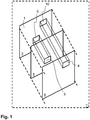
- Fig. 1 Figure 12 illustrates a layer model, such as may be implemented in a browser 11 used to render HTML documents.
- the browser 11 is installed on a data processing system 23.
- the last level (or the lowest or lowest level) is a video presentation level 2 in which a video 1 is played.
- a first object 9 and a second object 10 are shown (pictorially).
- the representation is particularly schematic in that the video presentation level 2, the first activation level 5 and the second activation level 6 are shown individually and offset.
- the second activation level 6 is arranged above the first activation level 5.
- the first activation level 5 comprises a first activation area 3, which is assigned to the first object 9 in the video 1. This means that the first activation region 3 has the shape of the first object 9 and is arranged in the first activation plane 5 such that the first activation region 3 completely overlays the first object 9.
- the second object 10 in the video 1 is assigned a second activation area 4 in the second activation level 6.
- a user By activating one of the activation areas 3, 4, a user can interact with the data processing system 23. This gives the user the impression that he would immediately click on objects 9, 10 shown in the video 1. If the user clicks on the first activation area 3 with a computer mouse, for example, the video 1 is interrupted and a new window of the browser 11 is opened in which more Contents are displayed. Thus, the user can retrieve contents to the first object 9.
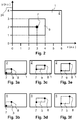
- Fig. 2 shows a two-dimensional schematic representation of a video display level 2.
- a first object 9 is shown.
- the first object 9 is a rectangle in this example.
- the video presentation plane 2 has an x-axis and a y-axis, which together form a coordinate system 24 overlying the video. Exemplary numbers are given in arbitrary units on the x-axis and on the y-axis.
- the abbreviation "au” means arbitrary units (arbitrary units). Shown is a frame of a time of the video 1.
- a pixel grid is specified, which corresponds to the pixel resolution of the video (for example, 1920 * 1080 pixels for a full HD video).
- a first characteristic point 7 is defined.
- the first characteristic point 7 is a black dot in the center of the first object 9 in this example. This black dot is actually seen in the video 1.
- the first characteristic point 7 can be identified. In this example, the first characteristic point 7 has the x-coordinate 3 and the y-coordinate 2.
- Fig. 3a to 3f show schematic representations of a video presentation level 2 and a first activation level 5 at three different times of a time course.
- Fig. 3a shows the video presentation level 2 at a first time.
- Fig. 3b shows the first activation level 5 at the first time.
- Fig. 3c shows the video presentation level 2 at a second time.
- Fig. 3d shows the first activation level 5 at the second time.
- Fig. 3e show the Video presentation level 2 at a third time.
- Fig. 3f shows the first activation level 5 at the third time.
- the first, second and third times form a time course.
- a video 1 is displayed, in which a rectangular first object 9 is shown with two black dots.
- the black dots are defined as a first characteristic point 7 and a second characteristic point 8.
- a first activation area 3 can be seen.
- the first activation area 3 is not visible to the user in this example, which is indicated by dashed lines. This means that the first activation area 3 can only be activated for the user.
- the characteristic points 7, 8 are in the representations of the first activation level 5 in FIG Fig. 3b, Fig. 3d and Fig. 3f drawn, which serves here only the explanation.
- the characteristic points 7, 8 are not visible in the first activation plane 5.
- the first object 9 moves from the first time to the second time, changing its shape. From the second time point to the third time point, the first object 9 only changes its shape and does not move.
- a change is predefined, which is synchronized (in particular with regard to type and time) with operations shown in the video 1.
- the operations shown in the video 1 are the displacement of the first object 9 and the change of the shape of the first object 9.
- the variation of the first activation region 3 is predetermined in this example such that the first activation region 3 is positioned by position and the shape of the change of the first object 9 follows.
- the synchronization between the change of the first object 9 and the first activation area 3 takes place by using coordinates of the characteristic points 7, 8.
- Fig. 4 explained in more detail using four pictures / frames from a video with a drifting motor vehicle.
- Fig. 4 explained in more detail using four pictures / frames from a video with a drifting motor vehicle.
- Notice are in each case four different (temporally from top to bottom consecutive) images / frames 34 of a video 1, which are each superimposed by the same coordinate system 24.
- the images / frames 34 shown here, of the video 1, do not follow one another directly in terms of time and were selected here only as an example.
- object 9 which is here a drifting motor vehicle and which is to be made activatable by the described method for a user.
- an activation area 3 is applied in an activation level (not shown separately here) overlapping the video 1, which is synchronized with the movement of the object 9 from image 34 to image 34 of the video 1 to always overlap with the object 9 for the user to be activated.
- the activation area 3 has an image-to-image-changing shape and position, which is adapted to the visible silhouette and its position of the object 9 in the video 1.
- the activation area 3 is defined by means of points 7, 8, 33. These points 7, 8, 11 are transmitted to adapt the activation area 3 from image 34 to image 34 in a second data stream.
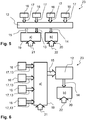
- the Fig. 5 to 8 show various embodiments of data processing systems 23 for performing the method described.
- the in the FIGS. 5 to 8 Components of a data processing system 23 shown are preferably at least partially realized as computer program components or software components.
- the playback component 19 comprises for reproducing the video provided as the first data stream 21 and the provisioning component 20 for providing the at least one activation area provided as the second data stream 22.
- the playback component 19 preferably also includes the previously described video presentation layer.
- the provision component 20 preferably also includes the at least one activation level already described above.
- control components 16 which are operable for a user and which control signals 17 can send out to control the reproduction of the video. This includes, for example, stopping or pausing, as well as fast-forwarding and rewinding in the video.
- these control components 16 would be similar to the keys of a VCR if the playback component 19 were a VCR or the software-based buttons below a video on a software-based video player if the playback component 19 were such a software-based video player.
- control components 16 that can transmit video control signals 17 may be any other control components that may be used in the described method.
- Control components 12 are arranged. Control signals 17 of the control components 16 do not reach the reproduction component 19 directly, but are previously converted by the control component 12 into first control signals 13 for controlling the reproduction component 19. This conversion may also include a simple passing of control signals 17 as first control signals 13.
- the control component 12 then also has the control signals 17 available to perform control of the provisioning component 20 with second control signals 14 in synchronism with the control of the display component 19 with first control signals 13.
- second control signals 14 can be generated by the control component 12 in accordance with first control signals 13.
- Optional is in the Fig.
- a monitoring signal 15 can be transmitted to the control component 12 with which the playback of the video can be monitored with the playback component 19. If appropriate, this monitoring signal 15 can be used for a particularly fine synchronization between the reproduction of the video and the provision of the at least one activation area.
- control signals 17 directly form first control signals 13 for controlling the reproduction component 19.
- control component 12 for synchronously controlling the provisioning component 20, which performs the synchronization of the provision of the at least one activation region only on the basis of a monitoring signal 15 with which the reproduction component 19 or the playback of the video is monitored with the playback component 19.
- control signals 17 and first control signals 13 are intercepted for controlling the reproduction component 19 and a control component 12, which serves the purpose of the provision component 20 in the sense of the embodiment according to Fig. 6 to control.
- the embodiment according to Fig. 8 is in principle very similar to the embodiment according to Fig. 6 , However, there is additionally a monitoring component 18 with which the video or the reproduction component 19 is monitored in order to generate a monitoring signal 15.
- This embodiment variant can be used, for example, when the playback component 19 itself can not be directly taken from a monitoring signal 15 which can be used to synchronize the provisioning component 20 with the playback component 19.
- the monitoring component 18 may, for example, comprise a module for evaluating a specific pixel group of the video, the monitoring component 18 then generating from the pixel group or changes in the pixel group during the time sequence of the video a monitoring signal 15 which can be used to synchronize the provisioning component 20 in that specific data sets in the second data stream 15 can be addressed via this monitoring signal 15.
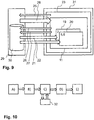
- Fig. 9 illustrates a flow of the described method in a client-server environment.
- the client 31 comprises a data processing system 23 with which the described method is carried out, for example with a web browser 11.
- a first http request is sent to the server 29, whereupon the Server 29 as html response 28 provides the environment in which the described method is executed.
- this environment also already includes the playback component 19 with the prepared video presentation level 2 and the provisioning component 20 with the different activation levels 5,6.
- a second http request 26 and a third http request 27 are transmitted to the server 29 by the web browser 11 or the data processing system 23.
- the second http request 26 and the third http request 28 have preferably been forwarded to the web browser 11 or the data processing system 23 with the html response 28.
- the server 29 preferably comprises a database 30 in which the data underlying the first data stream 21 and the second data stream 22 are stored.
- the server preferably accesses this database 30 to deliver the first data stream 21 and the second data stream 22 to the client 31 and the rendering component 19 and the provisioning component 20, respectively provide.
- the access to the database 30 with the second http request 27 for the provision of the second data stream 22 is completely separate from the access to the database 30 with the first http request 26 for the provision of the first data stream 21. If appropriate, the data of first data streams 21 and the data of second data streams 22 even separate databases on the server 29th
- Fig. 10 shows a flowchart of the described method for generating a second data stream. Schematically to recognize the process steps A), B), C), D) and E). Highlighted here in step c) that here an external software component 32 can be used, which is used for motion detection ("motion tracking") in a video.
- an external software component 32 can be used, which is used for motion detection ("motion tracking") in a video.
Landscapes
- Engineering & Computer Science (AREA)
- Multimedia (AREA)
- Human Computer Interaction (AREA)
- Databases & Information Systems (AREA)
- Theoretical Computer Science (AREA)
- Signal Processing (AREA)
- Data Mining & Analysis (AREA)
- Physics & Mathematics (AREA)
- General Engineering & Computer Science (AREA)
- General Physics & Mathematics (AREA)
- User Interface Of Digital Computer (AREA)
Priority Applications (1)
| Application Number | Priority Date | Filing Date | Title |
|---|---|---|---|
| EP17164996.5A EP3386207A1 (fr) | 2017-04-05 | 2017-04-05 | Procédé de fonctionnement d'un système de traitement de données destiné à fournir un contenu vidéo interactif |
Applications Claiming Priority (1)
| Application Number | Priority Date | Filing Date | Title |
|---|---|---|---|
| EP17164996.5A EP3386207A1 (fr) | 2017-04-05 | 2017-04-05 | Procédé de fonctionnement d'un système de traitement de données destiné à fournir un contenu vidéo interactif |
Publications (1)
| Publication Number | Publication Date |
|---|---|
| EP3386207A1 true EP3386207A1 (fr) | 2018-10-10 |
Family
ID=58606020
Family Applications (1)
| Application Number | Title | Priority Date | Filing Date |
|---|---|---|---|
| EP17164996.5A Withdrawn EP3386207A1 (fr) | 2017-04-05 | 2017-04-05 | Procédé de fonctionnement d'un système de traitement de données destiné à fournir un contenu vidéo interactif |
Country Status (1)
| Country | Link |
|---|---|
| EP (1) | EP3386207A1 (fr) |
Cited By (3)
| Publication number | Priority date | Publication date | Assignee | Title |
|---|---|---|---|---|
| CN111125022A (zh) * | 2019-11-15 | 2020-05-08 | 浙江大华技术股份有限公司 | 录像覆盖权重的确定方法、装置、设备和存储介质 |
| CN112804490A (zh) * | 2020-12-31 | 2021-05-14 | 中铝智能科技发展有限公司 | 一种基于视频传输信号的生产数据采集方法 |
| CN116994339A (zh) * | 2023-09-27 | 2023-11-03 | 成都谷帝科技有限公司 | 一种基于图像处理的用于坐位体前屈测试的方法和系统 |
Citations (5)
| Publication number | Priority date | Publication date | Assignee | Title |
|---|---|---|---|---|
| GB2327837A (en) * | 1997-07-29 | 1999-02-03 | Microsoft Corp | Transmission, reception and display of combined video data in a set area of a hyperlink data file. |
| US20020161909A1 (en) * | 2001-04-27 | 2002-10-31 | Jeremy White | Synchronizing hotspot link information with non-proprietary streaming video |
| US20090007023A1 (en) * | 2007-06-27 | 2009-01-01 | Sundstrom Robert J | Method And System For Automatically Linking A Cursor To A Hotspot In A Hypervideo Stream |
| WO2010049442A1 (fr) * | 2008-10-30 | 2010-05-06 | Frederic Sigal | Procédé de génération d'un fichier de recouvrement redirectionnel se rapportant à des objets affichés dans des images pour un flux vidéo |
| US20130212477A1 (en) * | 2004-09-01 | 2013-08-15 | Gravidi, Inc. | Interactive Marketing System |
-
2017
- 2017-04-05 EP EP17164996.5A patent/EP3386207A1/fr not_active Withdrawn
Patent Citations (5)
| Publication number | Priority date | Publication date | Assignee | Title |
|---|---|---|---|---|
| GB2327837A (en) * | 1997-07-29 | 1999-02-03 | Microsoft Corp | Transmission, reception and display of combined video data in a set area of a hyperlink data file. |
| US20020161909A1 (en) * | 2001-04-27 | 2002-10-31 | Jeremy White | Synchronizing hotspot link information with non-proprietary streaming video |
| US20130212477A1 (en) * | 2004-09-01 | 2013-08-15 | Gravidi, Inc. | Interactive Marketing System |
| US20090007023A1 (en) * | 2007-06-27 | 2009-01-01 | Sundstrom Robert J | Method And System For Automatically Linking A Cursor To A Hotspot In A Hypervideo Stream |
| WO2010049442A1 (fr) * | 2008-10-30 | 2010-05-06 | Frederic Sigal | Procédé de génération d'un fichier de recouvrement redirectionnel se rapportant à des objets affichés dans des images pour un flux vidéo |
Cited By (5)
| Publication number | Priority date | Publication date | Assignee | Title |
|---|---|---|---|---|
| CN111125022A (zh) * | 2019-11-15 | 2020-05-08 | 浙江大华技术股份有限公司 | 录像覆盖权重的确定方法、装置、设备和存储介质 |
| CN112804490A (zh) * | 2020-12-31 | 2021-05-14 | 中铝智能科技发展有限公司 | 一种基于视频传输信号的生产数据采集方法 |
| CN112804490B (zh) * | 2020-12-31 | 2023-03-24 | 中铝智能科技发展有限公司 | 一种基于视频传输信号的生产数据采集方法 |
| CN116994339A (zh) * | 2023-09-27 | 2023-11-03 | 成都谷帝科技有限公司 | 一种基于图像处理的用于坐位体前屈测试的方法和系统 |
| CN116994339B (zh) * | 2023-09-27 | 2024-01-23 | 成都谷帝科技有限公司 | 一种基于图像处理的用于坐位体前屈测试的方法和系统 |
Similar Documents
| Publication | Publication Date | Title |
|---|---|---|
| DE60003578T2 (de) | Simuliertes dreidimensionales menunavigationssystem | |
| DE69428647T2 (de) | Verfahren und Gerät zur Erzeugung eines zweiten gemischten Bildsignals im räumlichen Kontext eines ersten Bildsignals | |
| DE102019005884A1 (de) | Schnittstellen und Techniken zum Einpassen von 2D-Anleitungsvideos in 3D-Tutorials in der virtuellen Realität | |
| DE69714854T2 (de) | Verknuepfen von information mit videodaten und zugreifen auf infrmation aus videodaten | |
| DE69820093T2 (de) | Hierarchisches verfahren und system für objektbasierte audiovisuelle deskriptiveetikettierung von bildern für die informationswiedergewinnung, -editierung und -manipulation | |
| DE4290947B4 (de) | Interaktives videogestütztes Bedienungsverfahren und -vorrichtung | |
| DE69609077T2 (de) | Systeme zum auffinden und darstellen von information | |
| DE112020000942T5 (de) | Bildanzeigevorrichtung | |
| DE112007001788T5 (de) | Bildlayoutbeschränkungserzeugung | |
| DE202014011253U1 (de) | Informationsverarbeitungsvorrichtung | |
| DE19811910A1 (de) | Benutzer-Interface mit Kanalleiste für ein Unterhaltungssystem | |
| DE102019218787A1 (de) | Verfahren, vorrichtung und system zum erzeugen von mit einer darstellung eines artikels verbundenen angeboten | |
| DE4446139A1 (de) | Verfahren und Einrichtung zum Hervorheben von Objekten in einem Konferenzsystem | |
| DE10234137A1 (de) | System und Verfahren, um Benutzern zu ermöglichen, graphische Bilder zu editieren | |
| DE112016004279T5 (de) | Integration von Audio in eine interaktive digitale Mehrfachansicht-Medienpräsentation | |
| EP3570164B1 (fr) | Procédé et système de génération d'une application mobile à partir d'une application bureau | |
| EP3718086A1 (fr) | Animation d'avatar | |
| DE69715816T2 (de) | Videoanzeigesystem zum Darstellen einer virtuellen dreidimensionalen Bildanzeige | |
| DE202021004011U1 (de) | Erzeugen und Anzeigen von kontextuellem audiovisuellem Inhalt | |
| EP3538977B1 (fr) | Procédé de fonctionnement d'un système de commande utilisateur et système de commande utilisateur | |
| EP3386207A1 (fr) | Procédé de fonctionnement d'un système de traitement de données destiné à fournir un contenu vidéo interactif | |
| EP2701115A1 (fr) | Procédé et système de conseil vidéo en direct | |
| DE102010031429A1 (de) | Verfahren zum Bereitstellen eines Kombinations-Videos | |
| WO2018069218A1 (fr) | Système de transmission télévision pour produire des images enrichies | |
| EP1649355B1 (fr) | Procédé et système pour afficher des informations numériques |
Legal Events
| Date | Code | Title | Description |
|---|---|---|---|
| PUAI | Public reference made under article 153(3) epc to a published international application that has entered the european phase |
Free format text: ORIGINAL CODE: 0009012 |
|
| STAA | Information on the status of an ep patent application or granted ep patent |
Free format text: STATUS: THE APPLICATION HAS BEEN PUBLISHED |
|
| AK | Designated contracting states |
Kind code of ref document: A1 Designated state(s): AL AT BE BG CH CY CZ DE DK EE ES FI FR GB GR HR HU IE IS IT LI LT LU LV MC MK MT NL NO PL PT RO RS SE SI SK SM TR |
|
| AX | Request for extension of the european patent |
Extension state: BA ME |
|
| STAA | Information on the status of an ep patent application or granted ep patent |
Free format text: STATUS: THE APPLICATION IS DEEMED TO BE WITHDRAWN |
|
| 18D | Application deemed to be withdrawn |
Effective date: 20190411 |